

Cele mai bune software-uri de asistență ajută echipele să rezolve problemele mai rapid, să reducă numărul de tichete restante, să îmbunătățească acuratețea răspunsurilor și să mențină o comunicare clară cu utilizatorii. Aceste instrumente centralizează solicitările, automatizează sarcinile de rutină și oferă echipelor de asistență vizibilitatea necesară pentru a gestiona problemele înainte ca acestea să perturbe fluxurile de lucru.
Echipele caută adesea soluții de asistență atunci când urmărirea manuală duce la solicitări omise, procesele neuniforme încetinesc asistența sau lipsurile din documentație fac dificilă înțelegerea problemelor recurente. Aceste provocări creează întârzieri, cresc frustrarea utilizatorilor și îngreunează coordonarea eficientă a echipelor IT și de operațiuni.
Având peste 20 de ani de experiență în industrie ca director de tehnologie, am testat și analizat zeci de platforme software de asistență în medii reale pentru a le evalua fluxurile de lucru, integrările și ușurința în utilizare. Acest ghid evidențiază cele mai bune software-uri de asistență, care îmbunătățesc eficiența asistenței, consolidează colaborarea și ajută echipele să ofere utilizatorilor asistență de încredere. Fiecare analiză prezintă funcționalitățile, avantajele și dezavantajele, precum și cazurile de utilizare potrivite, pentru a vă ajuta să alegeți instrumentul potrivit.
Why Trust Our Software Recommendations
6,700+
Reviews
20
Industry experts
16+
Evaluation factors
14
Years
Our team has been testing and reviewing software since 2012. As tech leaders ourselves, we know how difficult—and important—it is to choose the right software.
For this guide, we evaluated tools using hands-on testing and independent research, scoring tools using our selection criteria.
Our reviews reflect our human editorial judgment, not a sales pitch.
Expert reviewers:
- Paulo Gardini MiguelTech Director
 Tim FisherVP of AI
 Gabriel RosasTech Lead & Software Architect
 Christhian GruhnTech Lead & Platform Architect

Tabel comparativ: software-uri de asistență
Acest tabel comparativ rezumă detaliile privind prețurile pentru selecțiile mele de top de software-uri de asistență.
Sorted by: Default
| Tool | Starting Price | Website | |
|---|---|---|---|
Best for AI-powered ticket automation | 4.6 out of 5 | $149/user/month Free trial available | Book Demo |
Best for unified IT helpdesk & asset management | 4.6 out of 5 | $19/user/month 14-day free trial | Book Demo |
Best for AI-powered workflow automations | 4.5 out of 5 | $59/user/month Free trial + free demo available | Book Demo |
Best for full context tickets | 4.6 out of 5 | Pricing upon request 14-day free trial | Website |
Best for ticket based workflows | 4.4 out of 5 | $19/agent/month 14-day free trial + free demo available | Book Demo |
Best for proactive IT issue detection | 4.5 out of 5 | Pricing upon request Free demo available | Website |
Best for AI-powered ticketing and collaboration | 4.7 out of 5 | $25/user/month 7-day free trial + free demo available | Book Demo |
Best for providing tailored assistance | 4.4 out of 5 | $7/user/month Free plan + 15-day trial + demo available | Website |
Best for centralized ecommerce support | 4.4 out of 5 | $45/user/month 14-day free trial + free demo available | Website |
Best with automated multilingual ticket handling | 4.6 out of 5 | $16/agent/month Free plan + 14-day trial + free demo available | Website |


Recenzii ale celor mai bune software-uri de asistență
 Best for AI-powered ticket automation
- Free trial available
- From $149/user/month (billed annually)
Visit WebsiteCustomer Rating:4.6/5
Atera device monitoring interface displaying real-time availability, system metrics, and remote access options. Atera is primarily an all-in-one IT management platform built for managed service providers (MSPs) and IT departments. Among its many capabilities, it also offers a full-featured help desk system that combines ticket management, automation, and AI-powered workflows.
Why I Picked Atera: I included Atera because its help desk sits directly inside its broader remote monitoring and management (RMM) system, giving you full visibility into both support tickets and endpoint health in one place. What makes Atera stand out is its AI Copilot, which can automatically summarize tickets, propose solutions, and pull diagnostic insights into the ticket itself. This allows you to reduce time spent reviewing and triaging tickets, especially when working across large device fleets. For IT teams juggling both support and system management, the AI-powered ticket automation can help cut down repetitive work while keeping response times faster.
Standout features & integrations:
Atera offers custom ticket fields, dynamic routing, and adaptive automation rules that can adjust based on ticket type or priority. You can configure self-service portals and knowledge bases to deflect tickets and reduce request volume. AI-powered features also allow auto-generated ticket summaries and diagnostics to speed up triage.
Integrations include Microsoft Teams, Slack, ServiceNow, Okta, Azure Active Directory, Microsoft Outlook, WhatsApp Notifications, monday.com, Jira Software Cloud, Acronis Cyber Protect Cloud, Google Sheets, and ChatGPT (OpenAI).
Pros and Cons
Pros:
- Includes built-in self-service portal and knowledge base
- AI Copilot can generate ticket summaries and automate replies
- Centralized ticketing and service desk management
Cons:
- Advanced features may require setup and configuration time
- Limited integration depth compared to specialized PSA or ITSM tools
 Best for unified IT helpdesk & asset management
- 14-day free trial
- From $19/user/month (billed annually)
Visit WebsiteCustomer Rating:4.6/5
Freshservice provides a centralized repository of information and solutions for common IT issues. Freshservice is a cloud-based IT service management tool designed to support your IT teams in managing and resolving issues swiftly. Its features cater to modern IT needs, ensuring your team can handle technical challenges with ease.
Why I Picked Freshservice: I picked Freshservice for its powerful automation and AI capabilities, which streamline repetitive tasks and free up your IT team to focus on complex issues. Its AI-powered insights help drive faster, smarter decisions by analyzing data patterns. The platform also includes robust asset management, allowing you to track all IT assets in one place and monitor their full lifecycle. This visibility supports better upgrade and maintenance planning. Plus, the self-service portal lets end-users resolve common issues independently, helping reduce ticket volume for your team.
Standout features & integrations:
Features include incident management, which helps your team prioritize and resolve issues quickly, and problem management, which identifies and mitigates the root cause of recurring incidents. Change management is another feature that ensures any modifications to your IT infrastructure are handled smoothly and with minimal disruption. These features work together to provide a comprehensive support system for your IT operations.
Integrations include Microsoft Teams, Slack, Google Workspace, Azure, Jira, AWS, Zapier, Trello, GitHub, and ServiceNow.
Pros and Cons
Pros:
- Robust automation features to reduce manual tasks
- Asset management capabilities
- AI-powered support management
Cons:
- Reports could be more customizable
- Freddy AI is a paid add-on feature
Learn more about Freshservice: Best for AI-powered workflow automations
- Free trial + free demo available
- From $59/user/month (billed annually)
Visit WebsiteCustomer Rating:4.5/5
SysAid displays active service records with AI-assisted ticket summaries, priority levels, and response timelines. SysAid is an IT Service Management (ITSM) platform with strong support for IT asset management and IT operations. It provides tools that help teams track, manage, and maintain hardware and software assets while tying that data into service desk and ITSM workflows. This makes it a practical option for organizations that place a high priority on asset visibility and control.
Why I Picked SysAid: I picked SysAid because its asset management capabilities are closely integrated with its service desk and IT operations features. Asset data is not managed in isolation; it is linked directly to tickets, users, and service requests, which gives IT teams better context when troubleshooting or planning maintenance. For organizations focused on improving IT asset management while still supporting day-to-day IT services, SysAid offers a balanced and structured approach.
Standout features & integrations:
SysAid's prominent features include an IT asset inventory, patch management, and remote control functionalities. Additionally, it offers a self-service portal, enhancing user autonomy and reducing IT workload.
Integration-wise, SysAid works well with various third-party applications, ensuring an interconnected IT environment.
Pros and Cons
Pros:
- Flexibility with third-party integrations ensures adaptive IT operations
- Self-service portal empowers users and reduces help desk ticket volume
- Robust IT asset management functionalities streamline IT operations
Cons:
- Initial setup can be time-consuming for larger IT environments
- Reporting features may require additional customization for specific needs
- The user interface might be complex for beginners
 Best for full context tickets
- 14-day free trial
- Pricing upon request
Visit WebsiteCustomer Rating:4.6/5
SuperOps organizes critical tickets by status, helping teams quickly prioritize and act on urgent issues. SuperOps is an AI-powered platform that combines professional services automation (PSA) and remote monitoring and management (RMM) tools. It's designed to help managed service providers (MSPs) and IT teams manage tickets, assets, and workflows in one place.
Why I picked SuperOps: One reason SuperOps stands out is its AI-driven ticketing system. With features like Monica AI, your team can get suggested fixes, ticket summaries, and identification of recurring issues, which helps reduce escalations and speeds up resolutions. The platform also links tickets to device histories and assets, giving technicians the full context they need to solve problems without switching between tools.
Standout features & integrations:
Features include hierarchical policy management that lets you define rules at the client, site, or device level, which helps standardize service delivery across different environments. It also has a built-in knowledge base that allows your team to document solutions and procedures for easy reference.
Integrations include ConnectWise, TeamViewer, Xero, Stripe, QuickBooks, SentinelOne, Lifecycle Manager, Guardz, and Microsoft Azure.
Pros and Cons
Pros:
- Manages resource allocation and technician availability
- Built-in time tracker ensures accurate logging of time spent on tickets
- Monica AI assists in ticket resolution by suggesting fixes
Cons:
- While powerful, customization options can be complex
- Compared to competitors, SuperOps offers fewer third-party integrations
Learn more about SuperOps: Best for ticket based workflows
- 14-day free trial + free demo available
- From $19/agent/month (billed annually)
Visit WebsiteCustomer Rating:4.4/5
A photo focused on the customer service request management inside Freshdesk. Freshdesk (a product of Freshworks Inc.) is a customer support platform designed to help businesses manage and organize support requests more effectively. It focuses on ticket based workflows that make it easier for teams to track, prioritize, and resolve customer issues from a single system. The interface is designed to be accessible, which can support faster onboarding for support agents.
Why I Picked Freshdesk: I picked Freshdesk because of how clearly it structures ticket workflows. As I reviewed different customer support tools, Freshdesk stood out for its straightforward approach to creating, assigning, and resolving tickets without adding unnecessary complexity. It also includes Freddy AI, which can assist agents with response suggestions and ticket handling as part of the existing workflow. If you are looking for software that helps you manage tickets in a way that feels easy to follow and maintain, Freshdesk fits that use case well.
Standout features & integrations:
Freshdesk includes ticket routing tools that allow tickets to be assigned based on predefined rules, helping teams direct requests to the appropriate agents. It supports inquiries from multiple channels, including email and social platforms, while keeping all conversations within a single ticketing workflow.
Integrations are available with tools such as Slack, Salesforce, and Trello, which can help connect support activities with collaboration, CRM, and project management workflows.
Pros and Cons
Pros:
- Expansive third-party integration ecosystem
- Multi-channel support maintains a consistent workflow
- Efficient ticket routing minimizes response times
Cons:
- Some customization limitations
- Setup can be time-consuming for larger teams
- Advanced analytics reserved for premium tiers
Learn more about Freshdesk: Best for proactive IT issue detection
- Free demo available
- Pricing upon request
Visit WebsiteCustomer Rating:4.5/5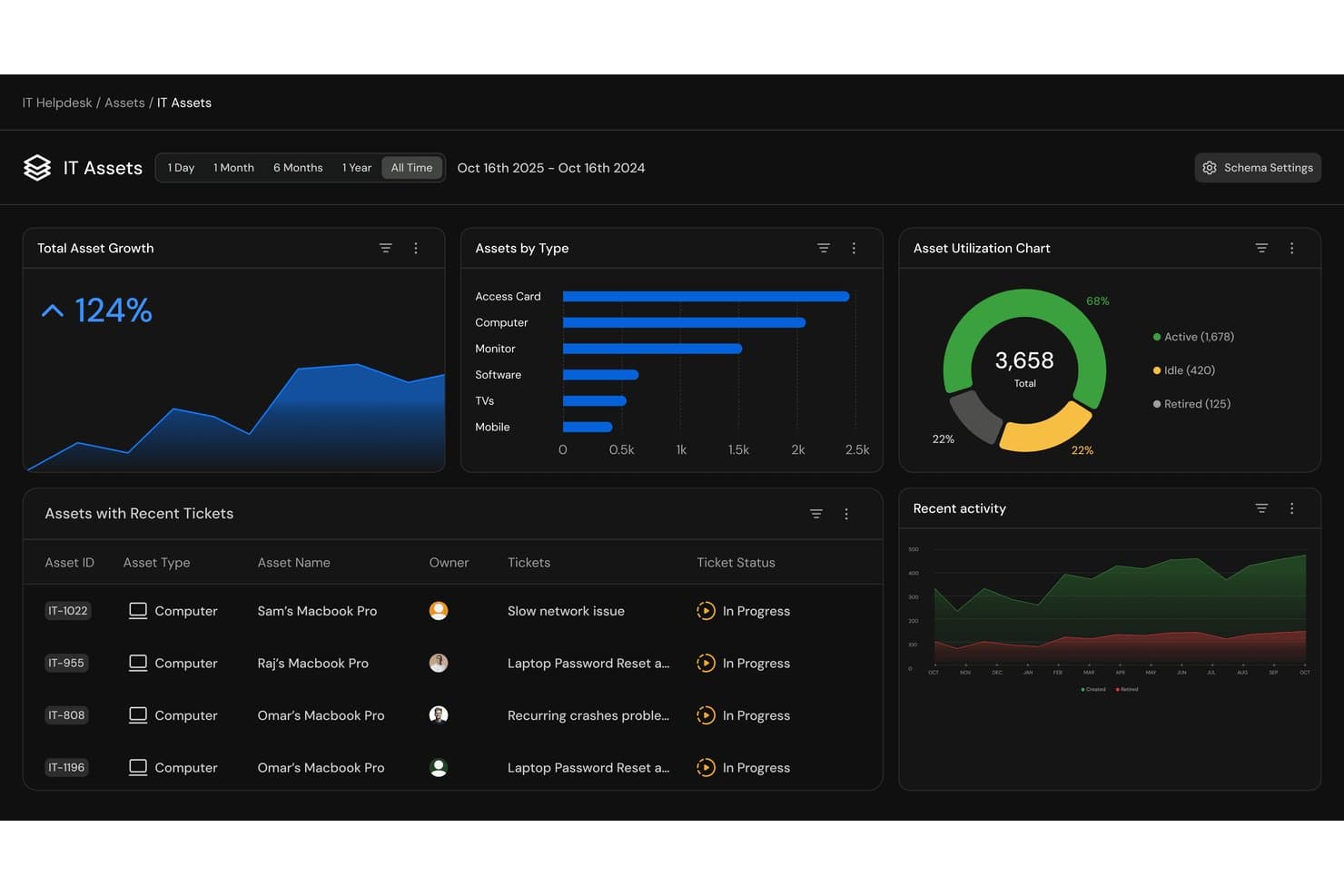
Serval tracks IT assets, tickets, and utilization in one dashboard. Serval is an AI-native enterprise service management platform that combines ticketing, knowledge base, CMDB, asset tracking, access management, and AI-driven automation across channels like Slack, Teams, and email.
Who Is Serval Best For?
Serval is a strong fit for enterprise IT teams that need to move beyond reactive ticketing and want AI-driven automation to surface and resolve issues before they escalate.
Why I Picked Serval
I've included Serval in my top picks because its background agents do something most help desk tools don't: they scan device telemetry and network logs to surface problems before a ticket ever gets filed. I love that Catalyst then drafts automation proposals directly from that ticket history, so your team isn't just reacting to issues but systematically eliminating repeat ones. One G2 reviewer saved over 80 hours of manual work in 28 days, which tells you how much lift the proactive detection and auto-remediation actually delivers.
Serval Key Features
- Multi-channel help desk agent: Handles employee requests across Slack, Microsoft Teams, email, phone, and the Serval web portal from a single unified queue.
- Just-in-time access management: Grants time-limited access that expires automatically, with approval requests delivered directly through Slack or Teams.
- CMDB and asset tracking: Maps configuration items, dependencies, and field history while tracking hardware and software assets across their full lifecycle.
- Knowledge base with permission-aware answers: Surfaces cited answers from connected knowledge sources based on each employee's access permissions, and flags stale content for review.
Serval Integrations
Serval offers hundreds of native integrations, including Slack and Okta. Its REST API, webhooks, MCP, and A2A connections support custom integrations.
Pros and Cons
Pros:
- Ticket lifecycle includes incidents, problems, and changes
- Catalyst turns recurring tickets into automation proposals
- Background agents flag device and network issues
Cons:
- Reviewers report analytics need improvement
- AI can make inaccurate assumptions
Learn more about Serval: Best for AI-powered ticketing and collaboration
- 7-day free trial + free demo available
- From $25/user/month (billed annually)
Visit WebsiteCustomer Rating:4.7/5
Hiver provides real-time analytics dashboards for tracking team performance and customer service metrics. Hiver is an AI-powered help desk platform built for teams that manage customer inquiries through shared inboxes like Gmail. Designed to enhance visibility, collaboration, and response accuracy, it centralizes every interaction, from email to chat and WhatsApp, into a unified workspace.
Why I Picked Hiver: I picked Hiver for its seamless integration with Gmail and strong AI-driven ticketing system. It automatically organizes incoming messages into trackable tickets, helping you stay on top of customer inquiries without switching tools. I also appreciate its built-in sentiment analysis and automatic response suggestions, which can help your team prioritize and respond faster. Hiver’s workflow automation tools further reduce manual effort, ensuring support operations run smoothly and consistently.
Standout features & integrations:
Features include omnichannel inbox management that consolidates all customer communications in one place, workflow automation that assigns and routes tickets automatically, and a customer portal that enables users to resolve issues independently. Analytics dashboards provide insights into service trends and agent performance.
Integrations include Salesforce, HubSpot, Slack, Google Sheets, Gmail, monday.com, Asana, ClickUp, Zoho CRM, Shopify, WhatsApp, and Jira.
Pros and Cons
Pros:
- Analytics dashboards enhance performance tracking
- AI automation improves ticket resolution
- Omnichannel inbox centralizes communications
Cons:
- 3. Frequent app refreshes cause delays
- Sync issues across device platforms
Learn more about Hiver: Best for providing tailored assistance
- Free plan + 15-day trial + demo available
- From $7/user/month (billed annually)
Visit WebsiteCustomer Rating:4.4/5
A screenshot focused on the dark-themed dashboard of the tool Zoho Desk. Zoho Desk stands as a reputable help desk system that offers businesses a way to manage their customer support efficiently. Its emphasis on utilizing artificial intelligence to provide contextual support makes it a prime candidate for companies looking to leverage AI for improved IT support, hence its distinction as the best for contextual AI assistance.
Why I Picked Zoho Desk: While selecting the top tools, Zoho Desk consistently emerged as a front-runner due to its innovative AI features. Its emphasis on contextual AI assistance differentiated it from the crowd, as it takes the help desk experience to a nuanced level, using artificial intelligence to understand the context of issues and help you provide tailored solutions. I chose it specifically because, in my opinion, and upon comparing, its AI capabilities are superior in offering context-driven IT support.
Standout features & integrations:
Zoho Desk's AI assistant, Zia, stands out, offering smart predictions, anomaly detection, and knowledge-base suggestions, all designed to enhance the support process. Additionally, the tool boasts powerful automation features that streamline workflows for IT support teams.
In terms of integrations, Zoho Desk offers strong ties with other Zoho products and essential third-party apps like Salesforce, Slack, and Trello, ensuring businesses have a cohesive system in place.
Pros and Cons
Pros:
- Seamless integrations with popular third-party applications
- Robust automation tools for IT support workflow
- Innovative AI assistance that understands context
Cons:
- Requires a learning curve to make full use of AI capabilities
- Interface can appear cluttered with numerous features
- Might be overwhelming for businesses new to AI
Learn more about Zoho Desk: Best for centralized ecommerce support
- 14-day free trial + free demo available
- From $45/user/month (billed annually)
Visit WebsiteCustomer Rating:4.4/5
eDesk manages ecommerce customer support from multiple channels in one view. eDesk is an AI-powered help desk solution built for ecommerce businesses that need centralized ecommerce support alongside intelligent ticket routing. With tools to automate routine support tasks, eDesk helps teams handle high volumes of customer interactions more efficiently. By bringing customer messages into one system and routing tickets to the right agents, it supports faster and more accurate responses.
Why I Picked eDesk
I picked eDesk for its centralized ecommerce support, which brings customer messages from all sales channels into one place. Intelligent ticket routing assigns inquiries to the right agents, reducing manual sorting for your team. The Smart Inbox makes it easier to prioritize urgent issues and respond consistently across ecommerce platforms, helping maintain customer trust and service quality.
eDesk Key Features
In addition to intelligent ticket routing, eDesk offers:
- AI Chatbot: Provides 24/7 real-time support, ensuring customers receive assistance even outside business hours.
- Customer View: Offers quick access to customer order history, enabling your team to provide personalized and informed responses.
- Pre-Sales Support Tools: Helps in engaging potential customers with prompt answers to their inquiries, driving conversions.
- Knowledge Base: Reduces the frequency of queries by allowing customers to find answers independently.
eDesk Integrations
Integrations include Shopify, Amazon, eBay, Walmart, BigCommerce, Magento, WooCommerce, Allegro, and Linnworks.
Pros and Cons
Pros:
- Integrates rich order data for enhanced customer service
- AI-powered automations improve response efficiency
- Designed to handle high volumes of ecommerce inquiries
Cons:
- Primarily built for ecommerce, less flexible for other industries
- Reporting customization is limited for complex analysis
Learn more about eDesk: Best with automated multilingual ticket handling
- Free plan + 14-day trial + free demo available
- From $16/agent/month (billed annually)
Visit WebsiteCustomer Rating:4.6/5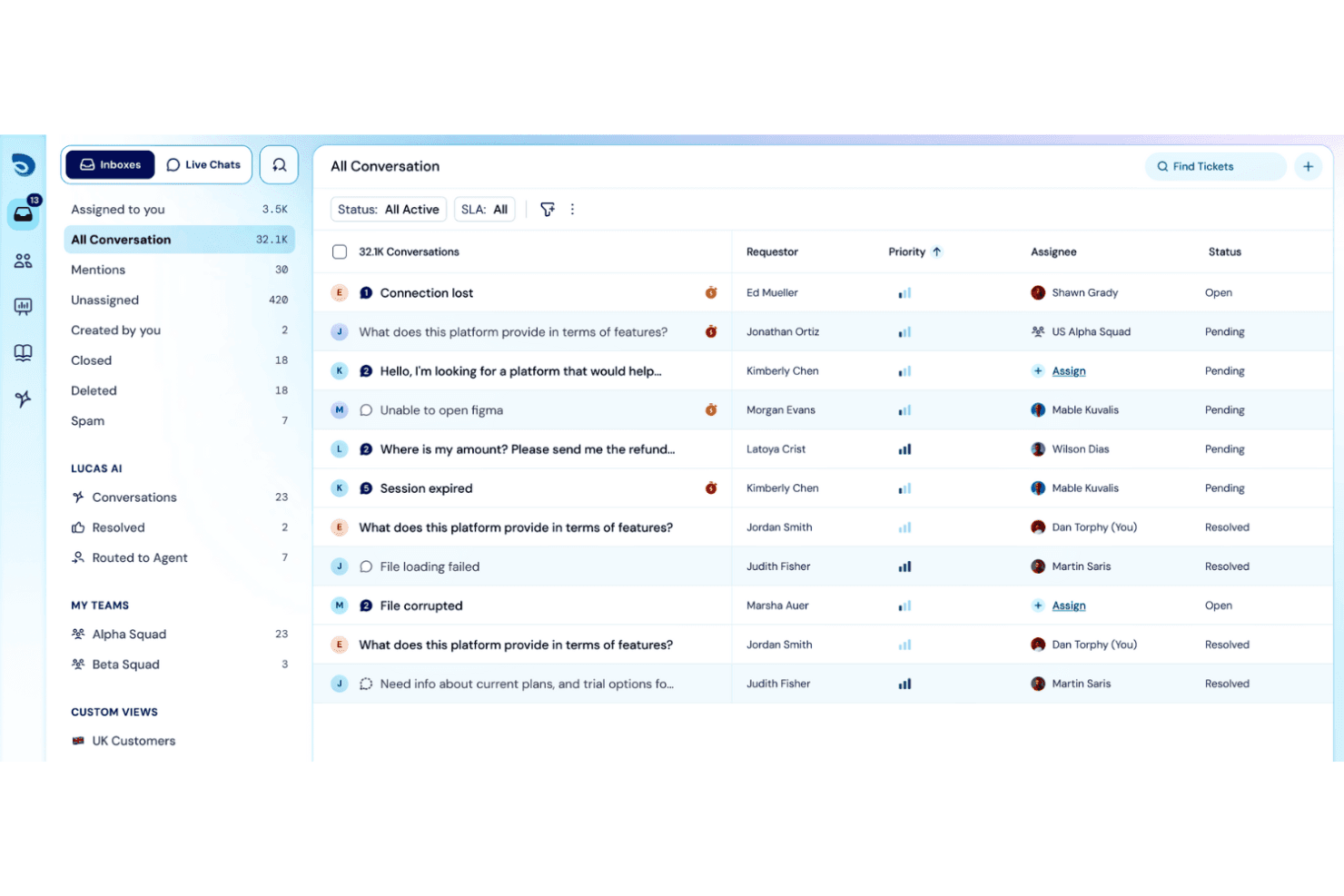
SparrowDesk displays a unified conversation inbox with priority, assignee, and status columns for managing 32.1K support tickets. SparrowDesk is an AI-driven help desk platform that combines omnichannel ticket management, no-code workflow automation, SLA tracking, a self-service knowledge base, and an AI agent for automated ticket resolution.
Who Is SparrowDesk Best For?
SparrowDesk is a strong fit for small to mid-sized businesses running lean support teams that need AI-driven ticket handling without a complex ITSM setup.
Why I Picked SparrowDesk
I picked SparrowDesk as one of the best because its multilingual ticket handling is genuinely automated, not just a translation toggle bolted on. Zoona, its AI agent, resolves incoming tickets in any language using your actual knowledge base content, then translates the full thread so agents can reply without switching tools or hiring language specialists. The AI Copilot layers on top with instant ticket summaries and suggested replies, so even complex multilingual threads move fast.
SparrowDesk Key Features
- No-code workflow builder: Design and automate support processes visually with drag-and-drop workflow creation.
- Omnichannel inbox: Manage tickets from email, live chat, web forms, and Slack in a single, prioritized queue.
- Service Level Agreement (SLA) tracking: Set, monitor, and enforce response and resolution deadlines based on custom business hours.
- Custom reports and dashboards: Build and view real-time analytics on ticket metrics, agent activity, and SLA compliance.
SparrowDesk Integrations
SparrowDesk offers native integrations with Gmail, Slack, Salesforce, Microsoft 365, HubSpot, Shopify, Linear, Pipedrive, Attio, and SurveySparrow. An API is available for custom integrations.
Pros and Cons
Pros:
- No-code automation reduces manual workflow
- Multilingual support covers ticket channels automatically
- AI agent handles tickets without agent involvement
Cons:
- Reporting lacks advanced BI export options
- Newer platform with a smaller user community
Learn more about SparrowDesk:
Alte software-uri de asistență demne de menționat
Mai jos este o listă de software-uri de asistență suplimentare pe care le-am inclus pe lista scurtă, dar care nu au ajuns în primele zece. Cu toate acestea, merită cu siguranță să le analizați.
- 11Jitbit HelpdeskBest with instant setup for cloud or on-premises
- 12MissiveBest for shared inbox team collaboration
- 13monday serviceBest for tracking internal support requests
- 14IntercomBest for real-time customer messaging
- 15IssuetrakBest for round-robin issue assignment
- 16ServiceNowBest for enterprise IT service operations
- 17Jira Service ManagementBest for agile IT service projects
- 18KayakoBest for unified customer journeys
- 19GuruBest for knowledge base access
- 20SolarWinds Web Help DeskBest for ITSM ticket automation
- 21SAAS FirstBest for AI-powered chatbots
- 22LiveAgentBest for multi-channel communication
- 23TidioBest for AI-driven customer support
- 24Help ScoutBest for small businesses and teams
- 25Desk365Best for AI-driven ticket responses
Recenzii asociate ale software-urilor
Dacă încă nu ați găsit aici ceea ce căutați, consultați aceste instrumente alternative pe care le-am testat și evaluat.
- Software de monitorizare a rețelei
- Software de monitorizare a serverelor
- Soluții SD-WAN
- Instrumente de monitorizare a infrastructurii
- Analizor de pachete
- Instrumente de monitorizare a aplicațiilor
How I Evaluate Help Desk Software
I split my evaluation into two layers: the baseline a tool must cover—think multi-channel intake and SLA enforcement—and the differentiators that make one platform the right fit over another.
Core Functionality (Table Stakes For This List)
When I'm selecting tools for my list, I rank each one on a scale from 0 (does not offer the functionality) to 5 (excels in this area) for each core functionality listed below. Then, I calculate the tool's total score into a percentage. Each tool needs to achieve a minimum total score of 75% to be considered for inclusion.
- Ticket Management System: I look at how each tool handles the full ticket lifecycle—statuses, priorities, categorization, custom fields, and parent/child ticket linking for complex issues.
- Multi-Channel Intake: Each platform should unify requests from email, portal, chat, and tools like Slack or Teams into a single queue instead of siloed inboxes.
- Workflow Automation & SLAs: I check whether routing rules, escalation triggers, and SLA timers can be configured per priority or team—like auto-escalating a P1 server outage.
- Knowledge Base & Self-Service: A searchable KB paired with a self-service portal matters here, especially one that suggests relevant articles before a user submits a ticket.
- Reporting & Analytics: Dashboards covering ticket volume, agent workload, SLA compliance, and resolution trends help IT managers spot bottlenecks without manual data pulls.
- IT Tool Integrations: Native connections to monitoring, asset management, directory services, and dev tools like Jira or PagerDuty keep support tied to the broader IT stack.
Once I have a list of tools that meet this criteria, I consider what sets each platform apart.
Differentiating Factors (What Sets Vendors Apart)
Here's how I compare and contrast different vendors:
Standout Features
ITSM and ITIL support are a major differentiator. Tools like Freshservice and ServiceNow go beyond ticketing with built-in change, problem, and release management—useful when a single outage spawns dozens of related incidents. I also evaluate whether a platform includes integrated asset or configuration management, since linking a ticket to a specific device or CI speeds up root cause analysis. AI capabilities matter here too, especially virtual agents that can handle password resets or common requests without a technician stepping in.
Beyond Features
Security and compliance certifications like SOC 2 Type II and ISO 27001 carry real weight here, especially for IT teams handling sensitive employee or infrastructure data. I also consider how each platform scales with team size, since a tool that fits a five-person support desk may buckle under enterprise ticket volume. Ecosystem extensibility matters too. Open APIs and webhooks let you build custom integrations, like piping alerts from your monitoring stack directly into the help desk as tickets.
Cum să alegeți software-ul de asistență
Este ușor să vă pierdeți în liste lungi de funcționalități și structuri complexe de prețuri. Pentru a vă ajuta să rămâneți concentrat în timp ce parcurgeți procesul unic de selecție a software-ului, iată o listă de factori de care trebuie să țineți cont:
| Factor | Aspecte de luat în considerare |
|---|---|
| FactorScalabilitate | Aspecte de luat în considerareVerificați dacă software-ul poate evolua odată cu echipa dumneavoastră și poate gestiona un volum tot mai mare de tichete fără probleme de performanță. Astfel, evitați migrările frecvente către alte software-uri pe măsură ce afacerea se extinde. |
| FactorIntegrări | Aspecte de luat în considerareConfirmați că software-ul se integrează fără probleme cu instrumentele pe care le utilizați deja, precum platformele de e-mail, sistemele CRM sau instrumentele interne de chat, pentru a vă asigura că fluxul de lucru rămâne eficient. |
| FactorPosibilitate de personalizare | Aspecte de luat în considerareCăutați o soluție care vă permite să adaptați câmpurile tichetelor, rapoartele și fluxurile de lucru la procesele unice de asistență ale echipei dumneavoastră. Personalizarea previne soluțiile improvizate care consumă timpul echipei. |
| FactorUșurință în utilizare | Aspecte de luat în considerareAlegeți un software cu o interfață intuitivă și o navigare clară. Dacă echipei dumneavoastră i se pare dificil de utilizat, rata de adoptare va avea de suferit, afectând productivitatea. |
| FactorBuget | Aspecte de luat în considerareComparați instrumente care se încadrează în bugetul dumneavoastră și asigurați-vă că prețurile sunt transparente. Aflați dacă există costuri ascunse, precum taxe pentru integrări, spațiu de stocare suplimentar sau niveluri de asistență. |
| FactorMăsuri de securitate | Aspecte de luat în considerareAsigurați-vă că software-ul oferă măsuri de securitate solide, inclusiv criptarea datelor, permisiuni bazate pe roluri și conformitate cu standarde precum GDPR sau HIPAA, protejând datele sensibile ale clienților. |
| FactorRaportare | Aspecte de luat în considerareLuați în considerare dacă instrumentul oferă rapoarte și analize detaliate pentru a ajuta la identificarea tiparelor, monitorizarea performanței echipei și îmbunătățirea furnizării serviciilor. |
| FactorCalitatea asistenței | Aspecte de luat în considerareEvaluați promptitudinea serviciului de asistență pentru clienți oferit de furnizor. O asistență bună vă ajută să rezolvați rapid problemele sau întrebările pe care le-ar putea întâmpina echipa dumneavoastră în timpul implementării și ulterior. |
Tendințe în software-ul de asistență
În cercetarea mea, am colectat nenumărate actualizări de produse, comunicate de presă și jurnale de lansare de la diferiți furnizori de software pentru serviciul de asistență. Iată câteva dintre tendințele emergente pe care le urmăresc:
- Chatboți alimentați de inteligență artificială: Instrumentele folosesc acum chatboți mai inteligenți pentru a răspunde instantaneu și cu acuratețe la întrebările clienților. Astfel, se reduc timpii de așteptare, iar echipa se poate concentra asupra problemelor mai complexe. Furnizori precum Freshdesk și Zendesk și-au extins semnificativ funcționalitățile chatboturilor.
- Asistență proactivă: Software-ul pune din ce în ce mai mult accent pe detectarea proactivă a problemelor. În loc să aștepte solicitările, aceste instrumente vă alertează echipa cu privire la posibile probleme, prevenindu-le înainte ca clienții să le observe. Help Scout este unul dintre furnizorii care conduc această schimbare.
- Analize avansate: Instrumentele pentru serviciul de asistență îmbunătățesc modul în care colectează și prezintă datele. Cu ajutorul analizelor avansate, echipa poate identifica cu ușurință blocajele din serviciu, își poate îmbunătăți performanța și poate înțelege mai bine comportamentul clienților. Zoho Desk și-a îmbunătățit în mod deosebit funcțiile de analiză.
- Analiza sentimentului clienților: Instrumentele analizează acum interacțiunile cu clienții pentru a evalua automat gradul lor de satisfacție sau frustrare. Echipa poate prioritiza solicitările în consecință, contribuind la evitarea experiențelor negative. Gladly este un pionier al acestei abordări.
- Inovații în autoservire: Furnizorii își perfecționează portalurile de autoservire, facilitând găsirea rapidă a propriilor răspunsuri de către clienți. Astfel, utilizatorii capătă mai multă autonomie, iar volumul de lucru al echipei de asistență se reduce. Furnizori precum HubSpot Service Hub și-au îmbunătățit în mod semnificativ bazele de cunoștințe.
Ce este software-ul pentru serviciul de asistență?
Software-ul pentru serviciul de asistență le permite echipelor să gestioneze solicitările utilizatorilor, să urmărească problemele și să răspundă la acestea dintr-un singur sistem. Personalul IT, echipele de asistență și profesioniștii din domeniul operațiunilor îl folosesc pentru a organiza solicitările, a reduce întârzierile și a le oferi utilizatorilor asistență mai clară.
Urmărirea solicitărilor, distribuirea automată și instrumentele de comunicare ajută la menținerea organizării solicitărilor, la reducerea timpilor de răspuns și la simplificarea urmăririi activității de asistență. În general, acest software ajută echipele să ofere utilizatorilor asistență mai rapidă și mai consecventă.
Funcțiile software-ului pentru serviciul de asistență
Atunci când selectați un software pentru serviciul de asistență, urmăriți următoarele funcții esențiale:
- Gestionarea solicitărilor: Urmărește și organizează solicitările clienților într-o locație centrală, ajutând echipa să răspundă rapid și să rezolve problemele.
- Bază de cunoștințe: Oferă resurse de autoservire, permițându-le clienților să găsească singuri soluții și reducând volumul solicitărilor.
- Chat live: Permite echipei să interacționeze instantaneu cu clienții, îmbunătățind timpii de răspuns și satisfacția clienților.
- Asistență pe mai multe canale: Permite echipei să gestioneze comunicarea cu clienții pe canale precum e-mailul, rețelele sociale și aplicațiile de mesagerie dintr-un singur tablou de bord.
- Rapoarte: Oferă informații detaliate despre performanța echipei, tendințele solicitărilor și satisfacția clienților, ajutând compania să își îmbunătățească nivelul serviciilor.
- Gestionarea SLA: Vă ajută să definiți, să urmăriți și să respectați acordurile privind nivelul serviciilor, asigurând răspunsuri la timp și asistență fiabilă.
- Reguli de automatizare: Reduc sarcinile repetitive, precum distribuirea solicitărilor sau atribuirea priorităților, permițând echipei să se concentreze asupra interacțiunilor mai valoroase.
- Sondaje privind feedbackul clienților: Colectează direct feedbackul clienților, oferind echipei informații utile pentru îmbunătățirea experiențelor clienților și a calității serviciilor.
- Fluxuri de lucru personalizate: Vă permit să adaptați procesele serviciului de asistență la cerințele specifice ale companiei, îmbunătățind eficiența generală.
- Detectarea suprapunerilor: Împiedică mai mulți membri ai echipei să lucreze la aceeași solicitare, evitând eforturile duplicate și confuzia.
Beneficiile software-ului pentru serviciul de asistență
Implementarea unui software pentru serviciul de asistență oferă mai multe beneficii echipei și companiei dumneavoastră. Iată câteva dintre avantajele pe care le puteți anticipa:
- Răspunsuri mai rapide: Gestionarea centralizată a solicitărilor ajută echipa să vadă, să prioritizeze și să răspundă rapid solicitărilor.
- Eficiență îmbunătățită: Regulile de automatizare gestionează sarcinile repetitive, permițând echipei să petreacă mai mult timp pentru problemele importante.
- Clienți mai mulțumiți: Portalurile de autoservire și bazele de cunoștințe îi ajută pe clienți să găsească rapid singuri răspunsurile.
- Vizibilitate mai bună: Instrumentele de raportare afișează clar tendințele solicitărilor și performanța echipei, astfel încât să știți exact unde trebuie să aduceți îmbunătățiri.
- Productivitate mai mare: Funcții precum detectarea suprapunerilor previn eforturile duplicate, astfel încât echipa să poată gestiona mai eficient mai multe solicitări.
- Colaborare mai strânsă: Tablourile de bord unificate și notele interne ajută echipa să colaboreze mai bine la rezolvarea problemelor.
- Conformitate simplificată: Gestionarea SLA asigură respectarea timpilor de furnizare a serviciilor conveniți pentru solicitări, ajutând echipa să rămână pe drumul cel bun.
Costurile și prețurile software-ului pentru serviciul de asistență
Selectarea unui software pentru serviciul de asistență necesită înțelegerea diferitelor modele și planuri de tarifare disponibile. Costurile variază în funcție de funcții, dimensiunea echipei, suplimente și alți factori. Tabelul de mai jos sintetizează planurile comune, prețurile medii ale acestora și funcțiile incluse de obicei în soluțiile software pentru serviciul de asistență:
Tabel comparativ al planurilor pentru software-ul serviciului de asistență
| Tipul planului | Preț mediu | Funcții comune |
|---|---|---|
| Tipul planuluiPlan gratuit | Preț mediu$0 | Funcții comuneGestionarea de bază a solicitărilor, asistență prin e-mail și raportare limitată. |
| Tipul planuluiPlan personal | Preț mediu$10-$25/utilizator/lună | Funcții comuneAsistență pe mai multe canale, reguli de automatizare și sondaje pentru clienți. |
| Tipul planuluiPlan pentru companii | Preț mediu$30-$75/utilizator/lună | Funcții comuneGestionarea SLA, analize avansate, fluxuri de lucru personalizate și detectarea suprapunerilor. |
| Tipul planuluiPlan pentru întreprinderi | Preț mediu$80-$150+/utilizator/lună | Funcții comuneRaportare avansată, chatboți alimentați de inteligență artificială, opțiuni extinse de personalizare și asistență dedicată pentru cont. |
Întrebări frecvente despre software-ul de asistență
Iată câteva răspunsuri la întrebările frecvente despre software-ul de asistență:
Care sunt avantajele utilizării celui mai bun software de asistență?
Software-ul de asistență oferă numeroase avantaje, mai ales atunci când este furnizat prin platforme de asistență bazate pe SaaS. Iată câteva dintre principalele beneficii ale software-ului de asistență de care vă puteți bucura:
- Gestionarea centralizată a problemelor clienților: Toate problemele, reclamațiile sau solicitările clienților sunt direcționate către o singură platformă, asigurându-se că nimic nu este omis.
- Gestionarea eficientă a schimbărilor: Software-ul contribuie la eficientizarea procesului de realizare a schimbărilor, de la primirea feedbackului până la implementarea modificărilor fără întreruperea fluxurilor de lucru.
- Accesibilitate oriunde: Multe instrumente de asistență includ aplicații pentru Android sau iOS, permițând echipelor să răspundă preocupărilor clienților de oriunde.
- Comunicare îmbunătățită: Comunicare fluidă între membrii echipei și cu clienții, adesea prin integrarea cu instrumente de comunicare populare.
- Informații bazate pe date: Software-ul oferă funcții de analiză și raportare pentru înțelegerea comportamentului clienților, a performanței agenților și a domeniilor care necesită îmbunătățiri.
Cum îmbunătățește software-ul de asistență satisfacția clienților?
Prin centralizarea solicitărilor clienților și automatizarea gestionării tichetelor, software-ul de asistență asigură răspunsuri prompte și asistență consecventă, ceea ce duce la creșterea satisfacției clienților.
Se poate integra software-ul de asistență cu sistemele existente?
Da, multe soluții de asistență oferă integrări cu cel mai bun software de portal de pe piață, sisteme CRM, platforme de e-mail și alte instrumente de afaceri, permițând partajarea fluidă a datelor și îmbunătățirea eficienței fluxului de lucru.
Ce ar trebui să iau în considerare atunci când aleg un software de asistență pentru o întreprindere mică?
Concentrați-vă asupra interfețelor ușor de utilizat, scalabilității și funcțiilor esențiale, precum gestionarea tichetelor, bazele de cunoștințe și raportarea. Asigurați-vă că software-ul se încadrează în bugetul dumneavoastră și că se poate dezvolta odată cu nevoile afacerii.
Este posibilă personalizarea software-ului de asistență pentru a se potrivi unor procese de afaceri specifice?
Multe platforme de asistență oferă opțiuni de personalizare, permițându-vă să adaptați fluxurile de lucru, câmpurile tichetelor și regulile de automatizare pentru a corespunde proceselor și cerințelor unice ale organizației dumneavoastră.
Cum gestionează software-ul de asistență serviciile pe mai multe canale?
Soluțiile moderne de asistență centralizează solicitările provenite din diverse canale—precum e-mailul, chatul, rețelele sociale și telefonul—într-o singură interfață, permițând echipei de asistență să gestioneze și să răspundă eficient tuturor interacțiunilor cu clienții.
Care sunt aspectele de securitate de luat în considerare la implementarea software-ului de asistență?
Asigurați-vă că software-ul oferă funcții de securitate solide, precum criptarea datelor, autentificarea utilizatorilor și copii de siguranță regulate, pentru a proteja informațiile sensibile ale clienților și a menține conformitatea cu reglementările relevante.
Rezumat
Software-ul de asistență potrivit poate eficientiza gestionarea problemelor clienților, poate implementa gestionarea schimbărilor și poate asigura operațiuni fără probleme, mai ales într-un model SaaS bazat pe cloud.
Cu toate acestea, software-ul ideal diferă în funcție de nevoile specifice—de la cele care necesită funcționalități IT solide până la cele care caută gestionarea integrată a activelor sau o soluție cuprinzătoare de servicii de asistență.
Idei principale:
- Stabiliți nevoile de bază: Înainte de a analiza opțiunile, identificați-vă nevoile de bază. Indiferent dacă vă orientați către o infrastructură IT solidă, gestionarea activelor sau o simplă soluție de asistență în cloud, software-ul ar trebui să răspundă principalelor preocupări și cerințe.
- Acordați prioritate ușurinței de utilizare și funcționalității: Cel mai bun software nu este doar bogat în funcții; acesta ar trebui să ofere și o interfață intuitivă. Un design simplu și ușor de utilizat poate face o diferență semnificativă, mai ales pentru platforme precum soluțiile de asistență, unde răspunsul rapid și eficiența sunt esențiale.
- Luați în considerare analiza cost-beneficiu: Deși prețul este un factor important, evaluarea valorii software-ului este esențială. Uneori, o opțiune puțin mai scumpă poate oferi funcționalități care economisesc timp și resurse pe termen lung. De asemenea, nu treceți cu vederea opțiunile gratuite de asistență sau alternativele open-source; acestea ar putea oferi exact funcțiile potrivite pentru startupuri sau operațiuni de dimensiuni mai mici.