

Svela il Codice: I 10 Migliori Strumenti di Analisi Statica del Codice del 2026

Elenco dei migliori strumenti di analisi statica del codice


I migliori strumenti di analisi statica del codice aiutano i team a rilevare tempestivamente le vulnerabilità, ridurre i difetti prima che raggiungano l'ambiente di produzione, applicare gli standard di codifica e migliorare la qualità complessiva del codice. Questi strumenti forniscono agli sviluppatori un feedback immediato, consentendo loro di correggere rapidamente i problemi ed evitare in seguito problemi di prestazioni o di sicurezza nel ciclo di vita.
I team cercano spesso strumenti di analisi statica del codice quando le revisioni manuali non rilevano gli errori, pratiche di codifica incoerenti creano debito tecnico o le lacune di sicurezza passano inosservate in basi di codice di grandi dimensioni. Questi problemi rallentano i rilasci, aumentano il lavoro da rifare e rendono più difficile la collaborazione tra i team di sviluppo e di sicurezza.
Con oltre 20 anni di esperienza nel settore come Chief Technology Officer, ho testato e recensito dozzine di strumenti di analisi statica del codice in ambienti reali per valutarne l'accuratezza del rilevamento, le opzioni di integrazione e la facilità d'uso. Questa guida evidenzia i migliori strumenti di analisi statica del codice che migliorano la qualità del codice, supportano flussi di lavoro di sviluppo più efficienti e riducono i rischi. Ogni recensione illustra funzionalità, vantaggi e svantaggi e i casi d'uso più adatti, per aiutarti a scegliere lo strumento giusto.
Perché fidarsi dei nostri consigli sui software
Il nostro team testa e recensisce software dal 2012. In quanto leader tecnologici noi stessi, sappiamo quanto sia difficile — e importante — scegliere il software giusto.
Per questa guida, abbiamo valutato gli strumenti attraverso test praticie ricerche indipendenti, assegnando un punteggio agli strumenti in base ai nostri criteri di selezione.
Le nostre recensioni riflettono il nostro giudizio editoriale umano, non un discorso di vendita.
Riepilogo dei migliori strumenti di analisi statica del codice
| Tool | Best For | Trial Info | Price | ||
|---|---|---|---|---|---|
| 1 | Ideale per una scansione completa delle vulnerabilità del codice | Piano gratuito disponibile + demo gratuita | Da $350/mese | Website | |
| 2 | Ideale per il deployment on-premise | Demo gratuita disponibile | Prezzo su richiesta | Website | |
| 3 | Ideale per l’analisi contestuale con IA | Piano gratuito disponibile | Da $200/mese | Website | |
| 4 | Ideale per il monitoraggio dei rischi della supply chain | Prova gratuita di 7 giorni + demo gratuita disponibile | A partire da $399/mese (fatturato annualmente) | Website | |
| 5 | Ideale per la sua robusta analisi statica del codice incentrata sulla sicurezza | Demo gratuita disponibile | I prezzi partono da $50/utente/mese | Website | |
| 6 | Ideale per l'integrazione perfetta con Visual Studio per aumentare la produttività | Prova gratuita di 30 giorni + piano gratuito disponibile | Piani a partire da $12.90/utente/mese (fatturati annualmente) | Website | |
| 7 | Ottimo per il suo ampio supporto linguistico e per l'analisi dei progetti nelle fasi iniziali | Prova gratuita disponibile | I prezzi partono da $20/utente/mese (fatturazione annuale) | Website | |
| 8 | Ideale per identificare violazioni della sicurezza in grandi codebase | Not available | I prezzi partono da $79/utente/mese | Website | |
| 9 | Ideale per la sua capacità di gestire codebase complesse e rilevare bug difficili da individuare | Not available | I prezzi non sono disponibili pubblicamente | Website | |
| 10 | Ideale per la sua sofisticata identificazione in tempo reale delle vulnerabilità di sicurezza | Prova gratuita disponibile | Il prezzo è su richiesta | Website |


Recensioni dei migliori strumenti di analisi statica del codice

Ideale per una scansione completa delle vulnerabilità del codice

Aikido Security è una piattaforma DevSecOps completa che offre una copertura totale dal codice al cloud, fornendo gestione delle vulnerabilità e generazione di SBOM. Lo strumento aiuta a proteggere le applicazioni in fase di esecuzione identificando e affrontando varie minacce alla sicurezza come malware, software obsoleto e rischi legati alle licenze.
Perché ho scelto Aikido Security: Il suo test statico di sicurezza delle applicazioni (SAST) orientato alla sicurezza offre scansioni approfondite del codice sorgente per vulnerabilità critiche come SQL injection, cross-site scripting (XSS) e buffer overflow. A differenza di molti altri strumenti SAST che generano una miriade di problemi non legati alla sicurezza, Aikido si concentra esclusivamente sui rischi di sicurezza, riducendo così i 'rumori' e facilitando alle squadre la priorizzazione e la risoluzione delle vere minacce.
Questo approccio mirato è ulteriormente potenziato dalla creazione di regole personalizzate, che consente alle organizzazioni di adattare il processo di scansione al proprio ambiente e alle proprie politiche di sicurezza.
Funzionalità principali & integrazioni:
Aikido Security offre anche una gestione della postura di sicurezza nel cloud (CSPM) per rilevare rischi legati all’infrastruttura cloud presso i principali provider, oltre alla rilevazione di segreti per prevenire accessi non autorizzati controllando la presenza di informazioni sensibili trapelate o esposte come API key e password. Le integrazioni includono Amazon Web Services (AWS), Google Cloud, Microsoft Azure Cloud, Drata, Vanta, AWS Elastic Container Registry, Docker Hub, Jira, Asana e GitHub.
Pros and Cons
Pros:
- Offre una dashboard completa e report personalizzabili
- Fornisce insight azionabili
- Interfaccia intuitiva
Cons:
- Ignora le vulnerabilità se non è disponibile una correzione
- Disponibile solo in inglese
New Product Updates from Aikido Security
Aikido Security Adds Pentest for AI Capabilities
Aikido Security adds Pentest for AI to test agents and LLM features against OWASP Agentic Top 10 risks. This helps teams identify AI-specific security weaknesses before they reach production. For more information, visit Aikido Security’s official site.

Ideale per il deployment on-premise

DerScanner è una piattaforma completa per il test della sicurezza delle applicazioni che combina il pieno controllo e la privacy della tua implementazione con costi prevedibili grazie alle licenze per scansione.
Perché ho scelto DerScanner: Mi piace che possa scansionare sia il codice sorgente sia i file binari. Questo significa che puoi identificare vulnerabilità nascoste, anche nelle applicazioni legacy o quando non hai accesso al codice sorgente. Questa funzione garantisce che nessun problema di sicurezza passi inosservato, dandoti fiducia nella sicurezza della tua applicazione.
Un altro vantaggio è il motore Confi AI di DerScanner, che riduce i falsi positivi. Filtrando gli avvisi irrilevanti, il tuo team può concentrarsi sulla risoluzione dei problemi reali invece di perdere tempo su problemi inesistenti.
Funzionalità e integrazioni principali:
Altre funzioni includono il deployment on-premise e il test di sicurezza dinamico delle applicazioni (DAST) che mette alla prova le applicazioni web attive dal punto di vista di un potenziale attaccante, fornendo spunti su potenziali minacce reali. L'analisi della composizione del software (SCA) protegge le dipendenze e le supply chain, aiutando il tuo team a gestire efficacemente le vulnerabilità open-source. Offre anche test di sicurezza per applicazioni mobili.
Alcune integrazioni disponibili sono Jira, GitLab CI, Jenkins, Azure DevOps, TeamCity, SonarQube, GitHub, Bitbucket e SVN.
Pros and Cons
Pros:
- Rilevamento efficace delle vulnerabilità
- Supporta una vasta gamma di linguaggi di programmazione
- Funzionalità per ridurre l'affaticamento da avvisi
Cons:
- Numero limitato di utenti nei piani di livello inferiore
- Il processo di configurazione può essere complesso

Zeropath
Ideale per l’analisi contestuale con IA

ZeroPath offre una piattaforma di Static Application Security Testing (SAST) nativa per l'IA progettata per soddisfare le esigenze di organizzazioni orientate alla sicurezza. Identificando e correggendo automaticamente le vulnerabilità nel codice, ZeroPath è ideale per le aziende che danno priorità alla sicurezza e desiderano migliorare l'integrità del loro codice.
Perché ho scelto ZeroPath
Ho scelto ZeroPath perché rappresenta un reale miglioramento rispetto ai tradizionali sistemi di static application security testing (SAST), combinando un motore di analisi contestuale con suggerimenti automatizzati di patch e una valutazione intelligente delle vulnerabilità. Il tuo team ottiene un SAST nativo per l'IA che comprende i flussi di dati e la logica di business, una generazione automatica di patch che trasforma i problemi individuati in proposte di soluzione e una priorizzazione basata sul rischio che mette in evidenza ciò che conta davvero, non solo ciò che viene segnalato. Queste funzionalità sono in linea con le esigenze di team di sviluppo dinamici che vogliono mantenere elevati standard di sicurezza senza essere rallentati dai falsi positivi.
Caratteristiche principali di ZeroPath
Oltre ai suoi punti di forza principali, ho trovato utili anche queste funzionalità per il tuo team:
- Infrastruttura come Codice (IaC) – Errori di configurazione: Rileva e corregge errori di configurazione nella IaC, garantendo la sicurezza dell’infrastruttura fin dalle fondamenta.
- Rilevamento di segreti: Identifica e riduce l’esposizione di informazioni sensibili all’interno del codice, proteggendo l’organizzazione dalle violazioni dei dati.
- Triage contestuale: Prioritizza le vulnerabilità in base al contesto, aiutando il team a risolvere prima le questioni più critiche.
- Strumenti di gestione del rischio: Fornisce strumenti completi per valutare e gestire i rischi, assicurando la conformità e migliorando il livello di sicurezza complessivo.
Integrazioni ZeroPath
Le integrazioni includono GitHub, GitLab, Bitbucket, Azure DevOps ed è disponibile una API per integrazioni personalizzate.
Pros and Cons
Pros:
- Individua difetti nella logica di business che i tradizionali strumenti SAST non rilevano.
- Genera suggerimenti di patch con un solo clic direttamente nelle pull request.
- Fornisce software composition analysis con mappatura delle dipendenze in base al contesto applicativo.
Cons:
- Gli utenti non abituati alla scansione basata su IA potrebbero aver bisogno di tempo per fidarsi dei risultati.
- La generazione automatica delle patch può richiedere una verifica manuale prima dell'unione nel codice di produzione sensibile.

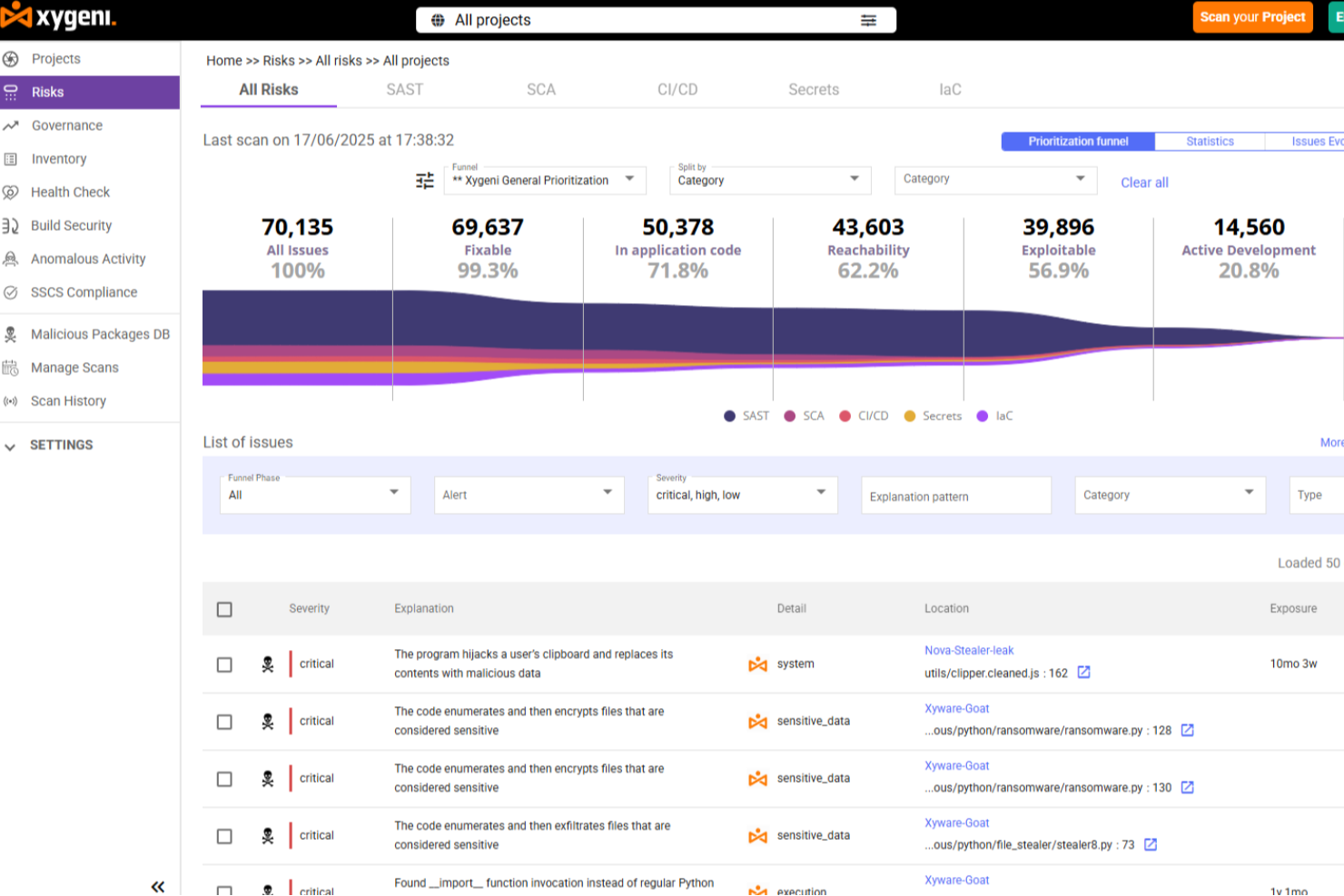
Xygeni è una piattaforma di sicurezza delle applicazioni basata sull'IA che combina SAST, SCA, rilevamento di segreti, sicurezza CI/CD e protezione della supply chain del software in un'unica soluzione AppSec end-to-end.
Per Chi è Ideale Xygeni?
Xygeni si adatta perfettamente ai team di ingegneria focalizzati sulla sicurezza in aziende di medie e grandi dimensioni che gestiscono pipeline di sviluppo software complesse e multi-tool.
Perché Ho Scelto Xygeni
Ho incluso Xygeni tra le mie migliori scelte perché il suo modulo SCA va ben oltre la normale scansione CVE e copre l’intero spettro dei rischi della supply chain open-source. Analizza migliaia di pacchetti nuovi e aggiornati ogni giorno per rilevare malware 'zero-day' e bloccare dipendenze sospette prima che raggiungano la produzione. Apprezzo anche il punteggio di rischio basato sul contesto, che tiene conto di raggiungibilità, esposizione a internet ed exploitabilità, evitando al team di inseguire falsi positivi. Inoltre, l'esportazione SBOM con un clic nei formati SPDX o CycloneDX rende la reportistica di conformità molto meno laboriosa.
Caratteristiche Principali di Xygeni
- SAST alimentato da AI: Analizza il codice sorgente per vulnerabilità di sicurezza utilizzando l’analisi guidata dall’IA e genera correzioni automatiche direttamente nel tuo IDE o nella pull request.
- Rilevamento di codice dannoso: Identifica backdoor, trojan e logiche offuscate nel codice personalizzato, classificati secondo CWE-506.
- Scansione sicurezza IaC: Analizza file infrastructure-as-code per individuare configurazioni non sicure in ambienti cloud e container.
- Dashboard ASPM: Fornisce in un’unica interfaccia l’inventario completo degli asset e una panoramica del profilo di rischio su tutto il tuo SDLC.
Integrazioni di Xygeni
Xygeni si integra con GitHub, GitLab, Bitbucket, Jenkins e Azure DevOps per i workflow SCM e CI/CD, oltre che con CircleCI e TravisCI. Per il supporto IDE, offre plugin per JetBrains IDE, Visual Studio Code, Eclipse, Visual Studio, Cursor e Windsurf. Si collega anche con Slack per le notifiche e Jira per la gestione dei ticket. Xygeni fornisce una REST API che consente ai team di automatizzare le scansioni, recuperare i risultati, avviare workflow di enforcement e integrarsi con strumenti interni.
Pros and Cons
Pros:
- Filtra i falsi positivi per mettere in evidenza i rischi sfruttabili
- Copertura totale della sicurezza della supply chain del software
- Rilevamento delle vulnerabilità in tempo reale tra le dipendenze
Cons:
- Personalizzazione limitata di dashboard e report
- Meno integrazioni con tool DevOps di nicchia
Ideale per la sua robusta analisi statica del codice incentrata sulla sicurezza
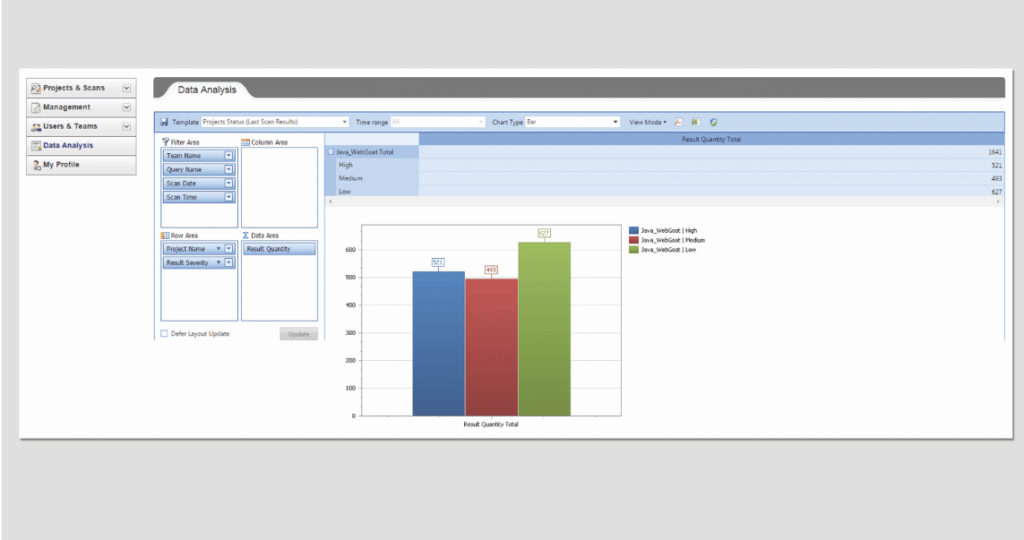
Checkmarx è uno strumento ampiamente utilizzato per l'analisi statica del codice, con una forte enfasi sull'individuazione e la mitigazione delle vulnerabilità di sicurezza.
Questo strumento è specializzato nell'identificare potenziali violazioni della sicurezza all'interno del tuo codice prima che diventino un problema in produzione, rendendolo una risorsa indispensabile per le organizzazioni attente alla sicurezza.
Perché ho scelto Checkmarx: Ho selezionato Checkmarx per la sua analisi statica del codice incentrata sulla sicurezza di alto livello. Nel confronto tra diversi strumenti, Checkmarx si è distinto per le sue capacità di scansione rigorose e la profonda attenzione alla sicurezza. Lo strumento non solo è in grado di individuare potenziali problemi di sicurezza, ma fornisce anche approfondimenti dettagliati su come risolverli.
Ritengo che Checkmarx sia ideale per le organizzazioni che danno priorità alla sicurezza, poiché contribuisce a identificare e mitigare potenziali violazioni già nelle prime fasi del ciclo di vita dello sviluppo.
Caratteristiche e integrazioni principali:
Checkmarx offre capacità approfondite di scansione del codice, rilevando potenziali violazioni prima che diventino vulnerabilità in produzione. La possibilità di fornire raccomandazioni concrete per mitigare i rischi è particolarmente preziosa.
Inoltre, Checkmarx offre integrazioni con strumenti di sviluppo popolari come JIRA, Jenkins e GitHub, permettendo ai team di incorporare facilmente i controlli di sicurezza nel loro flusso di lavoro di sviluppo.
Pros and Cons
Pros:
- Eccellente nell'individuare le vulnerabilità di sicurezza
- Offre raccomandazioni concrete per la mitigazione dei rischi
- Si integra bene con i più diffusi strumenti di sviluppo
Cons:
- Costo più elevato rispetto ad alcune alternative
- Può avere una curva di apprendimento ripida per i nuovi utenti
- Può generare falsi positivi che richiedono una revisione manuale

Ideale per l'integrazione perfetta con Visual Studio per aumentare la produttività
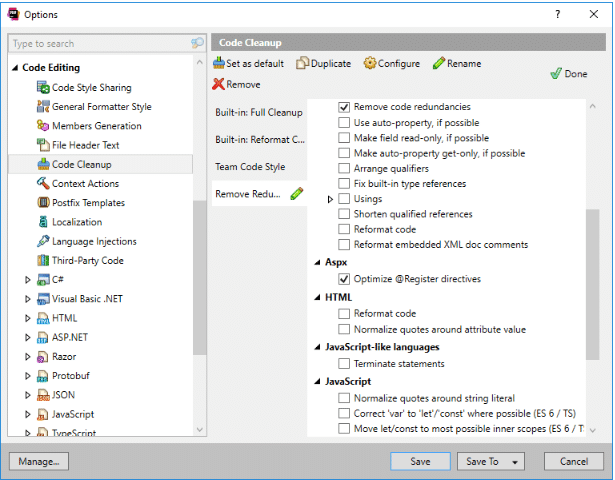
ReSharper è un rinomato strumento di analisi statica del codice che funziona all'interno dell'ambiente di Visual Studio per aumentare la produttività degli sviluppatori. Con ReSharper, l'ispezione del codice, il refactoring e la navigazione diventano più efficienti, rendendolo lo strumento perfetto per gli sviluppatori che utilizzano Visual Studio.
Perché ho scelto ReSharper: Ho scelto ReSharper per la sua profonda integrazione con Visual Studio e per la sua capacità di migliorare significativamente la produttività degli sviluppatori. Si è distinto grazie alla possibilità di analizzare il codice direttamente dall'IDE, rendendo comodo e facile per gli sviluppatori effettuare refactoring e navigare all'interno dei propri progetti.
Credo che ReSharper sia ideale per gli sviluppatori che utilizzano Visual Studio, poiché migliora la produttività offrendo una navigazione avanzata del codice e un'analisi della qualità del codice in tempo reale.
Funzionalità principali e integrazioni:
ReSharper si distingue per funzionalità come l'analisi della qualità del codice in tempo reale, la navigazione avanzata del codice e un ampio refactoring intelligente. Offre inoltre una profonda integrazione con Visual Studio, consentendo agli sviluppatori di eseguire l'analisi senza dover abbandonare l'ambiente di sviluppo.
Pros and Cons
Pros:
- Profonda integrazione con Visual Studio
- Fornisce navigazione avanzata del codice e refactoring intelligente
- Analisi della qualità del codice in tempo reale
Cons:
- Soprattutto utile per gli sviluppatori che utilizzano Visual Studio
- Può rallentare Visual Studio su grandi basi di codice
- Curva di apprendimento elevata per i nuovi utenti

Qodana
Ottimo per il suo ampio supporto linguistico e per l'analisi dei progetti nelle fasi iniziali
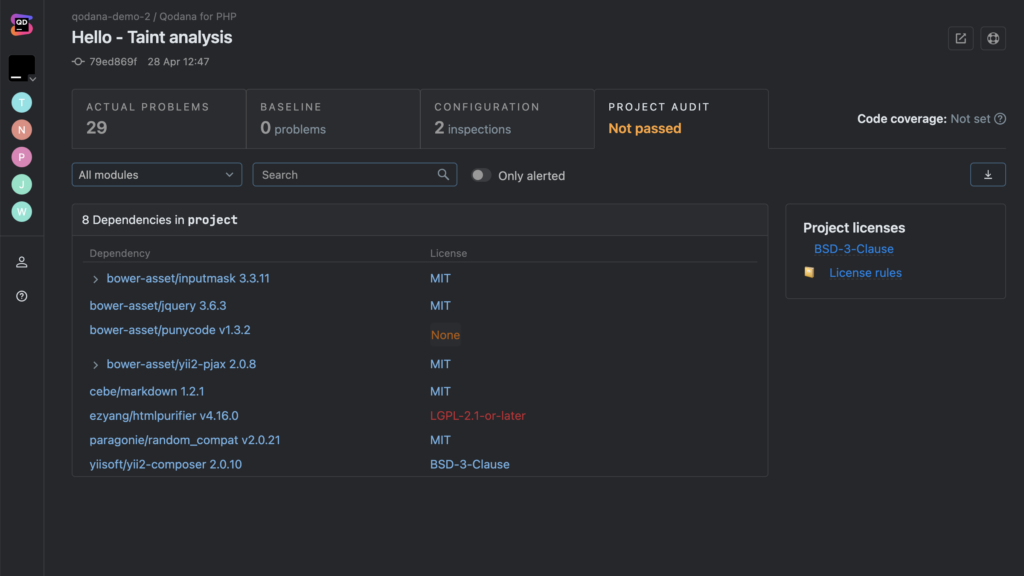
Qodana è uno strumento di analisi statica del codice multi-lingua sviluppato da JetBrains. Offre un approccio completo all'analisi dei codebase grazie all'ampio supporto linguistico e alla possibilità di essere utilizzato già nelle prime fasi del ciclo di vita del progetto.
Questi attributi chiave rendono Qodana particolarmente utile per progetti eterogenei e per l'analisi nelle fasi iniziali, aiutando a identificare e mitigare i problemi prima che si trasformino in questioni più gravi.
Perché ho scelto Qodana: La scelta di Qodana si basa sulla sua versatilità e sull'approccio proattivo. Ciò che lo distingue è il suo ampio supporto ai diversi linguaggi, che consente l'esame di codebase in varie lingue e lo rende adatto a progetti multi-linguaggio. Inoltre, la capacità di eseguire l'analisi nelle fasi iniziali aiuta i team a individuare e risolvere potenziali problemi fin dall'inizio.
Queste caratteristiche fanno di Qodana uno strumento eccellente per team che lavorano su progetti diversificati e per chi vuole mantenere alta la qualità sin dalle prime fasi.
Caratteristiche principali & integrazioni:
Qodana vanta una serie di funzionalità che supportano molti linguaggi, tra cui Java, Python, JavaScript e altri, rendendolo applicabile a una vasta gamma di progetti. Un'altra caratteristica degna di nota è l'analisi nelle fasi iniziali di un progetto, che aiuta a individuare potenziali criticità fin da subito.
Per quanto riguarda le integrazioni, Qodana si integra perfettamente con Docker, semplificando la distribuzione e l'esecuzione in vari ambienti.
Pros and Cons
Pros:
- L'ampio supporto linguistico si adatta a progetti differenti
- Permette l'analisi dei progetti nelle fasi iniziali, favorendo la risoluzione proattiva dei problemi
- L'integrazione con Docker semplifica distribuzione ed esecuzione
Cons:
- Può essere meno conveniente per sviluppatori singoli o team di piccole dimensioni
- Il requisito di Docker potrebbe introdurre ulteriori complessità
- Manca l'integrazione con alcuni sistemi di controllo versione comuni

Ideale per identificare violazioni della sicurezza in grandi codebase
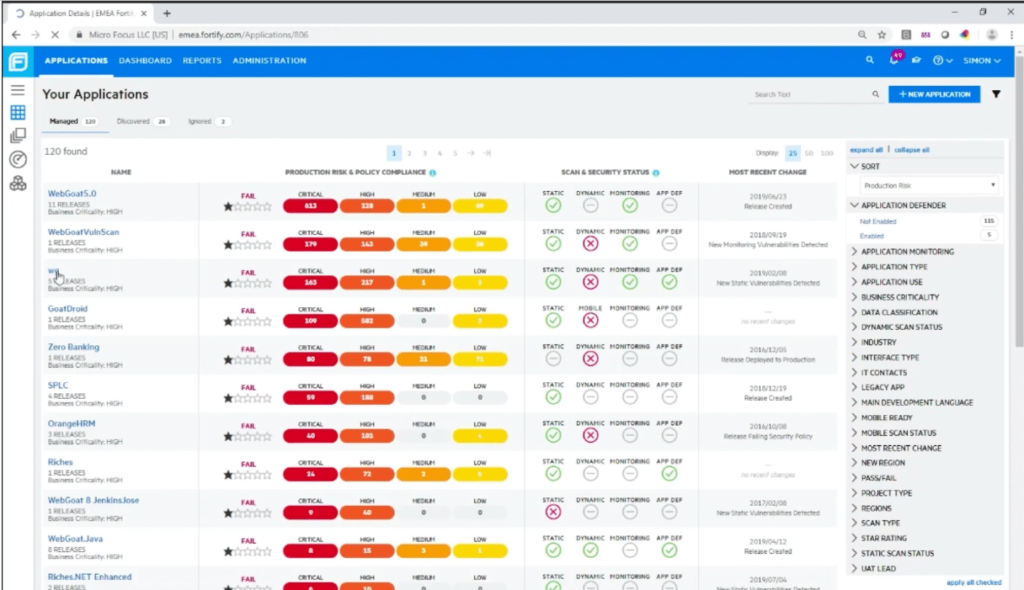
Fortify Static Code Analyzer è uno strumento sviluppato da Micro Focus che consente agli sviluppatori di analizzare il codice dal punto di vista della sicurezza. Lo strumento si distingue quando si lavora con ampi codebase, poiché individua e segnala efficacemente potenziali vulnerabilità di sicurezza all'interno di grandi quantità di codice, adattandosi perfettamente a grandi aziende e progetti.
Perché ho scelto Fortify Static Code Analyzer: Ho scelto Fortify Static Code Analyzer per la sua capacità di gestire efficacemente l'analisi di grandi codebase. Ciò che lo differenzia dagli altri strumenti è la sua scalabilità e la profondità dell'analisi. Ho notato che, quando si gestiscono progetti di grandi dimensioni, l'efficacia di questo strumento nell'individuare problematiche di sicurezza risalta particolarmente.
Date queste caratteristiche, si adatta perfettamente al suo punto di forza, rendendolo ideale per identificare vulnerabilità di sicurezza in codebase di grandi dimensioni.
Funzionalità e integrazioni principali:
La capacità di gestire e analizzare codebase estesi è una caratteristica distintiva di Fortify Static Code Analyzer. Inoltre, l'interfaccia utente del software offre una panoramica completa delle potenziali vulnerabilità, le categorizza in base alla gravità e suggerisce possibili soluzioni.
Per quanto riguarda le integrazioni, Fortify funziona bene con sistemi di build come Jenkins e sistemi di controllo versione come Git, che possono semplificare il processo di sviluppo.
Pros and Cons
Pros:
- Analisi efficiente di grandi codebase
- Rilevamento e categorizzazione delle vulnerabilità esaustivo
- Si integra bene con i sistemi di sviluppo più diffusi
Cons:
- Il costo elevato può essere un ostacolo per i piccoli team
- L'interfaccia può risultare complessa per i principianti
- Potrebbe essere eccessivo per progetti di piccole dimensioni

Coverity
Ideale per la sua capacità di gestire codebase complesse e rilevare bug difficili da individuare
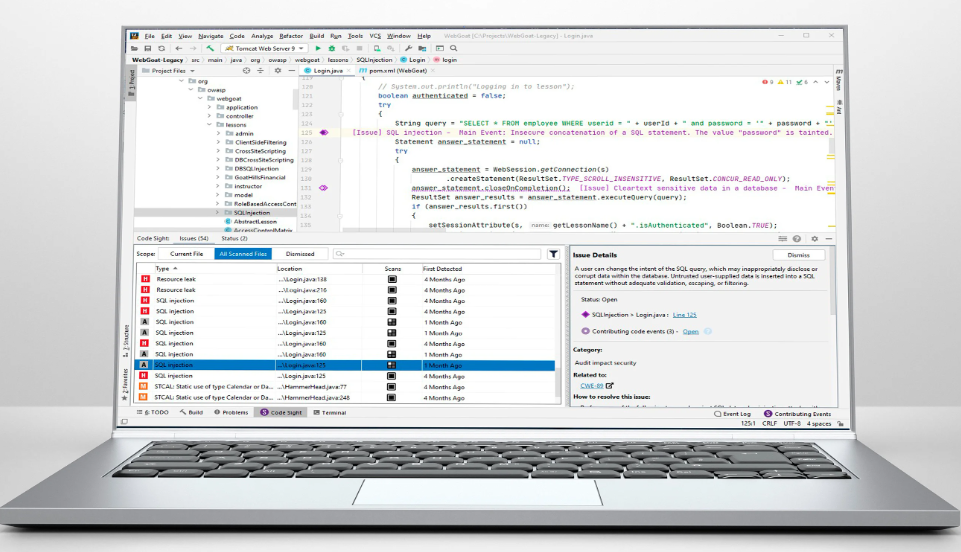
Coverity è uno strumento di analisi statica sofisticato, abile nel gestire codebase complesse e nello scovare bug sfuggenti. Può ispezionare in modo approfondito grandi quantità di codice, risultando particolarmente adatto all'individuazione di bug difficili da trovare in codebase articolate.
Perché ho scelto Coverity: Nell'includere Coverity in questa lista, ho apprezzato la sua capacità di gestire codebase complesse e scoprire bug difficili da individuare. La sua differenza sta nella profondità dell'analisi che offre, rendendolo uno strumento eccellente per progetti di grandi dimensioni e complessi. Per la sua efficacia nel rilevare bug nascosti in codebase intricate, ritengo che Coverity sia la scelta migliore per questo compito.
Caratteristiche distintive & integrazioni:
Coverity offre una vasta gamma di funzionalità che comprendono una scansione approfondita del codice per l'identificazione di difetti nascosti, vulnerabilità di sicurezza e problemi di concorrenza. Fornisce inoltre una visione unificata dei difetti e delle vulnerabilità, facilitando il processo di correzione dei bug.
In termini di integrazioni, Coverity garantisce compatibilità con i principali IDE, pipeline CI/CD e sistemi di controllo versione, aumentando così la sua usabilità.
Pros and Cons
Pros:
- L'analisi approfondita lo rende in grado di gestire codebase complesse
- Eccellente nel rilevare bug difficili da individuare
- Forte integrazione con vari strumenti di sviluppo
Cons:
- La mancanza di prezzi trasparenti potrebbe essere uno svantaggio per alcuni
- L'interfaccia può apparire complessa ai principianti
- Il processo di configurazione può risultare abbastanza articolato
Klocwork
Ideale per la sua sofisticata identificazione in tempo reale delle vulnerabilità di sicurezza
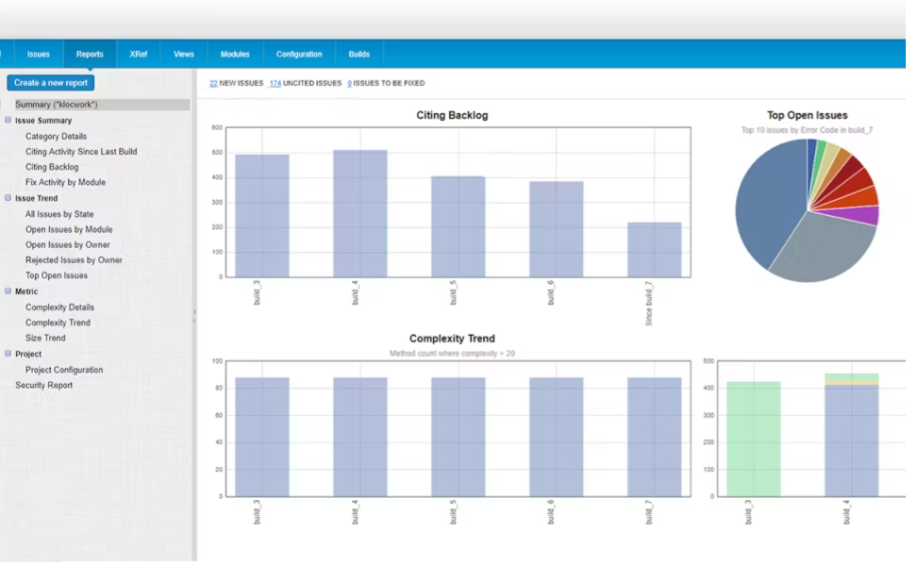
Klocwork, un prodotto di Perforce, offre un'ampia analisi statica del codice. È rinomato per la sua capacità di rilevare vulnerabilità di sicurezza in tempo reale, garantendo un elevato livello di sicurezza del codice. Questa forza nell'analisi in tempo reale è il motivo per cui credo che Klocwork sia il migliore per identificare rapidamente ed efficientemente i problemi di sicurezza.
Perché ho scelto Klocwork: Nel campo degli strumenti di analisi statica del codice, Klocwork si distingue per l'impressionante capacità di analisi in tempo reale. Questa funzionalità, che ho valutato e confrontato con altri strumenti, aiuta a identificare le problematiche di sicurezza appena si presentano.
Questa caratteristica unica e cruciale mi ha portato a selezionare Klocwork come scelta ottimale per gli sviluppatori che danno priorità all'individuazione immediata delle vulnerabilità di sicurezza.
Caratteristiche distintive e integrazioni:
Klocwork si distingue per funzionalità come smartRank, che attribuisce priorità e classifica i problemi individuati, e il Code Review Center, che facilita la revisione collaborativa del codice. Si integra perfettamente con i principali IDE, strumenti CI/CD e strumenti di controllo del codice sorgente, offrendo un'esperienza fluida e integrata.
Pros and Cons
Pros:
- Offre identificazione in tempo reale delle vulnerabilità di sicurezza
- Attribuisce priorità e classifica i problemi, facilitando la gestione delle problematiche
- Favorisce la revisione collaborativa del codice
Cons:
- Le informazioni sui prezzi non sono facilmente disponibili
- Potrebbe essere eccessivo per progetti o team di piccole dimensioni
- Può presentare una curva di apprendimento ripida per i nuovi utenti
Altri strumenti di analisi statica del codice
Di seguito è riportato un elenco di ulteriori strumenti di analisi statica del codice che ho selezionato, ma che non sono rientrati tra i primi 10. Vale sicuramente la pena dare loro un’occhiata.
- SonarCloud
Il migliore per l'analisi cloud di progetti open source
- Semgrep
Ideale per la creazione di regole personalizzate e il linting indipendente dal linguaggio
- Codiga
Ideale per automatizzare le revisioni del codice e migliorare la qualità del software
- CodeSonar
Ideale per un'analisi approfondita del codice sorgente per prevenire errori
- SonarQube
Ideale per l'ispezione continua della qualità del codice e degli aspetti di sicurezza


Altre recensioni degli strumenti di analisi del codice
Cómo evalúo el software de comisiones de ventas para pequeñas empresas
Divido cada evaluación en dos niveles: los requisitos básicos que una herramienta debe cumplir—como cálculos automatizados e informes para los representantes—y los diferenciadores como la previsión, integraciones y precios para pymes.
Funcionalidad principal (Requisitos indispensables para esta lista)
Cuando selecciono herramientas para mi lista, califico cada una en una escala del 0 (no ofrece la funcionalidad) al 5 (sobresale en esta área) por cada funcionalidad principal listada abajo. Luego, calculo la puntuación total de la herramienta en porcentaje. Cada herramienta debe obtener una puntuación mínima total de 65% para ser considerada en la inclusión.
- Cálculos automatizados de comisiones: Verifico si una herramienta puede extraer los acuerdos cerrados-ganados y calcular los pagos por sí misma, gestionando aspectos como tasas escalonadas y divisiones entre múltiples representantes sin fórmulas manuales.
- Diseño de planes flexible: Cada herramienta debe permitirte construir planes escalonados, aceleradores, SPIFFs y dividir créditos mediante un generador sin código, en lugar de requerir a un desarrollador o un ticket de soporte.
- Dashboards e informes para representantes: Los representantes deberían poder iniciar sesión y ver exactamente cómo un acuerdo específico contribuyó a su pago, con un desglose en tiempo real del cumplimiento de cuota y las ganancias.
- Integraciones con CRM y nómina: Busco conectores nativos con los CRM y herramientas de nómina que realmente usan los pequeños equipos, como HubSpot, Salesforce, QuickBooks y Gusto, además de acceso API o Zapier.
- Flujos de trabajo de disputas y aprobaciones: La plataforma debe permitir la presentación de disputas dentro de la aplicación y aprobaciones de pagos en varios pasos para que los equipos de finanzas y ventas no tengan que perseguir correcciones por correo electrónico.
- Historial de auditoría e informes ASC 606: Cada cambio de cálculo y acción de aprobación debe quedar registrado, y evalúo si la herramienta genera informes que cumplen con ASC 606 directamente.
Una vez que tengo una lista de herramientas que cumplen con estos criterios, considero qué distingue a cada plataforma.
Factores diferenciadores (Lo que distingue a los proveedores)
Así es como comparo y contrasto los diferentes proveedores:
Características destacadas
La previsión de comisiones es un gran diferenciador. Busco herramientas que permitan a los gerentes y representantes modelar ingresos frente a datos en tiempo real del pipeline antes de que finalice el trimestre. La gestión de clawbacks y anticipos también es importante para pequeños equipos que incorporan nuevos representantes con mínimos garantizados o recuperan comisiones por clientes perdidos a mitad de ciclo. Las funciones de gamificación como tablas de clasificación y concursos pueden diferenciar aún más una herramienta al dar a los líderes de ventas una manera integrada de motivar a los representantes más allá de sus informes de pagos.
Más allá de las características
La transparencia en los precios es una de las primeras cosas que evalúo. Los pequeños equipos necesitan precios por pagador que no los obliguen a pasar a planes empresariales al agregar un par de representantes cada trimestre. La velocidad de implementación es igual de relevante: busco plataformas que ofrezcan plantillas de planes y una configuración guiada para que un equipo de ventas de cinco personas pueda estar operativo en días, no meses. También considero la escalabilidad, específicamente si una herramienta puede crecer desde unos pocos representantes a una operación de nivel medio sin requerir una reimplementación completa.
Che cos'è uno strumento di analisi statica del codice?
Gli strumenti di analisi statica del codice esaminano il codice sorgente senza eseguirlo per individuare difetti, problemi di sicurezza ed errori di codifica. Gli sviluppatori, gli ingegneri QA e i team di sicurezza utilizzano questi strumenti per rilevare tempestivamente i problemi e mantenere le basi di codice più facili da gestire.
La scansione automatizzata, i controlli basati su regole e le funzionalità di reporting aiutano a individuare rapidamente gli errori, applicare gli standard di codifica e ridurre la quantità di lavoro da rifare in seguito. Nel complesso, questi strumenti aiutano i team a scrivere codice più pulito e sicuro con meno lavoro manuale.
Le persone chiedono anche
Quali sono i vantaggi dell'utilizzo degli strumenti di analisi statica del codice?
Gli strumenti di analisi statica del codice offrono diversi vantaggi che li rendono una parte indispensabile del processo di sviluppo software. Ecco cinque vantaggi chiave:
\u003col class=\u0022wp-block-list\u0022\u003e
\u003cli\u003e\u003cstrong\u003eRilevamento dei bug:\u003c/strong\u003e possono rilevare bug, errori e vulnerabilità nel codice che potrebbero non essere immediatamente evidenti agli sviluppatori.\u003c/li\u003e
\u003cli\u003e\u003cstrong\u003eMiglioramento della qualità del codice:\u003c/strong\u003e indicando le aree da migliorare, questi strumenti possono contribuire ad aumentare la qualità complessiva del codice.\u003c/li\u003e
\u003cli\u003e\u003cstrong\u003eRiduzione del tempo di debug:\u003c/strong\u003e individuando i bug nelle prime fasi del ciclo di sviluppo, questi strumenti possono ridurre significativamente il tempo dedicato al debug in seguito.\u003c/li\u003e
\u003cli\u003e\u003cstrong\u003eMigliore comprensione del codice:\u003c/strong\u003e per basi di codice di grandi dimensioni, questi strumenti offrono un modo rapido e sistematico per comprendere la struttura del codice, le dipendenze e le potenziali aree problematiche.\u003c/li\u003e
\u003cli\u003e\u003cstrong\u003eConformità normativa:\u003c/strong\u003e alcuni strumenti possono anche verificare se il codice è conforme a determinati standard e normative di programmazione, aspetto fondamentale in alcuni settori.\u003c/li\u003e
\u003c/ol\u003e
Quanto costano gli strumenti di analisi statica del codice?
Il prezzo degli strumenti di analisi statica del codice può variare notevolmente, a seconda della complessità dello strumento, delle dimensioni del team, del numero di basi di codice analizzate e di altri fattori. La maggior parte dei fornitori offre un modello di prezzo a livelli che inizia con un pacchetto base con funzionalità limitate e arriva a pacchetti più avanzati che includono funzionalità premium come analisi più approfondite, un maggior numero di integrazioni, supporto dedicato e altro.
Quali sono i modelli di prezzo tipici per gli strumenti di analisi statica del codice?
La maggior parte degli strumenti di analisi statica del codice applica un costo per utente o per riga di codice analizzata. Alcuni adottano anche un modello freemium, in cui le funzionalità di base sono disponibili gratuitamente mentre quelle più avanzate sono a pagamento. Altri offrono un periodo di prova gratuito, al termine del quale sarà necessario pagare per continuare a utilizzare il servizio.
Qual è la fascia di prezzo tipica degli strumenti di analisi statica del codice?
Il prezzo di questi strumenti può variare da pochi dollari per utente al mese a diverse centinaia di dollari per utente al mese per le soluzioni di livello aziendale. Alcuni strumenti offrono sconti per i pagamenti annuali, mentre altri potrebbero applicare un costo di configurazione una tantum oltre al costo mensile.
Quali sono gli strumenti di analisi statica del codice più economici e più costosi?
Tra gli strumenti elencati qui, l’opzione più conveniente è ESLint, uno strumento open source gratuito. I più costosi sono generalmente strumenti completi come SonarQube e Veracode, che possono costare diverse centinaia di dollari al mese, a seconda delle dimensioni del team e dell’ampiezza dei progetti.
Esistono opzioni gratuite per gli strumenti di analisi statica del codice?
Sì, sono disponibili diverse opzioni gratuite. Strumenti come ESLint, FindBugs e OWASP Dependency-Check sono open source e gratuiti. Tuttavia, è importante notare che queste opzioni gratuite potrebbero non offrire lo stesso livello di analisi o le stesse funzionalità degli strumenti a pagamento. Inoltre, potrebbero richiedere una configurazione e un’impostazione manuali maggiori.
Punti chiave
La scelta del miglior strumento di analisi statica del codice richiede la comprensione delle esigenze specifiche del team di sviluppo e il loro allineamento con le funzionalità offerte dai diversi strumenti. Alcuni strumenti sono progettati per garantire semplicità e facilità d'uso, mentre altri sono in grado di gestire progetti più complessi e di grandi dimensioni con funzionalità analitiche avanzate.
- Definisci i tuoi requisiti: inizia identificando ciò di cui hai bisogno da uno strumento di analisi statica del codice. Considera le dimensioni della tua base di codice, il linguaggio in cui è scritta e l'esperienza del tuo team con gli strumenti di analisi del codice. Per lo sviluppo basato su Java, trovare lo strumento di analisi statica del codice per Java più adatto è fondamentale. Rifletti sui tuoi obiettivi, che si tratti di migliorare la qualità del codice, ridurre i bug o rispettare specifiche normative di settore.
- Bilancia funzionalità e usabilità: ogni strumento di analisi statica del codice offre un proprio insieme di funzionalità. Sebbene un maggior numero di funzioni possa sembrare preferibile, può anche aumentare la complessità dello strumento. È fondamentale trovare uno strumento che fornisca le funzionalità necessarie, rimanendo al contempo intuitivo e facile da integrare nel processo di sviluppo.
- Considera il prezzo: i prezzi variano significativamente tra i diversi strumenti, quindi è essenziale considerare il proprio budget. Tieni presente che anche i modelli di prezzo variano: alcuni strumenti applicano un costo per utente o per riga di codice analizzata. Sebbene siano disponibili opzioni gratuite, potrebbero non offrire lo stesso livello di analisi o le stesse funzionalità degli strumenti a pagamento.
La scelta dei giusti strumenti di analisi statica e della composizione del software può avere un impatto significativo sul processo di sviluppo, sulla qualità del codice e, in definitiva, sul successo del tuo progetto software.
Unisciti per scoprire ulteriori approfondimenti
Questi strumenti offrono visibilità sui problemi di qualità, aiutano a prevenire gli errori di codifica che potrebbero insinuarsi nelle diverse fasi del SDLC e si dimostrano una parte essenziale del processo di revisione del codice. Facilitano un'integrazione perfetta nel tuo flusso di lavoro, offrendo funzionalità come il supporto API per linguaggi tra cui PHP, TypeScript e Swift, la compatibilità con IDE come Eclipse e la possibilità di fornire feedback direttamente nella tua richiesta pull.
Fidati, una volta che inizierai a usare questi strumenti, ti chiederai come hai fatto a farne a meno.
Iscriviti alla newsletter di The QA Lead per ricevere ulteriori consigli sugli strumenti.