

La gestione dei servizi aziendali può sembrare complessa, soprattutto quando i team crescono e i processi si distribuiscono tra i vari reparti. Tuttavia, il software giusto può dare struttura a questa complessità centralizzando le richieste, migliorando la visibilità e riducendo il lavoro manuale. Gli strumenti di gestione dei servizi aziendali aiutano i team impegnati dei reparti IT, delle risorse umane e delle operations ad allocare le risorse in modo efficace e a collaborare meglio.
In qualità di persona che testa e recensisce software in modo indipendente, conosco l'importanza di disporre di informazioni chiare e imparziali prima di prendere una decisione. Ho valutato le principali piattaforme di questo settore per individuare le opzioni che offrono funzionalità solide senza complicazioni superflue.
In questo articolo ti presenterò gli strumenti che si sono distinti, spiegando cosa fanno, perché sono importanti e come possono supportare le attività quotidiane della tua organizzazione nell'ambito di una moderna strategia ESM. Al termine, avrai un'idea più chiara di quali piattaforme rispondono alle esigenze del tuo team e dei punti di forza di ciascuna.
Perché fidarsi dei nostri consigli sui software
6,700+
Reviews
20
Industry experts
16+
Evaluation factors
14
Years
Il nostro team testa e recensisce software dal 2012. In quanto leader tecnologici noi stessi, sappiamo quanto sia difficile — e importante — scegliere il software giusto.
Per questa guida, abbiamo valutato gli strumenti attraverso test praticie ricerche indipendenti, assegnando un punteggio agli strumenti in base ai nostri criteri di selezione.
Le nostre recensioni riflettono il nostro giudizio editoriale umano, non un discorso di vendita.
Revisori esperti:
- Paulo Gardini MiguelDirettore tecnico
 Tim FisherVP dell'IA
 Gabriel RosasTech Lead e architetto software
 Christhian GruhnTech Lead e architetto della piattaforma

Tabella comparativa dei software di gestione dei servizi aziendali
Questa tabella comparativa riassume i dettagli sui prezzi delle mie migliori selezioni di software di gestione dei servizi aziendali:
| Tool | Best For | Trial Info | Price | ||
|---|---|---|---|---|---|
| 1 | Ideale per i team IT | Prova gratuita di 14 giorni + demo gratuita disponibile | Da $19/agente/mese (fatturato annualmente) | Website | |
| 2 | Ideale per integrare PSA e RMM | Prova gratuita di 21 giorni + demo gratuita disponibile | A partire da $149/tecnico/mese (fatturazione annuale) | Website | |
| 3 | Ideale con copiloti IA nativi per i team di assistenza | Demo gratuita disponibile | Prezzi su richiesta | Website | |
| 4 | Ideale per il settore dell’istruzione | Prova gratuita di 30 giorni + demo gratuita disponibile | Da $76/agente/mese | Website | |
| 5 | Ideale per organizzazioni focalizzate sulla gestione degli asset | Demo gratuita disponibile | Prezzo su richiesta | Website | |
| 6 | Ideale per grandi imprese | Demo gratuita disponibile | Prezzo su richiesta | Website | |
| 7 | Ideale per la conformità alla sicurezza | Demo gratuita disponibile | Prezzo su richiesta | Website | |
| 8 | Ideale per l'automazione guidata dall'IA | Demo gratuita disponibile | Prezzi su richiesta | Website | |
| 9 | Ideale per chi è attento al budget | Prova gratuita di 30 giorni + demo gratuita disponibile | Da $104/mese | Website | |
| 10 | Ideale per aziende in crescita | Prova gratuita + demo disponibile | Da $90/utente/anno | Website |


Recensione dei migliori software di gestione dei servizi aziendali
Di seguito trovi le mie sintesi dettagliate dei migliori software di gestione dei servizi aziendali inclusi nella mia selezione. Ogni recensione illustra cosa fa lo strumento, perché si è distinto e quali sono gli aspetti principali da considerare durante la valutazione delle opzioni. Troverai anche note su funzionalità, integrazioni, prezzi, vantaggi e svantaggi, per aiutarti a decidere quale piattaforma si adatta meglio alle esigenze della tua organizzazione.
 Ideale per i team IT
- Prova gratuita di 14 giorni + demo gratuita disponibile
- Da $19/agente/mese (fatturato annualmente)
Visit WebsiteCustomer Rating:4.6/5
Freshservice è una piattaforma di gestione dei servizi basata su cloud progettata per aiutare i team IT a gestire incidenti, richieste, asset e cambiamenti da un'unica postazione centralizzata. Freshservice semplifica le operazioni IT con flussi di lavoro guidati, automazione e un'interfaccia intuitiva. Spesso è scelto da team che desiderano una copertura ITSM affidabile senza la complessità dei sistemi enterprise più pesanti.
Perché ho scelto Freshservice: Ho scelto Freshservice perché offre un equilibrio di capacità ITSM adatte a una vasta gamma di ambienti tecnici. I suoi strumenti per la gestione degli incidenti e dei cambiamenti aiutano i team a gestire le esigenze operative quotidiane con struttura e prevedibilità. La piattaforma pone inoltre l'accento sull'usabilità, rendendo più facile per i team l'adozione e la manutenzione nel tempo. Per le organizzazioni che necessitano di una gestione dei servizi orientata all'IT con una configurazione semplice, Freshservice rappresenta una solida via di mezzo tra semplicità e funzionalità.
Funzionalità e integrazioni di spicco:
Funzionalità: un sistema di gestione dei ticket intuitivo che organizza incidenti e richieste di servizio, una knowledge base integrata che promuove l'autoservizio degli utenti e strumenti di gestione degli asset che tracciano hardware e software durante il loro ciclo di vita. La piattaforma offre anche flussi di lavoro per la gestione dei cambiamenti che aiutano i team a implementare aggiornamenti in modo sicuro e strumenti di reportistica che forniscono visibilità sulle tendenze del servizio e sulle prestazioni del team.
Integrazioni: includono Microsoft Teams, Slack, Jira, Google Workspace, Office 365, AWS, Azure, Salesforce, Zapier e Trello.
Pros and Cons
Pros:
- Offre un'interfaccia accessibile adatta a team IT di varie dimensioni
- Fornisce flussi di lavoro strutturati per la gestione di incidenti, asset e cambiamenti
- Include strumenti di reportistica che aiutano i team a monitorare le prestazioni del servizio
Cons:
- La personalizzazione avanzata dei flussi di lavoro può richiedere sforzi aggiuntivi di configurazione
- Funziona meglio con una connettività di rete costante
Learn more about Freshservice: Ideale per integrare PSA e RMM
- Prova gratuita di 21 giorni + demo gratuita disponibile
- A partire da $149/tecnico/mese (fatturazione annuale)
Visit WebsiteCustomer Rating:4.6/5
La bacheca del service desk di SuperOps permette ai team di gestire i ticket in base a priorità, stato e SLA in un'unica vista centralizzata. Per le aziende alla ricerca di una soluzione software per la gestione dei servizi aziendali, SuperOps offre una piattaforma efficace progettata per ottimizzare le operazioni IT sia per i team interni che per i fornitori di servizi gestiti. Fornisce una soluzione unificata che integra funzionalità essenziali come la gestione degli endpoint, il ticketing e l'automazione. Affrontando sfide come la gestione dei dispositivi e l'erogazione dei servizi, SuperOps si rivolge a professionisti IT e leader aziendali che desiderano snellire le operazioni e migliorare la qualità del servizio.
Perché ho scelto SuperOps
Ho scelto SuperOps come soluzione di riferimento per la gestione dei servizi aziendali grazie all'integrazione di Professional Services Automation (PSA) e Remote Monitoring and Management (RMM) in un'unica piattaforma. Questa combinazione consente di gestire gli endpoint, automatizzare i flussi di lavoro e risolvere gli incidenti in modo fluido. L'utilizzo dell'intelligenza artificiale da parte della piattaforma per un'automazione proattiva e un apprendimento continuo aumenta l'efficienza operativa, consentendo al team di concentrarsi su iniziative strategiche invece che su compiti di routine.
Funzionalità principali di SuperOps
Oltre alle sue funzionalità principali, ho individuato altre caratteristiche che rendono SuperOps una scelta eccellente:
- Controllo unificato degli endpoint: Fornisce piena visibilità e controllo su tutte le workstation, i server e i dispositivi di rete.
- Gestione mobile multi-OS: Consente di gestire dispositivi mobili su diversi sistemi operativi da una console unica.
- Automazione dei flussi di lavoro dei ticket: Ottimizza l'organizzazione e la risoluzione dei ticket di supporto grazie all'automazione integrata.
- Reportistica per dirigenti: Offre dashboard complete per monitorare il livello di rischio, il rispetto degli SLA e la preparazione agli audit.
Integrazioni di SuperOps
Tra le integrazioni figurano Microsoft 365, Google Workspace, QuickBooks, Xero, Slack, FreshBooks, Zapier, ConnectWise, Autotask e ServiceNow. È inoltre disponibile un'API per integrazioni personalizzate.
Pros and Cons
Pros:
- Gestione integrata di patch e backup
- Strumenti di automazione dei flussi di lavoro con intelligenza artificiale
- Piattaforma integrata RMM e PSA
Cons:
- Visibilità limitata sui log degli eventi
- L'automazione avanzata richiede competenze tecniche
Learn more about SuperOps: Ideale con copiloti IA nativi per i team di assistenza
- Demo gratuita disponibile
- Prezzi su richiesta
Visit WebsiteCustomer Rating:4.5/5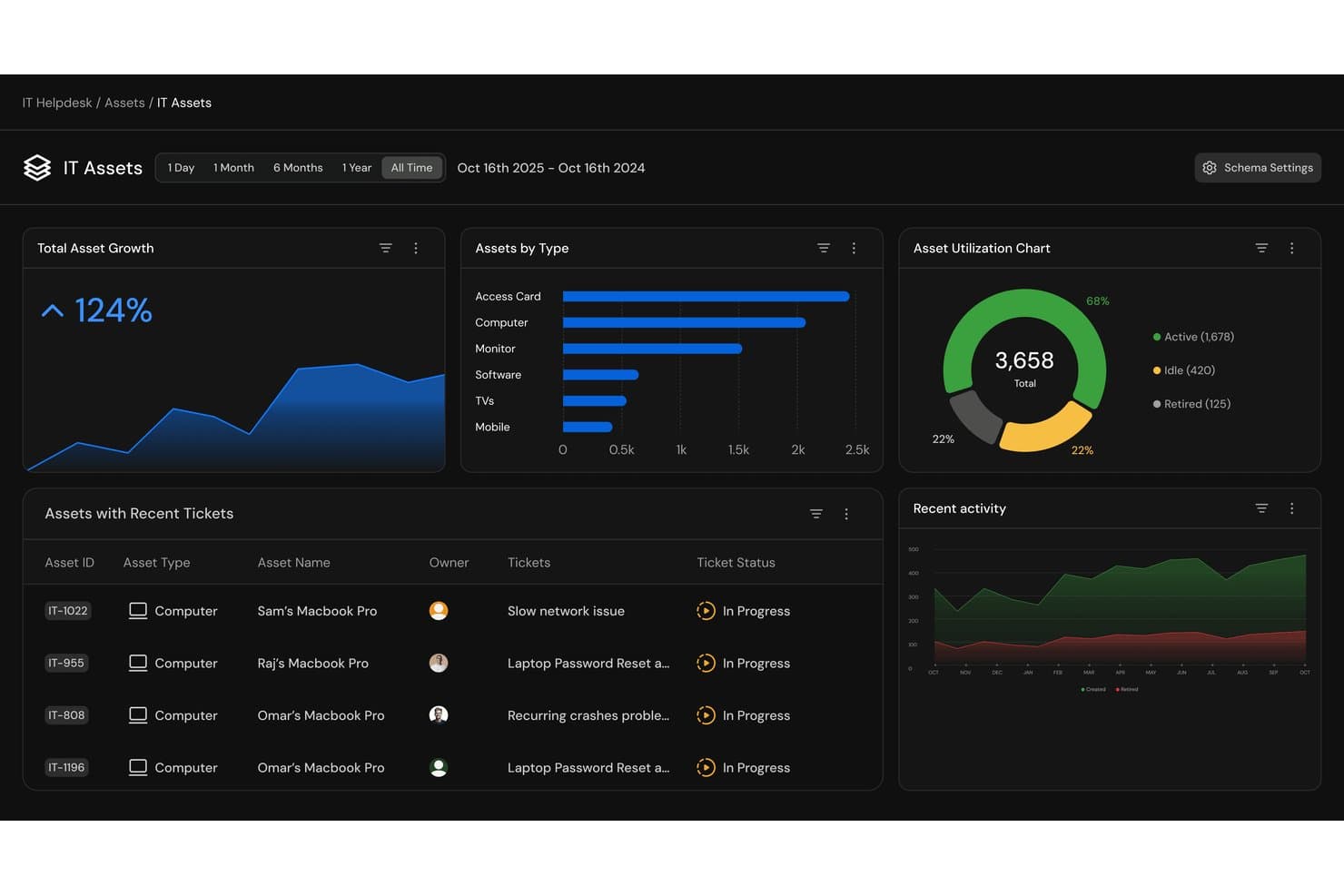
Serval offre un pannello di controllo delle risorse IT con metriche sulla crescita delle risorse, suddivisione per tipo di risorsa, grafici sull'utilizzo e monitoraggio dei ticket recenti per la gestione dei servizi aziendali. Serval è una piattaforma nativa per l'IA di gestione dei servizi IT che utilizza agenti IA specializzati per automatizzare le richieste all'assistenza, la fornitura degli accessi e i flussi di lavoro di inserimento e uscita dei dipendenti.
Per chi è più adatto Serval?
Serval è particolarmente adatto ai team IT di aziende tecnologiche in rapida crescita che gestiscono elevati volumi di richieste di servizio ripetitive e desiderano automatizzare la risoluzione senza sostituire gli strumenti ITSM esistenti.
Perché ho scelto Serval
Ho incluso Serval tra le mie scelte principali perché la sua architettura IA è realmente nativa, non una funzionalità aggiunta in un secondo momento. Gli agenti dell'assistenza e dell'automazione aiutano il mio team ad automatizzare la risoluzione dei ticket e ad attivare i flussi di lavoro per la fornitura degli accessi, mentre i Suggerimenti IA evidenziano opportunità di ulteriore automazione. Apprezzo particolarmente l'Agente di Automazione, che converte descrizioni in linguaggio naturale in flussi di lavoro TypeScript funzionanti per attività come la fornitura degli accessi e l'inserimento dei dipendenti.
Funzionalità principali di Serval
- Acquisizione multicanale: Gestisci le richieste provenienti da Slack, Teams, e-mail e portale web in un'interfaccia unificata dell'assistenza.
- Separazione dei team: Segmenta le richieste di IT, Sicurezza, Risorse umane e Finanza in code separate con flussi di lavoro e fonti di conoscenza personalizzati.
- Suggerimenti IA: Individua opportunità di automazione dai modelli dei ticket e consiglia nuove competenze, flussi di lavoro, connessioni alle app e aggiornamenti della base di conoscenza.
- Analisi: Monitora i tassi di risoluzione, il tempo risparmiato e le prestazioni degli SLA tramite pannelli di controllo integrati.
Integrazioni di Serval
Serval offre integrazioni native con Okta, Google Workspace, Microsoft Teams, Slack, Notion, Confluence, Jira, GitHub, ServiceNow e Salesforce. È disponibile un'API per le integrazioni personalizzate.
Pros and Cons
Pros:
- Gli agenti IA nativi risolvono i ticket autonomamente
- Automatizza nativamente i flussi di lavoro di inserimento e uscita
- L'Agente di Automazione genera flussi di lavoro a partire dal linguaggio naturale
Cons:
- Ecosistema più ridotto rispetto alle piattaforme ITSM consolidate
- Potrebbe essere più complesso del necessario per l'assistenza IT di base
Learn more about Serval: Ideale per il settore dell’istruzione
- Prova gratuita di 30 giorni + demo gratuita disponibile
- Da $76/agente/mese
Visit WebsiteCustomer Rating:4.3/5
TOPdesk supporta scuole e università aiutando i team IT, dei servizi generali e delle operazioni di campus a fornire servizi tramite una piattaforma condivisa. Lo strumento è progettato per organizzazioni che gestiscono una vasta gamma di richieste—da problemi tecnologici nelle aule a interventi di manutenzione edilizia—e che necessitano di un sistema centrale rivolto a personale, docenti e studenti.
Perché ho scelto TOPdesk: Ho selezionato TOPdesk perché la sua struttura e il set di funzionalità sono ben allineati alle esigenze delle istituzioni educative. La piattaforma gestisce sia le richieste IT sia le richieste di servizi generali, il che è prezioso in contesti dove i team di supporto collaborano spesso per risolvere problemi che coinvolgono aule, laboratori e spazi del campus. Il portale self-service e gli strumenti di condivisione delle conoscenze facilitano l’accesso rapido alle risposte per studenti e personale, riducendo la pressione sui team di supporto di prima linea nei periodi di maggiore attività.
Funzionalità e integrazioni principali:
Funzionalità includono un sistema di gestione degli incidenti per tracciare e rispondere alle richieste di studenti e personale, un modulo di gestione degli asset per monitorare l’attrezzatura didattica e le risorse, e una componente di gestione delle strutture per supportare la manutenzione degli edifici e le operazioni nei campus. La piattaforma offre inoltre un portale self-service e una knowledge base che aiutano gli utenti a risolvere in autonomia le domande comuni, oltre a strumenti di reportistica che evidenziano le tendenze di servizio tra i diversi dipartimenti del campus.
Integrazioni includono Microsoft 365, Google Workspace, Azure Active Directory, Slack, Jira, Salesforce, Zapier e Microsoft Teams.
Pros and Cons
Pros:
- Supporta sia i flussi di lavoro IT che quelli dei servizi generali, diffusi negli ambienti scolastici
- Offre strumenti self-service che riducono la richiesta sui team di supporto
- Si adatta efficacemente a istituti multi-campus
Cons:
- Richiede una configurazione coordinata tra dipartimenti per sfruttare tutto il potenziale
- Alcuni componenti dell’interfaccia possono risultare datati rispetto a piattaforme più recenti
Learn more about TOPdesk: 5Ideale per organizzazioni focalizzate sulla gestione degli asset
IFS
- Demo gratuita disponibile
- Prezzo su richiesta
Visit WebsiteCustomer Rating:4/5
IFS Assyst aiuta le organizzazioni a gestire asset IT e non IT durante tutto il loro ciclo di vita supportando flussi di lavoro strutturati per servizi e cambiamenti. Precedentemente conosciuta come Axios, la piattaforma è progettata per team che necessitano di una solida gestione delle configurazioni, chiara relazione tra gli asset e una consegna dei servizi prevedibile attraverso ambienti distribuiti.
Perché ho scelto IFS: Ho selezionato IFS Assyst perché offre funzionalità complete di gestione degli asset e delle configurazioni che soddisfano le esigenze delle organizzazioni con inventari di attrezzature complessi o ambienti tecnici rigorosamente controllati. Il suo CMDB, il monitoraggio del ciclo di vita e i processi di servizio standardizzati la rendono particolarmente adatta ai team che richiedono una supervisione precisa degli asset e delle loro dipendenze. La piattaforma supporta inoltre flussi di lavoro per i cambiamenti e gli incidenti a livello enterprise, aiutando i team a mantenere coerenza tra i diversi sistemi operativi.
Funzionalità e integrazioni di rilievo:
Funzionalità include un sistema completo di gestione di asset e configurazioni che traccia le risorse dall'acquisizione fino alla dismissione, insieme a un CMDB che mappa le dipendenze tra servizi, applicazioni e componenti dell'infrastruttura. La piattaforma offre anche un catalogo dei servizi dettagliato per standardizzare le tipologie di richiesta, strumenti di gestione incidenti e problemi per affrontare le questioni operative ed i flussi di lavoro per la gestione dei cambiamenti per agevolare l'introduzione di aggiornamenti con il minimo disturbo. Le funzionalità di reportistica offrono visibilità sui costi del ciclo di vita, le attività di servizio e le tendenze operative.
Integrazioni includono Microsoft 365, Salesforce, SAP, Oracle, Azure, AWS, Google Cloud, ServiceNow, Jira e strumenti IBM.
Pros and Cons
Pros:
- Fornisce il monitoraggio completo degli asset con un CMDB dettagliato
- Supporta flussi di lavoro complessi per cambiamenti e servizi in grandi organizzazioni
- Offre un'elevata visibilità sulle relazioni tra asset e le dipendenze dei servizi
Cons:
- L'implementazione e la configurazione richiedono un notevole impegno e competenze
- Può essere eccessivo per aziende di piccole dimensioni con esigenze di gestione dei servizi basilari
Learn more about IFS : Ideale per grandi imprese
- Demo gratuita disponibile
- Prezzo su richiesta

ServiceNow aiuta le grandi aziende a gestire e automatizzare i flussi di lavoro nei servizi IT, HR e operations. ServiceNow è una piattaforma basata su cloud progettata per organizzazioni con ambienti complessi e multi-team. Centralizza l'erogazione dei servizi, supporta flussi di lavoro strutturati e offre strumenti per tracciare le richieste, coordinare le attività e gestire operazioni ad alto volume tra i vari dipartimenti.
Perché ho scelto ServiceNow: Ho scelto ServiceNow perché offre la profondità e la scalabilità richieste dalle grandi aziende con processi interconnessi. Il suo motore di workflow supporta regole di instradamento dettagliate, approvazioni e il coordinamento tra dipartimenti, rendendolo adatto a organizzazioni che gestiscono migliaia di richieste e dipendono da risultati di servizio costanti. Le funzionalità di analisi, automazione e l'ampia gamma di moduli della piattaforma la rendono anche una scelta ideale per i team che necessitano di una visione unificata delle operazioni di servizio.
Caratteristiche principali e integrazioni:
Funzionalità includono un portale self-service unificato dove i dipendenti possono inviare e monitorare le richieste, una gestione dei casi assistita da IA che aiuta a instradare e dare priorità ai lavori in entrata e analisi delle prestazioni che evidenziano tendenze nelle attività di servizio e colli di bottiglia operativi. La piattaforma supporta anche la gestione delle operazioni IT, la gestione dei servizi ai dipendenti e l'orchestrazione di workflow complessi, aiutando le grandi organizzazioni a mantenere la coerenza tra team e dipartimenti.
Integrazioni comprendono una vasta gamma di sistemi aziendali, tra cui Salesforce, Workday, Microsoft Teams, Slack, SAP, Oracle, Google Cloud Platform e Amazon Web Services.
Pros and Cons
Pros:
- Supporta workflow complessi e strutture aziendali di grandi dimensioni
- Centralizza le operazioni di servizio tra più dipartimenti
- Offre solide analisi per monitorare prestazioni e tendenze
Cons:
- L'implementazione può richiedere molto tempo
- Richiede una gestione amministrativa continuativa per le configurazioni
Learn more about ServiceNow Customer Service Management: Ideale per la conformità alla sicurezza
- Demo gratuita disponibile
- Prezzo su richiesta

Ivanti aiuta le organizzazioni a gestire i servizi IT mantenendo pratiche di sicurezza e conformità solide su dispositivi e applicazioni. Ivanti unisce la gestione tradizionale dei servizi IT con la gestione degli endpoint, la distribuzione delle patch e una panoramica sulle vulnerabilità, risultando ideale per le organizzazioni che devono mantenere i sistemi sicuri mentre gestiscono le richieste di servizio quotidiane.
Perché ho scelto Ivanti: Ho selezionato Ivanti perché affronta insieme i requisiti di gestione dei servizi e di sicurezza, il che è prezioso per i team che operano in ambienti regolamentati o sensibili al rischio. Le sue automazioni per le patch e gli strumenti di gestione delle vulnerabilità basate sul rischio aiutano i team IT a dare priorità agli interventi di rimedio, mentre le funzionalità di service desk soddisfano le principali esigenze ITSM. Questa combinazione rende Ivanti adatto alle aziende che desiderano un approccio maggiormente orientato alla sicurezza nelle operazioni di servizio, senza dover gestire strumenti separati per conformità e supporto.
Caratteristiche distintive e integrazioni:
Caratteristiche includono la gestione centralizzata degli asset IT per tracciare dispositivi e software nell'organizzazione, la gestione automatizzata delle patch per migliorare la postura di sicurezza e una panoramica sulle vulnerabilità per aiutare i team a identificare e dare priorità alle criticità ad alto rischio. La piattaforma supporta anche i flussi di lavoro per la gestione di incidenti, problemi e cambiamenti, oltre a report di conformità che evidenziano lacune di configurazione e aree che necessitano di attenzione.
Integrazioni includono Microsoft Teams, Slack, ServiceNow, Salesforce, AWS, Azure, Google Workspace, Jira, Okta e Active Directory.
Pros and Cons
Pros:
- Combina gestione dei servizi IT con funzionalità di sicurezza e conformità
- Automatizza la distribuzione delle patch e aiuta a dare priorità alle vulnerabilità più critiche
- Offre visibilità sugli asset attraverso dispositivi e applicazioni
Cons:
- Configurazione e amministrazione possono richiedere competenze tecniche avanzate
- Non ideale per i team che non necessitano di funzionalità orientate alla sicurezza
Learn more about Ivanti: Ideale per l'automazione guidata dall'IA
- Demo gratuita disponibile
- Prezzi su richiesta

BMC Helix utilizza IA e automazione per aiutare le aziende a gestire incidenti, asset e flussi di lavoro dei servizi attraverso ambienti cloud e ibridi. BMC Helix è una piattaforma di gestione dei servizi aziendali progettata per le organizzazioni che vogliono rafforzare le operazioni IT attraverso funzionalità predittive e processi automatizzati. Si allinea alle pratiche ITIL e supporta l'erogazione dei servizi in ambienti complessi e distribuiti.
Perché ho scelto BMC Helix: Ho scelto BMC Helix perché integra ITSM, AIOps e automazione in modo da soddisfare le esigenze delle grandi organizzazioni che gestiscono ambienti cloud ibridi e on-premise. Le sue capacità predittive aiutano i team a identificare le problematiche prima che si aggravino, mentre gli strumenti di workflow no-code consentono ai responsabili di processo di creare o modificare la logica di servizio senza dipendere fortemente dagli sviluppatori. Questo equilibrio tra automazione e configurabilità lo rende pratico per le aziende con sistemi stratificati e alti volumi di servizio.
Caratteristiche distintive & integrazioni:
Caratteristiche: gestione cognitiva dei servizi che utilizza l'IA per classificare, instradare e prioritizzare le richieste; strumenti di gestione multi-cloud per il controllo delle risorse fra ambienti cloud e ibridi; e mappature delle dipendenze che visualizzano le relazioni tra servizi, applicazioni e componenti dell'infrastruttura. Queste funzionalità aiutano i team a mantenere la visibilità su paesaggi tecnologici complessi e ad automatizzare le attività operative di routine.
Integrazioni: includono Microsoft Teams, Slack, Jira, Salesforce, AWS, Microsoft Azure e Google Cloud.
Pros and Cons
Pros:
- Utilizza l'IA per identificare e gestire proattivamente le problematiche
- Supporta ambienti ibridi e multi-cloud
- Offre strumenti no-code per configurare i workflow di servizio
Cons:
- La configurazione iniziale può risultare complessa per i nuovi team
- Funziona al meglio con onboarding strutturati e supporto amministrativo continuo
Learn more about BMC Helix: Ideale per chi è attento al budget
- Prova gratuita di 30 giorni + demo gratuita disponibile
- Da $104/mese

ManageEngine ServiceDesk Plus offre ai team IT le funzionalità essenziali di gestione dei servizi a prezzi accessibili, rendendolo una scelta pratica per le organizzazioni con budget più ridotto. La piattaforma supporta la gestione degli incidenti, delle risorse e delle modifiche in un ambiente centralizzato, offrendo struttura senza i costi o la complessità dei grandi sistemi enterprise.
Perché ho scelto ManageEngine ServiceDesk Plus: Ho scelto ServiceDesk Plus perché offre funzionalità ITSM di base in edizioni che si adattano alle necessità, permettendo ai team di selezionare le caratteristiche più adatte al proprio budget e al livello di complessità operativa. I suoi workflow per la gestione degli incidenti, il tracciamento delle risorse e i processi di gestione delle modifiche forniscono ai team più piccoli o con esigenze di risparmio gli strumenti necessari per gestire in modo più efficace le operazioni IT. Per le aziende che vogliono andare oltre il supporto via email o la semplice gestione dei ticket, ServiceDesk Plus rappresenta un passo avanti strutturato ma accessibile.
Funzionalità e integrazioni di rilievo:
Funzionalità: un modulo di gestione degli incidenti che aiuta i team a categorizzare, dare priorità e risolvere i ticket, insieme a strumenti di asset management per monitorare hardware e software durante tutto il loro ciclo di vita. La piattaforma offre inoltre un catalogo di servizi per gestire le richieste standard, workflow per la gestione delle modifiche relative agli aggiornamenti programmati e dashboard di reportistica che forniscono visibilità sulle prestazioni del team e sull'utilizzo delle risorse. Sono disponibili anche funzionalità per la gestione di contratti e fornitori, utili per monitorare le scadenze dei rinnovi e gli accordi.
Integrazioni: includono Microsoft 365, Jira, Slack, Microsoft Teams, Zoho CRM, G Suite, AWS, Azure, Google Workspace e Salesforce.
Pros and Cons
Pros:
- Offre le principali funzionalità ITSM a prezzi accessibili
- Fornisce gestione di incidenti, asset e modifiche su un'unica piattaforma
- Include strumenti di reportistica e tracciamento dei contratti per la visibilità operativa
Cons:
- Le funzionalità ITSM avanzate sono limitate alle edizioni di livello superiore
- L'installazione e la configurazione richiedono comunque un certo impegno amministrativo
Learn more about ManageEngine: Ideale per aziende in crescita
- Prova gratuita + demo disponibile
- Da $90/utente/anno

Atomicwork potenzia i servizi IT e HR per le aziende in crescita grazie all'automazione guidata dall'IA. Atomicwork è una soluzione di gestione dei servizi basata sull'IA che supporta IT, Risorse Umane e altri team di servizi interni. Centralizza le richieste dei dipendenti, automatizza le attività di routine e offre un'interfaccia conversazionale che consente alle persone di chiedere aiuto direttamente negli strumenti che già utilizzano.
Perché ho scelto Atomicwork: Ho scelto Atomicwork perché offre un approccio moderno e snello alla gestione dei servizi, ideale per le organizzazioni senza un'impronta ITSM significativa. Il suo assistente IA può gestire una parte importante delle richieste di routine, riducendo il carico di lavoro quotidiano per i team piccoli e medi. L'attenzione della piattaforma sull'acquisizione tramite chat, sulle risposte automatizzate e sulla configurazione semplice dei flussi di lavoro la rende più accessibile rispetto ai sistemi enterprise più pesanti, rappresentando spesso la soluzione ideale per le aziende che desiderano crescere senza aumentare il carico operativo.
Caratteristiche e integrazioni principali:
Caratteristiche include un assistente IA che aiuta i dipendenti a ottenere risposte alle domande più frequenti, attivare richieste e risolvere compiti semplici direttamente all'interno degli strumenti di chat. La piattaforma offre anche un catalogo dei servizi, tracciamento degli asset, automazione dei flussi di lavoro e gestione della conoscenza integrata, che fornisce automaticamente informazioni rilevanti in base al contesto della richiesta. Queste funzionalità supportano sia i team IT che HR senza richiedere configurazioni avanzate.
Integrazioni includono Microsoft Teams, Slack, Okta, Google Workspace (con supporto a Google Drive per la sincronizzazione dei documenti), Jira, Azure Active Directory e Salesforce.
Pros and Cons
Pros:
- Gestisce le richieste di routine tramite IA, riducendo il lavoro manuale
- Offre un'interfaccia moderna e intuitiva, adatta a team di piccole dimensioni
- Funziona direttamente dentro gli strumenti di chat per un'adozione semplice
Cons:
- Meno adatto a contesti aziendali molto grandi e complessi
- Richiede una connessione costante per prestazioni ottimali
Learn more about Atomicwork:
Altri software di gestione dei servizi aziendali
Ecco alcune ulteriori opzioni di software di gestione dei servizi aziendali che non sono entrate nella mia selezione, ma che vale comunque la pena prendere in considerazione:
- 11SysAidIdeale per un'interfaccia utente semplice
- 12TeamDynamixIdeale per organizzazioni del settore pubblico
- 13AtlassianIdeale per team IT Agile
- 14ServiceaideIdeale per operazioni di supporto assistite dall'IA
Come Valuto il Software di Enterprise Service Management
Quando un direttore IT ha bisogno che i servizi HR, strutture e IT siano unificati in un'unica piattaforma, valuto gli strumenti su due livelli: i requisiti fondamentali dell’ESM e i fattori che distinguono davvero i migliori.
Funzionalità di Base (Requisiti Minimi per Questa Lista)
Quando seleziono gli strumenti per la mia lista, valuto ciascuno di essi su una scala da 0 (non offre la funzionalità) a 5 (eccelle in quest’area) per ogni funzionalità fondamentale indicata sotto. Successivamente, converto il punteggio totale dello strumento in una percentuale. Ogni software deve raggiungere un punteggio minimo totale del 65% per essere preso in considerazione per l’inclusione.
- Erogazione di Servizi Multi-Dipartimentale: Cerco supporto pensato appositamente anche fuori dall’IT—come modelli di richiesta per l’onboarding HR o workflow di trasferimento postazione per i team delle strutture.
- Gestione Processi in Linea con ITIL: Ogni strumento dovrebbe coprire la gestione di incidenti, problemi, cambiamenti e richieste con workflow strutturati allineati alle pratiche ITIL consolidate.
- Portale Self-Service & Catalogo: Qui è importante un portale configurabile dove i dipendenti possono consultare i servizi disponibili, inviare richieste tramite form dinamici e ricercare articoli della knowledge base.
- Motore di Automazione dei Workflow: Valuto se la piattaforma offre un builder visuale e low-code per creare workflow di approvazione, escalation e instradamento tra dipartimenti.
- CMDB & Gestione Asset: Lo strumento dovrebbe gestire gli elementi di configurazione con mappatura delle relazioni, così che i team possano tracciare, ad esempio, come un guasto a un server impatta sui servizi di business a monte.
- Gestione SLA & Reportistica: Verifico la presenza di strumenti per il tracciamento SLA su più livelli e dashboard che permettono a manager e responsabili di monitorare le performance rispetto agli obiettivi.
Una volta ottenuta la lista degli strumenti che soddisfano questi criteri, considero cosa rende unica ciascuna piattaforma.
Fattori Differenzianti (Cosa Distingue i Fornitori)
Ecco come confronto e metto a confronto i diversi fornitori:
Caratteristiche Distintive
Gli agenti virtuali alimentati dall’IA sono un importante fattore di differenziazione. Cerco piattaforme dove i dipendenti possano risolvere reset password o inviare richieste di permesso direttamente via chat, senza mai aprire un ticket. Anche i builder di app low-code sono importanti, perché team come legale o procurement spesso hanno workflow di nicchia che i template predefiniti non coprono. Valuto anche il marketplace di integrazioni di ciascuna piattaforma, dato che gli strumenti ESM devono collegarsi a sistemi come Workday, SAP, Slack o Microsoft Teams per mantenere attivi i processi tra dipartimenti.
Oltre le Caratteristiche
I modelli di licenza meritano un’analisi attenta. Alcuni fornitori fanno pagare per agente, altri prevedono un prezzo per dipendente, e questa differenza cambia completamente il calcolo quando si estende l’ESM a team HR, strutture e finanza che non hanno agenti full-time. Valuto anche le certificazioni di conformità come SOC 2 Type II e ISO 27001, soprattutto per le organizzazioni che operano in settori regolamentati. Sono importanti anche i tempi di implementazione: verifico se le piattaforme offrono template ESM già pronti che abbreviano il go-live, rispetto a quelle che richiedono mesi di personalizzazione.
Come scegliere il software di gestione dei servizi aziendali
È facile perdersi tra lunghi elenchi di funzionalità e strutture tariffarie complesse. Per aiutarti a rimanere concentrato durante la valutazione delle opzioni, ecco una lista di controllo dei fattori principali da considerare nel processo di selezione del software.
| Fattore | Cosa considerare |
|---|---|
| FattoreScalabilità | Cosa considerareValuta se il software può crescere insieme alla tua organizzazione. Sarà in grado di gestire un aumento del traffico degli utenti o del volume dei dati? Cerca un'architettura scalabile e piani tariffari flessibili che supportino la crescita a lungo termine senza creare picchi di costi. |
| FattoreIntegrazioni | Cosa considerareEsamina quanto bene la piattaforma si connette agli strumenti esistenti. Verifica la compatibilità con sistemi come il tuo CRM, ERP o le piattaforme di comunicazione. Evita gli strumenti che richiedono soluzioni alternative complesse o sviluppo personalizzato per adattarsi al tuo attuale stack tecnologico. |
| FattorePersonalizzazione | Cosa considerareConsidera quanto facilmente puoi adattare il software ai tuoi flussi di lavoro. Cerca la possibilità di personalizzare campi, moduli, processi e regole di automazione. I sistemi rigidi possono limitare l'adozione e rendere più difficile adattare la piattaforma alle esigenze del tuo team. |
| FattoreFacilità d'uso | Cosa considerareValuta l'esperienza utente complessiva. L'interfaccia è intuitiva? Quanto è ripida la curva di apprendimento? Scegli una soluzione che riduca al minimo il tempo di formazione e supporti la produttività fin dal primo giorno. |
| FattoreImplementazione e inserimento | Cosa considerareConsidera quanto tempo sarà necessario per implementare completamente il sistema e formare il tuo team. Privilegia le piattaforme che offrono un solido supporto per l'inserimento, inclusi documentazione, video tutorial, modelli e tour guidati. |
| FattoreCosto | Cosa considerareEsamina il costo totale di proprietà, incluse le tariffe di abbonamento, i costi di implementazione, i livelli di assistenza e gli eventuali componenti aggiuntivi a pagamento. Confronta le funzionalità e i livelli di servizio offerti con i vincoli del tuo budget per determinare il valore complessivo. |
| FattoreMisure di sicurezza | Cosa considerareEsamina le misure di sicurezza adottate. Cerca la conformità a standard come GDPR o HIPAA, la crittografia dei dati, i controlli degli accessi e le verifiche periodiche. Solide pratiche di sicurezza contribuiscono a proteggere le informazioni sensibili dell'organizzazione. |
| FattoreDisponibilità dell'assistenza | Cosa considerareConsidera la qualità e la disponibilità dell'assistenza clienti. Verifica se il fornitore offre assistenza 24 ore su 24, 7 giorni su 7 e attraverso quali canali. Un'assistenza reattiva aiuta a risolvere rapidamente i problemi e a mantenere la continuità del servizio. |
Che cos'è il software di gestione dei servizi aziendali?
Il software di gestione dei servizi aziendali aiuta le organizzazioni a gestire e automatizzare l'erogazione dei servizi tra reparti come IT, risorse umane e strutture. Queste piattaforme centralizzano richieste, incidenti e dati sulle risorse, consentendo ai team di risolvere i problemi in modo più coerente e di ridurre il lavoro manuale. In genere includono strumenti per la gestione degli incidenti, le richieste di servizio, la condivisione delle conoscenze e il monitoraggio delle risorse, permettendo ai team di coordinare i processi da un unico sistema.
Funzionalità del software di gestione dei servizi aziendali
Quando selezioni un software di gestione dei servizi aziendali, presta attenzione alle seguenti funzionalità chiave:
- Gestione degli incidenti: Fornisce un modo strutturato per registrare, stabilire la priorità e risolvere le interruzioni del servizio, consentendo ai team di affrontare i problemi in modo efficiente e ridurre al minimo i tempi di inattività.
- Gestione delle richieste di servizio: Consente ai dipendenti di inviare richieste o domande di routine tramite un portale centralizzato, aiutando i team di assistenza a organizzare il lavoro in entrata e a rispondere in modo coerente.
- Monitoraggio delle risorse: Offre visibilità su hardware, software e altre risorse dell'organizzazione, supportando una gestione completa del ciclo di vita e riducendo il rischio che le risorse diventino obsolete o vengano smarrite.
- Gestione delle modifiche: Supporta gli aggiornamenti controllati fornendo fasi di approvazione, opzioni di documentazione e flussi di lavoro strutturati che riducono i rischi durante le modifiche ai sistemi o ai processi.
- Portale autonomo: Fornisce ai dipendenti accesso a moduli, domande frequenti e soluzioni standard che li aiutano a risolvere autonomamente i problemi semplici, riducendo il numero di richieste di assistenza e migliorando in definitiva l'esperienza complessiva dei dipendenti.
- Base di conoscenza: Archivia e organizza articoli, procedure per la risoluzione dei problemi e documentazione interna, consentendo ai team di condividere le informazioni e migliorare il processo decisionale.
- Funzionalità di integrazione: Collega la piattaforma di servizio agli strumenti di comunicazione, ai fornitori di identità, agli ambienti di cloud computing, ai sistemi di monitoraggio e ad altre applicazioni aziendali per supportare flussi di lavoro unificati.
- Rapporti e analisi: Forniscono visibilità sulle tendenze dei servizi, sulle prestazioni dei team, sull'utilizzo delle risorse e sui colli di bottiglia operativi, consentendo iniziative di miglioramento basate sui dati.
- Personalizzazione: Consente agli amministratori di adattare campi, flussi di lavoro, moduli e regole di automazione ai processi organizzativi e ai requisiti specifici dei reparti.
- Misure di sicurezza: Includono crittografia, controlli degli accessi, certificazioni di conformità (come GDPR o HIPAA) e altre protezioni per mettere in sicurezza i dati sensibili dell'organizzazione.
Vantaggi del software di gestione dei servizi aziendali
Il software di gestione dei servizi aziendali può aiutare i team a migliorare l'efficienza, ottimizzare la comunicazione ed erogare servizi più coerenti tra i reparti. Ecco alcuni dei principali vantaggi che le organizzazioni ottengono generalmente adottando queste piattaforme:
- Efficienza migliorata: Automatizzando attività di routine come l'instradamento dei ticket, le notifiche e la gestione delle richieste, queste piattaforme contribuiscono a ridurre il lavoro manuale e liberano i team di assistenza, consentendo loro di concentrarsi su responsabilità a maggiore valore aggiunto.
- Erogazione dei servizi ottimizzata: La gestione centralizzata dei ticket e delle richieste consente ai team di rispondere più rapidamente ai problemi e di mantenere un flusso di lavoro più prevedibile e organizzato tra i vari reparti.
- Maggiore controllo sugli asset: Gli strumenti di tracciamento degli asset forniscono visibilità su hardware, software e altre risorse, supportando la gestione del ciclo di vita e contribuendo a ridurre costi imprevisti o tempi di inattività.
- Processo decisionale informato: I report e le analisi forniscono informazioni sulle tendenze dei servizi, sui problemi ricorrenti, sulle prestazioni dei team e sulle criticità operative, consentendo miglioramenti basati sui dati.
- Maggiore soddisfazione degli utenti: Funzionalità come i portali self-service e le basi di conoscenza offrono ai dipendenti un accesso rapido alle informazioni e consentono loro di risolvere autonomamente i problemi comuni, migliorando la loro esperienza complessiva.
- Scalabilità: Queste piattaforme possono espandersi con la crescita delle organizzazioni, supportando utenti, reparti e aree di servizio aggiuntivi senza richiedere una revisione completa del sistema.
- Garanzia della sicurezza: Le protezioni integrate, come la crittografia, i controlli degli accessi e i framework di conformità, contribuiscono a proteggere i dati sensibili e a mantenere gli standard di sicurezza dell'organizzazione.
Costi e prezzi dei software per la gestione dei servizi aziendali
La scelta di un software per la gestione dei servizi aziendali richiede una conoscenza dei diversi modelli e piani tariffari disponibili. I costi variano in base alle funzionalità, alle dimensioni del team, ai componenti aggiuntivi e ad altri fattori. La tabella seguente riassume i piani più comuni, i relativi prezzi medi e le funzionalità generalmente incluse nelle soluzioni software per la gestione dei servizi aziendali:
Tabella comparativa dei piani per i software di gestione dei servizi aziendali
| Tipo di piano | Prezzo medio | Funzionalità comuni |
|---|---|---|
| Tipo di pianoPiano gratuito | Prezzo medio$0/utente/mese | Funzionalità comuniGestione di base degli incidenti, richieste di servizio limitate e supporto della comunità. |
| Tipo di pianoPiano personale | Prezzo medio$5-$25/utente/mese | Funzionalità comuniGestione degli incidenti, gestione delle richieste di servizio, tracciamento degli asset e supporto via e-mail. |
| Tipo di pianoPiano aziendale | Prezzo medio$30-$60/utente/mese | Funzionalità comuniReport avanzati, gestione delle modifiche, base di conoscenza e supporto telefonico. |
| Tipo di pianoPiano per grandi aziende | Prezzo medio$70-$120/utente/mese | Funzionalità comuniPersonalizzazione, funzionalità di integrazione, protezioni di sicurezza e gestione dedicata dell'account. |
Domande frequenti sul software di gestione dei servizi aziendali
Ecco alcune risposte alle domande comuni sul software di gestione dei servizi aziendali:
In che modo il software può aiutarti a far rispettare gli accordi sui livelli di servizio tra le diverse unità aziendali?
Puoi impostare gli SLA per ogni reparto e monitorarli in un unico posto per evitare il mancato rispetto delle scadenze. I tuoi timer, gli avvisi e le regole di escalation mantengono attive le richieste e, quando qualcosa è in ritardo, il sistema lo evidenzia rapidamente, così il tuo team può intervenire prima che diventi un problema più grande. Questo aiuta a mantenere aspettative di servizio chiare e coerenti in tutta l’organizzazione.
Come si misura il ROI e si giustifica l'investimento in un software di gestione dei servizi aziendali?
Inizia monitorando quanto tempo risparmia il tuo team eliminando il lavoro manuale e le attività ripetitive. Misura poi i miglioramenti, come tempi di evasione più rapidi, un numero inferiore di ritardi e una riduzione degli errori. Confrontare questi vantaggi con i costi dell’abbonamento e dell’implementazione offre una visione più chiara dell’impatto finanziario del software e aiuta a dimostrarne il valore alla dirigenza.
Quali difficoltà nella gestione del cambiamento dovresti aspettarti adottando un software di gestione dei servizi aziendali?
I team potrebbero opporsi ai nuovi strumenti o ai processi condivisi se sono abituati a lavorare in modo indipendente. Una comunicazione chiara, una formazione adeguata e un’implementazione graduale possono rendere più semplice la transizione. L’adozione progressiva aiuta a ridurre la frustrazione e dà agli utenti il tempo di adattarsi senza sentirsi sopraffatti.
Come si decide se creare flussi di lavoro personalizzati o utilizzare le funzionalità già disponibili in un software di questo tipo?
Inizia valutando se il tuo processo attuale è abbastanza particolare da richiedere una personalizzazione. In caso contrario, i flussi di lavoro integrati potrebbero soddisfare le tue esigenze e aiutarti ad avviare il sistema più rapidamente. Le configurazioni personalizzate richiedono più impegno per la manutenzione, quindi è meglio scegliere l’impostazione più semplice che soddisfi i tuoi requisiti.
Come si garantisce la qualità dei dati quando si utilizza un software di gestione dei servizi aziendali?
Assegna la responsabilità di mantenere coerenti i campi, le convenzioni di denominazione e i record. Esamina regolarmente i ticket più vecchi, le voci degli asset e i dati dei servizi per individuare errori o informazioni obsolete. Dati puliti migliorano l’accuratezza dei report e riducono la confusione tra i team.
Come si possono confrontare i fornitori quando i loro elenchi di funzionalità sembrano simili?
Concentrati sul modo in cui ciascuna piattaforma si comporta durante i flussi di lavoro reali, invece di affidarti agli elenchi di funzionalità. Prova le demo con scenari che il tuo team affronta ogni settimana, come l’instradamento dei ticket o la ricerca degli asset. Questo aiuta a evidenziare differenze in termini di usabilità, prestazioni e flessibilità che non sono evidenti dalle sole pagine di marketing.