

Guida ai 10 Migliori Strumenti ITSM del 2026

Migliori strumenti ITSM - Shortlist


I migliori strumenti ITSM nel 2026 ti aiutano a gestire le richieste di servizio, tracciare gli incidenti e automatizzare i flussi di lavoro ripetitivi così che il tuo team possa risolvere i problemi più velocemente e garantire un supporto coerente. Dopo 15 anni alla guida di operazioni di servizio IT e avendo testato decine di strumenti ITSM tra ambienti SaaS e enterprise, so quali realmente riducono l'MTTR e migliorano l'uptime.
Se il tuo service desk si affida ancora ad aggiornamenti manuali o strumenti scollegati, probabilmente stai perdendo tempo tra ticket duplicati ed escalation poco chiare. Le piattaforme ITSM moderne colmano queste lacune con instradamento automatico, gestione della conoscenza e dashboard sulle performance in tempo reale che aiutano il team a concentrarsi sulla qualità del servizio invece che sulle attività amministrative.
Questa guida mette in evidenza le piattaforme che si distinguono per configurazione semplice, automazioni concrete e reportistica che guida il miglioramento misurabile—non solo il volume dei ticket. Approfondiamo insieme!
Perché fidarsi dei nostri consigli sui software
Il nostro team testa e recensisce software dal 2012. In quanto leader tecnologici noi stessi, sappiamo quanto sia difficile — e importante — scegliere il software giusto.
Per questa guida, abbiamo valutato gli strumenti attraverso test praticie ricerche indipendenti, assegnando un punteggio agli strumenti in base ai nostri criteri di selezione.
Le nostre recensioni riflettono il nostro giudizio editoriale umano, non un discorso di vendita.
Sintesi dei migliori strumenti ITSM
| Tool | Best For | Trial Info | Price | ||
|---|---|---|---|---|---|
| 1 | Ideale per l'automazione ricca di contesto | Prova gratuita di 14 giorni disponibile | Prezzi su richiesta | Website | |
| 2 | Ideale per l'ITSM con gestione delle risorse integrata | Prova gratuita di 21 giorni | Da $29/agente/mese | Website | |
| 3 | Ideale per la prioritizzazione dei ticket guidata dall'IA | Prova gratuita di 14 giorni | Prezzo su richiesta | Website | |
| 4 | Il miglior ITSM alimentato dall'IA | Demo gratuita disponibile | Prezzi su richiesta | Website | |
| 5 | Ideale per RMM e help desk unificati | Prova gratuita di 30 giorni + demo gratuita disponibile | Da $129/tecnico/mese (fatturato annualmente) | Website | |
| 6 | Ideale per l'automazione delle attività tramite AI | Prova gratuita di 21 giorni + demo gratuita disponibile | Da $149/tecnico/mese (fatturato annualmente) | Website | |
| 7 | Ideale per la fornitura di asset a livello globale | Demo gratuita disponibile | da $5/persona/mese | Website | |
| 8 | Ideale per la gestione degli incidenti alimentata dall'IA | Demo gratuita disponibile | A partire da $20/utente/mese | Website | |
| 9 | Ideale con un service desk nativo per l'IA | Demo gratuita disponibile | Prezzi su richiesta | Website | |
| 10 | Ideale per workflow personalizzabili | Prova gratuita di 14 giorni | Da $9/postazione/mese (fatturato annualmente) | Website |


Recensioni sui migliori strumenti ITSM
Per aiutarti a trovare più facilmente lo strumento che meglio si adatta alle tue esigenze, ho scritto le mie recensioni preferite sugli strumenti ITSM, insieme ai loro punti di forza, funzionalità uniche e integrazioni:

NinjaOne
Ideale per l'automazione ricca di contesto
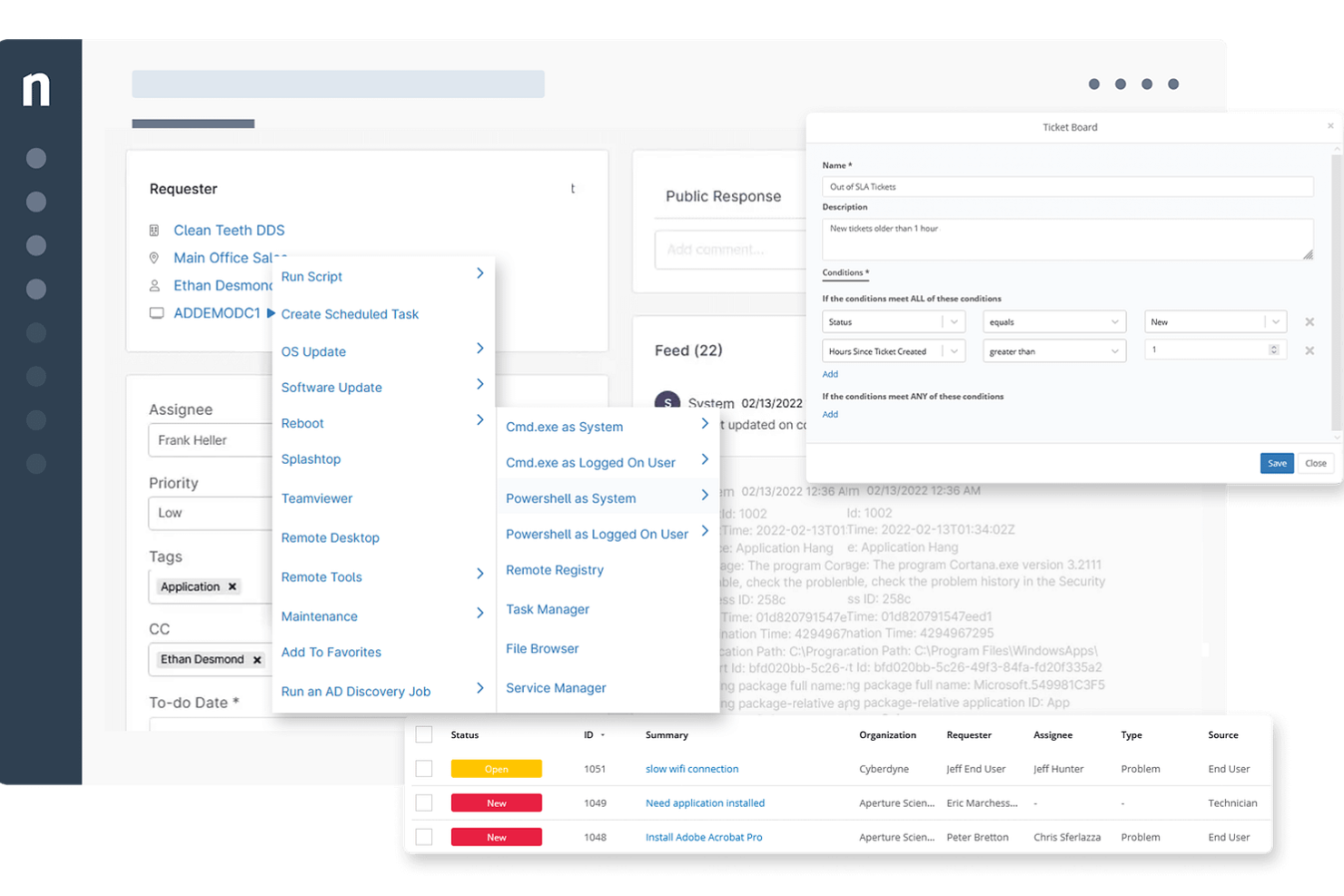
NinjaOne è una piattaforma di gestione IT basata su cloud progettata per migliorare le operazioni IT. Offre strumenti per il monitoraggio remoto, la gestione delle patch e l'automazione, consentendo al tuo team di gestire e risolvere efficacemente i problemi dei dispositivi in diverse posizioni.
Perché ho scelto NinjaOne: Offre ticketing unificato, documentazione, accesso remoto e gestione degli endpoint, facilitando un supporto più rapido su diversi dispositivi e utenti, particolarmente vantaggioso per i team ibridi. Una caratteristica degna di nota è la visibilità sugli endpoint senza la necessità di una VPN, semplificando così la gestione per i team remoti. Inoltre, le attività automatizzate, come la gestione dei dispositivi e la creazione dei ticket, liberano il personale IT permettendogli di concentrarsi su progetti strategici.
Funzionalità e integrazioni principali di NinjaOne:
Funzionalità includono la gestione dei problemi e degli incidenti e la documentazione integrata per una condivisione efficiente delle conoscenze. Offre anche automazione ricca di contesto che migliora i tempi di risoluzione dei ticket fornendo informazioni operative, identificazione proattiva dei problemi degli endpoint per prevenire l'apertura di ticket e la possibilità di automatizzare attività di helpdesk di routine come l'instradamento dei ticket e le notifiche. Queste capacità permettono al tuo team di concentrarsi su compiti più critici, migliorando la qualità complessiva del servizio.
Le integrazioni includono Crowdstrike, Halo PSA, SentinelOne, Autotask, Bitdefender, Connectwise Manage, IT Glue, Slack, Splashtop, TeamViewer, Microsoft Entra e N-able Passportal.
Pros and Cons
Pros:
- Fornisce potenti capacità di monitoraggio
- Buone funzionalità di automazione
- Le funzioni di accesso remoto facilitano una risoluzione efficiente dei problemi e il supporto
Cons:
- L'app mobile potrebbe essere migliorata
- Potrebbe offrire più informazioni sulle metriche di gestione dei ticket
New Product Updates from NinjaOne
NinjaOne Launches Browser Management
NinjaOne launches Browser Management with visibility into browser activity, extensions, AI usage, and policy controls. This extends endpoint management into the browser while giving IT teams more control over browser-based risk. For more information, visit NinjaOne’s official site.

Ideale per l'ITSM con gestione delle risorse integrata
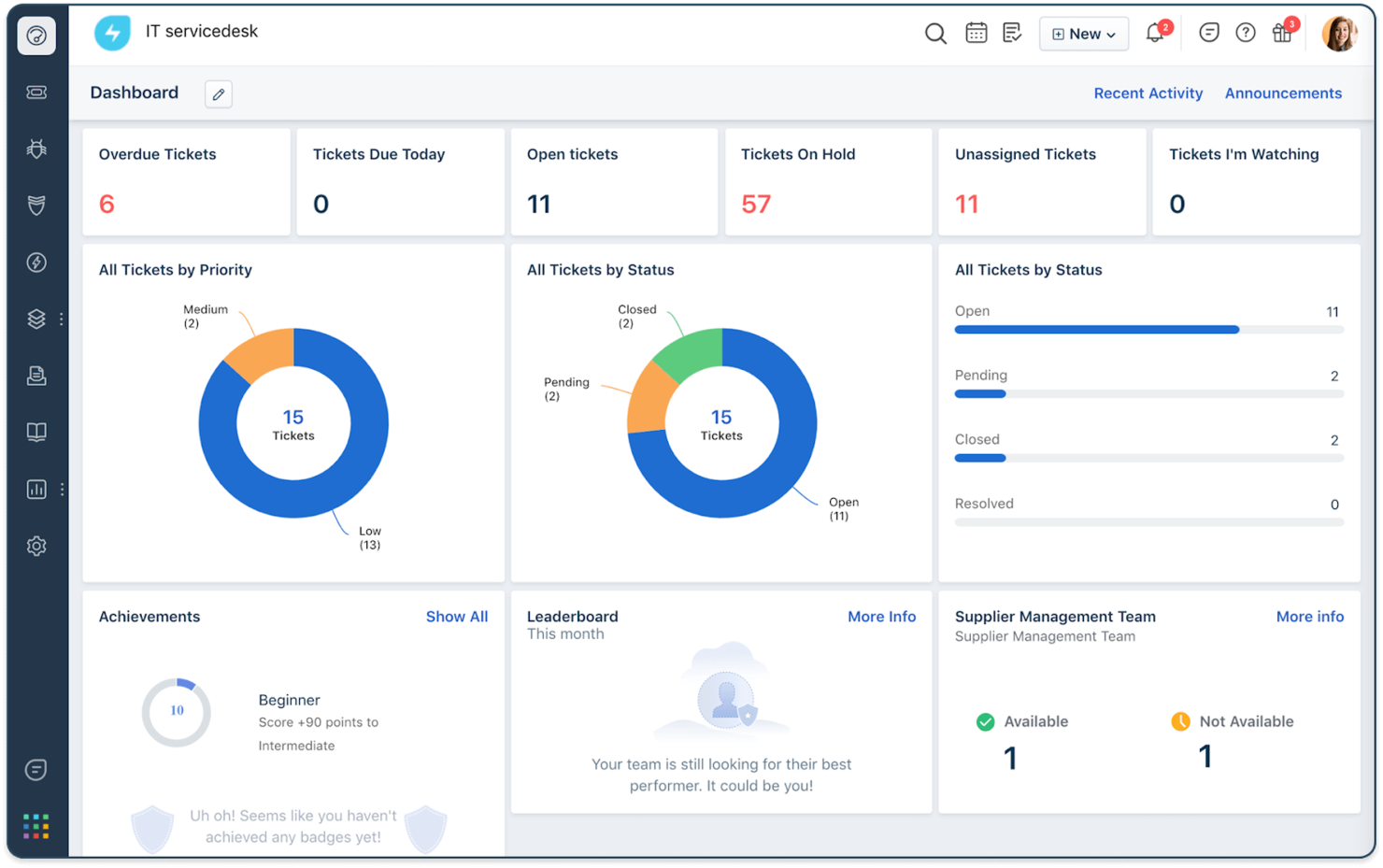
Freshservice è una soluzione ITSM di Freshworks progettata per aiutare i team IT a gestire l'erogazione dei servizi, i flussi di lavoro e le risorse da una piattaforma centralizzata. Combina gestione degli incidenti, automazione e monitoraggio delle risorse in un sistema che aiuta le organizzazioni a standardizzare i processi di servizio mantenendo la visibilità su tutto l'ambiente IT.
Perché ho scelto Freshservice: Ho scelto Freshservice perché offre funzionalità ITSM di livello enterprise senza la complessità di configurazione o operatività tipica delle piattaforme ITSM tradizionali. I suoi strumenti di gestione della conoscenza permettono ai team di creare e mantenere una knowledge base centralizzata che supporta la risoluzione più rapida dei problemi e il self-service. La piattaforma include inoltre strumenti di automazione e gestione dei carichi di lavoro che aiutano i team a gestire le richieste di servizio in modo più efficiente mantenendo la visibilità sulla capacità dei tecnici e sulle attività in corso.
Caratteristiche e integrazioni di spicco di Freshservice:
Le funzionalità includono strumenti di gestione dei carichi di lavoro che aiutano i responsabili IT a comprendere la capacità del team e pianificare meglio l'erogazione dei servizi man mano che le operazioni crescono. La piattaforma offre anche strumenti di gestione dei contratti che consentono ai team di tracciare gli accordi con i fornitori e mantenere la visibilità sugli impegni di servizio.
Le integrazioni sono preconfigurate per TeamViewer, Microsoft Teams, Slack, Jira, PagerDuty, Google Calendar, Google Hangouts, Office 365 Calendar e Google Analytics.
Pros and Cons
Pros:
- Ampia libreria di plugin
- Interfaccia intuitiva
- Funzionalità di automazione robuste
Cons:
- Personalizzazione limitata per flussi di lavoro particolari
- Struttura delle licenze complessa
New Product Updates from Freshservice
 Experience)
Freshservice Introduces a Reimagined IT Asset Management (ITAM) Experience
Freshservice introduces a reimagined IT Asset Management (ITAM) experience with continuous infrastructure discovery, dependency mapping, IPAM, and Software License Management. This update helps teams improve asset visibility and manage connected IT environments more effectively. For more information, visit Freshservice’s official site.

SysAid
Ideale per la prioritizzazione dei ticket guidata dall'IA
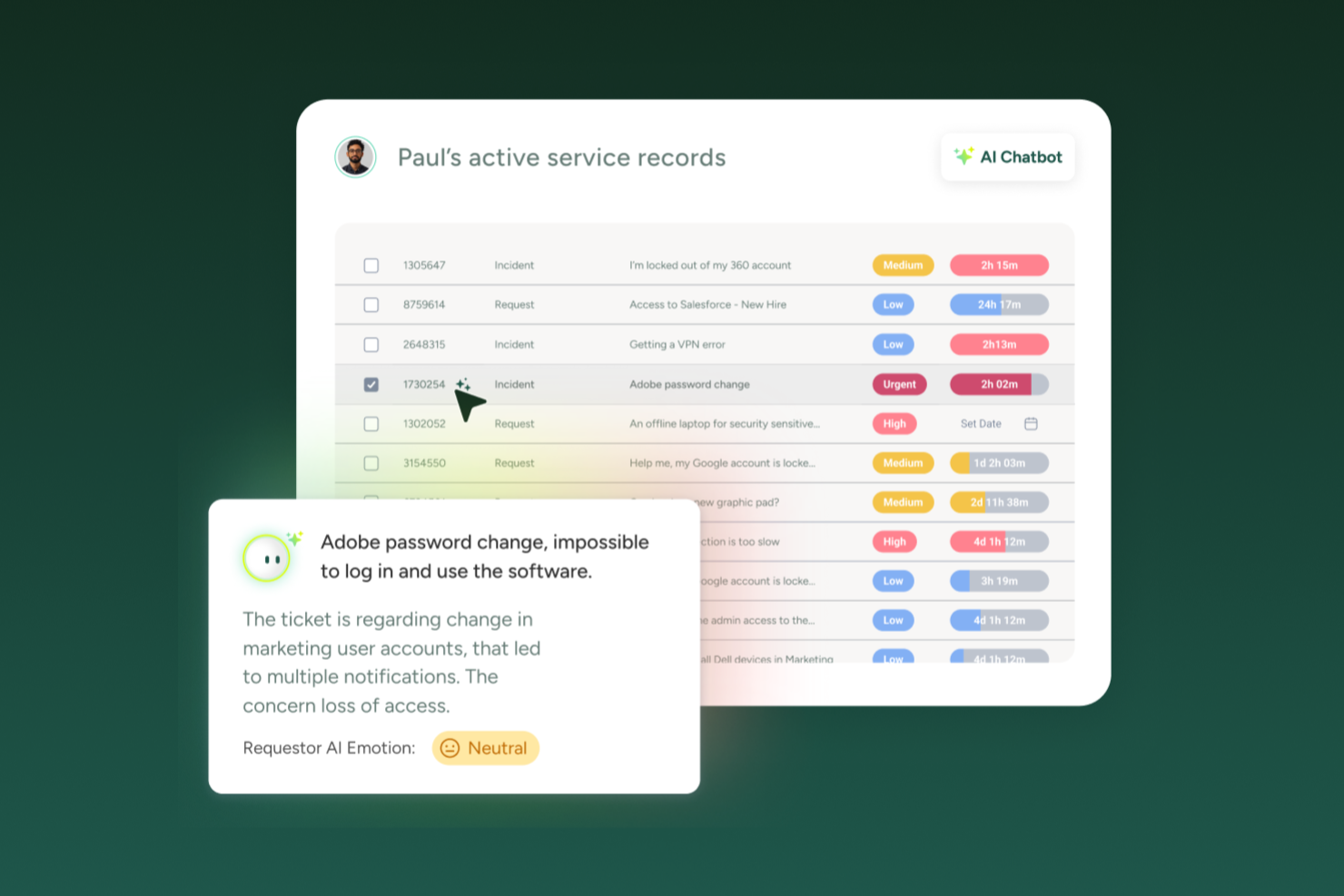
SysAid è un fornitore di soluzioni per la Gestione dei Servizi IT (ITSM) le cui principali funzionalità includono un help desk, automazione dei servizi e gestione delle risorse IT. La piattaforma è progettata per aiutare i team IT a gestire ticket e richieste di servizio in modo più efficiente grazie a flussi di lavoro centralizzati e automazione.
Perché ho scelto SysAid: Ho scelto SysAid perché offre una vasta gamma di opzioni di automazione che possono ridurre significativamente il lavoro manuale dei team del service desk. È possibile instradare automaticamente i ticket utilizzando regole predefinite che valutano le proprietà del ticket e lo assegnano all'agente o al team più adatto. Queste capacità di automazione sono supportate dalla categorizzazione e prioritizzazione dei ticket basata sull'intelligenza artificiale di SysAid, insieme a strumenti di reportistica integrata che offrono visibilità sulle prestazioni del servizio e aiutano a individuare le aree di miglioramento.
Caratteristiche distintive e integrazioni di SysAid:
Le funzionalità che si sono distinte nella gestione dei ticket includono la matrice di priorità di SysAid, che aiuta a determinare l'urgenza dei ticket e ad assegnare automaticamente la priorità in base ai criteri di impatto e urgenza. Per ridurre il rischio di richieste non gestite, SysAid può anche impostare automaticamente le date di scadenza in base ai dettagli della richiesta di servizio e inviare notifiche e promemoria per mantenere il lavoro in movimento e informare le parti interessate.
Le integrazioni includono Jira, Slack, Microsoft 365, Google Workspace, Shibboleth, Nagios, OpenAM, Microsoft Teams, SolarWinds e TeamViewer.
Pros and Cons
Pros:
- Monitoraggio efficace dei ticket e gestione degli incidenti
- Alto livello di personalizzazione
- Funzione di chat in tempo reale
Cons:
- Interfaccia utente complessa da navigare
- Le numerose funzionalità possono risultare troppo complesse per le piccole realtà IT
New Product Updates from SysAid

SysAid Adds Bulk Contract Import
SysAid added bulk contract import to License Manager Essentials, letting admins upload a CSV template, validate entries, and create multiple contracts at once. For more information, visit SysAid's official site.

Il miglior ITSM alimentato dall'IA

TeamDynamix è una piattaforma di gestione dei servizi IT alimentata dall'IA che combina processi allineati all'ITIL con automazione, gestione dei progetti e tracciamento delle risorse. Si estende oltre l'IT alla gestione dei servizi aziendali (ESM), rendendola un'opzione flessibile per le organizzazioni che desiderano gestire le richieste tra più dipartimenti.
Perché ho scelto TeamDynamix: Ho scelto TeamDynamix per il suo agente virtuale AI conversazionale, che aiuta a deviare i ticket gestendo immediatamente le richieste comuni. Questo può ridurre significativamente il carico sull'help desk e liberare il personale IT per questioni più complesse. Apprezzo anche come combini ITSM con la gestione del portafoglio progetti, così puoi gestire progetti IT e richieste di servizio fianco a fianco. Questo rende più semplice coordinare le risorse e mantenere la visibilità sui lavori in corso.
Caratteristiche principali e integrazioni di TeamDynamix:
Le caratteristiche che ho trovato preziose includono il suo agente virtuale alimentato dall'IA per il supporto istantaneo, automazione dei workflow senza codice per costruire processi di servizio senza bisogno di programmazione, e gestione integrata delle risorse IT per un miglior controllo su dispositivi e risorse. La piattaforma supporta inoltre la gestione dei servizi aziendali, consentendo a Risorse Umane, strutture e altri dipartimenti di usare lo stesso sistema. La gestione del portafoglio progetti è integrata, quindi puoi supervisionare progetti IT e compiti operativi in un unico posto.
Le integrazioni includono Workday, Office365, Slack, Salesforce, Microsoft Teams, ServiceNow, Jira, BMC Remedy, Cherwell, TaskCall, Sassafras ed EPIC, oltre a centinaia di altre.
Pros and Cons
Pros:
- Automazione workflow senza codice
- Gestione solida del portafoglio progetti
- Agente virtuale basato su IA
Cons:
- Prezzi non pubblicati pubblicamente
- Integrazioni native limitate

Atera
Ideale per RMM e help desk unificati

Atera riunisce molti degli strumenti necessari per gestire le operazioni IT — dalla gestione di dispositivi e reti remoti all'assistenza clienti e all'installazione di aggiornamenti — in un'unica piattaforma cloud creata appositamente per team IT e fornitori di servizi gestiti (MSP). È interessante se vuoi che il tuo team IT (piccolo o in crescita) gestisca infrastruttura, supporto e automazione da un solo posto senza dover usare sistemi diversi.
Perché ho scelto Atera
Ho scelto Atera perché integra strettamente monitoraggio remoto, help desk e automazione — una combinazione di funzioni di cui molti team IT hanno bisogno ma che spesso acquistano separatamente. L'RMM integrato (monitoraggio e gestione remota) ti consente di controllare server, workstation e dispositivi di rete da un'unica dashboard. L'help desk e la gestione ticket integrati consentono flussi di lavoro di supporto semplici affiancati al monitoraggio. E le nuove funzionalità basate su AI (ad esempio script automatici e gestione ticket) aggiungono automazione, permettendo al team di rispondere più velocemente e con meno lavoro manuale alle esigenze IT.
Funzionalità principali di Atera
Oltre alle capacità base di monitoraggio, help desk e automazione, ecco altre funzionalità utili che tu e il tuo team potreste apprezzare:
- Gestione asset: Atera ti consente di tracciare e verificare tutto l'hardware e il software attraverso un inventario centralizzato e personalizzabile.
- Gestione patch: Puoi programmare e distribuire aggiornamenti su tutti i dispositivi da un solo posto — aiutando a mantenere i sistemi sicuri e aggiornati.
- Scoperta della rete: La piattaforma può scansionare e mappare la rete per identificare i dispositivi connessi, offrendo visibilità su infrastruttura ed eventuali punti deboli.
- Avvisi e report in tempo reale: Atera genera avvisi quando emergono problemi e offre dashboard e report per monitorare performance, uptime e attività dei tecnici.
Integrazioni di Atera
Le integrazioni includono Microsoft Teams, Slack, Google Workspace, AzureAD, Okta, Zapier, Bitdefender, Axcient, Emsisoft e Ironscales.
Pros and Cons
Pros:
- Gli strumenti di accesso remoto sono rapidi e affidabili per le attività IT quotidiane
- La scrittura di script assistita da AI riduce il carico manuale per i tecnici
- Il monitoraggio dei dispositivi copre server, workstation e hardware di rete
Cons:
- Le impostazioni degli avvisi possono risultare rigide nella gestione di ambienti complessi
- Il deployment delle patch talvolta manca di opzioni di controllo granulare
New Product Updates from Atera

Atera Adds Webhook Triggers for Technician Assignment Changes
Atera ticket automation rules now support a webhook trigger when a ticket’s technician assignment changes, expanding automation beyond creation, status updates, and closure/resolution events. For more information, visit Atera's official site.

SuperOps
Ideale per l'automazione delle attività tramite AI
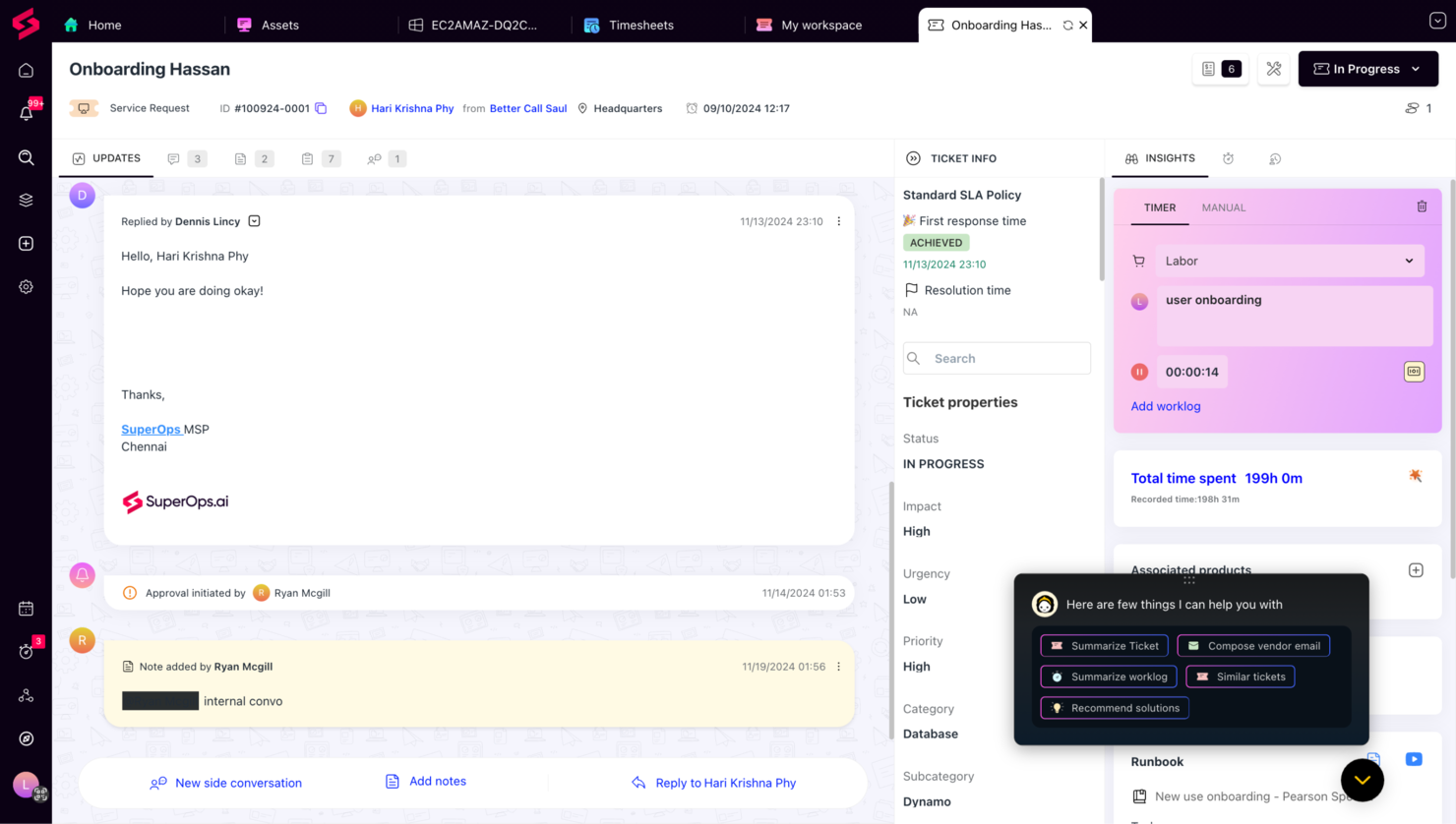
SuperOps è un software PSA-RMM moderno progettato specificamente per i fornitori di servizi gestiti (MSP) e per i team IT. Si concentra sul miglioramento dell'efficienza operativa e sulla crescita con una suite di funzionalità pensate per ottimizzare le attività di gestione IT e supportare gli obiettivi aziendali.
Perché ho scelto SuperOps: Ciò che mi ha colpito di più di SuperOps è la gestione del service desk. Questa funzione consente di gestire, monitorare e risolvere le richieste di assistenza, garantendo che il team possa affrontare le attività rapidamente e mantenere le operazioni senza intoppi. Grazie a Monica AI, la soluzione AI di SuperOps, è possibile automatizzare le attività di routine, aiutando il team a dare priorità alle questioni più complesse senza perdersi in compiti ripetitivi.
Un altro motivo per scegliere SuperOps sono le sue capacità dettagliate di gestione degli asset. Questa funzione aiuta a tenere traccia di tutti gli asset IT, assicurandone l'utilizzo ottimale e la manutenzione regolare. Inoltre, le funzionalità di gestione dei contratti e di pianificazione degli eventi della piattaforma consentono di amministrare servizi IT, contratti associati e calendari in modo efficiente, semplificando il rispetto delle aspettative di delivery.
Funzionalità distintive e integrazioni
Le funzionalità includono la sicurezza degli endpoint, che protegge l'ambiente IT da potenziali minacce, assicurando integrità e sicurezza dei dati. La piattaforma offre inoltre la gestione automatizzata delle patch, mantenendo i sistemi aggiornati e protetti senza necessità di intervento manuale. Un'altra funzionalità è il monitoraggio della rete in tempo reale, che permette di individuare e risolvere proattivamente i problemi di rete prima che impattino sulle attività.
Le integrazioni disponibili includono Acronis, ESET, Sophos, SentinelOne, Emsisoft, ISL Online, TeamViewer, Xero, Quickbooks, Stripe, ConnectWise e Autotask.
Pros and Cons
Pros:
- Design pulito e intuitivo che facilita la navigazione
- Aggiornamenti regolari e nuove funzionalità
- Interfaccia facile da usare
Cons:
- Il costo può essere proibitivo per startup o piccole imprese
- Non compatibile con alcuni strumenti di terze parti
New Product Updates from SuperOps

SuperOps Improves Ticket Visibility, Dynamic Forms, and Dashboard Views
SuperOps introduces improvements to ticket visibility, dynamic forms, and dashboard visualizations. These updates help technicians manage customer conversations, simplify ticket creation, and keep dashboard views consistent across teams. For more information, visit SuperOps' official site.
 .
.
Deel IT
Ideale per la fornitura di asset a livello globale
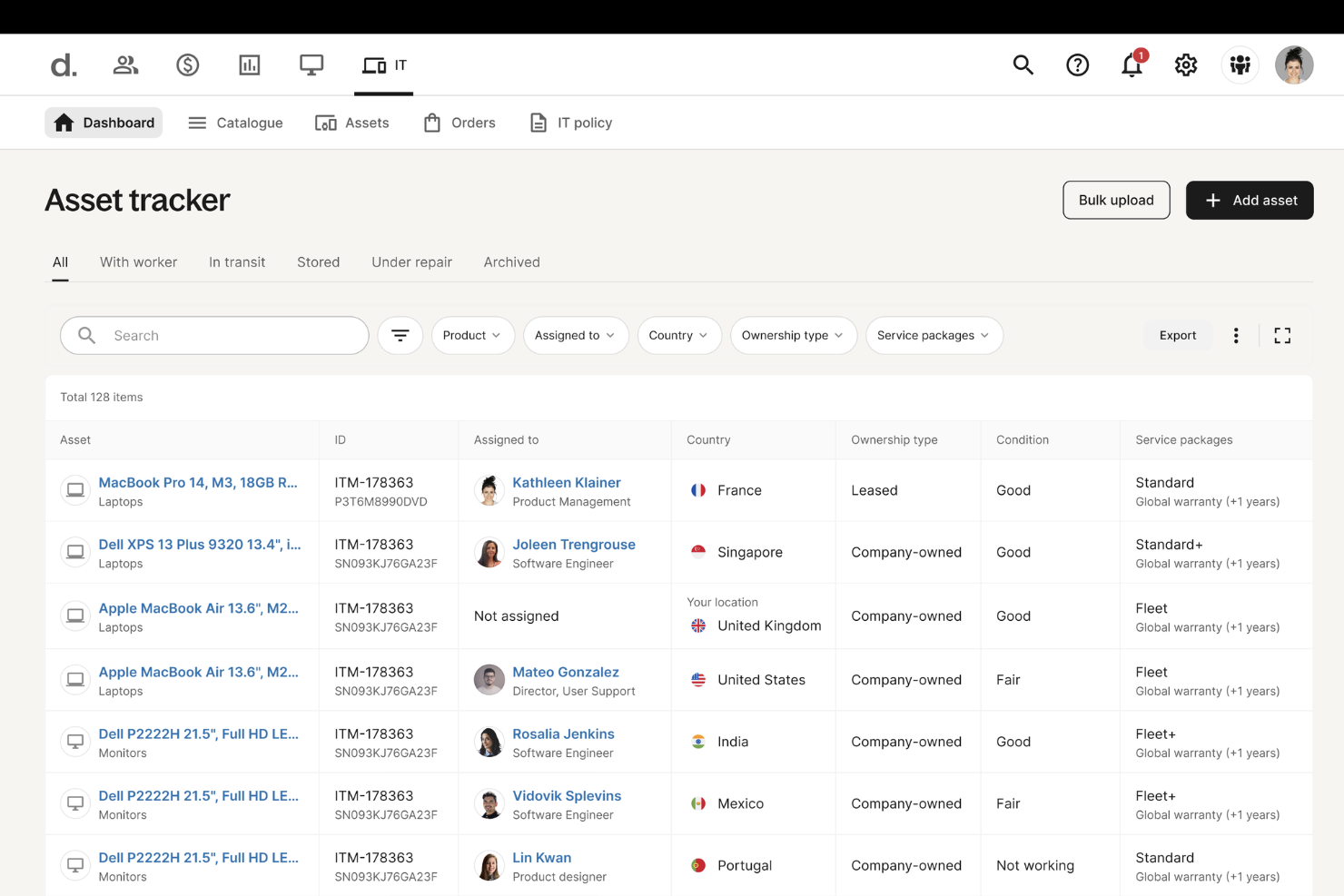
Deel IT fornisce alle aziende gli strumenti per gestire le operazioni e l'infrastruttura IT in diversi paesi. Aiuta i team IT a semplificare la gestione della forza lavoro, automatizzare la conformità e garantire la fornitura sicura di asset a livello globale.
Perché ho scelto Deel: Deel IT permette alle aziende di automatizzare la fornitura di asset IT, rendendo semplice concedere, gestire e revocare l’accesso ai software per i dipendenti globali. I team IT possono configurare automaticamente l'accesso agli strumenti e alle applicazioni principali, garantendo la conformità alle politiche aziendali e ai requisiti di sicurezza. Questo è particolarmente utile per la gestione dei servizi IT (ITSM), dove l’accesso sicuro e le autorizzazioni devono essere rigorosamente controllati.
Funzionalità e integrazioni di rilievo di Deel:
Funzionalità includono il monitoraggio degli asset IT, che consente ai team di monitorare e gestire i dispositivi aziendali distribuiti su più sedi. L’automazione dell’offboarding garantisce che i dipendenti e i collaboratori in uscita perdano immediatamente l’accesso alle risorse IT, riducendo i rischi per la sicurezza. Inoltre, i flussi di lavoro IT personalizzati consentono alle aziende di creare processi strutturati per la fornitura dei dispositivi, le richieste di accesso e i controlli di conformità, rendendo le operazioni IT più efficienti.
Integrazioni comprendono QuickBooks, Workday, UKG, SAP, Netsuite, Carta, Xero, Greenhouse, Slack, Microsoft Teams, Okta e OneLogin.
Pros and Cons
Pros:
- Automatizza la fornitura e il recupero degli asset IT
- Semplifica la conformità e la sicurezza IT a livello globale
- Assistenza globale per la risoluzione dei problemi e la riparazione dei dispositivi
Cons:
- Supporto limitato per strumenti ITSM altamente specializzati
- Non offre funzionalità IT avanzate, come il monitoraggio della rete

Rootly
Ideale per la gestione degli incidenti alimentata dall'IA
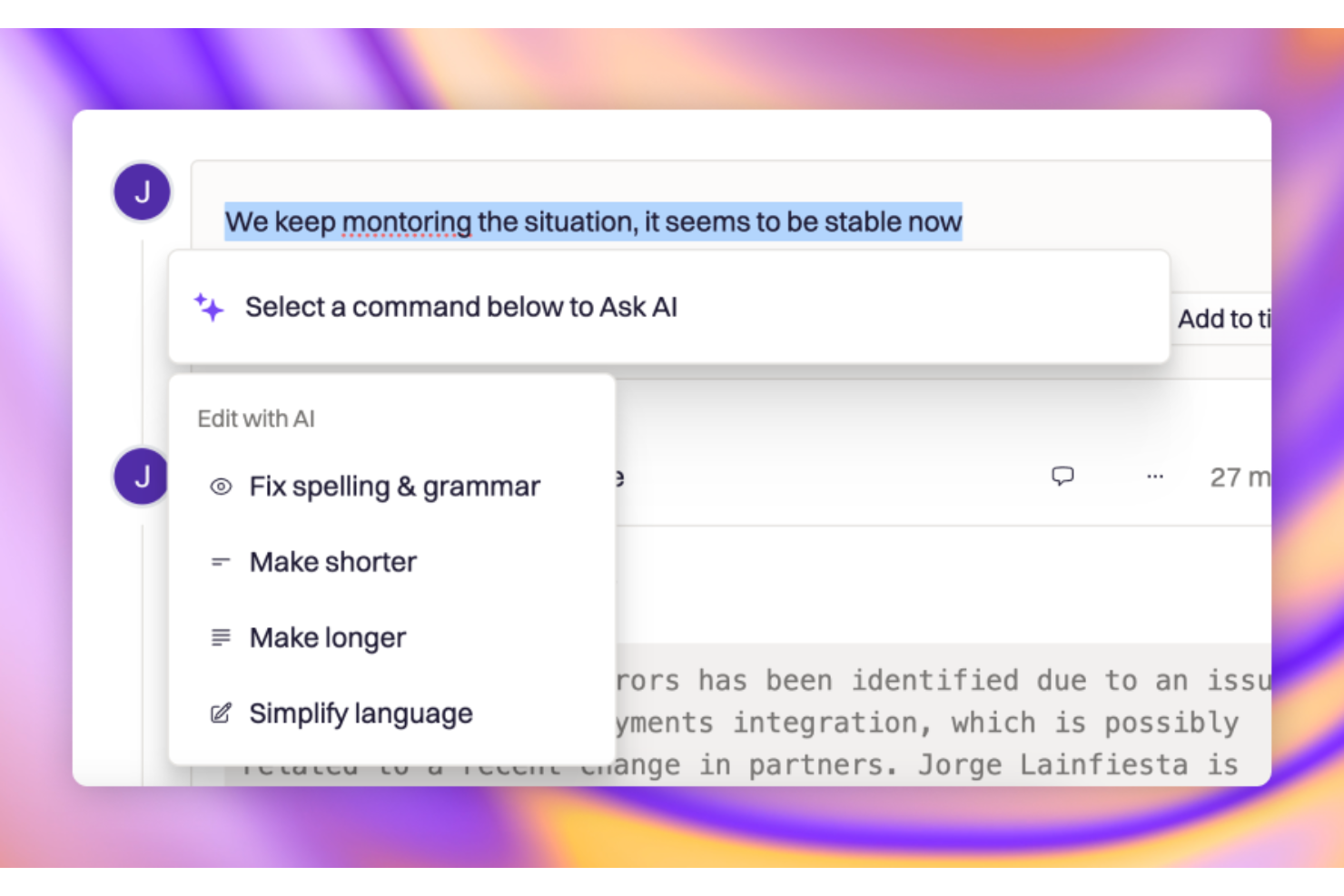
Rootly è una piattaforma di gestione degli incidenti guidata dall'IA, pensata per i team IT e SRE che devono rispondere rapidamente alle interruzioni del servizio. In qualità di strumento ITSM, semplifica processi come la pianificazione dei turni di reperibilità, la gestione degli incidenti e l'analisi post-incidente, aiutando i team a mantenere alta disponibilità e prestazioni dei servizi.
Perché ho scelto Rootly: Ho scelto Rootly perché porta la risposta agli incidenti direttamente nei flussi di lavoro esistenti. Le sue integrazioni con Slack e Microsoft Teams permettono di gestire gli incidenti, assegnare ruoli e comunicare aggiornamenti in tempo reale, senza dover cambiare strumento. Mi piace anche la capacità SRE basata su IA che analizza automaticamente gli avvisi e i dati storici per identificare le potenziali cause principali, aiutando così a ridurre il tempo medio di risoluzione. Queste funzionalità di automazione e collaborazione rendono Rootly perfetto per i team focalizzati su una gestione proattiva dei servizi IT.
Funzionalità e integrazioni distintive di Rootly:
Le funzionalità includono retrospettive assistite dall'IA che generano automaticamente riepiloghi e timeline degli incidenti, risparmiando tempo nei post-mortem. I suoi strumenti di gestione delle reperibilità facilitano la programmazione e l'escalation, garantendo una copertura 24/7. Ho trovato utili anche le pagine di stato integrate per comunicare in tempo reale gli aggiornamenti di servizio agli stakeholder.
Le integrazioni includono Jira, Slack, Microsoft Teams, Confluent, Docs, Terraform Provider, API e MCP Server, offrendo al tuo team flessibilità tra strumenti di sviluppo e collaborazione.
Pros and Cons
Pros:
- Analisi automatizzata degli incidenti guidata dall’IA
- Integrazione per la risoluzione degli incidenti basata su IDE
- Retrospettive automatizzate per i post-incidenti
Cons:
- Limitato all'elenco delle integrazioni supportate
- Curva di apprendimento per la configurazione di automazioni avanzate

Serval
Ideale con un service desk nativo per l'IA
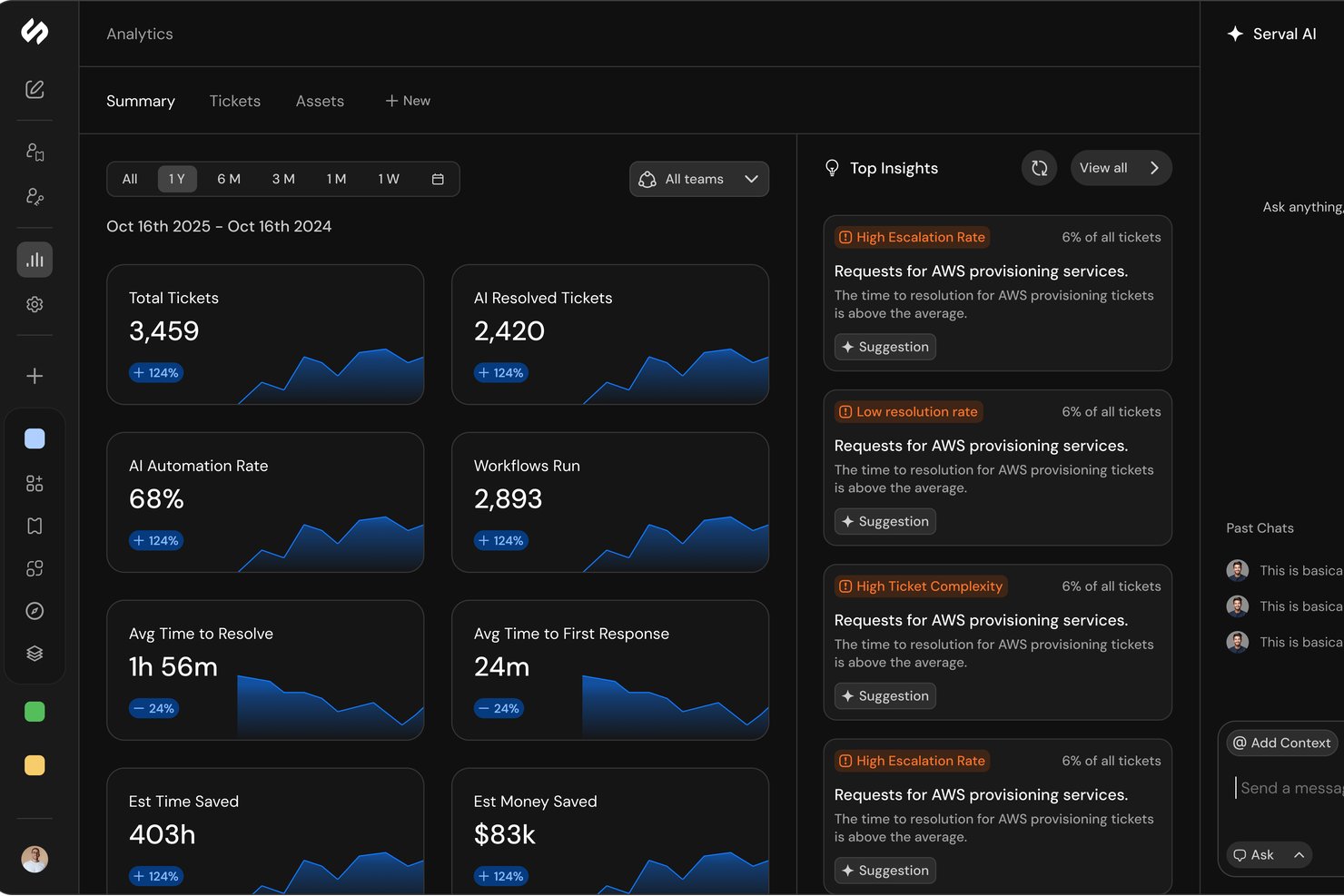
Serval è una piattaforma ITSM nativa per l'IA che combina gestione dei ticket, gestione degli accessi, automazione dei flussi di lavoro e analisi dei servizi attraverso una serie di agenti IA progettati per classificare, risolvere e analizzare le richieste di assistenza IT.
Per chi è più indicato Serval?
Serval è particolarmente adatto ai team IT di grandi aziende che gestiscono ambienti IT complessi e volumi elevati di richieste di assistenza. È progettato per aiutare le organizzazioni a migliorare l'efficienza dei servizi attraverso l'automazione basata sull'IA.
Perché ho scelto Serval
Ho scelto Serval come una delle soluzioni migliori perché la sua architettura IA è realmente costruita da zero, non aggiunta in un secondo momento. L'Agente dell'help desk classifica, diagnostica e risolve automaticamente i ticket su Slack, Teams, e-mail e un portale web, senza intervento umano. Ciò che trovo particolarmente interessante è l'Agente di automazione: converte il linguaggio naturale in flussi di lavoro deterministici in TypeScript, che il CLI può recuperare localmente per il controllo delle versioni e la revisione tramite Git. Di conseguenza, il mio team può distribuire le automazioni nello stesso modo in cui gestisce il codice delle applicazioni.
Funzionalità principali di Serval
- Suggerimenti dell'IA: analizza i modelli dei ticket e propone nuove competenze, flussi di lavoro, installazioni di flussi di lavoro, connessioni alle app e aggiornamenti della knowledge base da sottoporre a revisione.
- Analisi: monitora i tassi di risoluzione, il tempo risparmiato e le prestazioni degli SLA tramite dashboard integrate.
- Controlli degli accessi privilegiati: consente di impostare flussi di approvazione, assegnare accessi e monitorare le modifiche con registri di audit completi.
- Sincronizzazione bidirezionale dei ticket: supporta la sincronizzazione bidirezionale con ServiceNow, Jira Service Management, Zendesk, Freshservice e Linear.
Integrazioni di Serval
Serval offre integrazioni native con ServiceNow, Jira, Zendesk, Okta, Google Workspace, GitHub, Rippling, Slack, Notion, AWS e altro ancora. È disponibile un'API per le integrazioni personalizzate.
Pros and Cons
Pros:
- Gli agenti IA risolvono i ticket senza intervento umano
- Creazione di flussi di lavoro in linguaggio naturale tramite l'Agente di automazione
- Gestione efficace degli accessi con registri di audit completi
Cons:
- I flussi di lavoro avanzati possono richiedere tempo per essere perfezionati
- Piattaforma più recente con una base di recensioni degli utenti più ridotta
Ideale per workflow personalizzabili

Monday Service è una piattaforma di servizi intuitiva e totalmente personalizzabile, progettata per aiutare i team di assistenza e supporto a gestire e automatizzare le proprie operazioni e processi.
Perché ho scelto Monday Service: Monday Service è uno strumento IT Service Management (ITSM) altamente efficace, noto per i suoi workflow personalizzabili che permettono ai team IT di adattare i processi alle esigenze specifiche, assicurando che tutte le attività siano gestite in modo strutturato ed efficiente.
Inoltre, le funzionalità di automazione della piattaforma aiutano a risparmiare tempo automatizzando le attività ripetitive, riducendo il carico sullo staff IT e minimizzando il rischio di errore umano. Gli strumenti di collaborazione in tempo reale aumentano la produttività permettendo comunicazione e coordinamento tra i membri del team, indipendentemente dalla loro posizione fisica.
Caratteristiche distintive e integrazioni di Monday Service:
Le funzionalità che mi hanno colpito maggiormente usando Monday Service includono una knowledge base self-service sia per i clienti che per gli agenti, l'acquisizione dei ticket via e-mail e WorkForms, l'instradamento intelligente dei ticket, ticket e workflow illimitati, conformità HIPAA, classificazione automatica dei ticket e sicurezza e governance di livello aziendale.
Le integrazioni includono Microsoft Teams, Microsoft Outlook, Slack, DocuSign, Gmail e Azure DevOps.
Pros and Cons
Pros:
- Aggiornamenti in tempo reale
- Knowledge base completa
- Viste di progetto personalizzabili
Cons:
- Dimensione minima del team di 3 persone
- Funzionalità limitate dell'app mobile
Altre opzioni
Qui sotto trovi altri validi strumenti che non sono entrati nella mia lista principale, ma che potrebbero comunque essere la scelta giusta per altri casi d’uso.
- SolarWinds Service Desk
Migliore gestione degli incidenti
- InvGate Service Management
Ideale per ITSM scalabile e senza codice
- Jira Service Management
Miglior gestore di flussi di lavoro
- BMC Helix ITSM
Miglior gestore delle modifiche
- 4me
Le migliori funzionalità di rilevamento dei tempi
- GoTo Resolve
Ideale per l’accesso remoto ai dispositivi
- Freshdesk
Le migliori funzionalità di gestione omnicanale
- Zendesk Suite
Ideale per aziende in crescita
- SolarWinds Web Help Desk
Ideale per installazioni on-premise
- ServiceNow ITSM
Ideale per le aziende nel settore sanitario
- Syncro
Ideale per PSA e RMM integrati


Come Valuto gli Strumenti ITSM
Valuto due livelli: se uno strumento soddisfa i requisiti di base dell'ITSM—gestione degli incidenti, workflow dei cambiamenti, CMDB—e cosa lo distingue, come le capacità di IA o la profondità nell'ITIL.
Funzionalità Core (Requisiti Fondamentali per Questo Elenco)
Quando seleziono gli strumenti per il mio elenco, valuto ognuno su una scala da 0 (non offre la funzionalità) a 5 (eccelle in quest'area) per ciascuna delle funzionalità principali elencate di seguito. Quindi, calcolo il punteggio totale dello strumento in una percentuale. Ogni strumento deve raggiungere un punteggio minimo totale del 75% per essere preso in considerazione per l'inclusione.
- Gestione Incidenti & Richieste: Valuto l'acquisizione dei ticket multi-canale, la logica di instradamento e il tracciamento completo del ciclo di vita—dall'invio di un problema al laptop tramite portale da parte di un utente fino alla risoluzione e chiusura.
- Gestione Cambiamenti & Problemi: Ogni strumento dovrebbe supportare workflow di approvazione, valutazione del rischio e analisi delle cause radice così che i team possano gestire revisione CAB e indagini post-incidente.
- Gestione Asset & Configurazione: Verifico la presenza di ITAM con mappatura delle relazioni CMDB—come tracciare un guasto a un server fino a una specifica catena di dipendenze CI all'interno della tua infrastruttura.
- Portale Self-Service & Knowledge Base: Un portale ricercabile rivolto agli utenti finali con articoli KB integrati è cruciale qui. Strumenti come ServiceNow e Freshservice offrono questo servizio approcciandolo in modo diverso, ma entrambi lo garantiscono.
- Gestione SLA & Reportistica: Analizzo come ogni strumento gestisce le definizioni SLA multi-livello, le regole di escalation e le dashboard che mostrano metriche come il tempo medio di risoluzione e i tassi di violazione.
- Automazione dei Workflow & Integrazioni: L'automazione delle attività ripetitive—come l'assegnazione automatica dei ticket per categoria o il triggering degli avvisi su Slack—e l'ampiezza delle integrazioni native sono fattori chiave in ogni valutazione.
Una volta che ho un elenco di strumenti che soddisfano i criteri, considero cosa distingue ogni piattaforma.
Fattori Differenzianti (Cosa Distingue i Fornitori)
Ecco come confronto i diversi fornitori:
Funzionalità Distintive
Le capacità di IA sono oggi un importante elemento distintivo. Valuto se uno strumento offre agenti virtuali, classificazione predittiva dei ticket o riepiloghi generati mediante IA che aiutano gli operatori a risolvere i problemi più rapidamente. La gestione dei servizi enterprise è un'altra area che osservo attentamente—piattaforme come Jira Service Management e ServiceNow permettono di estendere i workflow ITSM ai team HR o ai servizi generali. Considero anche le opzioni di personalizzazione low-code, poiché i team IT spesso devono creare moduli, app o workflow personalizzati senza coinvolgere sviluppatori.
Oltre le Funzionalità
La profondità delle integrazioni è fondamentale. Verifico se uno strumento si connette in modo bidirezionale con le toolchain DevOps come Jira e GitHub, oltre che con piattaforme di monitoraggio come Datadog o New Relic. Anche le certificazioni di sicurezza e conformità hanno un forte peso—SOC 2 Type II e ISO 27001 sono segni di maturità, e cerco controlli d'accesso basati su ruoli, SSO e audit logging per i team in settori regolamentati. Valuto anche il costo totale di proprietà, compreso se l'onboarding guidato, i template predefiniti e partner certificati sono disponibili per accelerare il time-to-value.
Come scegliere gli strumenti ITSM
È facile perdersi in lunghe liste di funzionalità e strutture di pricing complesse. Per aiutarti a restare focalizzato durante il processo di selezione software, ecco un elenco di fattori da tenere in considerazione:
| Fattore | Cosa valutare |
|---|---|
| Scalabilità | Lo strumento cresce con il tuo team? Verifica che possa gestire un aumento di utenti e ticket senza perdere efficienza. Considera la crescita e l'espansione future. |
| Integrazioni | Funziona con i tuoi sistemi attuali? Cerca l’integrazione fluida con il tuo stack software, come CRM, software di approvvigionamento IT o piattaforme email, per evitare dati isolati. |
| Personalizzazione | Puoi adattare lo strumento ai tuoi flussi di lavoro? Assicurati che offra opzioni per modificare processi, campi e report in base alle tue esigenze specifiche. |
| Facilità d’uso | Il tuo team lo troverà intuitivo? Valuta l’interfaccia e la facilità di navigazione. Uno strumento complesso può rallentare l’adozione e ridurre la produttività. |
| Implementazione e onboarding | Com’è la transizione? Valuta le risorse e il supporto per l’onboarding, come tutorial, sessioni formative e assistenza nella configurazione. Minimizza le interruzioni durante il rollout. |
| Costo | È adatto al tuo budget? Confronta i piani tariffari con il budget a disposizione. Considera eventuali costi nascosti come componenti aggiuntivi, tariffe di supporto o rincari per la scalabilità. |
| Sicurezza | I tuoi dati sono protetti? Controlla la conformità agli standard di sicurezza e le misure di protezione dei dati, soprattutto se gestisci informazioni sensibili o soggette a regolamentazione. |
Cosa sono gli strumenti ITSM?
Gli strumenti di IT Service Management (ITSM) centralizzano e automatizzano i flussi di lavoro di supporto IT—dalla gestione degli incidenti e delle richieste fino al controllo delle modifiche e al tracciamento degli asset—così che i team possano fornire un servizio coerente, garantire il rispetto degli SLA e migliorare l’efficienza operativa in tutta l’organizzazione.
Possono anche supportare le strategie IT per la pianificazione, la progettazione e l'esecuzione. Le organizzazioni con risorse interne limitate spesso si affidano a agenzie specializzate di outsourcing IT per gestire queste complesse implementazioni.
Caratteristiche degli strumenti ITSM
Quando scegli gli strumenti ITSM, fai attenzione alle seguenti funzionalità chiave:
- Gestione degli incidenti: Gestisci le interruzioni dei servizi IT consentendo di registrare, monitorare e risolvere rapidamente i problemi. Questo garantisce meno grattacapi sia al tuo team IT che agli utenti finali, riducendo i tempi di inattività e la confusione.
- Evasione delle richieste di servizio: Gestisci richieste utente di routine come il reset della password o l'installazione di software in modo strutturato e coerente. Questo ti aiuta a fornire servizi in modo efficiente mantenendo tutti aggiornati.
- Gestione dei cambiamenti: Apporta modifiche ai sistemi IT senza intoppi e con meno rischi. Puoi pianificare, approvare e documentare le modifiche così da ridurre le sorprese e garantire continuità ai tuoi servizi.
- Gestione dei problemi: Identifica e affronta le cause alla base dei problemi ricorrenti. Questo include l’analisi delle tendenze e la ricerca delle cause profonde: non solo spegni incendi, ma previeni i problemi futuri.
- Database di gestione della configurazione (CMDB): Tieni traccia di tutti gli asset IT e delle loro relazioni in un unico hub centralizzato. Questo ti aiuta a vedere come tutto è collegato, rendendo più facile la risoluzione dei problemi e la valutazione dell’impatto.
- Gestione della conoscenza: Conserva soluzioni, FAQ e passaggi di troubleshooting in una libreria ricercabile. Questo consente agli utenti e al team di risolvere i problemi più velocemente e con maggiore sicurezza.
- Portale self-service: Permetti agli utenti di inviare richieste, monitorare lo stato e trovare soluzioni tutto in un unico posto. Questo riduce le domande ripetitive e permette a chiunque di auto-supportarsi, risparmiando tempo al reparto IT.
- Gestione dei livelli di servizio: Imposta, monitora ed applica gli accordi sul livello di servizio (SLA), così da misurare quanto bene vengono mantenute le promesse e individuare aree di miglioramento.
- Report e analisi: Visualizza metriche di performance, tendenze e colli di bottiglia tramite dashboard e report integrati. Questo ti aiuta a monitorare i progressi e a prendere decisioni più intelligenti basate sui dati reali.
Funzionalità comuni di AI negli strumenti ITSM
Oltre alle funzionalità standard elencate sopra, molte di queste soluzioni stanno integrando l'intelligenza artificiale (AI) con caratteristiche come:
Analisi del sentiment: Monitora e interpreta i feedback degli utenti utilizzando AI per valutare la soddisfazione e segnalare automaticamente le tendenze negative che richiedono interventi rapidi.
Classificazione automatica dei ticket: Usa l'intelligenza artificiale per analizzare i ticket in arrivo e classificarli istantaneamente, accelerando così l’assegnazione e riducendo la necessità di smistamento manuale.
Agenti virtuali e chatbot: Offri supporto 24/7 agli utenti attraverso intelligenza artificiale conversazionale che risponde alle domande, fornisce soluzioni o indirizza le richieste alla persona giusta.
Analisi predittiva: Analizza incidenti e tendenze passate per prevedere problemi futuri in modo da poter intraprendere azioni preventive prima che si aggravino.
Routing intelligente: Inoltra i ticket al tecnico più qualificato grazie all'analisi AI su carico di lavoro, competenze e storicità dei ticket, garantendo una risoluzione più rapida.
Vantaggi
L'implementazione di strumenti ITSM offre diversi vantaggi sia al tuo team che all’azienda. Ecco alcuni dei benefici a cui puoi aspirare:
- Efficienza migliorata: Automatizza compiti di routine come la gestione dei ticket, liberando tempo per attività più strategiche.
- Qualità del servizio migliorata: Garantisce processi di gestione delle modifiche coerenti, riducendo gli errori e migliorando l’erogazione dei servizi.
- Migliore allocazione delle risorse: Le funzionalità di gestione degli asset aiutano a ottimizzare l’utilizzo delle risorse IT, con risparmi sui costi.
- Maggiore soddisfazione degli utenti: Risposte rapide alle richieste di servizio aumentano l’esperienza e la soddisfazione degli utenti.
- Decisioni più informate: Le analisi guidate dall’AI forniscono approfondimenti preziosi, supportando decisioni IT più intelligenti.
- Flessibilità da remoto: L’accesso mobile permette ai team IT di gestire i servizi ovunque, mantenendo l’agilità.
- Protezione dei dati: Le misure di sicurezza garantiscono conformità agli standard e tutelano le informazioni sensibili.
Costi e prezzi
Selezionare gli strumenti ITSM richiede una comprensione dei vari modelli e piani di prezzo disponibili. Ad esempio, NinjaOne vs. ManageEngine presentano funzionalità differenti che possono adattarsi al tuo ambiente IT. I costi variano in base alle funzionalità, alla dimensione del team, agli extra e altro ancora. La tabella qui sotto riassume i piani comuni, i loro prezzi medi e le caratteristiche tipiche incluse nelle soluzioni ITSM:
Tabella di confronto dei piani per gli strumenti ITSM
| Tipo di piano | Prezzo medio | Funzionalità comuni |
|---|---|---|
| Piano gratuito | $0 | Sistema di ticketing di base, assistenza utenti limitata e forum della community. |
| Piano personale | $5-$25/user/month | Gestione degli incidenti, supporto via email e reportistica di base. |
| Piano business | $30-$60/user/month | Reportistica avanzata, gestione delle modifiche, tracciamento degli asset e supporto prioritario. |
| Piano enterprise | $70-$120/user/month | Integrazioni personalizzate, informazioni guidate dall’IA, account manager dedicato e supporto 24/7. |
FAQ sugli strumenti ITSM
Ecco alcune risposte a domande comuni sugli strumenti ITSM:
Come posso valutare la scalabilità degli strumenti ITSM in un'azienda in rapida crescita?
Inizia verificando se lo strumento ITSM può gestire un numero crescente di utenti, ticket e servizi senza rallentamenti. Cerca licenze utente flessibili, capacità di automazione e implementazioni in cloud. Richiedi casi di studio da aziende di dimensioni simili e testa la scalabilità durante il periodo di prova.
Cosa dovrei considerare nell'integrazione degli strumenti ITSM con il mio stack tecnologico esistente?
Assicurati che lo strumento ITSM offra API solide e integrazioni pronte all’uso con i tuoi sistemi principali, come la gestione delle identità, strumenti di monitoraggio e piattaforme di collaborazione. Revisiona la documentazione per la compatibilità, verifica il supporto del fornitore alle integrazioni e richiedi casi di studio o referenze di clienti per l’integrazione.
Come possono gli strumenti ITSM supportare i requisiti di compliance e sicurezza?
Scegli soluzioni ITSM con controlli di accesso integrati, registrazione degli audit e crittografia dei dati. Verifica la presenza di certificazioni come SOC 2 o ISO 27001. Chiedi ai fornitori informazioni su aggiornamenti di sicurezza regolari, report di conformità e su come i loro strumenti ti aiutano a mantenere gli standard di settore nel tuo ambiente.
Quali funzionalità ITSM aiutano a ridurre i tempi di risoluzione dei ticket?
Cerca strumenti con instradamento dei ticket potenziato dall’IA, workflow automatizzati e integrazione con la knowledge base. Funzionalità come la collaborazione in tempo reale, modelli rapidi per risposte e reportistica avanzata aiutano i team a rispondere più velocemente. Dopo l’implementazione, misura il tempo di risoluzione per valutare l’impatto.
Quali sono le best practice per l’adozione degli strumenti ITSM e la gestione del cambiamento all’interno del mio team IT?
Inizia con una comunicazione chiara e coinvolgi il tuo team IT fin dalle prime fasi nella scelta della soluzione ITSM. Offri formazione pratica adattata ai tuoi workflow. Utilizza feedback e adottare rollout a fasi per gestire eventuali resistenze. Monitora l’utilizzo, riconosci gli utenti esperti e adatta i processi in base ai risultati concreti.
Cosa succede dopo
Se stai ricercando strumenti ITSM, collegati gratuitamente con un consulente SoftwareSelect per ricevere raccomandazioni.
Compila un modulo e programma una chiamata per condividere le tue esigenze specifiche. Riceverai una lista di software da valutare e supporto durante tutto il processo di acquisto, incluse le trattative di prezzo.