

Le 10 Migliori Soluzioni Software per la Gestione degli Incidenti Recensite nel 2026

Migliori Software di Gestione degli Incidenti - Shortlist


Gestire gli incidenti può essere davvero difficile per i team tecnici. Quando un problema imprevisto interrompe il tuo flusso di lavoro, ogni secondo è prezioso. È qui che interviene un software di gestione degli incidenti, aiutandoti a risolvere velocemente ed efficientemente i problemi.
Nella mia esperienza, trovare lo strumento giusto può fare davvero la differenza per mantenere le operazioni fluide. Ho testato e recensito diverse opzioni per offrirti una selezione accuratamente studiata delle migliori soluzioni disponibili.
In questo articolo condividerò le mie principali scelte, mettendo in evidenza le caratteristiche uniche e i vantaggi di ciascun software. Otterrai informazioni su come questi strumenti possano aiutare il tuo team a migliorare i tempi di risposta e a rafforzare la collaborazione, assicurandoti di essere pronto ad affrontare qualsiasi situazione.
Perché fidarsi dei nostri consigli sui software
Il nostro team testa e recensisce software dal 2012. In quanto leader tecnologici noi stessi, sappiamo quanto sia difficile — e importante — scegliere il software giusto.
Per questa guida, abbiamo valutato gli strumenti attraverso test praticie ricerche indipendenti, assegnando un punteggio agli strumenti in base ai nostri criteri di selezione.
Le nostre recensioni riflettono il nostro giudizio editoriale umano, non un discorso di vendita.
Revisori esperti:
Sommario Migliori Software di Gestione degli Incidenti
Questa tabella comparativa riassume i dettagli sui prezzi delle mie migliori scelte di software di gestione degli incidenti per aiutarti a trovare quello più adatto al tuo budget e alle esigenze della tua azienda.
| Tool | Best For | Trial Info | Price | ||
|---|---|---|---|---|---|
| 1 | Ideale per la continuità operativa | Demo gratuita disponibile | Prezzi su richiesta | Website | |
| 2 | Ideale per la gestione automatizzata degli incidenti | Prova gratuita di 21 giorni + demo gratuita | Da $19/agente/mese (fatturato annualmente) | Website | |
| 3 | Ideale per il rilevamento in tempo reale degli incidenti | Prova gratuita di 30 giorni + demo gratuita disponibile | Da $129/tecnico/mese (fatturato annualmente) | Website | |
| 4 | Ideale per ridurre il carico di lavoro IT con l'AI | Prova gratuita di 14 giorni | Prezzo su richiesta | Website | |
| 5 | Ideale per l’assistenza clienti | Prova gratuita di 30 giorni disponibile | Da $15/utente/mese | Website | |
| 6 | Ideale per esigenze di conformità | Demo gratuita disponibile | Prezzo su richiesta | Website | |
| 7 | Ideale per integrare la caccia alle minacce | Prova gratuita + demo gratuita disponibili | Prezzo su richiesta | Website | |
| 8 | Ideale per la risoluzione degli incidenti potenziata dall'intelligenza artificiale | Demo gratuita disponibile | A partire da $20/utente/mese | Website | |
| 9 | Ideale per la gestione dei log | Prova gratuita di 30 giorni + demo gratuita | Prezzo su richiesta | Website | |
| 10 | Ideale per i flussi di lavoro di risoluzione automatica degli incidenti IT | Demo gratuita disponibile | Prezzi su richiesta | Website |


Recensioni Migliori Software di Gestione degli Incidenti
Qui sotto trovi i miei riassunti dettagliati dei migliori software di gestione degli incidenti che ho selezionato nella mia shortlist. Le mie recensioni offrono uno sguardo approfondito alle principali caratteristiche, pro e contro, integrazioni e casi d’uso ideali di ciascun tool per aiutarti a trovare quello migliore per te.

Preparis
Ideale per la continuità operativa
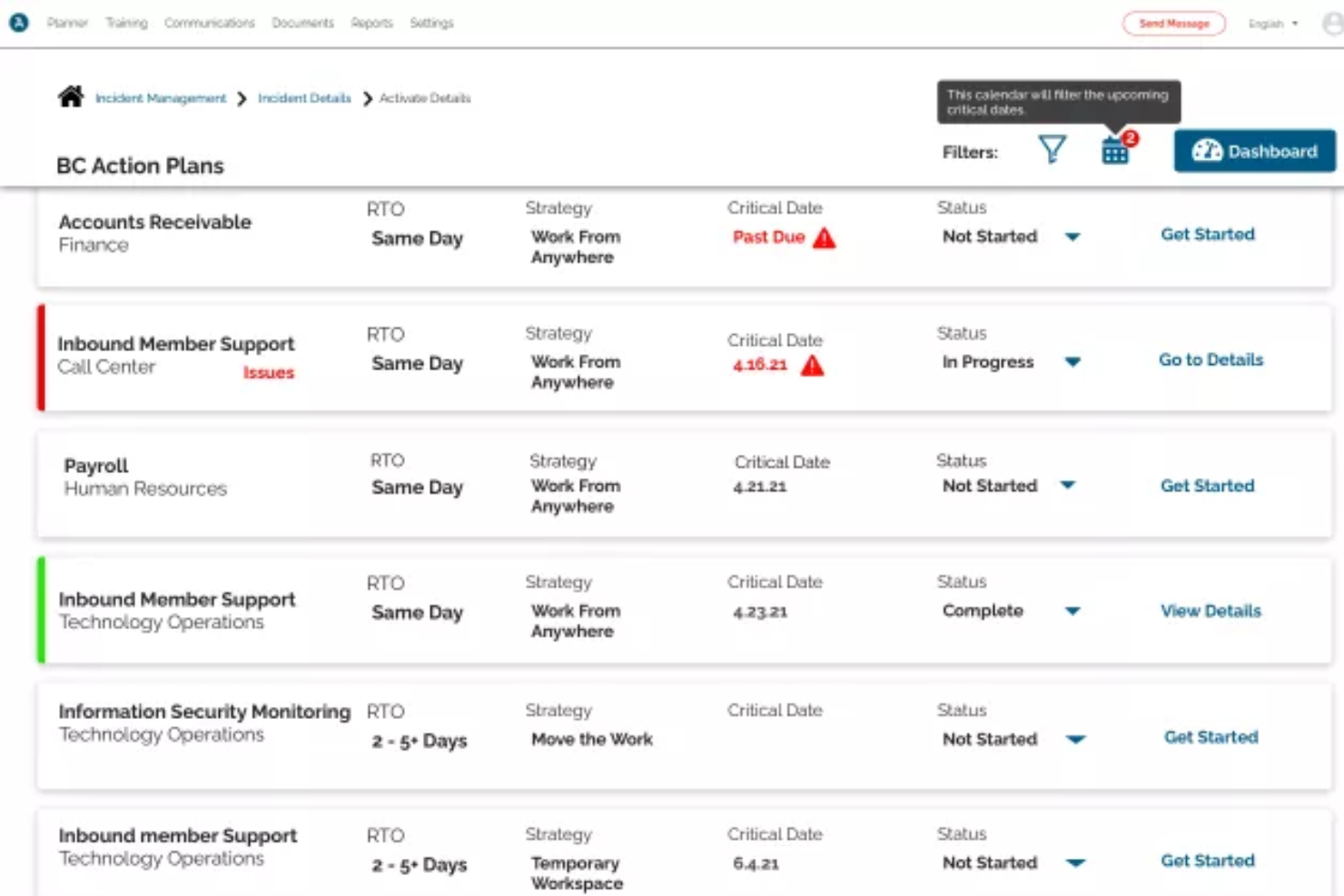
Preparis è una piattaforma di gestione degli incidenti progettata per i team IT e i responsabili aziendali che necessitano di coordinare la risposta alle emergenze, semplificare la comunicazione e mantenere la resilienza operativa durante le interruzioni.
Per chi è ideale Preparis?
Preparis è particolarmente adatto a organizzazioni di medie e grandi dimensioni che necessitano di un approccio strutturato alla pianificazione della continuità operativa e al coordinamento della risposta alle emergenze.
Perché ho scelto Preparis
Preparis si guadagna un posto nella mia lista perché è uno dei pochi strumenti di gestione degli incidenti costruiti specificamente attorno alla continuità operativa come disciplina, e non solo come funzionalità. Mi piace come Preparis Planner guidi i team nella creazione di piani di continuità completamente personalizzabili, inclusa l'analisi dell'impatto aziendale (BIA), le valutazioni dei rischi e la reportistica per la conformità, tutto in un unico flusso di lavoro guidato. Quando si verifica un incidente, il modulo Incident Manager consente al mio team di allestire una war room virtuale, distribuire elenchi di azioni agli stakeholder e monitorare i progressi di recupero attraverso dashboard in tempo reale. Trovo utile la visibilità a 360° sullo stato degli incidenti quando bisogna coordinare le risposte tra più team o sedi.
Caratteristiche principali di Preparis
- Messaggistica di emergenza bidirezionale: Invia allarmi ai dipendenti in base a sede, reparto, gruppo o ruolo tramite il loro canale preferito e monitora le risposte in un'unica dashboard.
- Allerta basata su geofence: Disegna geofence in tempo reale oppure utilizza quelle predefinite per inviare notifiche geolocalizzate ai dipendenti sul campo o in smart working.
- Condivisione di documenti in cloud e offline: Archivia e condividi documenti di continuità in modo che restino accessibili anche quando l'edificio non è disponibile o i server sono offline.
- Formazione online e centro di conoscenza: Accedi a oltre 100 argomenti di formazione specifici alle minacce e certifica i team di crisi sui protocolli di risposta alle emergenze direttamente dalla piattaforma.
Integrazioni di Preparis
Preparis offre integrazioni native con Everbridge, Alertus e Singlewire e mette a disposizione un'API per integrazioni personalizzate.
Pros and Cons
Pros:
- Design intuitivo del cruscotto
- Piani efficaci di gestione delle crisi
- Sistemi di notifica di emergenza
Cons:
- Non ideale per team piccoli
- Possibili ritardi nelle notifiche

Ideale per la gestione automatizzata degli incidenti
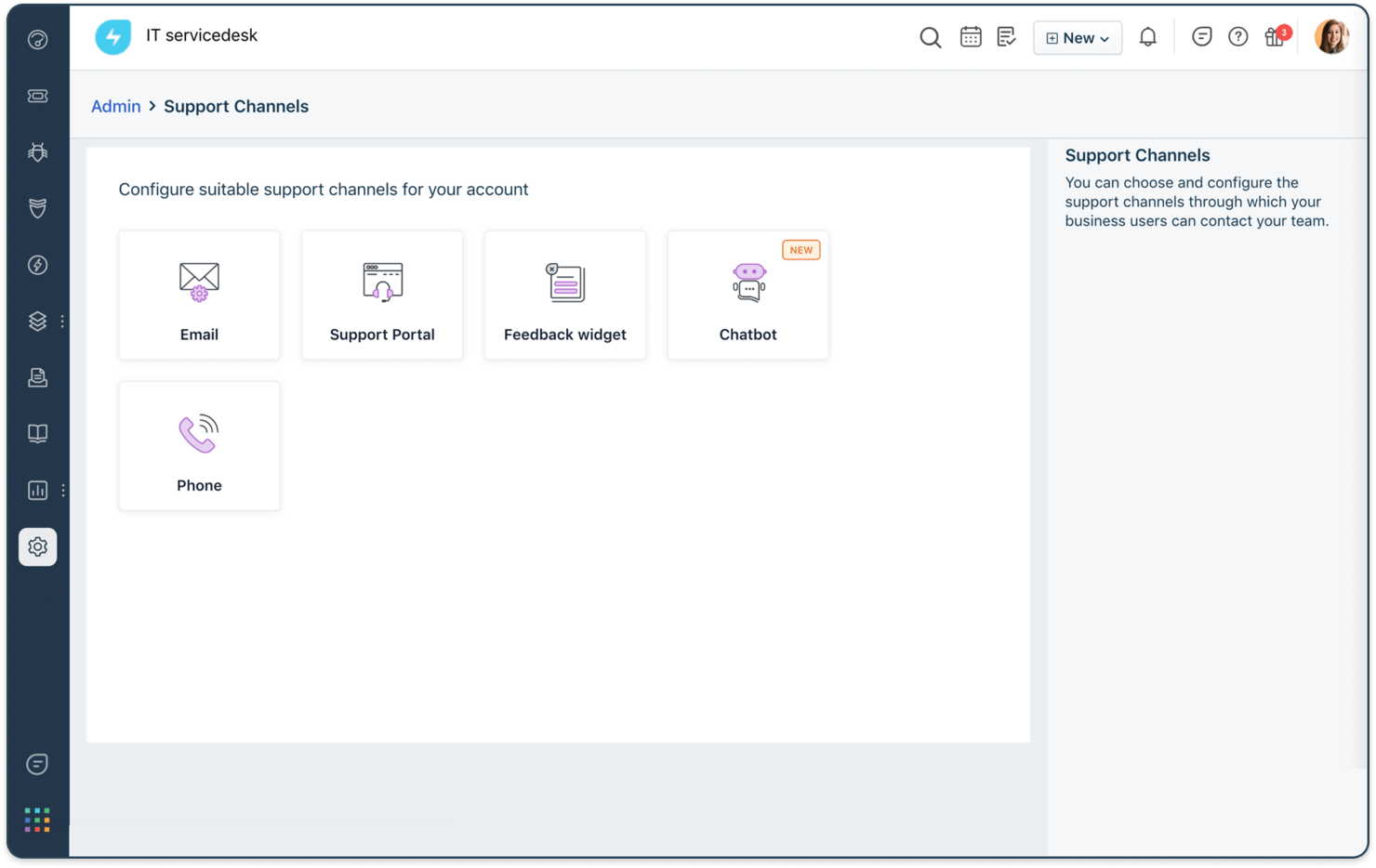
Freshservice è una piattaforma di gestione dei servizi IT basata su cloud, progettata per i team IT di aziende di ogni dimensione che necessitano di centralizzare la risposta agli incidenti, automatizzare i flussi di lavoro e migliorare la visibilità sulle proprie operazioni IT.
Per chi è ideale Freshservice?
Freshservice è particolarmente adatto a team IT di medie e grandi dimensioni che hanno bisogno di un approccio strutturato e conforme a ITIL per gestire incidenti, richieste di servizio e operazioni IT in un unico luogo.
Perché ho scelto Freshservice
Ho scelto Freshservice tra i migliori strumenti per la gestione automatizzata degli incidenti grazie all'ampiezza delle sue funzionalità di automazione che coprono l’intero ciclo di vita dell’incidente. Mi piace il fatto che, quando arriva un avviso, Freddy AI correla i segnali dai tool di monitoraggio, indirizza automaticamente il ticket al team giusto in base a disponibilità e carico di lavoro, e può avviare una war room completa di contesto—il tutto senza intervento manuale. Il mio team utilizza il builder di workflow senza codice per impostare escalation automatiche, trigger SLA e turni di reperibilità, così che le persone giuste vengano coinvolte al momento giusto. I postmortem generati dall’IA dopo ogni incidente rilevano automaticamente le cause radice, restituendo veri insight per la prevenzione invece dei soliti report manuali.
Caratteristiche principali di Freshservice
- Gestione SLA: Crea policy SLA personalizzate, esegui escalation automatica dei ticket prioritari e monitora la conformità rispetto agli obiettivi di servizio.
- Supporto omnicanale: Gestisci gli incidenti inviati via email, Slack, Microsoft Teams o tramite portale self-service da una singola vista per l’agente.
- Gestione avvisi: Consolida gli avvisi da più fonti di monitoraggio in una sola vista e riduci il rumore grazie al filtro assistito dall’IA.
- Integrazione CMDB: Collega direttamente gli incidenti agli asset e agli elementi di configurazione interessati per offrire ai rispondenti un contesto infrastrutturale completo.
Integrazioni di Freshservice
Freshservice offre oltre 1.200 integrazioni native, tra cui Microsoft Teams, Slack, Jira, Azure AD, TeamViewer e SecPod, con app connettore, API flessibili e strumenti low-code disponibili per integrazioni personalizzate.
Pros and Cons
Pros:
- Accordi sul livello di servizio (SLA) e regole di escalation personalizzabili
- Può consultare dati storici con il suo motore IA chiamato Freddy
- Report e analisi approfonditi sulle tendenze e le performance degli incidenti
Cons:
- Curva di apprendimento ripida
- Può diventare costoso con l’aumentare degli agenti
New Product Updates from Freshservice
 Experience)
Freshservice Introduces a Reimagined IT Asset Management (ITAM) Experience
Freshservice introduces a reimagined IT Asset Management (ITAM) experience with continuous infrastructure discovery, dependency mapping, IPAM, and Software License Management. This update helps teams improve asset visibility and manage connected IT environments more effectively. For more information, visit Freshservice’s official site.

Atera
Ideale per il rilevamento in tempo reale degli incidenti
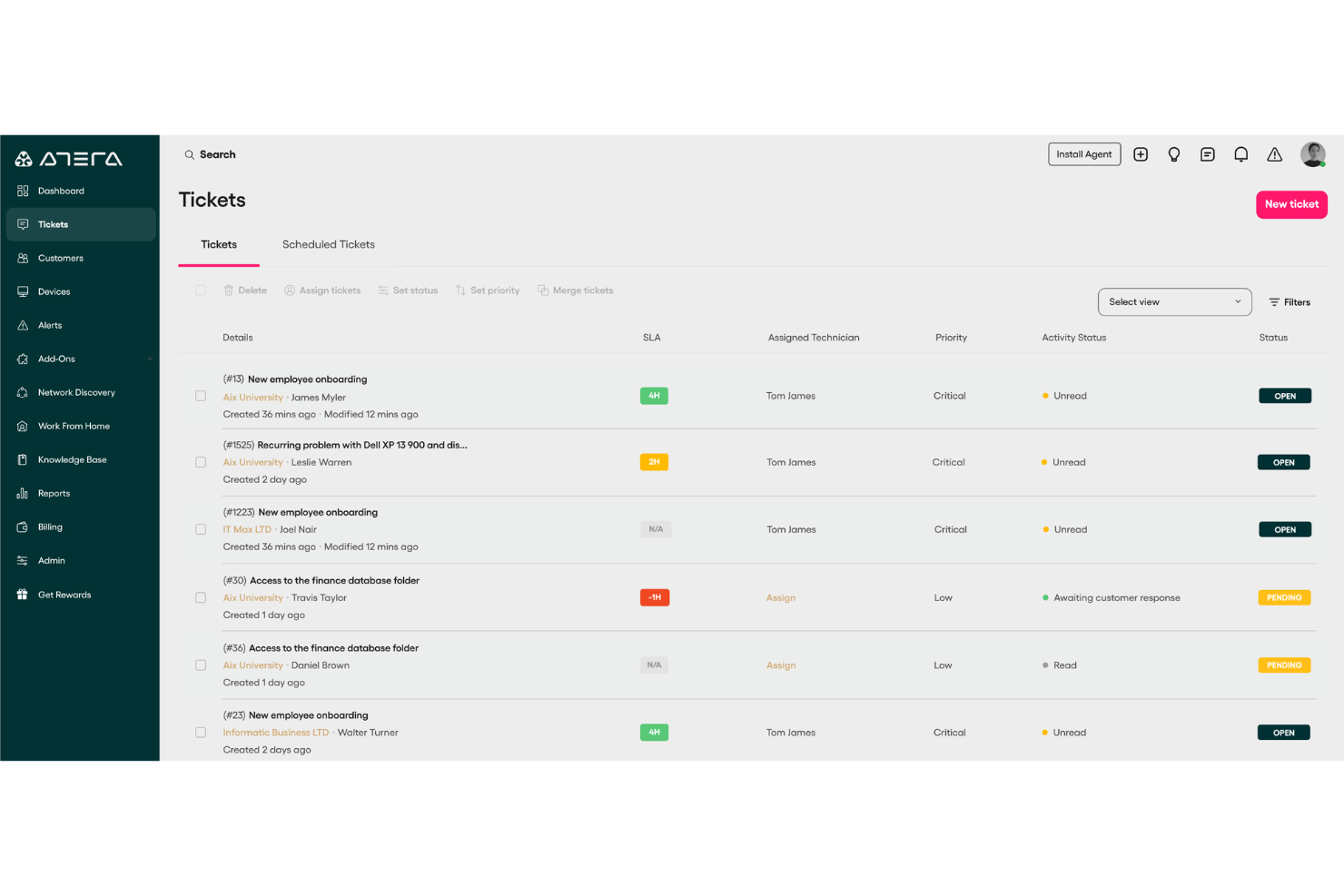
Atera è una piattaforma di gestione IT tutto-in-uno progettata per i fornitori di servizi gestiti (MSP) e team IT interni che necessitano di monitorare, rilevare e risolvere incidenti su molteplici dispositivi e ambienti da un'unica dashboard.
Per chi è ideale Atera?
Atera è particolarmente adatta a MSP e reparti IT che gestiscono endpoint distribuiti e hanno bisogno di una piattaforma unificata per monitoraggio, ticketing e supporto remoto.
Perché ho scelto Atera
Atera si guadagna un posto nella mia selezione per il modo in cui le sue capacità di monitoraggio e allerta in tempo reale sono strettamente integrate nel flusso di risposta agli incidenti. Mi piace che l'agente di Atera monitori costantemente le metriche dei dispositivi—CPU, RAM, uso del disco, banda di rete ed eventi di Windows—e invii allerta non appena qualcosa supera una soglia che hai definito. Questo significa che il mio team non aspetta che un utente segnali un problema; stiamo già analizzando la situazione prima che se ne accorgano. Lo strato AI Copilot va oltre analizzando proattivamente questi alert e suggerendo soluzioni, riducendo considerevolmente il tempo tra rilevamento e azione.
Caratteristiche principali di Atera
- Helpdesk e ticketing: Gestisci, traccia e rispondi alle richieste di supporto degli utenti finali da un sistema di ticket centralizzato con automazione e auto-tagging alimentati dall'IA.
- Gestione delle patch: Automatizza la distribuzione delle patch per dispositivi Windows, Mac e Linux su tutto l'ambiente secondo una pianificazione definita o su richiesta.
- Scoperta della rete: Scansiona le tue reti monitorate per identificare tutti i dispositivi connessi, le porte aperte e le potenziali CVE, inclusi asset non autorizzati.
- Automazione IT: Crea profili di automazione per gestire attività ripetitive—come l'installazione di software e l'onboarding—su dispositivi nuovi o esistenti.
Integrazioni di Atera
Atera offre integrazioni native con Splashtop, TeamViewer, ScreenConnect, AnyDesk, HubSpot, Slack, WhatsApp, Microsoft Teams, Google (per SSO), Azure Active Directory e Okta, e fornisce un'API per integrazioni personalizzate.
Pros and Cons
Pros:
- Supporto IA integrato per la gestione dei ticket e la risoluzione dei problemi
- Piattaforma unificata per RMM, PSA e help desk
- Modello di prezzo pay-per-technician
Cons:
- Personalizzazione limitata dei flussi di lavoro
- L'app mobile ha meno funzionalità rispetto alla versione desktop
New Product Updates from Atera

Atera Adds Webhook Triggers for Technician Assignment Changes
Atera ticket automation rules now support a webhook trigger when a ticket’s technician assignment changes, expanding automation beyond creation, status updates, and closure/resolution events. For more information, visit Atera's official site.

SysAid
Ideale per ridurre il carico di lavoro IT con l'AI

SysAid è una piattaforma di gestione dei servizi IT progettata per i team IT di medie e grandi organizzazioni che devono centralizzare il tracciamento degli incidenti, automatizzare i flussi di lavoro e gestire gli asset IT per mantenere i sistemi efficienti.
Per chi è ideale SysAid?
SysAid è particolarmente adatto a dipartimenti IT di medie e grandi dimensioni che necessitano di una piattaforma ITSM strutturata, dotata di automazione integrata per gestire elevati volumi di incidenti e richieste di servizio.
Perché ho scelto SysAid
Ho scelto SysAid tra i migliori grazie al livello di automazione fornito dall'intelligenza artificiale, che solleva davvero il team da molte attività. Quello che trovo davvero notevole è che gli agenti AI di SysAid non si limitano a suggerire soluzioni, ma agiscono in autonomia. Esempi includono la risoluzione di ticket duplicati, lo sblocco degli account utente, l'assegnazione di licenze Microsoft 365 e la segnalazione di asset con garanzia in scadenza: tutto ciò avviene automaticamente senza intervento manuale. SysAid Copilot aggiunge un ulteriore livello, fornendo agli operatori IT visione istantanea dei ticket, risposte AI già redatte e un'interfaccia conversazionale per interrogare i dati di servizio—così anche gli incidenti complessi vengono gestiti più rapidamente. La piattaforma sostiene di risolvere automaticamente oltre il 60% degli incidenti prima ancora che si trasformino in ticket; nella mia esperienza, è proprio questo tipo di deflessione che cambia radicalmente il funzionamento quotidiano di un service desk.
Funzionalità chiave di SysAid
- Portale self-service: Un portale personalizzabile dove i dipendenti possono inviare ticket, monitorare lo stato delle richieste e consultare una base di conoscenza senza contattare direttamente l’IT.
- Costruttore di workflow senza codice: Un’interfaccia drag-and-drop per costruire flussi di lavoro multi-step per l’instradamento, l’escalation e l’approvazione dei ticket senza dover scrivere codice.
- Classificazione degli incidenti allineata a ITIL: I ticket vengono automaticamente categorizzati utilizzando dati storici, analisi del sentiment e metadati per indirizzarli attraverso workflow ITIL strutturati.
- Prioritizzazione dei ticket basata su SLA: Applica soglie SLA, punteggi di urgenza e livelli di rischio per impostare automaticamente le scadenze e riassegnare i ticket prima che si verifichino violazioni.
Integrazioni di SysAid
SysAid offre integrazioni native con l’ecosistema Microsoft, tra cui Microsoft 365 e Azure, nonché integrazioni con Jira, Slack, Google Workspace, Okta, Salesforce e Zapier. È disponibile un’API per integrazioni personalizzate.
Pros and Cons
Pros:
- L'AI ottimizza la gestione dei ticket
- Analisi in tempo reale migliorano il monitoraggio delle performance
- L'automazione dei processi migliora l'efficienza
Cons:
- Il design dell'interfaccia appare leggermente datato
- Il processo di implementazione è spesso lento
New Product Updates from SysAid

SysAid Adds Bulk Contract Import
SysAid added bulk contract import to License Manager Essentials, letting admins upload a CSV template, validate entries, and create multiple contracts at once. For more information, visit SysAid's official site.

Ideale per l’assistenza clienti

Salesforce Service Cloud è una piattaforma CRM progettata per i team di assistenza clienti che vogliono aumentare la soddisfazione e la fedeltà della clientela.
Perché ho scelto Salesforce Service Cloud: È pensato per l'assistenza clienti, integrando funzionalità di marketing e vendite con quelle di supporto per migliorare le interazioni. Permette di gestire i casi dei clienti in modo efficiente tramite strumenti di gestione dei casi. La knowledge base della piattaforma aiuta il team a risolvere i problemi più rapidamente. I dashboard personalizzabili forniscono una panoramica delle prestazioni dell’assistenza, agevolando il processo decisionale.
Funzionalità e integrazioni di rilievo:
Funzionalità comprendono la gestione dei casi, che permette di monitorare e risolvere le richieste dei clienti in modo efficiente, una knowledge base che accelera la risoluzione dei problemi e dashboard personalizzabili che offrono dati sulle prestazioni del servizio. La piattaforma supporta inoltre interazioni multicanale con la clientela.
Integrazioni disponibili includono Slack, Microsoft Teams, Google Workspace, Mailchimp, HubSpot, Zendesk, QuickBooks, Dropbox, DocuSign e PayPal.
Pros and Cons
Pros:
- Supporto multicanale
- Dashboard personalizzabili
- Piattaforma unificata per le interazioni con i clienti
Cons:
- Funzionalità predefinite limitate
- Richiede formazione per i nuovi utenti
New Product Updates from Agentforce Service (formerly Service Cloud)
Agentforce Service Keeps Full Agentforce Voice Transcripts After Calls
Agentforce Service now shows the full conversation history in post-call transcripts for Agentforce Voice calls within the Service Console, giving agents better context for follow-ups. For more information, visit Salesforce’s official site.
 .
.
Ideale per esigenze di conformità
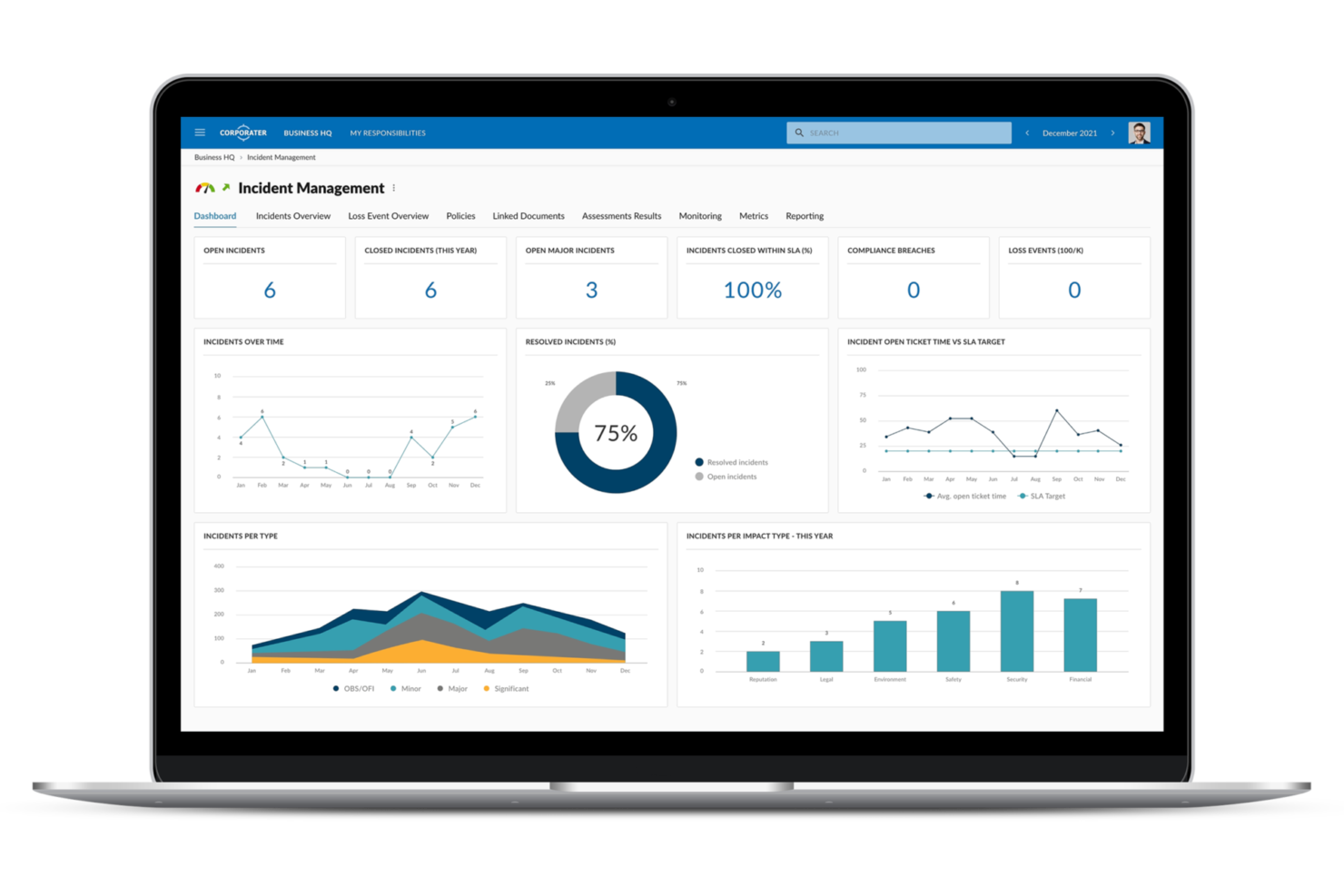
Corporater è una piattaforma di gestione aziendale progettata per le organizzazioni che danno priorità alla conformità e all’adesione normativa.
Perché ho scelto Corporater: È focalizzata sulle esigenze di conformità, offrendo funzionalità per gestire incidenti, audit e valutazioni del rischio. Puoi allineare le tue operazioni ai requisiti normativi utilizzando gli strumenti di monitoraggio della conformità. Le sue capacità di valutazione del rischio aiutano a identificare e mitigare potenziali minacce. Dashboard personalizzabili forniscono approfondimenti sulle performance di conformità, supportando la pianificazione strategica.
Funzionalità e integrazioni principali:
Funzionalità includono il monitoraggio della conformità che aiuta il tuo team a rispettare gli standard normativi, valutazione del rischio per identificare possibili minacce e dashboard personalizzabili per approfondimenti sulle performance di conformità. Lo strumento supporta anche la gestione degli audit per garantire valutazioni accurate.
Integrazioni includono Microsoft 365, Salesforce, SAP, Oracle, Google Workspace, IBM, ServiceNow, Jira, Slack e Tableau.
Pros and Cons
Pros:
- Progettato per esigenze di conformità
- Supporta la gestione audit
- Valutazione efficace dei rischi
Cons:
- Funzionalità limitate out-of-the-box
- Richiede formazione per i nuovi utenti

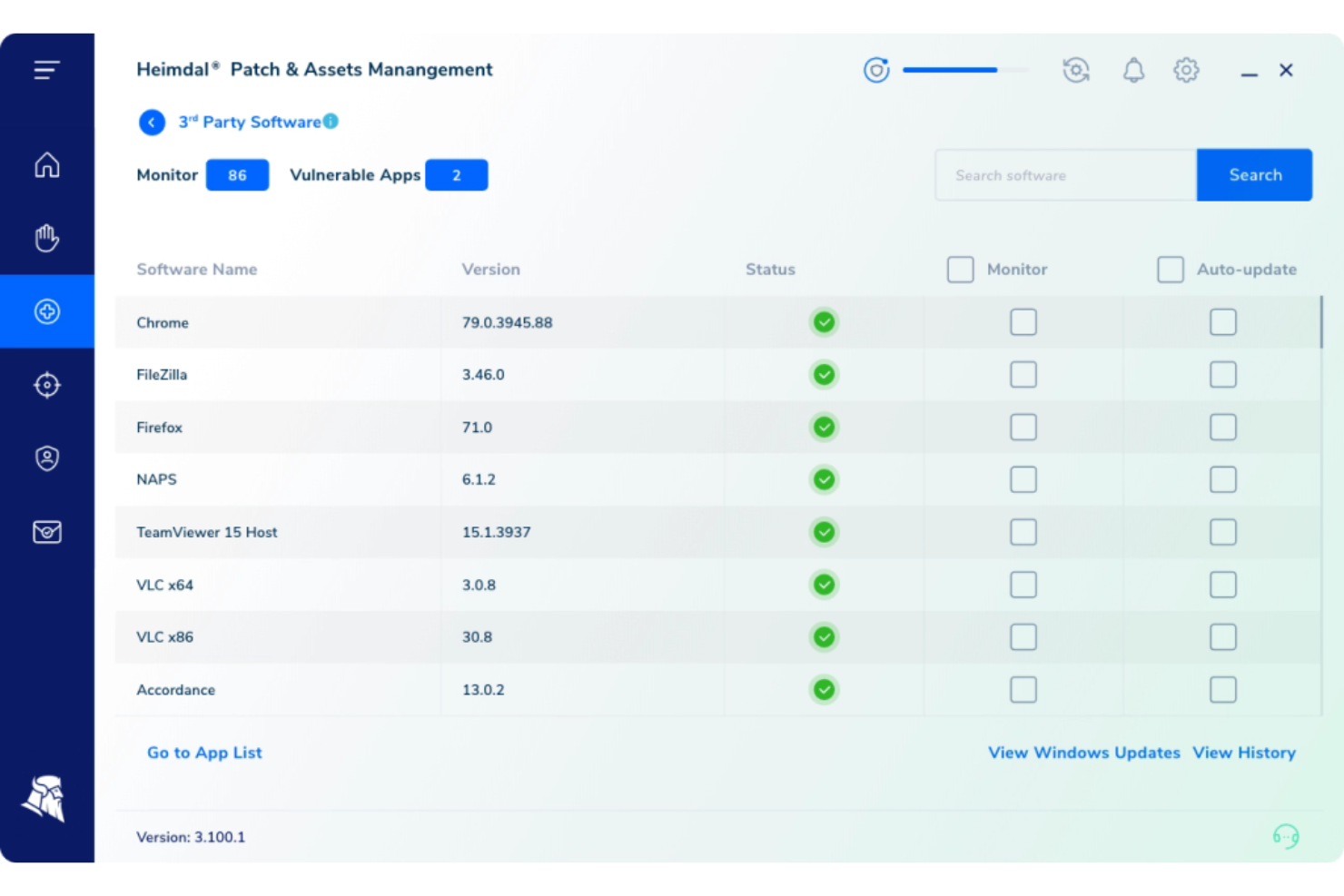
Heimdal offre ai team IT e di sicurezza una piattaforma unificata per rilevare, rispondere e gestire incidenti su endpoint e reti, aiutando le organizzazioni a ridurre il rischio e automatizzare la risposta alle minacce in ambienti complessi.
Per chi è ideale Heimdal?
Heimdal è particolarmente indicato per team di sicurezza e operazioni IT di medie e grandi aziende che necessitano di una piattaforma centralizzata per gestire le minacce in ambienti complessi e multilivello.
Perché ho scelto Heimdal
Ho incluso Heimdal nella mia selezione perché il suo Threat-hunting and Action Center (TAC) integra la caccia alle minacce direttamente nel flusso di gestione degli incidenti, mentre la maggior parte degli strumenti tratta questa attività separatamente. Apprezzo come il TAC utilizzi il motore Extended Threat Protection (XTP) insieme al framework MITRE ATT&CK per rilevare comportamenti anomali a livello di dispositivo, fornendo al mio team un vero contesto forense anziché semplici avvisi grezzi. L'Action Center con un solo clic ci permette di eseguire risposte come quarantena, scansione e isolamento degli endpoint senza dover passare da uno strumento all'altro. L'analisi comportamentale di utenti ed entità (UEBA) integrata monitora le minacce basate sull'identità su Microsoft 365, consentendo così di coprire sia incidenti a livello di endpoint che di utente dalla stessa piattaforma.
Caratteristiche principali di Heimdal
- Gestione di patch e asset: Testa, sanifica e distribuisce automaticamente patch OS e di terze parti su Windows, macOS e Linux per oltre 350 applicazioni.
- Protezione contro la cifratura ransomware (REP X): Utilizza quattro motori di rilevamento in tempo reale—cifratura, rinomina, shadow copy e canary—per bloccare i ransomware prima che la cifratura dei file abbia inizio.
- Gestione degli accessi privilegiati (PAM): Controlla e monitora gli accessi agli account privilegiati per prevenire accessi non autorizzati e movimenti laterali all'interno dell'ambiente.
- Sicurezza DNS: Blocca minacce web, malware e tentativi di esfiltrazione dati a livello di rete grazie a un'intelligenza delle minacce alimentata da AI/ML.
Integrazioni Heimdal
Heimdal offre integrazioni native con l'ecosistema Microsoft, tra cui Microsoft 365, Azure e applicazioni aziendali principali, oltre a integrazioni con Splunk, ServiceNow e Zapier. È disponibile un'API per integrazioni personalizzate.
Pros and Cons
Pros:
- Automatizza le patch su tutti gli endpoint
- Rilevamento avanzato di vulnerabilità e minacce
- Visibilità dettagliata su asset e licenze
Cons:
- Nessuna integrazione nativa disponibile
- L'interfaccia richiede tempo di onboarding

Rootly
Ideale per la risoluzione degli incidenti potenziata dall'intelligenza artificiale
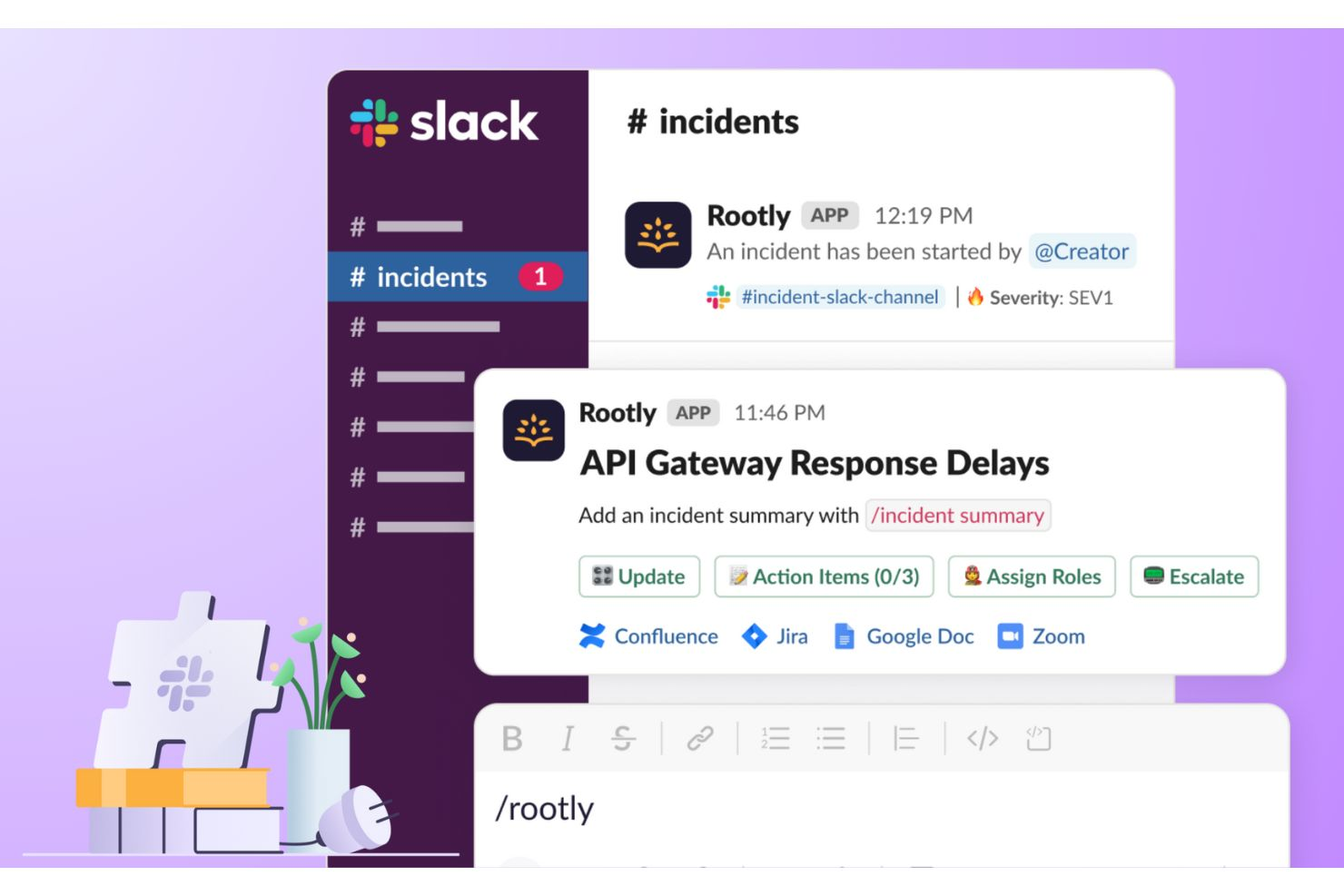
Rootly è una piattaforma di gestione degli incidenti creata per i team IT e gli SRE che necessitano di automatizzare i flussi di lavoro di risposta, coordinarsi tra diversi canali e ridurre i tempi di inattività durante le interruzioni dei servizi.
Per Chi È Più Adatto Rootly?
Rootly si adatta particolarmente ad organizzazioni guidate da team di ingegneri e ai team SRE di aziende di medie o grandi dimensioni che richiedono una risposta agli incidenti strutturata e automatizzata su larga scala.
Perché Ho Scelto Rootly
Rootly merita il suo posto nella mia selezione per come il suo agente SRE AI gestisce l'analisi della causa principale. Quando si verifica un incidente, l'AI di Rootly incrocia gli avvisi attivi, le modifiche recenti al codice e gli incidenti storici per individuare con un punteggio di affidabilità le possibili cause principali, così il mio team non deve iniziare da zero alle 2 di notte. Inoltre, apprezzo che non si limita a indicare cosa non funziona: mostra il ragionamento dietro i suggerimenti e propone correzioni specifiche, facilitando un'azione rapida. In più, il server MCP di Rootly permette agli ingegneri di risolvere gli incidenti di produzione direttamente dal loro IDE in strumenti come Cursor o Windsurf, riducendo il cambio di contesto che rallenta i tempi di risposta.
Funzionalità Principali di Rootly
- Builder di workflow automatizzati: Crea flussi di lavoro di risposta agli incidenti senza codice che avviano azioni come la definizione dei ruoli, la creazione di canali Slack e la notifica degli stakeholder non appena viene dichiarato un incidente.
- Pianificazione dei turni on-call che riconosce le ferie: Il motore di pianificazione di Rootly tiene conto delle ferie e consente agli ingegneri di richiedere la copertura del turno con un solo clic; l'AI trova e assegna automaticamente le sostituzioni.
- Retrospettive post-incidente automatizzate: Rootly genera automaticamente le timeline dell'incidente e i documenti strutturati di revisione post-incidente, inserendo il contesto direttamente dall'incidente senza copia e incolla manuale.
- Automazione della pagina di stato: Rootly aggiorna in tempo reale le pagine di stato visibili al cliente man mano che cambiano la gravità e lo stato dell'incidente, senza richiedere aggiornamenti manuali dal team di risposta.
Integrazioni Rootly
Rootly offre oltre 70 integrazioni native, tra cui Slack, Jira, ServiceNow, PagerDuty, Datadog, AWS CloudWatch, GitHub, Zoom, Microsoft Teams, Google Cloud e Zapier. È disponibile anche un'API per integrazioni personalizzate.
Pros and Cons
Pros:
- Automazione guidata da AI per la risposta agli incidenti
- Si integra con Slack e Teams
- Retrospettive automatizzate con riepiloghi AI
Cons:
- Il prezzo per le aziende richiede un preventivo personalizzato
- Lista di integrazioni pubblica limitata

Ideale per la gestione dei log
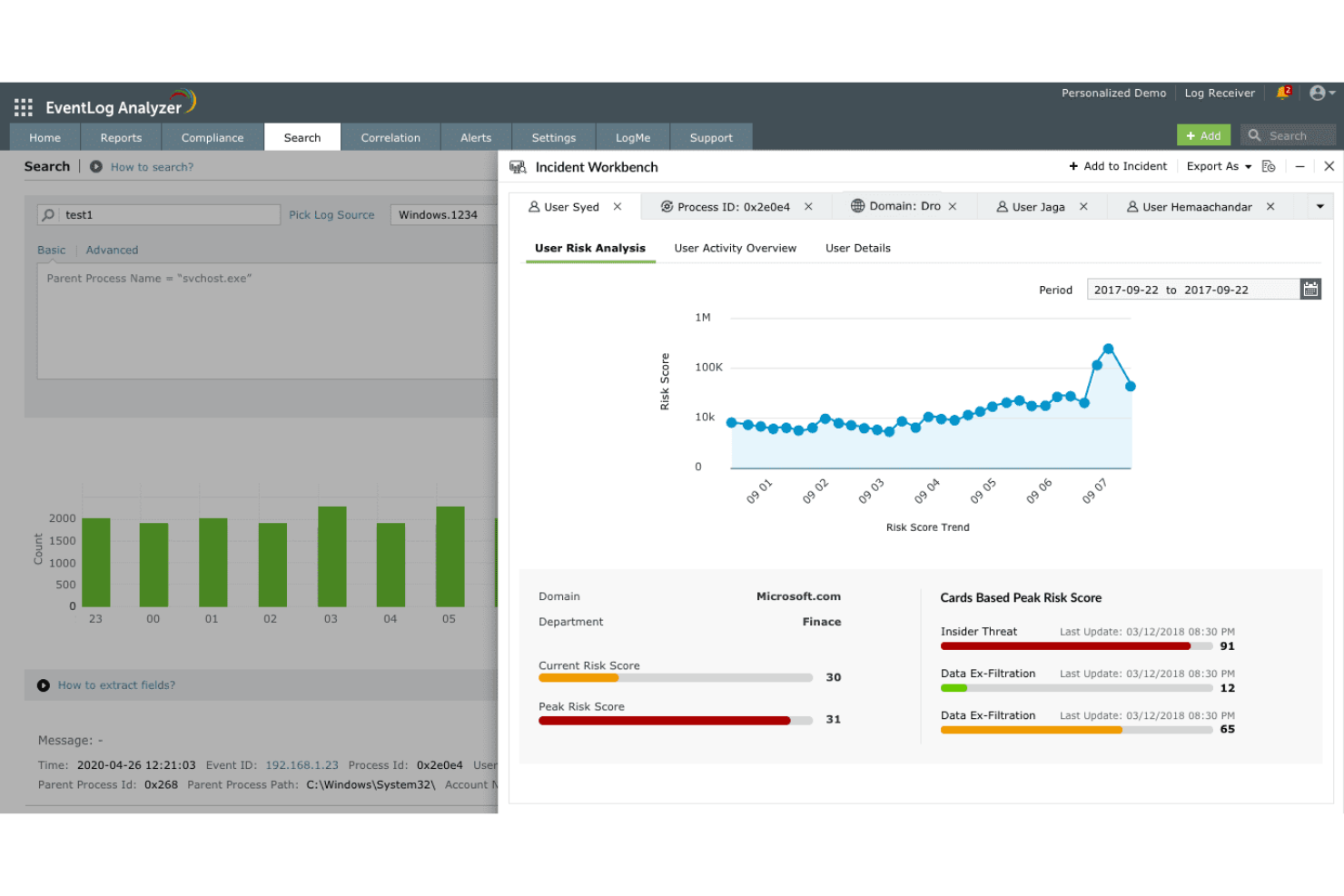
Per chi è più indicato ManageEngine EventLog Analyzer?
ManageEngine EventLog Analyzer è una soluzione particolarmente adatta ai team di sicurezza IT e conformità, presenti in aziende di medie e grandi dimensioni che gestiscono elevati volumi di dati di log su infrastrutture distribuite.
Perché ho scelto ManageEngine EventLog Analyzer
La gestione dei log è l’aspetto in cui ManageEngine EventLog Analyzer si distingue. Mi piace come centralizza la raccolta dei log da un'ampia gamma di fonti—log eventi Windows, syslog, server applicativi, database e dispositivi perimetrali—così il mio team non deve passare continuamente tra sistemi diversi per ricostruire quanto avvenuto durante un incidente. La funzione di analisi forense dei log è particolarmente utile: quando si verifica una violazione della sicurezza, posso eseguire report di correlazione e risalire alla causa principale direttamente dai dati di log, senza necessità di uno strumento investigativo separato. La correlazione degli eventi in tempo reale e l’invio istantaneo di allerta via email o SMS permettono al mio team di individuare anomalie non appena si verificano, senza ritardi di ore.
Funzionalità chiave di ManageEngine EventLog Analyzer
- Intelligence sulle minacce: Rileva traffico IP dannoso in entrata nella rete utilizzando aggiornamenti in tempo reale da un database globale di minacce IP.
- Monitoraggio dell’integrità dei file: Invia allerta istantanee quando vengono apportate modifiche critiche a file e cartelle riservati.
- Monitoraggio dei dispositivi di rete: Tiene traccia del traffico web, delle configurazioni e degli aggiornamenti delle regole sui dispositivi perimetrali tramite report preimpostati.
- Gestione della conformità: Genera report pronti per audit per standard quali PCI DSS, GDPR, FISMA, ISO 27001 e SOX.
Integrazioni di ManageEngine EventLog Analyzer
ManageEngine EventLog Analyzer offre integrazioni native con ServiceNow, Jira, Splunk, ManageEngine ServiceDesk Plus, ManageEngine OpManager e un’API per integrazioni personalizzate.
Pros and Cons
Pros:
- Sistema di allerta personalizzabile
- Monitoraggio dei log in tempo reale
- Capacità di reporting avanzate
Cons:
- Richiede molte risorse su reti di grandi dimensioni
- Ritardi occasionali nella generazione dei report

Resolve
Ideale per i flussi di lavoro di risoluzione automatica degli incidenti IT
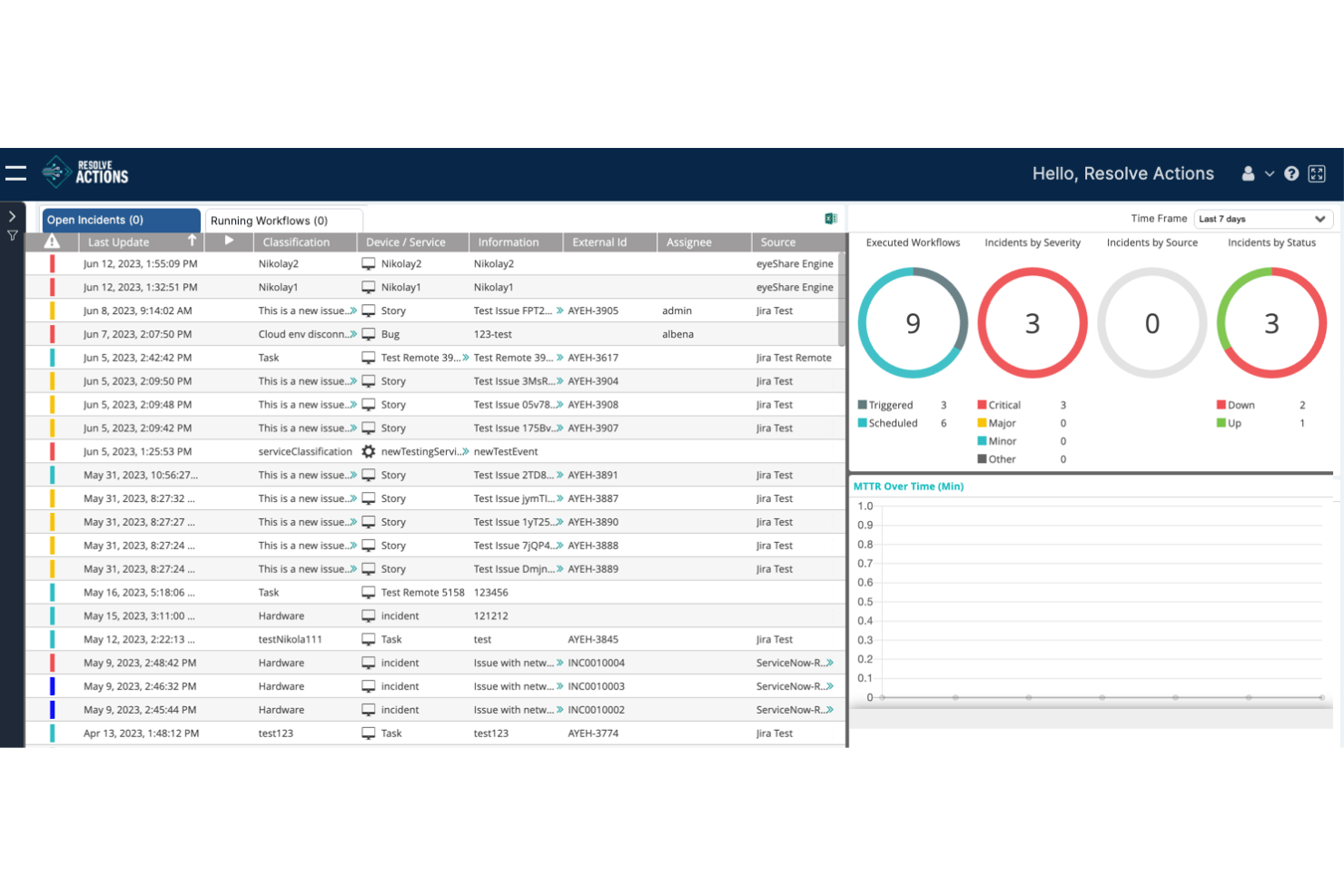
Resolve è una piattaforma di automazione e orchestrazione IT basata sull'IA che gestisce il rilevamento degli incidenti, la classificazione degli avvisi, l'esecuzione automatizzata delle procedure operative e la risoluzione a ciclo chiuso tramite flussi di lavoro basati su agenti e un'infrastruttura autoriparante.
Per chi è più adatto Resolve?
Resolve è particolarmente adatto ai responsabili delle operazioni IT e ai team addetti all'infrastruttura aziendale che puntano a ridurre il volume dei ticket tramite la risoluzione automatizzata anziché il coordinamento manuale degli incidenti.
Perché ho scelto Resolve
Ho scelto Resolve come una delle soluzioni migliori perché la sua risoluzione automatica degli incidenti a ciclo chiuso va oltre quella della maggior parte degli strumenti di questo settore. Mentre altre piattaforme avvisano il team affinché intervenga, le procedure operative automatizzate di Resolve gestiscono l'intero ciclo: classificazione degli avvisi, diagnosi, applicazione della correzione e chiusura del ticket senza intervento umano. Sono particolarmente colpito dalla sua funzionalità di infrastruttura autoriparante, che può ridurre il tempo di riconoscimento degli allarmi da oltre 1.800 minuti a meno di un minuto per i modelli di errore noti.
Funzionalità principali di Resolve
- Correlazione degli avvisi basata sull'IA e filtraggio del rumore: Resolve arricchisce e correla gli avvisi in arrivo per sopprimere i falsi positivi prima che raggiungano il team operativo.
- Libreria di flussi di lavoro per lo scambio di automazioni: Accesso a oltre 5.000 modelli di automazione predefiniti che coprono la classificazione degli incidenti, il riavvio dei servizi, il ripristino delle configurazioni e altro ancora.
- Generatore personalizzato di agenti IA AgentLab: Crea e distribuisci agenti IA con ambito definito, protezioni di governance, flussi di lavoro di approvazione e limiti operativi stabiliti.
- Sincronizzazione ITSM bidirezionale: Resolve mantiene una sincronizzazione attiva e bidirezionale con ServiceNow e Jira per tutto il ciclo di vita dell'incidente, mantenendo aggiornato il sistema di riferimento senza aggiornamenti manuali.
Integrazioni di Resolve
Resolve offre oltre 500 integrazioni per ITSM, monitoraggio, cloud e collaborazione, tra cui ServiceNow, Jira, Datadog, Splunk, AWS, Microsoft Azure, Slack e Microsoft Teams.
Pros and Cons
Pros:
- Risoluzione automatizzata degli incidenti senza intervento umano
- Classificazione in tempo reale e soppressione del rumore degli avvisi
- Ampia scelta di flussi di lavoro e opzioni di automazione predefiniti
Cons:
- Nessuna pianificazione dei turni di reperibilità o sistema di notifica nativo
- Mancano strumenti integrati per le analisi post-incidente e gli SLO
Altre Opzioni di Software per la Gestione degli Incidenti
Ecco alcune altre opzioni di software per la gestione degli incidenti che non sono entrate nella mia shortlist, ma che meritano comunque attenzione:
- Opsgenie
Ideale per la gestione della reperibilità
- ServiceNow
Ideale per soluzioni enterprise
- AlertOps
Ideale per gli avvisi in tempo reale
- New Relic
Ideale per il monitoraggio delle prestazioni
- BigPanda
Ideale per le capacità AIOps
- Jira Service Management
Ideale per la gestione degli incidenti tra team diversi
- ClickUp
Ideale per strumenti di collaborazione del team
- incident.io
Ideale per una risposta rapida agli incidenti
- Mantis Bug Tracker
Ideale per il tracciamento dei bug
- xMatters
Ideale per la risposta agli incidenti automatizzata
- FireHydrant
Ideale per le revisioni post-incidente
- SolarWinds IT Service Desk Software
Ideale per l'automazione dei servizi guidata dall'IA
- Rippling IT
Ideale per l'integrazione nella gestione dei dispositivi
- ManageEngine ServiceDesk Plus
Ideale per processi allineati a ITIL
- Mitratech Alyne
Ideale per i team focalizzati sulla conformità


Come valuto i software di gestione degli incidenti
Valuto gli strumenti di gestione degli incidenti su due livelli: le funzionalità di base che ogni strumento deve avere—avvisi in tempo reale, pianificazione dei turni di reperibilità—e i fattori distintivi che contano per i team SRE e DevOps.
Funzionalità principali (Requisiti minimi per questa lista)
Quando seleziono gli strumenti per la mia lista, valuto ciascuno su una scala da 0 (non offre la funzionalità) a 5 (eccelle in quest'area) per ogni funzionalità principale elencata di seguito. Poi calcolo il punteggio totale dello strumento in percentuale. Ogni strumento deve raggiungere un punteggio minimo totale del 65% per essere preso in considerazione.
- Avvisi e inoltro in tempo reale: Verifico che gli avvisi raggiungano rapidamente il giusto referente tramite SMS, push, email e voce—soprattutto durante i guasti a cascata, dove minuti di ritardo aumentano i tempi di inattività.
- Pianificazione dei turni di reperibilità ed escalation: I buoni strumenti consentono di creare rotazioni multi-livello con copertura follow-the-sun, calendari di override ed escalation automatiche quando scade la finestra di riconoscimento.
- Gestione del ciclo di vita dell'incidente: Cerco flussi di lavoro strutturati che accompagnino un incidente dalla rilevazione, passando per la triage, l'assegnazione della gravità, la risposta attiva e la risoluzione, con chiare fasi di monitoraggio dello stato.
- Collaborazione e comunicazione: I team hanno bisogno di war room integrate o ChatOps bidirezionali con strumenti come Slack e Microsoft Teams, così i soccorritori possono coordinarsi senza cambiare contesto durante l'incidente.
- Postmortem e analytics: Valuto se la piattaforma supporta cronologie post-incidente, modelli per analisi delle cause e metriche come MTTA e MTTR che aiutano i team a individuare ricorrenze tra i servizi.
- Integrazione con altri strumenti: La piattaforma dovrebbe collegarsi nativamente al tuo stack esistente di monitoraggio, APM, logging e ITSM—strumenti come Datadog, Prometheus, Jira e ServiceNow sono i riferimenti più comuni che mi aspetto di trovare.
Una volta che ho una lista di strumenti che soddisfano questi criteri, valuto ciò che differenzia ciascuna piattaforma.
Fattori differenzianti (Cosa distingue i fornitori)
Ecco come confronto e metto a confronto diversi fornitori:
Caratteristiche distintive
La riduzione del rumore tramite intelligenza artificiale è fondamentale per me. Durante un grave disservizio, un singolo servizio in errore può generare centinaia di avvisi duplicati—gli strumenti che correlano e sopprimono questo rumore consentono ai soccorritori di concentrarsi sul vero problema. Cerco anche runbook di auto-rimediation che possano riavviare servizi o effettuare rollback per modalità di errore note senza aspettare l'intervento umano. La mappatura delle dipendenze di servizio completa il quadro, mostrando l'impatto a monte e a valle e aiutando i team a dare le giuste priorità quando più servizi sono degradati contemporaneamente.
Oltre le funzionalità
La affidabilità conta qui più che in molte altre categorie di software—la tua piattaforma per la gestione degli incidenti non può andare offline proprio durante il disservizio che dovrebbe aiutarti a risolvere. Controllo SLA di uptime supportati da failover su più regioni e infrastruttura indipendente dai principali cloud provider. Analizzo attentamente anche la struttura dei prezzi, visto che i modelli per referente crescono molto diversamente rispetto ai modelli per utente o per incidente via via che il team di reperibilità aumenta. Per i team che lavorano in ambienti regolamentati, considero anche il livello di conformità, inclusi SOC 2 Type II, HIPAA e il supporto SSO/SAML.
Come Scegliere un Software per la Gestione degli Incidenti
È facile perdersi tra le lunghe liste di funzionalità e le strutture di prezzo complesse. Per aiutarti a restare focalizzato durante il tuo processo di selezione software, ecco un elenco di fattori da tenere a mente:
| Fattore | Cosa Considerare |
| Scalabilità | Assicurati che il software possa crescere insieme al tuo team. Cerca soluzioni che possano gestire un aumento di utenti e incidenti senza compromettere le prestazioni. |
| Integrazioni | Verifica se il software si integra con i tuoi strumenti esistenti come Slack, Jira o AWS. Un'integrazione senza soluzione di continuità può far risparmiare tempo e ridurre il lavoro manuale per il tuo team. |
| Personalizzazione | Valuta se lo strumento ti consente di adattare i flussi di lavoro e gli avvisi alle tue esigenze specifiche. Questa flessibilità può migliorare l'efficienza e la soddisfazione degli utenti. |
| Facilità d'uso | Valuta l'interfaccia utente e la navigazione. Uno strumento facile da usare ridurrà i tempi di formazione e aiuterà il team a rispondere più rapidamente agli incidenti. |
| Budget | Confronta il costo con il tuo budget. Considera il valore offerto nei diversi livelli di prezzo ed eventuali costi nascosti che potrebbero influire sulle tue finanze. |
| Misure di Sicurezza | Cerca funzionalità come cifratura dei dati e controlli di accesso. Queste misure sono fondamentali per proteggere le informazioni sensibili durante la gestione degli incidenti. |
| Supporto | Valuta la disponibilità e la qualità dell’assistenza clienti. Un supporto affidabile può essere cruciale durante un incidente, quando hai bisogno di assistenza rapida. |
| Reportistica | Controlla la presenza di strumenti di reportistica completi che offrano insight sulle tendenze degli incidenti e sulle performance del team. Queste analisi possono guidare i miglioramenti. |
Tendenze nei Software di Gestione degli Incidenti
Nella mia ricerca, ho consultato numerosi aggiornamenti di prodotto, comunicati stampa e registri delle release provenienti da diversi fornitori di software di gestione degli incidenti. Ecco alcune delle tendenze emergenti che sto monitorando:
- Analisi Guidata dall’IA: Molti strumenti ora utilizzano l’Intelligenza Artificiale per analizzare i dati sugli incidenti e prevedere problemi futuri. Questo aiuta i team a prepararsi meglio e rispondere più velocemente. Fornitori come Moogsoft stanno integrando l’IA per offrire analisi predittiva e sistemi di allerta più intelligenti.
- Collaborazione in Tempo Reale: Si sta assistendo a una tendenza verso l’integrazione di strumenti di comunicazione in tempo reale all’interno delle piattaforme di gestione degli incidenti. Questo migliora la coordinazione tra i membri del team durante gli incidenti e consente risoluzioni più rapide. Strumenti come incident.io integrano funzionalità di chat direttamente nelle loro piattaforme.
- Segnalazioni Contestuali: Invece di sopraffare i team con numerosi avvisi, i nuovi software di allerta IT forniscono notifiche ricche di contesto. Questo aiuta i team a dare priorità e a risolvere prima i problemi più critici. Opsgenie, ad esempio, offre avvisi che includono dettagli rilevanti sugli incidenti per un'azione più rapida.
- Analisi Post-Incidente: Sempre più strumenti si concentrano su capacità avanzate di revisione post-incidente. Queste funzionalità aiutano i team a imparare dagli incidenti passati e a migliorare le risposte future. FireHydrant fornisce report dettagliati sugli incidenti per supportare il miglioramento continuo.
- Dashboard Centrati sull’Utenza: C'è una crescente attenzione verso dashboard personalizzabili che si adattano al ruolo dell’utente. Questo consente agli utenti di accedere rapidamente ai dati più rilevanti. Fornitori come ServiceNow offrono dashboard che gli utenti possono modellare secondo le proprie esigenze.
Che Cos’è un Software di Gestione degli Incidenti?
Il software di gestione degli incidenti è uno strumento che aiuta le organizzazioni a tracciare, gestire e risolvere gli incidenti in modo efficiente. In genere, questi strumenti sono utilizzati da professionisti IT, team DevOps e personale di assistenza clienti per ridurre al minimo i tempi di inattività e migliorare l’affidabilità dei servizi.
Flussi di lavoro automatizzati, collaborazione in tempo reale e notifiche contestuali permettono una risposta rapida e una comunicazione efficace durante gli incidenti. In generale, questi servizi di risposta agli incidenti informatici migliorano l’efficienza operativa e assicurano un recupero più veloce dai disservizi.
Funzionalità dei Software di Gestione degli Incidenti
Quando scegli un software di gestione degli incidenti, tieni d’occhio le seguenti caratteristiche chiave:
- Flussi di lavoro automatizzati: Ottimizza le risposte agli incidenti automatizzando le attività di routine, permettendo al tuo team di concentrarsi su questioni più complesse.
- Collaborazione in tempo reale: Migliora la comunicazione del team durante gli incidenti, assicurando che tutti siano allineati e riducendo i tempi di risoluzione.
- Notifiche contestuali: Fornisci avvisi con dettagli rilevanti per aiutare a dare priorità e risolvere prima i problemi più critici.
- Analisi post-incidente: Fornisci approfondimenti sugli incidenti passati per supportare il miglioramento continuo e risposte future migliori.
- Dashboard personalizzabili: Permetti agli utenti di personalizzare la loro visualizzazione per accedere rapidamente ai dati più rilevanti ed efficienti.
- Approfondimenti guidati dall’IA: Utilizza l’intelligenza artificiale per analizzare i dati e prevedere eventuali incidenti futuri, migliorando la preparazione.
- Notifiche multicanale: Garantisci che gli avvisi raggiungano il tuo team tramite vari canali di comunicazione, mantenendo tutti informati.
- Scalabilità: Supporta team in crescita e un aumento degli incidenti senza sacrificare prestazioni o efficienza.
- Capacità di integrazione: Connettiti con strumenti esistenti come Slack, Jira e AWS per creare un flusso di lavoro integrato all’interno della tua organizzazione.
- Interfaccia intuitiva: Semplifica la navigazione e riduci la curva di apprendimento, aiutando i team ad adattarsi rapidamente al software.
Vantaggi del software di gestione degli incidenti
L’implementazione di un software per la gestione degli incidenti offre numerosi vantaggi per il tuo team e la tua azienda. Eccone alcuni a cui puoi ambire:
- Tempi di risposta più rapidi: Flussi di lavoro automatizzati e avvisi in tempo reale aiutano il tuo team a gestire rapidamente gli incidenti, riducendo al minimo i tempi di inattività.
- Comunicazione migliorata: Gli strumenti di collaborazione in tempo reale garantiscono che tutti i membri del team restino informati e coordinati durante le emergenze.
- Migliore prioritizzazione: Le notifiche contestuali aiutano il team a concentrarsi prima sulle problematiche più critiche, migliorando l’efficienza.
- Analisi approfondita: Le revisioni post-incidente forniscono preziosi spunti sulle tendenze degli incidenti, supportando il miglioramento continuo.
- Maggiore preparazione: Gli approfondimenti forniti dall’IA e le analisi predittive aiutano il team a prevedere i problemi prima che si verifichino.
- Esperienza utente su misura: Dashboard personalizzabili e interfacce intuitive rendono più semplice per il team navigare e utilizzare il software in modo efficace.
Costi e prezzi del software di gestione degli incidenti
Scegliere un software per la gestione degli incidenti richiede la comprensione dei diversi modelli e piani tariffari disponibili. Oltre ai nomi più noti come Jira, valuta anche di consultare le alternative a Jira service management per trovare la soluzione più adatta al tuo budget. I costi variano in base a funzionalità, dimensione del team, componenti aggiuntivi e altro ancora. La tabella sottostante riassume i piani più comuni, i prezzi medi e le funzionalità tipiche incluse nelle soluzioni di software per la gestione degli incidenti:
Tabella comparativa dei piani per il software di gestione degli incidenti
| Tipo di piano | Prezzo medio | Funzionalità comuni |
| Piano gratuito | $0 | Monitoraggio di base degli incidenti, avvisi limitati e report essenziali. |
| Piano personale | $5-$25/user/month | Avvisi avanzati, dashboard personalizzabili e integrazione con strumenti selezionati. |
| Piano business | $30-$60/user/month | Collaborazione in tempo reale, analisi dettagliate e notifiche multi-canale. |
| Piano enterprise | $70-$100/user/month | Personalizzazione completa, approfondimenti mediante IA, analisi post-incidente e assistenza clienti prioritaria. |
Domande frequenti sul software di gestione degli incidenti
Ecco alcune risposte alle domande più comuni sul software di gestione degli incidenti:
In che modo il software di gestione degli incidenti può ridurre i rischi sul posto di lavoro?
Il software di gestione degli incidenti può aiutare il tuo team a identificare e affrontare i potenziali rischi prima che si aggravino. Fornendo avvisi in tempo reale e report dettagliati, il software assicura che il tuo team sia consapevole di eventuali problemi non appena si presentano. Questo approccio proattivo contribuisce a mantenere un ambiente di lavoro più sicuro e a ridurre al minimo le interruzioni.
Come assicura la conformità alle normative il software di gestione degli incidenti?
Questi strumenti tengono traccia delle scadenze e dei requisiti di conformità, aiutando il tuo team a rispettare gli standard di settore. Spesso includono modelli e checklist integrati per normative come OSHA, rendendo più semplice per il tuo team garantire la conformità. Questo riduce il rischio di sanzioni e mantiene le operazioni senza intoppi.
Quali strumenti sono i migliori per automatizzare la risoluzione degli incidenti?
Automatizzare la risoluzione degli incidenti può far risparmiare tempo al tuo team e ridurre gli errori umani. Strumenti come i sistemi SIEM e le piattaforme SOAR sono spesso utilizzati per questo scopo. Aiutano a dare priorità e risolvere automaticamente gli incidenti, permettendo al tuo team di concentrarsi su compiti più complessi che richiedono l’intervento umano.
Come si integra il software di gestione degli incidenti con altri strumenti?
La maggior parte delle soluzioni di gestione degli incidenti offre integrazioni con strumenti popolari come Slack, Jira e AWS. Queste integrazioni consentono al tuo team di semplificare i flussi di lavoro e garantire che le informazioni vengano condivise tra le piattaforme. Questa connettività migliora l’efficienza e assicura che tutti i membri del team siano allineati.
Qual è la differenza tra gestione dei problemi e gestione degli incidenti?
La gestione degli incidenti si concentra sulla risoluzione immediata dei problemi per ripristinare rapidamente il servizio, mentre la gestione dei problemi mira a identificare e risolvere la causa principale dei problemi ricorrenti. La gestione degli incidenti è reattiva, affrontando i problemi man mano che si verificano, mentre la gestione dei problemi è proattiva, prevenendo incidenti futuri.
Come si dà priorità a più incidenti che si verificano simultaneamente?
Dare priorità agli incidenti implica valutare il loro impatto e la loro urgenza. Il software di gestione degli incidenti fornisce strumenti per classificare e dare priorità agli incidenti in base a criteri predefiniti. Questo aiuta il team ad affrontare per primi i problemi più critici, garantendo che le interruzioni più gravi vengano risolte rapidamente.
Cosa succede dopo?
Se stai valutando un software di gestione degli incidenti, contatta gratuitamente un consulente SoftwareSelect per ricevere raccomandazioni personalizzate.
Devi solo compilare un modulo e fare una breve chiacchierata, durante la quale analizzeranno le tue esigenze specifiche. Successivamente riceverai una lista ristretta di software da valutare. Ti supporteranno anche durante l'intero processo di acquisto, comprese le negoziazioni sul prezzo.