

I 10 migliori software di allerta IT del 2026

10 Migliori software di allerta IT - Shortlist


Rimanere aggiornati sui problemi IT può essere una sfida per qualsiasi team. Devi essere informato sui problemi nel momento stesso in cui si presentano per mantenere tutto funzionante senza intoppi. È qui che entrano in gioco i software di allerta IT: aiutano a individuare i problemi tempestivamente, così il tuo team può rispondere rapidamente ed efficacemente.
Secondo la mia esperienza, scegliere il software giusto può fare una grande differenza nel flusso di lavoro. Ho testato e recensito in modo indipendente diverse opzioni per offrirti le mie migliori scelte. Puoi contare su opinioni imparziali su funzionalità e vantaggi.
Nel proseguo della lettura, troverai analisi dettagliate di ogni soluzione che ti aiuteranno a decidere quale si adatta meglio alle tue esigenze. L’efficienza e la tranquillità del tuo team sono a pochi passi di distanza.
Perché fidarsi dei nostri consigli sui software
Il nostro team testa e recensisce software dal 2012. In quanto leader tecnologici noi stessi, sappiamo quanto sia difficile — e importante — scegliere il software giusto.
Per questa guida, abbiamo valutato gli strumenti attraverso test praticie ricerche indipendenti, assegnando un punteggio agli strumenti in base ai nostri criteri di selezione.
Le nostre recensioni riflettono il nostro giudizio editoriale umano, non un discorso di vendita.
Revisori esperti:
Sintesi dei migliori software di allerta IT
Questa tabella comparativa riassume i dettagli dei prezzi delle mie scelte top di software di allerta IT per aiutarti a trovare quello più adatto alle tue esigenze aziendali e di budget.
| Tool | Best For | Trial Info | Price | ||
|---|---|---|---|---|---|
| 1 | Ideale per la comunicazione di emergenza multicanale | Demo gratuita disponibile | Prezzi su richiesta | Website | |
| 2 | Ideale per monitoraggio e analisi in tempo reale | Prova gratuita di 14 giorni | Da $15/utente/mese (fatturato annualmente) | Website | |
| 3 | Ideale per l'auto-triage degli alert potenziato dall'IA | Prova gratuita di 14 giorni + demo gratuita disponibile | A partire da $19/utente/mese (fatturazione annuale) | Website | |
| 4 | Ideale per il monitoraggio avanzato dei profili di soglia | Prova gratuita di 30 giorni + demo gratuita disponibile | Da $129/tecnico/mese (fatturato annualmente) | Website | |
| 5 | Ideale per opzioni di notifica flessibili | Piano gratuito + prova gratuita di 30 giorni disponibile | Da $20/utente/mese (fatturazione annuale) | Website | |
| 6 | Ideale per la gestione delle patch | Prova gratuita di 21 giorni + demo gratuita disponibile | Da $149/tecnico/mese (fatturazione annuale) | Website | |
| 7 | Ideale per avvisi di intelligence sulle minacce | Demo gratuita disponibile | Prezzi su richiesta | Website | |
| 8 | Ideale per configurare regole di avviso intelligenti | Demo gratuita disponibile | Prezzo su richiesta | Website | |
| 9 | Ideale per diagnosi a livello di codice | Demo gratuita disponibile | Da $245/25 dispositivi | Website | |
| 10 | Ideale per notifiche multi-canale focalizzate sulla disponibilità | Piano gratuito + demo gratuita disponibile | Da $8/10 monitor al mese (fatturati annualmente) | Website |


Recensioni dei migliori software di allerta IT
Di seguito trovi le mie sintesi dettagliate dei migliori software di allerta IT che ho selezionato. Le mie recensioni offrono uno sguardo approfondito alle caratteristiche chiave, ai pro e contro, alle integrazioni e agli scenari d’uso ideali di ogni strumento per aiutarti a trovare quello che fa per te.

Preparis
Ideale per la comunicazione di emergenza multicanale
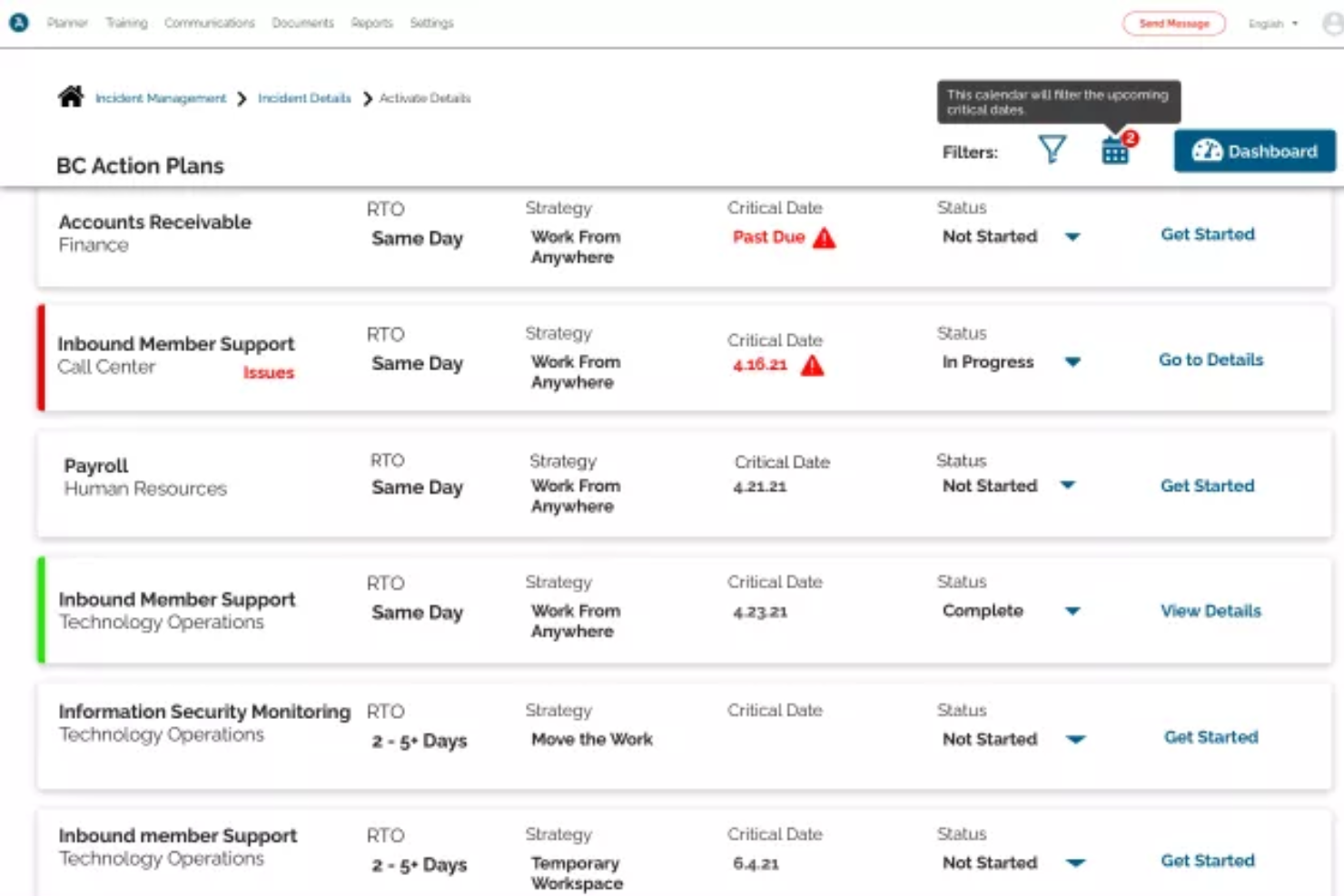
Preparis è un software completo per la continuità operativa aziendale progettato per aiutare le organizzazioni a gestire e prepararsi alle emergenze. La piattaforma offre una suite di strumenti che include valutazione dei rischi, gestione degli incidenti e sistemi di notifica d'emergenza, tutti mirati a rafforzare la resilienza organizzativa.
Perché ho scelto Preparis: Ho scelto Preparis per la sua capacità di comunicazione multicanale, che garantisce l’invio degli avvisi attraverso vari mezzi come SMS, email e notifiche push. Questa versatilità assicura che le informazioni critiche raggiungano tempestivamente i tuoi stakeholder, indipendentemente dal loro canale di comunicazione preferito, migliorando la tempestività e l’efficacia della risposta dell’organizzazione durante le emergenze IT. Inoltre, il software supporta la messaggistica bidirezionale, consentendo il monitoraggio e la risposta in tempo reale.
Caratteristiche e integrazioni principali:
Oltre al sistema di allerta, Preparis ti permette anche di creare piani personalizzabili per il disaster recovery IT e conservare tali documenti in un luogo centralizzato. La piattaforma offre inoltre un incident manager che consente di monitorare, assegnare e risolvere gli incidenti IT. Le integrazioni includono sistemi come ADP e Okta.
Pros and Cons
Pros:
- Gestione efficace dei documenti per report sugli incidenti, piani e audit
- Sistema di notifica multicanale in tempo reale
- Scalabile per organizzazioni di tutte le dimensioni
Cons:
- Integrazioni limitate
- Potrebbe offrire un rilevamento degli incidenti più robusto nello specifico delle problematiche IT
Datadog
Ideale per monitoraggio e analisi in tempo reale
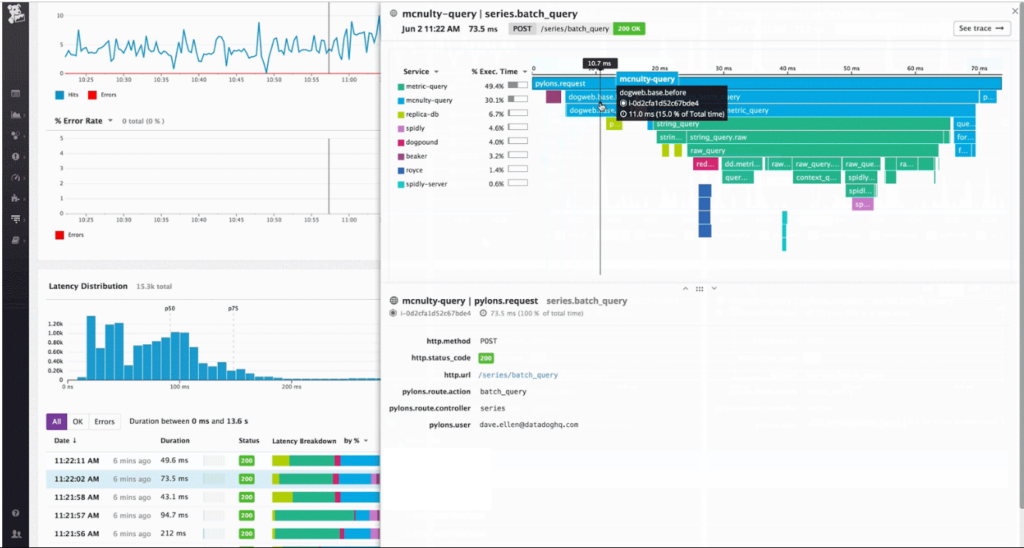
Datadog è una piattaforma completa di monitoraggio cloud che offre una panoramica sulle prestazioni delle applicazioni, sulla salute dell'infrastruttura e sulla gestione dei log. Grazie alla sua robusta suite di strumenti di analisi, fornisce alle aziende la capacità di prendere decisioni informate basate su dati in tempo reale, giustificando il suo ruolo come migliore per il monitoraggio e l’analisi in tempo reale.
Perché ho scelto Datadog: Durante la selezione degli strumenti per questa lista, Datadog è emerso costantemente come leader nel suo settore. Ho valutato la sua capacità basandomi sia sull’elevata adozione nel settore sia sulla vasta gamma di funzionalità di monitoraggio e analisi.
Secondo me, quando si tratta di monitoraggio in tempo reale combinato con potenti strumenti di analisi, Datadog occupa una posizione unica sul mercato.
Caratteristiche e integrazioni di spicco:
La piattaforma Datadog si distingue in particolare per il monitoraggio delle prestazioni delle applicazioni, che offre una profonda comprensione dei problemi applicativi e dell'esperienza utente. Inoltre, la sua capacità di gestione dei log facilita la risoluzione efficiente dei problemi. Per quanto riguarda le integrazioni, Datadog si sincronizza con oltre 400 tecnologie popolari, tra cui AWS, Docker e Slack, rendendolo uno strumento versatile per ambienti tecnologici diversi.
Pros and Cons
Pros:
- Approfondimenti completi sulle prestazioni applicative
- La gestione efficiente dei log favorisce una risoluzione più rapida dei problemi
- Un'ampia gamma di integrazioni si adatta a diversi stack tecnologici
Cons:
- I prezzi possono diventare elevati per team numerosi
- La configurazione iniziale può richiedere un apprendimento
- Le metriche personalizzate possono influire sui costi

Ideale per l'auto-triage degli alert potenziato dall'IA
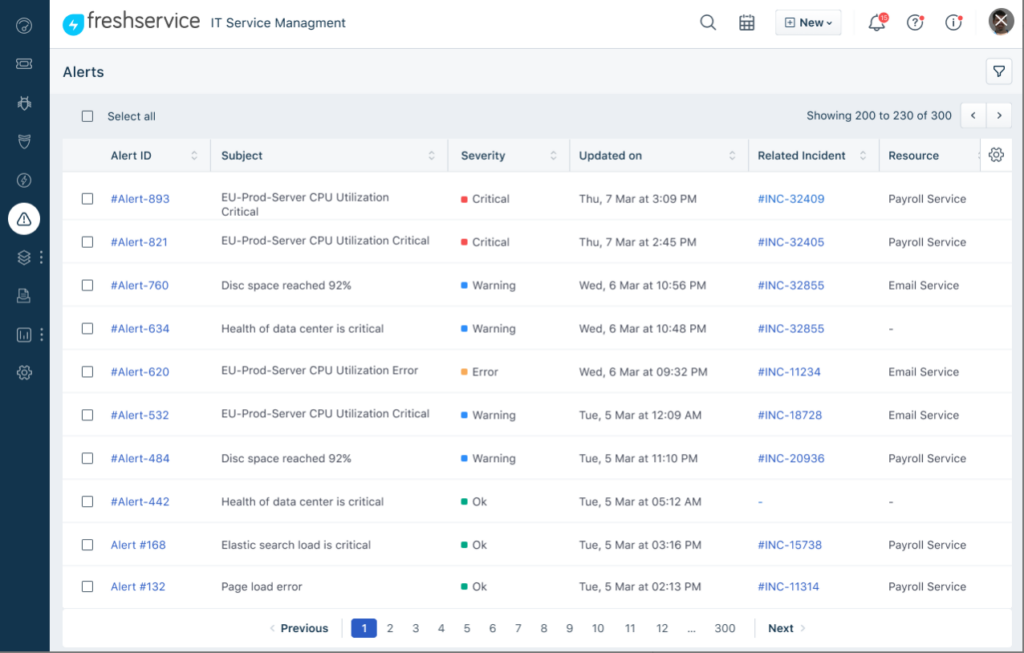
Freshservice è una piattaforma cloud per la gestione dei servizi IT (ITSM) che include funzionalità di alerting per i team IT. Aiuta a gestire gli incidenti, automatizzare i flussi di lavoro e collegare gli avvisi ai processi del service desk. Le sue funzionalità basate sull'intelligenza artificiale supportano una classificazione e un instradamento più rapidi degli alert.
Perché ho scelto Freshservice: Ho scelto Freshservice per le sue capacità di alerting potenziate dall'IA e le funzionalità di auto-triage integrate. Utilizza il machine learning per categorizzare gli alert, ridurre i rumori e assegnare automaticamente gli incidenti alle code del service desk appropriate. Questo aiuta i team IT a rispondere più rapidamente mantenendo flussi di ticket strutturati all'interno dello stesso sistema.
Caratteristiche principali e integrazioni:
Freshservice non è solo uno strumento ITSM, ma offre anche la gestione degli asset e soluzioni robuste per la gestione dei ticket. Le sue funzionalità sono pensate per garantire l'efficienza dei dipartimenti IT.
Freshservice offre integrazioni native con Slack, Jira, Microsoft Teams e altri strumenti di collaborazione e sviluppo.
Pros and Cons
Pros:
- Soluzione ITSM completa con funzionalità aggiuntive
- Capacità di integrazione versatili con tutte le piattaforme più diffuse
- Interfaccia intuitiva che semplifica anche le attività complesse
Cons:
- La fatturazione annuale potrebbe essere un deterrente per alcuni utenti
- Curva di apprendimento per chi non conosce gli strumenti ITSM
- Alcune funzionalità avanzate sono disponibili solo nei piani di livello superiore
New Product Updates from Freshservice
 Experience)
Freshservice Introduces a Reimagined IT Asset Management (ITAM) Experience
Freshservice introduces a reimagined IT Asset Management (ITAM) experience with continuous infrastructure discovery, dependency mapping, IPAM, and Software License Management. This update helps teams improve asset visibility and manage connected IT environments more effectively. For more information, visit Freshservice’s official site.

Atera
Ideale per il monitoraggio avanzato dei profili di soglia
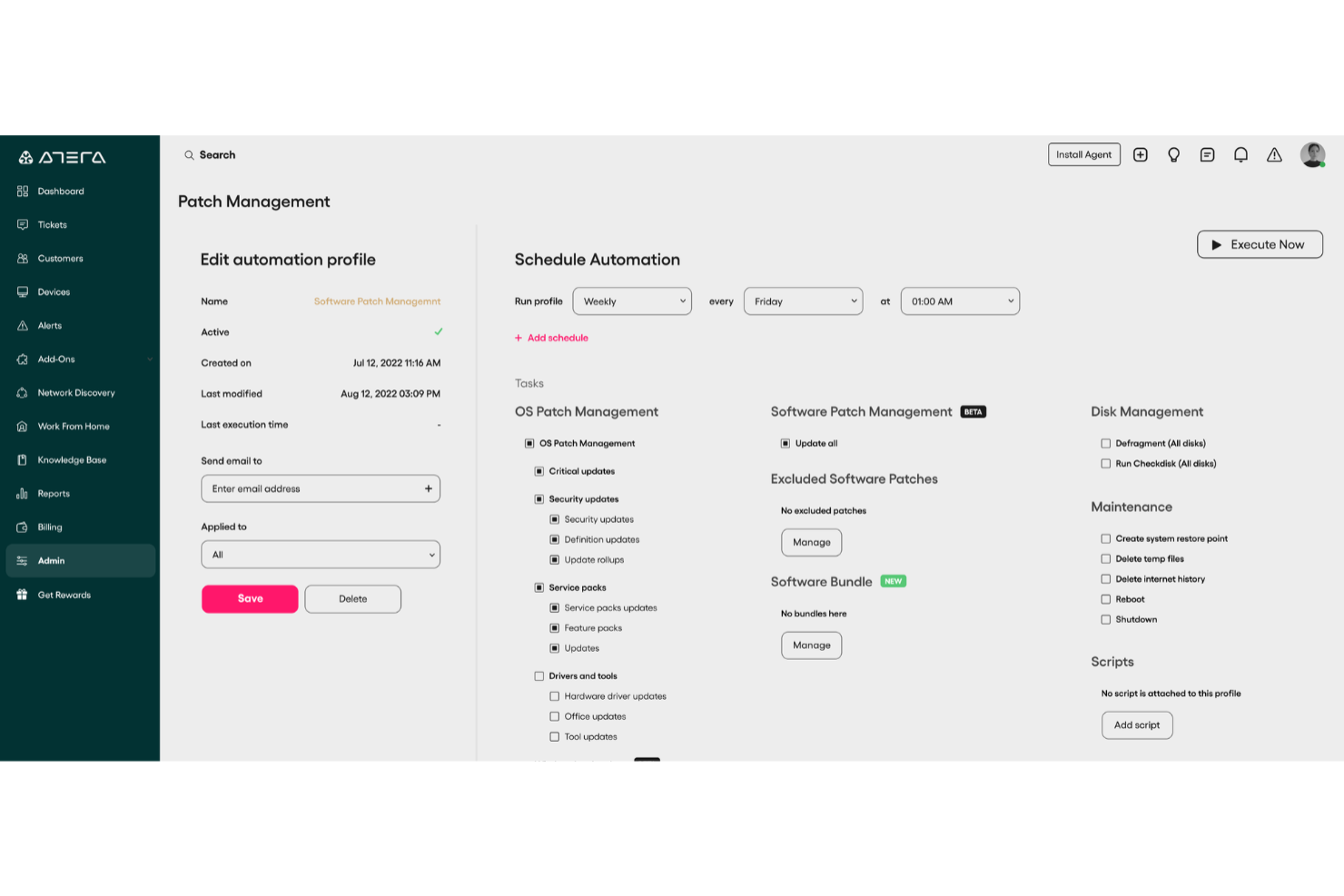
Atera è una soluzione completa di monitoraggio e gestione remota (RMM) progettata per aiutare i professionisti IT a monitorare, rilevare e risolvere in modo proattivo potenziali problemi nei loro ambienti IT prima che si trasformino in criticità.
Perché ho scelto Atera:
Offre funzionalità di monitoraggio in tempo reale che notificano il tuo team riguardo potenziali problemi IT tramite avvisi personalizzabili in base all'infrastruttura specifica. Monitorando metriche chiave come carico della CPU, utilizzo del disco e attività di rete, Atera assicura che il team possa affrontare tempestivamente eventuali criticità prima che impattino sugli utenti finali. Inoltre, la funzione di script 'auto-healing' consente l’automazione dei compiti di correzione come il riavvio delle macchine o dei servizi quando vengono superate determinate soglie, contribuendo a ridurre il carico manuale e ad aumentare l'efficienza.
Caratteristiche distintive e integrazioni:
Altre funzionalità includono il monitoraggio avanzato dei profili di soglia che traccia metriche come risorse di sistema, tempo attivo del disco, processi di Windows, dispositivi abilitati SNMP e accessi utente, offrendo una panoramica completa dell'ambiente IT. La soluzione supporta anche il monitoraggio per Active Directory, SQL Server, Exchange, VMware, Hyper-V e servizi DNS. Tra le integrazioni troviamo Microsoft Active Directory, Exchange e VMware, garantendo la compatibilità con i componenti infrastrutturali IT più diffusi.
Pros and Cons
Pros:
- Centralizza ticketing, RMM, PSA e gestione degli asset
- Rilevamento proattivo dei problemi e opzioni di automazione
- Reportistica dettagliata e dashboard per i clienti
Cons:
- Curva di apprendimento per i nuovi utenti a causa dell'ampiezza delle funzionalità
- Alcune limitazioni nelle funzionalità PSA e di fatturazione
New Product Updates from Atera

Atera Adds Webhook Triggers for Technician Assignment Changes
Atera ticket automation rules now support a webhook trigger when a ticket’s technician assignment changes, expanding automation beyond creation, status updates, and closure/resolution events. For more information, visit Atera's official site.

Checkmk
Ideale per opzioni di notifica flessibili
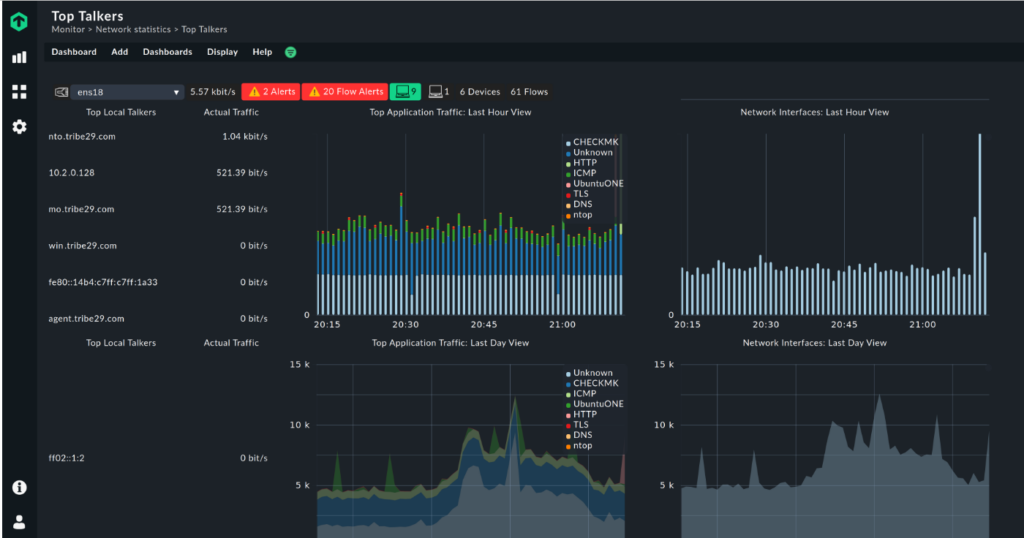
Checkmk è uno strumento di monitoraggio che offre approfondimenti dettagliati su applicazioni, reti e sistemi. Una delle sue caratteristiche distintive è il sistema di notifiche flessibile, che consente agli utenti di personalizzare gli avvisi in base a parametri e requisiti specifici.
Perché ho scelto Checkmk: Nel mio percorso di selezione degli strumenti di monitoraggio più adatti, Checkmk ha attirato la mia attenzione grazie alla sua particolare flessibilità nelle notifiche. Dopo confronti e valutazioni, ho apprezzato il modo in cui permette un alerting preciso, riducendo i falsi positivi e concentrando l'attenzione sulle notifiche più importanti.
Questa capacità di personalizzare finemente gli avvisi è il motivo per cui l'ho scelto come miglior strumento per le opzioni di notifica flessibili.
Caratteristiche e integrazioni principali:
Checkmk si distingue per il monitoraggio in tempo reale, la scoperta automatica dei servizi e il suo modulo BI (Business Intelligence) per ambienti complessi. Si integra con piattaforme come Grafana, Jira e Slack per garantire un monitoraggio e una comunicazione completi.
Pros and Cons
Pros:
- Personalizzazione granulare degli avvisi
- Solide integrazioni con altre piattaforme
- Funzionalità di monitoraggio in tempo reale
Cons:
- Potrebbe richiedere una curva di apprendimento ripida per i principianti
- Il modello di licenza può risultare confuso per alcuni utenti
- Alcune funzionalità avanzate sono esclusive della versione enterprise
New Product Updates from Checkmk
Checkmk Adds Experimental MCP Server and OAuth 2.0 Support
Checkmk adds an experimental MCP server and built-in OAuth 2.0 authorization for commercial editions. These updates let AI agents query monitoring data with native authorization support. For more information, visit Checkmk’s official site.
 .
.
SuperOps
Ideale per la gestione delle patch
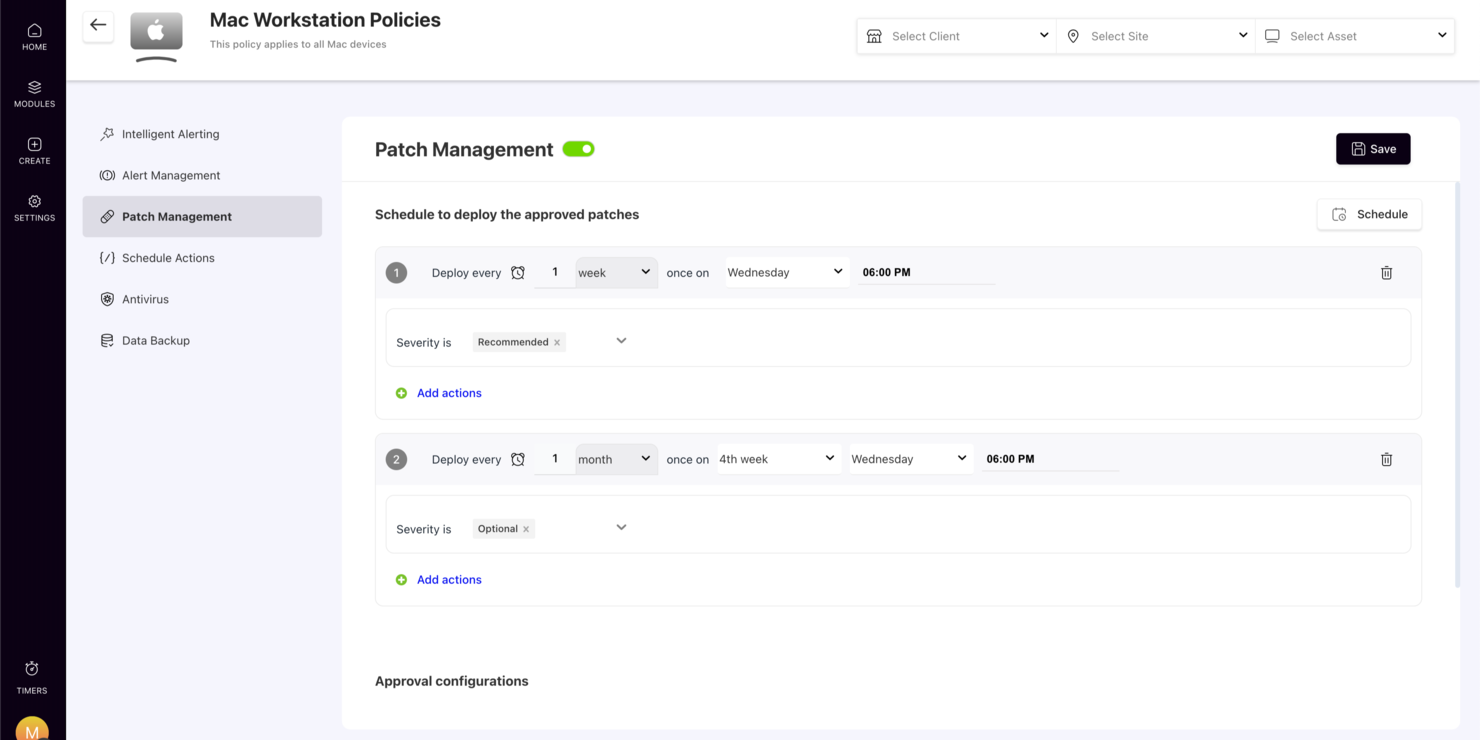
SuperOps si distingue come una soluzione innovativa per la gestione IT, appositamente progettata per i fornitori di servizi gestiti (MSP) e i team IT interni che desiderano aumentare l'efficienza operativa. Sfruttando funzionalità basate sull'intelligenza artificiale, affronta le complessità dell'automazione dei servizi e della gestione degli asset, offrendo alle aziende un approccio semplificato agli avvisi IT. Che tu sia responsabile di un reparto IT in crescita o gestisca servizi per più clienti, SuperOps offre gli strumenti necessari per monitorare e gestire efficacemente le infrastrutture IT, aiutandoti ad affrontare con facilità sfide come la velocità di risoluzione degli incidenti e la visibilità operativa.
Perché ho scelto SuperOps
Ho scelto SuperOps per le sue avanzate capacità di gestione degli avvisi, essenziali per qualsiasi software di alerting IT. Questa piattaforma integra avvisi intelligenti con l'automazione, permettendo al tuo team di affrontare proattivamente potenziali problematiche prima che si aggravino. Inoltre, il sistema di ticketing integrato assicura che gli avvisi vengano convertiti in compiti attuabili, facilitando una risposta più rapida. Queste caratteristiche si adattano perfettamente alle esigenze dei professionisti IT che desiderano mantenere operazioni fluide e minimizzare i tempi di inattività.
Funzionalità principali di SuperOps
Oltre alle funzionalità di gestione degli avvisi, SuperOps offre diverse altre caratteristiche che ne aumentano l'utilità per l'alerting IT:
- Service Desk: Centralizza tutte le richieste di servizio, consentendo al tuo team di gestire e rispondere agli incidenti da un'unica interfaccia.
- Gestione delle patch: Automatizza il processo di patching, garantendo che i sistemi siano aggiornati e sicuri contro le vulnerabilità.
- Gestione degli asset: Fornisce un monitoraggio e una gestione completa degli asset IT, aiutandoti a mantenere un inventario organizzato.
- App mobile: Permette la gestione in mobilità di avvisi e ticket, assicurandoti di rimanere sempre connesso e reattivo ovunque ti trovi.
Integrazioni di SuperOps
Le integrazioni includono Microsoft 365, Google Workspace, QuickBooks, Xero, Zapier, Slack, FreshBooks, Stripe e Harvest.
Pros and Cons
Pros:
- Collegamento degli avvisi ai ticket integrato
- Piattaforma integrata PSA e RMM
- App mobile per i tecnici
Cons:
- Il prezzo per endpoint può aumentare
- Progettato principalmente per MSP
New Product Updates from SuperOps

SuperOps Improves Ticket Visibility, Dynamic Forms, and Dashboard Views
SuperOps introduces improvements to ticket visibility, dynamic forms, and dashboard visualizations. These updates help technicians manage customer conversations, simplify ticket creation, and keep dashboard views consistent across teams. For more information, visit SuperOps' official site.
 .
.
Ideale per avvisi di intelligence sulle minacce
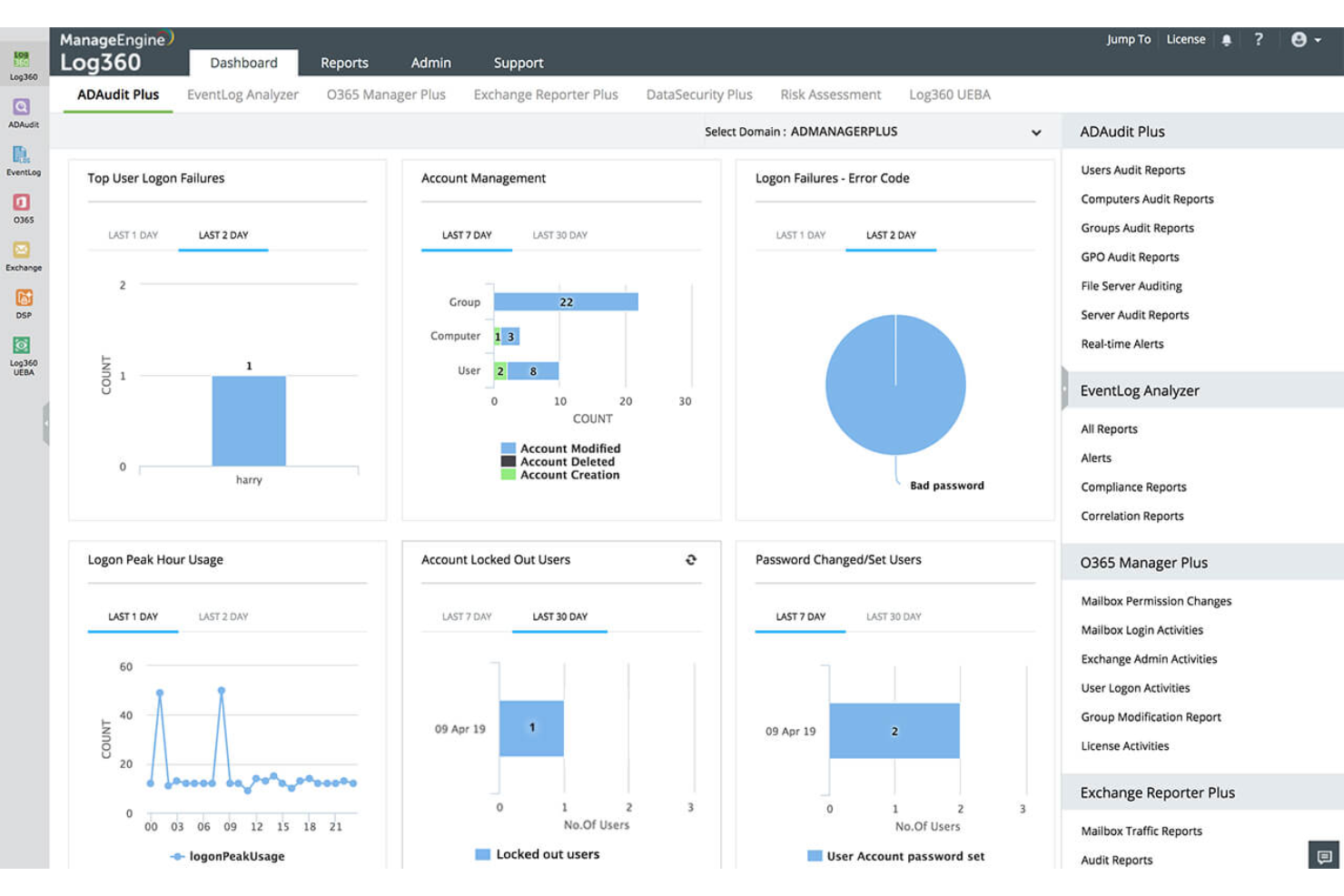
ManageEngine Log360 è una soluzione unificata di gestione delle informazioni e degli eventi di sicurezza (SIEM) progettata per aiutare le organizzazioni a rilevare, investigare e rispondere alle minacce di sicurezza nelle loro infrastrutture IT.
Perché ho scelto ManageEngine Log360: Offre un motore di correlazione in tempo reale che consente al tuo team di rilevare con precisione le minacce alla sicurezza correlando eventi sospetti in tutta la rete, assicurando che i potenziali problemi vengano identificati e affrontati tempestivamente. L'analisi del comportamento di utenti e entità (UEBA) basata su machine learning di Log360 aiuta inoltre a individuare minacce interne analizzando scostamenti nei comportamenti degli utenti, offrendo un ulteriore livello di sicurezza. Inoltre, sfruttando i feed di intelligence sulle minacce in formato STIX/TAXII, il software può individuare, segnalare e bloccare in tempo reale IP, domini e URL dannosi.
Funzionalità distintive e integrazioni:
Altre funzionalità includono la protezione DLP integrata che monitora l'accesso alle informazioni sensibili e previene l'esfiltrazione dei dati, garantendo la sicurezza delle informazioni critiche. Il software offre inoltre il monitoraggio del dark web per scoprire potenziali minacce e dati esposti prima che impattino sull’azienda. Alcune integrazioni includono Microsoft Exchange, Amazon Web Services (AWS), Microsoft Entra ID, Microsoft Azure e Active Directory.
Pros and Cons
Pros:
- Visione olistica della sicurezza tra reti on-premises, cloud e ibride
- Feed di intelligence avanzata sulle minacce
- Console di gestione degli incidenti
Cons:
- I log possono essere difficili da leggere e interpretare
- Configurazione e impostazione complesse
New Product Updates from ManageEngine Log360
ManageEngine Log360 Adds New Log Source Integrations
ManageEngine Log360 adds new log source integrations for Bitdefender GravityZone, CrowdStrike Falcon Event Streams, Okta, and MikroTik to broaden security and network visibility. For more information, visit ManageEngine Log360's official site.
 .
.
Ideale per configurare regole di avviso intelligenti

ManageEngine OPM Plus è una suite per la gestione delle operazioni IT che aiuta a monitorare, gestire e proteggere ogni livello della tua infrastruttura IT. Riunisce il monitoraggio di rete, server, applicazioni e sicurezza in un'unica piattaforma unificata, garantendo che gli avvisi e i dati sulle prestazioni confluiscano in una sola console facile da gestire.
Perché ho scelto ManageEngine OPM Plus: Ho scelto ManageEngine OPM Plus perché consolida tutti i tuoi avvisi IT in un unico posto, aiutandoti a ridurre il rumore degli avvisi e ad agire più rapidamente sulle problematiche critiche. Puoi configurare regole intelligenti per gli avvisi, personalizzare i percorsi di escalation e integrare direttamente strumenti di collaborazione come Slack e Microsoft Teams affinché le persone giuste vengano avvisate immediatamente. Inoltre, mi piace che vada oltre la segnalazione degli alert includendo osservabilità full-stack e gestione automatizzata delle patch, aiutandoti sia a rilevare che a risolvere i problemi all'interno dello stesso ambiente.
Caratteristiche principali e integrazioni:
Le funzionalità includono gestione avanzata dei guasti con escalation automatizzata degli avvisi, monitoraggio delle prestazioni full-stack per reti, server e applicazioni, e funzionalità SIEM integrate per rilevare e rispondere alle minacce alla sicurezza in tempo reale. Ottieni anche strumenti di analisi e analisi delle cause radice per una risoluzione più rapida degli incidenti. Le integrazioni includono ServiceDesk Plus, ServiceNow, Jira, Slack, MS Teams, Ansible, piattaforme SIEM, Log360, Analytics Plus, Grafana, suite Zoho e REST API.
Pros and Cons
Pros:
- Supporta il monitoraggio multipiattaforma con più vendor
- Consente workflow di escalation automatica degli avvisi
- Fornisce visibilità in tempo reale sulle prestazioni
Cons:
- Richiede risorse di sistema elevate
- Configurazione complessa per principianti

Ideale per diagnosi a livello di codice
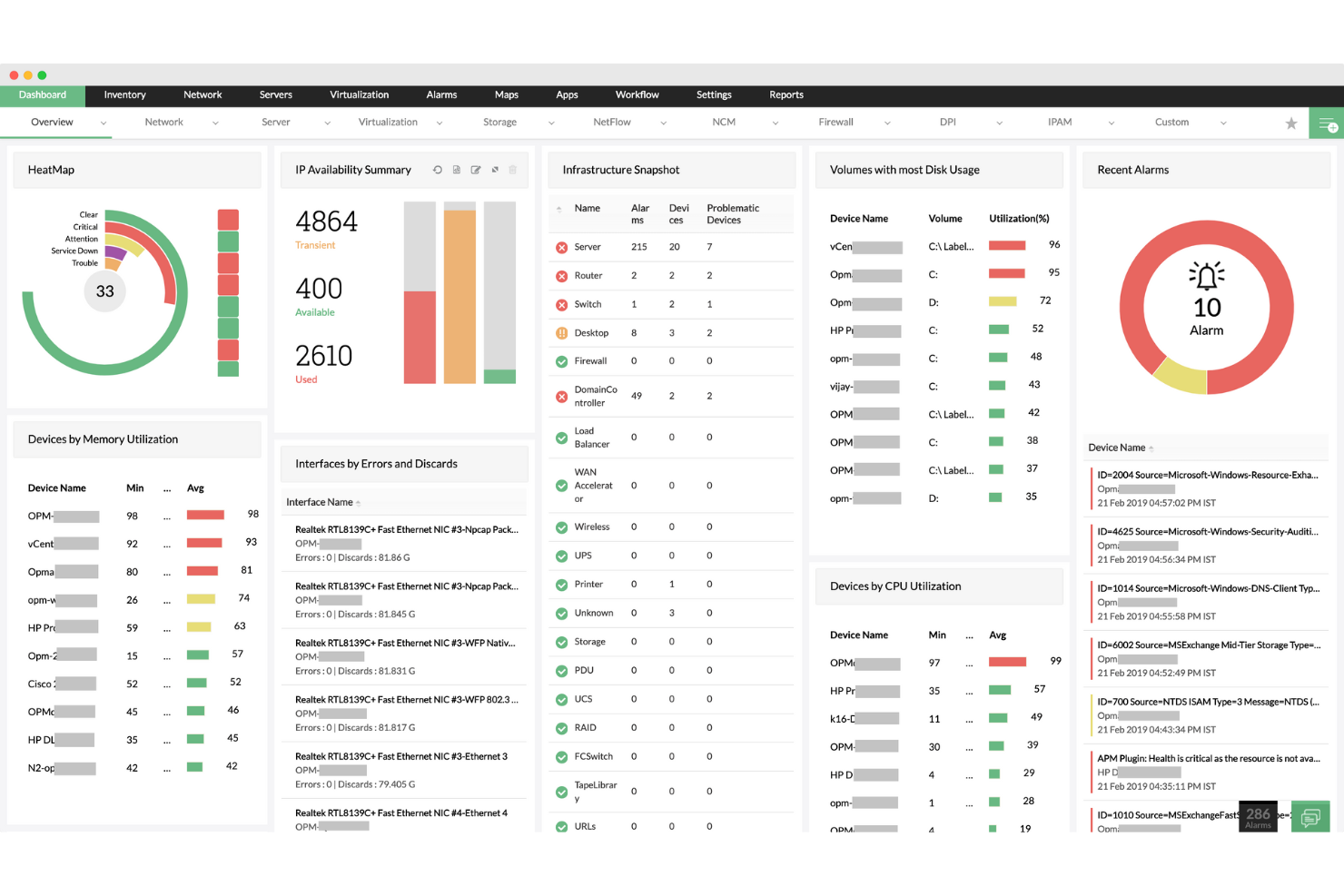
ManageEngine Applications Manager è una soluzione completa per il monitoraggio delle prestazioni delle applicazioni (APM) e dell'infrastruttura che supporta oltre 150 tecnologie su ambienti on-premises, cloud e ibridi. Fornisce diagnosi in tempo reale, avvisi potenziati dall'IA e visibilità approfondita su stack applicativi, database, servizi cloud ed esperienze utente.
Perché ho scelto ManageEngine Applications Manager: Ho selezionato Applications Manager per il suo approccio olistico al monitoraggio, che unifica la visibilità di applicazioni e infrastruttura in un'unica piattaforma. Si distingue offrendo diagnosi a livello di codice per stack applicativi come Java e .NET, insieme a un monitoraggio approfondito dell'infrastruttura per macchine virtuali, database e container. L'inclusione di monitoraggio degli utenti reali (RUM), transazioni sintetiche e strumenti di osservabilità cloud ne potenzia ulteriormente la versatilità nelle operazioni IT.
Funzionalità e integrazioni principali:
Applications Manager include tracciamento delle transazioni distribuite, rilevamento delle anomalie, monitoraggio sintetico tramite script Selenium e dashboard delle prestazioni in tempo reale. Si integra con strumenti ManageEngine come OpManager e ServiceDesk Plus, e supporta servizi di terze parti tra cui Slack e Site24x7.
Pros and Cons
Pros:
- Mappe di rete in tempo reale e aggiornate automaticamente
- Supporta ambienti multi-vendor
- Scoperta automatizzata e programmata della rete
Cons:
- La configurazione iniziale può essere complessa
- Il prezzo può essere elevato per i piccoli team
New Product Updates from ManageEngine OpManager

ManageEngine OpManager Adds NVIDIA GPU Monitoring
ManageEngine OpManager adds NVIDIA GPU monitoring for Linux servers, dedicated GPU dashboards, adaptive thresholds, and automated incident response to help teams track AI infrastructure performance, health, and resource usage. For more information, visit ManageEngine OpManager’s official site.
 .
.
UptimeRobot
Ideale per notifiche multi-canale focalizzate sulla disponibilità
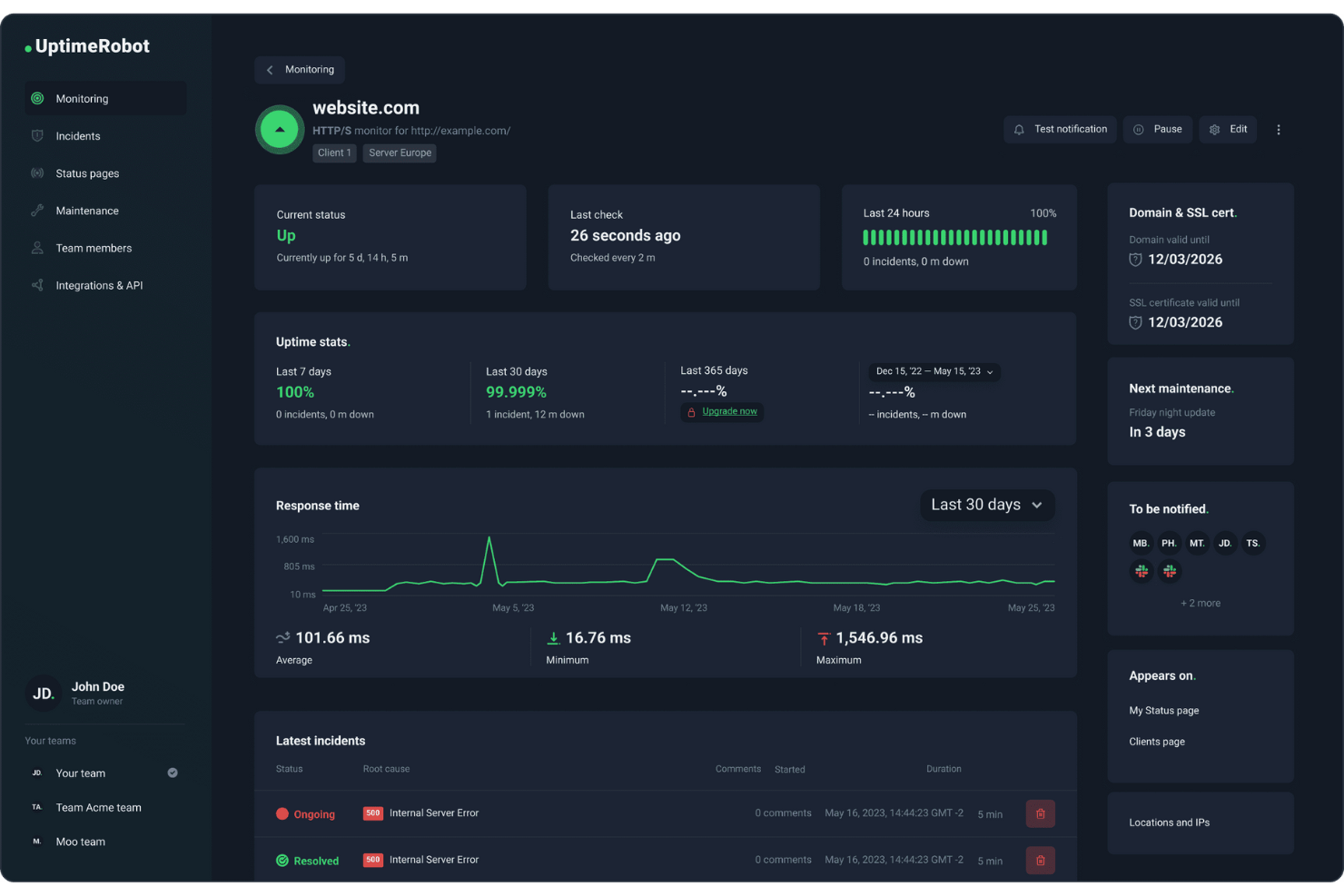
Se stai cercando una soluzione affidabile per gli avvisi IT, UptimeRobot è un'opzione pratica per i team che dipendono da notifiche multi-canale focalizzate sulla disponibilità. Supporta team DevOps, sviluppatori e titolari d'azienda monitorando uptime, stato SSL e tempi di risposta sui principali endpoint. Con avvisi inviati tramite diversi canali e integrazioni con strumenti comuni, UptimeRobot aiuta i team a restare informati su eventuali problemi di disponibilità e a rispondere rapidamente ai tempi di inattività.
Perché ho scelto UptimeRobot
Ho scelto UptimeRobot per i suoi avvisi multi-canale incentrati sui tempi di disponibilità, che aiutano i team a reagire rapidamente quando i servizi non sono disponibili. Monitora la disponibilità, lo stato SSL e i tempi di risposta, fornendo segnali chiari quando si verificano problemi di uptime. Con notifiche inviate tramite strumenti come Slack e Microsoft Teams, i team possono restare informati senza dover controllare continuamente le dashboard. UptimeRobot offre anche funzionalità come controlli HTTP personalizzati e finestre di manutenzione, facilitando la gestione del monitoraggio durante cambiamenti programmati e operazioni continuative.
Funzionalità principali di UptimeRobot
Oltre alle notifiche multi-canale focalizzate sulla disponibilità, UptimeRobot offre:
- Pagine di stato pubbliche: crea e personalizza facilmente pagine di stato per comunicare la disponibilità dei tuoi servizi e gli incidenti agli stakeholder.
- Monitoraggio da più località: effettua controlli da più sedi per garantire l'accuratezza e l'affidabilità della disponibilità a livello globale.
- Collaborazione di team: invita membri del team con diversi livelli di accesso per gestire gli incidenti e monitorare le prestazioni in modo collaborativo.
- Webhooks: configura notifiche avanzate e integra applicazioni personalizzate per una gestione degli incidenti su misura.
Integrazioni di UptimeRobot
Le integrazioni includono Slack, Microsoft Teams, Discord, Telegram, Splunk, Zapier, PagerTree, Pipedream, ilert e Zenduty.
Pros and Cons
Pros:
- Avvisi affidabili e tempestivi in caso di inattività del sistema
- Supporta diversi tipi di monitoraggio, inclusi SSL e dominio
- Supporta notifiche via email, SMS, Slack, Teams e webhook
Cons:
- Le funzionalità avanzate richiedono piani a pagamento, limitando l'uso gratuito
- Logica degli avvisi limitata rispetto alle piattaforme di gestione degli incidenti
Altri software di allerta IT
Ecco alcune ulteriori soluzioni di software di allerta IT che non sono entrate nella mia shortlist, ma che meritano comunque attenzione:
- PagerDuty
Ideale per la gestione dei turni di reperibilità e delle escalation
- New Relic
Ideale per politiche di allerta personalizzabili
- BigPanda
Ideale per la correlazione centralizzata degli alert
- Better Stack
Il migliore per il monitoraggio dell'uptime e delle performance
- Amazon Simple Notification Service (SNS)
Ideale per la messaggistica scalabile nel cloud
- FireEye Helix
Ideale per notifiche di intelligence avanzata sulle minacce
- Altera
Ideale per la gestione IT da remoto
- xMatters
Ideale per la risposta automatizzata agli incidenti
- OnPage
Ideale per la gestione degli avvisi di incidente
- HipLink
Ideale per soluzioni complete di gestione degli alert


Come valuto il software di IT Alerting
Divido la mia valutazione tra le funzionalità imprescindibili—come la consegna su più canali e la gestione dei turni di reperibilità—e i fattori differenzianti che separano un buon strumento da quello giusto.
Funzionalità di base (Requisiti fondamentali per questa lista)
Quando seleziono gli strumenti per la mia lista, valuto ciascuno su una scala da 0 (non offre la funzionalità) a 5 (eccelle in quest'area) per ogni funzionalità di base elencata di seguito. Successivamente, calcolo il punteggio totale dello strumento in percentuale. Ogni strumento deve raggiungere un punteggio minimo totale del 65% per essere preso in considerazione.
- Consegna di allerte su più canali: Verifico se lo strumento può raggiungere i destinatari tramite SMS, email, chiamate vocali, notifiche push e app di chat—perché un'alert non ricevuto alle 3 di notte vanifica tutto lo scopo.
- Gestione dei turni di reperibilità: Qui è importante la gestione delle rotazioni, inclusi i cambi di turno, le sostituzioni e la copertura "follow-the-sun" affinché i team distribuiti a livello globale abbiano sempre qualcuno disponibile.
- Politiche di escalation: Valuto se la piattaforma consente di definire regole di escalation multi-livello e basate sul tempo che reindirizzano automaticamente le allerte non confermate ai reperibili di backup o ai responsabili.
- Integrazione con strumenti di monitoraggio: Lo strumento dovrebbe collegarsi con stack di osservabilità come Datadog, Prometheus, Nagios e New Relic affinché le allerte arrivino senza necessità di inoltramenti manuali o script personalizzati.
- Aggregazione e deduplicazione delle allerte: Esamino come la piattaforma raggruppa le allerte correlate e sopprime i duplicati—un singolo disservizio del database non dovrebbe sommergere l'ingegnere reperibile con 200 notifiche separate.
- Monitoraggio e report degli incidenti: Metriche di risposta come MTTA e MTTR dovrebbero essere registrate e visualizzate in dashboard per consentire ai team di misurare le prestazioni e condurre post-mortem significativi.
Dopo aver stilato una lista di strumenti che soddisfano i criteri, considero ciò che distingue ogni piattaforma.
Fattori differenzianti (Cosa distingue i fornitori)
Ecco come confronto e metto a confronto i diversi fornitori:
Funzionalità eccezionali
L'automazione dei runbook è un grande punto di differenziazione—cerco strumenti che attivano script di remediation predefiniti al verificarsi di una allerta, come il riavvio di un servizio in errore o lo scaling delle risorse ancor prima che intervenga un operatore. Anche le funzionalità ChatOps sono rilevanti, soprattutto per le piattaforme che attivano canali Slack o Teams dedicati, corredati di tutto il contesto dell'incidente. Le app mobili di risposta completano il quadro consentendo ai reperibili di confermare, eseguire escalation o riassegnare allerte direttamente dal telefono anche fuori orario.
Oltre le funzionalità
Le certificazioni di sicurezza e conformità pesano molto nella mia valutazione—i team in settori regolamentati devono poter contare sulla copertura SOC 2 Type II, HIPAA o ISO 27001 prima ancora di prendere in considerazione una piattaforma. Anche la trasparenza dei modelli di prezzo è importante, poiché la fatturazione per utente funziona per i piccoli team ma può crescere rapidamente rispetto ai modelli basati sui reperibili. Verifico anche la flessibilità di deployment, in particolare se il fornitore offre ridondanza multi-regione, perché una piattaforma di alerting che va offline durante un guasto genera esattamente il problema che dovrebbe risolvere.
Come scegliere un software di allerta IT
È facile perdersi tra lunghe liste di funzionalità e strutture di prezzi complesse. Per aiutarti a rimanere concentrato durante il tuo processo di selezione del software, ecco una checklist di fattori da tenere in considerazione:
| Fattore | Cosa considerare |
|---|---|
| Scalabilità | Il software crescerà insieme al tuo team? Considera le esigenze future e se lo strumento può gestire un aumento di allerte e utenti senza problemi. |
| Integrazioni | Funziona con i tuoi strumenti attuali? Verifica che si colleghi ai tuoi sistemi IT già in uso per risparmiare tempo ed evitare soluzioni manuali. |
| Personalizzazione | Puoi adattarlo alle tue necessità? Cerca opzioni che ti permettano di regolare allerte e flussi di lavoro in base ai processi specifici del tuo team. |
| Facilità d’uso | È facile da usare? Un’interfaccia semplice riduce tempi di formazione e possibili errori. Prova la demo per vedere se il tuo team riesce a navigarla facilmente. |
| Implementazione e onboarding | Quanto velocemente puoi iniziare? Valuta le risorse necessarie per la configurazione e se il fornitore offre materiali formativi per facilitare la transizione. |
| Costo | Si adatta al tuo budget? Confronta i piani tariffari e fai attenzione ai costi nascosti. Cerca eventuali versioni di prova gratuita per testare prima dell’acquisto. |
| Meccanismi di sicurezza | Le tue allerte sono sicure? Assicurati che il software disponga di una solida crittografia e misure di protezione dei dati per mantenere le tue informazioni al sicuro. |
| Disponibilità del supporto | Ricevi aiuto quando ne hai bisogno? Controlla se il fornitore offre supporto 24/7, live chat o un account manager dedicato per l’assistenza. |
Che cos’è un software di allerta IT?
Il software di alerting IT è uno strumento che notifica i team riguardo ai problemi IT in tempo reale. I professionisti IT come amministratori di sistema e ingegneri di rete utilizzano questi strumenti per affrontare rapidamente i problemi e minimizzare i tempi di inattività. Funzionalità come notifiche in tempo reale, capacità di integrazione e flussi di lavoro personalizzabili aiutano a garantire avvisi tempestivi e una gestione efficiente degli incidenti. In generale, questi strumenti migliorano l'efficienza operativa mantenendo i team informati e pronti ad agire.
Funzionalità
Quando scegli un software di alerting IT, tieni in considerazione le seguenti caratteristiche chiave:
- Avvisi in tempo reale: Notifica istantaneamente il tuo team in caso di problemi, consentendo tempi di risposta più rapidi e riducendo i possibili tempi di inattività.
- Capacità di integrazione: Collegati senza problemi ai sistemi e agli strumenti IT esistenti per ottimizzare i flussi di lavoro ed evitare l'inserimento manuale dei dati.
- Flussi di lavoro personalizzabili: Adatta i processi di avviso alle esigenze specifiche del tuo team per migliorare l'efficienza nella gestione degli incidenti.
- Pianificazione dei turni di reperibilità: Gestisci e automatizza i turni di reperibilità per assicurarti che i membri giusti del team siano disponibili quando si verificano problemi.
- Notifiche multicanale: Invia avvisi tramite diversi canali come e-mail, SMS e app mobili per garantire che nessun avviso critico venga perso.
- Tracciamento degli incidenti: Mantieni un registro dettagliato degli incidenti per analizzare le tendenze e migliorare le strategie di risposta future.
- Supporto app mobile: Accedi agli avvisi e gestisci gli incidenti anche in movimento, assicurando che il tuo team possa rispondere tempestivamente ovunque si trovi.
- Accesso basato sui ruoli: Controlla chi può visualizzare quali informazioni per mantenere la sicurezza e garantire che i membri accedano solo ai dati rilevanti.
- Analisi avanzata: Utilizza approfondimenti dei dati per comprendere i modelli di incidenti e migliorare l’operatività IT complessiva.
- Misure di sicurezza: Proteggi le informazioni sensibili con una forte crittografia e altre misure di tutela dei dati.
Vantaggi
Implementare un software di alerting IT offre numerosi vantaggi per il tuo team e la tua azienda. Ecco alcuni benefici a cui puoi ambire:
- Tempi di risposta più rapidi: Gli avvisi in tempo reale permettono al tuo team di agire velocemente, riducendo i tempi di inattività e minimizzando l’impatto sulle operazioni.
- Migliore coordinamento del team: Flussi di lavoro personalizzabili e pianificazione dei turni di reperibilità aiutano il tuo team a collaborare in modo più efficiente durante gli incidenti.
- Miglioramento del processo decisionale: Le analisi avanzate offrono informazioni sui modelli di incidenti, facilitando una migliore pianificazione e risposta alle emergenze.
- Maggiore accessibilità: Notifiche multicanale e supporto app mobile consentono al tuo team di rispondere agli avvisi ovunque si trovi.
- Migliore gestione delle risorse: Le capacità di integrazione permettono una connessione fluida con gli strumenti esistenti, risparmiando tempo e riducendo il lavoro manuale.
- Maggiore sicurezza: L’accesso basato sui ruoli e le misure di sicurezza proteggono i dati sensibili e assicurano che solo il personale autorizzato gestisca gli incidenti.
- Approccio proattivo alla risoluzione dei problemi: Il tracciamento degli incidenti aiuta a identificare problematiche ricorrenti, permettendo al tuo team di intervenire sulle cause alla radice e prevenire futuri incidenti.
Costi e prezzi
La scelta di un software di alerting IT richiede la comprensione dei vari modelli e piani tariffari disponibili. I costi variano in base alle funzionalità, alle dimensioni del team, agli addon e altro ancora. La tabella seguente riassume i piani più comuni, i prezzi medi e le funzionalità tipiche incluse nelle soluzioni di software di alerting IT:
Tabella comparativa dei piani per il software di alerting IT
| Tipo di piano | Prezzo medio | Funzionalità comuni |
|---|---|---|
| Piano gratuito | $0 | Avvisi di base, integrazioni limitate e reportistica essenziale. |
| Piano personale | $5-$25/user/month | Avvisi in tempo reale, supporto app mobile e analisi di base. |
| Piano business | $30-$50/user/month | Integrazioni avanzate, flussi di lavoro personalizzabili e pianificazione dei turni di reperibilità. |
| Piano enterprise | $60-$100/user/month | Suite analitica completa, supporto dedicato e funzionalità di sicurezza avanzate. |
Domande frequenti sul software di allerta IT
Ecco alcune risposte alle domande più comuni sul software di allerta IT:
Come funzionano le politiche di escalation nel software di allerta IT?
Le politiche di escalation determinano come vengono gestiti gli avvisi quando il primo referente non li riconosce. È possibile impostare regole basate sul tempo per inoltrare automaticamente gli avvisi ad altri membri del team o ai manager. Personalizza le politiche in base alla struttura del tuo team e garantisci risposte tempestive alle problematiche critiche.
Il software di allerta IT può monitorare il tempo medio di presa in carico (MTTA) o risoluzione (MTTR)?
Sì, la maggior parte degli strumenti di allerta IT offre report integrati per metriche come MTTA, MTTR e tassi di riconoscimento. Queste metriche ti aiutano a capire come reagisce il tuo team IT sotto pressione. Puoi esaminare gli avvisi passati, vedere chi ha risposto e individuare eventuali ritardi nei percorsi di escalation. Ciò rende più semplice identificare i punti deboli nel processo di risposta agli incidenti.
I sistemi di allerta IT supportano la rotazione delle reperibilità per sysadmin o SRE?
La maggior parte dei software di allerta IT include strumenti di pianificazione per l’operatività IT. Puoi creare rotazioni, assegnare referenti di backup e inoltrare automaticamente gli avvisi in caso di mancata risposta. Alcuni strumenti si integrano con Google Calendar o Slack, così il tuo team sa sempre chi è reperibile. Questa configurazione garantisce una copertura costante e affidabile.
Quali canali di comunicazione supportano tipicamente gli strumenti di allerta IT?
Il software di allerta IT di solito supporta SMS, chiamate telefoniche, notifiche push, email e integrazioni con strumenti come Microsoft Teams, Slack o PagerDuty. Puoi impostare regole per inviare gli avvisi su canali specifici in base all’orario, al team o alla gravità. Questa flessibilità aiuta il team IT a rispondere rapidamente con il metodo preferito.
Cosa succede dopo:
Se stai cercando un software di allerta IT, collegati gratuitamente con un consulente SoftwareSelect per ricevere raccomandazioni personalizzate.
Basta compilare un modulo e fare una breve chiacchierata per entrare nello specifico delle tue necessità. Riceverai così una lista ristretta di software da valutare. Ti supporteranno anche durante tutto il processo di acquisto, comprese le negoziazioni sul prezzo.