

10 Meilleurs Outils de Test Cloud Passés en Revue pour 2026

10 Liste des meilleurs outils de test cloud
Here's my pick of the 10 best software from the 20 tools reviewed.


Les tests cloud offrent à votre équipe la flexibilité d’exécuter des tests à grande échelle sans avoir à gérer une infrastructure coûteuse. Mais avec autant d’outils disponibles, choisir le bon peut prendre beaucoup de temps. Il vous faut une solution adaptée à vos besoins de test, qui s’intègre à votre flux de travail et qui reste économique.
Je teste et évalue les logiciels de manière indépendante, en me concentrant sur ce qui compte le plus pour les CTO dans le domaine des tests logiciels. Dans ce guide, j’ai sélectionné les meilleurs outils de test cloud disponibles aujourd’hui. Vous trouverez des informations sur leurs fonctionnalités, tarifications, avantages et inconvénients, ainsi que sur la façon dont chaque outil répond à différents besoins de test.
Que vous recherchiez un outil pour gérer les tests automatisés, la compatibilité inter-navigateurs ou les tests de performance dans le cloud, cette liste vous aidera à faire un choix éclairé.
Table of Contents
Why Trust Our Software Reviews
We’ve been testing and reviewing software since 2023. As tech leaders ourselves, we know how critical and difficult it is to make the right decision when selecting software.
We invest in deep research to help our audience make better software purchasing decisions. We’ve tested more than 2,000 tools for different tech use cases and written over 1,000 comprehensive software reviews. Learn how we stay transparent & our software review methodology.
Résumé des meilleurs outils de test cloud
| Tool | Best For | Trial Info | Price | ||
|---|---|---|---|---|---|
| 1 | Best for AI-driven test automation | Free plan available | From $3,600/year | Website | |
| 2 | Best cloud testing tool for startups and software agencies | 14-day free trial + free plan available | From $189/month (billed annually) | Website | |
| 3 | Best for codeless test automation | Free trial available | From $199/month/year (minimum of 4 seats) | Website | |
| 4 | Best for agile teams | Free demo available | From $200/user/month (billed annually) | Website | |
| 5 | Best network protocol analyzer testing tool | Free download available | Free to use (open source) | Website | |
| 6 | Best for fast end-to-end test creation | 14-day free trial | From $212/month | Website | |
| 7 | Best for real-time performance insights for cloud-based applications and infrastructure | Free trial + free demo available | Pricing upon request | Website | |
| 8 | Best CI/CD testing server | Free download available | Free to use | Website | |
| 9 | Best highly-customizable, automation test tool | Free plan available | From $8/user/month (billed annually) | Website | |
| 10 | Best cloud performance testing application | 30-day free trial | Pricing upon request | Website |
-

Site24x7
Visit WebsiteThis is an aggregated rating for this tool including ratings from Crozdesk users and ratings from other sites.4.7 -
GitHub Actions
Visit WebsiteThis is an aggregated rating for this tool including ratings from Crozdesk users and ratings from other sites.4.8 -
Docker
Visit WebsiteThis is an aggregated rating for this tool including ratings from Crozdesk users and ratings from other sites.4.6





Aperçus des 10 meilleurs outils de test cloud
Vous trouverez ci-dessous mes résumés détaillés des meilleurs outils de test cloud qui ont été retenus dans ma sélection. Mes avis offrent un aperçu approfondi des principales fonctionnalités, des avantages et inconvénients, des intégrations et des cas d’utilisation idéaux pour chaque outil afin de vous aider à trouver celui qui vous convient le mieux.

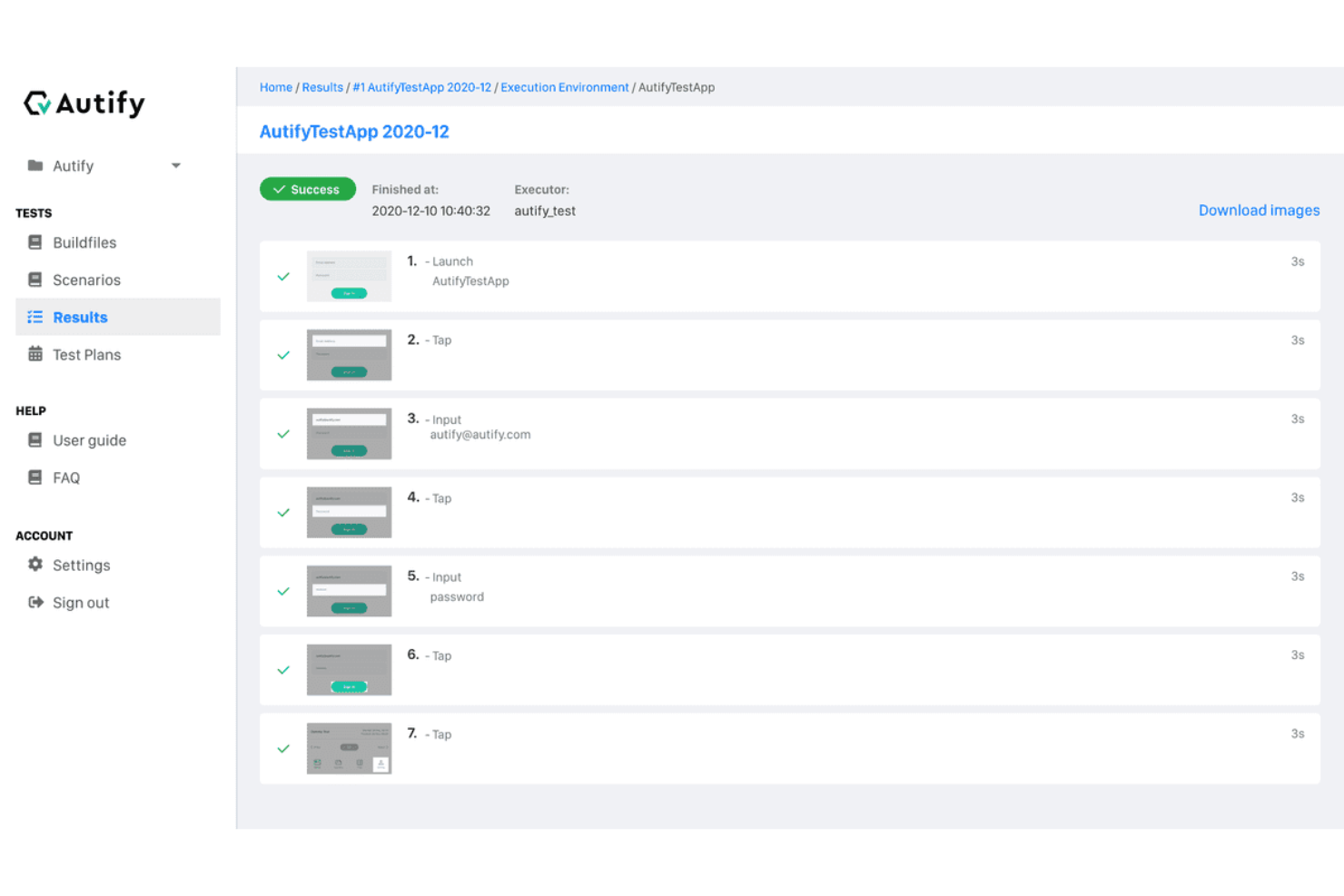
Autify Aximo presents a compelling solution for teams looking to streamline their testing processes across web, mobile, and desktop platforms. By leveraging AI to automate end-to-end testing, it caters to modern engineering teams seeking to eliminate the complexities of traditional scripted automation. With its ability to adapt to application changes autonomously, Autify Aximo helps reduce the overhead of test maintenance and ensures reliable results, addressing the need for efficient and scalable testing in today's fast-paced development environments.
Why I Picked Autify Aximo
I chose Autify Aximo because of its unique AI-driven approach that simplifies and enhances the testing lifecycle. The tool's ability to use natural language and visual recognition to autonomously generate and execute tests sets it apart, particularly for teams that need to reduce the time spent on manual scripting. Autify Aximo's self-healing capabilities ensure that your tests remain robust against UI changes, minimizing the need for constant maintenance. Additionally, its NoCode option makes test automation accessible to non-technical users, broadening its appeal across various team structures.
Autify Aximo Key Features
In addition to its core functionalities, I also found Autify Aximo offers several other features that enhance its utility as a cloud testing tool.
- NoCode Automation: Allows users without technical expertise to create and manage tests, making it accessible to a broader range of team members.
- Self-Healing Tests: Automatically updates tests to adapt to changes in the application, reducing the need for manual intervention.
- End-to-End Test Coverage: Provides comprehensive testing capabilities across web, mobile, and desktop applications, ensuring thorough validation of software.
- AI-Driven Test Creation: Utilizes AI to generate test cases from product documents, streamlining the test creation process.
Autify Aximo Integrations
Native integrations include Jira, Slack, GitHub, Jenkins, CircleCI, Bitrise, Travis CI, and TestRail. An open API is available for custom integrations.
Pros and Cons
Pros:
- Supports web, mobile, desktop
- CI/CD pipeline integrations available
- AI-driven automated test creation
Cons:
- Limited traditional scripting control
- Pricing not publicly available

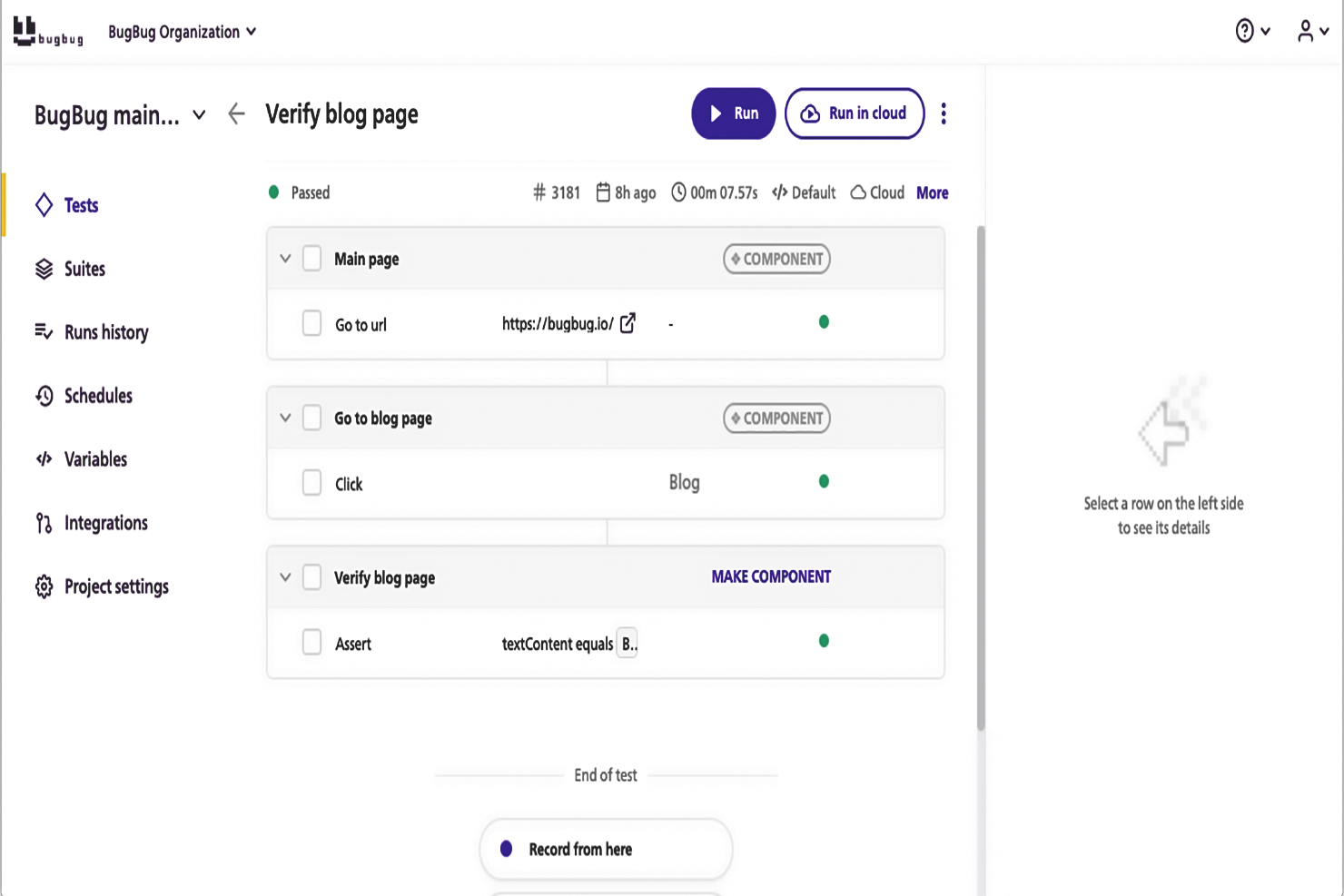
BugBug is a cloud-based testing software solution designed to aid developers in evaluating and troubleshooting web applications in one portal. This platform has a playback and recording tool, allowing users to review their recorded activities and tweak results. Users can create tests without coding, run tests in browsers or the cloud, and fix tests by re-recording, scheduling test automation, integrating CI/CD pipelines, and collaborating with teammates.
The software has several features that make it a reliable platform for developers, including automatic CSS or Xpath selectors, smart waiting, intelligent click and scroll, debugging through Chrome, multiple tab support, parallel cloud test runs, support for various technologies, and test step customization with JavaScript. The software is designed for startups and software agencies to help automate tests faster than when coding them, reduce testing costs, monitor applications, and avoid complexities.
Other valuable features include cloud tests through BugBug cloud VMs, schedules, email notifications, variables, API access, integrations, parallel runs, and better customer support.
Users can create functional tests in minutes, run tests on schedule, and integrate the platform with their favorite tools. BugBug’s user-friendly interface makes it easy for users to use the different features available on the platform. Businesses that want to use BugBug as a cloud testing tool only need to pay $49 a month to access cloud testing through BugBug’s virtual machines.

TestGrid is a cloud-based testing platform that offers real device testing, codeless automation, and integration with popular CI/CD pipelines. The tool helps QA teams run tests across browsers, devices, and environments without maintaining on-premise infrastructure.
Why I picked TestGrid: I chose TestGrid because it emphasizes codeless automation, making it easier for non-technical users to build and run tests without writing scripts. Its real device cloud allows you to validate performance across multiple platforms, while AI-powered test intelligence can adapt to changing requirements. This makes it a practical choice for teams that want both accessibility and technical depth in one tool.
TestGrid Standout Features & Integrations
Features include test case parameterization, iterative execution, test case cloning, API + UI assertions, performance metrics, and hybrid cloud deployment options.
Integrations include Jenkins, CircleCI, Azure Pipelines, Bitrise, Travis CI, Cypress, Appium, Playwright, Selenium IDE, Katalon, Ranorex, and TestComplete, plus connections with collaboration tools like Jira, Slack, and Microsoft Teams.
Pros and Cons
Pros:
- Strong CI/CD integrations
- Real device testing cloud
- Codeless test creation option
Cons:
- Setup complexity for beginners
- Limited advanced reporting views
New Product Updates from TestGrid
TestGrid's Quantum Fuze Introduces Smart Execution
Quantum Fuze introduces Smart Execution, enabling environment-specific test runs across devices, OS versions, and screen resolutions. This update improves test accuracy and reliability by treating each execution independently. For more information, visit TestGrid's official site.
 .
.

Tricentis Test Automation is a cloud-based software testing tool that helps you automate your testing processes, making it easier and faster to ensure the quality of your applications. It's designed for both small and large businesses, and it's perfect for those who want to streamline their testing efforts and get better results in less time.
Why I picked Tricentis Test Automation: I chose Tricentis Test Automation as one of the best cloud testing tools because it offers a comprehensive solution for all types of testing, including functional, performance, and security testing. It's also very user-friendly, which means that even if you're not a testing expert, you can still get up and running quickly and easily. Plus, it has the ability to simulate realistic virtual application services so you don't have to wait for something to be available or pay to use it for a simulation.
Tricentis Test Automation Standout Features & Integrations
Features include a model-based approach to test automation, which means that you can create reusable test assets that can be easily updated as your application changes. This not only saves time but also helps ensure that your tests stay relevant and effective. Second, it includes AI-driven test automation, which helps you identify the most critical tests to run and can even generate test cases for you. This can help you focus your testing efforts on the areas that matter most and get better results faster.
Integrations include some of the most popular Agile and DevOps tools, including Jenkins, Selenium, Cucumber, Tricentis Vera, Jira, VersionOne, and Central Rally.
Pros and Cons
Pros:
- Parallel test runs across infrastructures
- Test reusable models instead of scripts
- You can build simulated API responses

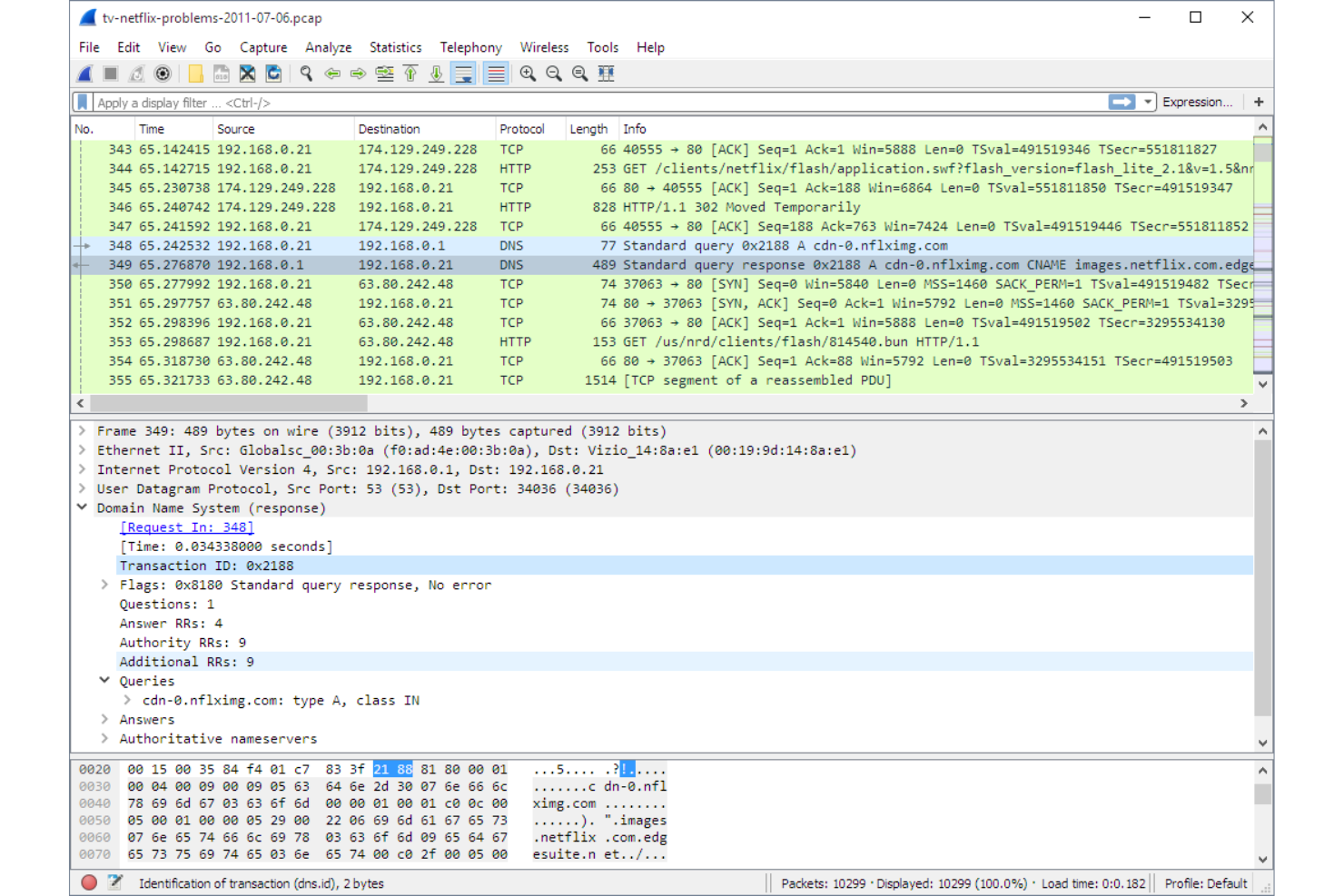
Wireshark is an open-source package tool and analyzer for network vulnerability and penetration tests. It is called a packet sniffer due to its ability to act as a network monitoring tool.
Why I picked Wireshark: Wireshark helps both security specialists and testers obtain the precise picture of a network to troubleshoot issues effectively. Its network and telephony analysis runs on all the major OSs, including Windows, Linux, and macOS.
As one of the foremost network traffic capture tools, Wireshark helps to resolve the root cause of packet problems, such as where there’s a network depreciation and why packets are getting dropped.
Wireshark Standout Features & Integrations
Features include decryption support, color-coded schemes, protocol decoding, live capture, offline analysis, deep packet inspection, and display filters.
Integrations include third-party platforms such as Network Critical, Kali Linux, and EndaceProbes.
Wireshark is free and open source.
Pros and Cons
Pros:
- Comes with powerful display filters.
- An open-source security tool that’s free to everyone.
- Provides offline analysis in addition to live capture.
Cons:
- You can’t alter or generate packets with Wireshark.
- It can’t be run outside a network since it doesn’t allow packet injection.


Reflect is all about simplifying automated web testing in the cloud. It’s built for teams that want to create reliable, end-to-end tests quickly—without writing a line of code. You interact with your app in a browser, and Reflect records your actions to build the test. It’s like having an AI-powered test engineer sitting beside you, translating your clicks into full test coverage.
Why I picked Reflect: A few things really stand out. First, the AI-generated test steps save a ton of time—you just describe what you want in plain language, and Reflect builds it. Second, the platform adapts automatically to UI changes, so you’re not constantly fixing broken selectors. And because it supports both UI and API testing in the same flow, you get a full picture of how your app behaves, front to back.
Reflect Standout Features & Integrations
Features include no-code test creation, visual regression detection, cross-browser execution, automatic test maintenance, real-time alerts, and video-based debugging. Tests run entirely in the cloud, with parallel execution across environments.
Integrations include Slack, GitHub, Jira, Jenkins, CircleCI, Bitbucket, Azure DevOps, Shopify, AWS, Marketo, and more.
Pros and Cons
Pros:
- No-code test creation
- AI-powered test maintenance
- Comprehensive CI/CD integration
Cons:
- Limitations to mobile app testing
- Could offer more customization options for test configurations

Best for real-time performance insights for cloud-based applications and infrastructure

New Relic is all about application performance management and monitoring. It's a tool that's designed to help you keep an eye on your software and make sure everything's running smoothly. It's like having a 24/7 watchdog for your apps, making sure they're performing at their best and alerting you if anything goes wrong.
Why I picked New Relic: There are a few standout features that really make New Relic shine. First off, it's got real-time analytics. This means you can see exactly what's happening with your software, right as it's happening. It's also got an intuitive dashboard that makes it easy to understand your data. Plus, it's got a great alert system that lets you know if anything's going wrong, so you can fix it before it becomes a big problem.
New Relic Standout Features & Integrations
Features include backend monitoring, Kubernetes monitoring, mobile monitoring, model performance monitoring, infrastructure monitoring, log management, error tracking, network monitoring, vulnerability management, and browser monitoring.
Integrations include over 500 apps, such as AWS, Google Cloud, Microsoft Azure, Jenkins, CircleCI, Travis CI, Slack, PagerDuty, and other monitoring and analytics tools like Grafana, Datadog, and Splunk. It also has an API you can use to build custom integrations.
Pros and Cons
Pros:
- Integrates seamlessly with popular dev tools
- AI-powered anomaly detection and intelligent alerting
- Wide range of monitoring capabilities
Cons:
- Added complexity from reliance on agents installed on application servers
- Bit of a learning curve


Jenkins is a Java-based, open-source automation server used for continuous integration and continuous deployment (CI/CD) purposes. Jenkins allows DevOps to implement various stages of the software development lifecycle, especially those involving testing, building, and deployment.
Why I picked Jenkins: As part of the deployment pipeline, QA engineers typically use Jenkins to perform tests on code. However, Jenkins is self-contained and can be used to automate all sorts of development-aligned tasks, whether it involves delivery, deploying, building, or testing.
Jenkins can be installed on standalone machines with Java Runtime Environment (JRE). However, it can also be deployed on the cloud, with Cloud Native groups of collaborators and contributors working to improve its cloud-run environment, like offering architectural changes that optimize a stateless Jenkins.
Jenkins Standout Features & Integrations
Features include SCLC pipelines, task automations, workflow management, continuous integration and delivery (CI/CD), distributed builds, extensible, and open source.
Integrations include many software development and CI/CD tools like GitHub, GitLab, and BitBucket, including build tools such as Gradle and Maven. Additionally, they offer over 1,700 plugins to support different kinds of automation.
Jenkins is fully open-source and free to use.
Pros and Cons
Pros:
- Abundant plugin support and version management.
- Jenkins saves a lot of operational time through automating its deployment process.
- Reduces test and deployment time.
- Excellent facilitator for DevOps operations.
Cons:
- It needs to be used on high performance servers.
- Single-server architecture limits resources to a single computer or virtual machine.
- It is very dependent on Java architecture.


Testsigma is an open-source automation tool that provides QA teams and test engineers with the ability to customize tests for a variety of test profiles, whether they want to execute data-driven, regression, cross-browser, mobile, or continuous testing mechanisms.
Why I picked Testsigma: Although Testsigma works out of the box, it is highly configurable for a variety of end-to-end tests. It gives testers the flexibility of going code-agnostic, creating simple test scripts, or adopting AI-driven auto-pilot test maintenance.
Testsigma is ideal for development teams who are burdened with executing various test suites with a plethora of test scenarios. Testsigma’s SDKs and APIs help them to both customize and automate the process to meet their requirements.
Testsigma Standout Features and Integrations
Features include AI-driven test automations, cross-platform compatibility, cloud-based testing, continuous integration, reporting, multi-language support, and collaboration tools.
Integrations include Jenkins, Travis CI, CircleCI, Jira, Trello, BrowserStack, Sauce Labs, Scrum, Kanban, Appium, Selendroid, Postman, and Swagger.
Testsigma offers customized pricing upon request. Testsigma is free to use with some feature limitations.
Pros and Cons
Pros:
- Open source, ease of use along with cross-platform compatibility.
- Flexible, with multiple programming language support.
- No coding experience is required to use Testsigma.
Cons:
- It still poses a challenge to automate complex tests.
- Some of its desired features aren’t included in the open-source version.


CloudTest is a performance-testing platform from SOASTA, the US subsidiary of Akamai Technologies. It provides organizations with production application readiness from the convenience of the cloud.
Why I picked CloudTest: SOASTA CloudTest effectively leverages cloud computing resources so DevOps can focus their time and effort on delivering product features rather than building tests. CloudTest provides various forms of cross-platform support with browser recording (WebUI/Ajax), messaging (HTTP(s)), and SOAP/REST API service connectivity. It is ideal for enterprises, especially for large-scale testing.
It aims to make testing in production feasible, safe, and easier through its ability to span dozens of cloud providers seamlessly. However, it also facilitates low-level performance tests that make it possible to detect and identify performance issues much earlier in the development lifecycle.
CloudTest Standout Features & Integrations
Features include custom dashboards, scaling tests worldwide, big-data analytics, unlimited processing, dynamic ramp, traffic simulation, load simulation, multi-user test aggregation, real-user scenarios, and drag-and-drop test cases.
Integrations include Jenkins, Travis CI, CircleCI, VMware, Hyper-V, Apache JMeter, Gatling, Nagios, New Relic, Amazon Web Services (AWS), Microsoft Azure, MySQL, MongoDB, Apache, Nginx, Tomcat, Glassfish, as well as Network appliances such as firewalls, load balancers, and routers.
You need to contact Akamai sales for a pricing quote for CloudTest. CloudTest provides prospective customers with a 30-day free trial.
Pros and Cons
Pros:
- Provides organizations with the ability to test and validate code in production
- Takes web application performance seriously
- User-friendly interface design
Cons:
- Display of graphs on reports need improvement.
- Users complain of missing information with regard to load testing.
Autres options
Voici quelques autres options qui n’ont pas été retenues dans la liste des meilleurs outils de test cloud :
- Cloud Sleuth
Cloud distributed tracing tool
- AWS Device Farm
Cloud testing service for multiple browsers and devices
- Nessus
Vulnerability management tool for the cloud
- BitBar
Mobile app testing platform to test on physical devices
- BlazeMeter
Continuous cloud testing platform with open source compatibility
- Visual Studio App Center
Cloud mission control center for apps
- Watir
Web-browser cloud automation tool for ruby libraries
- AppPerfect
Cloud testing tool for versatility
- Tuskr
For flexible test management
- Owlity
For autonomous test generation


Autres tests et avis logiciels IT
Si vous n’avez toujours pas trouvé ce que vous cherchez ici, consultez ces solutions alternatives que nous avons testées et évaluées.
- Logiciels de surveillance de réseau
- Logiciels de surveillance de serveurs
- Solutions SD-Wan
- Outils de surveillance d’infrastructure
- Analyseur de paquets
- Outils de surveillance des applications
Critères de sélection des outils de test cloud
Pour sélectionner les meilleurs outils de test cloud à inclure dans cette liste, j’ai pris en compte les besoins courants des acheteurs et les difficultés fréquentes, comme la scalabilité pour gérer de grands ensembles de tests et l’intégration avec les pipelines CI/CD pour une automatisation efficace. J’ai également utilisé le cadre suivant pour garantir une évaluation structurée et équitable :
Fonctionnalités principales (25 % du score total)
Pour être inclus dans cette liste, chaque solution devait satisfaire les cas d’utilisation communs suivants :
- Exécution de tests automatisés dans des environnements cloud
- Prise en charge de plusieurs navigateurs, appareils et systèmes d’exploitation
- Intégration avec les pipelines CI/CD
- Fournir des rapports de tests détaillés et de l’analytique
- Offrir une exécution de tests en parallèle pour des résultats plus rapides
Fonctionnalités remarquables supplémentaires (25 % du score total)
Pour affiner la sélection, j’ai également recherché des fonctionnalités uniques, telles que :
- Automatisation des tests pilotée par l’IA et tests auto-réparateurs
- Fonctionnalités intégrées de tests de charge et de performance
- Débogage en temps réel et enregistrement des sessions de test
- Prise en charge native des environnements de test conteneurisés
- Automatisation de tests sans code pour les utilisateurs non techniques
Utilisabilité (10 % du score total)
Pour évaluer l’utilisabilité de chaque système, j’ai pris en compte les éléments suivants :
- Facilité de configuration des environnements de test
- Tableau de bord et interface de reporting intuitifs
- Clarté des journaux de test et des outils de débogage
- Accessibilité pour les développeurs et les testeurs
- Rapidité et fiabilité des performances lors de l’exécution des tests
Intégration (10 % du score total)
Pour évaluer l’expérience d’intégration sur chaque plateforme, j’ai pris en compte les éléments suivants :
- Disponibilité d’assistants de configuration guidés et de documentation
- Accès à des vidéos de formation, webinaires et tutoriels
- Disponibilité de visites interactives du produit et de démonstrations
- Facilité de migration des scripts de test et configurations existants
- Possibilité de périodes d’essai pour tester les fonctionnalités avant achat
Support client (10 % du score total)
Pour évaluer les services d’assistance client de chaque éditeur de logiciel, j’ai pris en compte les éléments suivants :
- Disponibilité d’un support en direct (chat ou téléphone) 24/7
- Réactivité des systèmes de support par ticket
- Présence d’une base de connaissance et de guides de dépannage
- Accès à des forums communautaires actifs ou groupes de support pour développeurs
- Disponibilité de gestionnaires de compte dédiés pour les utilisateurs entreprises
Rapport qualité-prix (10 % du score total)
Pour évaluer le rapport qualité-prix de chaque plateforme, j’ai pris en compte les éléments suivants :
- Transparence des prix et des fonctionnalités disponibles selon les offres
- Évolutivité des tarifs selon la taille de l’équipe et l’utilisation
- Inclure les fonctionnalités essentielles sans nécessiter d’extensions coûteuses
- Disponibilité d’options de facturation flexibles (mensuel vs annuel)
- Équité des prix comparée à celle des concurrents aux capacités similaires
Avis clients (10 % du score total)
Pour avoir un aperçu global de la satisfaction des utilisateurs, j’ai étudié les aspects suivants lors de la lecture des avis clients :
Cas d’usage concrets et retours d’expérience partagés par les utilisateurs
Fréquence des problèmes techniques ou bogues signalés
Retours sur la facilité d’utilisation et l’expérience d’intégration
Commentaires récurrents (positifs ou négatifs) sur la réactivité du support client
Stabilité et fiabilité globale de la plateforme
Comment choisir des outils de test cloud
Il est facile de se perdre dans les longues listes de fonctionnalités et les structures tarifaires complexes. Pour vous aider à rester concentré tout au long de votre processus de sélection logiciel, voici une liste de points à garder à l’esprit :
| Facteur | À prendre en compte |
|---|---|
| Évolutivité | L’outil peut-il gérer une augmentation de la charge de tests et de multiples utilisateurs simultanés ? Cherchez des solutions qui prennent en charge l’exécution de tests en parallèle et le test distribué. |
| Intégrations | Est-ce qu’il s’intègre à votre pipeline CI/CD, à vos systèmes de gestion de versions et à vos outils DevOps ? Une intégration fluide réduit les frictions dans les workflows de tests automatisés. |
| Personnalisation | Pouvez-vous adapter les cas de test, les tableaux de bord et les scripts d’automatisation à vos besoins ? Un outil avec des scripts flexibles et des configurations adaptables correspondra mieux à votre flux de travail. |
| Facilité d’utilisation | La plateforme est-elle facile à configurer et à naviguer ? Recherchez une interface intuitive, une documentation claire et un temps d’intégration minimal pour les nouveaux utilisateurs. |
| Budget | La tarification correspond-elle à vos besoins en matière de test et à la taille de votre équipe ? Pensez aux essais gratuits, aux formules à la carte et à d’éventuels coûts cachés pour des fonctionnalités avancées. |
| Mesures de sécurité | Comment l’outil protège-t-il les données de test sensibles ? Vérifiez la présence de chiffrement, de contrôles d’accès et la conformité aux normes de sécurité du secteur. |
| Vitesse d’exécution des tests | À quelle vitesse les tests s’exécutent-ils et l’outil peut-il optimiser les temps d’exécution ? Une exécution lente peut être un goulot d’étranglement pour votre cycle de développement, donc la rapidité est importante. |
| Rapports & Analyses | Propose-t-il des rapports de test clairs et exploitables ? Recherchez des fonctionnalités telles que des journaux en temps réel, des visualisations sur tableau de bord, et des formats de rapport personnalisables. |
Tendances des outils de test cloud
Lors de mes recherches, j’ai consulté de nombreuses mises à jour produits, communiqués de presse et journaux de versions provenant de divers fournisseurs d’outils de test cloud. Voici quelques-unes des tendances émergentes que je surveille de près :
- Génération de tests basée sur l’IA : De plus en plus d’outils utilisent l’intelligence artificielle pour créer et optimiser automatiquement des cas de test. Ces systèmes analysent les changements de code et le comportement des utilisateurs pour suggérer des scénarios de test pertinents, ce qui réduit l’intervention manuelle et améliore la couverture des tests. Des plateformes telles que Testim et Functionize intègrent déjà des fonctionnalités de test piloté par l’IA dans leurs workflows.
- Tests auto-réparateurs : Les outils de test cloud améliorent leur capacité à détecter et corriger automatiquement les scripts de test cassés. Plutôt que d’exiger une intervention manuelle lorsqu’un élément change, ces outils ajustent dynamiquement les localisateurs pour garantir la poursuite des tests. Cela réduit la maintenance et fiabilise l’automatisation.
- Environnements de test sans serveur : Certains fournisseurs offrent désormais des tests cloud entièrement sans serveur, permettant aux équipes de créer des environnements de test à la demande. Cela élimine le besoin de gérer une infrastructure de test dédiée et facilite le passage à l’échelle. AWS Device Farm et LambdaTest avancent déjà dans cette direction.
- Testing des performances anticipé (« shift-left ») : De plus en plus d’équipes réalisent des tests de performance et de charge plus tôt dans le cycle de développement, au lieu d’attendre la fin du processus. Les outils de test cloud permettent maintenant aux développeurs d’intégrer des tests de performance légers dans les pipelines CI/CD, afin de détecter les problèmes de performance plus tôt.
- Accent accru sur les tests de conformité : Avec le renforcement des réglementations sur la confidentialité des données, les plateformes de test cloud ajoutent des fonctionnalités axées sur la conformité. Certains outils incluent désormais des vérifications intégrées de conformité au RGPD, à l’HIPAA et à la norme SOC 2, aidant ainsi les équipes à garantir que leurs applications respectent les exigences de sécurité et de réglementation.
Que sont les outils de test cloud ?
Les outils de test cloud sont des solutions logicielles qui permettent aux équipes d’exécuter et de gérer des tests dans des environnements cloud plutôt que de dépendre d’une infrastructure locale. Les développeurs, ingénieurs QA et équipes DevOps utilisent ces outils pour tester des applications à grande échelle, améliorer la qualité logicielle et détecter les bogues en amont. L’exécution de tests en parallèle, la génération de tests pilotée par l’IA, et le reporting en temps réel permettent des cycles de rétroaction plus rapides, une meilleure couverture des tests et un dépannage plus efficace. Ces outils facilitent l’exécution de tests automatisés et fiables sur différents appareils, navigateurs et conditions de réseau.
Fonctionnalités des outils de test cloud
Lors du choix d’outils de test cloud, surveillez les fonctionnalités clés suivantes :
- Exécution de tests en parallèle : Exécute plusieurs tests simultanément sur différents environnements, réduisant ainsi la durée globale des tests.
- Automatisation des tests pilotée par l'IA : Utilise l'apprentissage automatique pour créer, optimiser et maintenir les cas de test, réduisant l'effort manuel.
- Tests multi-navigateurs et multi-appareils : Garantit le bon fonctionnement des applications sur différents navigateurs, systèmes d'exploitation et appareils mobiles.
- Scripts de test auto-réparateurs : Ajuste automatiquement les scripts de test lors de modifications des éléments de l'interface utilisateur, minimisant les échecs et la maintenance des tests.
- Environnements de test évolutifs : Permet aux équipes de provisionner et de gérer rapidement les environnements de test sans infrastructure physique.
- Rapports de test en temps réel : Fournit un retour immédiat avec journaux, captures d'écran et enregistrements vidéo pour faciliter le diagnostic des échecs.
- Tests de performance et de charge : Simule des conditions de fort trafic pour évaluer comment les applications se comportent sous contrainte.
- Tests de sécurité et de conformité : Vérifie les vulnérabilités et garantit la conformité des applications aux normes de protection et de sécurité des données.
- Intégration CI/CD : Se connecte aux pipelines DevOps pour automatiser les tests à chaque étape du développement.
- Tests de géolocalisation : Teste les applications depuis différentes localisations géographiques afin de valider leur fonctionnement sous divers types de réseaux.
Bénéfices des outils de test cloud
La mise en œuvre des outils de test cloud présente plusieurs avantages pour votre équipe et votre entreprise. Voici quelques-uns des bénéfices auxquels vous pouvez vous attendre :
- Exécution des tests plus rapide : Lance plusieurs tests en parallèle sur différents environnements, réduisant ainsi le temps de test.
- Coûts d'infrastructure réduits : Élimine la nécessité d'environnements de test sur site coûteux en utilisant des ressources cloud.
- Meilleure couverture des tests : Permet de tester sur divers navigateurs, appareils et systèmes d'exploitation pour détecter davantage de problèmes.
- Scalabilité facilitée : Ajuste les environnements de test à la demande selon les besoins du projet sans limitations matérielles.
- Détection précoce des bugs : S'intègre aux pipelines CI/CD pour identifier les défauts plus tôt dans le cycle de développement.
- Collaboration améliorée : Permet aux équipes distribuées d'accéder, d'exécuter et de revoir les tests de n'importe où.
- Automatisation plus fiable : Utilise l'IA et des scripts auto-réparateurs afin de réduire l'instabilité des tests et les efforts de maintenance.
Coûts et tarification des outils de test cloud
Choisir des outils de test cloud suppose de comprendre les différents modèles de tarification et forfaits proposés. Les coûts varient selon les fonctionnalités, la taille de l'équipe, les modules complémentaires et d'autres facteurs. Le tableau ci-dessous résume les forfaits courants, leurs prix moyens, ainsi que les fonctionnalités généralement incluses dans les solutions d'outils de test cloud :
Tableau comparatif des forfaits pour les outils de test cloud
| Type de forfait | Prix moyen | Fonctionnalités courantes |
|---|---|---|
| Forfait Gratuit | $0 | Exécutions de test limitées, rapports basiques, accès utilisateur unique et support communautaire. |
| Forfait Personnel | $10-$30/user/month | Nombre d’exécutions de tests augmenté, tests en parallèle, prise en charge multi-appareils et rapports standards. |
| Forfait Business | $40-$100/user/month | Automatisation avancée des tests, intégration avec outils CI/CD, collaboration d’équipe et support prioritaire. |
| Forfait Enterprise | Tarification personnalisée | Exécutions de tests illimitées, gestionnaire de compte dédié, support conformité et fonctionnalités de sécurité avancées. |
FAQ
Voici des réponses aux questions fréquentes sur les outils de test cloud :
Quels défis pourriez-vous rencontrer lors de l'intégration des outils de test cloud avec vos systèmes existants ?
L'intégration des outils de test cloud avec vos systèmes actuels et pipelines CI/CD peut s'avérer complexe, surtout si vous travaillez avec des systèmes anciens. Il est essentiel de choisir des outils offrant des capacités d'intégration transparentes afin de limiter les perturbations.
Comment garantir la sécurité de vos données lors des tests cloud ?
La sécurité des données est une préoccupation majeure dans le test cloud. Pour protéger vos données, veillez à ce que votre fournisseur de test cloud respecte les certifications de sécurité standard du secteur et propose des méthodes de chiffrement robustes. Établissez également des politiques claires pour la gestion des données et le contrôle des accès au sein de votre équipe.
Quelles stratégies utiliser pour superviser et rendre compte des performances des tests cloud ?
La supervision et le reporting sont essentiels pour évaluer l'efficacité de vos efforts de test cloud. Utilisez des outils de surveillance des performances qui s'intègrent à votre environnement de test cloud pour collecter des données en temps réel. Analysez régulièrement ces données afin d'identifier les goulots d'étranglement et générez des rapports pour informer les parties prenantes des résultats des tests.
Comment gérez-vous les dépendances réseau lors des tests cloud ?
Les dépendances réseau peuvent impacter la fiabilité des tests cloud en raison de la latence potentielle et des problèmes de connectivité. Concevez vos tests afin de prendre en compte ces variables en simulant différentes conditions réseau. Mettez en œuvre des mécanismes de secours et assurez-vous que votre environnement de test peut gérer avec souplesse les fluctuations du réseau.
Quels outils sont couramment utilisés pour automatiser les tests UI dans un environnement cloud ?
L’automatisation des tests UI dans le cloud peut être réalisée avec des outils comme Selenium, qui permet l’automatisation basée sur le navigateur, et Robot Framework, un framework open source d’automatisation des tests. Ces outils permettent de créer et d’exécuter des tests sur différents navigateurs et plateformes au sein de votre infrastructure cloud. Pour les appareils connectés, envisagez de compléter ces outils par des outils de test IoT dédiés.
Comment garantir la compatibilité de votre application cloud sur différents appareils et plateformes ?
Garantir la compatibilité implique de tester votre application sur divers appareils et plateformes. Utilisez des émulateurs et des simulateurs pour reproduire différents environnements, et effectuez des tests manuels ainsi qu’automatisés afin d’identifier et de corriger les problèmes de compatibilité. Cette approche permet d’offrir une expérience utilisateur cohérente sur toutes les plateformes.
Quelle est la prochaine étape ?
Si vous êtes en train de rechercher des outils de test cloud, contactez gratuitement un conseiller SoftwareSelect pour des recommandations personnalisées.
Vous remplissez un formulaire et échangez brièvement afin qu’ils cernent précisément vos besoins. Ensuite, vous recevrez une liste restreinte de logiciels à examiner. Ils vous accompagneront même pendant tout le processus d’achat, y compris lors des négociations tarifaires.