

El software de control de acceso a la red (NAC) ayuda a los equipos de TI a controlar qué dispositivos y usuarios pueden acceder a sus redes, según su identidad, función y nivel de seguridad.
Muchas organizaciones empiezan a buscar una solución NAC cuando tienen dificultades para gestionar dispositivos BYOD, aplicar las políticas de acceso de forma coherente o detectar cuándo sistemas no aprobados se conectan a la red. Estas deficiencias pueden crear riesgos de seguridad y dificultar el mantenimiento del cumplimiento normativo, especialmente en entornos más grandes o dinámicos.
He trabajado con equipos de redes y seguridad de distintos sectores para evaluar, implementar y solucionar problemas de sistemas NAC en situaciones reales. Esta guía se basa en esas experiencias para ayudarte a elegir una herramienta que se adapte a tu entorno y proporcione a tu equipo un mayor control sin añadir complejidad.
¿Qué es el software de control de acceso a la red?
El software de control de acceso a la red es una herramienta que gestiona qué usuarios y dispositivos pueden conectarse a una red. Los administradores de TI y los equipos de seguridad lo utilizan para bloquear el acceso no autorizado y aplicar las reglas de seguridad. Las funciones de comprobación de identidad, aplicación de políticas y detección de amenazas ayudan a controlar el acceso, responder a los riesgos y mantener la seguridad de la red. Estas herramientas permiten a los equipos controlar mejor quién entra y qué puede hacer una vez conectado.
Por qué confiar en nuestras recomendaciones de software
6,700+
Reviews
20
Industry experts
16+
Evaluation factors
14
Years
Nuestro equipo lleva probando y evaluando software desde 2012. Como líderes tecnológicos, sabemos lo difícil —y lo importante— que es elegir el software adecuado.
Para esta guía, evaluamos las herramientas mediante pruebas prácticas e investigación independiente, puntuando las herramientas según nuestros criterios de selección.
Nuestras reseñas reflejan nuestro criterio editorial humano, no un discurso de ventas.
Revisores expertos:
- Paulo Gardini MiguelDirector técnico
 Tim FisherVP de IA
 Gabriel RosasTech Lead y arquitecto de software
 Christhian GruhnTech Lead y arquitecto de plataforma

Tabla comparativa de software de control de acceso a la red
Esta tabla comparativa resume los detalles de precios de mis principales selecciones de software de control de acceso a la red:
| Tool | Best For | Trial Info | Price | ||
|---|---|---|---|---|---|
| 1 | Ideal para el descubrimiento y la supervisión de redes | Prueba gratuita de 30 días + demostración gratuita disponible | Desde $129/técnico/mes (facturado anualmente) | Website | |
| 2 | Ideal para acceso a la red de confianza cero | Prueba gratuita de 14 días + demo gratuita disponible | Desde $7/usuario/mes (facturado anualmente) | Website | |
| 3 | Mejor con soporte experto en ciberseguridad 24/7 | Prueba gratuita de 30 días + demo gratuita disponible | Precio bajo solicitud | Website | |
| 4 | Mejor para la gestión unificada de accesos | Prueba gratuita de 30 días | Precios a consultar | Website | |
| 5 | Mejor para implementaciones NAC gestionadas y multi-inquilino | Descarga gratuita, no requiere prueba | Gratis, de código abierto (soporte de pago opcional) | Website | |
| 6 | Mejor para proteger redes IoT industriales | Prueba gratuita de 30 días + demo gratuita disponible | Precio a consultar | Website | |
| 7 | Ideal para la mitigación automatizada de riesgos de dispositivos IoT | Demo bajo solicitud | Cotización personalizada | Website | |
| 8 | Ideal para el aprovisionamiento automatizado de redes de invitados | Demo bajo petición | Cotización personalizada (suscripción o perpetua) | Website | |
| 9 | El mejor con flujos de trabajo de respuesta automatizada para eventos de seguridad | Demostración a solicitud | Cotización personalizada | Website | |
| 10 | El mejor con prevención multinivel de amenazas en archivos | Prueba gratuita / demostración bajo solicitud | Basado en licencia, anual o por varios años | Website |


Reseñas del mejor software de control de acceso a la red
 Ideal para el descubrimiento y la supervisión de redes
- Prueba gratuita de 30 días + demostración gratuita disponible
- Desde $129/técnico/mes (facturado anualmente)
Visit WebsiteCustomer Rating:4.6/5
Atera proporciona herramientas de supervisión remota para la gestión de redes en tiempo real. Atera ofrece una plataforma integral de gestión de TI que va más allá de las soluciones tradicionales de control de acceso a la red. Resulta especialmente atractiva para profesionales de TI y proveedores de servicios gestionados que necesitan mantener un entorno de red seguro y eficiente. Con capacidades como la detección automatizada de dispositivos y las alertas de seguridad, Atera ayuda a gestionar los recursos de red y a evitar accesos no autorizados, garantizando operaciones fluidas y seguras para su empresa.
Por qué elegí Atera
Elegí Atera por su sólida herramienta de descubrimiento de redes, que es fundamental para el control de acceso a la red. Esta función utiliza la tecnología NMAP para detectar y catalogar automáticamente los dispositivos de la red, lo que permite mantener un inventario actualizado y bloquear dispositivos no autorizados. Además, su panel centralizado ofrece información detallada de los dispositivos y configuraciones de alertas, lo que permite supervisar y gestionar de forma proactiva los cambios en la red. Estas capacidades responden a la necesidad de mantener la seguridad y la eficiencia de la red, convirtiendo a Atera en una opción sólida para quienes buscan soluciones de control de acceso a la red.
Características principales de Atera
Además de su herramienta de descubrimiento de redes, Atera ofrece varias características adicionales que aumentan su valor como solución de gestión de redes.
- Gestión automatizada de parches: Esta función garantiza que todos sus sistemas estén actualizados mediante la aplicación automática de parches, reduciendo las vulnerabilidades.
- Supervisión y gestión remotas (RMM): Proporciona una supervisión integral de todos los dispositivos de la red, ayudando a identificar y resolver problemas de forma remota.
- Automatizaciones inteligentes de TI: Automatiza tareas y alertas rutinarias, permitiendo que su equipo se concentre en actividades más estratégicas.
- Panel centralizado: Ofrece una única interfaz para gestionar todos los recursos de red, simplificando la supervisión y la toma de decisiones.
Integraciones de Atera
Las integraciones incluyen Splashtop, AnyDesk, TeamViewer, FreshBooks, QuickBooks, Xero, Zapier, Webroot, Acronis y Bitdefender.
Pros and Cons
Pros:
- Integra RMM, mesa de ayuda y automatización en una sola plataforma.
- El panel centralizado simplifica la supervisión y la generación de informes de la red.
- Los datos de los agentes sobre el sistema operativo, la IP y la actividad de los usuarios permiten auditar los niveles de acceso.
Cons:
- La escalabilidad para implementaciones de NAC empresariales muy grandes puede requerir módulos adicionales o niveles de licencia.
- Los motores especializados en políticas de NAC pueden no estar tan desarrollados como los de las herramientas especializadas.
 Ideal para acceso a la red de confianza cero
- Prueba gratuita de 14 días + demo gratuita disponible
- Desde $7/usuario/mes (facturado anualmente)
Visit WebsiteCustomer Rating:4.3/5
Las funciones de NordLayer, como ThreatBlock y puertas de enlace privadas, están diseñadas para proteger las redes empresariales. NordLayer es una solución de seguridad de red diseñada para ayudar a las empresas a proteger sus activos digitales y gestionar el acceso seguro a los recursos de la compañía. Ofrece funciones como el Acceso a la Red de Confianza Cero (ZTNA) y una VPN empresarial para garantizar que solo los usuarios autorizados puedan acceder a información sensible.
Por qué elegí NordLayer: Me gusta su uso del acceso a la red de confianza cero (ZTNA). Este enfoque asegura que cada solicitud de acceso sea verificada exhaustivamente, otorgando permisos solo a usuarios y dispositivos autenticados. Esto minimiza el riesgo de accesos no autorizados y posibles filtraciones de datos, proporcionando a tu equipo un entorno seguro en el que operar. Otra característica que me gusta es el cortafuegos en la nube de NordLayer. A diferencia de los cortafuegos tradicionales basados en hardware, esta solución nativa en la nube ofrece protección escalable y flexible sin la necesidad de hardware adicional.
Características destacadas e integraciones:
Otras funciones incluyen la segmentación de redes, que te permite dividir tu red en segmentos más pequeños para controlar el acceso y aumentar la seguridad. Esto significa que puedes restringir el acceso a datos confidenciales, asegurando que solo miembros específicos del equipo puedan acceder a ciertas partes de tu red. Además, NordLayer ofrece filtrado DNS, lo que permite bloquear el acceso a sitios web maliciosos o no deseados. Algunas integraciones incluyen Entra ID, Okta, OneLogin, JumpCloud, Google Workspace, Google Cloud, IBM Cloud y AWS.
Pros and Cons
Pros:
- Utiliza un marco de confianza cero
- Medidas de seguridad como cifrado AES-256 y autenticación multifactor
- Ofrece un soporte VPN robusto
Cons:
- El número de ubicaciones de servidores podría ampliarse
- La configuración del servidor puede ser compleja
Learn more about NordLayer: Mejor con soporte experto en ciberseguridad 24/7
- Prueba gratuita de 30 días + demo gratuita disponible
- Precio bajo solicitud
Visit WebsiteCustomer Rating:4.8/5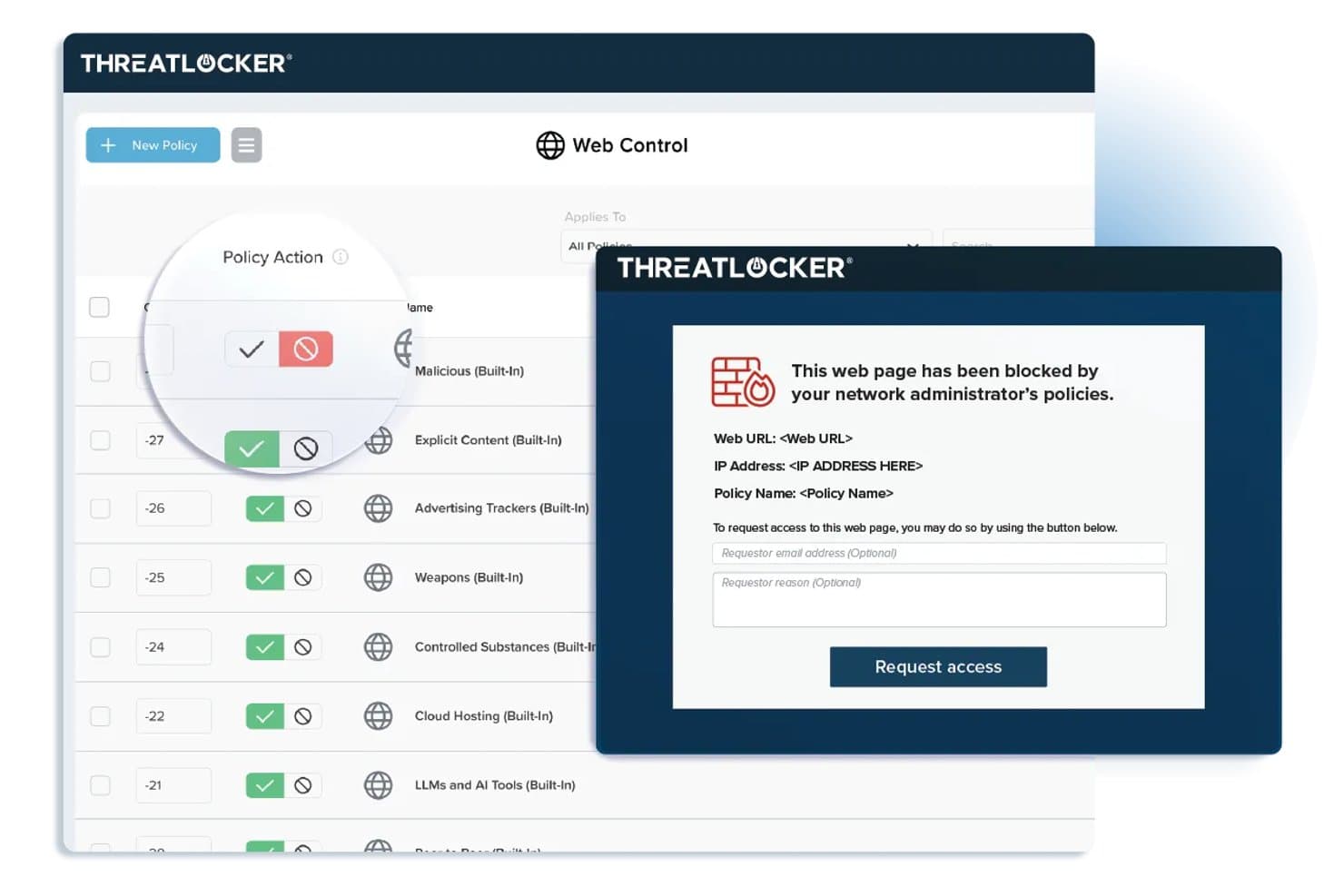
ThreatLocker ofrece políticas de control web que bloquean sitios web restringidos y muestran una página de bloqueo personalizable con un formulario de solicitud de acceso para los usuarios finales. ThreatLocker es una plataforma de seguridad de confianza cero para el control de acceso a la red que combina la lista de aplicaciones permitidas, gestión de dispositivos, segmentación de la red y respuesta a amenazas en tiempo real desde una única consola unificada.
¿Para Quién es Mejor ThreatLocker?
Organizaciones con políticas estrictas de confianza cero que desean un control granular sobre las aplicaciones y el acceso a dispositivos en entornos informáticos basados en Windows.
Por Qué Elegí ThreatLocker
Elegí ThreatLocker como uno de los mejores porque puedo configurar rápidamente controles de acceso a nivel de aplicación y bloquear ejecutables no autorizados en los endpoints. Me gusta saber que cuento con soporte experto en ciberseguridad 24/7 al aplicar políticas estrictas de confianza cero.
Características Clave de ThreatLocker
- Ringfencing: Aísla aplicaciones para prevenir el movimiento lateral a través de la red.
- Control de red: Restringe el tráfico entrante y saliente según configuraciones precisas de grupos y políticas.
- Control de almacenamiento: Gestiona el acceso a dispositivos USB y almacenamiento externo con reglas personalizables.
- Flujo de trabajo de aprobación de administrador: Permite que los administradores requieran una aprobación explícita antes de ejecutar aplicaciones nuevas o desconocidas.
Integraciones de ThreatLocker
ThreatLocker ofrece integraciones nativas con Microsoft Active Directory y Azure, proveedores de SSO que admiten SAML, y proporciona una API para integraciones personalizadas.
Pros and Cons
Pros:
- Soporte experto 24/7 para respuesta ante amenazas
- Listas de aplicaciones permitidas y herramientas de ringfencing granulares
- Políticas de control de dispositivos y almacenamiento en tiempo real
Cons:
- No cuenta con opciones de descubrimiento de dispositivos sin agente
- No está diseñado para implementación de IoT o BYOD
Learn more about ThreatLocker: Mejor para la gestión unificada de accesos
- Prueba gratuita de 30 días
- Precios a consultar
Visit WebsiteCustomer Rating:4.4/5
Imagen 7: Software de control de acceso a la red de Portnox Portnox es una solución de software de control de acceso que se centra en proporcionar una visibilidad y control integral de la red. Esta herramienta destaca por ofrecer gestión unificada de accesos en varios dispositivos y redes, lo que la hace ideal para organizaciones que buscan control y seguridad en una sola plataforma.
Por qué elegí Portnox: Seleccioné Portnox para esta lista por su enfoque en la gestión unificada de accesos. El elemento destacado es su capacidad para brindar visibilidad total sobre todos los dispositivos conectados, una función que no es tan prominente en otras herramientas que he considerado. Para el caso de uso de administración unificada de accesos, creo que el punto fuerte de Portnox radica en su capacidad para ofrecer control centralizado en una red diversa.
Funciones destacadas e integraciones:
La función principal de Portnox es su habilidad para ofrecer visibilidad completa de la red, permitiendo a las organizaciones controlar el acceso en todos los puntos de conexión. La herramienta también ofrece funciones como control de acceso remoto, autenticación basada en riesgos y detección de anomalías en la red. En cuanto a integraciones, Portnox puede integrarse con una variedad de sistemas empresariales, incluyendo VPNs, switches, controladores inalámbricos y soluciones de gestión de dispositivos móviles, lo que permite un flujo de trabajo de seguridad más eficiente.
Pros and Cons
Pros:
- Proporciona visibilidad completa de la red
- Ofrece control centralizado en varias redes y dispositivos
- Se integra con una amplia gama de sistemas empresariales
Cons:
- La información de precios no está disponible fácilmente
- Puede ser complejo para pequeñas empresas
- La falta de precios transparentes podría ser una barrera para algunos posibles usuarios
Learn more about Portnox: Mejor para implementaciones NAC gestionadas y multi-inquilino
- Descarga gratuita, no requiere prueba
- Gratis, de código abierto (soporte de pago opcional)
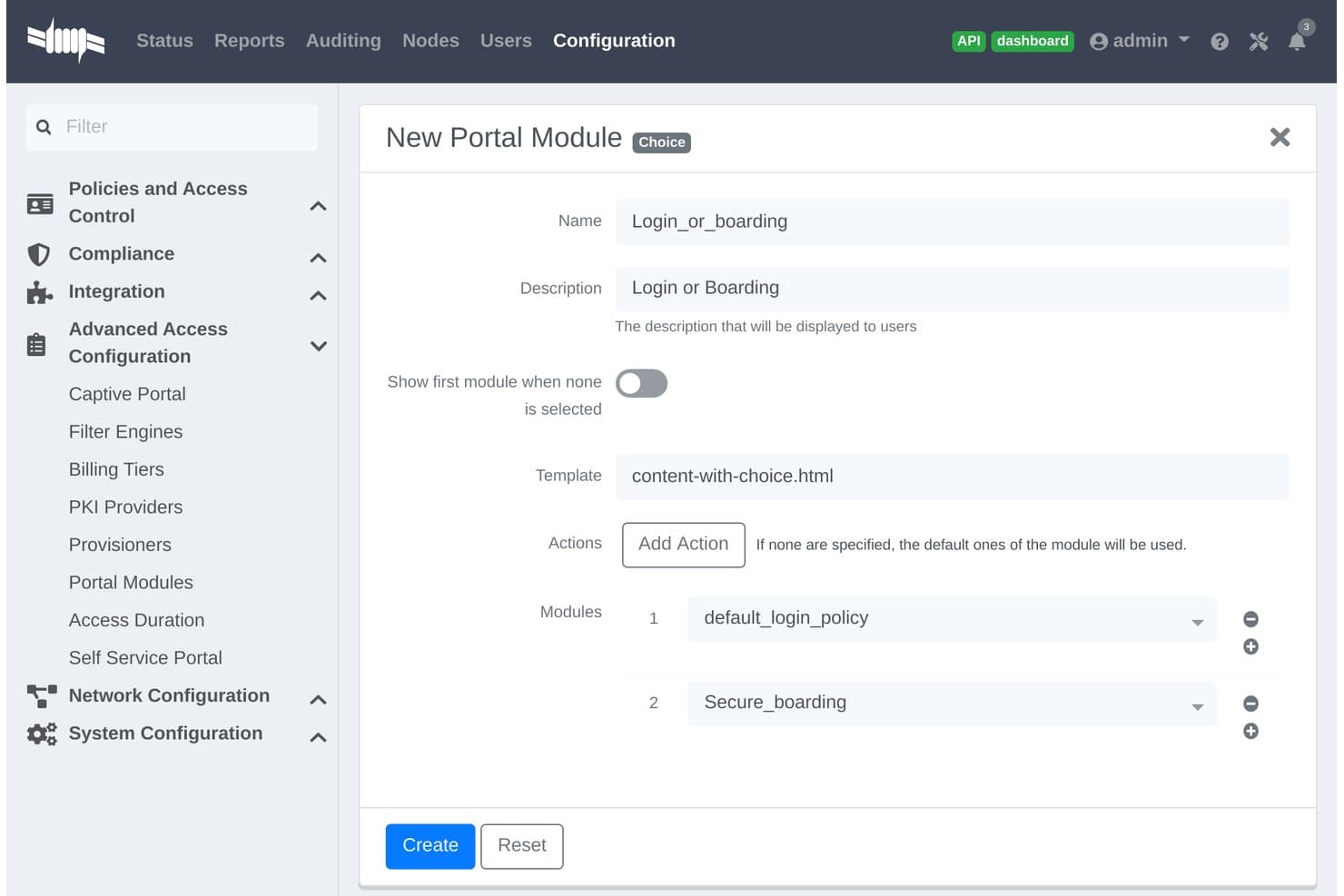
PacketFence ofrece una configuración de módulo de portal tipo Elección que permite a los administradores combinar módulos de inicio de sesión y embarque en un solo flujo de portal cautivo. PacketFence es una solución de control de acceso a la red de código abierto diseñada para organizaciones que gestionan entornos diversos, ofreciendo descubrimiento de dispositivos sin agentes, autenticación, autorización y segmentación de red basada en políticas.
¿Para quién es mejor PacketFence?
Grandes organizaciones, proveedores de servicios y campus que necesitan control centralizado en entornos de red complejos y multi-inquilino.
Por qué elegí PacketFence
Elegí PacketFence como uno de los mejores porque está diseñado específicamente para implementaciones NAC gestionadas y multi-inquilino. Me gusta que admita el descubrimiento de dispositivos sin agentes en redes cableadas, inalámbricas y VPN, y la aplicación flexible de políticas para usos empresariales y en campus.
Características clave de PacketFence
- Portal cautivo personalizado: Permite crear flujos de autenticación web con marca y registro de dispositivos.
- Integración avanzada de dispositivos de red: Compatible con proveedores de switches, redes inalámbricas y cortafuegos como Cisco, Aruba y Juniper.
- Informes de cumplimiento automatizados: Exporta registros de acceso y eventos para agilizar tareas de auditoría e investigación.
- Extensibilidad mediante API: Se conecta con sistemas de terceros para flujos de trabajo automatizados e integraciones personalizadas.
Integraciones de PacketFence
PacketFence ofrece integraciones nativas con Cisco, Aruba, Juniper, HP, Ruckus, Extreme Networks, Microsoft Active Directory, LDAP, RADIUS, SAML y cuenta con una API para integraciones personalizadas.
Pros and Cons
Pros:
- Admite descubrimiento de dispositivos en red sin agentes
- Control multi-inquilino para proveedores de servicios gestionados
- Escalable a entornos de red distribuidos y grandes
Cons:
- Requiere sólidos conocimientos de Linux y redes
- La interfaz es menos intuitiva que las soluciones comerciales de NAC
Learn more about PacketFence: Mejor para proteger redes IoT industriales
- Prueba gratuita de 30 días + demo gratuita disponible
- Precio a consultar
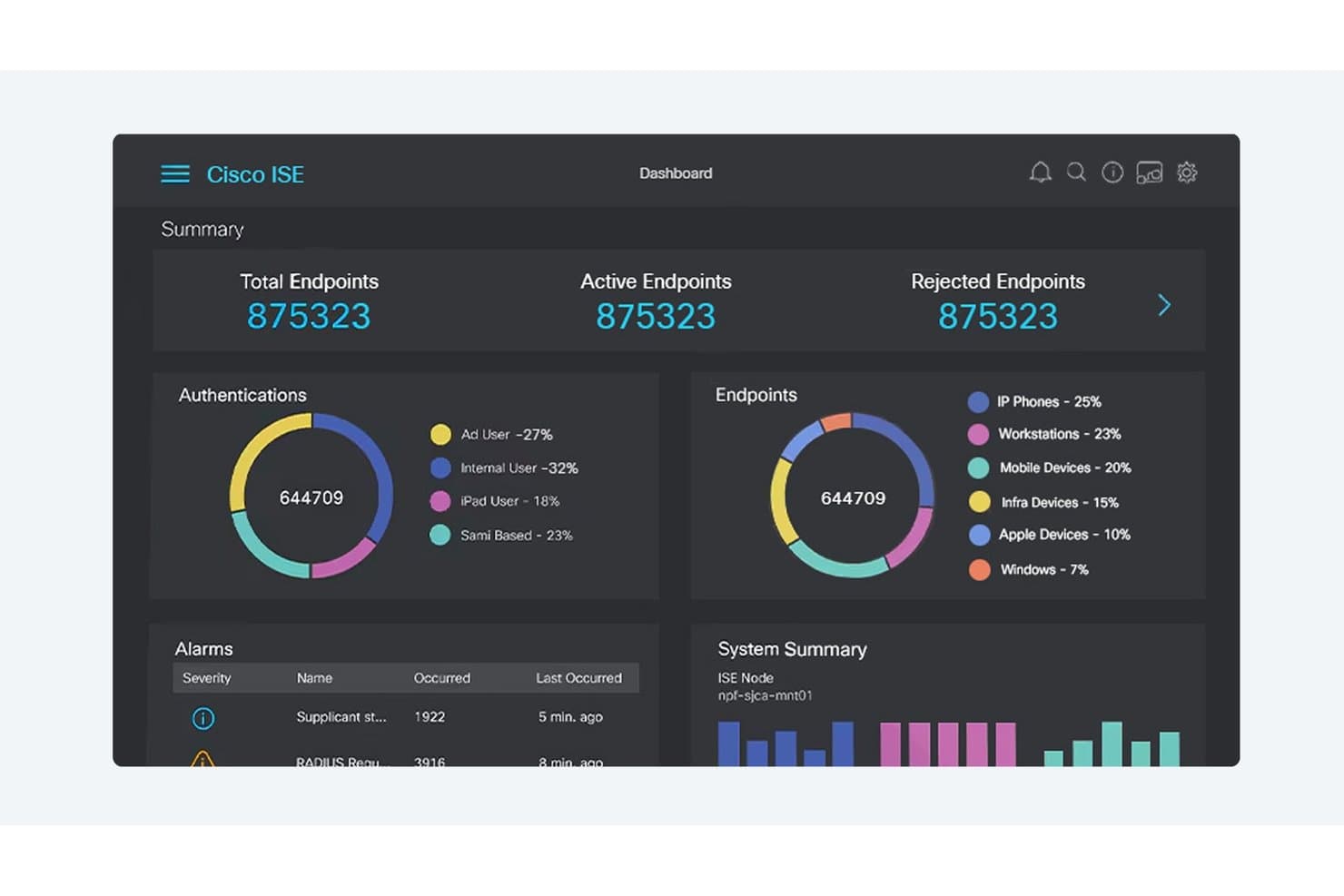
Cisco ISE ofrece un panel centralizado de control de acceso a red que muestra autenticación de terminales, clasificación de dispositivos, alarmas y estado del sistema en tiempo real. Cisco es una plataforma de control de acceso a redes diseñada específicamente para proteger entornos industriales complejos, combinando el descubrimiento de dispositivos, políticas de acceso dinámicas, segmentación y funciones de cumplimiento normativo pensadas para redes IoT y operativas.
¿Para quién es mejor Cisco?
Equipos de seguridad de redes industriales en sectores de manufactura, energía, servicios públicos e infraestructura crítica que necesitan visibilidad unificada y control de políticas en entornos IT y OT.
Por qué elegí Cisco
Elegí Cisco como uno de los mejores porque mi equipo puede descubrir, perfilar y controlar cada dispositivo IoT en grandes redes industriales. Sus funciones de segmentación automatizada y respuesta a amenazas nos ayudan a abordar los desafíos únicos de la seguridad IoT industrial.
Funciones clave de Cisco
- Integración con sistemas SCADA: Se conecta directamente con sistemas de control industrial para monitorear dispositivos operativos en red.
- Motor de políticas de acceso dinámico: Permite la aplicación en tiempo real de reglas de acceso según la identidad y postura del dispositivo.
- Informes de cumplimiento personalizables: Genera informes automatizados alineados con marcos regulatorios comunes y estándares de la industria.
- Compatibilidad con redes multivendedor: Aplica políticas de acceso y descubrimiento tanto en equipos de red de Cisco como de terceros.
Integraciones de Cisco
Cisco ofrece integraciones nativas en todo el ecosistema Cisco, incluyendo Cisco ISE, Cisco Cyber Vision, Cisco SecureX y Cisco DNA Center. Cuenta con integraciones nativas con Microsoft Azure e integra con cortafuegos de Palo Alto Networks y Fortinet. También dispone de una API para integraciones personalizadas.
Pros and Cons
Pros:
- Visibilidad profunda de los activos de redes industriales
- Segmentación automatizada en tiempo real para entornos OT
- Controles de políticas altamente granulares basados en roles
Cons:
- Configuración extensa requerida para el despliegue inicial
- Administración compleja para equipos de seguridad pequeños
Learn more about Cisco: Ideal para la mitigación automatizada de riesgos de dispositivos IoT
- Demo bajo solicitud
- Cotización personalizada
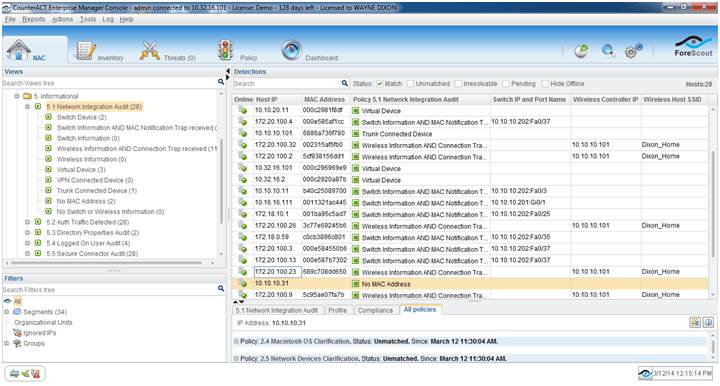
Imagen 1: Software de control de acceso a la red de Forescout Forescout es una plataforma de control de acceso a la red enfocada en el descubrimiento automatizado de dispositivos, la creación de perfiles, la aplicación de políticas y la segmentación de red en tiempo real para todo tipo de endpoints: gestionados, no gestionados, BYOD y IoT.
¿Para quién es mejor Forescout?
Grandes empresas en sectores regulados que necesitan un control minucioso y visibilidad completa sobre la variedad de dispositivos conectados a la red, incluidos endpoints IoT y OT.
Por qué elegí Forescout
Elegí Forescout como uno de los mejores porque confío en su mitigación automatizada de riesgos de dispositivos IoT, su descubrimiento de dispositivos en tiempo real y su creación de perfiles sin agentes. En mi experiencia, identifica rápidamente los dispositivos no gestionados y me permite aplicar políticas granulares a medida que surgen amenazas.
Funciones clave de Forescout
- Soporte de autenticación 802.1X: Utiliza múltiples estándares de autenticación para validar dispositivos tanto en redes cableadas como inalámbricas.
- Orquestación de segmentación de red: Se integra con los principales switches y cortafuegos para automatizar las asignaciones de VLAN y ACL.
- Evaluación continua de la postura de los dispositivos: Supervisa el estado de cumplimiento de los dispositivos durante toda la sesión de red, no solo en la conexión.
- Informes integrales de cumplimiento: Proporciona registros exportables, historiales de acceso y trazabilidad para auditorías regulatorias.
Integraciones de Forescout
Forescout ofrece integraciones nativas con Cisco, Aruba, Palo Alto Networks, Fortinet, Splunk, ServiceNow, Okta, Microsoft Defender, CrowdStrike, IBM QRadar y AWS. Hay una API disponible para integraciones personalizadas.
Pros and Cons
Pros:
- Descubrimiento inigualable de dispositivos IoT sin agentes
- Automatización confiable de la segmentación de red
- Monitoreo y respuesta de riesgos en tiempo real
Cons:
- La instalación del dispositivo requiere tiempo de inactividad en la red
- Los flujos de trabajo avanzados de políticas requieren mucha sintonización
Learn more about Forescout: Ideal para el aprovisionamiento automatizado de redes de invitados
- Demo bajo petición
- Cotización personalizada (suscripción o perpetua)
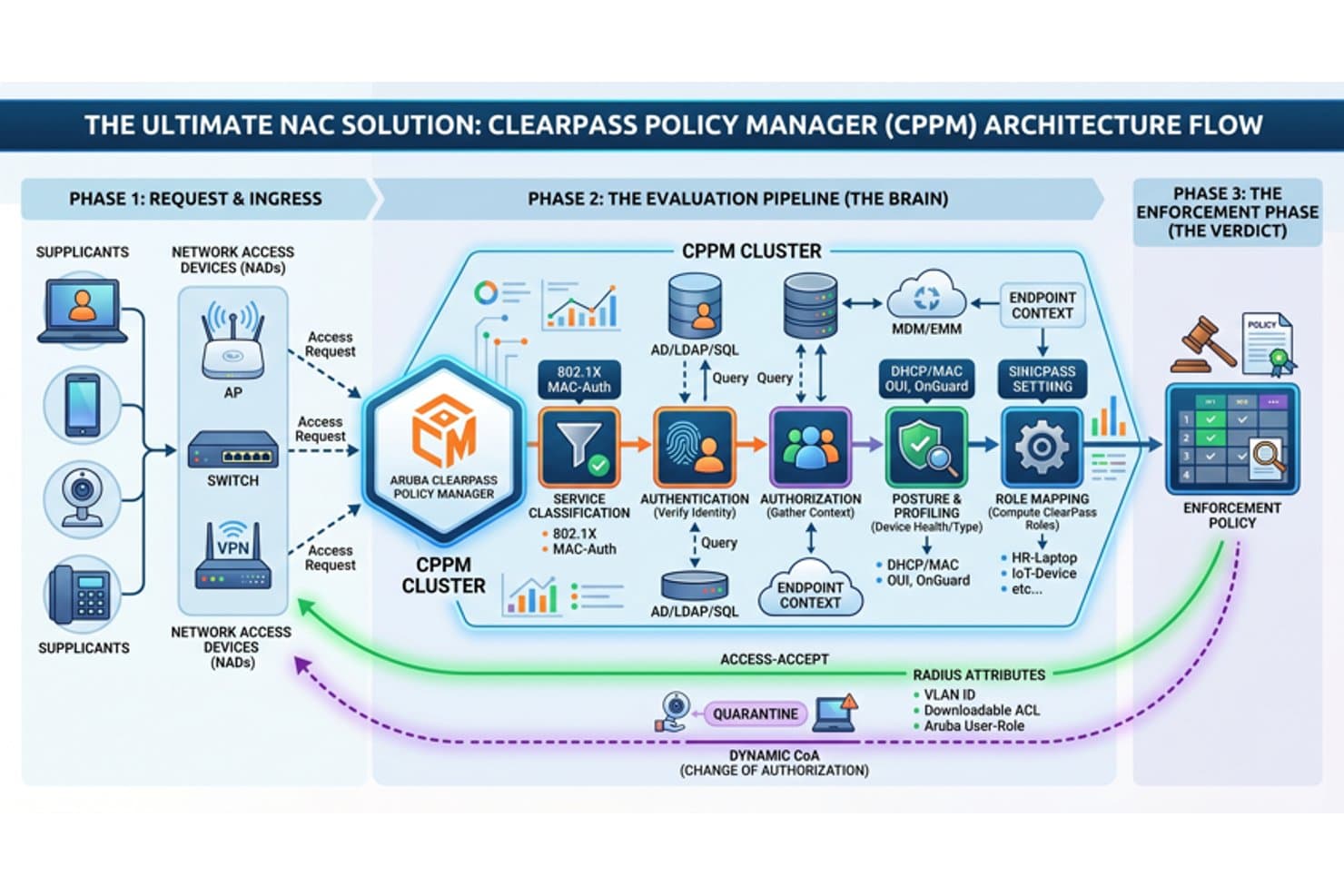
Aruba ClearPass ofrece un flujo de arquitectura NAC integral que cubre la entrada de solicitudes, la canalización de evaluación y las fases de políticas de aplicación para el control de acceso a la red. Aruba Clearpass es una plataforma de control de acceso a la red que ofrece identificación automática de dispositivos, autenticación basada en roles, aplicación de políticas en tiempo real e integración con sistemas de identidad, seguridad y cumplimiento.
¿Para quién es mejor Aruba Clearpass?
Diseñado para equipos de TI y seguridad en medianas y grandes empresas que gestionan un acceso diverso de dispositivos e invitados en entornos de red complejos.
Por qué elegí Aruba Clearpass
Elegí Aruba Clearpass como uno de los mejores porque puedo automatizar la incorporación segura de invitados, aplicar políticas granulares a los dispositivos y gestionar flujos de trabajo personalizados para visitantes y contratistas en entornos grandes y cambiantes. Es la mejor opción para el aprovisionamiento automatizado de redes para invitados.
Características clave de Aruba Clearpass
- Perfiles de dispositivo en tiempo real: Identifica y clasifica todos los extremos, incluidos dispositivos IoT y BYOD, sin agente.
- Compatibilidad con autenticación 802.1X: Permite una autenticación segura y basada en estándares para conexiones cableadas e inalámbricas.
- Motor de políticas basado en roles: Asigna políticas de manera dinámica según el rol del usuario, el tipo de dispositivo o el estado de la postura.
- Integración con plataformas de seguridad: Se conecta con herramientas SIEM, EDR y MDM para una respuesta coordinada a amenazas y cumplimiento.
Integraciones de Aruba Clearpass
Aruba Clearpass ofrece integraciones nativas con Active Directory, Azure AD, Okta, Jamf, MobileIron, ServiceNow, Palo Alto Networks, Cisco ISE, Splunk y Fortinet. Hay una API disponible para integraciones personalizadas.
Pros and Cons
Pros:
- El aprovisionamiento automatizado de redes de invitados es altamente configurable
- Identificación de dispositivos en tiempo real para todos los extremos
- Controles granulares de acceso y políticas basadas en roles
Cons:
- La configuración inicial es compleja para equipos pequeños
- Los paneles de informes requieren configuración manual
Learn more about Aruba Clearpass: El mejor con flujos de trabajo de respuesta automatizada para eventos de seguridad
- Demostración a solicitud
- Cotización personalizada
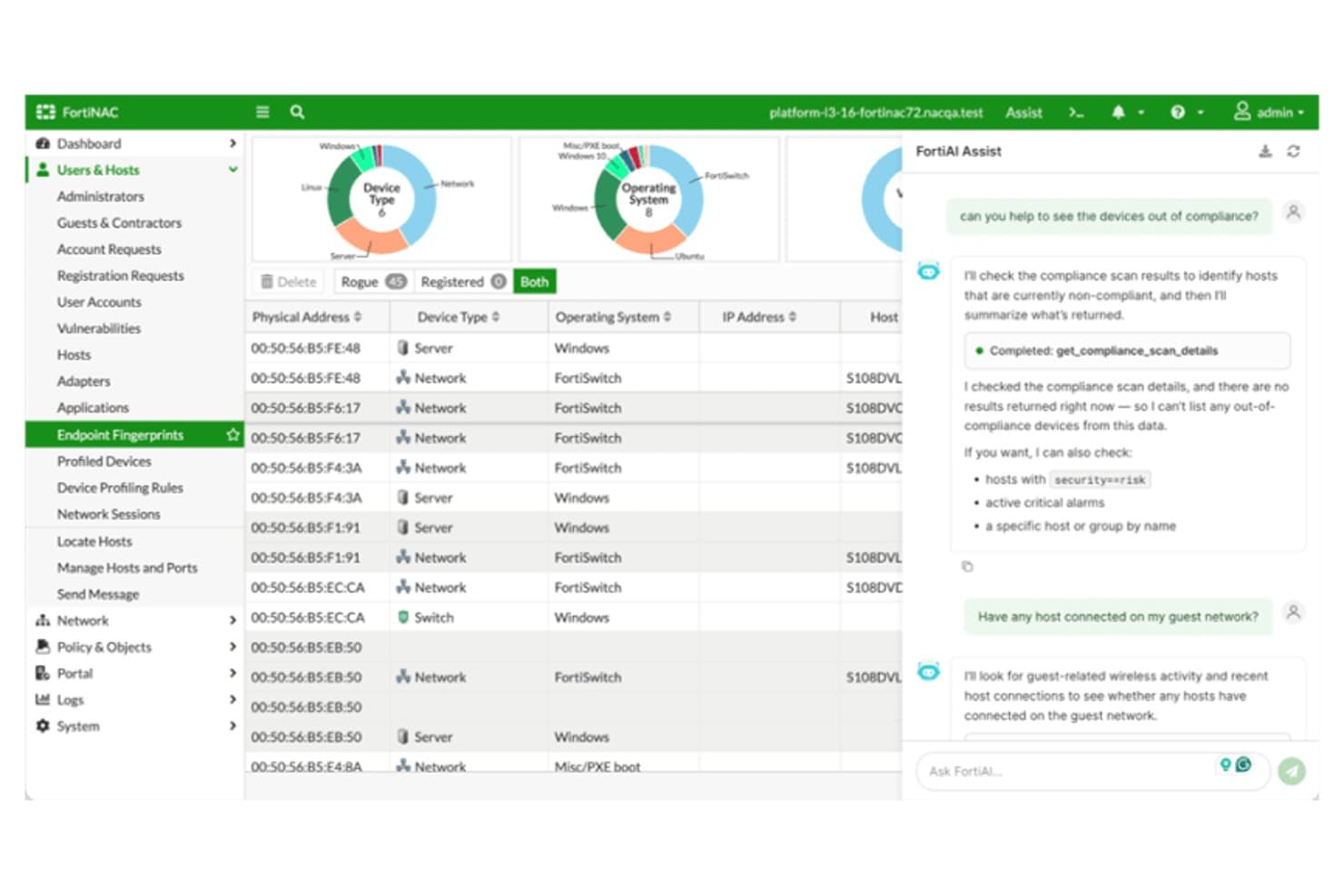
Fortinet FortiNAC ofrece una interfaz asistida por IA con escaneo de cumplimiento de dispositivos, gestión de hosts y visibilidad en tiempo real de la red a través de huellas de terminales. Fortinet FortiNAC es una plataforma de control de acceso a la red diseñada para organizaciones que necesitan detección avanzada de dispositivos, aplicación dinámica de políticas, evaluación continua de endpoints e integración con entornos de múltiples proveedores.
¿Para quién es mejor Fortinet FortiNAC?
Equipos de seguridad y TI en grandes empresas u organizaciones reguladas que gestionan redes complejas y de múltiples proveedores con diversos tipos de dispositivos.
Por qué seleccioné Fortinet FortiNAC
Elegí Fortinet FortiNAC porque dependo de sus flujos de trabajo automatizados de respuesta para poner en cuarentena instantáneamente dispositivos de riesgo y activar cambios en las políticas de red. Utilizo su detección en tiempo real para iniciar respuestas ante incidentes de seguridad sin intervención manual.
Funciones clave de Fortinet FortiNAC
- Motor de perfilado de dispositivos: Identifica y clasifica todos los dispositivos, incluidos IoT y OT, a medida que se conectan a la red.
- Autenticación de múltiples métodos: Soporta 802.1X, autenticación MAC, portal cautivo y flujos de acceso basados en certificados.
- Segmentación dinámica: Asigna dispositivos a VLANs o zonas de red apropiadas según su postura e identidad en tiempo real.
- Panel de informes de cumplimiento: Genera registros detallados e informes personalizables para respaldar auditorías e investigaciones regulatorias.
Integraciones de Fortinet FortiNAC
Fortinet FortiNAC ofrece integraciones nativas con productos de Fortinet Security Fabric como FortiGate, FortiAnalyzer y FortiSIEM, así como hardware de red de Cisco, Aruba, HPE, Extreme Networks, Meraki, Arista y Ruckus. Hay una API disponible para integraciones personalizadas.
Pros and Cons
Pros:
- Perfilado avanzado de dispositivos para IoT y OT
- Políticas de segmentación de red dinámica
- Respuestas automatizadas ante eventos de seguridad
Cons:
- La interfaz y los flujos de trabajo requieren capacitación extensa
- Algunos usuarios reportan soporte técnico lento
Learn more about Fortinet FortiNAC: El mejor con prevención multinivel de amenazas en archivos
- Prueba gratuita / demostración bajo solicitud
- Basado en licencia, anual o por varios años
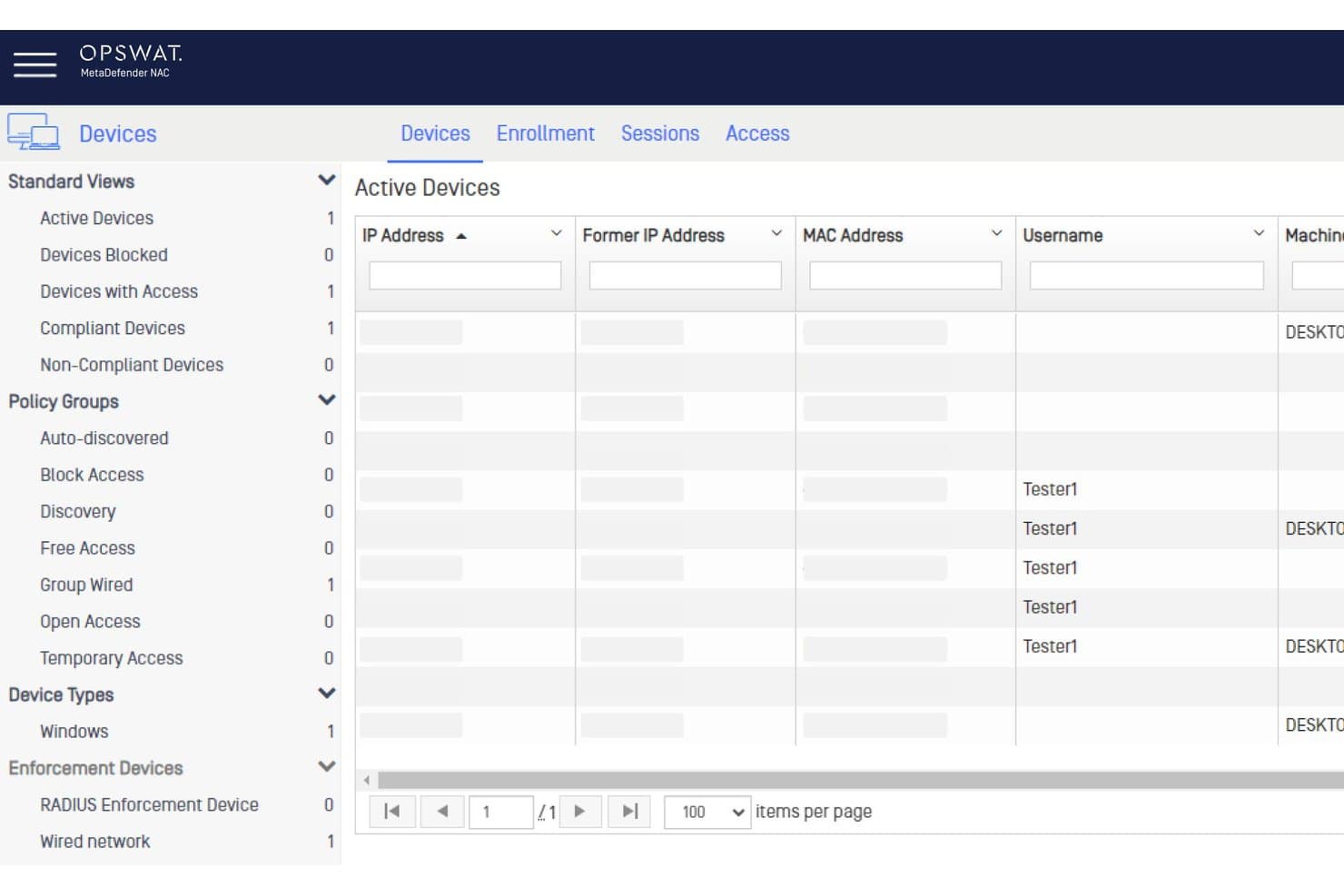
OPSWAT MetaDefender NAC ofrece un panel de dispositivos activos que muestra el estado de los dispositivos, grupos de políticas y sesiones de usuario para el control de acceso a la red. OPSWAT MetaDefender es una plataforma de seguridad que proporciona inspección avanzada de contenido, escaneo de archivos y evaluación profunda de la postura de los endpoints para organizaciones que desean mejorar sus defensas de control de acceso a la red.
¿Para Quién Es Mejor OPSWAT MetaDefender?
Equipos de seguridad en empresas reguladas y operadores de infraestructuras que gestionan transferencias de archivos complejas y acceso de dispositivos de terceros.
Por Qué Elegí OPSWAT MetaDefender
Elegí OPSWAT MetaDefender porque confío en su prevención multinivel de amenazas en archivos para controlar los riesgos transmitidos por archivos en los límites de la red. Utilizo su desarme profundo de contenido, escaneo con múltiples motores y análisis de vulnerabilidades para detener amenazas antes de que los archivos lleguen a los endpoints.
Funciones Clave de OPSWAT MetaDefender
- Verificaciones de postura del endpoint: Evalúa los dispositivos por versión del sistema operativo, parches de seguridad y antivirus en cumplimiento.
- Integración con SIEM: Envía inteligencia de amenazas y datos de incidentes directamente a sistemas de gestión de información y eventos de seguridad.
- Controles de acceso basados en políticas: Impone reglas de acceso a la red centradas en dispositivos según puntuaciones de riesgo y estado de cumplimiento.
- Escaneo de dispositivos sin agente: Inspecciona dispositivos no gestionados y BYOD sin requerir instalación de software.
Integraciones de OPSWAT MetaDefender
OPSWAT MetaDefender ofrece integraciones nativas con Cisco ISE, Forescout, Palo Alto Networks, ServiceNow y Splunk, y proporciona una API para integraciones personalizadas.
Pros and Cons
Pros:
- Escaneo multinivel con más de 30 motores antivirus
- Desarme avanzado de contenido para cargas de archivos
- Verificaciones en tiempo real de riesgos y cumplimiento en endpoints
Cons:
- No es un NAC dedicado para el descubrimiento de dispositivos
- Implementación compleja para equipos de TI más pequeños
Learn more about OPSWAT MetaDefender:
Otros programas de control de acceso a la red
A continuación se muestra una lista de programas adicionales de control de acceso a la red que seleccioné, pero que no llegaron a estar entre los 10 mejores. Sin duda, merece la pena echarles un vistazo.
- 11Cloudflare OneEl mejor con cifrado seguro ante la computación cuántica en todo el stack
- 12NACVIEWIdeal para la vigilancia en tiempo real de la red
- 13TwingateLa mejor opción para la seguridad de la fuerza laboral remota
- 14SilverfortLa mejor protección en tiempo de ejecución para todas las identidades
- 15Auconet BICSLa mejor con escalabilidad ilimitada para grandes empresas
Reseñas de otros programas de control de acceso a la red
- Herramientas de seguridad en la nube
- Software de protección de terminales
- Software de respuesta a incidentes
Cómo evalúo el software de control de acceso a la red
Evalúo estas herramientas en dos capas: los requisitos básicos que debe cubrir una plataforma NAC, como la aplicación de 802.1X y el estado de los endpoints, y los factores diferenciadores que distinguen a ciertos proveedores.
Funcionalidad principal (Requisitos imprescindibles para esta lista)
Al seleccionar las herramientas para mi lista, califico cada una en una escala del 0 (no ofrece la funcionalidad) al 5 (destaca en esta área) para cada funcionalidad principal enumerada a continuación. Luego, calculo la puntuación total de la herramienta en porcentaje. Cada herramienta debe alcanzar una puntuación mínima total del 65% para ser considerada para su inclusión.
- Descubrimiento y perfilado de dispositivos: Verifico si la plataforma puede detectar y clasificar automáticamente endpoints gestionados, portátiles BYOD, sensores IoT y dispositivos no gestionados en segmentos cableados e inalámbricos.
- Autenticación y autorización: Cada herramienta debe admitir varios métodos como 802.1X, salto de autenticación por MAC y portales cautivos, junto con acceso basado en roles vinculado a servicios de directorio.
- Aplicación de políticas y segmentación: Analizo cómo la herramienta asigna VLANs, aplica listas de control de acceso (ACL) u orquesta microsegmentación basada en la identidad y el contexto del dispositivo para aislar el tráfico de forma dinámica.
- Evaluación del estado del endpoint: La plataforma debe evaluar la salud del dispositivo (nivel de parches, estado del antivirus, cifrado de disco) antes y durante la sesión, no solo en la conexión inicial.
- Respuesta automática a amenazas: Valoro si la herramienta puede poner en cuarentena o restringir un dispositivo comprometido en tiempo real, por ejemplo, moviendo un endpoint señalado a una VLAN de remediación sin intervención manual.
- Informes de cumplimiento y auditoría: Los registros de acceso detallados y los informes auditables son importantes, especialmente para equipos que se preparan para evaluaciones PCI-DSS, HIPAA o NIST, donde se requiere evidencia de controles de acceso.
Una vez que tengo una lista de herramientas que cumplen estos criterios, considero lo que distingue a cada plataforma.
Factores diferenciadores (Qué distingue a los proveedores)
Así es como comparo y contrasto diferentes proveedores:
Funciones destacadas
El soporte para redes multi-vendor es un gran diferenciador: compruebo si la plataforma funciona en equipos de Cisco, Aruba, Juniper y Fortinet sin imponer un stack de proveedor único. La inteligencia sobre dispositivos IoT y OT también diferencia rápidamente las herramientas. Los entornos con dispositivos médicos o controladores de automatización de edificios requieren una identificación especializada que va mucho más allá del perfilado estándar. Las políticas adaptativas basadas en el riesgo completan este punto, permitiendo que el acceso se ajuste dinámicamente según la puntuación de amenazas en tiempo real en lugar de reglas estáticas.
Más allá de las funciones
Las integraciones en el ecosistema son muy importantes aquí. Reviso si la plataforma NAC se conecta con tus herramientas SIEM, EDR y proveedores de identidad existentes, para que se integre en la pila de seguridad y no quede aislada de ella. La estructura de licenciamiento es otro factor clave: algunos proveedores cobran por dispositivo, otros por usuario concurrente, y las tasas ocultas de módulos para acceso de invitados o verificación de estado pueden aumentar el costo rápidamente. También evalúo la flexibilidad de despliegue, ya que los equipos con entornos híbridos necesitan opciones más allá de un solo appliance en local.
Preguntas frecuentes
¿Qué ventajas ofrece el uso de software de control de acceso a la red?
Existen numerosas ventajas de utilizar software de control de acceso a la red, entre ellas:
- Mayor seguridad: el software NAC mejora la seguridad al garantizar que solo los dispositivos autorizados accedan a la red. Verifica a los usuarios y dispositivos antes de concederles acceso a la red, lo que reduce el riesgo de ciberamenazas.
- Aplicación de políticas: con estas herramientas, las organizaciones pueden aplicar políticas en varios dispositivos y aplicaciones, reforzando aún más la seguridad de su red.
- Visibilidad y control: el software NAC proporciona una visión completa de todos los dispositivos conectados y sus actividades, lo que permite supervisarlos y controlarlos en tiempo real.
- Respuestas automatizadas: el software puede automatizar las respuestas ante posibles amenazas, como aislar los sistemas afectados o bloquear determinados dispositivos, facilitando una actuación rápida durante los incidentes de seguridad.
- Cumplimiento normativo: las herramientas NAC ayudan a las organizaciones a cumplir determinados requisitos normativos relacionados con la seguridad de los datos y de la red.
¿Cuánto suelen costar las herramientas de control de acceso a la red?
El coste de las herramientas de control de acceso a la red puede variar considerablemente en función de las características específicas, el tamaño de la organización y el número de usuarios o dispositivos que se gestionen. Los modelos de precios suelen basarse en licencias por usuario o por dispositivo, y algunos proveedores ofrecen planes escalonados con un número creciente de funcionalidades.
¿Cuál es el rango de precios habitual del software de control de acceso a la red?
El software de control de acceso a la red puede costar desde aproximadamente $5 por usuario al mes hasta varios cientos de dólares por usuario al mes en el caso de soluciones empresariales más complejas.
¿Cuáles son los software de control de acceso a la red más baratos y más caros?
El software NAC más asequible de nuestra selección es LiteManager, con planes desde $10 al mes. En el extremo superior, las soluciones de Cisco pueden alcanzar varios cientos de dólares por usuario al mes, dadas sus sólidas funcionalidades y sus completas capacidades de nivel empresarial.
¿Existen opciones gratuitas de software de control de acceso a la red?
Sí, algunas herramientas como PacketFence ofrecen una versión gratuita y de código abierto de su software de control de acceso a la red. Sin embargo, estas versiones gratuitas suelen carecer de las funcionalidades avanzadas y del soporte que ofrecen las soluciones de pago, y podrían no ser adecuadas para redes grandes o complejas.