ThreatLocker vs. CrowdStrike: Comparison & Expert Reviews For 2026

25-year IT veteran and AI exec leading enterprise AI governance at scale.

We review tools independently, and commissions help fund our testing. See our transparency policy, our methodology, or suggest a tool.

Endpoint breaches will cost firms millions this year, but many continue to use tools that detect attacks too late. You may be part of one of the dozens of security teams debating between ThreatLocker’s zero-trust approach and CrowdStrike’s AI detection, and hitting a wall when trying to decide on the best option to prevent breaches without sacrificing productivity or blowing your budget.

In this article, I’ll walk you through everything you need to know, from pricing and key features to real-world fits. By the end, you’ll know exactly which endpoint cybersecurity software fits your needs.

ThreatLocker

ThreatLocker’s Detect Alert Center centralizes threat alerts, severity levels, and remediation actions for active endpoints.
ThreatLocker offers a centralized dashboard displaying device management, pending approvals, recent activity, health center summaries, and security policy controls.
ThreatLocker offers a detailed Ops Policy editor with configurable path-based conditions and actions for controlling network scanning tool access.
ThreatLocker offers granular application control policies with permit, deny, and request actions manageable through a structured policy list interface.
ThreatLocker offers a Network Control portal where administrators can create, manage, and toggle active network access policies across the entire organization.
Customer rating

4.8/5

Pricing
  • 30-day free trial + free demo available
  • Pricing upon request

CrowdStrike Falcon
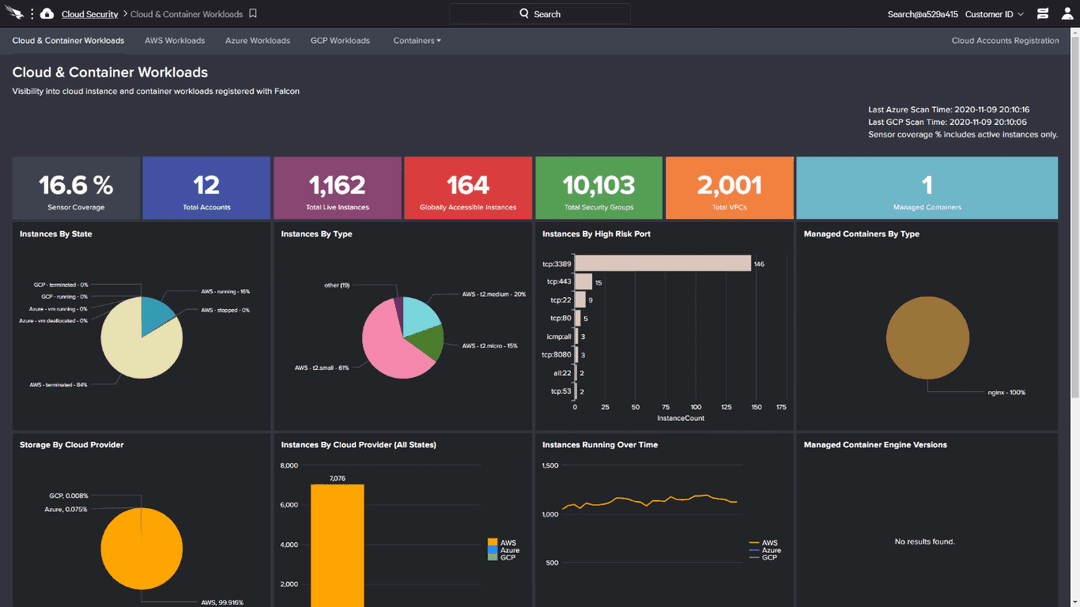
Stops cyber threats by blending real-time endpoint detection with rich threat intelligence.
Customer rating

4.6/5

Pricing
  • Free demo available
  • Pricing upon request

Why Trust Our Software Recommendations

6,700+

Reviews

20

Industry experts

16+

Evaluation factors

14

Years

Our team has been testing and reviewing software since 2012. As tech leaders ourselves, we know how difficult—and important—it is to choose the right software.

For this guide, we evaluated tools using hands-on testing and independent research, scoring tools using our selection criteria.

Our reviews reflect our human editorial judgment, not a sales pitch.

Expert reviewers:

ThreatLockerCrowdStrike Falcon
Free Trial30-day free trial + free demo availableFree demo available
PricingPricing upon requestPricing upon request

ThreatLocker vs. CrowdStrike Pricing & Hidden Costs

ThreatLocker uses custom, quote-based pricing tailored to your environment, factoring in endpoint count and required controls. Costs are scoped upfront to match your needs, emphasizing predictability over fixed tiers.

CrowdStrike offers transparent, tiered per-device subscriptions, with higher tiers unlocking advanced features. Pricing is clear at the bundle level, but optional modules, premium services, and MDR are priced separately through sales.

ThreatLocker focuses on deterministic, policy-driven prevention with a deny-by-default zero-trust model. Application allowlisting, Ringfencing, elevation control, and storage/network restrictions ensure only explicitly approved software can run or move laterally, reducing noise and supporting strict uptime and compliance needs.

CrowdStrike Falcon takes an analytics-driven approach, using AI and global threat intelligence to monitor behavior in real time and stop attacks as they emerge. It combines next-gen AV, behavioral detection, identity security, and automated response to give security teams broad visibility, rapid investigation, and scalable containment without pre-approving every application.

ThreatLockerCrowdStrike Falcon
APIYesNo
Data ExportNoYes
Data ImportNoYes
External IntegrationsYesNo
Multi-UserYesYes
NotificationsYesNo

ToolThreatLockerCrowdStrike
ConnectWise✅✅
N-able✅✅
Datto RMM✅❌
Kaseya✅❌
NinjaOne❌✅
Splunk✅✅
Elastic✅✅
ServiceNow✅✅
Okta✅❌
Zscaler❌✅
Palo Alto Networks❌✅
ThreatAware✅❌

ThreatLocker focuses its integrations on MSP-centric workflows, RMM, PSA, and basic cloud platforms, so you can deploy agents, sync customers, and automate tickets directly from the tools your IT team already lives in. CrowdStrike’s marketplace, on the other hand, is built for large security stacks, with deep, productized connectors into SIEM, SOAR, cloud providers, identity platforms, and firewalls, making it easier to plug Falcon telemetry into an existing SOC ecosystem.

FactorThreatLockerCrowdStrike
Core Security ModelZero trust, deny-by-default allowlisting, and application containment focused on preventing execution.AI-driven NGAV, EDR/XDR with continuous telemetry, threat intel, and automated detection and response.
Compliance and CertificationsEmphasizes support for frameworks like NIST, CIS, HIPAA, PCI via policy controls; formal certs are limited vs. larger vendors.Broad compliance posture with SOC 2, ISO 27001, PCI, HIPAA/HiTRUST mappings, and industry attestations.
Data Handling and ResidencyCloud-managed service with regional hosting options and granular control over what runs, but less marketing focus on data residency nuances.Global cloud architecture with documented data residency options and strict data segregation in its trust center.
Access Control and IdentityRole-based admin access inside the console; it integrates with SSO/IdP, but identity protection is not a primary feature.Strong SSO/RBAC plus dedicated identity threat protection and integration with major IdPs.
Reliability and Incident Track RecordHas fast deployment with 24/7 “Cyber Hero” support and a focus on uptime, but with fewer public SLAs than hyperscale vendors.Large-scale, globally distributed SaaS with documented high availability, though the 2024 outage highlighted dependence on single-vendor EDR.

Both tools take security seriously but emphasize different philosophies: ThreatLocker leans into strict prevention via zero trust policies and granular control, which can significantly reduce your attack surface if you maintain policies well. CrowdStrike instead optimizes for visibility, analytics, and broad compliance, pairing strong certifications and global reliability with advanced detection and response capabilities that suit mature SOCs and regulated enterprises.

FactorThreatLockerCrowdStrike
Initial Setup and RolloutAgent deployment is straightforward, but building and tuning allowlist policies can take time and careful planning.Lightweight sensor is fast to deploy at scale via scripts and RMM/MDM tools, with minimal endpoint disruption.
Learning CurveSteeper at first because deny-by-default requires understanding apps and workflows, though “learning mode” helps automate policy creation.Console and workflows are more familiar to SOC teams; users have access to more powerful features, but there are many options to master.
Day-to-Day ManagementPolicy-centric UI makes it easy to see and adjust what’s allowed or blocked, but frequent changes in apps can mean ongoing tuning.Central dashboard with rich search, detections, and dashboards simplifies investigations but can feel busy for smaller teams.
Onboarding and TrainingOffers hands-on onboarding with ThreatLocker Cyber Hero engineers and webinars to guide policy design and rollout.Provides documentation, training, and partner support; larger customers often pair onboarding with MDR or SIEM integrations.
Support Experience24/7 “Cyber Hero” support is responsive and offers practical help during policy incidents.Enterprise-grade support with SLAs and optional managed services; quality is high but can be tier-dependent.

ThreatLocker generally demands more upfront effort because you are deciding exactly what is allowed to run, but once policies settle, you can see fewer alerts and more predictable behavior. CrowdStrike feels more plug-and-play from a detection standpoint, with UI and workflows that align well to SOC processes, though the breadth of options can be overwhelming if you do not have a dedicated security staff.

ThreatLocker

Pros
  • Delivers strong prevention against ransomware and zero-days.
  • Granular control over applications, storage, and network access.
  • Detailed logging supports compliance, audits, and forensic investigations.
Cons
  • Steep initial learning curve and tuning period, requires upfront policy work to avoid blocking legitimate apps.
  • Not a set-and-forget security solution for most environments.
  • End-user friction arises from strict controls that block routine software installs.

CrowdStrike Falcon

Pros
  • Highly effective endpoint protection with features like device control and DLP options.
  • Real-time threat detection.
  • Cloud-native architecture provides scalable, efficient endpoint security.
Cons
  • Customer support response times could be quicker.
  • Onboarding might require more time and resources than expected.
  • Interface can be complex and overwhelming at first.

ThreatLocker

ThreatLocker’s Detect Alert Center centralizes threat alerts, severity levels, and remediation actions for active endpoints.
ThreatLocker offers a centralized dashboard displaying device management, pending approvals, recent activity, health center summaries, and security policy controls.
ThreatLocker offers a detailed Ops Policy editor with configurable path-based conditions and actions for controlling network scanning tool access.
ThreatLocker offers granular application control policies with permit, deny, and request actions manageable through a structured policy list interface.
ThreatLocker offers a Network Control portal where administrators can create, manage, and toggle active network access policies across the entire organization.
  1. MSPs Managing Multiple ClientsCentralized cloud portal and RMM integrations let you deploy and tune policies across diverse environments without constant per-client tweaks.
  2. Healthcare OrganizationsGranular storage and elevation controls protect patient data on USBs, shares, and apps while meeting HIPAA compliance through audit trails.
  3. Educational InstitutionsLocks down student devices and servers against unauthorized software, reducing risks from unvetted apps in shared environments.
  4. Midmarket EnterprisesBalances strong prevention with learning modes to build allowlists quickly, minimizing disruption during rollout.
  5. High-Compliance IndustriesRingfencing and network controls limit lateral movement and data exfiltration, simplifying audits with detailed enforcement logs.
  6. Remote/Hybrid WorkforcesDynamic network ACLs secure traveling endpoints by whitelisting specific IPs or keywords without VPN overhead.

CrowdStrike Falcon

Stops cyber threats by blending real-time endpoint detection with rich threat intelligence.
  1. Security TeamsFalcon's capabilities allow you to focus on advanced threat management and prevention.
  2. IT DepartmentsIt equips your team with tools to proactively manage and respond to security threats.
  3. Large EnterprisesFalcon's comprehensive features support your extensive IT security needs effectively.
  4. Retail ChainsFalcon's threat hunting tools help you identify vulnerabilities in your payment systems.
  5. Healthcare ProvidersIts endpoint protection ensures patient data is secure and compliant with regulations.
  6. Financial ServicesCrowdStrike Falcon provides real-time threat detection to protect your sensitive financial data.

Who Should Use ThreatLocker, and Who Should Use CrowdStrike

ThreatLocker is best suited for organizations that want to prevent threats by tightly controlling what can run in their environment, particularly in regulated or operationally sensitive sectors like healthcare, manufacturing, education, and MSP-managed SMBs. Its deny-by-default Zero Trust model, granular application and storage controls, and strong audit visibility are most effective for teams willing to invest upfront in policy design to reduce long-term risk, ransomware exposure, and unexpected behavior.

CrowdStrike is a strong fit for organizations that need broad visibility and rapid detection across large, complex environments, such as hospitals, retail chains, enterprises, and government agencies. The Falcon platform focuses on detection and response through EDR/XDR, identity protection, cloud security, and optional 24/7 managed threat hunting, making it well-suited for security teams that prioritize real-time monitoring, incident response, and compliance reporting at scale.

ApproachThreatLocker

ThreatLocker is fundamentally a prevention platform built on zero-trust allowlisting and policy controls, stopping unapproved applications and scripts from executing in the first place.

CrowdStrike Falcon

CrowdStrike is designed around AI-driven EDR and XDR that record activity, spot malicious behavior, and respond quickly once suspicious patterns appear, prioritizing detection and investigation.

ComplianceThreatLocker

Supports compliance by enforcing technical controls aligned with frameworks such as NIST, CIS, HIPAA, PCI-DSS, and CMMC, and provides SOC 2 Type II reports with security practices mapped to standards like ISO 27001, though it offers fewer formal certifications than some large legacy vendors.

CrowdStrike Falcon

Maintains a broad compliance posture with SOC 2 Type II reports, ISO 27001 certification, PCI DSS assessments, and support for regulatory frameworks including HIPAA, NIST, and government standards like FedRAMP and IRAP, which can be valuable when auditors require named third-party attestations.

Control & Telemetry BreadthThreatLocker

ThreatLocker gives you very granular control over what each app, script, user, and device can access, but collects comparatively limited behavioral telemetry.

CrowdStrike Falcon

CrowsStrike captures rich endpoint and identity telemetry and correlates it with global threat intel, but it does not provide the same fine-grained, default-deny application allowlisting model that ThreatLocker offers.

IntegrationsThreatLocker

ThreatLocker’s integrations are strongest in the MSP and IT operations ecosystem, with tight links into RMM, PSA, and endpoint tools to simplify multi-tenant management.

CrowdStrike Falcon

CrowdStrike offers a far larger security ecosystem through its marketplace, including deep integrations with SIEM, SOAR, identity, cloud, and network security products—better suited if you want Falcon at the center of a broader detection and response stack.

Target AudienceThreatLocker

ThreatLocker tends to resonate with IT teams, MSPs, and mid-market enterprises that want to lock down known workflows and reduce alert fatigue without needing a fully staffed SOC.

CrowdStrike Falcon

CrowdStrike is aimed more at enterprises and security-led organizations that have, or plan to have, a SOC, run SEIM or SOAR, and need threat hunting, incident response, and detailed forensics at scale.

Agent Architectures

Both ThreatLocker and CrowdStrike use small agents that live on your devices and connect to cloud consoles. This cloud approach lets you deploy quickly, push updates from one place, and protect remote workers without maintaining complex infrastructure yourself.

Breach Risk Reduction

Both platforms explicitly target modern ransomware, fileless attacks, and living-off-the-land techniques, going beyond legacy antivirus approaches.

Enterprise Readiness

ThreatLocker and CrowdStrike target the enterprise market. They’re built specifically for IT teams wrestling with complex networks, giving them what actually matters: centralized management, role-based access control, and support for complex, multi-site deployments.

Support

When security incidents hit, ThreatLocker’s Cyber Hero team is available 24/7 to help you adjust policies and coordinate your response. CrowdStrike matches this with always-on security operations via their support team and managed services options, with their Falcon Complete packages taking it further by handling monitoring and response duties for you.

Trial/Demo Availability

Both ThreatLocker and CrowdStrike let you test their platforms risk-free with a customized demo or a free trial, so you can deploy agents, build policies, or review detections, and assess fit for your specific environment before committing.