

10 mejores herramientas competidoras de ServiceNow para la gestión de servicios de TI en 2026

Lista de los mejores competidores de ServiceNow


En el mundo de la gestión de servicios de TI, ServiceNow se ha ganado un nombre gracias a sus potentes paneles y sus capacidades de seguimiento de datos en tiempo real. Como alguien que ha navegado por el vasto mar de herramientas de ITSM, puedo decirte que ServiceNow destaca por agilizar los procesos empresariales y ofrecer soluciones adaptadas a organizaciones que van desde empresas emergentes hasta gigantes como IBM. En esencia, ServiceNow es una plataforma que automatiza los procesos empresariales de TI y proporciona a los departamentos de una empresa los medios para mejorar su eficacia.
Entiendo que cada empresa tiene necesidades únicas y que una solución única para todos no siempre es la mejor opción. Quizás buscas una herramienta que ponga más énfasis en la funcionalidad de las aplicaciones móviles, ofrezca plantillas más personalizables o se adapte mejor a las prácticas de desarrollo de software. Esta guía te mostrará las mejores alternativas a ServiceNow, centrándose en sus puntos fuertes, para que puedas elegir la que se adapte perfectamente a las necesidades de tu empresa.
¿Qué es ServiceNow?
ServiceNow es una plataforma de gestión de flujos de trabajo digitales que te ayuda a gestionar servicios de TI, operaciones y procesos empresariales en un solo lugar. La utilizan equipos de TI, departamentos de recursos humanos y equipos de operaciones empresariales para automatizar solicitudes, realizar un seguimiento de incidentes y mejorar la prestación de servicios. Las herramientas de emisión de tickets, los portales de autoservicio y la automatización de flujos de trabajo ayudan a gestionar problemas, solicitudes y aprobaciones de forma más eficiente. En general, ServiceNow ayuda a tu equipo a mantenerse organizado y ofrecer asistencia más rápida en toda la empresa.
Por qué confiar en nuestras recomendaciones de software
Nuestro equipo lleva probando y evaluando software desde 2012. Como líderes tecnológicos, sabemos lo difícil —y lo importante— que es elegir el software adecuado.
Para esta guía, evaluamos las herramientas mediante pruebas prácticas e investigación independiente, puntuando las herramientas según nuestros criterios de selección.
Nuestras reseñas reflejan nuestro criterio editorial humano, no un discurso de ventas.
Revisores expertos:
Tabla comparativa de competidores de ServiceNow
Esta tabla comparativa resume los detalles de precios de mis principales selecciones de competidores de ServiceNow:
| Tool | Best For | Trial Info | Price | ||
|---|---|---|---|---|---|
| 1 | Ideal para gestionar múltiples endpoints | Prueba gratuita de 30 días + demo gratuita disponible | Desde $129/técnico/mes (facturado anualmente) | Website | |
| 2 | Mejor opción para una gestión intuitiva de incidentes y problemas | Prueba gratuita de 14 días + demo gratuita disponible | $19/usuario/mes (facturado anualmente) | Website | |
| 3 | Mejor opción para una sólida preparación y soporte de ITIL | Demostración gratuita | $10/usuario/mes (facturado anualmente) | Website | |
| 4 | Ideal para automatización y capacidades de IA | Prueba gratuita de 30 días disponible | Desde $17/usuario/mes | Website | |
| 5 | Mejor opción para integración sin fisuras con la suite de Atlassian | Prueba gratuita de 7 días + plan gratuito disponible | $20/user/month | Website | |
| 6 | Mejor para análisis enriquecidos del rendimiento de TI | Prueba gratuita de 14 días + demo gratuita disponible | $25/usuario/mes | Website | |
| 7 | Ideal para interacciones de atención al cliente excelentes | Prueba gratuita de 14 días + demostración gratuita disponible | $15/usuario/mes (facturado anualmente) | Website | |
| 8 | La mejor opción para configuración innovadora sin código | Not available | $100/user/month | Website | |
| 9 | Mejor opción para una gestión integral de activos de TI | Not available | $19/usuario/mes (facturado anualmente) | Website | |
| 10 | Mejor para automatización avanzada impulsada por IA | Demostración gratuita disponible | $60/usuario/mes (facturado anualmente) | Website |


Reseñas de los mejores competidores de ServiceNow
A continuación se presentan mis resúmenes detallados de los mejores competidores de ServiceNow que llegaron a mi lista. Mis reseñas ofrecen una visión detallada de las funciones clave, ventajas y desventajas, integraciones y casos de uso ideales de cada herramienta para ayudarte a encontrar la mejor opción para ti.

Atera
Ideal para gestionar múltiples endpoints
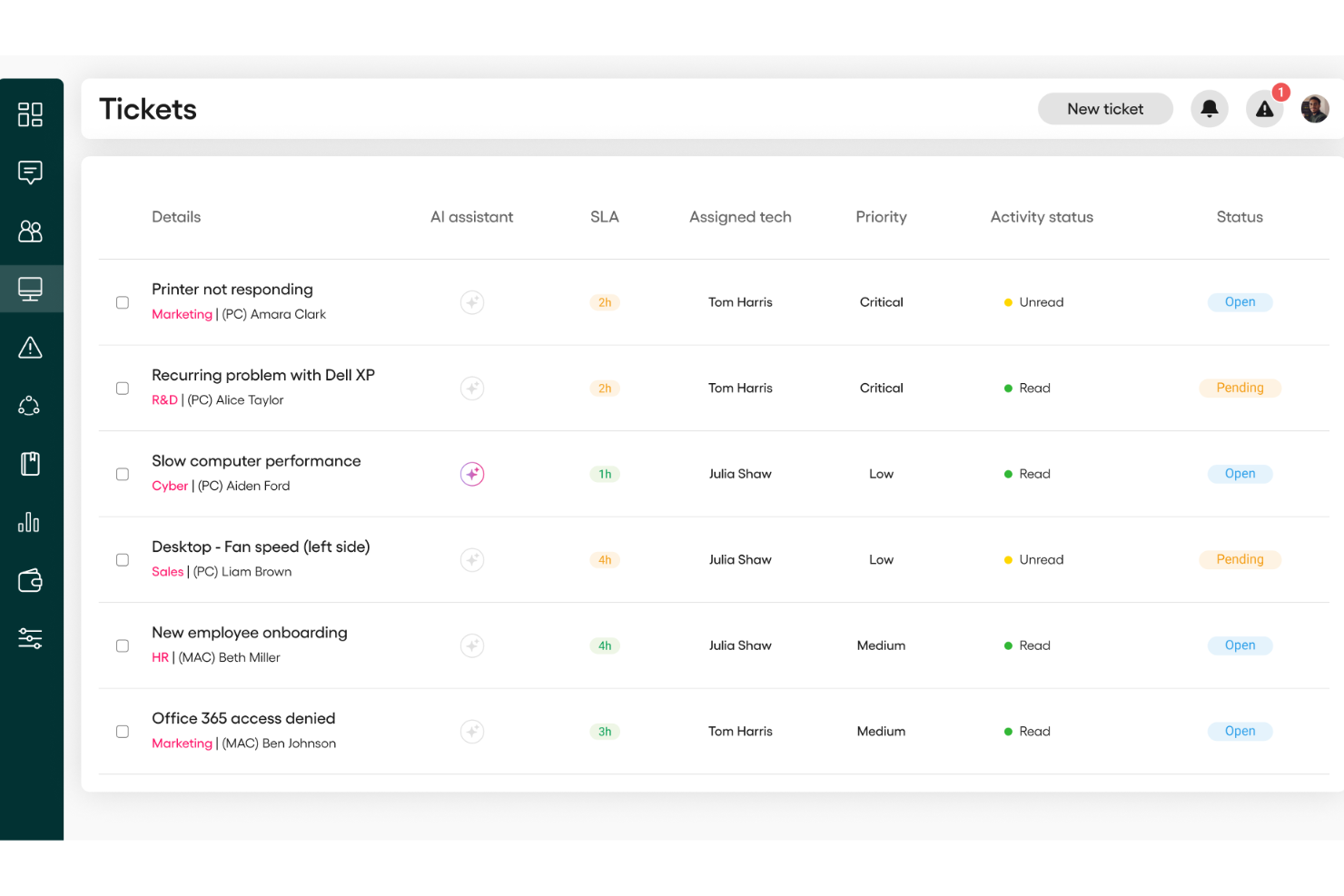
Para equipos de TI y proveedores de servicios gestionados que buscan optimizar sus operaciones, Atera ofrece una plataforma de gestión de TI todo en uno que integra monitorización remota, gestión de parches y automatización. Esta herramienta es ideal para quienes buscan una alternativa a ServiceNow, especialmente para la gestión eficiente de múltiples endpoints.
Por qué elegí Atera
Aprecio la capacidad de Atera para integrar la monitorización y gestión remota con la gestión de parches y la automatización operativa, lo cual es crucial para los equipos que administran múltiples endpoints de TI. Su sistema de gestión de tickets y la autenticación en dos factores son características destacadas que mejoran la seguridad y agilizan las operaciones de TI. Estas funcionalidades están pensadas para equipos que desean automatizar tareas rutinarias y mejorar la eficiencia general de TI, posicionando a Atera como una gran alternativa a ServiceNow, especialmente para aquellos que priorizan la facilidad de uso y capacidades de gestión integrales.
Características clave de Atera
Además de sus funcionalidades principales, encontré varias otras características que aumentan el valor de Atera:
- Servicios de mesa de ayuda: Proporciona un sistema centralizado para gestionar consultas de clientes y tickets de soporte de TI.
- Automatización impulsada por IA: Automatiza tareas rutinarias de TI, liberando tiempo para que los profesionales de TI se enfoquen en iniciativas más estratégicas.
- Portal de autoservicio y base de conocimientos: Ofrece a los usuarios un espacio para enviar tickets, rastrear el estado y buscar artículos, reduciendo la carga repetitiva de los agentes.
- Gestión integral de activos de TI: Permite a los equipos rastrear y gestionar activos de TI en entornos distribuidos de manera eficaz.
Integraciones de Atera
Las integraciones incluyen Microsoft Teams, Slack, notificaciones de WhatsApp, monday.com, Okta, Jira Software Cloud, Jira Service Management, Microsoft Entra ID y Bitdefender.
Pros and Cons
Pros:
- Ofrece funciones integrales de monitorización y gestión remota.
- Integra múltiples herramientas de gestión de TI en una sola plataforma.
- Incluye automatización impulsada por IA para resolución proactiva de incidencias.
Cons:
- Menos control granular para flujos de trabajo personalizados muy complejos o integraciones.
- Las funciones de informes pueden tener costes adicionales para necesidades avanzadas.
New Product Updates from Atera

Atera Adds Webhook Triggers for Technician Assignment Changes
Atera ticket automation rules now support a webhook trigger when a ticket’s technician assignment changes, expanding automation beyond creation, status updates, and closure/resolution events. For more information, visit Atera's official site.

Mejor opción para una gestión intuitiva de incidentes y problemas
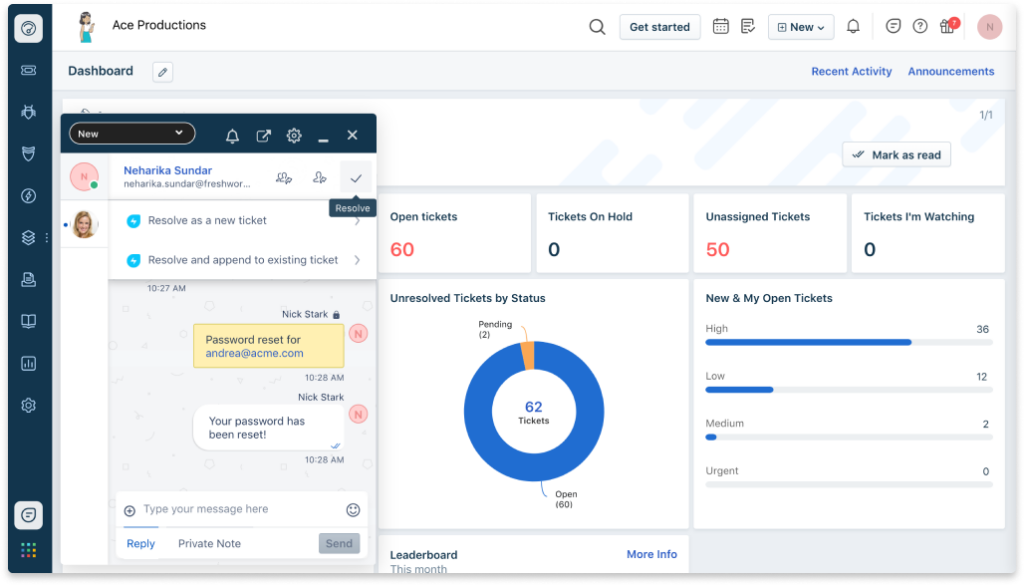
Freshservice, desarrollado por Freshworks, ofrece una variedad de capacidades de gestión de servicios de TI. Lo que lo diferencia es su interfaz fácil de usar y sus avanzadas capacidades de gestión de incidentes y problemas, lo que justifica su lugar como la mejor herramienta para una gestión intuitiva de incidentes y problemas.
Pros and Cons
Pros:
- La interfaz fácil de usar la hace ideal para principiantes
- Excelentes capacidades de gestión de incidentes y problemas
- Fuertes integraciones con otras herramientas comúnmente utilizadas
Cons:
- Algunas funciones solo están disponibles en los planes de mayor precio
- La personalización avanzada puede ser un desafío
- Algunos usuarios reportan la necesidad de mejores funciones de informes
New Product Updates from Freshservice
 Experience)
Freshservice Introduces a Reimagined IT Asset Management (ITAM) Experience
Freshservice introduces a reimagined IT Asset Management (ITAM) experience with continuous infrastructure discovery, dependency mapping, IPAM, and Software License Management. This update helps teams improve asset visibility and manage connected IT environments more effectively. For more information, visit Freshservice’s official site.

Mejor opción para una sólida preparación y soporte de ITIL
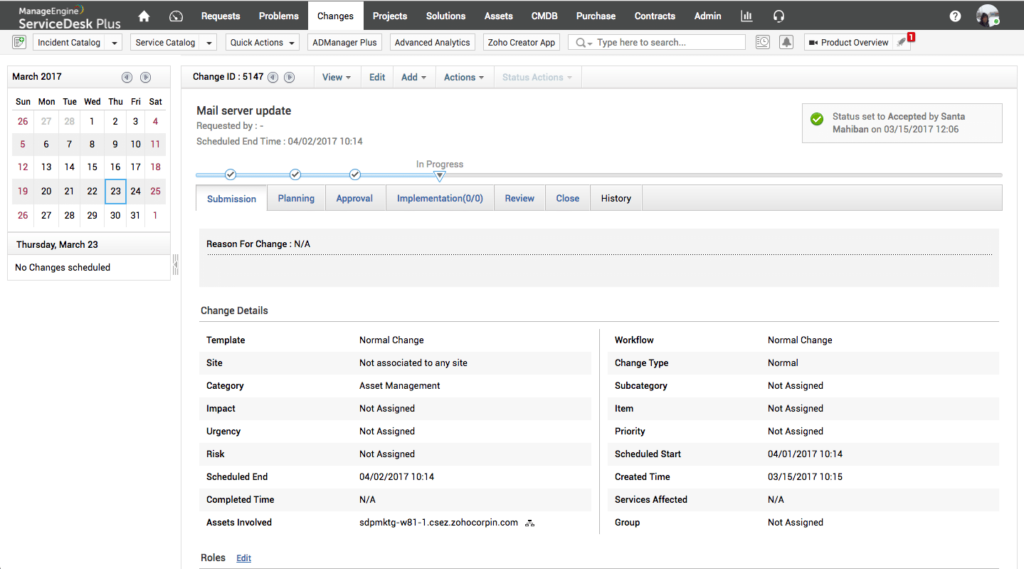
ServiceDesk Plus es un software de gestión de servicios de TI diseñado para ayudar a las empresas a gestionar su infraestructura y servicios de TI con mayor eficiencia. Con su fuerte alineación con los principios de ITIL, es una excelente opción para organizaciones que buscan una sólida preparación y soporte para ITIL.
Pros and Cons
Pros:
- Fuerte preparación y soporte para ITIL
- Funciones completas de gestión de servicios de TI
- Amplia gama de integraciones
Cons:
- La interfaz de usuario puede requerir un periodo de aprendizaje
- Las funciones avanzadas tienen un costo mayor
- Menos flujos de trabajo de servicios no TI en comparación con ServiceNow

Ideal para automatización y capacidades de IA
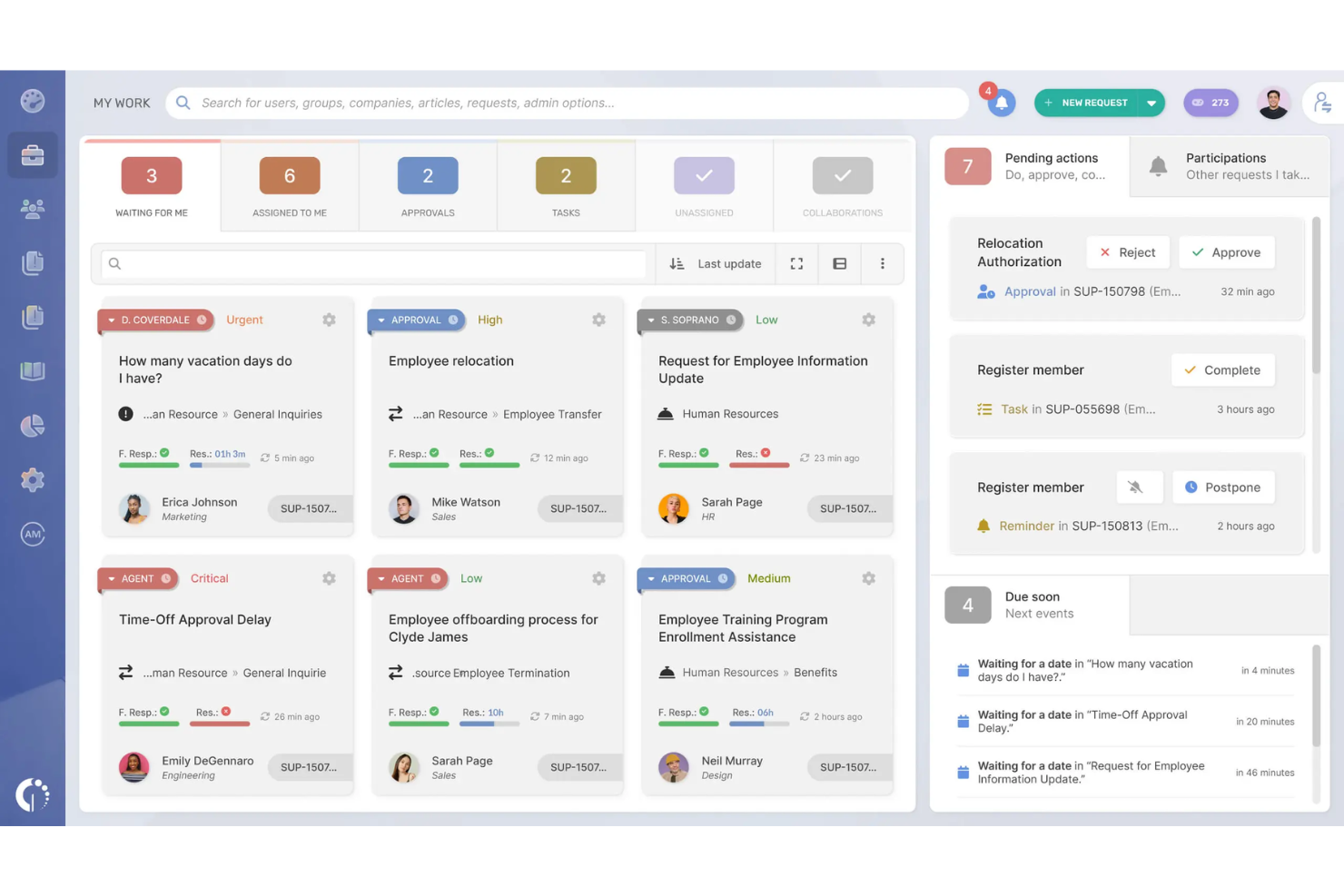
InvGate Service Management ofrece una solución flexible de gestión de servicios de TI para organizaciones que buscan una alternativa práctica a ServiceNow. Es ideal para equipos que desean mejorar la eficiencia de los flujos de trabajo usando plantillas predefinidas que reducen el tiempo de configuración y estandarizan procesos comunes de TI. Con su diseño sin código y automatización incorporada, InvGate te ayuda a gestionar solicitudes y operaciones sin necesidad de una personalización intensiva ni configuraciones complejas.
Por qué elegí InvGate Service Management
Elegí InvGate Service Management por sus plantillas de flujo de trabajo preconfiguradas, que facilitan el establecimiento y la operación de procesos de servicios de TI sin comenzar desde cero. Estas plantillas permiten al equipo estandarizar flujos de trabajo comunes, mientras que el editor visual posibilita ajustes sin necesidad de programación. Además, los resúmenes de tickets impulsados por IA y el agente virtual de servicio reducen el esfuerzo manual, haciendo que la gestión diaria de solicitudes sea más manejable en comparación con configuraciones más complejas como las de ServiceNow.
Características clave de InvGate Service Management
Además de las plantillas de flujo de trabajo preestablecidas, InvGate Service Management ofrece:
- Paneles personalizables: Supervisa el rendimiento en tiempo real y toma decisiones informadas con análisis basados en datos.
- Opciones de autoservicio: Permite a los usuarios resolver problemas comunes de forma independiente, reduciendo la carga del soporte de TI.
- Soporte experto para la incorporación: Garantiza una integración fluida en tu infraestructura de TI existente, minimizando el tiempo de inactividad.
Integraciones de InvGate Service Management
Las integraciones nativas incluyen Microsoft Intune, Microsoft Teams, FileWave, ServiceNow CMDB y Google Workspace. InvGate también es compatible con integraciones personalizadas mediante su API REST, lo que proporciona flexibilidad para conectarse con una amplia gama de herramientas.
Pros and Cons
Pros:
- Las configuraciones SLA personalizables se adaptan a las necesidades específicas de la organización
- La integración con la gestión de activos de TI permite una supervisión integral
- Los elementos de gamificación impulsan la participación y el compromiso de los usuarios
Cons:
- La configuración de flujos de trabajo requiere planificación previa
- Las importaciones y las conexiones con aplicaciones externas requieren configuración adicional
New Product Updates from InvGate Service Management
InvGate Adds KB Article Creation and PDF Indexing for AI Search
InvGate Service Management adds KB article creation shortcuts and AI indexing for PDF attachments in KB articles. The updates help teams improve knowledge coverage and make more support content searchable through AI features. For more information, visit InvGate Service Management’s official site.
 .
.
Mejor opción para integración sin fisuras con la suite de Atlassian
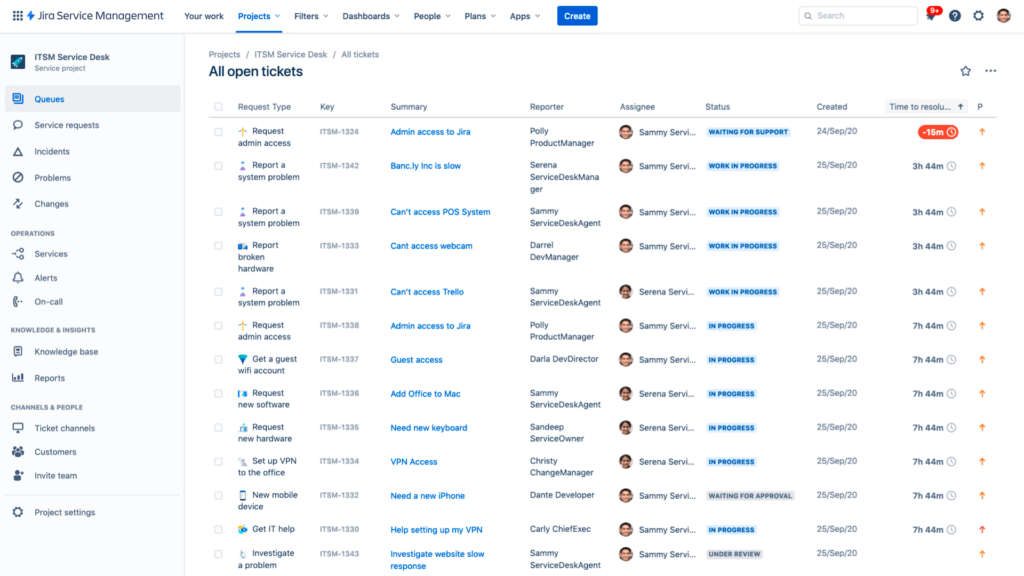
Jira Service Management es una herramienta robusta de gestión de servicios de TI y software de gestión de proyectos que forma parte del amplio ecosistema de Atlassian. Su integración fluida con otros productos de Atlassian la posiciona como una excelente opción para empresas que ya utilizan la suite de Atlassian.
Pros and Cons
Pros:
- Integración fluida con otras herramientas de Atlassian
- Conjunto robusto de funciones de gestión de servicios de TI
- Acceso al amplio ecosistema de Atlassian
Cons:
- Curva de aprendizaje para usuarios principiantes
- La personalización puede ser compleja
- La funcionalidad de informes podría ser más fácil de usar

SysAid
Mejor para análisis enriquecidos del rendimiento de TI
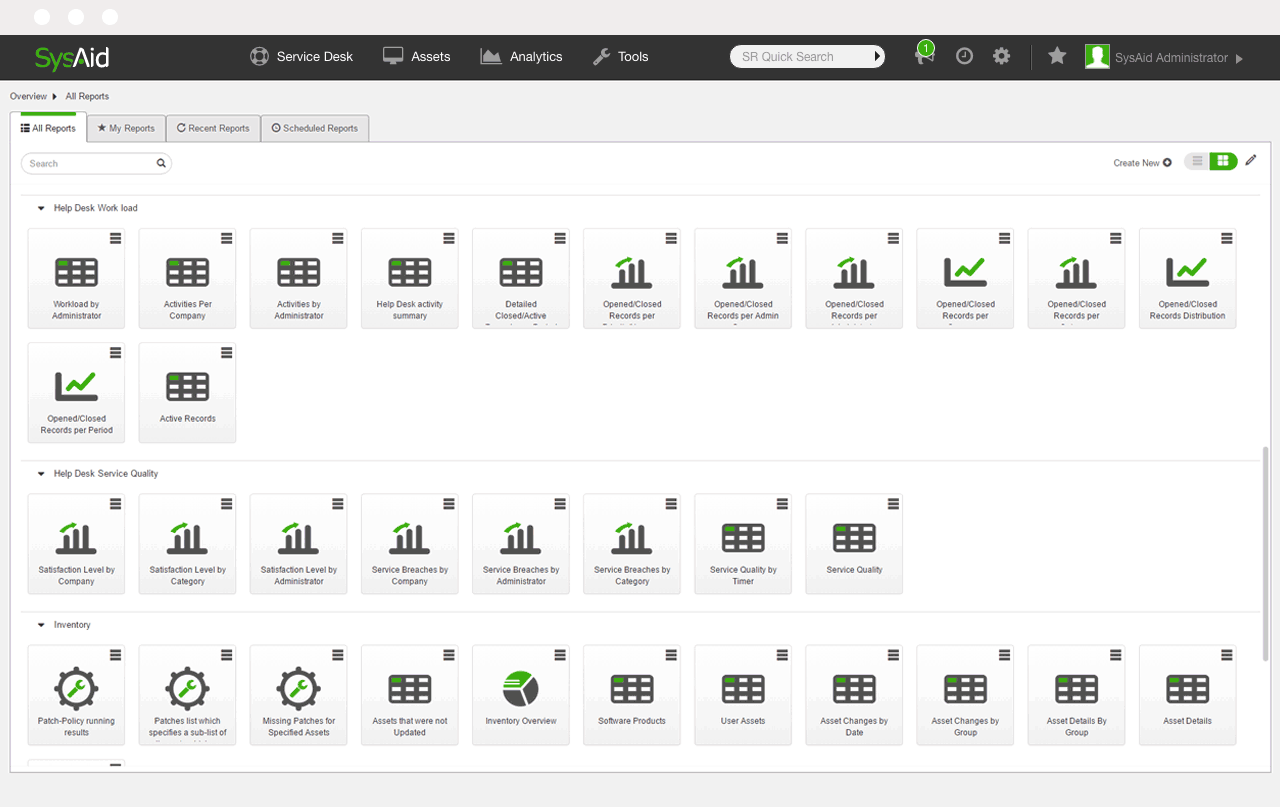
SysAid es una solución de gestión de servicios de TI que ofrece una mesa de servicio todo en uno para las organizaciones. Con un énfasis en análisis sólidos, realmente merece la etiqueta de 'mejor para' análisis enriquecidos del rendimiento de TI.
Pros and Cons
Pros:
- Amplias capacidades analíticas
- Se integra con varias plataformas líderes
- Funciones integrales de gestión de servicios
Cons:
- La información detallada de precios no está fácilmente disponible
- La interfaz de usuario podría ser más intuitiva
- El soporte al cliente podría mejorar

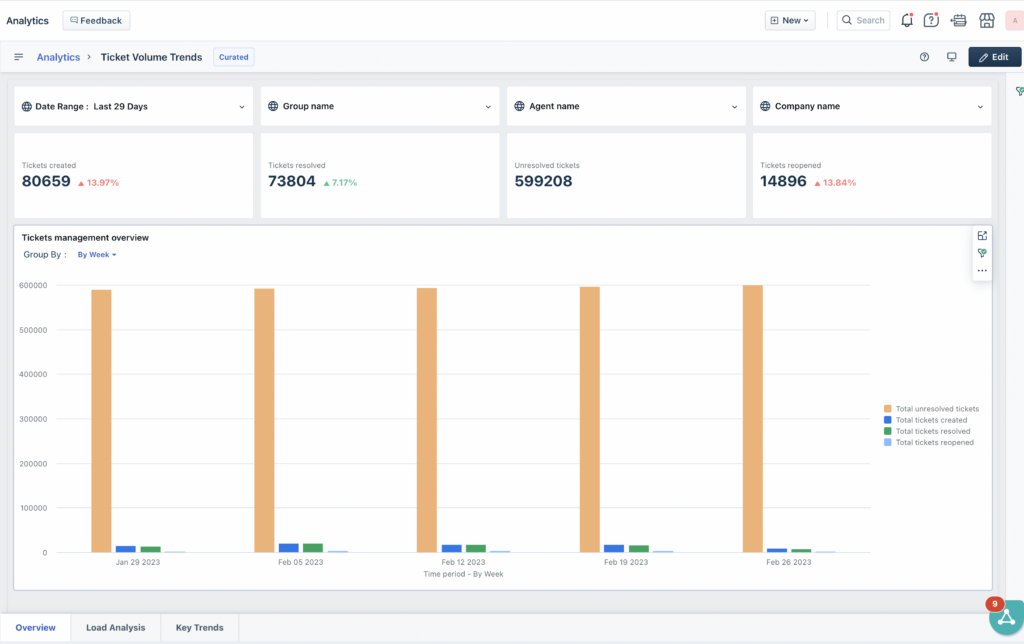
Freshdesk es una solución de software de atención al cliente rica en funciones, diseñada para simplificar las interacciones de servicio al cliente y facilitar la vida de los equipos de soporte. Esta herramienta reúne todas las conversaciones con los clientes en una interfaz centralizada, asegurando que nada se pase por alto.
Pros and Cons
Pros:
- Extensas funciones enfocadas en el servicio al cliente
- Sistema de tickets integral
- Amplia gama de integraciones
Cons:
- Los precios pueden aumentar con las funciones avanzadas
- La personalización puede requerir conocimientos técnicos
- Capacidades limitadas de ITSM en comparación con ServiceNow

La mejor opción para configuración innovadora sin código
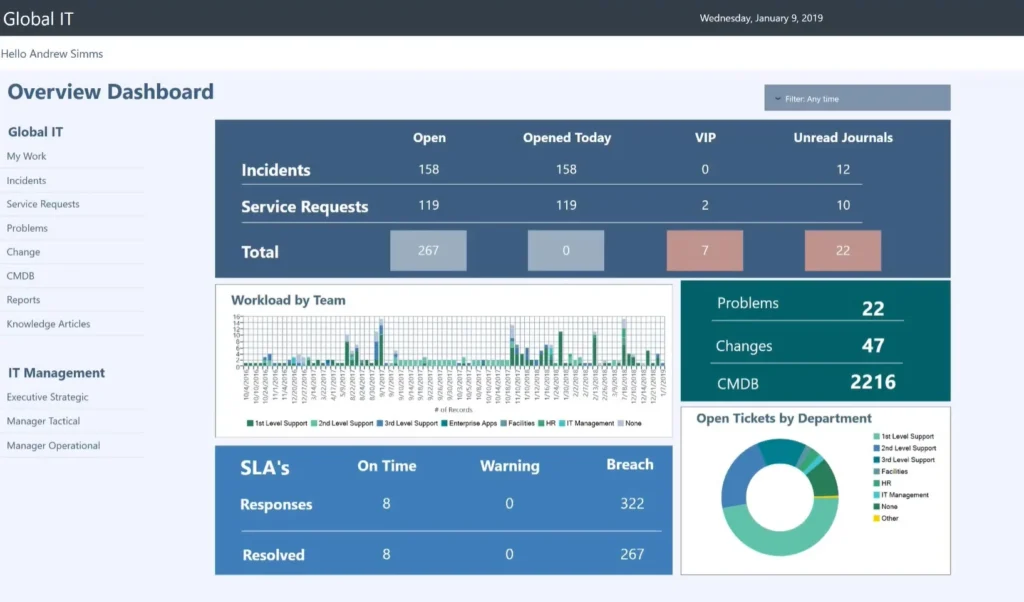
Cherwell Service Management es una herramienta de gestión de servicios de TI que aprovecha la automatización para proporcionar servicios de TI eficientes. Su enfoque innovador de configuración sin código la convierte en una opción óptima para las empresas que buscan simplicidad y adaptabilidad.
Pros and Cons
Pros:
- Innovadora función de configuración sin código
- Amplia variedad de integraciones
- Funciones completas de gestión de servicios de TI
Cons:
- Precio inicial más alto en comparación con otras herramientas
- La interfaz de usuario podría ser más moderna e intuitiva
- Algunos usuarios han observado lentitud ocasional en el rendimiento del sistema

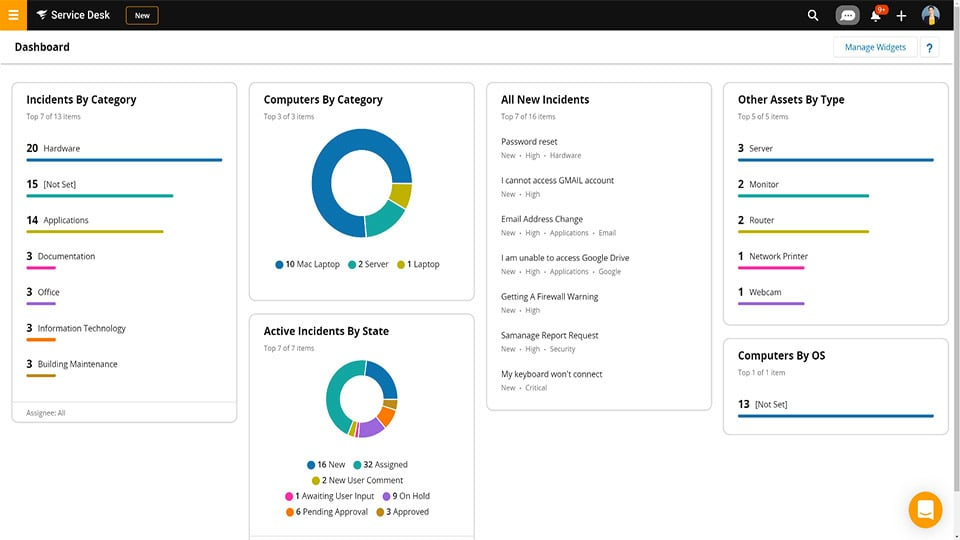
Service Desk de SolarWinds es una solución de gestión de servicios de TI diseñada para que las empresas ofrezcan soporte más rápido y eficiente. Reconocida por sus completas capacidades de gestión de activos de TI, esta herramienta facilita el seguimiento y la gestión de activos a lo largo de su ciclo de vida.
Pros and Cons
Pros:
- Gestión integral de activos de TI
- Seguimiento detallado del ciclo de vida
- Amplia gama de integraciones
Cons:
- Puede requerir capacitación inicial para un uso completo
- Los análisis avanzados requieren planes de nivel superior
- La interfaz de usuario podría ser más intuitiva
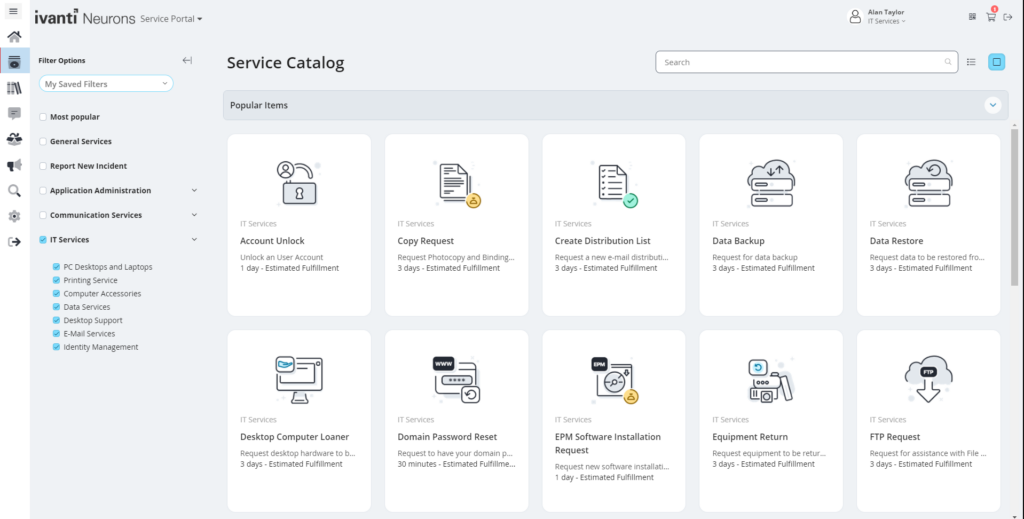
Ivanti Neurons for ITSM es una eficiente plataforma de gestión de servicios de TI que se apoya considerablemente en la IA para optimizar sus capacidades de automatización. Dada su potente gama de funciones impulsadas por IA, ofrece una sólida justificación para ser considerado el 'mejor para' automatización avanzada potenciada por IA.
Pros and Cons
Pros:
- Capacidades avanzadas de automatización impulsadas por IA
- Integraciones fluidas con los principales proveedores de software empresarial
- Ofrece análisis predictivo para una mejor toma de decisiones
Cons:
- El precio puede ser un poco elevado para empresas pequeñas
- La interfaz de usuario puede parecer compleja para algunos usuarios
- La personalización puede requerir conocimientos técnicos
Otros competidores de ServiceNow
Estos son algunos competidores adicionales de ServiceNow que no llegaron a mi lista, pero que aún vale la pena conocer:
- Micro Focus Service Management Automation X (SMAX)
La mejor opción para la gestión y automatización de servicios a gran escala
- BMC Helix
Mejor para capacidades de gestión de servicios cognitivos
- IFS Assist
Mejor para una entrega transformadora de servicios digitales
- NinjaOne
Mejor opción para una gestión y supervisión de redes sin interrupciones


Otras reseñas de software
- Plataformas de desarrollo en la nube
- Proveedores de IaaS
- Plataformas en la nube como servicio
- Herramientas de infraestructura como código
- Herramientas de supervisión de bases de datos
Cómo evalúo a los competidores de ServiceNow
Divido mi evaluación en dos capas: la base principal—flujos de trabajo ITIL, CMDB, autoservicio—y los diferenciadores como AIOps o ESM que revelan si una herramienta realmente rivaliza con ServiceNow.
Funcionalidad básica (requisitos fundamentales para esta lista)
Cuando selecciono herramientas para mi lista, califico cada una en una escala del 0 (no ofrece la funcionalidad) al 5 (destaca en esta área) para cada funcionalidad principal que se indica a continuación. Luego, calculo el puntaje total de la herramienta en un porcentaje. Cada herramienta necesita alcanzar una puntuación total mínima del 75% para ser considerada para inclusión.
- Gestión de servicios de TI: Evalúo si una herramienta cubre la gestión de incidentes, problemas, cambios y solicitudes, alineada con ITIL—cosas como flujos de trabajo CAB y seguimiento de SLAs que reflejan cómo los equipos de TI realmente operan.
- Automatización de flujos de trabajo: El generador de flujos de trabajo de cada plataforma es importante aquí. Busco automatización visual, sin código o con poco código, que gestione escenarios reales como la incorporación de empleados o aprobaciones de cambios en varias etapas y departamentos.
- Portal de autoservicio: Un buen portal debe incluir un catálogo de servicios y una base de conocimientos integrada. Verifico si los usuarios finales pueden registrar solicitudes, rastrear su estado y encontrar respuestas antes de que un ticket llegue a un agente.
- Gestión de activos y configuración: Analizo cómo cada herramienta gestiona ITAM y su CMDB—específicamente, si mapea relaciones y dependencias de CI para que tu equipo pueda rastrear el impacto de un servidor fallido en los servicios conectados.
- IA y agente virtual: Esto abarca el direccionamiento de tickets impulsado por IA, agentes virtuales con PLN y capacidades predictivas. Herramientas como Freshservice y BMC Helix abordan esto de manera diferente, así que evalúo la profundidad y utilidad práctica de cada una.
- Integraciones y extensibilidad: Busco APIs abiertas y conectores preconfigurados con las herramientas que usan los equipos de TI a diario—plataformas de monitoreo, cadenas de herramientas DevOps como Jenkins o GitHub, y apps de colaboración como Slack y Microsoft Teams.
Una vez que tengo una lista de herramientas que cumplen con este criterio, considero qué distingue a cada plataforma.
Factores diferenciadores (lo que distingue a los proveedores)
Así es como comparo y contrasto a los diferentes proveedores:
Funciones destacadas
La gestión de servicios empresariales es un gran diferenciador—reviso si una plataforma extiende los flujos de trabajo ITSM a RRHH, instalaciones y finanzas, para que tus equipos compartan un solo sistema de solicitudes en vez de gestionar herramientas separadas. AIOps y la correlación de eventos también son importantes. Plataformas como BMC Helix e Ivanti adoptan diferentes enfoques para ingresar datos de monitoreo, pero evalúo si realmente reducen el ruido de las alertas y muestran las causas raíz. También considero los generadores de apps de bajo código que te permiten crear aplicaciones personalizadas más allá de TI sin una gran implicación de desarrolladores.
Más allá de las funciones
El costo total de propiedad es donde dedico más tiempo. La complejidad de licenciamiento de ServiceNow a menudo es la razón por la que los equipos buscan alternativas, así que evalúo si el precio de un competidor es transparente y predecible a medida que aumentas agentes y activos. La velocidad de implementación importa igual de mucho—algunas plataformas como Freshservice y Jira Service Management ofrecen plantillas ITIL preconfiguradas que reducen la implementación de meses a semanas. También reviso certificaciones de seguridad como SOC 2, ISO 27001 y FedRAMP, especialmente para equipos en sectores regulados donde la falta de credenciales puede ser un factor excluyente.
¿Por qué buscar un competidor de ServiceNow?
ServiceNow es una potente plataforma de asistencia de TI basada en la nube que ayuda a las empresas a gestionar los flujos de trabajo digitales de las operaciones empresariales. Sus soluciones, que abarcan la gestión de servicios de TI (ITSM), la gestión de operaciones de TI (ITOM) y la gestión empresarial de TI (ITBM), agilizan los procesos y mejoran la productividad. Está dirigida principalmente a grandes organizaciones y clientes de nivel empresarial que necesitan una gestión compleja de flujos de trabajo y servicios.
A pesar de sus sólidas funciones, la necesidad de alternativas a ServiceNow puede surgir por diversos motivos. Entre ellos pueden estar las consideraciones de coste, ya que ServiceNow suele percibirse como una opción cara, especialmente para pequeñas y medianas empresas. Contribuye a mejorar la experiencia del cliente y las relaciones con los clientes al abordar eficazmente los problemas e incidentes relacionados con los servicios.
Características clave de ServiceNow
Estas son algunas de las características clave de ServiceNow, que te ayudarán a contrastar y comparar lo que ofrecen las soluciones alternativas:
- Informes y paneles: Te proporciona datos en tiempo real sobre el volumen de tickets, el tiempo de resolución y el rendimiento del equipo.
- Gestión de incidentes: Ayuda a tu equipo a rastrear, priorizar y resolver los problemas de TI más rápidamente.
- Gestión de cambios: Te permite planificar, probar y documentar los cambios del sistema con menos riesgos.
- Portal de autoservicio: Ofrece a los usuarios una forma sencilla de enviar tickets y encontrar artículos de ayuda.
- Catálogo de servicios: Te permite ofrecer servicios de TI estándar mediante formularios de solicitud predefinidos.
- Gestión de activos: Ayuda a realizar un seguimiento del hardware, el software y los activos de TI relacionados desde un solo lugar.
- Base de conocimientos: Permite a tu equipo documentar y compartir soluciones para problemas habituales.
- CMDB (base de datos de gestión de la configuración): Traza las relaciones entre los activos de TI para facilitar la resolución de problemas.
- Automatización de flujos de trabajo: Automatiza tareas repetitivas, como las aprobaciones y el enrutamiento de tickets.
- Acceso móvil: Te permite consultar y gestionar tickets desde un teléfono o una tableta.
Resumen
En resumen, el campo de ServiceNow y las alternativas a la gestión de servicios de Jira es diverso, y cada solución ofrece un conjunto distinto de características, fortalezas y estructuras de precios. Tanto si tu organización valora la gestión de servicios a gran escala como las capacidades de servicio cognitivo o la gestión intuitiva de incidentes y problemas, existe una alternativa a ServiceNow que satisfará tus necesidades.
Conclusiones clave
- Comprender las necesidades y los casos de uso específicos de tu organización es fundamental para seleccionar la herramienta de ITSM adecuada. Las características beneficiosas para una empresa pueden ser menos importantes para otra. Asegúrate de identificar claramente qué necesitas de un competidor de ServiceNow antes de tomar una decisión.
- En cuanto a los precios, existe una amplia variedad de opciones entre los competidores de ServiceNow. Algunos ofrecen soluciones más asequibles, mientras que otros proporcionan servicios prémium a un precio más elevado. Asegúrate de considerar el coste total, incluidas las posibles tarifas de configuración y el coste de las licencias adicionales a medida que crezca tu empresa.
- Por último, no subestimes el valor de la facilidad de uso y la atención al cliente. Una herramienta con una interfaz intuitiva y un servicio de atención al cliente receptivo puede ahorrar a tu equipo un tiempo valioso y ayudar a evitar posibles frustraciones. Esto es especialmente cierto en el caso de las herramientas de ITSM complejas, en las que una incorporación eficaz y un soporte continuo son fundamentales para maximizar el valor.
¿Qué opinas?
Por supuesto, el campo de ITSM está evolucionando rápidamente y constantemente aparecen nuevas herramientas y características. Si crees que un competidor de ServiceNow o una de las alternativas a la gestión de servicios de Jira merece estar en esta lista, no dudes en compartir tu sugerencia. Siempre valoro las opiniones y experiencias de mis lectores, y tu contribución podría ayudar a otras organizaciones a encontrar la herramienta adecuada para sus necesidades. ¡Gracias por tu tiempo y tus aportaciones!