
24 beste Webentwicklungs-Tools im Test für 2026

Beste Webentwicklungstools Kurzliste
Here's my pick of the 12 best software from the 24 tools reviewed.


Die richtigen Webentwicklungstools zu finden, kann Entwicklern helfen, hochwertige Websites und Webanwendungen effizienter zu erstellen sowie die Zusammenarbeit und Produktivität zu verbessern.
Angesichts der riesigen Auswahl an Webentwicklungstools und unter Berücksichtigung dessen, dass Ihr Team eventuell bereits andere Tools für das Programmieren, Debuggen und die Versionskontrolle nutzt, kann die Auswahl der geeignetsten Optionen eine Herausforderung darstellen.
In diesem Artikel schildere ich meine Erfahrungen aus der Arbeit an Webprojekten unterschiedlicher Größe und mit verschiedenen Entwicklungstools. Ich erkläre, was jedes Tool bietet und für wen es am besten geeignet ist, damit Sie leichter die passenden Werkzeuge für Ihre Anforderungen auswählen können.
Table of Contents
Why Trust Our Software Reviews
Zusammenfassung der besten Webentwicklungstools
Diese Vergleichstabelle fasst die Preisinformationen meiner Favoriten unter den Webentwicklungstools zusammen, damit Sie das beste Tool für Ihr Budget und Ihre geschäftlichen Anforderungen finden können.
| Tool | Best For | Trial Info | Price | ||
|---|---|---|---|---|---|
| 1 | Best for low-code development with integrations | Free plan available | From $20/developer/month | Website | |
| 2 | Best for AI-powered app creation | Free plan available | From $160/month (billed annually) | Website | |
| 3 | Best for low-code and full-code teams | Free plan available | From $17/month | Website | |
| 4 | Best for custom CMS | Free trial available | From $10/month (billed annually) | Website | |
| 5 | Best for application testing with expert support | Free demo available | Pricing upon request | Website | |
| 6 | Best for organizing code, collaboration, and version control | 30-day free trial available | From $4/user/month | Website | |
| 7 | Best all-in-one code editor | Free, open-source | Free to use | Website | |
| 8 | Best for creating responsive user interfaces | Free plan available | Free and open-source | Website | |
| 9 | Best for adding secure user authentication | Free trial available | From $35/month | Website | |
| 10 | Best for fast troubleshooting and debugging | Free plan available | Free built-in browser | Website | |
| 11 | Best for code organization and error detection | Free plan available | Free open-source | Website | |
| 12 | Best for quick and collaborative deployment | Free plan available (non-commercial use) | From $20/user/month (billed annually) | Website |
-

Site24x7
Visit WebsiteThis is an aggregated rating for this tool including ratings from Crozdesk users and ratings from other sites.4.6 -
Docker
Visit WebsiteThis is an aggregated rating for this tool including ratings from Crozdesk users and ratings from other sites.4.6 -
Pulumi
Visit WebsiteThis is an aggregated rating for this tool including ratings from Crozdesk users and ratings from other sites.4.8





Bewertungen der besten Webentwicklungstools
Hier ist meine Einschätzung zu den besten Webentwicklungstools. Ich habe die Funktionen jedes Tools zusammengefasst, wobei der Fokus auf Geschwindigkeit, Zusammenarbeit und Benutzerfreundlichkeit liegt, um die Teamproduktivität zu optimieren und Ihre technische Schulden zu eliminieren.


If you need to simplify web development, UI Bakery offers a low-code platform for building internal tools, dashboards, and customer portals with ease. Its intuitive drag-and-drop interface and strong integration capabilities make it appealing to professionals across various industries who need to accelerate application development without extensive coding. By addressing the need for rapid deployment and seamless integration with existing systems, UI Bakery gives teams a faster, simpler way to manage their development workflow.
Why I Picked UI Bakery
I picked UI Bakery for its unique ability to combine low-code development with extensive integration options, making it a standout choice for web development tools. The platform's drag-and-drop UI builder lets you design applications quickly and intuitively, a crucial feature for those who need to create prototypes or business applications. Additionally, UI Bakery's support for over 45 databases and APIs ensures that your applications can easily connect to and interact with existing data sources. This integration capability, coupled with the platform's AI-driven development agent, allows you to deploy apps efficiently, addressing the common need for speed and flexibility in web development.
UI Bakery Key Features
In addition to low-code development, UI Bakery offers:
- Workflow Automation: Automate repetitive tasks within your applications to save time and reduce errors.
- React Code Export: Export clean, readable React code to maintain flexibility and avoid vendor lock-in.
- Security Compliance: SOC 2 certification and advanced role-based access control ensure your applications are secure.
- One-Click Deployment: Deploy updates instantly with a single click, ensuring your applications are always up-to-date.
UI Bakery Integrations
Integrations include PostgreSQL, MySQL, MongoDB, REST API, GraphQL, Airtable, Firebase, Stripe, Google Sheets, and Slack.
Pros and Cons
Pros:
- Includes pre-built templates to jumpstart projects
- Supports workflow automation and webhooks
- Has flexible deployment options, including on-premise
Cons:
- May not suit users needing broader application features
- Performance may vary with highly complex datasets
New Product Updates from UI Bakery

UI Bakery Adds File Uploads and Voice Prompts to AI Chat
UI Bakery introduces file attachments in AI Chat and a voice prompt microphone tool. These updates improve how users interact with the AI agent, making app building faster and more flexible. For more information, visit UI Bakery’s official site.
 .
.

Base44 is a no-code web development tool that lets you build applications by describing your ideas in plain language. With built-in hosting, backend automation, and ready-made templates, it makes app development accessible—even if you’ve never coded before.
Why I Picked Base44: I picked Base44 because it automatically handles backend essentials like user authentication, data storage, and permissions, so you don’t need to set up complex infrastructure. I also like that its AI-driven workflow lets you go from idea to working prototype in minutes, which is ideal for founders and teams testing new concepts quickly. Additionally, you can customize visual elements such as layouts, colors, and fonts, giving you creative control without coding knowledge.
Standout Features and Integrations
Features include built-in hosting for instant app deployment, diverse templates for dashboards or onboarding portals, and real-time editing tools for quick design adjustments. Base44 also supports role-based permissions and provides analytics to help you manage app performance.
Integrations include Google Sheets, Gmail, Stripe, Shopify, Google Drive, Salesforce, HubSpot, Airtable, and Slack.
Pros and Cons
Pros:
- Built-in hosting and deployment
- Automated backend and security
- Fast AI-driven app generation
Cons:
- Not fully optimized for mobile
- Limited design customization options
New Product Updates from Base44
Base44 Launches Mobile App Publishing
Base44 introduces mobile app publishing to Apple App Store and Google Play. This update enables users to turn their projects into fully published mobile apps with a streamlined process. For more information, visit Base44’s official site.
 .
.

Wix is a flexible platform that supports both visual website creation and advanced development workflows. While it's known for helping non-coders build websites with drag-and-drop tools, its developer environment—Wix Studio paired with Velo—makes it a viable web development tool for teams that need to write, test, and deploy real code.
Why I picked Wix: I picked Wix for its full-stack dev environment that lets you build web applications within a visual-first platform. Velo by Wix gives developers access to backend JavaScript, APIs, databases, and serverless functions—all built into the Wix Studio workspace. You can also manage code using Git, run local dev environments with a CLI, and collaborate across teams using multi-environment setups. The combination of visual layout tools and custom coding features means you can move fast while maintaining control over structure and logic.
Wix Standout Features and Integrations
Features include the ability to create and reuse custom components with standard web technologies like HTML, CSS, and JavaScript, giving you full control over functionality and styling. For non-coders or hybrid teams, Wix also offers customizable templates and an AI website builder that generates full site layouts based on prompts—so less technical team members can contribute to the project without writing code.
Integrations include Klaviyo, Easyship, AfterShip, Privy, SoundCloud, Mailchimp, Importify, Cart2Cart, Dropbox, Google Drive, AdScale, 123FormBuilder, JivoChat, Meta for Business, and Eventbrite.
Pros and Cons
Pros:
- Mobile app for on-the-go store management
- AI website builder and extensive templates
- Full-stack web development tools
Cons:
- Limited flexibility for non-developers in switching templates after site creation
- Site migration to or from another platform can be complex


Framer is a no-code website builder crafted for professionals, especially those in design. It offers a platform where you can create and publish websites without the need for coding expertise.
Why I Picked Framer: I picked Framer because it gives you a real design environment—not just a visual HTML editor—so you can build websites that look and feel great. You can customize the CMS to match your team’s needs, keeping your site fresh and flexible. I also like that it includes built-in SEO tools, fast load speeds, and real-time collaboration, so your whole team can stay aligned and move quickly.
Standout Features and Integrations
Features include easy integration of animations, which can greatly enhance the user experience on your site. Framer also offers one-click publishing, allowing you to deploy your site to a global audience effortlessly. Additionally, the platform provides a marketplace for plugins, which can extend the functionality of your site and help you achieve more complex design goals.
Integrations include Formspark, Hotjar, HubSpot, Intercom, Mailchimp, Marketo, Meta Pixel, Typeform, Webhook, Loom, Trustpilot, Google Tag Manager, and Google Analytics.
Pros and Cons
Pros:
- Offers design freedom and customization options
- Regular updates to enhance functionality
- Versatile for both web and mobile design projects
Cons:
- Limited offline capabilities
- Lacks some advanced features found in other design tools


QA Wolf is a test automation platform and service that optimizes the testing process for web applications. By utilizing the Playwright framework, QA Wolf automates the creation, execution, and maintenance of end-to-end tests. It offers 24-hour expert monitoring, which ensures continuous oversight and maintenance of the test suite.
Why I picked QA Wolf: QA Wolf is a unique web development tool in that it combines human-led test designing, deployment, and monitoring with a centralized platform for users to gain visibility into test activity and bug reports. Its seamless integration with CI/CD pipelines enables continuous testing and immediate feedback on code changes, ensuring application stability. Additionally, the platform's support for parallel test execution helps reduce testing time.
QA Wolf Standout Features and Integrations
Features include human-verified bug reports, customizable test plans, comprehensive test coverage reports, unlimited parallel test runs, and continuous monitoring and maintenance by QA experts.
Integrations include GitHub, GitLab, Bitbucket, Jenkins, CircleCI, Travis CI, Jira, Asana, Linear, Slack, Microsoft Teams, and Azure DevOps.
Pros and Cons
Pros:
- Easy communication and collaboration with the QA Wolf team
- Unlimited parallel test runs
- 24/5 expert test monitoring and maintenance
Cons:
- Less control over the testing process
- Relying on an external team for testing may lead to coordination issues


GitHub is the world’s largest developer platform for version control and collaboration, allowing developers to host, organize, and share their code repositories. It enables coders to collaborate with others, track changes, and manage the development process.
Why I picked GitHub: I chose GitHub because it is an industry-standard tool that many web development roles require you to have experience in. It offers networking opportunities and the ability to build your brand as a developer.
GitHub Standout Features and Integrations:
Features include version control, issue tracking, Copilot AI, and collaboration tools. I like that GitHub integrates with continuous integration/continuous deployment (CI/CD) platforms, allowing you to automate your testing, building, and deployment workflows.
Integrations can be found in the GitHub marketplace. Popular pre-built tools include Slack, ZenHub, Instabug, SupportBee, PR Chat, and Jira. Additional integrations can be found in Zapier.
Pros and Cons
Pros:
- GitHub Copilot AI
- Codespace–Instant dev environments
- Automated workflows
Cons:
- More expensive than competitors
- Command-line knowledge is required
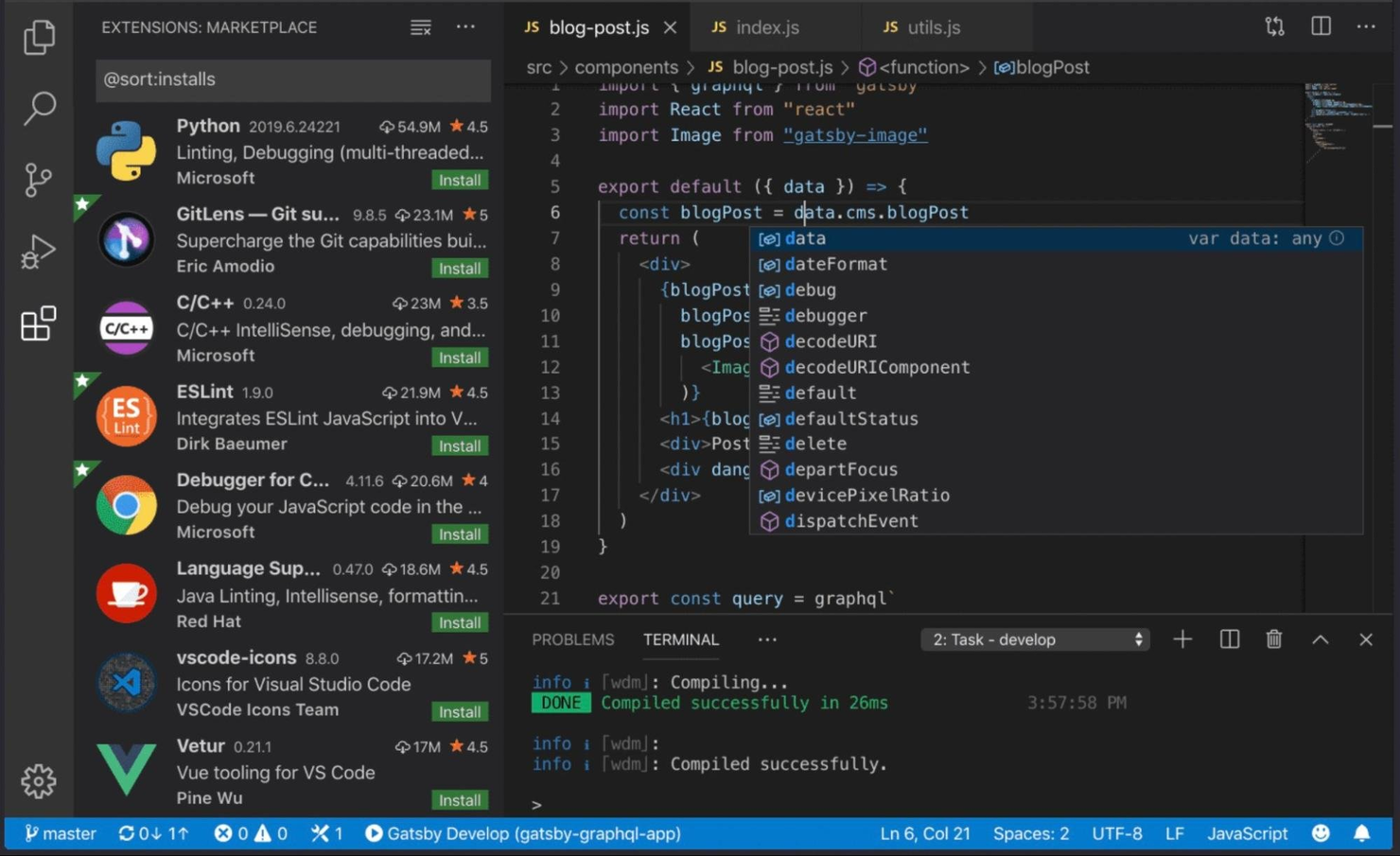
Visual Studio Code is a lightweight code editor known for its fast performance and extensive customization features. It supports various programming languages, frameworks, and operating systems, including Windows, macOS, and Linux.
Why I picked Visual Studio Code: I think Visual Studio Code is the best all-in-one code editor because it is highly customizable yet fast and lightweight. It has a huge extension library, so you can tailor your coding environment to suit you. It also has a clean interface, making it easy to navigate.
Visual Studio Code Standout Features and Integrations:
Features include syntax highlighting, intelligent code completion, formatting, navigation, and debugging capabilities. A standout for me is the integrated terminal support, allowing developers to run commands and scripts directly within the editor.
Integrations are limited natively. They include Docker, Azure Tools, and TypeScript. You can use the Visual Studio Code Extension API to open more options.
Pros and Cons
Pros:
- Clean user interface
- Vast extension library
- Lightweight and fast
Cons:
- No SVG file preview
- Some extensions crash when used simultaneously


Tailwind CSS is a customizable CSS framework that helps you build modern and responsive user interfaces. It provides a comprehensive set of low-level utility classes that can be combined to create custom designs for absolutely anything.
Why I picked Tailwind CSS: I chose Tailwind CSS because you can build your designs directly in your HTML markup, saving you a ridiculous amount of time. It’s fast and tiny–all unused CSS is automatically removed before shipping.
Tailwind CSS Standout Features and Integrations:
Features include the Tailwind CSS Playground for experimenting with code and a library of ready-made components that you can use in your projects. I like that you can build responsive design directly into your HTML–no more complex media queries.
Integrations are enabled via pre-built plugins for Visual Studio Code and JetBrains IDEs like WebStorm and PhpStorm. You can find additional plugins and integrations on GitHub.
Pros and Cons
Pros:
- Automatically removes unused CSS
- Build directly in your HTML
- Library of ready-made components
Cons:
- Can be a lot to learn with the number of available classes
- Can cause bloated HTML files


Auth0 is an access management tool that allows developers to add secure user authentication and authorization to their websites and applications. From single sign-on (SSO) and multi-factor authentication (MFA) to passwordless and user profiling, Auth0 provides a simple solution to modern identity management.
Why I picked Auth0: I chose Auth0 because of its simplicity in providing more control and security to your apps. The Auth0 dashboard lets you connect your apps, set up rules, customize login pages, select identity providers, add users, and access analytics. Popular authentication methods like social logins, SSO, and MFA are all supported, as well as the traditional username and password combo.
Auth0 Standout Features and Integrations:
Features include universal login, SSO, MFA, machine-to-machine, and passwordless authentication. I like the access and control provided by Auth0, allowing developers to manage user registration, logins, password resets, account linking, user roles, and permissions.
Integrations include hundreds of native tools and apps in the Auth0 Marketplace. Popular integrations include Gmail, Facebook, Datadog, GitHub, Splunk, PayPal, Bitbucket, Twitter, Yahoo, and Amazon. You can request any not listed or build your own with the Auth0 API.
Pros and Cons
Pros:
- Detailed user documentation
- Built-in analytics
- Central dashboard
Cons:
- Add-ons can get expensive
- Limited free plan


Chrome Developer Tools is a set of tools available in the Google Chrome browser that allows developers to quickly inspect, debug, and analyze web applications and websites. They provide insights into sites’ structure and performance, making diagnosing issues easier, so you can improve code quality and enhance the user experience.
Why I picked Chrome Developer Tools: I chose Chrome Developer Tools because it works directly in the browser and it’s fast; no software or platforms to access or install. With a simple right-click on any website, you can inspect the code, live-edit HTML and CSS, and debug JavaScript. You can also run performance, memory, and security reports with Lighthouse.
Chrome Developer Tools Standout Features and Integrations:
Features include element inspection and JavaScript debugging. The fact you can run a network, performance, memory, and security analysis all within the interface is a standout feature for me.
Integrations include Google Chrome–obviously! You can’t integrate additional tools because it’s built into the Chrome browser as a feature. However, many apps allow you to integrate Chrome Developer Tools using their respective APIs.
Pros and Cons
Pros:
- Performance analysis reports
- Easy to use and learn
- Live debugging
Cons:
- No downloadable reports
- User interface can be overwhelming


TypeScript is a programming language based on JavaScript, with additional syntax to allow for static typing. Developed by Microsoft, it is highly trusted, with over 5 million weekly downloads of its compiler on GitHub.
Why I picked TypeScript: I chose TypeScript because its static typing abilities are great for helping you catch mistakes before runtime. It allows you to specify variables, elements, and function parameters, resulting in better code organization and high-quality output.
TypeScript Standout Features and Integrations:
Features include the TypeScript compiler, which analyzes your code, checks for type compatibility, and provides helpful feedback and warnings. I love that completed TypeScript is transformed into plain JavaScript, meaning it can be executed in any JavaScript runtime environment.
Integrations with build tools are natively built into the TypeScript language and use npm install in some instances. Tools include Babel, Grunt, Gulp, Browserify, MSBuild, Rollup, and Webpack.
Pros and Cons
Pros:
- Runs anywhere JavaScript runs
- Early error detection
- Simplified code management
Cons:
- Another language to learn
- Bloated code


Vercel is a platform for deploying and hosting static websites and web applications. It was created by the team behind Next.js to provide a seamless deployment experience for Next.js applications, although it also supports other frameworks and static site generators.
Why I picked Vercel: I chose Vercel because it offers a simple and intuitive interface for deploying projects, allowing you to configure custom domains and environment variables. Vercel focuses on your experience as a developer and enables you to deploy projects with minimal configuration.
Vercel Standout Features and Integrations:
Features include automatic scaling and built-in caching to ensure optimal performance and reliability. I love how much time the automatic scaling can save you with rapid deployments. And no need to worry about server configuration–Vercel does it for you!
Integrations available range from analytics and commerce to testing and security tools. Popular native integrations include Contentful, GitHub, Shopify, Tinybird, Slack, and Auth0. You can create your own integrations, for public or private use, in the Vercel dashboard using the Vercel API.
Pros and Cons
Pros:
- Multi-cloud capability with serverless and edge functions
- Large library of integrations
- Generous free plan for personal use
Cons:
- No automation features
- Lacks user documentation
Weitere Webentwicklungstools
Hier sind einige Webentwicklungstools, die es nicht in meine Top-Liste geschafft haben, die ich aber dennoch empfehle anzuschauen:
- Postman
For developing and testing APIs
- Flutter
For multi-platform app development
- Selenium
For automated browser testing
- Grunt
For automating repetitive tasks
- Airplane
For building custom internal tools
- monday dev
For flexible agile workflows
- CodePen
For sharing code snippets
- Docker
For customizable, accelerated workflows
- Marvel
For designing digital products
- Firebase
For app development
- GitLab
For AI-powered DevSecOps
- Sublime Text
For cross-platform and lightweight code editing


Verwandte Software- & Tool-Bewertungen
Falls Sie hier noch nicht das Gewünschte finden konnten, sehen Sie sich diese anderen getesteten und bewerteten Tool-Kategorien an.
- Netzwerküberwachungssoftware
- Serverüberwachungssoftware
- SD-Wan-Lösungen
- Packet Sniffer
- Anwendungsüberwachungstools
- Infrastrukturüberwachungstools
Auswahlkriterien für Webentwicklungstools
Bei der Auswahl der besten Webentwicklungstools für diese Liste habe ich typische Käuferbedürfnisse und Problemstellen wie Integrationsfähigkeit und Kollaborationsfunktionen berücksichtigt. Außerdem habe ich folgendes Schema genutzt, um meine Bewertung strukturiert und objektiv zu gestalten:
Kernfunktionen (25% der Gesamtbewertung)
Um in diese Liste aufgenommen zu werden, musste jede Lösung diese gängigen Anwendungsfälle abdecken:
- Code-Editor
- Versionskontrolle
- Debugging
- Zusammenarbeit
- Bereitstellung
Zusätzliche besondere Funktionen (25% der Gesamtbewertung)
Um die Auswahl weiter einzugrenzen, habe ich nach besonderen Merkmalen gesucht, wie zum Beispiel:
- Echtzeit-Kollaborationsfunktionen
- Anpassbare Vorlagen
- Integrierte Analysen
- Integration mit Drittanbieter-Apps
- Funktionen für responsives Design
Benutzerfreundlichkeit (10% der Gesamtbewertung)
Um einen Eindruck vom Bedienkomfort der jeweiligen Systeme zu bekommen, habe ich Folgendes berücksichtigt:
- Intuitive Benutzeroberfläche
- Einfache Navigation
- Anpassbare Einstellungen
- Klare Dokumentation
- Benutzerfreundliches Design
Onboarding (10 % der Gesamtbewertung)
Um die Onboarding-Erfahrung jeder Plattform zu bewerten, habe ich Folgendes berücksichtigt:
- Verfügbarkeit von Trainingsvideos
- Interaktive Produkttouren
- Zugriff auf Vorlagen
- Chatbot-Unterstützung
- Webinare zum Onboarding
Kundensupport (10 % der Gesamtbewertung)
Um die Kundenservice-Leistungen der Softwareanbieter einzuschätzen, habe ich folgende Kriterien herangezogen:
- 24/7 Verfügbarkeit
- Mehrere Support-Kanäle
- Reaktionszeit
- Zugriff auf Wissensdatenbank
- Personalisierter Support
Preis-Leistungs-Verhältnis (10 % der Gesamtbewertung)
Um das Preis-Leistungs-Verhältnis jeder Plattform zu bewerten, habe ich Folgendes berücksichtigt:
- Wettbewerbsfähige Preisgestaltung
- Verfügbarkeit einer kostenlosen Testphase
- Transparenz bei den Preisen
- Verhältnis von Funktionen zu Preis
- Rabattmöglichkeiten
Kundenbewertungen (10 % der Gesamtbewertung)
Um einen Eindruck von der allgemeinen Kundenzufriedenheit zu gewinnen, habe ich beim Lesen von Kundenbewertungen auf Folgendes geachtet:
- Bewertung der Gesamtzufriedenheit
- Feedback der Nutzer zu Funktionen
- Kommentare zur Benutzerfreundlichkeit
- Bewertungen der Support-Erfahrung
- Rückmeldungen zur Preisgestaltung
Wie wähle ich ein Web-Entwicklungstool aus?
Es ist leicht, sich in langen Funktionslisten und komplexen Preisstrukturen zu verlieren. Um Ihnen zu helfen, während Ihres Auswahlprozesses für Webentwicklungssoftware den Fokus zu behalten, finden Sie hier eine Checkliste mit Faktoren, auf die Sie achten sollten:
| Faktor | Worauf achten? |
|---|---|
| Skalierbarkeit | Kann das Tool mit Ihrem Unternehmen wachsen? Überprüfen Sie, ob erhöhte Arbeitslasten und größere Teams ohne Leistungseinbußen unterstützt werden. |
| Integration | Funktioniert das Tool mit Ihrer bestehenden Software? Prüfen Sie die Kompatibilität mit vorhandenen Tools, um Unterbrechungen im Arbeitsablauf zu vermeiden. |
| Anpassbarkeit | Können Sie das Tool an Ihre eigenen Bedürfnisse anpassen? Achten Sie auf Möglichkeiten, Workflows oder Interface-Elemente Ihrem Team anzupassen. |
| Benutzerfreundlichkeit | Findet Ihr Team sich schnell zurecht? Bewerten Sie die Lernkurve und ob das Interface einfach genug für eine schnelle Einführung ist. |
| Implementierung & Onboarding | Wie lange dauert die Inbetriebnahme? Beurteilen Sie den Ressourcenbedarf für die Einführung und ob Schulungen zur Erleichterung des Einstiegs angeboten werden. |
| Kosten | Passen die Preise zu Ihrem Budget? Vergleichen Sie diese mit ähnlichen Lösungen und berücksichtigen Sie versteckte Kosten oder langfristige Verpflichtungen. |
| Sicherheitsmaßnahmen | Sind Ihre Daten und Projekte sicher? Achten Sie darauf, dass das Tool branchenspezifischen Standards entspricht und Funktionen wie Verschlüsselung und Zugriffskontrollen bietet. |
Trends bei Web-Entwicklungstools
Webentwicklungstools passen sich rasant an die sich ständig wandelnden Anforderungen von Entwicklern und Unternehmen an. Durch eine gründliche Analyse von Produktaktualisierungen, Pressemitteilungen und Veröffentlichungsprotokollen der führenden und am schnellsten wachsenden Werkzeuge der Branche, ergibt sich ein klares Bild aktueller Trends bei Webentwicklungstools und -technologien. Nachfolgend sind die wichtigsten Trends aufgeführt, die die heutige Welt der Webentwicklung prägen:
Trends bei Funktionen und Funktionalität
- Vermehrte Nutzung von Low-Code/No-Code-Plattformen: Diese Plattformen werden immer ausgefeilter und ermöglichen es sowohl Entwicklern als auch Nicht-Entwicklern, Webanwendungen mit minimalem Programmieraufwand zu erstellen und bereitzustellen. Dieser Trend steht für die Demokratisierung der Webentwicklung, macht sie einem breiteren Publikum zugänglich und verkürzt die Markteinführungszeit für neue Anwendungen.
- Serverlose Architekturen werden zum Standard: Der Wechsel zu serverlosen Computing-Modellen vereinfacht die Bereitstellung und Skalierbarkeit, sodass sich Entwickler auf das Programmieren statt auf die Verwaltung der Infrastruktur konzentrieren können. Dieser Trend spiegelt den Branchentrend zu kostengünstigeren und skalierbaren Lösungen wider.
- Fähigkeiten von Progressive Web Apps (PWA): Verbesserungen in der PWA-Technologie machen Webanwendungen leistungsfähiger und zuverlässiger, sogar bei schlechten Netzwerkbedingungen. Die Weiterentwicklung dieses Features zeigt die wachsende Nachfrage nach Web-Apps, die ein nutzerfreundliches, app-ähnliches Erlebnis bieten.
- API-First-Entwicklung: Der Anstieg von API-First-Design-Tools unterstreicht die zunehmende Bedeutung nahtloser Integrationen mit anderen Diensten und Plattformen. Dieser Ansatz erleichtert agilere Entwicklungsprozesse und die Interoperabilität zwischen verschiedenen Systemen und Technologien.
- Funktionen für Augmented Reality (AR) und Virtual Reality (VR): Einige Webentwicklungstools beginnen, AR- und VR-Technologien direkt zu unterstützen und ebnen so den Weg für immersivere Web-Erlebnisse. Dieser Trend deutet darauf hin, dass das Interesse an der Gestaltung über klassische Weboberflächen hinauswächst, um ansprechendere Nutzererfahrungen zu schaffen.
Diese Trends zeigen, dass sich das Ökosystem der Webentwicklung rasant an neue Technologien und Methoden anpasst. Mit der fortlaufenden Weiterentwicklung dieser Tools dienen sie Entwicklern als Wegweiser, um an der Spitze der Branche zu bleiben.
Was sind Webentwicklungstools?
Webentwicklungstools sind Softwareanwendungen, die bei der Erstellung und Verwaltung von Websites und Webanwendungen unterstützen. Entwickler, Designer und IT-Fachleute nutzen diese Tools in der Regel, um Programmierung, Gestaltung und Zusammenarbeit zu vereinfachen. Funktionen wie Code-Bearbeitung, Versionskontrolle und Debugging helfen dabei, Projekte effizient zu verwalten und die Zusammenarbeit im Team zu stärken. Insgesamt steigern diese Tools die Produktivität und erleichtern den Webentwicklungsprozess.
Funktionen
Hier sind die wichtigsten Funktionen, auf die ich bei Webentwicklungstools achte:
- Versionskontrolle: Verfolgt und verwaltet Änderungen am Code und ermöglicht eine reibungslose Zusammenarbeit sowie die Vermeidung von Konflikten im Codebestand.
- Aufgabenmanagement und Kommentarfunktion: Unterstützt die Zuweisung von Aufgaben und Kommentare im Code, verbessert die Kommunikation und sorgt für Klarheit im Entwicklungsprozess.
- Code-Editor und Formatierungstools: Bietet eine funktionsreiche Oberfläche zum Schreiben von Code, mit Syntaxhervorhebung, Autovervollständigung und Linting für sauberen und wartbaren Code.
- Debugging und Testing: Enthält Tools zur Fehlersuche und zum Ausführen automatisierter oder manueller Tests, um qualitativ hochwertige, fehlerfreie Anwendungen zu gewährleisten.
- Integrierte Entwicklungsumgebung (IDE): Vereint Bearbeitung, Debugging und Versionskontrolle in einer Oberfläche und erleichtert so den Entwicklungsprozess.
- Vorschau für responsives Design: Zeigt an, wie Anwendungen auf verschiedenen Bildschirmgrößen und Geräten dargestellt werden, um konsistente Nutzererfahrungen sicherzustellen.
- Paketverwaltung: Vereinfacht die Installation und Verwaltung von Projektabhängigkeiten und -bibliotheken, sodass Projekte organisiert und aktuell bleiben.
- Kollaborationstools: Ermöglichen die Echtzeit-Zusammenarbeit im Team, mit gleichzeitiger Codebearbeitung und sofortigem Feedback.
- Framework- und Bibliotheksintegration: Unterstützen populäre Frameworks wie React, Angular und Vue.js und beschleunigen die Entwicklung mit vorgefertigten Komponenten.
- Live-Server-Neuladen: Aktualisiert den Browser automatisch, um Codeänderungen in Echtzeit anzuzeigen und den Feedback-Zyklus zu beschleunigen.
- API-Testing und -Integration: Erleichtert Tests von APIs im Entwicklungsumfeld, um die fehlerfreie Funktion von Back-End-Services zu prüfen.
- Sicherheitsanalyse-Tools: Erkennt potenzielle Schwachstellen im Code und stellt die Einhaltung von Sicherheitsstandards und Datenschutzrichtlinien sicher.
Die Auswahl von Tools mit der passenden Funktionsvielfalt kann die Komplexität der Webentwicklung deutlich verringern und den Prozess strukturierter und effizienter gestalten.
Vorteile
Webentwicklungstools bieten zahlreiche Vorteile, die den Entwicklungsprozess vereinfachen, die Produktivität steigern und die Erstellung hochwertiger, ansprechender digitaler Erlebnisse ermöglichen. Nachfolgend sind fünf Hauptvorteile von Webentwicklungstools aufgeführt.
- Erhöhte Produktivität: Die Automatisierung sich wiederholender Aufgaben und Funktionen wie Code-Vervollständigung. Webentwicklungstools reduzieren die Entwicklungszeit und den Aufwand erheblich, sodass Entwickler sich auf Innovation und Problemlösung konzentrieren können.
- Verbesserte Zusammenarbeit: Funktionen für die Zusammenarbeit in Echtzeit und Versionskontrolle. Diese Tools erleichtern die nahtlose Teamarbeit zwischen Entwicklern, Designern und weiteren Beteiligten und gewährleisten einen einheitlichen und koordinierten Ansatz bei Webentwicklungsprojekten.
- Höhere Qualität und Zuverlässigkeit: Integrierte Debugging- und Testtools. Webentwicklungstools helfen dabei, Fehler frühzeitig im Entwicklungsprozess zu erkennen und zu beheben, was zu stabileren und zuverlässigeren Webanwendungen führt.
- Größere Skalierbarkeit: Tools für modulare Entwicklung und Cloud-Integration. Sie ermöglichen es Unternehmen, ihre Webanwendungen bei wachsender Nachfrage der Nutzer problemlos zu skalieren und so eine gleichbleibende Performance und Benutzererfahrung sicherzustellen.
- Kosteneffizienz: Verringerung des Aufwands für umfangreiche manuelle Programmierung und Infrastrukturverwaltung. Durch die Optimierung des Entwicklungsprozesses und die Nutzung cloudbasierter Ressourcen können Webentwicklungstools die Entwicklungs- und Betriebskosten eines Unternehmens deutlich senken.
Webentwicklungstools sind mehr als nur Werkzeuge für Codierung und Design; sie sind strategische Ressourcen, die die Herangehensweise an Webentwicklungsprojekte grundlegend verändern können. Das Verständnis dieser Vorteile ist für potenzielle Käufer von Webentwicklungstools entscheidend, um die passenden Tools zu wählen, die auf ihre spezifischen Ziele und Herausforderungen abgestimmt sind und so den Weg für erfolgreiche Digitalprojekte ebnen.
Kosten & Preise
Diese Tools sind darauf ausgelegt, verschiedenste Bedürfnisse zu bedienen – von Einzelpersonen, die gerade erst in die Webentwicklung einsteigen, bis hin zu großen Organisationen, die komplexe Projekte verwalten. Die Kosten und Funktionen der jeweiligen Tarife können die Effektivität des Tools für Ihre eigenen Anforderungen erheblich beeinflussen.
Wenn Sie die gängigen Tarifarten, ihre durchschnittlichen Preise und die enthaltenen Funktionen kennen, können Sie eine fundierte Entscheidung treffen, die Ihren Entwicklungszielen und Budgetvorgaben entspricht.
Tarifvergleichstabelle für Webentwicklungstools
Nachfolgend finden Sie einen Überblick über die durchschnittlichen Preisstrukturen für diese Tools:
| Tariftyp | Durchschnittlicher Preis | Typische Funktionen |
|---|---|---|
| Kostenlos | $0 | Zugriff auf grundlegende Entwicklungsfunktionen, begrenztes Projekt-Hosting, Community-Support |
| Basis/Individuell | $5 - $25/Monat | Private Projekte, grundlegende Bereitstellungsoptionen, Zugriff auf die meisten Entwicklungstools, E-Mail-Support |
| Professional | $25 - $100/Monat | Erweiterte Entwicklungsfunktionen, mehr Bereitstellungsoptionen, Team-Collaboration-Tools, priorisierter Support |
| Business/Enterprise | $100+/Monat | Anpassbare Funktionen, höhere Sicherheitsoptionen, dedizierter Support, Skalierbarkeitsoptionen für große Teams und Projekte |
Die Wahl des richtigen Tarifs für Webentwicklungstools erfordert eine Abwägung zwischen den benötigten Funktionen und dem Preis, den Sie zu zahlen bereit sind. Es ist wichtig, die Komplexität Ihrer Projekte und die Betriebsgröße zu berücksichtigen, um den Tarif zu finden, der für Ihre spezifischen Anforderungen den größten Mehrwert bietet.
FAQ zu Webentwicklungstools
Sie sind sich noch unsicher, wie Webentwicklungstools Ihren Arbeitsablauf optimieren können? Diese häufig gestellten Fragen und Antworten werden Ihnen weiterhelfen:
Welche verschiedenen Arten von Webentwicklungstools gibt es?
Webentwicklungstools unterstützen verschiedene Phasen des Entwicklungsprozesses. Code-Editoren, Frameworks und Prototyping-Tools helfen bei der Erstellung von Websites und Webanwendungen. Versionskontrollsysteme, Paketmanager und JavaScript-Bibliotheken ermöglichen es Entwicklern, organisiert zu bleiben und ihre Fähigkeiten zu erweitern. Pair-Programming-Tools erleichtern die Echtzeit-Zusammenarbeit zwischen Entwicklern. Schließlich beschleunigen Entwicklertools für Browser, Task-Runner und Deployment-Software die Test-, Debugging- und Bereitstellungsprozesse.
Woran erkenne ich, ob ich Webentwicklungstools brauche?
Alle Webentwickler nutzen bereits Webentwicklungstools, selbst wenn es nur die nötigen Programmiersprachen und Frameworks sind, die für die Arbeit erforderlich sind. Sie müssen nicht zwingend Extras in Ihren Arbeitsablauf integrieren, aber dadurch können Sie Ihre Prozesse beschleunigen, sich von Routineaufgaben entlasten und Ihre Codebibliotheken übersichtlicher gestalten.
Gibt es Webentwicklungstools für Einsteiger?
Ja, Webentwicklungstools für Einsteiger sind weit verbreitet und darauf ausgelegt, den Entwicklungsprozess zu vereinfachen. Tools wie Visual Studio Code und Sublime Text bieten benutzerfreundliche Code-Editoren mit hilfreichen Funktionen wie Syntaxhervorhebung und automatischer Vervollständigung. Drag-and-Drop-Builder wie WordPress und Webflow ermöglichen Einsteigern die Website-Erstellung ohne Programmierkenntnisse, während Frameworks wie Bootstrap vorgefertigte Komponenten zum schnellen Aufbau responsiver Webseiten bereitstellen. Viele dieser Plattformen enthalten auch Tutorials und Vorlagen, die dem Nutzer den Entwicklungsprozess erleichtern.
Welche beliebten Back-End-Webentwicklungstools gibt es?
Beliebte Back-End-Webentwicklungstools sind Node.js für skalierbare JavaScript-basierte Anwendungen, Django und Flask für effiziente Python-basierte Webentwicklung, Ruby on Rails für eine schnelle Erstellung datenbankgestützter Applikationen und Express.js für eine flexible API- sowie Webservice-Entwicklung. Diese Tools übernehmen serverseitige Aufgaben wie Datenbankverwaltung, Anfragenbearbeitung und Kernanwendungslogik.
Welche häufigen Herausforderungen gibt es bei der Nutzung von Webentwicklungstools?
Zu den häufigen Herausforderungen bei der Nutzung von Webentwicklungstools zählen eine steile Lernkurve, Kompatibilitätsprobleme sowie Leistungseinbußen durch funktionsreiche Werkzeuge. Häufige Updates können zu Kompatibilitätsproblemen führen, während veraltete Abhängigkeiten Sicherheitsrisiken mit sich bringen. Außerdem können manche Tools durch eine Fülle von Funktionen den Entwicklungsprozess eher verkomplizieren als beschleunigen. Die Auswahl der passenden Tools entsprechend Projekt und Know-how ist entscheidend, um diese Herausforderungen zu meistern.
Was sind die Vor- und Nachteile beim Einsatz von KI in Webentwicklungstools?
KI in Webentwicklungstools kann die Produktivität steigern, indem sie wiederkehrende Aufgaben automatisiert, Debugging verbessert und Codevorschläge sowie Optimierungen liefert. Dadurch können Entwickler effizienter arbeiten und Fehler reduzieren. Es ist jedoch wichtig, das richtige Maß zu finden, denn eine zu große Abhängigkeit von KI kann das kritische Denken verringern und das tiefere Verständnis für den Code einschränken.
Welche beliebten Front-End-Webentwicklungstools gibt es?
Beliebte Frameworks und Bibliotheken für die Front-End-Webentwicklung sind React, Vue.js und Angular für den Aufbau dynamischer Benutzeroberflächen. SASS, Tailwind CSS und Bootstrap erleichtern das Styling und die Entwicklung responsiver Designs. Tools wie Webpack helfen, Ressourcen für schnellere Ladezeiten zu optimieren, und Figma unterstützt die kollaborative Gestaltung und das Prototyping. Mit diesen Tools wird die Front-End-Entwicklung effizienter und die Umsetzung interaktiver, responsiver Webanwendungen vereinfacht.
Welche Rolle spielen Progressive Web Apps (PWAs) für Webentwicklungstools?
Progressive Web Apps (PWAs) ermöglichen Entwicklern die Erstellung schneller, zuverlässiger und ansprechender Webanwendungen, die auf allen Geräten und Plattformen funktionieren. PWAs kombinieren die besten Eigenschaften von Web- und nativen Apps, etwa Offline-Funktion, Push-Benachrichtigungen und eine verbesserte Performance. Viele moderne Webentwicklungstools bieten integrierte Unterstützung für PWA-Funktionen wie Service-Worker, responsive Designvorlagen und die Generierung von Manifestdateien. Mit PWA-Fähigkeiten ausgestattete Anwendungen bieten ein App-ähnliches Erlebnis und bleiben dabei direkt über den Browser zugänglich.
Wie geht es weiter:
Wenn Sie gerade auf der Suche nach den passenden Webentwicklungstools sind, nehmen Sie Kontakt zu einem SoftwareSelect-Berater auf und erhalten Sie kostenlos Empfehlungen.
Sie füllen ein Formular aus und führen ein kurzes Gespräch, in dem Ihre spezifischen Anforderungen besprochen werden. Anschließend erhalten Sie eine Auswahlliste an Software, die Sie prüfen können. Sie werden sogar während des gesamten Kaufprozesses unterstützt, einschließlich Preisverhandlungen.