
Die 24 besten Online-Backup-Software im Test 2026

10 Beste Online-Backup-Software Shortlist
Here's my pick of the 10 best software from the 24 tools reviewed.


In der heutigen digitalen Welt ist die Sicherung Ihrer Daten ein absolutes Muss. Sie und Ihr Team stehen ständig vor der Herausforderung von Datenverlust – sei es durch Hardware-Fehler, Cyber-Bedrohungen oder versehentliches Löschen. Genau hier kommt Online-Backup-Software ins Spiel, die durch sichere und zugängliche Speicherung für ein beruhigendes Gefühl sorgt.
Ich habe verschiedene Online-Backup-Lösungen getestet und bewertet, um Ihnen dabei zu helfen, die passende Lösung für Ihre Anforderungen zu finden. Mein Fokus liegt auf objektiven, gut recherchierten Einblicken, gestützt auf meine Erfahrung in der SaaS-Entwicklung.
In diesem Artikel finden Sie eine Übersicht der besten Produkte mit einer Hervorhebung der jeweiligen Besonderheiten. Ziel ist es, Ihnen bei der informierten Entscheidung zum Schutz Ihrer wertvollen Daten zu helfen.
Why Trust Our Software Reviews
Zusammenfassung: Beste Online-Backup-Software
Diese Vergleichstabelle fasst die Preisinformationen meiner Top-Auswahl an Online-Backup-Software zusammen und hilft Ihnen, die für Ihr Budget und Ihre Geschäftsanforderungen beste Option zu finden.
| Tool | Best For | Trial Info | Price | ||
|---|---|---|---|---|---|
| 1 | Best for cyber protection suite | Not available | From $5/user/month (billed annually) | Website | |
| 2 | Best for endpoint data security | Not available | From $10/user/month (billed annually) | Website | |
| 3 | Best for managed service providers | Not available | From $6/user/month (billed annually) | Website | |
| 4 | Best for enterprise-level cloud protection | Not available | From $5/user/month (min 10 seats) | Website | |
| 5 | Best for personal cloud storage | Not available | From $5.79/user/month (billed annually) | Website | |
| 6 | Best for comprehensive backup solutions | 30-day free trial | Pricing upon request | Website | |
| 7 | Best for IT monitoring integration | Not available | Pricing upon request. | Website | |
| 8 | Best for Microsoft 365 integration | Not available | From $3/user/month (min 10 seats) | Website | |
| 9 | Best for data resiliency framework | Not available | Pricing upon request. | Website | |
| 10 | Best for hybrid cloud recovery | Not available | From $9/user/month (billed annually) | Website |
-

Site24x7
Visit WebsiteThis is an aggregated rating for this tool including ratings from Crozdesk users and ratings from other sites.4.6 -
Docker
Visit WebsiteThis is an aggregated rating for this tool including ratings from Crozdesk users and ratings from other sites.4.6 -
Pulumi
Visit WebsiteThis is an aggregated rating for this tool including ratings from Crozdesk users and ratings from other sites.4.8





Testberichte: Beste Online-Backup-Software
Hier finden Sie meine ausführlichen Zusammenfassungen der besten Online-Backup-Software, die es auf meine Shortlist geschafft hat. Meine Bewertungen geben Ihnen einen detaillierten Überblick über Schlüsselfunktionen, Vor- und Nachteile, Integrationen und ideale Einsatzbereiche jedes Tools, damit Sie das passende für sich finden.

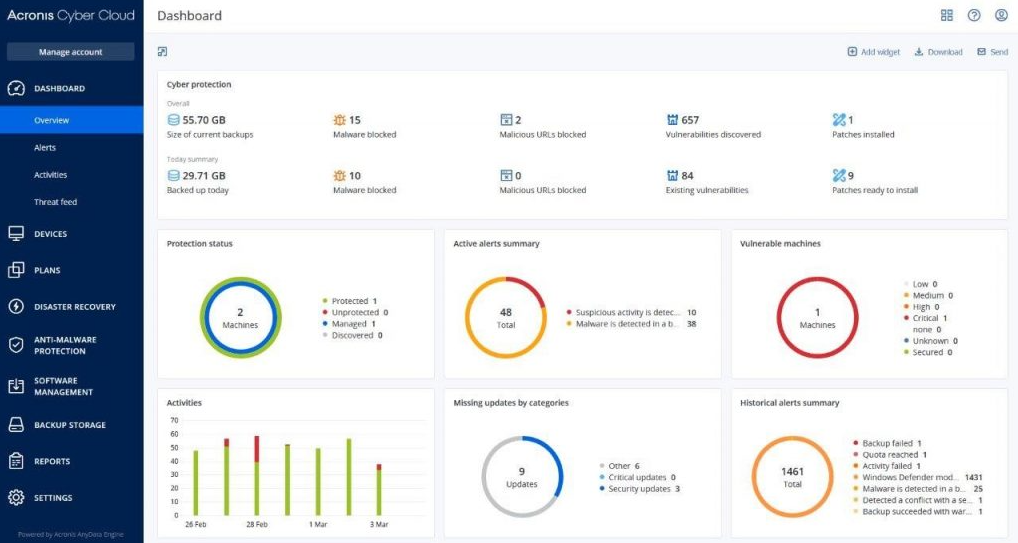
Acronis Cyber Protect integrates backup, disaster recovery, next-gen antimalware, cybersecurity, and endpoint management tools into one platform. Converging these various functions ensures that businesses are holistically covered against a range of modern cyber threats, aligning with its "best for cyber protection suite" classification.
Why I Picked Acronis Cyber Protect: While I was selecting tools for inclusion, I judged each based on their features, versatility, and ability to address present-day threats. Acronis Cyber Protect caught my attention with its integrated approach, amalgamating crucial cybersecurity aspects under one roof.
It was evident from my comparisons that Acronis is uniquely positioned as the "best for cyber protection suite" given its comprehensive protective measures.
Standout Features & Integrations:
Acronis Cyber Protect shines with its AI-driven antimalware and ransomware protection. Additionally, its real-time data protection ensures that data remains uncompromised. As for integrations, the tool ties in with popular systems like Microsoft 365, VMware, Linux, and a slew of other platforms, allowing for diverse deployment options.
Pros and Cons
Pros:
- Extensive range of system integrations
- AI-driven antimalware capabilities
- Comprehensive, integrated cyber protection solution
Cons:
- Some advanced features may be overkill for very small businesses
- Occasionally resource-intensive during scans
- Learning curve for those used to separate solutions for backup and cybersecurity


BluVault delivers a comprehensive solution designed primarily to secure endpoint data. As data breaches become increasingly sophisticated, it's crucial to have a dedicated tool that prioritizes the security of data right at its source, the endpoints.
Why I Picked BluVault: Among the myriad of backup solutions, I chose BluVault due to its laser-focused approach to endpoint data. In a landscape where endpoints often become vulnerable targets, BluVault stands out by offering stringent security measures. I am convinced that for businesses seeking specialized protection for their endpoint data, BluVault shines as the best for endpoint data security.
Standout Features & Integrations:
At its core, BluVault offers features like data encryption at rest and in transit, ensuring that data remains inaccessible to prying eyes. The tool also has a unique BYOD (Bring Your Own Device) support, allowing businesses to maintain data integrity even on employee personal devices. Integrations-wise, BluVault works harmoniously with platforms like OneDrive, Google Drive, and Dropbox, ensuring data flow and backup.
Pros and Cons
Pros:
- Comprehensive integrations with popular cloud storage platforms
- BYOD support
- Robust encryption for data at rest and in transit
Cons:
- Potential complexities in the initial setup
- Might not be suitable for businesses not focused on endpoint security
- Requires annual billing

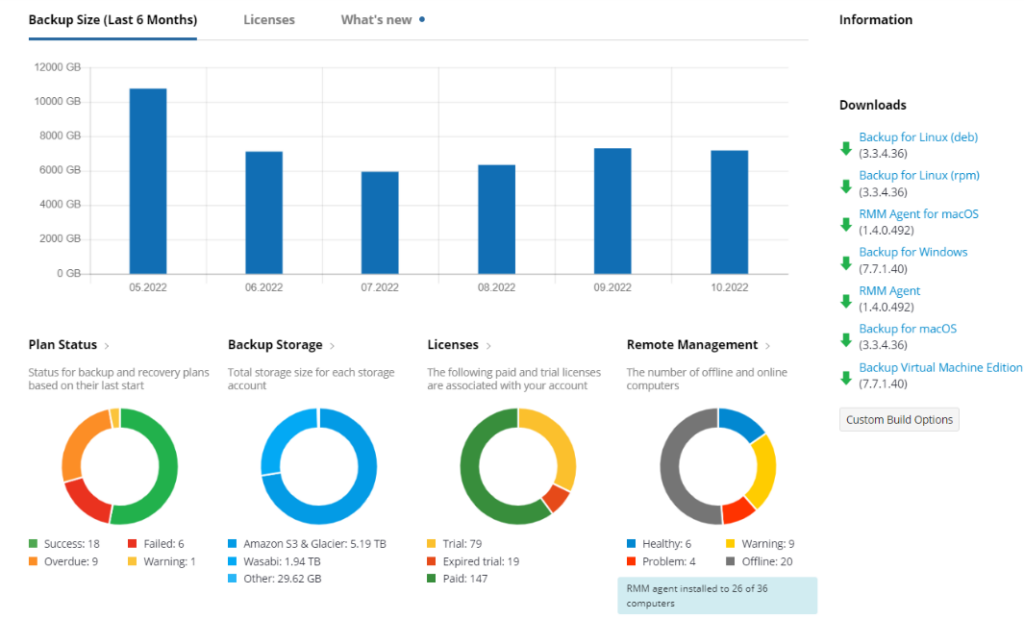
MSP360 Managed Backup provides comprehensive backup and recovery solutions tailored specifically for managed service providers. The software's core design aligns with the unique needs of MSPs, ensuring they offer top-tier backup services to their clients while maintaining operational efficiency.
Why I Picked MSP360 Managed Backup: In my quest for the most adept backup software for MSPs, MSP360 Managed Backup quickly caught my attention. Judging from its capabilities and user feedback, it’s evident that this tool has carved a niche for itself. My determination, based on comparisons and inherent features, places MSP360 Managed Backup at the forefront for managed service providers seeking an all-encompassing backup solution.
Standout Features & Integrations:
MSP360 Managed Backup's robust feature set includes block-level backup, which significantly speeds up the backup process, and a centralized management dashboard that allows for quick overview and adjustments. Integration-wise, the tool supports a wide array of storage destinations, including AWS, Google Cloud, and Microsoft Azure, catering to varied storage preferences.
Pros and Cons
Pros:
- Broad range of storage destination integrations
- Centralized management for multiple clients
- Block-level backup for faster processing
Cons:
- Lack of some advanced analytics features for reporting
- Mobile application interface could be improved
- Initial setup might be challenging for some


Clumio provides an advanced cloud-based backup solution that emphasizes the protection of enterprise-level data. With the exponential growth of data in large organizations, ensuring that it's safely and efficiently backed up is paramount.
Why I Picked Clumio: I chose Clumio after an extensive comparison of numerous backup solutions. Its strength lies in its robust architecture built explicitly for enterprise data protection. The choice was clear: For businesses seeking a scalable, cloud-native platform tailored to large-scale operations, Clumio is undoubtedly the best for enterprise-level cloud protection.
Standout Features & Integrations:
Clumio excels with features like air-gapped backups, which significantly reduce the risk of cyber threats, and its universal restore capability ensures that data can be retrieved and restored from any point. Its integration ecosystem is impressive, allowing smooth interoperability with platforms like AWS, Microsoft 365, and VMWare, making it highly adaptable in diverse IT environments.
Pros and Cons
Pros:
- Extensive integration with major platforms
- Universal restore capability
- Air-gapped backups for increased security
Cons:
- Requires a minimum purchase of 10 seats
- Steeper learning curve for beginners
- May be overkill for smaller businesses


IDrive Backup is known for its ability to offer a secure and efficient backup solution, ensuring that individual users can easily store and access their digital content. Tailored specifically for personal use, IDrive delivers a storage solution that ensures your personal files and memories are safe, making it fittingly dubbed "best for personal cloud storage."
Why I Picked IDrive Backup: When selecting a backup tool, especially for personal use, I give precedence to ease of use, storage capacity, and security. IDrive Backup was a standout because of its reputation in the cloud storage community and its tailored features for individual users.
I determined IDrive to be a top pick, especially after comparing it to similar platforms, as it emphasizes personal storage needs without compromising on features.
Standout Features & Integrations:
IDrive Backup comes with features such as real-time backup, ensuring that the latest versions of files are always saved, and end-to-end encryption for enhanced security. The platform also integrates well with most personal devices, from PCs to smartphones, and supports backup from social media accounts like Facebook and Instagram.
Pros and Cons
Pros:
- Real-time backup capabilities
- Offers encryption both at rest and during transfer for heightened security
- Intuitive interface suitable for non-tech savvy individuals
Cons:
- Limited advanced features compared to enterprise-level solutions
- Mobile app experience can vary across devices
- Restoring large datasets can be time-consuming

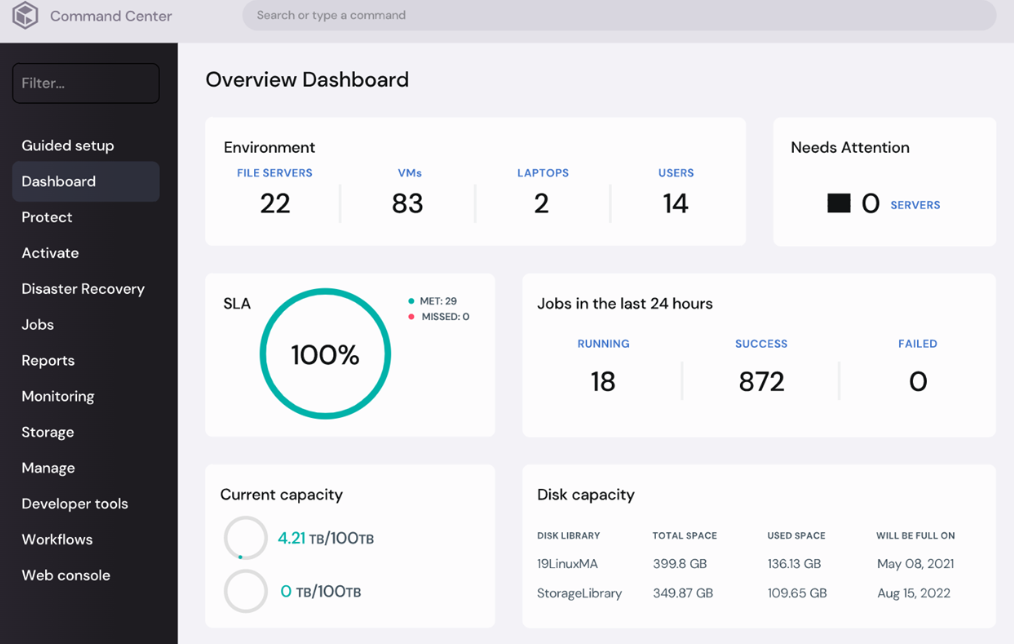
Commvault delivers a unified backup and recovery platform, facilitating data protection for enterprises and mid-sized organizations alike. Its capacity to provide a complete set of backup features and cater to various data needs is precisely why it's recognized as "best for comprehensive backup solutions."
Why I Picked Commvault: I chose Commvault for this list after a thorough analysis and comparison of various backup tools in the market. Commvault distinguishes itself with its exhaustive range of backup solutions, catering to almost every conceivable data protection need.
Given its comprehensive set of features and adaptability, it became clear why this tool is ideally suited for businesses seeking all-encompassing backup solutions.
Standout Features & Integrations:
Commvault boasts of features like data deduplication, which ensures efficient storage utilization and ransomware protection to safeguard your backups. Additionally, it offers integrations with many cloud storage providers, ensuring a backup experience, and supports a wide variety of applications, databases, and virtual environments.
Pros and Cons
Pros:
- Flexible deployment models, be it on-premises, hybrid, or entirely cloud-based
- Integration capabilities with a variety of cloud storage options
- Offers extensive data protection capabilities beyond just backup
Cons:
- Licensing structure can be confusing for some businesses
- Some users may find the user interface less intuitive than competitors
- Can be complex to set up initially


NinjaOne Backup is a tool designed to provide not just secure backups but also integrated IT monitoring solutions for businesses. It shines particularly in scenarios where organizations need their backup solutions to communicate easily with IT monitoring systems, ensuring timely alerts and data protection.
Why I Picked NinjaOne Backup: During my research, I determined that NinjaOne Backup offered an unparalleled integration between backup solutions and IT monitoring systems. Its ability to weave these two critical IT functions together is what differentiates it from other backup tools. Given the importance of timely alerts and data insights in the IT domain, I am of the opinion that NinjaOne Backup stands out as the optimal choice for those prioritizing IT monitoring integration.
Standout Features & Integrations:
NinjaOne Backup boasts features like continuous data protection, ensuring real-time backup without large backup windows. Its proactive alert system is tailored for IT monitoring, making anomaly detection more efficient. It integrates with popular IT management platforms and ticketing systems, allowing for a more cohesive IT workflow.
Pros and Cons
Pros:
- Compatibility with a wide range of IT management platforms
- Proactive alerting system tailored for timely anomaly detection.
- Integrated approach between backup and IT monitoring.
Cons:
- Potential for increased costs with add-on features or integrations
- The learning curve for users unfamiliar with integrated IT tools
- Might be overkill for organizations only looking for a backup solution


AvePoint Cloud Backup is designed with a profound emphasis on backing up data within the Microsoft 365 ecosystem. In the vast universe of cloud backup solutions, AvePoint holds a distinct position, tailoring its capabilities around the intricacies of Microsoft 365.
Why I Picked AvePoint Cloud Backup: In my journey of selecting tools, AvePoint Cloud Backup caught my attention with its unmatched synergy with Microsoft 365. The tool has carved out a niche, demonstrating its prowess in backing up Teams, SharePoint, OneDrive, and more. After a thorough comparison, I determined that businesses relying heavily on Microsoft 365 would find AvePoint to be the best for Microsoft 365 integration.
Standout Features & Integrations:
AvePoint's capabilities extend beyond just backing up; it offers granular restore options ensuring precise data recovery. Additionally, their automatic backup schedule is a boon for companies looking for hands-off management. For integrations, apart from the entire suite of Microsoft 365, AvePoint also syncs with platforms like Dynamics 365, cementing its role in the Microsoft ecosystem.
Pros and Cons
Pros:
- Automated backup schedules
- Granular restore options
- Deep integration with Microsoft 365
Cons:
- Some users might find its Microsoft focus too narrow
- Requires a minimum of 10 seats
- Limited appeal for non-Microsoft 365 users


Druva Data Resiliency Cloud is a SaaS platform that offers data protection and management across endpoints, data centers, and cloud applications. With an emphasis on safeguarding business-critical data from threats and disruptions, Druva stands out, especially when one considers the essential nature of a data resiliency framework.
Why I Picked Druva Data Resiliency Cloud: Upon reviewing multiple tools, I selected Druva Data Resiliency Cloud for its unparalleled approach to ensuring data resiliency. What sets Druva apart is its unique cloud-native architecture, which significantly reduces potential points of failure in the data protection chain.
With the evolving complexities of digital threats, Druva's emphasis on a robust data resiliency framework places it at the forefront of data protection solutions.
Standout Features & Integrations:
Druva offers features like global deduplication, which reduces storage costs, and automated backup, ensuring data safety without manual intervention. It also integrates effortlessly with major cloud providers like AWS and Microsoft Azure, as well as enterprise applications such as Office 365, enabling streamlined backup and recovery processes.
Pros and Cons
Pros:
- Automated policies allow for easier regulatory compliance
- Simplified and centralized management interface.
- Cloud-native architecture provides an added layer of resiliency.
Cons:
- Data retrieval times can vary depending on the size and type of data
- Some users may want more granular control over certain features
- Initial setup might require technical expertise


Unitrends is recognized for providing a comprehensive backup and continuity solution, facilitating both local and cloud-based recoveries. Its prowess in hybrid cloud recovery ensures that businesses can safeguard their critical data irrespective of where it resides, making it an apt choice for its "best for hybrid cloud recovery" distinction.
Why I Picked Unitrends: In determining which tools to spotlight, I had to judge and compare them based on their resilience, efficiency, and adaptability to modern backup needs. Unitrends stood out with its unique capability to combine on-premises and cloud recoveries easily.
After having opinions from various sources and weighing their pros and cons, I chose Unitrends because its emphasis on hybrid cloud recovery aligns perfectly with businesses seeking versatile recovery options.
Standout Features & Integrations:
Unitrends boasts features like instant recovery, ransomware detection, and automated testing to validate backups. Furthermore, its integrations are noteworthy; it ties in well with platforms such as VMware, Hyper-V, Windows, and a variety of Linux distributions, facilitating diverse recovery scenarios.
Pros and Cons
Pros:
- Versatile integration with popular operating systems and virtual environments
- In-built ransomware detection to safeguard backups
- Robust hybrid cloud recovery capabilities
Cons:
- Larger deployments might experience incremental costs
- Initial setup requires some technical know-how
- The interface may seem cluttered to new users
Weitere Online-Backup-Software
Hier sind einige zusätzliche Online-Backup-Softwareoptionen, die es nicht auf meine Shortlist geschafft haben, aber dennoch einen Blick wert sind:
- Carbonite
Good for cloud-to-cloud data protection
- Teradata Vantage
Good for advanced analytics at scale
- Cohesity Helios
Good for unifying global data management
- Cove Data Protection
Good for managed service providers
- Redstor
Good for instant data recovery
- Barracuda Backup
Good for integrated threat protection
- Zoolz
Good for affordable long-term storage
- SpiderOak
Good for privacy-conscious backups
- Duplicati
Good for free encrypted backups
- ElephantDrive
Good for multi-device synchronization


Kriterien für die Auswahl von Online-Backup-Software
Bei der Auswahl der besten Online-Backup-Software für diese Liste habe ich häufige Anforderungen und Schmerzpunkte der Anwender wie Datensicherheit und einfache Bedienung berücksichtigt. Zudem habe ich das folgende Bewertungsraster genutzt, um objektiv und strukturiert zu vergleichen:
Kernfunktionen (25 % der Gesamtbewertung)
Um in diese Liste aufgenommen zu werden, musste jede Lösung die folgenden Anwendungsfälle erfüllen:
- Automatisches Sichern von Daten
- Einfache Wiederherstellung von Dateien
- Datenverschlüsselung für Sicherheit
- Planung regelmäßiger Backups
- Unterstützung mehrerer Geräte
Weitere besondere Funktionen (25 % der Gesamtbewertung)
Zur weiteren Differenzierung habe ich auf folgende Funktionen geachtet:
- Dateiversionierung
- Mobiler Zugriff
- Unterstützung von Hybrid-Cloud-Backups
- Integration mit Drittanbieter-Apps
- Unbegrenzte Dateigrößen erlauben
Benutzerfreundlichkeit (10 % der Gesamtbewertung)
Um die Benutzerfreundlichkeit einzuschätzen, habe ich folgende Aspekte betrachtet:
- Navigation durch die Benutzeroberfläche
- Anpassung der Sicherungseinstellungen
- Zugriff auf Hilferessourcen
- Schnelle Ausführung von Aufgaben
- Übersichtlichkeit des Layouts
Einführung (10 % der Gesamtbewertung)
Zur Bewertung des Onboarding-Prozesses jeder Plattform habe ich folgende Punkte überprüft:
- Bereitstellung von Schulungsvideos
- Anbieten interaktiver Produkttouren
- Bereitstellung von Vorlagen für die Einrichtung
- Durchführung von Webinaren zur Anleitung
- Einsatz von Chatbots für den Support
Kundensupport (10% der Gesamtbewertung)
Um die Kundensupport-Dienste jedes Softwareanbieters zu bewerten, habe ich Folgendes berücksichtigt:
- Anbieten eines 24/7-Supports
- Bereitstellung von Live-Chat-Optionen
- Schnelle Reaktion auf Anfragen
- Pflege eines umfassenden FAQ-Bereichs
- Unterstützung mehrerer Kommunikationskanäle
Preis-Leistungs-Verhältnis (10% der Gesamtbewertung)
Um das Preis-Leistungs-Verhältnis jeder Plattform zu bewerten, habe ich Folgendes berücksichtigt:
- Vergleich der Preispläne
- Bewertung des Funktionsumfangs
- Berücksichtigung von Speicherlimits
- Beurteilung von verfügbaren kostenlosen Testversionen
- Analyse von Kundenrabatten
Kundenbewertungen (10% der Gesamtbewertung)
Um ein Gefühl für die allgemeine Kundenzufriedenheit zu bekommen, habe ich bei der Lektüre von Kundenbewertungen Folgendes beachtet:
- Hervorhebung der Benutzerfreundlichkeit
- Beachtung von Zuverlässigkeits-Feedback
- Bewertung der Kundensupport-Erfahrungen
- Beurteilung der allgemeinen Zufriedenheit
- Analyse der Wirksamkeit der Funktionen
Wie wählt man Online-Backup-Software aus?
Es ist leicht, sich in langen Funktionslisten und komplexen Preisstrukturen zu verlieren. Damit Sie sich während Ihres individuellen Auswahlprozesses für Software besser fokussieren können, finden Sie hier eine Checkliste mit Faktoren, die Sie im Hinterkopf behalten sollten:
| Faktor | Worauf ist zu achten? |
|---|---|
| Skalierbarkeit | Kann die Software mit Ihren Anforderungen wachsen? Berücksichtigen Sie das zukünftige Datenwachstum und stellen Sie sicher, dass das Tool erhöhten Speicherbedarf ohne deutliche Kostensteigerungen bewältigen kann. |
| Integrationen | Funktioniert sie mit Ihren bestehenden Tools? Prüfen Sie, ob Integrationen mit Ihren aktuellen Systemen und Apps unterstützt werden, um Unterbrechungen der Arbeitsabläufe zu vermeiden. |
| Anpassbarkeit | Lässt sie sich auf Ihre Bedürfnisse zuschneiden? Suchen Sie nach Optionen, um Einstellungen entsprechend Ihren Backup-Zeitplänen und Datenprioritäten anzupassen. |
| Benutzerfreundlichkeit | Ist sie einfach zu bedienen? Bewerten Sie die Benutzeroberfläche, damit Ihr Team diese effektiv und ohne umfangreiche Schulungen nutzen kann. |
| Implementierung und Onboarding | Wie schnell können Sie starten? Berücksichtigen Sie die Einrichtungszeit und nötige Ressourcen. Suchen Sie nach Tools mit geführtem Onboarding oder Kundensupport für einen reibungslosen Einstieg. |
| Kosten | Passt sie in Ihr Budget? Vergleichen Sie die Preispläne sorgfältig; denken Sie dabei an versteckte Kosten wie zusätzliche Speichergebühren oder Premium-Support. |
| Sicherheitsmaßnahmen | Sind Ihre Daten geschützt? Überprüfen Sie Verschlüsselungsstandards und die Sicherheitsmaßnahmen der Rechenzentren, damit Ihre Daten vor Angriffen sicher bleiben. |
| Support-Verfügbarkeit | Gibt es Hilfe, wenn Sie sie brauchen? Achten Sie auf 24/7-Support und schnelle Reaktionszeiten, damit Sie bei Problemen Unterstützung erhalten. |
Was ist Online-Backup-Software?
Online-Backup-Software ist ein Tool, das automatisch Kopien Ihrer Daten in der Cloud speichert, um Sie vor Datenverlust zu schützen. IT-Fachkräfte, Geschäftsinhaber und Privatpersonen nutzen solche Tools, um Datensicherheit und Zugänglichkeit zu gewährleisten. Automatische Backups, Verschlüsselung und einfache Wiederherstellungsfunktionen tragen zur Datensicherheit und schnellen Wiederherstellung bei. Diese Art von SaaS-Backup-Software bietet Sicherheit, da Ihre wichtigen Informationen sicher und jederzeit abrufbar bleiben.
Funktionen
Wenn Sie Online-Backup-Software auswählen, achten Sie auf die folgenden wichtigen Funktionen:
- Automatische Backups: Speichert Daten regelmäßig ohne manuelles Eingreifen und stellt sicher, dass Ihre Dateien stets auf dem neuesten Stand sind.
- Datenverschlüsselung: Schützt Ihre Daten während der Übertragung und Speicherung vor unbefugtem Zugriff.
- Dateiversionierung: Ermöglicht den Zugriff auf vorherige Dateiversionen und bietet Flexibilität bei Bearbeitungen und Wiederherstellungen.
- Unterstützung mehrerer Geräte: Ermöglicht Backups von verschiedenen Geräten, sodass alle Ihre Daten abgedeckt sind.
- Skalierbarkeit: Passt sich wachsenden Speicheranforderungen an und ist somit ideal für wachsende Unternehmen.
- Integrationsfähigkeit: Arbeitet nahtlos mit bestehender Software und bestehenden Systemen zusammen, um die Kontinuität des Workflows sicherzustellen.
- Benutzerfreundliche Oberfläche: Vereinfacht die Navigation und Bedienung, wodurch die Einarbeitungszeit für neue Nutzer verringert wird.
- 24/7 Kundensupport: Bietet jederzeit Unterstützung und sorgt für eine schnelle Problemlösung.
- Hybride Backup-Optionen: Bietet sowohl Cloud- als auch lokale Backups für zusätzliche Sicherheit und Flexibilität.
- Anpassbare Einstellungen: Erlauben es, Backup-Zeitpläne und Prioritäten individuell an spezifische Anforderungen anzupassen.
Vorteile
Die Implementierung einer Online-Backup-Software bringt zahlreiche Vorteile für Ihr Team und Ihr Unternehmen. Die regelmäßige Wartung mit Festplattenbereinigungssoftware kann Ihre Backup-Strategie ergänzen und für eine optimale Speichernutzung sorgen. Hier sind einige Vorteile, auf die Sie sich freuen können:
- Datenschutz: Automatische Backups und Verschlüsselung schützen Ihre Informationen vor Verlust und unbefugtem Zugriff.
- Einfache Wiederherstellung: Funktionen wie Dateiversionierung und Wiederherstellung erleichtern das Auffinden und Wiederherstellen verlorener oder bearbeiteter Dateien.
- Erhöhte Zugänglichkeit: Die Unterstützung mehrerer Geräte stellt sicher, dass Sie auf Ihre Daten jederzeit und von überall zugreifen können.
- Kosteneffizienz: Skalierbarkeit ermöglicht es, nur für den tatsächlich benötigten Speicher zu zahlen und Wachstum ohne unnötige Ausgaben zu unterstützen.
- Produktivitätssteigerung: Eine benutzerfreundliche Oberfläche und Integrationsfähigkeit sparen Zeit und gewährleisten effiziente Arbeitsabläufe.
- Beruhigendes Gefühl: Zuverlässiger Kundensupport und hybride Backup-Optionen bieten die Sicherheit, dass Ihre Daten geschützt und wiederherstellbar sind.
Kosten & Preise
Bei der Auswahl einer Online-Backup-Software sollten Sie die verschiedenen verfügbaren Preisstrukturen und -modelle kennen. Die Kosten variieren je nach Funktionsumfang, Teamgröße, Zusatzoptionen und mehr. Die folgende Tabelle fasst gängige Tarife, deren durchschnittliche Preise und typische enthaltene Funktionen von Online-Backup-Software-Lösungen zusammen:
Vergleichstabelle für Online-Backup-Software
| Tarifart | Durchschnittlicher Preis | Typische Funktionen |
|---|---|---|
| Kostenloser Tarif | $0 | Begrenzter Speicherplatz, grundlegende Backup-Funktionen und Basissicherheit. |
| Persönlicher Tarif | $5-$15/Monat | Mittelgroßer Speicherplatz, automatische Backups, Dateiversionierung und Basissupport. |
| Geschäftstarif | $20-$50/user/Monat | Erweiterter Speicherplatz, erweiterte Sicherheit, Unterstützung mehrerer Geräte, Integrationen und Prioritätssupport. |
| Unternehmens-Tarif | $60-$100/user/Monat | Unbegrenzter Speicherplatz, individuelle Lösungen, erweiterte Sicherheit, dediziertes Account-Management und 24/7-Support. |
Häufig gestellte Fragen zur Online-Backup-Software
Hier finden Sie Antworten auf häufig gestellte Fragen zur Online-Backup-Software:
Wie geht Online-Backup-Software mit großen Dateien um?
Online-Backup-Software komprimiert große Dateien in der Regel, um deren Größe vor dem Hochladen in die Cloud zu reduzieren. Dies spart Bandbreite und Speicherplatz. Überprüfen Sie, ob die Software Dateigrößenbeschränkungen hat, und stellen Sie sicher, dass Ihre Internetverbindung die Upload-Geschwindigkeit für große Dateien bewältigen kann.
Kann man Backups zu bestimmten Zeiten planen?
Ja, die meisten Online-Backup-Programme ermöglichen es Ihnen, Backups zu für Sie passenden Zeiten zu planen. Sie können tägliche, wöchentliche oder monatliche Zeitpläne wählen. Diese Flexibilität sorgt dafür, dass Ihre Daten gesichert werden, ohne Ihre Arbeit zu unterbrechen – für eine praktische “Set-and-Forget”-Lösung.
Was passiert, wenn das Speichervolumen überschritten wird?
Wenn Sie Ihr Speichervolumen überschreiten, kann die Software entweder keine neuen Daten mehr sichern oder zusätzliche Gebühren verlangen. Es ist wichtig, die Nutzung zu überwachen und über ein Upgrade nachzudenken, wenn Sie das Limit regelmäßig erreichen. Einige Anbieter verschicken Benachrichtigungen, wenn Sie sich der Kapazitätsgrenze nähern.
Wie stellt man Dateien aus einem Online-Backup wieder her?
Die Wiederherstellung von Dateien ist meistens unkompliziert. Die meisten Programme bieten eine benutzerfreundliche Oberfläche, über die Sie die gewünschten Dateien oder Ordner zur Wiederherstellung auswählen können. Oft können Sie entscheiden, ob Sie an den ursprünglichen oder einen neuen Speicherort wiederherstellen möchten; manche Tools ermöglichen auch die Wiederherstellung einzelner Dateiversionen.
Wie geht es weiter:
Wenn Sie gerade auf der Suche nach einer Online-Backup-Software sind, lassen Sie sich kostenfrei von einem SoftwareSelect-Berater Empfehlungen geben.
Sie füllen ein Formular aus und führen ein kurzes Gespräch, in dem Ihre individuellen Anforderungen besprochen werden. Anschließend erhalten Sie eine Auswahlliste mit passenden Softwarelösungen. Die Berater begleiten Sie sogar durch den gesamten Kaufprozess – inklusive Preisverhandlung.