

CMDB-Software (Datenbank für das Konfigurationsmanagement) erfasst Konfigurationselemente (CIs), ihre Attribute und Beziehungen in Ihrer IT-Umgebung. Die besten CMDB-Tools automatisieren die Erkennung, Abhängigkeitszuordnung, Änderungsverfolgung und ITSM-Integration, um Konfigurationsblindstellen und Ausfallzeiten zu vermeiden.
In diesem Leitfaden vergleiche ich die beste CMDB-Software für hybride Infrastrukturen, Cloud-Umgebungen, Compliance-Anforderungen und andere komplexe IT-Anwendungsfälle.
Warum Sie unseren Software-Empfehlungen vertrauen können
6,700+
Reviews
20
Industry experts
16+
Evaluation factors
14
Years
Unser Team testet und bewertet Software seit 2012. Als Tech-Führungskräfte wissen wir selbst, wie schwierig – und wichtig – es ist, die richtige Software auszuwählen.
Für diesen Leitfaden haben wir Tools mithilfe von praktischen Tests und unabhängiger Recherche bewertet und dabei unsere Bewertungskriterien angewendet.
Unsere Bewertungen spiegeln unser menschliches redaktionelles Urteilsvermögen wider, keine Verkaufsstrategie.
Expertenprüfer:
- Paulo Gardini MiguelTech-Direktor
 Tim FisherVP für KI
 Gabriel RosasTech Lead & Software-Architekt
 Christhian GruhnTech Lead & Plattform-Architekt

Vergleichstabelle für CMDB-Software
Diese Vergleichstabelle fasst die Preisdetails meiner besten CMDB-Softwareauswahlen zusammen:
| Tool | Best For | Trial Info | Price | ||
|---|---|---|---|---|---|
| 1 | Am besten für CMDB mit nativen ITSM-Workflows geeignet | Kostenlose Demo verfügbar | Preis auf Anfrage | Website | |
| 2 | Am besten geeignet für CMDB-gesteuerte Änderungskontrolle | Kostenlose Demo verfügbar | Preis auf Anfrage | Website | |
| 3 | Am besten für anpassbare quelloffene CMDBs geeignet | Kostenloser Tarif verfügbar | Preis auf Anfrage | Website | |
| 4 | Am besten für die visuelle Zuordnung von Änderungsauswirkungen geeignet | Kostenlose Testversion verfügbar | Ab $10,000/Jahr (jährlich abgerechnet) | Website | |
| 5 | Am besten für die Multi-Cloud-Ressourcenerkennung geeignet | 30-tägige kostenlose Testversion | Ab $67/Monat | Website | |
| 6 | Am besten für die Zuordnung von Anwendungsabhängigkeiten geeignet | Kostenlose Testversion verfügbar | Preis auf Anfrage | Website | |
| 7 | Am besten für Vorschläge zur automatischen CMDB-Zuordnung geeignet | 30-tägige kostenlose Testversion | Ab $1,499/Jahr (jährlich abgerechnet) | Website | |
| 8 | Am besten geeignet für die Erkennung in groß angelegten hybriden IT-Umgebungen | Kostenlose Demo verfügbar | Preis auf Anfrage | Website | |
| 9 | Am besten für CMDB mit Dienstzuordnung geeignet | Kostenlose Demo verfügbar | Preis auf Anfrage | Website | |
| 10 | Am besten für föderierte Konfigurationsdaten | Kostenlose Demo verfügbar | Preis auf Anfrage | Website |





Bewertungen von CMDB-Software
\u003cspan data-slate-fragment=\u0022JTVCJTdCJTIyY2hpbGRyZW4lMjIlM0ElNUIlN0IlMjJ0ZXh0JTIyJTNBJTIyQmVsb3clMjBhcmUlMjBteSUyMGRldGFpbGVkJTIwc3VtbWFyaWVzJTIwb2YlMjB0aGUlMjBiZXN0JTIwQ01EQiUyMHNvZnR3YXJlJTIwdGhhdCUyMG1hZGUlMjBpdCUyMG9udG8lMjBteSUyMHNob3J0bGlzdC4lMjBNeSUyMHJldmlld3MlMjBvZmZlciUyMGElMjBkZXRhaWxlZCUyMGxvb2slMjBhdCUyMHRoZSUyMGZlYXR1cmVzJTJDJTIwY2FwYWJpbGl0aWVzJTJDJTIwYW5kJTIwaW50ZWdyYXRpb25zJTIwb2YlMjBlYWNoJTIwcGxhdGZvcm0lMjB0byUyMGhlbHAlMjB5b3UlMjBmaW5kJTIwdGhlJTIwYmVzdCUyMG9uZSUyMGZvciUyMHlvdS4lMjIlN0QlNUQlMkMlMjJ0eXBlJTIyJTNBJTIycCUyMiUyQyUyMmlkJTIyJTNBJTIyRFp3NlBoa2VsXyUyMiU3RCU1RA==\u0022\u003eNachfolgend finden Sie meine ausführlichen Zusammenfassungen der besten CMDB-Software, die es auf meine Auswahlliste geschafft hat. Meine Bewertungen bieten einen detaillierten Einblick in die Funktionen, Möglichkeiten und Integrationen jeder Plattform, damit Sie die für Sie beste Lösung finden.\u003c/span\u003e
 Am besten für CMDB mit nativen ITSM-Workflows geeignet
- Kostenlose Demo verfügbar
- Preis auf Anfrage
Visit WebsiteCustomer Rating:4.4/5
Der CMDB-Arbeitsbereich von ServiceNow zentralisiert den Zustand von IT-Assets und die Aufgabenverwaltung. ServiceNow CMDB ist eine unternehmenstaugliche Konfigurationsmanagement-Datenbank, die auf der Now Platform basiert und die Erkennung von Konfigurationselementen, die Zuordnung von Abhängigkeiten, die Datenabstimmung über IRE sowie native Integrationen mit der vollständigen ServiceNow-ITSM-Suite bietet.
Für wen ist ServiceNow am besten geeignet?
ServiceNow CMDB eignet sich besonders für große Unternehmen, die bereits ServiceNow ITSM einsetzen oder dies planen und ihre Konfigurationsdaten und Service-Workflows auf einer einzigen, einheitlichen Plattform verwalten möchten.
Warum ich ServiceNow ausgewählt habe
ServiceNow CMDB hat sich einen Platz auf meiner Auswahlliste verdient, weil die CMDB nicht an die ITSM-Schicht angebunden ist – sie ist die ITSM-Schicht. Ich schätze, dass beim Öffnen eines Incidents die relevanten Daten des Konfigurationselements automatisch angezeigt werden – ohne API-Aufrufe oder Synchronisierungsverzögerungen. Service Mapping verfolgt, wie eine Geschäftsanwendung mit der zugrunde liegenden Infrastruktur verbunden ist. Wenn sich ein Konfigurationselement ändert, können Sie daher die Auswirkungen vor der Genehmigung der Änderung direkt im Change-Management-Workflow erkennen.
Wichtige Funktionen von ServiceNow
- CMDB-Zustands-Dashboard: Verfolgt die Datenqualität anhand der Dimensionen Vollständigkeit, Korrektheit und Compliance, um Lücken in Ihren Datensätzen zu Konfigurationselementen aufzudecken.
- Identifikations- und Abstimmungs-Engine (IRE): Wendet prioritätsbasierte Regeln zur Quellenbewertung und Duplikaterkennung an, um aus mehreren gleichzeitig eingehenden Datenfeeds erfasste Daten zu Konfigurationselementen zu normalisieren.
- Service-Graph-Konnektoren: Vorgefertigte, zertifizierte Integrationen für AWS, Azure, GCP, Kubernetes, Dynatrace und Datadog übertragen Daten zu Konfigurationselementen kontinuierlich direkt in die CMDB.
- AIOps-Ereigniskorrelation: ML-basierte Alarmgruppierung und Anomalieerkennung machen konfigurationsbezogene Incidents sichtbar, bevor sie zu Serviceunterbrechungen eskalieren.
ServiceNow-Integrationen
ServiceNow CMDB bietet mehr als 40 zertifizierte Service-Graph-Konnektoren, darunter AWS, Microsoft Azure, Google Cloud Platform, Kubernetes, Dynatrace, Datadog, SCCM und VMware, sowie native Integrationen innerhalb der ServiceNow-ITSM-Suite (Incident, Problem, Change, Request). Für benutzerdefinierte und von Partnern entwickelte Integrationen stehen eine REST-API und der ServiceNow-Store-Marktplatz zur Verfügung.
Pros and Cons
Pros:
- Native ITSM-Workflows zeigen Daten zu Konfigurationselementen sofort an
- Service-Graph-Konnektoren decken alle wichtigen Cloud-Plattformen ab
- Die Identification Engine verhindert doppelte Konfigurationselemente
Cons:
- Die individuelle Preisgestaltung erfordert Verhandlungen mit dem Vertrieb
- Für die laufende Datenqualität werden dedizierte Administratoren benötigt
 2Am besten geeignet für CMDB-gesteuerte Änderungskontrolle
USU
- Kostenlose Demo verfügbar
- Preis auf Anfrage

USU erfasst Softwareerkennung, Betriebssystemnutzung und Lizenzbedarf in einem einzigen Dashboard. USU ist eine ITSM-Plattform mit einer nativ eingebetteten CMDB, die die Nachverfolgung von Konfigurationselementen, die automatisierte Erkennung, die Abhängigkeitszuordnung und das Änderungsmanagement in einer einzigen, nach ITIL 4 zertifizierten Suite vereint.
Für wen ist USU am besten geeignet?
USU eignet sich besonders für IT-Teams in Unternehmen, die CMDB und ITAM innerhalb einer einzigen, nach ITIL 4 zertifizierten Plattform verwalten müssen.
Warum ich USU ausgewählt habe
USU hat sich einen Platz auf meiner Auswahlliste verdient, weil die CMDB direkt in eine vollständige, nach ITIL 4 zertifizierte ITSM-Suite integriert ist und nicht nachträglich als Zusatzlösung angebunden wurde. Besonders nützlich für die Änderungskontrolle sind die KI-gestützte Berechnung des Änderungsrisikos und die Erkennung von Konflikten, die widersprüchliche Änderungen markieren, bevor sie Vorfälle verursachen. Außerdem gefällt mir die Funktion zur Änderungsvalidierung, die CMDB-Datensätze automatisch mit den Daten aus Live-Bestands-Scans vergleicht und bei auftretenden Abweichungen Korrektur-Workflows auslöst.
Die wichtigsten Funktionen von USU
- Föderierte Datenintegration: CI-Daten aus externen Quellen in die CMDB übernehmen, ohne Datensätze in Ihrer Umgebung zu duplizieren.
- Nach ITIL 4 zertifizierte Änderungs-Workflows: Standard-, normale und Notfalländerungsprozesse ausführen, die nativ mit CMDB-Datensätzen verknüpft und über 19 ITIL-4-Praktiken hinweg vollständig zertifiziert sind.
- Auditkonforme Protokollierung von CI-Änderungen: Ein vollständiges, den gesamten Lebenszyklus umfassendes Protokoll jeder an jedem CI vorgenommenen Änderung führen, um die Anforderungen von DORA, NIS-2 und ISO 27001 zu erfüllen.
- Zusammenführung von ITAM und CMDB: Hardware- und Software-Asset-Daten aus dem ITAM-Modul füllen CI-Datensätze in der CMDB automatisch aus und reichern sie an.
USU-Integrationen
USU bietet mehr als 50 integrierte Konnektoren für CMDB- und Asset-Daten, darunter ServiceNow, Microsoft SCCM, IBM ILMT, AWS, Azure, Google Cloud, Active Directory, Microsoft Exchange, Okta und Oracle sowie mehr als 400 SaaS-App-Integrationen innerhalb seines SaaS-Management-Moduls. Für individuelle Integrationen stehen offene APIs zur Verfügung.
Pros and Cons
Pros:
- Nativ in eine vollständige ITSM-Suite eingebettet
- ITIL-4-Zertifizierung für 19 Praktiken
- KI-gestützte Erkennung von Änderungsrisiken und Konflikten
Cons:
- Die Konfiguration ist komplex und ressourcenintensiv
- Die Anpassungsmöglichkeiten für Berichte sind begrenzt und unflexibel
Learn more about USU: 3Am besten für anpassbare quelloffene CMDBs geeignet
iTop
- Kostenloser Tarif verfügbar
- Preis auf Anfrage
Visit WebsiteCustomer Rating:4.3/5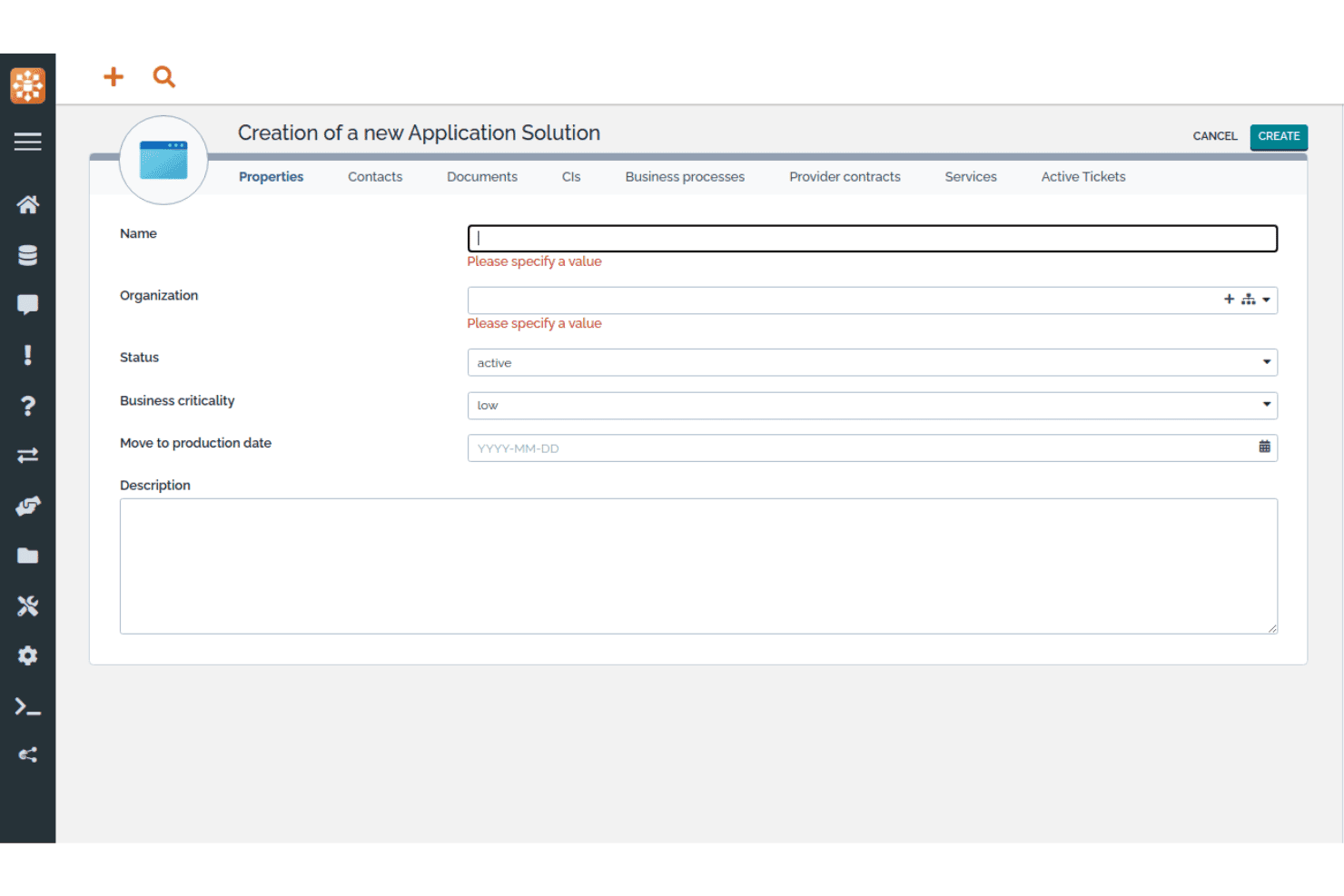
Mit iTop können Benutzer neue Anwendungslösungen mit wichtigen Eigenschaften registrieren. iTop ist eine quelloffene CMDB- und ITSM-Plattform, die ein anpassbares CI-Repository, Abhängigkeitszuordnung, Auswirkungsanalyse und native IT-Service-Management-Prozesse in einer einzigen selbst gehosteten oder SaaS-Bereitstellung kombiniert.
Für wen eignet sich iTop am besten?
iTop eignet sich besonders für IT-Teams, die eine vollständig anpassbare quelloffene CMDB nutzen möchten, ohne Lizenzgebühren pro Benutzer oder CI zu zahlen.
Warum ich iTop ausgewählt habe
iTop steht auf meiner Auswahlliste, weil sich mit dem iTop Designer völlig neue CI-Klassen, benutzerdefinierte Attribute und Beziehungstypen erstellen lassen, ohne direkt Code schreiben zu müssen – eine Seltenheit bei quelloffenen CMDB-Tools. Außerdem gefällt mir, dass die Auswirkungsanalyse direkt in die Kernplattform integriert ist: Verknüpft man ein CI mit einem Vorfall, zeigt iTop sofort alle abhängigen Services oder Verträge an, die davon betroffen sind. Die Community-Edition bietet all dies ohne Begrenzung der Anzahl von CIs und ohne Lizenzgebühren.
Wichtige Funktionen von iTop
- Datenabgleich-Engine: CI-Daten gleichzeitig aus mehreren externen Quellen abrufen, mit konfigurierbaren Abgleichregeln je Quelle und je CI-Klasse.
- Unterstützung mehrerer Organisationen: CIs, Teams, Kontakte und Servicebeziehungen für getrennte Organisationseinheiten innerhalb einer einzigen iTop-Instanz verwalten.
- REST/JSON-API: Vollständige CRUD-Operationen für alle Objekte ausführen, einschließlich benutzerdefinierter CI-Klassen, um iTop mit externen Tools und Automatisierungs-Workflows zu verbinden.
- Rollenbasierte Zugriffskontrolle: Über den Designer detaillierte Benutzerprofile definieren, mit integrierter Unterstützung für SSO (SAML, OAuth, OpenID Connect) und MFA (TOTP, Hardware-Schlüssel).
iTop-Integrationen
iTop bietet native Integrationen mit Microsoft Azure, VMware vSphere, Microsoft Intune, Proxmox, OCS Inventory NG, Ansible, LDAP/Active Directory, Slack und Microsoft Teams (über Webhooks) sowie TeemIP für die IP-Adressverwaltung. Für benutzerdefinierte Integrationen steht eine REST/JSON-API zur Verfügung, und Case Exchange unterstützt in höheren Tarifen die Synchronisierung von Tickets mit ITSM-Tools von Drittanbietern.
Pros and Cons
Pros:
- Unbegrenzte Anzahl von CIs in der kostenlosen Community-Edition
- Native ITSM- und CMDB-Integration in der gesamten Plattform
- Oberfläche mit wenig Programmieraufwand für benutzerdefinierte CI-Klassen
Cons:
- Keine native Unterstützung für die Erkennung von AWS- oder GCP-Ressourcen
- Die Benutzeroberfläche wirkt im Vergleich zu Wettbewerbern veraltet
Learn more about iTop: Am besten für die visuelle Zuordnung von Änderungsauswirkungen geeignet
- Kostenlose Testversion verfügbar
- Ab $10,000/Jahr (jährlich abgerechnet)

Virima bietet eine einheitliche Übersichtsansicht für die IT-Infrastruktur. Virima ist eine CMDB- und IT-Ressourcenverwaltungsplattform, die eine automatisierte Erkennung mit mehreren Methoden, Abhängigkeitszuordnung und bidirektionale ITSM-Integrationen in einer einzigen, umfassenden Lösung kombiniert.
Für wen ist Virima am besten geeignet?
Virima eignet sich hervorragend für mittelständische IT-Teams, die eine vollständige CMDB mit visueller Abhängigkeitszuordnung benötigen, ohne für jedes Modul separat bezahlen zu müssen.
Warum ich Virima ausgewählt habe
Ich habe Virima als eine der besten Lösungen ausgewählt, weil die ViVID™-Engine etwas leistet, was die meisten CMDBs nicht können: Sie rendert live interaktive Abhängigkeitskarten von Services mit einer Analyse des Auswirkungsradius, bevor eine Änderung genehmigt wird. Dadurch können Ihre CAB-Prüfer genau sehen, welche CIs gefährdet sind. Aktive Vorfälle, offene Änderungsanfragen und CVE-Kennzeichnungen werden direkt auf derselben Karte eingeblendet. Außerdem gefällt mir, dass die CMDB-Zustandsbewertung die Datenqualität pro CI anhand von Vollständigkeit, Aktualität und Konsistenz erfasst und Änderungen bei Datensätzen mit geringer Vertrauenswürdigkeit blockieren kann.
Die wichtigsten Funktionen von Virima
- Automatisierte Erkennung mit mehreren Methoden: Führt gleichzeitig agentenbasierte, agentenlose Erkennung (140+ Prüfungen) sowie API-basierte Erkennung in lokalen Umgebungen sowie in AWS-, Azure-, VMware-, Hyper-V- und Kubernetes-Umgebungen durch.
- CMDB-Zustandsbewertung: Erfasst die Datenqualität pro CI anhand der Dimensionen Vollständigkeit, Aktualität und Konsistenz und kann erneute Scans auslösen oder Änderungen bei Datensätzen mit geringer Vertrauenswürdigkeit blockieren.
- Bidirektionale ITSM-Integrationen: Synchronisiert CI-Daten nativ mit ServiceNow, Jira Service Management, Ivanti, HaloITSM, Xurrent, Hornbill und TeamDynamix – in jedem Tarif ohne zusätzliche Kosten enthalten.
- Messung der Softwarenutzung: Überwacht die tatsächliche Anwendungsnutzung über den Windows-Erkennungsagenten, um nicht verwendete Lizenzen zu identifizieren und Entscheidungen zur Rückgewinnung zu unterstützen.
Virima-Integrationen
Virima bietet bidirektionale native Integrationen mit ServiceNow, Jira Service Management, Ivanti, HaloITSM, Xurrent, Hornbill und TeamDynamix für ITSM-Workflows sowie API-basierte Konnektoren für AWS, Azure, VMware, Hyper-V, Kubernetes, LogicMonitor, SolarWinds, Okta, Microsoft SCCM und die Nationale Schwachstellendatenbank des NIST. Eine vollständige REST-API ist in jedem Tarif für benutzerdefinierte Integrationen enthalten.
Pros and Cons
Pros:
- Visuelle Zuordnung von Änderungsauswirkungen mit Live-Daten
- Automatisierte IT-Ressourcenerkennung mit mehreren Methoden
- CMDB-Zustandsbewertung blockiert riskante Änderungen
Cons:
- Kein Konnektor zur Erkennung von Google Cloud verfügbar
- Der Formulareditor verfügt nicht über eine Ziehen-und-Ablegen-Oberfläche
Learn more about Virima: Am besten für die Multi-Cloud-Ressourcenerkennung geeignet
- 30-tägige kostenlose Testversion
- Ab $67/Monat

CloudAware ermöglicht es Benutzern, alle IT-Ressourcen in einer einzigen Inventaransicht zu filtern und zu verwalten. CloudAware ist eine Salesforce-native CMDB-Plattform, die agentenlose Multi-Cloud-Ressourcenerkennung, Abhängigkeitszuordnung, IT-Ressourcenverwaltung, Compliance als Code sowie integriertes FinOps- und Sicherheitsstatusmanagement in Cloud- und hybriden Umgebungen kombiniert.
Für wen eignet sich CloudAware am besten?
CloudAware eignet sich besonders für Enterprise-IT- und Cloud-Betriebsteams, die Ressourcen über zwei oder mehr Cloud-Anbieter hinweg verwalten und eine einheitliche Übersicht benötigen, ohne Agents bereitzustellen.
Warum ich CloudAware ausgewählt habe
Ich habe CloudAware in meine Top-Auswahl aufgenommen, weil die agentenlose, API-basierte Erkennung gleichzeitig AWS, Azure, GCP, Oracle Cloud und Alibaba Cloud abdeckt und Ihnen eine einheitliche CMDB über alle von Ihnen betriebenen Clouds hinweg bietet, ohne einen einzigen Agent bereitzustellen. Besonders gut gefällt mir, dass innerhalb eines Tages mithilfe von schreibgeschützten Anmeldedaten ein vollständiges Ressourceninventar erstellt wird. Der Tag-Analysator normalisiert anschließend Tags über alle Anbieter hinweg, sodass Ihre CI-Datensätze unabhängig davon konsistent bleiben, welches Team die Ressource bereitgestellt hat.
Wichtige Funktionen von CloudAware
- Compliance als Code: Verfassen Sie Compliance-Richtlinien in einer benutzerdefinierten DSL, versionieren Sie sie in Git und führen Sie Prüfungen von Pull-Anfragen sowie Einheitstests vor der Bereitstellung aus.
- Automatisierung mit dem Flow-Builder: Verwenden Sie eine Oberfläche zum Ziehen und Ablegen ohne Programmierung, um automatisierte Workflows über Ihre Cloud- und lokalen Umgebungen hinweg zu erstellen und zu orchestrieren.
- FinOps-Modul: Verfolgen Sie die Auslastung reservierter Instanzen, erstellen Sie Kostenumlageberichte und erhalten Sie Empfehlungen zur bedarfsgerechten Größenanpassung über Multi-Cloud-Abrechnungsquellen hinweg.
- Schwachstellenmanagement: Gruppieren und priorisieren Sie Schwachstellen anhand von CMDB-Ressourcenverantwortlichkeiten und dem Kontext der Umgebung, um Ergebnisse in großem Umfang zu bewerten und zu beheben.
CloudAware-Integrationen
CloudAware bietet mehr als 60 native Integrationen, darunter AWS, Microsoft Azure, Google Cloud Platform, ServiceNow, Jira, PagerDuty, Datadog, CrowdStrike, Splunk und Terraform. Außerdem stehen eine REST-API, eine Bulk-API und eine CLI für benutzerdefinierte Integrationen zur Verfügung.
Pros and Cons
Pros:
- Einheitliche Multi-Cloud-Ressourcenerkennung und -zuordnung
- Salesforce-native CMDB mit granularen Zugriffskontrollen
- Automatisierte Compliance als Code zur Durchsetzung von Richtlinien
Cons:
- ITSM-Workflows sind von externen Plattformen abhängig
- Die Benutzeroberfläche kann bei großen Umgebungen langsamer reagieren
Learn more about CloudAware: Am besten für die Zuordnung von Anwendungsabhängigkeiten geeignet
- Kostenlose Testversion verfügbar
- Preis auf Anfrage
Visit WebsiteCustomer Rating:4.8/5
Device42 bildet Abhängigkeiten von Cloud-Ressourcen in Echtzeit visuell ab. Device42 ist eine CMDB-Plattform, die automatisierte agentenlose Erkennung, die Zuordnung von Anwendungsabhängigkeiten, IT-Asset-Management und Datenstandardisierung in physischen, virtuellen, Cloud- und Containerumgebungen kombiniert.
Für wen ist Device42 am besten geeignet?
Device42 eignet sich besonders für mittelgroße bis große IT-Teams, die hybride Umgebungen verwalten und genaue Karten von Anwendungsabhängigkeiten benötigen, um Cloud-Migrationen und Analysen der Auswirkungen von Änderungen zu unterstützen.
Warum ich Device42 ausgewählt habe
Ich habe Device42 als eine der besten Lösungen ausgewählt, weil die Zuordnung von Anwendungsabhängigkeiten automatisch Visualisierungen von Abhängigkeiten zwischen Diensten ohne Agenten erstellt. Das ist wichtig, wenn man eine Cloud-Migration plant und genau wissen muss, was ausfällt, wenn eine Komponente verschoben wird. Außerdem gefällt mir, dass man mit Listen der Auswirkungen auf Anwendungen den Auswirkungsbereich vor Änderungen bewerten kann und dass die Erkennung von Affinitätsgruppen logisch zusammengehörige Ressourcen sichtbar macht, die man sonst möglicherweise übersehen würde.
Wichtige Funktionen von Device42
- EnrichAI-Datenstandardisierung: Standardisiert automatisch Betriebssystemnamen, Anbieternamen und Softwaretitel aus verschiedenen Erkennungsquellen und ergänzt Lebenszyklusdaten zum Ende der Lebensdauer bzw. des Supports von großen Softwareanbietern.
- Agentenlose Multi-Cloud-Erkennung: Erkennt Ressourcen in AWS, Azure, GCP, Oracle Cloud und Alibaba Cloud mithilfe nativer Cloud-APIs, ohne dass Agenten auf den Zielsystemen erforderlich sind.
- Softwarelizenzverwaltung: Vergleicht die Anzahl der installierten Softwareprodukte mit den erworbenen Lizenzen, kennzeichnet nicht zulässige Software und verfolgt die Ablaufdaten von Lizenzvereinbarungen.
- Abfragen in natürlicher Sprache mit InsightsAI: Wandelt Fragen in natürlicher Sprache in SQL-Abfragen für die CI-Datenbank um und erstellt benutzerdefinierte Berichte, ohne dass Abfragekenntnisse erforderlich sind.
Integrationen von Device42
Device42 bietet mehr als 40 native Integrationen, darunter Freshservice, ServiceNow, Jira Service Management, Zendesk, Ansible, Puppet, Chef, Jenkins, Splunk und PagerDuty. Außerdem stehen eine RESTful-API und Webhooks für benutzerdefinierte Integrationen zur Verfügung.
Pros and Cons
Pros:
- Für die Zuordnung von Abhängigkeiten sind keine Agenten erforderlich
- EnrichAI standardisiert Anbieter- und Betriebssystemnamen automatisch
- Compliance-Dashboards unterstützen mehrere Rahmenwerke
Cons:
- Die Ersteinrichtung wirkt für kleine Teams überwältigend
- Die Erkennung kann sich bei hoher Auslastung verlangsamen
Learn more about Device42: Am besten für Vorschläge zur automatischen CMDB-Zuordnung geeignet
- 30-tägige kostenlose Testversion
- Ab $1,499/Jahr (jährlich abgerechnet)
Visit WebsiteCustomer Rating:4.6/5
InvGate Asset Management ordnet CI-Beziehungen in einer visuellen Diagrammansicht zu. InvGate Asset Management ist eine CMDB- und IT-Asset-Management-Plattform, die automatisierte Erkennung aus mehreren Quellen, visuelle Abhängigkeitszuordnung, KI-gestützte Beziehungsvorschläge und native ITSM-Integration kombiniert.
Für wen eignet sich InvGate Asset Management am besten?
IT-Teams, die hybride Umgebungen verwalten und eine KI-gestützte Zuordnung von CMDB-Beziehungen ohne die Komplexität von Plattformen für Großunternehmen wünschen.
Warum ich InvGate Asset Management ausgewählt habe
Ich habe InvGate Asset Management in meine Top-Auswahl aufgenommen, weil die Funktion zur automatischen CMDB-Zuordnung tatsächlich verändert, wie Teams Beziehungsdaten erstellen und pflegen. Anstatt Abhängigkeiten manuell nachzuverfolgen, erkennt die KI-Engine wichtige Asset-Beziehungen in lokalen und Cloud-Umgebungen und stellt sie als Vorschläge zur Annahme oder Ablehnung in eine Warteschlange. Außerdem gefällt mir, dass Atlas CI-Datensätze automatisch um Informationen zum Supportende und zum Versionsstatus ergänzt, sodass Ihre CMDB den tatsächlichen Zustand der Assets widerspiegelt, ohne dass ständig manuelle Aktualisierungen erforderlich sind.
Die wichtigsten Funktionen von InvGate Asset Management
- Automatisierte Erkennung aus mehreren Quellen: Durchsucht lokale, Cloud- (AWS, Azure, GCP) und hybride Umgebungen mithilfe agentenbasierter und agentenloser Methoden über mehr als 11 Protokolle.
- Zustandsregeln: Definieren Sie benutzerdefinierte Bedingungen, um CIs als fehlerfrei, gefährdet oder kritisch zu kennzeichnen und so die Qualität der CI-Daten in Ihrer CMDB zu überwachen.
- Atlas-Asset-Anreicherung: Füllt CI-Datensätze automatisch mit Supportendedaten, Versionsstatus und Lebenszykluswarnungen aus einer universellen IT-Datenbank.
- Granulare rollenbasierte Zugriffskontrolle: Begrenzen Sie Zugriffsberechtigungen nach Standort, Asset-Typ und Tags, sodass verschiedene Teams nur die für ihre Rolle relevanten CIs sehen und verwalten.
Integrationen von InvGate Asset Management
InvGate Asset Management bietet native Integrationen mit InvGate Service Management, ServiceNow CMDB, Jira, Zendesk, Microsoft Intune, Jamf, AWS, Azure, Google Cloud Platform und VMware sowie Konnektivität innerhalb des Microsoft-Ökosystems, einschließlich Microsoft 365 und Entra ID. Für benutzerdefinierte Integrationen ist eine REST-API verfügbar. Die Unterstützung für Zapier wird über InvGate Service Management als kostenpflichtiges Zusatzmodul angeboten.
Pros and Cons
Pros:
- KI-gestützte Vorschläge zur automatischen CMDB-Zuordnung
- Automatisierte Erkennung aus mehreren Quellen, einschließlich MDM
- Visuelle Zuordnung von Abhängigkeiten und Topologien
Cons:
- Funktion zur automatischen Zuordnung befindet sich im frühen Zugriff
- Anpassungsmöglichkeiten für Berichte und Dashboards sind begrenzt
Learn more about InvGate Asset Management: Am besten geeignet für die Erkennung in groß angelegten hybriden IT-Umgebungen
- Kostenlose Demo verfügbar
- Preis auf Anfrage
Visit WebsiteCustomer Rating:4.2/5
OpenText zentralisiert Verkaufsdaten, Verträge und Bestellungen in einem Dashboard. OpenText Universal Discovery und CMDB ist eine CMDB-Plattform auf Unternehmensniveau für groß angelegte hybride IT-Umgebungen. Sie umfasst automatisierte Erkennung, Abhängigkeitszuordnung, Servicemodellierung und die Normalisierung von CI-Daten in lokalen, multicloudbasierten und containerisierten Infrastrukturen.
Für wen ist OpenText am besten geeignet?
OpenText Universal Discovery und CMDB wurde für große Unternehmen mit erfahrenen IT-Teams entwickelt, die komplexe, mehrschichtige Infrastrukturen in lokalen, Cloud- und hybriden Umgebungen verwalten.
Warum ich mich für OpenText entschieden habe
Ich habe mich für OpenText Universal Discovery und CMDB entschieden, weil die Plattform für eine Größenordnung bei der Erkennung ausgelegt ist, mit der die meisten Tools einfach nicht mithalten können. Die Plattform unterstützt mehr als 3.500 Netzwerkgerätetypen und mehr als 250 Anbieter. Außerdem erstellt die automatisierte Servicemodellierung kontinuierlich aktuelle Abhängigkeitszuordnungen neu, sobald sich die Infrastruktur ändert, und das ohne manuelles Eingreifen. Auch die Funktion zur Erkennung der letzten Anmeldung finde ich besonders nützlich, um in umfangreichen Umgebungen inaktive Konten aufzuspüren und Lizenzen zurückzugewinnen.
Wichtige Funktionen von OpenText
- Dynamische Softwareerkennung: Durchsucht Ihre Umgebung anhand einer Bibliothek mit mehr als 140.000 Softwaretiteln, einschließlich Kennzeichnungen zum Status des Lebenszyklusendes, um Compliance- und Sicherheitslücken aufzudecken.
- Topologie-Abfragesprache (TQL): Ermöglicht Ihnen, benutzerdefinierte Abfragen zu erstellen, um bestimmte CI-Beziehungen und Abhängigkeiten direkt aus dem CMDB-Datenmodell zu extrahieren.
- Rollenbasierte Zugriffskontrolle (RBAC): Beschränkt den Zugriff auf CI-Daten nach Benutzerrolle und unterstützt damit Prüfungsanforderungen für die Einhaltung von SOX, HIPAA und ISO 27001.
- Verwaltung entfernter Sonden: Ermöglicht es Ihnen, Hotfix-Aktualisierungen gleichzeitig über die Benutzeroberfläche auf alle Erkennungssonden zu übertragen, ohne direkten Zugriff auf jede einzelne Sonde zu benötigen.
OpenText-Integrationen
OpenText Universal Discovery und CMDB bietet native Integrationen mit ServiceNow (zertifizierte App), BMC, Jira Service Management, CrowdStrike Falcon, Infoblox und Oracle LMS sowie umfassende Verbindungen innerhalb des OpenText-Ökosystems, darunter SMAX, Netzwerkbetriebsmanagement, Cloud-Management, KI-Betriebsmanagement und Asset-Management. Außerdem werden die Topologie-Abfragesprache (TQL) und eine erweiterbare API für benutzerdefinierte Integrationen und die Extraktion von CI-Daten unterstützt.
Pros and Cons
Pros:
- Erkennt mehr als 3.500 Netzwerkgerätetypen
- Unterstützt aktuelle Servicemaps mit automatischen Aktualisierungen
- Verarbeitet Umgebungen mit 200 Millionen CIs
Cons:
- Für eine zuverlässige Einrichtung ist spezialisiertes Fachwissen erforderlich
- Die Benutzeroberfläche wirkt im Vergleich zu neueren Plattformen veraltet
Learn more about OpenText: Am besten für CMDB mit Dienstzuordnung geeignet
- Kostenlose Demo verfügbar
- Preis auf Anfrage
Visit WebsiteCustomer Rating:4/5
Ivanti Neurons zeigt Schwachstellenrisiken von Endgeräten auf allen Geräten an. Ivanti Neurons ist eine Plattform für CMDB und IT-Asset-Management, die kontinuierliche Erkennung in mehreren Umgebungen, die Zuordnung von Dienstabhängigkeiten und ein einheitliches CI-Repository mit nativer ITSM-Integration kombiniert.
Für wen eignet sich Ivanti Neurons am besten?
Ivanti Neurons eignet sich hervorragend für IT-Teams in Unternehmen, die eine einzige Plattform benötigen, um sowohl Asset-Datensätze als auch Konfigurationsbeziehungen in komplexen Infrastrukturen mit mehreren Umgebungen zu verwalten.
Warum ich Ivanti Neurons ausgewählt habe
Ich habe Ivanti Neurons als eine der besten Lösungen ausgewählt, weil sich die Funktion zur Dienstzuordnung deutlich von eigenständigen CMDB-Tools abhebt. Die Plattform erstellt dynamische Abhängigkeitskarten automatisch direkt aus den Erkennungsdaten und blendet anschließend offene Vorfälle sowie ausstehende Änderungen ein, sodass Sie die Auswirkungen auf den gesamten betroffenen Bereich sehen können, bevor Sie etwas genehmigen. Außerdem gefällt mir, dass ITAM- und CMDB-Datensätze in einem einheitlichen Modell synchronisiert bleiben. Dadurch enthalten Ihre CI-Daten bereits Informationen zum Lebenszyklus und zur Zuständigkeit, ohne dass ein manueller Abgleich erforderlich ist.
Die wichtigsten Funktionen von Ivanti Neurons
- Kontinuierliche Erkennung in mehreren Umgebungen: Scannt automatisch lokale Umgebungen, Cloud-Umgebungen (AWS, Azure), SaaS, OT/IoT und Legacy-Umgebungen mithilfe aktiver und passiver Methoden, damit CI-Datensätze aktuell bleiben.
- Erkennung von Konfigurationsabweichungen: Überwacht CIs auf Abweichungen vom erwarteten Zustand und kennzeichnet Änderungen, sodass Sie für jedes Konfigurationselement einen fortlaufenden Prüfpfad erhalten.
- Abgleichs- und Normalisierungsmodul: Entfernt automatisch Duplikate und konsolidiert Asset-Daten aus UEM, Cloud-Plattformen, Schwachstellenscannern und ITSM-Quellen zu einem einzigen maßgeblichen Datensatz.
- Rollenbasierte Zugriffskontrolle mit SSO und MFA: Verwaltet Benutzerberechtigungen granular mit zentralisierter Authentifizierung, Unterstützung für Single Sign-on und standardmäßig erzwungener Multi-Faktor-Authentifizierung.
Integrationen von Ivanti Neurons
Ivanti Neurons bietet native Integrationen mit ServiceNow, BMC, Jamf, CrowdStrike, Wiz, Tenable, Rapid7, Qualys, Okta und Zscaler sowie native Konnektivität innerhalb des Microsoft-Ökosystems, einschließlich Azure, Azure AD und Azure DevOps (über die Ivanti Neurons iPaaS). Außerdem stellt die Plattform Verbindungen zu AWS, Google Chrome Enterprise und Cisco her und bietet offene REST-APIs über den Ivanti Developer Hub für benutzerdefinierte Integrationen. Weitere vorgefertigte Konnektoren sind im Ivanti Marketplace verfügbar.
Pros and Cons
Pros:
- Erstellt automatisch dynamische Karten von Dienstabhängigkeiten
- Einheitliche Plattform für ITAM und CMDB
- Analyse der Auswirkungen bevorstehender Änderungen auf den gesamten betroffenen Bereich
Cons:
- Keine kostenlose Self-Service-Testversion verfügbar
- Die Implementierung kann einen erheblichen Konfigurationsaufwand erfordern
Learn more about Ivanti Neurons: Am besten für föderierte Konfigurationsdaten
- Kostenlose Demo verfügbar
- Preis auf Anfrage

BMC Helix CMDB überwacht die Datenintegrität und Vollständigkeit aller IT-Assets. BMC Helix CMDB ist eine Konfigurationsmanagement-Datenbank für Unternehmen, die ein föderiertes CI-Repository, agentenlose Multi-Cloud-Erkennung, Abhängigkeitszuordnung sowie eine integrierte Abgleichs- und Normalisierungs-Engine kombiniert.
Für wen eignet sich BMC Helix am besten?
BMC Helix CMDB eignet sich besonders für große Unternehmen, die komplexe IT-Umgebungen mit mehreren Datenquellen verwalten und bei denen die Datenrichtigkeit über Erkennungstools, Cloud-Plattformen und ITSM-Arbeitsabläufe hinweg nicht verhandelbar ist.
Warum ich mich für BMC Helix entschieden habe
BMC Helix CMDB steht auf meiner Auswahlliste, weil die föderierte Datenarchitektur das Abrufen von CI-Daten aus mehreren maßgeblichen Quellen wie BMC Helix Discovery, SCCM und Cloud-Konnektoren in eine einzige Referenzdatenbank ermöglicht, ohne alles in ein einheitliches, vorgegebenes Datenmodell zu pressen. Besonders gut gefällt mir die Abgleichs-Engine, mit der sich Datenvorrangsregeln pro Attribut definieren lassen, sodass bei widersprüchlichen Datensätzen für jedes Feld die richtige Quelle maßgeblich ist. In Kombination mit der regelbasierten Deduplizierung der Normalisierungs-Engine über Datensätze und CI-Klassen hinweg erhalten Sie eine CMDB, die auch dann korrekt bleibt, wenn die Anzahl Ihrer Erkennungsquellen steigt.
Die wichtigsten Funktionen von BMC Helix
- Agentenlose Multi-Cloud-Erkennung: BMC Helix Discovery scannt AWS-, Azure-, GCP- und OCI-Umgebungen, ohne dass installierte Agenten erforderlich sind, und verwendet dabei eine auf Outposts basierende Architektur.
- Generativer KI-Assistent HelixGPT: Ein integriertes KI-Tool, das plattformweit Zusammenfassungen in natürlicher Sprache, Beschreibungen von Übersichtsseiten und Arbeitsablaufautomatisierung erstellt.
- Erkennung von Kubernetes und Containern: Die Plattform bildet Verbindungen zwischen Containern, Zuordnungen zwischen Pods und Bereitstellungen sowie externe Softwareabhängigkeiten in containerisierten Umgebungen ab.
- PinkVerify-zertifizierte ITSM-Arbeitsabläufe: CI-Daten fließen direkt in Datensätze für Vorfälle, Probleme, Änderungen und die Anlagenverwaltung innerhalb der BMC Helix ITSM-Suite ein, die für 18 ITIL-Praktiken zertifiziert ist.
Integrationen von BMC Helix
BMC Helix CMDB bietet eigene Integrationen innerhalb des BMC-Helix-Ökosystems (Helix ITSM, Helix Discovery, Helix Operations Management und Atrium Integrator) sowie mit Microsoft SCCM, Active Directory, Microsoft Teams, ServiceNow CMDB, CyberArk und ARCON PAM. Hinzu kommen Cloud-Konnektoren für AWS, Azure, GCP und OCI. Für benutzerdefinierte Integrationen stehen REST-APIs zur Verfügung, und Kubernetes- sowie Großrechnerumgebungen werden über spezielle Anbieter für die Erkennung unterstützt.
Pros and Cons
Pros:
- Verarbeitet Hunderte Millionen CIs
- Agentenlose Multi-Cloud- und Container-Erkennung
- Ausgereifte Normalisierungs- und Abgleichs-Engines
Cons:
- Die Auswirkungsanalyse kann langsam sein
- Die Deduplizierung im Hintergrundsystem bietet nur geringe Granularität
Learn more about BMC Helix:
Weitere CMDB-Software
\u003cspan data-slate-fragment=\u0022JTVCJTdCJTIyY2hpbGRyZW4lMjIlM0ElNUIlN0IlMjJ0ZXh0JTIyJTNBJTIySGVyZSUyMGFyZSUyMHNvbWUlMjBhZGRpdGlvbmFsJTIwQ01EQiUyMHNvZnR3YXJlJTIwb3B0aW9ucyUyMHRoYXQlMjBkaWRuJUUyJTgwJTk5dCUyMG1ha2UlMjBpdCUyMG9udG8lMjBteSUyMHNob3J0bGlzdC4lMjBidXQlMjBhcmUlMjBzdGlsbCUyMHdvcnRoJTIwY2hlY2tpbmclMjBvdXQlM0ElMjIlN0QlNUQlMkMlMjJ0eXBlJTIyJTNBJTIycCUyMiUyQyUyMmlkJTIyJTNBJTIySTZMdFBaQkJWSyUyMiU3RCU1RA==\u0022\u003eHier finden Sie einige weitere CMDB-Softwareoptionen, die es nicht auf meine Auswahlliste geschafft haben, aber dennoch einen Blick wert sind:\u003c/span\u003e
- 11Xurrent ITSMAm besten für einheitliche CI- und Asset-Datensätze
- 12FreshserviceAm besten für ITSM und CMDB für mittelständische Unternehmen in einer Lösung
- 13LansweeperOptimal für die Befüllung einer primär auf Erkennung ausgerichteten CMDB
- 14ServiceDesk PlusAm besten für einheitliche CMDB- und ITSM-Workflows
- 15HaloAm besten für ITSM-natives CI-Tracking
- 16Jira Service ManagementAm besten für ITSM-Teams, die CIs mit jedem Ticket verknüpfen
- 17Flexera OneAm besten für standardisierte Technologieinformationen
- 18AtomicworkAm besten für KI-native CMDB und ITSM in einer Lösung
- 19AxoniusAm besten für CMDB-Datenqualität und -anreicherung
- 20ServiceNow CMDBAm besten geeignet für Daten von Servicegraphen in Unternehmen
Wie ich CMDB-Software bewerte
Ich teile meine Bewertung in grundlegende Funktionen auf, die jedes Tool erfüllen muss, und in die Unterscheidungsmerkmale, die eine solide CMDB von einer CMDB unterscheiden, die auch dann standhält, wenn ein falsch konfiguriertes CI eine P1-Störung auslöst.
Grundlegende Funktionen (Mindestanforderungen für diese Liste)
Bei der Auswahl der Tools für meine Liste bewerte ich jedes einzelne auf einer Skala von 0 (bietet die Funktionalität nicht) bis 5 (zeichnet sich in diesem Bereich aus) für jede der unten aufgeführten grundlegenden Funktionen. Anschließend rechne ich die Gesamtpunktzahl des Tools in einen Prozentsatz um und verwende 75 % als Maßstab, um die allgemeine Eignung für die Liste zu beurteilen.
- CI-Repository & Datenmodell: Ich bewerte, wie flexibel das Datenmodell ist – ob Sie benutzerdefinierte CI-Klassen, Attribute und Hierarchien definieren können oder an eine starre flache Liste gebunden sind.
- Automatisierte Erkennung: Das Tool sollte IT-Ressourcen in lokalen, Cloud- und containerisierten Umgebungen erkennen, ohne auf manuelle CSV-Importe oder Agenten für nur eine Umgebung angewiesen zu sein.
- Abhängigkeits- & Beziehungszuordnung: Ich achte auf dynamische Topologieansichten und Auswirkungsanalysen, nicht nur auf statische übergeordnete/untergeordnete Verknüpfungen – wichtig ist die Sichtbarkeit des Auswirkungsradius, bevor eine Änderung umgesetzt wird.
- ITSM-Integration: Der bidirektionale CI-Kontext in Störungs-, Problem- und Änderungs-Tickets ist hier entscheidend. Tools wie ServiceNow und BMC Helix unterstützen dies nativ, während andere auf Konnektoren angewiesen sind.
- Abgleich & Normalisierung: Mehrere Quellen für die Erkennung führen zu Duplikaten und Konflikten. Ich prüfe, ob regelbasierte Abgleichsysteme Daten automatisch deduplizieren und deren Qualität bewerten.
- Zugriffssteuerung & Audit-Protokollierung: Eine granulare rollenbasierte Zugriffssteuerung (RBAC) und ein vollständiger Prüfpfad für jede CI-Änderung sind die Kriterien, auf die ich besonders bei Teams achte, die ihre Regelkonformität während Prüfungen nachweisen müssen.
Sobald ich eine Liste von Tools habe, die die Kriterien erfüllen, prüfe ich, wodurch sich die einzelnen Plattformen voneinander unterscheiden.
Unterscheidungsmerkmale (Wodurch sich Anbieter abheben)
So vergleiche ich verschiedene Anbieter miteinander:
Hervorstechende Funktionen
Ich achte auf eine Visualisierung des Servicegraphen, die Anwendungs- und Infrastrukturabhängigkeiten in Echtzeit abbildet – vor einem Änderungsfenster möchte ich den Auswirkungsradius über hybride Umgebungen hinweg verfolgen können, statt ihn zu erraten. Die Zuordnung von Geschäftsservices ist ebenso wichtig, da sie CIs mit umsatzgenerierenden Anwendungen und SLAs verknüpft und Ihnen ermöglicht, eine P1 nach ihren geschäftlichen Auswirkungen zu priorisieren. Außerdem bewerte ich Konnektoren für die Erkennung in mehreren Clouds und prüfe, ob ein Tool AWS, Azure, GCP und Kubernetes standardmäßig mit integrierter Erkennung von Abweichungen abdeckt.
Mehr als Funktionen
Ich bewerte zunächst die Flexibilität bei der Bereitstellung – ob ein Anbieter SaaS-, selbst gehostete und vollständig isolierte Optionen anbietet, ist wichtig, wenn Ihre Sicherheitsanforderungen eine mandantenfähige Cloud ausschließen. Zertifizierungen zur Regelkonformität wie SOC 2 Type II und ISO 27001 sind ebenso wichtig, insbesondere wenn Sie Prüfungsnachweise für PCI-DSS oder SOX erstellen müssen, ohne Berichte manuell zusammenführen zu müssen. Außerdem prüfe ich die Gesamtbetriebskosten: Einige Anbieter bündeln Erkennung und Servicezuordnung in der Basispreisgestaltung, während andere pro Modul abrechnen, wodurch sich Ihre Ausgaben verdoppeln können, wenn die Anzahl der CIs wächst.
So wählen Sie eine CMDB-Software aus
Bei der Auswahl der richtigen CMDB-Software kommt es darauf an, was Ihr Team benötigt, um Konfigurationsdaten in großem Maßstab korrekt, zugänglich und nutzbar zu halten:
| Wenn Ihre Priorität lautet ... | Achten Sie auf ... |
| Unterstützung von Multi-Cloud-Umgebungen | Integrierte Erkennungs-Connectoren für AWS, Azure, GCP und Kubernetes |
| Reduzierung manueller Asset-Aktualisierungen | Automatisierte Erkennung von Assets und Abhängigkeiten in lokalen und Cloud-Umgebungen |
| Integration in Störungs-Workflows | Native oder bidirektionale ITSM-Integration mit Ihrem Service Desk |
| Nachweis der Audit-Bereitschaft | Konfigurierbare RBAC, Audit-Protokolle und exportierbare Compliance-Berichte |
| Anpassung an komplexe Infrastrukturen | Flexible Datenmodelle mit benutzerdefinierten CI-Klassen und Attributen |
So prüfen Sie Ihre Auswahlliste
- Automatisierung der Erkennung testen: Führen Sie einen fünftägigen Test durch, um Cloud-, lokale und Container-Ressourcen zu erfassen, ohne CSV-Dateien zu importieren.
- Umfang der Servicezuordnung bestätigen: Ordnen Sie Anwendungsabhängigkeiten zu und prüfen Sie, ob sich Visualisierungen nach einer Änderung in Echtzeit aktualisieren.
- ITSM-Integration validieren: Erstellen Sie ein Änderungs-Ticket und prüfen Sie, ob CI-Details und die Auswirkung der Änderung automatisch mit Ihrer ITSM-Plattform synchronisiert werden.
- Compliance-Artefakte prüfen: Fordern Sie ein Beispiel eines Prüfprotokolls an und prüfen Sie, ob detaillierte, mit Zeitstempeln versehene CI-Änderungen mit Zuordnung zu den jeweiligen Benutzern vorhanden sind.
- Entscheidung zwischen Open Source und Enterprise treffen: Wägen Sie Erweiterbarkeit und Kosteneinsparungen gegen verwalteten Support und Sicherheitszertifizierungen ab.
Was ist CMDB-Software?
CMDB steht für Konfigurationsmanagementdatenbank. CMDB-Software ist ein Werkzeug, das Daten zu Konfigurationselementen (CIs) in Ihrer IT-Umgebung erfasst, speichert und verwaltet. Sie bildet Beziehungen zwischen Anlagen ab, verfolgt Änderungen und führt eine detaillierte Aufzeichnung der Infrastrukturkomponenten. Die Verwendung einer CMDB hilft Ihrem Team, die Datenqualität aufrechtzuerhalten, Abhängigkeiten nachzuverfolgen und Prozesse für Störungen sowie Compliance zu unterstützen, indem sichergestellt wird, dass jedes CI und seine Verbindungen jederzeit sichtbar und auf dem neuesten Stand sind.
Funktionen von CMDB-Software
Achten Sie bei der Auswahl einer CMDB-Software auf die folgenden wichtigen Funktionen:
- CI-Datenablage und Datenmodellierung: Erstellen, kategorisieren und verwalten Sie Konfigurationselemente (CIs), einschließlich benutzerdefinierter Klassen, Attribute und Beziehungen.
- Automatisierte Anlagenerkennung: Finden und erfassen Sie Anlagen in lokalen, Cloud- und hybriden Umgebungen mit minimalem manuellen Aufwand.
- Abhängigkeits- und Beziehungszuordnung: Ordnet Abhängigkeiten zwischen Anwendungen, Diensten, Servern und Netzwerkgeräten dynamisch zu. Dadurch erhält Ihr Team einen visuellen Einblick in die Interaktionen der Komponenten und kann die Auswirkungen von Änderungen und Störungen besser einschätzen.
- Änderungs- und Prüfverfolgung: Überwacht Konfigurationsänderungen an einzelnen CIs, zeichnet Benutzeraktionen auf und protokolliert Momentaufnahmen für Zurücksetzungen. Dieser Prüfpfad ist für die Fehlerbehebung, Compliance und das Verständnis historischer Konfigurationszustände wertvoll.
- Zugriffskontrolle und Berechtigungen: Diese Funktion bietet rollenbasierte Kontrollen für verschiedene Benutzergruppen, sodass nur autorisierte Mitarbeiter bestimmte Datensätze anzeigen oder ändern können. Dadurch bleiben sensible Konfigurationsdaten geschützt und die Aufgabentrennung wird unterstützt.
- Integration mit ITSM-Werkzeugen: Verbindet Ihre CMDB mit Arbeitsabläufen für das Störungs-, Problem- und Änderungsmanagement. Dadurch verfügen Servicedesk-Mitarbeiter über den erforderlichen Kontext und können Tickets direkt mit CIs und deren Beziehungen verknüpfen.
- Abgleich und Normalisierung: Löst Datenkonflikte aus mehreren Erkennungsquellen, entfernt doppelte Anlagen und vereinheitlicht Datensatzformate. Dadurch bleibt die Datenbank sauber und vertrauenswürdig, insbesondere in größeren Umgebungen.
- Service- und Geschäftszuordnung: Verknüpft IT-Anlagen mit Geschäftsdiensten und -prozessen, sodass sich Probleme leichter nach ihren potenziellen Auswirkungen auf zentrale Abläufe oder umsatzgenerierende Anwendungen priorisieren lassen.
- Übersichten und Berichte: Bietet vorgefertigte und anpassbare Übersichten zur Visualisierung der Inventargenauigkeit, kürzlich erfolgter Änderungen, des Zustands der Anlagen und des Compliance-Status. Teams nutzen diese, um die Umgebung zu überwachen und Erkenntnisse mit Beteiligten zu teilen.
- Compliance- und Exportfunktionen: Bietet konfigurierbare Berichte zur Unterstützung von Prüfungen und exportiert Protokolle sowie CI-Daten nach Bedarf für regulatorische Zwecke oder die teamübergreifende Weitergabe. Dies ist besonders wichtig für Organisationen, die Standards wie SOC 2 oder ISO 27001 unterliegen.
Gängige KI-Funktionen von CMDB-Software
Über die oben aufgeführten Standardfunktionen von CMDB-Software hinaus integrieren viele dieser Lösungen KI mit Funktionen wie:
- Automatisierte Anomalieerkennung: Verwendet KI-Algorithmen zur Überwachung von Konfigurationsdaten und Anlagenänderungen und kennzeichnet ungewöhnliche Muster oder Abweichungen, die auf Fehlkonfigurationen, Sicherheitsrisiken oder Compliance-Probleme hindeuten könnten. Dadurch kann Ihr Team Probleme frühzeitig erkennen, selbst in komplexen Umgebungen.
- Prädiktive Auswirkungsanalyse: Wendet maschinelles Lernen auf historische Störungs- und Änderungsdaten an, um die potenziellen Auswirkungen vorgeschlagener Änderungen auf verbundene Systeme und Dienste vorherzusagen. So erhalten Sie vor der Durchführung von Aktualisierungen ein klareres Bild der Risiken.
- Intelligente Anlagenklassifizierung: Nutzt KI, um neue oder unbekannte Anlagen automatisch anhand beobachteter Verhaltensweisen, Metadaten und Netzwerkaktivitäten zu kategorisieren. Dadurch wird die manuelle Dateneingabe reduziert und Ihre CMDB bleibt übersichtlich, während sich Ihre Umgebung weiterentwickelt.
- Suche in natürlicher Sprache und Erkenntnisse: Ermöglicht Benutzern, die CMDB in Alltagssprache abzufragen, wobei die KI die Absicht interpretiert und relevante Konfigurationselemente, Beziehungen oder Prüfprotokolle hervorhebt. Dadurch können auch Nichtfachleute die benötigten Informationen leichter finden.
- Automatisierte Ursachenanalyse: Nutzt KI, um Vorfälle, Änderungen und Konfigurationsdaten miteinander zu korrelieren, sodass Ihr Team schnell die zugrunde liegende Ursache von Ausfällen oder Leistungsproblemen ermitteln kann. Dies verkürzt die Untersuchungszeit und ermöglicht eine schnellere Behebung.
Vorteile von CMDB-Software
Die Implementierung von CMDB-Software bietet Ihrem Team und Ihrem Unternehmen mehrere Vorteile. Hier sind einige, auf die Sie sich freuen können:
- Präzises Asset-Inventar: Pflegen Sie mithilfe automatisierter Erkennung und flexibler Datenmodellierung eine einheitliche Echtzeitdatenbank aller Konfigurationselemente (CIs).
- Klare Abhängigkeitszuordnung: Visualisieren Sie Beziehungen und Abhängigkeiten zwischen Infrastruktur, Anwendungen und Geschäftsdiensten, um bessere Änderungsbewertungen und eine effizientere Vorfallpriorisierung zu ermöglichen.
- Unterstützung bei Prüfungen und Compliance: Greifen Sie auf detaillierte Prüfpfade, benutzerspezifisch zugeordnete Änderungsprotokolle und exportierbare Compliance-Berichte zu, um gesetzliche Standards und interne Richtlinien einzuhalten.
- Schnellere Behebung von Vorfällen: Verknüpfen Sie Vorfälle, Probleme und Änderungen direkt mit relevanten CIs und deren Beziehungen, damit Teams sofort den erforderlichen Kontext zur Behebung von Problemen erhalten.
- Weniger manuelle Arbeit: Erkennen Sie Asset-Daten aus mehreren Quellen automatisch, gleichen Sie diese ab und normalisieren Sie sie, wodurch der Bedarf an manuellen Aktualisierungen von Datensätzen minimiert wird.
- Rollenbasierte Datenkontrolle: Beschränken Sie den Zugriff auf bestimmte CMDB-Datensätze mit granularen Rollen und Berechtigungen.
- KI-gestützte Erkenntnisse: Erkennen Sie Anomalien, klassifizieren Sie Assets und bewerten Sie potenzielle Auswirkungen von Änderungen mithilfe KI-gestützter Analysen.
Kosten und Preise
Für die Auswahl einer CMDB-Software ist es erforderlich, die verschiedenen verfügbaren Preismodelle und Tarife zu verstehen. Die Kosten variieren je nach Funktionen, Teamgröße, Zusatzmodulen und weiteren Faktoren. Die folgende Tabelle fasst gängige Tarife, ihre durchschnittlichen Preise und typische in CMDB-Softwarelösungen enthaltene Funktionen zusammen:
Tarifvergleichstabelle für CMDB-Software
| Tariftyp | Durchschnittlicher Preis | Übliche Funktionen |
|---|---|---|
| TariftypKostenloser Tarif | Durchschnittlicher Preis$0 | Übliche FunktionenEinfaches CI-Repository, eingeschränkte Asset-Erkennung, grundlegende Berichte und Community-Support. |
| TariftypPersönlicher Tarif | Durchschnittlicher Preis$10–$25/Benutzer/Monat | Übliche FunktionenBenutzerdefinierte CI-Klassen, automatisierte Asset-Erkennung, grundlegende Beziehungszuordnung und eingeschränkte Integrationen. |
| TariftypGeschäftstarif | Durchschnittlicher Preis$25–$60/Benutzer/Monat | Übliche FunktionenErweiterte Abhängigkeitszuordnung, ITSM-Integrationen, Abgleich und Normalisierung sowie Prüfprotokollierung. |
| TariftypUnternehmenstarif | Durchschnittlicher Preis$60–$150/Benutzer/Monat | Übliche FunktionenService- und Geschäftszuordnung, API-Zugriff, erweitertes RBAC, Compliance-Exporte und Premium-Support. |
FAQs zur CMDB-Software
Hier finden Sie Antworten auf häufige Fragen zur CMDB-Software: