

Eine reibungslos laufende Cloud-Infrastruktur bedeutet nicht nur Verfügbarkeit – es geht darum, Leistungsprobleme zu erkennen, bevor sie sich auf die Benutzer auswirken, Skalierbarkeit ohne Verschwendung sicherzustellen und Transparenz über komplexe Umgebungen hinweg zu gewährleisten. Wenn Sie schon einmal mit unerklärlichen Verlangsamungen, unerwarteten Ausfällen oder fehlenden Echtzeiteinblicken zu kämpfen hatten, wissen Sie, wie schwierig es ohne die richtigen Überwachungstools sein kann, Problemen immer einen Schritt voraus zu sein.
Tools zur Überwachung von Cloud-Infrastrukturen bieten eine zentrale Möglichkeit, die Anwendungsleistung, Netzwerkaktivität und Ressourcennutzung in Cloud-Umgebungen zu verfolgen. Im Laufe der Jahre habe ich eine große Auswahl dieser Tools getestet und bewertet, wie gut sie Probleme erkennen, Reaktionszeiten verkürzen und sich in bestehende Arbeitsabläufe integrieren lassen. In diesem Leitfaden stelle ich die besten verfügbaren Optionen vor und helfe Ihnen dabei, eine Lösung zu finden, die Ihren Anforderungen an die Cloud-Überwachung entspricht.
Warum Sie unseren Software-Empfehlungen vertrauen können
6,700+
Reviews
20
Industry experts
16+
Evaluation factors
14
Years
Unser Team testet und bewertet Software seit 2012. Als Tech-Führungskräfte wissen wir selbst, wie schwierig – und wichtig – es ist, die richtige Software auszuwählen.
Für diesen Leitfaden haben wir Tools mithilfe von praktischen Tests und unabhängiger Recherche bewertet und dabei unsere Bewertungskriterien angewendet.
Unsere Bewertungen spiegeln unser menschliches redaktionelles Urteilsvermögen wider, keine Verkaufsstrategie.
Expertenprüfer:
- Paulo Gardini MiguelTech-Direktor
 Tim FisherVP für KI
 Gabriel RosasTech Lead & Software-Architekt
 Christhian GruhnTech Lead & Plattform-Architekt

Zusammenfassung: Beste Tools zur Überwachung von Cloud-Infrastrukturen
| Tool | Best For | Trial Info | Price | ||
|---|---|---|---|---|---|
| 1 | Am besten geeignet für anpassbare, mehrschichtige Dashboards | 30-tägige kostenlose Testversion | Ab $200/Monat (jährliche Abrechnung) | Website | |
| 2 | Am besten geeignet für synthetische Transaktionstests | Nein | Preis auf Anfrage | Website | |
| 3 | Am besten für Application Performance Monitoring | Nein | $945 jährlich für bis zu 25 Server oder Anwendungen | Website | |
| 4 | Am besten geeignet zur Überwachung hybrider IT-Infrastrukturen | Nein | Preise auf Anfrage | Website | |
| 5 | Am besten für detaillierte Health-Metriken | Ja | $99/Monat | Website | |
| 6 | Am besten geeignet für den Infrastructure as Code (IaC)-Ansatz | Ja | $20/user/month | Website | |
| 7 | Am besten für die IBM Cloud-Umgebung | Nein | $10 pro Million erfasster Metriken/Monat | Website | |
| 8 | Geeignet für vereinheitlichte Anwendungs- und Infrastrukturdaten | 30-tägige kostenlose Testversion | $5/GB/Monat | Website | |
| 9 | Beste Lösung für Open-Source-Cloud-Monitoring | Nein | Kostenlos, kostenpflichtiger Support ab $1000/Monat | Website | |
| 10 | Am besten für Echtzeit-Transparenz | Nein | $60 pro Host und Monat | Website |


Rezensionen der besten Tools zur Überwachung von Cloud-Infrastrukturen
Nachfolgend finden Sie meine ausführlichen Zusammenfassungen der besten Tools zur Überwachung von Cloud-Infrastrukturen, die es in meine Shortlist geschafft haben. Meine Rezensionen bieten einen detaillierten Überblick über die wichtigsten Funktionen, Vor- & Nachteile, Integrationen und idealen Einsatzmöglichkeiten jedes Tools, damit Sie das für Sie beste Tool finden.
 Am besten geeignet für anpassbare, mehrschichtige Dashboards
- 30-tägige kostenlose Testversion
- Ab $200/Monat (jährliche Abrechnung)
Visit WebsiteCustomer Rating:4.6/5This rating combines scores from multiple user review sites to reflect overall customer sentiment about the product.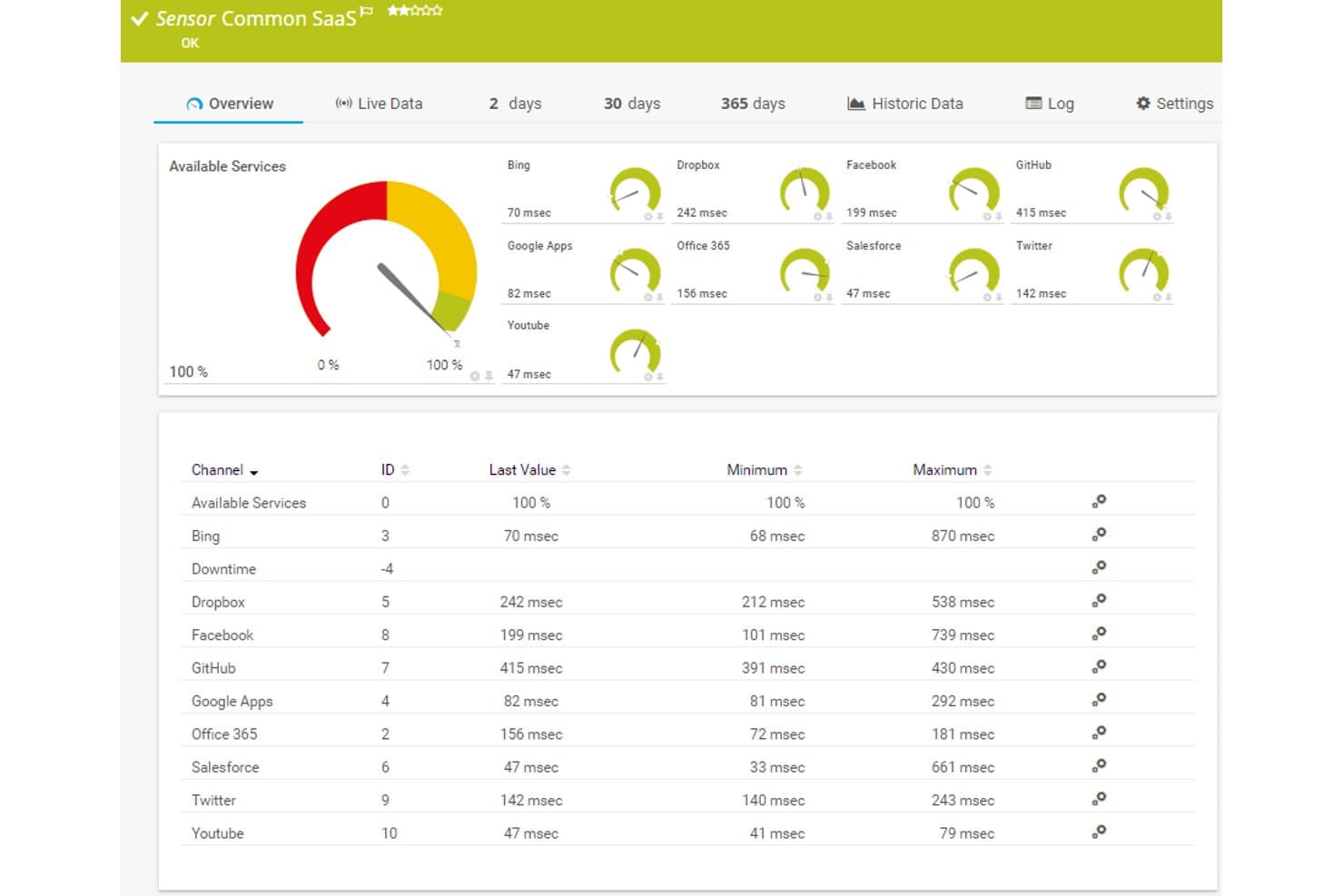
Paessler PRTG bietet ein Dashboard für gemeinsame SaaS-Sensoren mit Echtzeit-Antwortzeiten und Verfügbarkeitsanzeigen für Cloud-Dienste wie Dropbox, Office 365, Salesforce und GitHub. Paessler PRTG ist eine Plattform zur Infrastrukturüberwachung, die Netzwerkgeräte, Server, Cloud-Dienste und Anwendungen mit einem sensorbasierten Ansatz sowohl in lokalen als auch in gehosteten Cloud-Umgebungen überwacht.
Für wen ist Paessler PRTG am besten geeignet?
IT-Betriebsteams von mittelgroßen Unternehmen, die hybride Umgebungen verwalten und eine zentrale Übersicht über Netzwerk-, Server- und Cloud-Infrastrukturen benötigen.
Warum ich Paessler PRTG gewählt habe
Ich habe Paessler PRTG als eines der besten Tools ausgewählt, weil sich der Dashboard-Builder wirklich von den meisten Überwachungstools abhebt. Der Drag-and-Drop-Map-Designer bietet Zugriff auf über 300 Widgets, von Verkehrsdiagrammen bis hin zu Gerätestatus-Icons, und ich kann benutzerdefinierte HTML-Elemente einbinden, um mehrschichtige Ansichten zu erstellen, die exakt meiner Infrastruktur entsprechen. Die Map-Rotation-Funktion nutze ich zudem, um verschiedene Infrastrukturperspektiven auf einem einzigen Display durchlaufen zu lassen.
Wichtige Funktionen von Paessler PRTG
- Sensorbasierte Überwachung: Ermöglicht das Verfolgen spezifischer Metriken für Geräte, Anwendungen und Cloud-Dienste.
- Probe-Unterstützung für AWS-Hosting: Erlaubt die Überwachung globaler Umgebungen, ohne lokale Infrastruktur zu betreiben.
- Plattformübergreifende Probe: Lässt sich auf Windows, Linux, Raspberry Pi oder NAS bereitstellen und bietet so flexible Agentenabdeckung.
- Geplante Berichte: Erstellt und versendet automatisch Berichte zu Leistungsdaten, Trends und SLA-Kennzahlen per E-Mail.
Paessler PRTG Integrationen
Paessler PRTG bietet native Integrationen mit AWS, Microsoft Azure, Google Cloud Platform, VMware vSphere und Microsoft 365. Eine API steht für benutzerdefinierte Integrationen zur Verfügung, und Webhooks ermöglichen Benachrichtigungen an Kanäle wie Slack und Microsoft Teams.
Pros and Cons
Pros:
- Sehr granulare, sensorbasierte Metrik-Erfassung
- Unterstützt hybride Cloud- und On-Premises-Umgebungen
- Umfassende SNMP- und Flow-Protokoll-Unterstützung
Cons:
- Schwächere native Cloud-Überwachung als bei Wettbewerbern
- Sensoranzahl-Beschränkungen erhöhen die Kosten
Learn more about Paessler PRTG: Am besten geeignet für synthetische Transaktionstests
- Nein
- Preis auf Anfrage
Visit WebsiteCustomer Rating:4.7/5This rating combines scores from multiple user review sites to reflect overall customer sentiment about the product.
Site24x7 überwacht mehrstufige Web-Transaktionen, um Leistung und Verfügbarkeit zu kontrollieren. Für Unternehmen, die komplexe Cloud-Infrastrukturen verwalten, bietet Site24x7 eine Überwachungslösung, die synthetische Transaktionstests umfasst, um die Serviceverfügbarkeit und -leistung nachzuverfolgen. Sie richtet sich an IT-Teams und Organisationen, die eine klare Sicht auf ihre Cloud-Umgebungen benötigen und dabei Probleme wie Leistungsverlangsamungen, Ressourcennutzung und Incident Response angehen müssen. Mit Abdeckung der wichtigsten Cloud-Plattformen und einer Vielzahl an Überwachungsfunktionen unterstützt Site24x7 Teams dabei, stabile Betriebsabläufe und eine konsistente Nutzererfahrung aufrechtzuerhalten.
Warum ich Site24x7 ausgewählt habe
Ich habe mich für Site24x7 aufgrund seiner synthetischen Transaktionstests entschieden, die helfen, die Serviceverfügbarkeit zu überwachen, indem sie Benutzer- und Systemabläufe simulieren. Die Plattform unterstützt außerdem die wichtigsten Cloud-Umgebungen und beinhaltet Application Performance Monitoring, um das Verhalten von Anwendungen nachzuverfolgen und Probleme zu erkennen. Ihre Automatisierungsfunktionen unterstützen das Incident Management, sodass Teams schneller reagieren und Ressourcen effizienter verwalten können.
Site24x7 Hauptfunktionen
Neben synthetischen Transaktionstests bietet Site24x7:
- Real User Monitoring (RUM): Dieses Feature liefert Einblicke in die tatsächliche Nutzererfahrung, indem Interaktionen von Benutzern mit Ihren Anwendungen verfolgt und analysiert werden.
- Log-Management: Mit dieser Funktion können Sie Protokolle aus verschiedenen Quellen aggregieren und analysieren, um einen umfassenden Überblick über den Zustand Ihres Systems zu erhalten.
- Netzwerküberwachung: Sie ermöglicht Einblicke in die Netzwerkleistung, unterstützt bei der Fehlerbehebung von Verbindungsproblemen und bei der Optimierung Ihrer Netzwerkinfrastruktur.
Site24x7 Integrationen
Integrationen umfassen Slack, ServiceNow, Moogsoft, Jira, PagerDuty, Freshservice, Microsoft Teams, Amazon EventBridge, Zapier und ManageEngine Analytics Plus.
Pros and Cons
Pros:
- Flexibles Monitoring lässt sich einfach mit mehreren Infrastrukturkomponenten integrieren
- Umfassende Überwachung verschiedener Systeme
- KI-gestütztes Full-Stack-Monitoring unterstützt das Management von Multicloud-Infrastrukturen
Cons:
- Komplexe Konfiguration verlangsamt die initiale Einrichtung und das Verständnis der Plattform
- Alarmierungsfehler verursachen Probleme beim Hinzufügen neuer Überwachungskonfigurationen
Learn more about Site24x7: Am besten für Application Performance Monitoring
- Nein
- $945 jährlich für bis zu 25 Server oder Anwendungen
Visit WebsiteCustomer Rating:4.3/5This rating combines scores from multiple user review sites to reflect overall customer sentiment about the product.
ManageEngine Applications Manager verfügt über Funktionen wie Alarme für überwachte Daten und Infrastruktur-Snapshots, um maximale Überwachungslösungen bereitzustellen. Diese können auf dem Standard-Dashboard weiter überprüft werden. ManageEngine Applications Manager ist ein leistungsstarkes Tool, das eine umfassende End-to-End-Überwachung für eine breite Palette von Anwendungen, Datenbanken, Servern und Systemen bietet. Besonders herausragend ist es durch seine detaillierten Einblicke in die Anwendungsleistung, was es zur optimalen Lösung für das Application Performance Monitoring macht.
Warum ich ManageEngine Applications Manager ausgewählt habe:
Bei der Aufnahme von ManageEngine Applications Manager in diese Liste berücksichtigte ich seine umfassenden Fähigkeiten zur Überwachung und Verwaltung von Anwendungen in unterschiedlichen Umgebungen. Es hebt sich durch detaillierte Einblicke in die Anwendungsleistung hervor und unterstützt eine schnelle Problemfindung und -lösung.
Daher habe ich es als 'am besten für Application Performance Monitoring' eingestuft, da es in diesem Bereich besonders leistungsfähig ist.
Hervorstechende Funktionen und Integrationen:
Zu den herausragenden Funktionen von ManageEngine Applications Manager gehören die automatische Anwendungserkennung, das tiefgehende Komponenten-Monitoring und intelligente Automatisierung. Diese Funktionen ermöglichen eine robuste Überwachung und automatisierte Problemlösung, sodass die Anwendungsleistung stets optimal bleibt.
In Bezug auf Integrationen kann ManageEngine Applications Manager mit verschiedenen Anwendungen, Servern und Datenbanken wie Oracle, MySQL, Microsoft SQL Server, SAP und vielen anderen integriert werden.
Pros and Cons
Pros:
- Detaillierte Überwachung der Anwendungsleistung
- Breite Kompatibilität mit verschiedenen Anwendungen, Servern und Datenbanken
- Intelligente Automatisierung für Problemlösung
Cons:
- Kann komplex in der Einrichtung und Konfiguration sein
- Hohe Einstiegskosten könnten für kleinere Unternehmen ein Hindernis darstellen
- Benutzeroberfläche möglicherweise nicht so benutzerfreundlich wie einige Alternativen
Learn more about ManageEngine Applications Manager: Am besten geeignet zur Überwachung hybrider IT-Infrastrukturen
- Nein
- Preise auf Anfrage
Visit WebsiteCustomer Rating:4.5/5This rating combines scores from multiple user review sites to reflect overall customer sentiment about the product.
Hier sehen Sie eine Übersicht darüber, wie die Benutzeroberfläche von LogicMonitor auf Benutzerfreundlichkeit ausgelegt ist. LogicMonitor ist eine SaaS-basierte, automatisierte IT-Performance-Überwachungsplattform, die umfassende Transparenz für komplexe IT-Infrastrukturen bietet. Aufgrund seiner Fähigkeit, sowohl lokale als auch Cloud-Umgebungen zu unterstützen, ist es eine erstklassige Wahl zur Überwachung von hybriden IT-Infrastrukturen.
Warum ich LogicMonitor gewählt habe:
Als es darum ging, ein Tool auszuwählen, das sich in der Überwachung von hybriden IT-Infrastrukturen hervorhebt, fiel meine Wahl auf LogicMonitor. Die Vielseitigkeit bei der Unterstützung einer breiten Palette von Infrastrukturen, einschließlich Cloud, On-Premises und hybriden Systemen, hebt es besonders hervor. Ich habe LogicMonitor als das beste Tool für die Überwachung hybrider IT-Infrastrukturen bestimmt, vor allem aufgrund der automatisierten Geräteerkennung und der Fähigkeit, unterschiedliche Systeme zu verwalten.
Herausragende Funktionen und Integrationen:
Die automatisierte Geräteerkennung von LogicMonitor ist besonders bemerkenswert, da sie den Prozess der Hinzufügung neuer Geräte zum System vereinfacht. Ebenso bietet es anpassbare Dashboards, die den Nutzern die Flexibilität geben, ihre Infrastruktur nach ihren individuellen Anforderungen zu überwachen.
Im Bereich der Integrationen unterstützt LogicMonitor verschiedene Cloud-Plattformen wie AWS, Google Cloud und Azure. Darüber hinaus lässt es sich mit wichtigen Business-Tools wie ServiceNow, Slack und Jira verbinden, was den reibungslosen Ablauf der Geschäftsprozesse fördert.
Pros and Cons
Pros:
- Automatisierte Geräteerkennung für einfache Einrichtung
- Anpassbare Dashboards für individuelles Monitoring
- Unterstützt verschiedene Cloud-Plattformen und Geschäftstools
Cons:
- Preise sind nicht transparent
- Einige Nutzer finden die Benutzeroberfläche weniger intuitiv
- Die Einrichtung individueller Dashboards erfordert möglicherweise technisches Know-how
Learn more about LogicMonitor: Am besten für detaillierte Health-Metriken
- Ja
- $99/Monat
Visit WebsiteCustomer Rating:4.3/5This rating combines scores from multiple user review sites to reflect overall customer sentiment about the product.
So ist das Dashboard des Application Performance Monitoring (APM) von New Relic aufgebaut. New Relic ist eine cloudbasierte Software-Analyseplattform, die Echtzeit-Dateneinblicke bietet, um Unternehmen dabei zu unterstützen, die Leistung ihrer Softwareanwendungen zu bewerten. Mit seinen detaillierten Health-Metriken eignet sich New Relic besonders für ausführliche Einblicke in den Zustand und die Effizienz dieser Systeme.
Warum ich New Relic ausgewählt habe:
New Relic hat mich durch seine leistungsstarken Analysefähigkeiten überzeugt, weshalb ich es in diese Liste aufgenommen habe. Die Fähigkeit, detaillierte, Echtzeit-Health-Metriken bereitzustellen, hebt es von anderen Tools ab. Meiner Meinung nach ist New Relic das Beste für detaillierte Health-Metriken, da seine umfassenden Datenanalyse- und Visualisierungsmöglichkeiten tiefere Einblicke in die Anwendungsleistung bieten.
Herausragende Funktionen und Integrationen:
Eine der herausragenden Funktionen von New Relic ist das Application Performance Monitoring (APM), das umfassende Einblicke in den Zustand Ihrer Anwendungen bietet. Darüber hinaus verfügt es über ein Real User Monitoring, das Daten darüber liefert, wie Nutzer mit Ihren Anwendungen interagieren.
New Relic lässt sich nahtlos in verschiedene Plattformen wie AWS, Azure, Google Cloud Platform und Kubernetes integrieren. Diese Integrationen ermöglichen einen ganzheitlicheren Blick auf Ihre Infrastruktur und Anwendungen.
Pros and Cons
Pros:
- Detaillierte Health-Metriken für tiefgehende Einblicke
- Große Auswahl an Integrationen mit Cloud-Plattformen
- Umfassende Überwachung der Anwendungsleistung
Cons:
- Hoher Preis für kleine Unternehmen
- Komplexe Benutzeroberfläche, die für Einsteiger schwierig sein kann
- Umfangreiche Funktionen können zu Informationsüberflutung führen
Learn more about New Relic: Am besten geeignet für den Infrastructure as Code (IaC)-Ansatz
- Ja
- $20/user/month

Hier ist ein Screenshot, der eine detaillierte Anzeige eines zusammenfassenden Berichts in HashiCorp zeigt. HashiCorp bietet eine Suite von Open-Source-Tools, mit denen Unternehmen Rechenzentrumsinfrastrukturen deklarativ als Code definieren, bereitstellen und verwalten können. Es eignet sich am besten für Unternehmen, die die Methodik Infrastructure as Code (IaC) übernehmen möchten, um die Effizienz zu steigern und Konsistenz im Infrastrukturmanagement zu gewährleisten.
Warum ich HashiCorp ausgewählt habe:
HashiCorp wurde in meine Auswahl aufgenommen, weil es über leistungsstarke IaC-Funktionen verfügt und sich dadurch deutlich im Bereich Infrastrukturmanagement abhebt. Dieser IaC-Ansatz fördert Effizienz, Wiederholbarkeit und Sicherheit bei der Bereitstellung und Verwaltung von Infrastruktur.
Aus diesen Gründen halte ich HashiCorp für 'Am besten geeignet für' Organisationen, die auf den IaC-Ansatz setzen möchten.
Hervorstechende Funktionen und Integrationen:
HashiCorps Tools wie Terraform, Vault und Consul bieten eine breite Palette an Funktionen, die auf Infrastruktur-Bereitstellung, Sicherheit und Service-Netzwerke ausgerichtet sind. Die Möglichkeit von Terraform, Infrastruktur als Code abzubilden, macht es äußerst wertvoll für das Bereitstellen und Verwalten von Infrastrukturen jeglicher Größe.
Wichtige Integrationen umfassen jene mit AWS, GCP und Azure, wodurch die IaC-Fähigkeiten effektiv auf mehrere Cloud-Umgebungen erweitert werden.
Pros and Cons
Pros:
- Hervorragende Infrastructure as Code-Fähigkeiten
- Integriert sich mit großen Cloud-Plattformen
- Bietet eine Vielzahl von Tools für verschiedene Aspekte des Infrastrukturmanagements
Cons:
- Kann komplex in der Einrichtung und Nutzung sein
- Unternehmensversionen können für kleinere Teams teuer sein
- Der Support für kostenlose Nutzer kann eingeschränkt sein
Learn more about HashiCorp: Am besten für die IBM Cloud-Umgebung
- Nein
- $10 pro Million erfasster Metriken/Monat

Das Hauptdashboard von IBM Cloud Monitoring liefert Informationen wie, aber nicht beschränkt auf, Netzwerktopologie und Ressourcennutzung. IBM Cloud Monitoring ist ein Überwachungsdienst, der Echtzeit-Einblicke in die Leistungsfähigkeit Ihrer Anwendungen und Infrastruktur bietet, die in der IBM Cloud gehostet werden. Dieses Tool ist speziell darauf ausgelegt, nahtlos mit der IBM Cloud-Umgebung zu funktionieren, was es zur besten Wahl für diejenigen macht, die in diesem Ökosystem investiert sind.
Warum ich mich für IBM Cloud Monitoring entschieden habe:
Die Entscheidung, IBM Cloud Monitoring in die Liste aufzunehmen, war eindeutig, angesichts seiner überlegenen Integration und nativen Kompatibilität mit der IBM Cloud-Umgebung. Es fällt durch seine reibungslose Interoperabilität mit den verschiedenen Diensten der IBM Cloud auf.
Ich habe es als 'am besten für die IBM Cloud-Umgebung' bewertet, da es die Möglichkeit bietet, detaillierte Metriken, Dashboards und Benachrichtigungen speziell für die IBM Cloud bereitzustellen.
Herausragende Funktionen und Integrationen:
Die detaillierten Metriken von IBM Cloud Monitoring liefern eine Fülle von Daten zur Leistung Ihrer Infrastruktur. Besonders bemerkenswert ist die Fähigkeit, Echtzeit-Überwachungsdaten bereitzustellen und eine schnelle Erkennung von Anomalien zu ermöglichen.
Was die Integrationen angeht, lässt es sich reibungslos mit verschiedenen IBM Cloud-Diensten integrieren, darunter IBM Cloud Databases, IBM Kubernetes Service und IBM Cloud Functions, um nur einige zu nennen.
Pros and Cons
Pros:
- Nahtlose Integration mit IBM Cloud-Diensten
- Detaillierte Metriken bieten umfassende Einblicke
- Echtzeit-Überwachung und Anomalieerkennung
Cons:
- Preisgestaltung kann komplex sein und vom Verbrauch abhängen
- Eventuell keine gute Integration mit Nicht-IBM-Diensten
- Benutzeroberfläche erfordert möglicherweise eine gewisse Einarbeitung für neue Nutzer
Learn more about IBM Cloud Monitoring: Geeignet für vereinheitlichte Anwendungs- und Infrastrukturdaten
- 30-tägige kostenlose Testversion
- $5/GB/Monat

SolarWinds Observability SaaS bietet detailliertes Anwendungsleistungsmonitoring SolarWinds Observability SaaS ist eine Cloud-Infrastrukturüberwachungsplattform für IT- und DevOps-Teams. Sie bietet Einblick in Cloud-Anwendungen, Infrastruktur, Protokolle, Datenbanken, Netzwerke und Nutzungsdaten. Die Plattform geht auf die Komplexität der Verwaltung vielfältiger IT-Umgebungen ein und stellt Werkzeuge zur Verfügung, um Überwachungsprozesse zu optimieren, die Problemlösung zu verbessern und umsetzbare Einblicke zu liefern – ideal für Teams, die ihre IT-Abläufe optimieren und die Systemleistung steigern möchten.
Warum ich SolarWinds Observability SaaS ausgewählt habe
Ich habe SolarWinds Observability SaaS wegen seiner Fähigkeit gewählt, umfassende Transparenz durch vereinheitlichte Anwendungs- und Infrastrukturdaten bereitzustellen. Diese Funktion ist entscheidend, um das gesamte Spektrum der IT-Umgebungen zu verstehen und umfasst die Unterstützung von Open-Source-Frameworks sowie von Integrationen mit Drittanbietern. Außerdem können die AIOps-Fähigkeiten, verstärkt durch maschinelles Lernen, dazu beitragen, die Alarmmüdigkeit zu reduzieren, indem echte Probleme priorisiert werden – somit ist es ein wertvolles Werkzeug für Teams, die durch ständige Benachrichtigungen überfordert sind.
Wichtige Funktionen von SolarWinds Observability SaaS
Hier sind einige Funktionen, die für Sie nützlich sein könnten:
- Automatisierte Instrumentierung und Abhängigkeitszuordnung: Diese Funktion ermöglicht Ihrem Team die effiziente Überwachung und Zuordnung von Abhängigkeiten ohne manuellen Aufwand.
- Echtzeit-Anomalieerkennung und KI-gestützte Ursachenanalyse: Damit können Sie Probleme schnell identifizieren und beheben, noch bevor sie die Systemleistung beeinträchtigen.
- Schnelle Bereitstellung und benutzerfreundliche Oberfläche: Ihr Team kann mit einer intuitiven Oberfläche, die Einrichtung und Verwaltung vereinfacht, zügig einen Mehrwert realisieren.
- Unterstützung von Open-Source-Frameworks: Dies gewährleistet eine einfache Integration mit bestehenden Werkzeugen und sorgt für Flexibilität im IT-Infrastrukturmanagement.
SolarWinds Observability SaaS Integrationen
Zu den Integrationen gehören AWS, Azure, Google Cloud Platform, Kubernetes, ServiceNow, Slack, Microsoft Teams, Jira, Splunk und PagerDuty.
Pros and Cons
Pros:
- Effektiv für Fehlerbehebung und operative Einblicke
- Umfassende Datenarchivierung mit AWS S3-Unterstützung
- AIOps-Funktionen reduzieren Alarmmüdigkeit
Cons:
- Begrenzte Anpassungsmöglichkeiten für Dashboards und Berichte
- Hohe Lernkurve bei komplexen Konfigurationen
Learn more about SolarWinds Observability SaaS: Beste Lösung für Open-Source-Cloud-Monitoring
- Nein
- Kostenlos, kostenpflichtiger Support ab $1000/Monat

Das Überwachungs-Dashboard von Zabbix bietet Ihnen übersichtlich den aktuellen Status in Echtzeit, um Ihre Überwachungsanforderungen optimal zu unterstützen. Zabbix Cloud Monitoring ist ein leistungsstarkes Tool, das eine Echtzeit-Überwachung von Servern, virtuellen Maschinen und Cloud-Diensten bietet. Bekannt für seinen Open-Source-Charakter, zeichnet es sich als die beste Lösung für Organisationen aus, die Wert auf Anpassbarkeit und Kostenersparnis legen.
Warum ich Zabbix Cloud Monitoring gewählt habe:
Ich habe Zabbix wegen seines Open-Source-Charakters gewählt, der vielfältige Anpassungsmöglichkeiten bietet, sowie wegen seines umfassenden Überwachungsumfangs, zu dem Server, virtuelle Maschinen und Cloud-Dienste gehören. Es überzeugt durch seine flexible Natur, die es ermöglicht, das System an spezifische Anforderungen anzupassen.
Deshalb erhält es das Prädikat 'Beste Lösung für' Open-Source-Cloud-Monitoring und richtet sich an alle, die Flexibilität und einen praxisorientierten Ansatz schätzen.
Herausragende Funktionen und Integrationen:
Zabbix glänzt bei der Netzwerkerkennung und bietet automatisierte Erkennung von Netzwerkgeräten und Konfigurationen. Es stellt umfangreiche Datenvisualisierungswerkzeuge bereit, mit denen Sie Überwachungsstatistiken auf einen Blick verstehen können. Als Open-Source-Tool lässt sich Zabbix mit einer Vielzahl anderer Systeme integrieren, darunter MySQL, PostgreSQL und IBM DB2.
Pros and Cons
Pros:
- Open-Source, bietet individuelle Anpassungen
- Breite Auswahl an Integrationen
- Umfassende Überwachungsfunktionen
Cons:
- Hohe Lernkurve für nicht-technische Nutzer
- Konfiguration kann komplex sein
- Kostenpflichtiger Support ist relativ teuer
Learn more about Zabbix Cloud Monitoring: Am besten für Echtzeit-Transparenz
- Nein
- $60 pro Host und Monat

Splunk Infrastructure Monitoring liefert schnelle Analysen basierend auf überwachten Cloud-Leistungen und hilft Unternehmen, rasch Einblicke und Ergebnisse zu erhalten. Splunk Infrastructure Monitoring ist ein Tool, das Echtzeit-Transparenz und Analysen für Cloud-Infrastrukturen und Microservices bietet. Als Plattform, die für Geschwindigkeit und Effizienz bekannt ist, ist es die bevorzugte Wahl für Unternehmen, die sofortige Einblicke in ihre Cloud-Leistung benötigen.
Warum ich Splunk Infrastructure Monitoring gewählt habe:
Ich habe Splunk Infrastructure Monitoring wegen seiner starken Fähigkeit zur Bereitstellung von Einblicken in Echtzeit ausgewählt; dadurch hebt es sich besonders im Bereich Observability hervor.
Die vielfältigen Analysefunktionen haben mich überzeugt, dass es die beste Lösung für Echtzeit-Transparenz ist – besonders vorteilhaft für Unternehmen, die sofortige Aufschlüsse über ihre Cloud-Betriebe benötigen.
Herausragende Funktionen und Integrationen:
Splunk Infrastructure Monitoring verfügt über eine Echtzeit-Streaming-Architektur, die umgehend Einblicke bereitstellt. Es beinhaltet zudem Funktionen wie sofortige dynamische Basislinien-Erkennung und Anomalieerkennung, wodurch eine proaktive Problemerkennung möglich wird.
Zentrale Integrationen bestehen unter anderem mit AWS, Google Cloud und Azure, was eine nahtlose Überwachung von Multi-Cloud-Umgebungen ermöglicht.
Pros and Cons
Pros:
- Bietet Echtzeit-Transparenz
- Beinhaltet Funktionen zur proaktiven Problemerkennung
- Integriert sich gut mit führenden Cloud-Plattformen
Cons:
- Für kleine Unternehmen möglicherweise zu teuer
- Komplexe Benutzeroberfläche kann Einarbeitung erfordern
- Begrenzte Speicherung von historischen Daten
Learn more about Splunk Infrastructure Monitoring:
Weitere Tools zur Überwachung von Cloud-Infrastrukturen
Nachfolgend finden Sie eine Liste weiterer Tools zur Überwachung von Cloud-Infrastrukturen, die ich in die engere Auswahl genommen habe, die es jedoch nicht unter die Top 10 geschafft haben.
- 11ThousandEyesAm besten geeignet für Transparenz in allen Netzwerkpfaden
- 12meshIQAm besten geeignet für Middleware-Monitoring und -Management
- 13CheckmkAm besten für die umfassende Überwachung der IT-Infrastruktur
- 14DynatraceAm besten für KI-unterstütztes Monitoring
- 15DatadogAm besten für vollständige Observierbarkeit
- 16Dotcom MonitorAm besten geeignet für agentenbasierte & agentenlose Überwachung
Verwandte Software-Rezensionen
Wenn Sie hier noch nicht gefunden haben, wonach Sie suchen, sehen Sie sich diese alternativen Tools an, die wir getestet und bewertet haben.
- Software zur Netzwerküberwachung
- Software zur Serverüberwachung
- SD-WAN-Lösungen
- Tools zur Infrastrukturüberwachung
- Paketanalysator
- Tools zur Anwendungsüberwachung
Wie ich Cloud-Infrastruktur-Monitoring-Tools bewerte
Ich unterteile meine Bewertung in grundlegende Voraussetzungen, die ein Tool erfüllen muss – wie Multi-Cloud-Metrik-Erfassung und Echtzeit-Benachrichtigungen – und die Unterscheidungsmerkmale, die gute von großartigen Tools abheben.
Kernfunktionalität (Grundvoraussetzungen für diese Liste)
Bei der Auswahl der Tools für meine Liste bewerte ich jedes auf einer Skala von 0 (bietet die Funktion nicht) bis 5 (ist in diesem Bereich herausragend) für jede unten aufgeführte Kernfunktion. Anschließend berechne ich die Gesamtpunktzahl des Tools in Prozent. Jedes Tool muss eine Mindestgesamtpunktzahl von 75% erreichen, um berücksichtigt zu werden.
- Multi-Cloud-Ressourcenüberwachung: Ich prüfe, ob ein Tool in der Lage ist, Metriken von AWS, Azure und GCP über Compute-, Storage-, Netzwerk- und Datenbankdienste hinweg in einer zentralen Ansicht zu erfassen.
- Echtzeit-Benachrichtigungen & Anomalie-Erkennung: Konfigurierbare Alarm-Schwellenwerte und Routings sind hier entscheidend – ich achte auf Multi-Channel-Zustellung an Tools wie Slack, PagerDuty oder Opsgenie mit Eskalationsunterstützung.
- Aggregation von Metriken, Logs & Traces: Ich bewerte, wie gut ein Tool verschiedene Telemetrie-Typen korreliert, so dass Teams von einem CPU-Anstieg direkt zu den zugehörigen Log-Einträgen und Traces wechseln können, ohne den Kontext zu wechseln.
- Anpassbare Dashboards & Visualisierung: Vorgefertigte Templates helfen Teams bei einem schnellen Einstieg, aber ich suche auch nach Drag-and-Drop-Anpassungen, damit SREs und Betriebsleiter rollenbasierte Ansichten erstellen können.
- Auto-Discovery & Integrationsmethoden: Ein Tool sollte neue Cloud-Ressourcen erkennen, sobald sie bereitgestellt werden – sei es durch native API-Abfragen oder schlanke Agenten – ohne dass jedes Mal eine manuelle Konfiguration erforderlich ist.
- Historische Daten & Berichte: Ich prüfe, wie lange ein Tool Leistungsdaten speichert und ob es Trendanalysen, Kapazitätsplanung und die Dokumentation der Einhaltung von SLAs unterstützt.
Sobald ich eine Liste von Tools habe, die die Kriterien erfüllen, betrachte ich, was jede Plattform besonders macht.
Unterscheidungsmerkmale (Was Anbieter voneinander abhebt)
So vergleiche und bewerte ich verschiedene Anbieter:
Herausragende Funktionen
KI-gestützte Ursachenanalyse ist ein entscheidendes Unterscheidungsmerkmal – wenn ein Latenzpeak einen Microservices-Cluster betrifft, möchte ich, dass das Tool diesen automatisch bis auf den fehlerhaften Dienst zurückverfolgt, anstatt dass manuell in Logs gesucht werden muss. Die Überwachung von Kubernetes und Containern ist ebenso wichtig, insbesondere pod- und node-basierte Metriken mit Abhängigkeitsdarstellung über Cluster hinweg. Außerdem bewerte ich Funktionen zur Kostenoptimierung wie die Erkennung untätiger Ressourcen und Empfehlungen zur Anpassung von Ressourcen, da Monitoring-Tools, die Ausgabenanalysen zusammen mit Leistungsdaten anzeigen, Infrastrukturteams bei Budgetgesprächen echten Einfluss verschaffen.
Mehr als nur Features
Transparente Preisgestaltung ist in diesem Bereich besonders wichtig. Telemetriedaten wachsen schnell, und ich prüfe, ob ein Tool pro Host, pro GB eingelesener Daten oder pro Metrik abrechnet – und wie vorhersehbar die Kosten bei wachsender Umgebung bleiben. Die Tiefe der Integration ist ein weiterer Schlüsselfaktor: Ich suche nach nativer OpenTelemetry- und Prometheus-Unterstützung sowie nach Konnektoren zu Incident Management und CI/CD-Pipelines, die sich in bestehende Workflows einfügen. Für Teams in regulierten Branchen bewerte ich zudem Anbieterzertifizierungen wie SOC 2 Type II und ISO 27001 sowie Optionen für rollenbasierte Zugriffskontrolle (RBAC), Single Sign-On (SSO) und regionale Datenhaltung.
So wählen Sie Tools zur Überwachung von Cloud-Infrastrukturen aus
Bei langen Funktionslisten und komplexen Preisstrukturen verliert man leicht den Überblick. Damit Sie sich bei der Auswahl der für Sie passenden Software auf die wichtigen Aspekte konzentrieren können, finden Sie hier eine Checkliste mit Faktoren, die Sie berücksichtigen sollten:
| Faktor | Was zu beachten ist |
|---|---|
| FaktorSkalierbarkeit | Was zu beachten istStellen Sie sicher, dass das Tool wachsende Infrastruktur-Anforderungen bewältigen kann. Ihre Überwachungslösung sollte mit der Erweiterung Ihrer Cloud-Umgebung skalieren und neue Instanzen und Dienste ohne Leistungseinbußen hinzufügen können. |
| FaktorIntegrationen | Was zu beachten istAchten Sie auf ein Tool, das sich in Ihre bestehenden Cloud-Anbieter (AWS, Azure, GCP) und Drittanbieterdienste (wie Slack, Jira) integrieren lässt. Dies hilft dabei, Überwachungsdaten zu zentralisieren und Warnmeldungen zu automatisieren. |
| FaktorAnpassbarkeit | Was zu beachten istWählen Sie eine Lösung, mit der Sie benutzerdefinierte Dashboards, Berichte und Warnmeldungen erstellen können, die den spezifischen Anforderungen und Arbeitsabläufen Ihres Teams entsprechen. Flexibilität bei der Datenvisualisierung ist entscheidend. |
| FaktorBenutzerfreundlichkeit | Was zu beachten istEine benutzerfreundliche Oberfläche verkürzt die Einarbeitungszeit und beschleunigt die Problemlösung. Stellen Sie sicher, dass das Tool sowohl für Entwickler als auch für technisch nicht versierte Benutzer intuitiv bedienbar ist. |
| FaktorBudget | Was zu beachten istPrüfen Sie die Preisstruktur auf versteckte Kosten wie Datenaufbewahrung, Premium-Support oder zusätzliche Integrationen. Vergleichen Sie verschiedene Preisstufen, um eine Überzahlung zu vermeiden. |
| FaktorSicherheitsvorkehrungen | Was zu beachten istStellen Sie sicher, dass das Tool Verschlüsselung, rollenbasierte Zugriffskontrolle und sichere API-Verbindungen zum Schutz sensibler Infrastrukturdaten bietet. Die Einhaltung von Branchenstandards (wie SOC 2) ist ein zusätzlicher Vorteil. |
| FaktorAutomatisierung | Was zu beachten istAchten Sie auf Automatisierungsfunktionen wie Anomalieerkennung, automatische Fehlerbehebung und Leistungsoptimierung, um den manuellen Aufwand zu reduzieren und die Effizienz zu verbessern. |
| FaktorEchtzeitwarnungen | Was zu beachten istStellen Sie sicher, dass das Tool Echtzeitwarnungen und Benachrichtigungen über mehrere Kanäle (E-Mail, Slack usw.) bereitstellt, damit schnell auf Probleme reagiert werden kann. |
Trends bei Tools zur Überwachung der Cloud-Infrastruktur
Für meine Recherche habe ich unzählige Produktaktualisierungen, Pressemitteilungen und Versionsprotokolle verschiedener Anbieter von Tools zur Überwachung der Infrastruktur in der Cloud ausgewertet. Hier sind einige der aufkommenden Trends, die ich im Blick behalte:
- KI-gestützte Erkenntnisse: Immer mehr Tools nutzen KI und maschinelles Lernen, um Ausfälle vorherzusagen, Anomalien zu erkennen und Lösungen vorzuschlagen, bevor Probleme eskalieren. Dies hilft Teams, proaktiv statt reaktiv zu handeln.
- Detaillierte Kostenverfolgung: Überwachungstools liefern jetzt tiefere Einblicke in die Cloud-Ausgaben und helfen Teams dabei, Verschwendung zu erkennen und die Ressourcenzuweisung zu optimieren. Einige Tools bieten sogar automatisierte Empfehlungen zur Kosteneinsparung.
- Einheitliche Beobachtbarkeit: Anbieter führen Infrastruktur-, Anwendungs- und Netzwerküberwachung in einer einzigen Plattform zusammen. Dadurch erhalten Teams einen vollständigen Überblick über ihre Umgebung, ohne zwischen verschiedenen Tools wechseln zu müssen.
- Überwachung am Netzwerkrand: Da immer mehr Workloads an den Netzwerkrand verlagert werden, erweitern Anbieter ihre Tools um die Überwachung von Edge-Geräten und Microservices. Dies hilft Teams, Leistung und Verfügbarkeit in verteilten Umgebungen aufrechtzuerhalten.
- Verbesserte Sicherheitsüberwachung: Tools ergänzen Funktionen zur Erkennung von Bedrohungen in Echtzeit und zur Protokollierung von Sicherheitsereignissen. Einige bieten inzwischen Integrationen mit SIEM-Plattformen (Security Information and Event Management) für eine schnellere Reaktion auf Vorfälle.
Was sind Tools zur Überwachung der Cloud-Infrastruktur?
Tools zur Überwachung der Cloud-Infrastruktur bieten eine automatisierte Möglichkeit, die Betriebsprozesse innerhalb einer cloudbasierten IT-Infrastruktur zu überwachen. Diese Tools werden hauptsächlich von IT-Fachleuten, Netzwerkingenieuren und Systemadministratoren eingesetzt und sind bei der Überwachung des Status, der Leistung und des Zustands von Servern, Datenbanken, Netzwerken und in der Cloud befindlichen Anwendungsdiensten von unschätzbarem Wert.
Sie erfüllen eine wichtige Funktion bei der schnellen Erkennung von Problemen, der Vermeidung potenzieller Ausfälle und der Sicherstellung eines reibungslosen Ablaufs von Geschäftsprozessen. Diese Überwachungstools bieten Erkenntnisse und Analysen, die bei der Optimierung von Ressourcen helfen. Damit spielen sie eine entscheidende Rolle bei strategischen Entscheidungen und der Verbesserung der Gesamtleistung des Systems.
Funktionen von Tools zur Überwachung der Cloud-Infrastruktur
Achten Sie bei der Auswahl von Tools zur Überwachung der Cloud-Infrastruktur auf die folgenden wichtigen Funktionen:
- Überwachung in Echtzeit: Bietet sofortige Einblicke in die Infrastrukturleistung und hilft Ihnen, Probleme schnell zu erkennen und zu beheben.
- Benutzerdefinierte Dashboards: Ermöglicht Ihnen, personalisierte Ansichten wichtiger Kennzahlen zu erstellen, sodass Sie leichter verfolgen können, was für Ihr Team am wichtigsten ist.
- Anomalieerkennung: Nutzt maschinelles Lernen und Software zur Protokollüberwachung, um ungewöhnliche Muster zu erkennen und auf potenzielle Probleme hinzuweisen, bevor diese die Leistung beeinträchtigen.
- Warnmeldungen und Benachrichtigungen: Sendet Warnmeldungen über mehrere Kanäle (E-Mail, Slack usw.), um Ihr Team in Echtzeit über Probleme zu informieren.
- Protokollaggregation: Sammelt und organisiert Protokolle aus verschiedenen Systemen, sodass sich Probleme leichter beheben und deren Ursachen ermitteln lassen.
- Kostenverfolgung: Schlüsselt Cloud-Ausgaben nach Dienst, Region oder Projekt auf und hilft Ihnen dabei, Verschwendung zu erkennen und Kosten zu optimieren.
- Rollenbasierte Zugriffskontrolle: Ermöglicht Ihnen, Benutzerberechtigungen festzulegen, damit Teammitglieder nur auf die Daten zugreifen können, die sie benötigen.
- Analyse historischer Daten: Speichert historische Leistungsdaten, sodass Sie Trends erkennen und fundierte Entscheidungen treffen können.
- Multi-Cloud-Lösungen: Überwacht die Infrastruktur verschiedener Cloud-Anbieter wie AWS, Azure und Google Cloud auf einer einzigen Plattform.
- APIs und Integrationen: Verbindet sich mit anderen Tools und Plattformen, um Arbeitsabläufe zu automatisieren und Daten zu zentralisieren.
Vorteile von Tools zur Überwachung der Cloud-Infrastruktur
Die Implementierung von Tools zur Überwachung der Cloud-Infrastruktur bietet Ihrem Team und Ihrem Unternehmen mehrere Vorteile. Hier sind einige, auf die Sie sich freuen können:
- Verbesserte Betriebszeit: Überwachungstools helfen dabei, Leistungsprobleme frühzeitig zu erkennen, Ausfallzeiten zu reduzieren und Dienste für Benutzer verfügbar zu halten.
- Schnellere Problemlösung: Echtzeitwarnungen und detaillierte Protokolle erleichtern Ihrem Team die schnelle Erkennung und Behebung von Problemen.
- Besseres Kostenmanagement: Funktionen zur Kostenverfolgung und Ressourcenoptimierung helfen Ihnen, eine Überbereitstellung zu vermeiden und Verschwendung zu reduzieren.
- Erhöhte Sicherheit: Integrierte Bedrohungserkennung und Sicherheitsprotokollierung helfen Ihnen, Schwachstellen zu erkennen und schneller auf Angriffe zu reagieren.
- Fundiertere Entscheidungsfindung: Historische Daten und Trendanalysen liefern Ihnen Einblicke in Leistungsmuster und den Ressourcenbedarf.
- Vereinfachte Multi-Cloud-Verwaltung: Einheitliche Dashboards und Multi-Cloud-Unterstützung ermöglichen Ihnen, verschiedene Cloud-Umgebungen von einem Ort aus zu überwachen.
- Verbesserte Zusammenarbeit im Team: Rollenbasierter Zugriff und gemeinsam genutzte Dashboards stellen sicher, dass alle Mitglieder Ihres Teams über die für Entscheidungen benötigten Daten verfügen.
Kosten und Preise von Tools zur Überwachung der Cloud-Infrastruktur
Bei der Auswahl von Tools zur Überwachung der Cloud-Infrastruktur ist ein Verständnis der verschiedenen verfügbaren Preismodelle und Tarife erforderlich. Die Kosten variieren je nach Funktionen, Teamgröße, Zusatzoptionen und weiteren Faktoren. Die folgende Tabelle fasst gängige Tarife, deren Durchschnittspreise und typische enthaltene Funktionen von Tools zur Überwachung der Cloud-Infrastruktur zusammen:
Vergleichstabelle der Tarife für Tools zur Überwachung der Cloud-Infrastruktur
| Tarifart | Durchschnittspreis | Übliche Funktionen |
|---|---|---|
| TarifartKostenloser Tarif | Durchschnittspreis$0 | Übliche FunktionenGrundlegende Tools zur Leistungsüberwachung, begrenzte Warnmeldungen, Community-Unterstützung und Integration einer einzelnen Cloud. |
| TarifartPersönlicher Tarif | Durchschnittspreis$10–$30/Benutzer/Monat | Übliche FunktionenLeistungsverfolgung, Echtzeitwarnungen, grundlegende Protokollanalyse und Zugriff für einzelne Benutzer. |
| TarifartGeschäftstarif | Durchschnittspreis$40–$100/Benutzer/Monat | Übliche FunktionenMulti-Cloud-Unterstützung, erweiterte Anomalieerkennung, benutzerdefinierte Dashboards und teambasierte Berechtigungen. |
| TarifartUnternehmenstarif | Durchschnittspreis$150–$500/Benutzer/Monat | Übliche FunktionenKI-gestützte Einblicke, automatische Behebung, Sicherheitsüberwachung, dedizierter Kundenbetreuer und Compliance-Verfolgung. |
FAQs zu Tools zur Überwachung der Cloud-Infrastruktur
Hier finden Sie Antworten auf einige häufig gestellte Fragen zu Tools zur Überwachung der Cloud-Infrastruktur:
Wie handhaben diese Tools die Überwachung in Multi-Cloud-Umgebungen?
Viele Tools zur Überwachung der Cloud-Infrastruktur unterstützen Multi-Cloud-Umgebungen und ermöglichen Ihnen, Ressourcen verschiedener Cloud-Anbieter wie AWS, Azure und Google Cloud über eine einzige Plattform zu überwachen. Dieser einheitliche Ansatz hilft Ihrem Team, den Überblick zu behalten, und vereinfacht die Verwaltung.
Können diese Tools in bestehende DevOps-Workflows integriert werden?
Ja, die meisten Überwachungstools bieten Integrationen mit beliebten Tools zur DevOps-Überwachung wie Jenkins, GitHub und Slack. Diese Integrationen ermöglichen es Ihrem Team, Überwachungsdaten in bestehende Workflows einzubinden, die Zusammenarbeit zu verbessern und Prozesse zu optimieren.
Wie unterstützen diese Tools die Optimierung von Cloud-Kosten?
Viele Überwachungstools bieten Funktionen zur Erfassung der Ressourcennutzung und zur Identifizierung nicht ausreichend genutzter Ressourcen. Durch die Analyse dieser Daten können Sie fundierte Entscheidungen treffen, um Ihre Cloud-Ausgaben zu optimieren und Ressourcen effizienter zuzuweisen.
Welche Sicherheitsfunktionen sind typischerweise in diesen Tools enthalten?
Zu den Sicherheitsfunktionen gehören häufig die Bedrohungserkennung in Echtzeit, Schwachstellenbewertungen und die Überwachung der Compliance. Diese Funktionen helfen Ihrem Team, potenzielle Sicherheitsprobleme schnell zu erkennen und zu beheben und so die Integrität Ihrer Infrastruktur zu gewährleisten.
Wie anpassbar sind die Dashboards und Berichte in diesen Tools?
Die meisten Tools bieten anpassbare Dashboards und Berichte, sodass Sie die Darstellung von Messwerten und Analysen an die spezifischen Anforderungen Ihres Teams anpassen können. Diese Flexibilität stellt sicher, dass Sie sich auf die für Ihren Betrieb relevantesten Daten konzentrieren können.
Unterstützen diese Tools automatisierte Reaktionen auf erkannte Probleme?
Ja, viele Überwachungstools unterstützen Automatisierungsfunktionen, die als Reaktion auf bestimmte Warnmeldungen oder Anomalien vordefinierte Aktionen auslösen können. Diese Automatisierung hilft Ihrem Team, Probleme schnell zu beheben, Ausfallzeiten zu reduzieren und die Zuverlässigkeit des Systems zu verbessern.
Wie geht es weiter?
Wenn Sie gerade Tools zur Überwachung der Cloud-Infrastruktur recherchieren, kontaktieren Sie kostenlos einen SoftwareSelect-Berater und erhalten Sie Empfehlungen.
Sie füllen ein Formular aus und führen ein kurzes Gespräch, in dem die Einzelheiten Ihrer Anforderungen besprochen werden. Anschließend erhalten Sie eine Vorauswahl an Software zur Prüfung. Die Berater unterstützen Sie sogar während des gesamten Kaufprozesses, einschließlich der Preisverhandlungen.