
18 Beste Cloud-Entwicklungsplattformen im Test für 2026

Beste Cloud-Entwicklungsplattformen: Shortlist
Hier sind meine Top-Tipps für die besten Cloud-Entwicklungsplattformen zur Bereitstellung Ihrer cloudbasierten Apps, weitere Optionen finden Sie weiter unten:


Bei der Vielzahl der verfügbaren Cloud-Entwicklungsplattformen ist es schwierig herauszufinden, welche zu Ihnen passt. Sie wissen, dass Ihre Cloud-Entwicklungsprojekte komplex werden können, müssen aber noch entscheiden, welches Tool Ihnen dabei am besten hilft. Ich unterstütze Sie dabei! In diesem Beitrag mache ich Ihnen die Entscheidung leicht und teile meine persönlichen Erfahrungen mit Dutzenden verschiedener Cloud-Entwicklungsplattformen, getestet in großen Teams und Projekten – inklusive meiner Favoriten unter den Cloud-Entwicklungsplattformen.
Ob Sie nun eine Web-App, eine Mobil-App oder einen Backend-Service erstellen: Cloud-Entwicklungsplattformen helfen dabei, Ihre Anwendungen schnell zum Laufen zu bringen. Im Folgenden erkläre ich die jeweiligen Vorteile der einzelnen Plattformen, sodass Sie die beste Lösung für Ihre Anforderungen auswählen können.
Why Trust Our Software Reviews
Zusammenfassung: Beste Cloud-Entwicklungsplattformen
Diese Vergleichstabelle fasst Preisinformationen meiner Top-Auswahl an Cloud-Entwicklungsplattformen zusammen und hilft Ihnen, die passende für Ihr Budget und Ihre geschäftlichen Anforderungen zu finden.
| Tool | Best For | Trial Info | Price | ||
|---|---|---|---|---|---|
| 1 | Best for simplicity and affordability | Free plan available | From $0.15/M tokens | Website | |
| 2 | Best platforms for developers | Free trial available | From $0.076/hour | Website | |
| 3 | Best for blockchain and AI | Free plan + free trial available | Pricing upon request | Website | |
| 4 | Best for building and deploying cloud applications | Free plan available | Pay-as-you-go model. | Website | |
| 5 | Best for machine learning and AI | Free plan + free demo + 30-day free trial available | Pricing upon request | Website | |
| 6 | Best for building custom business applications | Free plan available | From $25/user/month (billed annually) | Website | |
| 7 | Best for collaboration | Free plan available | Pay-as-you-go pricing model | Website | |
| 8 | Best for scaling web applications | Free demo available | From $5/month | Website | |
| 9 | Best for developing and deploying enterprise-scale applications | Free plan available | Pay-as-you-go model | Website | |
| 10 | Best for database management | 30-day free trial | Pay-as-you-go pricing model | Website |
-

Site24x7
Visit WebsiteThis is an aggregated rating for this tool including ratings from Crozdesk users and ratings from other sites.4.6 -
Docker
Visit WebsiteThis is an aggregated rating for this tool including ratings from Crozdesk users and ratings from other sites.4.6 -
Pulumi
Visit WebsiteThis is an aggregated rating for this tool including ratings from Crozdesk users and ratings from other sites.4.8





Cloud-Entwicklungsplattformen im Test: Einzelbewertungen
Nachfolgend finden Sie meine detaillierten Zusammenfassungen der Cloud-Entwicklungsplattformen, die es auf meine Shortlist geschafft haben. Die Bewertungen bieten einen umfassenden Blick auf die wichtigsten Funktionen, Vor- & Nachteile, Integrationen sowie ideale Einsatzzwecke jedes Tools, damit Sie die beste Lösung für sich finden.


DigitalOcean is a cloud infrastructure provider focused on simplicity and developer-friendly features. It offers scalable virtual machines (Droplets), managed Kubernetes, and other services suitable for developers and small to medium-sized businesses.
Why I picked DigitalOcean: I selected DigitalOcean for its simple and intuitive user interface, which makes it easy for developers to navigate and manage their cloud resources. The user-friendly experience of DigitalOcean enables developers to quickly deploy and configure their applications without the need for extensive technical expertise, streamlining the development process.
DigitalOcean Standout Features and Integrations:
Standout features include a scalable infrastructure with pre-configured application templates, making it effortless to deploy popular software stacks, databases, and development frameworks. With just a few clicks, I can quickly set up and start working with the tools and environments I need for my projects.
Integrations include integrations with various developer tools and frameworks, including popular content management systems (CMS), databases, and CI/CD platforms through Zapier.
Pros and Cons
Pros:
- Scalability and solid performance
- One-click application deployment
- User-friendly interface and straightforward pricing
Cons:
- Visit WebsiteOpens new window
- Relatively minor ecosystem compared to larger cloud providers
- Limited enterprise-grade features and services


Red Hat OpenShift is a container application platform best suited for developers. Built on Kubernetes for orchestration, OpenShift gives developers an effective platform to build and deploy applications with an agile DevOps approach.
Why I picked Red Hat: I picked Red Hat because it is an open-source Kubernetes-based platform for containerization applications, and offers a consistent approach for public clouds, on-prem servers, and hybrid environments. I appreciated how this could simplify the software development lifecycle and enable continuous integration and deployment.
Red Hat Standout Features and Integrations:
Standout features include containerization capabilities that allow me to deploy web apps quickly, as well as automation, integration solutions, and support services. These features make Red Hat a compelling choice for businesses seeking a customizable and scalable private cloud environment.
Integrations include extensive integrations within the Kubernetes ecosystem, encompassing container orchestration, monitoring, logging, and various other functionalities. These integrations are native to the Red Hat OpenShift platform.
Pros and Cons
Pros:
- Extensive DevOps tools
- Container-based platform
- Easy to use
Cons:
- Complex to manage for users new to containerization and DevOps.
- Limited customization options


The IBM Cloud is a specialized cloud platform focusing on blockchain and AI. It provides developers with various services like storage, network, compute, etc, to create, launch, and oversee blockchain applications. Additionally, it allows for the integration of AI capabilities into their apps.
Why I picked IBM Cloud:
I confidently selected IBM Cloud as my go-to cloud development platform for its exceptional incorporation of blockchain technology and AI. Developers can effortlessly create, launch, and maintain blockchain applications with its IBM Blockchain Platform based on the Hyperledger Fabric framework.
IBM Cloud Standout Features and Integrations:
Standout features include its blockchain platform, enterprise-level security and compliance, support for programming languages, and a vast catalog of pre-built services and APIs.
Integrations include native integrations with IBM Watson services and GitHub, enabling developers to connect repositories and facilitate continuous integration and deployment (CI/CD) workflows.
Pros and Cons
Pros:
- Hybrid cloud management
- Extensive security features
- Robust blockchain and AI capabilities
Cons:
- Queries might take some time to load
- Steep learning curve

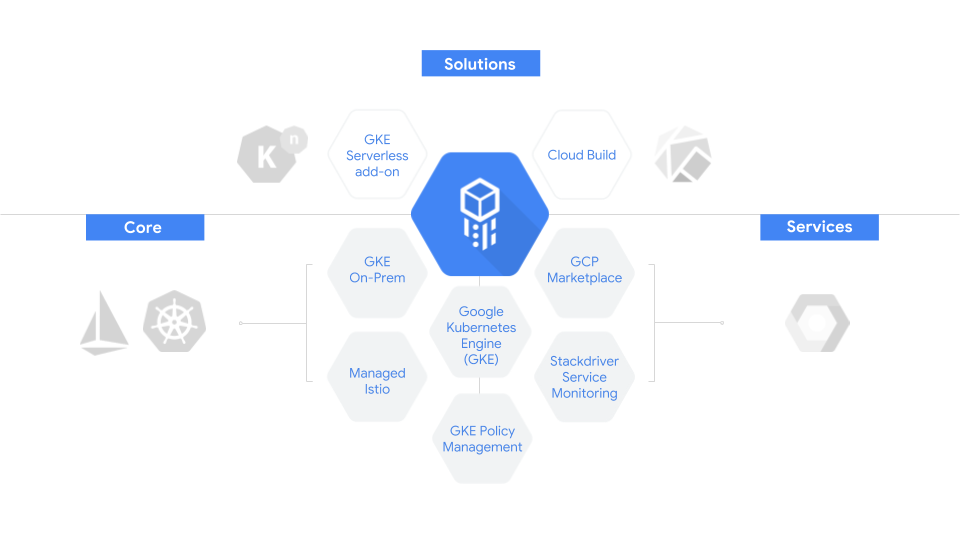
Google Cloud Platform is a comprehensive cloud computing platform globally recognized for its scalable and reliable infrastructure. GCP’s ecosystem includes a wide variety of tools, including Google Cloud Functions, Google App Engine, Kubernetes Engine, and Cloud Firestore – all geared toward helping developers create and manage cloud-based applications.
Why I picked Google Cloud Platform: I selected Google Cloud Platform (GCP) because it excels in providing a highly scalable infrastructure that effortlessly handles varying workloads, ensuring optimal performance and flexibility for building cloud applications.
Google Cloud Platform Standout Features and Integrations:
Standout features that I appreciated in Google Cloud Platform (GCP) were its remarkable scalability and flexibility. Automatic scaling based on demand ensures optimal performance and cost efficiency. I also found that GCP's integration with the Google Cloud AI offered powerful machine learning capabilities for tasks like image recognition, natural language processing, and predictive analytics.
Integrations: Google Cloud Platform (GCP) provides integrations with Cloud Build for continuous integration/continuous deployment (CI/CD), Cloud Functions for serverless function execution, and Cloud Storage for data storage and retrieval, all native to the platform.
Pros and Cons
Pros:
- High-performance computing.
- Extensive machine learning capabilities
- Scalable and flexible
Cons:
- Some services can be costly.
- It can be complex for beginners

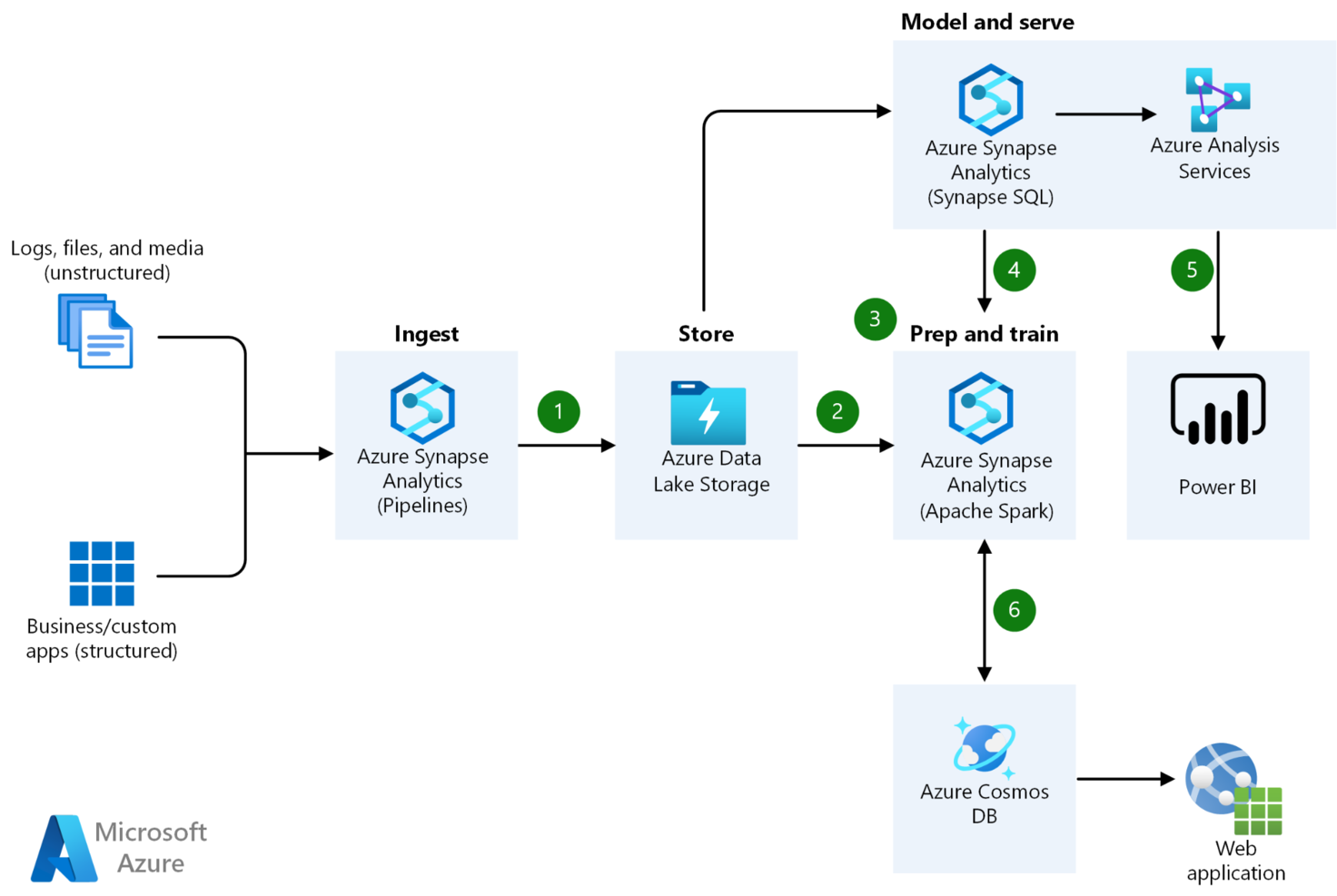
Azure gives you everything you need to create robust and secure applications without worrying about infrastructure management. Azure's offerings include a comprehensive suite of cloud services, advanced AI capabilities, global scalability, robust security measures, and integration options. It's a game-changer in cloud computing, and developers can't get enough of it.
Why I picked Microsoft Azure: I chose Microsoft Azure because it offers a broad selection of pre-designed templates, powerful machine-learning capabilities, and ready-to-use AI models. These features significantly accelerate the development process by providing efficient tools and resources to build and deploy applications with advanced functionalities.
Azure Standout Features and Integrations:
Standout Features include its advanced AI and machine learning capabilities, robust security measures, and compliance certifications. Furthermore, I discovered you could integrate with on-site environments through hybrid cloud capabilities.
Integrations include native support for other Microsoft services such as Office 365, Dynamics 365, and Power Platform. It also includes pre-built integrations with third-party tools like GitHub, Splunk, and Tableau.
Pros and Cons
Pros:
- Hybrid cloud capabilities.
- Extensive compliance certifications
- Robust AI and machine learning capabilities
Cons:
- Some services can be costly.
- It can be complex for beginners


Salesforce is an exceptional cloud-based platform for customer relationship management that provides a wide range of services and tools for sales, marketing, service, and collaboration. Its highly customizable and scalable environment makes it the perfect choice for building customer-centric applications.
Why I picked Salesforce: I chose Salesforce because of its low-code development capabilities for building customer-centric applications, which enables faster application development and empowers non-technical users to contribute to the development process. Additionally, Salesforce's extensive ecosystem and pre-built functionalities provide a robust foundation for creating scalable and customizable solutions tailored to specific business needs.
Salesforce Standout Features and Integrations:
Standout features include its CRM capabilities, offering features for lead management, sales automation, customer support, and more. I like that it also provides a vast marketplace of pre-built cloud apps and integrations, allowing developers to extend the platform's functionality.
Integrations include integration through Zapier with numerous pre-built applications available on the Salesforce AppExchange marketplace, including popular productivity tools, marketing automation platforms, and data integration tools.
Pros and Cons
Pros:
- Low-code development capabilities
- Extensive app marketplace for customization
- Powerful CRM functionality
Cons:
- Limited flexibility outside the CRM domain
- Costs can escalate with additional features and users


Amazon Web Services Cloud9 is a cloud-native integrated development environment (IDE), which provides a terminal to write and test code right in your browser. It is renowned for its impressive collaboration capabilities.
Why I picked Amazon Web Services Cloud9:
I chose Cloud9 because I liked the ease of collaboration via shared cloud environments that allow your team to work together from anywhere. I discovered that multiple developers could work on the same codebase simultaneously, making it an ideal platform for team-based development projects. Online hosting means you don’t have to install anything to get started, and this easy entry is another reason why Amazon Web Services (AWS) is the go-to choice for many developers.
AWS Cloud9 Standout Features and Integrations
Standout features in AWS Cloud9 include support for multiple languages, such as JavaScript, Python, and PHP. Integrated debugger with code-hinting and code completion tools. The centralized ecosystem enables collaboration, and I found it was great for cloud migration, analytics, app development, and deployment.
Integrations offered natively for Amazon Web Services Cloud9 include other AWS services and common external tools like GitHub.
Pros and Cons
Pros:
- Scalability and flexibility
- Highly functional across the globe
- Easy collaboration
Cons:
- Steep learning curve
- No free technical support


If you need to scale your web applications, Heroku is the perfect cloud-based platform. It's easy to use, flexible, and offers a variety of features that make it popular among small businesses and startups. With Heroku, you can quickly deploy, manage, and scale your web applications hassle-free.
Why I picked Heroku: I chose Heroku because of its user-friendly and straightforward deployment process that allows for the easy scalability of web applications. I also appreciated the on-demand flexibility to add or remove components like dynos and data storage.
Heroku Standout Features and Integrations:
Standout Features include its capability to help me deploy and adjust web applications quickly. Heroku also supports various programming languages. Furthermore, it has built-in add-ons for common services, such as databases and caching.
Integrations include native integration with Salesforce for application development and data synchronization while also offering a wide range of pre-built add-ons for services such as databases, monitoring, and logging.
Pros and Cons
Pros:
- Supports a wide range of programming languages.
- Scalable
- Easy to use
Cons:
- It can quickly become costly
- Limited customization options

Best for developing and deploying enterprise-scale applications

SAP Business Technology Platform (SAP BTP) is a cloud-based platform best suited for developing and deploying enterprise applications. It offers services and tools that enable developers to quickly build and deploy complex applications, including analytics, integration, and extensibility capabilities.
Why I picked SAP BTP: I chose this platform because of its comprehensive end-to-end development lifecycle management and integration with SAP enterprise software solutions. Developers can benefit from the robust cloud infrastructure, and industry-specific capabilities to develop applications addressing unique requirements in a particular industry.
SAP BTP Standout Features and Integrations:
Standout features include streamlined development processes, a scalable cloud infrastructure, advanced analytics and machine learning, and access to an app store and marketplace. I found great support for developing applications and monetizing them in a thriving ecosystem.
Integrations include integrations with various SAP applications, including SAP S/4HANA, SAP SuccessFactors, SAP Customer Experience, and more. These integrations are native to SAP BTP.
Pros and Cons
Pros:
- Supports a range of programming languages
- Great extensibility capabilities
- Robust analytics and integrations
Cons:
- Limited flexibility outside the SAP ecosystem
- Some services might be costly

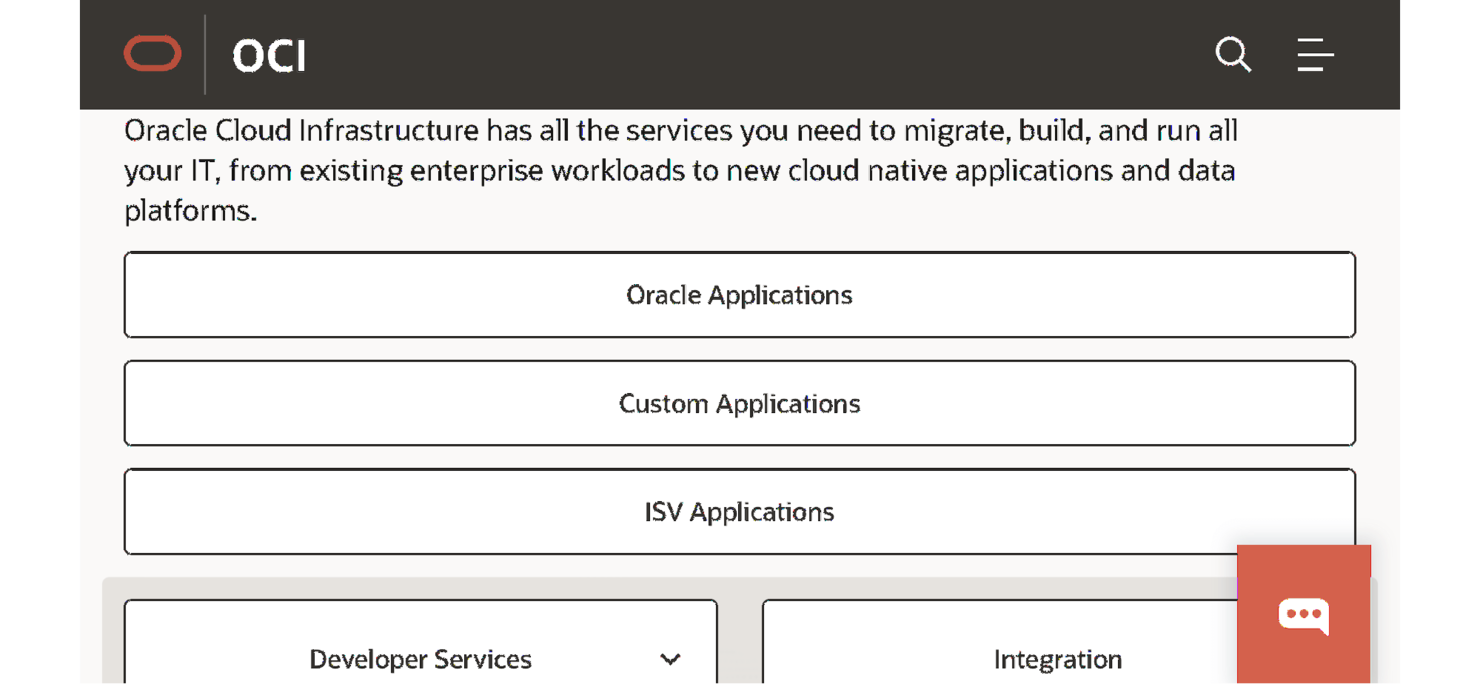
Oracle Cloud is a comprehensive cloud platform that offers a range of services, including infrastructure as a service (IaaS), platform as a service (PaaS), and software as a service (SaaS). It provides a robust and secure environment for building and deploying applications.
Why I picked Oracle: I picked this platform because Oracle offers a comprehensive suite of cloud services from SaaS to PaaS and IaaS. Its easy integration with existing Oracle services makes it the best database management and app deployment choice.
Oracle Cloud Standout Features and Integrations:
Standout features include enterprise-grade scalability and an integrated suite of services, including computing, storage, networking, databases, AI/ML, analytics, and more. I found this offers good support for developers to build end-to-end solutions within a single platform.
Integrations include native integrations with Oracle products and services, including Oracle Database, Oracle Applications, and Oracle Integration Cloud.
Pros and Cons
Pros:
- Integration with Oracle technologies
- Strong security and compliance features
- A comprehensive suite of cloud-based services
Cons:
- High learning curve for developers unfamiliar with Oracle technologies
- It may be costly compared to some other cloud-based solutions
Weitere Cloud-Entwicklungsplattformen
Hier sind einige weitere Cloud-Entwicklungsplattformen, die es zwar nicht auf meine Shortlist geschafft haben, aber dennoch einen Blick wert sind:
- OpenStack
For building and managing private and public clouds
- Cloud Foundry
Scalable, open-source option
- Mendix
For making enterprise-grades apps quickly
- Firebase
For mobile app development
- TensorFlow
For building and deploying AI models
- Platform.sh
For building web apps with a high level of automation
- Virtuozzo
For managing applications in a multi-cloud environment


Auswahlkriterien für Cloud-Entwicklungsplattformen
Bei der Auswahl der besten Cloud-Entwicklungsplattformen für diese Liste habe ich gängige Anforderungen und Schmerzpunkte der Käufer, wie Integrationsprobleme und Bedenken bei der Sicherheit, berücksichtigt. Für eine strukturierte und faire Bewertung habe ich außerdem dieses Bewertungsraster genutzt:
Kernfunktionalität (25 % der Gesamtbewertung)
Um in diese Liste aufgenommen zu werden, musste jede Lösung diese grundlegenden Anwendungsfälle abdecken:
- Zusammenarbeit beim Programmieren
- Versionskontrolle
- Integrierte Entwicklungsumgebung
- Automatisierte Bereitstellung
- Sicherheitsmanagement
Besondere Zusatzfunktionen (25 % der Gesamtbewertung)
Um die Auswahl weiter einzugrenzen, habe ich nach einzigartigen Funktionen gesucht wie:
- KI-basierte Code-Vorschläge
- Unterstützung von Multi-Cloud-Umgebungen
- Echtzeit-Analysen
- Anpassbare Workflows
- Erweiterte Zugriffskontrolle
Benutzerfreundlichkeit (10 % der Gesamtbewertung)
Um einen Eindruck von der Benutzerfreundlichkeit jedes Systems zu bekommen, habe ich Folgendes berücksichtigt:
- Intuitives Oberflächendesign
- Einfache Navigation
- Anpassbare Dashboards
- Barrierefreiheitsfunktionen
- Feedback-Möglichkeiten für Anwender
Onboarding (10 % der Gesamtbewertung)
Um die Onboarding-Erfahrung für jede Plattform zu bewerten, habe ich Folgendes berücksichtigt:
- Verfügbarkeit von Schulungsvideos
- Interaktive Produkttouren
- Onboarding-Vorlagen
- Zugang zu Webinaren
- Unterstützende Chatbots
Kundensupport (10 % der Gesamtbewertung)
Um die Kundendienstleistungen jedes Softwareanbieters zu bewerten, habe ich Folgendes berücksichtigt:
- 24/7 Kundenservice
- Verfügbarkeit von Live-Chat
- Umfassende Wissensdatenbank
- Effektivität der Reaktionszeit
- Persönliche Account Manager
Preis-Leistungs-Verhältnis (10 % der Gesamtbewertung)
Um das Preis-Leistungs-Verhältnis jeder Plattform zu beurteilen, habe ich Folgendes berücksichtigt:
- Wettbewerbsfähige Preise
- Flexible Abonnementpläne
- Verfügbarkeit einer kostenlosen Testversion
- Verhältnis von Funktionen zu Kosten
- Rabatte bei jährlicher Zahlung
Kundenbewertungen (10 % der Gesamtbewertung)
Um ein Gefühl für die allgemeine Kundenzufriedenheit zu bekommen, habe ich bei der Auswertung von Kundenbewertungen Folgendes berücksichtigt:
- Gesamtzufriedenheitsbewertungen
- Häufigkeit von Updates und Verbesserungen
- Feedback zum Kundenservice
- Zuverlässigkeit der Performance
- Engagement innerhalb der Nutzer-Community
Wie wähle ich eine Cloud-Entwicklungsplattform aus?
Es ist leicht, sich in langen Funktionslisten und komplexen Preismodellen zu verlieren. Damit Sie im Auswahlprozess Ihrer eigenen Software fokussiert bleiben, finden Sie hier eine Checkliste mit Faktoren, die Sie im Auge behalten sollten:
| Faktor | Worauf Sie achten sollten |
|---|---|
| Skalierbarkeit | Kann die Plattform mit Ihrem Team wachsen? Suchen Sie nach Lösungen, die wachsende Arbeitslasten bewältigen, ohne dass die Leistung darunter leidet. Berücksichtigen Sie zukünftige Wachstumspläne. |
| Integrationen | Lässt sie sich mit Ihren bestehenden Tools verknüpfen? Prüfen Sie die Kompatibilität mit Ihrem Software-Stack, um isolierte Prozesse zu vermeiden. |
| Anpassungsfähigkeit | Wie stark können Sie die Plattform anpassen? Stellen Sie sicher, dass sie Anpassungen des Workflows für die Arbeitsweise Ihres Teams ermöglicht. |
| Benutzerfreundlichkeit | Ist die Oberfläche intuitiv? Bewerten Sie, wie benutzerfreundlich die Plattform für technisch versierte und nicht-technische Teammitglieder ist. |
| Implementierung und Onboarding | Wie schnell können Sie starten? Bewerten Sie den Zeit- und Ressourcenaufwand für Einrichtung und Schulung. Achten Sie auf Unterstützung in Form von Anleitungen oder Tutorials. |
| Kosten | Passt sie in Ihr Budget? Vergleichen Sie die Preisstrukturen und achten Sie auf versteckte Kosten. Berücksichtigen Sie sowohl kurzfristige als auch langfristige Ausgaben. |
| Sicherheitsmaßnahmen | Sind Ihre Daten und Abläufe geschützt? Bewerten Sie die Sicherheitsvorkehrungen und die Einhaltung von Branchenstandards. |
| Support-Verfügbarkeit | Welche Art von Unterstützung können Sie erwarten? Prüfen Sie, ob es 24/7-Support gibt und welche Kanäle wie Chat, E-Mail oder Telefon zur Verfügung stehen. |
Trends bei Cloud-Entwicklungsplattformen
Im Jahr 2025 entwickelt sich die Landschaft der Cloud-Entwicklungsplattformen rasant weiter und bringt Innovationen bei Effizienz, Skalierbarkeit und Sicherheit in der Entwicklung und Verwaltung von Anwendungen in der Cloud. Durch die Auswertung von Produktupdates, Pressemitteilungen und Release-Logs der führenden DevOps-Plattformen lassen sich wichtige Trends erkennen, die den Wandel der Anforderungen und technischen Fortschritte in der Cloud-Entwicklung widerspiegeln.
Diese Trends verdeutlichen nicht nur die Merkmale, die an Bedeutung gewinnen, sondern auch jene, die mit der Reife von Markt und Technologie an Wichtigkeit verlieren. Hier folgt eine Übersicht der auffälligsten Trends und Features bei Cloud-Entwicklungsplattformen im Jahr 2025:
Neuartige Trends bei Cloud-Entwicklungsplattformen
- Erweiterte DevOps- und Continuous Integration/Continuous Deployment (CI/CD)-Tools: Der Fokus auf DevOps-Praktiken und CI/CD-Pipelines wächst weiter, wobei Plattformen immer ausgefeiltere Werkzeuge für Automatisierung, Testing und Deployment bereitstellen. Das spiegelt das anhaltende Bedürfnis nach schnelleren Entwicklungszyklen und verlässlicheren Methoden für die Softwarebereitstellung wider.
- Erweiterung von Multi-Cloud- und Hybrid-Cloud-Unterstützung: Da Unternehmen Anbieterabhängigkeit vermeiden und ihre Cloud-Strategien optimieren möchten, unterstützen Plattformen zunehmend Multi-Cloud- und Hybrid-Cloud-Umgebungen. Diese Flexibilität ermöglicht es Entwicklern, Anwendungen über verschiedene Cloud-Dienste hinweg bereitzustellen und so verschiedensten Betriebs- und regulatorischen Anforderungen gerecht zu werden.
- Mehr integrierte Sicherheits- und Compliance-Funktionen: Angesichts zunehmender Cyberbedrohungen stärken Cloud-Plattformen ihr Sicherheitsangebot. Funktionen wie automatisierte Compliance-Prüfungen, fortschrittliche Verschlüsselung und Identitätsmanagement werden zum Standard und unterstreichen die zentrale Bedeutung des Schutzes von Daten und Anwendungen in der Cloud.
Funktionen mit rasanter Entwicklung
- Microservices und Containerisierung: Diese Technologien entwickeln sich rasant weiter, wobei Plattformen immer robustere Tools für das Management containerisierter Anwendungen und Microservices-Architekturen bieten. Diese Entwicklung weist auf die zunehmende Komplexität von Cloud-Anwendungen und die Notwendigkeit skalierbarer und handhabbarer Lösungen hin.
Neue und ungewöhnliche Funktionalitäten
- Blockchain-Integration: Einige SaaS-Integrationsplattformen beginnen, Blockchain-as-a-Service (BaaS) anzubieten und stellen Entwicklern Werkzeuge zur Verfügung, um Blockchain-Technologien in ihre Anwendungen zu integrieren. Diese neuartige Funktion reagiert auf den Wunsch nach erhöhter Sicherheit und Transparenz bei Transaktionen und Datenmanagement.
Die wichtigsten und gefragtesten Funktionen
- Umfassendes API-Management: Da Anwendungen immer stärker miteinander vernetzt sind, sind effektive Werkzeuge für das API-Management unerlässlich, um APIs zu erstellen, bereitzustellen und abzusichern. Diese Funktion erleichtert die Integration zwischen Diensten und steigert die Leistungsfähigkeit von Anwendungen.
Weniger wichtige Funktionen
- Traditionelle, VM-basierte Hosting-Lösungen: Mit dem Aufstieg von Containerisierung und serverlosem Computing verlieren traditionelle VM-basierte Lösungen an Beliebtheit. Entwickler bevorzugen die flexibleren, skalierbaren und kosteneffizienteren Hosting-Modelle, die durch diese neuen Technologien ermöglicht werden.
Die aktuellen Trends und Funktionen von Cloud-Entwicklungsplattformen spiegeln den übergeordneten Wandel hin zu agileren, sichereren und effizienteren Cloud-Computing-Lösungen wider. Da Entwickler weiterhin Plattformen suchen, die fortschrittliche Möglichkeiten bei geringem Overhead bieten, werden diese Trends die Zukunft der Cloud-Anwendungsentwicklung mitgestalten.
Was sind Cloud-Entwicklungsplattformen?
Cloud-Entwicklungsplattformen sind Online-Tools, mit denen Sie Apps in der Cloud entwickeln, starten und verwalten können. Entwickler, IT-Teams und Softwareunternehmen nutzen sie, um standortunabhängig zusammenzuarbeiten, die Bereitstellung zu beschleunigen und Updates einfach zu handhaben. Sie sind praktisch, wenn Sie Anwendungen schnell erstellen oder skalieren möchten, ohne sich um komplexe Setups oder Infrastrukturen sorgen zu müssen.
Funktionen
Achten Sie bei der Auswahl einer Cloud-Entwicklungsplattform auf die folgenden Schlüsselfunktionen:
- Code-Zusammenarbeit: Erleichtert Teamarbeit, indem mehrere Entwickler gleichzeitig am selben Code arbeiten können.
- Versionskontrolle: Verfolgt Codeänderungen und erleichtert das Zurücksetzen auf ältere Versionen sowie die Verwaltung der Projektgeschichte.
- Automatisierte Bereitstellung: Automatisiert den Prozess der Bereitstellung von Anwendungen, verringert Fehlerquellen und spart Zeit.
- Integrierte Entwicklungsumgebung: Bietet eine Suite von Tools für das Programmieren, Debuggen und Testen in einer einzigen Oberfläche.
- Sicherheitsmanagement: Stellt den Schutz von Daten und Anwendungen durch robuste Sicherheitsmaßnahmen und die Einhaltung von Standards sicher.
- Anpassbare Workflows: Ermöglicht Teams, ihre Projektprozesse individuell anzupassen und so effizienter zu arbeiten.
- Echtzeit-Analysen: Bietet Einblicke in Performance und Nutzung, damit Teams fundierte Entscheidungen treffen können.
- Multi-Cloud-Unterstützung: Erlaubt die Nutzung mehrerer Cloud-Anbieter und sorgt dadurch für Flexibilität und Redundanz.
- Zugriffsmanagement: Regelt, wer Projekte einsehen und bearbeiten darf – für mehr Sicherheit und bessere Zusammenarbeit.
- Schulungsressourcen: Enthält Anleitungen, Videos und Tutorials, um Nutzer schnell einzuarbeiten.
Vorteile
Die Implementierung einer Cloud-Entwicklungsplattform bietet zahlreiche Vorteile für Ihr Team und Ihr Unternehmen. Hier sind einige, auf die Sie sich freuen können:
- Verbesserte Zusammenarbeit: Echtzeit-Code-Kollaboration ermöglicht es Teammitgliedern, unabhängig vom Standort effizient zusammenzuarbeiten.
- Erhöhte Sicherheit: Integriertes Sicherheitsmanagement stellt sicher, dass Ihre Daten und Anwendungen gut geschützt und konform mit Branchenstandards sind.
- Kosteneffizienz: Multi-Cloud-Support und automatische Bereitstellung helfen, Betriebskosten durch optimierte Ressourcennutzung und Minimierung manueller Aufgaben zu senken.
- Flexibilität: Anpassbare Workflows ermöglichen es Teams, Prozesse individuell an ihre speziellen Anforderungen und Präferenzen anzupassen.
- Steigerung der Produktivität: Integrierte Entwicklungsumgebungen und Versionskontrolle vereinfachen Entwicklungsaufgaben, sodass Teams sich auf Innovation konzentrieren können.
- Skalierbarkeit: Die Fähigkeit der Plattform, mit Ihrem Unternehmen zu wachsen, unterstützt zukünftige Expansionen ohne große Umstellungen.
- Fundierte Entscheidungsfindung: Echtzeit-Analysen bieten wertvolle Einblicke in die Projektleistung und Ressourcenzuteilung.
Kosten & Preise
Die Auswahl einer Cloud-Entwicklungsplattform erfordert ein Verständnis der verschiedenen Preismodelle und -pläne. Die Kosten variieren je nach Funktionen, Teamgröße, Zusatzoptionen und mehr. Die folgende Tabelle fasst gängige Pläne, ihre Durchschnittspreise und typische Funktionen von Lösungen für Cloud-Entwicklungsplattformen zusammen:
Vergleichstabelle: Cloud-Entwicklungsplattform-Pläne
| Plan-Typ | Durchschnittlicher Preis | Gängige Funktionen |
|---|---|---|
| Kostenloser Plan | $0 | Grundlegende Code-Kollaboration, begrenzter Speicherplatz und Community-Support. |
| Persönlicher Plan | $5-$25/user/month | Erweiterte Versionskontrolle, zusätzlicher Speicher und Basis-Analysen. |
| Business-Plan | $30-$100/user/month | Fortschrittliche Sicherheitsfunktionen, individuelle Workflows und priorisierter Support. |
| Enterprise-Plan | $100-$300/user/month | Umfassende Integrationsmöglichkeiten, dedizierter Account-Manager und vollständige Analysen. |
Cloud-Entwicklungsplattform FAQs
Hier sind einige Antworten auf häufig gestellte Fragen zur Cloud-Entwicklungsplattform:
Was ist der Unterschied zwischen Cloud-Entwicklung und traditioneller Entwicklung?
Cloud-Entwicklung stützt sich auf cloudbasierte Ressourcen für den Bau und die Bereitstellung von Anwendungen, während die traditionelle Entwicklung auf lokale Infrastruktur setzt. Mit Cloud-Entwicklung können Sie Ressourcen schnell skalieren und global mit Teammitgliedern zusammenarbeiten. Traditionelle Entwicklung erfordert oft mehr Anfangsinvestitionen in Hardware und Infrastruktur.
Wie wirkt sich Anbieterbindung auf Cloud-Entwicklungsplattformen aus?
Anbieterbindung bei Cloud-Entwicklungsplattformen entsteht, wenn Entwickler von bestimmten Diensten und Technologien eines Anbieters abhängig werden, was einen Plattformwechsel erschwert. Dies betrifft Technologieauswahl, Portabilität, Kosten, Innovation und Datenverwaltung.
Um Anbieterbindung zu reduzieren, sollten Sie auf Standards und Offenheit achten, Interoperabilität und Portabilität berücksichtigen, Multi-Cloud- oder Hybrid-Lösungen in Betracht ziehen und Kontrolle über Datenmanagement und Exportmöglichkeiten sicherstellen.
Welche Sicherheitsaspekte sind bei der Nutzung einer Cloud-Entwicklungsplattform zu beachten?
Bei der Nutzung einer Cloud-Entwicklungsplattform sind verschiedene Sicherheitsaspekte wichtig. Dazu gehören die Implementierung von Datenverschlüsselung, starke Zugriffskontrollen und Authentifizierungsmechanismen. Diese werden manchmal in einem anderen Cloud-Sicherheitsprodukt derselben Suite angeboten.
Sie sollten Backup- und Notfallwiederherstellungsmöglichkeiten prüfen und das Schwachstellenmanagement priorisieren. Auditing und Logging, sichere Entwicklungspraktiken sowie physische Sicherheitsmaßnahmen sind ebenfalls essentiell.
Wie geht es weiter:
Wenn Sie gerade dabei sind, sich über Cloud-Entwicklungsplattformen zu informieren, verbinden Sie sich mit einem SoftwareSelect-Berater für kostenlose Empfehlungen.
Sie füllen ein Formular aus und führen ein kurzes Gespräch, in dem Ihre spezifischen Anforderungen besprochen werden. Anschließend erhalten Sie eine Auswahlliste mit geeigneter Software. Die Unterstützung reicht sogar über den gesamten Kaufprozess hinweg – einschließlich Preisverhandlungen.