

Software supply chain security tools help you detect, monitor, and prevent threats across your code, dependencies, and development process. These tools focus on application security and open source security, identifying known vulnerabilities before they impact production. They often include capabilities like software composition analysis and automated security testing to protect sensitive data and ensure safer software delivery. By integrating into your pipeline, they give teams visibility and control over risks across the entire supply chain. This list gives you a clear, up-to-date look at the top tools trusted by IT teams to secure every link in your software supply chain. You’ll find options for different environments, risk profiles, and workflows—so you can choose the right fit for your team’s needs.
Why Trust Our Software Recommendations
6,700+
Reviews
20
Industry experts
16+
Evaluation factors
14
Years
Our team has been testing and reviewing software since 2012. As tech leaders ourselves, we know how difficult—and important—it is to choose the right software.
For this guide, we evaluated tools using hands-on testing and independent research, scoring tools using our selection criteria.
Our reviews reflect our human editorial judgment, not a sales pitch.
Expert reviewers:
- Paulo Gardini MiguelTech Director
 Tim FisherVP of AI
 Gabriel RosasTech Lead & Software Architect
 Christhian GruhnTech Lead & Platform Architect

Best Software Supply Chain Security Tools Summary
This comparison chart summarizes pricing details for my top software supply chain security tool selections to help you find the best one for your budget and business needs.
| Tool | Best For | Trial Info | Price | ||
|---|---|---|---|---|---|
| 1 | Best for extensive language and framework coverage | Free plan + 14-day free trial + free demo available | From $34/month | Website | |
| 2 | Best for developer-first vulnerability scanning | Free plan + free demo available | From $25/contributing developer/month | Website | |
| 3 | Best for AI-powered code security | Free demo available | Pricing upon request | Website | |
| 4 | Best for end-to-end supply chain security | 14-day free trial + free plan + free demo available | From $135/user/month + consumption (billed annually) | Website | |
| 5 | Best for customizable security scanning rules | Free plan + free demo available | From $30/contributor/month | Website | |
| 6 | Best for policy-based container security | 14-day free trial + free demo available | Pricing upon request | Website | |
| 7 | Best for risk-based code-to-cloud visibility | Free demo available | Pricing upon request | Website | |
| 8 | Best for advanced supply chain threat detection | 14-day free trial + free plan + free demo available | From $500/month | Website | |
| 9 | Best for continuous binary and container scanning | 14-day free trial + free demo available | From $150/month | Website | |
| 10 | Best for CI/CD supply chain protection | Free plan + free demo available | $350/month | Website |


Software Supply Chain Security Tools Reviews
Below are my detailed summaries of the software supply chain security tools that made it onto my shortlist. My reviews offer a detailed look at the features, capabilities, and integrations of each platform to help you find the best one for you.
 Best for extensive language and framework coverage
- Free plan + 14-day free trial + free demo available
- From $34/month
Visit WebsiteCustomer Rating:4.4/5This rating combines scores from multiple user review sites to reflect overall customer sentiment about the product.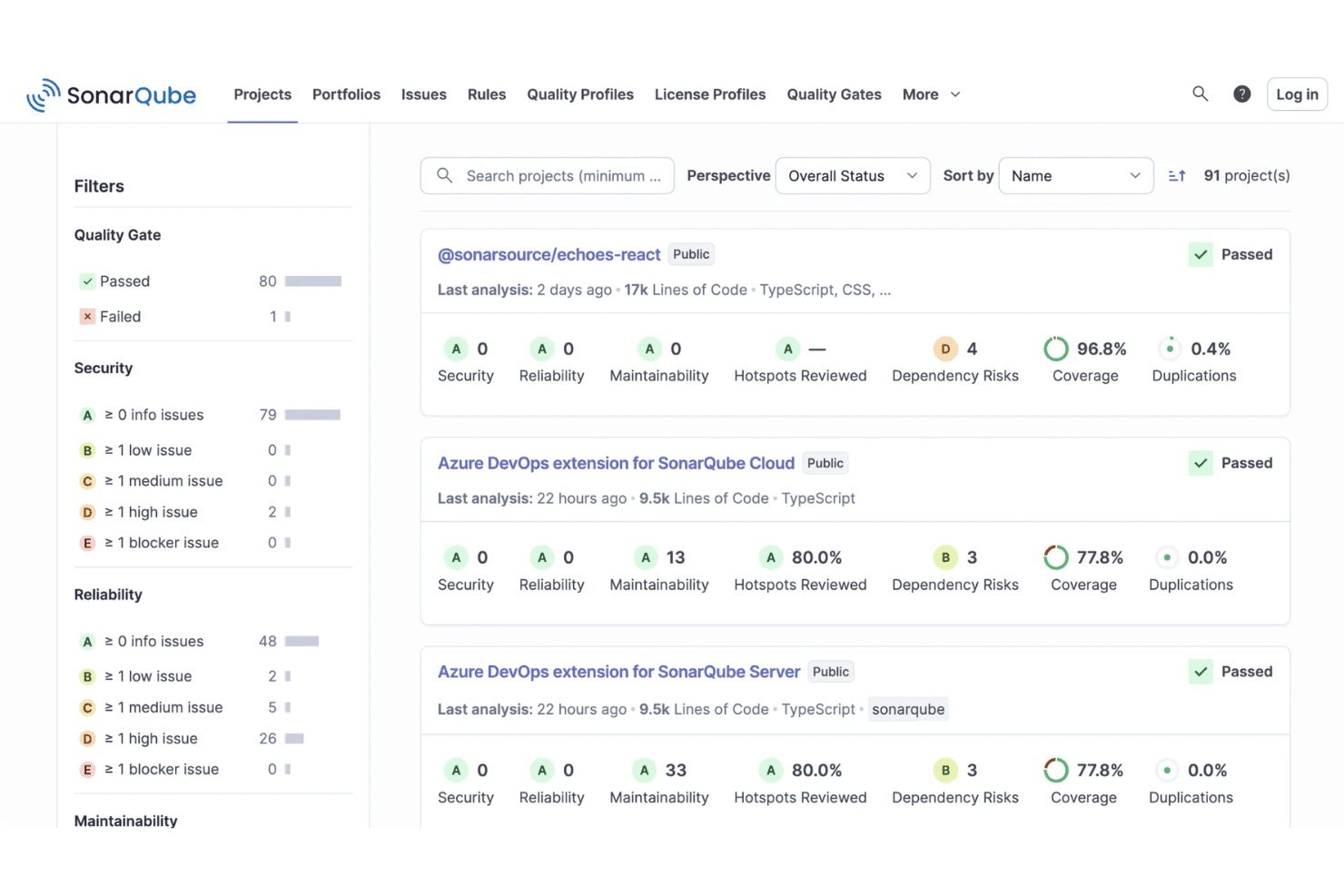
SonarQube displays a project's dashboard with quality gate statuses, security ratings, coverage percentages, and maintainability metrics. SonarQube is a code security and quality analysis platform that combines SAST, SCA, secrets detection, and SBOM generation to scan first-party code, AI-generated code, and open source dependencies.
Who Is SonarQube Best For?
SonarQube is a strong fit for enterprise engineering teams managing large, polyglot codebases across multiple languages, frameworks, and environments.
Why I Picked SonarQube
I picked SonarQube because no other tool on my shortlist covers 40+ languages, frameworks, and IaC technologies in a single platform. I like that it extends to legacy languages like COBOL and ABAP, since supply chain compromises don't discriminate by stack age. Its dependency-aware taint analysis traces data flows from your code into third-party libraries, catching vulnerabilities that a language-siloed scanner would miss.
SonarQube Key Features
- Secrets detection: Finds hard-coded credentials, tokens, and sensitive data before code reaches your repository.
- SBOM generation: Automatically creates and updates a Software Bill of Materials for every project.
- Quality gates: Enforces customized security and quality thresholds in your CI/CD pipeline.
- IDE integration: Delivers instant code insights within popular editors like Visual Studio Code and IntelliJ.
SonarQube Integrations
SonarQube offers native integrations with GitHub, GitLab, Bitbucket, Azure DevOps, Jenkins, Jira, Slack, and supports Visual Studio Code, IntelliJ, and Eclipse. An API is available for custom integrations.
Pros and Cons
Pros:
- Automated SBOM generation and export
- Supports legacy and modern programming languages
- Offers SAST, SCA, and secrets scanning
Cons:
- Secrets scanning sometimes misses encrypted values
- Reports can overwhelm with non-critical findings
Learn more about SonarQube: 2Best for developer-first vulnerability scanning
Snyk
- Free plan + free demo available
- From $25/contributing developer/month
Visit WebsiteCustomer Rating:4.6/5This rating combines scores from multiple user review sites to reflect overall customer sentiment about the product.
Snyk asset dashboard displays repository coverage, technology breakdown, and open source risk metrics. Snyk is a software supply chain security platform that provides automated vulnerability detection, code scanning, license compliance, and remediation tools for developers and security teams.
Who Is Snyk Best For?
Development teams and security engineers at technology-driven companies who want automated vulnerability detection and remediation in their software supply chain.
Why I Picked Snyk
I picked Snyk as one of the best because I rely on its developer-first approach to catch vulnerabilities early in the coding process. I like that it scans for malicious code across open source dependencies, container images, and infrastructure as code, helping secure the broader development ecosystem. My team also benefits from insights like dependency metadata and automated remediation suggestions, which make it easier to fix issues quickly without leaving our workflow.
Snyk Key Features
- License compliance management: Tracks and flags open source license issues in dependencies.
- SBOM generation: Automatically creates software bills of materials for every project.
- Custom security policies: Lets you define and enforce organization-specific security rules.
- Integration with CI/CD pipelines: Connects directly to build tools for continuous monitoring.
Snyk Integrations
Snyk offers native integrations with GitHub, GitLab, Bitbucket, Azure DevOps, Jenkins, Jira, Docker Hub, CircleCI, Travis CI, and Slack. An API is available for custom integrations.
Pros and Cons
Pros:
- License compliance tracking for third-party packages
- Automated remediation for detected vulnerabilities
- Real-time scanning of open source dependencies
Cons:
- Advanced features require higher-tier plans
- Limited reporting options for compliance audits
Learn more about Snyk: Best for AI-powered code security
- Free demo available
- Pricing upon request
Visit WebsiteCustomer Rating:4.2/5This rating combines scores from multiple user review sites to reflect overall customer sentiment about the product.
Checkmarx dashboard shows project risk levels, policy violations, and dependency-based vulnerability tracking. Checkmarx is a software supply chain security platform that provides automated code scanning, open source risk analysis, and AI-driven threat detection for development teams.
Who Is Checkmarx Best For?
Security and DevOps teams at large enterprises who need automated code and supply chain risk analysis.
Why I Picked Checkmarx
I picked Checkmarx as one of the best because I rely on its AI-driven supply chain risk detection to surface threats that traditional scanners miss. My team uses its automated code analysis and open source risk management to catch vulnerabilities early in our pipelines. I like how it correlates findings across code, dependencies, and infrastructure for a unified risk view.
Checkmarx Key Features
- SBOM generation: Automatically creates software bills of materials for all tracked components.
- Policy management: Lets you define and enforce security policies across projects.
- Dependency graph visualization: Maps relationships and risk across your software supply chain.
- Audit logging: Tracks all user actions and policy enforcement for compliance.
Checkmarx Integrations
Checkmarx offers native integration into the Checkmarx One platform and supports developer workflows with integrations into CI/CD pipelines and source code repositories. An API is available for custom integrations.
Pros and Cons
Pros:
- Supports multi-language and multi-framework projects
- Provides detailed SBOM and dependency mapping
- AI-driven detection of supply chain threats
Cons:
- Reporting customization options are restricted
- False positives can require manual review
Learn more about Checkmarx: Best for end-to-end supply chain security
- 14-day free trial + free plan + free demo available
- From $135/user/month + consumption (billed annually)

Sonatype dashboard shows policy violations, component risk scores, and dependency tracking across applications. Sonatype is a software supply chain security platform that helps organizations identify and reduce security risks across the software development lifecycle. It provides automated policy enforcement, continuous monitoring, vulnerability detection, and license compliance for both open source and proprietary components.
Who Is Sonatype Best For?
Enterprise security and DevOps teams who need automated policy enforcement and monitoring across complex software supply chains.
Why I Picked Sonatype
I picked Sonatype as one of the best because I rely on its automated policy enforcement to keep our software supply chain compliant at every stage. I like that it continuously monitors open source and proprietary components for vulnerabilities and license risks. My team uses its granular policy controls to block risky dependencies before they ever reach production.
Sonatype Key Features
- SBOM generation: Automatically creates software bills of materials for every build.
- Continuous dependency scanning: Monitors third-party libraries for new vulnerabilities.
- Role-based access control: Lets you manage user permissions and restrict sensitive actions.
- Audit logging: Tracks all security events and changes within your CI/CD environment.
Sonatype Integrations
Sonatype offers native integrations with Jenkins, GitHub, GitLab, Bitbucket, Azure DevOps, Bamboo, Nexus Repository, Jira, and Slack. An API is available for custom integrations.
Pros and Cons
Pros:
- License risk detection for third-party libraries
- Detailed SBOM generation for every build
- Automated policy enforcement for open source components
Cons:
- Documentation can be sparse for complex setups
- Limited reporting customization for compliance needs
Learn more about Sonatype: Best for customizable security scanning rules
- Free plan + free demo available
- From $30/contributor/month

Semgrep dashboard displays code findings, secrets detection, and supply chain risk trends over time. Semgrep is a software supply chain security tool that combines code scanning, dependency analysis, and policy enforcement to help teams identify and manage risks across their development workflows.
Who Is Semgrep Best For?
Security engineers and DevSecOps teams at technology-driven companies who need automated code and dependency security across their software supply chain.
Why I Picked Semgrep
I picked Semgrep as one of the best because I rely on its automated code and dependency security to catch vulnerabilities before they reach production. I use its supply chain insights to track open source risks and policy violations across our repositories. My team benefits from its actionable findings, which help us prioritize and remediate issues quickly.
Semgrep Key Features
- Custom rule creation: Lets you write and enforce your own security policies.
- CI/CD pipeline integration: Connects directly with build and deployment workflows.
- SBOM generation: Produces software bills of materials for dependency tracking.
- Third-party package monitoring: Continuously scans for risks in open source libraries.
Semgrep Integrations
Semgrep offers native integrations with GitHub, GitLab, Bitbucket, Azure DevOps, Jenkins, and Jira, and provides an API for custom integrations.
Pros and Cons
Pros:
- Community-driven rule library for rapid updates
- Customizable rules for dependency risk detection
- Fast, code-aware supply chain scanning engine
Cons:
- No native support for binary artifact scanning
- Advanced rule writing requires YAML proficiency
Learn more about Semgrep: Best for policy-based container security
- 14-day free trial + free demo available
- Pricing upon request

Anchore system dashboard displays service health, image scans, and policy enforcement status. Anchore is a software supply chain security platform that provides automated container image scanning, policy enforcement, vulnerability detection, and compliance checks for containerized applications.
Who Is Anchore Best For?
Security and DevOps teams at enterprises running containerized workloads in regulated industries.
Why I Picked Anchore
I picked Anchore as one of the best because I rely on its automated container image scanning and policy enforcement to catch vulnerabilities before deployment. My team uses it alongside SCA tools to analyze open source software and enforce rules that support risk mitigation at every stage of our CI/CD pipeline. I also like that it provides detailed reports on vulnerabilities and policy violations, helping us maintain a secure software supply chain.
Anchore Key Features
- SBOM generation: Automatically creates software bills of materials for container images.
- Multi-registry scanning: Scans images across multiple container registries for vulnerabilities.
- Role-based access control: Lets you manage user permissions and access within the platform.
- REST API: Enables integration with external tools and custom workflows.
Anchore Integrations
Anchore offers native integrations with Jenkins, GitHub, GitLab, Azure DevOps, and Jira, and provides an API for custom integrations. It also supports CI/CD workflows through its API.
Pros and Cons
Pros:
- Supports automated remediation workflows
- Open source engine available for customization
- Strong policy-based container image scanning
Cons:
- Scan speeds can be slow on large images
- Limited support for non-container artifacts
Learn more about Anchore: Best for risk-based code-to-cloud visibility
- Free demo available
- Pricing upon request

Apiiro risk dashboard tracks discovered risks, MTTR metrics, SLA status, and security trends. Apiiro is a software supply chain security platform that provides code risk analysis, CI/CD pipeline monitoring, and automated remediation for development and security teams.
Who Is Apiiro Best For?
Security and engineering teams at large enterprises needing end-to-end risk visibility and remediation across their software supply chain.
Why I Picked Apiiro
I picked Apiiro as one of the best because I rely on its end-to-end risk visibility and remediation across the software supply chain. I use its code risk analysis to identify vulnerabilities early, and its automated remediation workflows help my team address issues before they reach production. I also like how Apiiro maps risks to business context, so we can prioritize what matters most.
Apiiro Key Features
- SBOM management: Lets you generate, track, and manage software bills of materials for all components.
- Policy-driven controls: Enable you to enforce custom security and compliance policies across your pipelines.
- Third-party dependency scanning: Identifies vulnerabilities in open-source and third-party libraries.
- Audit trail and reporting: Provides detailed logs and reports for all risk and remediation activities.
Apiiro Integrations
Apiiro offers native integrations with GitHub, GitLab, Bitbucket, Azure DevOps, Jenkins, Jira, and Slack, and provides an API for custom integrations.
Pros and Cons
Pros:
- Supports SBOM management and export
- Context-aware risk prioritization
- Native integration with major CI/CD tools
- Automated remediation for code and dependencies
- End-to-end risk mapping across pipelines
Cons:
- Scan speeds can be slow on large images
- Limited support for non-container artifacts
Learn more about Apiiro: Best for advanced supply chain threat detection
- 14-day free trial + free plan + free demo available
- From $500/month

ReversingLabs analysis panel shows file risk grading, CVE findings, and extracted component details. ReversingLabs is a software supply chain security platform that delivers advanced threat detection, binary analysis, and continuous monitoring for software artifacts and components.
Who Is ReversingLabs Best For?
Security teams at large enterprises and software vendors who need advanced threat detection and analysis for their software supply chain.
Why I Picked ReversingLabs
I picked ReversingLabs as one of the best because I rely on its advanced threat detection and deep binary analysis to uncover hidden risks across third-party components. My team uses its continuous monitoring to strengthen our cybersecurity posture and catch supply chain threats early, similar to high-profile risks seen in incidents like SolarWinds. I also value its detailed file reputation and malware analysis, which give me confidence in securing both open source and proprietary software.
ReversingLabs Key Features
- Automated policy enforcement: Enforces security policies across the software supply chain.
- SBOM management: Generates and manages software bills of materials for all artifacts.
- Tamper detection: Identifies unauthorized changes in software packages.
- Integration with CI/CD pipelines: Connects directly to build and deployment workflows.
ReversingLabs Integrations
Native integrations are not currently listed. The tool supports integrations via API for custom workflows and can connect to CI/CD pipelines.
Pros and Cons
Pros:
- Tamper detection for software packages
- Automated SBOM generation and management
- Deep binary analysis for software artifacts
Cons:
- Limited open source vulnerability scanning features
- High resource usage for deep analysis
Learn more about ReversingLabs: Best for continuous binary and container scanning
- 14-day free trial + free demo available
- From $150/month

JFrog Xray dashboard shows vulnerability counts, severity breakdown, and policy violations for container images. JFrog Xray is a software supply chain security tool that provides deep binary and container scanning, vulnerability detection, and license compliance analysis across your artifacts and dependencies.
Who Is JFrog Xray Best For?
Enterprise DevOps and security teams in technology, finance, and manufacturing who need deep scanning of binaries and containers for vulnerabilities and license compliance.
Why I Picked JFrog Xray
I picked JFrog Xray as one of the best because I rely on its deep recursive scanning for vulnerability management across binaries and containers. I like that it analyzes dependencies in open-source projects all the way down the chain, not just surface-level packages. My team also benefits from features like authentication controls and its integration with JFrog Artifactory to automate continuous scanning within our CI/CD workflows.
JFrog Xray Key Features
- Policy-based security controls: Set and enforce custom security and compliance policies for artifacts.
- SBOM generation: Automatically creates software bills of materials for tracked components.
- REST API access: Integrate scanning and reporting into external systems and workflows.
- License compliance management: Detects and flags open source license issues in dependencies.
JFrog Xray Integrations
JFrog Xray offers native integrations with JFrog Artifactory, Jenkins, Jira, GitHub, GitLab, Bitbucket, Azure DevOps, and Slack. An API is available for custom integrations, and it supports CI/CD workflows through its API.
Pros and Cons
Pros:
- Supports multi-package and multi-language projects
- Real-time vulnerability database updates
- Deep binary and container scanning capabilities
Cons:
- Complex initial setup for hybrid environments
- Limited support for non-JFrog repository types
Learn more about JFrog Xray:

Aikido dashboard shows active pentesting sessions, attack simulations, and real-time threat monitoring across agents. Aikido is a software supply chain security platform that focuses on automated detection and prevention of threats in CI/CD pipelines, offering real-time monitoring and actionable insights for development teams.
Who Is Aikido Best For?
Security and DevOps teams at tech companies who need automated supply chain protection in their CI/CD workflows.
Why I Picked Aikido
I picked Aikido as one of the best because it actively detects and blocks supply chain attacks right in the CI/CD pipeline. I like that it monitors build processes for suspicious activity and enforces security policies automatically. My team is able to get real-time alerts when threats are detected, so we can respond quickly.
Aikido Key Features
- Dependency scanning: Continuously scans open source and third-party dependencies for vulnerabilities.
- SBOM generation: Automatically creates software bills of materials for every build.
- Role-based access control: Lets you manage user permissions and restrict access to sensitive actions.
- Audit logging: Tracks all security events and changes within your CI/CD environment.
Aikido Integrations
Aikido offers native integrations with GitHub, GitLab, Bitbucket, Jira, Slack, Azure DevOps, AWS, Google Cloud, Docker Hub, and Jenkins. An API is available for custom integrations.
Pros and Cons
Pros:
- SBOM generation for every build
- Real-time monitoring of CI/CD pipelines
- Automated detection of supply chain attacks
Cons:
- Advanced features require higher-tier plans
- No on-premises deployment option
Learn more about Aikido:
Other Software Supply Chain Security Tools
Here are some additional software supply chain security tools options that didn’t make it onto my shortlist, but are still worth checking out:
- 11ChainguardBest for secure container image supply chains
- 12CycodeBest for unified code and pipeline security
- 13KusariBest for open-source supply chain integrity
- 14ZscalerBest for zero-trust cloud security
- 15VeracodeBest for application supply chain security
- 16WizBest for cloud supply chain visibility
- 17BitsightBest for third-party cyber risk management
- 18IntegrityNextBest for supply chain compliance automation
- 19Nudge SecurityBest for SaaS supply chain discovery
- 20ExigerBest for AI supply chain risk analysis
- 21Everstream AnalyticsBest for predictive supply chain risk insights
- 22JitBest for DevSecOps security and compliance
- 23ReflectizBest for web supply chain monitoring
How I Evaluate Software Supply Chain Security Tools
I split evaluation into two layers: baseline requirements—SBOM generation, CVE scanning, artifact signing—and the differentiators that show which tools are actually built for supply chain defense.
Core Functionality (Table Stakes For This List)
When I'm selecting tools for my list, I rank each one on a scale from 0 (does not offer the functionality) to 5 (excels in this area) for each core functionality listed below. Then, I calculate the tool's total score into a percentage. Each tool needs to achieve a minimum total score of 65% to be considered for inclusion.
- SBOM Generation & Management: I check whether a tool can auto-generate SBOMs in SPDX and CycloneDX formats per build, since many procurement and compliance workflows now require them at release time.
- Dependency & Vulnerability Scanning: SCA depth matters here—I evaluate language ecosystem coverage, transitive dependency resolution, and whether the tool maps CVEs with context like reachability or EPSS scores.
- Malicious Package Detection: Beyond CVE feeds, I look for proprietary threat intelligence that catches typosquats and dependency confusion attacks across registries like npm, PyPI, and Maven Central.
- CI/CD Pipeline Security: A tool should cover pipeline misconfigurations, exposed secrets, and build integrity checks across platforms like GitHub Actions, GitLab CI, or Jenkins.
- Artifact Integrity & Provenance: I evaluate whether the tool supports signing workflows (Cosign, Sigstore) and generates provenance attestations aligned with SLSA framework levels.
- Policy Enforcement & Compliance: Customizable policy-as-code with CI/CD gating is what I look for—teams need to block builds that violate license or vulnerability thresholds before anything ships.
Once I have a list of tools that meet the criteria, I consider what sets each platform apart.
Differentiating Factors (What Sets Vendors Apart)
Here's how I compare and contrast different vendors:
Standout Features
Reachability analysis is a major differentiator—I look for tools that can tell you whether a flagged CVE actually touches an execution path in your code, not just that it exists in your dependency tree. A curated package firewall adds another layer by letting teams proxy public registries and block risky packages before developers ever pull them. I also evaluate developer-native remediation, like auto-generated fix PRs, since security findings that sit in dashboards instead of reaching devs tend to go unresolved.
Beyond Features
Integration with the DevSecOps stack is one of the first things I evaluate—tools need native CI/CD plugins for platforms like GitHub Actions or GitLab CI, plus connections to artifact registries and ticketing systems like Jira. Compliance alignment matters just as much, especially for teams shipping to regulated buyers who expect NIST SSDF or SLSA attestation documentation. I also consider threat intelligence depth, checking whether a vendor maintains an in-house research team that publishes original findings on emerging package-level threats.
How to Choose Software Supply Chain Security Tools
It’s easy to get bogged down in long feature lists and complex pricing structures. To help you stay focused as you work through your unique software selection process, here’s a checklist of factors to keep in mind:
| Factor | What to Consider |
|---|---|
| FactorScalability | What to ConsiderWill the tool handle your current and projected codebase size, user count, and number of integrations as your organization grows? |
| FactorIntegrations | What to ConsiderDoes it natively connect with your CI/CD, code repositories, ticketing, and alerting systems? Are APIs available for custom workflows? |
| FactorCustomizability | What to ConsiderCan you tailor policies, alerts, and reporting to your organization’s risk profile and compliance needs? |
| FactorEase of use | What to ConsiderIs the interface intuitive for both security and development teams? Will it require extensive training or ongoing support to use daily? |
| FactorImplementation and onboarding | What to ConsiderHow long does setup take, and what resources are required? Are there migration tools, onboarding guides, or dedicated support for rollout? |
| FactorCost | What to ConsiderAre pricing tiers transparent and predictable? Does the cost scale with usage, seats, or features? Watch for hidden fees or add-ons. |
| FactorSecurity safeguards | What to ConsiderWhat certifications, encryption standards, and data handling practices does the vendor follow? Are there audit logs and access controls? |
| FactorCompliance requirements | What to ConsiderDoes the tool support your industry’s regulatory standards (e.g., SOC 2, ISO 27001, GDPR)? Can it generate compliance-ready reports? |
What Are Software Supply Chain Security Tools?
Software supply chain security tools are specialized platforms that help organizations identify, monitor, and mitigate risks in the components, dependencies, and processes used to build and deliver software. These tools scan code, third-party libraries, and infrastructure for vulnerabilities, track software bills of materials, and support compliance with security standards throughout the development lifecycle.
Features of Software Supply Chain Security Tools
When selecting software supply chain security tools, keep an eye out for the following key features:
- Vulnerability scanning: Scans source code, dependencies, and containers for known and emerging security vulnerabilities throughout the development lifecycle.
- SBOM generation: Automatically creates a software bill of materials to inventory all components and dependencies in your applications.
- Dependency tracking: Monitors third-party and open source libraries for updates, risks, and license compliance issues.
- Policy enforcement: Lets you define and automate security policies to block risky code or components from entering your environment.
- Risk prioritization: Uses context and severity to rank vulnerabilities, helping teams focus on the most urgent threats first.
- CI/CD integration: Connects directly with your build and deployment pipelines to automate security checks and remediation steps.
- Audit logging: Records user actions, policy changes, and security events for compliance and forensic analysis.
- Alerting and reporting: Notifies teams of critical issues and generates detailed reports for stakeholders and auditors.
- Remediation guidance: Provides actionable steps or automated fixes to resolve identified vulnerabilities and misconfigurations.
Benefits of Software Supply Chain Security Tools
Implementing software supply chain security tools provides several benefits for your team and your business. Here are a few you can look forward to:
- Reduced vulnerability risk: Automated scanning and monitoring help you catch and address security issues before they impact your software or users.
- Improved compliance: Built-in policy enforcement and audit logging make it easier to meet regulatory requirements and pass security audits.
- Faster incident response: Real-time alerts and risk prioritization let your team quickly identify and remediate the most urgent threats.
- Greater visibility: SBOM generation and dependency tracking give you a clear view of all components in your software supply chain.
- Simplified workflows: CI/CD integrations and automated remediation steps reduce manual work and keep security checks in sync with development.
- Better decision-making: Detailed reporting and risk scoring help stakeholders understand security posture and allocate resources where they’re needed most.
- Improved collaboration: Centralized dashboards and alerting keep security, development, and compliance teams aligned on shared risks and actions.
Costs and Pricing of Software Supply Chain Security Tools
Selecting software supply chain security tools requires an understanding of the various pricing models and plans available. Costs vary based on features, team size, add-ons, and more. The table below summarizes common plans, their average prices, and typical features included in software supply chain security tools solutions:
Plan Comparison Table for Software Supply Chain Security Tools
| Plan Type | Average Price | Common Features |
|---|---|---|
| Plan TypeFree Plan | Average Price$0 | Common FeaturesBasic vulnerability scanning, limited SBOM generation, and community support. |
| Plan TypePersonal Plan | Average Price$10-$30/user/month | Common FeaturesAdvanced scanning, basic policy enforcement, limited integrations, and email support. |
| Plan TypeBusiness Plan | Average Price$40-$80/user/month | Common FeaturesFull CI/CD integration, risk prioritization, audit logging, reporting, and standard customer support. |
| Plan TypeEnterprise Plan | Average Price$100-$200/user/month | Common FeaturesCustom policy management, advanced compliance tools, dedicated onboarding, premium support, and SLAs. |
Software Supply Chain Security Tools FAQs
Here are some answers to common questions about software supply chain security tools:
How do software supply chain security tools help prevent supply chain attacks?
These tools scan code, dependencies, and build processes for vulnerabilities and suspicious changes. By monitoring for known threats and enforcing security policies, they help you catch risks early and reduce the chance of compromised components making it into production.
Can software supply chain security tools integrate with my existing CI/CD pipeline?
Yes, most tools offer integrations with popular CI/CD platforms like Jenkins, GitHub Actions, and GitLab CI. This lets you automate security checks as part of your build and deployment workflows, so vulnerabilities are flagged before code is released.
What is a software bill of materials (SBOM) and why does it matter?
An SBOM is a detailed inventory of all components and dependencies in your software. It’s important because it gives you visibility into what’s in your codebase, helps with vulnerability tracking, and is increasingly required for regulatory compliance.
Do these tools support open source and proprietary code?
Yes, most solutions can scan both open source and proprietary codebases. They typically support a wide range of programming languages and package managers, so you can monitor all your software assets for risks.
How often should I run scans with these tools?
You should run scans continuously or at every code commit if possible. Frequent scanning ensures new vulnerabilities are caught quickly and helps maintain a strong security posture as your codebase evolves.