

The best MDM software helps you enforce security policies, track and control devices, and protect sensitive data across company-owned and BYOD endpoints. It’s built to handle common challenges like remote device wipe after loss or theft, inconsistent policy enforcement across operating systems, and time-consuming manual setup for new devices.
If you’ve struggled with shadow IT, gaps in compliance reporting, or unreliable remote access control, you’re not alone. Many IT teams adopt MDM solutions after realizing their existing approach can’t scale or protect against growing threats.
I’ve tested MDM platforms across enterprise and mid-market environments, working with teams rolling out device fleets in healthcare, finance, and education. This guide breaks down the tools that actually simplify enrollment, reduce support tickets, and give admins clear visibility into their mobile ecosystem.
Why Trust Our Software Recommendations
6,700+
Reviews
20
Industry experts
16+
Evaluation factors
14
Years
Our team has been testing and reviewing software since 2012. As tech leaders ourselves, we know how difficult—and important—it is to choose the right software.
For this guide, we evaluated tools using hands-on testing and independent research, scoring tools using our selection criteria.
Our reviews reflect our human editorial judgment, not a sales pitch.
Expert reviewers:
- Paulo Gardini MiguelTech Director
 Tim FisherVP of AI
 Gabriel RosasTech Lead & Software Architect
 Christhian GruhnTech Lead & Platform Architect

MDM Software Comparison Table
This comparison table summarizes pricing details for my top MDM software selections:
| Tool | Best For | Trial Info | Price | ||
|---|---|---|---|---|---|
| 1 | Best for onboarding and offboarding | 14-day free trial | From $8/user/month (billed annually) | Website | |
| 2 | Best for endpoint management and patch compliance | 14-day free trial + free demo available | Pricing upon request | Website | |
| 3 | Best for managing devices for global remote teams | Free demo available | from $5/person/month | Website | |
| 4 | Best for multi-OS device management | 14-day free trial | From $2.00/device/month (billed annually) | Website | |
| 5 | Best for remote data wiping | 14-day free trial + free demo available | From $1.30/device/month (billed annually) | Website | |
| 6 | Best for edge use cases | 30-day free trial | From $3.99/device/month (billed annually) | Website | |
| 7 | Best for mixed-fleet and rugged device management | Free demo available | Pricing upon request | Website | |
| 8 | Best for on-premises | 30-day free trial + free demo available | From $1.28/device/month (billed annually) | Website | |
| 9 | Best for zero-trust and AI-driven fleet insights | 30-day free trial | From $3.00/device/month | Website | |
| 10 | Best with kiosk capabilities | 30-day free trial | From $24/device/year (billed annually) | Website |


Best MDM Software Reviews
Here are my top 20 MDM software recommendations, including their features, benefits, and starting price points.
 Best for onboarding and offboarding
- 14-day free trial
- From $8/user/month (billed annually)
Visit WebsiteCustomer Rating:4.8/5
View all of an employee’s physical hardware with Rippling’s MDM portal. Rippling IT gives IT teams and HR professionals a unified platform to manage devices, apps, and security policies across their workforce, helping businesses automate device provisioning, enforce compliance, and simplify IT operations.
Who Is Rippling IT Best For?
Rippling IT is a strong fit for mid-sized to enterprise businesses that need IT and HR workflows connected in a single platform.
Why I Picked Rippling IT
I picked Rippling IT as one of the best because its onboarding and offboarding automation is directly tied to device management in a way most MDM tools can't match. When a new hire joins, Rippling IT can automatically enroll their device, push the right apps, and set access permissions based on their role—all triggered from a single workflow. Offboarding works in reverse: when someone leaves, their device can be remotely locked or wiped and app access revoked simultaneously. This coordinated automation between HR events and IT actions makes it stand out for lifecycle management.
Rippling IT Key Features
- Custom security policies: Build and enforce security rules based on hundreds of user and device attributes, like department, OS, and role, that update automatically across your org.
- SentinelOne integration: Automatically deploy SentinelOne endpoint protection to all managed devices directly from within Rippling, without separate configuration.
- Device configuration settings: Apply custom settings—including WiFi profiles, firewall rules, and login screens—to devices based on employee attributes like location and department.
- OS update enforcement: Track and enforce macOS and Windows operating system updates across your entire fleet from a single dashboard.
Rippling IT Integrations
Integrations include Microsoft 365, Google Workspace, Slack, AWS, Jira, GitHub, PayPal, 1Password, Yubikey, and Carta.
Pros and Cons
Pros:
- Can integrate HR and IT features
- Create common workflows to deploy easily
- Reduces on and offboarding friction
Cons:
- Initial setup can be time-consuming
- Does more than just MDM, which may be more than you need
Learn more about Rippling IT: Best for endpoint management and patch compliance
- 14-day free trial + free demo available
- Pricing upon request
Visit WebsiteCustomer Rating:4.7/5
NinjaOne allows companies to control, patch, and manage employee devices remotely. NinjaOne gives IT teams a unified platform to manage, monitor, and secure endpoints across distributed environments, helping businesses maintain control over devices and automate routine management tasks.
Who Is NinjaOne Best For?
NinjaOne is a strong fit for IT teams and managed service providers that need centralized control over large, distributed device environments.
Why I Picked NinjaOne
NinjaOne earns its spot on my shortlist because of how well it handles endpoint management and patch compliance at scale. I particularly like the Patch Intelligence AI feature, which analyzes telemetry and deployment signals to automatically flag unstable updates and pause risky patches before they cause disruption. My team uses autonomous patch management to cover Windows, macOS, and Linux endpoints and 200+ third-party applications from a single console. Additionally, condition-based automated remediation means we're not manually chasing down non-compliant devices—NinjaOne detects and corrects endpoint issues without technician intervention.
NinjaOne Key Features
- Hardware and software inventory: Gives you a real-time view of every device in your environment, including hardware specs, installed software, warranty status, and performance data.
- Software and OS deployment: Deploys Windows software, updates, and configurations across endpoints using repeatable, automation-driven workflows.
- Secure remote access: Lets technicians access devices remotely to diagnose and resolve issues in real time from a centralized console.
- Flexible device reporting: Lets you customize device views with configurable data columns and filters to surface the endpoint details that matter most to your team.
NinjaOne Integrations
Integrations include ServiceNow, CrowdStrike, SentinelOne, Microsoft Entra, Okta, PagerDuty, Bitdefender, ConnectWise Manage, IT Glue, and Slack.
Pros and Cons
Pros:
- Integrated patch management
- Detailed user role management
- Remote scripting in multiple languages
Cons:
- Limited customization in alerting mechanisms
- Steep learning curve
Learn more about NinjaOne: Best for managing devices for global remote teams
- Free demo available
- from $5/person/month
Visit WebsiteCustomer Rating:4.9/5
Deel's asset tracker provides an overview of all leased and owned devices used by employees around the world. Deel IT serves IT teams and businesses managing distributed workforces, offering centralized device management, provisioning, and security controls to support remote and global operations.
Who Is Deel IT Best For?
Deel IT is a strong fit for companies with international or remote-first teams that need to manage, provision, and secure devices across multiple countries.
Why I Picked Deel IT
Deel IT earns its spot on my shortlist because it's one of the few MDM platforms that genuinely handles global device operations end-to-end. I like that it covers the full device lifecycle—procurement, configuration, shipping, and recovery—across 130+ countries without relying on fragmented regional vendors. In practice, that means my team can ship a pre-configured, policy-compliant laptop to a new hire in Brazil or Germany without touching a separate logistics tool. The zero-touch enrollment through Apple Business Manager and Windows Autopilot is a real differentiator, since devices arrive already enrolled and configured before the employee even opens the box.
Deel IT Key Features
- Security policy configuration: Set and enforce device security baselines—including password rules, encryption, VPN requirements, and app allowlists—across user groups or device types from a single dashboard.
- Remote wipe and lock: Remotely lock, wipe, or send messages to lost or compromised devices, with selective wipe for BYOD devices that removes only corporate data.
- Compliance monitoring and alerts: Track compliance status across your entire fleet in real time, with color-coded indicators and instant alerts when devices fall out of policy.
- Geofencing and location tracking: Set location-based access controls that automatically lock devices or revoke permissions when they leave designated secure areas or approved regions.
Deel IT Integrations
Integrations include FaceUp, Snowflake API, DefensX, Microsoft Finance, Kintsugi, ReFresh OS, Revo.ai, Keeper, Human Interest, and Everyminute.
Pros and Cons
Pros:
- Grants comprehensive visibility over IT assets worldwide
- Ensures device security with MDM and endpoint protection
- Provides customizable device configurations
Cons:
- Doesn't offer features beyond device management, like network and server management
- May not be ideal for teams with very complex IT asset needs
Learn more about Deel IT: Best for multi-OS device management
- 14-day free trial
- From $2.00/device/month (billed annually)
Visit WebsiteCustomer Rating:4.7/5
Scalefusion allows you to cast and control enterprise devices, whether company or employee-owned. Scalefusion gives IT teams in businesses of all sizes a way to manage, secure, and monitor company devices across different platforms, helping reduce manual oversight and keep endpoints compliant with organizational policies.
Who Is Scalefusion Best For?
Scalefusion is a good fit for IT teams managing mixed-device environments across Android, iOS, Windows, and macOS from a single console.
Why I Picked Scalefusion
Scalefusion earns a spot on my shortlist because it delivers multi-OS management from a single dashboard—Windows, macOS, iOS, Android, Linux, and ChromeOS all in one place. I like that you can push OS updates, enforce security policies, and deploy apps across different platforms without switching tools or maintaining separate consoles. The AirThink AI feature lets you generate and validate PowerShell and Shell scripts from the dashboard, saving time when scripting across mixed environments. Additionally, the Maker Checker workflow adds an approval layer before critical changes are pushed to devices, a useful safeguard for managing a large, diverse fleet.
Scalefusion Key Features
- Remote cast and control: View and control enrolled devices in real time to troubleshoot issues without needing physical access.
- Kiosk mode: Lock devices to a single app or a curated set of apps, useful for dedicated-use devices like POS terminals or field tablets.
- Location tracking and geofencing: Monitor device locations and set geographic boundaries that trigger automated policy actions when crossed.
- Content management: Push documents, media, and web content to devices silently, without requiring user interaction.
Scalefusion Integrations
Integrations include Azure Active Directory, Google Workspace, Okta, PingOne, Jira, Freshservice, Checkpoint Mobile Threat Defense, B2M Elemez, Intel vPro, and Apple Business Manager.
Pros and Cons
Pros:
- Effective device management capabilities
- Complimentary round-the-clock support
- Combines UEM, ZTA & Endpoint Security in one platform
Cons:
- Per app VPN is not available
- Annual billing only
Learn more about Scalefusion: 5Best for remote data wiping
Prey
- 14-day free trial + free demo available
- From $1.30/device/month (billed annually)
Visit WebsiteCustomer Rating:4.7/5
Prey's device tracking offers detailed location data, device information, and reporting features. Prey is a security-focused MDM platform for IT teams and organizations that track, manage, and secure laptops, phones, and tablets across multiple locations.
Who Is Prey Best For?
Prey is a good fit for IT teams in education, SMBs, and field-based organizations managing distributed fleets of laptops and mobile devices.
Why I Picked Prey
I picked Prey as one of the best because its remote data wiping capabilities are genuinely useful when a device goes missing in the field. I like that you can trigger a full wipe or selectively delete specific files and folders remotely, which gives my team more control over what gets erased depending on the situation. Prey also lets you lock a device and display a custom message before wiping, so there's a chance to recover it first. The wipe actions are logged, which helps with incident documentation and compliance reporting.
Prey Key Features
- Real-time location tracking: Monitor the live location of any device in your fleet using active tracking and Wi-Fi triangulation.
- Geofence actions: Set geographic boundaries and trigger automatic security responses when a device enters or leaves a defined zone.
- Fleet status dashboard: View the status of all managed devices from a single panel, with labels and search to organize large fleets.
- Mass actions: Apply security or management actions across multiple devices at once, rather than handling each device individually.
Prey Integrations
Integrations include Okta, Shibboleth, Keycloak, OpenAM, SimpleSAMLphp, Apache Syncope, WordPress, Drupal, NetIQ Access Manager, and Gluu Server.
Pros and Cons
Pros:
- GPS tracking feature
- Remote functionalities like lock, messaging, and alarm
- Compatibility across multiple platforms
Cons:
- Update process can be cumbersome
- Variable geolocation accuracy
Learn more about Prey: Best for edge use cases
- 30-day free trial
- From $3.99/device/month (billed annually)
Visit WebsiteCustomer Rating:4.8/5
View all of your devices in SureMDM’s portal. SureMDM is a mobile device management platform designed for IT teams in industries like logistics, manufacturing, and field services who need to manage, secure, and monitor a wide range of devices across multiple operating systems and environments.
Who Is SureMDM Best For?
SureMDM is a strong fit for IT teams in industries like retail, healthcare, and transportation that need to manage large fleets of mixed-OS devices across distributed or remote locations.
Why I Picked SureMDM
I picked SureMDM as one of the best because of how far it goes to support devices that most MDM platforms simply weren't built for. Where other tools focus on smartphones and laptops, SureMDM extends management to IoT endpoints, rugged handhelds, Wear OS devices, VR headsets, and Linux machines—all from the same console.
I particularly like the Things Management Technology (TMT) feature, which lets my team enroll and manage peripherals like RFID readers, barcode scanners, and GPS trackers the same way you'd manage a mobile device. That means I can push firmware updates, monitor battery and network stats, and enforce compliance policies on edge devices that would otherwise be invisible to IT. The OEMConfig support for rugged device manufacturers like Zebra and Datalogic is another thing I find genuinely useful—it lets me configure hardware-specific settings directly from the SureMDM console without needing separate OEM tools.
SureMDM Key Features
- Kiosk lockdown: Lock devices down to a single app or a restricted set of apps, preventing end users from accessing unauthorized settings or content.
- BYOD management: Enroll employee-owned devices using Android Work Profiles or Apple User Enrollment, keeping personal and corporate data in separate containers.
- Remote troubleshooting: Access and control devices remotely to diagnose and resolve issues without requiring physical access or on-site visits.
- Location tracking: Monitor device locations in real time and set geofence-based policies that automatically restrict or adjust device behavior based on where a device is.
SureMDM Integrations
Integrations include Zebra, Datalogic, Honeywell, Samsung Knox, Google Zero-Touch Enrollment, Apple Business Manager, Microsoft Azure Active Directory, VMware Workspace ONE, SOTI, and an API is available for custom integrations.
Pros and Cons
Pros:
- Simple user interface
- Strong history of customer support
- Flexible and customizable
Cons:
- Can be slow to install on users’ devices
- It can be overwhelming to configure
Learn more about SureMDM: Best for mixed-fleet and rugged device management
- Free demo available
- Pricing upon request
Visit WebsiteCustomer Rating:4.4/5
SOTI MobiControl gives IT teams in healthcare, retail, logistics, and field services a way to manage, secure, and support a wide range of mobile devices and endpoints from a single platform.
Who Is SOTI MobiControl Best For?
SOTI MobiControl is a strong fit for mid-to-large enterprises in asset-heavy industries like logistics, healthcare, and retail that need centralized control over large fleets of mixed-OS devices.
Why I Picked SOTI MobiControl
SOTI MobiControl earns its spot on my shortlist because it genuinely covers the full OS spectrum—Android, iOS, macOS, Windows, and Linux—from a single management console. I like that it goes beyond basic MDM by handling IoT endpoints and Linux-based devices, which most competitors don't touch. The SOTI XTreme Technology feature is something I find particularly useful in distributed environments: it speeds up app and data delivery by up to 10x, which matters when you're pushing large OS updates to hundreds of devices across warehouses or retail locations with limited bandwidth.
SOTI MobiControl Key Features
- Geofencing and location-based policy enforcement: Create custom-shaped geofences to track device locations and automatically deploy or restrict apps, content, and policies based on device position.
- Shared device configuration: Let multiple employees share a single device across shifts, with personalized app and data access granted through individual login credentials or SSO.
- Express enrollment and provisioning: Enroll and configure new devices in the field using methods like Android Zero-Touch Enrollment, Apple DEP, Samsung KME, Windows Autopilot, and Zebra StageNow.
- System health dashboard: Monitor real-time and 48-hour historical data on queue lengths, CPU usage, DB performance, and server health from a single console view.
SOTI MobiControl Integrations
Integrations include Microsoft Entra ID, Zebra, Samsung, Apple DEP, Android Zero-Touch Enrollment, Windows Autopilot, Imprivata, SOTI Hub, SOTI Surf, and SOTI Identity.
Pros and Cons
Pros:
- Effective remote troubleshooting capabilities
- Strong support for a wide range of devices and operating systems
- User-friendly interface that simplifies device management
Cons:
- Some users find the setup process complex
- Occasional performance issues reported by users
Learn more about SOTI MobiControl: Best for on-premises
- 30-day free trial + free demo available
- From $1.28/device/month (billed annually)

Track your devices with ManageEngine’s on-premises portal, seen here. ManageEngine Mobile Device Manager Plus stands out for organizations that need a flexible on-premises MDM solution. It’s a strong choice for IT teams in regulated industries or businesses with strict data residency requirements. With support for multi-OS environments and granular device control, it helps you manage security and compliance across diverse fleets.
Who Is ManageEngine Mobile Device Manager Plus Best For?
IT departments in mid-sized to enterprise organizations across regulated industries. It fits companies that require on-premises deployment options to meet internal security or compliance requirements.
Why I Picked ManageEngine Mobile Device Manager Plus
For organizations that require on-premises control, ManageEngine Mobile Device Manager Plus offers deployment flexibility that cloud-only MDMs can’t match. I picked it because it lets IT teams host and manage their own MDM infrastructure, which is essential for businesses with strict compliance or data sovereignty needs. The platform supports detailed device policy enforcement and role-based access controls, giving admins the ability to tailor security and management to their environment. This makes it a strong fit for sectors like government, healthcare, and finance, where on-premises solutions are often a requirement.
ManageEngine Mobile Device Manager Plus Key Features
Some other features that make ManageEngine Mobile Device Manager Plus appealing for IT teams include:
- Multi-OS support: Manage and secure devices running Android, iOS, Windows, macOS, and Chrome OS.
- App distribution and management: Deploy, update, and remove apps across devices from a central console.
- Remote troubleshooting tools: Access devices remotely to diagnose and resolve issues without user intervention.
- Geofencing and location tracking: Set location-based policies and monitor device locations in real time.
ManageEngine Mobile Device Manager Plus Integrations
Integrations are available natively with platforms like ServiceNow, Zendesk, and Zoho CRM. It also offers custom API integrations.
Pros and Cons
Pros:
- Administrator portal that is simple to use
- Customer support focused
- Comprehensive features for a variety of use-cases
Cons:
- Limited customization features
- Pricing is an annual commitment
Learn more about ManageEngine Mobile Device Manager Plus: Best for zero-trust and AI-driven fleet insights
- 30-day free trial
- From $3.00/device/month
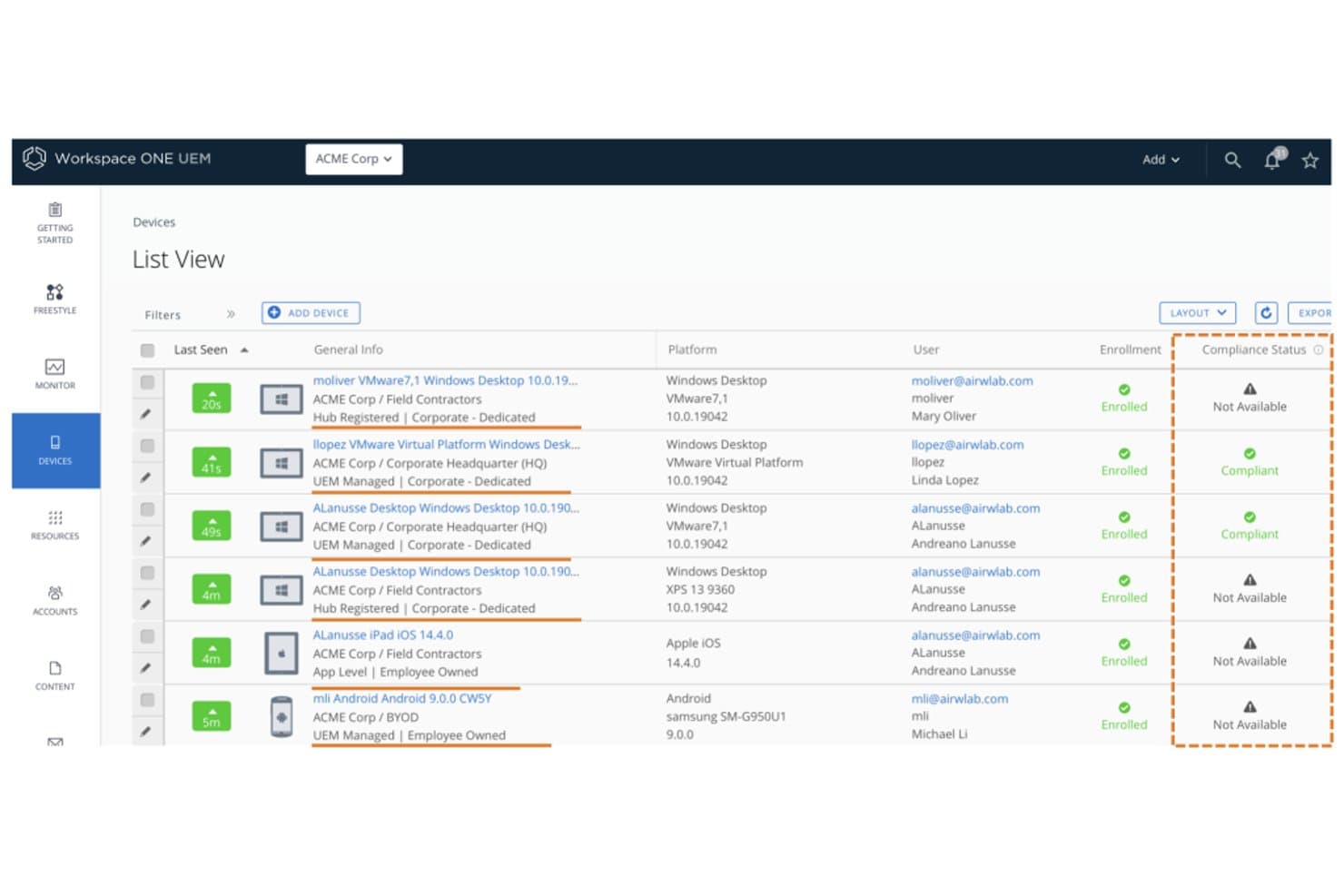
Workspace ONE UEM tracks device compliance status across enrolled endpoints. Workspace ONE UEM is an enterprise unified endpoint management platform by Omnissa that covers mobile, desktop, rugged, and IoT device management across iOS, Android, Windows, macOS, ChromeOS, and Linux from a single admin console.
Who Is Workspace ONE UEM Best For?
Workspace ONE UEM is a strong fit for large enterprises managing diverse, mixed-OS device fleets where zero-trust security and regulatory compliance are non-negotiable.
Why I Picked Workspace ONE UEM
Workspace ONE UEM earns its spot on my shortlist because of how it combines zero-trust enforcement with AI-driven fleet intelligence in a way few platforms match. I'm particularly impressed by Omnissa Intelligence, which uses machine learning to detect anomalies, predict device issues, and trigger autonomous remediation before users are ever affected. Its built-in Mobile Threat Defense also stands out: it identifies rogue Wi-Fi, phishing attempts, and risky apps on iOS, Android, and ChromeOS, then feeds directly into the compliance engine to automate responses.
Workspace ONE UEM Key Features
- Zero-touch enrollment: Automates device provisioning across iOS, Android, Windows, and macOS via ABM/DEP, Android Enterprise, and Windows Autopilot without manual setup.
- Freestyle Orchestrator: A workflow builder that lets admins design and automate policy-based resource deployment sequences across managed device groups.
- Selective corporate wipe: Removes only corporate data from enrolled devices while leaving personal content untouched, which is essential for BYOD offboarding.
- Per-app VPN: Routes only managed app traffic through a VPN tunnel, keeping personal app traffic separate on the same device.
Workspace ONE UEM Integrations
Workspace ONE UEM offers five documented native integrations, including Microsoft Entra ID, Okta, Google Workspace, ServiceNow, and Microsoft Defender for Endpoint. Its REST API supports custom integrations, while ServiceNow connectivity includes ITSM and Service Graph Connectors.
Pros and Cons
Pros:
- AI-driven anomaly detection and remediation
- Zero-trust and threat defense baked in
- Covers iOS, Android, Windows, macOS, Linux
Cons:
- No native third-party app patching
- On-premises deployment being phased out
Learn more about Workspace ONE UEM: 10Best with kiosk capabilities
TinyMDM
- 30-day free trial
- From $24/device/year (billed annually)
Visit WebsiteCustomer Rating:4.7/5
TinyMDM offers kiosk mode configuration and app management controls within its policy settings dashboard. TinyMDM is a mobile device management platform designed for organizations that need to secure, monitor, and control Android devices across industries like retail, logistics, and field services, helping IT teams manage large device fleets.
Who Is TinyMDM Best For?
TinyMDM is a strong fit for IT teams in retail, logistics, and field operations that need to manage dedicated Android device fleets at scale.
Why I Picked TinyMDM
I picked TinyMDM as one of the best MDM solutions because its kiosk mode capabilities go well beyond a basic lockdown. I like that it offers single-app and multi-app kiosk configurations—whether my team is deploying a self-service tablet in a retail environment or a field device locked to a logistics app, the configuration suits the use case. The "Classic" mode is particularly useful: it blocks notifications, disables the Home and Recent Tasks buttons, and prevents device shutdown, so users stay focused on the task at hand. I also find the confidential sessions feature genuinely useful—it lets a temporary user log in with personal accounts, then automatically wipes that data when the session ends.
TinyMDM Key Features
- Remote control: Access and control enrolled Android devices in real time to troubleshoot issues without being on-site.
- App management: Push, update, or remove apps silently across all enrolled devices directly from the dashboard.
- Geolocation tracking: Monitor the real-time location of devices on a map to keep tabs on field teams and assets.
- Security policies: Enforce password requirements, restrict device settings, and remotely wipe lost or stolen devices.
TinyMDM Integrations
Integrations include Microsoft Entra ID and a REST API for integration with external applications.
Pros and Cons
Pros:
- Supports non-GMS devices, expanding compatibility options
- Effective remote management capabilities
- Simple setup process, including QR code enrollment
Cons:
- Labeling devices after batch setup can be tedious
- Cannot force-enable location services remotely
Learn more about TinyMDM:
Other MDM Software Options
Though these didn’t make my top 12 list, they are still worthwhile solutions to check out.
- 11Microsoft IntuneBest for Microsoft integrations
- 12Swif.aiBest for multi-OS with built-in compliance
- 13IBM MaaS360 Best for fast deployments
- 14HexnodeBest for geofencing-based policy enforcement
- 15IruBest for Apple-first teams expanding to Windows
- 16BlackBerry UEMBest for government-grade endpoint security
- 17Citrix XENMobileBest for Android device management
- 18FileWave Unified Endpoint Management SoftwareBest for multi-platform device management
- 19Ivanti Neurons for MDMBest for BYOD and corporate fleet in one console
How I Evaluate MDM Software
I split my evaluation into baseline must-haves—like zero-touch enrollment and cross-platform policy enforcement—and the differentiators that separate a good MDM from the right one for your fleet.
Core Functionality (Table Stakes For This List)
When I'm selecting tools for my list, I rank each one on a scale from 0 (does not offer the functionality) to 5 (excels in this area) for each core functionality listed below. Then, I calculate the tool's total score into a percentage. Each tool needs to achieve a minimum total score of 75% to be considered for inclusion.
- Device Enrollment & Provisioning: I check whether the platform supports zero-touch enrollment workflows like Apple Business Manager and Android Enterprise so admins can ship devices directly to end users preconfigured.
- Remote Policy Enforcement: Each tool should let you push password requirements, encryption settings, and Wi-Fi configurations to device groups without manual intervention at scale.
- Remote Lock & Wipe: I evaluate whether admins can trigger a full wipe on a stolen device or a selective wipe that removes only corporate data when an employee leaves the organization.
- Mobile Application Management: The platform should handle app distribution across public stores and in-house builds, including volume-purchased license assignments and forced updates.
- Compliance Monitoring & Reporting: I look for real-time dashboards that flag devices falling out of compliance, such as a phone running an outdated OS or missing required encryption.
- Cross-Platform OS Support: A viable MDM needs to manage iOS and Android at minimum, and I give higher marks to platforms with full feature parity across Windows, macOS, and ChromeOS.
Once I have a list of tools that meet the criteria, I consider what sets each platform apart.
Differentiating Factors (What Sets Vendors Apart)
Here's how I compare and contrast different vendors:
Standout Features
BYOD containerization matters when your workforce brings personal devices. I look for platforms that cleanly separate work and personal data so IT can wipe corporate apps without touching personal photos. Zero-trust integration is another factor I weigh, especially tools that tie device compliance checks into conditional access policies through identity providers like Okta or Azure AD. I also evaluate whether a platform includes built-in mobile threat defense that can detect phishing or network attacks and automatically quarantine the device.
Beyond Features
Compliance certifications are a key differentiator I check. A platform aligned with SOC 2, HIPAA, or FedRAMP saves your team from building compensating controls on its own. Ecosystem integrations also carry weight—your MDM should connect to ITSM tools like ServiceNow and SIEM platforms so device alerts feed directly into existing incident workflows. I also evaluate licensing flexibility, since a mixed fleet of shared warehouse tablets and personal phones often calls for a blend of per-device and per-user models.
How to Choose MDM Software
It’s easy to get bogged down in long feature lists and complex pricing structures. To help you stay focused as you work through your unique software selection process, here’s a checklist of factors to keep in mind:
| Factor | What to Consider |
|---|---|
| FactorScalability | What to ConsiderCan the software grow with your business? Consider future needs and whether additional devices can be easily managed as your team expands. |
| FactorIntegrations | What to ConsiderDoes it connect with your existing tools? Ensure compatibility with current systems like CRM, email, and productivity apps to maintain workflow efficiency. |
| FactorCustomizability | What to ConsiderCan you tailor the software to your processes? Look for options that allow adjustments in settings, dashboards, and reports to fit your specific needs. |
| FactorEase of use | What to ConsiderHow intuitive is the interface? Ensure your team can navigate it without extensive training, which saves time and reduces frustration. |
| FactorImplementation and onboarding | What to ConsiderHow fast can you get started? Evaluate the setup time and resources needed, including training materials and support for a smooth transition. |
| FactorCost | What to ConsiderWhat’s the total expense? Consider the software's price against your budget, including hidden fees, maintenance, and potential cost savings. |
| FactorSecurity safeguards | What to ConsiderDoes it protect your data? Look for features like encryption, access controls, and compliance with data protection standards to safeguard sensitive information. |
What Is MDM Software?
Mobile device management (MDM) software is a tool that allows IT administrators to manage all devices connected to the corporate network centrally. The software connects to your company’s devices, which you can use to control access, install software, and enforce security policies.
MDM software can be used for phones, tablets, computers, and other IoT devices running operating systems like iOS, Android, Windows, and more. It gives IT administrators enterprise-level control and allows them to protect and monitor devices for security threats.
Features
When selecting MDM software, keep an eye out for the following key features:
- Device enrollment: This feature allows you to add new devices to your management system quickly and securely, so you can get your team up and running without headaches. It’s the first step to bringing all your devices under one roof.
- Remote device management: Control and troubleshoot devices without being near them. You can push updates, configure settings, or even lock or wipe a device if it’s lost, which can save you from a lot of worry (and angry emails).
- Application management: Deploy, update, or remove apps across all your devices from a single dashboard. This is a huge time-saver and helps keep everyone using the right tools.
- Security and compliance controls: Set policies to protect sensitive data, enforce password requirements, encrypt data, and ensure your organization stays on the right side of privacy regulations.
- Inventory and asset tracking: Keep tabs on every device in your fleet, from who’s using what to its status and location. You’ll always know where your tech investments are and who might be due for an upgrade.
- Content management: Distribute important documents, updates, or forms directly to users’ devices. This helps you make sure everyone has what they need, no frantic email chains required.
- User access management: Control who can access which resources and apps based on roles or groups. This means you can keep sensitive data locked down to just the people who need it.
- Reporting and analytics: Get in-depth insights into usage, security incidents, and compliance. Dashboards let you spot trends, fix problems fast, and show your boss you’re on top of things.
- Multi-platform support: Manage a mix of device types and operating systems—like iOS, Android, and Windows—without needing a different tool for each. This keeps things simple when your team has a BYOD (bring your own device) vibe.
Common MDM Software AI Features
Beyond the standard MDM software features listed above, many of these solutions are incorporating AI with features like:
Adaptive user authentication: Using AI, the system adjusts authentication requirements based on context and risk, like requiring extra security steps only when something unusual is detected.
Predictive threat detection: AI analyzes patterns across your network to spot and alert you to possible security risks before they become big problems. It’s like having a digital bodyguard scanning the crowd.
Automated compliance monitoring: AI scans device settings and activity in real time, flagging anything that could lead to a policy violation. This takes a lot of manual checking off your plate.
Smart anomaly detection: AI gets to know your organization’s normal device behaviors and notifies you instantly when something looks off, such as unusual access times or locations.
Intelligent policy recommendations: Instead of setting every rule yourself, AI suggests optimal policies based on your usage data and evolving security needs.
Automated troubleshooting: AI identifies common device issues and offers fixes so you spend less time putting out fires.
Benefits
Implementing MDM software provides several benefits for your team and your business. Here are a few you can look forward to:
- Enhanced security: By enforcing security policies and enabling remote wipe, MDM software protects sensitive data from unauthorized access.
- Improved efficiency: Automating device enrollment and app distribution saves time and ensures consistency across devices.
- Better compliance: Regular inventory and reporting help maintain compliance with industry standards and regulations.
- Increased productivity: Ensuring users have the necessary apps and tools boosts overall team productivity.
- Cost savings: Preventing data breaches and optimizing device usage can lead to significant cost reductions for the business.
- Flexibility in management: Multi-platform support allows for the management of different devices from a single interface, simplifying administrative tasks.
- Location-based control: Geofencing capabilities provide security by controlling device access based on location.
Costs and Pricing
Selecting MDM software requires an understanding of the various pricing models and plans available. Costs vary based on features, team size, add-ons, and more. The table below summarizes common plans, their average prices, and typical features included in MDM software solutions:
Plan Comparison Table for MDM Software
| Plan Type | Average Price | Common Features |
|---|---|---|
| Plan TypeFree Plan | Average Price$0 | Common FeaturesBasic device management, app distribution, and limited reporting. |
| Plan TypePersonal Plan | Average Price$5-$15/user/month | Common FeaturesDevice management, app distribution, security policies, and basic analytics. |
| Plan TypeBusiness Plan | Average Price$20-$40/user/month | Common FeaturesAdvanced security features, custom reports, integrations, and user roles. |
| Plan TypeEnterprise Plan | Average Price$50-$100/user/month | Common FeaturesFull feature set, advanced analytics, multi-platform support, and 24/7 support. |
MDM software FAQs
Here are some answers to common questions about MDM software: