

The 10 Best Infrastructure Automation Tools Of 2026

10 Best Infrastructure Automation Tools Shortlist


Managing infrastructure can be a headache, especially when you're juggling tight deadlines and limited resources. Infrastructure automation tools can ease the burden, helping your team work smarter, not harder. These tools minimize manual errors and boost efficiency, freeing you to focus on more strategic tasks.
I've spent time testing and reviewing these tools independently, and I'm here to share my findings with you. In this listicle, I'll present my top picks for the best infrastructure automation tools available today. You'll get an unbiased, well-researched overview to help you make informed decisions that suit your team's needs. Let's dive into the tools that can transform the way you handle infrastructure.
Why Trust Our Software Reviews
We’ve been testing and reviewing software since 2023. As tech leaders ourselves, we know how critical and difficult it is to make the right decision when selecting software.
We invest in deep research to help our audience make better software purchasing decisions. We’ve tested more than 2,000 tools for different tech use cases and written over 1,000 comprehensive software reviews. Learn how we stay transparent & our software review methodology.
Best Infrastructure Automation Tools Summary
This comparison chart summarizes pricing details for my top infrastructure automation tool selections to help you find the best one for your budget and business needs.
| Tool | Best For | Trial Info | Price | ||
|---|---|---|---|---|---|
| 1 | Best for policy-as-code automation workflows | Free trial available | From $20,000/year (billed annually) | Website | |
| 2 | Best for network configuration automation | Free demo available | Pricing upon request | Website | |
| 3 | Best for real-time infrastructure alerts | 30-day free trial + free demo available | From $10/month (billed annually) | Website | |
| 4 | Best for version control and collaborative software development | 30-day free trial | From $21/user/month | Website | |
| 5 | Best for open-source IT automation | Free trial available | Pricing upon request | Website | |
| 6 | Best for SaaS-based IT infrastructure monitoring | 14-day free trial | Pricing upon request | Website | |
| 7 | Best for creating and managing AWS resource stacks | Up to 6-month free trial | Pricing upon request | Website | |
| 8 | Best for integrated CI/CD, security, and DevOps practices | 30-day free trial + Free demo | From $19/user/month | Website | |
| 9 | Best for orchestrating time-consuming and error-prone cloud tasks | Not available | Customized price upon request | Website | |
| 10 | Best for virtualization and cloud infrastructure management | Not available | Pricing upon request | Website |
Best Infrastructure Automation Tools Review
Below are my detailed summaries of the best infrastructure automation tools that made it onto my shortlist. My reviews offer a detailed look at the key features, pros & cons, integrations, and ideal use cases of each tool to help you find the best one for you.

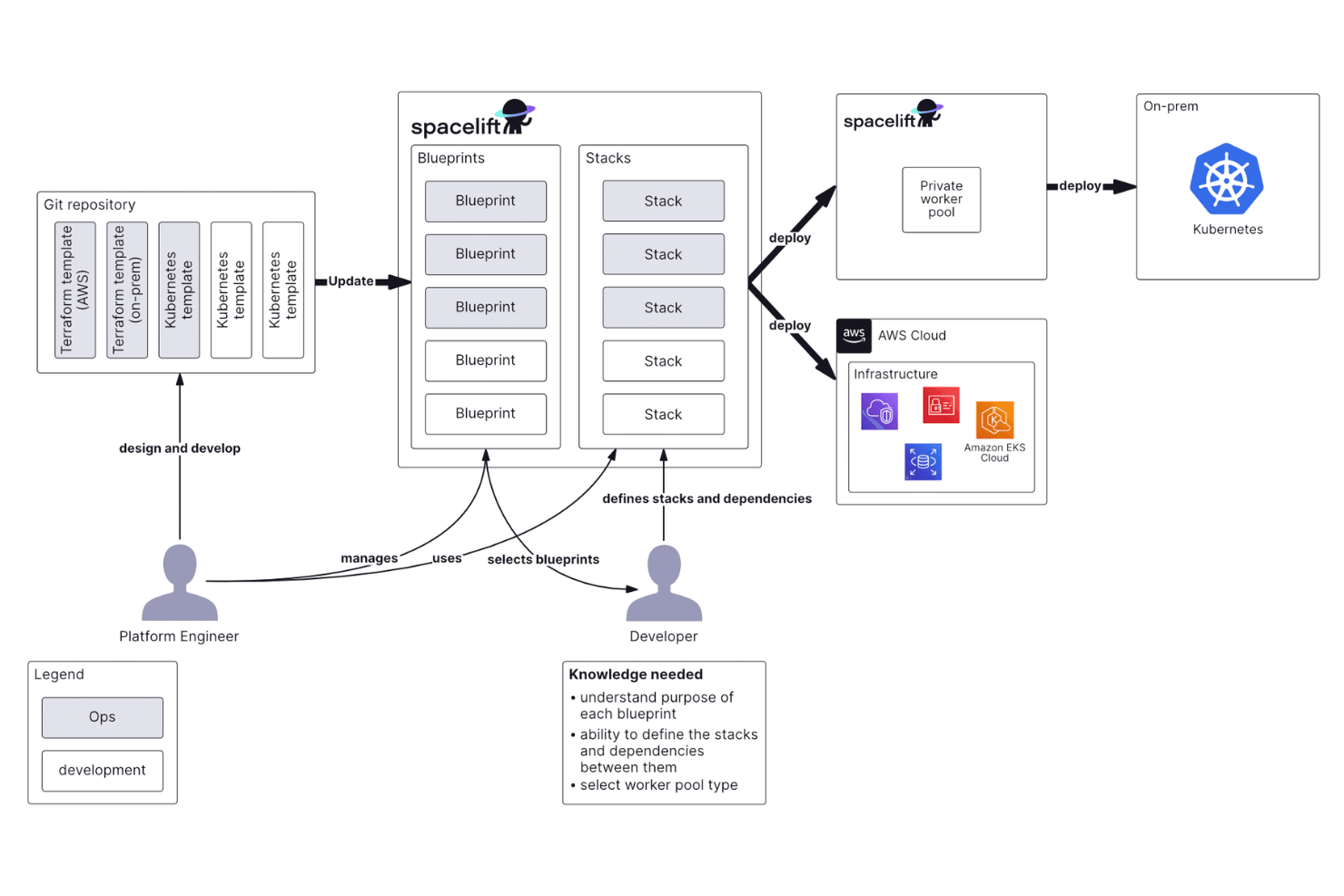
Spacelift is an infrastructure automation platform that orchestrates IaC workflows across Terraform, OpenTofu, Pulumi, Ansible, and Kubernetes with built-in policy enforcement, drift detection, and GitOps-native CI/CD pipelines.
Who is Spacelift Best For?
Spacelift is well suited for platform engineering and DevOps teams at mid-size to enterprise organizations managing infrastructure at scale across multiple cloud environments.
Why I Picked Spacelift
Spacelift is one of my top picks because I love how its OPA-powered policy engine lets you define and enforce governance rules directly in your automation workflows, without bolting on a separate tool. You can write approval policies to automatically block runs triggered outside business hours, or write plan policies that reject any Terraform change missing required resource tags before an apply ever happens. What makes it especially practical is the autoattach label system, which lets you apply a policy to every stack in a given space automatically, so you're not manually attaching rules one by one as your infrastructure grows.
Spacelift Key Features
- Drift detection: Scheduled runs identify when live infrastructure diverges from its declared state and trigger automatic reconciliation jobs.
- Stack dependencies: Define run order across stacks so dependent infrastructure components deploy in the correct sequence without manual coordination.
- Spaces: Segment your infrastructure into isolated environments with dedicated RBAC controls, enabling separate teams or projects to maintain their own access boundaries.
- Private module registry: Store and version reusable Terraform modules internally so teams can use a governed, organization-managed source instead of a public registry.
Spacelift Integrations
Spacelift offers native integrations with IaC tools including Terraform, OpenTofu, Pulumi, CloudFormation, Kubernetes, and Ansible, along with native cloud provider integrations for AWS, Azure, and GCP. It also integrates with GitHub, GitLab, Bitbucket, Azure DevOps, Slack, Microsoft Teams, Datadog, ServiceNow, and Infracost. A GraphQL API is available for custom integrations. Zapier support is not documented.
Pros and Cons
Pros:
- Policy guardrails support multi-team governance
- PR-based plan logs show up inline
- Scheduled drift detection spots manual changes
Cons:
- Self-hosted version lacks certain cloud integrations
- Kubernetes stack support lags behind Terraform

Best for network configuration automation

ManageEngine OpManager Plus is an integrated IT operations management solution designed to monitor and manage your organization's entire IT infrastructure. It combines network performance monitoring, server and application management, and more into a single platform.
Why I Picked ManageEngine OpManager Plus:
I picked OpManager Plus because of its built-in network configuration management, which helps you automate backups, monitor changes in real time, and stay compliant with policies. It also offers automated workflows that let you handle routine tasks and first-level troubleshooting using a drag-and-drop interface.
Standout features and integrations:
Other features include adaptive thresholds, which use machine learning to set ideal threshold values for various metrics, eliminating the need for manual adjustments. Additionally, the root cause analysis tool allows you to compare data from multiple monitors in one window, helping you quickly identify and address the underlying causes of issues. Some integrations include Active Directory, Microsoft 365, Exchange management, OpManager, Site24x7, NetFlow Analyzer, Log360, ADAudit Plus, Endpoint Central, Patch Manager Plus, AssetExplorer, and ServiceDesk Plus.
Pros and Cons
Pros:
- Provides in-depth monitoring of various network devices, servers, and applications
- Ability to build custom views with widgets and visualizations
- Offers detailed performance history and trends over time for root cause analysis
Cons:
- Setting up configurations can be complex
- Can generate too many alerts, leading to alert fatigue

Site24x7
Best for real-time infrastructure alerts

Site24x7 is a cloud-based infrastructure monitoring platform that helps you observe and manage your servers, apps, cloud resources, and networks from one place. It brings AI-powered automation to your monitoring stack, helping you stay ahead of outages and performance issues.
Why I Picked Site24x7:
I picked Site24x7 because it gives you real-time view of your infrastructure from a single dashboard and the feature to receive alerts when needed. Whether you're monitoring Linux servers, Windows VMs, or Kubernetes containers, the platform lets you dig into performance without toggling between tools. Its AIOps features can trigger automated actions when problems arise—like restarting a service or executing a script—so you’re not always on call.
Standout features and integrations:
You can build custom dashboards to monitor KPIs that matter most to your team. Site24x7 also lets you run automation scripts based on alert conditions, which is useful for scaling and troubleshooting. It supports REST APIs, offers audit trails for automation, and integrates with tools like Slack, PagerDuty, Jira, ServiceNow, Chef, Ansible, Puppet, and cloud services like AWS, Azure, and GCP.
Pros and Cons
Pros:
- Comprehensive network monitoring capabilities
- Real-time alerts for immediate issue detection
- Automated compliance audits
Cons:
- Lacks more robust security features, like threat detection
- Excessive alerts can be overwhelming for users
New Product Updates from Site24x7
Site24x7 Expands OCI Monitoring for PostgreSQL and API Gateways
Site24x7 adds monitoring for OCI PostgreSQL databases and API Gateways, including performance, traffic, latency, storage, and alerts. This gives teams broader visibility into OCI infrastructure from one console. For more information, visit Site24x7’s official site.
 .
.
GitHub
Best for version control and collaborative software development

GitHub is a platform that combines the power of distributed version control and source code management (SCM) functionality of Git with its unique features. It provides a shared space for developers to collaborate, review, and manage code, making it especially suitable for version control and collaborative software development.
Why I Picked GitHub:
I chose GitHub for this list primarily because of its position as a standard in the industry for source code management. Its widespread adoption within the developer community gives it an edge, and its rich features make it ideal for version control and collaborative software development.
Standout features and integrations:
GitHub provides features in code review, project management, integrations, and team management. Pull Requests, Forks, and Actions are among its standout features that streamline the collaborative coding process. It integrates well with popular tools such as Slack, Jira, Vagrant, and many continuous integration/continuous delivery (CI/CD) systems.
Pros and Cons
Pros:
- A wide array of integrations with other development tools
- Excellent collaborative features
- Comprehensive tools for version control
Cons:
- Large projects might experience performance issues.
- Certain advanced features require payment.
- The interface might be complex for beginners.
Best for open-source IT automation

Red Hat Ansible Automation Platform is an open-source platform that automates IT infrastructure. It also eliminates the complexity of managing systems, networks, and other IT-related services. Given its ability to streamline various IT operations using open-source automation, Ansible stands out as the best choice for open-source IT automation.
Why I Picked Red Hat Ansible Automation Platform:
In choosing tools for this list, I was impressed by Ansible's reputation as an effective open-source solution, agent-less configuration management, and orchestration tool. Also, it enables users to execute playbooks to create and manage the required infrastructure resources. The fact that it has become a popular choice for automating IT infrastructure tasks due to its simplicity and broad community support sets it apart. These factors underscore why Ansible is "Best for open-source IT automation.
Standout features and integrations:
Ansible offers critical features such as infrastructure management, application deployment, and configuration management. The platform also provides a robust API for integration, which allows it to work seamlessly with systems like Terraform, Jenkins, and many cloud platforms like AWS, GCP, and Azure.
Pros and Cons
Pros:
- Strong integration capabilities with various systems and cloud platforms
- Simplifies infrastructure management and application deployment
- Open-source, widely supported by a vast community.
Cons:
- The Enterprise version comes at a relatively high cost
- The platform may need to be more balanced for more minor projects.
- It can have a steep learning curve for beginners.
Best for SaaS-based IT infrastructure monitoring

LogicMonitor is a SaaS-based platform designed to automate IT infrastructure monitoring. The tool aids in visualizing and alerting about meaningful insights from infrastructure data across networks, servers, and cloud services. Given its robust capabilities and cloud-based nature, it excels at SaaS-based IT infrastructure monitoring.
Why I Picked LogicMonitor:
I picked LogicMonitor due to its robust, automated monitoring tool features that provide a broad spectrum of IT infrastructure visibility. The cloud-based platform, combined with its scalability, differentiates it from others. It fits the bill for SaaS-based IT infrastructure monitoring because it successfully consolidates diverse monitoring tasks under one roof in a user-friendly manner.
Standout features and integrations:
LogicMonitor's standout features include comprehensive IT infrastructure coverage, automated device discovery, and cloud monitoring. The tool can seamlessly integrate with various applications, like ServiceNow, Slack, and Zendesk, making collaboration and incident management more effective.
Pros and Cons
Pros:
- Cloud-based and highly scalable
- Seamless integrations with numerous applications
- Broad coverage of IT infrastructure
Cons:
- Complex setup for some specific monitoring tasks
- A steep learning curve for beginners
- Pricing information is not transparent.

Best for creating and managing AWS resource stacks

AWS CloudFormation is the go-to service for managing and provisioning AWS resources. It's a popular choice for cloud automation and AWS development environments due to its ability to handle large amounts of resources and services.
Why I Picked AWS CloudFormation:
I found AWS CloudFormation to be impressive and the ideal choice for creating and managing AWS resource stacks. Its strong infrastructure as code abilities and seamless integration with AWS services caught my attention. Its unique feature of managing a diverse range of resources is supported by the trusted reputation of AWS. Users can safely and reliably provision and manage AWS resources using a template (JSON or YAML file).
Standout features and integrations:
AWS CloudFormation’s most valuable features such as consistent management of infrastructures, automated updates to existing models, and safe management of all AWS resources. Also, its ability to integrate with various AWS services is a significant advantage, including direct integrations with Amazon S3, Amazon EC2, and Amazon RDS.
Pros and Cons
Pros:
- Allows for automated updates and consistent management
- Direct integration with a wide array of AWS services
- Comprehensive and efficient management of AWS resources
Cons:
- Limited to AWS ecosystems only, no support for multi-cloud deployments
- The steeper learning curve for those not familiar with AWS
- No stand-alone pricing, costs tied to the usage of AWS resources


GitLab is a web-based DevOps lifecycle tool that provides a Git repository manager. Also, it encompasses many features, including continuous integration/continuous delivery (CI/CD), source code management, and security capabilities. This versatility and the all-in-one solution make it the top pick for integrated CI/CD, security, and DevOps practices.
Why I Picked GitLab:
I selected GitLab for its complete DevOps platform. It stands out with its integrated CI/CD and security capabilities, which cater well to teams focusing on DevOps practices. Its ability to handle all stages of the DevOps lifecycle within a single application is also noteworthy.
Standout features and integrations:
GitLab’s most valuable features such as integrated CI/CD, which enables automated testing and delivery, and built-in security capabilities that detect vulnerabilities and prevent security issues. GitLab also offers significant integrations with Kubernetes, Jira, Slack, and other popular tools, augmenting its value for many DevOps teams.
Pros and Cons
Pros:
- A broad range of integrations
- Strong CI/CD and security features
- Comprehensive DevOps tool
Cons:
- Server performance can be an issue for large-scale projects.
- Some advanced features are available only in the higher-priced tiers.
- The user interface can be complex for beginners.


Azure Automation is a service from Microsoft Azure designed to automate processes and tasks, freeing up time for more complex duties. Its excellence in managing lengthy and error-prone functions in cloud environments establishes it as a robust solution for orchestrating cloud tasks.
Why I Picked Azure Automation:
I chose Azure Automation for its prowess in process automation, especially for managing complex cloud tasks. Its wide range of capabilities, from process automation and configuration management to update management, truly sets it apart. Also, Azure Automation's standout performance in orchestrating time-consuming and error-prone cloud tasks is why I named it "best for" this role, given its ability to enhance productivity and reduce errors in cloud operations.
Standout features and integrations:
Azure Automation offers essential features such as process automation, update management, and desired state configuration. These features allow for effective management of infrastructure while reducing manual effort. The platform integrates seamlessly with other Azure services, making it a natural fit for organizations heavily invested in the Azure ecosystem.
Pros and Cons
Pros:
- Flexible pricing based on usage
- Integration with Azure services
- Robust set of automation capabilities
Cons:
- Complex pricing models can be challenging to predict costs.
- Limited functionalities outside the Azure ecosystem
- The learning curve for those new to Azure


VMware is a leading provider of cloud computing and virtualization software and services. It's known for delivering a top-tier platform for businesses to virtualize their IT infrastructure on-premises and in the cloud. Given its proficiency in these areas, it is ideal for virtualization and cloud infrastructure management.
Why I Picked VMware:
In selecting tools for this list, the proven track record of VMware in the industry stood out. It's a pioneer in virtualization technology and continues to innovate in cloud infrastructure management. VMware is best for these use cases due to its comprehensive features tailored for virtualizing and managing complex IT environments.
Standout features and integrations:
VMware boasts many vital features, such as vSphere for server virtualization, vSAN for software-defined storage, and NSX for network virtualization. Additionally, it integrates well with many cloud providers like AWS, Google Cloud, and Azure, easing the process of managing hybrid and multi-cloud environments.
Pros and Cons
Pros:
- Proven reliability and industry acceptance
- Robust integrations with major cloud providers
- A comprehensive suite of virtualization and cloud management tools
Cons:
- Certain features may require additional licensing costs
- The pricing model may be more precise with a customized quote.
- It can be complex to set up and manage.
Other Infrastructure Automation Tools
Here are some additional infrastructure automation tools options that didn’t make it onto my shortlist, but are still worth checking out:
- Azure Resource Manager
For provisioning and managing Azure resources
- HashiCorp Terraform Cloud
For infrastructure as code across multiple clouds
- Suse Manager
For Linux server operations and compliance
- Progress Chef
For configuration management and application deployment
- DuploCloud
For managing multi-cloud deployments with no-code operations
- JFrog Software Supply Chain Platform
Good for securing and managing software binaries and containers
- Cloudify
Good for orchestrating multi-cloud deployments with an open-source approach
- SaltStack
Good for infrastructure automation with a focus on security and compliance
- Puppet Enterprise
Good for IT automation with configuration management capabilities
- Pulumi
Good for modern infrastructure as code with multiple language support
- JHipster
Good for quickly generating, developing, and deploying modern web applications and microservices
- Resolve
Good for automated IT operations with AI-driven responses
- Qovery
Good for deploying apps directly from your code repository to the cloud
- Red Hat CloudForms
Good for managing hybrid clouds and virtual infrastructures
- Spot by NetApp
Good for optimizing cloud costs with automated workload management
- Google Cloud Deployment Manager
Good for managing Google Cloud resources using yaml configuration management tool
- AutoCloud
Good for automating cloud setup and deployments with ready templates


How I Evaluate Infrastructure Automation Tools
I evaluate these tools in two layers: the baseline capabilities a tool must have to qualify—like IaC support and multi-cloud provisioning—and the differentiators that set one apart.
Core Functionality (Table Stakes For This List)
When I'm selecting tools for my list, I rank each one on a scale from 0 (does not offer the functionality) to 5 (excels in this area) for each core functionality listed below. Then, I calculate the tool's total score into a percentage. Each tool needs to achieve a minimum total score of 75% to be considered for inclusion.
- Infrastructure as Code: I look for declarative or imperative code-based resource definitions with reusable modules—like spinning up a VPC with subnets using a single template.
- Multi-Cloud & Provider Support: Each tool should cover AWS, Azure, and GCP at minimum. I also check for on-prem and hybrid coverage across VMware or OpenStack.
- Configuration Management: I evaluate how each tool handles OS-level config tasks like enforcing package versions or managing service states across fleets of servers.
- Provisioning & Orchestration: Dependency-aware execution matters here. I check whether a tool can, for example, provision a database before deploying the app that needs it.
- State & Drift Detection: I look at how a tool tracks desired vs. actual state—like flagging when a security group rule has been manually changed outside of code.
- CI/CD & Pipeline Integration: The tool should plug into Git-based workflows and CI/CD platforms like Jenkins or GitHub Actions to trigger runs on merge or commit.
Once I have a list of tools that meet this criteria, I consider what sets each platform apart.
Differentiating Factors (What Sets Vendors Apart)
Here's how I compare and contrast different vendors:
Standout Features
Policy-as-code support is a big differentiator—I look for tools that let teams enforce guardrails before deployment, like blocking public S3 buckets or unapproved instance types. Cost estimation is another area I evaluate, especially tools that show projected spend before a plan is applied. I also check for self-service module catalogs, where platform teams publish approved blueprints that developers can deploy without writing configs from scratch.
Beyond Features
Deployment model matters a lot here. Some teams need a SaaS option for speed, while others in regulated environments require self-hosted or air-gapped installs. I also evaluate the provider and plugin ecosystem—a tool with a thin library of integrations will create gaps when you need to manage DNS records, firewall rules, or monitoring alongside compute. Community strength is another factor I weigh, since active forums and public module registries make onboarding faster and troubleshooting far less painful.
How to Choose an Infrastructure Automation Tool
It’s easy to get bogged down in long feature lists and complex pricing structures. To help you stay focused as you work through your unique software selection process, here’s a checklist of factors to keep in mind:
| Factor | What to Consider |
|---|---|
| Scalability | Can the tool grow with your business needs? Consider whether it supports increasing workloads and users without sacrificing performance or requiring costly upgrades. |
| Integrations | Does it work with your existing systems? Check for compatibility with your current tech stack to avoid integration headaches and ensure a smooth workflow. |
| Customizability | Can you tailor the tool to your needs? Look for options to modify workflows and settings to fit your team's specific processes and preferences. |
| Ease of use | Is the tool user-friendly? Ensure the interface is intuitive so your team can adopt it quickly without extensive training or frustration. |
| Implementation and onboarding | How long will it take to get started? Evaluate the time and resources needed to implement the tool and train your team, considering any support offered by the vendor. |
| Cost | Does the pricing fit your budget? Compare the total cost of ownership, including licenses, maintenance, and potential hidden fees, to ensure it aligns with your financial constraints. |
| Security safeguards | Are your data and operations protected? Verify the tool's security features, such as encryption and access controls, to safeguard sensitive information. |
| Support availability | What help is available when you need it? Assess the vendor's support options, including response times and channels, to ensure you can get assistance when required. |
What Are Infrastructure Automation Tools?
Infrastructure automation tools are software that let teams set up, manage, and change servers, networks, and other systems through code instead of doing everything manually. They're used by DevOps engineers, sysadmins, and cloud architects who want to make deployments faster and more reliable. Features like script-based provisioning, state management, and integration with CI/CD systems help with reducing setup time, avoiding config errors, and keeping environments consistent. These tools make it easier to manage infrastructure without repeating the same manual tasks.
Features
When selecting infrastructure automation tools, keep an eye out for the following key features:
- Automating provisioning: Automatically set up and configure infrastructure resources, saving time and reducing human error.
- Configuration management: Maintain system consistency by managing configuration files and software versions across servers with enterprise configuration management tools.
- Continuous deployment: Enable rapid and reliable release of updates and new features to production environments.
- Monitoring and alerting: Track system performance and receive notifications of issues to address them proactively.
- Infrastructure as code: Manage infrastructure using code, allowing for version control and more efficient collaboration.
- Multi-cloud support: Operate across multiple cloud providers, offering flexibility and avoiding vendor lock-in.
- Integration capabilities: Connect with existing tools and systems to create a cohesive and efficient technology environment.
- Customizable workflows: Adapt processes to fit your specific team needs, enhancing operational efficiency.
- User-friendly interface: Ensure easy navigation and use, reducing the learning curve for new users.
- Security features: Protect sensitive data with encryption and access controls, safeguarding your infrastructure.
Benefits
Implementing infrastructure automation tools provides several benefits for your team and your business. Here are a few you can look forward to:
- Increased efficiency: Automating routine tasks like provisioning and configuration saves time and reduces manual effort.
- Reduced errors: Automating processes minimizes human errors, leading to more consistent and reliable operations.
- Faster deployments: Continuous deployment capabilities allow quicker releases of updates and features, keeping your systems up-to-date.
- Enhanced collaboration: Infrastructure as code supports better collaboration through version control and shared understanding.
- Cost savings: Efficient resource management and reduced manual labor lead to lower operational costs.
- Scalability: Easily accommodate growth with tools that support increased workloads and multi-cloud environments.
- Improved security: Built-in security features protect data and infrastructure, reducing the risk of breaches.
Costs & Pricing
Selecting infrastructure automation tools requires an understanding of the various pricing models and plans available. Costs vary based on features, team size, add-ons, and more. The table below summarizes common plans, their average prices, and typical features included in infrastructure automation tools solutions:
Plan Comparison Table for Infrastructure Automation Tools
| Plan Type | Average Price | Common Features |
|---|---|---|
| Free Plan | $0 | Limited automation capabilities, basic monitoring, and community support. |
| Personal Plan | $10-$30/user/month | Advanced automation reporting tools, configuration management, and email support. |
| Business Plan | $50-$100/user/month | Advanced integrations, multi-cloud support, and priority customer service. |
| Enterprise Plan | $150-$300/user/month | Customizable workflows, a dedicated account manager, and enhanced security features. |
Infrastructure Automation Tools FAQs
Here are some answers to common questions about infrastructure automation tools:
How does infrastructure automation improve deployment speed?
Infrastructure automation speeds up deployment by automating repetitive tasks and ensuring consistent configurations across environments. This reduces downtime and errors, allowing your team to release updates and new features more quickly and efficiently.
Can infrastructure automation tools support multi-cloud environments?
Yes, many infrastructure automation tools support multi-cloud environments. They enable you to manage resources across different cloud providers, giving your team the flexibility to choose the best environment for each workload without being locked into a single provider.
How do I manage infrastructure drift when using automation tools?
Drift happens when the live infrastructure deviates from the desired state defined in code or templates. To manage it, you’ll want tools that support auditing, state comparison, and automatic remediation (or alerts). Make sure your team has processes to detect drift, review changes, and roll back if required.
What are the security considerations when using infrastructure automation tools?
When using these tools, ensure they offer features like encryption and access controls to protect your data. It’s important to regularly update and patch the tools to safeguard against vulnerabilities and follow best practices for secure configurations to mitigate risks.
What’s Next:
If you're in the process of researching infrastructure automation tools, connect with a SoftwareSelect advisor for free recommendations.
You fill out a form and have a quick chat where they get into the specifics of your needs. Then you'll get a shortlist of software to review. They'll even support you through the entire buying process, including price negotiations.