

10 Best End-to-End Testing Tools Reviewed in 2026

Best End-to-End Testing Tools Shortlist
Here’s my shortlist of the best end-to-end testing tools:


The best end-to-end testing tools help you catch broken user flows, validate cross-browser behavior, and test API integrations so you can ship reliable software without last-minute bug scrambles. If you've dealt with tests that fail unpredictably, struggled to reproduce errors across environments, or had your CI pipeline stall on flaky scripts, you know how much productivity leaks away.
With over 12 years of experience testing dozens of these tools in live staging and production environments, I have compared their ability to handle real app complexity and team workflows. This guide highlights the solutions that deliver stable tests, clear reporting, and easy setup for different use cases. Let's dive into my picks!
Why Trust Our Software Reviews
We've been testing and reviewing SaaS development software since 2023. As tech experts ourselves, we know how critical and difficult it is to make the right decision when selecting software. We invest in deep research to help our audience make better software purchasing decisions.
We've tested more than 2,000 tools for different SaaS development use cases and written over 1,000 comprehensive software reviews. Learn how we stay transparent & check out our software review methodology.
Best End-to-End Testing Tools Summary
This comparison chart summarizes pricing details for my top end-to-end testing tools selections to help you find the best one for your budget and business needs.
| Tool | Best For | Trial Info | Price | ||
|---|---|---|---|---|---|
| 1 | Best with autonomous test healing | 30-day free trial | Pricing upon request | Website | |
| 2 | Best for team collaboration | Free demo available | Pricing upon request | Website | |
| 3 | Best for natural language test automation | Free plan available | From $3,600/year | Website | |
| 4 | Best for Salesforce automation | Free trial available | Pricing upon request | Website | |
| 5 | Best for risk-based insights | Free trial available + free demo | Pricing upon request | Website | |
| 6 | Best for AI-powered test case generation | 14-day free trial | Pricing upon request | Website | |
| 7 | Best for test case tracking | Free plan available | From $15.42/user/month (billed annually) | Website | |
| 8 | Best for real device testing | Free trial available | From $199/month/year (minimum of 4 seats) | Website | |
| 9 | Best for quick test setup | 14-day free trial + free plan available | From $189/month (billed annually) | Website | |
| 10 | Best for real-time reloads | Free plan available | From $67/month (billed annually) | Website | |
| 11 | Best for JavaScript developers | 14-day free trial available | From $32/month (billed annually) | Website | |
| 12 | Best for global testing networks | Not available | Pricing upon request | Website | |
| 13 | Best for AI-driven test maintenance | 14-day free trial | From $212/month | Website | |
| 14 | Best for real-world conditions | Free demo available | From $39/month (billed annually) | Website | |
| 15 | Best for scriptless test automation | 14-day free trial + free demo | From $175/month | Website | |
| 16 | Best for no-code test creation | Free open source access available + 14-day free trial | Pricing upon request | Website | |
| 17 | Best for monitoring integration | Free trial + free demo available | Pricing upon request | Website | |
| 18 | Best for cross-platform testing | Free trial available | Pricing upon request | Website | |
| 19 | Best for AI-driven user behaviour simulation | No free trial available | Pricing upon request | Website | |
| 20 | Best for 100% no-code testing | 14 Days Free Trial | Website |









-

QA Wolf
Visit WebsiteThis is an aggregated rating for this tool including ratings from Crozdesk users and ratings from other sites.4.9 -
NordLayer
Visit WebsiteThis is an aggregated rating for this tool including ratings from Crozdesk users and ratings from other sites.4.3 -
Intruder
Visit WebsiteThis is an aggregated rating for this tool including ratings from Crozdesk users and ratings from other sites.4.8


Best End-to-End Testing Tool Reviews
Below are my detailed summaries of the best end-to-end testing tools that made it onto my shortlist. My reviews offer a detailed look at the key features, pros & cons, integrations, and ideal use cases of each tool to help you find the best one for you.

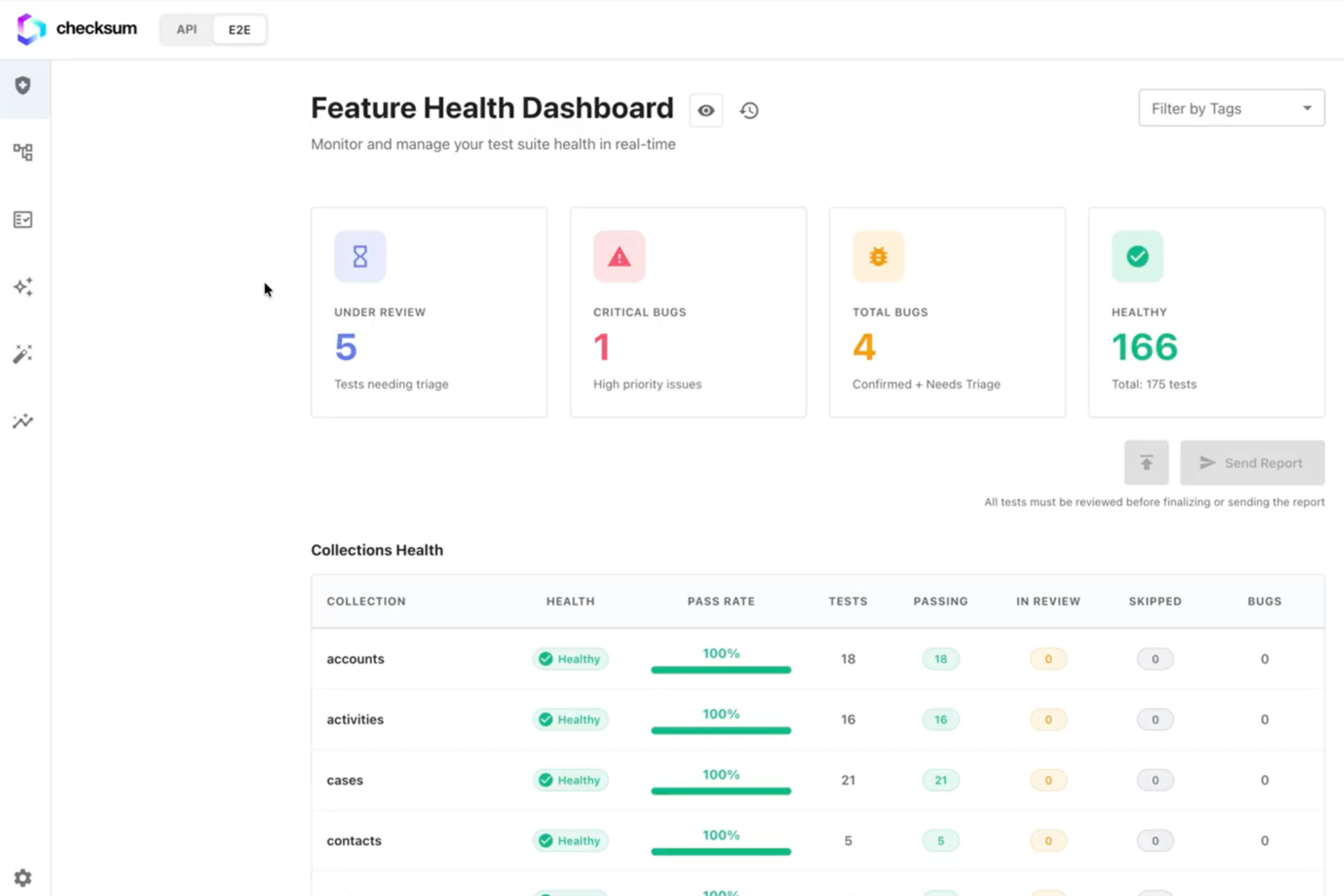
Checksum is an end to end testing platform that uses AI to generate, maintain, and execute automated tests across web applications, APIs, and user interfaces.
Who Is Checksum Best For?
Checksum suits QA teams and developers at tech companies who need AI-driven automation for web and API testing.
Why I Picked Checksum
I picked Checksum as one of the best because its autonomous test healing stands out for reducing manual maintenance when UI or API changes break tests. My team is able to rely on its AI-driven healing to automatically update selectors and flows, so we spend less time fixing brittle tests. I also like that Checksum flags and adapts to dynamic elements, which helps us keep our test suite stable even as our application evolves.
Checksum Key Features
- Visual regression testing: Detects UI changes by comparing screenshots across test runs.
- API test generation: Automatically creates API tests from your application’s traffic.
- CI/CD pipeline integration: Connects with popular CI/CD tools for automated test execution.
- Pull request-based test creation: Generates targeted tests for new or changed code in pull requests.
Checksum Integrations
Native integrations are not clearly documented. Checksum supports CI/CD workflows and custom integrations through its API.
Pros and Cons
Pros:
- Flags flaky tests for targeted review
- Visual regression testing for UI changes
- Deep parameter coverage for API endpoints
Cons:
- May require manual setup for complex workflows
- Limited public documentation and community resources


QA Wolf is an AI-driven platform designed for software teams looking to automate QA testing for web and mobile applications. It focuses on increasing release speed and reducing bugs, providing value by allowing teams to automate numerous tests efficiently.
Why I picked QA Wolf: It supports collaboration by offering features like human-verified bug reports and CI/CD integration. The platform uses Playwright for web testing and Appium for mobile testing, ensuring compatibility with various applications. QA Wolf's zero-flake guarantee and no vendor lock-in policy make it unique, focusing on reliability and flexibility. The service claims to achieve 80% test coverage within four months, significantly enhancing team productivity.
Standout features & integrations:
Features include a zero-flake guarantee to ensure test reliability, human-verified bug reports that provide actionable insights, and the use of Playwright and Appium for comprehensive web and mobile testing. These features help your team maintain high testing standards and improve software quality.
Integrations include Slack, Jira, GitHub, CircleCI, Travis CI, GitLab, Bitbucket, Azure DevOps, Jenkins, and Asana.
Pros and Cons
Pros:
- Human-verified bug reports
- Zero-flake guarantee
- Supports team collaboration
Cons:
- Limited customization options
- Pricing details are unclear
New Product Updates from QA Wolf

QA Wolf Adds Android Emulator Infrastructure for Device Testing
QA Wolf introduces Android emulator infrastructure with expanded device and OS testing support. These updates enable teams to test across real-world device conditions and improve test coverage. For more information, visit QA Wolf’s official site.
 .
.
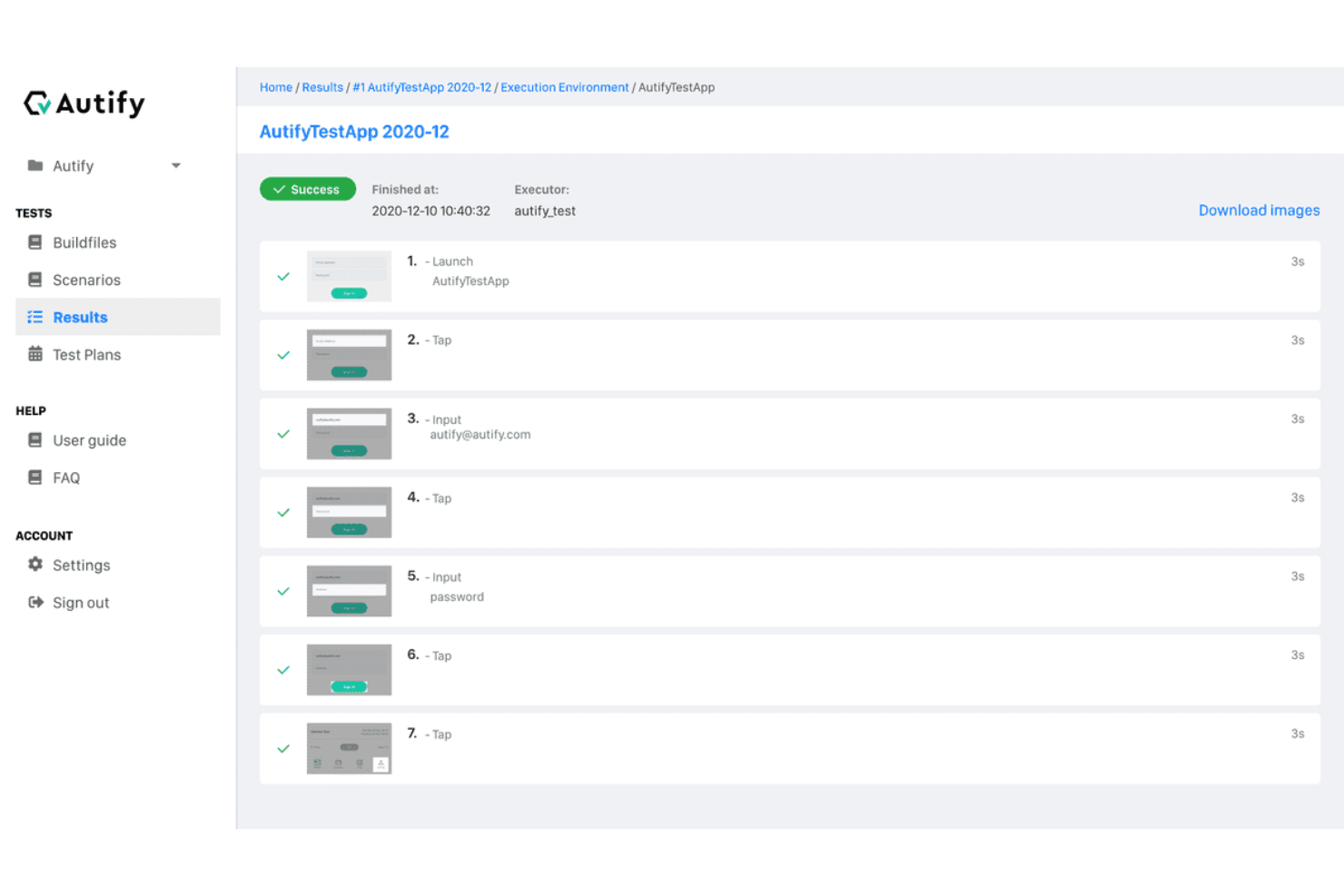
Autify Aximo is designed for those seeking an end-to-end testing tool that leverages AI to simplify and enhance the testing process. Whether you are in software development, quality assurance, or product management, Autify Aximo can address your needs by simulating real user workflows to ensure seamless integration and functionality across web and mobile platforms. This AI-driven tool helps alleviate the challenges of maintaining test scripts and adapting to frequent UI changes, allowing your team to focus on delivering high-quality software.
Why I Picked Autify Aximo
I chose Autify Aximo for its unique ability to utilize natural language and visual recognition to autonomously generate and execute end-to-end tests. This feature is particularly beneficial for teams looking to maintain testing efficiency without the need for extensive coding skills. Autify Aximo's ability to simulate real user interactions ensures that your applications perform optimally in real-world scenarios. Additionally, its adaptability to UI changes reduces test maintenance efforts, making it a practical choice for agile development environments.
Autify Aximo Key Features
In addition to its natural language processing capabilities, Autify Aximo offers several other features that enhance its utility as an end-to-end testing tool.
- AI-Powered Test Generation: Uses advanced algorithms to automatically generate test scripts, reducing the need for manual script writing.
- Cross-Platform Support: Enables testing across multiple platforms, including web and mobile, ensuring comprehensive test coverage.
- Visual Recognition Technology: Identifies and adapts to UI changes, minimizing test failures and maintenance.
- Integration with Playwright: Provides a robust framework for executing tests, allowing for flexible and scalable testing solutions.
Autify Aximo Integrations
Native integrations are not currently listed by Autify Aximo.
Pros and Cons
Pros:
- Supports web, mobile, desktop
- CI/CD pipeline integrations available
- AI-driven automated test creation
Cons:
- Limited traditional scripting control
- Pricing not publicly available


Tricentis Testim Salesforce is an automation testing tool tailored for Salesforce applications, serving businesses that require efficient testing within the Salesforce ecosystem. It simplifies the process of automating tests, making it easier for teams to maintain high-quality Salesforce applications.
Why I picked Tricentis Testim Salesforce: It offers specialized features for Salesforce, like visual testing and robust support for Salesforce's dynamic components. This tool simplifies the automation process by using AI to handle complex testing scenarios. It provides a user-friendly interface that allows your team to create and execute tests quickly. The integration with Salesforce ensures smooth operation within your existing processes.
Standout features & integrations:
Features include visual testing capabilities that help you verify UI changes efficiently. The tool also offers AI-driven test creation, which simplifies handling complex scenarios. Additionally, Tricentis Testim Salesforce supports dynamic components, making it well-suited for Salesforce's ever-changing environment.
Integrations include Salesforce, Jira, Slack, Jenkins, GitHub, GitLab, Bitbucket, Azure DevOps, Bamboo, and TeamCity.
Pros and Cons
Pros:
- Supports dynamic components
- AI-driven test creation
- Tailored for Salesforce applications
Cons:
- May not suit non-Salesforce apps
- Limited to Salesforce environment


Tricentis SeaLights is a quality intelligence platform designed for QA teams and developers who need to focus on risk-based testing. It offers insights that help prioritize testing efforts, making it valuable for teams aiming to enhance software quality efficiently.
Why I picked Tricentis SeaLights: It provides risk-based insights that allow your team to focus on areas of code that matter most. The platform's analytics help identify which tests are necessary, reducing unnecessary testing efforts. SeaLights also supports continuous testing with real-time feedback, which is essential for agile development environments. Its ability to integrate with CI/CD pipelines ensures seamless operation within your existing workflows.
Standout features & integrations:
Features include real-time feedback during testing, which helps your team make quick decisions. The platform also offers analytics to determine which areas of the code require testing, reducing time spent on unnecessary tests. Additionally, continuous testing capabilities ensure your software remains high-quality throughout the development process.
Integrations include Jenkins, Bamboo, TeamCity, Azure DevOps, GitHub, Bitbucket, GitLab, Jira, Slack, and ServiceNow.
Pros and Cons
Pros:
- Real-time feedback available
- Reduces unnecessary testing
- Provides risk-based testing insights
Cons:
- Limited customization options
- Requires understanding of risk-based testing


Kualitee is an end-to-end test management platform built to streamline quality assurance for software teams. It supports test case management, defect tracking, automation integration, and AI-driven test case generation. Kualitee focuses on making the entire testing lifecycle—from planning to execution to reporting—more efficient and collaborative across industries like banking, telecom, and public services.
Why I picked Kualitee: Kualitee stood out because of its AI-powered test case generation and comprehensive defect management system, making it easier to achieve high coverage and quick issue resolution. It also offers strong requirement traceability and customizable dashboards, ensuring testing activities align closely with project goals. With features like role-based access, reusable test repositories, and release management, Kualitee provides true end-to-end support without unnecessary complexity.
Standout features & integrations:
Features include mobile access for managing test cases on-the-go, reusable test libraries to speed up regression cycles, and release management tools to coordinate QA during deployments. It also supports seamless CI/CD integration to automate testing workflows.
Integrations include Jira, Jenkins, Linear, Redmine, Selenium, Slack, Teamwork, Trello, Playwright, Monday.com, Asana, Azure DevOps, GitHub, GitLab, CircleCI, Bitbucket, and ClickUp.
Pros and Cons
Pros:
- Customizable dashboards improve project visibility
- Supports both manual and automated testing
- Allows reusability of test cases
Cons:
- Occasional issues with integration functionality
- Performance can lag with larger projects


Testiny is a modern test management software designed to bring together manual and automated test cases under one roof. It offers a centralized platform that allows you to manage, plan, and track all your testing activities.
One reason I picked Testiny as a top end-to-end testing tool is its robust test case management. You can create, organize, and track your test cases, which is crucial for ensuring thorough coverage and quality assurance. This feature ensures that your team can maintain a clear structure and focus on what's essential in testing.
Another aspect is its real-time collaboration capability. Testiny allows your team to work together effortlessly, sharing insights and updates as they happen. This means you can quickly adapt and respond to any issues, keeping your testing process agile and responsive.
Features include comprehensive reporting capabilities that let you monitor metrics and results with real-time dashboards, providing valuable insights into your testing outcomes. Testiny supports custom fields and rich text editing, allowing you to tailor the platform to meet your specific needs. Additionally, user management with role permissions and audit logs enhances accountability and security within your testing environment.
Integrations include Jira, GitLab, GitHub, Azure DevOps, Slack, Microsoft Teams, Jenkins, CircleCI, Travis CI, Bitbucket, Bamboo, and TestRail.
Pros and Cons
Pros:
- Beginner-friendly
- The tool adapts well to increasing project demands
- Real-time updates enhance team collaboration in agile work environments
Cons:
- Dashboard customization options are restricted
- Fewer third-party integration options compared to competitors
New Product Updates from Testiny
Testiny Improves Test Case Filtering and CSV Import With Jira Links
Testiny introduces Enhanced Test Case Filtering and CSV Import with Jira Requirement Links. These updates improve how you select test cases and strengthen integration with Jira-based workflows, improving test management. For more information, visit Testiny’s official site.
 .
.
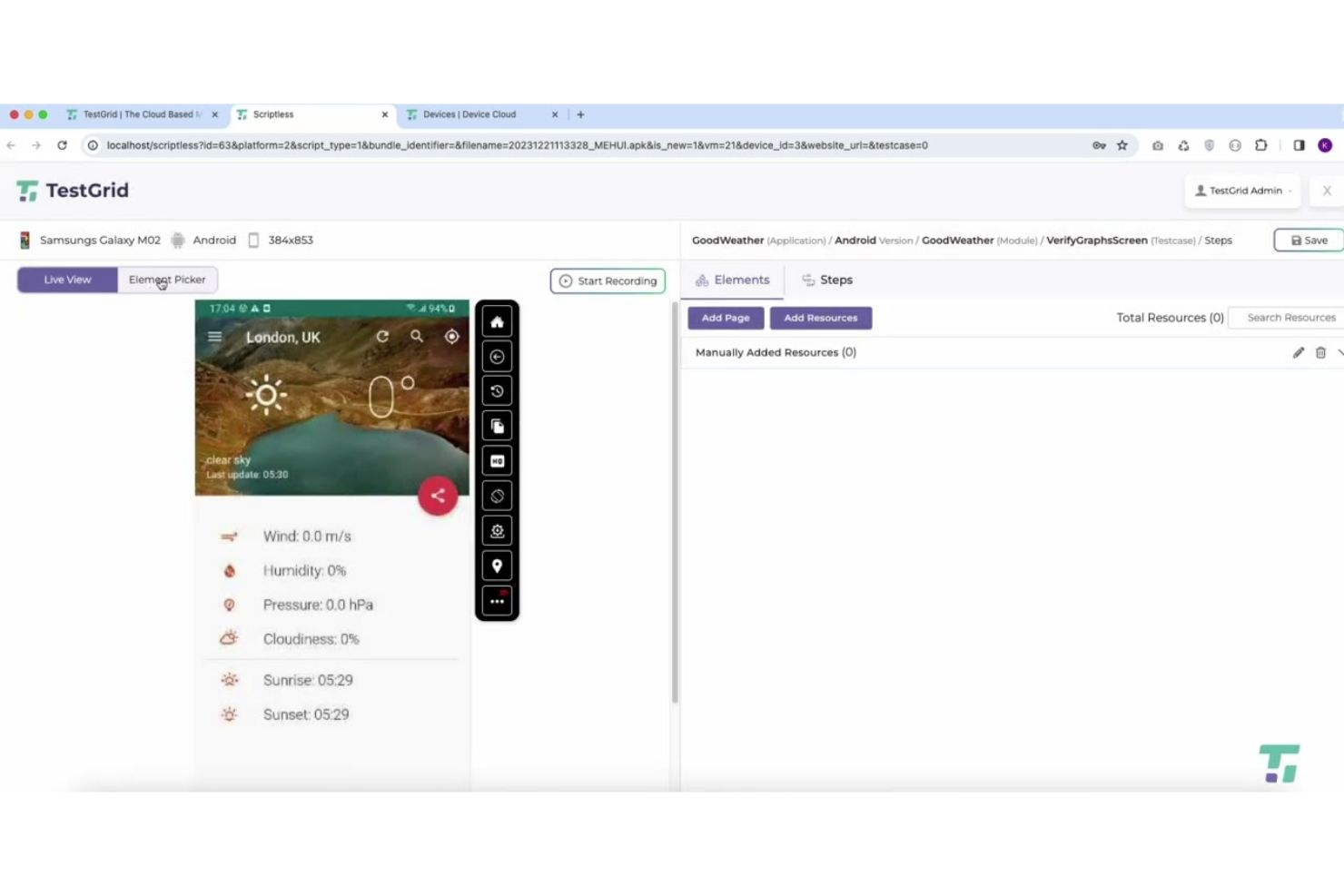
TestGrid's TestOS 2.0 is a versatile end-to-end testing platform that streamlines testing for businesses across industries. It offers a comprehensive suite of features, including codeless automation and support for real device testing, making it useful for teams looking to validate applications across different environments. By addressing challenges such as bug detection and performance testing, TestGrid helps improve software quality and reduce time-to-market for development teams.
Why I Picked TestGrid
I picked TestGrid TestOS 2.0 for its real-device testing, which lets teams validate how applications perform on actual mobile devices and browsers rather than relying solely on simulators or emulators. This helps teams identify compatibility and performance issues that may appear in real user environments. TestGrid also includes AI-driven, codeless automation to simplify test case creation and execution, enabling teams to run tests without extensive coding knowledge. In addition, the platform supports multiple testing types, including API and IoT testing, allowing teams to test different parts of the application within a single platform.
TestGrid Key Features
In addition to real device testing, TestGrid offers:
- Performance Testing: Enables thorough performance analysis using JMeter to identify bottlenecks and ensure optimal application performance.
- Visual Testing: Enables automated visual regression testing to detect UI discrepancies across environments.
- IoT Testing: Provides tools for testing IoT applications, ensuring their reliability and performance in real-world scenarios.
- Scriptless Test Case Creation: Enables automated test case creation without coding, making it accessible to non-technical users.
TestGrid Integrations
Integrations include Jira, Slack, Microsoft Teams, Bitrise, and Travis CI. An API is also available for custom integrations.
Pros and Cons
Pros:
- Codeless automation enables non-technical teams to build and run tests
- End-to-end testing support across web, mobile, and API environments
- AI-powered automation reduces manual testing effort and execution time
Cons:
- Some integrations and advanced features require additional setup
- User interface may need improvement for smoother navigation
New Product Updates from TestGrid
TestGrid's Quantum Fuze Introduces Smart Execution
Quantum Fuze introduces Smart Execution, enabling environment-specific test runs across devices, OS versions, and screen resolutions. This update improves test accuracy and reliability by treating each execution independently. For more information, visit TestGrid's official site.
 .
.

BugBug is built for teams that want to create end-to-end tests quickly without managing complex setups or writing code-heavy scripts. Its browser-based workflow helps smaller teams get automation in place fast, making it easier to validate core user journeys with minimal onboarding.
Why I Picked BugBug
I picked BugBug because you can record tests directly in your browser, which shortens the time needed to create reliable end-to-end coverage. Your team saves effort with its visual test editor, letting you adjust steps without touching code. You also speed up regression cycles thanks to parallel test execution, which reduces how long you wait for results. BugBug’s lightweight, browser-based environment removes the need for local installs or complicated infrastructure, so you can focus on verifying functionality instead of configuring tools. It’s a strong fit for teams prioritizing accessibility and fast setup over heavy customization.
BugBug Key Features
These additional features support BugBug’s focus on quick, accessible test automation.
- Visual Test Editor: Modify recorded steps through an intuitive interface.
- Scheduled Test Runs: Automate recurring checks without manual triggers.
- Error Screenshots: Capture visual evidence when tests fail.
- Team Collaboration Tools: Share test suites and review results together.
BugBug Integrations
Integrations include Slack, Jira, GitHub, Bitbucket, GitLab, Jenkins, Azure DevOps, Trello, Asana, and Microsoft Teams.
Pros and Cons
Pros:
- No-code test editor simplifies updates for non-technical users
- Parallel execution shortens regression cycles
- Fast browser-based setup lowers the barrier to adoption
Cons:
- Some users report performance issues during large suites
- Requires browser access, limiting certain test environments

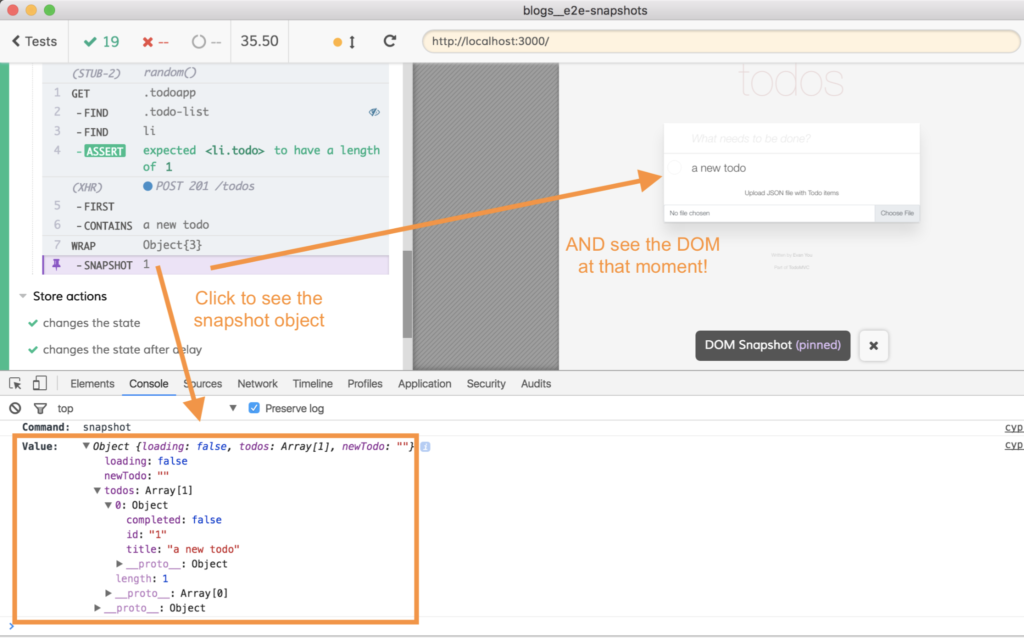
Cypress is a front-end test automation tool that allows you to debug your front-end UI of your web apps. The tool provides a built in debugging feature and allows you to set up automatic retries and waits. Cypress also allows you to schedule your test executions within your CI/CD pipeline.
Cypress offers you the ability to write your tests in Javascript syntax, which provides clean and accurate results when testing on single-page applications with features such as the time travel, video recording, and image capturing. The tool takes snapshots of your web applications and allows you to playback the state of the tests over time. This allows you to thoroughly and effectively assess bug issues during your application testing.
Cypress integrates with preprocessors such as Cucumber and Browserify, and devOps tools such as Docker.
The cost of Cypress is $75.00 USD/month. The tool also has an open-source version.
Other End-to-End Testing Tools
Here are some additional end-to-end testing tools options that didn’t make it onto my shortlist, but are still worth checking out:
- Nightwatch
For JavaScript developers
- Testlio
For global testing networks
- Reflect
For AI-driven test maintenance
- HeadSpin
For real-world conditions
- Endtest
For scriptless test automation
- testRigor
For no-code test creation
- New Relic
For monitoring integration
- SmartBear
For cross-platform testing
- QA.tech
For AI-driven user behaviour simulation
- Avo Assure
For 100% no-code testing
- Autify
AI-driven test automation built on Playwright
- Mabl
For AI-driven testing
- Selenium WebDriver
For open-source browser automation
- Puppeteer
For headless browser testing
- TestCafe
For JavaScript end-to-end testing
- Endtest
For scriptless test automation
- Mobot
For physical device testing
- TestRail
For test case management
- ConformIQ
For model-based test generation
- Owlity
For autonomous test generation


End-to-End Testing Tool Selection Criteria
When selecting the best end-to-end testing tools to include in this list, I considered common buyer needs and pain points like ease of integration and support for multiple environments. I also used the following framework to keep my evaluation structured and fair:
Core Functionality (25% of total score)
To be considered for inclusion in this list, each solution had to fulfill these common use cases:
- Test automation across browsers
- Mobile application testing
- API testing tools
- Continuous integration compatibility
- Reporting and analytics features
Additional Standout Features (25% of total score)
To help further narrow down the competition, I also looked for unique features, such as:
- AI-driven testing capabilities
- Self-healing test scripts
- Visual regression testing
- Support for non-technical users
- Cloud-based testing environments
Usability (10% of total score)
To get a sense of the usability of each system, I considered the following:
- Intuitive user interface
- Easy test creation process
- Clear navigation and layout
- Minimal learning curve
- Customizable dashboards
Onboarding (10% of total score)
To evaluate the onboarding experience for each platform, I considered the following:
- Availability of training videos
- Interactive product tours
- Comprehensive documentation
- Access to webinars
- Supportive community forums
Customer Support (10% of total score)
To assess each software provider’s customer support services, I considered the following:
- 24/7 support availability
- Live chat options
- Dedicated account managers
- Response time for inquiries
- Availability of support documentation
Value For Money (10% of total score)
To evaluate the value for money of each platform, I considered the following:
- Competitive pricing
- Flexible subscription plans
- Free trial availability
- Cost versus features offered
- Discounts for long-term commitments
Customer Reviews (10% of total score)
To get a sense of overall customer satisfaction, I considered the following when reading customer reviews:
- Overall satisfaction ratings
- Commonly mentioned pros and cons
- Feedback on support quality
- User experiences with updates
- Frequency of positive recommendations
How to Choose End-to-End Testing Tool
It’s easy to get bogged down in long feature lists and complex pricing structures. To help you stay focused as you work through your unique software selection process, here’s a checklist of factors to keep in mind:
| Factor | What to Consider |
| Scalability | Ensure the tool can grow with your team and handle increased testing demands. Look for solutions that support large test suites and concurrent users. |
| Integrations | Check compatibility with your existing tools like CI/CD pipelines, bug trackers, and communication platforms to streamline workflows. |
| Customizability | Assess whether the tool allows you to tailor test cases and reports to your specific needs, enhancing flexibility and efficiency. |
| Ease of Use | Evaluate the user interface and setup process. A tool that's easy to navigate reduces training time and increases productivity. |
| Budget | Consider the total cost, including any hidden fees. Ensure the features align with your budget constraints and offer good value for money. |
| Security Safeguards | Verify that the tool complies with industry standards and provides data protection features to safeguard sensitive information. |
| Support | Look for reliable customer support options like live chat or phone support, especially if your team needs immediate assistance. |
| Test Coverage | Determine if the tool covers all necessary platforms and devices your team uses, ensuring comprehensive testing across environments. |
Trends in End-to-End Testing Tools
In my research, I sourced countless product updates, press releases, and release logs from different end-to-end and SaaS testing tools vendors. Here are some of the emerging trends I’m keeping an eye on:
- AI-Powered Testing: Many tools are integrating AI to predict test failures and improve test accuracy. This technology helps teams focus on high-risk areas, saving time and resources. Vendors like Mabl and Tricentis are leading with AI-driven capabilities.
- Self-Healing Tests: Tools are now offering self-healing features to adapt to changes in the application's UI automatically. This reduces maintenance time and effort, ensuring tests remain relevant and accurate over time.
- Visual Testing: More platforms are incorporating visual testing to capture UI discrepancies. This trend helps teams catch visual bugs that traditional testing might miss, enhancing overall software quality.
- Codeless Test Creation: Vendors are providing codeless solutions to make testing accessible to non-developers. This allows broader team involvement in the testing process, as seen with tools like testRigor and Avo Assure.
- Shift-Left Testing: There's a growing emphasis on integrating testing earlier in the development cycle. This approach helps identify issues sooner, improving the software development process and reducing long-term costs.
What Are End-to-End Testing Tools?
End-to-end testing tools are software solutions designed to test the entire flow of an application, from start to finish, to ensure it functions as expected. These tools are typically used by QA teams, developers, and testers to identify and fix issues before deployment, often complemented by exploratory testing tools that provide significant value by improving software reliability.
Features like AI-powered testing, self-healing tests, and visual testing help with identifying bugs, reducing maintenance efforts, and enhancing the overall quality of applications. Overall, these tools ensure that applications work correctly across different environments and user scenarios.
Features of End-to-End Testing Tools
When selecting end-to-end testing tools, keep an eye out for the following key features:
- AI-powered testing: Uses artificial intelligence to predict failures and increase test accuracy, saving time and enhancing reliability.
- Self-healing tests: Automatically adapts to changes in application UI, reducing the need for manual updates and maintenance.
- Visual testing: Captures UI discrepancies to identify visual bugs, improving the overall quality of the application.
- Codeless test creation: Allows non-developers to create tests without coding, making testing accessible to broader team members.
- Cross-browser testing: Ensures applications function correctly across different web browsers, providing a consistent user experience.
- Real-time analytics: Offers immediate insights into test performance, helping teams quickly identify and address issues.
- Parallel test execution: Runs multiple tests simultaneously, reducing the time it takes to complete testing cycles.
- Integration capabilities: Connects with existing tools like CI/CD pipelines and bug trackers to streamline workflows.
- Customizable dashboards: Provides tailored views of key metrics, allowing teams to focus on the most relevant data.
- Security safeguards: Ensures compliance with industry standards and protects sensitive data throughout the testing process.
Common AI Features in End-to-End Testing Tools
Many modern end-to-end testing tools now incorporate AI-driven features to streamline and enhance the testing process. Here are some of the most common AI capabilities you’ll find:
- Self-healing tests: AI automatically updates test scripts when UI elements change, reducing maintenance and minimizing test failures due to minor app updates.
- Smart element locators: Advanced algorithms identify and interact with dynamic or complex elements on the page, even if their attributes change over time.
- Test case generation: AI analyzes user flows and application usage to suggest or create new test cases, helping you achieve broader coverage with less manual effort.
- Flaky test detection: Machine learning identifies patterns in test results to flag unreliable or inconsistent tests, so you can focus on fixing real issues.
- Intelligent test prioritization: AI helps determine which tests to run first based on recent code changes, risk factors, or historical failures, speeding up feedback loops.
- Visual testing and anomaly detection: AI compares screenshots or UI states to spot visual regressions or unexpected changes that might slip past traditional tests.
- Natural language processing (NLP): Some tools let you write test scripts in plain English, making it easier for non-developers to contribute to test creation and review.
These AI-powered features can save time, reduce manual work, and improve the overall reliability of your end-to-end testing process.
Benefits of End-to-End Testing Tools
Implementing end-to-end testing tools provides several benefits for your team and your business. Here are a few you can look forward to:
- Improved reliability: Ensures applications function as expected across different scenarios, reducing unexpected failures.
- Faster bug detection: Identifies issues early in the development cycle, thanks to features like AI-powered testing and real-time analytics.
- Reduced maintenance efforts: Self-healing tests automatically adapt to changes, saving time on manual updates.
- Enhanced user experience: Visual testing catches UI bugs that could affect the look and feel of your application.
- Broad team involvement: Codeless test creation allows non-developers to participate in testing, increasing team collaboration.
- Consistent performance: Cross-browser testing verifies application functionality across various browsers, ensuring a stable user experience.
- Efficient workflows: Integration capabilities connect with existing tools, making the testing process more streamlined and less disruptive.
Costs and Pricing of End-to-End Testing Tools
Selecting end-to-end testing tools requires an understanding of the various pricing models and plans available. Costs vary based on features, team size, add-ons, and more. The table below summarizes common plans, their average prices, and typical features included in end-to-end testing tools solutions:
Plan Comparison Table for End-to-End Testing Tools
| Plan Type | Average Price | Common Features |
| Free Plan | $0 | Basic test execution, limited test cases, and community support. |
| Personal Plan | $5-$25/user/month | Test automation tools, cross-browser testing, and basic reporting. |
| Business Plan | $30-$75/user/month | Advanced analytics, integration capabilities, and priority support. |
| Enterprise Plan | $80-$150/user/month | Customizable dashboards, dedicated account management, and enhanced security. |
End-to-End Testing Tool FAQs
Here are some answers to common questions about end-to-end testing tools:
How does end-to-end testing differ from integration testing?
End-to-end testing verifies complete user workflows from start to finish, while integration testing checks how individual modules or services interact. Use end-to-end tests to emulate real-world user scenarios and catch issues that cross system boundaries. Rely on integration tests for checking connections and data flows between specific components in your application.
Can end-to-end testing be automated?
Yes, most modern end-to-end testing can be fully automated. Leading tools offer features like record-and-playback, scripting languages, and rich reporting. Automation speeds up regression testing and improves consistency, but you should plan for some manual oversight to catch complex or edge user cases.
What should CTOs look for when evaluating end-to-end testing tools for large teams?
Look for scalability, support for your tech stack, parallel test execution, and integrations with CI/CD pipelines. Choose tools with user-friendly dashboards and strong permission controls. Prioritize reliable vendor support, detailed documentation, and robust test maintenance features for easier onboarding and scaling across multiple teams.
How can you reduce flaky tests with end-to-end testing platforms?
Minimize flakiness by using stable selectors, waiting for network calls or UI elements to load, and keeping test data consistent. Choose tools that offer built-in flake detection, retries, and visual debugging. Regularly review failed test results and update tests as your application evolves.
Which integrations are most important in end-to-end testing tools?
Key integrations include popular CI/CD platforms (like Jenkins, GitHub Actions), version control systems, notification channels (Slack, email), and bug trackers (Jira, Trello). Make sure your tool integrates well with your deployment workflow and supports your team’s preferred collaboration tools.
How much maintenance do automated end-to-end tests require?
Automated end-to-end tests require regular updates as your UI and workflows change. Plan for periodic reviews to replace brittle selectors and obsolete test steps. Choose tools with good maintainability features like reusable components, visual debugging, and easy test editing to reduce long-term effort.
What are best practices for scaling end-to-end test coverage across multiple products?
Standardize test creation and naming conventions, share reusable test components, and use version control for test scripts. Set up consistent environments and automate as much as possible. Assign ownership for test maintenance and make use of dashboards to track coverage and results across all teams.
What’s Next
If you're researching end-to-end testing tools, connect with a SoftwareSelect advisor for free recommendations.
Fill out a form and schedule a chat to share the specifics of your needs. You'll receive a shortlist of software to review and support through the entire buying process, including price negotiations.