
10 Best API Testing Tools Reviewed In 2026

Best API Testing Tools Shortlist
Here’s my shortlist of the best API testing tools:


The best API testing tools help developers and QA teams verify endpoints, detect integration issues, and ensure APIs perform reliably across environments. They make it easier to automate testing, validate payloads, and monitor response times so teams can catch problems before they affect production systems.
Teams usually start looking for better API testing software when they’re debugging unclear response codes, chasing intermittent failures, or juggling multiple environments without consistent test coverage. Manual testing or incomplete automation often leads to missed defects and long feedback loops between development and QA.
I’ve worked with engineering teams implementing API testing frameworks across REST and GraphQL architectures, evaluating how different tools handle automation, reporting, and CI/CD integration in both agile and enterprise setups.
In this guide, you’ll learn which API testing tools actually help you reduce manual work, improve reliability across releases, and gain clearer insight into your API’s performance.
Why Trust Our Software Reviews
Best API Testing Tools Summary
This comparison chart summarizes pricing details for my top API testing tools selections to help you find the best one for your budget and business needs.
| Tool | Best For | Trial Info | Price | ||
|---|---|---|---|---|---|
| 1 | Best for continuous security testing | Free demo available | Pricing upon request | Website | |
| 2 | Best for detecting vulnerabilities | Free demo available | Pricing upon request | Website | |
| 3 | Best for dynamic application security testing | Free plan available + free demo | From $350/month | Website | |
| 4 | Best with end-to-end testing workflows | Free demo available | Pricing upon request | Website | |
| 5 | Best for beginners in testing | Free plan available + free demo | From $183/user/month | Website | |
| 6 | Best for cloud-based testing | 28-day free trial + free demo available | From $39/month (billed annually) | Website | |
| 7 | Best for cross-platform support | Free trial available | Pricing upon request | Website | |
| 8 | Best for AI-powered vulnerability scanning | Free demo available | From $99/month | Website | |
| 9 | Best for open-source testing | Free trial available | Pricing upon request | Website | |
| 10 | Best for API management | Free demo available | Pricing upon request | Website |

-

Site24x7
Visit WebsiteThis is an aggregated rating for this tool including ratings from Crozdesk users and ratings from other sites.4.6 -
GitHub Actions
Visit WebsiteThis is an aggregated rating for this tool including ratings from Crozdesk users and ratings from other sites.4.8 -
Docker
Visit WebsiteThis is an aggregated rating for this tool including ratings from Crozdesk users and ratings from other sites.4.6





Best API Testing Tool Reviews
Below are my detailed summaries of the best API testing tools that made it onto my shortlist. My reviews offer a detailed look at the key features, pros & cons, integrations, and ideal use cases of each tool to help you find the best one for you.


Invicti is a comprehensive API security tool tailored for developers and security teams. It automates vulnerability detection and integrates into CI/CD pipelines to enhance security workflows.
Why I picked Invicti: It offers real-time vulnerability detection and zero false positives, which aligns with its USP of continuous security testing. The tool's advanced scanning technology supports REST, SOAP, and GraphQL APIs. Invicti's DAST + IAST approach increases accuracy and identifies more vulnerabilities. It also provides visibility into exposed assets, helping teams manage risks effectively.
Standout features & integrations:
Features include advanced scanning technology for multiple API types, real-time vulnerability detection, and zero false positives. The platform promotes proactive security by helping developers write secure code. Its automation capabilities enhance the software development lifecycle.
Integrations include Jenkins, JIRA, GitHub, Azure DevOps, Bamboo, Bitbucket, GitLab, Slack, ServiceNow, and Microsoft Teams.
Pros and Cons
Pros:
- Automates vulnerability detection
- Supports multiple API types
- Proactive security measures
Cons:
- Pricing not readily available
- May require technical expertise
New Product Updates from Invicti
Invicti Enterprise Adds WebLogic Support and Security Enhancements
The latest Invicti Enterprise v25.10.0 release introduces WebLogic support for Java Shark sensors and improved secrets management through SEM integrations. It also refines API consistency and strengthens overall platform stability. For more information, visit Invicti's official site.
 .
.

Acunetix is a web application security scanner designed for security teams and developers. It focuses on detecting vulnerabilities in web applications to enhance your security posture.
Why I picked Acunetix: It excels in vulnerability detection with its ability to identify over 7,000 vulnerabilities, which aligns with its USP of being best for detecting vulnerabilities. The tool integrates dynamic and static analysis to cover a wide range of security issues. Acunetix's scanning engine is fast and accurate, providing comprehensive security assessments. It also supports a wide range of technologies, making it versatile for different environments.
Standout features & integrations:
Features include advanced scanning for over 7,000 vulnerabilities, fast and accurate scanning engine, and comprehensive security assessments. The tool supports various technologies, enhancing its versatility. It also provides detailed reports to help you understand and address security issues.
Integrations include Jenkins, JIRA, GitHub, GitLab, Azure DevOps, TFS, Bugzilla, Mantis, ServiceNow, and Slack.
Pros and Cons
Pros:
- Detects over 7,000 vulnerabilities
- Fast scanning engine
- Supports various technologies
Cons:
- Requires technical expertise
- Initial setup complexity


Aikido Security is a platform designed to protect your code, cloud, and runtime environments with its suite of security features. It offers tools for dynamic application security testing (DAST), API scanning, and other measures to safeguard your applications against vulnerabilities.
Why I Picked Aikido Security: I picked Aikido Security for API testing because of its dynamic application security testing, API scanning, and AI-driven AutoFix feature, which automatically generates pull requests to fix vulnerabilities. This automation saves time and keeps security measures up to date. Aikido also supports custom rule creation, allowing you to filter non-essential paths and focus on critical vulnerabilities, helping you prioritize and secure your API endpoints effectively.
Standout features & integrations:
Features include bulk fix, which allows you to create multiple ready-to-merge pull requests with a single action, streamlining the resolution process. TL;DR summaries provide concise overviews and ticket creation options for complex issues, enhancing management efficiency. Aikido also prioritizes data security through read-only access to repositories, short-lived access tokens, and separate Docker containers for each scan.
Integrations include VSCode, Azure Pipelines, BitBucket Pipes, GitHub, GitLab, Jira, Asana, Monday, ClickUp, YouTrack, Drata, and Vanta.
Pros and Cons
Pros:
- User-friendly interface
- Provides actionable insights
- Offers a comprehensive dashboard and customizable reports
Cons:
- Ignores vulnerabilities if no fix is available
- Only supports English
New Product Updates from Aikido Security

Aikido Security Adds Continuous Pentesting, VM Reachability, and IDE Scanning
Aikido Security introduces Aikido Infinite continuous pentesting, cloud VM reachability diagrams, and full workspace scanning across IDEs. These updates help teams identify exploitable vulnerabilities faster and strengthen security checks during development. For more information, visit Aikido Security’s official site.

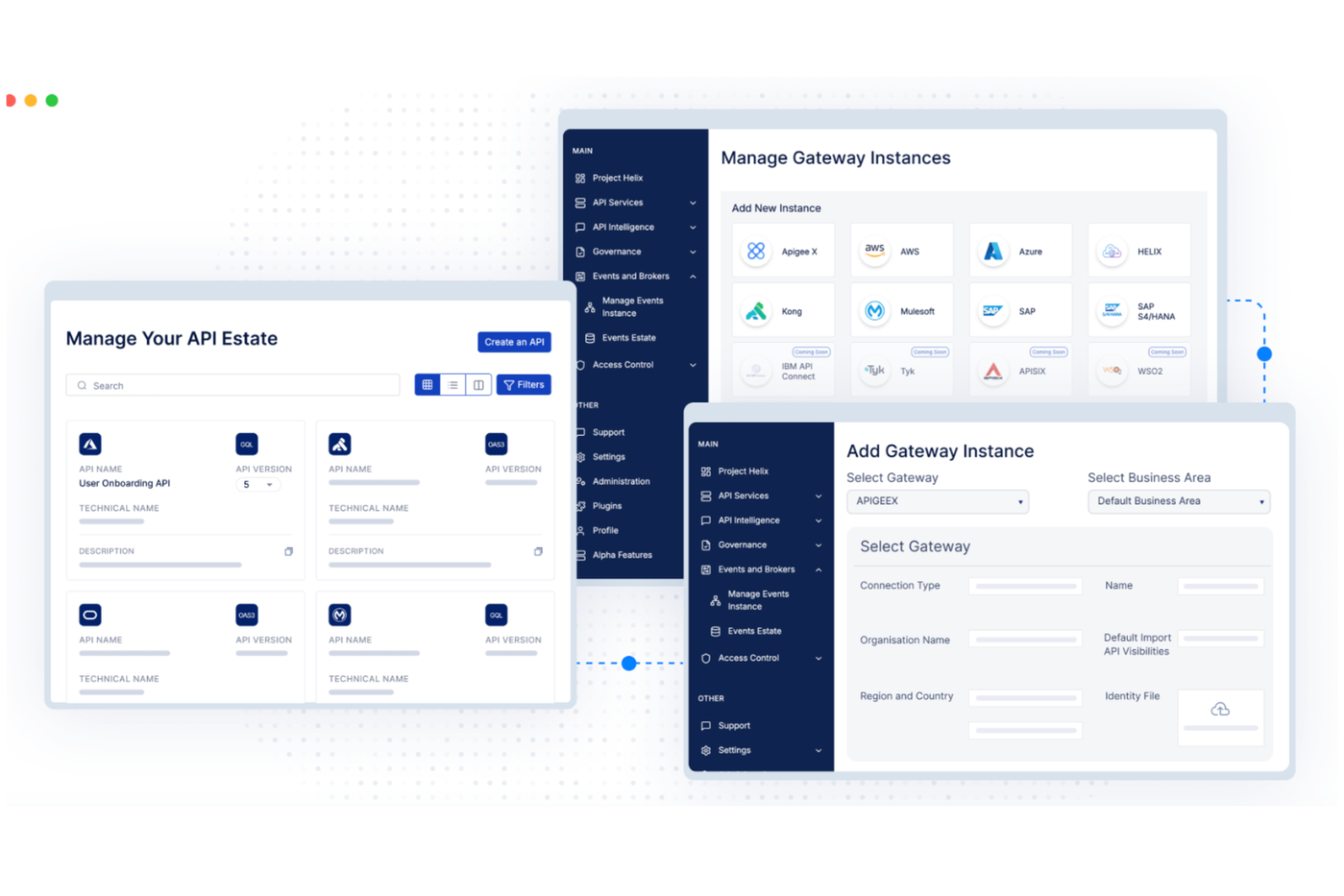
DigitalAPI is a flexible platform for teams that need a complete solution for API management and testing. It’s well-suited to industries like healthcare, banking, and insurance, where reliable API operations are essential. With tools for API discovery, governance, and lifecycle management, DigitalAPI supports more consistent workflows and better productivity. Whether the goal is improving API quality or ensuring reliable integrations, the platform is built to address those needs.
Why I Picked DigitalAPI
I chose DigitalAPI for its AI-driven automated test generation, which reduces manual testing work and shortens deployment timelines. The platform offers a solid testing environment that includes load testing and end-to-end testing, helping teams validate API performance under different conditions. Its real-time analytics also allow teams to identify and resolve issues early, making it a strong option for developers and QA teams focused on maintaining API quality.
DigitalAPI Key Features
In addition to its AI-driven test generation, I also found several other features valuable for API testing:
- Load Testing: Simulates peak traffic to identify performance issues and scalability challenges.
- End-to-End Testing: Ensures API functionality within the entire application workflow.
- Security Assessments: Conducts thorough checks to validate API security and data protection.
- Automated Documentation: Streamlines the documentation process, making it easier to maintain and share API specifications.
DigitalAPI Integrations
Native integrations are not currently listed by DigitalAPI.
Pros and Cons
Pros:
- Centralized governance across multiple gateways
- Detailed analytics for API performance
- Helix Gateway supports full lifecycle
Cons:
- No listed native integrations
- Pricing details not publicly available

Katalon Studio is a test automation tool designed for testers and developers. It offers a comprehensive solution for web, API, mobile, and desktop app testing, making it ideal for teams looking to streamline their testing processes.
Why I picked Katalon Studio: It's beginner-friendly, providing an intuitive user interface that simplifies test automation. The tool supports both scriptless and scripting modes, catering to users with varying levels of coding experience. With built-in keywords and templates, it reduces the learning curve for new testers. Additionally, its extensive documentation and community support make it accessible for beginners.
Standout features & integrations:
Features include scriptless test creation, which allows you to build tests without coding. The tool also offers built-in keywords and templates to simplify the process. You can switch between scripting and scriptless modes, giving flexibility to your testing approach.
Integrations include Jenkins, JIRA, Git, TestRail, Slack, qTest, Kobiton, Azure DevOps, Sauce Labs, and BrowserStack.
Pros and Cons
Pros:
- Beginner-friendly interface
- Supports scriptless test creation
- Extensive community support
Cons:
- Limited advanced features
- May require initial setup time

Sauce Labs is a cloud-based testing platform tailored for developers and QA teams. It provides automated testing solutions for web, mobile, and API applications, enabling teams to test across multiple browsers and devices.
Why I picked Sauce Labs: It offers a cloud-based infrastructure, allowing you to run tests without maintaining an in-house setup. This makes it ideal for teams looking to scale testing efforts efficiently. You can perform automated testing across a wide array of devices and browsers, ensuring comprehensive coverage. Sauce Labs real-time analytics and reporting features help your team quickly identify and resolve issues.
Standout features & integrations:
Features include real-time analytics that give you insights into test results. The platform supports a wide variety of browsers and devices, enhancing your testing coverage. Additionally, it offers instant access to a vast infrastructure, eliminating the need for in-house maintenance.
Integrations include Jenkins, JIRA, GitHub, CircleCI, Slack, Bamboo, Travis CI, Bitbucket, TeamCity, and Azure DevOps.
Pros and Cons
Pros:
- Cloud-based infrastructure
- Supports multiple devices
- Real-time analytics
Cons:
- May require advanced technical skills
- Can be costly for small teams


SmartBear is a versatile testing tool designed for QA teams and developers. It provides comprehensive testing solutions for web, mobile, and API applications, making it ideal for teams needing cross-platform support.
Why I picked SmartBear: It offers extensive cross-platform compatibility, allowing your team to test on various environments without hassle. The tool supports automated testing for web, mobile, and desktop applications, aligning with its USP of cross-platform support. SmartBear robust reporting features provide insights into your testing efforts. Additionally, SmartBear's flexible scripting options cater to both beginners and experienced testers.
Standout features & integrations:
Features include robust reporting capabilities that offer insights into test results. The tool provides flexible scripting options, catering to testers with different skill levels. Its support for automated testing across web, mobile, and desktop applications enhances your testing coverage.
Integrations include Jenkins, JIRA, GitHub, Azure DevOps, Slack, Bitbucket, TeamCity, Bamboo, qTest, TestRail, and Confluence.
Pros and Cons
Pros:
- Extensive cross-platform compatibility
- Flexible scripting options
- Comprehensive reporting features
Cons:
- Pricing not transparent
- Limited offline support


For software development teams and businesses looking to safeguard their digital interactions, Astra API Security provides a solution for identifying and mitigating API vulnerabilities. This platform is particularly appealing to industries like fintech and healthcare, where API security is paramount. By combining AI-driven vulnerability scanning with manual testing, Astra addresses complex security challenges, helping teams protect sensitive data and maintain compliance with industry regulations.
Why I Picked Astra API Security
I picked Astra API Security because it offers a unique combination of AI-driven vulnerability scanning and manual penetration testing, which is crucial for identifying complex attack vectors and business logic vulnerabilities. The platform's ability to perform continuous discovery and risk classification provides a comprehensive view of potential threats, enabling your team to prioritize fixes effectively. With over 15,000 tests available, it ensures that your API security keeps pace with development, significantly reducing the time to address vulnerabilities.
Astra API Security Key Features
In addition to AI-powered vulnerability scanning, Astra API Security offers:
- Rapid API Discovery: The platform can quickly identify all APIs within 30 minutes, ensuring that no endpoint goes unnoticed.
- Continuous DAST Testing: Ongoing dynamic application security testing helps maintain a secure environment by constantly evaluating API vulnerabilities.
- AI-Driven Risk Prioritization: By classifying and scoring risks based on exposure and sensitivity, your team can focus on the most critical vulnerabilities first.
- Manual Pentesting: This feature complements automated scans by detecting complex vulnerabilities that require human insight.
Astra API Security Integrations
Integrations include GitHub, Jira, Slack, Jenkins, Bitbucket, GitLab, Microsoft Teams, AWS, Azure, and Google Cloud.
Pros and Cons
Pros:
- Includes both automated and manual security tests
- Centralized dashboard for vulnerability management with AI-generated remediation
- Helps maintain compliance with ISO 27001, HIPAA, and GDPR
Cons:
- Occasional false positives increase validation work
- Some technical bugs and glitches reported


SoapUI is an open-source API testing tool aimed at developers and testers who need a reliable way to test REST and SOAP APIs. It allows users to create and execute automated functional, regression, and load tests with ease.
Why I picked SoapUI: It offers a comprehensive open-source platform for API testing, making it accessible for teams with limited budgets. The tool supports both REST and SOAP protocols, providing flexibility in testing various API types. Its user-friendly interface simplifies test creation and execution, aligning with its USP of open-source testing. Additionally, SoapUI's extensive documentation and community support enhance its usability.
Standout features & integrations:
Features include support for both REST and SOAP protocols, allowing you to test a wide range of APIs. The tool offers a user-friendly interface that simplifies test creation and execution. Its extensive documentation and active community support help you troubleshoot and enhance your testing efforts.
Integrations include Jenkins, JIRA, GitHub, Swagger, Docker, Maven, Bamboo, Azure DevOps, TFS, and TeamCity.
Pros and Cons
Pros:
- Open-source platform
- Extensive documentation
- Active community support
Cons:
- Limited advanced features
- Requires manual setup for some tasks


Apigee Edge is an API management platform designed for enterprises looking to manage, secure, and scale their APIs. It provides tools for developers and businesses to create, publish, and analyze APIs efficiently.
Why I picked Apigee Edge: It excels in API management, offering features that enhance security and scalability for your APIs. You can use its analytics to gain insights into API usage and performance. The platform also provides tools for monetization, helping businesses generate revenue from APIs. Its comprehensive security features ensure your APIs are protected from threats.
Standout features & integrations:
Features include detailed analytics that provide insights into API performance. The platform offers monetization tools, allowing you to generate revenue from your APIs. It also integrates security features to protect your APIs from potential threats.
Integrations include Jenkins, JIRA, GitHub, Slack, AWS, Azure, Google Cloud, Salesforce, IBM Cloud, and MuleSoft.
Pros and Cons
Pros:
- Detailed analytics for insights
- Supports API monetization
- Scalable for large enterprises
Cons:
- Learning curve for beginners
- May require technical expertise
Other API Testing Tools
Here are some additional API testing tools options that didn’t make it onto my shortlist, but are still worth checking out:
- Hoppscotch
For quick API requests
- Subject7
For codeless automation
- Tricentis Testim
For AI-driven test creation
- QA Wolf
For fast test creation
- Reflect
For no-code test automation
- Apache JMeter
For load testing
- Parasoft SOAtest
For service virtualization
- SmartBear ReadyAPI
For end-to-end testing
- Postman
For collaboration features
- Tricentis
For continuous testing
- Karate DSL
For BDD testing
- Rest Assured
For Java developers


API Testing Tool Selection Criteria
When selecting the best API testing tools to include in this list, I considered common buyer needs and pain points like ease of integration and support for multiple protocols. I also used the following framework to keep my evaluation structured and fair:
Core Functionality (25% of total score)
To be considered for inclusion in this list, each solution had to fulfill these common use cases:
- Send and receive API requests
- Automate test execution
- Validate API responses
- Support REST and SOAP protocols
- Generate detailed test reports
Additional Standout Features (25% of total score)
To help further narrow down the competition, I also looked for unique features, such as:
- Real-time collaboration tools
- AI-driven test generation
- Built-in security testing
- Support for microservices architecture
- Advanced analytics and reporting
Usability (10% of total score)
To get a sense of the usability of each system, I considered the following:
- Intuitive user interface
- Minimal learning curve
- Customizable dashboard
- Responsive design
- Easy navigation
Onboarding (10% of total score)
To evaluate the onboarding experience for each platform, I considered the following:
- Availability of training videos
- Interactive product tours
- Access to templates and samples
- Webinars and live sessions
- Chatbot assistance
Customer Support (10% of total score)
To assess each software provider’s customer support services, I considered the following:
- 24/7 support availability
- Multiple support channels
- Access to a knowledge base
- Response time to queries
- Personalized support options
Value For Money (10% of total score)
To evaluate the value for money of each platform, I considered the following:
- Competitive pricing
- Feature set relative to price
- Flexible pricing plans
- Discounts for annual billing
- Free trial availability
Customer Reviews (10% of total score)
To get a sense of overall customer satisfaction, I considered the following when reading customer reviews:
- Overall satisfaction ratings
- Commonly reported issues
- Praise for specific features
- Feedback on customer service
- Frequency of updates and improvements
How to Choose API Testing Tools
It’s easy to get bogged down in long feature lists and complex pricing structures. To help you stay focused as you work through your unique software selection process, here’s a checklist of factors to keep in mind:
| Factor | What to Consider |
| Scalability | Ensure the tool can handle increased testing demands as your team or project grows. Look for solutions that support multiple users and large-scale testing without performance issues. |
| Integrations | Check if the tool integrates with your existing software stack, such as CI/CD pipelines, version control systems, and collaboration tools. This can enhance workflow efficiency and reduce manual efforts. |
| Customizability | Look for tools that allow you to tailor testing processes to fit your team’s specific needs. Customizable dashboards and test configurations can improve productivity and relevance. |
| Ease of Use | Evaluate the user interface and overall experience. A tool that's easy to navigate and requires minimal training will save your team time and help them focus on testing rather than learning the software. |
| Budget | Consider the total cost of ownership, including licensing, support, and potential add-ons. Ensure the tool fits within your budget while still meeting your team’s needs. |
| Security Safeguards | Ensure the tool provides adequate security measures to protect sensitive data and test results. Features like data encryption, access controls, and compliance with industry standards are crucial. |
| Support and Resources | Consider the availability of customer support, documentation, and community forums. Reliable support can be invaluable during implementation and troubleshooting. |
| Performance | Assess the tool's speed and reliability in executing tests. A performant tool will provide faster feedback and allow you to identify issues promptly. |
Trends in API Testing Tools
In my research, I sourced countless product updates, press releases, and release logs from different API testing tool vendors. Here are some of the emerging trends I’m keeping an eye on:
- AI-Driven Testing: AI is increasingly being used to create smarter testing processes. Tools are leveraging AI for predictive analytics and automated test case generation, making testing more efficient. Some vendors are integrating AI to identify potential bugs before they occur.
- Shift-Left Testing: This trend involves testing earlier in the development process. By catching issues sooner, teams can reduce costs and improve software quality. Vendors are enhancing their tools to support this approach, integrating with development environments to facilitate early testing.
- API Security Testing: As security becomes more important, tools are focusing on identifying vulnerabilities in APIs. Advanced security testing features are being integrated to protect data and ensure compliance with standards. This trend addresses growing concerns over data breaches.
- Support for Microservices: With the rise of microservices architecture, tools are adapting to test these distributed systems effectively. This involves handling complex dependencies and ensuring communication between services is reliable. Vendors are tailoring their tools to support these architectures.
- User Experience Focus: There’s a shift towards improving the user interface and experience of testing tools. Simplified interfaces and better user guidance make tools more accessible to non-technical users. Vendors are investing in design updates to make their products more intuitive.
What Are API Testing Tools?
API testing tools are software applications that help developers and QA teams test, validate, and monitor the functionality and performance of APIs. They're commonly used by software engineers, testers, and DevOps professionals to make sure APIs work correctly, handle edge cases, and communicate properly between systems.
Features like automated test scripts, environment management, and detailed reporting help with faster debugging, easier integration testing, and better accuracy across environments. Overall, these tools make it easier to maintain reliable, high-quality APIs that support stable software delivery.
Features of API Testing Tools
When selecting API monitoring tools, keep an eye out for the following key features:
- Automation capabilities: Automate repetitive tests to save time and reduce manual effort, increasing efficiency in the testing process.
- Security testing: Identify vulnerabilities within APIs to protect data and ensure compliance with security standards.
- Scalability: Handle increased testing demands effectively as your team or project grows, ensuring performance remains consistent.
- User-friendly interface: Simplify navigation and reduce the learning curve, making it accessible for both technical and non-technical users.
- Customizability: Tailor testing processes and dashboards to fit specific team needs, improving relevance and productivity.
- Real-time analytics: Provide insights into API performance and usage, enabling quick identification and resolution of issues.
- Integration support: API integration tools connect with existing software stacks like CI/CD pipelines and version control systems to enhance workflow efficiency.
- Support for microservices: Effectively test distributed systems, ensuring reliable communication between services and handling complex dependencies.
Benefits of API Testing Tools
Implementing API testing tools provides several benefits for your team and your business. Here are a few you can look forward to:
- Improved efficiency: Automation capabilities reduce manual testing efforts, allowing your team to focus on more complex tasks and speeding up the development process.
- Enhanced security: Security testing features help identify vulnerabilities early, protecting sensitive data and ensuring compliance with industry standards.
- Better reliability: Integration support ensures that APIs work smoothly with other software components, reducing the risk of errors and downtime.
- Scalability: The ability to handle increased testing demands means you can maintain performance as your team or project grows.
- Quick issue identification: Real-time analytics provide insights into API performance, enabling your team to detect and resolve issues swiftly.
- Customization options: Tailoring testing processes to fit your team's specific needs improves productivity and relevance.
- Simplified user experience: A user-friendly interface makes it easier for both technical and non-technical users to navigate the tool, reducing the learning curve.
Costs and Pricing of API Testing Tools
Selecting API testing tools requires an understanding of the various pricing models and plans available. Costs vary based on features, team size, add-ons, and more. The table below summarizes common plans, their average prices, and typical features included in API testing tools solutions:
Plan Comparison Table for API Testing Tools
| Plan Type | Average Price | Common Features |
| Free Plan | $0 | Basic testing capabilities, limited support, and community access. |
| Personal Plan | $10-$30 /user /month | Automation capabilities, basic integrations, and email support. |
| Business Plan | $50-$100 /user /month | Advanced integrations, security testing, and priority support. |
| Enterprise Plan | $150-$300/user /month | Customizable features, dedicated account manager, and advanced analytics. |
API Testing Tools FAQs
Here are some answers to common questions about API tools:
Which tool is mostly used for API testing?
Postman is one of the most widely used tools for API testing. It’s favored for its user-friendly interface and extensive features like automated testing and collaboration. Your team can easily create, share, and test APIs, making it a popular choice among developers and testers.
What are the major challenges faced in API testing?
One major challenge is ensuring security, especially when managing sensitive data. Another is maintaining data consistency across different API versions. Your team might also face issues with scaling tests and handling complex data formats. Overcoming these challenges requires thorough planning and the right tools.
What should be checked when performing API testing?
When performing API testing, check the endpoint functionality to ensure it’s working as expected. Verify the response accuracy and error handling capabilities. It’s also important to test the data format, like JSON or XML, and ensure the API performs well under different loads.
What are the three types of testing in API?
The three main types of API testing are functional, performance, and security testing. Functional testing ensures the API behaves as expected, performance testing measures speed and load handling, and security testing checks for vulnerabilities. Each type helps maintain the API’s reliability and safety.
How can I improve the efficiency of my API tests?
To improve efficiency, use automation to reduce manual testing efforts. Focus on reusability by creating modular test cases that can be used across different scenarios. Also, integrate testing tools with your CI/CD pipeline to streamline the testing process and get quicker feedback.
Why is it important to test APIs early in the development process?
Testing APIs early helps catch issues before they escalate, saving time and resources. It enables your team to fix bugs when they’re less costly to address. Early testing also improves the overall quality of the software, leading to a more reliable and robust application.
What's Next?
If you're in the process of researching api testing tools, connect with a SoftwareSelect advisor for free recommendations.
You fill out a form and have a quick chat where they get into the specifics of your needs. Then you'll get a shortlist of software to review. They'll even support you through the entire buying process, including price negotiations.