Key Takeaways
Structured Testing Process: The software testing life cycle offers defined phases that help teams catch defects early and reduce release risks.
Six STLC Phases Detailed: The article explains each of the six software testing life cycle phases, their objectives, deliverables, and criteria for completion.
Key Roles Clarified: Clear role assignments in the testing process help maintain accountability and improve test execution, even in small teams.
Modern Testing Strategies: Guidance covers integrating STLC with agile and DevOps, automation, AI tools, and essential metrics for continuous improvement.
Common Challenges Addressed: The article outlines frequent obstacles like ambiguous requirements and environment issues, offering practical solutions to overcome them.
The software testing life cycle (STLC) is the structured sequence of phases your team follows to plan, execute, and close out testing. Without it, releases become guesswork. I've seen teams ship confident-looking builds only to discover defects in production that a proper STLC would have caught weeks earlier. Skipping structure doesn't save time; it shifts the cost downstream where it hurts most.
This guide walks you through all six STLC phases, the roles behind each one, and the software testing tools that support them. You'll also get practical guidance on agile and DevOps integration, automation, and the metrics worth tracking.
What Is the Software Testing Life Cycle?
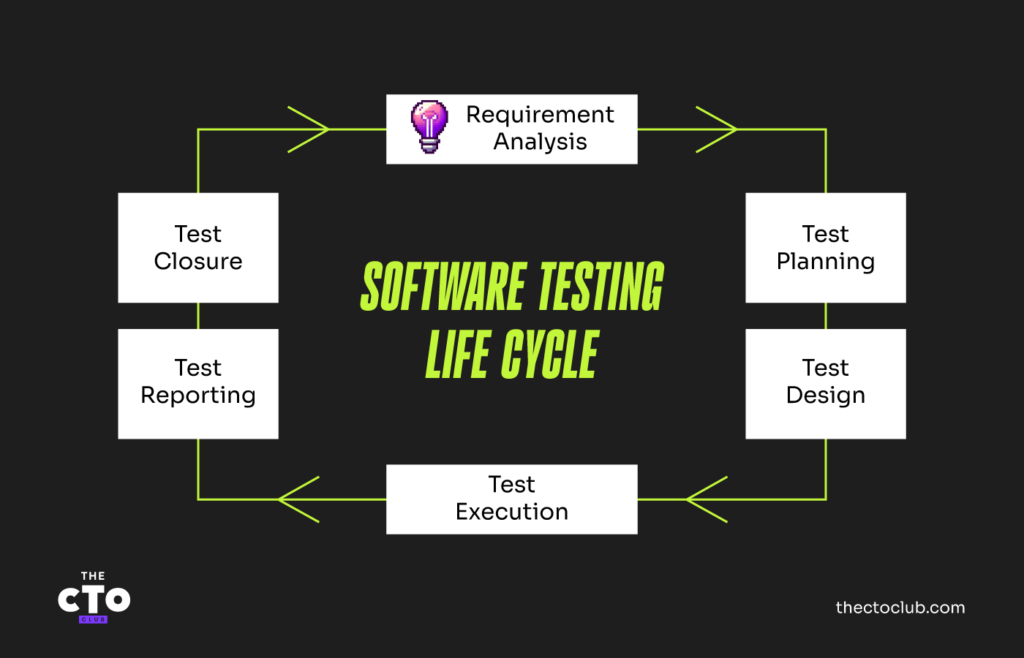
The STLC is the defined sequence of phases your team follows to plan, execute, and close out software testing. It runs parallel to the software development life cycle (SDLC) but focuses on quality assurance activities. Each phase has specific goals, entry and exit criteria, and deliverables.
The six phases are:
- Requirement Analysis
- Test Planning
- Test Case Development
- Test Environment Setup
- Test Execution
- Test Closure
You can use these six phases, whether you're testing a new feature, a full release, or a hotfix. The same structured approach applies each time.
Why STLC Matters: 5 Key Benefits
The STLC matter because it helps catch defects earlier, and that directly affects cost. The general rule of thumb is that bugs are exponentially more expensive to fix in production than they are during testing.
Here's what a clear STLC gives your team:
- Early defect detection: Reviewing requirements before writing a test case surfaces ambiguities before they become expensive bugs.
- Predictable test coverage: A defined process makes sure nothing falls through the cracks between sprints or handoffs.
- Standardized documentation: Each phase produces artifacts (e.g., test plans, test cases, defect logs) that create an audit trail and support compliance.
- Clear accountability: When every phase has defined roles and exit criteria, measuring progress and identifying bottlenecks gets easier.
- Lower overall cost: Structured testing reduces rework, unplanned hotfixes, and the operational fallout of production defects.
I've found that teams who skip formal STLC phases don't save time. They spend that time later on incident response and emergency patches.
Software Testing Life Cycle vs Software Development Life Cycle
The SDLC covers the entire software delivery process from requirements through design, development, testing, deployment, and maintenance. The STLC sits inside the SDLC and covers only testing activities.
Use this table to compare the two:
| Dimension | SDLC | STLC |
|---|---|---|
| DimensionScope | SDLCFull software delivery | STLCTesting activities only |
| DimensionFocus | SDLCBuilding and delivering software | STLCVerifying quality and catching defects |
| DimensionPrimary team | SDLCDevelopers, product managers, architects | STLCQA engineers, test leads, test managers |
| DimensionDeliverables | SDLCWorking software, architecture docs, release builds | STLCTest plans, test cases, defect reports, test summary reports |
| DimensionGoal | SDLCShip the product | STLCValidate the product meets requirements |
Roles and Responsibilities in the STLC
Every STLC phase relies on specific people doing specific work. Here's who owns what:
- Test manager: Sets the overall testing strategy, manages budgets and timelines, and reports quality status to stakeholders. Owns the test plan.
- Test lead: Coordinates day-to-day testing activities, assigns work to the team, and monitors progress against exit criteria.
- QA engineer: Writes and executes test cases, logs defects, and performs regression testing. The backbone of the execution phase.
- Automation engineer: Designs and maintains automated test scripts. Owns the automation framework and CI/CD integration.
- Business analyst: Supports requirement analysis by clarifying acceptance criteria and resolving ambiguities in user stories.
- Developer: Fixes reported defects and participates in unit testing. In shift-left testing, developers get involved earlier in test design.
In smaller teams, one person often covers multiple roles. A QA engineer might also handle automation, and the test lead might double as the test manager. That's fine; just make sure every responsibility is explicitly assigned rather than assumed.
Have an account? Log In
The 6 Phases of the Software Testing Life Cycle
1. Requirement Analysis
Requirement analysis is where testing starts, before a single test case is written. Your team reviews functional and non-functional requirements to understand what the system should do and identify anything that's unclear or untestable.
Key activities in this phase:
- Review requirements: Analyze business requirements documents, user stories, and acceptance criteria.
- Identify testable requirements: Flag anything that lacks a measurable, verifiable outcome.
- Map out test scope: Decide what will and won't be tested in this cycle.
- Spot risks early: Surface requirements that are ambiguous, contradictory, or technically risky.
- Document open questions: Send unresolved ambiguities to the business analyst or product owner for resolution.
The main deliverable here is a requirements traceability matrix (RTM). It maps each requirement to the test cases that will verify it.
Entry criteria: Approved requirements documents are available.
Exit criteria: All testable requirements identified; RTM drafted; ambiguities logged and sent for resolution.
2. Test Planning
Test planning defines how testing will be done. The test lead or test manager produces the test plan. This document sets the scope, approach, resources, schedule, and risk register for the test effort.
A solid test plan covers:
- Test objectives: What you're verifying and why.
- Testing types: Functional, regression, performance, security, etc. (whichever apply to the release).
- Resource plan: Who does what, and when.
- Schedule: Milestones, testing windows, and handoff dates.
- Risk and mitigation: What could block testing, and the contingency for each risk.
- Entry and exit criteria: The conditions that gate each phase.
- Tools: Test management, automation, and defect tracking tools the team will use.
Treat the test plan as a living document. In agile teams, it gets updated each sprint rather than written once and forgotten.
Entry criteria: Requirements analyzed; RTM available.
Exit criteria: Test plan reviewed and approved by stakeholders.
3. Test Case Development
Test case development is where QA engineers write, review, and baseline the actual tests. Each test case maps to a specific requirement in the RTM. Together, they should cover the full scope agreed on in the test plan.
Each test case should include:
- Test case ID and name
- Preconditions: The state the system must be in before execution.
- Test steps: Numbered, clear, and repeatable actions.
- Expected result: The exact output or behavior you're validating.
- Actual result: Filled in during execution.
- Pass/fail status
This phase also produces test data, which are the actual inputs your team uses during execution. Getting test data right is important, as bad test data produces misleading results.
Entry criteria: Approved test plan; finalized RTM.
Exit criteria: Test cases reviewed and signed off; test data prepared and validated.
4. Test Environment Setup
The test environment is the infrastructure your team runs tests on. It includes servers, databases, operating systems, browsers, network configurations, and any integrations the application depends on.
This phase has two goals: get the environment ready and verify that it's stable before execution begins.
Common activities include:
- Provisioning infrastructure: Setting up servers, containers, or cloud environments that mirror production.
- Installing the build: Deploying the build under test to the environment.
- Smoke testing the environment: Running a quick check to confirm the setup is working before full test execution.
- Data setup: Populating the environment with test data.
Environment issues are one of the most common causes of test delays. I'd treat smoke testing the environment as a hard gate before execution starts. If the environment isn't stable, your test results won't be meaningful.
Entry criteria: Test cases finalized; environment specifications defined.
Exit criteria: Environment stable; smoke test passes.
5. Test Execution
Test execution is where your team runs the test cases and records the results. For every test case that fails, the QA engineer logs a defect and assigns it to development for a fix.
The execution cycle typically works like this:
- Run test cases against the build.
- Log pass/fail results in your test management tool.
- Report defects with steps to reproduce, severity, and supporting evidence.
- The development team investigates and fixes the defect.
- QA retests fixed defects.
- Run regression tests to confirm fixes didn't break existing functionality.
- Repeat until exit criteria are met.
Tracking defect status matters as much as tracking execution progress. A backlog of unresolved high-severity defects signals the release isn't ready, even if your execution percentage looks high.
Entry criteria: Environment stable; test cases approved; build deployed.
Exit criteria: All planned test cases executed; defects above agreed severity resolved and retested; exit criteria metrics met.
6. Test Closure
Test closure wraps up the test cycle and produces the artifacts your team needs for handoff, compliance, and improvement. It's often rushed or skipped under deadline pressure, and that's a mistake.
Key activities:
- Evaluate exit criteria: Confirm all exit conditions from the test plan are satisfied.
- Write the test summary report: Document results, defect metrics, coverage achieved, and outstanding risks.
- Archive test assets: Store test cases, test data, and defect logs in a shared repository for future reference.
- Conduct a retrospective: Identify what worked, what didn't, and what to improve next cycle.
The test summary report is the deliverable that matters most here. Stakeholders use it to make a go/no-go release decision. Write it clearly and make sure it addresses open risks, not just pass rates.
Entry criteria: Test execution complete; defects resolved or deferred with documented justification.
Exit criteria: Test summary report approved; test artifacts archived.
Essential Tools for Each STLC Phase
Here are my picks for the best software testing life cycle tools:
Common STLC Challenges and How to Overcome Them
Here are the most common blockers and how to address them:
- Ambiguous requirements: Unclear acceptance criteria lead to tests that validate the wrong thing. Resolve this during requirement analysis. Don't wait until execution to discover a requirement is untestable.
- Environment instability: A flaky test environment wastes cycles and erodes confidence in results. Invest in environment-as-code using Docker or Kubernetes so you can spin up consistent, reproducible environments on demand.
- Flaky automated tests: Some automated test failures are due to flaky tests, not actual defects. Audit your automation suite regularly and rewrite tests that fail inconsistently.
- Tight timelines: When schedule pressure hits, teams cut testing (usually regression). Apply risk-based testing to prioritize high-impact areas instead of cutting blindly.
- Siloed teams: When developers and QA work in separate lanes, defect triage slows down. Build shared channels, triage cadences, and agreed-upon severity definitions before execution begins.
- Automation ROI pressure: Automation requires upfront investment and ongoing maintenance. Start with stable, high-frequency test cases (e.g., login flows, API contracts, checkout paths) before expanding to edge cases.
STLC in Agile and DevOps: Shift-Left and Continuous Testing
The six STLC phases still apply in agile and DevOps, but they compress and repeat. Instead of one long cycle per release, your team runs a shorter version every sprint.
- Shift-left testing: This means moving testing earlier in development. Testers review user stories during sprint planning, test cases exist before code is written, and developers write unit tests alongside features. The earlier you find a defect, the cheaper it is to fix.
- Continuous testing: This integrates automated tests into the CI/CD pipeline. Every commit triggers a test run, and the pipeline fails fast when a regression appears. Developers get immediate feedback without waiting for a dedicated testing window.
To adapt the STLC for agile and DevOps, follow these practices:
- Embed QA in sprint ceremonies: Testers should attend sprint planning to review acceptance criteria and flag testability issues before development starts.
- Automate regression alongside features: Don't build a regression suite after release. Build it as each feature ships.
- Use feature flags: Deploy code behind a flag, then test in production before enabling it for users.
- Treat environments as code: Use infrastructure-as-code to provision consistent environments automatically on every build.
In my experience, the biggest shift is cultural. Getting developers and testers working as one team, rather than in sequential stages, is what makes agile testing work.
The Role of Automation and AI in the Modern STLC
Automation belongs in your STLC, but it's not a replacement for test strategy. It's an accelerator for the right types of tests.
Where to Automate
Automate tests that are high-frequency, stable, and time-consuming to run manually:
- Regression testing: The highest ROI use case for automation. Run your full regression suite on every build.
- API testing: Fast, reliable, and easier to maintain compared to UI tests.
- Smoke testing: Automate your smoke suite so environment validation takes minutes, not hours.
- Load and performance testing: Tools like k6 and Apache JMeter can simulate thousands of concurrent users. This is impossible to replicate manually.
How AI Is Changing the STLC
AI is making meaningful differences to how testing works across the lifecycle:
- Test case generation: AI tools analyze requirements or user stories and suggest test cases your team might otherwise miss.
- Self-healing tests: AI-driven frameworks detect when a UI element changes and update the test selector automatically, which reduces maintenance overhead.
- Predictive defect analytics: Some platforms analyze historical defect data to predict which areas of a codebase carry the highest risk in a given release.
- Visual testing: AI-powered tools compare screenshots pixel-by-pixel and flag layout changes without brittle XPath selectors.
I think of AI in testing the way I think of automation generally: it handles repetitive, pattern-matching work so your QA engineers can focus on the testing that requires human judgment.
Software Testing Life Cycle Best Practices
Follow these practices to get the most out of your STLC across every phase:
- Start testing at requirements: The earlier QA gets involved, the fewer ambiguities make it into development.
- Maintain a live RTM: Keep the requirements traceability matrix updated so coverage gaps are visible in real time.
- Apply risk-based testing: Focus effort on high-risk, high-impact areas first, especially when time is short.
- Review test cases before execution: Peer-reviewed test cases catch gaps and bad assumptions before they produce misleading results.
- Integrate tests into CI/CD: Automated tests should run on every commit, not just before release.
- Run retrospectives every cycle: Use what you learn from each STLC to improve the next one.
Key Metrics to Track
These KPIs give you the clearest signal on testing quality and process health:
| Metric | What It Measures | Why It Matters |
|---|---|---|
| MetricDefect density | What It MeasuresDefects per unit of code or feature | Why It MattersSignals code quality and test thoroughness |
| MetricTest case pass rate | What It Measures% of test cases passing in a cycle | Why It MattersTracks overall build health |
| MetricDefect leakage | What It MeasuresDefects found in production vs. in testing | Why It MattersMeasures how much testing missed |
| MetricTest coverage | What It Measures% of requirements covered by test cases | Why It MattersEnsures nothing is untested |
| MetricDefect resolution time | What It MeasuresAverage time from log to fix | Why It MattersReflects development team responsiveness |
| MetricTest execution rate | What It Measures% of planned test cases executed | Why It MattersTracks whether testing is on schedule |
Keep Your Testing Knowledge Current
If you want to stay on top of quality engineering trends and the tools shaping modern development, The CTO Club newsletter delivers weekly insights from CTOs, engineering directors, and technical leaders straight to your inbox.