

O melhor software de helpdesk de TI ajuda as equipas a resolver problemas mais rapidamente, a melhorar os tempos de resposta aos pedidos e a manter os sistemas a funcionar sem problemas para os colaboradores de toda a organização. Estas ferramentas centralizam os pedidos, automatizam tarefas de rotina e dão às equipas de suporte a visibilidade necessária para resolver problemas antes que estes perturbem as operações diárias.
Quando configurações incorretas provocam interrupções repetidas, os processos manuais atrasam o tratamento dos pedidos ou as equipas de suporte dependem de canais de comunicação dispersos, o desempenho e a eficiência podem diminuir rapidamente. Estes desafios criam atrasos, aumentam a frustração dos utilizadores finais e dificultam a colaboração entre os profissionais de TI que tentam diagnosticar e resolver problemas.
Com mais de 20 anos de experiência no setor como Diretor de Tecnologia, testei e analisei dezenas de plataformas de software de helpdesk de TI em ambientes reais para avaliar o seu desempenho, as integrações e a facilidade de utilização. Este guia apresenta o melhor software de helpdesk de TI para melhorar os fluxos de trabalho de suporte, reforçar a coordenação das equipas e ajudar as organizações a prestar um serviço de TI fiável e responsivo. Cada análise aborda as funcionalidades, as vantagens e desvantagens e os casos de utilização mais adequados, para ajudar a escolher a ferramenta certa.
Why Trust Our Software Recommendations
6,700+
Reviews
20
Industry experts
16+
Evaluation factors
14
Years
Our team has been testing and reviewing software since 2012. As tech leaders ourselves, we know how difficult—and important—it is to choose the right software.
For this guide, we evaluated tools using hands-on testing and independent research, scoring tools using our selection criteria.
Our reviews reflect our human editorial judgment, not a sales pitch.
Expert reviewers:
- Paulo Gardini MiguelTech Director
 Tim FisherVP of AI
 Gabriel RosasTech Lead & Software Architect
 Christhian GruhnTech Lead & Platform Architect

Tabela comparativa de software de helpdesk de TI
A tabela abaixo compara os detalhes de preços das minhas principais escolhas de software de helpdesk de TI.
| Tool | Best For | Trial Info | Price | ||
|---|---|---|---|---|---|
| 1 | Best for endpoint management and patch compliance | Free trial available | Pricing upon request | Website | |
| 2 | Best for AI-powered helpdesk with full ITSM | 14-day free trial | From $19/user/month (billed annually) | Website | |
| 3 | Best for remote monitoring | Free trial available | From $149/user/month (billed annually) | Website | |
| 4 | Best AI agents that resolve tickets | Free demo available | From $89/agent/month | Website | |
| 5 | Best for managed service providers | 14-day free trial | Pricing upon request | Website | |
| 6 | Best for remote access support | 15-day free trial | From $8.25/month (billed annually) | Website | |
| 7 | Best for creating personalized experiences with AI | Free trial available | From $75/user/month | Website | |
| 8 | Best for AI-native IT service workflows | Free demo available | Pricing upon request | Website | |
| 9 | Best for multi-channel ticketing | Free trial available | From $25/agent/month (billed annually) | Website | |
| 10 | Best deployment flexibility for cloud & on-premise | 21-day free trial | From $29/month | Website |


Análises dos 10 melhores softwares de helpdesk de TI
Eis uma breve descrição de cada solução de software de helpdesk de TI, do seu caso de utilização mais adequado, das funcionalidades relevantes e de capturas de ecrã que apresentam uma visão geral do painel de controlo.
 Best for endpoint management and patch compliance
- Free trial available
- Pricing upon request
Visit WebsiteCustomer Rating:4.7/5
NinjaOne helps IT members track, manage, and deploy repairs as required across multiple devices. NinjaOne is a top-rated IT management platform that specializes in endpoint management and patch compliance, making it the best choice for businesses and MSPs.
Why I picked NinjaOne: With a focus on security and efficiency, NinjaOne offers a comprehensive solution for organizations looking to monitor, manage, and secure their IT assets effectively. The software provides features including endpoint management and patch compliance, helping IT teams improve overall processes and complete updates across multiple networks.
NinjaOne Standout Features and Integrations:
Features include endpoint management, patch management, mobile device management, remote control, and endpoint backup.
Integrations include ConnectWise, ScreenConnect, BrightGauge, Slack, TeamViewer, Remote, Malwarebytes, and Bitdefender.
Pros and Cons
Pros:
- Script library and sharing
- Real-time collaboration tools
- Automated documentation generations
Cons:
- Challenges with reporting customization
- Limited customization for alert prioritization
Learn more about NinjaOne: Best for AI-powered helpdesk with full ITSM
- 14-day free trial
- From $19/user/month (billed annually)
Visit WebsiteCustomer Rating:4.6/5
Freshservice allows for intelligent routing of incidents, providing technicians with the necessary tools to resolve issues from a single screen. Freshservice is a cloud-based IT service management (ITSM) software developed by Freshworks. It provides a comprehensive suite of tools that enable IT teams to provide better service and resolve issues.
Why I picked Freshservice: I like Freshservice's AI-powered support, which leverages machine learning to automate routine tasks, provide intelligent ticketing routing, and offer predictive insights to improve service delivery. Additionally, the platform includes a robust incident management system that allows IT teams to quickly capture, track, and resolve incidents. The software's change management module also enables teams to plan, approve, and implement changes with minimal risk.
Freshservice Standout Features and Integrations:
Features include asset management for a comprehensive view of all IT assets and the service catalog feature that allows users to create and publish a list of available IT services, making it easier for end-users to request and receive services. Freshservice also includes a knowledge base module and supports multi-channel service, allowing users to submit tickets via email, chat, phone, or portal.
Integrations include Slack, Microsoft Teams, Jira, Trello, GitHub, Azure DevOps, Google Workspace, Office 365, Zapier, Twilio, Okta, Dropbox, Salesforce, AWS, and Zendesk.
Pros and Cons
Pros:
- Good range of integrations
- Intuitive and easy to set up
- Automated workflow features
Cons:
- Filtering options could be improved
- Most reporting features are only available on higher-tier plans
Learn more about Freshservice: Best for remote monitoring
- Free trial available
- From $149/user/month (billed annually)
Visit WebsiteCustomer Rating:4.6/5
Atera provides a help desk and ticketing system to manage requests, automate workflows, and improve efficiency. This system allows IT teams to handle service tickets on a unified platform. Atera is an all-in-one RMM and PSA solution built for IT professionals and Managed Service Providers (MSPs), with a focus on ease of use, automation, and remote capabilities.
Why I picked Atera: Atera stands out for its intuitive interface and real-time monitoring tools that help IT teams spot and resolve issues before they escalate. Its remote access functionality is fast, secure, and works across multiple platforms, allowing technicians to provide support from anywhere. I also liked that Atera’s pricing is per technician—not per device—making it a cost-effective choice for teams managing a large number of endpoints. Plus, its automated patch management and alerts help enforce security and compliance without manual follow-up.
Atera Standout Features and Integrations:
Features include built-in IT automation for tasks like software installation, patching, and scripting, along with real-time monitoring, asset tracking, and remote access. Atera also includes a helpdesk ticketing system, contract management, and billing tools, giving MSPs and IT departments everything they need in one platform. The reporting tools are customizable and provide visibility into system health, user activity, and SLA performance.
Integrations include TeamViewer and Splashtop for remote access, Acronis Cyber Protect Cloud for backup and cybersecurity, Microsoft Teams and Slack for internal communication, as well as ServiceNow, Okta, Jira Software Cloud, Azure Active Directory, and Google Sheets for identity, workflows, and reporting.
Pros and Cons
Pros:
- Advanced reporting capabilities
- Customizable workflows and automation
- Automated ticketing system
Cons:
- Limited scalability for very large organizations
- Advanced features may require a learning curve
 Best AI agents that resolve tickets
- Free demo available
- From $89/agent/month
Visit WebsiteCustomer Rating:4.5/5
SysAid displays active service records with AI-assisted ticket summaries, priority levels, and response timelines. SysAid helps you bring IT support, asset tracking, and service desk work into one place, a single platform that makes it easier for mid-sized or enterprise IT teams to handle tickets, manage hardware and software inventory, and provide self-service support for employees or clients. It is a strong option if your team wants to reduce manual overhead for routine tasks, give users a reliable self-service portal, and gain clearer visibility into both incidents and IT assets.
Why I Picked SysAid
I picked SysAid because it embeds AI-driven automation directly into the help desk workflow. Capabilities such as automatic ticket triage, categorization, and prioritization help prevent support queues from becoming unmanageable, especially during spikes in request volume. Its built-in asset management also links tickets to specific hardware, software, or licenses, which makes troubleshooting, auditing, and compliance checks more straightforward. This close connection between ticketing and asset data makes SysAid a practical, unified tool for IT teams responsible for both support and infrastructure.
SysAid Key Features
In addition to its automation and asset-aware ticketing, SysAid offers several other features that enhance IT helpdesk operations:
- Incident Management: Facilitates efficient tracking and resolution of IT incidents, ensuring minimal disruption to your operations.
- Change Management: Streamlines the process of implementing IT changes, reducing the risk of errors and downtime.
- Knowledge Management: Provides tools to create and maintain a comprehensive knowledge base, aiding in faster issue resolution.
- Self-Service Portal: Let's end users search a knowledge base, request services or report issues on their own — helping reduce routine tickets.
SysAid Integrations
Integrations include Jira, Microsoft Teams, Slack, Active Directory, Azure AD, SCCM, VMware, Google Workspace, Okta, and Salesforce.
Pros and Cons
Pros:
- Customizable workflows and SLA policies let you tailor processes to your organization’s needs.
- The self-service portal enables end users to find solutions themselves.
- AI-driven ticket categorization and prioritization capabilities to reduce manual triage.
Cons:
- When features are not properly configured, automations and SLA workflows can become complex and confusing for agents.
- Mobile app experience lacks full functionality.
 Best for managed service providers
- 14-day free trial
- Pricing upon request
Visit WebsiteCustomer Rating:4.6/5
SuperOp's PSA offers a service desk feature that allow technicians to communicate with clients and manage issues easily. SuperOps is a PSA-RMM platform designed for Managed Service Providers (MSPs), offering automation and a range of features.
Why I picked SuperOps: SuperOps has a service desk feature that provides a solution for MSPs to manage tickets and communicate with clients. The service desk supports contextual engagement, with each ticket containing all necessary information as soon as it's opened. Its ticketing system also offers powerful automation features, from using event-based triggers to automatic time tracking, ticket assignment, and scheduling. SuperOps even has automated invoicing features to ensure timely payments.
SuperOps Standout Features and Integrations:
Features include a unified RMM and PSA platform, allowing IT teams to manage endpoints, monitor networks, and handle service desk operations within a single tool. Its AI-powered automation reduces manual workloads by identifying issues proactively and triggering automated resolutions, improving efficiency and response times. Additionally, SuperOps offers agentless monitoring, enabling IT professionals to track network health without installing software on every device, making deployment and management more straightforward.
Integrations include Splashtop, TeamViewer, Bitdefender, Xero, QuickBooks, Stripe, SentinelOne, Guardz, Hudu, Emsisoft, Microsoft Azure, and Webroot.
Pros and Cons
Pros:
- User-friendly scripting module
- RMM and PSA in one solution
- Effective ticket automation
Cons:
- Client portal could be improved
- Limited language support
Learn more about SuperOps: Best for remote access support
- 15-day free trial
- From $8.25/month (billed annually)
Visit WebsiteCustomer Rating:4.7/5
SetMe's unattended access feature allows technicians to access client computers without user intervention. SetMe is a remote support software that lets you access and control Windows and Mac computers from anywhere. It's designed to help IT professionals and support teams troubleshoot issues, perform system updates, and provide real-time assistance without needing to be on-site.
Why I picked SetMe: While it lacks features like ticket management, SetMe offers a unique approach to managing IT helpdesks with its focus on remote support. For example, its multi-session handling allows you to connect to and control multiple remote computers simultaneously. This is particularly useful when managing several support requests at once, as it enables efficient multitasking without the need to disconnect and reconnect between sessions. Additionally, the 'run as admin' feature lets you perform administrative tasks on remote machines, such as installing software or managing user accounts, even if the remote user lacks administrative privileges.
SetMe Standout Features and Integrations:
Features include the remote reboot and auto-reconnect functionality. If a system reboot is necessary during a support session, SetMe can restart the remote computer in normal or safe mode and automatically reconnect once the system is back online. It also offers clipboard synchronization, which lets you share text, images, and files between your local and remote computers.
Integrations are not listed on SetMe's website, but it supports both Windows and Mac computers.
Pros and Cons
Pros:
- Ensures secure communication and data sharing
- Cross-platform support
- Facilitates easy drag-and-drop file transfers
Cons:
- Does not offer traditional helpdesk features, like ticket management
- Potential compatibility issues with older operating systems or devices
Learn more about SetMe: Best for creating personalized experiences with AI
- Free trial available
- From $75/user/month
Visit WebsiteCustomer Rating:4.4/5
Resolve cases faster with automation and personalized recommendations. Salesforce Service Cloud is an advanced multi-channel helpdesk that can be used in both internal and client-facing settings. It has AI features that allow for more personalized, contextual support.
Why I picked Salesforce Service Cloud: The software leverages AI and automation to handle routine tasks, enabling IT staff to concentrate on delivering exceptional support. Features like AI-driven chatbots and automatic triaging streamline processes, improving efficiency by routing issues to the appropriate IT personnel with the necessary skills.
This platform is suitable for IT departments of all sizes. It enhances support by analyzing interactions, offering proactive service suggestions, and anticipating needs. The drag-and-drop editor allows for creating a self-service center, empowering employees to find solutions independently, which enhances support effectiveness.
Salesforce Service Cloud Standout Features and Integrations:
Features include omni-channel routing, which directs IT issues to the appropriate personnel based on their skills and availability, ensuring quick and accurate responses. The platform also includes a comprehensive knowledge base, providing IT staff with easy access to information and solutions, thereby speeding up problem resolution.
Integrations include Freshdesk, CloudTalk, Twilio, Brandwatch, Paligo, Mailchimp, HubSpot CRM, Trello, TeamViewer, Smartsheet, Klaviyo, Aircall, Gainsight, and Conversocial.
Pros and Cons
Pros:
- Adaptable to users’ needs
- Effectively simplifies support procedures
- Provides a unified view of interactions
Cons:
- Comes with a learning curve
- Can be cumbersome to implement
Learn more about Agentforce Service (formerly Service Cloud): Best for AI-native IT service workflows
- Free demo available
- Pricing upon request
Visit WebsiteCustomer Rating:4.5/5
Serval offers an AI-powered Slack bot that automatically responds to IT help desk queries, such as providing WiFi credentials in real time. Serval is an AI-native IT helpdesk platform that combines ticket automation, access management, and workflow automation using a built-in AI agent workforce across Slack, Teams, email, and web portals.
Who Is Serval Best For?
Serval is a strong fit for technical IT ops teams at growth-stage and enterprise companies that want to automate high-volume help desk workflows without scaling headcount.
Why I Picked Serval
I picked Serval as one of the best because its Automation Agent converts plain-language descriptions into TypeScript workflow code, which my team can then version, review, and maintain in Git like any other software project. That means access provisioning, onboarding, and offboarding flows aren’t locked inside a drag-and-drop UI but actually live in your repo. I also like that the Help Desk Agent resolves tickets autonomously across Slack, Microsoft Teams, email, and a web portal before a human ever gets involved.
Serval Key Features
- Omnichannel ticket intake: Accepts IT requests through Slack, Microsoft Teams, email, and web portal channels.
- Access management automation: Handles access requests, approvals, and provisioning for any application or resource.
- AI Suggestions: Surfaces automation opportunities by identifying patterns in ticket data.
- Analytics: Tracks resolution rates, time saved, and SLA performance through built-in dashboards.
Serval Integrations
Serval offers native integrations with Okta, Google Workspace, Microsoft Teams, Slack, Notion, Confluence, Jira, GitHub, ServiceNow, and Salesforce. An API is available for custom integrations.
Pros and Cons
Pros:
- Handles access provisioning end-to-end autonomously
- Automation Agent writes deployable workflow code
- AI agents resolve tickets without human intervention
Cons:
- Limited third-party reviews for real-world validation
- Advanced workflow customization may require technical expertise
Learn more about Serval: Best for multi-channel ticketing
- Free trial available
- From $25/agent/month (billed annually)
Visit WebsiteCustomer Rating:4.3/5
Zendesk Explore dashboard displaying real-time chat, call, and ticket performance metrics. Zendesk is an IT helpdesk software that helps organizations manage internal IT support and customer service inquiries from one centralized platform. It supports multiple communication channels, enabling teams to respond to requests via email, chat, phone, and social media while maintaining a complete ticket history for every interaction.
Why I picked Zendesk: I like its robust ticketing system that organizes all incoming requests in one place, making it easier for your IT team to track, prioritize, and resolve issues quickly. The platform’s automation tools, including AI-powered routing and macros, help reduce repetitive work so your agents can focus on complex problems. I also appreciate the inclusion of a self-service knowledge base, giving users a way to solve common issues independently and reduce ticket volume.
Zendesk Standout Features and Integrations:
Features include AI-driven ticket management that suggests solutions and routes requests to the right team member, a customizable knowledge base for end-user self-service, and detailed analytics that give you insight into response times and resolution trends. Security tools help ensure compliance with standards such as HIPAA and GDPR, making it suitable for organizations with strict data protection needs.
Integrations include Slack, HubSpot, Marketo, Twilio, Zapier, Jira, Trello, Hootsuite, Mailchimp, PandaDoc, Dialpad, and Zoho Analytics.
Pros and Cons
Pros:
- Strong integration capabilities with popular business apps
- AI features to speed up ticket resolution
- Centralized inbox for all support channels
Cons:
- Higher cost for advanced features
- Steeper learning curve for new users
 Best deployment flexibility for cloud & on-premise
- 21-day free trial
- From $29/month
Visit WebsiteCustomer Rating:4.4/5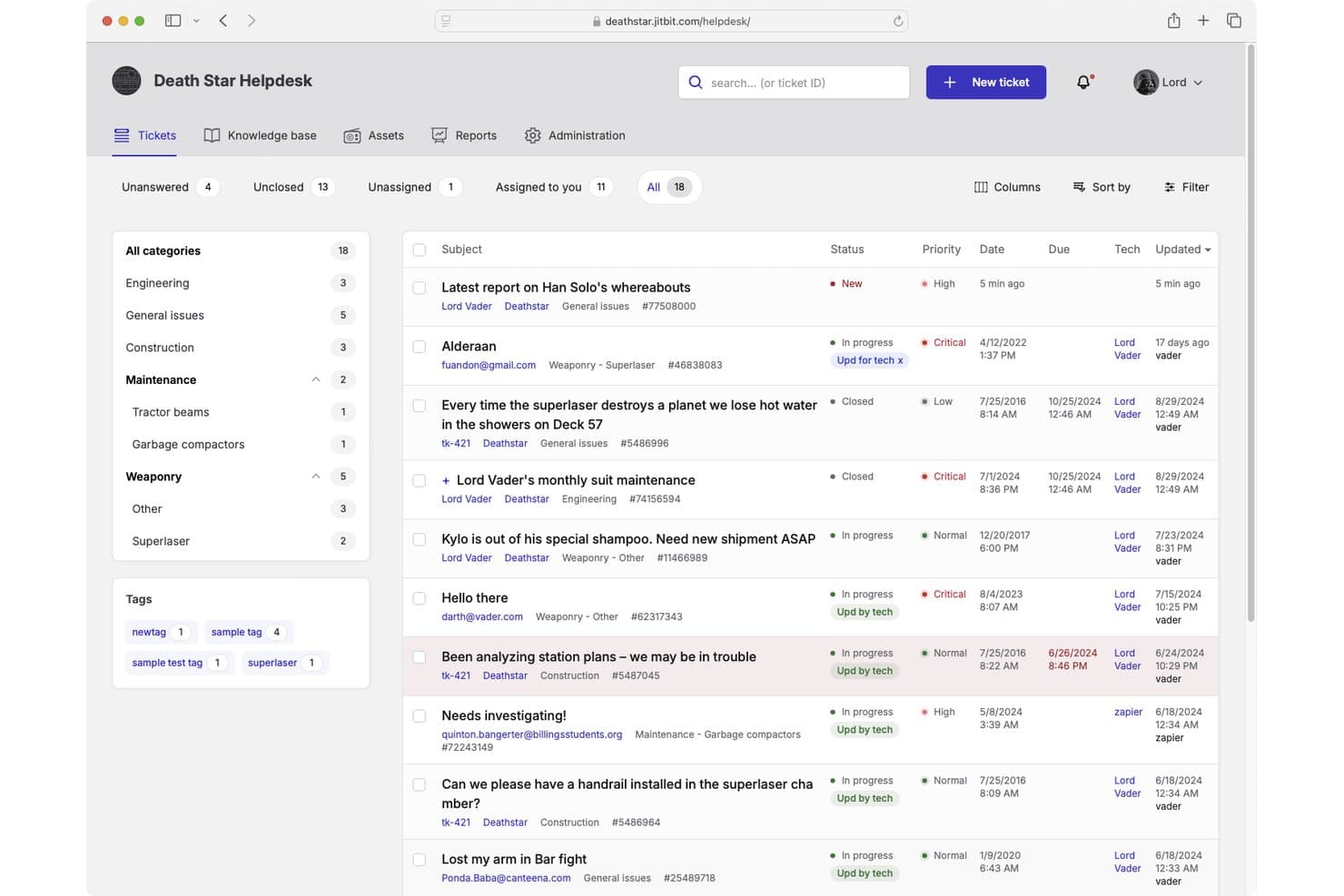
Jitbit Helpdesk offers a ticket management interface with categorized tickets, priority levels, status tracking, and assignee management for IT support teams. Jitbit Helpdesk is an email-first IT helpdesk platform that combines ticket management, automation, SLA tracking, a self-service knowledge base, and asset tracking—available as both a cloud-hosted SaaS solution and a self-hosted on-premises application.
Who Is Jitbit Helpdesk Best For?
Jitbit Helpdesk is a strong fit for small to mid-sized IT teams that need a no-fuss ticketing system they can either host themselves or run in the cloud.
Why I Picked Jitbit Helpdesk
I picked Jitbit Helpdesk as one of the best because it's one of the only IT helpdesk tools that offers full feature parity across its cloud and self-hosted versions. The on-premises license is perpetual, so my team owns the software outright with no ongoing subscription required. I also like that the C# source code is available for purchase, which means we can customize the platform at a deep level when standard configuration isn't enough.
Jitbit Helpdesk Key Features
- AI-powered ticket responses: Uses AI to suggest replies, summarize tickets, and recommend knowledge base articles.
- Multi-channel ticket intake: Accepts tickets via email, web portal, live chat, WhatsApp, API, and mobile app.
- Automation triggers: Customizable rules handle auto-assignment, escalations, and external HTTP requests.
- SLA tracking and alerts: Monitors multiple SLA policies with breach notifications and automated escalations.
Jitbit Helpdesk Integrations
Jitbit Helpdesk offers native integrations with Microsoft Teams, Slack, Jira, Active Directory, Zapier, and has an API for custom integrations.
Pros and Cons
Pros:
- Automation rules support external HTTP requests
- Cloud and self-hosted versions have feature parity
- Perpetual on-premises license with full source code
Cons:
- No native ITIL change or problem management modules
- Reporting and analytics capabilities are limited
Learn more about Jitbit Helpdesk:
Outros softwares de helpdesk de TI a considerar
Eis algumas opções adicionais à sua escolha. Não entraram na lista dos 10 melhores, mas pode considerá-las como a sua próxima ferramenta de helpdesk:
- 11MissiveBest for collaborative inbox management
- 12Rippling ITBest for HR-connected IT request automation
- 13Zoho DeskBest for multichannel IT support
- 14HaloBest for advanced help desk users
- 15monday serviceBest for workflow automation
- 16Vision HelpdeskBest for gamification features
- 17HappyFoxBest for integrations
- 18IssuetrakBest for helpdesk reporting and analytics
- 19InvGate Service ManagementBest for help desk configuration
- 20SpiceworksBest free IT helpdesk software
Análises relacionadas de software de TI
Se ainda não encontrou o que procura, consulte estas ferramentas alternativas que testámos e avaliámos.
- Software de monitorização de redes
- Software de monitorização de servidores
- Soluções SD-Wan
- Ferramentas de monitorização de infraestruturas
- Analisador de pacotes
- Ferramentas de monitorização de aplicações
How I Evaluate IT Helpdesk Software
I evaluate every tool on two levels: the baseline—ticket routing, SLA enforcement, and self-service portals—and the differentiators that matter for IT teams managing incidents under pressure.
Core Functionality (Table Stakes For This List)
When I'm selecting tools for my list, I rank each one on a scale from 0 (does not offer the functionality) to 5 (excels in this area) for each core functionality listed below. Then, I calculate the tool's total score into a percentage. Each tool needs to achieve a minimum total score of 75% to be considered for inclusion.
- Ticket Management: I look at how each tool handles categorization, assignment, status tracking, and ticket relationships—like linking a parent incident to child tasks when a server outage spawns multiple hardware requests.
- Multi-Channel Intake: Each platform should accept tickets from email, a web portal, and at least one additional channel such as Microsoft Teams or Slack so end users can report issues where they already work.
- Automation & Routing: I evaluate whether the tool supports rule-based routing and escalation triggers—for example, auto-assigning printer issues to a specific technician or escalating a VPN outage after 30 minutes without response.
- Knowledge Base & Self-Service Portal: A searchable KB paired with a self-service portal matters here. I check whether employees can find password reset guides or VPN setup instructions and submit tickets without emailing the help desk.
- SLA Management: I look for configurable SLA policies tied to ticket priority or category, with breach alerts and business-hours tracking so teams can differentiate response expectations for a downed production server vs. a software access request.
- IT Asset & Configuration Tracking: The tool should link assets to tickets and users. When a laptop failure comes in, agents should see warranty status, installed software, and past incidents tied to that device.
Once I have a list of tools that meet this criteria, I consider what sets each platform apart.
Differentiating Factors (What Sets Vendors Apart)
Here's how I compare and contrast different vendors:
Standout Features
AI-assisted triage is a big differentiator—tools that can auto-categorize tickets and draft responses save agents real time during high-volume incidents like a company-wide outage. I also evaluate whether a platform includes native change and problem management modules, since teams that handle root-cause analysis and change approvals outside their helpdesk lose visibility. Built-in remote control is another feature I look for, especially for support teams troubleshooting endpoint issues without switching to a separate remote desktop tool.
Beyond Features
Ecosystem fit matters a lot here. I check whether a tool connects natively to identity providers like Azure AD and endpoint managers like Intune, since a helpdesk that doesn't plug into your existing stack creates more work than it solves. Compliance is another key factor—teams in regulated industries need SOC 2 Type II or ISO 27001 certifications alongside SSO and role-based access controls. I also evaluate pricing transparency, particularly whether asset management and automation features sit behind add-ons or come included in base tiers.
Como escolher software de helpdesk de TI
É fácil perder-se em listas extensas de funcionalidades e estruturas de preços complexas. Para ajudar a manter o foco enquanto percorre o seu processo específico de seleção de software, eis uma lista de verificação dos fatores a ter em conta:
| Fator | O que considerar |
|---|---|
| FatorEscalabilidade | O que considerarO software consegue acompanhar as necessidades da sua equipa? Procure uma solução que suporte um volume crescente de pedidos, vários departamentos e equipas globais. |
| FatorIntegrações | O que considerarConsegue ligar-se às ferramentas que já utiliza? Certifique-se de que se integra com sistemas de correio eletrónico, chat, CRM e gestão de ativos para simplificar os fluxos de trabalho. |
| FatorPersonalização | O que considerarPode ajustar fluxos de trabalho, categorias de pedidos e funções de utilizador? Um serviço de assistência flexível permite adaptar os processos às necessidades específicas da sua equipa. |
| FatorFacilidade de utilização | O que considerarA interface é intuitiva tanto para os agentes como para os utilizadores finais? Procure um sistema simples de gestão de pedidos, uma navegação clara e um painel de controlo fácil de utilizar. |
| FatorOrçamento | O que considerarO preço é compatível com o seu orçamento e o tamanho da equipa? Verifique se existem custos ocultos em funcionalidades adicionais, preços por agente e planos empresariais. |
| FatorMedidas de segurança | O que considerarAté que ponto protege os dados informáticos sensíveis? Procure controlos de acesso baseados em funções, encriptação e conformidade com normas do setor, como o RGPD. |
| FatorFuncionalidades de automatização | O que considerarOferece automatização de fluxos de trabalho, encaminhamento de pedidos baseado em IA ou chatbots? A automatização reduz o trabalho manual e acelera os tempos de resolução dos pedidos. |
| FatorRelatórios e análise | O que considerarFornece informações em tempo real sobre o desempenho informático? Procure painéis de controlo, acompanhamento de SLA e análise de tendências para medir a eficiência e identificar áreas de melhoria. |
Tendências no software de assistência informática
Na minha investigação, recolhi inúmeras atualizações de produtos, comunicados de imprensa e registos de versões de diferentes fornecedores de software de assistência informática. A criação de documentação abrangente requer frequentemente ferramentas de criação de documentação de ajuda especializadas para organizar e apresentar estas informações de forma eficaz. Eis algumas das tendências emergentes que tenho acompanhado:
- Resolução de pedidos com recurso a IA: Cada vez mais ferramentas de assistência utilizam IA para categorizar, encaminhar e até resolver pedidos automaticamente. Os modelos de aprendizagem automática analisam pedidos anteriores para sugerir soluções, reduzindo a carga de trabalho manual e acelerando os tempos de resposta.
- Suporte informático proativo: Em vez de aguardarem que os utilizadores submetam pedidos, algumas ferramentas detetam agora potenciais problemas antes de estes causarem interrupções. A análise preditiva e as integrações com sistemas de monitorização ajudam as equipas de informática a resolver os problemas antes de estes afetarem os colaboradores.
- Gestão conversacional de pedidos: Os formulários tradicionais de pedidos estão a ser substituídos por interfaces baseadas em chat. Os colaboradores podem agora submeter e acompanhar pedidos diretamente através do Slack, do Microsoft Teams ou de chatbots com IA, tornando o suporte informático mais acessível.
- Automatização de fluxos de trabalho sem código: Cada vez mais plataformas permitem que as equipas de informática criem fluxos de trabalho personalizados para a gestão de pedidos sem escrever código. Os criadores de fluxos de trabalho de arrastar e largar ajudam as equipas a automatizar processos repetitivos, como a integração de novos colaboradores ou a reposição de palavras-passe.
- Acompanhamento da experiência dos colaboradores: O software de assistência está a expandir-se para além do suporte informático, de modo a medir a satisfação geral dos colaboradores. Algumas ferramentas recolhem agora comentários após a resolução dos pedidos e analisam as tendências de sentimento para ajudar as equipas de informática a melhorar a qualidade do serviço.
O que é o software de assistência informática?
O software de assistência informática ajuda as equipas de informática a acompanhar, gerir e resolver pedidos de suporte técnico. Os administradores informáticos, os agentes de suporte e os gestores de assistência utilizam estas ferramentas para organizar pedidos, automatizar fluxos de trabalho e melhorar os tempos de resposta.
O acompanhamento de pedidos, a automatização baseada em IA e as bases de conhecimento de autosserviço ajudam a reduzir os tempos de resolução, melhorar a satisfação dos utilizadores e manter as operações informáticas organizadas. Para as equipas que necessitam de ambientes de formação práticos, o software de laboratórios informáticos virtuais pode complementar estas ferramentas de suporte. Estas ferramentas facilitam a prestação de um suporte eficiente e fiável, minimizando simultaneamente o tempo de inatividade.
Funcionalidades do software de assistência informática
Ao selecionar software de assistência informática, esteja atento às seguintes funcionalidades essenciais:
- Gestão de pedidos: Organiza os pedidos de suporte recebidos, atribui-os aos agentes adequados e acompanha o seu progresso até à resolução.
- Fluxos de trabalho automatizados: Utiliza regras predefinidas para encaminhar pedidos, enviar notificações e desencadear ações, reduzindo o trabalho manual.
- Portal de autosserviço: O melhor software de portal para profissionais de TI disponibiliza bases de conhecimento onde os utilizadores podem encontrar respostas para problemas comuns sem submeterem um pedido.
- Suporte multicanal: Permite aos utilizadores submeter pedidos por e-mail, chat, telefone e aplicações de mensagens como o Slack ou o Microsoft Teams.
- Assistência baseada em IA: Utiliza aprendizagem automática para sugerir soluções, classificar pedidos e até resolver automaticamente problemas simples.
- Acompanhamento de SLA: Monitoriza os tempos de resposta e de resolução para garantir o cumprimento dos acordos de nível de serviço (SLAs).
- Gestão de ativos: Acompanha os ativos de TI, associando-os aos pedidos de suporte para ajudar as equipas de TI a diagnosticar e resolver mais rapidamente problemas de hardware ou software.
- Relatórios e análises: Fornece informações sobre o volume de pedidos, os tempos de resolução e o desempenho dos agentes para melhorar a eficiência dos serviços de TI.
- Ferramentas de suporte remoto: Permite às equipas de TI diagnosticar e resolver problemas nos dispositivos dos utilizadores sem precisarem de estar no local.
- Recolha de feedback dos utilizadores: Recolhe classificações e comentários após a resolução dos pedidos para medir a satisfação com o serviço e identificar áreas de melhoria.
Benefícios do software de suporte informático
A implementação de software de suporte informático proporciona vários benefícios à sua equipa e à sua empresa. Eis alguns dos que pode esperar:
- Resolução mais rápida de problemas: Automatiza o encaminhamento e a definição de prioridades dos pedidos, permitindo às equipas de TI resolver problemas mais rapidamente.
- Melhor organização: Mantém todos os pedidos de suporte num único local, facilitando o acompanhamento e a gestão dos pedidos do início ao fim.
- Melhor experiência do utilizador: Disponibiliza aos colaboradores opções de autosserviço e respostas mais rápidas, reduzindo a frustração.
- Maior eficiência de TI: Reduz as tarefas manuais através da automatização, permitindo às equipas de TI concentrarem-se em trabalhos de maior prioridade.
- Melhor tomada de decisões: Gera relatórios e informações sobre tendências dos pedidos, desempenho dos agentes e problemas comuns, ajudando a melhorar os serviços de TI.
- Maior conformidade em matéria de segurança: Acompanha os incidentes e os ativos de TI, ajudando as organizações a manterem a conformidade com os requisitos de segurança e regulamentares.
- Custos de suporte mais baixos: Reduz o número de pedidos repetitivos através da disponibilização de bases de conhecimento de autosserviço e assistência baseada em IA.
Custos e preços do software de suporte informático
A seleção de software de suporte informático exige uma compreensão dos vários modelos de preços e planos disponíveis. Os custos variam consoante as funcionalidades, a dimensão da equipa, os complementos, entre outros fatores. A tabela abaixo resume os planos comuns, os respetivos preços médios e as funcionalidades normalmente incluídas nas soluções de software de suporte informático:
Tabela de comparação de planos de software de suporte informático
| Tipo de plano | Preço médio | Funcionalidades comuns |
|---|---|---|
| Tipo de planoPlano gratuito | Preço médio$0 | Funcionalidades comunsSistema básico de gestão de pedidos, automatização limitada, acesso para um único utilizador e suporte da comunidade. |
| Tipo de planoPlano pessoal | Preço médio$10-$30/utilizador/mês | Funcionalidades comunsSuporte multicanal, atribuição de pedidos, ferramentas de elaboração de relatórios e notificações por e-mail. |
| Tipo de planoPlano empresarial | Preço médio$40-$100/utilizador/mês | Funcionalidades comunsAutomatização avançada, encaminhamento de pedidos baseado em IA, acompanhamento de SLA e integrações com aplicações de terceiros. |
| Tipo de planoPlano empresarial de grande dimensão | Preço médioPreço personalizado | Funcionalidades comunsFluxos de trabalho personalizados, suporte dedicado, gestão da conformidade e análises avançadas. |
Perguntas frequentes sobre software de suporte informático
Aqui estão algumas respostas a perguntas comuns sobre software de suporte informático: