

Å holde alle enheter oppdatert handler ikke bare om bekvemmelighet, men også om å beskytte virksomheten mot stadig nye cybertrusler. Programvare for oppdateringsadministrasjon fjerner det manuelle arbeidet med å opprettholde sikkerheten ved å oppdatere systemer automatisk, spore samsvar og redusere sårbarheter. Enten du administrerer et lite IT-team eller har ansvar for drift på virksomhetsnivå, kan riktig verktøy spare deg for timevis med repetitivt arbeid og forhindre kostbar nedetid.
Why Trust Our Software Recommendations
6,700+
Reviews
20
Industry experts
16+
Evaluation factors
14
Years
Our team has been testing and reviewing software since 2012. As tech leaders ourselves, we know how difficult—and important—it is to choose the right software.
For this guide, we evaluated tools using hands-on testing and independent research, scoring tools using our selection criteria.
Our reviews reflect our human editorial judgment, not a sales pitch.
Expert reviewers:
- Paulo Gardini MiguelTech Director
 Tim FisherVP of AI
 Gabriel RosasTech Lead & Software Architect
 Christhian GruhnTech Lead & Platform Architect

Sammenligningstabell for programvare for oppdateringsadministrasjon
Denne sammenligningstabellen oppsummerer prisopplysningene for mine beste utvalgte programmer for oppdateringsadministrasjon:
| Tool | Best For | Trial Info | Price | ||
|---|---|---|---|---|---|
| 1 | Best for simplified patch compliance reporting | 14-day free trial + free demo available | Pricing upon request | Website | |
| 2 | Best for AI-powered ITSM with smart patching | 14-day free trial | From $19/user/month (billed annually) | Website | |
| 3 | Best for multi-OS patch management | 30-day free trial + free demo available | From $129/technician/month (billed annually) | Website | |
| 4 | Best with real-time asset visibility | Free trial + free demo available | Pricing upon request | Website | |
| 5 | Best for HR-driven patch policy enforcement | 14-day free trial | From $8/user/month (billed annually) | Website | |
| 6 | Best with unified risk detection and patching | 30-day free trial + free demo available | Pricing upon request | Website | |
| 7 | Best for remote workforce patch management | Free plan + free demo available | Pricing upon request | Website | |
| 8 | Best for cloud-native environments | 15-day free trial + free demo available | From $1/endpoint/month (billed annually) | Website | |
| 9 | Best with automated CVE remediation | Free trial + demo available | From $12/device/year | Website | |
| 10 | Best for MSPs looking for extensive customization | Pricing upon request | Website |


Anmeldelser av den beste programvaren for oppdateringsadministrasjon
Nedenfor finner du mine detaljerte sammendrag av den beste programvaren for oppdateringsadministrasjon som kom med på kortlisten. Anmeldelsene mine gir en detaljert gjennomgang av de viktigste funksjonene, fordeler & ulemper, integrasjoner og ideelle bruksområder for hvert verktøy, slik at du kan finne det som passer best for deg.
 Best for simplified patch compliance reporting
- 14-day free trial + free demo available
- Pricing upon request
Visit WebsiteCustomer Rating:4.7/5
Dashboard overview in NinjaOne patch management software NinjaOne is a unified IT operations solution that includes streamlined patch management. Its patch compliance reporting is simplified and straightforward, catering to organizations that require this specific feature.
Why I Picked NinjaOne: I chose NinjaOne because it offers an intuitive approach to patch compliance reporting. This particular aspect sets it apart, making it best for those who need simplified reporting in compliance settings.
Standout Features & Integrations:
NinjaOne provides automated patching, custom scripting, and real-time monitoring. The platform also includes intuitive dashboards that simplify compliance reporting.
The tool integrates with popular RMM and PSA tools, as well as cloud storage solutions like Dropbox and Google Drive.
Pros and Cons
Pros:
- Low starting price point
- Custom scripting options
- Simplified patch compliance reporting
Cons:
- Dashboards can be cluttered.
- Fewer advanced features
- Limited support for non-Windows platforms
Learn more about NinjaOne: Best for AI-powered ITSM with smart patching
- 14-day free trial
- From $19/user/month (billed annually)
Visit WebsiteCustomer Rating:4.6/5
Testing and deploying patches in Freshservice patch management software Freshservice is an ITSM platform that combines service management with automated patch management capabilities. It helps you manage incidents, assets, and changes while using AI-driven workflows to streamline patch deployment and device oversight.
Why I Picked Freshservice: I picked Freshservice because it combines AI-powered IT service management with automated patch testing and deployment in a single system. Its intelligent automation supports ticket routing and service workflows, while built-in patch management tools help you identify, test, and deploy updates across devices without relying on separate software.
Standout Features & Integrations:
Freshservice offers features like auto-discovery of devices, automated patch testing, and deployment. Furthermore, it has a built-in CMDB for better asset management.
It integrates with popular ITSM tools, IT operations tools, and software like Jira and Slack.
Pros and Cons
Pros:
- Flexible integrations
- Built-in CMDB for asset management
- ITIL compliance
Cons:
- Limited patch-specific features.
- Overkill for non-ITIL organizations
- Pricier starting point
Learn more about Freshservice: Best for multi-OS patch management
- 30-day free trial + free demo available
- From $129/technician/month (billed annually)
Visit WebsiteCustomer Rating:4.6/5
Atera automation profile showing scheduled OS patch management, software updates, and maintenance tasks managed from a single dashboard. Atera is a complete solution for IT professionals and managed service providers, offering tools for remote monitoring and management. It's designed to simplify your workload by automating various processes, including multi-OS patch management.
Why I Picked Atera: I picked Atera because it automates patch installations across multiple operating systems, which can save you a lot of time. Whether you're dealing with Windows, macOS, or Linux, Atera has you covered with its automated scheduling and installation features. This ensures that your systems are always up to date without you having to manually intervene.
Another reason Atera stands out is its ability to handle reboots and manage patch-related tasks without disrupting your work. This means you can focus on more critical tasks while knowing that your patch management is being handled efficiently. These features make it a reliable choice for keeping your systems secure.
Standout Features & Integrations:
Features include automated patch management that covers Windows, macOS, and Linux, There's an option for offline agent execution, so patches can be applied even when machines aren't connected to the internet. Additionally, Atera offers detailed reporting on patch statuses.
The tool integrates with Microsoft Teams, Slack, ServiceNow, Okta, Jira Software Cloud, Azure Active Directory, Microsoft Outlook, WhatsApp Notifications, Acronis Cyber Protect Cloud, Google Sheets, ChatGPT (OpenAI), and monday.com.
Pros and Cons
Pros:
- Custom scripts and real-time dashboards offer visibility into patch workflows
- Combines patch management, remote access, and help desk features
- Unlimited endpoint coverage under a single technician license makes it cost-effective for MSPs
Cons:
- Interface can feel clunky when managing large device fleets or running bulk actions
- Compliance and audit reporting may fall short for heavily regulated industries
- Patch rollback options are minimal compared to enterprise-grade tools
 Best with real-time asset visibility
- Free trial + free demo available
- Pricing upon request

Heimdal’s unified management dashboard gives you clear visibility into endpoint compliance, patching status, and security controls across all managed devices. Heimdal's patch management software stands out as a versatile solution for businesses aiming to enhance their cybersecurity posture. It is particularly appealing to IT professionals and managed service providers (MSPs) who need to manage software updates seamlessly across various platforms. By automating the patch deployment process, Heimdal addresses the challenge of keeping systems secure and compliant with industry regulations, making it an ideal choice for sectors like healthcare, education, and government.
Why I Picked Heimdal
I picked Heimdal for its ability to automate the patch deployment process, which significantly reduces manual workload and ensures timely updates. With support for over 350 third-party applications, Heimdal provides comprehensive coverage to keep your systems secure and compliant. Its integration with Heimdal's Unified Security Platform further enhances your organization's cybersecurity strategy, making it a practical choice for those in need of effective patch management.
Heimdal Key Features
In addition to automated patch deployment, I also found that Heimdal offers several other valuable features:
- Vulnerability Management: Continuously scans your systems to identify and address potential security threats.
- Asset Management: Provides real-time visibility into your organization's IT assets, helping you track and manage them effectively.
- Customizable Patching Schedules: Allows you to set patch deployment times that minimize disruptions to your operations.
- Priority Server Updates: Optimizes patch distribution for bandwidth-limited environments, ensuring critical updates reach priority endpoints first.
Heimdal Integrations
Native integrations are not currently listed by Heimdal; however, the platform supports API-based custom integrations.
Pros and Cons
Pros:
- Detailed asset and license visibility
- Strong vulnerability and threat detection
- Automates patching across endpoints
Cons:
- Interface requires onboarding time
- No native integrations available
Learn more about Heimdal: Best for HR-driven patch policy enforcement
- 14-day free trial
- From $8/user/month (billed annually)
Visit WebsiteCustomer Rating:4.8/5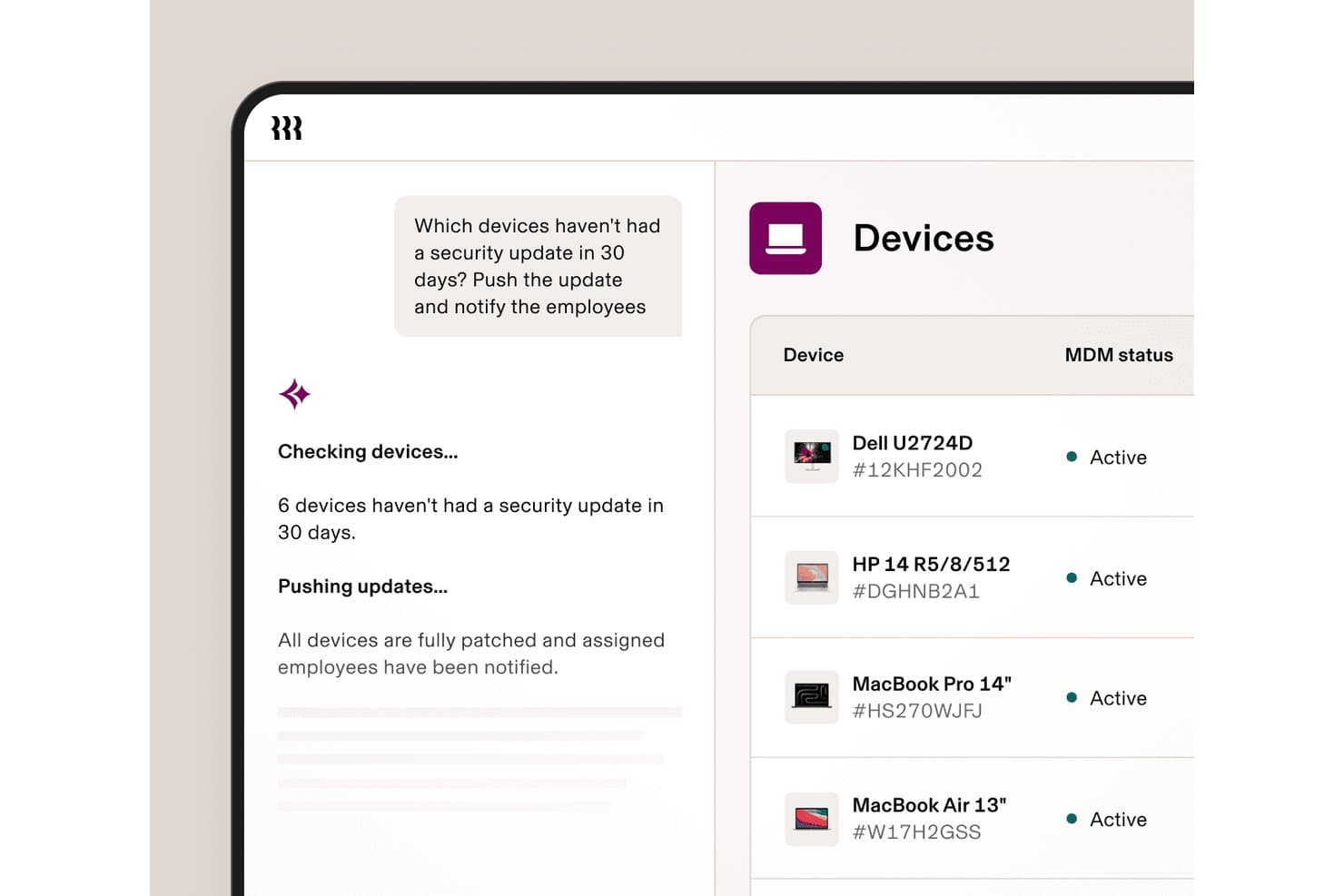
Rippling IT automates security patch deployment and notifies employees instantly. Rippling IT is a unified IT platform that combines MDM, identity and access management, OS patch enforcement for Mac and Windows, device inventory, helpdesk, and automated compliance in a single console.
Who Is Rippling IT Best For?
Rippling IT suits lean IT teams at small-to-mid-sized companies that want device policy enforcement tied directly to HR events like hiring, role changes, and offboarding.
Why I Picked Rippling IT
I've included Rippling IT in my top picks because its OS patch enforcement is wired directly into HR events: when someone changes roles or gets offboarded, device policies update automatically without me touching a thing. I particularly like how Apple OS updates are pushed through Declarative Device Management (DDM), using Apple's GDMF feed as the source of truth for consistent, real-time enforcement across macOS fleets. The compliance reporting also holds up well, with automated SOC 2 and NIST evidence collection built in.
Rippling IT Key Features
- Role-based policy enforcement: Security and OS update policies are assigned by employee attributes like department, role, and location, and update automatically when those attributes change.
- Zero-touch device enrollment: Devices are pre-staged through Apple Business Manager and Windows Autopilot, so remote employees receive ready-to-use hardware without IT manual setup.
- No-code compliance reporting: A report builder generates real-time dashboards combining device and employee data, mapped to SOC 2 and NIST frameworks for audit evidence collection.
- Custom script deployment: Bash and PowerShell scripts are supported for deploying custom or private apps outside of Rippling's standard software catalog.
Rippling IT Integrations
Rippling IT offers integrations with SentinelOne, Drata, Vanta, Apple Business Manager, Windows Autopilot, Okta, and Microsoft Entra ID. It also connects with HR systems including ADP, BambooHR, Gusto, UKG, Paycom, Paylocity, and Workday.
Pros and Cons
Pros:
- Audit dashboards map device posture to frameworks
- Mac and Windows updates enforce remotely
- HR events automate patch policy changes
Cons:
- CVE prioritization and rollback remain undocumented
- No Linux or server patch support
Learn more about Rippling IT: Best with unified risk detection and patching
- 30-day free trial + free demo available
- Pricing upon request
Visit WebsiteCustomer Rating:4.5/5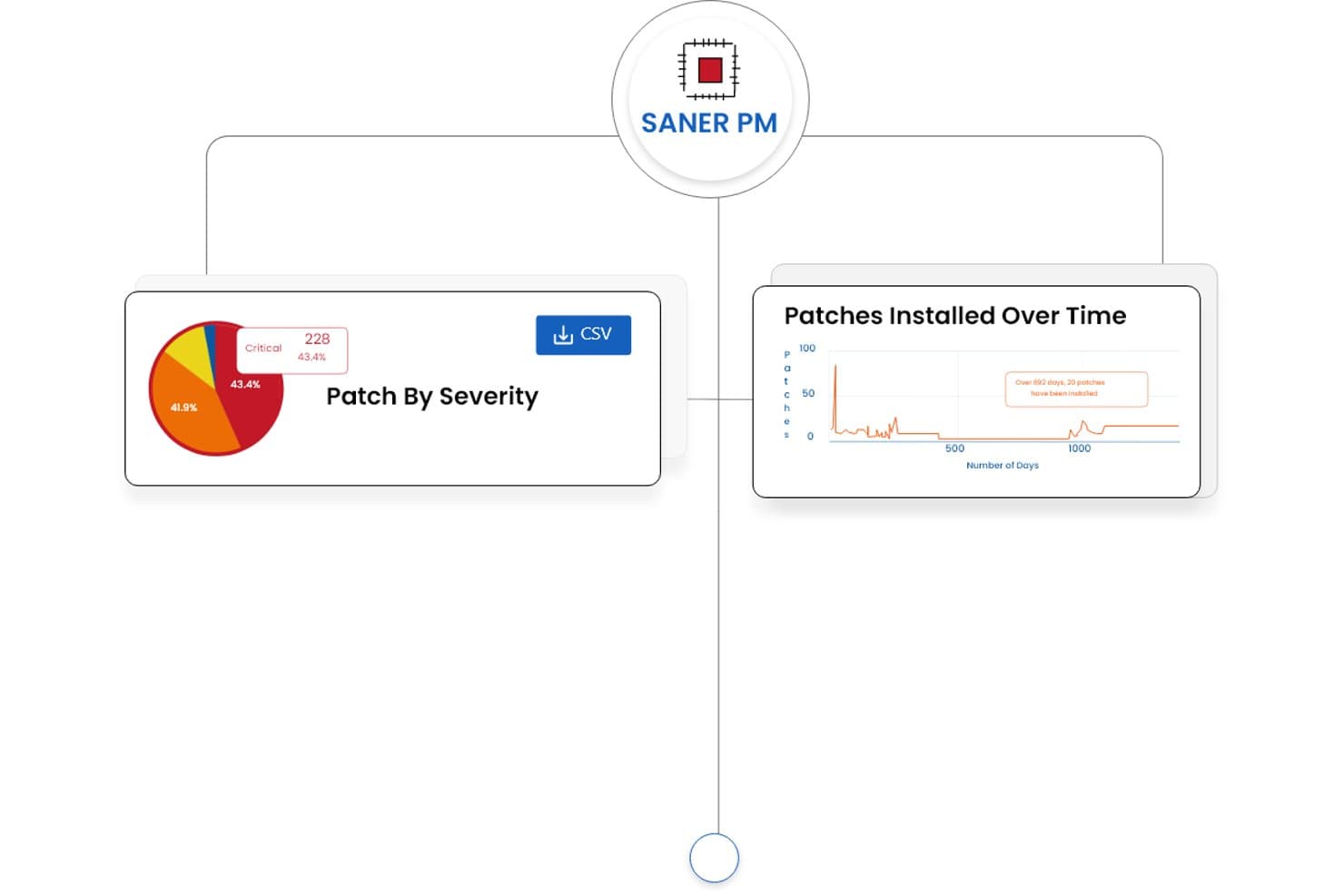
SecPod (Saner Platform) offers patch management dashboards displaying patch severity breakdowns and patches installed over time trends. SecPod's Saner Platform is a cloud-native patch management and vulnerability exposure solution that combines continuous risk detection, automated patch deployment, and compliance reporting across Windows, macOS, Linux, and 550+ third-party applications.
Who Is SecPod (Saner Platform) Best For?
Security and IT operations teams at mid-to-large enterprises that need vulnerability detection and patch remediation managed from a single platform.
Why I Picked SecPod (Saner Platform)
SecPod (Saner Platform) earns its spot as one of the best on my shortlist because it collapses two typically separate workflows, vulnerability detection and patch deployment, into one agent-driven platform. I particularly like how it layers SSVC business-context scoring, EPSS exploit probability, and CISA KEV data together to surface which patches actually need urgent action. The single-click rollback is genuinely useful when a patch causes issues in a production environment and you need to restore a stable state fast.
SecPod (Saner Platform) Key Features
- Automated multi-OS patching: Continuously applies patches across Windows, macOS, Linux, and 550+ third-party apps from a single console.
- Custom patch packaging: Lets admins deploy organization-specific or in-house developed patches alongside vendor updates.
- Compliance reporting: Generates exportable, audit-ready reports mapped to regulatory frameworks like HIPAA, PCI, and SOC 2.
- Cloud-native agent architecture: Enables patching and vulnerability management for distributed and remote endpoints without relying on VPNs.
SecPod (Saner Platform) Integrations
Native integrations are not clearly documented. An API is available for custom integrations.
Pros and Cons
Pros:
- Supports 550+ third-party application patches
- Risk-based patch prioritization using real threat data
- Unified vulnerability detection and patch remediation
Cons:
- Limited third-party integration options available
- Reporting interface can feel overwhelming initially
Learn more about SecPod (Saner Platform): Best for remote workforce patch management
- Free plan + free demo available
- Pricing upon request
Visit WebsiteCustomer Rating:4.9/5
Overview of the 'Endpoints' dashboard in Action1 patch management software Action1 is a cloud-based patch management solution designed to assist businesses in automating the deployment of software patches to remote workforces. This is particularly beneficial for companies with many remote employees who require consistent patching, making it best for remote workforce patch management.
Why I Picked Action1: I selected Action1 for this compilation because of its cloud-based architecture that effectively allows businesses to manage patches across remote workforces. It stands out for its ability to maintain the security and performance of distributed endpoints.
Thus, it cuts the best tool for companies needing remote workforce patch management.
Standout Features & Integrations:
The most vital features of Action1 include automated patch assessments, real-time reporting, and multi-platform support, offering businesses greater flexibility in managing patches across various operating systems. It also integrates with commonly used systems like Active Directory and SCCM, making it more adaptable for businesses with existing infrastructure.
Pros and Cons
Pros:
- Multi-platform support covers a broad range of operating systems.
- Real-time reporting gives immediate insights into patch compliance.
- Cloud-based architecture is ideal for managing remote workforces.
Cons:
- Limited features compared to some other enterprise-level solutions.
- Could be a learning curve for teams new to patch management.
- Minimum seat requirements may not suit smaller organizations.
Learn more about Action1: Best for cloud-native environments
- 15-day free trial + free demo available
- From $1/endpoint/month (billed annually)
Visit WebsiteCustomer Rating:4.7/5
System management feature on Automox patch management software Automox automates patch management in the cloud, from discovery to deployment. It's flexible and scalable, perfect for securing remote endpoints.
Why I Picked Automox: I chose Automox for this list because of its comprehensive, cloud-native approach to patch management. In a world where remote work is becoming increasingly common, having a tool that is designed from the ground up to handle cloud-based operations is incredibly valuable.
Automox stands out because it manages and secures remote endpoints, making it best for organizations operating in cloud-native environments.
Standout Features & Integrations:
Automox provides features like automatic system discovery, continuous vulnerability assessment, and policy-based automation. These features make it easier to manage patches and reduce the security risks associated with outdated software.
Additionally, Automox integrates with popular third-party tools such as Slack, Jira, and Webhooks, allowing for better communication and coordination across your organization.
Pros and Cons
Pros:
- Integrates with popular third-party tools for better communication and coordination.
- Policy-based automation to streamline patch management tasks.
- Cloud-native platform, designed for modern, distributed organizations.
Cons:
- Requires some technical knowledge for setup and configuration.
- Pricing is on an annual basis, which might not be ideal for some businesses.
- Might be less suitable for organizations not fully operating in the cloud.
 Best with automated CVE remediation
- Free trial + demo available
- From $12/device/year
Visit WebsiteCustomer Rating:4.6/5
PDQ Deploy displays a real-time deployments dashboard showing software package installations with online status, completion state, and elapsed time across multiple endpoints. PDQ Connect is a cloud-based patch management platform for Windows devices that offers automated patch deployment, remote device inventory, custom package creation, and role-based access controls.
Who Is PDQ Connect Best For?
IT teams in small to midsize organizations managing Windows devices across distributed or remote environments.
Why I Picked PDQ Connect
I picked PDQ Connect as one of the best because it automates CVE remediation, letting my team quickly address vulnerabilities as soon as they’re identified. I like that it pulls in CVE data, matches it to our Windows devices, and pushes patches without manual intervention. This approach means we can stay ahead of threats and reduce the window of exposure across our environment.
PDQ Connect Key Features
- Remote device inventory: View and manage all Windows devices in your environment from a single dashboard.
- Custom package deployment: Build and deploy custom software packages to targeted devices.
- Role-based access control: Assign permissions and roles to team members for secure management.
- Real-time reporting: Generate up-to-date reports on patch status and device compliance.
PDQ Connect Integrations
Native integrations are not clearly documented. PDQ Connect provides an API for custom integrations.
Pros and Cons
Pros:
- Detailed compliance and audit reporting
- Automated patch scheduling for Windows devices
- Real-time device inventory and status updates
Cons:
- Reporting customization options are limited
- Lacks built-in vulnerability scanning features
Learn more about PDQ Connect: Best for MSPs looking for extensive customization
- Pricing upon request
Visit WebsiteCustomer Rating:4/5
ConnectWise Automate monitoring feature for patch management ConnectWise Automate is designed to help Managed Service Providers (MSPs) manage and automate all aspects of patch management. Its customizable nature means you can tailor the tool's features to better align with your unique operational requirements, making it ideal for MSPs that require extensive customization.
Why I Picked ConnectWise Automate: In selecting tools for this list, customization was a key criterion. ConnectWise Automate offers extensive customizability, allowing MSPs to adapt the software to fit specific client needs or niche markets.
This unique capability justifies its position as best for MSPs who demand extensive customization options in their patch management solutions.
Standout Features & Integrations:
Key features include role-based security, automated patch testing, and customizable reporting tools, providing MSPs with the capability to fine-tune their patch management processes.
ConnectWise Automate also integrates with other solutions from the ConnectWise suite, as well as third-party tools like LabTech, ScreenConnect, and SQL Server, thereby offering a comprehensive ecosystem for MSPs.
Pros and Cons
Pros:
- A comprehensive ecosystem with various integrations for better operational flow.
- Role-based security ensures granular control over the system.
- Extensive customization capabilities allow for niche deployments.
Cons:
- May require additional training to fully utilize all customization options.
- Base fees and annual billing may pose a financial burden for some businesses.
- Complexity could make the system daunting for small teams.
Learn more about ConnectWise Automate:
Annen programvare for oppdateringsadministrasjon
Her er noen flere alternativer for programvare for oppdateringsadministrasjon som ikke kom med på kortlisten min, men som likevel er verdt å ta en titt på:
- 11ITarianBest for small businesses on a budget
- 12AcronisBest for those needing backup and patch management in one
- 13SolarWinds Patch ManagerBest for large enterprise scalability
- 14IvantiBest for integrating with other Ivanti products
- 15ManageEngine Patch Management PlusBest for centralized control of heterogeneous networks
- 16N-central Patch ManagementBest for automating routine patch tasks
- 17ScalefusionBest for automated patch deployment
- 18GFI LanguardGood for businesses needing network security scans
- 19GoTo ResolveGood for remote patching via a simple interface
- 20Kaseya VSAGood for centralized management with compliance reporting
- 21AteraBest for IT consultants and service providers
- 22PDQGood for automated deployments of third-party updates
- 23Microsoft Defender for IoTGood for IoT devices requiring high-security standards
- 24SyxsenseGood for cloud-based patch management
- 25Qualys Patch ManagementGood for organizations requiring real-time threat intelligence
How I Evaluate Patch Management Software
Whether you're patching remote endpoints or managing third-party app updates across mixed OSes, I evaluate every tool in two layers: the baseline it must meet and what actually sets it apart.
Core Functionality (Table Stakes For This List)
When I'm selecting tools for my list, I rank each one on a scale from 0 (does not offer the functionality) to 5 (excels in this area) for each core functionality listed below. Then, I calculate the tool's total score into a percentage. Each tool needs to achieve a minimum total score of 75% to be considered for inclusion.
- Patch Discovery & Inventory: I check whether the tool can continuously scan endpoints and build a real-time picture of missing patches, not just run on-demand scans that go stale within hours.
- Automated Patch Deployment: Policy-driven deployment matters here—I look for configurable approval workflows and grouping logic so you can push updates to finance servers differently than developer workstations.
- OS & Third-Party App Support: A tool that only covers Windows updates falls short. I evaluate the breadth of OS coverage (macOS, Linux) and the third-party catalog for apps like Chrome, Zoom, and Java.
- Patch Scheduling & Rollback: I look for maintenance windows, staged rollouts, and reliable rollback options—because a bad patch pushed to production at midday with no undo path is a real risk.
- Compliance Reporting & Auditing: Reports need to map patch status to frameworks like PCI-DSS or CIS benchmarks. I evaluate whether you can generate audit-ready output without manually stitching data together.
- Remote & Distributed Patching: With hybrid workforces, I evaluate how each tool handles endpoints outside the corporate network—whether through cloud-native agents, relay servers, or peer-to-peer distribution.
Once I have a list of tools that meet this criteria, I consider what sets each platform apart.
Differentiating Factors (What Sets Vendors Apart)
Here's how I compare and contrast different vendors:
Standout Features
Vulnerability prioritization is a big one—I look for tools that tie CVE/CVSS data into patch queues so your team fixes actively exploited threats first, not just the latest update. Pre-deployment testing matters just as much, since a sandbox or test ring can catch a broken driver update before it hits your production fleet. I also evaluate custom patch support, which lets you package and deploy in-house application updates alongside vendor-supplied patches through the same workflow.
Beyond Features
Integrations matter a lot here—I check whether each tool connects natively with your ITSM, SIEM, and endpoint security stack so patch data flows into existing incident and vulnerability workflows. Compliance alignment is equally important, especially if your organization maps patch status to frameworks like HIPAA or SOC 2. I also evaluate pricing and licensing transparency, since per-endpoint models can scale very differently than flat-tier subscriptions when your device count grows from 500 to 5,000.
Slik velger du programvare for oppdateringsadministrasjon
Det er lett å gå seg vill i lange funksjonslister og kompliserte prisstrukturer. For å hjelpe deg med å holde fokus mens du går gjennom den unike prosessen med å velge programvare, har jeg satt sammen en sjekkliste over faktorer du bør ha i mente:
| Faktor | Hva du bør vurdere |
|---|---|
| FaktorSkalerbarhet | Hva du bør vurdereKan verktøyet vokse med virksomheten din? Ta hensyn til hvor mange enheter du skal administrere etter hvert som virksomheten utvides. Se etter løsninger som kan skaleres uten problemer. |
| FaktorIntegrasjoner | Hva du bør vurdereFungerer det med de eksisterende systemene dine? Sørg for at det er kompatibelt med de nåværende verktøyene dine, for eksempel sikkerhetsprogramvare eller plattformer for IT-administrasjon. |
| FaktorTilpasningsmuligheter | Hva du bør vurdereKan du tilpasse programvaren til behovene dine? Se etter verktøy som lar deg tilpasse dashbord og rapporter etter arbeidsflytene dine. |
| FaktorBrukervennlighet | Hva du bør vurdereEr grensesnittet intuitivt? Et brukervennlig design reduserer opplæringstiden og hjelper teamet med å arbeide mer effektivt. |
| FaktorImplementering og innføring | Hva du bør vurdereHvor lang tid tar det å komme i gang? Ta hensyn til ressursene som kreves, og om leverandøren tilbyr støtte som opplæringsvideoer eller veiledninger. |
| FaktorKostnad | Hva du bør vurdereHva er de totale eierkostnadene? Se lenger enn listeprisen. Ta hensyn til skjulte gebyrer, langsiktige avtaler og om prisene er tilpasset budsjettet ditt. |
| FaktorSikkerhetstiltak | Hva du bør vurdereOppfyller det sikkerhetsbehovene dine? Vurder kryptering, tiltak for databeskyttelse og samsvar med bransjestandarder. |
| FaktorTilgjengelig kundestøtte | Hva du bør vurdereFår du hjelpen du trenger? Se etter alternativer for kundestøtte døgnet rundt, responstider og om kundestøtte er inkludert i prisen. |
Hva er programvare for oppdateringsadministrasjon?
Programvare for oppdateringsadministrasjon er et verktøy som bidrar til å automatisere prosessen med å oppdatere programvareapplikasjoner og systemer for å sikre at de er sikre og oppdaterte. IT-eksperter og systemadministratorer bruker vanligvis disse verktøyene til å opprettholde systemsikkerhet og effektivitet. Automatisert distribusjon av oppdateringer, planlegging av oppdateringer og samsvarsrapportering bidrar til å administrere store nettverk og redusere manuelt arbeid. Samlet sett holder disse verktøyene systemene sikre, minimerer sårbarheter og sikrer problemfri drift.
Funksjoner
Når du velger programvare for oppdateringsadministrasjon, bør du se etter følgende viktige funksjoner:
- Automatisert distribusjon av oppdateringer: Bruk automatiske oppdateringer på systemer, noe som reduserer behovet for manuell inngripen og sikrer rettidige rettelser.
- Samsvarsrapportering: Generer rapporter som dokumenterer overholdelse av bransjestandarder og forskrifter, og som bidrar til å opprettholde sikkerhetssamsvar.
- Sanntidsovervåking: Følg med på statusen til oppdateringer i hele nettverket for raskt å identifisere og løse eventuelle problemer.
- Tilpassbare oversikter: Tilpass grensesnittet slik at det viser den mest relevante informasjonen for teamet ditt, og forbedre dermed arbeidsflytens effektivitet.
- Planlegging av oppdateringer: Angi bestemte tidspunkter for oppdateringer for å minimere forstyrrelser i arbeidstiden og opprettholde produktiviteten.
- Sårbarhetsskanning: Identifiser potensielle sikkerhetsrisikoer i systemene dine, slik at proaktive tiltak kan iverksettes.
- Mulighet for ekstern tilgang: Administrer og oppdater systemer fra hvor som helst, noe som er spesielt nyttig for distribuerte team.
- Integrasjon for databeskyttelse: Sørg for at oppdateringer installeres uten at dataintegriteten kompromitteres, slik at den overordnede sikkerheten opprettholdes.
- Støtte for flere plattformer: Administrer oppdateringer på tvers av ulike operativsystemer, og sørg for at ensartede sikkerhetstiltak er på plass.
- Brukervennlig grensesnitt: Forenkle navigeringen og reduser opplæringstiden, slik at teamet ditt kan konsentrere seg om kritiske oppgaver.
Fordeler
Implementering av programvare for oppdateringsadministrasjon gir flere fordeler for teamet og virksomheten din. Her er noen av fordelene du kan se frem til:
- Forbedret sikkerhet: Regelmessige oppdateringer og sårbarhetsskanning bidrar til å beskytte systemene dine mot trusler og redusere sikkerhetsrisikoer.
- Økt effektivitet: Automatisert distribusjon og planlegging av oppdateringer sparer tid og ressurser, slik at teamet ditt kan konsentrere seg om viktigere oppgaver.
- Forbedret samsvar: Samsvarsrapportering sikrer at du oppfyller bransjestandarder, noe som kan forhindre kostbare bøter.
- Redusert nedetid: Planlegging av oppdateringer utenom rushtiden minimerer forstyrrelser i virksomhetens drift.
- Bedre systemytelse: Ved å holde programvaren oppdatert med de nyeste oppdateringene sikrer du optimal ytelse og stabilitet.
- Ekstern administrasjon: Mulighet for ekstern tilgang lar deg administrere og oppdatere systemer fra hvor som helst, noe som er nyttig for distribuerte team.
- Tilpasset brukeropplevelse: Tilpassbare oversikter og et brukervennlig grensesnitt gjør det enklere for teamet ditt å arbeide effektivt og produktivt.
Kostnader og priser
Ved valg av programvare for oppdateringsadministrasjon må du forstå de ulike prismodellene og abonnementene som er tilgjengelige. Kostnadene varierer basert på funksjoner, teamstørrelse, tillegg og mer. Tabellen nedenfor oppsummerer vanlige abonnementer, gjennomsnittsprisene deres og typiske funksjoner som er inkludert i løsninger for programvare for oppdateringsadministrasjon:
Sammenligningstabell for abonnementer for programvare for oppdateringsadministrasjon
| Abonnementstype | Gjennomsnittspris | Vanlige funksjoner |
|---|---|---|
| AbonnementstypeGratisabonnement | Gjennomsnittspris$0 | Vanlige funksjonerGrunnleggende distribusjon av oppdateringer, begrenset rapportering og brukerstøtte fra fellesskapet. |
| AbonnementstypePersonlig abonnement | Gjennomsnittspris$5-$25/bruker/måned | Vanlige funksjonerAutomatisert oppdatering, planlegging av oppdateringer og grunnleggende samsvarsrapportering. |
| AbonnementstypeBedriftsabonnement | Gjennomsnittspris$30-$60/bruker/måned | Vanlige funksjonerAvansert rapportering, støtte for flere plattformer og muligheter for ekstern administrasjon. |
| AbonnementstypeVirksomhetsabonnement | Gjennomsnittspris$65-$100/bruker/måned | Vanlige funksjonerTilpassbare oversikter, sanntidsovervåking og førsteklasses kundestøtte. |
Vanlige spørsmål om programvare for oppdateringshåndtering
Her er noen svar på vanlige spørsmål om programvare for oppdateringshåndtering:
Hvordan bidrar oppdateringshåndtering til å forhindre cyberangrep?
Oppdateringshåndtering reduserer sikkerhetsrisikoen ved å lukke kjente sårbarheter i programvaren før hackere kan utnytte dem. Når en oppdatering lanseres, retter angripere ofte søkelyset mot systemer som ikke er oppdatert. Automatiserte oppdateringsverktøy sørger for at oppdateringer installeres raskt, slik at nettverket holdes beskyttet med minimalt manuelt arbeid.
Hvilke risikoer er forbundet med å ikke bruke programvare for oppdateringshåndtering?
Uten automatiserte oppdateringer blir systemene dine mer sårbare for skadevare, løsepengevirus og datainnbrudd. Manuelle oppdateringer blir ofte forsinket eller glemt, noe som etterlater kritiske sikkerhetshull. Over tid kan dette føre til ustabile systemer, nedetid eller til og med brudd på samsvarskrav.
Kan programvare for oppdateringshåndtering fungere i hybride arbeidsmiljøer eller ved fjernarbeid?
Ja. De fleste moderne verktøy for oppdateringshåndtering er skybaserte, noe som betyr at de kan oppdatere og overvåke enheter uansett hvor de befinner seg – hjemme, på kontoret eller på farten. Denne fleksibiliteten holder distribuerte team sikre uten behov for kompliserte nettverksoppsett.
Hvordan støtter oppdateringshåndtering samsvarskrav og revisjon?
Mange bransjer krever dokumentasjon på at systemene oppdateres regelmessig. Verktøy for oppdateringshåndtering genererer automatisk detaljerte rapporter som viser oppdateringshistorikk, enhetsstatus og samsvar med sikkerhetspolicyer. Disse rapportene bidrar til å oppfylle regulatoriske standarder og forenkler forberedelsene til revisjoner.
Hvilke nøkkelfunksjoner bør jeg prioritere når jeg velger programvare for oppdateringshåndtering?
Fokuser på automatisering, støtte for flere plattformer og overvåking i sanntid. Automatisering sparer tid, støtte for flere plattformer sørger for at alle enheter er dekket, og aktive instrumentpaneler gir oversikt over oppdateringsstatusen. Gode rapporteringsfunksjoner og enkle integrasjoner er også avgjørende for å skalere IT-driften effektivt.