

Den beste MDM-programvaren hjelper deg med å håndheve sikkerhetspolicyer, spore og kontrollere enheter og beskytte sensitive data på tvers av bedriftseide enheter og BYOD-endepunkter. Den er utviklet for å håndtere vanlige utfordringer som fjernsletting av enheter etter tap eller tyveri, uensartet håndheving av policyer på tvers av operativsystemer og tidkrevende manuell konfigurering av nye enheter.
Hvis du har hatt problemer med skygge-IT, mangler i samsvarsrapporteringen eller upålitelig fjernstyring av tilgang, er du ikke alene. Mange IT-team tar i bruk MDM-løsninger etter å ha innsett at den eksisterende tilnærmingen ikke kan skaleres eller beskytte mot økende trusler.
Jeg har testet MDM-plattformer i virksomheter og mellomstore bedrifter, og samarbeidet med team som ruller ut enhetsparker innen helsevesen, finans og utdanning. Denne veiledningen går gjennom verktøyene som faktisk forenkler registrering, reduserer antallet supportsaker og gir administratorer tydelig oversikt over det mobile økosystemet.
Hvorfor du kan stole på våre programvareanbefalinger
6,700+
Reviews
20
Industry experts
16+
Evaluation factors
14
Years
Teamet vårt har testet og anmeldt programvare siden 2012. Vi er selv teknologiledere, så vi vet hvor vanskelig og hvor viktig det er å velge riktig programvare.
I denne guiden har vi vurdert verktøyene gjennom praktisk testing og uavhengig research og gitt dem poeng ut fra våre utvelgelseskriterier.
Anmeldelsene våre bygger på vår egen redaksjonelle vurdering. De er ikke et salgsargument.
Ekspertanmeldere:
- Paulo Gardini MiguelTech Director
 Tim FisherVP of AI
 Gabriel RosasTech Lead & Software Architect
 Christhian GruhnTech Lead & Platform Architect

Sammenligningstabell for MDM-programvare
Denne sammenligningstabellen oppsummerer prisdetaljene for mine beste valg av MDM-programvare:
| Tool | Best For | Trial Info | Price | ||
|---|---|---|---|---|---|
| 1 | Best for onboarding and offboarding | 14-day free trial | From $8/user/month (billed annually) | Website | |
| 2 | Best for managing devices for global remote teams | Free demo available | from $5/person/month | Website | |
| 3 | Best for multi-OS device management | 14-day free trial | From $2.00/device/month (billed annually) | Website | |
| 4 | Best with kiosk capabilities | 30-day free trial | From $2.40/device/year (billed annually) | Website | |
| 5 | Best for remote data wiping | Not available | From $1.23/device/month (billed annually) | Website | |
| 6 | Best for edge use cases | 30-day free trial | From $3.99/device/month (billed annually) | Website | |
| 7 | Best for mixed-fleet and rugged device management | Free demo available | Pricing upon request | Website | |
| 8 | Best for on-premises | 30-day free trial + free demo available | From $1.28/device/month (billed annually) | Website | |
| 9 | Best for zero-trust and AI-driven fleet insights | 30-day free trial | From $3.00/device/month | Website | |
| 10 | Best for Microsoft integrations | 90-day free trial | From $60/user/month (billed annually) | Website |


Anmeldelser av den beste MDM-programvaren
Her er mine 20 beste anbefalinger av MDM-programvare, inkludert funksjoner, fordeler og startpriser.
 Best for onboarding and offboarding
- 14-day free trial
- From $8/user/month (billed annually)
Visit WebsiteCustomer Rating:4.8/5
View all of an employee’s physical hardware with Rippling’s MDM portal. Rippling IT gives IT teams and HR professionals a unified platform to manage devices, apps, and security policies across their workforce, helping businesses automate device provisioning, enforce compliance, and simplify IT operations.
Who Is Rippling IT Best For?
Rippling IT is a strong fit for mid-sized to enterprise businesses that need IT and HR workflows connected in a single platform.
Why I Picked Rippling IT
I picked Rippling IT as one of the best because its onboarding and offboarding automation is directly tied to device management in a way most MDM tools can't match. When a new hire joins, Rippling IT can automatically enroll their device, push the right apps, and set access permissions based on their role—all triggered from a single workflow. Offboarding works in reverse: when someone leaves, their device can be remotely locked or wiped and app access revoked simultaneously. This coordinated automation between HR events and IT actions makes it stand out for lifecycle management.
Rippling IT Key Features
- Custom security policies: Build and enforce security rules based on hundreds of user and device attributes, like department, OS, and role, that update automatically across your org.
- SentinelOne integration: Automatically deploy SentinelOne endpoint protection to all managed devices directly from within Rippling, without separate configuration.
- Device configuration settings: Apply custom settings—including WiFi profiles, firewall rules, and login screens—to devices based on employee attributes like location and department.
- OS update enforcement: Track and enforce macOS and Windows operating system updates across your entire fleet from a single dashboard.
Rippling IT Integrations
Integrations include Microsoft 365, Google Workspace, Slack, AWS, Jira, GitHub, PayPal, 1Password, Yubikey, and Carta.
Pros and Cons
Pros:
- Can integrate HR and IT features
- Create common workflows to deploy easily
- Reduces on and offboarding friction
Cons:
- Initial setup can be time-consuming
- Does more than just MDM, which may be more than you need
Learn more about Rippling IT: Best for managing devices for global remote teams
- Free demo available
- from $5/person/month
Visit WebsiteCustomer Rating:4.9/5
Deel's asset tracker provides an overview of all leased and owned devices used by employees around the world. Deel IT serves IT teams and businesses managing distributed workforces, offering centralized device management, provisioning, and security controls to support remote and global operations.
Who Is Deel IT Best For?
Deel IT is a strong fit for companies with international or remote-first teams that need to manage, provision, and secure devices across multiple countries.
Why I Picked Deel IT
Deel IT earns its spot on my shortlist because it's one of the few MDM platforms that genuinely handles global device operations end-to-end. I like that it covers the full device lifecycle—procurement, configuration, shipping, and recovery—across 130+ countries without relying on fragmented regional vendors. In practice, that means my team can ship a pre-configured, policy-compliant laptop to a new hire in Brazil or Germany without touching a separate logistics tool. The zero-touch enrollment through Apple Business Manager and Windows Autopilot is a real differentiator, since devices arrive already enrolled and configured before the employee even opens the box.
Deel IT Key Features
- Security policy configuration: Set and enforce device security baselines—including password rules, encryption, VPN requirements, and app allowlists—across user groups or device types from a single dashboard.
- Remote wipe and lock: Remotely lock, wipe, or send messages to lost or compromised devices, with selective wipe for BYOD devices that removes only corporate data.
- Compliance monitoring and alerts: Track compliance status across your entire fleet in real time, with color-coded indicators and instant alerts when devices fall out of policy.
- Geofencing and location tracking: Set location-based access controls that automatically lock devices or revoke permissions when they leave designated secure areas or approved regions.
Deel IT Integrations
Integrations include FaceUp, Snowflake API, DefensX, Microsoft Finance, Kintsugi, ReFresh OS, Revo.ai, Keeper, Human Interest, and Everyminute.
Pros and Cons
Pros:
- Grants comprehensive visibility over IT assets worldwide
- Ensures device security with MDM and endpoint protection
- Provides customizable device configurations
Cons:
- Doesn't offer features beyond device management, like network and server management
- May not be ideal for teams with very complex IT asset needs
Learn more about Deel IT: Best for multi-OS device management
- 14-day free trial
- From $2.00/device/month (billed annually)
Visit WebsiteCustomer Rating:4.7/5
Scalefusion allows you to cast and control enterprise devices, whether company or employee-owned. Scalefusion gives IT teams in businesses of all sizes a way to manage, secure, and monitor company devices across different platforms, helping reduce manual oversight and keep endpoints compliant with organizational policies.
Who Is Scalefusion Best For?
Scalefusion is a good fit for IT teams managing mixed-device environments across Android, iOS, Windows, and macOS from a single console.
Why I Picked Scalefusion
Scalefusion earns a spot on my shortlist because it delivers multi-OS management from a single dashboard—Windows, macOS, iOS, Android, Linux, and ChromeOS all in one place. I like that you can push OS updates, enforce security policies, and deploy apps across different platforms without switching tools or maintaining separate consoles. The AirThink AI feature lets you generate and validate PowerShell and Shell scripts from the dashboard, saving time when scripting across mixed environments. Additionally, the Maker Checker workflow adds an approval layer before critical changes are pushed to devices, a useful safeguard for managing a large, diverse fleet.
Scalefusion Key Features
- Remote cast and control: View and control enrolled devices in real time to troubleshoot issues without needing physical access.
- Kiosk mode: Lock devices to a single app or a curated set of apps, useful for dedicated-use devices like POS terminals or field tablets.
- Location tracking and geofencing: Monitor device locations and set geographic boundaries that trigger automated policy actions when crossed.
- Content management: Push documents, media, and web content to devices silently, without requiring user interaction.
Scalefusion Integrations
Integrations include Azure Active Directory, Google Workspace, Okta, PingOne, Jira, Freshservice, Checkpoint Mobile Threat Defense, B2M Elemez, Intel vPro, and Apple Business Manager.
Pros and Cons
Pros:
- Effective device management capabilities
- Complimentary round-the-clock support
- Combines UEM, ZTA & Endpoint Security in one platform
Cons:
- Per app VPN is not available
- Annual billing only
Learn more about Scalefusion: Best with kiosk capabilities
- 30-day free trial
- From $2.40/device/year (billed annually)
Visit WebsiteCustomer Rating:4.7/5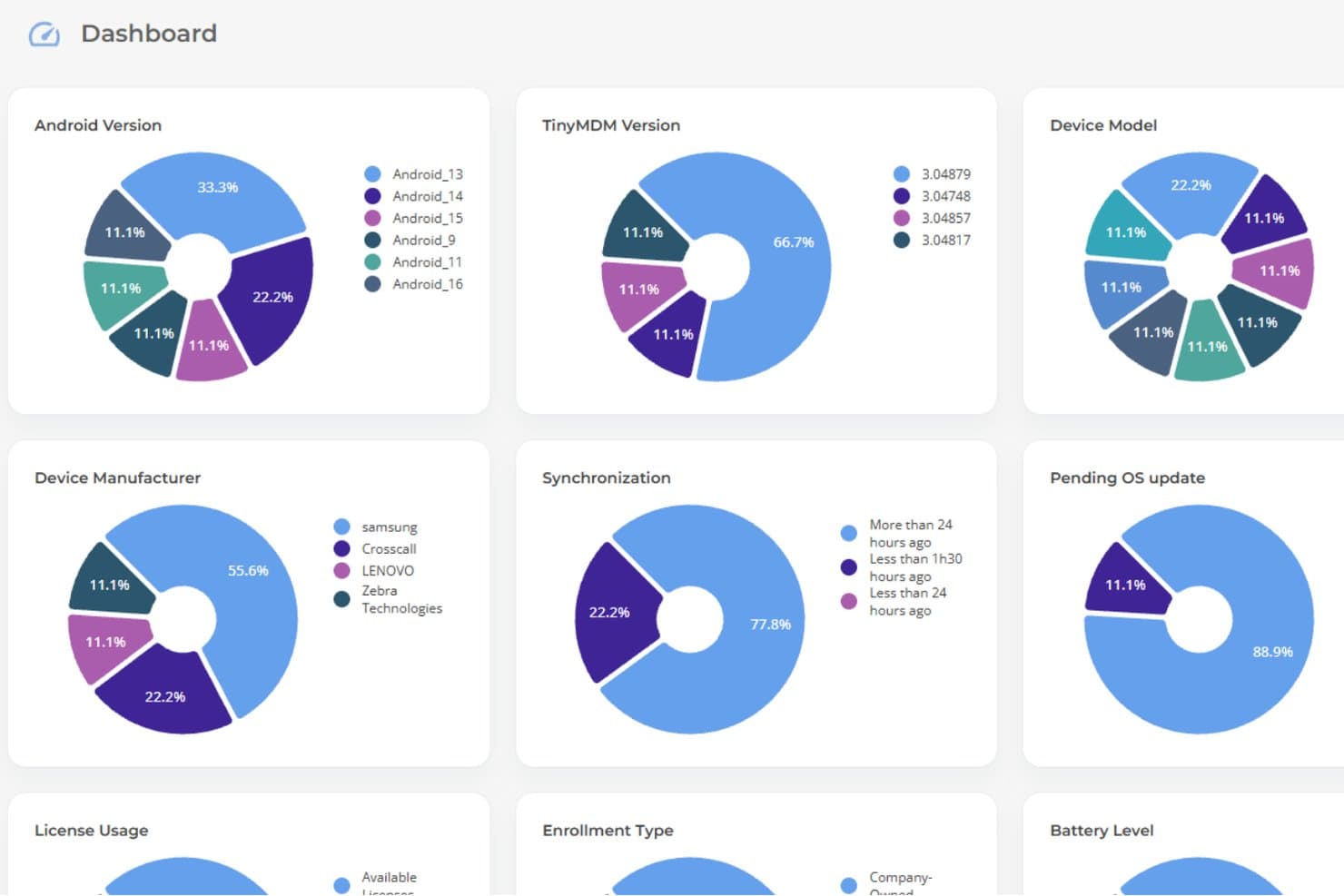
TinyMDM's dashboard gives admins a visual overview of all managed devices. TinyMDM is a mobile device management platform designed for organizations that need to secure, monitor, and control Android devices across industries like retail, logistics, and field services, helping IT teams manage large device fleets.
Who Is TinyMDM Best For?
TinyMDM is a strong fit for IT teams in retail, logistics, and field operations that need to manage dedicated Android device fleets at scale.
Why I Picked TinyMDM
I picked TinyMDM as one of the best MDM solutions because its kiosk mode capabilities go well beyond a basic lockdown. I like that it offers single-app and multi-app kiosk configurations—whether my team is deploying a self-service tablet in a retail environment or a field device locked to a logistics app, the configuration suits the use case. The "Classic" mode is particularly useful: it blocks notifications, disables the Home and Recent Tasks buttons, and prevents device shutdown, so users stay focused on the task at hand. I also find the confidential sessions feature genuinely useful—it lets a temporary user log in with personal accounts, then automatically wipes that data when the session ends.
TinyMDM Key Features
- Remote control: Access and control enrolled Android devices in real time to troubleshoot issues without being on-site.
- App management: Push, update, or remove apps silently across all enrolled devices directly from the dashboard.
- Geolocation tracking: Monitor the real-time location of devices on a map to keep tabs on field teams and assets.
- Security policies: Enforce password requirements, restrict device settings, and remotely wipe lost or stolen devices.
TinyMDM Integrations
Integrations include Microsoft Entra ID and a REST API for integration with external applications.
Pros and Cons
Pros:
- Supports non-GMS devices, expanding compatibility options
- Effective remote management capabilities
- Simple setup process, including QR code enrollment
Cons:
- Labeling devices after batch setup can be tedious
- Cannot force-enable location services remotely
Learn more about TinyMDM: 5Best for remote data wiping
Prey
- Not available
- From $1.23/device/month (billed annually)
Visit WebsiteCustomer Rating:4.7/5
Prey's device tracking offers detailed location data, device information, and reporting features. Prey is a security-focused MDM platform for IT teams and organizations that track, manage, and secure laptops, phones, and tablets across multiple locations.
Who Is Prey Best For?
Prey is a good fit for IT teams in education, SMBs, and field-based organizations managing distributed fleets of laptops and mobile devices.
Why I Picked Prey
I picked Prey as one of the best because its remote data wiping capabilities are genuinely useful when a device goes missing in the field. I like that you can trigger a full wipe or selectively delete specific files and folders remotely, which gives my team more control over what gets erased depending on the situation. Prey also lets you lock a device and display a custom message before wiping, so there's a chance to recover it first. The wipe actions are logged, which helps with incident documentation and compliance reporting.
Prey Key Features
- Real-time location tracking: Monitor the live location of any device in your fleet using active tracking and Wi-Fi triangulation.
- Geofence actions: Set geographic boundaries and trigger automatic security responses when a device enters or leaves a defined zone.
- Fleet status dashboard: View the status of all managed devices from a single panel, with labels and search to organize large fleets.
- Mass actions: Apply security or management actions across multiple devices at once, rather than handling each device individually.
Prey Integrations
Integrations include Okta, Shibboleth, Keycloak, OpenAM, SimpleSAMLphp, Apache Syncope, WordPress, Drupal, NetIQ Access Manager, and Gluu Server.
Pros and Cons
Pros:
- GPS tracking feature
- Remote functionalities like lock, messaging, and alarm
- Compatibility across multiple platforms
Cons:
- Update process can be cumbersome
- Variable geolocation accuracy
Learn more about Prey: Best for edge use cases
- 30-day free trial
- From $3.99/device/month (billed annually)
Visit WebsiteCustomer Rating:4.8/5
View all of your devices in SureMDM’s portal. SureMDM is a mobile device management platform designed for IT teams in industries like logistics, manufacturing, and field services who need to manage, secure, and monitor a wide range of devices across multiple operating systems and environments.
Who Is SureMDM Best For?
SureMDM is a strong fit for IT teams in industries like retail, healthcare, and transportation that need to manage large fleets of mixed-OS devices across distributed or remote locations.
Why I Picked SureMDM
I picked SureMDM as one of the best because of how far it goes to support devices that most MDM platforms simply weren't built for. Where other tools focus on smartphones and laptops, SureMDM extends management to IoT endpoints, rugged handhelds, Wear OS devices, VR headsets, and Linux machines—all from the same console.
I particularly like the Things Management Technology (TMT) feature, which lets my team enroll and manage peripherals like RFID readers, barcode scanners, and GPS trackers the same way you'd manage a mobile device. That means I can push firmware updates, monitor battery and network stats, and enforce compliance policies on edge devices that would otherwise be invisible to IT. The OEMConfig support for rugged device manufacturers like Zebra and Datalogic is another thing I find genuinely useful—it lets me configure hardware-specific settings directly from the SureMDM console without needing separate OEM tools.
SureMDM Key Features
- Kiosk lockdown: Lock devices down to a single app or a restricted set of apps, preventing end users from accessing unauthorized settings or content.
- BYOD management: Enroll employee-owned devices using Android Work Profiles or Apple User Enrollment, keeping personal and corporate data in separate containers.
- Remote troubleshooting: Access and control devices remotely to diagnose and resolve issues without requiring physical access or on-site visits.
- Location tracking: Monitor device locations in real time and set geofence-based policies that automatically restrict or adjust device behavior based on where a device is.
SureMDM Integrations
Integrations include Zebra, Datalogic, Honeywell, Samsung Knox, Google Zero-Touch Enrollment, Apple Business Manager, Microsoft Azure Active Directory, VMware Workspace ONE, SOTI, and an API is available for custom integrations.
Pros and Cons
Pros:
- Simple user interface
- Strong history of customer support
- Flexible and customizable
Cons:
- Can be slow to install on users’ devices
- It can be overwhelming to configure
Learn more about SureMDM: Best for mixed-fleet and rugged device management
- Free demo available
- Pricing upon request
Visit WebsiteCustomer Rating:4.4/5
SOTI MobiControl gives IT teams in healthcare, retail, logistics, and field services a way to manage, secure, and support a wide range of mobile devices and endpoints from a single platform.
Who Is SOTI MobiControl Best For?
SOTI MobiControl is a strong fit for mid-to-large enterprises in asset-heavy industries like logistics, healthcare, and retail that need centralized control over large fleets of mixed-OS devices.
Why I Picked SOTI MobiControl
SOTI MobiControl earns its spot on my shortlist because it genuinely covers the full OS spectrum—Android, iOS, macOS, Windows, and Linux—from a single management console. I like that it goes beyond basic MDM by handling IoT endpoints and Linux-based devices, which most competitors don't touch. The SOTI XTreme Technology feature is something I find particularly useful in distributed environments: it speeds up app and data delivery by up to 10x, which matters when you're pushing large OS updates to hundreds of devices across warehouses or retail locations with limited bandwidth.
SOTI MobiControl Key Features
- Geofencing and location-based policy enforcement: Create custom-shaped geofences to track device locations and automatically deploy or restrict apps, content, and policies based on device position.
- Shared device configuration: Let multiple employees share a single device across shifts, with personalized app and data access granted through individual login credentials or SSO.
- Express enrollment and provisioning: Enroll and configure new devices in the field using methods like Android Zero-Touch Enrollment, Apple DEP, Samsung KME, Windows Autopilot, and Zebra StageNow.
- System health dashboard: Monitor real-time and 48-hour historical data on queue lengths, CPU usage, DB performance, and server health from a single console view.
SOTI MobiControl Integrations
Integrations include Microsoft Entra ID, Zebra, Samsung, Apple DEP, Android Zero-Touch Enrollment, Windows Autopilot, Imprivata, SOTI Hub, SOTI Surf, and SOTI Identity.
Pros and Cons
Pros:
- Effective remote troubleshooting capabilities
- Strong support for a wide range of devices and operating systems
- User-friendly interface that simplifies device management
Cons:
- Some users find the setup process complex
- Occasional performance issues reported by users
Learn more about SOTI MobiControl: Best for on-premises
- 30-day free trial + free demo available
- From $1.28/device/month (billed annually)

Track your devices with ManageEngine’s on-premises portal, seen here. ManageEngine Mobile Device Manager Plus stands out for organizations that need a flexible on-premises MDM solution. It’s a strong choice for IT teams in regulated industries or businesses with strict data residency requirements. With support for multi-OS environments and granular device control, it helps you manage security and compliance across diverse fleets.
Who Is ManageEngine Mobile Device Manager Plus Best For?
IT departments in mid-sized to enterprise organizations across regulated industries. It fits companies that require on-premises deployment options to meet internal security or compliance requirements.
Why I Picked ManageEngine Mobile Device Manager Plus
For organizations that require on-premises control, ManageEngine Mobile Device Manager Plus offers deployment flexibility that cloud-only MDMs can’t match. I picked it because it lets IT teams host and manage their own MDM infrastructure, which is essential for businesses with strict compliance or data sovereignty needs. The platform supports detailed device policy enforcement and role-based access controls, giving admins the ability to tailor security and management to their environment. This makes it a strong fit for sectors like government, healthcare, and finance, where on-premises solutions are often a requirement.
ManageEngine Mobile Device Manager Plus Key Features
Some other features that make ManageEngine Mobile Device Manager Plus appealing for IT teams include:
- Multi-OS support: Manage and secure devices running Android, iOS, Windows, macOS, and Chrome OS.
- App distribution and management: Deploy, update, and remove apps across devices from a central console.
- Remote troubleshooting tools: Access devices remotely to diagnose and resolve issues without user intervention.
- Geofencing and location tracking: Set location-based policies and monitor device locations in real time.
ManageEngine Mobile Device Manager Plus Integrations
Integrations are available natively with platforms like ServiceNow, Zendesk, and Zoho CRM. It also offers custom API integrations.
Pros and Cons
Pros:
- Administrator portal that is simple to use
- Customer support focused
- Comprehensive features for a variety of use-cases
Cons:
- Limited customization features
- Pricing is an annual commitment
Learn more about ManageEngine Mobile Device Manager Plus: Best for zero-trust and AI-driven fleet insights
- 30-day free trial
- From $3.00/device/month
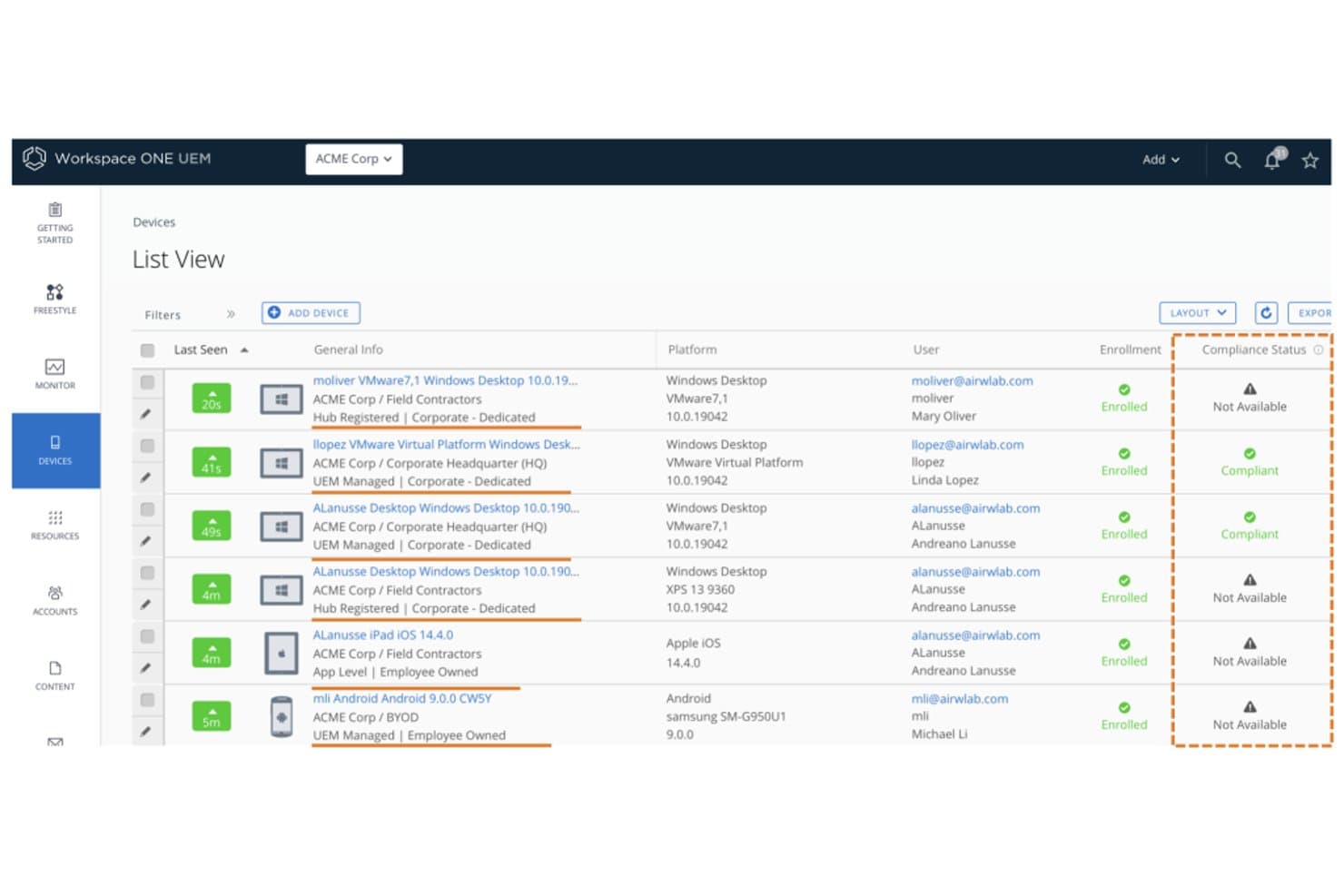
Workspace ONE UEM tracks device compliance status across enrolled endpoints. Workspace ONE UEM is an enterprise unified endpoint management platform by Omnissa that covers mobile, desktop, rugged, and IoT device management across iOS, Android, Windows, macOS, ChromeOS, and Linux from a single admin console.
Who Is Workspace ONE UEM Best For?
Workspace ONE UEM is a strong fit for large enterprises managing diverse, mixed-OS device fleets where zero-trust security and regulatory compliance are non-negotiable.
Why I Picked Workspace ONE UEM
Workspace ONE UEM earns its spot on my shortlist because of how it combines zero-trust enforcement with AI-driven fleet intelligence in a way few platforms match. I'm particularly impressed by Omnissa Intelligence, which uses machine learning to detect anomalies, predict device issues, and trigger autonomous remediation before users are ever affected. Its built-in Mobile Threat Defense also stands out: it identifies rogue Wi-Fi, phishing attempts, and risky apps on iOS, Android, and ChromeOS, then feeds directly into the compliance engine to automate responses.
Workspace ONE UEM Key Features
- Zero-touch enrollment: Automates device provisioning across iOS, Android, Windows, and macOS via ABM/DEP, Android Enterprise, and Windows Autopilot without manual setup.
- Freestyle Orchestrator: A workflow builder that lets admins design and automate policy-based resource deployment sequences across managed device groups.
- Selective corporate wipe: Removes only corporate data from enrolled devices while leaving personal content untouched, which is essential for BYOD offboarding.
- Per-app VPN: Routes only managed app traffic through a VPN tunnel, keeping personal app traffic separate on the same device.
Workspace ONE UEM Integrations
Workspace ONE UEM offers five documented native integrations, including Microsoft Entra ID, Okta, Google Workspace, ServiceNow, and Microsoft Defender for Endpoint. Its REST API supports custom integrations, while ServiceNow connectivity includes ITSM and Service Graph Connectors.
Pros and Cons
Pros:
- AI-driven anomaly detection and remediation
- Zero-trust and threat defense baked in
- Covers iOS, Android, Windows, macOS, Linux
Cons:
- No native third-party app patching
- On-premises deployment being phased out
Learn more about Workspace ONE UEM: Best for Microsoft integrations
- 90-day free trial
- From $60/user/month (billed annually)
Visit WebsiteCustomer Rating:4.7/5
Monitor all your user’s devices with Microsoft Intune’s integrated portal shown here. Microsoft Intune gives IT teams a unified way to manage, secure, and monitor devices and apps across Windows, macOS, iOS, and Android, making it a go-to choice for organizations that need centralized control and compliance in complex environments.
Who Is Microsoft Intune Best For?
Microsoft Intune is a strong fit for mid-size to enterprise IT teams that are already running Microsoft 365 or Azure and need device management that works natively within that ecosystem.
Why I Picked Microsoft Intune
Microsoft Intune earns its spot on my shortlist because of how naturally it fits into a Microsoft-heavy environment. I like that conditional access policies work directly with Azure Active Directory, so I can enforce compliance rules—like requiring device encryption or a minimum OS version—before granting access to Microsoft 365 apps. My team also uses Intune's co-management feature alongside Microsoft Configuration Manager, which lets us gradually shift workloads to the cloud without ripping out existing on-premises infrastructure.
Microsoft Intune Key Features
- Windows Autopilot provisioning: Automatically configure and enroll new Windows devices out of the box, without manual IT setup or imaging.
- Mobile application management (MAM): Apply data protection policies to corporate apps on personal devices without requiring full device enrollment.
- Endpoint Privilege Management: Let standard users run specific IT-approved tasks that would normally require admin rights, reducing the need for elevated accounts.
- Remote wipe and device retirement: Remotely remove corporate data from lost, stolen, or non-compliant devices while leaving personal data intact on BYOD devices.
Microsoft Intune Integrations
Integrations include Microsoft 365, Azure Active Directory, Microsoft Defender for Endpoint, Microsoft Configuration Manager, Microsoft Cloud PKI, Microsoft Security Copilot, Microsoft Intune Remote Help, Microsoft Intune Endpoint Privilege Management, Microsoft Intune Advanced Analytics, and Microsoft Intune Enterprise Application Management.
Pros and Cons
Pros:
- Supportive training and documentation
- Easy-to-use interface
- Zero-touch deployment
Cons:
- Can require a more complicated setup
- Only one Intune account per device
Learn more about Microsoft Intune:
Andre alternativer for MDM-programvare
Selv om disse ikke kom med på listen min over de 12 beste, er de fortsatt verdt å se nærmere på.
- 11Swif.aiBest for multi-OS with built-in compliance
- 12NinjaOneBest for endpoint management and patch compliance
- 13HexnodeBest for geofencing-based policy enforcement
- 14IruBest for Apple-first teams expanding to Windows
- 15IBM MaaS360 Best for fast deployments
- 16BlackBerry UEMBest for government-grade endpoint security
- 17Citrix XENMobileBest for Android device management
- 18FileWave Unified Endpoint Management SoftwareBest for multi-platform device management
- 19Ivanti Neurons for MDMBest for BYOD and corporate fleet in one console
How I Evaluate MDM Software
I split my evaluation into baseline must-haves—like zero-touch enrollment and cross-platform policy enforcement—and the differentiators that separate a good MDM from the right one for your fleet.
Core Functionality (Table Stakes For This List)
When I'm selecting tools for my list, I rank each one on a scale from 0 (does not offer the functionality) to 5 (excels in this area) for each core functionality listed below. Then, I calculate the tool's total score into a percentage. Each tool needs to achieve a minimum total score of 75% to be considered for inclusion.
- Device Enrollment & Provisioning: I check whether the platform supports zero-touch enrollment workflows like Apple Business Manager and Android Enterprise so admins can ship devices directly to end users preconfigured.
- Remote Policy Enforcement: Each tool should let you push password requirements, encryption settings, and Wi-Fi configurations to device groups without manual intervention at scale.
- Remote Lock & Wipe: I evaluate whether admins can trigger a full wipe on a stolen device or a selective wipe that removes only corporate data when an employee leaves the organization.
- Mobile Application Management: The platform should handle app distribution across public stores and in-house builds, including volume-purchased license assignments and forced updates.
- Compliance Monitoring & Reporting: I look for real-time dashboards that flag devices falling out of compliance, such as a phone running an outdated OS or missing required encryption.
- Cross-Platform OS Support: A viable MDM needs to manage iOS and Android at minimum, and I give higher marks to platforms with full feature parity across Windows, macOS, and ChromeOS.
Once I have a list of tools that meet the criteria, I consider what sets each platform apart.
Differentiating Factors (What Sets Vendors Apart)
Here's how I compare and contrast different vendors:
Standout Features
BYOD containerization matters when your workforce brings personal devices. I look for platforms that cleanly separate work and personal data so IT can wipe corporate apps without touching personal photos. Zero-trust integration is another factor I weigh, especially tools that tie device compliance checks into conditional access policies through identity providers like Okta or Azure AD. I also evaluate whether a platform includes built-in mobile threat defense that can detect phishing or network attacks and automatically quarantine the device.
Beyond Features
Compliance certifications are a key differentiator I check. A platform aligned with SOC 2, HIPAA, or FedRAMP saves your team from building compensating controls on its own. Ecosystem integrations also carry weight—your MDM should connect to ITSM tools like ServiceNow and SIEM platforms so device alerts feed directly into existing incident workflows. I also evaluate licensing flexibility, since a mixed fleet of shared warehouse tablets and personal phones often calls for a blend of per-device and per-user models.
Slik velger du MDM-programvare
Det er lett å gå seg vill i lange funksjonslister og kompliserte prisstrukturer. For å hjelpe deg med å holde fokus mens du arbeider deg gjennom den unike prosessen med å velge programvare, er dette en sjekkliste over faktorer du bør ha i mente:
| Faktor | Hva du bør vurdere |
|---|---|
| FaktorSkalerbarhet | Hva du bør vurdereKan programvaren vokse med virksomheten din? Tenk på fremtidige behov og om flere enheter enkelt kan administreres etter hvert som teamet utvides. |
| FaktorIntegrasjoner | Hva du bør vurdereKan den kobles til de eksisterende verktøyene dine? Sørg for kompatibilitet med nåværende systemer som CRM, e-post og produktivitetsapper for å opprettholde effektive arbeidsflyter. |
| FaktorTilpasningsmuligheter | Hva du bør vurdereKan du tilpasse programvaren til prosessene dine? Se etter alternativer som lar deg justere innstillinger, dashbord og rapporter slik at de passer til dine spesifikke behov. |
| FaktorBrukervennlighet | Hva du bør vurdereHvor intuitivt er grensesnittet? Sørg for at teamet kan navigere i det uten omfattende opplæring, noe som sparer tid og reduserer frustrasjon. |
| FaktorImplementering og innføring | Hva du bør vurdereHvor raskt kan du komme i gang? Vurder tiden og ressursene som kreves for oppsettet, inkludert opplæringsmateriell og støtte for en smidig overgang. |
| FaktorKostnad | Hva du bør vurdereHva er den totale kostnaden? Vurder programvareprisen opp mot budsjettet ditt, inkludert skjulte gebyrer, vedlikehold og mulige kostnadsbesparelser. |
| FaktorSikkerhetstiltak | Hva du bør vurdereBeskytter den dataene dine? Se etter funksjoner som kryptering, tilgangskontroller og samsvar med standarder for databeskyttelse for å sikre sensitiv informasjon. |
Hva er MDM-programvare?
Programvare for administrasjon av mobile enheter (MDM) er et verktøy som gjør det mulig for IT-administratorer å administrere alle enheter som er koblet til bedriftsnettverket, sentralt. Programvaren kobler seg til bedriftens enheter, slik at du kan kontrollere tilgang, installere programvare og håndheve sikkerhetspolicyer.
MDM-programvare kan brukes for telefoner, nettbrett, datamaskiner og andre IoT-enheter som kjører operativsystemer som iOS, Android, Windows og flere. Den gir IT-administratorer kontroll på virksomhetsnivå og gjør det mulig å beskytte og overvåke enheter mot sikkerhetstrusler.
Funksjoner
Når du velger MDM-programvare, bør du se etter følgende viktige funksjoner:
- Registrering av enheter: Denne funksjonen lar deg legge til nye enheter i administrasjonssystemet raskt og sikkert, slik at du kan få teamet i gang uten problemer. Det er det første steget mot å samle alle enhetene dine under én paraply.
- Fjernadministrasjon av enheter: Kontroller og feilsøk enheter uten å være i nærheten av dem. Du kan sende ut oppdateringer, konfigurere innstillinger eller til og med låse eller slette en enhet hvis den blir borte, noe som kan spare deg for mye bekymring (og sinte e-poster).
- Programadministrasjon: Distribuer, oppdater eller fjern apper på alle enhetene dine fra ett enkelt kontrollpanel. Dette sparer mye tid og bidrar til at alle bruker de riktige verktøyene.
- Sikkerhets- og samsvarskontroller: Angi policyer for å beskytte sensitive data, håndheve krav til passord, kryptere data og sikre at organisasjonen overholder personvernreglene.
- Lager- og utstyrssporing: Hold oversikt over alle enhetene i utstyrsparken din, fra hvem som bruker hva, til status og plassering. Du vet alltid hvor teknologi-investeringene dine befinner seg, og hvem som kanskje trenger en oppgradering.
- Innholdsadministrasjon: Distribuer viktige dokumenter, oppdateringer eller skjemaer direkte til brukernes enheter. Dette hjelper deg med å sikre at alle har det de trenger, uten hektiske e-posttråder.
- Administrasjon av brukertilgang: Kontroller hvem som kan få tilgang til hvilke ressurser og apper, basert på roller eller grupper. Det betyr at du kan begrense sensitive data til bare personene som trenger tilgang.
- Rapportering og analyse: Få inngående innsikt i bruk, sikkerhetshendelser og samsvar. Kontrollpaneler lar deg oppdage trender, løse problemer raskt og vise sjefen at du har kontroll.
- Støtte for flere plattformer: Administrer en blanding av enhetstyper og operativsystemer – som iOS, Android og Windows – uten å trenge et eget verktøy for hver av dem. Dette gjør ting enklere når teamet ditt praktiserer BYOD (ta med egen enhet).
Vanlige AI-funksjoner i MDM-programvare
I tillegg til de standardfunksjonene i MDM-programvare som er nevnt ovenfor, innlemmer mange av disse løsningene AI med funksjoner som:
Tilpasset brukerautentisering: Ved hjelp av AI justerer systemet autentiseringskravene basert på kontekst og risiko, for eksempel ved å kreve ekstra sikkerhetstrinn bare når noe uvanlig oppdages.
Prediktiv trusseloppdagelse: AI analyserer mønstre på tvers av nettverket ditt for å oppdage og varsle deg om mulige sikkerhetsrisikoer før de blir store problemer. Det er som å ha en digital livvakt som overvåker mengden.
Automatisert samsvarsovervåking: AI skanner enhetsinnstillinger og aktivitet i sanntid og markerer alt som kan føre til et policybrudd. Dette reduserer mye av den manuelle kontrollen du må gjøre.
Smart avviksoppdagelse: AI lærer seg organisasjonens normale enhetsatferd og varsler deg umiddelbart når noe virker unormalt, for eksempel uvanlige tilgangstider eller -steder.
Intelligente policyanbefalinger: I stedet for å angi hver regel selv foreslår AI optimale policyer basert på bruksdataene dine og sikkerhetsbehov som utvikler seg.
Automatisert feilsøking: AI identifiserer vanlige enhetsproblemer og foreslår løsninger, slik at du bruker mindre tid på å slukke branner.
Fordeler
Implementering av MDM-programvare gir flere fordeler for teamet og virksomheten din. Her er noen av fordelene du kan se frem til:
- Forbedret sikkerhet: Ved å håndheve sikkerhetspolicyer og aktivere fjernsletting beskytter MDM-programvare sensitive data mot uautorisert tilgang.
- Forbedret effektivitet: Automatisering av enhetsregistrering og appdistribusjon sparer tid og sikrer konsistens på tvers av enheter.
- Bedre samsvar: Regelmessig beholdningskontroll og rapportering bidrar til å opprettholde samsvar med bransjestandarder og forskrifter.
- Økt produktivitet: Når brukerne har de nødvendige appene og verktøyene, øker det den samlede produktiviteten i teamet.
- Kostnadsbesparelser: Forebygging av datainnbrudd og optimalisering av enhetsbruken kan føre til betydelige kostnadsreduksjoner for virksomheten.
- Fleksibilitet i administrasjonen: Støtte for flere plattformer gjør det mulig å administrere ulike enheter fra ett enkelt grensesnitt, noe som forenkler administrative oppgaver.
- Stedsbasert kontroll: Geogjerdefunksjoner gir sikkerhet ved å kontrollere enhetstilgang basert på plassering.
Kostnader og priser
Ved valg av MDM-programvare er det nødvendig å forstå de ulike prismodellene og abonnementene som er tilgjengelige. Kostnadene varierer basert på funksjoner, teamstørrelse, tillegg og mer. Tabellen nedenfor oppsummerer vanlige abonnementer, gjennomsnittsprisene deres og typiske funksjoner som er inkludert i MDM-programvareløsninger:
Sammenligningstabell for abonnementer for MDM-programvare
| Abonnementstype | Gjennomsnittspris | Vanlige funksjoner |
|---|---|---|
| AbonnementstypeGratisabonnement | Gjennomsnittspris$0 | Vanlige funksjonerGrunnleggende enhetsadministrasjon, appdistribusjon og begrenset rapportering. |
| AbonnementstypePersonlig abonnement | Gjennomsnittspris$5-$15/bruker/måned | Vanlige funksjonerEnhetsadministrasjon, appdistribusjon, sikkerhetspolicyer og grunnleggende analyse. |
| AbonnementstypeBedriftsabonnement | Gjennomsnittspris$20-$40/bruker/måned | Vanlige funksjonerAvanserte sikkerhetsfunksjoner, tilpassede rapporter, integrasjoner og brukerroller. |
| AbonnementstypeVirksomhetsabonnement | Gjennomsnittspris$50-$100/bruker/måned | Vanlige funksjonerFullt funksjonssett, avansert analyse, støtte for flere plattformer og støtte døgnet rundt. |
Vanlige spørsmål om MDM-programvare
Her er noen svar på vanlige spørsmål om MDM -programvare: