

Den beste programvaren for IT-brukerstøtte hjelper team med å løse problemer raskere, forbedre svartidene på saker og holde systemene i jevn drift for ansatte i hele organisasjonen. Disse verktøyene samler forespørsler på ett sted, automatiserer rutineoppgaver og gir supportteam den oversikten de trenger for å løse problemer før de forstyrrer den daglige driften.
Når feilkonfigurasjoner fører til gjentatte driftsavbrudd, manuelle prosesser gjør saksbehandlingen tregere eller supportteam er avhengige av spredte kommunikasjonskanaler, kan ytelsen og effektiviteten raskt svekkes. Disse utfordringene skaper forsinkelser, øker frustrasjonen blant sluttbrukere og gjør det vanskeligere for IT-medarbeidere å samarbeide når de skal diagnostisere og løse problemer.
Med over 20 år i bransjen som teknologidirektør har jeg testet og vurdert dusinvis av plattformer for IT-brukerstøtte i virkelige miljøer for å evaluere ytelse, integrasjoner og brukervennlighet. Denne veiledningen fremhever de beste programvarene for IT-brukerstøtte som forbedrer supportarbeidsflyter, styrker teamsamarbeidet og hjelper organisasjoner med å levere pålitelig og responsiv IT-tjeneste. Hver vurdering dekker funksjoner, fordeler og ulemper samt bruksområder som passer best, slik at du kan velge riktig verktøy.
Hvorfor du kan stole på våre programvareanbefalinger
6,700+
Reviews
20
Industry experts
16+
Evaluation factors
14
Years
Teamet vårt har testet og anmeldt programvare siden 2012. Vi er selv teknologiledere, så vi vet hvor vanskelig og hvor viktig det er å velge riktig programvare.
I denne guiden har vi vurdert verktøyene gjennom praktisk testing og uavhengig research og gitt dem poeng ut fra våre utvelgelseskriterier.
Anmeldelsene våre bygger på vår egen redaksjonelle vurdering. De er ikke et salgsargument.
Ekspertanmeldere:
- Paulo Gardini MiguelTech Director
 Tim FisherVP of AI
 Gabriel RosasTech Lead & Software Architect
 Christhian GruhnTech Lead & Platform Architect

Sammenligningstabell for programvare for IT-brukerstøtte
Tabellen nedenfor sammenligner prisopplysninger for mine beste utvalgte programmer for IT-brukerstøtte.
| Tool | Best For | Trial Info | Price | ||
|---|---|---|---|---|---|
| 1 | Best for endpoint management and patch compliance | Free trial available | Pricing upon request | Website | |
| 2 | Best for AI-powered helpdesk with full ITSM | 14-day free trial | From $19/user/month (billed annually) | Website | |
| 3 | Best for remote monitoring | Free trial available | From $149/user/month (billed annually) | Website | |
| 4 | Best AI agents that resolve tickets | Free demo available | From $89/agent/month | Website | |
| 5 | Best for managed service providers | 14-day free trial | Pricing upon request | Website | |
| 6 | Best for remote access support | 15-day free trial | From $8.25/month (billed annually) | Website | |
| 7 | Best for creating personalized experiences with AI | Free trial available | From $75/user/month | Website | |
| 8 | Best for AI-native IT service workflows | Free demo available | Pricing upon request | Website | |
| 9 | Best for multi-channel ticketing | Free trial available | From $25/agent/month (billed annually) | Website | |
| 10 | Best deployment flexibility for cloud & on-premise | 21-day free trial | From $29/month | Website |


Vurdering av de 10 beste programmene for IT-brukerstøtte
Her er en kort beskrivelse av hver programvareløsning for IT-brukerstøtte, dens beste bruksområde og bemerkelsesverdige funksjoner, samt skjermbilder som gir et innblikk i dashbordet.
 Best for endpoint management and patch compliance
- Free trial available
- Pricing upon request
Visit WebsiteCustomer Rating:4.7/5
NinjaOne helps IT members track, manage, and deploy repairs as required across multiple devices. NinjaOne is a top-rated IT management platform that specializes in endpoint management and patch compliance, making it the best choice for businesses and MSPs.
Why I picked NinjaOne: With a focus on security and efficiency, NinjaOne offers a comprehensive solution for organizations looking to monitor, manage, and secure their IT assets effectively. The software provides features including endpoint management and patch compliance, helping IT teams improve overall processes and complete updates across multiple networks.
NinjaOne Standout Features and Integrations:
Features include endpoint management, patch management, mobile device management, remote control, and endpoint backup.
Integrations include ConnectWise, ScreenConnect, BrightGauge, Slack, TeamViewer, Remote, Malwarebytes, and Bitdefender.
Pros and Cons
Pros:
- Script library and sharing
- Real-time collaboration tools
- Automated documentation generations
Cons:
- Challenges with reporting customization
- Limited customization for alert prioritization
Learn more about NinjaOne: Best for AI-powered helpdesk with full ITSM
- 14-day free trial
- From $19/user/month (billed annually)
Visit WebsiteCustomer Rating:4.6/5
Freshservice allows for intelligent routing of incidents, providing technicians with the necessary tools to resolve issues from a single screen. Freshservice is a cloud-based IT service management (ITSM) software developed by Freshworks. It provides a comprehensive suite of tools that enable IT teams to provide better service and resolve issues.
Why I picked Freshservice: I like Freshservice's AI-powered support, which leverages machine learning to automate routine tasks, provide intelligent ticketing routing, and offer predictive insights to improve service delivery. Additionally, the platform includes a robust incident management system that allows IT teams to quickly capture, track, and resolve incidents. The software's change management module also enables teams to plan, approve, and implement changes with minimal risk.
Freshservice Standout Features and Integrations:
Features include asset management for a comprehensive view of all IT assets and the service catalog feature that allows users to create and publish a list of available IT services, making it easier for end-users to request and receive services. Freshservice also includes a knowledge base module and supports multi-channel service, allowing users to submit tickets via email, chat, phone, or portal.
Integrations include Slack, Microsoft Teams, Jira, Trello, GitHub, Azure DevOps, Google Workspace, Office 365, Zapier, Twilio, Okta, Dropbox, Salesforce, AWS, and Zendesk.
Pros and Cons
Pros:
- Good range of integrations
- Intuitive and easy to set up
- Automated workflow features
Cons:
- Filtering options could be improved
- Most reporting features are only available on higher-tier plans
Learn more about Freshservice: Best for remote monitoring
- Free trial available
- From $149/user/month (billed annually)
Visit WebsiteCustomer Rating:4.6/5
Atera provides a help desk and ticketing system to manage requests, automate workflows, and improve efficiency. This system allows IT teams to handle service tickets on a unified platform. Atera is an all-in-one RMM and PSA solution built for IT professionals and Managed Service Providers (MSPs), with a focus on ease of use, automation, and remote capabilities.
Why I picked Atera: Atera stands out for its intuitive interface and real-time monitoring tools that help IT teams spot and resolve issues before they escalate. Its remote access functionality is fast, secure, and works across multiple platforms, allowing technicians to provide support from anywhere. I also liked that Atera’s pricing is per technician—not per device—making it a cost-effective choice for teams managing a large number of endpoints. Plus, its automated patch management and alerts help enforce security and compliance without manual follow-up.
Atera Standout Features and Integrations:
Features include built-in IT automation for tasks like software installation, patching, and scripting, along with real-time monitoring, asset tracking, and remote access. Atera also includes a helpdesk ticketing system, contract management, and billing tools, giving MSPs and IT departments everything they need in one platform. The reporting tools are customizable and provide visibility into system health, user activity, and SLA performance.
Integrations include TeamViewer and Splashtop for remote access, Acronis Cyber Protect Cloud for backup and cybersecurity, Microsoft Teams and Slack for internal communication, as well as ServiceNow, Okta, Jira Software Cloud, Azure Active Directory, and Google Sheets for identity, workflows, and reporting.
Pros and Cons
Pros:
- Advanced reporting capabilities
- Customizable workflows and automation
- Automated ticketing system
Cons:
- Limited scalability for very large organizations
- Advanced features may require a learning curve
 Best AI agents that resolve tickets
- Free demo available
- From $89/agent/month
Visit WebsiteCustomer Rating:4.5/5
SysAid displays active service records with AI-assisted ticket summaries, priority levels, and response timelines. SysAid helps you bring IT support, asset tracking, and service desk work into one place, a single platform that makes it easier for mid-sized or enterprise IT teams to handle tickets, manage hardware and software inventory, and provide self-service support for employees or clients. It is a strong option if your team wants to reduce manual overhead for routine tasks, give users a reliable self-service portal, and gain clearer visibility into both incidents and IT assets.
Why I Picked SysAid
I picked SysAid because it embeds AI-driven automation directly into the help desk workflow. Capabilities such as automatic ticket triage, categorization, and prioritization help prevent support queues from becoming unmanageable, especially during spikes in request volume. Its built-in asset management also links tickets to specific hardware, software, or licenses, which makes troubleshooting, auditing, and compliance checks more straightforward. This close connection between ticketing and asset data makes SysAid a practical, unified tool for IT teams responsible for both support and infrastructure.
SysAid Key Features
In addition to its automation and asset-aware ticketing, SysAid offers several other features that enhance IT helpdesk operations:
- Incident Management: Facilitates efficient tracking and resolution of IT incidents, ensuring minimal disruption to your operations.
- Change Management: Streamlines the process of implementing IT changes, reducing the risk of errors and downtime.
- Knowledge Management: Provides tools to create and maintain a comprehensive knowledge base, aiding in faster issue resolution.
- Self-Service Portal: Let's end users search a knowledge base, request services or report issues on their own — helping reduce routine tickets.
SysAid Integrations
Integrations include Jira, Microsoft Teams, Slack, Active Directory, Azure AD, SCCM, VMware, Google Workspace, Okta, and Salesforce.
Pros and Cons
Pros:
- Customizable workflows and SLA policies let you tailor processes to your organization’s needs.
- The self-service portal enables end users to find solutions themselves.
- AI-driven ticket categorization and prioritization capabilities to reduce manual triage.
Cons:
- When features are not properly configured, automations and SLA workflows can become complex and confusing for agents.
- Mobile app experience lacks full functionality.
 Best for managed service providers
- 14-day free trial
- Pricing upon request
Visit WebsiteCustomer Rating:4.6/5
SuperOp's PSA offers a service desk feature that allow technicians to communicate with clients and manage issues easily. SuperOps is a PSA-RMM platform designed for Managed Service Providers (MSPs), offering automation and a range of features.
Why I picked SuperOps: SuperOps has a service desk feature that provides a solution for MSPs to manage tickets and communicate with clients. The service desk supports contextual engagement, with each ticket containing all necessary information as soon as it's opened. Its ticketing system also offers powerful automation features, from using event-based triggers to automatic time tracking, ticket assignment, and scheduling. SuperOps even has automated invoicing features to ensure timely payments.
SuperOps Standout Features and Integrations:
Features include a unified RMM and PSA platform, allowing IT teams to manage endpoints, monitor networks, and handle service desk operations within a single tool. Its AI-powered automation reduces manual workloads by identifying issues proactively and triggering automated resolutions, improving efficiency and response times. Additionally, SuperOps offers agentless monitoring, enabling IT professionals to track network health without installing software on every device, making deployment and management more straightforward.
Integrations include Splashtop, TeamViewer, Bitdefender, Xero, QuickBooks, Stripe, SentinelOne, Guardz, Hudu, Emsisoft, Microsoft Azure, and Webroot.
Pros and Cons
Pros:
- User-friendly scripting module
- RMM and PSA in one solution
- Effective ticket automation
Cons:
- Client portal could be improved
- Limited language support
Learn more about SuperOps: Best for remote access support
- 15-day free trial
- From $8.25/month (billed annually)
Visit WebsiteCustomer Rating:4.7/5
SetMe's unattended access feature allows technicians to access client computers without user intervention. SetMe is a remote support software that lets you access and control Windows and Mac computers from anywhere. It's designed to help IT professionals and support teams troubleshoot issues, perform system updates, and provide real-time assistance without needing to be on-site.
Why I picked SetMe: While it lacks features like ticket management, SetMe offers a unique approach to managing IT helpdesks with its focus on remote support. For example, its multi-session handling allows you to connect to and control multiple remote computers simultaneously. This is particularly useful when managing several support requests at once, as it enables efficient multitasking without the need to disconnect and reconnect between sessions. Additionally, the 'run as admin' feature lets you perform administrative tasks on remote machines, such as installing software or managing user accounts, even if the remote user lacks administrative privileges.
SetMe Standout Features and Integrations:
Features include the remote reboot and auto-reconnect functionality. If a system reboot is necessary during a support session, SetMe can restart the remote computer in normal or safe mode and automatically reconnect once the system is back online. It also offers clipboard synchronization, which lets you share text, images, and files between your local and remote computers.
Integrations are not listed on SetMe's website, but it supports both Windows and Mac computers.
Pros and Cons
Pros:
- Ensures secure communication and data sharing
- Cross-platform support
- Facilitates easy drag-and-drop file transfers
Cons:
- Does not offer traditional helpdesk features, like ticket management
- Potential compatibility issues with older operating systems or devices
Learn more about SetMe: Best for creating personalized experiences with AI
- Free trial available
- From $75/user/month
Visit WebsiteCustomer Rating:4.4/5
Resolve cases faster with automation and personalized recommendations. Salesforce Service Cloud is an advanced multi-channel helpdesk that can be used in both internal and client-facing settings. It has AI features that allow for more personalized, contextual support.
Why I picked Salesforce Service Cloud: The software leverages AI and automation to handle routine tasks, enabling IT staff to concentrate on delivering exceptional support. Features like AI-driven chatbots and automatic triaging streamline processes, improving efficiency by routing issues to the appropriate IT personnel with the necessary skills.
This platform is suitable for IT departments of all sizes. It enhances support by analyzing interactions, offering proactive service suggestions, and anticipating needs. The drag-and-drop editor allows for creating a self-service center, empowering employees to find solutions independently, which enhances support effectiveness.
Salesforce Service Cloud Standout Features and Integrations:
Features include omni-channel routing, which directs IT issues to the appropriate personnel based on their skills and availability, ensuring quick and accurate responses. The platform also includes a comprehensive knowledge base, providing IT staff with easy access to information and solutions, thereby speeding up problem resolution.
Integrations include Freshdesk, CloudTalk, Twilio, Brandwatch, Paligo, Mailchimp, HubSpot CRM, Trello, TeamViewer, Smartsheet, Klaviyo, Aircall, Gainsight, and Conversocial.
Pros and Cons
Pros:
- Adaptable to users’ needs
- Effectively simplifies support procedures
- Provides a unified view of interactions
Cons:
- Comes with a learning curve
- Can be cumbersome to implement
Learn more about Agentforce Service (formerly Service Cloud): Best for AI-native IT service workflows
- Free demo available
- Pricing upon request
Visit WebsiteCustomer Rating:4.5/5
Serval offers an AI-powered Slack bot that automatically responds to IT help desk queries, such as providing WiFi credentials in real time. Serval is an AI-native IT helpdesk platform that combines ticket automation, access management, and workflow automation using a built-in AI agent workforce across Slack, Teams, email, and web portals.
Who Is Serval Best For?
Serval is a strong fit for technical IT ops teams at growth-stage and enterprise companies that want to automate high-volume help desk workflows without scaling headcount.
Why I Picked Serval
I picked Serval as one of the best because its Automation Agent converts plain-language descriptions into TypeScript workflow code, which my team can then version, review, and maintain in Git like any other software project. That means access provisioning, onboarding, and offboarding flows aren’t locked inside a drag-and-drop UI but actually live in your repo. I also like that the Help Desk Agent resolves tickets autonomously across Slack, Microsoft Teams, email, and a web portal before a human ever gets involved.
Serval Key Features
- Omnichannel ticket intake: Accepts IT requests through Slack, Microsoft Teams, email, and web portal channels.
- Access management automation: Handles access requests, approvals, and provisioning for any application or resource.
- AI Suggestions: Surfaces automation opportunities by identifying patterns in ticket data.
- Analytics: Tracks resolution rates, time saved, and SLA performance through built-in dashboards.
Serval Integrations
Serval offers native integrations with Okta, Google Workspace, Microsoft Teams, Slack, Notion, Confluence, Jira, GitHub, ServiceNow, and Salesforce. An API is available for custom integrations.
Pros and Cons
Pros:
- Handles access provisioning end-to-end autonomously
- Automation Agent writes deployable workflow code
- AI agents resolve tickets without human intervention
Cons:
- Limited third-party reviews for real-world validation
- Advanced workflow customization may require technical expertise
Learn more about Serval: Best for multi-channel ticketing
- Free trial available
- From $25/agent/month (billed annually)
Visit WebsiteCustomer Rating:4.3/5
Zendesk Explore dashboard displaying real-time chat, call, and ticket performance metrics. Zendesk is an IT helpdesk software that helps organizations manage internal IT support and customer service inquiries from one centralized platform. It supports multiple communication channels, enabling teams to respond to requests via email, chat, phone, and social media while maintaining a complete ticket history for every interaction.
Why I picked Zendesk: I like its robust ticketing system that organizes all incoming requests in one place, making it easier for your IT team to track, prioritize, and resolve issues quickly. The platform’s automation tools, including AI-powered routing and macros, help reduce repetitive work so your agents can focus on complex problems. I also appreciate the inclusion of a self-service knowledge base, giving users a way to solve common issues independently and reduce ticket volume.
Zendesk Standout Features and Integrations:
Features include AI-driven ticket management that suggests solutions and routes requests to the right team member, a customizable knowledge base for end-user self-service, and detailed analytics that give you insight into response times and resolution trends. Security tools help ensure compliance with standards such as HIPAA and GDPR, making it suitable for organizations with strict data protection needs.
Integrations include Slack, HubSpot, Marketo, Twilio, Zapier, Jira, Trello, Hootsuite, Mailchimp, PandaDoc, Dialpad, and Zoho Analytics.
Pros and Cons
Pros:
- Strong integration capabilities with popular business apps
- AI features to speed up ticket resolution
- Centralized inbox for all support channels
Cons:
- Higher cost for advanced features
- Steeper learning curve for new users
 Best deployment flexibility for cloud & on-premise
- 21-day free trial
- From $29/month
Visit WebsiteCustomer Rating:4.4/5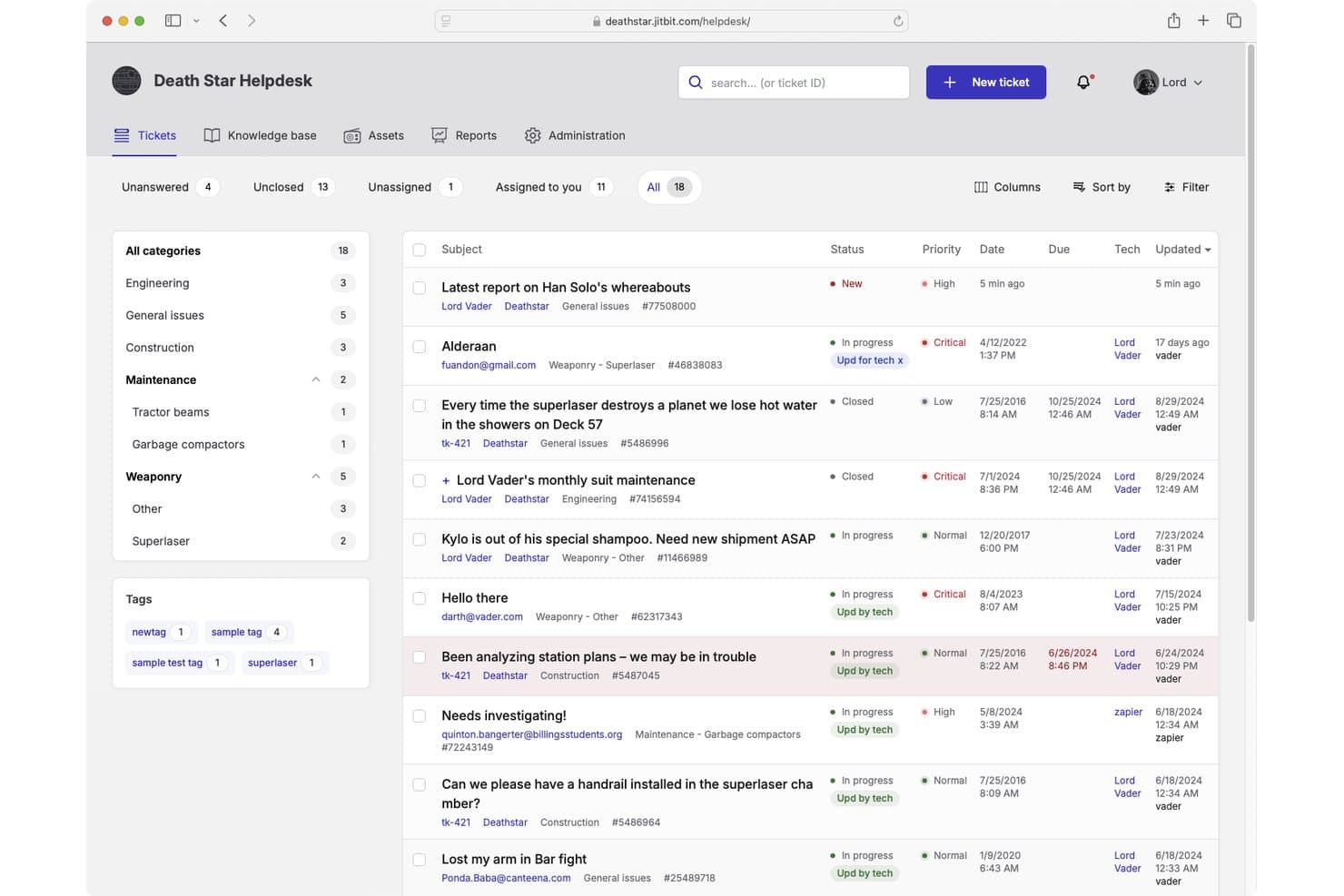
Jitbit Helpdesk offers a ticket management interface with categorized tickets, priority levels, status tracking, and assignee management for IT support teams. Jitbit Helpdesk is an email-first IT helpdesk platform that combines ticket management, automation, SLA tracking, a self-service knowledge base, and asset tracking—available as both a cloud-hosted SaaS solution and a self-hosted on-premises application.
Who Is Jitbit Helpdesk Best For?
Jitbit Helpdesk is a strong fit for small to mid-sized IT teams that need a no-fuss ticketing system they can either host themselves or run in the cloud.
Why I Picked Jitbit Helpdesk
I picked Jitbit Helpdesk as one of the best because it's one of the only IT helpdesk tools that offers full feature parity across its cloud and self-hosted versions. The on-premises license is perpetual, so my team owns the software outright with no ongoing subscription required. I also like that the C# source code is available for purchase, which means we can customize the platform at a deep level when standard configuration isn't enough.
Jitbit Helpdesk Key Features
- AI-powered ticket responses: Uses AI to suggest replies, summarize tickets, and recommend knowledge base articles.
- Multi-channel ticket intake: Accepts tickets via email, web portal, live chat, WhatsApp, API, and mobile app.
- Automation triggers: Customizable rules handle auto-assignment, escalations, and external HTTP requests.
- SLA tracking and alerts: Monitors multiple SLA policies with breach notifications and automated escalations.
Jitbit Helpdesk Integrations
Jitbit Helpdesk offers native integrations with Microsoft Teams, Slack, Jira, Active Directory, Zapier, and has an API for custom integrations.
Pros and Cons
Pros:
- Automation rules support external HTTP requests
- Cloud and self-hosted versions have feature parity
- Perpetual on-premises license with full source code
Cons:
- No native ITIL change or problem management modules
- Reporting and analytics capabilities are limited
Learn more about Jitbit Helpdesk:
Andre programmer for IT-brukerstøtte du bør vurdere
Her er noen flere alternativer å velge mellom. De kom ikke med på topp 10-listen, men du kan vurdere dem som ditt neste brukerstøtteverktøy:
- 11MissiveBest for collaborative inbox management
- 12Rippling ITBest for HR-connected IT request automation
- 13Zoho DeskBest for multichannel IT support
- 14TidioBest for live chat support with AI chatbot functions
- 15HaloBest for advanced help desk users
- 16monday serviceBest for workflow automation
- 17Vision HelpdeskBest for gamification features
- 18HappyFoxBest for integrations
- 19IssuetrakBest for helpdesk reporting and analytics
- 20InvGate Service ManagementBest for help desk configuration
Relaterte vurderinger av IT-programvare
Hvis du fortsatt ikke har funnet det du leter etter her, kan du se nærmere på disse alternative verktøyene som vi har testet og vurdert.
- Programvare for nettverksovervåking
- Programvare for serverovervåking
- SD-WAN-løsninger
- Verktøy for infrastrukturovervåking
- Pakkesniffer
- Verktøy for applikasjonsovervåking
How I Evaluate IT Helpdesk Software
I evaluate every tool on two levels: the baseline—ticket routing, SLA enforcement, and self-service portals—and the differentiators that matter for IT teams managing incidents under pressure.
Core Functionality (Table Stakes For This List)
When I'm selecting tools for my list, I rank each one on a scale from 0 (does not offer the functionality) to 5 (excels in this area) for each core functionality listed below. Then, I calculate the tool's total score into a percentage. Each tool needs to achieve a minimum total score of 75% to be considered for inclusion.
- Ticket Management: I look at how each tool handles categorization, assignment, status tracking, and ticket relationships—like linking a parent incident to child tasks when a server outage spawns multiple hardware requests.
- Multi-Channel Intake: Each platform should accept tickets from email, a web portal, and at least one additional channel such as Microsoft Teams or Slack so end users can report issues where they already work.
- Automation & Routing: I evaluate whether the tool supports rule-based routing and escalation triggers—for example, auto-assigning printer issues to a specific technician or escalating a VPN outage after 30 minutes without response.
- Knowledge Base & Self-Service Portal: A searchable KB paired with a self-service portal matters here. I check whether employees can find password reset guides or VPN setup instructions and submit tickets without emailing the help desk.
- SLA Management: I look for configurable SLA policies tied to ticket priority or category, with breach alerts and business-hours tracking so teams can differentiate response expectations for a downed production server vs. a software access request.
- IT Asset & Configuration Tracking: The tool should link assets to tickets and users. When a laptop failure comes in, agents should see warranty status, installed software, and past incidents tied to that device.
Once I have a list of tools that meet this criteria, I consider what sets each platform apart.
Differentiating Factors (What Sets Vendors Apart)
Here's how I compare and contrast different vendors:
Standout Features
AI-assisted triage is a big differentiator—tools that can auto-categorize tickets and draft responses save agents real time during high-volume incidents like a company-wide outage. I also evaluate whether a platform includes native change and problem management modules, since teams that handle root-cause analysis and change approvals outside their helpdesk lose visibility. Built-in remote control is another feature I look for, especially for support teams troubleshooting endpoint issues without switching to a separate remote desktop tool.
Beyond Features
Ecosystem fit matters a lot here. I check whether a tool connects natively to identity providers like Azure AD and endpoint managers like Intune, since a helpdesk that doesn't plug into your existing stack creates more work than it solves. Compliance is another key factor—teams in regulated industries need SOC 2 Type II or ISO 27001 certifications alongside SSO and role-based access controls. I also evaluate pricing transparency, particularly whether asset management and automation features sit behind add-ons or come included in base tiers.
Slik velger du programvare for IT-brukerstøtte
Det er lett å gå seg vill i lange funksjonslister og komplekse prisstrukturer. For å hjelpe deg med å holde fokus mens du går gjennom den unike prosessen med å velge programvare, får du her en sjekkliste over faktorer du bør ha i tankene:
| Faktor | Hva du bør vurdere |
|---|---|
| FaktorSkalerbarhet | Hva du bør vurdereKan programvaren vokse i takt med teamets behov? Se etter en løsning som støtter økende saksmengder, flere avdelinger og globale team. |
| FaktorIntegrasjoner | Hva du bør vurdereKan den kobles til de eksisterende verktøyene dine? Sørg for at den integreres med e-post, chat, CRM- og ressursstyringssystemer for å effektivisere arbeidsflytene. |
| FaktorTilpasningsmuligheter | Hva du bør vurdereKan du justere arbeidsflyter, sakskategorier og brukerroller? En fleksibel brukerstøtteløsning lar deg tilpasse prosessene til teamets spesifikke behov. |
| FaktorBrukervennlighet | Hva du bør vurdereEr grensesnittet intuitivt for både agenter og sluttbrukere? Se etter et enkelt system for saksbehandling, tydelig navigasjon og et brukervennlig kontrollpanel. |
| FaktorBudsjett | Hva du bør vurderePasser prisene med budsjettet og teamstørrelsen din? Se etter skjulte kostnader for funksjonstillegg, prising per agent og virksomhetsabonnementer. |
| FaktorSikkerhetstiltak | Hva du bør vurdereHvor godt beskytter det sensitive IT-data? Se etter rollebasert tilgangskontroll, kryptering og samsvar med bransjestandarder som GDPR. |
| FaktorAutomatiseringsfunksjoner | Hva du bør vurdereTilbyr det automatisering av arbeidsflyter, AI-drevet ruting av saker eller chatbotter? Automatisering reduserer manuelt arbeid og fremskynder løsningen av saker. |
| FaktorRapportering & analyse | Hva du bør vurdereGir det sanntidsinnsikt i IT-ytelsen? Se etter kontrollpaneler, sporing av tjenestenivåavtaler og trendanalyse for å måle effektivitet og områder med forbedringspotensial. |
Trender innen programvare for IT-brukerstøtte
I researchen min hentet jeg inn utallige produktoppdateringer, pressemeldinger og utgivelseslogger fra ulike leverandører av programvare for IT-brukerstøtte. Omfattende dokumentasjon krever ofte spesialiserte verktøy for utarbeiding av hjelpedokumentasjon for å organisere og presentere denne informasjonen på en effektiv måte. Her er noen av trendene som er på vei, og som jeg følger med på:
- AI-drevet løsning av saker: Flere brukerstøtteverktøy bruker AI til automatisk å kategorisere, rute og til og med løse saker. Maskinlæringsmodeller analyserer tidligere saker for å foreslå løsninger, noe som reduserer den manuelle arbeidsmengden og fremskynder svartidene.
- Proaktiv IT-støtte: I stedet for å vente på at brukerne skal sende inn saker, kan enkelte verktøy nå oppdage potensielle problemer før de forårsaker avbrudd. Prediktiv analyse og integrasjoner for systemovervåking hjelper IT-team med å håndtere problemer før de påvirker medarbeiderne.
- Samtalebasert saksbehandling: Tradisjonelle saksskjemaer erstattes av chatbaserte grensesnitt. Medarbeidere kan nå sende inn og følge opp saker direkte gjennom Slack, Microsoft Teams eller AI-drevne chatbotter, noe som gjør IT-støtte mer tilgjengelig.
- Arbeidsflytautomatisering uten kode: Flere plattformer lar IT-team bygge tilpassede arbeidsflyter for saksbehandling uten å skrive kode. Byggere for arbeidsflyter med dra-og-slipp-funksjonalitet hjelper team med å automatisere gjentakende prosesser, som å ta imot nye medarbeidere eller tilbakestille passord.
- Sporing av medarbeideropplevelse: Programvare for brukerstøtte utvides utover IT-støtte for å måle medarbeidertilfredshet generelt. Enkelte verktøy samler nå inn tilbakemeldinger etter at saker er løst, og analyserer trender i holdninger for å hjelpe IT-team med å forbedre tjenestekvaliteten.
Hva er programvare for IT-brukerstøtte?
Programvare for IT-brukerstøtte hjelper IT-team med å spore, administrere og løse forespørsler om teknisk støtte. IT-administratorer, brukerstøtteagenter og ledere for brukerstøtte bruker disse verktøyene til å organisere saker, automatisere arbeidsflyter og forbedre svartidene.
Sporing av saker, AI-drevet automatisering og kunnskapsbaser for selvbetjening bidrar til å redusere tiden det tar å løse saker, forbedre brukertilfredsheten og holde IT-driften organisert. For team som trenger praktiske opplæringsmiljøer, kan programvare for virtuelle IT-laboratorier supplere disse støtteløsningene. Disse verktøyene gjør det enklere for team å tilby effektiv og pålitelig støtte samtidig som nedetiden minimeres.
Funksjoner i programvare for IT-brukerstøtte
Når du velger programvare for IT-brukerstøtte, bør du se etter følgende nøkkelfunksjoner:
- Ticket-håndtering: Organiserer innkommende brukerstøtteforespørsler, tildeler dem til riktige medarbeidere og følger fremdriften deres frem til de er løst.
- Automatiserte arbeidsflyter: Bruker forhåndsdefinerte regler til å rute saker, sende varsler og utløse handlinger for å redusere manuelt arbeid.
- Selvbetjeningsportal: Den beste portalprogramvaren for IT-fagfolk tilbyr kunnskapsbaser der brukere kan finne svar på vanlige problemer uten å sende inn en sak.
- Flerkanalsstøtte: Gjør det mulig for brukere å sende inn saker via e-post, chat, telefon og meldingsapper som Slack eller Microsoft Teams.
- AI-drevet assistanse: Bruker maskinlæring til å foreslå løsninger, klassifisere saker og til og med løse enkle problemer automatisk.
- SLA-sporing: Overvåker respons- og løsningstider for å sikre at tjenestenivåavtaler (SLA-er) overholdes.
- Håndtering av IT-ressurser: Sporer IT-ressurser og kobler dem til brukerstøttesaker for å hjelpe IT-team med å diagnostisere og løse maskinvare- eller programvareproblemer raskere.
- Rapportering og analyse: Gir innsikt i saksmengde, løsningstider og medarbeidernes ytelse for å forbedre effektiviteten til IT-tjenestene.
- Verktøy for fjernstøtte: Gjør det mulig for IT-team å feilsøke og løse problemer på brukernes enheter uten å måtte være fysisk til stede.
- Innsamling av tilbakemeldinger fra brukere: Samler inn vurderinger og tilbakemeldinger etter at saker er løst, slik at man kan måle brukertilfredshet og identifisere forbedringsområder.
Fordeler med programvare for IT-brukerstøtte
Implementering av programvare for IT-brukerstøtte gir flere fordeler for teamet og virksomheten din. Her er noen av fordelene du kan se frem til:
- Raskere problemløsning: Automatiserer ruting og prioritering av saker, slik at IT-team kan løse problemer raskere.
- Bedre organisering: Holder alle brukerstøtteforespørsler samlet på ett sted, noe som gjør det enklere å følge opp og håndtere saker fra start til slutt.
- Bedre brukeropplevelse: Gir ansatte selvbetjeningsalternativer og raskere svar, noe som reduserer frustrasjon.
- Økt IT-effektivitet: Reduserer manuelle oppgaver gjennom automatisering, slik at IT-team kan fokusere på arbeid med høyere prioritet.
- Bedre beslutningstaking: Genererer rapporter og innsikt om sakstrender, medarbeidernes ytelse og vanlige problemer for å bidra til bedre IT-tjenester.
- Bedre sikkerhetsetterlevelse: Sporer IT-hendelser og -ressurser, slik at organisasjoner lettere kan overholde sikkerhets- og myndighetskrav.
- Lavere brukerstøttekostnader: Reduserer antallet gjentakende saker ved å tilby selvbetjente kunnskapsbaser og AI-drevet assistanse.
Kostnader og priser for programvare for IT-brukerstøtte
Ved valg av programvare for IT-brukerstøtte er det viktig å forstå de ulike prismodellene og abonnementene som er tilgjengelige. Kostnadene varierer basert på funksjoner, teamstørrelse, tillegg og mer. Tabellen nedenfor oppsummerer vanlige abonnementer, gjennomsnittsprisene deres og typiske funksjoner som er inkludert i løsninger for programvare for IT-brukerstøtte:
Sammenligningstabell for programvare for IT-brukerstøtte
| Plantype | Gjennomsnittspris | Vanlige funksjoner |
|---|---|---|
| PlantypeGratisabonnement | Gjennomsnittspris$0 | Vanlige funksjonerGrunnleggende saksbehandlingssystem, begrenset automatisering, tilgang for én bruker og brukerstøtte fra fellesskapet. |
| PlantypePersonlig abonnement | Gjennomsnittspris$10-$30/bruker/måned | Vanlige funksjonerFlerkanalsstøtte, tildeling av saker, rapporteringsverktøy og e-postvarsler. |
| PlantypeBedriftsabonnement | Gjennomsnittspris$40-$100/bruker/måned | Vanlige funksjonerAvansert automatisering, AI-drevet sakruting, SLA-sporing og integrasjoner med tredjepartsapper. |
| PlantypeVirksomhetsabonnement | GjennomsnittsprisTilpasset pris | Vanlige funksjonerTilpassede arbeidsflyter, dedikert brukerstøtte, etterlevelsesstyring og avansert analyse. |
Vanlige spørsmål om IT-helpdeskprogramvare
Her er svar på noen vanlige spørsmål om IT-helpdeskprogramvare: