

I 10 migliori software per infrastrutture IT recensiti per il 2026

Elenco dei migliori software per infrastrutture IT


Il software per la gestione dell’infrastruttura aiuta i team IT a monitorare i sistemi, automatizzare la manutenzione e mantenere le operazioni affidabili negli ambienti locali e ibridi.
La maggior parte dei team inizia a cercare questi strumenti quando è difficile diagnosticare le interruzioni, la configurazione manuale richiede troppo tempo o gli strumenti distribuiti rendono difficile capire cosa stia realmente accadendo. Questi problemi non solo rallentano le attività, ma distolgono anche il team dai progetti che fanno progredire l’azienda.
Ho aiutato diverse organizzazioni a scegliere e implementare strumenti per la gestione dell’infrastruttura che si adattassero realmente al funzionamento dei loro ambienti, non solo a quello che dichiarano i fornitori. Questa guida raccoglie ciò che ho imparato, così puoi trovare una soluzione che riduca la complessità e aiuti il tuo team a rimanere concentrato su ciò che conta.
Perché fidarsi dei nostri consigli sui software
Il nostro team testa e recensisce software dal 2012. In quanto leader tecnologici noi stessi, sappiamo quanto sia difficile — e importante — scegliere il software giusto.
Per questa guida, abbiamo valutato gli strumenti attraverso test praticie ricerche indipendenti, assegnando un punteggio agli strumenti in base ai nostri criteri di selezione.
Le nostre recensioni riflettono il nostro giudizio editoriale umano, non un discorso di vendita.
Revisori esperti:
Riepilogo dei migliori software per infrastrutture IT
| Tool | Best For | Trial Info | Price | ||
|---|---|---|---|---|---|
| 1 | Ideale per l’automazione infrastrutturale guidata da policy | Prova gratuita di 14 giorni | A partire da $399/mese (fatturato annualmente) | Website | |
| 2 | Ideale per dashboard di performance live. | Prova gratuita di 14 giorni | A partire da $15/utente/mese (fatturazione annuale) | Website | |
| 3 | Ideale per il monitoraggio IT infrastrutturale personalizzabile | Prova gratuita di 30 giorni | Da $179/mese (fatturato annualmente) | Website | |
| 4 | Ideale per l'impostazione di un service desk multicanale | Prova gratuita di 14 giorni + demo gratuita disponibile | Da $19/agente/mese (fatturato annualmente) | Website | |
| 5 | Ideale per combinare RMM e gestione delle patch | Prova gratuita di 30 giorni + demo gratuita disponibile | Da $129/tecnico/mese (fatturazione annuale) | Website | |
| 6 | Migliore soluzione open-source per il monitoraggio | Disponibile piano gratuito | Prezzo su richiesta | Website | |
| 7 | Ideale per infrastruttura IT per team distribuiti | Demo gratuita disponibile | da $5/persona/mese | Website | |
| 8 | Ideale per la visibilità full-stack | Demo gratuita disponibile | A partire da $10/utente/mese (fatturazione annuale) | Website | |
| 9 | Ideale per la visibilità automatizzata della rete | Prova gratuita di 14 giorni + demo gratuita disponibile | Prezzo su richiesta | Website | |
| 10 | Ideale per il monitoraggio multi-tecnologico | Prova gratuita di 30 giorni + demo gratuita + piano gratuito disponibile | A partire da $199/anno | Website |


Recensioni dei migliori software per infrastrutture IT
Di seguito trovi i miei riepiloghi dettagliati dei migliori software per infrastrutture IT inclusi nel mio elenco. Le mie recensioni offrono un’analisi approfondita delle funzionalità principali, dei pro e dei contro, delle integrazioni e dei casi d’uso ideali di ogni strumento, per aiutarti a trovare quello più adatto a te.

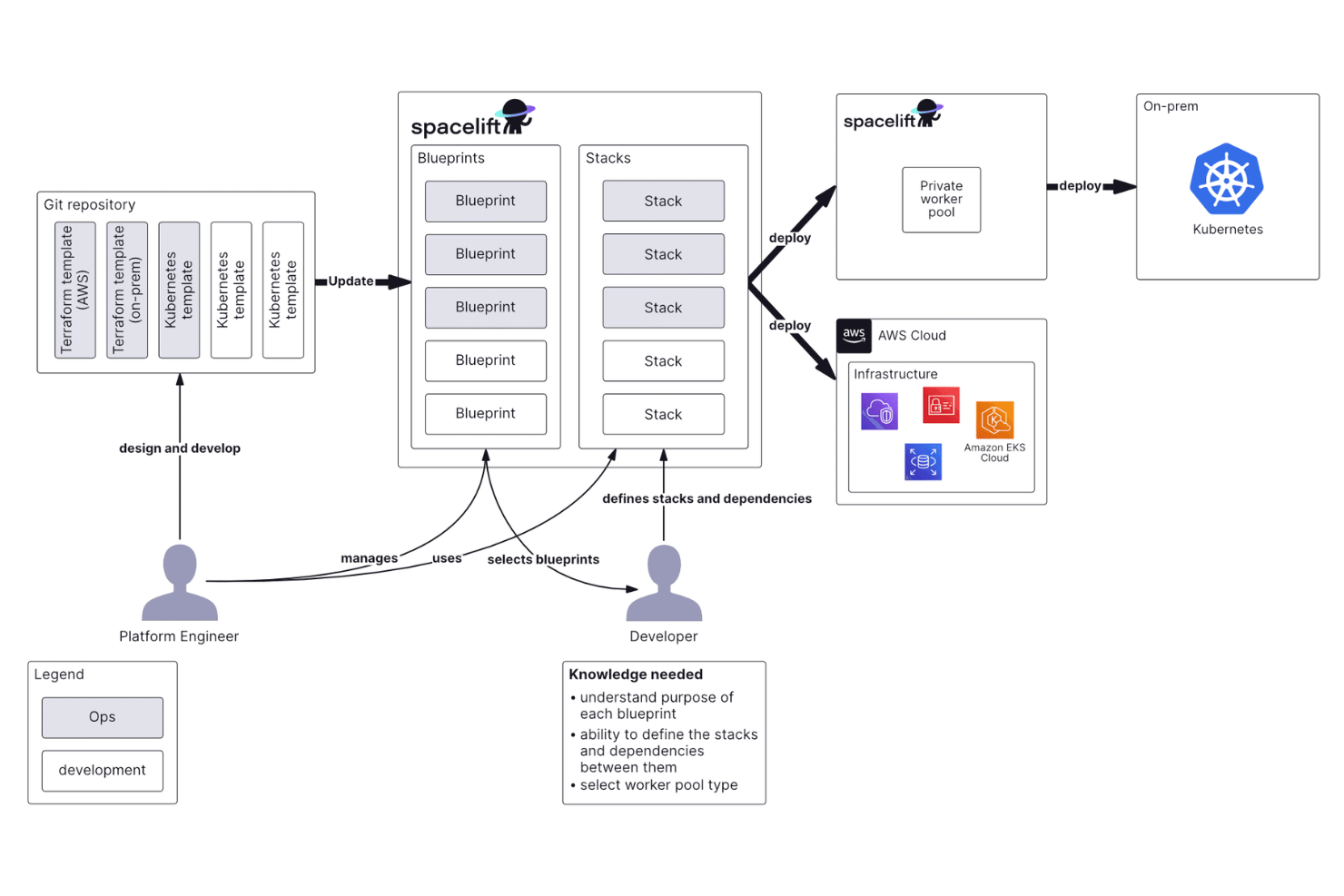
Spacelift è una piattaforma di orchestrazione dell'infrastruttura che gestisce i flussi di lavoro IaC su Terraform, OpenTofu, Pulumi, CloudFormation e Kubernetes, offrendo controlli policy-as-code, rilevamento delle derive e automazione delle pipeline CI/CD.
Per chi è migliore Spacelift?
Progettato specificamente per i team che utilizzano l'infrastructure-as-code, Spacelift unisce distribuzione, governance e automazione per Terraform, OpenTofu, Pulumi, Ansible e altri strumenti.
Perché ho scelto Spacelift
Ho scelto Spacelift tra i migliori perché il suo motore policy-as-code è davvero uno dei più dettagliati che abbia mai visto in una piattaforma IaC. Utilizza Open Policy Agent (OPA) con Rego per definire le regole in ogni punto decisionale della pipeline infrastrutturale. Mi riferisco a policy di pianificazione che bloccano la creazione di determinati tipi di risorse, policy di approvazione che richiedono la conferma dal team corretto prima dell'esecuzione di una run, e policy di push che controllano esattamente come gli eventi Git scatenano le distribuzioni. La workbench delle policy permette anche di simulare valutazioni delle policy su input reali campionati, così puoi testare e perfezionare le regole senza dover attendere una run dal vivo per validare la logica.
Funzionalità principali di Spacelift
- Dipendenze fra stack: Attiva l’esecuzione di stack a valle quando uno stack a monte completa con successo una distribuzione.
- Rilevamento delle derive: Controlli programmati confrontano lo stato attuale nel cloud con le definizioni IaC e segnalano eventuali deviazioni di configurazione.
- Blueprint: Modelli parametrizzati che permettono ai team di creare stack infrastrutturali standardizzati tramite un portale self-service.
- Credenziali dinamiche: Genera credenziali cloud temporanee al momento dell'esecuzione, evitando di memorizzare segreti statici nell'ambiente.
Integrazioni di Spacelift
Spacelift offre integrazioni native per strumenti IaC, sistemi di controllo di versione, provider cloud e piattaforme di comunicazione come GitHub, GitLab, Bitbucket, Azure DevOps, Slack, Microsoft Teams, AWS, Azure, Google Cloud e Datadog. Si integra anche con ServiceNow e Infracost. Possono essere costruite integrazioni personalizzate utilizzando l'API GraphQL e il supporto per webhook.
Pros and Cons
Pros:
- Le policy basate su OPA permettono un controllo dettagliato delle approvazioni Terraform
- Il rilevamento delle derive individua tempestivamente le discrepanze senza passaggi manuali
- Le esecuzioni dei piani si attivano automaticamente sui pull request
Cons:
- Aggiungere nuovi elementi di configurazione risulta difficile
- La versione self-hosted manca di alcune integrazioni cloud
Datadog
Ideale per dashboard di performance live.
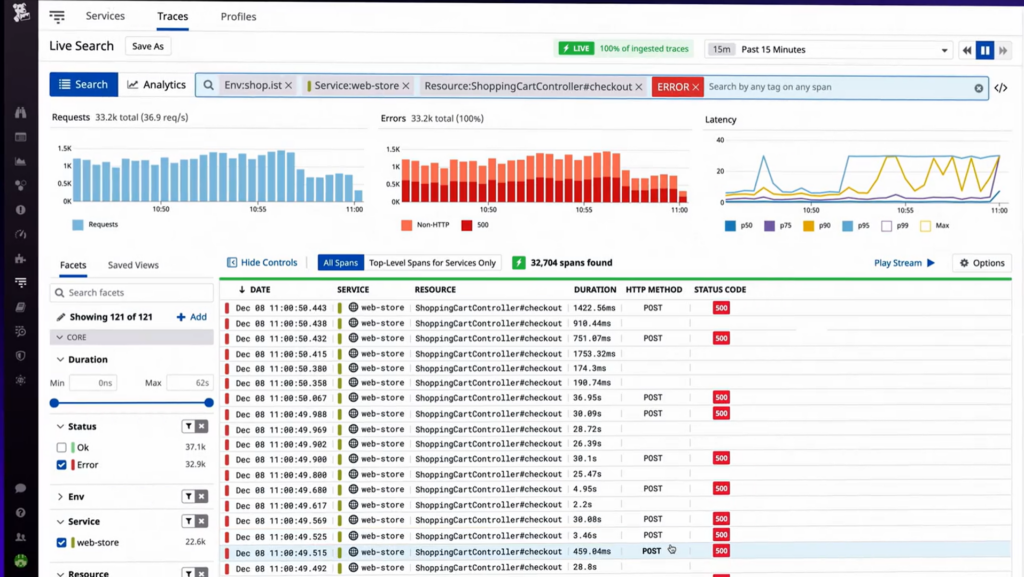
Datadog è una piattaforma di monitoraggio completa progettata per garantire prestazioni applicative ottimali. Grazie ai suoi potenti strumenti di visualizzazione, è particolarmente adatta a chi desidera dashboard live che mostrino metriche di performance in tempo reale.
Perché ho scelto Datadog:
Durante la valutazione di diversi strumenti per il monitoraggio dell'infrastruttura IT, ho avuto un forte interesse per Datadog. La mia scelta è stata guidata dai suoi eccellenti strumenti di visualizzazione e dall'efficienza nel rappresentare i dati sulle prestazioni in tempo reale. Rispetto ad altre soluzioni, l'attenzione di Datadog verso le dashboard live e la capacità di fornire insight istantanei sono i motivi per cui lo considero il 'Migliore per dashboard di performance live.'
Caratteristiche principali e integrazioni:
Datadog vanta funzionalità straordinarie, offrendo monitoraggio end-to-end dall'infrastruttura agli strati applicativi. La sua dashboard di performance live è un elemento distintivo, permettendo ai team IT di risolvere i problemi in modo immediato. Le integrazioni rappresentano una parte significativa dell'ecosistema Datadog, con supporto per AWS, Linux, Slack e Zabbix, migliorando le sue capacità di monitoraggio.
Pros and Cons
Pros:
- Forte attenzione alle dashboard live con strumenti di visualizzazione intuitivi.
- Ricco ecosistema di integrazioni, inclusi AWS e Slack.
- Monitoraggio completo, dai dispositivi di rete alle prestazioni delle applicazioni.
Cons:
- Può risultare complesso da configurare per i nuovi utenti.
- Alcuni utenti potrebbero trovare la vasta gamma di funzionalità complessa.
- Il prezzo può essere elevato per organizzazioni di piccole dimensioni.

Ideale per il monitoraggio IT infrastrutturale personalizzabile
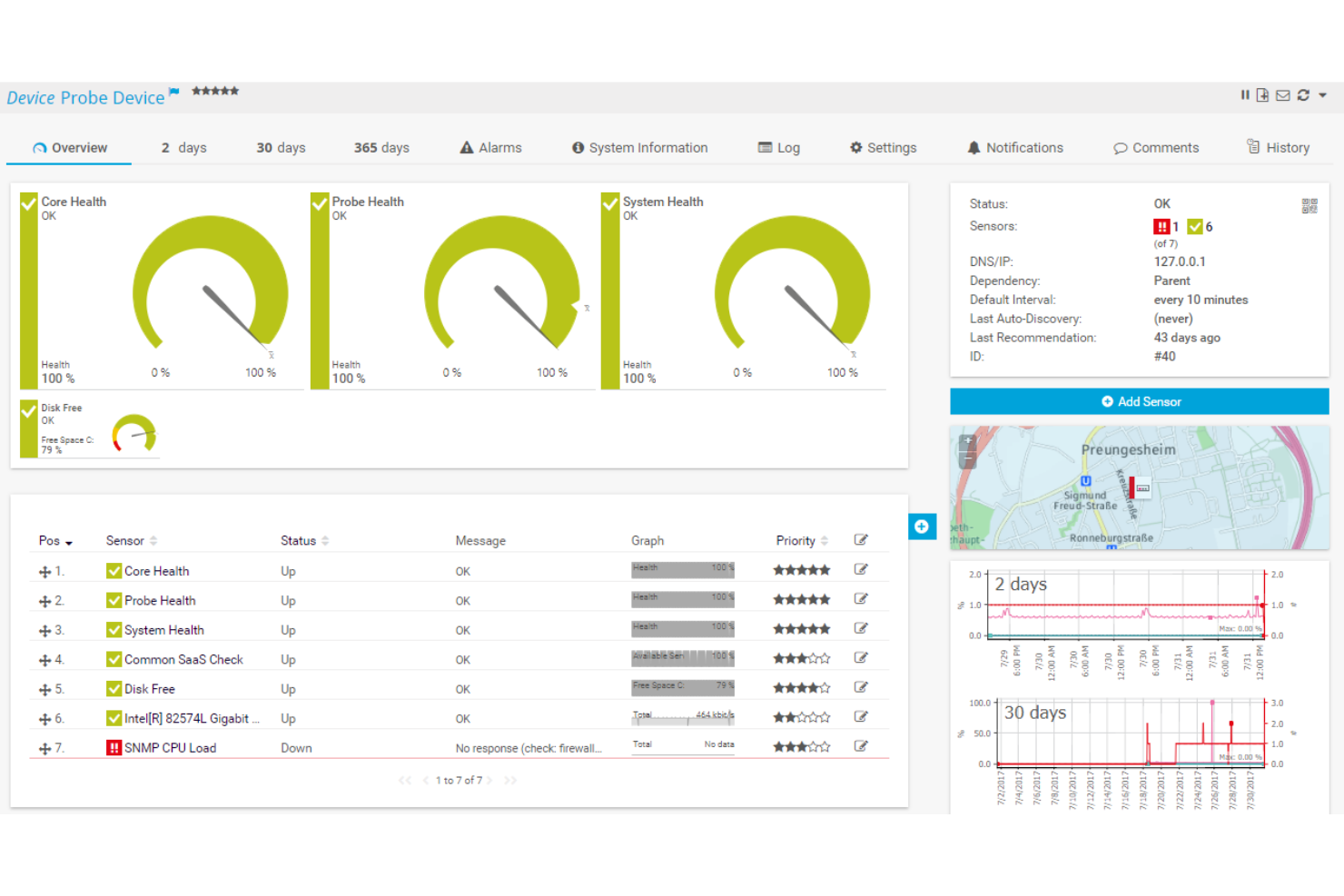
PRTG Network Monitor di Paessler è uno strumento robusto per il monitoraggio dell'infrastruttura IT, progettato per professionisti IT e amministratori di rete. Offre monitoraggio in tempo reale di dispositivi di rete, sistemi e applicazioni, garantendo prestazioni ottimali e affidabilità per aziende di tutte le dimensioni.
Perché ho scelto PRTG: Ho scelto PRTG per le sue funzionalità di monitoraggio estese e personalizzabili. L'interfaccia intuitiva di PRTG permette la creazione di dashboard e avvisi personalizzati, offrendo approfondimenti e notifiche in tempo reale su potenziali problemi. Questo approccio proattivo aiuta a prevenire i tempi di inattività e a mantenere operazioni fluide. Inoltre, la scalabilità e la versatilità del software lo rendono adatto sia alle piccole aziende sia alle grandi imprese.
Caratteristiche e integrazioni distintive di PRTG
Caratteristiche includono la funzione di auto-discovery di rete per semplificare la configurazione rilevando automaticamente i dispositivi presenti sulla rete, strumenti avanzati di analisi del traffico che offrono approfondimenti dettagliati sull'utilizzo della rete e funzionalità di reportistica dettagliata per generare report personalizzabili.
Integrazioni includono Microsoft Exchange, VMware, Amazon Web Services (AWS), Cisco, Dell, HP, IBM, NetApp, Linux, Windows, Citrix, Apache e Oracle.
Pros and Cons
Pros:
- Interfaccia visiva user-friendly
- Scalabile per reti piccole e grandi
- Dashboard, avvisi e report personalizzabili
Cons:
- Costi elevati per implementazioni su larga scala
- Le funzionalità più avanzate possono richiedere un periodo di apprendimento
New Product Updates from Paessler PRTG
Paessler PRTG Improves Route Monitoring and Auto-Discovery
Paessler PRTG adds route-change alerts, faster traceroute processing, updated auto-discovery defaults, and a Proxmox template. This improves network monitoring and setup. For more information, visit Paessler’s official site.
 .
.
Ideale per l'impostazione di un service desk multicanale
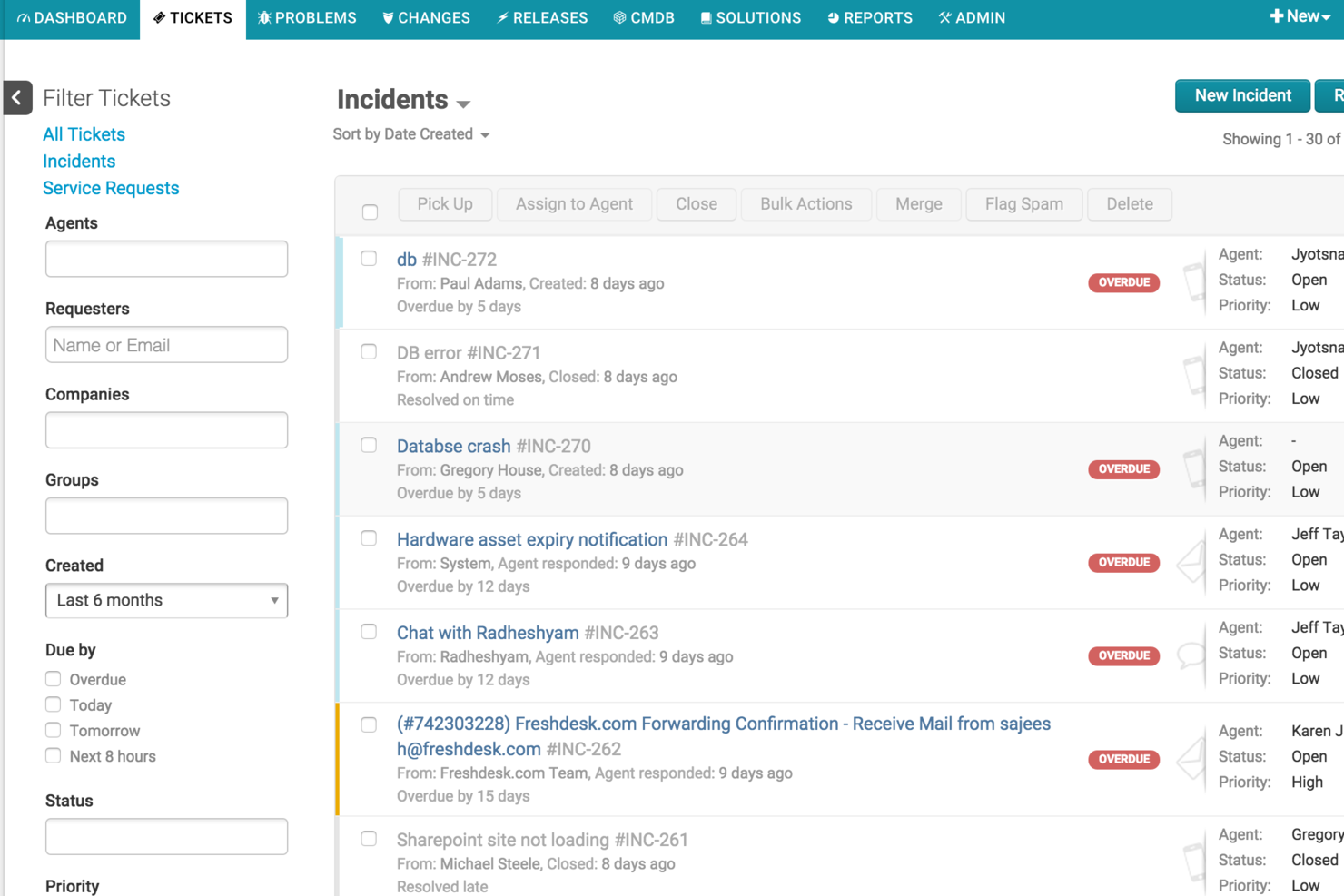
Freshservice è una piattaforma di gestione dei servizi IT progettata per i team di infrastruttura IT, che offre gestione degli incidenti, tracciamento degli asset, automazione dei flussi di lavoro e un service desk multicanale.
Per chi è più indicato Freshservice?
Freshservice è ideale per i team IT di organizzazioni di medie e grandi dimensioni che necessitano di una gestione dei servizi centralizzata e flussi di lavoro automatizzati.
Perché ho scelto Freshservice
Ho incluso Freshservice tra le mie migliori scelte perché posso configurare un service desk che gestisce i ticket provenienti da email, chat, telefono e portale in pochi minuti. Il mio team utilizza la casella di posta unificata per gestire le richieste da più fonti senza dover cambiare strumento. Inoltre, apprezzo il fatto che possiamo personalizzare i flussi di lavoro per ciascun canale in modo da adattarli ai nostri processi di supporto.
Funzionalità principali di Freshservice
- Gestione dei problemi: Collega incidenti correlati e analizza le cause principali per prevenire problemi ricorrenti.
- Gestione delle release: Pianifica, monitora e documenta i rilasci software all'interno del tuo ambiente IT.
- Base di conoscenza: Crea e mantieni una libreria ricercabile di soluzioni e FAQ per gli utenti finali.
- Gestione SLA: Definisci e monitora gli accordi sui livelli di servizio per garantire la risoluzione tempestiva dei ticket.
Integrazioni di Freshservice
Freshservice offre integrazioni native con Microsoft Teams, SecPod, Slack, TeamViewer, Jira e Microsoft Entra ID. Sono disponibili app connettore e API per integrazioni personalizzate, mentre il marketplace mette a disposizione oltre 1.200 integrazioni con app aziendali.
Pros and Cons
Pros:
- Strumenti di rilevamento e risposta agli incidenti basati su AI
- Moduli integrati per la gestione dei cambiamenti
- Supporta la gestione dei servizi anche per team non IT
Cons:
- Le funzionalità di automazione richiedono piani di livello superiore
- Nessun piano gratuito per sempre per i piccoli team
New Product Updates from Freshservice
 Experience)
Freshservice Introduces a Reimagined IT Asset Management (ITAM) Experience
Freshservice introduces a reimagined IT Asset Management (ITAM) experience with continuous infrastructure discovery, dependency mapping, IPAM, and Software License Management. This update helps teams improve asset visibility and manage connected IT environments more effectively. For more information, visit Freshservice’s official site.

Atera
Ideale per combinare RMM e gestione delle patch
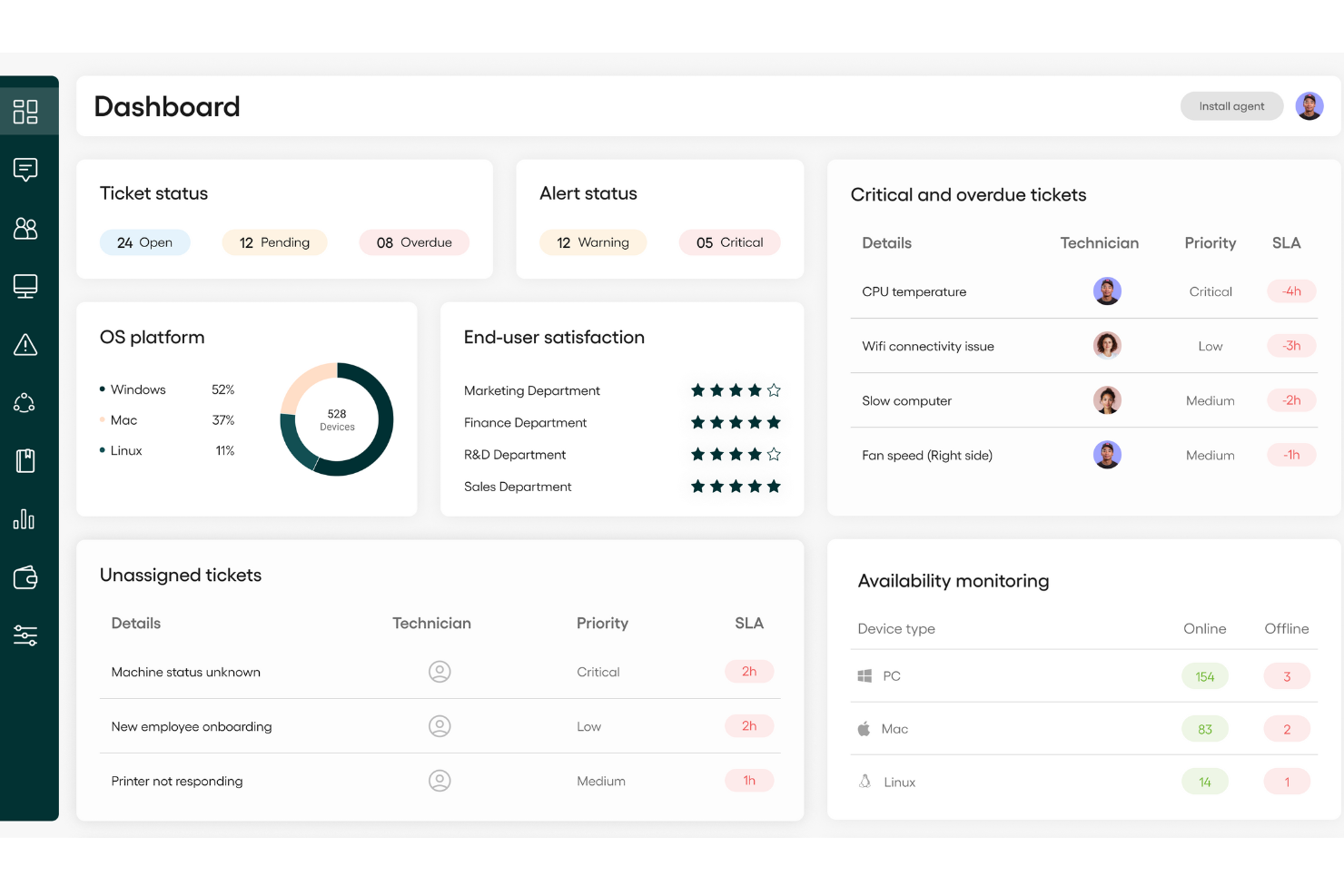
Atera offre una soluzione completa per la gestione dell'infrastruttura IT progettata per soddisfare le esigenze dei provider di servizi gestiti (MSP) e dei team IT interni. Mette a disposizione strumenti per il monitoraggio remoto, la gestione delle patch e l'automazione, affrontando le sfide comuni nelle operazioni IT. Questo lo rende un prezioso alleato per chi desidera migliorare la supervisione dei sistemi e gestire le attività IT in modo più efficace.
Perché ho scelto Atera
Ho scelto Atera perché unisce in modo unico il monitoraggio e la gestione remota (RMM) con la gestione delle patch, elementi essenziali per mantenere un ambiente IT stabile. La sua automazione operativa riduce al minimo le attività manuali, permettendoti di concentrarti su miglioramenti strategici dell'IT. L'automazione basata su intelligenza artificiale migliora ulteriormente l'erogazione dei servizi prevedendo e risolvendo preventivamente i potenziali problemi.
Caratteristiche principali di Atera
Oltre alle sue funzionalità di base, ho riscontrato anche altre caratteristiche che ne aumentano il valore per la gestione dell'infrastruttura IT:
- Servizi di help desk: Ottimizza le richieste di supporto e il ticketing per garantire una risoluzione efficiente dei problemi.
- Network discovery: Utilizza Network Discovery per eseguire la scansione dei dispositivi connessi o sconosciuti presenti nelle tue reti così da poterli gestire ed evitare punti ciechi.
- Gestione completa delle risorse: Permette il monitoraggio e la gestione dettagliata delle risorse IT all'interno dell'organizzazione.
Integrazioni di Atera
Le integrazioni includono Google, AzureAD, Okta, Acronis, Splashtop, Bitdefender, Keeper, Axcient, Emsisoft e Ironscales.
Pros and Cons
Pros:
- Consolida la gestione IT in un'unica piattaforma, semplificando le operazioni.
- Fornisce un efficace monitoraggio remoto e gestione delle patch.
- Consente una rapida implementazione dell'agente Atera per migliorare il flusso di lavoro.
Cons:
- Alcune funzionalità avanzate di reportistica e intelligenza artificiale richiedono piani di livello superiore.
- La gestione dei progetti e il monitoraggio dei SLA complessi sono relativamente limitati.
New Product Updates from Atera

Atera Adds Webhook Triggers for Technician Assignment Changes
Atera ticket automation rules now support a webhook trigger when a ticket’s technician assignment changes, expanding automation beyond creation, status updates, and closure/resolution events. For more information, visit Atera's official site.

Icinga
Migliore soluzione open-source per il monitoraggio
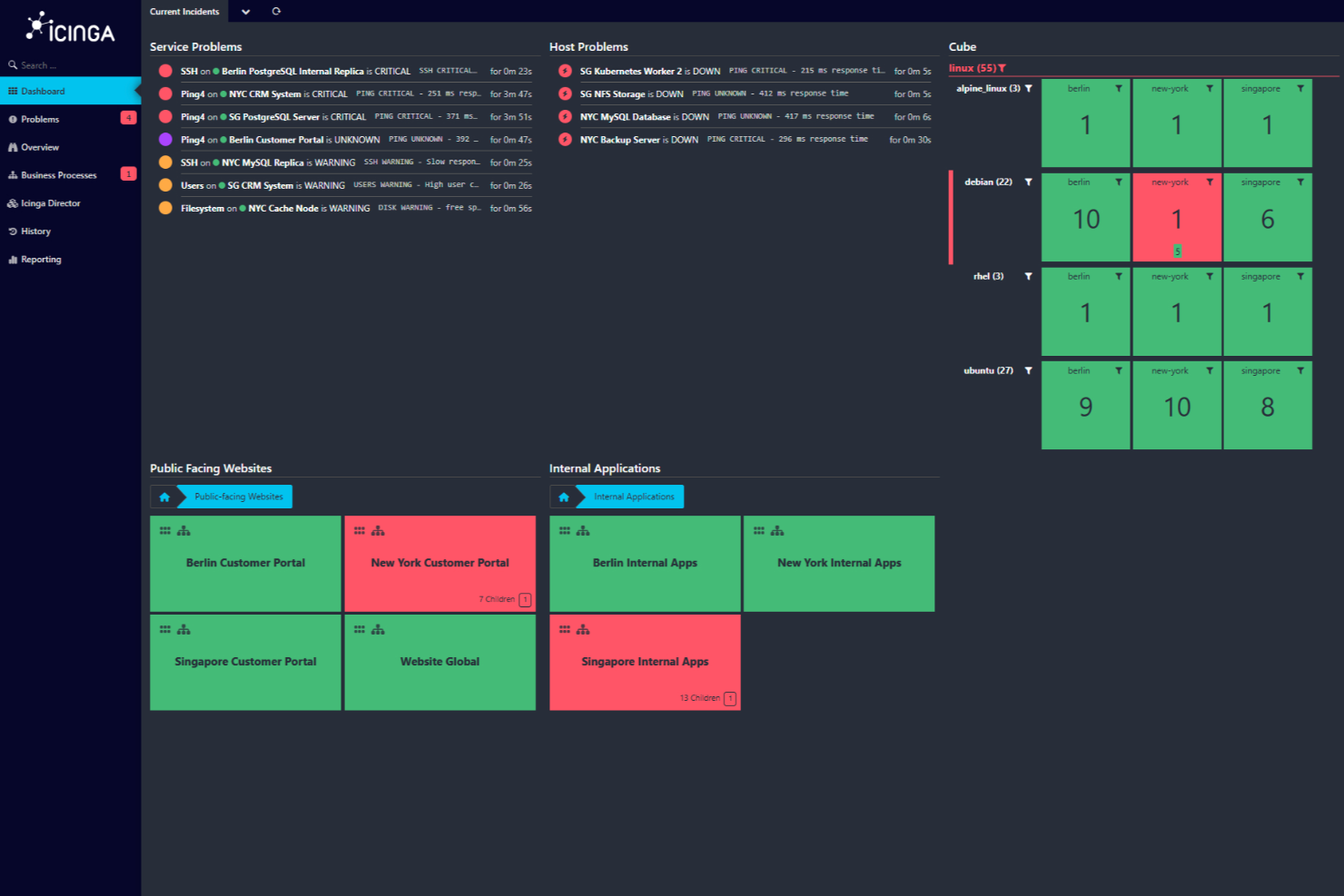
Icinga è una soluzione di monitoraggio open-source progettata per gestire ambienti IT complessi offrendo una suite completa per il monitoraggio di infrastrutture, cloud e applicazioni.
Perché ho scelto Icinga: Ho scelto Icinga per le sue regole di automazione che adattano il monitoraggio man mano che i sistemi evolvono. Con le regole di applicazione e la scoperta automatica, Icinga apprende nuovi server o servizi e adatta i controlli in base ai tuoi criteri. Questo significa che non devi inseguire manualmente i cambiamenti—gestisce ambienti in espansione o in riduzione con un lavoro di configurazione minimo. Icinga unisce anche log, metriche e risultati dei controlli dei servizi in un'unica vista. Viene fornito con writer per Graphite, InfluxDB ed Elasticsearch e ti permette di interrogare i log o visualizzare le metriche insieme agli allarmi.
Caratteristiche e integrazioni distintive di Icinga
Caratteristiche includono il monitoraggio distribuito e basato su agenti per supportare la copertura su più sedi e allarmi e notifiche personalizzabili per aiutarti a risolvere rapidamente i problemi. I suoi strumenti di analisi permettono anche di creare dashboard e report personalizzati, aiutandoti a identificare i colli di bottiglia e monitorare la disponibilità storica.
Integrazioni includono Grafana, AWS, Azure, Puppet, Ansible, Chef, Terraform, Jira, PagerDuty, ServiceNow, BigPanda e Stackstorm.
Pros and Cons
Pros:
- Gratuito da usare senza costi di avviamento
- Scalabile sia per ambienti piccoli che grandi
- Altamente personalizzabile per le diverse esigenze di infrastruttura IT
Cons:
- Segnalati occasionali problemi di prestazioni in scenari ad alto carico
- Configurazione e setup presentano una curva di apprendimento
New Product Updates from Icinga

Icinga Adds TOTP Two-Factor Authentication to Icinga Web
Icinga added time-based one-time password (TOTP) two-factor authentication to Icinga Web, helping organizations strengthen login security with an additional verification step. For more information, visit Icinga’s official site.
 .
.
Deel IT
Ideale per infrastruttura IT per team distribuiti
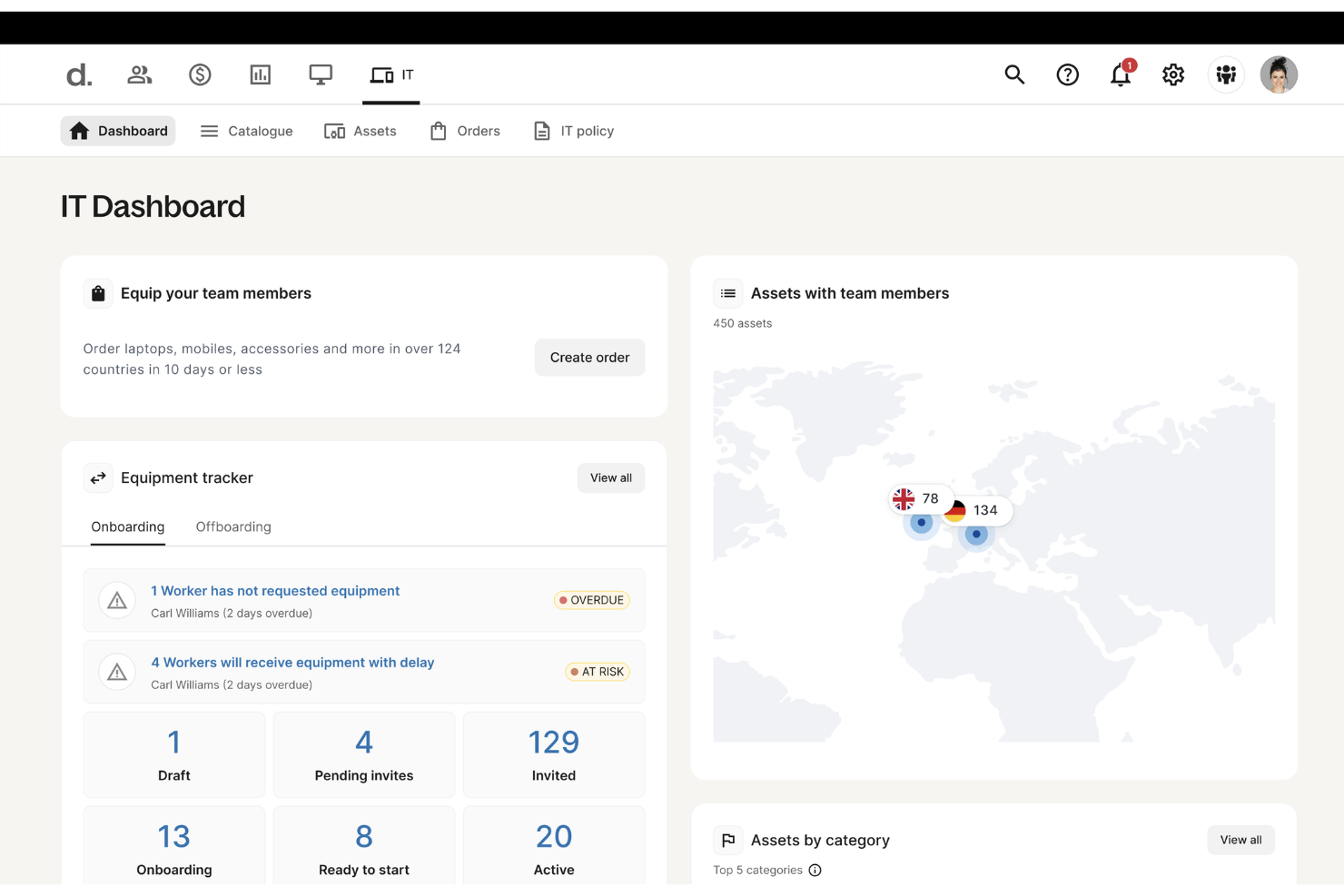
Deel è una piattaforma globale completa progettata per semplificare e automatizzare la gestione della forza lavoro per team distribuiti di tutte le dimensioni. Inizialmente nota per le sue soluzioni di gestione paghe, risorse umane e conformità, Deel ha ampliato la sua offerta includendo una suite di strumenti per l'infrastruttura IT focalizzati sulla gestione dei dispositivi.
Perché ho scelto Deel: Ciò che distingue Deel IT è la capacità di gestire l'intero ciclo di vita delle apparecchiature IT—coprendo l'acquisto, la distribuzione, la manutenzione e il recupero—in oltre 130 paesi. L'approccio globale, supportato da competenze locali, assicura che le aziende possano consegnare, tracciare e mettere in sicurezza i dispositivi a livello mondiale rispettando le normative regionali. Deel protegge inoltre i dispositivi tramite Mobile Device Management (MDM), protezione degli endpoint e gestione degli accessi alle applicazioni.
Funzionalità e integrazioni di spicco di Deel
Funzionalità includono la possibilità di automatizzare i cicli di rinnovo dei dispositivi, assicurando che l'attrezzatura sia sempre aggiornata, un servizio certificato di cancellazione dati che offre la cancellazione sicura dei dati sui dispositivi restituiti o dismessi, e policy IT personalizzabili e permessi, consentendo alle aziende di adattare i controlli di accesso e le impostazioni per diversi team e individui.
Integrazioni includono Slack, Google Workspace, Microsoft Teams, BambooHR, Greenhouse, SAP SuccessFactors, Okta e Azure Active Directory.
Pros and Cons
Pros:
- Supporta la gestione dei dispositivi in oltre 130 paesi
- Aiuta ad automatizzare i flussi di lavoro legati alle risorse
- Gestione delle risorse HR e IT in un'unica piattaforma
Cons:
- Potrebbe non essere ideale per team con esigenze IT molto complesse
- Non offre funzionalità per altri componenti dell'infrastruttura IT, come server e reti

Ideale per la visibilità full-stack

ManageEngine OpManager Plus è una soluzione integrata di gestione delle operazioni IT progettata per monitorare e gestire l'intera infrastruttura IT. Offre visibilità full-stack per migliorare le operazioni IT e ottimizzare i risultati aziendali, inclusi approfondimenti in tempo reale sulle prestazioni della rete, lo stato dei server e la disponibilità delle applicazioni.
Perché ho scelto ManageEngine OpManager Plus: Ho scelto ManageEngine OpManager Plus come uno dei migliori software per l'infrastruttura IT perché copre in modo dettagliato sia il monitoraggio delle prestazioni di rete sia quello delle applicazioni. Puoi tenere traccia di metriche di rete in tempo reale come latenza, perdita di pacchetti e disponibilità dei dispositivi, aiutando il tuo team a identificare e risolvere rapidamente i problemi prima che peggiorino. Monitora inoltre oltre 100 tipi di applicazioni e server, garantendoti visibilità su aspetti come le prestazioni dei database e i tempi di risposta del front-end. Questo doppio focus sulla salute della rete e delle applicazioni ti consente di gestire l'intero ambiente IT da un'unica dashboard.
Funzionalità e integrazioni principali di ManageEngine OpManager Plus
Funzionalità includono la gestione della configurazione di rete e della conformità, che permette di tracciare l'attività degli utenti, gestire le modifiche e verificare la conformità dei dispositivi di rete. Inoltre, la funzione di gestione degli indirizzi IP e delle porte switch aiuta nell'assegnazione degli indirizzi IP e nella risoluzione dei problemi di rete tramite strumenti come traceroute e PING.
Integrazioni includono Active Directory, Microsoft 365, gestione Exchange, OpManager, Site24x7, NetFlow Analyzer, Log360, ADAudit Plus, Endpoint Central, Patch Manager Plus, AssetExplorer e ServiceDesk Plus.
Pros and Cons
Pros:
- Fornisce una cronologia dettagliata delle prestazioni e delle tendenze nel tempo per l'analisi delle cause principali
- Possibilità di creare visualizzazioni personalizzate con widget e grafici
- Offre un monitoraggio approfondito di vari dispositivi di rete, server e applicazioni
Cons:
- Può generare troppi avvisi, causando affaticamento da alert
- La configurazione iniziale può essere complessa

Auvik
Ideale per la visibilità automatizzata della rete
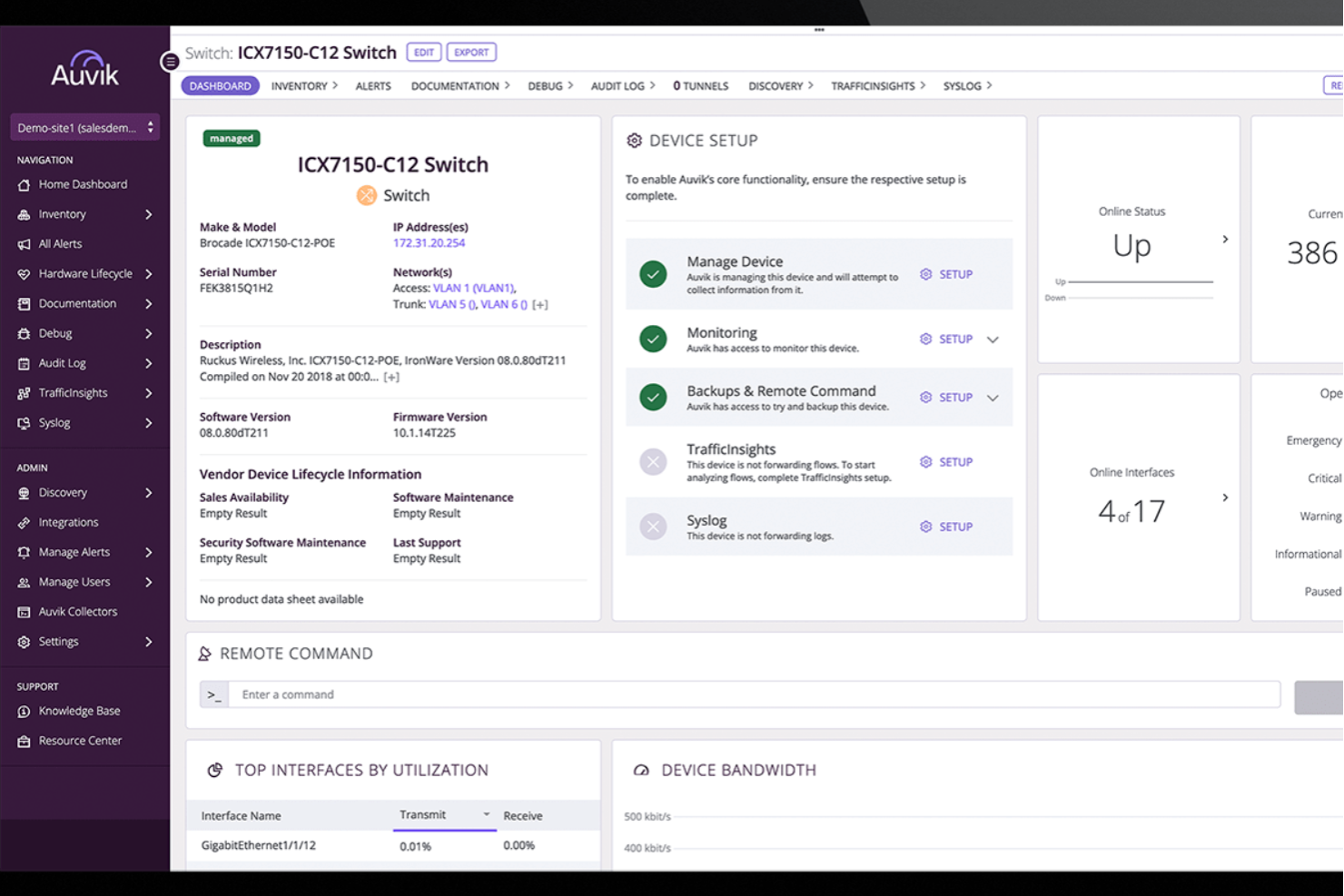
Auvik è una piattaforma di monitoraggio della rete che offre ai team IT una visibilità in tempo reale sulle prestazioni dell'infrastruttura. Aiuta a identificare rapidamente i problemi di connettività grazie alla mappatura automatizzata della rete, alle informazioni sulle prestazioni in tempo reale e alla gestione centralizzata dei log dei dispositivi.
Perché ho scelto Auvik: Ho scelto Auvik perché semplifica ambienti di rete complessi offrendo visibilità live sulle prestazioni dei dispositivi e mappando automaticamente le connessioni. Apprezzo anche la possibilità di centralizzare i log dei dispositivi e il backup delle configurazioni, così da facilitare la risoluzione dei problemi e il ripristino dopo un'interruzione. Il suo ampio supporto agli ambienti multi-vendor consente di gestire tutto da una singola dashboard senza dover usare più strumenti.
Funzionalità e integrazioni principali di Auvik
Funzionalità includono monitoraggio dei dispositivi in tempo reale, mappatura automatica della rete, avvisi globali, filtri di visualizzazione personalizzabili, esecuzione di comandi in-app, monitoraggio dello stato hardware, accesso remoto ai dispositivi e distribuzione rapida basata su cloud.
Integrazioni includono ConnectWise, Datto, Dell Technologies, Cisco, Fortinet, Google Workspace, Microsoft Teams, ServiceNow, Slack, Cisco Meraki, Palo Alto Networks e Ubiquiti.
Pros and Cons
Pros:
- Inventario dettagliato dei dispositivi utile per la gestione del ciclo di vita
- Può eseguire backup e ripristino delle configurazioni dei dispositivi
- Sistema di avviso rapido per diverse problematiche
Cons:
- Occasionale ritardo negli aggiornamenti dei dati in tempo reale
- La configurazione delle funzionalità più avanzate può essere complessa
New Product Updates from Auvik
Auvik Aurora Adds AI Alert Creation and Troubleshooting
Auvik Aurora adds AI-assisted alert creation and troubleshooting with natural-language prompts and guided investigation. This helps teams create alerts and diagnose issues faster. For more information, visit Auvik’s official site.
 .
.
Ideale per il monitoraggio multi-tecnologico
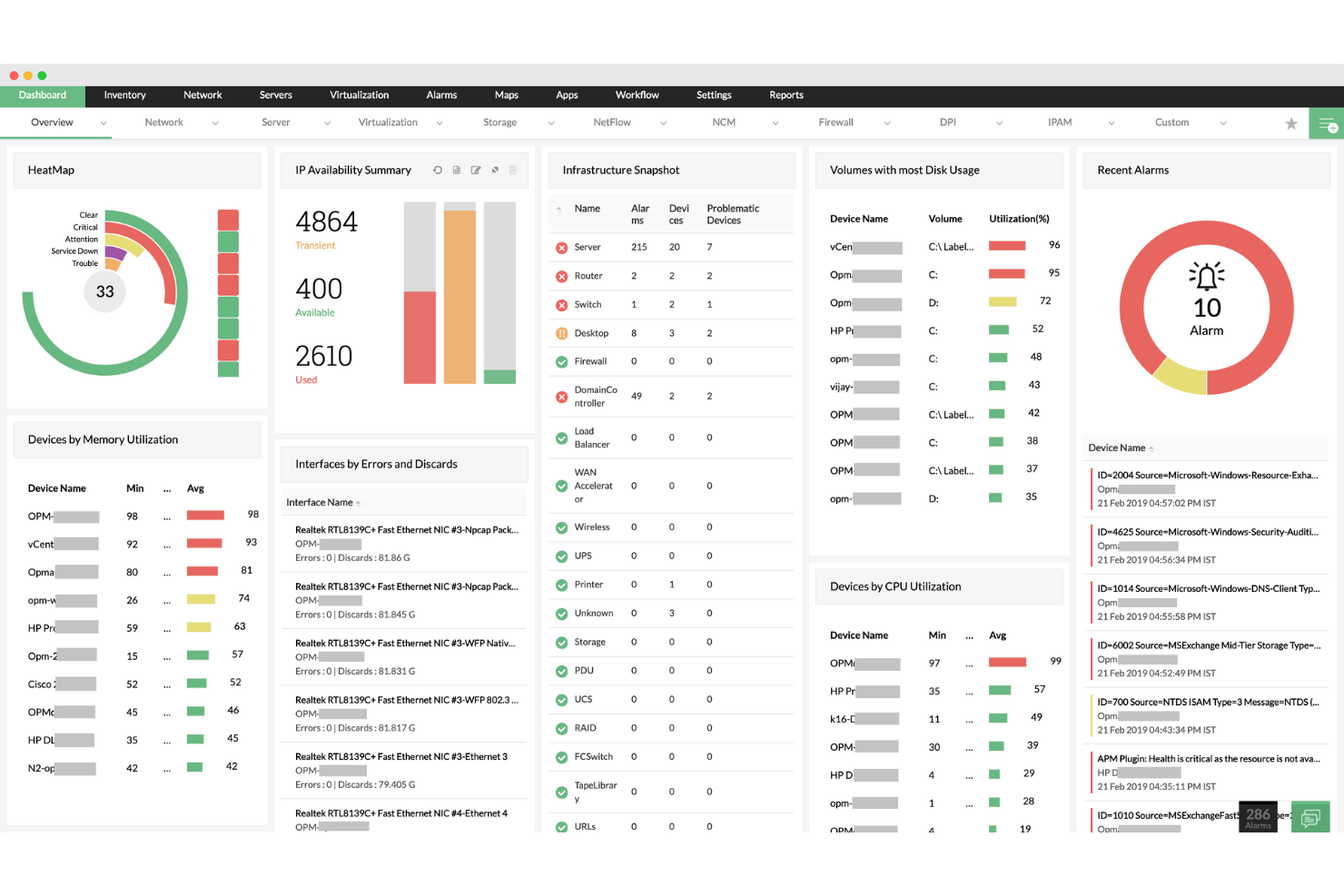
ManageEngine Applications Manager è un software per il monitoraggio delle prestazioni delle applicazioni che offre una visibilità approfondita sulle prestazioni e sull'esperienza utente delle applicazioni business-critical e dei componenti infrastrutturali. Supporta una vasta gamma di tecnologie, tra cui server, database, applicazioni e ambienti cloud, il che giustifica la sua posizione come miglior strumento per il monitoraggio multi-tecnologico.
Perché ho scelto ManageEngine Applications Manager:
ManageEngine Applications Manager è uno strumento completo progettato per monitorare e gestire le prestazioni e la disponibilità di applicazioni, server e infrastrutture IT. Le sue capacità si estendono su una vasta gamma di componenti IT, rendendolo una soluzione essenziale per le aziende che desiderano garantire il funzionamento ottimale dei propri asset tecnologici. Fornendo approfondimenti dettagliati sullo stato di salute di questi sistemi, aiuta a risolvere proattivamente i problemi e migliora la qualità complessiva della fornitura dei servizi IT.
Funzionalità e integrazioni principali:
Funzionalità includono una visibilità approfondita sullo stato operativo degli asset IT. Consente il monitoraggio in tempo reale, l'analisi delle prestazioni e la diagnosi delle problematiche su applicazioni, server, database e ambienti cloud. Questa solida piattaforma aiuta i team IT a mantenere la salute dei sistemi, garantire la disponibilità delle applicazioni e ottimizzare l'utilizzo delle risorse, contribuendo così direttamente al miglioramento dei risultati aziendali.
Integrazioni includono Slack, Microsoft Teams, ServiceNow, JIRA, Zapier, PagerDuty, Trello, AWS CloudWatch, Grafana e Splunk.
Pros and Cons
Pros:
- Ampia copertura di monitoraggio tra applicazioni, server e infrastruttura IT
- Interfaccia intuitiva con dashboard personalizzabili
- Diagnostica dettagliata per un'analisi precisa delle cause alla radice
Cons:
- Curva di apprendimento ripida per i nuovi utenti
- I prezzi potrebbero essere proibitivi per le piccole imprese
New Product Updates from ManageEngine Applications Manager
ManageEngine Applications Manager Adds AppLogs Alerting and Query Tools
ManageEngine Applications Manager adds AppLogs Alerting, advanced query operators, and new AppLogs Explorer visualizations. These updates help teams monitor log activity, refine searches, and analyze trends more efficiently. For more information, visit ManageEngine Applications Manager’s official site.
 .
.Altri software per infrastrutture IT
Di seguito trovi un elenco di software aggiuntivi per infrastrutture IT che ho selezionato, ma che non sono entrati nella top 12. Vale sicuramente la pena dar loro un’occhiata.
- ManageEngine OpManager
Ideale per il monitoraggio IT end-to-end
- Site24x7
La migliore per il monitoraggio IT alimentato dall'AI
- Netdata
Ideale per il monitoraggio dei sistemi in tempo reale
- Terraform
Ideale per le pratiche di infrastruttura come codice
- Ansible
Ideale per integrare sistemi eterogenei
- LogicMonitor
Ideale per il monitoraggio dell'infrastruttura cloud e ibrida
- Josys
Ideale per una gestione unificata di SaaS e dispositivi
- Files.com
Ideale per l'orchestrazione sicura dei file
- Amazon EC2
Ideale per ambienti di calcolo virtuale personalizzabili
- Google Compute Engine
Migliore per macchine virtuali cloud scalabili
- VMware vSphere
Ideale per virtualizzazione e gestione dei server
- Linode
Migliore per hosting cloud semplice e diretto


Recensioni di software e strumenti correlati
Se non hai ancora trovato quello che cerchi, dai un’occhiata a queste altre categorie di strumenti che abbiamo testato e valutato.
- Software di monitoraggio della rete
- Software di monitoraggio dei server
- Soluzioni SD-Wan
- Strumenti di monitoraggio dell’infrastruttura
- Analizzatore di pacchetti
- Strumenti di monitoraggio delle applicazioni
Come Valuto il Software per l’Infrastruttura IT
Valuto il software per l’infrastruttura IT su due livelli: le capacità di base—provisioning delle risorse, monitoraggio, automazione—che ogni strumento deve avere, e i fattori di differenziazione che distinguono i migliori.
Funzionalità Core (Requisiti Minimi per Questa Lista)
Quando seleziono gli strumenti per la mia lista, valuto ciascuno su una scala da 0 (non offre la funzionalità) a 5 (eccelle in quest’area) per ogni funzionalità core elencata di seguito. Poi calcolo il punteggio totale dello strumento in percentuale. Ogni strumento deve raggiungere un punteggio totale minimo del 75% per essere preso in considerazione.
- Provisioning e Gestione delle Risorse: Verifico come ogni strumento gestisce l’avvio e la configurazione di risorse di calcolo, storage e rete—sia che si tratti di distribuire cluster di VM o attivare server bare-metal.
- Monitoraggio e Allerta dell’Infrastruttura: Dashboard in tempo reale e soglie di allerta configurabili sono fondamentali, specie per il monitoraggio di metriche come utilizzo CPU, I/O disco e latenza di rete su sistemi distribuiti.
- Automazione e Orchestrazione: Valuto se gli strumenti supportano l’automazione di flussi di lavoro multi-step, come la risoluzione automatica di un deployment fallito o l’orchestrazione di aggiornamenti progressivi su gruppi di server.
- Supporto Ibrido e Multi-Cloud: La gestione dei carichi di lavoro tra data center on-premise e provider cloud come AWS, Azure o GCP da un’unica interfaccia centrale è un elemento che verifico attentamente.
- Sicurezza e Controlli di Accesso: RBAC granulare, audit logging e enforcement delle policy sono fondamentali—ad esempio per limitare chi può modificare le regole del firewall o accedere agli ambienti di produzione.
- Scalabilità e Alta Disponibilità: Valuto le capacità di auto-scaling e i meccanismi di failover, come una piattaforma gestisce i picchi di traffico distribuendo i carichi tra diverse zone di disponibilità.
Una volta identificati gli strumenti che soddisfano i criteri, considero ciò che distingue ogni piattaforma.
Fattori di Differenziazione (Cosa Distingue i Fornitori)
Ecco come confronto i diversi fornitori:
Funzionalità Distintive
Le capacità AIOps sono un importante fattore di differenziazione. Cerco strumenti che correlano allarmi tra i sistemi e prevedono i guasti prima che sfocino in interruzioni complete. Le funzionalità di gestione dei costi sono altrettanto importanti, soprattutto per i team che gestiscono ambienti ibridi, dove le spese cloud possono aumentare senza visibilità su risorse inattive o sottoutilizzate. Il supporto per i container e Kubernetes è un’altra area che analizzo attentamente, poiché molti team ormai eseguono carichi di lavoro containerizzati e necessitano di provisioning di cluster e gestione del ciclo di vita direttamente integrati nella piattaforma.
Oltre le Funzionalità
Le integrazioni e la compatibilità con l’ecosistema sono tra le mie priorità. Verifico che una piattaforma si connetta a strumenti ITSM già presenti come ServiceNow o Jira, oltre a pacchetti di osservabilità come Datadog o Prometheus, dato che gli strumenti infrastrutturali raramente operano in isolamento. Anche le certificazioni di conformità hanno peso—team in settori regolamentati richiedono piattaforme pronte per SOC 2, ISO 27001 o HIPAA senza dover costruire la conformità da zero. Valuto inoltre la flessibilità di deployment, in particolare se un fornitore supporta installazioni on-premise, SaaS e in ambienti air-gapped per adeguarsi alle diverse esigenze di sicurezza organizzativa.
Come scegliere il software per infrastrutture IT
È facile perdersi in lunghi elenchi di funzionalità e strutture tariffarie complesse. Per aiutarti a rimanere concentrato mentre affronti il tuo specifico processo di selezione del software, ecco una checklist dei fattori da tenere a mente:
| Fattore | Cosa considerare |
|---|---|
| Scalabilità | Assicurati che il software possa scalare facilmente con la crescita della rete. Cerca soluzioni in grado di gestire senza problemi l'aumento di dati, endpoint e carichi di lavoro, senza cali di prestazioni. |
| Integrazioni | Scegli un software che si colleghi facilmente agli strumenti già in uso, come AWS, Azure, Jira o Slack. Le buone integrazioni semplificano i flussi di lavoro e riducono al minimo le interruzioni. |
| Personalizzazione | Verifica che il software possa adattarsi alle tue esigenze specifiche. Dovresti poter personalizzare le soglie di monitoraggio, i formati dei report e i dashboard in base al flusso di lavoro del tuo team. |
| Semplicità d'uso | Scegli un software intuitivo con una curva di apprendimento ridotta. Il tuo team dovrebbe poter configurare rapidamente gli avvisi, monitorare le prestazioni e navigare nei dashboard senza una formazione approfondita. |
| Budget | Confronta attentamente i modelli di prezzo. Scegli una soluzione che offra costi trasparenti, licenze flessibili e spese prevedibili, così da evitare imprevisti finanziari. |
| Misure di sicurezza | Dai priorità ai software dotati di una sicurezza solida. Cerca funzionalità integrate di crittografia dei dati, autenticazione a più fattori e certificazioni di conformità per proteggere le informazioni sensibili. |
| Qualità dell'assistenza | Verifica la reattività dell'assistenza clienti del fornitore. Un supporto affidabile e rapido tramite chat, e-mail o telefono garantisce tempi di inattività minimi e una risoluzione più rapida dei problemi critici. |
| Automazione | Opta per strumenti che automatizzano le attività ripetitive, come l'applicazione di patch o la gestione degli avvisi. L'automazione consente al personale IT di concentrarsi sulle iniziative strategiche anziché sulla manutenzione ordinaria. |
Tendenze nei software per l'infrastruttura IT
Gli aggiornamenti dei prodotti, i comunicati stampa e i registri delle versioni dei principali fornitori di software per l'infrastruttura IT offrono informazioni sulle tendenze attuali che stanno influenzando il modo in cui l'infrastruttura IT viene gestita e mantenuta. Di seguito è riportata un'analisi di queste tendenze, che riflette le esigenze e le sfide affrontate dai professionisti IT mentre si muovono nell'attuale complesso panorama della gestione dell'infrastruttura IT:
Tendenze emergenti nelle funzionalità dei software per l'infrastruttura IT
- Funzionalità di sicurezza avanzate: con le minacce alla sicurezza informatica sempre più sofisticate, i software per l'infrastruttura IT si stanno evolvendo per includere funzionalità di sicurezza più avanzate. Tra queste rientrano il monitoraggio in tempo reale, il rilevamento delle anomalie e la risposta automatizzata agli incidenti. La richiesta di queste funzionalità sottolinea l'importanza fondamentale della sicurezza nella gestione dell'infrastruttura IT.
- Gestione decentralizzata dell'infrastruttura: alcuni strumenti stanno iniziando a offrire funzionalità di gestione decentralizzata, sfruttando la tecnologia blockchain per un controllo sicuro e distribuito delle risorse IT. Questo nuovo approccio può migliorare la sicurezza e la resilienza eliminando i singoli punti di errore.
- Supporto per l'edge computing: con la crescente diffusione del paradigma dell'edge computing, i software per l'infrastruttura IT si stanno adattando per gestire i dispositivi edge e l'elaborazione dei dati più vicino alla fonte di generazione dei dati. Questa funzionalità è progettata per ridurre la latenza e l'utilizzo della larghezza di banda, aspetti fondamentali per l'IoT e le applicazioni in tempo reale.
Funzionalità sempre meno importanti
- Strumenti di configurazione manuale: con la crescente diffusione dell'automazione e della gestione basata sull'intelligenza artificiale, la necessità di strumenti di configurazione manuale è diminuita. Questa tendenza indica un allontanamento dai processi ad alta intensità di lavoro e soggetti a errori a favore di sistemi più efficienti e automatizzati.
- Soluzioni di un singolo fornitore: il passaggio ad ambienti multi-cloud e ibridi ha ridotto la domanda di soluzioni per l'infrastruttura IT di un singolo fornitore. Le organizzazioni preferiscono ora strumenti che offrano interoperabilità e supporto per una vasta gamma di tecnologie e piattaforme.
Queste tendenze nei software per l'infrastruttura IT riflettono un cambiamento più ampio verso soluzioni di gestione IT più intelligenti, flessibili e sicure. Con la continua evoluzione delle tecnologie, i professionisti IT devono rimanere aggiornati su questi cambiamenti per garantire che la propria infrastruttura sia efficiente, scalabile e in grado di soddisfare le esigenze del moderno panorama digitale.
Che cos'è il software per l'infrastruttura IT?
Il software per l'infrastruttura IT è uno strumento che aiuta a gestire, monitorare e supportare server, reti e altri sistemi tecnologici. Viene utilizzato dai team IT, dagli amministratori di sistema e dai responsabili delle operazioni che devono mantenere i sistemi in funzione senza problemi ed evitare tempi di inattività.
Funzionalità come l'automazione, il monitoraggio delle prestazioni e la gestione della configurazione aiutano a individuare tempestivamente i problemi, ridurre il lavoro manuale e mantenere tutto connesso. I migliori software di gestione dei sistemi combinano efficacemente queste funzionalità. Questi strumenti semplificano la gestione degli ambienti IT senza dover intervenire continuamente sulle emergenze.
Funzionalità dei software per l'infrastruttura IT
Individuare il software per l'infrastruttura IT più adatto al proprio caso d'uso richiede una conoscenza approfondita delle funzionalità che contribuiscono a prestazioni, scalabilità e sicurezza. Per gli ambienti con requisiti di distribuzione complessi, gli strumenti aziendali per la gestione della configurazione diventano particolarmente importanti per mantenere la coerenza. Ecco le funzionalità più importanti da ricercare:
- Alta disponibilità: questa funzionalità riduce al minimo i tempi di inattività e garantisce che i servizi siano sempre accessibili. È fondamentale perché anche tempi di inattività minimi possono comportare perdite finanziarie significative e danni alla reputazione.
- Scalabilità: consente all'infrastruttura di crescere in base alle esigenze dell'azienda. È essenziale per garantire che l'ambiente IT possa supportare carichi di lavoro e richieste degli utenti in aumento senza compromettere le prestazioni.
- Ripristino di emergenza: offre meccanismi per il backup e il ripristino dei dati in caso di emergenza. Questa funzionalità è fondamentale per proteggere l'integrità dei dati e garantire la continuità aziendale dopo eventi imprevisti.
- Conformità alla sicurezza: garantisce il rispetto degli standard normativi e delle migliori pratiche del settore. Mantenere la conformità è fondamentale per proteggere i dati sensibili ed evitare sanzioni legali.
- Monitoraggio delle prestazioni: consente di monitorare in tempo reale le prestazioni del sistema. Un monitoraggio efficace è fondamentale per identificare e risolvere i potenziali problemi prima che influiscano sulle operazioni.
- Automazione: facilita l'esecuzione automatica delle attività ripetitive. L'automazione aumenta l'efficienza, riduce gli errori umani e libera risorse preziose per le attività strategiche.
- Interoperabilità: garantisce la compatibilità con altri sistemi e tecnologie. Questa funzionalità è importante per una perfetta integrazione e comunicazione tra le diverse parti dell'infrastruttura IT.
- Crittografia dei dati: protegge le informazioni convertendole in un codice sicuro. La crittografia è fondamentale per proteggere la privacy dei dati e la sicurezza, soprattutto durante il trasferimento e quando i dati sono inattivi.
- Ottimizzazione delle risorse: utilizza algoritmi per allocare le risorse in modo efficiente. Un'allocazione ottimale delle risorse è fondamentale per massimizzare le prestazioni riducendo al minimo i costi.
- Gestione degli incidenti: comprende servizi di avviso e monitoraggio in tempo reale, consentendo agli utenti di ricevere avvisi e progettare risposte automatiche per gestire efficacemente gli incidenti all'interno dell'infrastruttura IT. Queste soluzioni aiutano i team IT a rilevare i problemi nel momento in cui si verificano, consentendo tempi di risposta più rapidi e riducendo al minimo le interruzioni.
- Controllo degli accessi degli utenti: regola chi può accedere a determinate informazioni o sistemi. Controlli degli accessi efficaci sono necessari per impedire accessi non autorizzati e proteggere i dati sensibili.
Vantaggi del software per l'infrastruttura IT
Gestire il complesso panorama dell'infrastruttura IT moderna richiede soluzioni solide in grado di semplificare le operazioni, migliorare la sicurezza e garantire prestazioni ottimali. Le organizzazioni che gestiscono data center fisici dovrebbero prendere in considerazione anche software DCIM specializzati per una supervisione completa dell'infrastruttura. Come descritto in precedenza, il software per l'infrastruttura IT offre una serie di strumenti progettati per soddisfare queste esigenze, fornendo vantaggi significativi sia agli utenti sia alle organizzazioni. Ecco cinque vantaggi principali dell'utilizzo del software per l'infrastruttura IT:
- Maggiore efficienza e produttività: automatizzando le attività di routine e semplificando le operazioni, il software per l'infrastruttura IT riduce significativamente il lavoro manuale e gli errori, portando a una maggiore efficienza e produttività all'interno dell'organizzazione.
- Migliore sicurezza e conformità: grazie a funzionalità di sicurezza avanzate come crittografia, controllo degli accessi e aggiornamenti regolari, il software per l'infrastruttura IT contribuisce a proteggere i dati sensibili e garantisce la conformità agli standard normativi, tutelando così la reputazione e la posizione legale dell'organizzazione.
- Scalabilità e flessibilità: il software per l'infrastruttura IT consente alle aziende di aumentare o ridurre facilmente le proprie operazioni in base alla domanda, offrendo la flessibilità necessaria per adattarsi ai cambiamenti del mercato e alle opportunità di crescita senza investimenti iniziali significativi.
- Riduzione dei costi e miglioramento del ROI: ottimizzando l'utilizzo delle risorse e riducendo la necessità di interventi manuali, il software per l'infrastruttura IT può abbassare significativamente i costi operativi e migliorare il ritorno sull'investimento degli asset tecnologici.
- Monitoraggio e analisi in tempo reale: fornendo informazioni sulle prestazioni del sistema e sul comportamento degli utenti, il software per l'infrastruttura IT consente una gestione proattiva delle risorse IT, garantendo prestazioni ottimali e la possibilità di rispondere rapidamente ai problemi man mano che si presentano.
Costi & prezzi del software per l'infrastruttura IT
I prezzi e le opzioni dei piani per il software per l'infrastruttura IT variano notevolmente a seconda del fornitore, della gamma di funzionalità offerte e delle dimensioni delle operazioni. Per contribuire a chiarire il processo, ho illustrato le opzioni di piano e i modelli di prezzo tipici che si possono incontrare nella scelta del software per l'infrastruttura IT.
Tabella comparativa dei piani per il software per l'infrastruttura IT
Di seguito è riportata una panoramica semplificata dei tipi di piano più comuni, dei relativi prezzi medi e delle funzionalità generalmente incluse, pensata per aiutarti a prendere una decisione informata.
| Tipo di piano | Prezzo medio | Funzionalità comuni | Ideale per |
|---|---|---|---|
| Gratuito | $0 | Monitoraggio di base, utenti limitati, assistenza della community, funzionalità di sicurezza essenziali | Singoli utenti, piccoli progetti |
| Base | $50 - $100 al mese | Monitoraggio avanzato, più account utente, assistenza via e-mail, analisi di base | Piccole e medie imprese |
| Professionale | $100 - $500 al mese | Suite completa di monitoraggio, accesso per più utenti, assistenza prioritaria, analisi avanzate | Team in crescita, aziende più grandi |
| Aziendale | $500 - $2000+ al mese | Funzionalità personalizzabili, assistenza dedicata, opzioni di scalabilità, sicurezza completa | Grandi aziende, ambienti complessi |
Domande frequenti sul software per l'infrastruttura IT
Ecco alcune risposte alle domande comuni sul software per l’infrastruttura IT:
Come posso valutare la scalabilità del software per l'infrastruttura IT?
Valuta se il software è in grado di gestire la crescita della tua organizzazione. Cerca funzionalità come il bilanciamento del carico, il supporto per utenti o dispositivi aggiuntivi e la compatibilità con i servizi cloud. Assicurati che possa gestire carichi di lavoro maggiori senza un calo delle prestazioni.
Cosa devo considerare riguardo alle funzionalità di integrazione?
Determina se il software si integra perfettamente con gli strumenti e i sistemi esistenti. Verifica la compatibilità con i sistemi operativi, i database e i dispositivi di rete. L’integrazione con strumenti di monitoraggio, sistemi di gestione dei ticket e piattaforme cloud può migliorare l’efficienza.
Quanto è importante la personalizzazione nel software per l'infrastruttura IT?
La personalizzazione consente al software di adattarsi alle esigenze specifiche della tua organizzazione. Valuta se puoi personalizzare dashboard, report e avvisi. La possibilità di configurare le impostazioni in base ai tuoi flussi di lavoro può migliorarne l’usabilità e la pertinenza.
Quali fattori influenzano la facilità d'uso del software per l'infrastruttura IT?
Considera l’interfaccia utente e la curva di apprendimento. Un’interfaccia semplice e intuitiva riduce i tempi di formazione e gli errori. Cerca software con documentazione chiara, tutorial e assistenza reattiva per supportare il tuo team.
Come valuto il rapporto costi-benefici del software per l'infrastruttura IT?
Analizza il costo totale di proprietà, comprese le licenze, la manutenzione e le spese di formazione. Confronta questi costi con i vantaggi, come il miglioramento della disponibilità e della produttività. Assicurati che il modello di prezzo rientri nei limiti del tuo budget.
Quali funzionalità di sicurezza devo cercare nel software per l'infrastruttura IT?
La sicurezza è fondamentale. Assicurati che il software offra funzionalità come il controllo degli accessi basato sui ruoli, la crittografia e la conformità agli standard del settore. Aggiornamenti regolari e valutazioni delle vulnerabilità possono contribuire a proteggere la tua infrastruttura dalle minacce.
E adesso?
Se stai cercando un software per l'infrastruttura IT, contatta gratuitamente un consulente SoftwareSelect per ricevere consigli.
Compili un modulo e fai una breve conversazione durante la quale vengono analizzate nel dettaglio le tue esigenze. Riceverai quindi una selezione ristretta di software da esaminare. Ti assisteranno anche durante l'intero processo di acquisto, comprese le trattative sul prezzo.