

Il software di controllo degli accessi alla rete (NAC) aiuta i team IT a controllare quali dispositivi e utenti possono accedere alle loro reti, in base all'identità, al ruolo e al livello di sicurezza.
Molte organizzazioni iniziano a cercare una soluzione NAC quando incontrano difficoltà nella gestione dei dispositivi BYOD, nell'applicazione coerente delle politiche di accesso o nel rilevamento dei sistemi non autorizzati che si connettono alla rete. Queste lacune possono creare rischi per la sicurezza e rendere più difficile mantenere la conformità, soprattutto in ambienti più grandi o dinamici.
Ho collaborato con team di rete e sicurezza di diversi settori per valutare, implementare e risolvere i problemi dei sistemi NAC nel mondo reale. Questa guida si basa su tali esperienze per aiutarti a scegliere uno strumento adatto al tuo ambiente e che offra al tuo team un maggiore controllo senza aggiungere complessità.
Che cos'è il software di controllo degli accessi alla rete?
Il software di controllo degli accessi alla rete è uno strumento che gestisce quali utenti e dispositivi possono connettersi a una rete. Viene utilizzato dagli amministratori IT e dai team di sicurezza per bloccare gli accessi non autorizzati e applicare le regole di sicurezza. Le funzioni di verifica dell'identità, applicazione delle politiche e rilevamento delle minacce aiutano a controllare gli accessi, rispondere ai rischi e mantenere sicura la rete. Questi strumenti offrono ai team un maggiore controllo su chi può accedere e su ciò che può fare una volta connesso.
Perché fidarsi dei nostri consigli sui software
6,700+
Reviews
20
Industry experts
16+
Evaluation factors
14
Years
Il nostro team testa e recensisce software dal 2012. In quanto leader tecnologici noi stessi, sappiamo quanto sia difficile — e importante — scegliere il software giusto.
Per questa guida, abbiamo valutato gli strumenti attraverso test praticie ricerche indipendenti, assegnando un punteggio agli strumenti in base ai nostri criteri di selezione.
Le nostre recensioni riflettono il nostro giudizio editoriale umano, non un discorso di vendita.
Revisori esperti:
- Paulo Gardini MiguelDirettore tecnico
 Tim FisherVP dell'IA
 Gabriel RosasTech Lead e architetto software
 Christhian GruhnTech Lead e architetto della piattaforma

Tabella comparativa dei software di controllo degli accessi alla rete
Questa tabella comparativa riassume i dettagli sui prezzi delle mie principali selezioni di software di controllo degli accessi alla rete:
| Tool | Best For | Trial Info | Price | ||
|---|---|---|---|---|---|
| 1 | Ideale per il rilevamento e il monitoraggio della rete | Prova gratuita di 30 giorni + demo gratuita disponibile | A partire da $129/tecnico/mese (con fatturazione annuale) | Website | |
| 2 | Ideale per l'accesso alla rete a fiducia zero | Prova gratuita di 14 giorni + demo gratuita disponibile | A partire da $7/utente/mese (fatturazione annuale) | Website | |
| 3 | Il migliore con supporto esperto di cybersecurity 24/7 | Prova gratuita di 30 giorni + demo gratuita disponibile | Prezzo su richiesta | Website | |
| 4 | Ideale per la gestione unificata degli accessi | Prova gratuita di 30 giorni | Prezzo su richiesta | Website | |
| 5 | Ideale per implementazioni NAC gestite multi-tenant | Download gratuito, non è necessaria una prova | Gratuito, open-source (supporto a pagamento opzionale) | Website | |
| 6 | Ideale per la sicurezza delle reti IoT industriali | Prova gratuita di 30 giorni + demo gratuita disponibile | Prezzo su richiesta | Website | |
| 7 | Ideale per la mitigazione automatizzata dei rischi dei dispositivi IoT | Demo su richiesta | Preventivo personalizzato | Website | |
| 8 | Ideale per il provisioning automatizzato della rete per gli ospiti | Demo su richiesta | Preventivo personalizzato (in abbonamento o perpetuo) | Website | |
| 9 | Ideale per flussi di lavoro di risposta automatizzata agli eventi di sicurezza | Demo su richiesta | Preventivo personalizzato | Website | |
| 10 | Ideale per la prevenzione multilivello delle minacce tramite file | Prova gratuita / demo su richiesta | Basato su licenza, annuale o pluriennale | Website |


Recensioni dei migliori software di controllo degli accessi alla rete
 Ideale per il rilevamento e il monitoraggio della rete
- Prova gratuita di 30 giorni + demo gratuita disponibile
- A partire da $129/tecnico/mese (con fatturazione annuale)
Visit WebsiteCustomer Rating:4.6/5
Atera offre strumenti di monitoraggio remoto per la gestione della rete in tempo reale. Atera offre una piattaforma completa per la gestione IT che va oltre le tradizionali soluzioni di controllo degli accessi alla rete. È particolarmente interessante per i professionisti IT e i fornitori di servizi gestiti che devono mantenere un ambiente di rete sicuro ed efficiente. Grazie a funzionalità come il rilevamento automatico dei dispositivi e gli avvisi di sicurezza, Atera aiuta a gestire le risorse di rete e a impedire gli accessi non autorizzati, garantendo operazioni fluide e sicure per la tua azienda.
Perché ho scelto Atera
Ho scelto Atera per il suo solido strumento di rilevamento della rete, fondamentale per il controllo degli accessi alla rete. Questa funzionalità utilizza la tecnologia NMAP per rilevare e catalogare automaticamente i dispositivi presenti nella rete, consentendo di mantenere un inventario aggiornato e bloccare i dispositivi non autorizzati. Inoltre, il suo pannello di controllo centralizzato offre informazioni dettagliate sui dispositivi e configurazioni degli avvisi, permettendo un monitoraggio e una gestione proattivi delle modifiche alla rete. Queste funzionalità rispondono all'esigenza di mantenere la sicurezza e l'efficienza della rete, rendendo Atera un'opzione valida per chi cerca soluzioni di controllo degli accessi alla rete.
Funzionalità principali di Atera
Oltre al suo strumento di rilevamento della rete, Atera offre diverse altre funzionalità che ne aumentano il valore come soluzione per la gestione della rete.
- Gestione automatizzata delle patch: questa funzionalità garantisce che tutti i sistemi siano aggiornati applicando automaticamente le patch e riducendo le vulnerabilità.
- Monitoraggio e gestione remoti (RMM): fornisce una supervisione completa di tutti i dispositivi di rete, aiutando a identificare e risolvere i problemi da remoto.
- Automazioni IT intelligenti: automatizza le attività e gli avvisi di routine, consentendo al team di concentrarsi su attività più strategiche.
- Pannello di controllo centralizzato: offre un'unica interfaccia per gestire tutte le risorse di rete, semplificando la supervisione e il processo decisionale.
Integrazioni di Atera
Le integrazioni includono Splashtop, AnyDesk, TeamViewer, FreshBooks, QuickBooks, Xero, Zapier, Webroot, Acronis e Bitdefender.
Pros and Cons
Pros:
- Integra RMM, assistenza tecnica e automazione in un'unica piattaforma.
- Il pannello di controllo centralizzato semplifica il monitoraggio e la reportistica della rete.
- I dati degli agenti su sistema operativo, IP e attività degli utenti supportano la verifica dei livelli di accesso.
Cons:
- La scalabilità per implementazioni NAC aziendali molto grandi potrebbe richiedere moduli aggiuntivi o livelli di licenza.
- I motori avanzati per i criteri NAC potrebbero non essere maturi quanto quelli degli strumenti specializzati.
 Ideale per l'accesso alla rete a fiducia zero
- Prova gratuita di 14 giorni + demo gratuita disponibile
- A partire da $7/utente/mese (fatturazione annuale)
Visit WebsiteCustomer Rating:4.3/5
Le funzionalità di NordLayer, come ThreatBlock e gateway privati, sono progettate per mettere in sicurezza le reti aziendali. NordLayer è una soluzione di sicurezza di rete progettata per aiutare le aziende a proteggere i propri beni digitali e gestire l'accesso sicuro alle risorse aziendali. Offre funzionalità come Zero Trust Network Access (ZTNA) e una VPN aziendale per garantire che solo gli utenti autorizzati possano accedere alle informazioni sensibili.
Perché ho scelto NordLayer: Apprezzo il suo utilizzo dell'accesso alla rete a fiducia zero (ZTNA). Questo approccio assicura che ogni richiesta di accesso sia accuratamente verificata, concedendo i permessi solo a utenti e dispositivi autenticati. In questo modo si riduce il rischio di accessi non autorizzati e di potenziali violazioni dei dati, fornendo al tuo team un ambiente sicuro in cui operare. Un'altra caratteristica che mi piace è il firewall cloud di NordLayer. A differenza dei tradizionali firewall basati su hardware, questa soluzione nativa nel cloud offre una protezione scalabile e flessibile senza la necessità di hardware aggiuntivo.
Caratteristiche principali & integrazioni:
Altre funzionalità includono la segmentazione di rete, che consente di suddividere la rete in segmenti più piccoli per controllare l'accesso e aumentare la sicurezza. Questo significa che puoi limitare l'accesso ai dati sensibili, assicurando che solo membri specifici del team possano raggiungere determinate sezioni della rete. Inoltre, NordLayer offre il filtraggio DNS, che permette di bloccare l'accesso a siti web dannosi o indesiderati. Tra le integrazioni ci sono Entra ID, Okta, OneLogin, JumpCloud, Google Workspace, Google Cloud, IBM Cloud e AWS.
Pros and Cons
Pros:
- Utilizza un modello a fiducia zero
- Misure di sicurezza come crittografia AES-256 e autenticazione a più fattori
- Offre un solido supporto VPN
Cons:
- Il numero di posizioni server disponibili potrebbe essere ampliato
- La configurazione dei server può essere complessa
Learn more about NordLayer: Il migliore con supporto esperto di cybersecurity 24/7
- Prova gratuita di 30 giorni + demo gratuita disponibile
- Prezzo su richiesta
Visit WebsiteCustomer Rating:4.8/5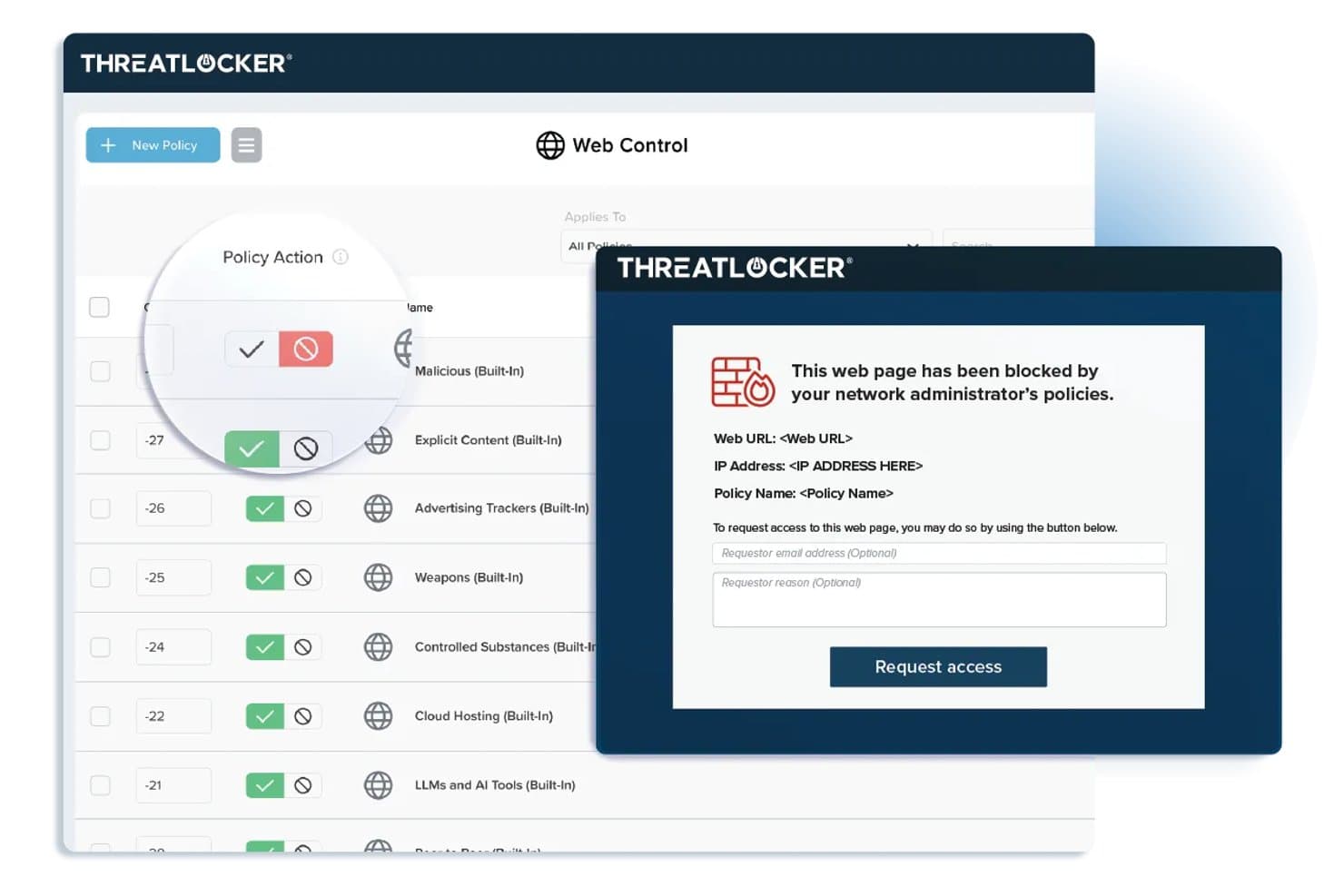
ThreatLocker offre politiche di Web Control che bloccano i siti web riservati e visualizzano una pagina di blocco personalizzabile con un modulo di richiesta di accesso per gli utenti finali. ThreatLocker è una piattaforma di sicurezza zero trust per il controllo dell'accesso alla rete che combina la whitelist delle applicazioni, la gestione dei dispositivi, la segmentazione della rete e la risposta alle minacce in tempo reale da un'unica console unificata.
Per chi è meglio ThreatLocker?
Organizzazioni con politiche zero trust rigorose che desiderano un controllo granulare sulle applicazioni e sull'accesso ai dispositivi in ambienti IT basati su Windows.
Perché ho scelto ThreatLocker
Ho scelto ThreatLocker tra i migliori perché posso configurare rapidamente controlli di accesso a livello di applicazione e bloccare gli eseguibili non autorizzati sugli endpoint. Mi piace sapere che ho supporto esperto di cybersecurity 24/7 quando applico politiche zero trust rigorose.
Caratteristiche principali di ThreatLocker
- Ringfencing: Isola le applicazioni per prevenire movimenti laterali attraverso la rete.
- Controllo di rete: Restringe il traffico in entrata e in uscita in base a configurazioni precise di gruppi e policy.
- Controllo dello storage: Gestisce l'accesso a dispositivi USB e di archiviazione esterna con regole personalizzabili.
- Workflow di approvazione amministrativa: Permette agli amministratori di richiedere un'approvazione esplicita prima di eseguire applicazioni nuove o sconosciute.
Integrazioni ThreatLocker
ThreatLocker offre integrazioni native con Microsoft Active Directory e Azure, provider SSO che supportano SAML, e fornisce un'API per integrazioni personalizzate.
Pros and Cons
Pros:
- Supporto esperto per la risposta alle minacce 24/7
- Whitelist e strumenti di ringfencing per applicazioni granulari
- Policy di controllo in tempo reale per dispositivi e storage
Cons:
- Manca di opzioni per la scoperta agentless dei dispositivi
- Non pensato per il provisioning IoT o BYOD
Learn more about ThreatLocker: Ideale per la gestione unificata degli accessi
- Prova gratuita di 30 giorni
- Prezzo su richiesta
Visit WebsiteCustomer Rating:4.4/5
Immagine 7: Software di controllo degli accessi di rete Portnox Portnox è una soluzione software per il controllo degli accessi che si concentra sulla fornitura di una visibilità e un controllo completi della rete. Questo strumento eccelle nell'offrire una gestione unificata degli accessi su diversi dispositivi e reti, rendendolo ideale per le organizzazioni che cercano controllo e sicurezza su un'unica piattaforma.
Perché ho scelto Portnox: Ho selezionato Portnox per questa lista per la sua attenzione alla gestione unificata degli accessi. L'elemento distintivo è la sua capacità di offrire una visibilità completa su tutti i dispositivi connessi, una caratteristica non così evidente in altri strumenti che ho considerato. Per quanto riguarda la gestione unificata degli accessi, credo che la forza di Portnox risieda nella sua capacità di offrire un controllo centralizzato su una rete eterogenea.
Funzionalità e integrazioni principali:
La funzionalità principale di Portnox è la sua capacità di fornire una visibilità completa della rete, consentendo alle organizzazioni di controllare l'accesso in tutti i punti di connessione. Lo strumento offre inoltre funzionalità come il controllo di accesso remoto, l'autenticazione basata sul rischio e il rilevamento delle anomalie di rete. In termini di integrazioni, Portnox può integrarsi con una varietà di sistemi aziendali, tra cui VPN, switch, controller wireless e soluzioni di gestione dei dispositivi mobili, consentendo un flusso di lavoro di sicurezza più snello.
Pros and Cons
Pros:
- Fornisce una visibilità completa della rete
- Offre un controllo centralizzato su diverse reti e dispositivi
- Si integra con una vasta gamma di sistemi aziendali
Cons:
- Le informazioni sui prezzi non sono facilmente disponibili
- Potrebbe risultare complesso per le piccole imprese
- La mancanza di trasparenza sui prezzi potrebbe essere un ostacolo per alcuni potenziali utenti
Learn more about Portnox: Ideale per implementazioni NAC gestite multi-tenant
- Download gratuito, non è necessaria una prova
- Gratuito, open-source (supporto a pagamento opzionale)
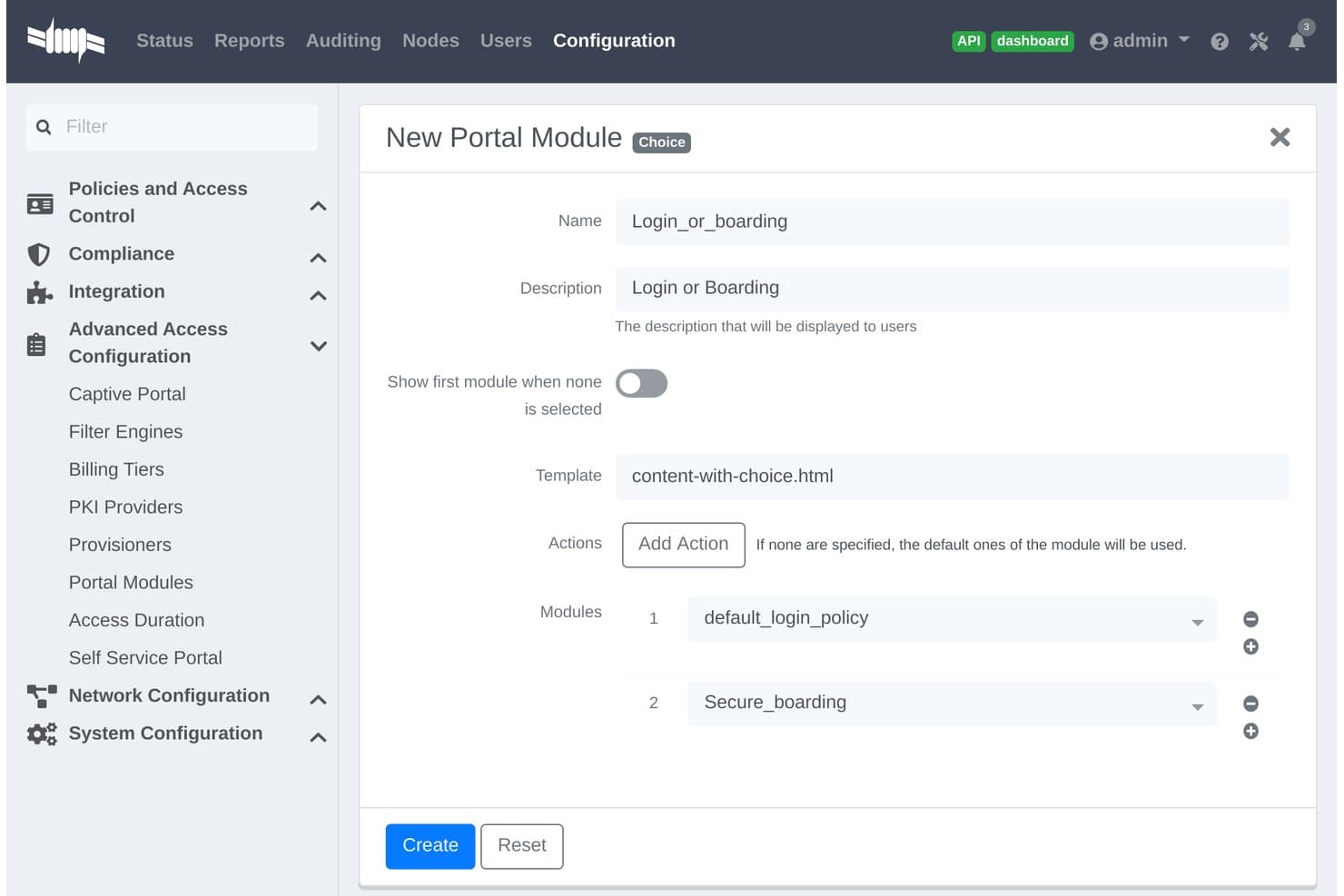
PacketFence offre una configurazione del Modulo Portale di Tipo Choice che consente agli amministratori di combinare login e moduli di registrazione in un unico flusso captive portal. PacketFence è una soluzione open-source per il controllo degli accessi di rete, progettata per organizzazioni che gestiscono ambienti eterogenei, offrendo rilevamento dei dispositivi senza agent, autenticazione, autorizzazione e segmentazione della rete basata su policy.
Per chi è più indicato PacketFence?
Grandi organizzazioni, fornitori di servizi e campus che necessitano di un controllo centralizzato in ambienti di rete complessi e multi-tenant.
Perché ho scelto PacketFence
Ho scelto PacketFence tra i migliori perché è progettato appositamente per implementazioni NAC gestite multi-tenant. Apprezzo il supporto per il rilevamento dei dispositivi senza agent in reti cablate, wireless e VPN e l’applicazione flessibile delle policy per contesti aziendali e accademici.
Funzionalità chiave di PacketFence
- Captive portal personalizzabile: Permette di creare flussi di autenticazione web e registrazione dispositivi con branding personalizzato.
- Integrazione avanzata con dispositivi di rete: Supporta fornitori di switch, soluzioni wireless e firewall come Cisco, Aruba e Juniper.
- Reportistica automatica di conformità: Esporta i log di accesso e gli eventi per semplificare attività di audit e investigazione.
- Estendibilità tramite API: Si integra con sistemi di terze parti per workflow automatizzati e integrazioni personalizzate.
Integrazioni PacketFence
PacketFence offre integrazioni nativamente con Cisco, Aruba, Juniper, HP, Ruckus, Extreme Networks, Microsoft Active Directory, LDAP, RADIUS, SAML e dispone di un’API per integrazioni personalizzate.
Pros and Cons
Pros:
- Supporta il rilevamento dei dispositivi di rete senza agent
- Controllo multi-tenant per fornitori di servizi gestiti
- Scalabile per ambienti di rete ampi e distribuiti
Cons:
- Richiede solide competenze Linux e di networking
- Interfaccia meno snella rispetto alle soluzioni NAC commerciali
Learn more about PacketFence: Ideale per la sicurezza delle reti IoT industriali
- Prova gratuita di 30 giorni + demo gratuita disponibile
- Prezzo su richiesta
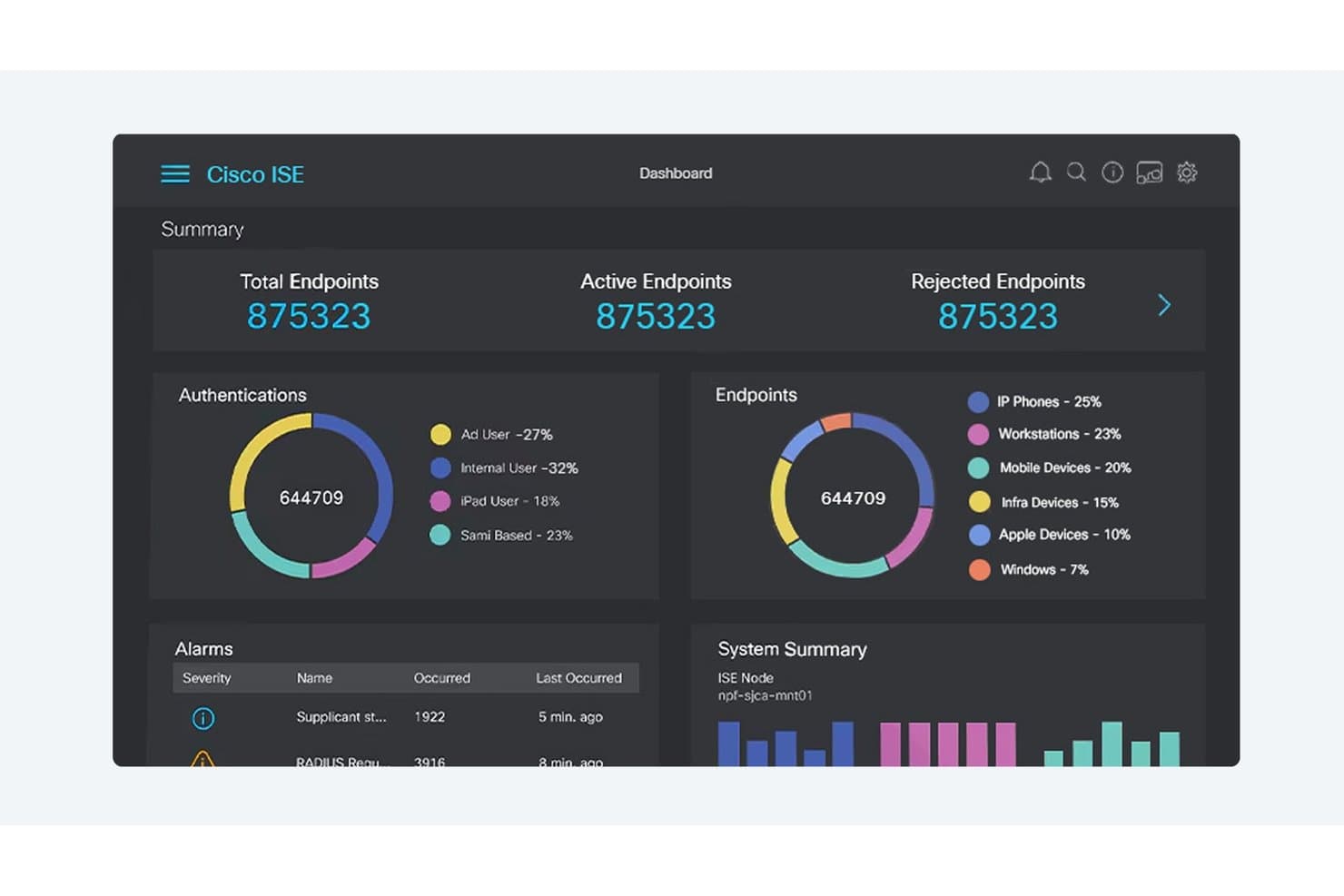
Cisco ISE offre una dashboard centralizzata di controllo dell'accesso alla rete che mostra l'autenticazione degli endpoint, la classificazione dei dispositivi, gli allarmi e lo stato di salute del sistema in tempo reale. Cisco è una piattaforma di controllo dell'accesso alla rete progettata specificamente per la sicurezza di ambienti industriali complessi, combinando rilevamento dei dispositivi, politiche di accesso dinamiche, segmentazione e funzionalità di conformità pensate per reti IoT e operative.
Per chi è più indicato Cisco?
I team di sicurezza delle reti industriali nei settori manifatturiero, energetico, dei servizi pubblici e delle infrastrutture critiche che necessitano di una visibilità unificata e di un controllo delle policy su ambienti IT e OT.
Perché ho scelto Cisco
Ho scelto Cisco come uno dei migliori perché il mio team può individuare, profilare e controllare ogni dispositivo IoT su grandi reti industriali. Le sue funzionalità di segmentazione e risposta alle minacce automatizzate ci aiutano ad affrontare le sfide uniche della sicurezza dell'IoT industriale.
Caratteristiche principali di Cisco
- Integrazione con sistemi SCADA: Si connette direttamente ai sistemi di controllo industriali per monitorare i dispositivi operativi in rete.
- Motore dinamico delle policy di accesso: Consente l'applicazione in tempo reale delle regole di accesso sulla base dell'identità e della postura del dispositivo.
- Report di conformità personalizzati: Genera report automatici mappati sui principali quadri normativi e sugli standard di settore.
- Supporto per reti multi-vendor: Applica policy di accesso e funzioni di rilevamento sia su apparecchiature di rete Cisco che di terze parti.
Integrazioni di Cisco
Cisco offre integrazioni native in tutto l'ecosistema Cisco, inclusi Cisco ISE, Cisco Cyber Vision, Cisco SecureX e Cisco DNA Center. Dispone di integrazioni native con Microsoft Azure e si integra con i firewall di Palo Alto Networks e Fortinet. È disponibile un'API per integrazioni personalizzate.
Pros and Cons
Pros:
- Visibilità approfondita sulle risorse di rete industriali
- Segmentazione automatizzata in tempo reale per ambienti OT
- Controlli delle policy altamente granulari basati sui ruoli
Cons:
- Configurazione iniziale impegnativa
- Gestione complessa per team di sicurezza più piccoli
Learn more about Cisco: Ideale per la mitigazione automatizzata dei rischi dei dispositivi IoT
- Demo su richiesta
- Preventivo personalizzato
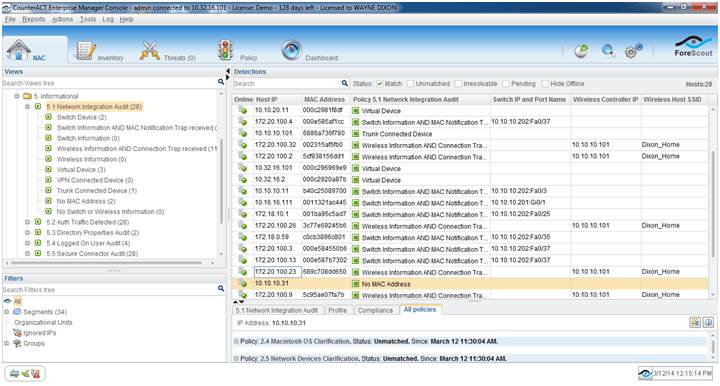
Immagine 1: Software di controllo dell'accesso alla rete Forescout Forescout è una piattaforma di controllo dell'accesso alla rete focalizzata su rilevamento automatico dei dispositivi, profilazione, applicazione delle policy e segmentazione della rete in tempo reale su endpoint gestiti, non gestiti, BYOD e IoT.
Per chi è ideale Forescout?
Per le grandi aziende nei settori regolamentati che necessitano di un controllo e di una visibilità granulari su diversi dispositivi collegati alla rete, inclusi endpoint IoT e OT.
Perché ho scelto Forescout
Ho scelto Forescout tra i migliori perché faccio affidamento sulla sua mitigazione automatica dei rischi dei dispositivi IoT, il rilevamento in tempo reale dei dispositivi e la profilazione senza agenti. Nella mia esperienza, identifica rapidamente i dispositivi non gestiti e mi consente di applicare policy granulari man mano che emergono minacce.
Funzionalità principali di Forescout
- Supporto autenticazione 802.1X: Utilizza diversi standard di autenticazione per validare i dispositivi su reti via cavo e wireless.
- Orchestrazione segmentazione di rete: Si integra con i principali switch e firewall per automatizzare l'assegnazione di VLAN e ACL.
- Valutazione continua dello stato del dispositivo: Monitora lo stato di conformità dei dispositivi durante tutta la sessione di rete, non solo al momento della connessione.
- Report di conformità completi: Fornisce log esportabili, storici di accesso e tracciabilità per audit normativi.
Integrazioni Forescout
Forescout offre integrazioni native con Cisco, Aruba, Palo Alto Networks, Fortinet, Splunk, ServiceNow, Okta, Microsoft Defender, CrowdStrike, IBM QRadar e AWS. Un'API è disponibile per integrazioni personalizzate.
Pros and Cons
Pros:
- Rilevamento dei dispositivi IoT senza agenti senza paragoni
- Automazione affidabile della segmentazione di rete
- Monitoraggio e risposta ai rischi in tempo reale
Cons:
- La configurazione degli appliance richiede un fermo della rete
- I workflow di policy avanzati richiedono un'ampia personalizzazione
Learn more about Forescout: Ideale per il provisioning automatizzato della rete per gli ospiti
- Demo su richiesta
- Preventivo personalizzato (in abbonamento o perpetuo)
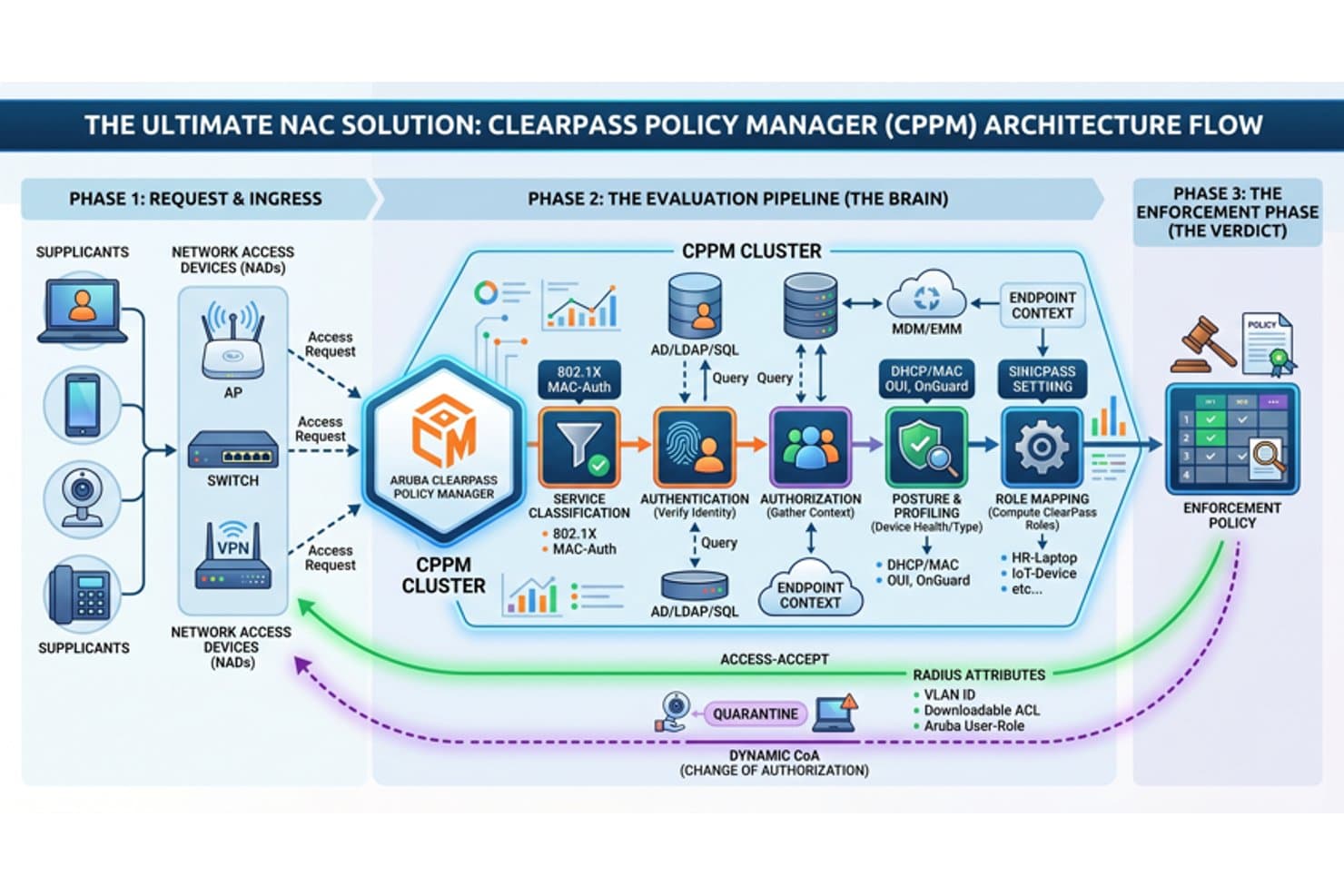
Aruba ClearPass offre un flusso architetturale NAC completo che copre le fasi di ingresso richiesta, pipeline di valutazione e applicazione delle policy di controllo accessi di rete. Aruba Clearpass è una piattaforma di controllo dell'accesso alla rete che offre identificazione automatizzata dei dispositivi, autenticazione basata sui ruoli, applicazione in tempo reale delle policy e integrazione con sistemi di identità, sicurezza e conformità.
Per chi è ideale Aruba Clearpass?
Progettato per i team IT e di sicurezza di medie e grandi imprese che gestiscono diversi tipi di dispositivi e accessi di ospiti in ambienti di rete complessi.
Perché ho scelto Aruba Clearpass
Ho scelto Aruba Clearpass tra i migliori perché posso automatizzare la registrazione sicura degli ospiti, applicare policy granulari ai dispositivi e gestire workflow personalizzati per visitatori e collaboratori in ambienti ampi e in continua evoluzione. Ideale per il provisioning automatizzato della rete per gli ospiti.
Caratteristiche principali di Aruba Clearpass
- Profilazione dei dispositivi in tempo reale: Identifica e classifica tutti gli endpoint, compresi dispositivi IoT e BYOD, senza un agente.
- Supporto autenticazione 802.1X: Abilita un'autenticazione sicura e basata su standard per connessioni cablate e wireless.
- Motore di policy basate sui ruoli: Assegna policy dinamicamente in base al ruolo dell'utente, tipo di dispositivo o stato del dispositivo.
- Integrazione con piattaforme di sicurezza: Si collega a strumenti SIEM, EDR e MDM per una risposta coordinata alle minacce e la conformità.
Integrazioni Aruba Clearpass
Aruba Clearpass offre integrazioni native con Active Directory, Azure AD, Okta, Jamf, MobileIron, ServiceNow, Palo Alto Networks, Cisco ISE, Splunk e Fortinet. È disponibile un'API per integrazioni personalizzate.
Pros and Cons
Pros:
- Il provisioning di rete per gli ospiti è altamente configurabile
- Fingerprinting in tempo reale di tutti gli endpoint
- Controlli granulari di accesso e policy basate sui ruoli
Cons:
- La configurazione iniziale è complessa per i piccoli team
- Le dashboard di reportistica richiedono un'impostazione manuale
Learn more about Aruba Clearpass: Ideale per flussi di lavoro di risposta automatizzata agli eventi di sicurezza
- Demo su richiesta
- Preventivo personalizzato
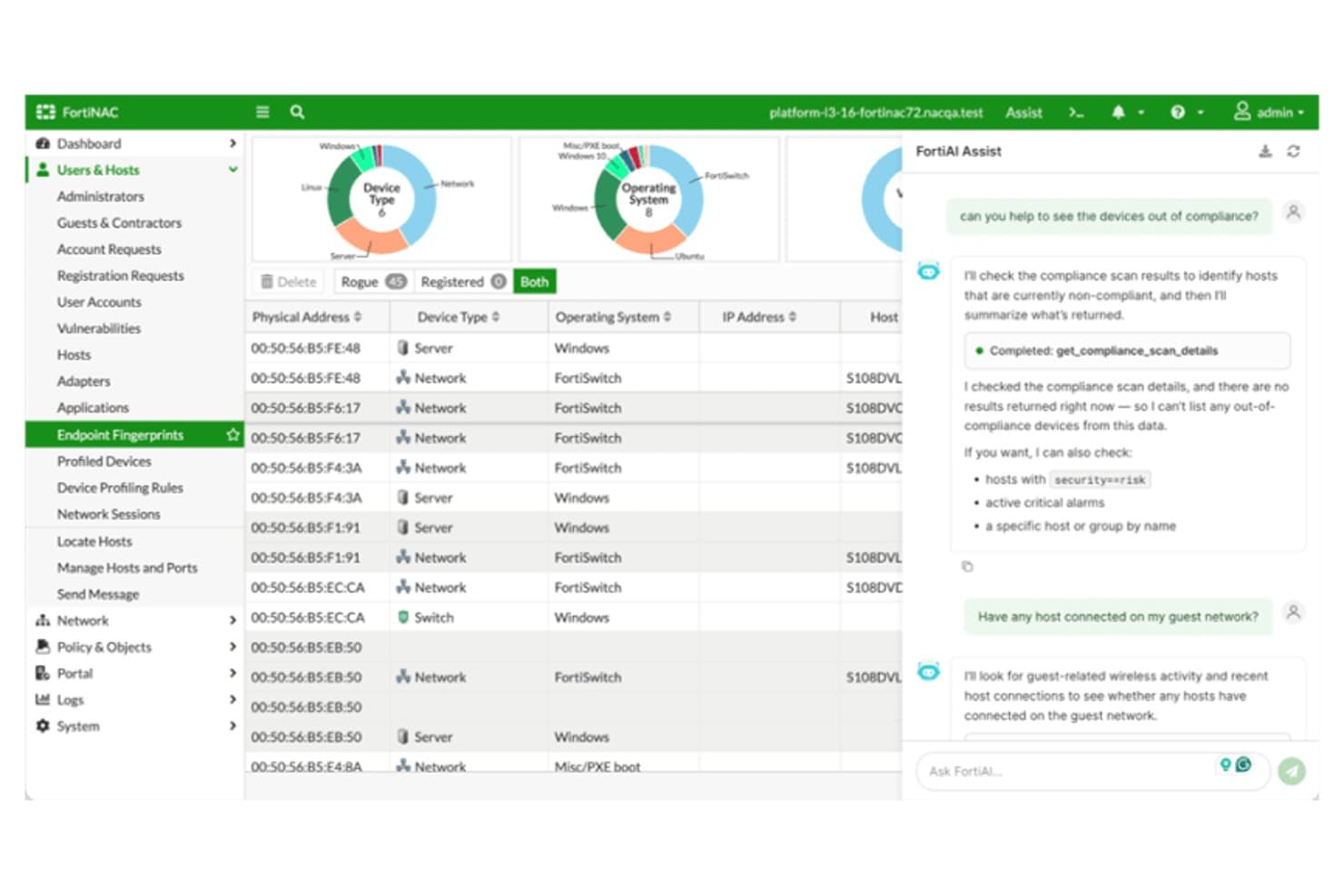
Fortinet FortiNAC offre un'interfaccia assistita da IA con scansione della conformità dei dispositivi, gestione degli host e visibilità della rete in tempo reale tramite impronte degli endpoint. Fortinet FortiNAC è una piattaforma di controllo dell'accesso alla rete progettata per organizzazioni che necessitano di una scoperta avanzata dei dispositivi, enforcement dinamico delle policy, valutazione continua degli endpoint e integrazione con ambienti multi-vendor.
Per chi è più adatto Fortinet FortiNAC?
Team di sicurezza e IT di grandi imprese o organizzazioni regolamentate che gestiscono reti complesse multi-vendor con tipologie di dispositivi diversificate.
Perché ho scelto Fortinet FortiNAC
Ho scelto Fortinet FortiNAC perché faccio affidamento sui suoi flussi di lavoro di risposta automatizzata per mettere immediatamente in quarantena i dispositivi rischiosi e applicare cambiamenti alle policy di rete. Utilizzo il rilevamento in tempo reale per avviare risposte a eventi di sicurezza senza intervento manuale.
Caratteristiche principali di Fortinet FortiNAC
- Motore di profilazione dei dispositivi: Identifica e classifica tutti i dispositivi, inclusi IoT e OT, al momento della connessione alla rete.
- Autenticazione multi-metodo: Supporta i flussi di lavoro di accesso con 802.1X, autenticazione MAC, captive portal e certificati.
- Segmentazione dinamica: Assegna i dispositivi alle VLAN o zone di rete appropriate in base alla postura e all'identità in tempo reale.
- Dashboard di reportistica sulla conformità: Genera log dettagliati e report personalizzabili a supporto di audit e indagini regolamentari.
Integrazioni di Fortinet FortiNAC
Fortinet FortiNAC offre integrazioni native con prodotti Fortinet Security Fabric come FortiGate, FortiAnalyzer e FortiSIEM, oltre che con hardware di rete Cisco, Aruba, HPE, Extreme Networks, Meraki, Arista e Ruckus. È disponibile un'API per integrazioni personalizzate.
Pros and Cons
Pros:
- Profilazione avanzata dei dispositivi per IoT e OT
- Policy di segmentazione della rete dinamiche
- Risposte automatizzate agli eventi di sicurezza
Cons:
- L'interfaccia e i flussi di lavoro richiedono un ampio addestramento
- Alcuni utenti segnalano un supporto tecnico lento
Learn more about Fortinet FortiNAC: Ideale per la prevenzione multilivello delle minacce tramite file
- Prova gratuita / demo su richiesta
- Basato su licenza, annuale o pluriennale
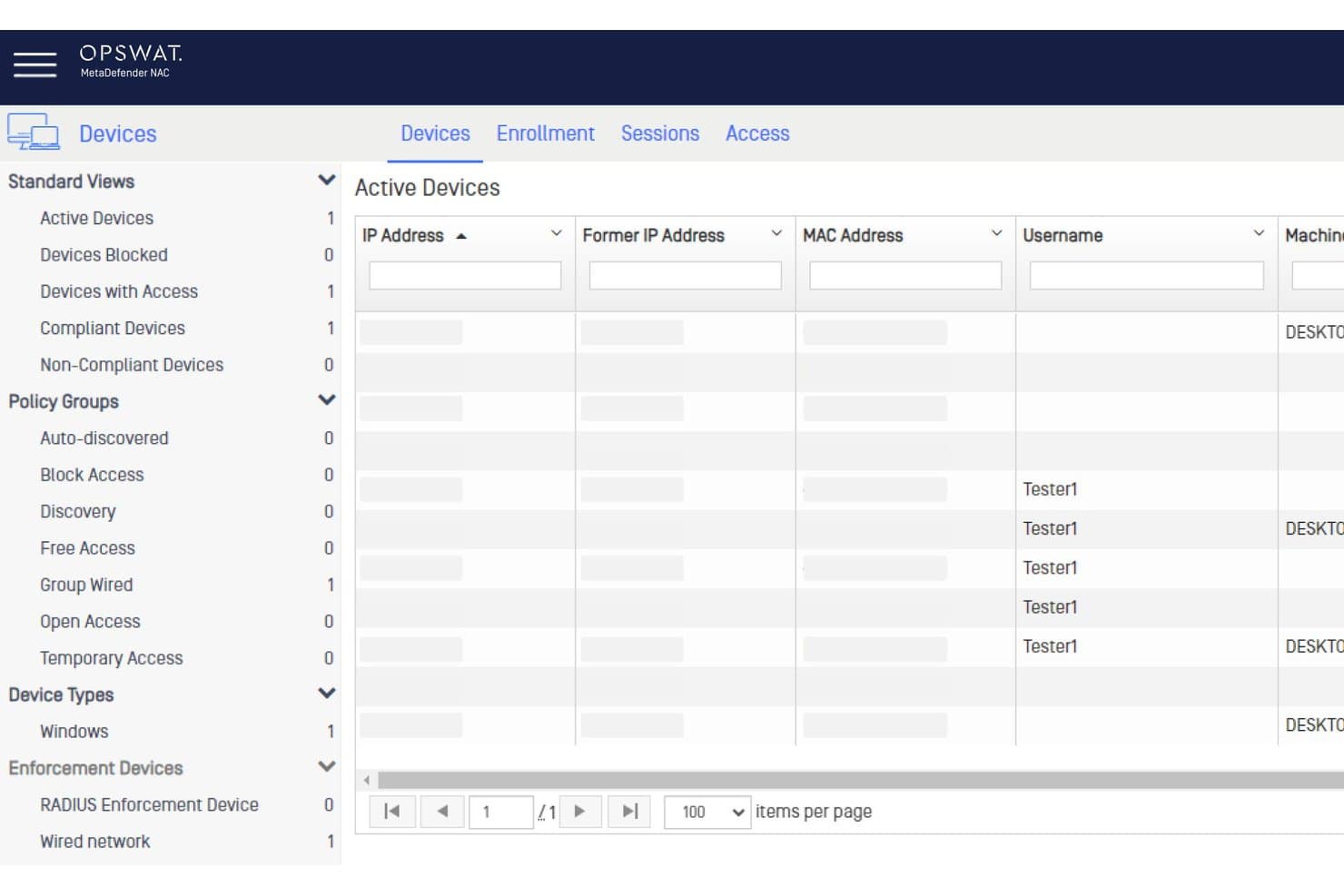
OPSWAT MetaDefender NAC offre una dashboard Dispositivi Attivi che mostra stato dei dispositivi, gruppi di policy e sessioni utente per il controllo dell'accesso alla rete. OPSWAT MetaDefender è una piattaforma di sicurezza che offre ispezione avanzata dei contenuti, scansione dei file e valutazione approfondita della postura degli endpoint per le organizzazioni che desiderano aggiornare le proprie difese di controllo dell'accesso alla rete.
Per Chi è Meglio OPSWAT MetaDefender?
Team di sicurezza presso aziende regolamentate e operatori di infrastrutture che gestiscono trasferimenti di file complessi e accesso di dispositivi di terze parti.
Perché Ho Scelto OPSWAT MetaDefender
Ho scelto OPSWAT MetaDefender perché mi affido alla sua prevenzione multilivello delle minacce derivanti dai file per controllare i rischi generati dai file ai confini della rete. Utilizzo la disattivazione approfondita dei contenuti, la scansione multi-motore e l'analisi delle vulnerabilità per fermare le minacce prima che i file raggiungano gli endpoint.
Funzionalità Chiave di OPSWAT MetaDefender
- Verifica della postura degli endpoint: Valuta i dispositivi per versione del sistema operativo, patch di sicurezza e presenza di antivirus conforme.
- Integrazione SIEM: Invia intelligence sulle minacce e dati sugli incidenti direttamente ai sistemi di gestione delle informazioni e degli eventi di sicurezza.
- Controlli di accesso basati su policy: Applica regole di accesso alla rete centrate sul dispositivo in base al punteggio di rischio e allo stato di conformità.
- Scansione dei dispositivi senza agente: Ispeziona dispositivi non gestiti e BYOD senza richiedere l'installazione di software.
Integrazioni di OPSWAT MetaDefender
OPSWAT MetaDefender offre integrazioni native con Cisco ISE, Forescout, Palo Alto Networks, ServiceNow e Splunk, e fornisce un'API per integrazioni personalizzate.
Pros and Cons
Pros:
- Scansione multilivello con oltre 30 motori antivirus
- Disattivazione avanzata dei contenuti per upload di file
- Controlli in tempo reale del rischio dell'endpoint e della conformità
Cons:
- Non è un NAC dedicato alla scoperta dei dispositivi
- Implementazione complessa per team IT più piccoli
Learn more about OPSWAT MetaDefender:
Altri software di controllo degli accessi alla rete
Di seguito è riportato un elenco di software aggiuntivi per il controllo degli accessi alla rete che ho selezionato, ma che non sono rientrati tra i primi 10. Vale sicuramente la pena dare un’occhiata anche a questi.
- 11Cloudflare OneIl migliore con cifratura quantum-safe su tutto lo stack
- 12NACVIEWIdeale per la sorveglianza della rete in tempo reale
- 13TwingateIdeale per la sicurezza della forza lavoro remota
- 14SilverfortIl migliore per la protezione in tempo reale di tutte le identità
- 15Auconet BICSIl migliore per la scalabilità illimitata nelle grandi imprese
Recensioni di altri software di controllo degli accessi alla rete
- Strumenti di sicurezza cloud
- Software di protezione degli endpoint
- Software di risposta agli incidenti
Come valuto i software di Network Access Control
Valuto questi strumenti su due livelli: i requisiti fondamentali che una piattaforma NAC deve coprire—come l’applicazione degli standard 802.1X e la verifica dello stato degli endpoint—e i fattori che distinguono i diversi fornitori.
Funzionalità di base (Requisiti fondamentali per questa lista)
Quando seleziono gli strumenti per la mia lista, assegno a ciascuno un punteggio da 0 (non offre la funzionalità) a 5 (eccelle in questo ambito) per ogni funzionalità chiave elencata di seguito. Successivamente, converto il punteggio totale dello strumento in percentuale. Ogni soluzione deve raggiungere un punteggio minimo totale del 65% per essere considerata per l’inclusione.
- Scoperta e profilazione dei dispositivi: Verifico se la piattaforma può rilevare e classificare automaticamente endpoint gestiti, laptop BYOD, sensori IoT e dispositivi non gestiti su segmenti cablati e wireless.
- Autenticazione e autorizzazione: Ogni strumento dovrebbe supportare diversi metodi come 802.1X, il bypass di autenticazione tramite MAC e portali captive, insieme a un accesso basato su ruoli collegato ai servizi di directory.
- Applicazione delle politiche e segmentazione: Analizzo come lo strumento assegna VLAN, applica ACL o orchestra la microsegmentazione sulla base dell’identità e del contesto del dispositivo per isolare in modo dinamico il traffico.
- Valutazione dello stato degli endpoint: La piattaforma dovrebbe valutare la salute del dispositivo—livelli di patch, stato dell’antivirus, cifratura del disco—prima e durante la sessione, non solo alla prima connessione.
- Risposta automatizzata alle minacce: Valuto se lo strumento può mettere in quarantena o limitare in tempo reale un dispositivo compromesso, ad esempio spostando l’endpoint in questione su una VLAN di correzione senza intervento manuale.
- Reportistica di conformità e auditing: Log dettagliati degli accessi e report audit-ready sono fondamentali, soprattutto per i team che si preparano per le valutazioni PCI-DSS, HIPAA o NIST dove è richiesta la prova dei controlli di accesso.
Una volta che ho una lista di strumenti che soddisfano questi criteri, considero cosa distingue ogni piattaforma dalle altre.
Fattori differenzianti (Cosa distingue i fornitori)
Ecco come confronto e metto a paragone i diversi fornitori:
Caratteristiche distintive
Il supporto multi-vendor per la rete è un importante elemento di differenziazione—verifico se la piattaforma è compatibile con dispositivi Cisco, Aruba, Juniper e Fortinet senza imporre uno stack monomarca. L’intelligenza nei confronti dei dispositivi IoT e OT è anche un fattore che separa rapidamente gli strumenti. Ambienti con dispositivi medici o controller di automazione edilizia necessitano una caratterizzazione specializzata che va ben oltre la profilazione standard. Politiche adattive basate sul rischio completano questo quadro, permettendo che l’accesso sia regolato dinamicamente in base a una valutazione della minaccia in tempo reale anziché solo su regole statiche.
Oltre alle funzionalità
Le integrazioni nell’ecosistema sono molto importanti. Verifico se la piattaforma NAC si connette con i SIEM, EDR e provider di identità esistenti così da inserirsi nello stack di sicurezza invece di essere un elemento a sé stante. Un altro fattore chiave è la struttura di licenza—alcuni fornitori addebitano per dispositivo, altri per utente simultaneo, e costi nascosti per moduli aggiuntivi come accesso ospiti o verifica della postura possono far lievitare rapidamente i costi. Valuto inoltre la flessibilità di implementazione, poiché i team che gestiscono ambienti ibridi necessitano di opzioni diverse da un singolo appliance on-premises.
Domande frequenti
Quali sono i vantaggi dell'utilizzo di software per il controllo degli accessi alla rete?
I vantaggi dell’utilizzo di software per il controllo degli accessi alla rete sono numerosi, tra cui:
- Maggiore sicurezza: il software NAC migliora la sicurezza assicurando che solo i dispositivi autorizzati accedano alla rete. Verifica gli utenti e i dispositivi prima di concedere l’accesso alla rete, riducendo il rischio di minacce informatiche.
- Applicazione delle policy: con questi strumenti, le organizzazioni possono applicare policy a diversi dispositivi e applicazioni, rafforzando ulteriormente la sicurezza della rete.
- Visibilità e controllo: il software NAC offre una panoramica completa di tutti i dispositivi connessi e delle loro attività, consentendo il monitoraggio e il controllo in tempo reale.
- Risposte automatizzate: il software può automatizzare le risposte alle potenziali minacce, ad esempio isolando i sistemi interessati o bloccando determinati dispositivi, favorendo un’azione rapida durante gli incidenti di sicurezza.
- Conformità normativa: gli strumenti NAC aiutano le organizzazioni a soddisfare determinati requisiti di conformità normativa relativi alla sicurezza dei dati e della rete.
Quanto costano in genere gli strumenti per il controllo degli accessi alla rete?
Il costo degli strumenti per il controllo degli accessi alla rete può variare notevolmente in base alle funzionalità specifiche, alle dimensioni dell’organizzazione e al numero di utenti o dispositivi da gestire. I modelli di prezzo si basano solitamente su licenze per utente o per dispositivo; alcuni fornitori offrono piani a livelli con funzionalità progressivamente più avanzate.
Qual è la fascia di prezzo tipica dei software per il controllo degli accessi alla rete?
Il software per il controllo degli accessi alla rete può avere un costo che va da circa $5 per utente al mese a diverse centinaia di dollari per utente al mese per le soluzioni aziendali più complesse.
Quali sono i software per il controllo degli accessi alla rete più economici e più costosi?
Il software NAC più conveniente della nostra selezione è LiteManager, con piani a partire da $10 al mese. All’estremità superiore della scala, le soluzioni di Cisco possono raggiungere diverse centinaia di dollari per utente al mese, grazie alle loro solide funzionalità e alle complete capacità di livello aziendale.
Esistono opzioni gratuite per il software di controllo degli accessi alla rete?
Sì, alcuni strumenti come PacketFence offrono una versione gratuita e a codice sorgente aperto del proprio software per il controllo degli accessi alla rete. Tuttavia, queste versioni gratuite spesso non includono le funzionalità avanzate e il supporto disponibili nelle soluzioni a pagamento e potrebbero non essere adatte a reti grandi o complesse.