

Guida alle 10 migliori piattaforme di gestione del cloud del 2026

10 Elenco delle migliori piattaforme di gestione cloud


La gestione dei sistemi cloud può diventare complessa con la crescita delle aziende e l’utilizzo simultaneo di diversi servizi online. Le piattaforme di gestione cloud semplificano questo processo riunendo tutto in un unico luogo. Aiutano i team a organizzare, monitorare e gestire più agevolmente le attività cloud, mantenendo i dati al sicuro, i sistemi efficienti e la spesa sotto controllo.
Questi strumenti semplificano le attività quotidiane, forniscono informazioni utili sulle prestazioni e aiutano le aziende a evitare gli sprechi. Con la piattaforma giusta, il tuo team può concentrarsi su ciò che conta di più, gestendo le operazioni in modo efficiente e sicuro.
Perché fidarsi dei nostri consigli sui software
Il nostro team testa e recensisce software dal 2012. In quanto leader tecnologici noi stessi, sappiamo quanto sia difficile — e importante — scegliere il software giusto.
Per questa guida, abbiamo valutato gli strumenti attraverso test praticie ricerche indipendenti, assegnando un punteggio agli strumenti in base ai nostri criteri di selezione.
Le nostre recensioni riflettono il nostro giudizio editoriale umano, non un discorso di vendita.
Riepilogo delle migliori piattaforme di gestione cloud
| Tool | Best For | Trial Info | Price | ||
|---|---|---|---|---|---|
| 1 | Migliore provider di gestione cloud per il controllo degli accessi utente | Demo gratuita disponibile | Da $9.99/mese | Website | |
| 2 | Miglior provider di gestione cloud open-source | Piano gratuito disponibile | Gratuito | Website | |
| 3 | Ideale per lavorare con diversi tipi di risorse | Piano gratuito disponibile | Gratuito | Website | |
| 4 | Ideale per il monitoraggio e la reportistica multi-cloud | Prova gratuita di 14 giorni | Prezzo su richiesta | Website | |
| 5 | Ideale per lo sviluppo di applicazioni basate su container | Prova gratuita di 60 giorni | Da $83.33/mese (fatturazione annuale, esclude costi dell'infrastruttura AWS) | Website | |
| 6 | Ideale per automatizzare la gestione del cloud | Piano gratuito disponibile | Da $49/mese | Website | |
| 7 | Ideale per la gestione di cloud ibridi | Demo gratuita disponibile | Prezzo su richiesta | Website | |
| 8 | Migliori funzionalità self-service per la gestione del cloud | Piano gratuito disponibile | Da $708,33/mese (fatturazione annuale) | Website | |
| 9 | Ideale per macchine virtuali (VM) | Prova gratuita di 7 giorni | Prezzo su richiesta | Website | |
| 10 | Ideale per il FinOps multi-cloud | Demo gratuita disponibile | A partire da $49/mese | Website |
Recensioni delle migliori piattaforme di gestione cloud
Nelle sezioni successive analizzerò le mie piattaforme di gestione cloud preferite, inclusi vantaggi e svantaggi, informazioni sui prezzi e criteri utilizzati per le mie selezioni.
Migliore provider di gestione cloud per il controllo degli accessi utente
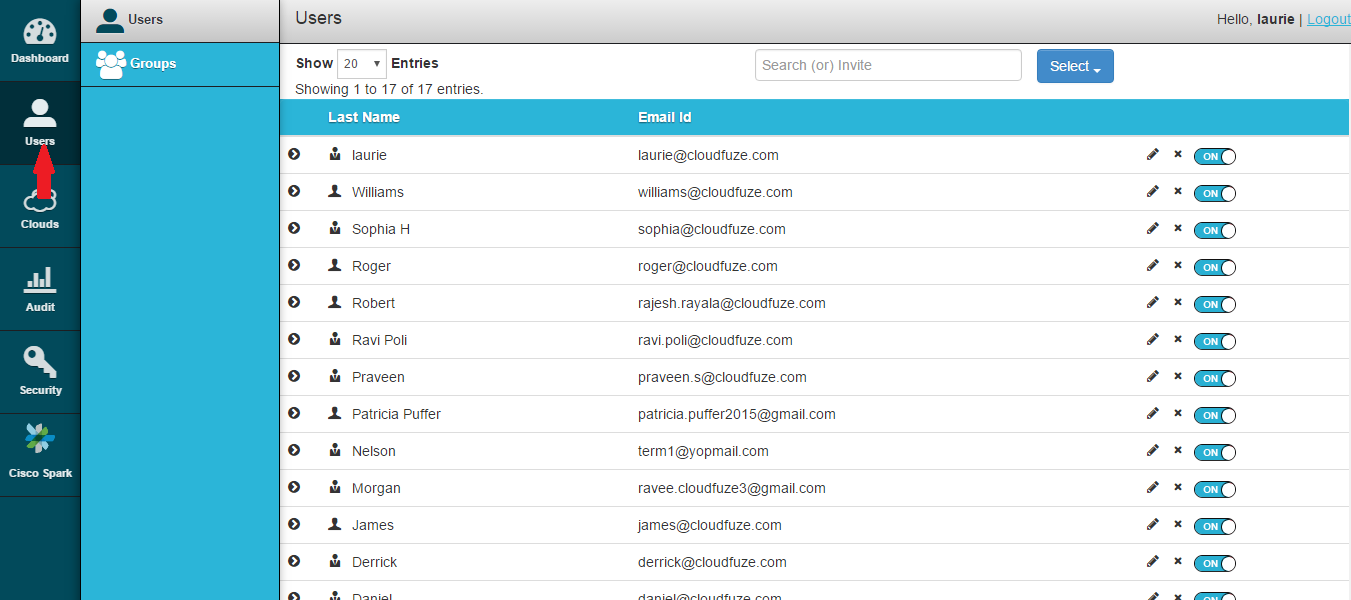
L'obiettivo principale di CloudFuze con il suo prodotto principale sembra essere la migrazione tra cloud, ma durante il tempo passato utilizzandolo ho scoperto che gestisce molto bene anche l'accesso degli utenti.
Perché ho scelto CloudFuze:
Ho trovato le funzionalità di sicurezza dei file cloud di CloudFuze piuttosto complete per la gestione degli accessi utente, con un'intera pagina dedicata a questa funzione. Puoi aggiungere e cancellare account utente, oltre a modificarne lo stato, promuovendoli o retrocedendoli da amministratore. Se hai numerosi utenti da monitorare, puoi raggrupparli in team che gestisci con azioni in blocco.
Funzionalità e integrazioni uniche di CloudFuze
Funzionalità che mi hanno spinto a raccomandare CloudFuze per la gestione degli accessi utente includono le chiavi API e l'accesso protetto al cloud, che permettono di controllare chi può accedere al tuo cloud da piattaforme esterne. È presente anche una funzione di audit che mostra come vengono utilizzati i file condivisi, con informazioni su accessi e download.
Integrazioni preconfigurate per le principali piattaforme cloud così come per Slack, Microsoft Teams, Defender e Sharepoint.
Pros and Cons
Pros:
- Migrazioni semplici
- Controllo completo degli accessi utente
- Solide funzionalità di sicurezza dei file
Cons:
- Solo web, nessuna app
- La prova gratuita spesso non è disponibile a favore di una demo
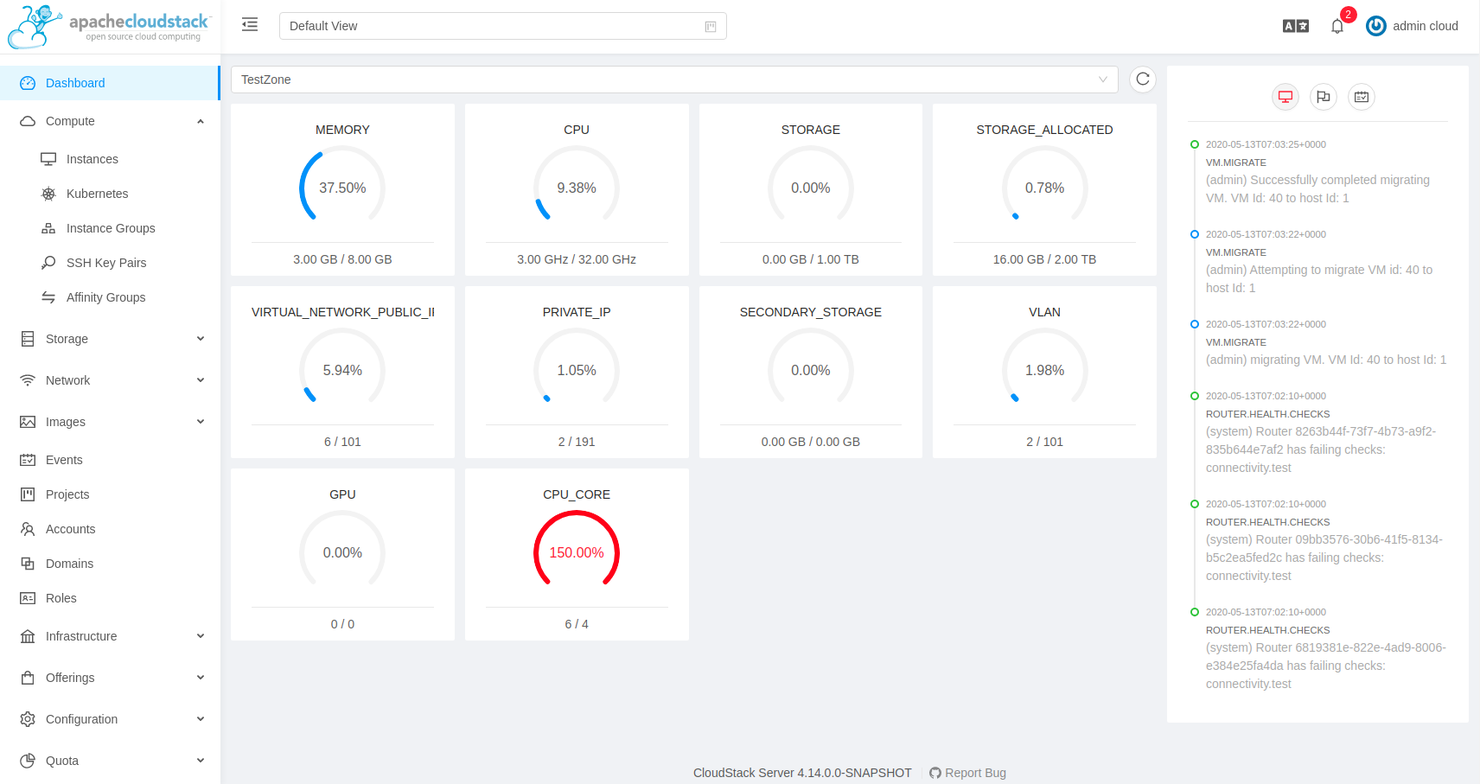
CloudStack è una piattaforma CMP (Cloud Management Platform) Infrastructure-as-a-Service (IaaS) gratuita e open-source di Apache, pensata per l’utilizzo sia in ambienti on-premise che ibridi.
Perché ho scelto Apache CloudStack:
Come ho già menzionato, CloudStack è un prodotto Apache, il che significa che è completamente open-source e supportato da una vivace comunità di sviluppatori. Questo lo rende un’opzione ideale per implementazioni in cui è necessario aggiungere funzionalità che non si trovano altrove, senza però dover costruire tutto da zero.
Funzionalità eccezionali e integrazioni di Apache CloudStack
Le funzionalità di CloudStack che apprezzo particolarmente per lavorare su software open-source includono una API potente e ampiamente documentata, che permette di estendere la funzionalità del prodotto con integrazioni personalizzate. CloudStack consente inoltre di lavorare con le API di AWS S3 ed EC2.
È anche indipendente dall’hypervisor, quindi può essere eseguito su KVM, VMware, Citrix XenProject e XenServer, BareMetal tramite IPMI, vSphere tramite vCenter e LXC.
Le integrazioni sono disponibili attraverso una API che si può utilizzare per costruire soluzioni personalizzate e collegare servizi di terze parti.
Pros and Cons
Pros:
- Open source
- Documentazione solida
- Completamente gratuito
Cons:
- Nessun supporto clienti dedicato; è necessario affidarsi alla community
- Più soggetto a bug rispetto ad altre soluzioni


Azure Storage Explorer è uno dei numerosi prodotti offerti da Microsoft nella sua suite di strumenti di cloud computing. Viene utilizzato per gestire diversi ambienti cloud sia sulla piattaforma Azure che al di fuori di essa.
Perché ho scelto Azure Storage Explorer:
Ho scelto Storage Explorer perché supporta un elenco completo di tipi di risorse. Se vuoi utilizzare il tuo account Azure, puoi connetterti a code, container di blob e directory e container di Azure Data Lake Storage Gen2. Se utilizzi un URL di firma di accesso condiviso (SAS), puoi connetterti a tutte e quattro le risorse precedentemente menzionate, oltre a tabelle e condivisioni file.
Funzionalità e integrazioni principali di Azure Storage Explorer
Funzionalità che ho apprezzato in Storage Explorer includono la presenza di emulatori locali come Azurite, che ti permette di creare un ambiente in cui testare applicazioni di storage per tabelle, code e blob sia on-premise che offline. È inoltre estendibile, grazie alle estensioni per servizi come Azure Data Factory per connettersi a servizi di terze parti come Google Cloud e AWS S3 per le migrazioni.
Le integrazioni sono preinstallate per i principali provider cloud e native per altri servizi Azure come Azurite, Data Factory, App Configuration e Active Directory (AD).
Pros and Cons
Pros:
- Supporta diversi tipi di risorse e oggetti
- Forti funzionalità di sicurezza
- Facile da usare dopo l'implementazione
Cons:
- Analisi limitate
- Prestazioni lente

Ideale per il monitoraggio e la reportistica multi-cloud
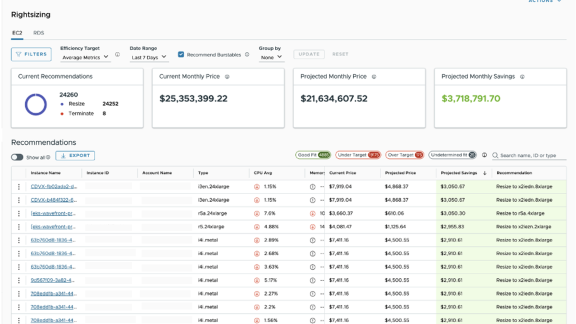
La prima volta che ho sentito parlare di CloudHealth è stato nel 2018, quando VMware annunciò di aver acquisito l'azienda di gestione multi-cloud per una cifra stimata di 500 milioni di dollari, quindi dovevano sicuramente fare qualcosa di giusto. Nel 2022, VMware lo ha rinominato in VMware Aria Cost powered by CloudHealth, ed è questa la versione che ho testato per questo articolo.
Perché ho scelto VMware Aria Cost:
Ho scelto VMware Aria Cost per l'ampio supporto alla maggior parte dei principali provider cloud, tra cui Google Cloud, Azure, Alibaba Cloud, AWS, Oracle Cloud e la stessa VMware. Su tutte queste piattaforme è possibile utilizzarlo per generare approfondimenti dettagliati sui propri fornitori di servizi cloud in aree che vanno dal FinOps alla sicurezza.
Funzionalità principali e integrazioni di VMware Aria Cost
Le funzionalità che ho apprezzato in VMware Aria Cost per il monitoraggio e la reportistica multi-cloud includono il rapporto storico multi-cloud, che fornisce informazioni sulle tendenze storiche e sull'attività all'interno dei propri ambienti cloud. La funzione FlexReports consente di generare analisi approfondite da diverse aree dei propri ambienti cloud per ottenere informazioni specifiche riguardo ad aspetti come asset e costi.
Le integrazioni sono disponibili nativamente con VMware e altre offerte Aria, tra cui Operation, Hub e Automation. Sono inoltre disponibili integrazioni già pronte per Azure, Google Cloud, AWS, Alert Logic, Logicworks, Ansible, Bulletproof, Shi, New Relic e Docker.
Pros and Cons
Pros:
- Supporta i principali provider di servizi cloud
- Facile da implementare
- Potenti funzionalità di monitoraggio e analisi
Cons:
- Documentazione limitata
- Prestazioni deboli su dispositivi mobili e tablet

Ideale per lo sviluppo di applicazioni basate su container
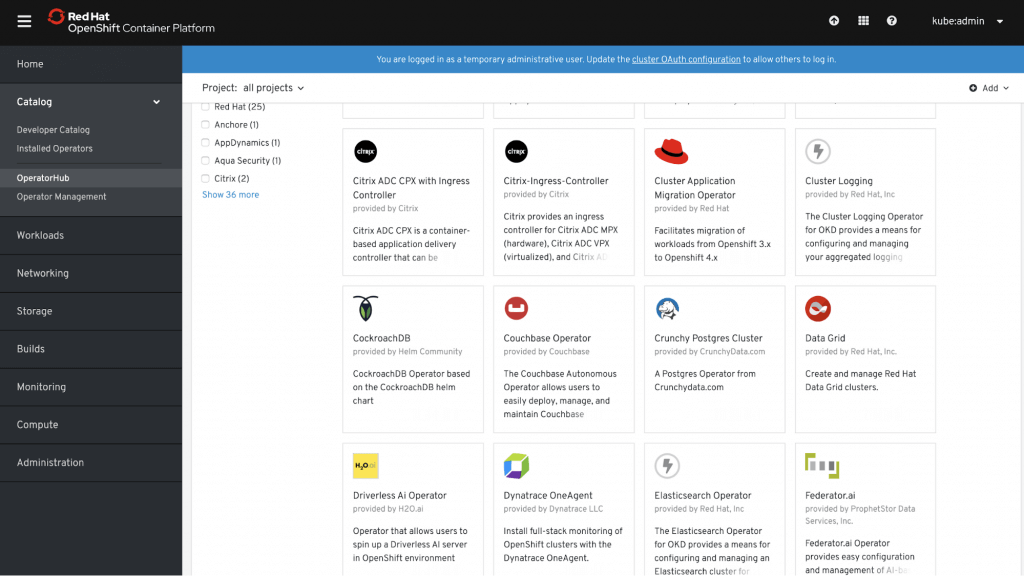
OpenShift Container Platform è offerto da Red Hat, uno dei maggiori contributori a vari progetti che supportano lo sviluppo basato su container, tra cui Kubernetes, Docker e Linux.
Perché ho scelto OpenShift Container Platform:
Quando ho lavorato con OpenShift Container Platform, ho scoperto che fornisce l'accesso al framework source-to-image (S2I) che consente di creare immagini container utilizzando il codice sorgente della propria applicazione. Supporta alcuni dei linguaggi e framework più popolari utilizzati nello sviluppo di app, tra cui Python, Node.js, Java, PHP, .NET, Go, Ruby e Perl.
Funzionalità e integrazioni distintive di OpenShift Container Platform
Le funzionalità che mi hanno portato a raccomandare OpenShift Container Platform per gli sviluppatori includono la pipeline CI/CD integrata che permette uno sviluppo rapido su periodi prolungati. Utilizza anche Prometheus, uno strumento che fornisce capacità di monitoraggio e metriche per applicazioni e cluster, così puoi assicurarti che tutto ciò su cui stai lavorando rimanga sano durante l'intero processo.
Le integrazioni sono disponibili nativamente con altri prodotti Red Hat come OpenShift Platform, Ansible ed Enterprise Linux. È inoltre presente una REST API che permette di creare integrazioni personalizzate se necessario.
Pros and Cons
Pros:
- Framework source-to-image integrato per la containerizzazione
- Opzioni di personalizzazione flessibili
- Documentazione approfondita
Cons:
- Opzioni di distribuzione limitate
- Curva di apprendimento ripida

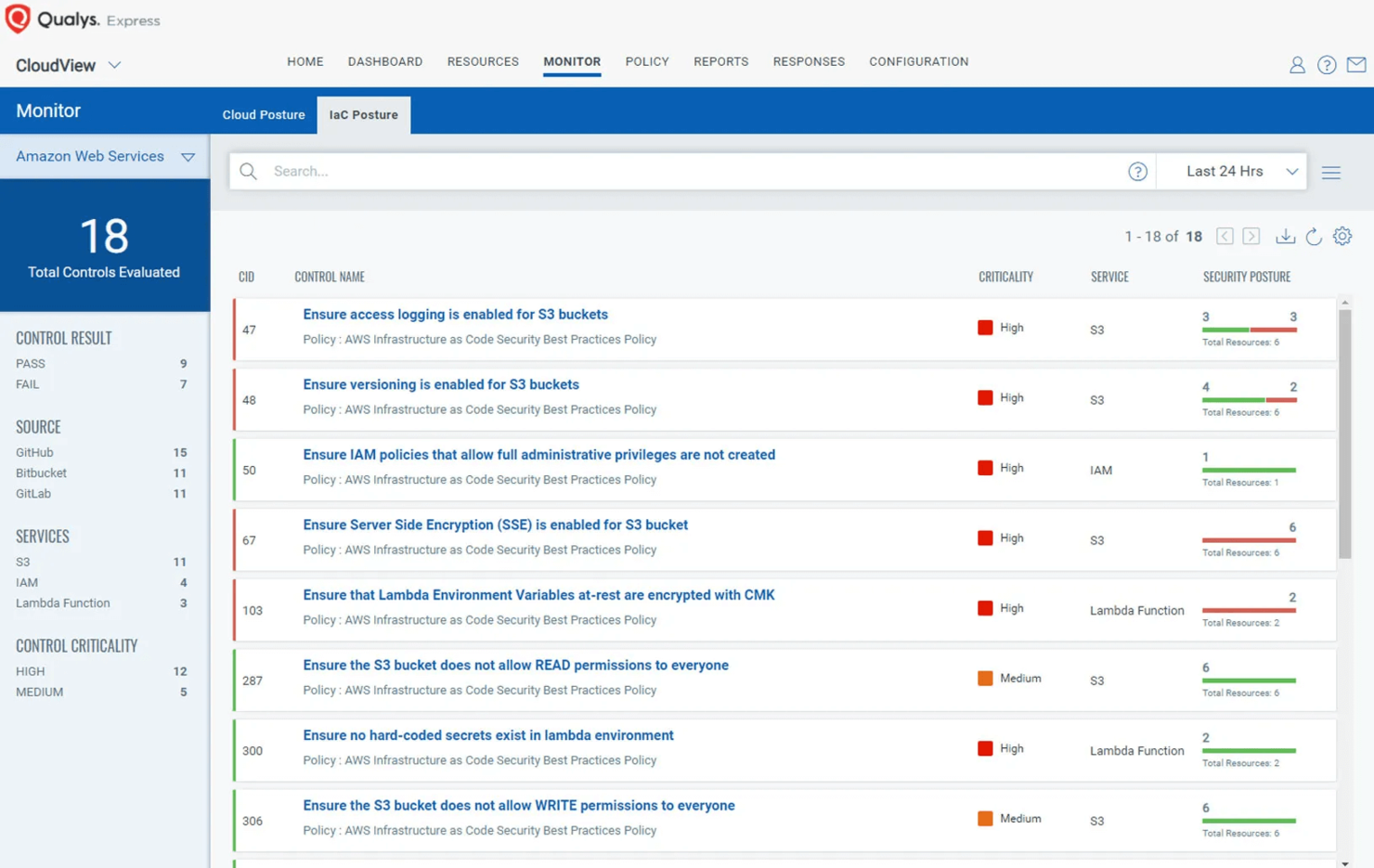
TotalCloud è una piattaforma di gestione cloud (CMP) di Qualys, un'azienda che si occupa anche di altre soluzioni correlate al cloud per sicurezza e conformità.
Perché ho scelto TotalCloud:
TotalCloud include Qualys Flow, che ho utilizzato durante i miei test per automatizzare diverse funzioni e, secondo me, ha funzionato molto bene. Ad esempio, l'ho usato per orchestrare attività legate alla sicurezza e ha gestito tutto autonomamente, dallo scan del mio ambiente per vulnerabilità fino alla risoluzione dei problemi.
Caratteristiche distintive e integrazioni di TotalCloud
Caratteristiche che mi hanno colpito mentre esaminavo TotalCloud includono le protezioni di sicurezza integrate, in linea con il resto delle soluzioni Qualys, molte delle quali possono essere lasciate in esecuzione automatica.
Ad esempio, FlexScan offre scansioni di sicurezza senza agenti, ma ti consente anche di eseguire scansioni di rete e basate su agenti se desideri report più dettagliati. TruRisk sfrutta un approccio alla sicurezza basato sul rischio per i tuoi ambienti cloud, proteggendoti da minacce quali malware e ransomware.
Le integrazioni sono preconfigurate per i principali provider cloud e disponibili nativamente con altri prodotti Qualys come InstaProtect, FlexScan, Flow e TruRisk.
Pros and Cons
Pros:
- Piano gratuito disponibile
- Potenti funzionalità di automazione
- Utili integrazioni native per la sicurezza
Cons:
- Personalizzazione limitata
- Costoso integrare altri servizi Qualys


Il team che ha creato Morpheus Data era alla ricerca di una soluzione che si adattasse alla loro pipeline DevOps in una fabbrica di applicazioni, e ha deciso di realizzarne una propria quando non ne hanno trovata una adeguata.
Perché ho scelto Morpheus Data:
Ho scelto Morpheus Data per il suo supporto all'orchestrazione open-container. Se abbinato alle sue funzionalità standard di gestione del cloud, diventa uno strumento unificato utile per chiunque desideri gestire configurazioni ibride.
Funzionalità e integrazioni distintive di Morpheus Data
Le funzionalità di Morpheus Data che hanno attirato la mia attenzione includono la configurazione no-code per Kubernetes e cloud privati, che rende facile anche alle persone non tecniche avviare le proprie implementazioni. Può inoltre integrare strumenti come bilanciatori di carico, DNS e reti, per trasformare hypervisor come KVM, Nutanix e VMware in cloud privati con piena multi-tenancy.
Le integrazioni sono predefinite per Microsoft DNS, Github, Docker, Chef, Ansible, Puppet, Remedy, Jenkins, PowerDNS e ServiceNow, oltre che per le principali piattaforme cloud.
Pros and Cons
Pros:
- Diverse integrazioni predefinite per terze parti
- Consente di costruire un vero cloud privato
- Eccellente funzionalità one-click
Cons:
- Nessun piano gratuito
- Assistenza clienti debole
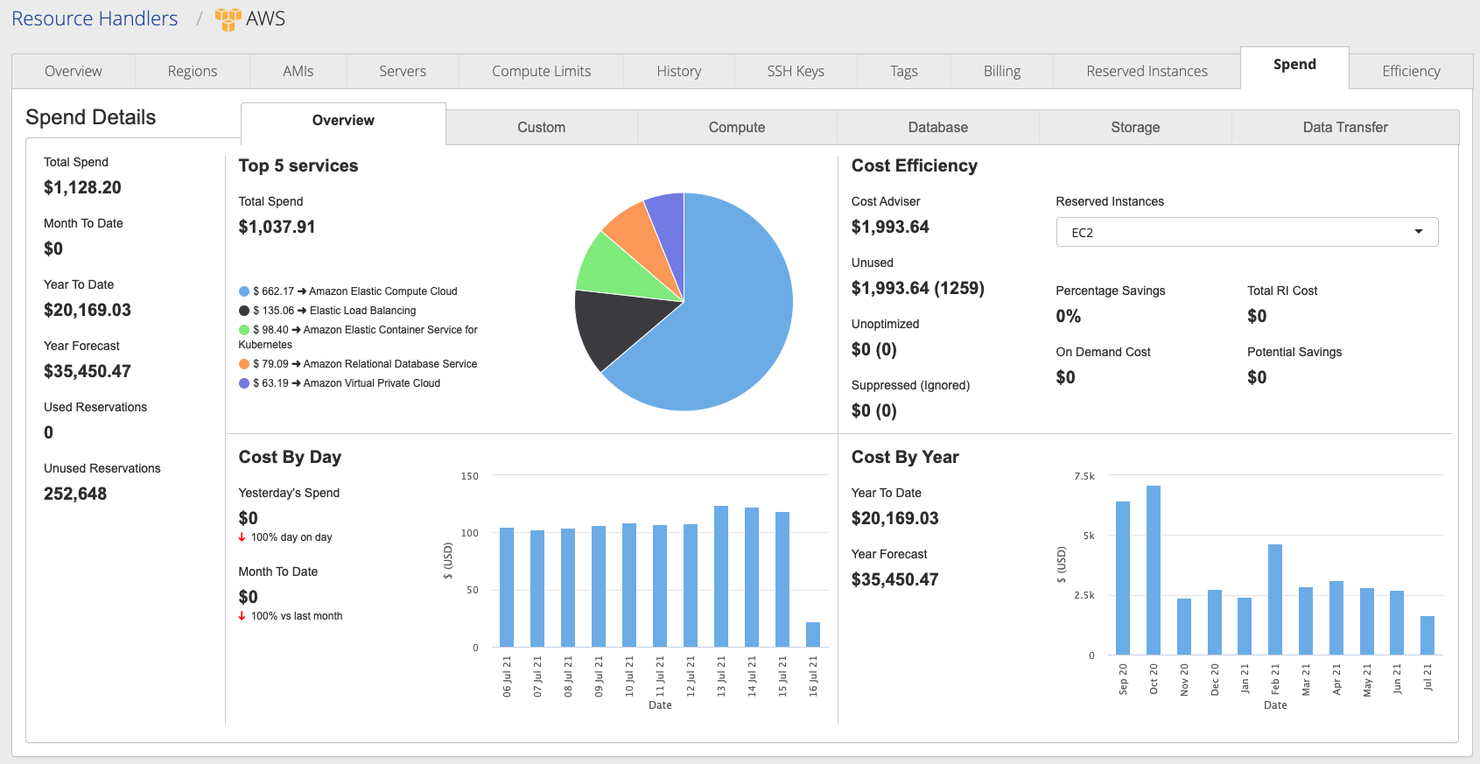
CloudBolt è una piattaforma di gestione multi e hybrid cloud che supporta diverse opzioni di distribuzione, inclusi i container.
Perché ho scelto CloudBolt:
CloudBolt mi ha conquistato con le sue funzionalità self-service che mi permettono di ordinare risorse come storage, calcolo e stack applicativi, rendendoli disponibili quasi immediatamente. Per la maggior parte del tempo che ho trascorso utilizzandolo, non mi sono preoccupato dello shadow IT, ovvero quando i dipendenti utilizzano hardware o software non approvati dal reparto IT, perché non ho mai dovuto aspettare troppo a lungo per avviare i processi.
Funzionalità e integrazioni principali di CloudBolt
Funzionalità che mi sono piaciute nel self-service di CloudBolt comprendono quello che loro chiamano blueprints, che consentono ai team DevOps di configurare e fornire risorse in pochi minuti su qualsiasi distribuzione. Sono inoltre disponibili dei cataloghi degli ambienti che rendono più facile la gestione delle risorse, dagli approvvigionamenti ai ruoli utente.
Integrazioni preconfigurate sono disponibili per i principali provider cloud, oltre a Veeam, ServiceNow, Puppet, Ansible, Chef, SolarWinds, Datadog, SAML, Spunk e New Relic.
Pros and Cons
Pros:
- Opzioni di distribuzione flessibili
- Robuste funzionalità self-service
- Diverse integrazioni preconfigurate
Cons:
- Registrazione delle attività essenziale
- Supporto più debole sui livelli inferiori

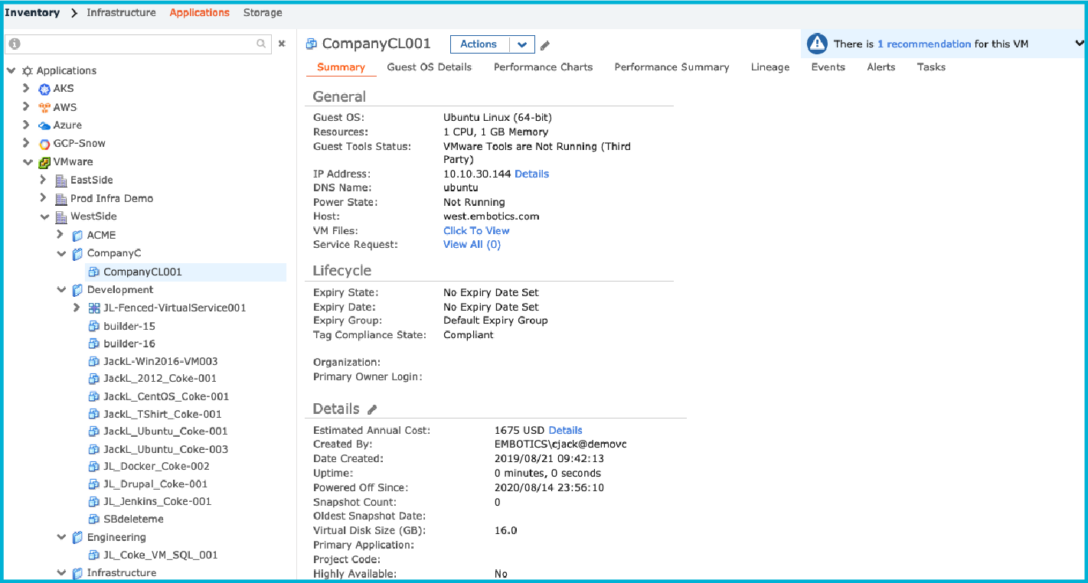
Snow Commander è una piattaforma di gestione cloud di Snow Software che si concentra principalmente sui cloud ibridi e mette l'automazione al centro dell'attenzione.
Perché ho scelto Snow Commander:
Ho scelto Snow Commander per la sua funzionalità di gestione automatizzata dei servizi, che permette di impostare finestre temporali dopo le quali le risorse vengono dismesse. Questo rende semplice la gestione delle macchine virtuali come quelle che avevo creato con VMware durante i miei test. Ricevi notifiche e hai l'opzione di posticipare questa operazione, così puoi mantenere le risorse disponibili per tutto il tempo necessario senza preoccuparti della proliferazione incontrollata.
Caratteristiche salienti e integrazioni di Snow Commander
Le funzionalità che hanno reso semplice la gestione dei miei ambienti con Snow Commander includono un portale self-service dove puoi richiedere nuove macchine virtuali da un catalogo di servizi o modifiche alle istanze esistenti, rendendo più semplice l'operatività di questi ambienti. Fornisce inoltre reportistica e analisi, e ho trovato particolarmente utili le informazioni sulla proliferazione e crescita delle macchine virtuali per mantenere sotto controllo i miei ambienti.
Le integrazioni sono preconfigurate per i principali provider cloud e anche per ServiceNow, Ansible, Jenkins, BMC Helix, Topdesk, Puppet, Chef, Saltstack, Cherwell e Slack.
Pros and Cons
Pros:
- Varie integrazioni
- Gestione automatizzata del ciclo di vita
- Catalogo dei servizi personalizzabile
Cons:
- I costi possono accumularsi
- Assistenza clienti lenta


CoreStack è una piattaforma di governance multi-cloud che supporta i principali provider come Azure, Google Cloud, Oracle Cloud e AWS.
Perché ho scelto CoreStack:
Ho scelto CoreStack per i suoi report di valutazione della maturità FinOps, che ho trovato molto dettagliati riguardo alle mie spese. Ha effettuato previsioni per dirmi se le mie attuali abitudini di spesa erano sostenibili con il mio budget e ha persino fornito suggerimenti per risparmiare sui costi e ottimizzare le risorse.
Funzionalità principali e integrazioni di CoreStack
Le funzionalità che rendono CoreStack ottimo per FinOps, secondo me, includono il monitoraggio in tempo reale delle deviazioni della spesa con avvisi che ti aiutano a tornare in linea. Ricevi anche notifiche non appena vengono distribuiti nuovi servizi, così sai esattamente cosa sta utilizzando le risorse nei tuoi ambienti, facilitando la gestione dei costi.
Le integrazioni sono preconfigurate per i principali provider cloud, oltre che per Nagios, Zabbix, Nessus, Chef e ServiceNow. Sono inoltre disponibili diverse API che permettono di collegarsi ad altri strumenti.
Pros and Cons
Pros:
- Supporta il FinOps su larga scala
- Potenti funzionalità di governance multi-cloud
- Conforme a diverse normative e standard
Cons:
- Linguaggio dei report talvolta poco chiaro
- Interfaccia grafica un po' datata
Altre piattaforme di gestione cloud
Di seguito è riportato un elenco di altre piattaforme di gestione cloud che non sono rientrate tra le 10 migliori, ma che restano ottimi prodotti.
- Concierto Cloud
Ideale per la migrazione in cloud
- AWS Storage Gateway
Ideale per soluzioni di storage multiple
- NinjaOne
Ideale per la gestione automatizzata degli endpoint


Recensioni correlate sui software cloud
- Fornitori di servizi cloud
- Strumenti di sicurezza cloud
- Piattaforme cloud come servizio
- Strumenti di archiviazione cloud
- Piattaforme di sviluppo cloud
Come valuto le piattaforme di gestione del cloud
Scompongo la mia valutazione in requisiti di base—come la visibilità unificata su multi-cloud e la governance dei costi—e in elementi differenzianti che separano una piattaforma davvero capace da un semplice cruscotto di fatturazione.
Funzionalità di base (Requisiti indispensabili per questa lista)
Quando seleziono gli strumenti per la mia lista, valuto ciascuno di essi su una scala da 0 (non offre la funzionalità) a 5 (eccelle in quest'area) per ogni funzionalità di base elencata di seguito. Successivamente, calcolo il punteggio totale dello strumento in percentuale. Ogni strumento deve ottenere un punteggio totale minimo del 75% per essere preso in considerazione per l'inclusione.
- Supporto Multi-Cloud: Verifico se una piattaforma può gestire risorse su AWS, Azure e GCP da un'unica console—e se è inclusa la copertura di cloud ibridi o privati.
- Gestione e Ottimizzazione dei Costi: Ogni strumento dovrebbe evidenziare la suddivisione delle spese, inviare avvisi di budget e fornire raccomandazioni per il dimensionamento corretto, così i team possono tracciare gli sprechi su vari account.
- Provisioning e Automazione: Valuto come una piattaforma gestisce il ciclo di vita delle risorse—se supporta strumenti IaC come Terraform, offre modelli predefiniti o abilita flussi di lavoro self-service.
- Governance ed Esecuzione delle Policy: Le piattaforme affidabili consentono di impostare regole, applicare standard di tagging e svolgere audit di conformità su centinaia di account cloud contemporaneamente.
- Monitoraggio e Inventario delle Risorse: Cerco cruscotti unificati che mappano le risorse distribuite, tracciano metriche di utilizzo e offrono visibilità in tempo reale senza passare tra i fornitori.
- Sicurezza e Controlli di Conformità: Per ogni strumento qui valuto la rilevazione di configurazioni errate, il punteggio di postura di sicurezza e l'allineamento a framework come SOC 2 o ISO 27001.
Dopo aver individuato gli strumenti che soddisfano questi criteri, considero ciò che distingue ogni piattaforma.
Fattori differenzianti (Cosa distingue i fornitori)
Ecco come confronto e metto a confronto i diversi fornitori:
Funzionalità di rilievo
Le raccomandazioni guidate dall'intelligenza artificiale rappresentano un grande elemento distintivo—cerco piattaforme che vadano oltre ai report statici e segnalino attivamente le opportunità di dimensionamento ottimale o prevedano anomalie di spesa prima che si riflettano in fattura. Un portale self-service è importante quando i team di piattaforma devono permettere agli sviluppatori di fornire risorse pre-approvate senza aprire ticket. Valuto anche la gestione di Kubernetes e dei container, dato che i team che eseguono microservizi su più cloud hanno bisogno di visibilità a livello di cluster integrata nella stessa console.
Oltre le funzionalità
Il modello di prezzo è importante—alcune piattaforme addebitano per ogni risorsa, altre prendono una percentuale della spesa cloud gestita, e questa differenza può moltiplicarsi rapidamente su larga scala. Valuto anche la profondità delle integrazioni, in particolare con strumenti ITSM come ServiceNow e pipeline CI/CD, poiché una piattaforma di gestione del cloud che resta fuori dai flussi di lavoro operativi genera più attriti che benefici. Le certificazioni di conformità sono un altro fattore che considero, soprattutto se un fornitore supporta la reportistica pronta per gli audit, allineata ai framework già adottati dalla tua organizzazione.
Come scegliere una piattaforma di gestione cloud
È facile perdersi in lunghi elenchi di funzionalità e strutture tariffarie complesse. Per aiutarti a mantenere la concentrazione mentre analizzi il tuo specifico processo di selezione del software, ecco una lista di controllo dei fattori da tenere presenti:
| Fattore | Cosa considerare |
|---|---|
| Scalabilità | La piattaforma supporta la tua crescita? Considera i futuri aumenti del carico di lavoro e il modo in cui lo strumento li gestisce senza costi aggiuntivi o cali delle prestazioni. |
| Integrazioni | Verifica se la piattaforma si connette agli strumenti che già utilizzi. Le integrazioni mancanti potrebbero richiedere lavoro manuale o aggiungere complessità. |
| Personalizzazione | Puoi adattare la piattaforma ai tuoi flussi di lavoro? Cerca impostazioni modificabili e modelli definiti dall’utente. |
| Semplicità d’uso | L’interfaccia è intuitiva? Una curva di apprendimento ripida potrebbe rallentare il tuo team. Cerca opinioni degli utenti sulla facilità d’uso. |
| Implementazione e avvio | Quanto velocemente puoi iniziare? Valuta la disponibilità di risorse formative e di supporto durante la fase di transizione. |
| Costo | Confronta le strutture tariffarie. Fai attenzione ai costi nascosti e assicurati che la spesa sia in linea con il tuo budget e il ROI previsto. |
| Misure di sicurezza | Le funzionalità di sicurezza sono sufficientemente solide per le tue esigenze? Considera la crittografia, i controlli degli accessi e la conformità agli standard del settore. |
| Disponibilità del supporto | Quali canali di supporto sono disponibili? Verifica la presenza di assistenza 24 ore su 24, 7 giorni su 7, chat dal vivo e responsabili dedicati dell’account che possano intervenire quando si verificano problemi. |
Cosa sono le piattaforme di gestione cloud?
Le piattaforme di gestione del cloud sono strumenti che aiutano le aziende a gestire e ottimizzare le proprie risorse e i propri servizi cloud. I professionisti IT e gli amministratori del cloud utilizzano generalmente questi strumenti per migliorare l'efficienza operativa e ridurre i costi. Le funzionalità di automazione, monitoraggio e integrazione aiutano a gestire i carichi di lavoro, garantire la sicurezza e mantenere la conformità. Nel complesso, questi strumenti offrono alle aziende un maggiore controllo sui propri ambienti cloud.
Funzionalità
Quando selezioni le piattaforme di gestione del cloud, presta attenzione alle seguenti funzionalità chiave:
- Automazione: Automatizza le attività di routine per risparmiare tempo e ridurre gli errori umani, consentendo al tuo team di concentrarsi su iniziative più strategiche.
- Gestione dei costi: Fornisce informazioni sulla spesa per il cloud e aiuta a identificare le aree in cui puoi ridurre i costi e ottimizzare l'utilizzo delle risorse.
- Funzionalità di integrazione: Si connette perfettamente agli strumenti esistenti, come le piattaforme di protezione dei carichi di lavoro cloud, migliorando l'efficienza dei flussi di lavoro e riducendo il lavoro manuale.
- Misure di sicurezza: Garantisce la protezione dei dati tramite crittografia e controlli degli accessi, mantenendo la conformità agli standard del settore.
- Monitoraggio: Offre il monitoraggio in tempo reale delle risorse cloud per rilevare anomalie e mantenere le prestazioni.
- Personalizzazione: Consente di adattare la piattaforma alle proprie esigenze e ai propri flussi di lavoro specifici, offrendo flessibilità e adattabilità.
- Scalabilità: Supporta la crescita dell'azienda gestendo carichi di lavoro in aumento senza compromettere le prestazioni.
- Monitoraggio della conformità: Mantiene le operazioni allineate alle normative del settore, riducendo il rischio di non conformità.
- Interfaccia intuitiva: Offre un design intuitivo che semplifica la navigazione e riduce la curva di apprendimento per il tuo team.
- Analisi predittiva: Offre informazioni sulle tendenze future e sui potenziali problemi, aiutandoti a prendere decisioni informate.
Vantaggi
L'implementazione di piattaforme di gestione del cloud offre numerosi vantaggi al tuo team e alla tua azienda. Ecco alcuni dei vantaggi che puoi aspettarti:
- Risparmio sui costi: Ottimizzando l'utilizzo delle risorse e riducendo gli sprechi, queste piattaforme contribuiscono a diminuire le spese per il cloud.
- Maggiore efficienza: L'automazione delle attività di routine libera il tuo team, consentendogli di concentrarsi sui progetti strategici e migliorando la produttività.
- Sicurezza avanzata: Le funzionalità di sicurezza integrate proteggono i tuoi dati e garantiscono la conformità agli standard del settore.
- Migliore processo decisionale: Il monitoraggio in tempo reale e l'analisi predittiva forniscono informazioni che aiutano a prendere decisioni consapevoli.
- Scalabilità: Queste piattaforme sono in grado di gestire carichi di lavoro in crescita, sostenendo l'azienda durante la sua espansione.
- Flessibilità: La personalizzazione consente di adattare la piattaforma alle proprie esigenze e ai propri flussi di lavoro specifici.
- Maggiore conformità: Il monitoraggio della conformità garantisce che le operazioni rispettino le normative del settore, riducendo i rischi legali.
Costi e prezzi
La selezione delle piattaforme di gestione del cloud richiede la comprensione dei vari modelli e piani tariffari disponibili. I costi variano in base alle funzionalità, alle dimensioni del team, agli add-on e ad altri fattori. Per informazioni dettagliate sui prezzi, valuta la possibilità di consultare i confronti tra NinjaOne e ManageEngine. La tabella seguente riassume i piani più comuni, i relativi prezzi medi e le funzionalità tipicamente incluse nelle soluzioni di piattaforme di gestione del cloud:
Tabella comparativa dei piani per le piattaforme di gestione del cloud
| Tipo di piano | Prezzo medio | Funzionalità comuni |
|---|---|---|
| Piano gratuito | $0 | Monitoraggio di base, automazione limitata e supporto della comunità. |
| Piano personale | $5-$25/utente/mese | Monitoraggio avanzato, automazione di base e integrazioni limitate. |
| Piano aziendale | $30-$75/utente/mese | Automazione completa, reportistica completa e supporto prioritario. |
| Piano per grandi aziende | $100-$200/utente/mese | Integrazioni personalizzate, account manager dedicato e funzionalità di sicurezza avanzate. |
Domande frequenti sulle piattaforme di gestione del cloud
Ecco alcune risposte alle domande frequenti sulle piattaforme di gestione del cloud:
Una piattaforma può gestire diversi servizi cloud?
Sì. Molte piattaforme di gestione del cloud consentono di controllare diversi provider cloud, come AWS, Azure o Google Cloud, da un unico pannello di controllo. Questo aiuta i team a lavorare in modo più efficiente e a mantenere un controllo migliore sui propri sistemi.
In che modo queste piattaforme contribuiscono a migliorare la sicurezza?
Forniscono un controllo centralizzato e impostazioni di sicurezza coerenti in tutti gli ambienti connessi. Funzionalità come la gestione degli accessi degli utenti, il monitoraggio delle attività e gli avvisi contribuiscono a proteggere i dati e a ridurre i rischi.
Queste piattaforme sono adatte ai team piccoli o di medie dimensioni?
Sì. La maggior parte delle piattaforme è progettata per essere flessibile e facile da usare, risultando quindi adatta a team di qualsiasi dimensione. Aiutano a semplificare le operazioni quotidiane e a ridurre il lavoro manuale grazie all’automazione e all’organizzazione.
Cosa succede ora:
Se stai cercando informazioni sulle piattaforme di gestione del cloud, contatta gratuitamente un consulente SoftwareSelect per ricevere consigli.
Compili un modulo e fai una breve conversazione durante la quale vengono analizzate le tue esigenze specifiche. Dopodiché riceverai una selezione ristretta di software da valutare. Ti assisteranno inoltre durante l'intero processo di acquisto, comprese le negoziazioni sui prezzi.