
Meilleurs outils de gestion du backlog analysés pour 2026

Meilleurs outils de gestion du backlog : sélection
Après une évaluation approfondie, j’ai sélectionné à la main 12 des meilleurs outils de gestion du backlog pour résoudre vos problématiques de backlog.


Avec autant d’outils de gestion du backlog disponibles, il est difficile de savoir lequel vous convient. Vous savez que vos projets de développement produit deviennent complexes à gérer, mais vous devez déterminer quel outil vous aidera au mieux. Je m’occupe de vous ! Dans cet article, je vais vous faciliter la tâche en partageant mes expériences personnelles sur des dizaines d’outils différents utilisés avec de grandes équipes et projets, ainsi que mes recommandations des meilleurs outils de gestion du backlog.
Grâce à des fonctionnalités telles qu’une messagerie conviviale, des notifications rapides et même un forfait gratuit qui accepte un nombre illimité d’utilisateurs, la navigation dans les backlogs produit et les backlogs de sprint devient intuitive. Si vous faites partie d’une équipe agile cherchant à simplifier vos itérations, la gestion des droits et les métriques d’équipe, ces outils sont la solution.
Why Trust Our Software Reviews
Résumé des meilleurs outils de gestion du backlog
| Tool | Best For | Trial Info | Price | ||
|---|---|---|---|---|---|
| 1 | Best for all-in-one project management solutions | Free plan + free demo available | From $7/user/month (billed annually) | Website | |
| 2 | Best for product management and roadmap visualization | 15-day free trial available | From $20/user/month (billed annually) | Website | |
| 3 | Best for integrated documentation collaboration | Free plan available | From $5.42/user/month | Website | |
| 4 | Best for agile project management with visual boards | 30-day free trial | From $5/user/month | Website | |
| 5 | Best for simple, card-based task organization | 14-day free trial + free plan available | From $5/user/month (billed annually) | Website | |
| 6 | Best for open-source project management | Free-forever plan available | Free to use | Website | |
| 7 | Best for large-scale agile projects | Not available | Pricing upon request | Website | |
| 8 | Best for detailed software project management | 14-day free trial + free plan available | From $7.91/user/month | Website | |
| 9 | Best for software development teams and release planning | 14-day free trial | From $5/user/month | Website | |
| 10 | Best for infinite nested task lists | 30-day free trial + free plan available | From $7.65/member/month (billed annually) | Website |
-

Site24x7
Visit WebsiteThis is an aggregated rating for this tool including ratings from Crozdesk users and ratings from other sites.4.6 -
Docker
Visit WebsiteThis is an aggregated rating for this tool including ratings from Crozdesk users and ratings from other sites.4.6 -
Pulumi
Visit WebsiteThis is an aggregated rating for this tool including ratings from Crozdesk users and ratings from other sites.4.8





Tests des meilleurs outils de gestion du backlog


In the vast sphere of project management, ClickUp stands as a comprehensive tool, offering a suite of features for a diverse range of needs. It’s designed to encompass all aspects of project management, which supports its position as a preferred choice for teams seeking an all-in-one solution.
Why I Picked ClickUp:
Navigating through a myriad of project management tools, I settled on ClickUp primarily for its holistic approach. When comparing its breadth of features and adaptability to other platforms, ClickUp clearly differentiated itself. I am of the opinion that ClickUp is the best fit for teams who want an encompassing project management tool without juggling multiple platforms.
Standout features & integrations:
ClickUp excels with its custom views ranging from lists, and boards, to calendar displays. Its goal-tracking and mind-mapping capabilities further enhance the project planning process. Integrations are vast, with ClickUp connecting effortlessly to tools such as Slack, GitHub, and Google Drive.
Pros and Cons
Pros:
- Extensive integration options
- Customizable views for personalized management
- A comprehensive set of features for varied needs
Cons:
- Some advanced features behind paywalls
- The mobile app experience can be improved
- Might feel overwhelming for new users


Every effective product team requires a streamlined process to visualize and manage their roadmap. ProductBoard delivers on this, providing a platform where product management intertwines perfectly with visualization tools. Its prowess in displaying product management phases, along with roadmap visualization, sets it apart for those who like seeing the big picture.
Why I Picked ProductBoard:
While examining numerous platforms, I chose ProductBoard because it struck a balance between product management and roadmap clarity. Comparing its interface and capabilities to others, it stood out with its unique product-centered view. My judgment on ProductBoard is founded on its ability to make product management and roadmap visualization cohesive, thereby ensuring it's the best for product teams requiring this synergy.
Standout features & integrations:
ProductBoard excels with its feature prioritization tools, allowing teams to weigh and decide on the most impactful changes. Its portal for user feedback ensures products are continually aligned with customer needs. Integration-wise, it connects with tools like Jira, Trello, and Slack, making data flow easy and actionable.
Pros and Cons
Pros:
- Direct portal for gathering user feedback
- Effective feature prioritization tools
- Clear product roadmap visualization
Cons:
- Annual billing might deter some users
- Requires a learning curve for full utilization
- Might be overkill for very small teams


At the heart of every efficient team lies a robust documentation system. Confluence stands out as a dedicated platform for this, helping teams document, collaborate, and share work. Its primary strength lies in integrated documentation collaboration, making it an ideal choice for teams that prioritize structured and collaborative document management.
Why I Picked Confluence:
In the vast sea of collaborative tools, I selected Confluence because of its distinguished approach to documentation. After comparing and judging multiple platforms, Confluence emerged distinctively due to its emphasis on creating an integrated documentation environment. This central focus on documentation, backed by user reviews and its extensive features, firmly planted my opinion that it's genuinely the best for teams seeking a collaborative documentation hub.
Standout features & integrations:
Confluence champions in offering customizable templates, ensuring teams can maintain consistent documentation standards. The real-time editing feature is another highlight, allowing multiple team members to cohesively work on a document. Integration-wise, it synergizes well with Atlassian’s ecosystem, including Jira, Trello, and Bitbucket. Moreover, its extensive marketplace ensures teams have a plethora of plugins to customize their workspace.
Pros and Cons
Pros:
- A wide array of plugins in the marketplace
- Real-time editing facilitates simultaneous collaboration
- Customizable templates for standardized documentation
Cons:
- Cost becomes a consideration for very large teams
- Initial setup might require some learning
- Could be daunting for smaller teams or solo users

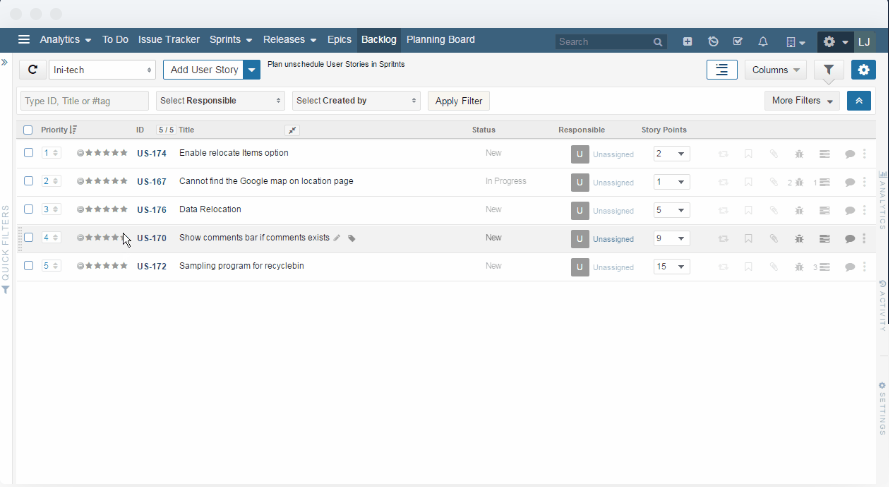
For teams steeped in agile methodologies, visual boards become an indispensable asset. Yodiz presents itself as a potent solution for agile project management using vivid, intuitive boards. With its emphasis on visual representations of agile processes, Yodiz resonates with teams that prefer a graphic touch to their workflows.
Why I Picked Yodiz:
Navigating the landscape of agile management tools, Yodiz caught my attention due to its pronounced visual capabilities. I determined that its visual boards are not only appealing but functionally superior, simplifying complex agile processes. This combination solidified my opinion that Yodiz is best for teams in pursuit of a visually charged agile management experience.
Standout features & integrations:
Yodiz offers a scalable scrum board, catering to teams of varying sizes and complexity. Its epic and release management features are commendable, offering a broad perspective on projects. As for integrations, Yodiz supports connections with popular platforms like Slack, GitHub, and Jenkins, enhancing its operational versatility.
Pros and Cons
Pros:
- A broad range of third-party integrations
- Comprehensive epic and release management
- Scalable and intuitive visual boards
Cons:
- Initial setup requires time and patience
- Customization has its limits
- The interface can feel dense at times


In the realm of task organization, simplicity often trumps complexity. Trello epitomizes this with its card-based system, allowing teams to manage tasks in a straightforward, drag-and-drop environment. Its commitment to simplicity, coupled with card-based organization, is why it's a favorite for those seeking a clutter-free task management experience.
Why I Picked Trello:
Through a process of selection and judgment, Trello emerged as a tool that masters the art of simplicity. In my comparisons, Trello’s card-based organization was unmatched in its ability to simplify complex workflows. I believe Trello is unequivocally the best for those who seek a straightforward, no-fuss task organization method.
Standout features & integrations:
Trello’s strength lies in its boards, lists, and cards, which offer a clear structure for task management. The Power-Ups feature, which lets teams integrate and automate their workflows, is a game-changer. On the integration front, Trello connects smoothly with tools like Dropbox, Google Drive, and Slack, enriching its ecosystem.
Pros and Cons
Pros:
- Numerous integration options
- Power-Ups add versatility to boards
- Intuitive card-based system
Cons:
- Collaboration tools can be basic for larger teams
- Might lack depth for complex projects
- Advanced features behind paywalls


Open-source solutions bring flexibility and customization, and Redmine captures these benefits in the realm of project management. As an open-source tool, Redmine offers adaptability and freedom, making it ideal for teams that prioritize customization and direct control.
Why I Picked Redmine:
I selected Redmine for this list after considering its strong community support and open-source nature. It became evident that its potential for customization and extensibility outshines many proprietary tools. Given these strengths, I judge Redmine as the best for organizations or teams that appreciate open-source freedoms.
Standout features & integrations:
Redmine boasts a modular architecture, allowing teams to plug in various features as needed. It supports multiple projects, offers a range of tracking tools, and possesses a robust issue management system. As for integrations, its open-source nature means it can be integrated with a plethora of tools, though popular ones include Git, Subversion, and LDAP.
Pros and Cons
Pros:
- Modular architecture for specific feature sets
- Strong community support
- Highly customizable due to its open-source nature
Cons:
- Limited official support
- The user interface feels dated
- Might require technical expertise to setup


Hansoft, by Perforce, carves out a niche for itself in managing large-scale agile projects. It's tailored to assist sprawling teams with detailed agile frameworks, making it a strong contender for organizations with vast projects that necessitate agile methodologies.
Why I Picked Hansoft:
In evaluating tools for comprehensive project management, Hansoft distinguished itself. My selection of Hansoft stems from its ability to handle the complexities of large projects while maintaining agile principles. Thus, I stand by the view that Hansoft is the ideal tool for entities needing a comprehensive solution for sizeable agile initiatives.
Standout features & integrations:
Hansoft excels with its combined backlog and timeline management, enabling simultaneous high-level and granular views. It also offers resource allocation and real-time collaboration tools, enhancing team synergy. On the integration front, Hansoft merges well with Jira, Perforce Helix Core, and Jenkins.
Pros and Cons
Pros:
- Real-time collaboration fosters team communication
- In-depth resource allocation tools
- Combines backlog and timeline views for improved oversight
Cons:
- The interface may seem dense for simple projects
- The pricing model may not be transparent
- The steeper learning curve for newcomers

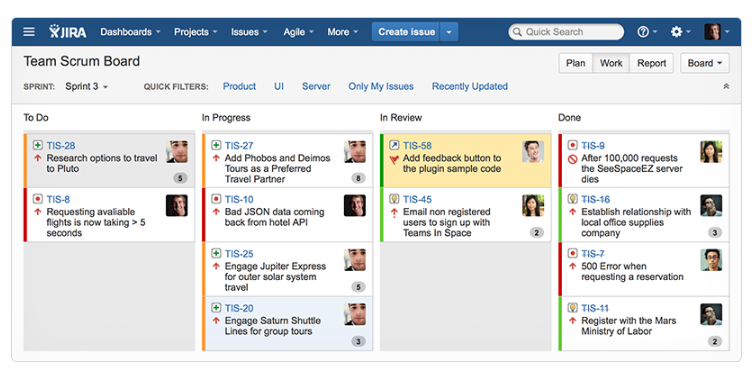
Jira, an Atlassian product, has long been a forerunner in the software project management landscape. It provides detailed tools catered to the software development lifecycle, making it the go-to for development teams needing robust oversight of their projects.
Why I Picked Jira:
Upon weighing the strengths of various tools, Jira stood out in the domain of software project management. I chose it because of its tried-and-true reputation in the software industry. Reflecting on its features, I believe Jira is the best tool for teams seeking an in-depth approach to software project management.
Standout features & integrations:
Jira is renowned for its customizable workflows that adapt to varying development methodologies. Its issue and project tracking, combined with agile reporting tools, offers detailed project oversight. Notable integrations include Confluence, Bitbucket, and Slack, fortifying its position in the software ecosystem.
Pros and Cons
Pros:
- Integration with other Atlassian products
- Robust issue tracking and agile reporting tools
- Customizable workflows cater to different methodologies
Cons:
- Pricing can get steep for larger teams.
- Configuration can be time-consuming
- Might be overkill for smaller projects

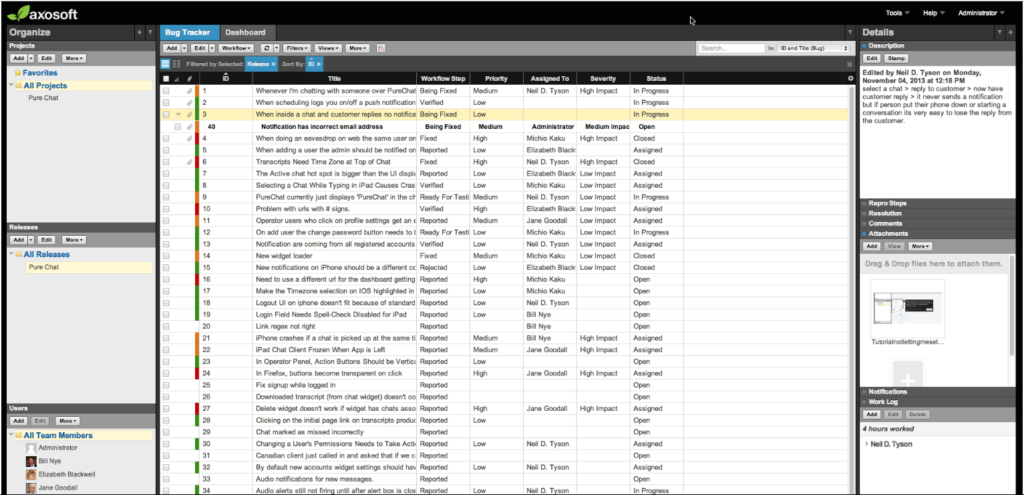
In the realm of software development, precise release planning is paramount. Axosoft emerges as a dedicated tool in this space, offering features tailored for developers and aiding in precise release cycles.
Why I Picked Axosoft:
When determining a tool tailored for software development teams, Axosoft consistently stood out. I chose it because of its profound focus on aiding developers in managing release cycles effectively. In drawing comparisons, it became apparent that Axosoft is best for development teams that require precision in their release planning.
Standout features & integrations:
Axosoft is lauded for its scrum software planning, which streamlines agile methodologies. Its burndown charts and capacity planning tools ensure teams stay on track. Integration-wise, Axosoft connects well with repositories like Git and Subversion, as well as with customer support tools like Help Scout.
Pros and Cons
Pros:
- Effective release management capabilities
- Robust scrum and agile planning tools
- Tailored features for software developers
Cons:
- Some features might seem complex for smaller teams
- The interface can take time to familiarize with
- Might not cater to non-development teams


Quire is a collaborative task and project management tool designed to help teams organize ideas, plan projects, and track work from start to finish.
Why I Picked Quire:
Quire's infinite nested list view is a particularly notable feature to use for backlog management. It allows you to create a hierarchy of tasks and subtasks, making it easier to organize and prioritize your backlog items. This structure helps you break down large projects into smaller, actionable steps, ensuring that nothing falls through the cracks. Additionally, Quire's Kanban board integrates with the nested list view. This combination enables you to visualize your backlog items as they move through different stages of development.
Standout features & integrations:
Other features include the ability to create personalized sublists from your main task list, helping you focus on specific tasks or priorities. Quire also offers a timeline feature that lets you visualize your project's journey, meet deadlines, and achieve milestones. Some integrations include Google Calendar, Gmail, Slack, Outlook, Zoho Flow, GitHub, Apple Calendar Sync, Box, Dropbox, Google Drive, and Microsoft Teams.
Pros and Cons
Pros:
- Ability to create nested tasks and subtasks, allowing for detailed project breakdowns
- Multiple project views, including lists, boards, and timelines
- Easy to collaborate with team members
Cons:
- Potential for notification overload, especially when working with large teams
- The mobile version lacks some features available on the desktop
New Product Updates from Quire
Quire Enhances Chat Editing and Text Formatting
Quire introduces updates to its chat functionality to improve collaboration and message formatting. These enhancements make it easier for teams to edit messages and structure text within conversations. For more information, visit Quire’s official site.
 .
.
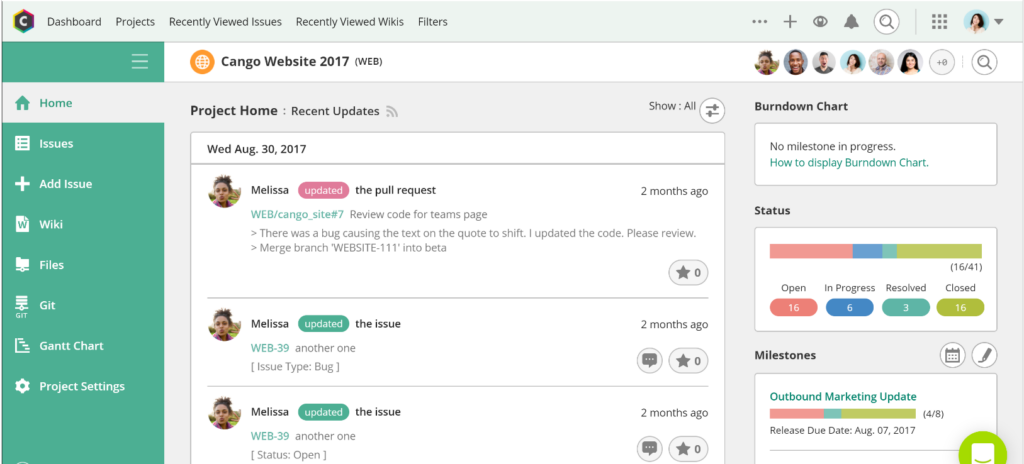
Backlog presents itself as a centralized platform that intertwines project management, task tracking, and bug resolution. It aptly consolidates these functionalities, making it invaluable for teams who want an integrated solution for their varying operational challenges.
Why I Picked Backlog:
In my search for tools that offer a cohesive experience, Backlog prominently emerged. I chose it after judging its capability to merge different operational needs into a single platform. Given its integrative features, it’s my determination that Backlog is best suited for teams keen on tracking projects, tasks, and bugs from one hub.
Standout features & integrations:
Backlog shines with its built-in bug-tracking system, ensuring issues are identified and resolved quickly. Additionally, it facilitates visual project timelines and offers extensive collaborative features such as shared wikis. Key integrations encompass Slack, Typetalk, and Jenkins for enhanced operational fluidity.
Pros and Cons
Pros:
- Visual Gantt chart and burndown chart features
- Built-in wiki system for team knowledge sharing
- Comprehensive dashboard with project, task, and bug views
Cons:
- Mobile experience could be enhanced
- Limited customization options in comparison to competitors
- The interface may be less intuitive for first-time users


Canny is a customer feedback management tool that helps you collect, organize, and prioritize user feedback to make informed product decisions.
Why I Picked Canny:
I like Canny's customizable prioritization system. You can develop formulas to score feedback and feature requests based on factors like impact and effort. By syncing properties from tools like HubSpot or Salesforce, you can factor in opportunity revenue, helping you focus on features with the highest potential return. This system helps you build your backlog and map out your projects.
Standout features & integrations:
Canny also offers the ability to create public or private roadmaps, allowing you to keep stakeholders informed about upcoming developments. It even has a changelog feature that lets you publish detailed release notes linked to specific feature requests, automatically notifying users who voted on those features and boosting engagement. Some integrations Intercom, Zendesk, Salesforce, HubSpot, Jira, ClickUp, GitHub, Asana, Slack, Microsoft Teams, Zapier, and Google Analytics.
Pros and Cons
Pros:
- Offers AI-powered feedback solutions
- Good feature request management system
- Consolidates feedback from various sources
Cons:
- No built-in survey capabilities
- Limited integrations on lower-tier plans
Autres outils de gestion du backlog
Voici une liste d’outils de gestion du backlog supplémentaires que j’ai présélectionnés, mais qui n’ont pas atteint le top 12. Ils valent vraiment le coup d’œil.
- monday dev
For customizable backlog workflow management
- Wrike
For real-time collaboration and workload management
- Teamhood
For Kanban-powered backlog management
- Craft.io
For hierarchical backlog organization
- monday.com
For customizable workflow automation
- ProWorkflow
Fortime tracking and resource management
- Scoro
Forcombining CRM and project management
- Pivotal Tracker
Foragile software development teams
- OpenProject
Forcomprehensive open-source collaboration


Autres avis sur des outils et logiciels
Si vous n’avez toujours pas trouvé ce que vous cherchez ici, consultez également ces autres catégories d’outils que nous avons testées et évaluées.
- Logiciels de supervision réseau
- Logiciels de surveillance serveur
- Solutions SD-WAN
- Outils de supervision d’infrastructure
- Analyseurs de paquets
- Outils de surveillance applicative
Critères de sélection des outils de gestion du backlog
Pour sélectionner les meilleurs outils de gestion du backlog à inclure dans cette liste, j’ai pris en compte les besoins courants des acheteurs ainsi que les difficultés rencontrées comme la hiérarchisation des tâches et la collaboration d’équipe. J’ai également utilisé le cadre ci-dessous pour structurer et objectiver mon évaluation :
Fonctionnalités principales (25 % de la note totale)
Pour être considérée dans cette liste, chaque solution devait répondre à ces cas d’utilisation courants :
- Gérer la hiérarchisation des tâches
- Suivre l’avancement des projets
- Favoriser la collaboration d’équipe
- S’intégrer avec d’autres outils
- Soutenir les méthodes agiles
Fonctionnalités distinctives supplémentaires (25 % de la note totale)
Pour départager les solutions, j’ai aussi recherché des options uniques, telles que :
- Flux de travail personnalisables
- Fonctionnalités avancées de reporting
- Analyses prédictives basées sur l’IA
- Outils de collaboration en temps réel
- Prise en charge multilingue
Facilité d’utilisation (10 % de la note totale)
Pour évaluer la facilité d’utilisation de chaque système, j’ai pris en compte les critères suivants :
- Interface utilisateur intuitive
- Courbe d’apprentissage minimale
- Design adaptatif
- Options de personnalisation
- Fonctionnalités d’accessibilité
Intégration (10 % du score total)
Pour évaluer l’expérience d’intégration de chaque plateforme, j’ai pris en compte les éléments suivants :
- Disponibilité de vidéos de formation
- Tours interactifs du produit
- Utilisation de chatbots pour l’accompagnement
- Accès à des webinaires
- Modèles préconçus
Support client (10 % du score total)
Pour évaluer le service client de chaque fournisseur logiciel, j’ai considéré :
- Disponibilité d’un support 24/7
- Multiples canaux d’assistance
- Efficacité du temps de réponse
- Accès à une base de connaissances
- Options de support personnalisé
Rapport qualité/prix (10 % du score total)
Pour évaluer le rapport qualité/prix de chaque plateforme, j’ai examiné les critères suivants :
- Tarification compétitive
- Options de tarification par niveaux
- Fonctionnalités incluses dans chaque plan
- Disponibilité d’essai gratuit
- Réductions pour les abonnements annuels
Avis clients (10 % du score total)
Pour évaluer la satisfaction globale des clients, j’ai examiné les éléments suivants lors de la lecture des avis :
- Notes de satisfaction des utilisateurs
- Problèmes fréquemment rapportés
- Éloges pour certaines fonctionnalités
- Retours sur le support client
- Taux de recommandation global
Comment choisir un outil de gestion de backlog
Il est facile de se perdre dans des listes de fonctionnalités interminables et des structures tarifaires complexes. Pour vous aider à rester concentré tout au long de votre processus unique de sélection de logiciels, voici une liste de points à garder à l’esprit :
| Facteur | À considérer |
|---|---|
| Évolutivité | L’outil peut-il évoluer avec votre équipe ? Considérez le volume de projets à venir et la taille de l’équipe. Recherchez des outils proposant des plans évolutifs ou des ressources supplémentaires. |
| Intégrations | Fonctionne-t-il avec vos logiciels existants ? Vérifiez s’il s’intègre aux outils essentiels de votre équipe comme Slack, Jira ou Trello. |
| Personnalisation | Pouvez-vous adapter l’outil à votre flux de travail ? Évaluez s’il est possible de personnaliser les tableaux de bord, champs et processus pour répondre aux besoins de votre équipe. |
| Facilité d’utilisation | L’outil est-il convivial ? Évaluez la courbe d’apprentissage et voyez si votre équipe peut s’adapter rapidement sans formation approfondie. |
| Mise en place et intégration | Quelle est la fluidité du processus d’installation ? Recherchez des outils offrant des ressources d’onboarding claires comme des tutoriels et du support afin de démarrer rapidement. |
| Coût | La tarification correspond-elle à votre budget ? Comparez les coûts avec des outils similaires et considérez la valeur ajoutée à chaque niveau de prix. |
| Sécurité | Vos données et projets sont-ils protégés ? Assurez-vous que l’outil respecte les normes de sécurité et propose des fonctionnalités comme le chiffrement et le contrôle d’accès. |
Que sont les outils de gestion de backlog ?
Les outils de gestion de backlog sont des solutions logicielles qui aident les équipes à organiser, prioriser et suivre les tâches et projets. Ils sont généralement utilisés par les chefs de projet, les développeurs et les équipes produit, leur offrant un meilleur contrôle sur leur flux de travail et leurs délais. La priorisation des tâches, les capacités d’intégration et les workflows personnalisables contribuent à garder les projets organisés et les équipes efficaces. Globalement, ces outils permettent aux équipes de mieux gérer leurs charges de travail et de respecter les échéances.
Fonctionnalités
Lors du choix d’un outil de gestion de backlog, surveillez les fonctionnalités clés suivantes :
- Priorisation des tâches : Aide les équipes à organiser les tâches par ordre d'importance, garantissant que les travaux critiques sont réalisés en premier.
- Capacités d'intégration : Permet une connexion transparente avec d'autres outils comme Slack, Jira et Trello pour rationaliser les flux de travail.
- Flux de travail personnalisables : Permet aux équipes d'adapter les processus et les tableaux de bord aux besoins spécifiques de leurs projets.
- Collaboration en temps réel : Facilite la communication et la mise à jour de l'équipe, afin que tout le monde reste sur la même longueur d'onde.
- Rapports avancés : Fournit des informations et des analyses pour surveiller la progression des projets et la performance de l'équipe.
- Évolutivité : Soutient la croissance en s'adaptant à un volume de projets et à la taille de l'équipe accrus.
- Interface conviviale : Assure que les membres de l'équipe peuvent facilement naviguer et utiliser l'outil sans formation approfondie.
- Garantie de sécurité : Protège les données grâce à des fonctionnalités telles que le chiffrement et le contrôle d'accès pour garantir la sécurité des informations.
- Ressources d'intégration : Propose des tutoriels, des visites du produit et des modèles pour aider les nouveaux utilisateurs à démarrer rapidement.
- Tarification avantageuse : Propose différents niveaux de tarification adaptés à tous les budgets, rendant l'outil accessible à de nombreuses tailles d'équipe.
Avantages
L’implémentation d’outils de gestion de backlog apporte de nombreux avantages à votre équipe et à votre entreprise. Voici quelques-uns dont vous pouvez bénéficier :
- Meilleure organisation : La priorisation des tâches et les flux de travail personnalisables permettent de structurer les projets et de réduire le chaos.
- Collaboration améliorée : Les fonctionnalités de collaboration en temps réel gardent les membres de l’équipe connectés et informés, améliorant ainsi le travail collectif.
- Efficacité accrue : Les intégrations avec d’autres outils simplifient les processus et réduisent le temps passé à basculer entre différentes plateformes.
- Prise de décision optimisée : Les rapports avancés fournissent une vision claire de l’avancement des projets, aidant les équipes à prendre des décisions éclairées.
- Soutien à l’évolutivité : À mesure que votre équipe grandit, des outils évolutifs permettent de gérer plus de projets et des effectifs plus importants.
- Gain de temps : Les interfaces intuitives et les ressources d’intégration réduisent le temps nécessaire pour prendre en main et déployer l’outil.
- Sécurité des données : La mise en place de mesures de sécurité garantit la protection des données de votre équipe, favorisant la confiance et la conformité.
Coûts & Tarification
Choisir des outils de gestion de backlog nécessite de comprendre les différents modèles et formules tarifaires disponibles. Les coûts varient selon les fonctionnalités, la taille de l’équipe, les modules complémentaires, etc. Le tableau ci-dessous résume les formules courantes, leurs prix moyens ainsi que les caractéristiques typiques incluses dans les solutions de gestion de backlog :
Tableau comparatif des offres pour les outils de gestion de backlog
| Type d’offre | Prix moyen | Fonctionnalités courantes |
|---|---|---|
| Formule gratuite | $0 | Gestion basique des tâches, intégrations limitées et support communautaire. |
| Formule personnelle | $5-$25/user/month | Priorisation des tâches, rapports de base et support par e-mail. |
| Formule business | $30-$60/user/month | Rapports avancés, flux de travail personnalisés et intégrations premium. |
| Formule entreprise | $70-$100/user/month | Personnalisation totale, support dédié et fonctionnalités de sécurité renforcées. |
Foire aux questions sur les outils de gestion du backlog
Réponses à certaines des questions les plus courantes liées aux solutions de gestion du backlog.
Quels sont les types d’outils de gestion du backlog ?
Existe-t-il des outils gratuits de gestion du backlog ?
Le prix est-il un gage de qualité ?
Et ensuite :
Si vous êtes en train de rechercher des outils de gestion du backlog, contactez gratuitement un conseiller SoftwareSelect pour des recommandations personnalisées.
Vous remplissez un formulaire puis échangez rapidement pour détailler vos besoins spécifiques. Ensuite, vous recevez une sélection de logiciels à examiner. Ils vous accompagnent même tout au long du processus d’achat, y compris pour la négociation des tarifs.