

Encontrar las herramientas de seguridad en la nube adecuadas puede agilizar significativamente la detección de amenazas y mejorar el cumplimiento normativo, ya sea para proteger datos confidenciales, asegurar entornos multinube o automatizar la respuesta a incidentes.
He probado y analizado de forma independiente diversas soluciones, centrándome en lo que realmente importa para ti y tu equipo. Creo en ofrecer una perspectiva imparcial y bien documentada que te ayude a tomar decisiones informadas.
En este artículo descubrirás mis principales recomendaciones de herramientas de seguridad en la nube, cada una elegida por sus ventajas únicas. Tanto si te preocupa la protección de datos como el cumplimiento normativo, encontrarás información que responde a tus necesidades específicas. Analicemos las opciones y encontremos la que mejor se adapte a tu organización.
Por qué confiar en nuestras recomendaciones de software
6,700+
Reviews
20
Industry experts
16+
Evaluation factors
14
Years
Nuestro equipo lleva probando y evaluando software desde 2012. Como líderes tecnológicos, sabemos lo difícil —y lo importante— que es elegir el software adecuado.
Para esta guía, evaluamos las herramientas mediante pruebas prácticas e investigación independiente, puntuando las herramientas según nuestros criterios de selección.
Nuestras reseñas reflejan nuestro criterio editorial humano, no un discurso de ventas.
Revisores expertos:
- Paulo Gardini MiguelDirector técnico
 Tim FisherVP de IA
 Gabriel RosasTech Lead y arquitecto de software
 Christhian GruhnTech Lead y arquitecto de plataforma

Tabla comparativa de herramientas de seguridad en la nube
Esta tabla comparativa resume los detalles de precios de mi selección de las mejores herramientas de seguridad en la nube.
| Tool | Best For | Trial Info | Price | ||
|---|---|---|---|---|---|
| 1 | Mejor para la protección de endpoints | Prueba gratuita de 15 días | Desde $25/mes con un plan anual | Website | |
| 2 | Ideal para CSPM y riesgos de identidad en entornos multicloud | Prueba gratuita de 30 días + demostración gratuita disponible | Precios disponibles previa solicitud | Website | |
| 3 | Ideal para asegurar flotas globales de dispositivos | Demo gratuita disponible | desde $5/persona/mes | Website | |
| 4 | Ideal para control de acceso de confianza cero | Plan gratuito disponible | Desde $5/usuario/mes (facturado anualmente) | Website | |
| 5 | Ideal para SIEM unificado con DLP y CASB | Demo gratuita disponible | Precios bajo consulta | Website | |
| 6 | Mejor para una gestión integral de la postura de seguridad en la nube | Plan gratuito disponible + demo gratis | Desde $350/mes | Website | |
| 7 | La mejor para la gestión de cuentas privilegiadas | Prueba gratuita + demo gratis disponible | Precio a consultar | Website | |
| 8 | Mejor para defensa basada en el conocimiento | Prueba gratuita de 30 días disponible | Desde $795/50 endpoints/año | Website | |
| 9 | Mejor variedad de servicios de escaneo | Prueba gratuita de 14 días + demo gratis disponible | Desde $149/mes | Website | |
| 10 | Mejor para detección proactiva de amenazas | Prueba gratuita de 30 días + demo gratuita disponible | Desde $338.50/año | Website |


Análisis de las mejores herramientas de seguridad en la nube
A continuación encontrarás mis resúmenes detallados de las mejores herramientas de seguridad en la nube que han llegado a mi selección. Mis análisis ofrecen una visión detallada de las características principales, ventajas y desventajas, integraciones y casos de uso ideales de cada herramienta para ayudarte a encontrar la mejor opción para ti.
 Mejor para la protección de endpoints
- Prueba gratuita de 15 días
- Desde $25/mes con un plan anual
Visit WebsiteCustomer Rating:4.6/5
El panel de CrowdStrike Falcon presenta visibilidad de cargas de trabajo en la nube y contenedores. CrowdStrike es un agente inteligente y liviano que previene ataques de malware mientras registra y captura la actividad en los endpoints. Su solución de seguridad para endpoints utiliza inteligencia artificial y análisis avanzados para proporcionar detección y respuesta extendidas para tu arquitectura en la nube.
Por qué elegí CrowdStrike Falcon: Elegí CrowdStrike porque ofrece protección para endpoints de próxima generación combinada con un servicio de detección de amenazas gestionado de manera continua. Especialmente aprecié la capacidad de las herramientas de detección y remediación para proteger las cargas de trabajo en la nube en todas las etapas, desde el desarrollo hasta la producción.
Características e integraciones destacadas de CrowdStrike Falcon:
Características incluyen detección de amenazas basada en inteligencia artificial que proporciona información en tiempo real sobre la actividad de los endpoints para identificar y mitigar posibles brechas antes de que ocurran. Su arquitectura nativa en la nube garantiza una implementación rápida y escalabilidad, lo que la hace ideal para organizaciones de cualquier tamaño. Además, CrowdStrike Falcon se integra perfectamente con otras herramientas de seguridad y ofrece una plataforma unificada para la detección y respuesta de endpoints (EDR), búsqueda de amenazas y servicios de seguridad gestionados, ofreciendo protección con una carga mínima.
Las integraciones están disponibles de forma nativa para Splunk, IBM QRadar, ArcSight, AWS, Microsoft Azure, Okta y ServiceNow.
Pros and Cons
Pros:
- Detección y respuesta en tiempo real
- Integración con otras herramientas de seguridad
- Informes completos
Cons:
- Posibles falsos positivos
- Personalización limitada
Learn more about CrowdStrike Falcon: Ideal para CSPM y riesgos de identidad en entornos multicloud
- Prueba gratuita de 30 días + demostración gratuita disponible
- Precios disponibles previa solicitud
Visit WebsiteCustomer Rating:4.5/5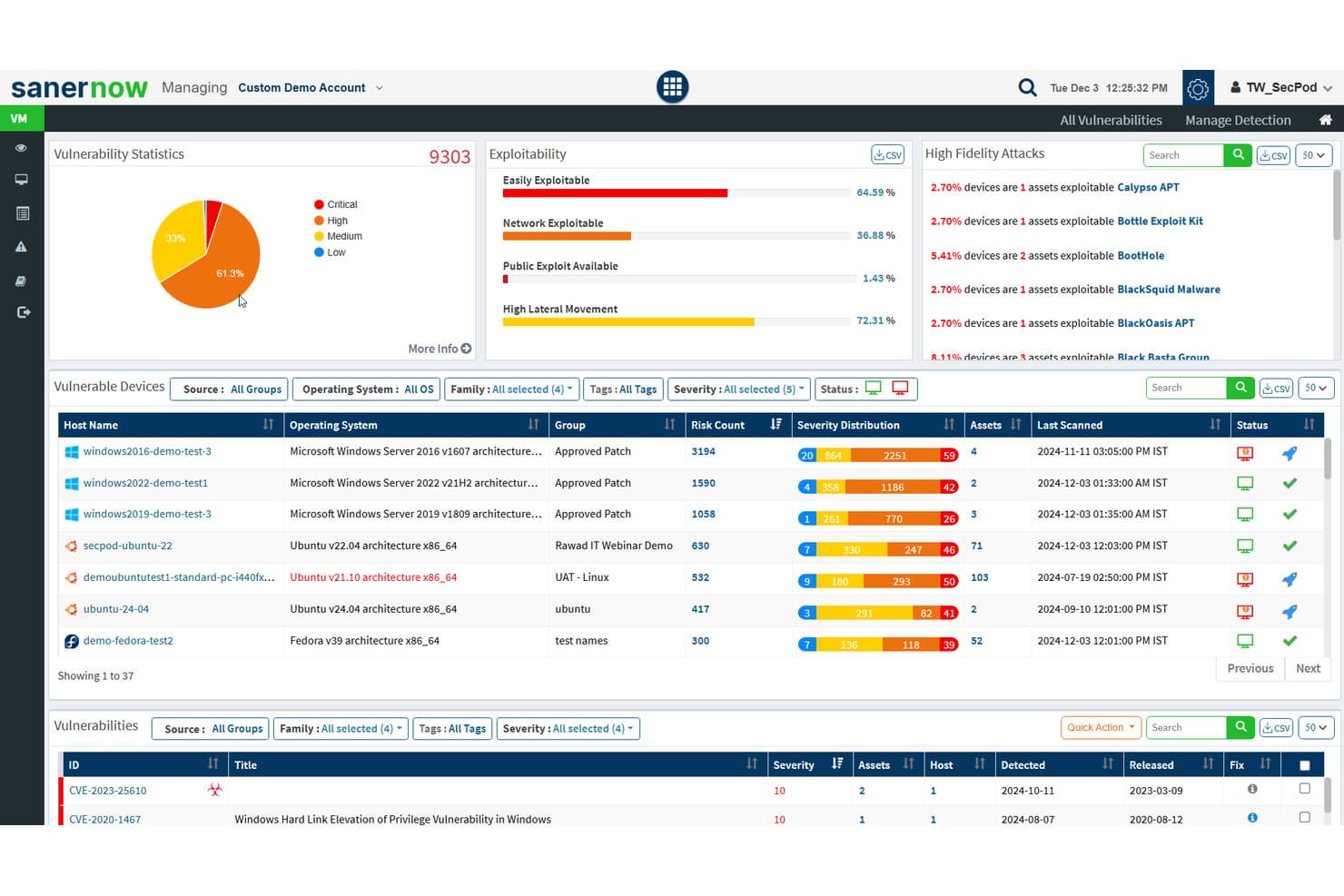
SecPod (Saner Platform) realiza un seguimiento de las estadísticas de vulnerabilidades y la explotabilidad en los activos de la nube. Saner Cloud es una plataforma nativa de la nube para la protección de aplicaciones de SecPod que unifica la gestión de la postura de seguridad en la nube, la gestión de derechos de infraestructura, la detección de anomalías y la exposición de activos en AWS, Azure y GCP.
¿Para quién es más adecuada SecPod (Saner Platform)?
Saner Cloud es adecuada para equipos de seguridad y cumplimiento que gestionan identidades, permisos y postura en AWS, Azure y GCP en entornos multicloud.
Por qué elegí SecPod (Saner Platform)
Elegí Saner Cloud como una de las mejores opciones porque su capacidad de CIEM va más allá de señalar permisos amplios: muestra exactamente cómo se combinan las identidades, los roles y las políticas para conceder acceso en AWS, Azure y GCP, y después identifica cuentas inactivas, vinculaciones huérfanas y tus 10 usuarios con más privilegios, con pruebas que explican por qué cada asignación es arriesgada. Junto con las comprobaciones de CSPM basadas en más de 1.000 reglas, la priorización de riesgos alineada con el modelo SSVC de CISA mantiene a tu equipo centrado en lo que puede explotarse, no solo en lo que está mal configurado.
Características principales de SecPod (Saner Platform)
- Detección de anomalías con puntuación de confianza: La detección de anomalías de la postura de seguridad en la nube de Saner Cloud agrupa las desviaciones de postura detectadas en categorías de confianza alta, media y baja en AWS, Azure y GCP.
- Programación automatizada de la corrección: Los equipos pueden configurar reglas de corrección para que se ejecuten automáticamente después de los análisis o según programaciones diarias, semanales o mensuales, con seguimiento del estado.
- Inventario de exposición de activos en la nube: Saner Cloud mantiene un inventario centralizado de activos que señala los recursos accesibles públicamente y realiza un seguimiento de los activos en la nube obsoletos o sin soporte.
- Priorización de riesgos alineada con CISA SSVC: Los hallazgos se priorizan mediante los factores de decisión de SSVC de CISA —explotabilidad, automatización, impacto técnico y criticidad de los recursos— para identificar lo que requiere atención inmediata.
Integraciones de SecPod (Saner Platform)
SecPod (Saner Platform) se integra con Amazon Web Services (AWS), Microsoft Azure y Google Cloud Platform (GCP) para obtener datos de postura, identidad y activos en la nube. La cantidad de integraciones nativas y la disponibilidad de API no están documentadas.
Pros and Cons
Pros:
- Clasifica los riesgos de la nube según el impacto y la explotabilidad
- Mapea los permisos de identidad en tres nubes
- Los usuarios informan de una incorporación inicial rápida
Cons:
- Las alertas basadas en análisis pueden no detectar cambios transitorios
- La cobertura híbrida y local sigue sin estar documentada
Learn more about SecPod (Saner Platform): Ideal para asegurar flotas globales de dispositivos
- Demo gratuita disponible
- desde $5/persona/mes
Visit WebsiteCustomer Rating:4.9/5
El panel de control de IT de Deel te brinda una visión global de la seguridad de dispositivos, el seguimiento de equipos y la distribución de recursos en toda tu fuerza laboral. Deel ofrece un conjunto de herramientas de seguridad basadas en la nube diseñadas para proteger cada dispositivo en tu organización contra amenazas cibernéticas. Su plataforma de protección de endpoints salvaguarda laptops, tabletas y dispositivos móviles para tu fuerza laboral global.
Por qué elegí Deel: Elegí Deel porque incorpora la seguridad en la nube directamente en el ecosistema de gestión de personal, combinando la protección de endpoints con la gestión de dispositivos y el control de acceso. El sistema nativo en la nube de Deel detecta y previene continuamente el malware, el ransomware y el acceso no autorizado en tiempo real, sin requerir una supervisión manual intensiva. Su respuesta automatizada ante amenazas aísla los dispositivos afectados de forma instantánea, minimizando las interrupciones y la exposición de datos.
Características e integraciones destacadas de Deel:
Las características incluyen detección automatizada de amenazas que se adapta en tiempo real a los riesgos cibernéticos en evolución, garantizando que todos los endpoints permanezcan protegidos. La arquitectura ligera de la plataforma permite el aislamiento instantáneo de amenazas de seguridad sin ralentizar los dispositivos ni los flujos de trabajo. Deel también ofrece cobertura multiplataforma, proporcionando a tu equipo de IT protección y visibilidad consistentes en todos los sistemas operativos y tipos de dispositivos.
Las integraciones incluyen BambooHR, Personio, NetSuite, Slack, Google Workspace, Zoom, SAP SuccessFactors, Xero, QuickBooks, Workday, Greenhouse y Lever.
Pros and Cons
Pros:
- Detección y respuesta a amenazas en tiempo real
- Protege todos los dispositivos en distintas ubicaciones
- El aislamiento automatizado reduce el trabajo manual
Cons:
- No es una suite de seguridad empresarial completa
- Carece de herramientas de seguridad en la nube más amplias, más allá de la gestión de endpoints para dispositivos
Learn more about Deel IT: Ideal para control de acceso de confianza cero
- Plan gratuito disponible
- Desde $5/usuario/mes (facturado anualmente)
Visit WebsiteCustomer Rating:4.8/5
Twingate ofrece visibilidad de dispositivos para una mejor gestión de la red. Twingate es una solución de seguridad en la nube que reemplaza las VPN tradicionales con un modelo de Acceso a Red de Confianza Cero (ZTNA). Ayuda a asegurar el acceso remoto a recursos privados aplicando el principio de mínimo privilegio, verificación de dispositivos y controles inteligentes de tráfico.
Por qué elegí Twingate: Elegí Twingate debido a su sólida implementación de confianza cero, que garantiza que los usuarios solo acceden a los recursos que necesitan. Al autenticar tanto la identidad del usuario como el estado del dispositivo, Twingate ayuda a prevenir movimientos laterales no autorizados dentro de las redes. También me parecieron valiosos sus controles de acceso automatizados, ya que pueden simplificar el proceso de otorgar o revocar permisos en entornos de trabajo dinámicos. Para equipos distribuidos, estas capacidades facilitan mantener la seguridad sin generar fricciones para los usuarios finales.
Características y conectores destacados de Twingate:
Características incluyen verificación inteligente de dispositivos mediante integraciones con servicios como CrowdStrike y Jamf, además de filtrado DNS y filtrado de contenido para reducir la exposición a sitios maliciosos. Su capa de orquestación puede centralizar la seguridad sin requerir una reconfiguración de la red, mientras que las integraciones con proveedores de identidad como Azure AD y Okta hacen más eficiente la gestión del acceso.
Integraciones incluyen CrowdStrike, Intune, Kandji, Jamf, Azure AD, Okta, Google Workspace, OneLogin, KeyCloak, JumpCloud, Máquinas Virtuales y Kubernetes.
Pros and Cons
Pros:
- Integraciones flexibles con proveedores de identidad
- Fuertes controles de verificación de dispositivos
- Orquestación centralizada de confianza cero
Cons:
- Curva de aprendizaje en la configuración
- Análisis avanzados limitados
Learn more about Twingate: Ideal para SIEM unificado con DLP y CASB
- Demo gratuita disponible
- Precios bajo consulta
Visit WebsiteCustomer Rating:4.2/5
ManageEngine Log360 ofrece funciones de generación de informes personalizables para eventos de seguridad, cumplimiento y perspectivas operativas. ManageEngine Log360 es una solución integral de gestión de información y eventos de seguridad (SIEM) que ofrece gestión de registros, detección de amenazas, generación de informes de cumplimiento y alertas de seguridad en tiempo real. Su objetivo es mejorar la visibilidad de la red de una organización, reforzar las medidas de seguridad y proporcionar una experiencia fácil de usar.
Por qué elegí ManageEngine Log360: Elegí ManageEngine Log360 por su capacidad para ofrecer una cobertura de seguridad integral en entornos en la nube. La integración de capacidades SIEM con funciones de corredor de seguridad de acceso a la nube (CASB) y prevención de pérdida de datos (DLP) garantiza una detección y respuesta robusta ante amenazas. Además, la detección de anomalías basada en aprendizaje automático, junto con el análisis en tiempo real del software, brinda una seguridad dinámica y proactiva en la nube, lo que la convierte en una opción ideal para proteger activos y datos en la nube.
ManageEngine Log360 Características destacadas e integraciones:
Las características incluyen gestión unificada de registros y capacidades SIEM, que permiten la detección de amenazas en tiempo real y la generación de informes de cumplimiento desde una única consola. Su integración con herramientas populares de TI y seguridad mejora la visibilidad a través de entornos de TI híbridos, facilitando el cumplimiento de normativas como GDPR e HIPAA. Además, la correlación automatizada de registros y la detección de anomalías en Log360 proporcionan información accionable para identificar y mitigar rápidamente posibles riesgos de seguridad.
Las integraciones incluyen Microsoft Active Directory, Office 365, Google Workspace, AWS, Azure, Salesforce, Box, ServiceNow, Jira, Slack, IBM QRadar, Splunk, SolarWinds, Palo Alto Networks, Fortinet, Cisco y Sophos.
Pros and Cons
Pros:
- Visibilidad de seguridad holística en redes locales, en la nube e híbridas
- Consola de gestión de incidentes
- Cumplimiento con regulaciones legales
Cons:
- Complejo de configurar e implementar
- Los registros pueden ser difíciles de leer y entender
Learn more about ManageEngine Log360: Mejor para una gestión integral de la postura de seguridad en la nube
- Plan gratuito disponible + demo gratis
- Desde $350/mes
Visit WebsiteCustomer Rating:4.7/5
Aikido Security proporciona un panel unificado para clasificar y filtrar incidencias por tipo, gravedad y fuente de escaneo. Aikido Security es una plataforma integral de DevSecOps diseñada para proporcionar una cobertura de seguridad completa desde el código hasta la nube. Integra múltiples capacidades de escaneo de seguridad, incluidas SAST, DAST, SCA, CSPM, IaC y escaneo de contenedores, para identificar y gestionar vulnerabilidades de alto riesgo en el código fuente, los contenedores y los entornos en la nube.
Por qué elegí Aikido Security: Me gusta su gestión de postura de seguridad en la nube (CSPM), que detecta riesgos en infraestructuras cloud a través de los principales proveedores. Esta función garantiza que tu entorno en la nube esté monitorizado continuamente en busca de vulnerabilidades, configuraciones incorrectas y problemas de cumplimiento, proporcionando una defensa robusta contra posibles brechas de seguridad. Además, Aikido Security ofrece escaneo de Infraestructura como Código (IaC), el cual analiza configuraciones de Terraform, CloudFormation y Kubernetes en busca de riesgos de seguridad.
Funciones y Integraciones destacadas de Aikido Security:
Las funciones incluyen un enfoque innovador para detectar rutas de ataque mediante la visualización de posibles vulnerabilidades en la infraestructura cloud, lo que permite la remediación preventiva. Su priorización de riesgos ofrece información accionable basada en el contexto en tiempo real y el impacto potencial para ayudar a los equipos a enfocarse en las amenazas más críticas. Aikido Security se integra con pipelines CI/CD y herramientas populares de DevOps, facilitando la incorporación de controles de seguridad en los flujos de trabajo de desarrollo sin afectar la productividad.
Las integraciones incluyen Amazon Web Services (AWS), Google Cloud, Microsoft Azure Cloud, Drata, Vanta, AWS Elastic Container Registry, Docker Hub, Jira, Asana y GitHub.
Pros and Cons
Pros:
- Interfaz fácil de usar
- Ayuda en el seguimiento y reporte de cumplimiento
- Ofrece recomendaciones e información accionable
Cons:
- Ignora vulnerabilidades si no hay una solución disponible
- No dispone de seguridad de endpoints ni capacidades de detección de intrusiones
Learn more about Aikido Security: La mejor para la gestión de cuentas privilegiadas
- Prueba gratuita + demo gratis disponible
- Precio a consultar

Heimdal ofrece un panel integral para la gestión de activos de TI. En el ámbito de la seguridad en la nube, Heimdal presenta una solución dinámica para empresas que buscan proteger sus entornos digitales. Adaptado para sectores como la salud, la educación y el gobierno, aborda desafíos como el cumplimiento de normativas tales como ISO 27001 y GDPR. La herramienta no solo protege contra amenazas como ransomware y phishing, sino que también simplifica la gestión de la seguridad, convirtiéndose en un recurso valioso para los equipos de TI.
Por qué elegí Heimdal
Elegí Heimdal por su excepcional integración de medidas de seguridad avanzadas diseñadas para entornos en la nube. Sus capacidades de Detección y Respuesta Extendidas (XDR) ofrecen una cobertura integral contra amenazas a través de endpoints y redes, satisfaciendo la necesidad de monitoreo constante. Además, la Seguridad DNS de Heimdal protege contra amenazas basadas en la web, asegurando que tu red permanezca segura. Estas funciones resultan atractivas para las empresas que priorizan el cumplimiento normativo y la protección de datos.
Características clave de Heimdal
Además de sus capacidades destacadas, Heimdal ofrece varias otras características notables que mejoran sus soluciones de seguridad en la nube:
- Gestión de cuentas privilegiadas y sesiones: Esta función protege el acceso gestionando y monitoreando las cuentas privilegiadas, reduciendo el riesgo de accesos no autorizados.
- Gestión de parches y activos: Automatiza el proceso de actualización, asegurando que los sistemas estén al día y cumplan con los estándares de seguridad.
- Protección contra cifrado de ransomware: Proporciona una capa adicional de defensa frente a ataques de ransomware, protegiendo datos y sistemas críticos.
- Seguridad de correo electrónico: Protege contra amenazas por correo electrónico, como phishing y malware, mediante el filtrado y monitoreo de las comunicaciones.
Integraciones de Heimdal
Actualmente, Heimdal no ofrece integraciones nativas; sin embargo, la plataforma admite integraciones personalizadas a través de API.
Pros and Cons
Pros:
- Automatiza el parcheo en todos los endpoints
- Detección sólida de vulnerabilidades y amenazas
- Visibilidad detallada de activos y licencias
Cons:
- No hay integraciones nativas disponibles
- La interfaz requiere tiempo de adaptación
Learn more about Heimdal: Mejor para defensa basada en el conocimiento
- Prueba gratuita de 30 días disponible
- Desde $795/50 endpoints/año
Visit WebsiteCustomer Rating:4.3/5
Obtén resúmenes detallados del estado del sistema con ManageEngine Desktop Central. ManageEngine Desktop Central es una herramienta integral que ofrece gestión unificada de endpoints y seguridad en la nube para todos los dispositivos dentro de una organización, ideal para profesionales de TI, proveedores de servicios gestionados (MSP) y empresas de diversos tamaños. Su objetivo es ayudar en la gestión de servidores, portátiles, escritorios, smartphones y tabletas desde una ubicación centralizada.
Por qué elegí ManageEngine Desktop Central: El software proporciona una defensa basada en el conocimiento a través de sus amplias funciones de recopilación de datos y análisis, que ayudan a los administradores de TI con inteligencia accionable para abordar proactivamente las amenazas de seguridad. Una característica clave que respalda este enfoque es la supervisión del sistema en tiempo real y las alertas. ManageEngine Desktop Central también ofrece visibilidad y control de extremo a extremo y fortalecimiento de los datos.
Características e integraciones destacadas de ManageEngine Desktop Central:
Las características incluyen la gestión de endpoints en diferentes dispositivos y sistemas operativos, garantizando una administración sin fisuras de escritorios, servidores y dispositivos móviles. Su integración con herramientas como ServiceDesk Plus permite operaciones de TI eficientes al conectar los flujos de trabajo de gestión de incidencias y dispositivos. Además, el software ofrece automatización avanzada para la gestión de parches y la aplicación de configuraciones, mejorando la seguridad y reduciendo el esfuerzo manual.
Las integraciones incluyen ServiceNow, Jira, Zoho Desk, Zendesk, Jira Service Desk, Microsoft SCCM, IBM BigFix, Slack, Microsoft Teams, Trello, Zapier, ManageEngine ServiceDesk Plus, Microsoft Intune, y más.
Pros and Cons
Pros:
- Capacidades de gestión remota de escritorios
- Gestión de parches para actualizaciones de software
- Gestión de Active Directory
Cons:
- Algunas funciones avanzadas requieren investigación adicional
- Los usuarios pueden sentirse abrumados con tantas funciones configurables
Learn more about ManageEngine Endpoint Central: Mejor variedad de servicios de escaneo
- Prueba gratuita de 14 días + demo gratis disponible
- Desde $149/mes
Visit WebsiteCustomer Rating:4.8/5
Intruder proporciona un panel para la gestión centralizada de vulnerabilidades. Intruder es una herramienta de seguridad en la nube diseñada para ayudar a las organizaciones a gestionar vulnerabilidades y proteger sus activos digitales. Se centra en la gestión continua de vulnerabilidades y en la gestión de la superficie de ataque, ofreciendo un enfoque integral para identificar y abordar las debilidades de seguridad.
Por qué elegí Intruder: Elegí Intruder por su capacidad para realizar diversos servicios de escaneo, incluidos escaneos de vulnerabilidades externas, internas, en la nube, en aplicaciones web y en API. Estas funciones permiten supervisar en tiempo real la postura de seguridad de su organización, asegurando que las vulnerabilidades críticas se prioricen y se aborden rápidamente. Además, la plataforma de Intruder ofrece gestión de exposición utilizando múltiples motores de escaneo, lo que ayuda a identificar problemas que otras herramientas podrían pasar por alto.
Funciones y integraciones destacadas de Intruder:
Funciones incluyen la capacidad de priorizar vulnerabilidades según su impacto potencial, ayudando a centrarse en los problemas más urgentes. Intruder también proporciona una guía clara de remediación, lo que facilita a su equipo solucionar los problemas identificados. Además, la plataforma ofrece capacidades de informes exhaustivos, permitiéndole supervisar la postura de seguridad a lo largo del tiempo y demostrar el cumplimiento de los estándares de la industria.
Integraciones incluyen AWS, GitLab, GitHub, Jira, Azure, Teams, Slack, Azure DevOps, Cloudflare, Google Cloud, Microsoft Sentinel y Okta.
Pros and Cons
Pros:
- La plataforma escanea proactivamente vulnerabilidades recién reveladas
- Ofrece informes detallados
- La priorización de problemas ayuda a enfocarse en las amenazas críticas
Cons:
- Algunos pueden encontrar limitadas las opciones de personalización de los escaneos
- La monitorización de la superficie de ataque está limitada al plan Premium
Learn more about Intruder: Mejor para detección proactiva de amenazas
- Prueba gratuita de 30 días + demo gratuita disponible
- Desde $338.50/año
Visit WebsiteCustomer Rating:4.6/5
La detección proactiva de amenazas de ESET PROTECT es visible en un panel único. ESET PROTECT Complete es una solución integral de seguridad basada en la nube diseñada para ofrecer protección multicapa para los endpoints empresariales, incluyendo computadoras, portátiles y dispositivos móviles. La solución cuenta con tecnología de sandbox en la nube para contrarrestar amenazas de día cero e incluye cifrado completo de disco para mejorar la protección de datos.
Por qué elegí ESET PROTECT Complete: Como herramienta de seguridad en la nube, ESET PROTECT ofrece una protección sólida diseñada específicamente para abordar los desafíos de seguridad únicos de la computación en la nube. Además, la consola basada en la nube de la plataforma permite a los administradores gestionar la seguridad en entornos de nube distribuidos de manera fluida, mejorando la visibilidad y el control sobre todos los recursos.
Características y opciones de integración destacadas de ESET PROTECT Complete:
Las características incluyen una plataforma unificada de gestión de seguridad con capacidades avanzadas de detección y respuesta a amenazas, permitiendo a los equipos de TI monitorizar endpoints, servidores y redes en tiempo real. El enfoque de seguridad multicapa de ESET incluye protección de endpoints, cifrado de datos y sandbox en la nube, garantizando una defensa completa contra amenazas conocidas y de día cero. Su integración con herramientas nativas de la nube y una implementación simplificada la hacen especialmente amigable para organizaciones que buscan soluciones de ciberseguridad eficientes y escalables.
Las integraciones incluyen ConnectWise Automate, Microsoft Windows Defender Antivirus, Microsoft Azure, Datto RMM, NinjaOne, Kaseya VSA y ATERA.
Pros and Cons
Pros:
- Huella de sistema ligera que asegura un impacto mínimo en el rendimiento
- Capacidades avanzadas de detección y respuesta a amenazas
- Herramientas de informes completas para análisis de seguridad en profundidad
Cons:
- El precio puede ser elevado para organizaciones pequeñas
- Requiere conocimientos técnicos para utilizar funciones avanzadas
Learn more about ESET PROTECT Complete:
Otras herramientas de seguridad en la nube
Estas son algunas opciones adicionales de herramientas de seguridad en la nube que no llegaron a mi selección, pero que merece la pena consultar:
- 11CyberarkIdeal para la seguridad de identidades de extremo a extremo
- 12Astra PentestLa mejor para escaneo continuo con soporte de expertos
- 13QualysMejor para la gestión de vulnerabilidades en entornos híbridos
- 14ZygonLa mejor para la seguridad del acceso a SaaS
- 15SplunkLa mejor plataforma unificada de seguridad y observabilidad
- 16ZscalerMejor solución de confianza cero
- 17Trend MicroMejor para detección y respuesta extendida (XDR)
- 18Barracuda CloudGen FirewallEl mejor firewall para redes en la nube e híbridas
- 19WizMejor para empresas medianas y grandes
- 20Forcepoint ONEIdeal para empresas con fuerza laboral híbrida
- 21RubrikIdeal para la copia de seguridad y recuperación de datos empresariales
- 22Orca SecurityLa mejor solución de seguridad en la nube sin agentes
- 23PenteraMejor para la validación automatizada de la seguridad
- 24CakewalkIdeal para la gestión de accesos
- 25OPSWAT Security ScoreIdeal para verificaciones rápidas de seguridad
- 26Rippling ITIdeal para gestionar dispositivos y aplicaciones basados en la nube
- 27Stream SecurityIdeal para la detección en tiempo real de exposiciones en la nube
- 28UnderDefenseIdeal para la detección y respuesta de amenazas 24/7
Cómo Evalúo las Herramientas de Seguridad en la Nube
Divido mi evaluación en criterios básicos—como la cobertura CSPM multicloud y el análisis de IAM—y diferenciadores que separan las herramientas diseñadas para equipos de SecOps empresariales de aquellas adecuadas para equipos más pequeños.
Funcionalidad Principal (Requisitos Básicos para Esta Lista)
Cuando selecciono herramientas para mi lista, califico cada una en una escala de 0 (no ofrece la funcionalidad) a 5 (sobresale en esta área) para cada funcionalidad principal que se detalla a continuación. Después, calculo la puntuación total de la herramienta como un porcentaje. Cada herramienta debe alcanzar una puntuación total mínima del 75% para ser considerada para inclusión.
- Gestión de la Postura en la Nube: Evalúo qué tan bien una herramienta detecta configuraciones incorrectas como buckets S3 abiertos, grupos de seguridad con permisos excesivos y almacenamiento sin cifrar en cuentas en la nube.
- Cobertura Multicloud: El soporte de cada herramienta en AWS, Azure y GCP importa, especialmente la paridad de funciones para que los equipos no tengan que lidiar con brechas entre proveedores.
- Cumplimiento y Aplicación de Políticas: Busco marcos integrados como CIS Benchmarks, SOC 2 y HIPAA, además de la capacidad de crear políticas personalizadas para estándares internos.
- Escaneo de Cargas de Trabajo y Vulnerabilidades: La cobertura en máquinas virtuales, contenedores y clústeres de Kubernetes es clave, incluyendo si la herramienta puede escanear cargas en ejecución o solo imágenes en reposo.
- Gestión de Identidad y Permisos: Reviso si la herramienta mapea permisos IAM, señala cuentas de servicio con privilegios excesivos y recomienda políticas de mínimo privilegio en entornos de nube.
- Detección y Respuesta ante Amenazas: La alerta en tiempo real ante actividades sospechosas como llamadas API inusuales o movimientos laterales tiene prioridad, junto con flujos de remediación o integración con SIEM/SOAR.
Una vez que tengo una lista de herramientas que cumplen con estos criterios, considero qué distingue a cada plataforma.
Factores Diferenciadores (Lo que Distingue a los Proveedores)
Así es como comparo y contrasto diferentes proveedores:
Características Destacadas
El análisis de rutas de ataque es un diferenciador importante. Busco herramientas que muestren cómo un bucket de almacenamiento mal configurado combinado con un rol con exceso de permisos podría dar a un atacante acceso a bases de datos de producción. El escaneo de seguridad en IaC también es relevante porque detectar una mala configuración en Terraform o CloudFormation antes del despliegue ahorra muchas horas de remediación después. Evalúo si una herramienta consolida CSPM, CWPP y CIEM en una consola CNAPP unificada, lo que reduce cambios de contexto y entrega a los equipos de seguridad una visión de riesgos correlacionada en lugar de alertas aisladas.
Más Allá de las Características
Las integraciones son muy importantes aquí. Reviso si una herramienta se conecta nativamente a plataformas SIEM/SOAR como Splunk o Sentinel y a sistemas de tickets como Jira, ya que los hallazgos de seguridad deben fluir hacia los flujos de trabajo de respuesta a incidentes existentes. La transparencia en los precios es otro factor que tomo en cuenta—algunos proveedores cobran por carga de trabajo, otros por cuenta de nube, y los costos impredecibles a medida que crece el entorno pueden erosionar rápidamente el valor. También evalúo la escalabilidad, específicamente si una plataforma maneja cientos de cuentas en la nube con el RBAC adecuado y soporte multiinquilino para equipos de seguridad distribuidos.
Cómo elegir herramientas de seguridad en la nube
Es fácil perderse entre largas listas de características y complejas estructuras de precios. Para ayudarte a mantener la atención mientras avanzas en tu proceso único de selección de software, aquí tienes una lista de factores que debes tener en cuenta:
| Factor | Qué debes tener en cuenta |
|---|---|
| FactorEscalabilidad | Qué debes tener en cuenta¿Puede la herramienta crecer al ritmo de las necesidades de tu equipo y tus datos? Busca opciones compatibles con cargas de trabajo y usuarios en expansión sin un aumento considerable de los costes. |
| FactorIntegraciones | Qué debes tener en cuenta¿Funciona con tus herramientas DevSecOps actuales y tus plataformas de protección de cargas de trabajo en la nube? Comprueba la compatibilidad con tu pila de software actual para evitar interrupciones y garantizar un funcionamiento fluido. |
| FactorPersonalización | Qué debes tener en cuenta¿Puedes adaptar la herramienta a tus flujos de trabajo? Considera herramientas que ofrezcan flexibilidad para ajustar la configuración y las características a tus necesidades específicas. |
| FactorFacilidad de uso | Qué debes tener en cuenta¿Es la herramienta fácil de usar para tu equipo? Prueba la interfaz y comprueba que la navegación sea intuitiva para garantizar una adopción rápida por parte de todos los miembros del equipo. |
| FactorImplementación e incorporación | Qué debes tener en cuenta¿Qué necesitas para empezar? Busca recursos como tutoriales y asistencia para facilitar la transición y reducir el tiempo de inactividad durante la configuración. |
| FactorCoste | Qué debes tener en cuenta¿Se ajusta el precio a tu presupuesto? Compara los planes de suscripción, las tarifas ocultas y el valor a largo plazo para garantizar que sea asequible sin sacrificar características clave. |
| FactorMedidas de seguridad | Qué debes tener en cuenta¿Existen medidas de seguridad sólidas? Da prioridad a las herramientas con cifrado, controles de acceso y actualizaciones periódicas para proteger tus datos. |
¿Qué son las herramientas de seguridad en la nube?
Las herramientas de seguridad en la nube son soluciones diseñadas para proteger los datos y las aplicaciones basados en la nube frente a amenazas y accesos no autorizados. Los profesionales de TI, los expertos en ciberseguridad y los responsables de cumplimiento normativo suelen utilizar estas herramientas para proteger la información confidencial y mantener el cumplimiento de las normativas. Las funciones de protección de datos, detección de amenazas y control de acceso ayudan a proteger los entornos, garantizar el cumplimiento y gestionar los riesgos. En general, estas herramientas proporcionan seguridad esencial y tranquilidad en los entornos en la nube.
Funciones
Al seleccionar herramientas de seguridad en la nube, presta atención a las siguientes funciones clave:
- Protección de datos: Protege la información confidencial frente a accesos no autorizados y filtraciones, garantizando la integridad de los datos.
- Detección de amenazas: Identifica y alerta a los usuarios sobre posibles amenazas de seguridad en tiempo real, incluidas las detectadas por las herramientas integradas de monitorización de la web oscura.
- Control de acceso: Gestiona quién puede acceder a datos y aplicaciones específicos, reduciendo el riesgo de amenazas internas.
- Gestión del cumplimiento: Ayuda a las organizaciones a cumplir las normativas y estándares del sector, evitando sanciones legales.
- Supervisión de la seguridad: Supervisa continuamente los entornos en la nube en busca de actividades sospechosas, manteniendo la postura de seguridad.
- Análisis de amenazas basado en IA: Utiliza inteligencia artificial para predecir y analizar posibles amenazas, mejorando la protección.
- Compatibilidad con múltiples nubes: Proporciona seguridad en varias plataformas en la nube, ofreciendo flexibilidad y escalabilidad.
- Cifrado avanzado: Protege los datos mediante métodos de cifrado sólidos, garantizando la confidencialidad y la seguridad.
- Alertas en tiempo real: Notifica inmediatamente a los usuarios sobre incidentes de seguridad, permitiendo actuar con rapidez para mitigar los riesgos.
- Paneles personalizables: Permite a los usuarios adaptar la vista de las métricas de seguridad, mejorando la supervisión y la toma de decisiones.
Ventajas
Implementar herramientas de seguridad en la nube ofrece varias ventajas para tu equipo y tu empresa. Estas son algunas de las que puedes esperar:
- Mayor seguridad de los datos: Protege la información confidencial frente a filtraciones mediante funciones como la protección de datos y el cifrado avanzado.
- Cumplimiento normativo: Ayuda a tu empresa a mantenerse alineada con las normativas del sector mediante la gestión del cumplimiento y las integraciones con herramientas de gobierno de la nube.
- Reducción del riesgo de amenazas: Identifica y mitiga rápidamente posibles amenazas de seguridad mediante la detección de amenazas y las alertas en tiempo real.
- Control de acceso mejorado: Limita los accesos no autorizados mediante funciones de control de acceso, protegiendo tus datos frente a amenazas internas.
- Escalabilidad y flexibilidad: Admite el crecimiento y los cambios de la empresa mediante la compatibilidad con múltiples nubes, adaptándose a tus necesidades cambiantes.
- Respuesta rápida ante incidentes: Permite actuar rápidamente durante los incidentes de seguridad mediante alertas y supervisión en tiempo real.
- Toma de decisiones informada: Los paneles personalizables proporcionan información clara sobre las métricas de seguridad, lo que ayuda en la planificación estratégica.
Costes y precios
Seleccionar herramientas de seguridad en la nube requiere comprender los distintos modelos de precios y planes disponibles. Los costes varían en función de las funciones, el tamaño del equipo, los complementos y otros factores. La tabla siguiente resume los planes habituales, sus precios medios y las funciones que suelen incluir las soluciones de herramientas de seguridad en la nube:
Tabla comparativa de planes de herramientas de seguridad en la nube
| Tipo de plan | Precio medio | Funciones habituales |
|---|---|---|
| Tipo de planPlan gratuito | Precio medio$0 | Funciones habitualesDetección básica de amenazas, control de acceso limitado y protección de datos de nivel básico. |
| Tipo de planPlan personal | Precio medio$5-$25/usuario/mes | Funciones habitualesProtección de datos mejorada, alertas en tiempo real y gestión básica del cumplimiento. |
| Tipo de planPlan empresarial | Precio medio$30-$60/usuario/mes | Funciones habitualesDetección avanzada de amenazas, compatibilidad con múltiples nubes y paneles personalizables. |
| Tipo de planPlan corporativo | Precio medio$70-$150/usuario/mes | Funciones habitualesHerramientas integrales de cumplimiento, análisis de amenazas basado en IA y control de acceso completo. |
Preguntas frecuentes sobre herramientas de seguridad en la nube
Estas son algunas respuestas a preguntas frecuentes sobre las herramientas de seguridad en la nube:
¿Las herramientas de seguridad en la nube requieren mantenimiento continuo?
Sí, a menudo necesitan actualizaciones, ajustes de políticas y mantenimiento de las integraciones. Algunas plataformas ofrecen actualizaciones automatizadas o servicios gestionados para reducir el trabajo manual. La carga de mantenimiento depende del modelo de implementación y de la complejidad de la configuración.
¿Pueden las herramientas de seguridad en la nube integrarse con los sistemas existentes?
Sí, muchas herramientas de seguridad en la nube ofrecen integraciones con sistemas y software de TI existentes. Esto garantiza un flujo de trabajo fluido y la sincronización de datos. Comprueba la compatibilidad con tus sistemas actuales para maximizar la eficiencia y evitar interrupciones.
¿Qué tipos de entornos en la nube admiten estas herramientas?
La mayoría de las herramientas están diseñadas para funcionar en entornos de nube pública, privada e híbrida. Algunas están optimizadas para proveedores específicos como AWS, Azure o Google Cloud. La compatibilidad puede depender de cómo se implemente y configure la herramienta.
¿Cómo detectan las amenazas las herramientas de seguridad en la nube?
Normalmente se basan en sistemas automatizados que analizan registros, actividad de red y patrones de acceso. Los métodos de detección pueden incluir motores basados en reglas, modelos de aprendizaje automático o análisis del comportamiento. La lógica de detección varía entre plataformas en función de su arquitectura.
¿Las herramientas de seguridad en la nube son específicas de una plataforma o multiplataforma?
Algunas están diseñadas específicamente para un proveedor de nube, mientras que otras admiten varias plataformas. Las herramientas multiplataforma suelen incluir paneles centralizados para ofrecer una visibilidad unificada. Los requisitos de implementación y el nivel de integración variarán según la herramienta.
¿Cuáles son las 4 C de la seguridad en la nube?
Las cuatro C de la seguridad nativa de la nube son Nube, Clúster, Código y Contenedor. Representan distintas capas de seguridad necesarias para proteger las aplicaciones nativas de la nube. Ten en cuenta cómo interactúa cada capa y cómo contribuye a la estrategia general de seguridad de tu entorno en la nube.
¿Cómo ayudan las herramientas de seguridad en la nube con el cumplimiento normativo?
Las herramientas de seguridad en la nube ayudan con el cumplimiento normativo mediante funciones como registros de auditoría, cifrado de datos y controles de acceso. Contribuyen a garantizar que tu organización cumpla las normativas del sector. Busca herramientas que se ajusten a tus necesidades específicas de cumplimiento para evitar posibles sanciones.