

Gestionar una red puede ser complicado, especialmente cuando los presupuestos son ajustados. Es posible que sientas la presión de mantener los sistemas funcionando correctamente sin gastar de más. Ahí es donde las herramientas gratuitas de monitorización de redes pueden ayudar, ya que ofrecen información esencial sin coste alguno.
Según mi experiencia, estas herramientas son útiles para detectar los problemas pronto y mantener las operaciones de tu equipo en marcha. He probado y analizado varias opciones, centrándome en aquellas que ofrecen planes gratuitos o periodos de prueba.
En este artículo, compartiré mis principales recomendaciones, cada una con funciones únicas para adaptarse a distintas necesidades. Tanto si gestionas una red pequeña como una infraestructura más grande, encontrarás soluciones que pueden aligerar tu carga de trabajo y mejorar la eficiencia. Vamos a descubrir qué pueden hacer estas herramientas por ti.
Por qué confiar en nuestras recomendaciones de software
6,700+
Reviews
20
Industry experts
16+
Evaluation factors
14
Years
Nuestro equipo lleva probando y evaluando software desde 2012. Como líderes tecnológicos, sabemos lo difícil —y lo importante— que es elegir el software adecuado.
Para esta guía, evaluamos las herramientas mediante pruebas prácticas e investigación independiente, puntuando las herramientas según nuestros criterios de selección.
Nuestras reseñas reflejan nuestro criterio editorial humano, no un discurso de ventas.
Revisores expertos:
- Paulo Gardini MiguelDirector técnico
 Tim FisherVP de IA
 Gabriel RosasTech Lead y arquitecto de software
 Christhian GruhnTech Lead y arquitecto de plataforma

Tabla comparativa de herramientas gratuitas de monitorización de redes
Estos son los costes básicos de cada una de las herramientas que se incluyeron en mi lista.
| Tool | Best For | Trial Info | Price | ||
|---|---|---|---|---|---|
| 1 | Mejor para despliegue de sondas multiplataforma | Prueba gratuita de 30 días + plan gratuito disponible | Desde $200/mes (facturado anualmente) | Website | |
| 2 | Mejor con análisis automatizado de la causa raíz | Prueba gratuita de 15 días + demostración gratuita disponible | Desde $7/host/mes | Website | |
| 3 | La mejor opción para monitorización en tiempo real | Descarga gratuita disponible | Desde $325/mes (facturado anualmente) | Website | |
| 4 | La mejor flexibilidad de código abierto | Plan gratuito y demo gratis disponible | Desde $2,595 (licencia perpetua para 100 nodos) | Website | |
| 5 | Ideal para paneles personalizables | Plan gratuito + prueba gratuita disponible | Desde $19/mes + uso | Website | |
| 6 | El mejor panel intuitivo | Prueba gratuita de 30 días + Edición gratuita disponible | Precio a consultar | Website | |
| 7 | Ideal para soporte de la comunidad | Plan gratuito disponible | Desde $5/asiento/mes (facturado anualmente) | Website | |
| 8 | Ideal para graficar datos de red | Descarga gratuita | Uso gratuito | Website | |
| 9 | Ideal para arquitectura extensible | Consulta gratuita disponible | Precios bajo consulta | Website | |
| 10 | Ideal para integración en Windows | Plan gratuito disponible | Precios bajo solicitud | Website |


Análisis de las mejores herramientas gratuitas de monitorización de redes
A continuación encontrarás mis resúmenes detallados de las mejores herramientas gratuitas de monitorización de redes que se incluyeron en mi lista. Mis análisis ofrecen una visión detallada de las funciones principales, las ventajas y desventajas, las integraciones y los casos de uso ideales de cada herramienta para ayudarte a encontrar la más adecuada para ti. Aunque algunas de estas herramientas ofrecen una versión completamente gratuita, otras ofrecen un periodo de prueba gratuito. He añadido una nota sobre qué incluye la opción gratuita en cada uno de mis análisis.
 Mejor para despliegue de sondas multiplataforma
- Prueba gratuita de 30 días + plan gratuito disponible
- Desde $200/mes (facturado anualmente)
Visit WebsiteCustomer Rating:4.6/5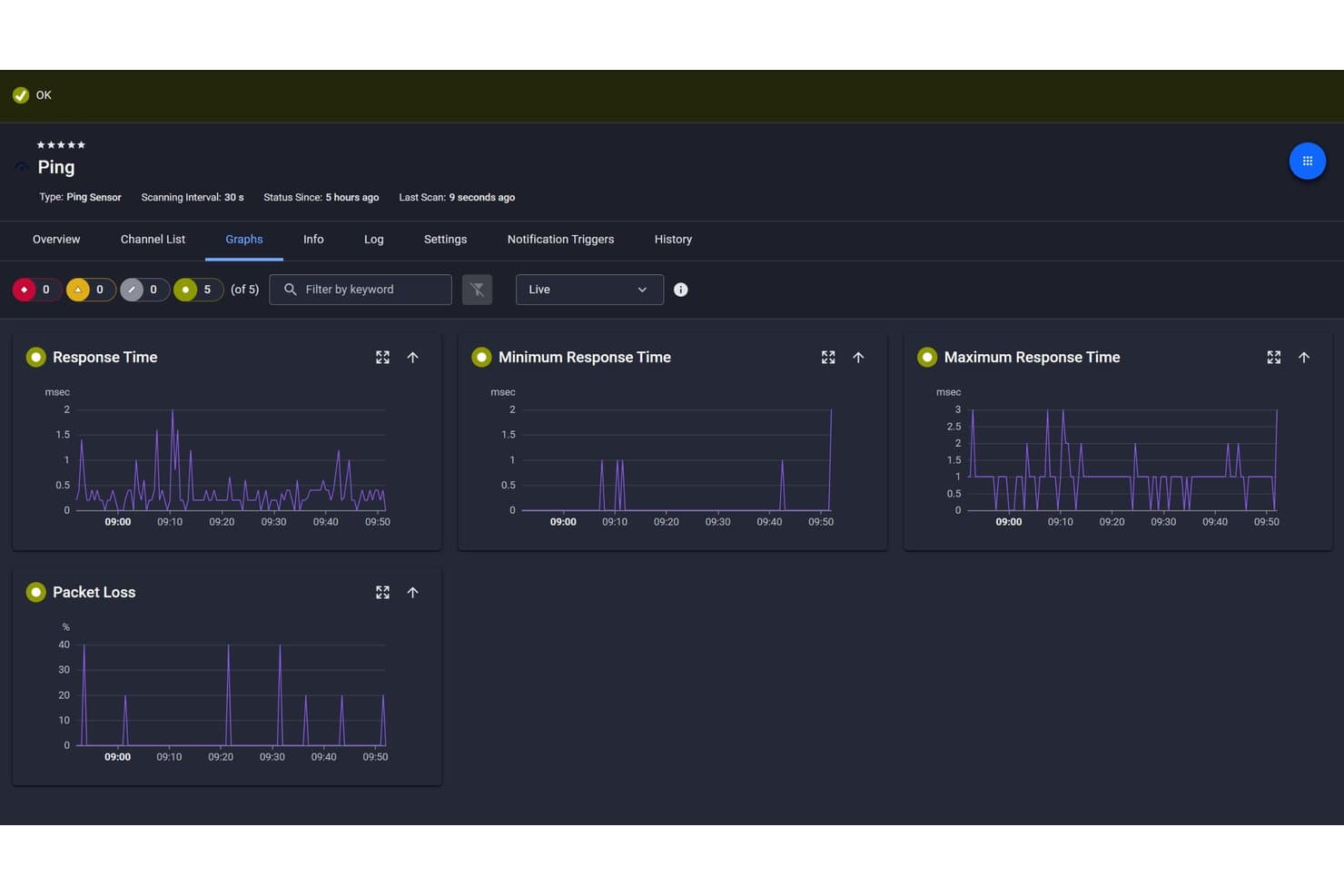
Paessler PRTG ofrece un panel del sensor Ping que muestra gráficos en vivo de tiempo de respuesta, tiempo de respuesta mínimo y máximo, y métricas de pérdida de paquetes. Paessler PRTG es una herramienta de monitorización de red que rastrea el tiempo de actividad de los dispositivos, el uso de ancho de banda, el flujo de tráfico y el rendimiento de aplicaciones en la infraestructura de TI utilizando sensores basados en SNMP, ICMP, NetFlow y REST.
¿Para quién es mejor Paessler PRTG?
Equipos de TI y administradores de red que gestionan infraestructuras empresariales medianas y grandes en entornos de sistemas operativos y hardware mixtos.
Por qué elegí Paessler PRTG
Elegí Paessler PRTG como uno de los mejores porque su despliegue de sondas multiplataforma realmente lo diferencia de las herramientas que todavía requieren Windows en cada capa de la pila de monitorización. Puedo desplegar sondas en Debian, Ubuntu, Red Hat y plataformas ARM, incluyendo Raspberry Pi, lo que significa que no estoy atado a una infraestructura solo Windows. En despliegues de PRTG Hosted Monitor, el entorno puede ser completamente libre de Windows, con TLS 1.3 asegurando toda la comunicación entre sonda y núcleo.
Funciones clave de Paessler PRTG
- Modo de auto-descubrimiento: Escanea segmentos de red definidos para detectar e inventariar automáticamente dispositivos.
- Paneles personalizables: Permite crear paneles activos y personalizables con widgets y estado en tiempo real mediante arrastrar y soltar.
- Canales de alertas y notificaciones: Soporta alertas vía correo electrónico, notificación push, SMS, solicitudes HTTP y Microsoft Teams.
- Informes históricos de rendimiento: Almacena métricas a largo plazo y genera informes para análisis de tendencia y capacidad.
Integraciones de Paessler PRTG
Paessler PRTG ofrece integraciones nativas con AWS, Azure, VMware, Microsoft 365 y Slack. Hay una API disponible para integraciones personalizadas.
¿Qué es gratis?
PRTG ofrece una prueba gratuita de 30 días del producto completo, tras la cual pasa a un modo freeware gratuito limitado a 100 sensores. Ese límite de sensores cubre necesidades básicas de monitorización, pero puede resultar restrictivo para redes grandes con muchos dispositivos e interfaces a monitorear.
Pros and Cons
Pros:
- Soporta más de 250 tipos de sensores de serie
- El modo freeware incluye acceso completo a funciones
- Despliegue de sondas multiplataforma en Linux y ARM
Cons:
- El límite de 100 sensores en el modo freeware restringe entornos grandes
- Se requiere Windows para la instalación del servidor principal
Learn more about Paessler PRTG: Mejor con análisis automatizado de la causa raíz
- Prueba gratuita de 15 días + demostración gratuita disponible
- Desde $7/host/mes
Visit WebsiteCustomer Rating:4.5/5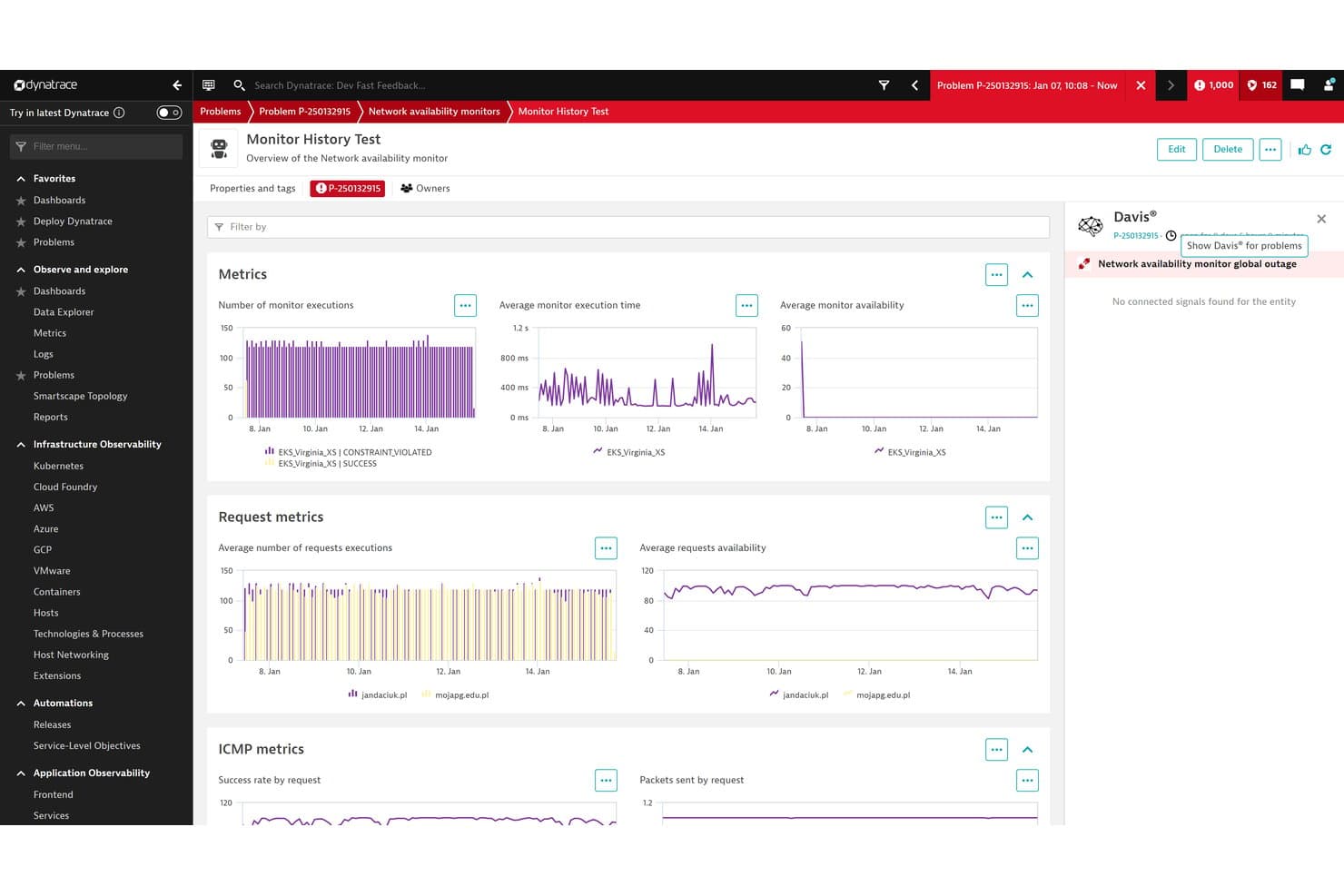
Dynatrace ofrece un panel de Monitor de disponibilidad de red con métricas sobre ejecuciones de supervisión, tiempo de ejecución, disponibilidad y métricas de ICMP en varias ubicaciones. Dynatrace es una plataforma de observabilidad impulsada por IA que combina la supervisión de la infraestructura, la supervisión del rendimiento de las aplicaciones, el análisis de registros y la detección automatizada de anomalías en entornos multinube e híbridos.
¿Para quién es más adecuado Dynatrace?
Dynatrace es una opción especialmente adecuada para equipos empresariales de DevOps y SRE que gestionan entornos distribuidos, multinube o de gran escala, donde identificar rápidamente el origen de los incidentes es una prioridad.
Por qué elegí Dynatrace
Elegí Dynatrace como una de las mejores opciones porque su motor de IA Davis hace algo que la mayoría de las herramientas de supervisión no puede hacer: rastrea automáticamente un incidente hasta una única causa raíz en lugar de inundarte con decenas de alertas correlacionadas. Por ejemplo, cuando falla un conmutador de red, Davis agrupa todos los errores posteriores en una sola tarjeta de problema práctica. También me gusta que OneAgent detecte automáticamente cada host, contenedor y proceso sin configuración manual, para que nunca tengas que buscar a ciegas los puntos no supervisados.
Características principales de Dynatrace
- Mapeo de topología Smartscape: Visualiza en tiempo real las relaciones entre hosts, servicios y aplicaciones.
- Detección automática de OneAgent: Se instala una sola vez para reconocer automáticamente todas las entidades y tecnologías supervisadas en tu entorno.
- Supervisión nativa de la nube: Supervisa cargas de trabajo en AWS, Azure, Google Cloud, Kubernetes e infraestructuras híbridas.
- Análisis de registros en contexto: Conecta los datos de registro con eventos, entidades y sesiones de usuario para solucionar problemas más rápidamente.
Integraciones de Dynatrace
Dynatrace ofrece integraciones nativas con ServiceNow, Jira, Slack, Microsoft Teams, PagerDuty y AWS, además de una API para integraciones personalizadas.
¿Qué es gratis?
Dynatrace ofrece una prueba gratuita de 15 días que proporciona acceso completo a sus capacidades de supervisión e IA sin necesidad de tarjeta de crédito. No existe un plan gratuito permanente, por lo que tendrás que pasar a un nivel de pago cuando finalice el periodo de prueba.
Pros and Cons
Pros:
- Davis AI identifica automáticamente la causa raíz
- Detecta automáticamente todos los hosts y servicios al instante
- Mapas de topología en tiempo real en entornos de nube
Cons:
- No hay un plan gratuito permanente
- Configuración inicial compleja para equipos pequeños
 La mejor opción para monitorización en tiempo real
- Descarga gratuita disponible
- Desde $325/mes (facturado anualmente)
Visit WebsiteCustomer Rating:4.5/5
Zabbix se centra en la observabilidad para la monitorización de TI en tiempo real. Zabbix es una solución de observabilidad de código abierto diseñada para empresas, centrada en la gestión de redes, la supervisión de servidores y la monitorización de aplicaciones. Está dirigida a profesionales de TI y administradores de sistemas que necesitan una herramienta confiable para el monitoreo y análisis en tiempo real.
Por qué elegí Zabbix: Zabbix ofrece una prueba gratuita de su servicio Zabbix Cloud, lo que permite explorar sus capacidades de supervisión en tiempo real sin costos iniciales, mientras que su software local es gratuito y de código abierto. La plataforma ofrece gran flexibilidad para monitorizar diversos entornos, y se puede aprovechar su extensa documentación para configurar y personalizar las necesidades de seguimiento. El foro de la comunidad también es valioso, ya que proporciona recursos para la resolución de problemas y mejoras.
Funciones e integraciones destacadas:
Funciones incluyen monitoreo en tiempo real, lo que te mantiene actualizado sobre el estado de tu red. El sistema de alertas es personalizable, permitiendo a tu equipo establecer disparadores específicos para las notificaciones. Además, Zabbix proporciona herramientas detalladas de generación de informes para analizar y visualizar los datos de rendimiento.
Integraciones incluyen Microsoft Azure, VMware, Docker, Kubernetes, MySQL, PostgreSQL y más.
¿Qué es gratis?
Zabbix ofrece una edición gratuita del software para uso local y una prueba gratuita de su servicio Zabbix Cloud que permite acceso completo a sus funciones.
Pros and Cons
Pros:
- Opciones flexibles de entornos de monitorización
- Información detallada en tiempo real
- Escalable para grandes empresas
Cons:
- Algunas integraciones requieren configuración manual
- Escalar a grandes entornos requiere conocimientos técnicos
 La mejor flexibilidad de código abierto
- Plan gratuito y demo gratis disponible
- Desde $2,595 (licencia perpetua para 100 nodos)
Visit WebsiteCustomer Rating:4.6/5
Nagios proporciona monitoreo, alertas e informes para sistemas de TI. Nagios es una herramienta de monitoreo de infraestructura de código abierto diseñada para profesionales de TI y administradores de sistemas. Ofrece monitoreo, alertas e informes para redes, servidores y aplicaciones, lo que la convierte en una herramienta valiosa para la salud y el rendimiento de la red.
Por qué elegí Nagios: Nagios es una solución gratuita y de código abierto que provee capacidades básicas de monitoreo. Su flexibilidad proviene de una sólida arquitectura de complementos (plugins), permitiendo adaptar el monitoreo a tus necesidades específicas. Con más de 50 complementos oficiales incluidos, tu equipo puede monitorear una amplia gama de componentes de red. El amplio soporte de la comunidad puede ayudarte a ampliar la funcionalidad con recursos adicionales.
Características destacadas e integraciones:
Características incluyen potentes herramientas de configuración que permiten personalizar Nagios para satisfacer tus necesidades de monitoreo específicas. El ecosistema comunitario es beneficioso para ayudarte a solucionar problemas y ampliar las capacidades de Nagios. Los asistentes de monitoreo ofrecen instrucciones paso a paso para facilitar la configuración y gestión de tareas de monitoreo de red por parte de tu equipo.
Integraciones no están listadas públicamente.
¿Qué es gratuito?
Nagios cuenta con un plan gratuito para siempre que ofrece funciones esenciales de monitoreo sin limitaciones de usuario ni de integraciones.
Pros and Cons
Pros:
- Amplio soporte comunitario
- Altamente personalizable con complementos
- Versión gratuita y de código abierto
Cons:
- Informes y analíticas integradas mínimas
- Diseño de interfaz básico
Learn more about Nagios: Ideal para paneles personalizables
- Plan gratuito + prueba gratuita disponible
- Desde $19/mes + uso
Visit WebsiteCustomer Rating:4.6/5
Grafana Cloud ofrece paneles interactivos para monitoreo y análisis de datos. Grafana Cloud es una herramienta de visualización de datos de código abierto utilizada principalmente por profesionales de TI y analistas de datos. Permite a los usuarios crear paneles interactivos y personalizables para monitorear y analizar diversas fuentes de datos.
Por qué elegí Grafana Cloud: Grafana Cloud ofrece un plan gratuito para siempre que permite acceso a 10,000 métricas de Prometheus y 50 GB de registros, trazas y perfiles. Este plan incluye paneles personalizables, permitiéndote adaptar la visualización de datos a tus necesidades. La herramienta también es compatible con más de 20 complementos empresariales de fuentes de datos, brindando flexibilidad en el monitoreo. El enfoque de Grafana en la personalización la convierte en una opción valiosa para usuarios que desean obtener información detallada y personalizada de sus datos.
Funciones e integraciones destacadas:
Funciones incluyen pruebas de rendimiento, que pueden ayudarte a evaluar la eficiencia de tu red. El sistema de alertas es personalizable, lo que permite a tu equipo establecer umbrales específicos para las notificaciones. Grafana Cloud también ofrece herramientas de gestión de incidentes y guardias para optimizar los flujos de respuesta ante problemas de red.
Integraciones incluyen Amazon Web Services, Azure, Cloudflare, CrowdStrike Falcon LogScale (anteriormente Humio) y más.
¿Qué es gratis?
Grafana Cloud ofrece un plan gratuito para siempre con acceso a 10,000 métricas de Prometheus, 50 GB de registros y más de 20 complementos empresariales de fuentes de datos.
Pros and Cons
Pros:
- Paneles altamente personalizables
- Ecosistema de integraciones robusto
- Servidores totalmente gestionados
Cons:
- Control backend limitado
- Funciones principales restringidas por muros de pago
 El mejor panel intuitivo
- Prueba gratuita de 30 días + Edición gratuita disponible
- Precio a consultar
Visit WebsiteCustomer Rating:4.4/5
WhatsUp Gold proporciona monitoreo visual del rendimiento de la red y de los dispositivos. WhatsUp Gold es una solución de monitoreo de redes diseñada para equipos de TI y administradores de redes. Se centra en la visualización del rendimiento de la red, el seguimiento del tráfico y la gestión de los dispositivos de red.
Por qué elegí WhatsUp Gold: WhatsUp Gold ofrece una prueba gratuita con acceso a su panel intuitivo, lo que simplifica la visualización de la red y te permite ver métricas de rendimiento y el estado de los dispositivos en un solo lugar. La herramienta proporciona alertas personalizables para mantener a tu equipo informado de cualquier problema. Su interfaz fácil de usar la hace accesible incluso si tienes conocimientos técnicos limitados.
Características destacadas e integraciones:
Características incluyen un sistema de gestión y archivado de registros que puedes usar para monitorear, filtrar y configurar alertas sobre syslogs. La funcionalidad de mapeo interactivo permite visualizar claramente el diseño de tu red. También puedes generar informes detallados para analizar el rendimiento de la red a lo largo del tiempo con el módulo de Monitoreo de Virtualización.
Integraciones incluyen Salesforce, Microsoft Office 365 y más.
¿Qué es gratis?
WhatsUp Gold ofrece una prueba gratuita por tiempo limitado, permitiendo el acceso completo a sus funciones sin restricciones, pero no es un plan gratuito para siempre.
Pros and Cons
Pros:
- Panel intuitivo y fácil de usar
- Gestión integrada de registros
- Visualización interactiva de la red
Cons:
- Los informes y análisis pueden ser menos detallados
- No apto para redes muy grandes
Learn more about WhatsUp Gold: Ideal para soporte de la comunidad
- Plan gratuito disponible
- Desde $5/asiento/mes (facturado anualmente)
Visit WebsiteCustomer Rating:4.3/5
Spiceworks se centra en la supervisión y gestión de sitios web para equipos de TI. Spiceworks es una herramienta gratuita de supervisión y gestión de redes diseñada para profesionales de TI, más adecuada para pequeñas y medianas empresas. Ofrece funciones esenciales para supervisar el rendimiento de la red, gestionar dispositivos y solucionar problemas de conectividad.
Por qué elegí Spiceworks: Spiceworks ofrece un plan gratuito para siempre, con un énfasis especial en el soporte comunitario mediante foros activos, discusiones y preguntas y respuestas. Incluye funciones como la supervisión en tiempo real y alertas de estado, ayudándote a mantener el control sobre la salud de tu red. La herramienta también proporciona un sistema intuitivo para visualizar datos de red.
Características destacadas e integraciones:
Funciones incluyen información en tiempo real que te ayuda a mantener la red bajo control. El sistema de alertas puede notificarte rápidamente sobre problemas que afecten a cualquiera de tus aplicaciones web. El Panel de Conectividad está integrado con una mesa de ayuda que organiza y rastrea las solicitudes de los usuarios.
Integraciones no se enumeran públicamente.
¿Qué es gratis?
Spiceworks ofrece un plan gratuito para siempre, sin limitaciones en usuarios ni integraciones, con soporte basado en la comunidad.
Pros and Cons
Pros:
- Fuerte soporte de la comunidad TI
- Diseño de panel intuitivo
- Adecuado para pequeñas y medianas empresas
Cons:
- Funciones API y de automatización limitadas
- No es ideal para entornos de TI complejos o de gran escala
Learn more about Spiceworks:

Cacti network ofrece herramientas de graficación para obtener visibilidad clara del rendimiento. Cacti es una herramienta de monitoreo y graficación de redes de código abierto, ideal para administradores de red y profesionales de TI. Se especializa en proporcionar gráficos detallados de métricas de rendimiento de la red, ayudando a los usuarios a visualizar y analizar datos de manera efectiva.
Por qué elegí Cacti: Cacti ofrece una solución gratuita para siempre que se centra en la graficación de datos de red. Con sus plantillas y funciones de automatización, puedes configurar y gestionar gráficos de red de manera eficiente. La herramienta admite la recopilación de datos desde varias fuentes, lo que aporta flexibilidad al monitoreo.
Funciones destacadas e integraciones:
Funciones incluyen un sistema de Dispositivos que se puede utilizar para crear y gestionar gráficos con atributos específicos e información meta. Cacti ofrece múltiples métodos de adquisición de datos, lo que incrementa su flexibilidad. También permite la copia de seguridad de la configuración de routers y cuenta con un programador que puede usarse para crear reglas personalizadas de descubrimiento de red.
Integraciones no se encuentran listadas públicamente.
¿Qué es gratis?
Cacti ofrece un plan gratuito para siempre, sin restricciones en usuarios o integraciones, enfocado en las capacidades de graficación.
Pros and Cons
Pros:
- Capacidades de graficación de alta densidad
- Soporta múltiples fuentes de datos
- Potente sistema de plantillas
Cons:
- La funcionalidad avanzada puede requerir experiencia técnica
- Capacidades limitadas de alerta y notificación
Learn more about Cacti: Ideal para arquitectura extensible
- Consulta gratuita disponible
- Precios bajo consulta

OpenNMS permite el monitoreo de código abierto para redes empresariales. OpenNMS es una plataforma de monitoreo de redes de código abierto dirigida a profesionales de TI y administradores de redes. Ofrece capacidades completas de monitoreo y gestión del rendimiento de redes.
Por qué elegí OpenNMS: OpenNMS está disponible como una solución gratuita y de código abierto que enfatiza la extensibilidad a través de complementos. Puedes personalizar la herramienta para adaptarla a tus necesidades específicas de monitoreo. La plataforma admite una amplia gama de servicios de monitoreo, desde métricas de rendimiento hasta gestión de eventos. Su naturaleza de código abierto permite que tu equipo contribuya y expanda sus capacidades.
Características destacadas e integraciones:
Características incluyen gestión avanzada de eventos, lo que ayuda a tu equipo a rastrear y responder a incidentes de red. La plataforma proporciona monitoreo detallado del rendimiento, ofreciendo información sobre la salud de la red. OpenNMS también ofrece una arquitectura flexible, lo que te permite adaptar el sistema a tus requisitos específicos.
Integraciones incluyen Slack, Mattermost, Jira, Grafana, Remedy y más.
¿Qué es gratis?
OpenNMS ofrece un plan gratuito para siempre llamado Horizon sin restricciones en el número de usuarios o integraciones, enfocándose en la extensibilidad y personalización.
Pros and Cons
Pros:
- Altamente extensible mediante complementos
- Integración con sistemas de tickets
- Arquitectura flexible basada en eventos
Cons:
- Alto costo para soporte empresarial
- Algunas integraciones pueden requerir configuración manual
Learn more about OpenNMS: Ideal para integración en Windows
- Plan gratuito disponible
- Precios bajo solicitud

Wi-Fi Network Monitor permite vistas en tiempo real del tráfico de red de Windows. Wi-Fi Network Monitor es una aplicación para Windows diseñada para ayudarte a vigilar tus dispositivos y el tráfico de red en tiempo real. Ofrece a tu equipo una forma sencilla de ver cómo se mueve la información a través de tu red, para que puedas detectar problemas desde el principio.
Por qué elegí Wi-Fi Network Monitor: Se puede instalar directamente desde Microsoft Store, por lo que se integra de manera natural en tu entorno de Windows existente. Tú y tu equipo podéis utilizarla en un entorno familiar de Windows en lugar de aprender el diseño de otra herramienta.
Características destacadas e integraciones:
Funciones incluyen vistas en tiempo real de descarga, subida y uso de ancho de banda, para que puedas ver cómo cambia la conexión con el tiempo. Puedes rastrear qué dispositivos están en tu red y cuánto tráfico están enviando o recibiendo, facilitando a ti y a tu equipo notar actividad inusual o uso elevado sin tener que navegar por los diferentes menús del sistema de Windows.
Integraciones no están listadas públicamente.
¿Qué es gratis?
Es una aplicación gratuita para siempre, sin niveles de pago, y todas las funciones listadas en Microsoft Store están incluidas sin coste alguno.
Pros and Cons
Pros:
- Se integra con tu flujo de trabajo actual de Windows
- Bajo impacto en el sistema
- Buena opción para redes pequeñas
Cons:
- Plataforma solo para Windows
- Funciones analíticas limitadas
Learn more about Wi-Fi Network Monitor:
Otras herramientas gratuitas de monitorización de redes
Aquí tienes algunas herramientas adicionales de monitorización de redes que también ofrecen planes gratuitos o periodos de prueba. Aunque estas herramientas no se incluyeron en mi lista, merece la pena echarles un vistazo:
- 11IcingaLa mejor para una arquitectura modular
- 12NetdataIdeal para la resolución de problemas asistida por IA
- 13MikroTik (The Dude)Ideal para herramientas de pruebas
- 14NtopIdeal para el análisis de tráfico
Cómo evalúo las herramientas gratuitas de monitoreo de red
Analizo cada herramienta desde dos perspectivas: si cubre lo básico—sondeo SNMP, alertas por umbral y visibilidad del ancho de banda—y qué la diferencia para los equipos que gestionan redes de producción reales.
Funcionalidad principal (requisitos básicos para esta lista)
Al seleccionar herramientas para mi lista, califico cada una en una escala de 0 (no ofrece la funcionalidad) a 5 (destaca en esta área) para cada funcionalidad principal listada a continuación. Luego, calculo el puntaje total de la herramienta como un porcentaje. Cada herramienta debe lograr un puntaje total mínimo del 65% para ser considerada.
- Monitoreo de dispositivos y tiempo de actividad: Verifico si una herramienta puede sondear routers, switches, firewalls y servidores mediante SNMP, ICMP o WMI, y si realiza descubrimiento automático de dispositivos en una subred.
- Análisis de ancho de banda y tráfico: Las herramientas deben mostrar el rendimiento por interfaz y, idealmente, desglose basado en flujo (NetFlow, sFlow) para que puedas identificar qué aplicación está saturando un enlace WAN.
- Alertas y notificaciones: Evalúo la configuración de umbrales y los canales de entrega—correo electrónico como mínimo, pero la integración con webhook o Slack es importante para equipos que realizan guardias.
- Mapeo de topología de red: Una buena vista de mapa te permite ver dependencias ascendentes de un vistazo, como rastrear un switch de acceso con fallas hasta su capa de distribución durante una caída.
- Disponibilidad de la versión gratuita: Reviso si la versión gratuita es realmente utilizable—herramientas de código abierto como Zabbix y Nagios Core ofrecen acceso total, mientras que proveedores como PRTG y Datadog limitan sensores o hosts.
- Datos históricos e informes: La profundidad de retención es relevante cuando necesitas comparar el pico de uso de este mes con el del mismo periodo del año anterior para planificación de capacidad o solicitudes presupuestarias.
Cuando tengo una lista de herramientas que cumplen con este criterio, considero qué diferencia a cada plataforma.
Factores diferenciadores (qué distingue a los proveedores)
Así es como comparo y contrasto diferentes proveedores:
Características destacadas
El monitoreo distribuido es importante cuando gestionas sucursales u oficinas remotas—herramientas como Zabbix y Checkmk admiten sondas remotas que informan a un servidor central. También evalúo la cobertura de nube y virtualización, ya que la mayoría de las redes ahora abarcan AWS, Azure o VMware junto con equipos físicos. Un ecosistema robusto de complementos es otro diferenciador. Nagios y Zabbix se benefician de plantillas y extensiones desarrolladas por la comunidad, que permiten monitorear hardware especializado sin tener que crear scripts desde cero.
Más allá de las características
El modelo de despliegue es uno de los primeros aspectos que evalúo—si una herramienta se ejecuta localmente, en la nube o ambos, influye en cómo se integra en tus políticas de seguridad e infraestructura. También reviso la profundidad de integración con plataformas ITSM e incidentes como ServiceNow, Jira o PagerDuty, ya que una herramienta de monitoreo que no se integra a tu flujo de tickets genera trabajo manual adicional. El soporte de la comunidad y la calidad de la documentación son especialmente importantes en herramientas gratuitas, donde el soporte del proveedor suele ser limitado o inexistente.
Cómo elegir una herramienta gratuita de monitorización de redes
Las listas complejas de funciones y las estructuras de precios pueden dificultar saber qué obtienes realmente de una herramienta gratuita de monitorización de redes. Para ayudarte a mantener la atención mientras avanzas en el proceso de selección del software, estos son algunos factores que debes tener en cuenta:
| Factor | Qué debes tener en cuenta |
|---|---|
| FactorAlcance de la oferta gratuita | Qué debes tener en cuentaComprueba qué incluye el plan gratuito. ¿Cubre funciones esenciales como la monitorización y las alertas o están bloqueadas tras un muro de pago? |
| FactorEscalabilidad | Qué debes tener en cuentaConsidera si la herramienta puede crecer junto con tu equipo. ¿Puede gestionar un aumento del tamaño y la complejidad de la red a medida que crece tu empresa? |
| FactorIntegraciones | Qué debes tener en cuentaVerifica que la herramienta se integre con tus sistemas actuales. Busca compatibilidad con plataformas como AWS, Microsoft Azure y VMware. |
| FactorFacilidad de uso | Qué debes tener en cuentaEvalúa la interfaz de usuario. ¿Es intuitiva? ¿Tu equipo necesitará una formación exhaustiva o podrá empezar a utilizarla de inmediato? |
| FactorPersonalización | Qué debes tener en cuentaBusca opciones para adaptar la herramienta a tus necesidades. ¿Puedes personalizar los paneles y los informes para centrarte en los datos que más te importan? |
| FactorAsistencia | Qué debes tener en cuentaComprueba si existe una asistencia adecuada. ¿Hay un foro de la comunidad, un chat en directo o un centro de ayuda para ofrecer asistencia cuando surjan problemas? |
| FactorMétricas de rendimiento | Qué debes tener en cuentaEvalúa los tipos de métricas que registra la herramienta. ¿Monitoriza eficazmente el ancho de banda, el estado de los dispositivos y los datos en tiempo real? |
| FactorFunciones de seguridad | Qué debes tener en cuentaInvestiga las medidas de seguridad disponibles. ¿La herramienta ofrece cifrado de datos y cumplimiento de normativas como el GDPR? |
¿Qué son las herramientas gratuitas de monitorización de redes?
Las herramientas de supervisión de redes son soluciones de software que ayudan a realizar un seguimiento y analizar el rendimiento y el estado de la red. Las opciones gratuitas suelen incluir supervisión básica, alertas y visualización de datos limitada. Los profesionales de TI y los administradores de redes utilizan habitualmente estas herramientas para mejorar la eficiencia y el tiempo de actividad de la red. Funciones como la supervisión en tiempo real, las alertas personalizables y las opciones de integración ayudan a mantener el rendimiento de la red, respaldar la escalabilidad y mejorar la experiencia del usuario.
Características
Repasemos las características que suelen encontrarse en el software de supervisión de redes y cuáles suelen incluirse en los planes gratuitos frente a los de pago.
Características habituales de las herramientas gratuitas de supervisión de redes
- Supervisión en tiempo real: realiza un seguimiento continuo del rendimiento de la red para identificar problemas cuando se producen.
- Alertas personalizables: envía notificaciones sobre eventos de red específicos, lo que ayuda a responder rápidamente.
- Informes básicos: proporciona informes sencillos sobre el estado de la red y las métricas de rendimiento.
- Detección de dispositivos: identifica automáticamente los dispositivos de la red para facilitar su gestión.
- Visualización en el panel: muestra los datos de la red en un formato accesible para obtener información rápidamente.
- Asistencia de la comunidad: ofrece acceso a foros de usuarios y recursos de la comunidad para resolver problemas.
- Integraciones limitadas: permite conexiones básicas con otros programas o plataformas.
- Funciones de seguridad básicas: incluye medidas de seguridad fundamentales para proteger los datos de la red.
Características habituales de las herramientas de pago de supervisión de redes
- Analítica avanzada: ofrece un análisis exhaustivo del rendimiento y las tendencias de la red para tomar mejores decisiones.
- Escalabilidad: admite redes más grandes y entornos más complejos a medida que crece la organización.
- Protocolos de seguridad mejorados: proporciona funciones de seguridad avanzadas que van más allá de la protección básica para los datos confidenciales.
- Informes completos: ofrece informes detallados y personalizables para satisfacer necesidades empresariales específicas.
- Suite completa de integraciones: permite la integración con una amplia variedad de aplicaciones de terceros.
- Reparación automatizada: resuelve automáticamente determinados problemas de red sin intervención manual.
- Asistencia al cliente 24/7: proporciona acceso a equipos de asistencia especializados para recibir ayuda inmediata.
- Herramientas de optimización del rendimiento: incluye funciones para mejorar la eficiencia y la velocidad de la red.
Ventajas
Implementar herramientas gratuitas de supervisión de redes ofrece varias ventajas para tu equipo y tu empresa. Estas son algunas de las que puedes esperar:
- Ahorro de costes: utilizar herramientas gratuitas permite supervisar la red sin gastos adicionales.
- Detección rápida de problemas: la supervisión en tiempo real ayuda a identificar inmediatamente los problemas de red, reduciendo el tiempo de inactividad.
- Tiempo de respuesta más rápido: las alertas personalizables notifican rápidamente a tu equipo los problemas, lo que permite resolverlos antes.
- Mayor visibilidad: la visualización en el panel ofrece una visión clara del rendimiento de la red y facilita la toma de decisiones fundamentadas.
- Recursos de la comunidad: el acceso a foros de asistencia y comunidades de usuarios proporciona información valiosa y ayuda para resolver problemas.
- Configuración sencilla: las funciones básicas y las interfaces intuitivas facilitan comenzar a supervisar la red.
- Potencial de escalabilidad: algunas herramientas gratuitas ofrecen opciones para ampliar su capacidad a medida que crece la red, proporcionando valor a largo plazo.
Costes y precios
Entiendo que has llegado a este artículo buscando las mejores opciones de herramientas de supervisión de redes disponibles de forma gratuita. Sin embargo, como los planes gratuitos solo ofrecen funciones limitadas, es muy probable que en el futuro necesites ampliar tu plan.
La tabla siguiente resume los planes habituales, sus precios medios y las funciones que suelen incluir las soluciones de herramientas de supervisión de redes:
Tabla comparativa de planes de herramientas de supervisión de redes
| Tipo de plan | Precio medio | Características habituales |
|---|---|---|
| Tipo de planPlan gratuito | Precio medio$0 | Características habitualesSupervisión básica, alertas personalizables y asistencia de la comunidad. |
| Tipo de planPlan personal | Precio medio$5-$25/usuario/mes | Características habitualesSupervisión avanzada, generación de informes e integraciones limitadas. |
| Tipo de planPlan empresarial | Precio medio$25-$75/usuario/mes | Características habitualesSuite completa de integraciones, mayor seguridad y análisis detallados. |
| Tipo de planPlan para empresas | Precio medio$75-$150/usuario/mes | Características habitualesEscalabilidad para redes grandes, asistencia al cliente 24/7 y herramientas de optimización del rendimiento. |
Preguntas frecuentes sobre herramientas gratuitas de supervisión de redes
Estas son algunas respuestas a preguntas habituales sobre las herramientas gratuitas de supervisión de redes:
¿Puedo utilizar varias herramientas gratuitas de supervisión de redes conjuntamente?
Sí, puedes combinar varias herramientas gratuitas en una misma pila. Muchos equipos utilizan un monitor de código abierto para las alertas, una herramienta de panel independiente y los paneles de los proveedores para los servicios en la nube. Solo tienes que evitar las duplicidades, documentar quién es responsable de cada herramienta, centralizar las alertas y notificaciones, y revisar todo con regularidad para detectar puntos ciegos y alertas ruidosas.
¿Cuándo debería pasar de un plan gratuito a una herramienta de pago para la supervisión de redes?
Plantéate actualizar el plan cuando tu equipo dedique más tiempo a luchar contra las limitaciones de la herramienta que a resolver incidentes. Entre las señales de advertencia se incluyen retrasos frecuentes en las alertas, métricas limitadas, ausencia de datos históricos y dificultades para incorporar nuevos servicios. Compara el coste del tiempo de inactividad y del trabajo de los ingenieros con el precio de la suscripción para justificar el cambio a niveles de precio superiores.
¿Son suficientemente seguras las herramientas gratuitas y de código abierto de supervisión de redes para los sectores regulados?
Las herramientas gratuitas y de código abierto pueden ser seguras, pero debes encargarte de su bastionado. Mantén los sistemas operativos actualizados, activa el cifrado siempre que sea posible, restringe el acceso mediante identidades sólidas y separa las redes de supervisión del tráfico de producción. En entornos regulados, valida los requisitos de residencia de datos, registro y conservación antes de enviar información sensible a las plataformas de supervisión.
¿Las herramientas gratuitas de supervisión de redes ralentizarán mis sistemas?
La supervisión siempre añade cierta carga, pero puedes mantenerla bajo control. Empieza con comprobaciones ligeras, ajusta los intervalos de recopilación y evita recopilar todas las métricas de forma predeterminada. Coloca los recopiladores cerca de los sistemas supervisados, controla el crecimiento de la CPU, la memoria y el almacenamiento, y elimina periódicamente las métricas y los paneles que no utilices para que el rendimiento a largo plazo siga siendo predecible y estable.
¿Con qué frecuencia debería revisar o ajustar mi configuración de supervisión gratuita?
Revisa tu configuración de supervisión con regularidad, no solo después de sufrir interrupciones. Un buen ritmo consiste en realizar una comprobación ligera mensual y una revisión trimestral más exhaustiva. Confirma que las alertas críticas siguen activándose correctamente, retira las comprobaciones que no utilices, adapta los paneles a las prioridades actuales y registra las lecciones aprendidas de los incidentes para que el sistema de supervisión siga reflejando la realidad cambiante de producción.