

Top 10 IT-Benachrichtigungssoftware 2026

10 Beste IT-Alarming-Software Übersicht


Bei IT-Problemen auf dem Laufenden zu bleiben, kann für jedes Team eine Herausforderung sein. Sie müssen über Störungen Bescheid wissen, sobald sie auftreten, um einen reibungslosen Betrieb sicherzustellen. Genau hier setzt IT-Alarming-Software an – sie hilft Ihnen, Probleme frühzeitig zu erkennen, sodass Ihr Team schnell und effektiv reagieren kann.
Meiner Erfahrung nach kann die richtige Software einen großen Unterschied im Arbeitsablauf machen. Ich habe verschiedene Optionen unabhängig getestet und bewertet, um Ihnen meine Top-Empfehlungen zu präsentieren. Sie können sich auf objektive Einblicke in deren Funktionen und Vorteile verlassen.
Im Folgenden finden Sie ausführliche Analysen zu jeder Lösung, die Ihnen helfen, die passende für Ihre Bedürfnisse zu finden. Die Effizienz und Gelassenheit Ihres Teams sind nur wenige Schritte entfernt.
Warum Sie unseren Software-Empfehlungen vertrauen können
Unser Team testet und bewertet Software seit 2012. Als Tech-Führungskräfte wissen wir selbst, wie schwierig – und wichtig – es ist, die richtige Software auszuwählen.
Für diesen Leitfaden haben wir Tools mithilfe von praktischen Tests und unabhängiger Recherche bewertet und dabei unsere Bewertungskriterien angewendet.
Unsere Bewertungen spiegeln unser menschliches redaktionelles Urteilsvermögen wider, keine Verkaufsstrategie.
Expertenprüfer:
Zusammenfassung: Beste IT-Alarming-Software
Diese Vergleichstabelle fasst die Preisinformationen meiner besten IT-Alarming-Software-Empfehlungen zusammen, um Ihnen bei der Auswahl der passenden Lösung für Ihr Budget und Unternehmen zu helfen.
| Tool | Best For | Trial Info | Price | ||
|---|---|---|---|---|---|
| 1 | Am besten für Multi-Channel-Notfallkommunikation | Kostenlose Demo verfügbar | Preise auf Anfrage | Website | |
| 2 | Am besten für Echtzeitüberwachung und Analysen geeignet | 14-tägige kostenlose Testphase + kostenloser Tarif verfügbar | Ab $15/Benutzer/Monat (jährliche Abrechnung) | Website | |
| 3 | Am besten geeignet für KI-gestützte automatische Triage von Benachrichtigungen | 14-tägige kostenlose Testversion verfügbar | Ab $19/Nutzer/Monat (jährlich abgerechnet) | Website | |
| 4 | Am besten geeignet für die erweiterte Schwellenwertprofil-Überwachung | 30-tägige kostenlose Testphase + kostenlose Demo verfügbar | Ab $149/Techniker/Monat (jährlich abgerechnet) | Website | |
| 5 | Am besten für flexible Benachrichtigungsoptionen geeignet | Kostenloser Plan + 30-tägige kostenlose Testphase verfügbar | Ab $20/Benutzer/Monat (jährliche Abrechnung) | Website | |
| 6 | Am besten für Patch-Management | 14-tägige kostenlose Testversion | Ab $89/Nutzer/Monat (jährliche Abrechnung) | Website | |
| 7 | Am besten für Bedrohungsintelligenz-Benachrichtigungen | Kostenlose Demo verfügbar | Preise auf Anfrage | Website | |
| 8 | Am besten geeignet zum Konfigurieren intelligenter Warnregeln | Kostenlose Demo verfügbar | Preise auf Anfrage | Website | |
| 9 | Am besten geeignet für Diagnosen auf Code-Ebene | Kostenlose Demo verfügbar | Ab $245/25 Geräte | Website | |
| 10 | Am besten geeignet für Multi-Channel-Benachrichtigungen mit Fokus auf Verfügbarkeit | Kostenloser Plan + kostenlose Demo verfügbar | Ab $8/10 Monitore/Monat (jährliche Abrechnung) | Website |


Bewertungen der besten IT-Alarming-Software
Im Folgenden finden Sie meine ausführlichen Zusammenfassungen der besten IT-Alarming-Software, die es auf meine Auswahlliste geschafft haben. Meine Bewertungen bieten einen detaillierten Blick auf die wichtigsten Funktionen, Vorteile & Nachteile, Integrationen und idealen Anwendungsfälle jeder Lösung, damit Sie die passende für sich finden.

Preparis
Am besten für Multi-Channel-Notfallkommunikation
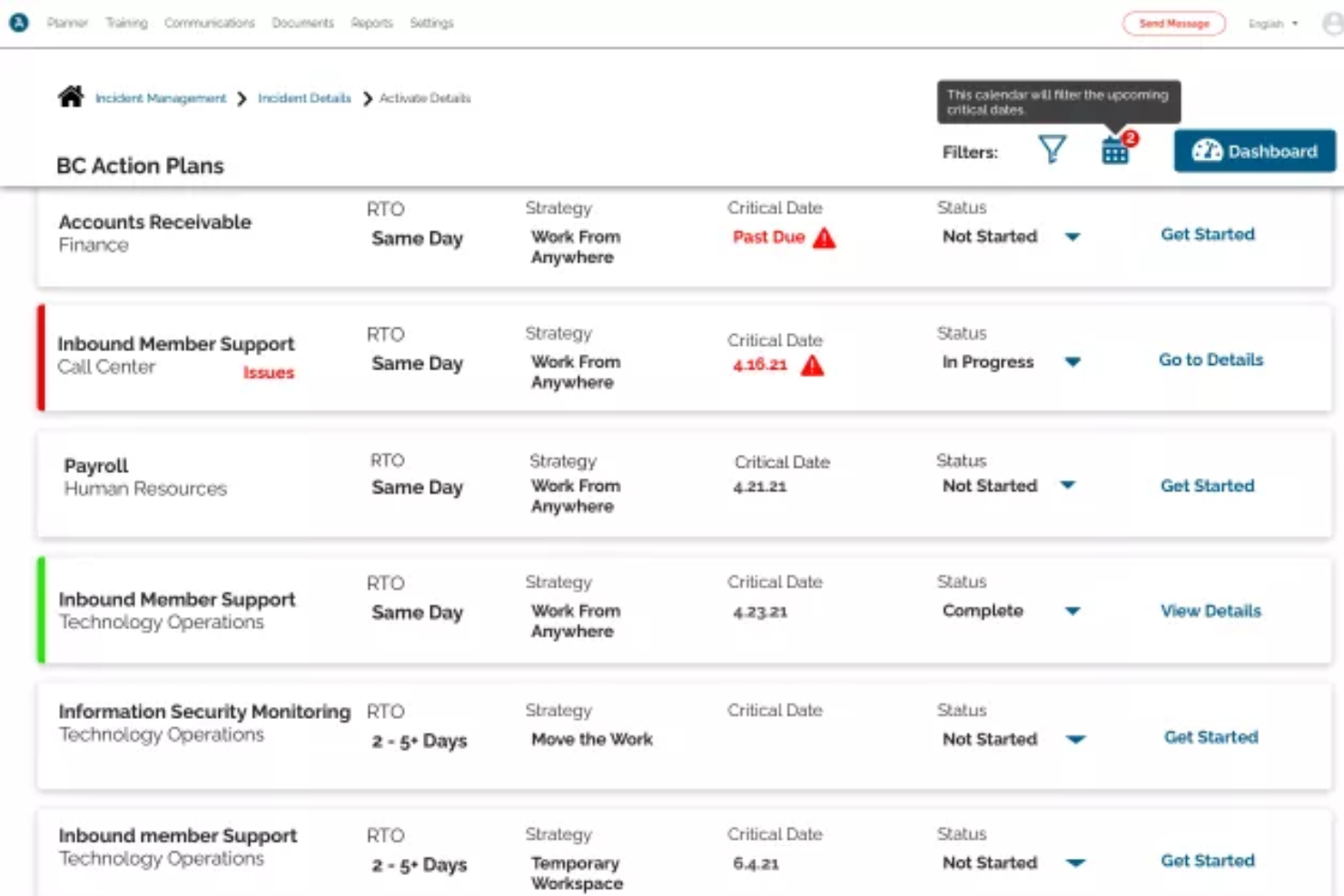
Preparis ist eine umfassende Business-Continuity-Software, die Unternehmen dabei unterstützt, Notfälle zu managen und sich darauf vorzubereiten. Die Plattform bietet eine Palette an Tools, darunter Risikobewertung, Vorfallmanagement und Notfallbenachrichtigungssysteme – alles darauf ausgerichtet, die organisatorische Resilienz zu stärken.
Warum ich Preparis gewählt habe: Ich habe mich für Preparis aufgrund seiner Multi-Channel-Kommunikationsfähigkeiten entschieden, da Warnmeldungen über verschiedene Kanäle wie SMS, E-Mail und Push-Benachrichtigungen zugestellt werden können. Diese Vielseitigkeit stellt sicher, dass wichtige Informationen Ihre Stakeholder schnell und zuverlässig erreichen, unabhängig vom bevorzugten Kommunikationskanal. So wird die Reaktionsfähigkeit und Effizienz Ihres Unternehmens bei IT-Notfällen verbessert. Darüber hinaus unterstützt die Software bidirektionale Kommunikation, was ein Echtzeit-Tracking und eine unmittelbare Reaktion ermöglicht.
Hervorstechende Funktionen & Integrationen:
Neben dem Benachrichtigungssystem ermöglicht Preparis das Erstellen anpassbarer IT-Notfallwiederherstellungspläne, die zentral gespeichert werden können. Die Plattform bietet außerdem einen Incident Manager, mit dem Sie IT-Vorfälle verfolgen, zuweisen und lösen können. Zu den Integrationen gehören Systeme wie ADP und Okta.
Pros and Cons
Pros:
- Effizientes Dokumentenmanagement für Vorfallberichte, Pläne und Audits
- Echtzeit-Benachrichtigungssystem über mehrere Kanäle
- Skalierbar für Organisationen jeder Größe
Cons:
- Begrenzte Integrationen
- Könnte speziell für IT-Probleme eine robustere Vorfallerkennung bieten
Datadog
Am besten für Echtzeitüberwachung und Analysen geeignet
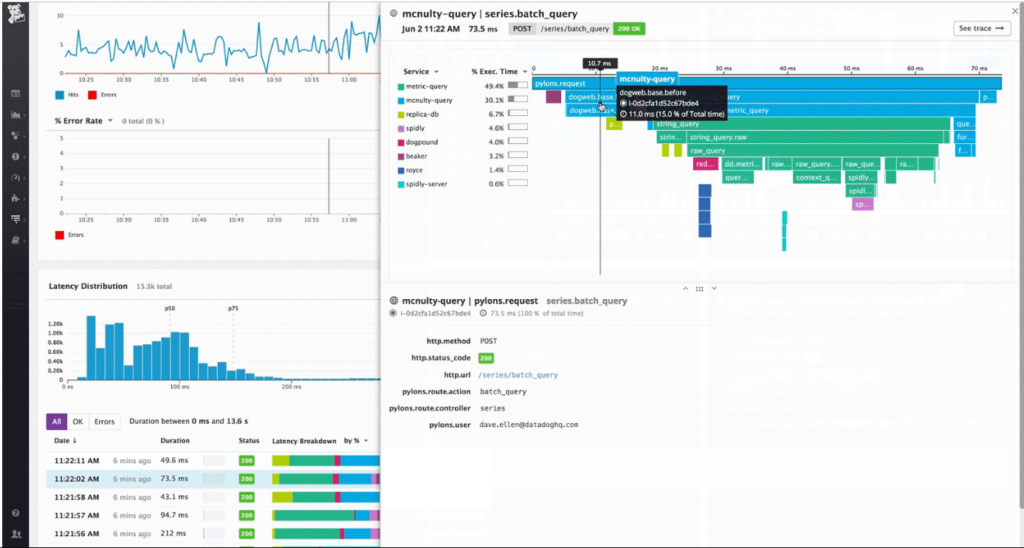
Datadog ist eine umfassende Cloud-Überwachungsplattform, die Einblicke in die Anwendungsleistung, den Zustand der Infrastruktur und das Log-Management bietet. Mit seiner leistungsstarken Suite an Analysewerkzeugen ermöglicht es Unternehmen, auf Basis von Echtzeitdaten fundierte Entscheidungen zu treffen und rechtfertigt damit seine Position als beste Lösung für Echtzeit-Monitoring und Analysen.
Warum ich Datadog ausgewählt habe: Bei der Auswahl der Tools für dieses Portfolio stach Datadog in seiner Domäne immer wieder als führend hervor. Ich habe seine Fähigkeiten sowohl anhand der breiten Akzeptanz in der Branche als auch hinsichtlich seiner Vielzahl von Monitoring- und Analysefunktionen bewertet.
Meiner Meinung nach nimmt Datadog, wenn es um Echtzeitüberwachung in Verbindung mit leistungsstarken Analysen geht, eine einzigartige Stellung am Markt ein.
Herausragende Funktionen & Integrationen:
Die Plattform von Datadog überzeugt besonders durch das Application Performance Monitoring, das tiefgehende Einblicke in Anwendungsprobleme und Nutzererfahrungen gewährt. Zudem ermöglicht das Log-Management eine effiziente Fehlerbehebung. In puncto Integrationen synchronisiert sich Datadog mit über 400 beliebten Technologien wie AWS, Docker und Slack und ist somit ein vielseitiges Werkzeug in unterschiedlichen technischen Umgebungen.
Pros and Cons
Pros:
- Umfassende Einblicke in die Anwendungsleistung
- Effizientes Log-Management unterstützt schnellere Problemlösungen
- Eine breite Palette an Integrationen passt zu verschiedenen Technologie-Stacks
Cons:
- Die Preisgestaltung kann bei großen Teams teuer werden
- Die Ersteinrichtung kann eine gewisse Einarbeitungszeit erfordern
- Eigene Metriken können die Kosten beeinflussen

Am besten geeignet für KI-gestützte automatische Triage von Benachrichtigungen
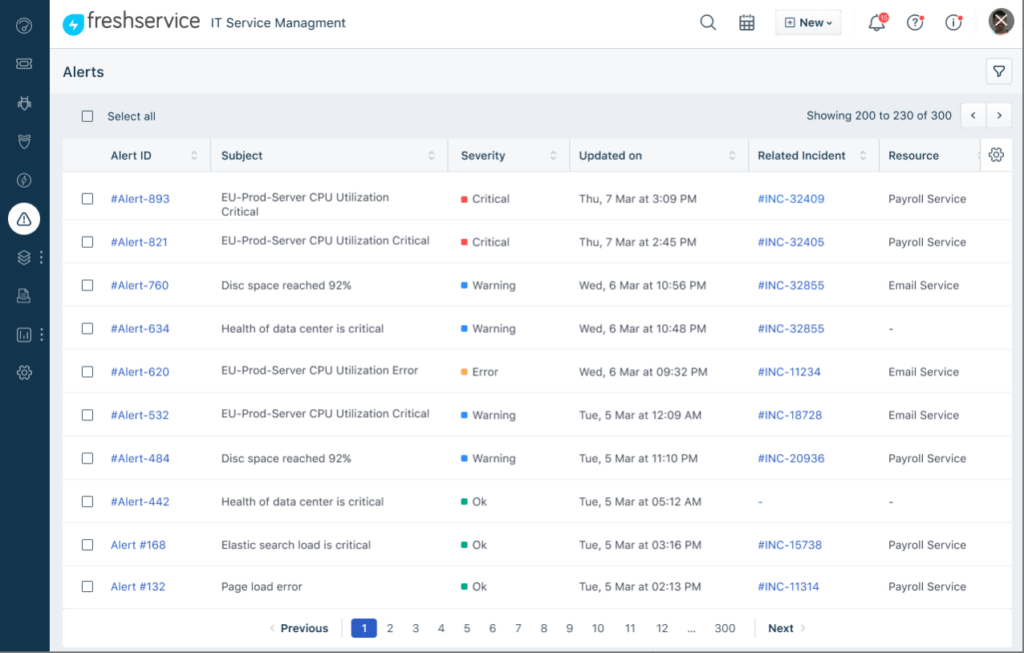
Freshservice ist eine cloudbasierte IT-Service-Management (ITSM)-Plattform, die über Alarming-Funktionen für IT-Teams verfügt. Sie hilft Ihnen, Vorfälle zu verwalten, Workflows zu automatisieren und Benachrichtigungen mit Service-Desk-Prozessen zu verbinden. Die KI-gestützten Funktionen ermöglichen eine schnellere Klassifikation und Weiterleitung von Benachrichtigungen.
Warum ich Freshservice ausgewählt habe: Ich habe Freshservice wegen der KI-gestützten Benachrichtigungsfunktion mit integrierter automatischer Triage ausgewählt. Es verwendet maschinelles Lernen zur Kategorisierung von Benachrichtigungen, reduziert Störungen und leitet Vorfälle automatisch an die entsprechenden Service-Desk-Queues weiter. Das ermöglicht IT-Teams eine schnellere Reaktion und gleichzeitig die Einhaltung strukturierter Ticket-Workflows innerhalb desselben Systems.
Hervorstechende Funktionen & Integrationen:
Freshservice ist nicht nur ein ITSM-Tool, sondern bietet auch Asset-Management und robuste Ticketing-Lösungen. Die Funktionen sind speziell darauf ausgerichtet, damit IT-Abteilungen effizient arbeiten können.
Freshservice bietet native Integrationen mit Slack, Jira, Microsoft Teams und weiteren Kollaborations- sowie Entwicklungstools.
Pros and Cons
Pros:
- Umfassende ITSM-Lösung mit zusätzlichen Funktionalitäten
- Vielseitige Integrationsmöglichkeiten mit gängigen Plattformen
- Benutzerfreundliche Oberfläche, die komplexe Aufgaben vereinfacht
Cons:
- Jährliche Abrechnung könnte für manche Nutzer abschreckend sein
- Einarbeitungszeit für Anwender ohne ITSM-Erfahrung
- Einige erweiterte Funktionen sind nur in höheren Tarifen verfügbar
New Product Updates from Freshservice
 Experience)
Freshservice Introduces a Reimagined IT Asset Management (ITAM) Experience
Freshservice introduces a reimagined IT Asset Management (ITAM) experience with continuous infrastructure discovery, dependency mapping, IPAM, and Software License Management. This update helps teams improve asset visibility and manage connected IT environments more effectively. For more information, visit Freshservice’s official site.

Atera
Am besten geeignet für die erweiterte Schwellenwertprofil-Überwachung
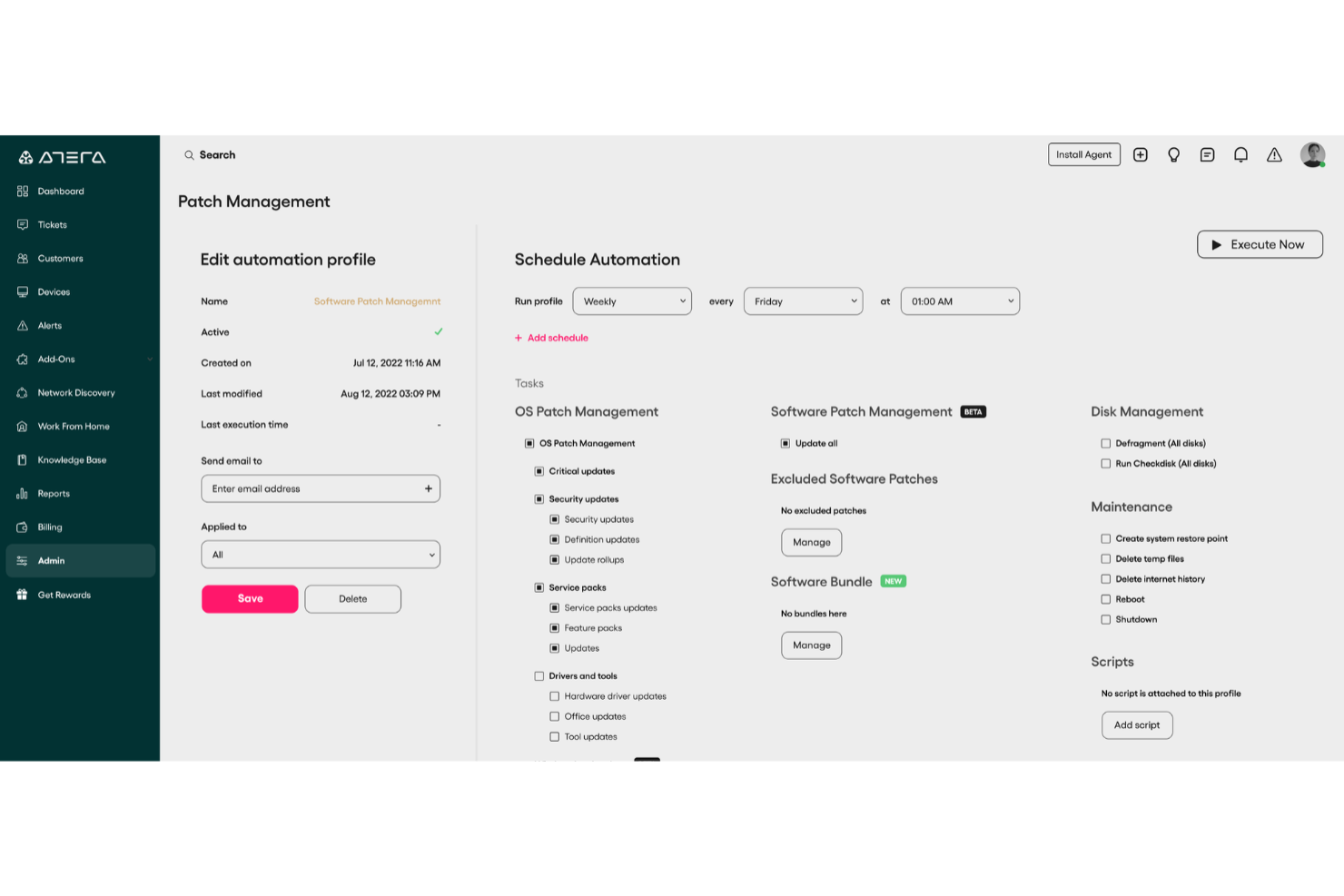
Atera ist eine All-in-One-Lösung für Remote Monitoring und Management (RMM), die IT-Fachleute dabei unterstützt, ihre IT-Umgebungen proaktiv zu überwachen, potenzielle Probleme zu erkennen und zu beheben, bevor sie zu kritischen Störungen führen.
Warum ich Atera ausgewählt habe:
Es bietet Echtzeit-Überwachungsfunktionen, die Ihr Team über potenzielle IT-Probleme durch individuell anpassbare Benachrichtigungen informieren, die speziell auf Ihre Infrastruktur abgestimmt sind. Durch die Überwachung von wichtigen Leistungskennzahlen wie CPU-Auslastung, Festplattennutzung und Netzwerkaktivität stellt Atera sicher, dass Ihr Team potenzielle Probleme proaktiv angehen kann, bevor Endnutzer betroffen sind. Zusätzlich ermöglicht die Funktion für „Auto-Healing“-Skripte die automatische Behebung von Problemen, wie das Neustarten von Maschinen oder Diensten, sobald Schwellenwerte überschritten werden. Das reduziert den manuellen Arbeitsaufwand und steigert die Effizienz.
Hervorstechende Funktionen & Integrationen:
Weitere Funktionen umfassen die erweiterte Schwellenwertprofil-Überwachung, die Metriken wie Systemressourcen, aktive Festplattenzeiten, Windows-Prozesse, SNMP-fähige Geräte und Benutzeranmeldungen überwacht, um Ihnen einen umfassenden Überblick über Ihre IT-Umgebung zu geben. Die Lösung unterstützt zudem die Überwachung von Active Directory, SQL Server, Exchange, VMware, Hyper-V und DNS-Diensten. Zu den Integrationen gehören unter anderem Microsoft Active Directory, Exchange und VMware, wodurch eine Kompatibilität mit weit verbreiteten IT-Infrastruktur-Komponenten sichergestellt wird.
Pros and Cons
Pros:
- Zentralisiert Ticketing, RMM, PSA und Asset-Management
- Proaktive Problemerkennung und Automatisierungsoptionen
- Detaillierte Berichte und kundenorientierte Dashboards
Cons:
- Einarbeitungszeit für neue Benutzer aufgrund des Funktionsumfangs
- Einige Einschränkungen bei PSA- und Abrechnungsfunktionen
New Product Updates from Atera

Atera Adds Webhook Triggers for Technician Assignment Changes
Atera ticket automation rules now support a webhook trigger when a ticket’s technician assignment changes, expanding automation beyond creation, status updates, and closure/resolution events. For more information, visit Atera's official site.

Checkmk
Am besten für flexible Benachrichtigungsoptionen geeignet
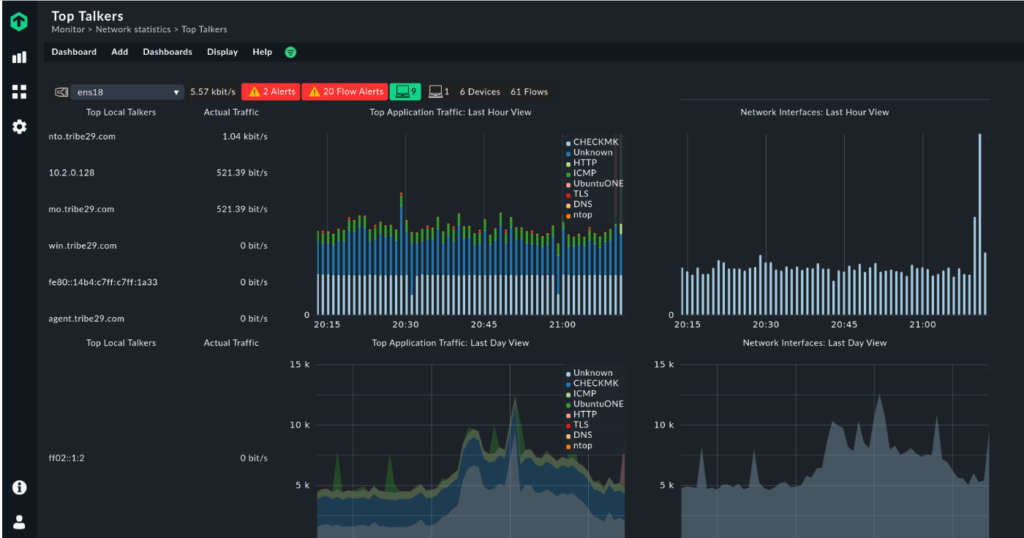
Checkmk ist ein Überwachungstool, das detaillierte Einblicke in Anwendungen, Netzwerke und Systeme bietet. Eines seiner herausragenden Merkmale ist das flexible Benachrichtigungssystem, das es den Nutzern ermöglicht, Alarme basierend auf spezifischen Parametern und Anforderungen individuell anzupassen.
Warum ich Checkmk ausgewählt habe: Auf meiner Suche nach den am besten geeigneten Monitoring-Tools fiel mir Checkmk aufgrund seiner besonderen Flexibilität bei Benachrichtigungen auf. Mein Urteil, basierend auf Vergleichen und Einschätzungen, führte dazu, dass ich die präzise Alarmierung, die Reduzierung unnötiger Meldungen und die Konzentration auf wesentliche Benachrichtigungen besonders schätze.
Diese Möglichkeit, Benachrichtigungen äußerst genau anzupassen, ist der Grund, warum ich es als das beste Tool für flexible Benachrichtigungsoptionen ausgewählt habe.
Herausragende Funktionen & Integrationen:
Checkmk überzeugt durch Echtzeitüberwachung, automatische Service-Erkennung und das BI-Modul (Business Intelligence) für komplexe Umgebungen. Es integriert sich mit Plattformen wie Grafana, Jira und Slack, um eine umfassende Überwachung und Kommunikation sicherzustellen.
Pros and Cons
Pros:
- Feingranulare Anpassung von Alarmmeldungen
- Leistungsstarke Integrationen mit anderen Plattformen
- Echtzeitüberwachung
Cons:
- Für Einsteiger möglicherweise schwierige Einarbeitung
- Das Lizenzmodell kann für einige Benutzer verwirrend sein
- Einige fortgeschrittene Funktionen sind nur in der Enterprise-Version verfügbar
New Product Updates from Checkmk
Checkmk Adds Experimental MCP Server and OAuth 2.0 Support
Checkmk adds an experimental MCP server and built-in OAuth 2.0 authorization for commercial editions. These updates let AI agents query monitoring data with native authorization support. For more information, visit Checkmk’s official site.
 .
.
SuperOps
Am besten für Patch-Management
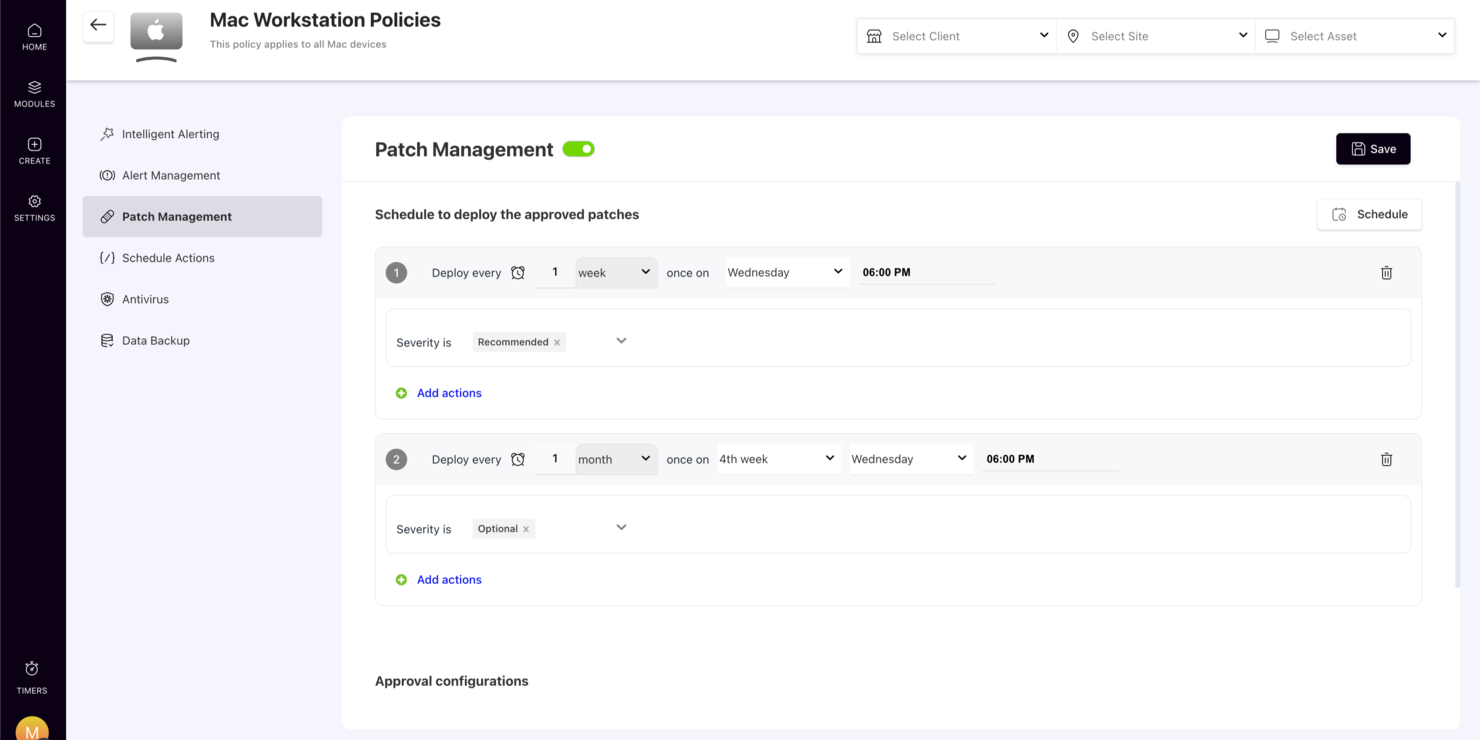
SuperOps zeichnet sich als innovative IT-Management-Lösung aus, die speziell für Managed Service Providers (MSPs) und interne IT-Teams entwickelt wurde, um deren operative Effizienz zu steigern. Durch den Einsatz von KI-gestützten Funktionen begegnet die Plattform den Herausforderungen der Serviceautomatisierung und des Asset-Managements und bietet Unternehmen einen schlanken Ansatz für IT-Benachrichtigungen. Egal, ob Sie ein wachsendes IT-Team leiten oder Dienstleistungen für mehrere Kunden managen, SuperOps stellt die nötigen Werkzeuge bereit, um IT-Infrastrukturen effektiv zu überwachen und zu verwalten. So lassen sich Herausforderungen wie die Geschwindigkeit der Vorfalllösung und die operative Transparenz mühelos meistern.
Warum ich SuperOps gewählt habe
Ich habe SuperOps wegen seiner ausgefeilten Funktionen im Alert-Management ausgewählt, die für jede IT-Alarmierungssoftware unerlässlich sind. Diese Plattform kombiniert intelligente Alarmierung mit Automatisierung, sodass Ihr Team potenzielle Probleme proaktiv angehen kann, bevor sie sich verschärfen. Außerdem sorgt das integrierte Ticket-System dafür, dass Alarme in umsetzbare Aufgaben verwandelt werden, was eine schnellere Reaktion ermöglicht. Diese Merkmale passen hervorragend zu den Anforderungen von IT-Profis, die reibungslose Abläufe sicherstellen und Ausfallzeiten minimieren möchten.
Hauptfunktionen von SuperOps
Neben seinen Alarmverwaltungsfunktionen bietet SuperOps weitere Merkmale, die den Nutzen für IT-Alarme erhöhen:
- Service Desk: Zentralisiert alle Serviceanfragen, sodass Ihr Team Vorfälle über eine einheitliche Oberfläche verwalten und darauf reagieren kann.
- Patch-Management: Automatisiert den Patch-Prozess und stellt sicher, dass Ihre Systeme aktuell und vor Schwachstellen geschützt sind.
- Asset-Management: Bietet umfassende Nachverfolgung und Verwaltung von IT-Ressourcen, um Ihnen eine organisierte Inventarisierung zu ermöglichen.
- Mobile App: Ermöglicht das Management von Benachrichtigungen und Tickets auch unterwegs und sorgt dafür, dass Sie überall verbunden und reaktionsfähig bleiben.
SuperOps-Integrationen
Zu den Integrationen gehören Microsoft 365, Google Workspace, QuickBooks, Xero, Zapier, Slack, FreshBooks, Stripe und Harvest.
Pros and Cons
Pros:
- Ticketsystem verlinkt Alarme
- Integrierte PSA- und RMM-Plattform
- Mobile App für Techniker
Cons:
- Preismodell pro Endpunkt summiert sich
- Vorwiegend für MSPs entwickelt
New Product Updates from SuperOps

SuperOps Improves Ticket Visibility, Dynamic Forms, and Dashboard Views
SuperOps introduces improvements to ticket visibility, dynamic forms, and dashboard visualizations. These updates help technicians manage customer conversations, simplify ticket creation, and keep dashboard views consistent across teams. For more information, visit SuperOps' official site.
 .
.
Am besten für Bedrohungsintelligenz-Benachrichtigungen
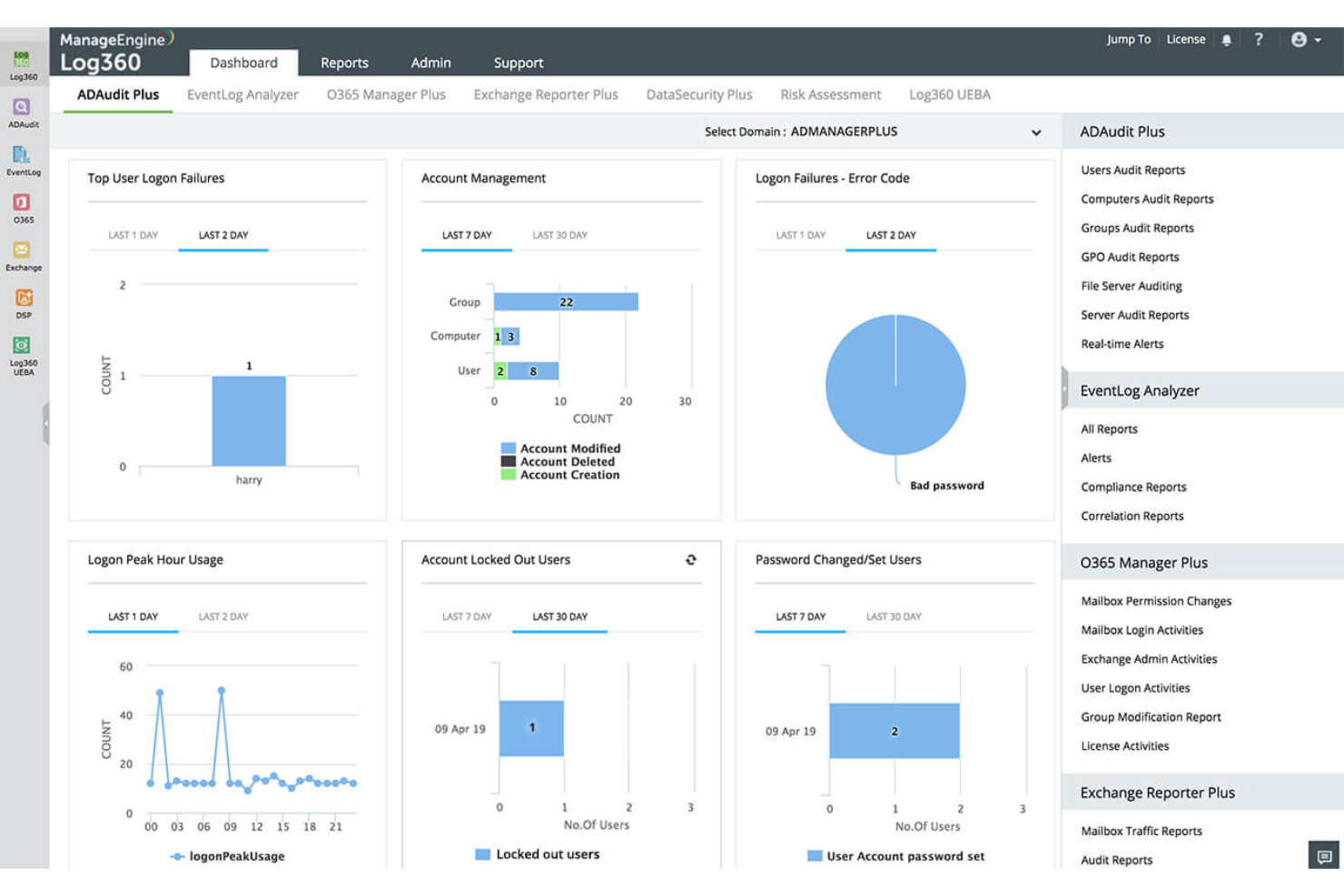
ManageEngine Log360 ist eine einheitliche Security Information and Event Management (SIEM)-Lösung, die Unternehmen dabei unterstützt, Sicherheitsbedrohungen in ihrer IT-Infrastruktur zu erkennen, zu untersuchen und darauf zu reagieren.
Warum ich ManageEngine Log360 ausgewählt habe: Es bietet eine Echtzeit-Korrelations-Engine, mit der Ihr Team Sicherheitsbedrohungen präzise erkennen kann, indem verdächtige Ereignisse im gesamten Netzwerk korreliert werden. So werden potenzielle Probleme zeitnah identifiziert und behoben. Die auf maschinellem Lernen basierende Analyse des Benutzer- und Entitätenverhaltens (UEBA) von Log360 hilft zudem, Insider-Bedrohungen zu erkennen, indem sie Abweichungen im Benutzerverhalten analysiert und so eine zusätzliche Sicherheitsebene bietet. Darüber hinaus kann die Software durch die Nutzung von Threat-Intelligence-Feeds im STIX/TAXII-Format schädliche IPs, Domains und URLs in Echtzeit erkennen, darauf hinweisen und blockieren.
Herausragende Funktionen & Integrationen:
Weitere Funktionen sind integrierte DLP-Fähigkeiten, die Zugriffe auf sensible Informationen überwachen und Datenexfiltration verhindern, damit Ihre wichtigen Daten geschützt bleiben. Die Software bietet auch Dark-Web-Überwachung, um potenzielle Bedrohungen und offengelegte Daten frühzeitig zu erkennen, bevor sie Ihr Unternehmen beeinträchtigen. Zu den Integrationen zählen Microsoft Exchange, Amazon Web Services (AWS), Microsoft Entra ID, Microsoft Azure und Active Directory.
Pros and Cons
Pros:
- Umfassende Sicherheitsübersicht über On-Premises-, Cloud- und hybride Netzwerke
- Erweiterter Threat-Intelligence-Feed
- Incident-Management-Konsole
Cons:
- Protokolle können schwer lesbar und verständlich sein
- Kompliziert einzurichten und zu konfigurieren
New Product Updates from ManageEngine Log360
ManageEngine Log360 Adds New Log Source Integrations
ManageEngine Log360 adds new log source integrations for Bitdefender GravityZone, CrowdStrike Falcon Event Streams, Okta, and MikroTik to broaden security and network visibility. For more information, visit ManageEngine Log360's official site.
 .
.
Am besten geeignet zum Konfigurieren intelligenter Warnregeln
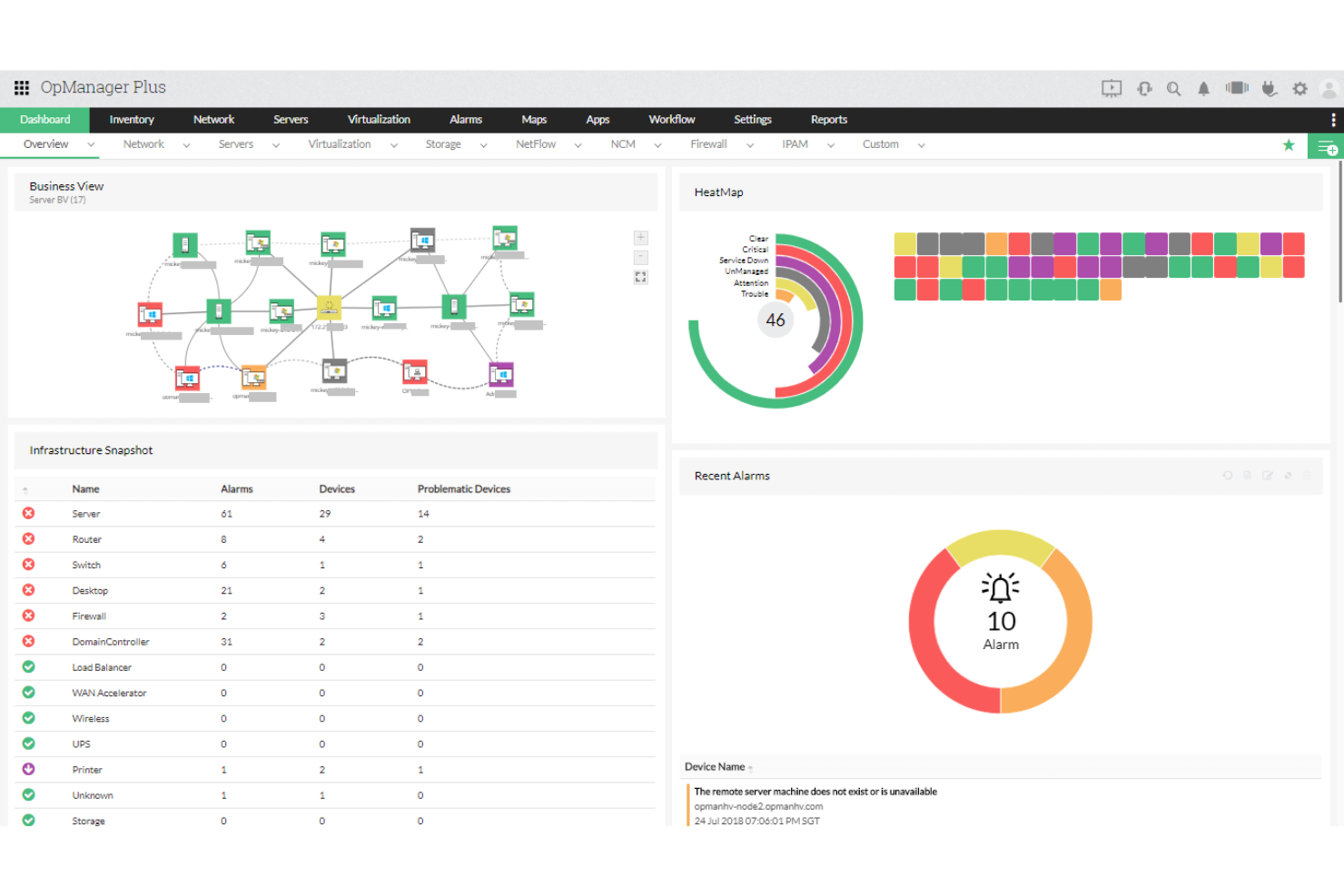
ManageEngine OPM Plus ist eine IT-Operations-Management-Suite, mit der Sie jede Ebene Ihrer IT-Infrastruktur überwachen, verwalten und absichern können. Sie vereint Netzwerk-, Server-, Anwendungs- und Sicherheitsüberwachung auf einer einzigen Plattform, sodass Warnmeldungen und Leistungsdaten über eine zentral gesteuerte Konsole laufen, die einfach zu bedienen ist.
Warum ich ManageEngine OPM Plus ausgewählt habe: Ich habe ManageEngine OPM Plus ausgewählt, weil alle IT-Benachrichtigungen an einem Ort zusammengeführt werden und Sie dadurch Benachrichtigungsflut reduzieren und schneller auf kritische Probleme reagieren können. Sie können intelligente Warnregeln konfigurieren, Eskalationspfade individuell anpassen und direkt mit Kollaborations-Tools wie Slack und Microsoft Teams integrieren, damit die richtigen Personen sofort informiert werden. Außerdem gefällt mir, dass die Plattform über das reine Benachrichtigen hinausgeht, denn sie beinhaltet Full-Stack-Observability und automatisiertes Patch-Management, sodass Sie Probleme innerhalb derselben Umgebung erkennen und beheben können.
Hervorstechende Funktionen & Integrationen:
Zu den Funktionen gehören fortschrittliches Fehlermanagement mit automatischer Eskalation von Warnungen, vollständige Leistungsüberwachung für Netzwerke, Server und Anwendungen sowie integrierte SIEM-Funktionen, um Sicherheitsbedrohungen in Echtzeit zu erkennen und darauf zu reagieren. Sie erhalten außerdem Analyse- und Root-Cause-Analyse-Tools, um Vorfälle schneller zu beheben. Zu den Integrationen gehören ServiceDesk Plus, ServiceNow, Jira, Slack, MS Teams, Ansible, SIEM-Plattformen, Log360, Analytics Plus, Grafana, Zoho Suite und REST API.
Pros and Cons
Pros:
- Unterstützt umfangreiches Multi-Vendor-Monitoring
- Ermöglicht automatisierte Eskalations-Workflows für Warnungen
- Bietet Echtzeit-Einblicke in die Performance
Cons:
- Benötigt hohe Systemressourcen
- Komplexe Konfiguration für Einsteiger

Am besten geeignet für Diagnosen auf Code-Ebene
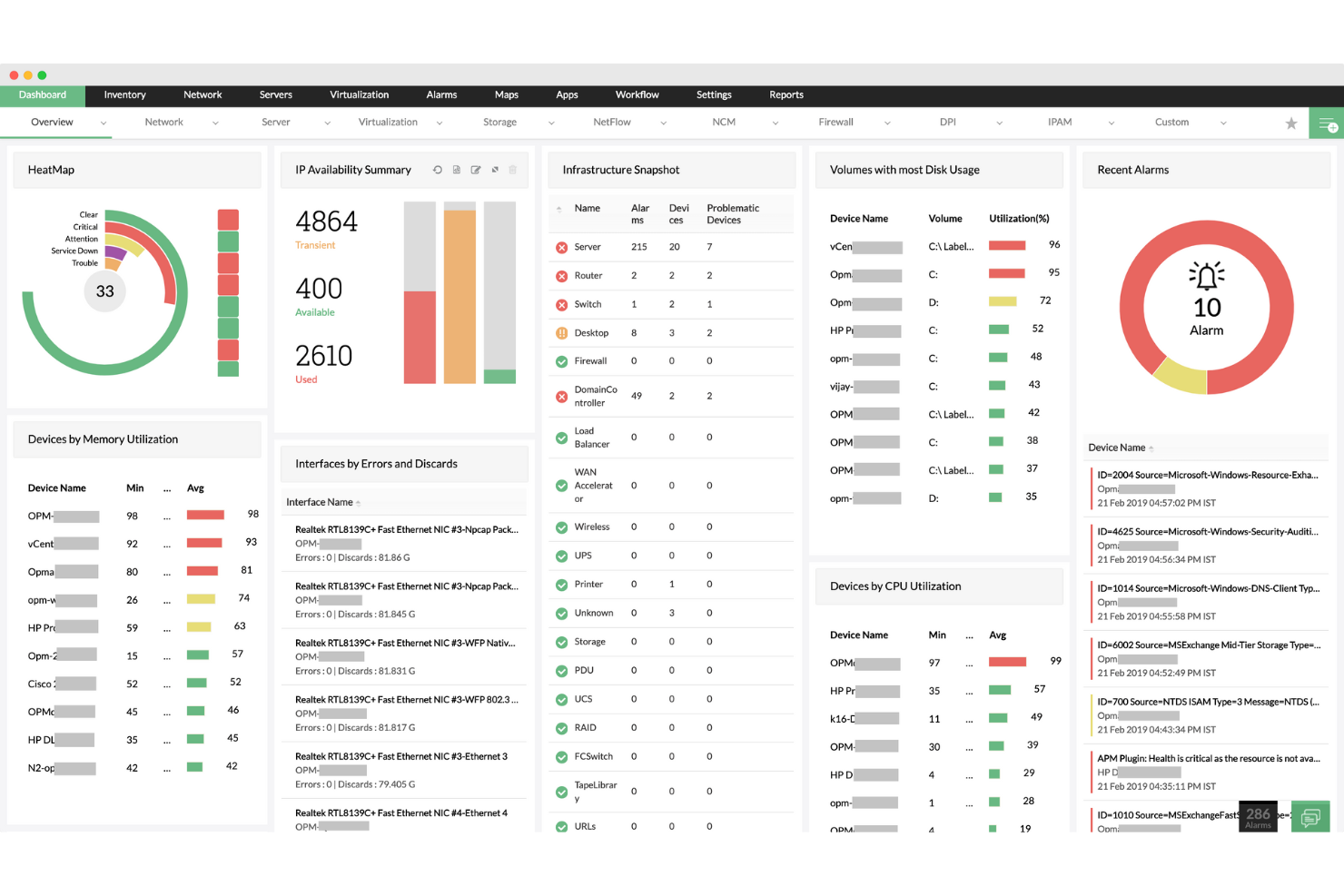
ManageEngine Applications Manager ist eine umfassende Lösung für das Application Performance Monitoring (APM) und das Infrastruktur-Monitoring, die über 150 Technologien in lokalen, Cloud- und hybriden Umgebungen unterstützt. Sie bietet Echtzeit-Diagnosen, KI-gestützte Warnmeldungen und tiefgehende Einblicke in Anwendungs-Stacks, Datenbanken, Cloud-Dienste und Benutzererlebnisse.
Warum ich den ManageEngine Applications Manager ausgewählt habe: Ich habe den Applications Manager wegen seines ganzheitlichen Ansatzes zur Überwachung ausgewählt, der die Sichtbarkeit von Anwendungen und Infrastruktur auf einer Plattform vereint. Besonders hervorzuheben sind Code-Ebene-Diagnosen für App-Stacks wie Java und .NET sowie ein tiefgehendes Infrastruktur-Monitoring für virtuelle Maschinen, Datenbanken und Container. Die Integration von Real User Monitoring (RUM), synthetischen Transaktionen und Werkzeugen für Cloud-Observability erhöht zudem seine Vielseitigkeit im IT-Betrieb.
Hervorstechende Funktionen & Integrationen:
Applications Manager beinhaltet verteiltes Transaktions-Tracking, Anomalieerkennung, synthetisches Monitoring über Selenium-Skripte und Echtzeit-Performance-Dashboards. Es integriert sich mit ManageEngine-Tools wie OpManager und ServiceDesk Plus und unterstützt Drittanbieter-Dienste, einschließlich Slack und Site24x7.
Pros and Cons
Pros:
- Echtzeit- und automatisch aktualisierende Netzwerkkarten
- Unterstützt mehrere Anbieterumgebungen
- Automatisierte, geplante Netzwerkerkennung
Cons:
- Erstinstallation kann komplex sein
- Preisgestaltung kann für kleine Teams hoch sein
New Product Updates from ManageEngine OpManager

ManageEngine OpManager Adds NVIDIA GPU Monitoring
ManageEngine OpManager adds NVIDIA GPU monitoring for Linux servers, dedicated GPU dashboards, adaptive thresholds, and automated incident response to help teams track AI infrastructure performance, health, and resource usage. For more information, visit ManageEngine OpManager’s official site.
 .
.
UptimeRobot
Am besten geeignet für Multi-Channel-Benachrichtigungen mit Fokus auf Verfügbarkeit
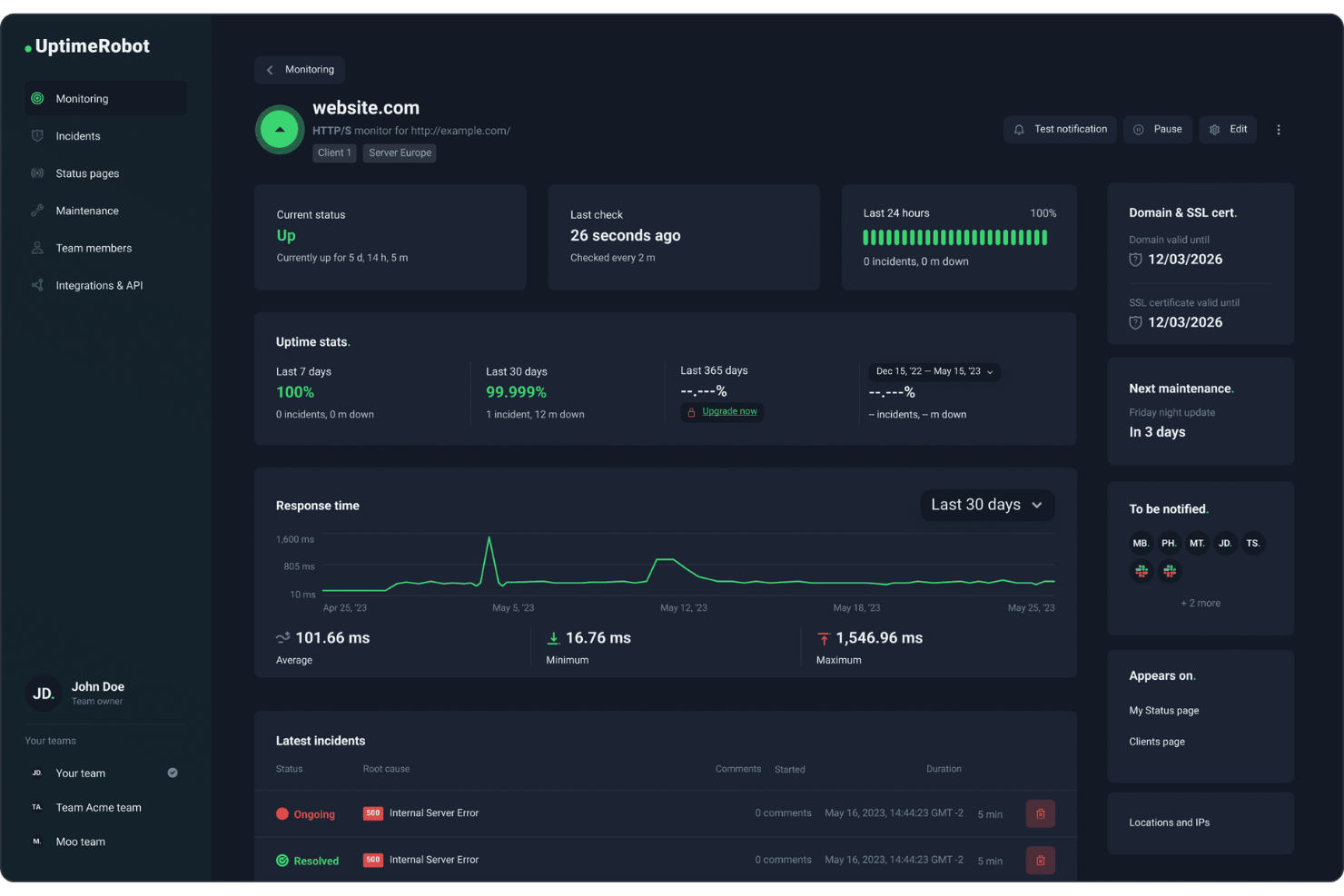
Wenn Sie eine zuverlässige IT-Alarmierungssoftware suchen, ist UptimeRobot eine praktische Option für Teams, die auf durchgängige, auf Verfügbarkeit ausgerichtete Multi-Channel-Benachrichtigungen angewiesen sind. Es unterstützt DevOps-Teams, Entwickler und Geschäftsinhaber, indem es die Verfügbarkeit, den SSL-Status und die Reaktionszeiten an wichtigen Endpunkten überwacht. Mit Benachrichtigungen, die über verschiedene Kanäle und Integrationen mit gängigen Tools zugestellt werden, hilft UptimeRobot Teams, über Verfügbarkeitsprobleme informiert zu bleiben und schnell auf Ausfälle zu reagieren.
Warum ich UptimeRobot ausgewählt habe
Ich habe UptimeRobot wegen seiner auf Verfügbarkeit fokussierten Multi-Channel-Benachrichtigungen ausgewählt, die Teams helfen, schnell zu reagieren, wenn Dienste ausfallen. Es überwacht Uptime, SSL-Status und Antwortzeiten und gibt klare Signale, wenn Verfügbarkeitsprobleme auftreten. Da Benachrichtigungen über Tools wie Slack und Microsoft Teams versendet werden, bleiben Teams informiert, ohne ständig Dashboards überprüfen zu müssen. UptimeRobot unterstützt außerdem Funktionen wie benutzerdefinierte HTTP-Checks und Wartungsfenster, was die Verwaltung des Monitorings um geplante Änderungen und den laufenden Betrieb erleichtert.
Wichtige Funktionen von UptimeRobot
Neben Multi-Channel-Benachrichtigungen mit Schwerpunkt auf Verfügbarkeit bietet UptimeRobot:
- Öffentliche Statusseiten: Erstellen und individualisieren Sie einfach Statusseiten, um Stakeholder über die Verfügbarkeit und Vorfälle Ihres Dienstes zu informieren.
- Überwachung von mehreren Standorten: Führen Sie Prüfungen von mehreren Standorten aus durch, um eine globale Genauigkeit und Zuverlässigkeit der Verfügbarkeit zu gewährleisten.
- Team-Zusammenarbeit: Laden Sie Teammitglieder mit unterschiedlichen Zugriffsrechten ein, um gemeinsam Vorfälle zu verwalten und die Leistung zu überwachen.
- Webhooks: Richten Sie fortschrittliche Benachrichtigungen ein und integrieren Sie benutzerdefinierte Anwendungen für ein maßgeschneidertes Incident Management.
UptimeRobot-Integrationen
Zu den Integrationen gehören Slack, Microsoft Teams, Discord, Telegram, Splunk, Zapier, PagerTree, Pipedream, ilert und Zenduty.
Pros and Cons
Pros:
- Zuverlässige und rechtzeitige Benachrichtigungen bei Systemausfällen
- Unterstützt verschiedene Monitoring-Arten, darunter SSL und Domain
- Unterstützt E-Mail-, SMS-, Slack-, Teams- und Webhook-Benachrichtigungen
Cons:
- Erweiterte Funktionen erfordern kostenpflichtige Pläne, was die kostenlose Nutzung einschränkt
- Eingeschränkte Benachrichtigungslogik im Vergleich zu Incident-Management-Plattformen
Weitere IT-Alarming-Software
Hier sind einige weitere IT-Alarming-Software-Optionen, die es nicht auf meine Auswahlliste geschafft haben, aber trotzdem einen Blick wert sind:
- PagerDuty
Am besten für Bereitschaftsmanagement und Eskalationen geeignet
- New Relic
Am besten für anpassbare Alarmierungsrichtlinien
- BigPanda
Am besten geeignet für zentralisierte Alarmkorrelation
- Better Stack
Am besten für Uptime- und Performance-Monitoring geeignet
- Amazon Simple Notification Service (SNS)
Am besten geeignet für skalierbare Cloud-basierte Nachrichtenübermittlung
- FireEye Helix
Am besten geeignet für fortschrittliche Bedrohungsintelligenz-Alarmierung
- Altera
Am besten für das Remote-IT-Management geeignet
- xMatters
Am besten für automatisierte Incident Response
- OnPage
Am besten für das Vorfallbenachrichtigungsmanagement geeignet
- HipLink
Am besten geeignet für umfassende Lösungen im Alarmmanagement


Wie ich IT-Alerting-Software bewerte
Ich teile meine Bewertung in unverzichtbare Funktionen – wie Multi-Channel-Benachrichtigung und Bereitschaftsplanung – sowie die Merkmale, die ein gutes Tool vom richtigen unterscheiden.
Kernfunktionen (Grundvoraussetzungen für diese Liste)
Wenn ich Tools für meine Liste auswähle, bewerte ich jedes einzelne auf einer Skala von 0 (bietet die Funktionalität nicht) bis 5 (hebt sich in diesem Bereich hervor) anhand jeder unten aufgeführten Kernfunktion. Dann berechne ich die Gesamtpunktzahl des Tools als Prozentwert. Jedes Tool muss eine Mindestpunktzahl von 65 % erreichen, um für die Aufnahme in Betracht gezogen zu werden.
- Multi-Channel-Benachrichtigungszustellung: Ich prüfe, ob das Tool Einsatzkräfte über SMS, E-Mail, Sprachanrufe, Push-Benachrichtigungen und Chat-Apps erreichen kann – denn eine verpasste Benachrichtigung um 3 Uhr morgens verfehlt ihren Zweck.
- Bereitschaftsplanung: Hier zählt das Management von Rotationen, einschließlich Schichtwechseln, Übersteuerungen und Follow-the-Sun-Abdeckung, damit in global verteilten Teams immer jemand verfügbar ist.
- Eskalationsrichtlinien: Ich bewerte, ob die Plattform mehrstufige, zeitbasierte Eskalationsregeln zulässt, die nicht bestätigte Alarme automatisch an Ersatzkräfte oder Manager weiterleiten.
- Integrationen von Monitoring-Tools: Das Tool sollte sich mit Observability-Stacks wie Datadog, Prometheus, Nagios und New Relic verbinden lassen, sodass Benachrichtigungen ohne manuelles Weiterleiten oder kundenspezifisches Skripting einlaufen.
- Alarm-Aggregation & Deduplikation: Ich prüfe, wie die Plattform zusammengehörige Alarme gruppiert und Duplikate unterdrückt – ein einzelner Datenbankausfall sollte den Bereitschaftsingenieur nicht mit 200 separaten Meldungen überfluten.
- Vorfall-Tracking & Berichterstattung: Reaktionsmetriken wie MTTA und MTTR sollten protokolliert und in Dashboards angezeigt werden, damit Teams ihre Leistung messen und sinnvolle Postmortems durchführen können.
Sobald ich eine Liste von Tools habe, die die Kriterien erfüllen, betrachte ich, was jede Plattform besonders macht.
Unterscheidungsmerkmale (Was Anbieter voneinander abhebt)
So vergleiche ich verschiedene Anbieter miteinander:
Herausragende Funktionen
Runbook-Automatisierung ist ein wichtiger Unterschied – ich suche nach Tools, die vordefinierte Behebungs-Skripte auslösen, wenn ein Alarm ausgelöst wird, z. B. das Neustarten eines fehlgeschlagenen Dienstes oder das Hochskalieren von Ressourcen, noch bevor ein Mensch eingreift. ChatOps-Funktionen sind ebenfalls wichtig, insbesondere Plattformen, die bei einem Vorfall automatisch eigene Slack- oder Teams-Kanäle mit vollständigem Kontext anlegen. Mobile Response-Apps runden das Angebot ab, indem sie Bereitschaftsingenieuren erlauben, Alarme direkt vom Handy aus zu bestätigen, weiterzuleiten oder umzuteilen – auch außerhalb der Arbeitszeiten.
Mehr als nur Funktionen
Sicherheits- und Compliance-Zertifizierungen spielen eine große Rolle in meiner Bewertung – Teams in regulierten Branchen benötigen vorab Abdeckungen wie SOC 2 Type II, HIPAA oder ISO 27001. Transparenz beim Preismodell ist ebenfalls wichtig, denn eine Abrechnung pro Nutzer eignet sich für kleine Teams, kann aber bei größerem Umfang im Vergleich zu einem modellbasierten Ansatz für Einsatzkräfte schnell teuer werden. Außerdem prüfe ich die Flexibilität bei der Bereitstellung, insbesondere ob der Anbieter Mehrregionen-Redundanz anbietet, denn eine Alert-Plattform, die während eines Ausfalls selbst ausfällt, verursacht genau das Problem, das sie eigentlich lösen soll.
So wählen Sie die richtige IT-Alarming-Software aus
Es ist einfach, sich in langen Funktionslisten und komplexen Preisstrukturen zu verlieren. Damit Sie sich während Ihres individuellen Auswahlprozesses auf das Wesentliche konzentrieren können, finden Sie hier eine Checkliste wichtiger Faktoren:
| Faktor | Worauf achten? |
|---|---|
| Skalierbarkeit | Wächst die Software mit Ihrem Team? Berücksichtigen Sie zukünftige Anforderungen und prüfen Sie, ob das Tool steigende Anzahl an Alarmen und Nutzern problemlos bewältigt. |
| Integrationen | Funktioniert das Tool mit Ihren bestehenden Systemen? Prüfen Sie, ob es sich nahtlos in Ihre IT-Landschaft einbinden lässt, um manuelle Workarounds zu vermeiden. |
| Anpassbarkeit | Können Sie die Lösung auf Ihre Bedürfnisse zuschneiden? Achten Sie auf Optionen zur individuellen Anpassung von Benachrichtigungen und Workflows an die spezifischen Abläufe Ihres Teams. |
| Benutzerfreundlichkeit | Ist die Oberfläche intuitiv? Eine einfache Bedienung verkürzt die Einarbeitungszeit und minimiert Fehler. Testen Sie die Demo, um zu prüfen, ob Ihr Team gut zurechtkommt. |
| Implementierung & Onboarding | Wie schnell können Sie starten? Bewerten Sie den Einrichtungsaufwand und ob der Anbieter Schulungsmaterial zur Verfügung stellt, um die Einführung zu erleichtern. |
| Kosten | Passt die Software ins Budget? Vergleichen Sie Preispläne und achten Sie auf versteckte Kosten. Nutzen Sie nach Möglichkeit kostenlose Testphasen. |
| Sicherheitsmaßnahmen | Sind Ihre Alarmmeldungen geschützt? Achten Sie auf starke Verschlüsselung und Datenschutz, damit Ihre Informationen sicher sind. |
| Support-Verfügbarkeit | Steht bei Bedarf Unterstützung bereit? Prüfen Sie, ob der Anbieter 24/7-Support, Live-Chat oder einen persönlichen Ansprechpartner anbietet. |
Was ist IT-Alarming-Software?
IT-Alarmierungssoftware ist ein Tool, das Teams in Echtzeit über IT-Probleme informiert. IT-Fachkräfte wie Systemadministratoren und Netzwerktechniker nutzen diese Tools, um Probleme schnell zu beheben und Ausfallzeiten zu minimieren. Funktionen wie Echtzeit-Benachrichtigungen, Integrationsmöglichkeiten und anpassbare Arbeitsabläufe sorgen für rechtzeitige Benachrichtigungen und effizientes Vorfallmanagement. Insgesamt steigern diese Tools die betriebliche Effizienz, indem sie Teams informiert und einsatzbereit halten.
Funktionen
Beim Auswählen einer IT-Alarmierungssoftware sollten Sie auf die folgenden Schlüsselfunktionen achten:
- Echtzeit-Benachrichtigungen: Informieren Sie Ihr Team sofort über auftretende Probleme, um schnellere Reaktionszeiten zu ermöglichen und potenzielle Ausfallzeiten zu reduzieren.
- Integrationsmöglichkeiten: Stellen Sie eine nahtlose Verbindung zu bestehenden IT-Systemen und Tools her, um Arbeitsabläufe zu optimieren und manuelle Dateneingaben zu vermeiden.
- Anpassbare Arbeitsabläufe: Passen Sie den Alarmierungsprozess an die spezifischen Anforderungen Ihres Teams an und steigern Sie die Effizienz im Vorfallmanagement.
- Rufbereitschaftsplanung: Verwalten und automatisieren Sie die Rufbereitschaft, damit bei Problemen immer die richtige Person verfügbar ist.
- Benachrichtigung über mehrere Kanäle: Verschicken Sie Alarmmeldungen über verschiedene Kanäle wie E-Mail, SMS und mobile Apps, sodass keine wichtige Meldung übersehen wird.
- Vorfallverfolgung: Führen Sie eine detaillierte Aufzeichnung von Vorfällen, um Trends zu analysieren und die Reaktionsstrategien zu verbessern.
- Unterstützung durch mobile Apps: Greifen Sie von unterwegs auf Alarmierungen zu und verwalten Sie Vorfälle, damit Ihr Team überall schnell reagieren kann.
- Rollenbasierter Zugriff: Steuern Sie, wer welche Informationen sieht, um die Sicherheit zu wahren und sicherzustellen, dass jedes Teammitglied nur relevante Daten erhält.
- Erweiterte Analysen: Nutzen Sie Datenanalysen, um Muster bei Vorfällen zu erkennen und die gesamte IT-Betriebslage zu verbessern.
- Sicherheitsmaßnahmen: Schützen Sie sensible Informationen durch starke Verschlüsselung und umfassenden Datenschutz.
Vorteile
Die Einführung einer IT-Alarmierungssoftware bietet zahlreiche Vorteile für Ihr Team und Ihr Unternehmen. Hier sind einige der wichtigsten:
- Schnellere Reaktionszeiten: Echtzeit-Benachrichtigungen ermöglichen Ihrem Team ein zügiges Handeln, wodurch Ausfallzeiten verkürzt und die Auswirkungen auf den Betrieb minimiert werden.
- Verbesserte Teamkoordination: Anpassbare Arbeitsabläufe und Rufbereitschaftsplanung unterstützen Ihr Team darin, während Vorfällen effizient zusammenzuarbeiten.
- Fundiertere Entscheidungen: Erweiterte Analysen geben Einblicke in Vorfallmuster und unterstützen eine bessere Planung und Reaktionsstrategien.
- Höhere Erreichbarkeit: Benachrichtigungen über mehrere Kanäle und mobile App-Unterstützung sorgen dafür, dass Ihr Team ortsunabhängig auf Alarmierungen reagieren kann.
- Bessere Ressourcennutzung: Integrationsmöglichkeiten ermöglichen eine nahtlose Anbindung an bestehende Tools, sparen Zeit und reduzieren manuellen Arbeitsaufwand.
- Stärkere Sicherheit: Rollenbasierter Zugriff und Sicherheitsmaßnahmen schützen vertrauliche Daten und stellen sicher, dass nur autorisiertes Personal Vorfälle bearbeiten kann.
- Proaktive Problemlösung: Durch die Nachverfolgung von Vorfällen lassen sich wiederkehrende Probleme erkennen, sodass Ihr Team die Ursachen beseitigen und zukünftige Vorfälle verhindern kann.
Kosten & Preise
Die Wahl der richtigen IT-Alarmierungssoftware erfordert ein Verständnis für die verschiedenen Preismodelle und Tarifoptionen. Die Kosten variieren je nach Funktionen, Teamgröße, Zusatzoptionen und mehr. Die untenstehende Tabelle fasst gängige Pläne, ihre durchschnittlichen Preise und die typischerweise enthaltenen Funktionen von IT-Alarmierungssoftware-Lösungen zusammen:
Vergleichstabelle: IT-Alarmierungssoftware
| Tarifart | Durchschnittspreis | Typische Funktionen |
|---|---|---|
| Kostenloser Tarif | $0 | Grundlegende Benachrichtigungen, eingeschränkte Integrationen und essenzielle Berichte. |
| Persönlicher Tarif | $5-$25/user/month | Echtzeit-Benachrichtigungen, mobile App-Unterstützung und Basis-Analysen. |
| Business-Tarif | $30-$50/user/month | Erweiterte Integrationen, anpassbare Arbeitsabläufe und Rufbereitschaftsplanung. |
| Enterprise-Tarif | $60-$100/user/month | Vollständige Analyse-Suite, dedizierter Support und erweiterte Sicherheitsfunktionen. |
FAQs zu IT-Alarmierungssoftware
Hier finden Sie Antworten auf häufig gestellte Fragen zur IT-Alarmierungssoftware:
Wie funktionieren Eskalationsrichtlinien in IT-Alarmierungssoftware?
Eskalationsrichtlinien legen fest, wie Alarme bearbeitet werden, wenn die primäre Ansprechperson diese nicht bestätigt. Sie können zeitbasierte Regeln festlegen, um Alarme an andere Teammitglieder oder Manager weiterzuleiten. Passen Sie die Richtlinien an die Struktur Ihres Teams an und stellen Sie sicher, dass kritische Probleme zeitnah bearbeitet werden.
Kann IT-Alarmierungssoftware die mittlere Reaktionszeit (MTTA) oder Lösungszeit (MTTR) nachverfolgen?
Ja, die meisten IT-Alarmierungstools bieten integrierte Berichte für Kennzahlen wie MTTA, MTTR und Bestätigungsraten. Diese Metriken helfen Ihnen zu verstehen, wie Ihr IT-Team unter Druck reagiert. Sie können vergangene Alarme überprüfen, sehen, wer reagiert hat, und Verzögerungen im Eskalationsprozess erkennen. So lassen sich Schwachstellen im Incident-Management leichter identifizieren.
Unterstützen IT-Alarmierungssysteme einen Bereitschaftsdienst für Systemadministratoren oder SREs?
Die meisten IT-Alarmierungssoftwares bieten spezielle Tools zur Schichtplanung für IT-Betriebsteams. Sie können Rotationen erstellen, Ersatzansprechpartner zuweisen und Alarme automatisch eskalieren, falls keine Antwort erfolgt. Einige Tools integrieren sich mit Google Calendar oder Slack, sodass Ihr Team immer weiß, wer gerade Bereitschaft hat. Auf diese Weise bleibt Ihre Abdeckung rund um die Uhr zuverlässig.
Welche Kommunikationskanäle unterstützen IT-Alarmierungstools üblicherweise?
IT-Alarmierungssoftware unterstützt in der Regel SMS, Telefonanrufe, Push-Benachrichtigungen, E-Mail sowie Integrationen mit Tools wie Microsoft Teams, Slack oder PagerDuty. Sie können Regeln festlegen, um Alarme basierend auf Zeit, Team oder Dringlichkeit über bestimmte Kanäle zu verschicken. Diese Flexibilität hilft Ihrem IT-Team, schnell über bevorzugte Methoden zu reagieren.
Wie geht es weiter:
Wenn Sie sich gerade über IT-Alarmierungssoftware informieren, lassen Sie sich kostenlos von einem SoftwareSelect-Berater Empfehlungen geben.
Sie füllen ein Formular aus und führen ein kurzes Gespräch, in dem Ihre Anforderungen genau geklärt werden. Danach erhalten Sie eine Vorauswahl an Softwarelösungen zur Ansicht. Die Berater begleiten Sie sogar durch den gesamten Kaufprozess, einschließlich Preisverhandlungen.