

Die beste Software zur Reaktion auf Sicherheitsvorfälle hilft Teams, Bedrohungen schneller zu erkennen, Reaktionsschritte teamübergreifend zu koordinieren und Ausfallzeiten zu reduzieren, indem wichtige Teile des Lebenszyklus eines Sicherheitsvorfalls automatisiert werden.
Wenn Sie bereits mit einer Überlastung durch Warnmeldungen, unklaren Eskalationswegen oder der Herausforderung zu tun hatten, eine Reaktion mithilfe voneinander getrennter Tools zusammenzustellen, wissen Sie, wie schwierig es ohne das richtige System sein kann, einen Sicherheitsvorfall effektiv zu verwalten. Manuelle Arbeit verlangsamt die Behebung, der Kontext geht zwischen Teams verloren und die Analyse nach einem Sicherheitsvorfall wird zum Ratespiel.
Ich habe Tools zur Reaktion auf Sicherheitsvorfälle in Live-Produktionsumgebungen getestet und mit Sicherheits- sowie DevOps-Teams gearbeitet, die kritische Ausfälle und reale Sicherheitsverletzungen bewältigen mussten. Ich habe bewertet, wie gut diese Plattformen Echtzeitwarnungen verarbeiten, Aktionen nachverfolgen und sowohl automatisierte als auch von Menschen gesteuerte Reaktionen unterstützen.
Dieser Leitfaden stellt die Plattformen vor, die eine schnelle Erkennung, nützliche Integrationen und übersichtliche Eskalationsabläufe bieten, damit Sie ein Tool auswählen können, das die Reaktionszeit verbessert und Ihrem Team bei kritischen Ereignissen eine bessere Kontrolle ermöglicht.
Warum Sie unseren Software-Empfehlungen vertrauen können
6,700+
Reviews
20
Industry experts
16+
Evaluation factors
14
Years
Unser Team testet und bewertet Software seit 2012. Als Tech-Führungskräfte wissen wir selbst, wie schwierig – und wichtig – es ist, die richtige Software auszuwählen.
Für diesen Leitfaden haben wir Tools mithilfe von praktischen Tests und unabhängiger Recherche bewertet und dabei unsere Bewertungskriterien angewendet.
Unsere Bewertungen spiegeln unser menschliches redaktionelles Urteilsvermögen wider, keine Verkaufsstrategie.
Expertenprüfer:
- Paulo Gardini MiguelTech-Direktor
 Tim FisherVP für KI
 Gabriel RosasTech Lead & Software-Architekt
 Christhian GruhnTech Lead & Plattform-Architekt

Zusammenfassung der besten Software zur Reaktion auf Sicherheitsvorfälle
Diese Vergleichstabelle fasst die Preisinformationen meiner besten Softwareauswahlen zur Reaktion auf Sicherheitsvorfälle zusammen, damit Sie die beste Lösung für Ihr Budget und Ihre geschäftlichen Anforderungen finden.
| Tool | Best For | Trial Info | Price | ||
|---|---|---|---|---|---|
| 1 | Am besten geeignet für Notfallvorsorge | Kostenlose Demo verfügbar | Preise auf Anfrage | Website | |
| 2 | Am besten geeignet für die Analyse von Risiken aus Open-Source-Bibliotheken | Kostenlose Demo verfügbar | Preise auf Anfrage | Website | |
| 3 | Am besten für Compliance-Berichte | 30-tägige kostenlose Testversion + kostenlose Demo | Preis auf Anfrage | Website | |
| 4 | Am besten für proaktives Threat Hunting geeignet | Kostenlose Testversion + kostenlose Demo verfügbar | Preis auf Anfrage | Website | |
| 5 | Am besten für einheitliche Sicherheit | 14-tägige kostenlose Testversion | $1,075/Monat (jährlich abgerechnet) | Website | |
| 6 | Am besten für Echtzeitanalysen | Kostenloser Tarif verfügbar | Preise auf Anfrage | Website | |
| 7 | Am besten geeignet für Skalierbarkeit | 14-tägige kostenlose Testphase | $86/5 Nutzer/Monat | Website | |
| 8 | Am besten für Bedrohungsinformationen | Kostenloser Tarif verfügbar | Ab $470/Monat (ohne Infrastrukturkosten) | Website | |
| 9 | Am besten für proaktive Bedrohungserkennung | Preise auf Anfrage erhältlich | Website | ||
| 10 | Am besten geeignet für Verhaltensanalyse | 90-tägige kostenlose Testphase | Preise auf Anfrage | Website |


Bewertungen der besten Software zur Reaktion auf Sicherheitsvorfälle
Nachfolgend finden Sie meine ausführlichen Zusammenfassungen der besten Software zur Reaktion auf Sicherheitsvorfälle, die es in meine Bestenliste geschafft hat. Meine Bewertungen bieten einen detaillierten Überblick über die wichtigsten Funktionen, Vor- & Nachteile, Integrationen und idealen Anwendungsfälle jedes Tools, damit Sie die beste Lösung für sich finden.
 Am besten geeignet für Notfallvorsorge
- Kostenlose Demo verfügbar
- Preise auf Anfrage
Visit WebsiteCustomer Rating:4.3/5
Das Vorfallmanagement-Dashboard von Preparis bietet eine detaillierte Übersicht über Vorfälle in der gesamten Organisation, einschließlich der IT. Preparis ist eine Plattform für Vorfallmanagement, die darauf ausgelegt ist, Organisationen bei der effektiven Bewältigung von Notfällen zu unterstützen. Sie richtet sich an Fachleute für Geschäftskontinuität und bietet Werkzeuge für Vorfallmeldung, Reaktionsplanung und Kommunikation.
Warum ich Preparis gewählt habe: Es ist speziell auf die Notfallvorsorge ausgerichtet und verschafft durch integrierte Dashboards eine 360°-Transparenz, um Vorfälle zu dokumentieren und die Einhaltung von Vorschriften sicherzustellen. Virtuelle Lagezentren ermöglichen es Ihrem Team, Reaktionen in Echtzeit zu koordinieren und Pläne flexibel anhand aktueller Daten anzupassen. Durch die Möglichkeit, Aktionslisten zu verteilen, weiß jeder im Krisenfall, was zu tun ist. Diese Funktionen machen Preparis zu einer ausgezeichneten Wahl für Teams, die ihre Notfallbereitschaft verbessern möchten.
Hervorstechende Funktionen & Integrationen:
Funktionen umfassen Vorfallmeldung, Reaktionsplanung und Werkzeuge für die Kommunikation in Echtzeit. Sie können virtuelle Lagezentren einrichten, um die Aktivitäten Ihres Teams zu koordinieren. Integrierte Dashboards bieten eine 360°-Sicht, die Ihnen hilft, Vorfälle zu dokumentieren und datenbasierte Entscheidungen zu treffen.
Integrationen beinhalten Slack, Microsoft Teams, Salesforce, Google Analytics, Tableau, Facebook, Twitter, LinkedIn, Instagram und Zendesk.
Pros and Cons
Pros:
- Kommunikationswerkzeuge in Echtzeit
- 360°-Transparenz durch Dashboards
- Virtuelle Lagezentren
Cons:
- Berichte über Integrationsprobleme
- Begrenzte Offline-Funktionen
Learn more about Preparis: Am besten geeignet für die Analyse von Risiken aus Open-Source-Bibliotheken
- Kostenlose Demo verfügbar
- Preise auf Anfrage

Oligo Security hilft dabei, Laufzeitumgebungen zu überwachen, um Sicherheitsbedrohungen für Anwendungen zu erkennen und ihnen zu begegnen. Oligo Security ist eine Runtime-Anwendungssicherheitsplattform, die aktive Angriffe bei modernen Anwendungen, Cloud-Workloads und KI-Systemen erkennt und blockiert, indem sie das Verhalten in der produktiven Umgebung analysiert, um ausnutzbare Schwachstellen zu identifizieren.
Für wen ist Oligo Security am besten geeignet?
Oligo Security eignet sich für AppSec- und DevSecOps-Teams in mittleren bis großen Unternehmen, die Echtzeit-Transparenz über ausnutzbare Schwachstellen in Produktionsumgebungen benötigen.
Warum ich Oligo Security ausgewählt habe
Oligo Security hat sich seinen Platz auf meiner Auswahlliste verdient, weil es Risiken aus Open-Source-Bibliotheken äußerst präzise handhabt. Oligo hat festgestellt, dass 85% der von Software Composition Analysis (SCA)-Tools generierten Schwachstellen irrelevant und nicht ausnutzbar sind, da sie Teil einer Bibliothek sind, die tatsächlich gar nicht in der Anwendung ausgeführt wird. Was mir gefällt, ist, dass Oligo dieses Rauschen durchbricht: Die Technologie profiliert das legitime Verhalten jeder Bibliothek, erstellt eine Wissensbasis mit Bibliotheksprofilen und meldet oder blockiert, wann immer die Aktivität einer Bibliothek vom Erwarteten abweicht. In der Praxis bedeutet das, dass mein Team aufhören kann, theoretische CVEs zu triagieren, und sich auf Bibliotheken konzentrieren kann, die nachweislich aktiv und ausnutzbar in Produktion sind. Entwickler erhalten zudem vollständige Call Stacks und Root-Cause-Analysen, um genau zu verstehen, wie eine Schwachstelle ausgenutzt werden kann – was die Reaktionszeit auf Sicherheitsvorfälle spürbar verkürzt und fokussierter macht.
Oligo Security Hauptfunktionen
- Runtime-Exploit-Blockierung: Stoppt aktive Exploit-Versuche auf Anwendungsebene in Echtzeit, ohne Container oder Prozesse zu beenden.
- MITRE ATT&CK-Zuordnung: Ordnet erkannte Angriffsaktivitäten standardisierten MITRE ATT--CK-Taktiken und -Techniken für eine strukturierte Vorfallklassifikation zu.
- KI-Workload-Überwachung: Überwacht KI- und Machine-Learning-Umgebungen, einschließlich Modell-Training-Pipelines, auf anomales oder bösartiges Bibliotheksverhalten.
- Benutzerdefinierte, richtlinienbasierte Benachrichtigungen: Damit können Sie Sicherheitsrichtlinien definieren, die automatisiert Jira-Tickets und Stakeholder-Benachrichtigungen auslösen, sobald bestimmte Risikobedingungen erfüllt sind.
Oligo Security Integrationen
Oligo Security integriert sich mit Slack und Jira für Alarmbenachrichtigungen und Ticket-Erstellung und arbeitet mit AWS Security Hub für zentralisierte Sicherheitsmeldungen zusammen. Falls ein Tool noch nicht integriert ist, verbindet Oligos Webhook-Funktion zu jedem Service, um Resultate anzureichern. Eine API unterstützt eigene Integrationen mit parameterbasierten Abfragen.
Pros and Cons
Pros:
- Reduziert CVE-Rauschen um über 99%
- Erkennt Exploits auf der Anwendungsebene
- Überwacht das Verhalten von Open-Source-Bibliotheken live
Cons:
- Einrichtung komplizierter als bei Mitbewerbern
- Wenige unabhängige Drittanbieter-Reviews
Learn more about Oligo Security: Am besten für Compliance-Berichte
- 30-tägige kostenlose Testversion + kostenlose Demo
- Preis auf Anfrage
Visit WebsiteCustomer Rating:4.5/5
Mit der Funktion für aktive Warnmeldungen im EventLog Analyzer können Benutzer Echtzeit-Alarme effektiv überwachen und verwalten. ManageEngine EventLog Analyzer richtet sich an Unternehmen, die eine zuverlässige Incident-Response-Software zur effizienten Verwaltung und Analyse ihrer Protokolldaten suchen. Seine Fähigkeiten im Bereich Echtzeit-Protokollüberwachung und Compliance-Management machen es besonders für IT-Teams in Branchen attraktiv, in denen Sicherheit und Compliance von zentraler Bedeutung sind. Durch Werkzeuge für tiefgehende Protokollanalyse, Sicherheitsüberprüfung und Compliance-Berichterstattung begegnet es den Herausforderungen beim Schutz sensibler Daten und der Einhaltung gesetzlicher Vorschriften – ein entscheidender Faktor für Sektoren wie Finanzen und Gesundheitswesen.
Warum ich ManageEngine EventLog Analyzer ausgewählt habe
Ich habe ManageEngine EventLog Analyzer aufgrund seiner bemerkenswerten Fähigkeiten in der Compliance-Berichterstattung gewählt, die für Unternehmen mit sensiblen Daten unerlässlich ist. Das Tool bietet vordefinierte Compliance-Berichte für Normen wie PCI DSS, HIPAA und DSGVO, wodurch der Audit-Prozess für Ihr Team erleichtert wird. Das Echtzeit-Benachrichtigungssystem sorgt für sofortige Meldung von Compliance-Verstößen und ermöglicht so ein schnelles Incident-Response. Diese umfassenden Protokollmanagement-Funktionen mit Fokus auf Compliance machen es für Branchen, in denen regulatorische Vorschriften kritisch sind, unentbehrlich.
ManageEngine EventLog Analyzer Hauptfunktionen
Zusätzlich zu seinen Stärken im Bereich Compliance-Berichte habe ich noch weitere Funktionen gefunden, die ManageEngine EventLog Analyzer zu einer ausgezeichneten Wahl für Incident Response machen:
- Überwachung von Netzwerkgeräten: Bietet umfassende Überwachung von Firewalls, Routern und Switches, sodass verdächtige Aktivitäten schnell erkannt werden können.
- Dateiintegritätsüberwachung: Verfolgt Änderungen an kritischen Dateien und Ordnern und warnt Sie bei unautorisierten Modifikationen, die auf eine Sicherheitsverletzung hindeuten könnten.
- Automatisierte Incident Response: Stellt vordefinierte Workflows zur Bearbeitung von Vorfällen zur Verfügung, sodass Ihr Team schnell und effektiv auf potenzielle Bedrohungen reagieren kann.
- Sicherheitsanalysen: Verbessert die Netzwerksichtbarkeit durch Analyse von Ereignisprotokollen und Identifizierung potenzieller Bedrohungen mittels fortschrittlicher Analysen.
ManageEngine EventLog Analyzer Integrationen
Zu den Integrationen gehören ManageEngine Log360, ADAudit Plus, Firewall Analyzer, Endpoint Central, Patch Manager Plus und Acronis Cyber Protect Cloud.
Pros and Cons
Pros:
- Individuelle Berichtserstellung
- Echtzeit-Warnmeldungen
- Automatisierte Berichterstellung
Cons:
- Anpassungsbedarf
- Herausforderungen bei der Integration
Learn more about ManageEngine EventLog Analyzer: Am besten für proaktives Threat Hunting geeignet
- Kostenlose Testversion + kostenlose Demo verfügbar
- Preis auf Anfrage

Das einheitliche Management-Dashboard von Heimdal verschafft Ihnen einen klaren Überblick über die Endpoint-Compliance, den Patch-Status und die Sicherheitskontrollen auf allen verwalteten Geräten. Für Organisationen, die eine zuverlässige Incident-Response-Softwarelösung suchen, bietet Heimdal eine fortschrittliche Plattform, die die Cybersicherheit in mehreren Sektoren verbessert. Speziell auf Branchen wie Gesundheitswesen, öffentliche Verwaltung und Bildung zugeschnitten, begegnet Heimdal Herausforderungen wie der Einhaltung von Standards wie ISO 27001 und HIPAA. Mit Funktionen wie Netzwerksicherheit, Threat Hunting und Schwachstellenmanagement gewährleistet Heimdal einen robusten Schutz vor Cyber-Bedrohungen und ist somit eine ideale Wahl für Unternehmen, die ihre digitalen Werte absichern möchten.
Warum ich Heimdal ausgewählt habe
Ich habe Heimdal wegen seines einzigartigen Ansatzes für Incident Response gewählt, insbesondere aufgrund seiner Extended Detection and Response (XDR)-Fähigkeiten. Die Plattform von Heimdal überzeugt durch die Bereitstellung von Echtzeit-Bedrohungserkennung und -reaktion, unterstützt durch 24/7-Überwachung im Security Operations Center (SOC). So kann Ihr Team potenzielle Angriffe schnell erkennen und umgehend reagieren, wodurch Ausfallzeiten und Schäden minimiert werden. Darüber hinaus steigert Heimdals Integration mit Drittanbieter-Tools die Flexibilität und macht es zu einer vielseitigen Option für Unternehmen, die ihre Cybersicherheitsabwehr verstärken möchten.
Heimdal Hauptfunktionen
Neben seinen herausragenden XDR-Fähigkeiten bietet Heimdal mehrere weitere wichtige Funktionen, die seine Effektivität bei der Incident Response stärken:
- Netzwerksicherheit: Bietet umfassenden Schutz vor netzwerkbasierten Bedrohungen und sorgt dafür, dass die Daten Ihres Unternehmens sicher bleiben.
- Threat Hunting: Identifiziert und neutralisiert potenzielle Bedrohungen proaktiv, bevor Schaden entstehen kann und stärkt so Ihre generelle Sicherheitslage.
- Schwachstellenmanagement: Überwacht und bewertet kontinuierlich Schwachstellen in Ihrem System, sodass Sie Schwächen schnell beheben können.
- Endpunktsicherheit: Sichert alle Endpunkte innerhalb Ihres Netzwerks, verhindert unbefugten Zugriff und stellt die Datenintegrität sicher.
Heimdal Integrationen
Heimdal listet derzeit keine nativen Integrationen; die Plattform unterstützt jedoch API-basierte, individuelle Integrationen.
Pros and Cons
Pros:
- Automatisiertes Patching sämtlicher Endpunkte
- Starke Schwachstellen- und Bedrohungserkennung
- Detaillierte Übersicht über Assets und Lizenzen
Cons:
- Keine nativen Integrationen verfügbar
- Für die Benutzeroberfläche ist Einarbeitungszeit nötig
Learn more about Heimdal: Am besten für einheitliche Sicherheit
- 14-tägige kostenlose Testversion
- $1,075/Monat (jährlich abgerechnet)
Visit WebsiteCustomer Rating:4.4/5
AlienVault hilft bei der Bearbeitung von Sicherheitsvorfällen. AlienVault USM ist eine einheitliche Sicherheitsmanagement-Plattform, die für IT- und Sicherheitsteams entwickelt wurde. Sie bietet grundlegende Sicherheitsfunktionen wie Asset-Erkennung, Schwachstellenbewertung und Eindringungserkennung.
Warum ich mich für AlienVault USM entschieden habe: Es bietet einen einheitlichen Ansatz für Sicherheit, indem mehrere wichtige Sicherheitswerkzeuge in einer Plattform vereint werden. Asset-Erkennung und Schwachstellenbewertung sind integriert, um Ihrem Team eine einfache Risikobewertung zu ermöglichen. Funktionen zur Eindringungserkennung und zum Verhaltensmonitoring arbeiten zusammen, um Bedrohungen in Echtzeit zu erkennen. Diese Tools machen es zu einer soliden Wahl für alle, die ihre Sicherheitsmaßnahmen zentralisieren möchten.
Herausragende Funktionen & Integrationen:
Funktionen umfassen Asset-Erkennung, Schwachstellenbewertung und Eindringungserkennung. Verhaltensmonitoring ermöglicht die Erkennung von Bedrohungen in Echtzeit. Die Plattform bietet zudem Security Information and Event Management (SIEM)-Funktionen.
Integrationen umfassen AWS, Azure, Google Cloud, Cisco, VMware, Microsoft Office 365, Salesforce, Slack, ServiceNow und Splunk.
Pros and Cons
Pros:
- Einfache Asset-Erkennung
- Vereinheitlichte Sicherheitswerkzeuge
- Echtzeit-Erkennung von Bedrohungen
Cons:
- Die Ersteinrichtung kann technisches Fachwissen erfordern
- Gelegentliche Fehlalarme
Learn more about AlienVault USM: Am besten für Echtzeitanalysen
- Kostenloser Tarif verfügbar
- Preise auf Anfrage
Visit WebsiteCustomer Rating:4.3/5
Nutzen Sie die Log-Analytik von Sumo Logic. Sumo Logic ist ein cloudbasierter Dienst für Log-Management und Analytik, der speziell für IT- und Sicherheitsteams entwickelt wurde. Er unterstützt Sie beim Überwachen, Troubleshooting und Absichern Ihrer Anwendungen und Infrastruktur.
Warum ich Sumo Logic ausgewählt habe: Es glänzt durch Echtzeitanalysen und bietet kontinuierliche Erkenntnisse, die Ihrem Team helfen, schnell fundierte Entscheidungen zu treffen. Die fortschrittlichen Abfragen und Dashboards der Plattform verschaffen Ihnen wertvolle Einblicke in Ihre Daten und verbessern Ihre Fähigkeit, Vorfälle zu erkennen und darauf zu reagieren. Funktionen zur Anomalieerkennung warnen Sie bei ungewöhnlichen Aktivitäten und sorgen für Sicherheit Ihrer Systeme. Diese Fähigkeiten machen Sumo Logic zu einer wertvollen Wahl für Teams, die sofortige Einblicke benötigen.
Herausragende Funktionen & Integrationen:
Funktionen sind unter anderem fortschrittliche Abfragen und Dashboards für tiefgehende Datenanalysen. Die Anomalieerkennung unterstützt Sie bei der Identifikation ungewöhnlicher Aktivitäten. Das Echtzeit-Monitoring stellt sicher, dass Ihre Systeme ständig überwacht werden.
Integrationen umfassen AWS, Azure, Google Cloud, Kubernetes, Docker, Salesforce, Microsoft Office 365, Slack, ServiceNow und Splunk.
Pros and Cons
Pros:
- Kontinuierliche Erkenntnisse
- Echtzeitüberwachung
- Erweiterte Abfragefunktionen
Cons:
- Begrenzte Offline-Funktionalität
- Hoher Ressourcenverbrauch
 Am besten geeignet für Skalierbarkeit
- 14-tägige kostenlose Testphase
- $86/5 Nutzer/Monat
Visit WebsiteCustomer Rating:4.3/5
Mit Splunk können Sie Sicherheitsvorfälle schnell erkennen und darauf reagieren. Splunk ist eine Datenanalyseplattform, die für IT- und Sicherheitsteams entwickelt wurde, um Maschinendaten zu überwachen und zu analysieren. Sie liefert Erkenntnisse, die den Betrieb, die Sicherheit und die Geschäftsanalytik unterstützen. Fergal Glynn, CMO bei Mindgard, erklärte: „Mit Splunk Mission Control habe ich ein Playbook eingerichtet, das verdächtige IPs geolokalisiert und automatisch Tickets erstellt. Dadurch wurden die manuellen Schritte buchstäblich halbiert und ich konnte meine Zeit darauf verwenden, Probleme zu lösen statt ihnen nachzujagen.“
Warum ich Splunk gewählt habe: Es verarbeitet große Datenmengen mühelos. Die Echtzeit-Datenanalysefähigkeiten ermöglichen es Ihrem Team, schnell auf Erkenntnisse zu reagieren. Die anpassbaren Dashboards helfen Ihnen, Daten so zu visualisieren, wie es Ihren Anforderungen entspricht. Diese Funktionen machen Splunk zur idealen Wahl für Organisationen, die ihre Datenanalyse skalieren möchten.
Herausragende Funktionen & Integrationen:
Funktionen beinhalten Echtzeit-Datenanalyse, die Ihnen hilft, schnelle Entscheidungen auf Grundlage aktueller Informationen zu treffen. Anpassbare Dashboards erlauben es, Ihre Datenansichten an spezifische Anforderungen anzupassen. Die Machine-Learning-Fähigkeiten der Plattform erweitern die Möglichkeit Ihres Teams, Muster und Anomalien zu erkennen.
Integrationen umfassen AWS, Microsoft Azure, Google Cloud, ServiceNow, Salesforce, Cisco, VMware, Microsoft 365, Slack und Tableau.
Pros and Cons
Pros:
- Echtzeit-Analysen
- Verarbeitet große Datenmengen
- Anpassbare Dashboards
Cons:
- Komplexe Ersteinrichtung
- Eingeschränkte Offline-Fähigkeiten
Learn more about Splunk: Am besten für Bedrohungsinformationen
- Kostenloser Tarif verfügbar
- Ab $470/Monat (ohne Infrastrukturkosten)
Visit WebsiteCustomer Rating:4.5/5
Verwalten Sie Ihren Geschäftsablauf mit QRadar. IBM Security QRadar SIEM ist ein Management-Tool für Sicherheitsinformationen und Ereignisse, das sich an IT-Sicherheitsteams richtet. Es hilft Ihnen, Sicherheitsbedrohungen in Ihrem gesamten Unternehmen zu erkennen, zu untersuchen und darauf zu reagieren.
Warum ich IBM Security QRadar SIEM ausgewählt habe: Es bietet außergewöhnliche Bedrohungsinformationen und liefert detaillierte Einblicke in potenzielle Sicherheitsprobleme. Die fortschrittlichen Analysefunktionen helfen Ihrem Team, Bedrohungen effektiv zu identifizieren und zu priorisieren. Die Überwachung in Echtzeit sorgt dafür, dass Sie stets über die Vorgänge in Ihrem Netzwerk informiert sind. Diese Eigenschaften machen QRadar SIEM zur idealen Wahl für Teams, die ihre Fähigkeiten zur Bedrohungserkennung verbessern möchten.
Herausragende Funktionen & Integrationen:
Funktionen umfassen fortschrittliche Analysen, mit denen Sie Bedrohungen entsprechend ihres potenziellen Einflusses priorisieren können. Die Überwachung in Echtzeit hält Ihr Netzwerk ständig im Blick. Das Tool bietet außerdem detaillierte forensische Analysen, die bei Untersuchungen nach Vorfällen unterstützen.
Integrationen umfassen Splunk, ServiceNow, Palo Alto Networks, Cisco, Check Point, AWS, Microsoft Azure, IBM Cloud, VMware und SAP.
Pros and Cons
Pros:
- Echtzeit-Netzwerküberwachung
- Detaillierte Bedrohungsinformationen
- Fortschrittliche Analysefähigkeiten
Cons:
- Die anfängliche Einrichtung kann technisches Fachwissen erfordern
- Begrenzte Anpassungsmöglichkeiten
Learn more about IBM Security QRadar SIEM: Am besten für proaktive Bedrohungserkennung
- Preise auf Anfrage erhältlich
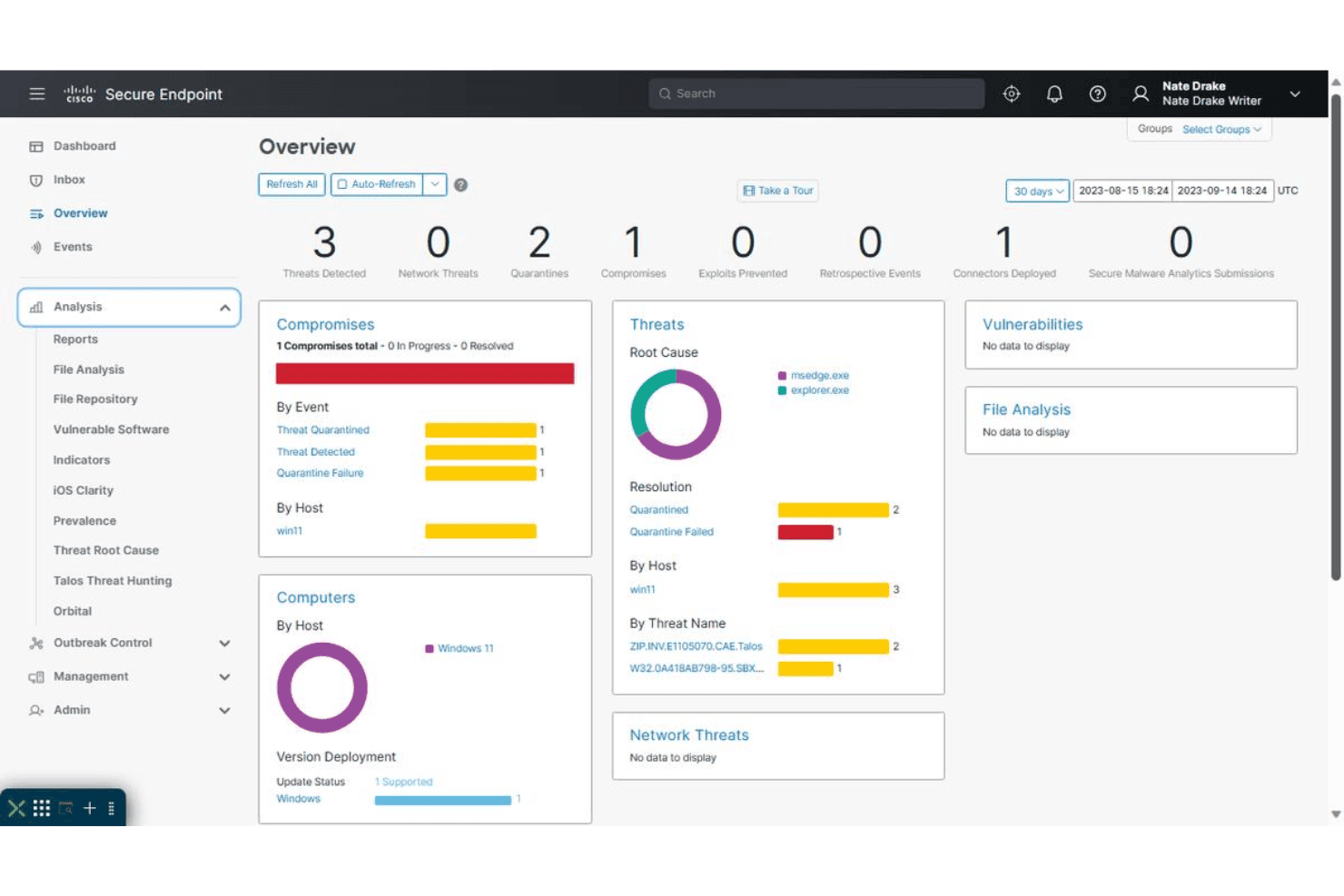
Cisco Secure Endpoint zeigt ein Sicherheitsübersicht-Dashboard an mit Bedrohungserkennungen, Quarantänen, Kompromittierungen und Ursachenanalysen über überwachte Hosts hinweg. Cisco Secure Endpoint, früher bekannt als AMP for Endpoints, ist eine cloud-native Lösung, die darauf ausgelegt ist, die Endpunktsicherheit Ihres Unternehmens zu stärken. Der Schwerpunkt liegt auf der Verbesserung der Fähigkeiten zur Vorfallreaktion und stellt Ihnen die Werkzeuge zur Verfügung, die benötigt werden, um Bedrohungen effektiv zu erkennen, zu verwalten und darauf zu reagieren.
Warum ich Cisco Secure Endpoint ausgewählt habe: Ein Grund, warum ich mich für Cisco Secure Endpoint entschieden habe, sind seine fortschrittlichen Endpoint Detection and Response (EDR)-Funktionen. Dieses Merkmal ist entscheidend, um Bedrohungen proaktiv zu erkennen und zu verwalten, sodass Ihr Team schnell auf Vorfälle reagieren kann. Darüber hinaus bieten die integrierten XDR-Fähigkeiten eine einheitliche Sicht auf Bedrohungen über verschiedene Vektoren hinweg, automatisieren das Vorfallmanagement und verbessern zusätzlich die Reaktionszeiten.
Ein weiteres herausragendes Merkmal ist das Talos Threat Hunting, das eine menschengeführte Bedrohungserkennung bietet, die auf dem MITRE ATT&CK-Framework basiert. Dieser proaktive Ansatz hilft, verborgene Bedrohungen zu identifizieren und liefert Warnungen mit hoher Genauigkeit zusammen mit Empfehlungen zur Behebung, sodass Ihr Team immer einen Schritt voraus ist. Die USB-Gerätekontrolle ist ein weiteres wichtiges Feature, durch das Sie die Nutzung von Geräten verwalten und während Untersuchungen eine bessere Sichtbarkeit erhalten.
Hervorstechende Funktionen und Integrationen von Cisco
Funktionen umfassen risikobasiertes Schwachstellenmanagement, mit dem Sie Schwachstellen identifizieren und verwalten können, um potenzielle Angriffsflächen zu reduzieren. Die Lösung bietet außerdem umfassenden Schutz durch die Kombination von Erkennung, Reaktion und Verwaltung des Benutzerzugriffs für Endpunkte, um eine robuste Sicherheit zu gewährleisten. Darüber hinaus ermöglicht sie erweiterte Untersuchungsmöglichkeiten, wodurch tiefere Einblicke in Bedrohungsaktivitäten möglich sind und Reaktionsstrategien verbessert werden.
Integrationen umfassen Cisco Duo, Email Threat Defense, Cisco Umbrella, Cisco Secure Cloud Analytics, Cisco XDR, Meraki, SD-WAN, Webex, Amazon Web Services, Google Cloud Platform, Microsoft Azure Cloud und Cisco SecureX.
Pros and Cons
Pros:
- Fortgeschrittene Bedrohungserkennung verbessert die Sicherheit, indem verschiedene Cyberangriffe effektiv erkannt und darauf reagiert wird.
- Die Integration mit anderen Cisco-Sicherheitsprodukten sorgt für ein einheitliches Sicherheitsökosystem.
- Umfassende Sicherheitsfunktionen bieten mehrschichtigen Schutz und Einblick in Bedrohungen.
Cons:
- Integrationsherausforderungen mit anderen Sicherheitslösungen wie Microsoft Defender und ESET.
- Eine langsamere Performance auf älterer Hardware kann für Nutzer mit veralteten Systemen problematisch sein.
Learn more about Cisco Secure Endpoints: Am besten geeignet für Verhaltensanalyse
- 90-tägige kostenlose Testphase
- Preise auf Anfrage

VMWare Carbon Black hilft bei der Verwaltung von Schwachstellen auf virtuellen Maschinen. Carbon Black ist eine Endpoint-Sicherheitsplattform, die für IT- und Sicherheitsteams entwickelt wurde, die sich auf den Schutz von Geräten und Daten konzentrieren. Sie hilft Ihnen, Bedrohungen für Ihre Endpunkte zu erkennen, zu verhindern und darauf zu reagieren.
Warum ich Carbon Black gewählt habe: Es überzeugt im Bereich Endpoint-Sicherheit und bietet fortschrittliche Bedrohungserkennung und -präventionsmaßnahmen. Die kontinuierlichen Überwachungsfunktionen verschaffen Ihrem Team Echtzeiteinblicke in die Endpunktaktivitäten. Die Incident-Response-Funktionen der Plattform ermöglichen schnelles Handeln zur Risikominderung. Diese Funktionalitäten machen Carbon Black zu einer verlässlichen Wahl für Teams, die Endpoint-Schutz priorisieren.
Herausragende Funktionen & Integrationen:
Funktionen beinhalten fortschrittliche Bedrohungserkennung, die Ihnen hilft, potenzielle Sicherheitsprobleme schnell zu identifizieren. Die kontinuierliche Überwachung informiert Sie in Echtzeit über Endpunktaktivitäten. Mit Incident-Response-Funktionen können Sie Bedrohungen zügig abwehren.
Integrationen gibt es mit Splunk, IBM QRadar, ServiceNow, Palo Alto Networks, Cisco, VMware, AWS, Microsoft Azure, Okta und Zscaler.
Pros and Cons
Pros:
- Echtzeiteinblicke
- Fortschrittliche Bedrohungserkennung
- Kontinuierliche Überwachung der Endpunkte
Cons:
- Eingeschränkte Offline-Funktionen
- Hohe Lernkurve
Learn more about Carbon Black:
Weitere Software zur Reaktion auf Sicherheitsvorfälle
Hier sind einige weitere Optionen für Software zur Reaktion auf Sicherheitsvorfälle, die es nicht in meine Bestenliste geschafft haben, aber dennoch einen Blick wert sind:
- 11Rapid7 InsightIDRAm besten für Bedrohungserkennung
- 12CrowdStrike Falcon InsightAm besten für Endpunktschutz geeignet
- 13VaronisAm besten für Einblicke in die Datensicherheit
- 14Palo Alto NetworkAm besten für KI-gestützte Bedrohungserkennung
- 15TenableAm besten für Schwachstellenmanagement geeignet
- 16AcutinexAm besten für Schwachstellenerkennung
- 17TripwireAm besten geeignet zur Überwachung der Dateiintegrität
- 18Greenbone OpenVASAm besten für umfassende Schwachstellenüberprüfung geeignet
- 19LogRhythmAm besten für die Bedrohungsbewertung in Echtzeit
- 20Cynet 360Am besten für umfassende Bedrohungserkennung
- 21RSA NetWitness PlatformAm besten geeignet für forensische Einblicke in Bedrohungen
- 22LogPointAm besten für zentrale Protokollverwaltung geeignet
- 23McAfee ESMAm besten für Echtzeit-Tracking und Analysen geeignet
- 24Cybereason Defense PlatformAm besten für Endpunktschutz
Wie ich Incident Response Software bewerte
Wenn ein Bereitschaftsingenieur um 2 Uhr morgens alarmiert wird, sind die eingesetzten Tools entscheidend – deshalb unterteile ich meine Bewertung in grundlegende Muss-Kriterien und die Unterscheidungsmerkmale, die die besten Plattformen hervorheben.
Kernfunktionen (Grundvoraussetzungen für diese Liste)
Bei der Auswahl der Tools für meine Liste bewerte ich jedes einzelne auf einer Skala von 0 (bietet die Funktionalität nicht) bis 5 (hervorragende Umsetzung in diesem Bereich) für jede unten aufgeführte Kernfunktionalität. Anschließend berechne ich die Gesamtsumme des Tools als Prozentwert. Jedes Tool muss eine Mindestgesamtwertung von 75 % erreichen, um für die Aufnahme berücksichtigt zu werden.
- Alarmierung & Benachrichtigungszustellung: Ich berücksichtige, über wie viele Kanäle ein Tool verfügt – Telefon, SMS, Push, E-Mail, Slack – und ob es in der Lage ist, redundante Monitoring-Benachrichtigungen zu deduplizieren, bevor sie den Bereitschaftsdienst überfluten.
- Bereitschaftsplanung & Eskalation: Gutes Management von Rotationen ist wichtig, wenn man Rund-um-die-Uhr-Abdeckung über Zeitzonen hinweg sicherstellt, daher prüfe ich, wie jedes Tool mit Vertretungen, Eskalationsstufen und Übergabelücken umgeht.
- Verfolgung des Incident-Lebenszyklus: Jedes Tool sollte es Teams ermöglichen, einen Incident durch definierte Phasen zu bewegen – von ausgelöst zu bestätigt bis gelöst – mit konfigurierbaren Schweregraden und einer Prüfhistorie für Compliance-Überprüfungen.
- Zusammenarbeit & War Rooms: Ich prüfe, ob die Plattform in der Lage ist, einen dedizierten Slack- oder Microsoft Teams-Kanal zu eröffnen, die richtigen Akteure einzubinden und eine fortlaufende Zeitleiste zu führen, sodass Nachzügler schnell den Anschluss finden.
- Monitoring- & ITSM-Integrationen: Das Integrationsverzeichnis eines Tools verrät viel. Ich bewerte, wie es sich mit Observability-Stacks wie Datadog oder Prometheus verbindet und ob es eine bidirektionale Synchronisation mit ITSM-Plattformen wie ServiceNow oder Jira ermöglicht.
- Postmortems & Response-Analysen: Nach dem Ernstfall brauchen Teams Daten. Ich achte auf integrierte Postmortem-Vorlagen, automatisch erstellte Incident-Zeitleisten und Dashboards, die MTTA- und MTTR-Trends im Zeitverlauf erfassen.
Nachdem ich eine Liste der Tools habe, die die Kriterien erfüllen, betrachte ich, was jede Plattform besonders macht.
Unterscheidungsmerkmale (Was Anbieter auszeichnet)
So vergleiche und unterscheide ich verschiedene Anbieter:
Herausragende Funktionen
Die Abbildung von Serviceabhängigkeiten ist entscheidend – wenn ein Incident ausgelöst wird, spart das Wissen über betroffene vorgelagerte Systeme und deren Verantwortliche enorm Zeit bei der Fehlerbehebung. Ich suche außerdem nach automatisierten Runbooks, die Diagnosen anstoßen oder einen Service neustarten können, ohne warten zu müssen, bis jemand eingreift. KI-gestützte Incident-Hilfe bietet Mehrwert, indem sie Alarme automatisch kategorisiert und während der Behebung potenzielle Ursachen vorschlägt. Öffentliche Statusseiten halten externe Interessengruppen während Ausfällen informiert, sodass Ihr Support-Team nicht mit Update-Anfragen überhäuft wird.
Mehr als nur Funktionen
Compliance und Sicherheitsstandards wiegen schwer – ich prüfe auf SOC 2 Typ II-Zertifizierung, SSO/SAML-Unterstützung und rollenbasierte Zugriffskontrollen, besonders für Teams in regulierten Branchen wie Gesundheitswesen oder Finanzwesen. Transparente Preisgestaltung ist ebenfalls wichtig, da Preismodelle pro Nutzer die Kosten für größere Bereitschaftsteams schnell steigen lassen können. Ich bewerte, ob ein Anbieter eine kostenlose Variante für kleinere Teams bietet, um die Plattform unverbindlich zu testen. Flexibilität bei der Bereitstellung rundet das Bild ab, da manche Organisationen Optionen für Datenresidenz oder Self-Hosting benötigen, um interne Governance-Vorgaben zu erfüllen.
So wählen Sie Software zur Reaktion auf Sicherheitsvorfälle aus
Es ist leicht, sich in langen Funktionslisten und komplexen Preisstrukturen zu verlieren. Damit Sie bei der individuellen Auswahl Ihrer Software den Überblick behalten, finden Sie hier eine Checkliste mit Faktoren, die Sie berücksichtigen sollten:
| Faktor | Was zu beachten ist |
| Skalierbarkeit | Stellen Sie sicher, dass die Software mit den Anforderungen Ihrer Organisation wachsen kann. Prüfen Sie, ob sie steigende Datenmengen und Nutzerzahlen bewältigen kann, ohne die Leistung zu beeinträchtigen. |
| Integrationen | Prüfen Sie, ob sich die Software nahtlos in Ihre bestehenden Tools wie SIEM-Software, Cloud-Dienste und Lösungen für die Endpunktsicherheit integrieren lässt. Dies trägt dazu bei, Ihren Arbeitsablauf zu optimieren und die Gesamteffizienz zu steigern. |
| Anpassbarkeit | Achten Sie auf Software, mit der Sie Dashboards, Warnmeldungen und Berichte an Ihre spezifischen Anforderungen anpassen können. Die Anpassbarkeit stellt sicher, dass das Tool Ihre individuellen betrieblichen Anforderungen erfüllt. |
| Benutzerfreundlichkeit | Wählen Sie Software mit einer intuitiven Benutzeroberfläche, die die Einarbeitungszeit für Ihr Team verkürzt. Ein benutzerfreundliches Design kann die Bereitstellung beschleunigen und die Akzeptanz verbessern. |
| Budget | Bewerten Sie die Gesamtbetriebskosten, einschließlich Abonnementgebühren, Einrichtungskosten und möglicher Zusatzmodule. Stellen Sie sicher, dass die Lösung in Ihr Budget passt und gleichzeitig alle erforderlichen Anforderungen erfüllt. |
| Sicherheitsvorkehrungen | Vergewissern Sie sich, dass die Software robuste Sicherheitsfunktionen wie Verschlüsselung, IT-Warnsoftware und regelmäßige Updates umfasst. Dies ist entscheidend, um sensible Daten zu schützen und die Einhaltung von Branchenvorschriften sicherzustellen. |
| Supportleistungen | Berücksichtigen Sie den Umfang der angebotenen Kundenunterstützung, beispielsweise die Verfügbarkeit rund um die Uhr und dedizierte Kundenbetreuer. Schnelle und zuverlässige Unterstützung kann während Vorfällen entscheidend sein. |
| Einhaltung von Vorschriften | Stellen Sie sicher, dass die Software die für Ihre Organisation relevanten Branchenstandards und Anforderungen an die Einhaltung von Vorschriften erfüllt, beispielsweise die DSGVO oder HIPAA, um mögliche Bußgelder und rechtliche Probleme zu vermeiden. |
Entwicklungen bei Software für die Reaktion auf Vorfälle
Bei meiner Recherche habe ich unzählige Produktaktualisierungen, Pressemitteilungen und Versionsprotokolle verschiedener Anbieter von Software für die Reaktion auf Vorfälle ausgewertet. Hier sind einige der aufkommenden Entwicklungen, die ich im Auge behalte:
- KI-gestützte Bedrohungserkennung: Immer mehr Anbieter setzen KI ein, um die Möglichkeiten zur Bedrohungserkennung zu verbessern. KI hilft dabei, Muster und Anomalien schneller zu erkennen und Erkenntnisse in Echtzeit zu liefern. Unternehmen wie IBM QRadar gehen mit KI-gestützten Analysen voran.
- Cloudbasierte Lösungen: Anbieter setzen zunehmend auf cloudbasierte Architekturen, die eine bessere Skalierbarkeit und Flexibilität ermöglichen. Dieser Trend unterstützt Teams an entfernten Standorten und bietet einen einfacheren Zugriff auf Updates. Lösungen wie CrowdStrike Falcon sind vollständig cloudbasiert und ermöglichen eine nahtlose Bereitstellung.
- Sicherheitsmodelle nach dem Zero-Trust-Prinzip: Die Umsetzung eines Zero-Trust-Ansatzes wird immer wichtiger. Dieses Modell stellt sicher, dass jede Zugriffsanfrage überprüft wird, wodurch das Risiko von Insider-Bedrohungen verringert wird. Palo Alto Networks hat Zero-Trust-Prinzipien in seine Angebote integriert.
- Verhaltensanalysen: Immer mehr Tools integrieren Verhaltensanalysen, um ungewöhnliche Benutzeraktivitäten zu erkennen. Dies hilft dabei, Insider-Bedrohungen und kompromittierte Konten zu identifizieren. Rapid7 InsightIDR nutzt Verhaltensanalysen, um seine Bedrohungserkennung zu verbessern.
- Integrierte Datenströme für Bedrohungsinformationen: Anbieter bieten zunehmend integrierte Datenströme für Bedrohungsinformationen an, um aktuelle Informationen über Bedrohungen bereitzustellen. Dies hilft Benutzern, Risiken effektiver zu priorisieren. FireEye Helix bietet eine umfassende Integration von Bedrohungsinformationen.
Was ist Software für die Reaktion auf Vorfälle?
Software für die Reaktion auf Vorfälle umfasst eine Reihe von Tools, die Organisationen dabei unterstützen, Cybersicherheitsbedrohungen zu erkennen, zu verwalten und auf sie zu reagieren. IT-Sicherheitsexperten und Teams für die Reaktion auf Vorfälle verwenden diese Tools in der Regel, um ihre Netzwerke und Daten zu schützen.
Bedrohungserkennung, Überwachung in Echtzeit und automatisierte Warnmeldungen helfen dabei, Risiken zu identifizieren und Vorfälle effizient zu verwalten. Bei der Bewertung der Optionen sollten Sie umfassende Dienste zur Reaktion auf Cybervorfälle in Betracht ziehen, die diese wesentlichen Funktionen bieten. Insgesamt verbessern diese Tools die Fähigkeit einer Organisation, Sicherheit und die Einhaltung von Vorschriften aufrechtzuerhalten.
Funktionen von Software für die Reaktion auf Vorfälle
Achten Sie bei der Auswahl von Software für die Reaktion auf Vorfälle auf die folgenden wichtigen Funktionen:
- Automatisierte Alarmierung: Benachrichtigt Ihr Team sofort, wenn Bedrohungen oder ungewöhnliche Aktivitäten erkannt werden, sodass Sie Maßnahmen ergreifen können, bevor aus kleinen Problemen größere werden.
- Fallverwaltung: Organisiert alle Vorfallsdetails, Beweise und die Kommunikation an einem zentralen, praktischen Ort. So behalten Sie den Fortschritt im Blick, weisen Aufgaben zu und stellen sicher, dass nichts übersehen wird.
- Automatisierung von Ablaufplänen: Ermöglicht Ihnen, standardisierte, schrittweise Vorgehensweisen für die Reaktion zu erstellen und bereitzustellen. Durch die Automatisierung routinemäßiger Aufgaben können Sie schneller und mit weniger Fehlern reagieren, insbesondere in stressigen Situationen.
- Nachverfolgung und Berichterstattung zu Vorfällen: Bietet eine einfache Möglichkeit, den gesamten Lebenszyklus jedes Vorfalls von der Erkennung bis zur Behebung zu überwachen und detaillierte Berichte darüber zu erstellen, wie damit umgegangen wurde. Diese Erkenntnisse helfen Ihnen, Muster zu erkennen und Ihre Prozesse im Laufe der Zeit zu verbessern.
- Integrationen von Drittanbietern: Verbindet sich mit Ihren anderen Sicherheits- und IT-Tools (z. B. SIEMs, E-Mail- und Ticketsystemen), sodass Sie Daten sammeln und koordinierte Maßnahmen ergreifen können, ohne zwischen verschiedenen Plattformen wechseln zu müssen.
- Rollenbasierte Zugriffskontrollen: Stellt sicher, dass vertrauliche Informationen nur für die richtigen Teammitglieder sichtbar sind. Dies schützt die Daten Ihrer Organisation und hält vertrauliche Details während eines Vorfalls sicher.
- Kommunikationswerkzeuge: Stellt sichere Kanäle bereit, über die Ihr Team chatten, Aktualisierungen teilen und Reaktionen in Echtzeit koordinieren kann. Gute Kommunikation ist entscheidend, wenn jede Sekunde zählt.
- Forensische Datenerfassung: Unterstützt das Sammeln und Bewahren wichtiger Beweise während eines Vorfalls. So können Sie nachvollziehen, was passiert ist, und spätere Untersuchungen oder Prüfungen nach einem Vorfall unterstützen.
- Anpassbare Dashboards: Zeigt die für Sie wichtigsten Kennzahlen und Warnmeldungen übersichtlich auf einen Blick an. Durch die Personalisierung Ihres Dashboards können Sie Trends erkennen und dringende Probleme schnell erfassen.
Gängige KI-Funktionen von Software zur Reaktion auf Vorfälle
Über die oben aufgeführten Standardfunktionen von Software zur Reaktion auf Vorfälle hinaus integrieren viele dieser Lösungen KI mit Funktionen wie:
- Automatisierte Bedrohungserkennung: Setzt KI ein, um den Netzwerkverkehr und Systemprotokolle kontinuierlich zu überprüfen und verdächtige Muster oder seltene Verhaltensweisen schneller und genauer zu erkennen als herkömmliche regelbasierte Werkzeuge.
- Intelligente Priorisierung von Warnmeldungen: Sortiert und ordnet Warnmeldungen, indem ihr Kontext und ihre potenziellen Auswirkungen analysiert werden. So können Sie sich auf das Wesentliche konzentrieren, anstatt von Fehlalarmen überflutet zu werden.
- KI-gestützte Ursachenanalyse: Durchsucht riesige Mengen an Vorfallsdaten, um schnell festzustellen, warum und wie ein Vorfall begonnen hat. Dies beschleunigt Ihre Untersuchung und hilft Ihnen, Wiederholungen zu verhindern.
- Anomalieerkennung: Nutzt maschinelles Lernen, um Abweichungen vom normalen Benutzer- oder Systemverhalten zu erkennen und frühe Anzeichen einer Kompromittierung zu melden, die Menschen möglicherweise übersehen würden.
- Vorhersage von Vorfällen: Sagt wahrscheinliche zukünftige Bedrohungen oder Schwachstellen auf Grundlage historischer Muster voraus. Dadurch können Sie von einer reaktiven zu einer proaktiven Reaktion übergehen und potenzielle Lücken schließen, bevor Angreifer sie finden.
Vorteile von Software zur Reaktion auf Vorfälle
Die Implementierung von Software zur Reaktion auf Vorfälle bietet Ihrem Team und Ihrem Unternehmen mehrere Vorteile. Hier sind einige, auf die Sie sich freuen können:
- Schnellere Bedrohungserkennung: Überwachung in Echtzeit und automatisierte Warnmeldungen helfen Ihrem Team, Bedrohungen schnell zu erkennen und zu beheben.
- Verbesserte Compliance: Funktionen für Compliance-Berichte unterstützen Sie bei der Einhaltung von Branchenvorschriften und verringern das Risiko von Bußgeldern.
- Verbesserte Sicherheitslage: Funktionen zur kontinuierlichen Überwachung und Bedrohungserkennung stärken Ihre allgemeine Sicherheit.
- Effiziente Ressourcenzuweisung: Fortschrittliche Analysen priorisieren Bedrohungen, sodass sich Ihr Team auf die dringendsten Probleme konzentrieren kann.
- Verkürzte Reaktionszeit: Die Automatisierung der Reaktion auf Vorfälle minimiert die Auswirkungen von Sicherheitsverletzungen, indem sie schnelle Maßnahmen ermöglicht.
- Aussagekräftige Datenanalyse: Analysen des Benutzerverhaltens liefern Erkenntnisse über potenzielle Insider-Bedrohungen und verbessern dadurch die Sicherheitsmaßnahmen.
- Flexible Integrationsmöglichkeiten: Integrationsfunktionen gewährleisten einen reibungslosen Betrieb mit vorhandenen Werkzeugen und verbessern die Effizienz der Arbeitsabläufe.
Kosten und Preise von Software zur Reaktion auf Vorfälle
Bei der Auswahl von Software zur Reaktion auf Vorfälle ist es wichtig, die verschiedenen verfügbaren Preismodelle und Tarife zu verstehen. Die Kosten variieren je nach Funktionen, Teamgröße, Zusatzoptionen und weiteren Faktoren. Die folgende Tabelle fasst gängige Tarife, ihre durchschnittlichen Preise und typische enthaltene Funktionen von Lösungen zur Reaktion auf Vorfälle zusammen:
Vergleichstabelle der Tarife für Software zur Reaktion auf Vorfälle
| Plantyp | Durchschnittlicher Preis | Übliche Funktionen |
| Kostenloser Plan | $0 | Grundlegende Software zur Erkennung von Eindringversuchen, begrenzte Warnungen und Community-Support. |
| Persönlicher Plan | $5-$25/Benutzer/Monat | Überwachung in Echtzeit, automatisierte Warnungen und grundlegende Berichterstattung. |
| Geschäftsplan | $30-$75/Benutzer/Monat | Erweiterte Analysen, Berichte zur Einhaltung von Vorschriften und Analysen des Nutzerverhaltens. |
| Unternehmensplan | $80-$150/Benutzer/Monat | Anpassbare Dashboards, Integrationsmöglichkeiten und dedizierter Support. |
Häufig gestellte Fragen zur Software zur Reaktion auf Sicherheitsvorfälle
Hier finden Sie Antworten auf einige häufige Fragen zur Software zur Reaktion auf Sicherheitsvorfälle:
Wie können Sie die Wirksamkeit eines Plans zur Reaktion auf Sicherheitsvorfälle mit Software sicherstellen?
Verwenden Sie Software, die regelmäßige Tests, Überwachung in Echtzeit und klare Arbeitsabläufe unterstützt, damit Ihr Plan wirksam bleibt. Erfassen Sie Vorfälle, automatisieren Sie Notfallhandbücher und überprüfen Sie Reaktionsmetriken, um Schwachstellen schnell zu erkennen. Stellen Sie sicher, dass Ihre Tools in Kommunikations- und Protokollierungssysteme integriert sind, und planen Sie regelmäßige Planspiele, um sowohl Ihr Team als auch die Plattform zu testen.
Wie verbessert Verhaltensanalyse die Reaktion auf Sicherheitsvorfälle?
Verhaltensanalyse erkennt ungewöhnliche Muster, indem sie lernt, wie das „Normale“ für Ihre Systeme aussieht. Mit Plattformen zur Reaktion auf Sicherheitsvorfälle erhalten Sie Warnungen zu potenziellen Bedrohungen, die auf Abweichungen basieren – etwa unerwarteten Anmeldeorten oder Dateizugriffen. Dadurch kann Ihr Team unauffällige oder sich weiterentwickelnde Angriffe schneller erkennen, die bei standardmäßigen Regeln möglicherweise übersehen werden.
Wie profitieren Teams zur Reaktion auf Sicherheitsvorfälle von automatisierten Warnungen?
Automatisierte Warnungen beschleunigen Ihre Reaktion, indem sie Ihr Team sofort über verdächtige Aktivitäten informieren. Sie sind zuverlässig und verhindern, dass Vorfälle unbemerkt bleiben, sodass Sie Bedrohungen unmittelbar nach ihrem Auftreten begegnen können. Warnungen in Echtzeit verbessern die Reaktionszeit und stellen sicher, dass alle denselben Prozess befolgen, wodurch die Konsistenz über verschiedene Schichten hinweg gewahrt bleibt.
Warum ist Skalierbarkeit bei Software zur Reaktion auf Sicherheitsvorfälle wichtig?
Skalierbarkeit bedeutet, dass Ihre Software mit dem Wachstum Ihres Unternehmens mehr Daten, Nutzer und Integrationen verarbeiten kann. Nach einer Fusion oder während einer starken Wachstumsphase werden Sie nicht ausgebremst und müssen die Plattform nicht wechseln. Für CTOs bedeutet dies, dass sie größere und komplexere Umgebungen mit demselben bewährten Toolset schützen können.
Welche Integrationen sollte Software zur Reaktion auf Sicherheitsvorfälle für IT-Umgebungen in Unternehmen unterstützen?
Achten Sie auf Lösungen, die sich in Ihr SIEM, Cloud-Anbieter, Systeme zur Endpunkterkennung, Ticketsysteme und Kommunikationsplattformen wie Slack oder Teams integrieren lassen. Suchen Sie nach Software, die eine Verbindung zu Ihren Überwachungsplattformen wie Sumo Logic oder einer Alternative sowie zu DevSecOps-Tools herstellen kann. Nahtlose Integrationen ermöglichen es Ihnen, Untersuchungen zu starten, die Ticketerstellung zu automatisieren und Vorfälle zu eskalieren, ohne zwischen Tools wechseln zu müssen. Dadurch wird Ihre Reaktion schneller und besser koordiniert.
Wie messen Sie den ROI von Investitionen in Software zur Reaktion auf Sicherheitsvorfälle?
Messen Sie den ROI, indem Sie kürzere Reaktionszeiten bei Vorfällen, weniger schwerwiegende Sicherheitsverletzungen und die Zeitersparnis bei manuellen Aufgaben Ihres Teams erfassen. Berücksichtigen Sie außerdem vermiedene behördliche Bußgelder, eine verbesserte Betriebszeit und die geringeren Kosten für die Untersuchung von Fehlalarmen. Wenn Ihre Plattform Arbeitsabläufe optimiert und den reibungslosen Betrieb Ihres Unternehmens sicherstellt, erzielen Sie einen echten Mehrwert.
Kann Software zur Reaktion auf Sicherheitsvorfälle bei der Einhaltung gesetzlicher Vorschriften helfen?
Ja, viele Plattformen automatisieren die Beweiserfassung, stellen eine Dokumentation von Vorfällen sicher und erstellen vorschriftskonforme Berichte. Dies vereinfacht Audits und hilft Ihnen nachzuweisen, dass Ihre Reaktion Vorschriften wie der DSGVO oder HIPAA entspricht – und reduziert gleichzeitig den Zeitaufwand Ihres Teams für Papierarbeit.
Was kommt als Nächstes?
Steigern Sie Ihr SaaS-Wachstum und Ihre Führungskompetenzen.
Abonnieren Sie unseren Newsletter für die neuesten Einblicke von CTOs und angehenden Führungskräften im Technologiebereich.
Wir helfen Ihnen, mit Leitfäden, Ressourcen und Strategien von führenden Experten intelligenter zu skalieren und stärker zu führen!