

Die 10 besten Cloud-Plattformen als Service 2026

10 Beste Cloud Platform as a Service-Shortlist


Eine effiziente Verwaltung Ihrer Infrastruktur ist entscheidend. Wahrscheinlich stehen Sie vor Herausforderungen wie der Skalierung Ihrer Prozesse oder der Senkung der IT-Kosten. Genau hier kommen Cloud-Plattformen als Service ins Spiel. Sie bieten Lösungen, die Ihre Arbeit erleichtern und Ihr Team produktiver machen können.
Ich habe diese Plattformen umfangreich getestet und überprüft. Mein Ziel ist es, Ihnen einen ehrlichen, detaillierten Einblick in die besten Optionen zu geben. Sie erhalten Einsichten zu Funktionen, Preisen und dazu, was jede Plattform besonders macht.
Meiner Erfahrung nach kann die Wahl der richtigen Cloud-Plattform die Art und Weise, wie Sie Projekte verwalten, grundlegend verändern. Sehen wir uns gemeinsam an, was diese Top-Anbieter Ihrem Team zu bieten haben.
Warum Sie unseren Software-Empfehlungen vertrauen können
Unser Team testet und bewertet Software seit 2012. Als Tech-Führungskräfte wissen wir selbst, wie schwierig – und wichtig – es ist, die richtige Software auszuwählen.
Für diesen Leitfaden haben wir Tools mithilfe von praktischen Tests und unabhängiger Recherche bewertet und dabei unsere Bewertungskriterien angewendet.
Unsere Bewertungen spiegeln unser menschliches redaktionelles Urteilsvermögen wider, keine Verkaufsstrategie.
Expertenprüfer:
Zusammenfassung der besten Cloud Platform as a Service
Diese Vergleichstabelle fasst die Preisinformationen zu meinen Top-Cloud-PaaS-Optionen zusammen, sodass Sie die passende Lösung für Ihr Budget und Ihre Geschäftsanforderungen finden können.
| Tool | Best For | Trial Info | Price | ||
|---|---|---|---|---|---|
| 1 | Am besten für maßgeschneiderte Hybrid-Cloud-Lösungen | Nicht verfügbar | Preis auf Anfrage | Website | |
| 2 | Am besten geeignet für die Entwicklung containerisierter Cloud-Anwendungen | 60-tägige kostenlose Testversion | Ab $20.00/Nutzer/Monat | Website | |
| 3 | Beste cloudbasierte Kundenbeziehungsmanagement-Lösung | 30-tägige kostenlose Testversion | Ab $5/Nutzer/Monat | Website | |
| 4 | Am besten für Nutzer von Microsoft-Unternehmens-Tools geeignet | 12-monatige kostenlose Testphase + kostenloser Plan verfügbar | Preise auf Anfrage | Website | |
| 5 | Beste Flexibilität für Unternehmen jeder Größe | 30-tägige kostenlose Testphase verfügbar | Ab $4/Monat | Website | |
| 6 | Am besten für die Vielzahl an Funktionen | 12-monatige kostenlose Testphase | Ab $29/Nutzer/Monat | Website | |
| 7 | Am besten für einfache Cloud-Bereitstellung | Kostenlose Testversion verfügbar | Ab $5/Nutzer/Monat | Website | |
| 8 | Am besten für zuverlässige agile Anwendungsentwicklung | 30-tägige kostenlose Testversion + kostenlose Tarife verfügbar | Preise auf Anfrage | Website | |
| 9 | Am besten geeignet für den Aufbau skalierbarer Gaming-Infrastrukturen | Kostenlose Testversion verfügbar | Ab 4,97/ Nutzer/Monat bei $59,62/Jahr | Website | |
| 10 | Am besten geeignet für Big Data-Analytik | 90-tägige kostenlose Testphase | Preis auf Anfrage | Website |
Cloud Platform as a Service Tests: Die besten Tools im Vergleich
Nachfolgend finden Sie meine ausführlichen Zusammenfassungen der besten Platformen als Service, die es auf meine Shortlist geschafft haben. Meine Bewertungen bieten einen detaillierten Einblick in die wichtigsten Funktionen, Vorteile & Nachteile, Integrationen und idealen Anwendungsbereiche jedes Tools – damit Sie die passende Lösung für sich finden.
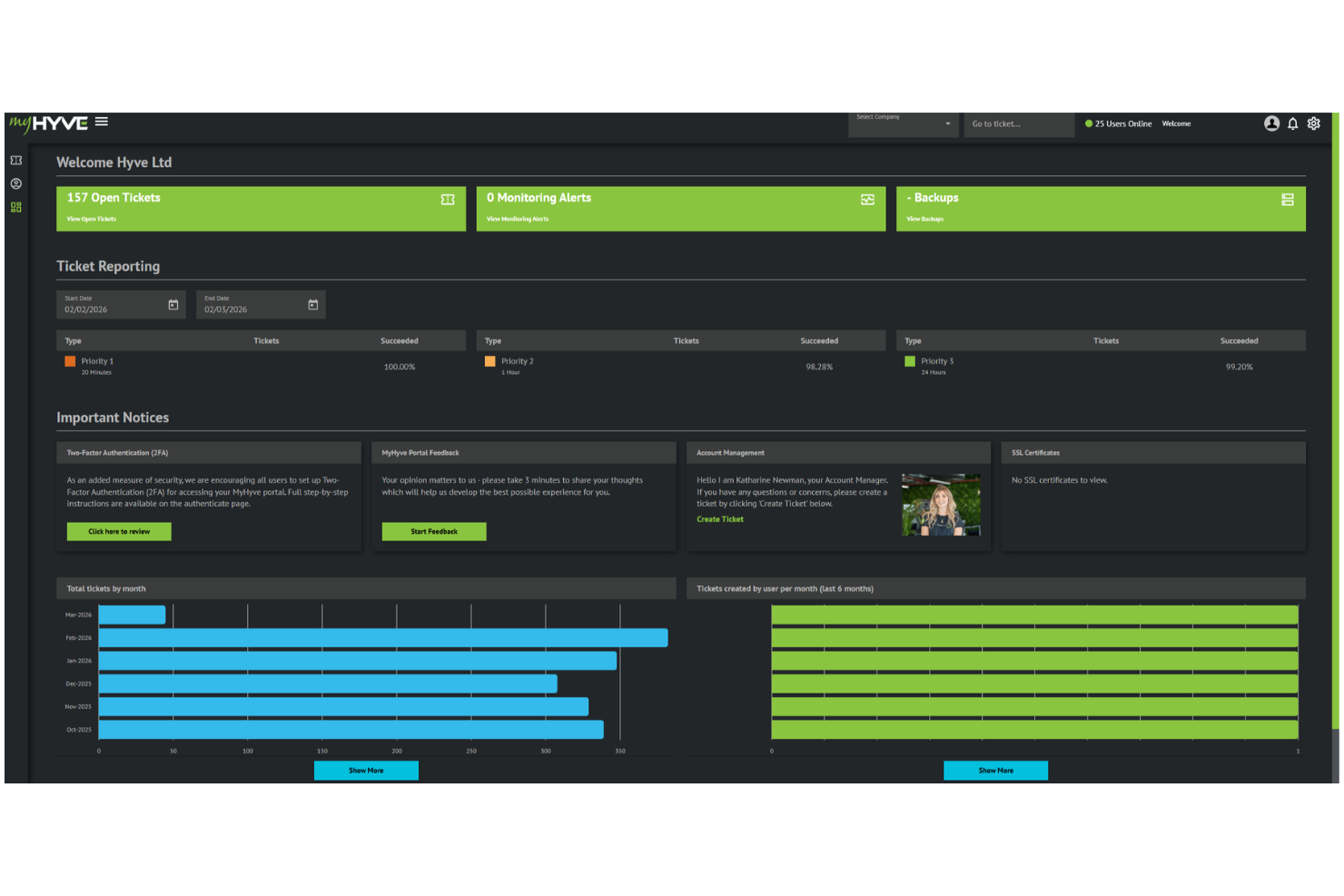
Hyve Managed Hosting bietet eine verwaltete Cloud-Infrastruktur, die für Unternehmen entwickelt wurde, die Flexibilität und Kontrolle über ihre IT-Umgebung benötigen. Es ist eine starke Option für Teams, die komplexe oder regulierte Workloads betreiben, die eine maßgeschneiderte Architektur, hohe Verfügbarkeit und strenge Compliance-Kontrollen erfordern. Mit einem praxisnahen Ansatz bei Support und Infrastrukturmanagement unterstützt Hyve Unternehmen dabei, Cloud-Umgebungen zu betreiben, ohne die gesamte Last eines internen DevOps-Teams tragen zu müssen.
Für wen eignet sich Hyve Managed Hosting am besten?
Hyve Managed Hosting ist ideal für mittelständische bis große Unternehmen in regulierten Branchen, die anpassbare, sichere und vollständig verwaltete Cloud-Infrastrukturen benötigen.
Warum ich Hyve Managed Hosting ausgewählt habe
Ich habe Hyve Managed Hosting ausgewählt, weil es hochgradig individuell anpassbare Cloud-Umgebungen unterstützt, insbesondere durch hybride und Multi-Cloud-Konfigurationen. Teams erhalten die Flexibilität, die Infrastruktur gezielt auf bestimmte Performance-, Compliance- und Datenresidenz-Anforderungen auszurichten, während sie sich auf Hyves Managed Services für die laufende Optimierung und Unterstützung verlassen können. Damit ist es eine praktische Wahl für Unternehmen, die mehr Kontrolle als bei Standard-Cloud-Plattformen benötigen, aber die Komplexität nicht vollständig intern abdecken möchten.
Hyve Managed Hosting – Hauptfunktionen
Weitere Funktionen, die Hyve Managed Hosting zu einer starken Option für Cloud Platform as a Service machen, umfassen:
- 24/7 technischer Support: Rund-um-die-Uhr-Zugang zu erfahrenen Technikern für Fehlerbehebung und proaktive Überwachung.
- Sicherheit auf Enterprise-Niveau: Integrierter DDoS-Schutz, Firewalls und regelmäßige Schwachstellenanalysen zum Schutz Ihrer Infrastruktur.
- Disaster Recovery-Lösungen: Automatisierte Backups und Failover-Optionen zur Minimierung von Ausfallzeiten und Datenverlusten.
- Compliance-Management: Unterstützung bei der Einhaltung von Standards wie ISO 27001, PCI DSS und DSGVO durch dedizierte Compliance-Ressourcen.
Hyve Managed Hosting – Integrationen
Derzeit sind keine nativen Integrationen aufgelistet.
Pros and Cons
Pros:
- ISO 27001- und PCI DSS-zertifizierte Infrastruktur
- Individuelle hybride und private Cloud-Bereitstellungen
- Proaktive Überwachung und verwaltete Sicherheitsdienste
Cons:
- Kein kostenloser Test oder Free-Tarif verfügbar
- Kleineres globales Rechenzentrum-Netzwerk als Hyperscaler

Am besten geeignet für die Entwicklung containerisierter Cloud-Anwendungen
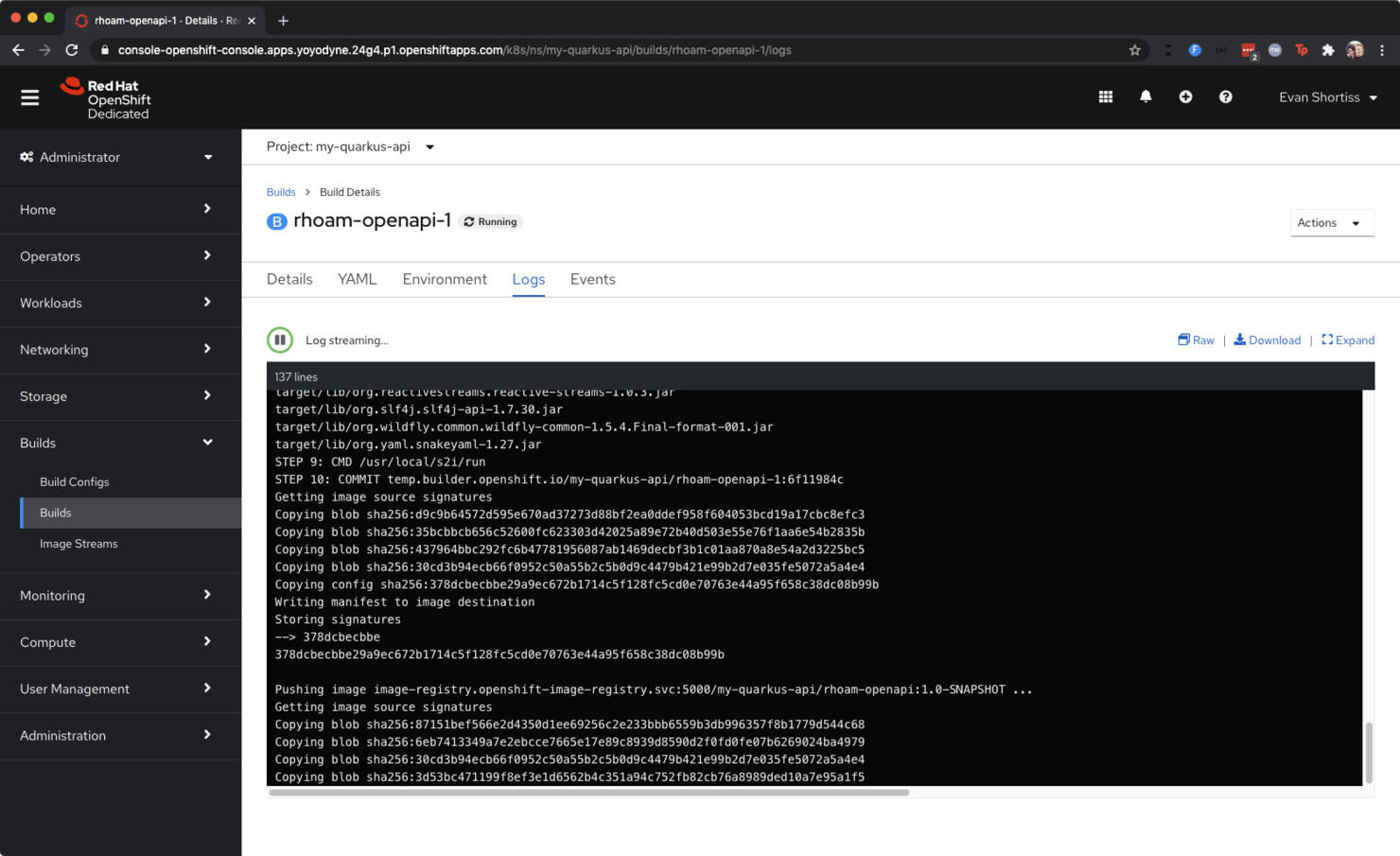
Red Hat OpenShift ist eine umfassende Cloud-native Plattform zum Erstellen, Bereitstellen und Verwalten von Anwendungen. Die Plattform nutzt Kubernetes-native Architekturen und integriert leistungsstarke Middleware, um sicherzustellen, dass Sie den Anforderungen Ihrer sich schnell entwickelnden Workflows gerecht werden.
Warum ich Red Hat OpenShift Cloud gewählt habe: Das überzeugende Argument für mich war, wie OpenShift die Container-Orchestrierung vereinfacht und Ihnen eine vollständige Sammlung von Tools für das Erstellen, Bereitstellen und Verwalten containerisierter Anwendungen bietet – eine hervorragende Option, wenn Ihr Entwicklungsteam eine moderne DevOps-Kultur anstrebt.
Besondere Funktionen & Integrationen von Red Hat OpenShift
Funktionen umfassen Skalierbarkeit von Workloads, Open-Source-Standards für Kompatibilität und zur Vermeidung von Anbieterbindung, Container-Portabilität, automatisierte Installation und Upgrades, Unterstützung für Edge-Architekturen und Multi-Cluster-Management. Integrierte APIs und REST-Endpunkte ermöglichen eine schnelle Integration in bestehende DevOps-Prozesse.
Integrationen beinhalten Cloud-native Anwendungen wie KI/ML, Datenbanken und Datenanalysen, Java (Quarkus), SAP und Spring auf Kubernetes. Es unterstützt zusätzliche Integrationen von Public Clouds oder selbstverwalteten Geschäftsapplikationen.
Pros and Cons
Pros:
- Skalierbarkeit und Flexibilität
- Portables Containersystem
- Automatisierte Installation und Upgrades
Cons:
- Schlechte Kompatibilität mit Windows
- Nicht ideal für Remote-Umgebungen

Beste cloudbasierte Kundenbeziehungsmanagement-Lösung
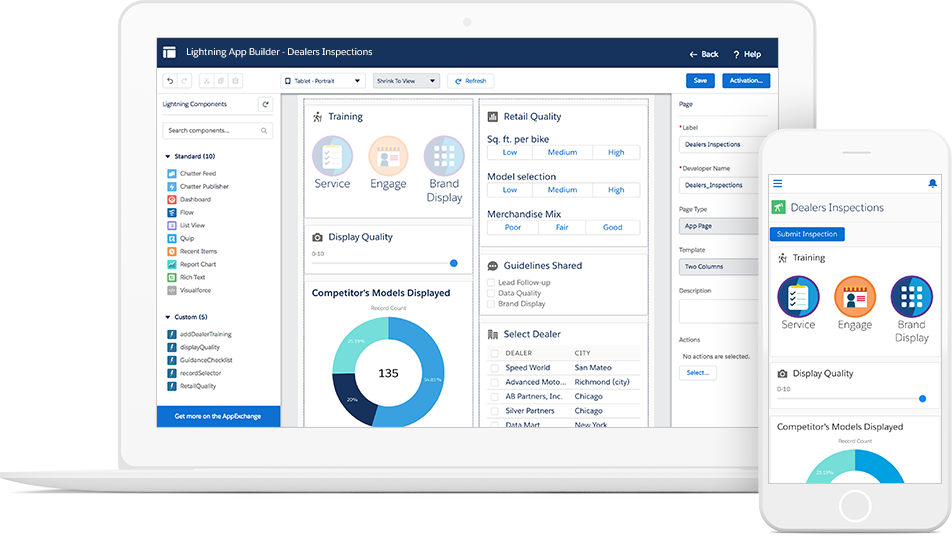
Obwohl Salesforce keine traditionelle Cloud-PaaS ist, ermöglicht es die Cloud-Bereitstellung vieler gängiger Geschäftswerkzeuge für Kundenbindung, Betriebsabläufe und Datenanalysen. Dadurch ist es eine großartige Alternative für Unternehmen, die anpassbare cloudbasierte CRM-Funktionen wünschen, ohne sie von Grund auf selbst entwickeln zu müssen.
Warum ich Salesforce Cloud ausgewählt habe: Mir gefiel, dass es mit zahlreichen Programmiersprachen kompatibel ist, wodurch Sie es für eine Vielzahl von Anwendungen nutzen können, einschließlich der Entwicklung individueller Geschäftsanwendungen. Ich fand, dass es eine hervorragende cloudbasierte Plattform für CRM-Tools ist, sodass Sie Ihre Vertriebsprozesse, Kundendaten und Marketingkampagnen verwalten können.
Herausragende Funktionen & Integrationen von Salesforce Cloud
Funktionen umfassen Vertriebsmanagement und Workflow-Automatisierung. Individuelle Berichte und Analysen liefern verwertbare Erkenntnisse für datenbasierte Entscheidungen. Zu den Funktionen für das Geschäftsmanagement zählen Lead-Management, E-Mail-Integration und Vertriebskollaboration.
Integrationen umfassen den nativen AppExchange-Marktplatz sowie eine umfangreiche API-Bibliothek mit einer Vielzahl von Drittanbieter-Zapier-Integrationen und Add-ons wie Slack, Jotform Enterprise, Google Workspace, Flair.hr, Outfunnel, Calendly, LinkedIn, Dropbox, Docusign, monday.com, Hubspot und Mailchimp.
Pros and Cons
Pros:
- Leistungsstarke CRM-Funktionen
- Umfangreiche Integrationsmöglichkeiten
- Starker Kundensupport
Cons:
- Etwas teurer im Vergleich zur Konkurrenz
- Komplexe Anpassungsanforderungen
Am besten für Nutzer von Microsoft-Unternehmens-Tools geeignet
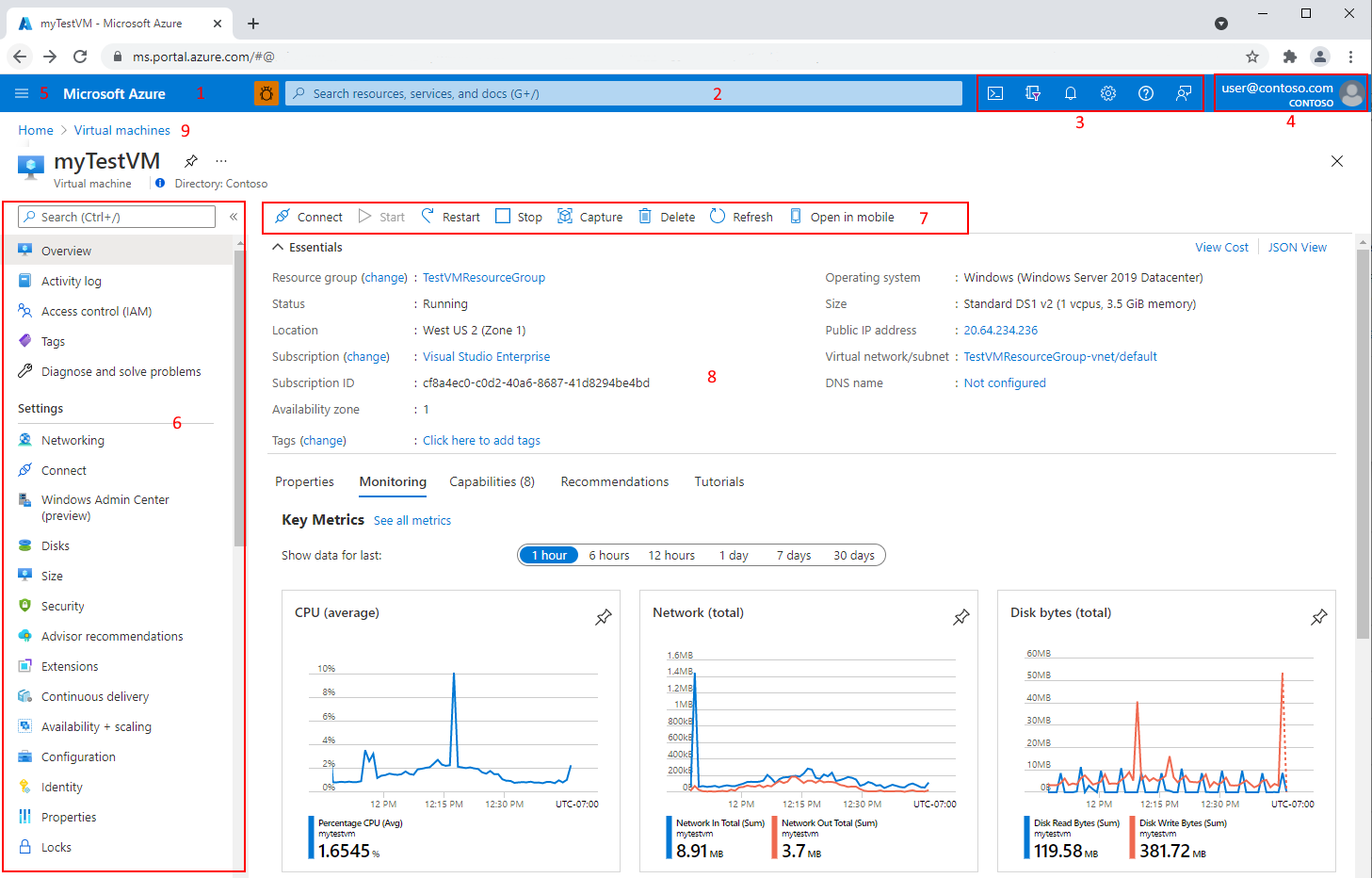
Microsoft Azure profitiert von seiner Dominanz im Unternehmensmarkt und ist eine hervorragende Cloud-Option, wenn Ihr Unternehmen bereits stark in Microsoft-Technologien investiert. Es bietet ein umfassendes Set an Unternehmens-Tools und -Services, die sich nahtlos in das Microsoft-Ökosystem integrieren lassen.
Warum ich Microsoft Azure Cloud gewählt habe: Ich habe Azure ausgewählt, weil es optimal mit Microsoft Windows und verwandten Tools wie Office und Active Directory zusammenarbeitet, die für viele große Unternehmen zentrale Werkzeuge sind. Azure bietet eine große Auswahl an cloud-nativen Diensten für nahezu jeden Anwender, aber ich finde, Azure Cloud ist besonders dann eine gute Wahl, wenn Sie von einer einfachen Integration in bestehende Windows-basierte Architekturen profitieren möchten.
Microsoft Azure Cloud – Hervorstechende Funktionen & Integrationen
Funktionen umfassen über 40 Lösungen wie Hybrid-Cloud-Hosting, Entwicklungsumgebungen für Anwendungen, containerbasierte Microservices, Datenanalyse, Sicherheits- und Governance-Kontrollen sowie SQL-Datenbanken. Für mich sind jedoch die umfangreiche Dokumentation und die Integration mit anderen Microsoft-Produkten die wichtigsten Verkaufsargumente.
Integrationen umfassen native Azure-Funktionen, API-Verwaltung und Microsoft-Dienste wie Office 365 und Active Directory. Datenintegrationen werden durch Funktionen wie Azure Event Grid zur Erstellung von Datenpipelines und Azure Data Factory für cloud-native ETL bereitgestellt. Zusätzlich können Sie über Zapier Azure-Webanwendungen mit mehr als 5.000 Apps integrieren.
Pros and Cons
Pros:
- Exzellente Integration mit Microsoft-Software
- Starke Unterstützung auf Unternehmensebene
- Unterstützung für Hybrid-Cloud-Lösungen
Cons:
- Lernaufwand für Nicht-Microsoft-Umgebungen
- Komplexe Preisstruktur

Kamatera
Beste Flexibilität für Unternehmen jeder Größe
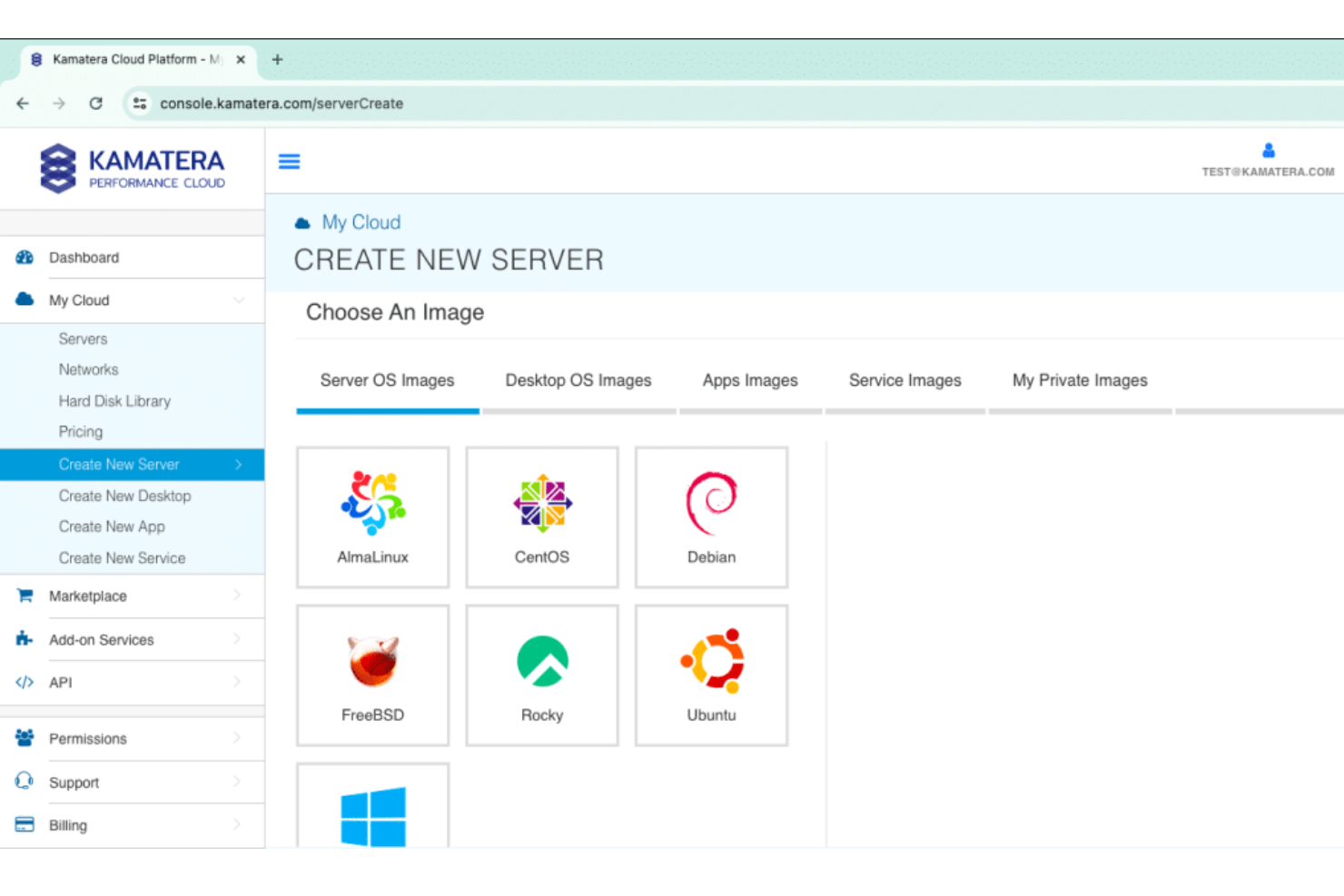
Kamatera bietet schnelle, zuverlässige und skalierbare Cloud-Lösungen mit weltweiter Präsenz. Mit 24 Rechenzentren weltweit, flexiblen Konfigurationen und technischem Support rund um die Uhr ermöglichen sie Unternehmen jeder Größe, mit einer kosteneffizienten und leistungsstarken Infrastruktur zu wachsen.
Warum ich Kamatera gewählt habe: Mir gefallen die anpassbaren Cloud-Server. Sie können Server individuell konfigurieren, indem Sie die gewünschte CPU-Leistung, den Arbeitsspeicher, den Speicherplatz und sogar den bevorzugten Rechenzentrumsstandort auswählen. Dieses Maß an Anpassung erlaubt es Ihrem Team, die Ressourcen effektiv zu optimieren und sicherzustellen, dass Ihre Anwendungen reibungslos laufen, ohne unnötige Überkapazitäten.
AWS – Herausragende Funktionen & Integrationen
Funktionen umfassen Kamateras Angebot für virtuelle private Clouds. Mit diesem Service können Sie eine isolierte, private Cloud-Umgebung einrichten, was die Sicherheit und Kontrolle über Ihre Daten erhöht. Es werden zudem Cloud-Firewalls angeboten, die Ihre Server durch Überwachung und Steuerung des ein- und ausgehenden Netzwerkverkehrs vor Bedrohungen schützen. Lastenausgleicher sorgen dafür, dass Arbeitslasten gleichmäßig auf die Server verteilt werden, sodass keine einzelne Instanz zum Engpass wird.
Integrationen sind über die API von Kamatera möglich.
Pros and Cons
Pros:
- Skalierbare Cloud-Infrastruktur
- Individuell anpassbare Server-Setups für spezifische Geschäftsanforderungen
- Schnelle und zuverlässige VPS-Hosting-Dienste
Cons:
- Begrenzte Anzahl an Rechenzentren in Asien und Afrika
- Für die Server-Einrichtung sind fortgeschrittene Kenntnisse erforderlich

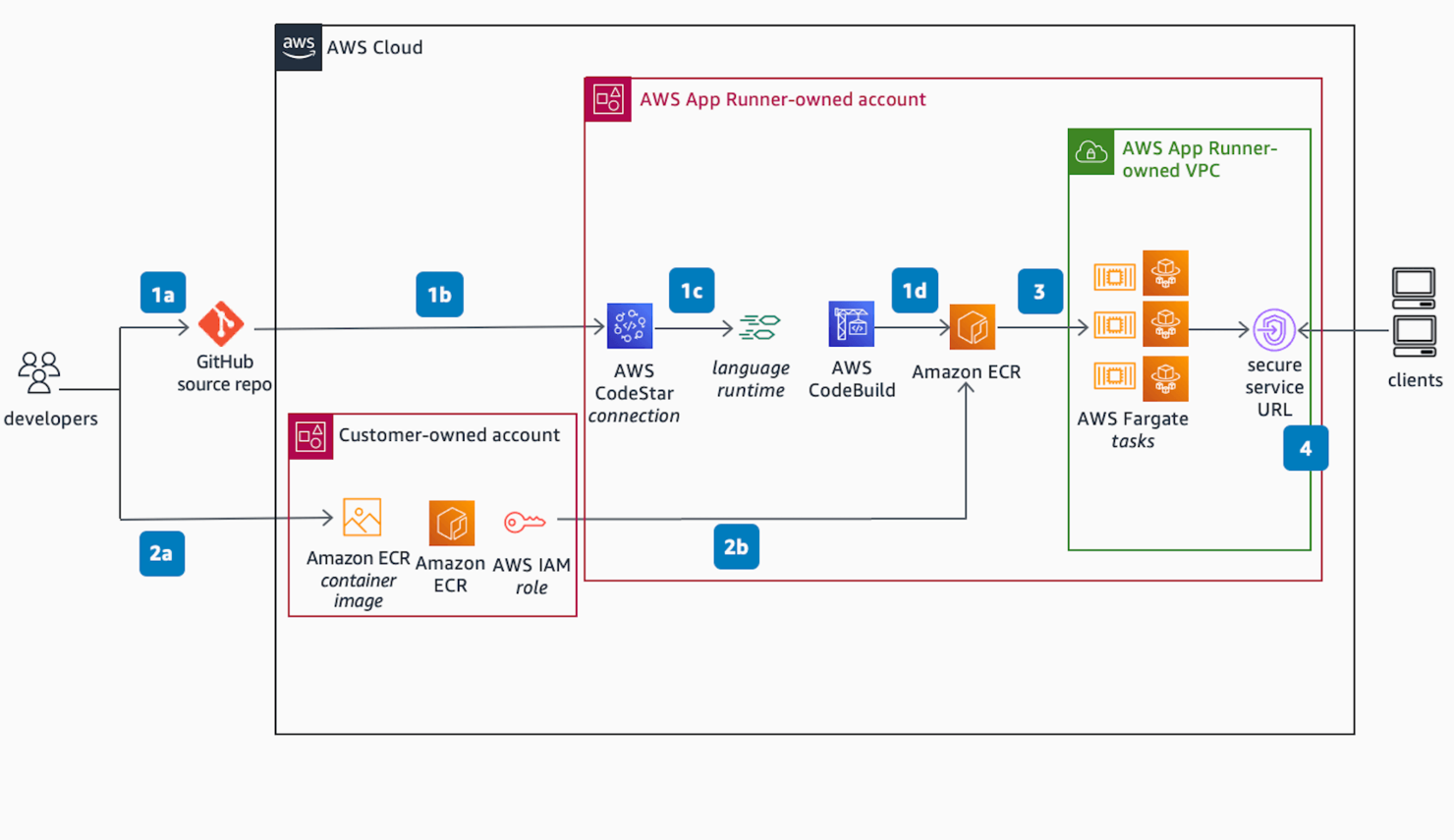
AWS ist der Pionier und das ausgereifteste PaaS-Angebot auf dem Markt und bekannt für sein umfangreiches Serviceportfolio. Dank einer großen Nutzer-Community und einer dominanten Marktstellung ist es für viele Unternehmen die bevorzugte Wahl.
Warum ich Amazon Web Services gewählt habe: Ich habe AWS ausgewählt, weil es die breiteste Auswahl an Services bietet, darunter die Elastic Compute Cloud, virtuelle Private Server und S3-Speicher-Buckets. Besonders haben mir die Skalierbarkeitsfunktionen der Amazon Cloud gefallen, die wachsenden Datenanforderungen gerecht werden, ohne die Performance zu beeinträchtigen. Es bietet zudem flexible Lösungen für Zusatzaufgaben wie das Erstellen von Organigrammen oder das Verwalten von Geräteverzeichnissen.
Herausragende Features & Integrationen von AWS
Funktionen umfassen mehr als 200 Services rund um Cloud-Hosting und Infrastrukturtechnologien, darunter Data Warehousing und Datenmigration, relationale oder NoSQL-Datenbanken, mobile Messaging- und Mediendienste, Compliance- und Governance-Tools und vieles mehr. Die einzelnen Module sind als Plattform gut aufeinander abgestimmt und bieten beeindruckende Flexibilität und Skalierbarkeit.
Integrationen umfassen das Amazon API Gateway, mit dem Sie APIs für serverlose Workloads und Webanwendungen erstellen, veröffentlichen, überwachen und absichern können. Sie erhalten außerdem vorgefertigte AWS AppSync-Lösungen zur flexiblen API-Erstellung, Amazon EventBridge für ereignisgesteuerte Architekturen und Messaging-Funktionen sowie Amazon MQ und eine No-Code-API, um Datenflüsse zwischen SaaS-Anwendungen und AWS zu automatisieren.
Pros and Cons
Pros:
- Umfangreiches Serviceportfolio
- Starker Fokus auf Skalierbarkeit und Performance
- Umfassender Community-Support
Cons:
- Komplexität der Services für Einsteiger
- Mögliche Kostenprobleme

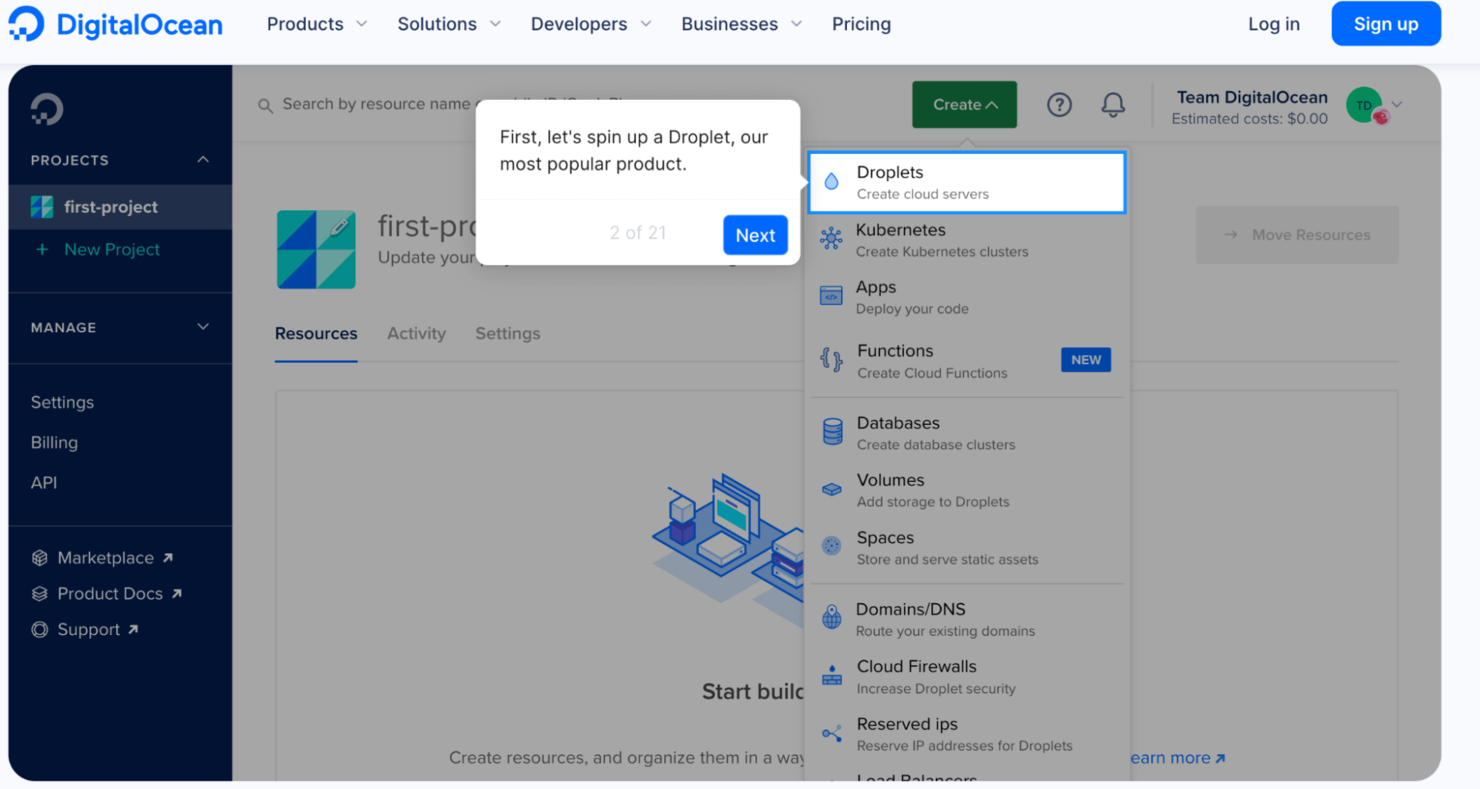
DigitalOcean bietet eine skalierbare und einfach zu bedienende Umgebung für Cloud-Bereitstellung und Anwendungsmanagement. DigitalOcean stellt eine große Auswahl an kompatiblen Betriebssystemen zur Auswahl sowie hervorragende Anpassungsmöglichkeiten beim Einrichten eines Virtual Private Server (VPS) bereit.
Warum ich die Digital Ocean Cloud Platform gewählt habe: Ich habe mich für DigitalOcean aufgrund der einfachen Skalierbarkeit und des Rufs als zuverlässiger und kostengünstiger Anbieter von Cloud-Infrastruktur entschieden. Die Plattform bietet außerdem eine benutzerfreundliche Oberfläche, exzellenten Kundensupport und einen unkomplizierten Einrichtungsprozess.
Hervorstechende Funktionen & Integrationen der Digital Ocean Cloud
Funktionen umfassen flexible Droplet-Größen, SSD-Speicher für verbesserte Leistung, ein globales Netzwerk von Rechenzentren und nahtlose Skalierbarkeit zur Anpassung an unterschiedliche Anwendungsanforderungen.
Integrationen umfassen beliebte Drittanbieter-Integrationen wie Ansible, GitHub, GitLab, CHEF, Puppet, Mesosphere, RANCHER und SaltStack. Besonders gefallen hat mir die „doctl“-Kommandozeile von DigitalOcean für die Arbeit mit der API, insbesondere bei der Integration containerisierter Anwendungen mit Terraform und Kubernetes.
Pros and Cons
Pros:
- Preisgünstige Tarifmodelle
- Unkomplizierter Einrichtungsprozess
- Starke Unterstützung durch eine engagierte Entwickler-Community
Cons:
- Teurer Backup-Prozess
- Nicht optimal als E-Mail-Marketing-Server geeignet

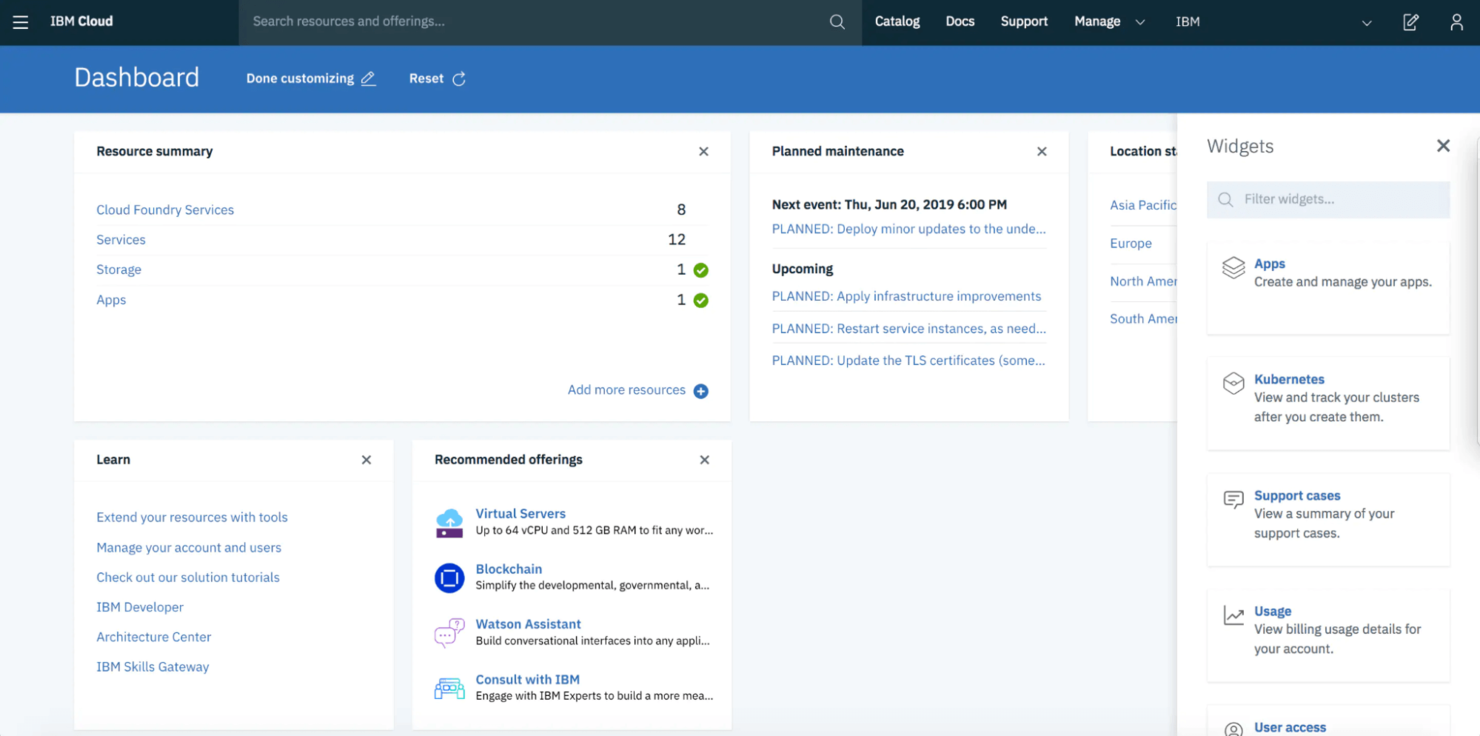
Die Apache-OpenWhisk-Lösung von IBM Cloud ermöglicht eine agile Anwendungsentwicklung, indem sie ein offenes Ökosystem fördert, das die Zusammenarbeit und Unterstützung bei der Codeausführung durch externe Mitwirkende erleichtert. Darüber hinaus läuft sie auf einer skalierbaren Plattform, die den Anforderungen wachsender Unternehmen gerecht wird, und bietet eine breite Palette intelligenter Entwicklungsfunktionen, die Datensicherheit gewährleisten.
Warum ich mich für IBM Cloud entschieden habe: Die wichtigsten Vorteile für mich sind die bewährte Infrastruktursicherheit, die Einhaltung gesetzlicher Vorschriften und die Governance-Steuerelemente, die Datensicherheit und Datenschutz gewährleisten. Angesichts der sich ständig verändernden Landschaft der Compliance-Vorschriften ermöglicht IBM Cloud Unternehmen, durch schnelleres Handeln den Vorsprung zu wahren und sich effektiv an die sich weiterentwickelnden Compliance-Anforderungen anzupassen.
Herausragende Funktionen und Integrationen von IBM Cloud
Zu den Funktionen gehören API, Dashboard zur Aktivitätsverwaltung, Anpassung, Geschäftsanalyse, virtuelle Netzwerke und Server, Aktivitätsverfolgung, Anwendungsverwaltung, Genehmigungsworkflow und Prüfungsverwaltung. Besonders attraktiv sind für mich jedoch die Zuverlässigkeit und die leistungsstarken Sicherheitsfunktionen.
Zu den Integrationen gehören die neue QRadar-Sicherheitssuite von IBM, Protokollanalysen, erweiterte Erkennung und Reaktion (XDR), die Sicherheitsorchestrierung und -automatisierung von QRadar (SOAR), Sicherheitsinformations- und Ereignisverwaltung (SIEM), containerisierte systemeigene Middleware und herkömmliche Anwendungssoftwaredienste.
Pros and Cons
Pros:
- Leistungsstarker Sicherheitswerkzeugsatz
- Hochgeschwindigkeits-Datenverwaltung
- Optimierte Leistung
Cons:
- Eingeschränkte regionale Verfügbarkeit
- Komplexe Preisstruktur

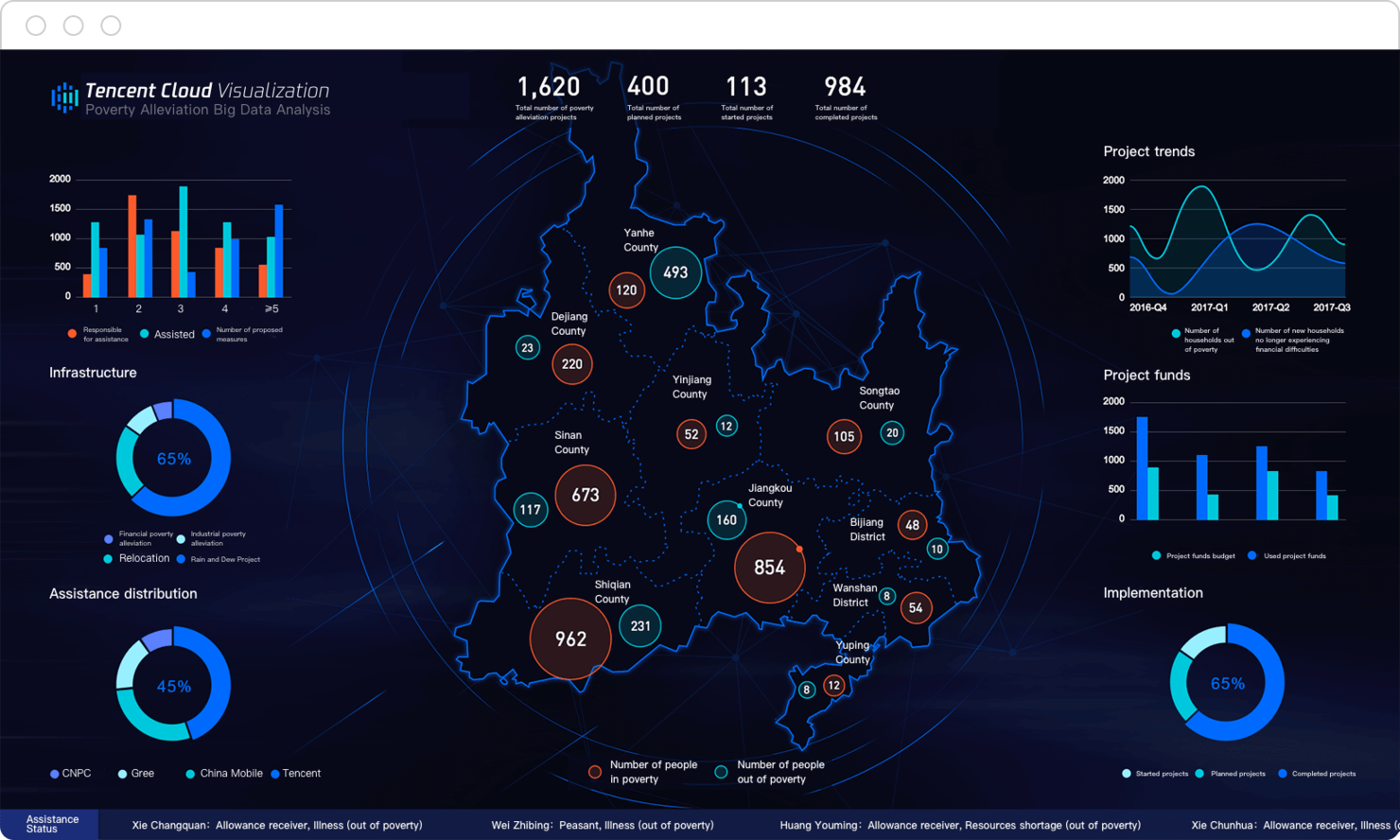
Tencent Cloud ist ein leistungsstarker PaaS-Anbieter, der für seine umfangreichen Investitionen in Technologien wie künstliche Intelligenz (KI), Cloud-Computing und Big-Data-Analysen bekannt ist. Er eignet sich besonders, wenn Sie Interesse an häufigen, neuen und innovativen Angeboten haben.
Warum ich Tencent Cloud ausgewählt habe: Mir gefällt, dass Tencent Cloud eine sichere, zuverlässige und leistungsstarke Cloud-Computing-Lösung anbietet, die auch Microservice- und serverlose Architekturen umfasst. Besonders interessant finde ich die maßgeschneiderten Lösungen für Online-Gaming – dazu gehören leistungsoptimierte Datenspeicherung sowie weltweit verteilte Zugriffsknoten, um Latenzen im Spiel zu vermeiden.
Herausragende Funktionen & Integrationen von Tencent Cloud
Funktionen umfassen mehr als 70 Compute- und Speicheroptionen, Unterstützung für KI-basierte Anwendungen, Mediadienste, umfassende Sicherheitsmaßnahmen, Cloud Object Storage, Cloud Monitoring, Web Application Firewall sowie Push-Benachrichtigungs- und Push-E-Mail-Dienste. Spiel-Architekturen, die für MMOs geeignet sind, können auf einer globalen Infrastruktur von 2.800 CDN-Knoten mit 200 Tbps reservierter Bandbreite bereitgestellt werden.
Integrationen umfassen Standard-APIs, Drittanbieter-Integrator:innen und eine breite Palette an Unternehmensanwendungen. Das API-Gateway von Tencent bietet Monitoring und Lebenszyklusmanagement; außerdem wird ein SDK bereitgestellt, das mit mehreren Programmiersprachen kompatibel ist.
Pros and Cons
Pros:
- Fortschrittliche KI-Funktionen
- Umfangreiches Produktportfolio, Gaming-Lösungen
- Wettbewerbsfähige Preisstruktur
Cons:
- Sprachbarriere
- Langsame Upload- und Download-Geschwindigkeiten

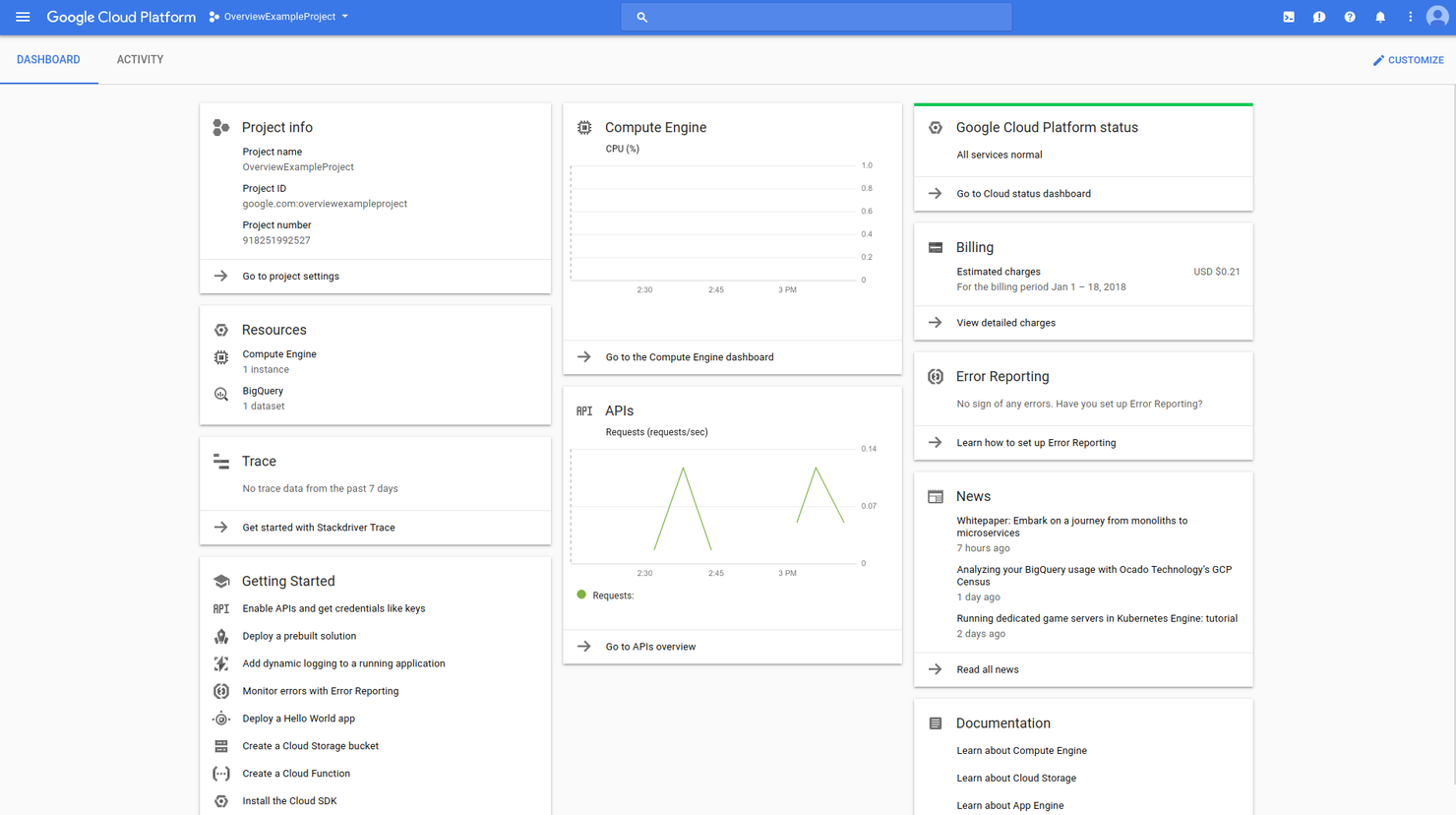
Google Cloud bietet eine flexible Umgebung für die Entwicklung, das Testen und den Betrieb von Anwendungen. Es umfasst eine umfangreiche Auswahl an APIs, verschiedene Speicherlösungen und Integrationsmöglichkeiten sowie hervorragende Datenverarbeitungs- und Analysefunktionen. Zudem stehen Ihnen fortschrittliche KI-Dienste wie Text- und Bilderkennung zur Verfügung.
Warum ich Google Cloud gewählt habe: Mir gefällt, dass Google Cloud einen leistungsstarken Serviceumfang bietet und Sie sich auf die Reife und die besonderen Stärken der Plattform im Bereich Big Data und KI verlassen können. Das ist ideal für zukunftsorientierte Projekte, beispielsweise zur Integration generativer KI in Ihre Webanwendungen oder den Einsatz von Machine Learning in Ihrem Data-Science-Projekt.
Google Cloud - Herausragende Funktionen & Integrationen
Funktionen umfassen Zugriffssteuerung und -verwaltung, Aktivitätsüberwachung, Anwendungsmanagement, Audit-Management, Backup und Wiederherstellung und mehr. Für mich sind jedoch die bemerkenswertesten Funktionen die Datenanalytik, Maschinelles Lernen und KI-Frameworks wie TensorFlow, serverloser Kubernetes-Service und Multi-Cloud-Fähigkeit.
Integrationen umfassen native Optionen wie SAP, App Engine, BigQuery, Cloud CDN, Compute Engine, Cloud SQL und Dataflow. Außerdem unterstützt Google Cloud Open-Source-Technologien und Frameworks für eine flexible Integration mit Unternehmensanwendungen wie Salesforce, Datenbanken wie MySQL und ereignisbasierten Systemen wie Cloud Pub/Sub.
Pros and Cons
Pros:
- Skalierbarkeit
- Big Data- und KI-Funktionen
- Kubernetes-Cluster-Expertise
Cons:
- Hohe Lernkurve
- Komplexe Preisstruktur
Weitere Cloud-PaaS
Hier finden Sie noch einige weitere Plattformen als Service, die es zwar nicht auf meine Shortlist geschafft haben, aber dennoch einen Blick wert sind:
- VMware
Am besten für Virtualisierung geeignet
- Alibaba Cloud
E Cloud-Plattform in Asien
- Oracle Cloud
Am besten für umfassende Anwendungsentwicklung
- Rackspace Cloud
Am besten für verwaltete Cloud-Dienste


Comment j'évalue les plateformes Cloud Platform as a Service
Lorsque les équipes doivent déployer des applications sans gérer l’infrastructure, je divise mon évaluation en exigences PaaS essentielles que chaque fournisseur doit remplir et les aspects différenciateurs qui distinguent les meilleures plateformes.
Fonctionnalités de base (Critères incontournables pour cette liste)
Lorsque je sélectionne des outils pour ma liste, j’attribue à chacun une note de 0 (la fonctionnalité n'est pas proposée) à 5 (excellent dans ce domaine) pour chaque fonctionnalité clé listée ci-dessous. Ensuite, je calcule le score total de l’outil en pourcentage. Chaque outil doit atteindre un score total minimum de 75 % pour être pris en considération.
- Environnements d'exécution gérés : Je vérifie les langages et frameworks pris en charge nativement par chaque plateforme, comme l’exécution d’une application Django Python ou d’un microservice Node.js sans configuration du système d’exploitation sous-jacent.
- Mise à l’échelle automatique & répartition de la charge : Les hausses de trafic lors de lancements produit ou de pics saisonniers peuvent faire planter les applications, j’évalue donc comment chaque plateforme gère les déclencheurs d’auto-scaling et répartit la charge.
- Flux de déploiement applicatif : Je recherche des workflows de déploiement par push Git, la compatibilité avec les pipelines CI/CD et des options d’orchestration de conteneurs permettant aux équipes de livrer du code en quelques minutes plutôt qu’en heures.
- Middleware intégré & bases de données : Les modules additionnels gérés comme les bases SQL, la mise en cache Redis ou les files de messages doivent pouvoir être provisionnés en un clic, sans configuration d’infrastructure séparée.
- Hébergement multi-environnements & multi-régions : Les environnements de développement, de préproduction et de production dans plusieurs régions sont essentiels quand vos utilisateurs sont répartis dans différentes zones géographiques et que votre équipe a besoin d’une parité d’environnement.
- Supervision & journalisation applicative : Des tableaux de bord APM intégrés, l’agrégation des logs et des alertes permettent aux équipes de repérer une fuite de mémoire ou un endpoint défaillant avant que les utilisateurs n’ouvrent un ticket de support.
Une fois que j’ai une liste d’outils répondant à ce critère, j’analyse ce qui distingue chaque plateforme.
Facteurs différenciants (Ce qui distingue les fournisseurs)
Voici comment je compare les différents fournisseurs :
Fonctionnalités remarquables
La prise en charge des fonctions serverless est un différenciateur majeur. Je privilégie les plateformes permettant aux équipes d’exécuter des traitements événementiels comme des gestionnaires de webhooks ou des tâches planifiées en parallèle de leurs applications principales, sans lancer d’instances dédiées. Les outils DevSecOps sont aussi importants : un scan des vulnérabilités et la gestion des secrets intégrés dans la chaîne de déploiement évitent d’ajouter des solutions de sécurité distinctes. J’évalue aussi le marketplace et l’écosystème de chaque plateforme, car l’accès à des buildpacks communautaires et des modules tiers peut faire gagner plusieurs semaines lors de la mise en place d’un projet.
Au-delà des fonctionnalités
Le risque d’enfermement propriétaire est l’une des premières choses que j'évalue. Les plateformes prenant en charge les workloads basés sur Kubernetes et les standards ouverts comme Terraform facilitent la migration d’applications entre fournisseurs si vos besoins évoluent. Les certifications de conformité sont également essentielles : si votre équipe traite des données de santé ou des paiements, je vérifie les certifications HIPAA et PCI DSS au lieu de présumer leur présence. La transparence tarifaire compte tout autant, car une facture imprévue après un pic de trafic peut annuler toute économie promise par la plateforme.
Wie Sie die richtige Cloud Platform as a Service auswählen
Es ist leicht, sich in langen Funktionslisten und komplexen Preisstrukturen zu verlieren. Damit Sie während Ihres individuellen Auswahlprozesses den Überblick behalten, finden Sie hier eine Checkliste wichtiger Faktoren:
| Faktor | Worauf achten? |
|---|---|
| Skalierbarkeit | Kann die Plattform mit Ihrem Unternehmen wachsen? Achten Sie auf Lösungen, die größere Arbeitslasten bewältigen, ohne zusätzliche Kosten zu verursachen. Berücksichtigen Sie künftiges Wachstum, um teure spätere Migrationen zu vermeiden. |
| Integrationen | Lässt sich die Plattform mit Ihren aktuellen Tools verbinden? Prüfen Sie die Kompatibilität mit bestehender Software, um Unterbrechungen im Arbeitsablauf zu vermeiden. |
| Anpassbarkeit | Können Sie die Plattform auf Ihre individuellen Anforderungen zuschneiden? Suchen Sie nach flexiblen Optionen, die spezifische Anpassungen an die Arbeitsweise Ihres Teams erlauben. |
| Benutzerfreundlichkeit | Ist die Benutzeroberfläche intuitiv bedienbar? Bewerten Sie Nutzer-Feedback zu Navigation und Design, damit Ihr Team schnell einsteigen kann. |
| Implementierung und Onboarding | Wie lange dauert es, bis Ihr Team startklar ist? Berücksichtigen Sie Schulungsangebote und Support, um Ausfallzeiten während der Umstellung zu minimieren. |
| Kosten | Passen die Preise zu Ihrem Budget? Vergleichen Sie Abomodelle und versteckte Gebühren, damit Sie sich wichtige Features leisten können. |
| Sicherheitsvorkehrungen | Gibt es umfassende Sicherheitsmaßnahmen? Sorgen Sie für Datenschutz mit Verschlüsselung, Zertifizierungen und regelmäßigen Updates, um Sicherheitslücken zu vermeiden. |
| Compliance-Anforderungen | Werden Branchenstandards erfüllt? Prüfen Sie die Einhaltung relevanter Vorschriften wie DSGVO oder HIPAA, um rechtliche Probleme zu vermeiden. |
Was ist eine Cloud Platform as a Service?
Platform as a Service (PaaS) ist ein Cloud-Computing-Angebot, das Nutzern eine skalierbare Plattform zur Verfügung stellt, um Anwendungen zu entwickeln, bereitzustellen und zu verwalten, ohne den Aufwand und die Kosten für den direkten Besitz der Hardware- und Softwareinfrastruktur zu haben. PaaS bietet alle zugrunde liegenden Technologien, die für die Erstellung einzigartiger webbasierten Anwendungen benötigt werden, darunter Server, Betriebssysteme, Middleware, Speicher und mehr.
Mit PaaS können Sie schnellere Entwicklungszyklen erreichen, und da PaaS über sichere Cloud-Integrationsplattformen betrieben wird, sind Ihre Daten während der Entwicklung und Laufzeit geschützt.
Funktionen
Bei der Auswahl einer Cloud Platform as a Service sollten Sie auf folgende Schlüsselfunktionen achten:
- Skalierbarkeit: Automatische Anpassung der Ressourcen an unterschiedliche Arbeitslasten, sodass Ihre Anwendungen effizient laufen, ohne manuellen Eingriff.
- Anpassungsfähigkeit: Die Plattform kann an spezifische Geschäftsanforderungen angepasst werden und ermöglicht die individuelle Entwicklung von Anwendungen.
- Benutzerfreundliche Oberfläche: Erleichtert die Navigation und verkürzt die Einarbeitungszeit, sodass Teams die Plattform leichter übernehmen und nutzen können.
- Sicherheitsmaßnahmen: Schutz der Daten durch Verschlüsselung und Einhaltung von Branchenstandards, um unbefugten Zugriff zu verhindern.
- Echtzeit-Analysen: Bieten Einblicke in die Anwendungsleistung und das Nutzerverhalten, um fundierte Entscheidungen zu treffen.
- API-Management: Ermöglicht eine effiziente Interaktion zwischen verschiedenen Softwaresystemen und unterstützt Funktionserweiterungen sowie den Datenaustausch.
- Integrationsmöglichkeiten: Nahtlose Verbindung mit bestehenden SaaS-Integrationsplattformen, um einen reibungslosen Workflow und Datenkonsistenz zu gewährleisten.
- Multi-Cloud-Unterstützung: Erleichtert den Einsatz über verschiedene Cloud-Umgebungen hinweg und bietet Flexibilität sowie Ausfallsicherheit.
- Entwicklertools: Stellt Teams essentielle Werkzeuge für Codierung, Testen und Bereitstellung der Anwendungen bereit, sodass Entwicklungszyklen beschleunigt werden.
- Schulungsressourcen: Bietet Tutorials, Webinare und Dokumentationen, damit Nutzer die Plattform schnell kennenlernen und optimal nutzen können.
Vorteile
Die Implementierung einer Cloud Platform as a Service bringt für Ihr Team und Ihr Unternehmen zahlreiche Vorteile, darunter erhöhte Sicherheit durch Cloud Workload Protection Platforms. Hier sind einige wichtige Vorteile, auf die Sie sich freuen können:
- Reduzierte Kosten: Geringere Infrastrukturkosten durch die Nutzung skalierbarer Ressourcen, die sich ohne Vorabinvestitionen an Ihren Bedarf anpassen.
- Schnellere Entwicklung: Beschleunigte Erstellung und Bereitstellung von Anwendungen durch integrierte Entwicklertools und vorkonfigurierte Umgebungen.
- Verbesserte Zusammenarbeit: Optimierte Teamarbeit dank Integrationsmöglichkeiten, mit denen verschiedene Systeme und Teams effektiv zusammenarbeiten können.
- Flexibilität: Die Plattform kann an spezifische Geschäftsanforderungen angepasst werden und passt sich so wechselnden Anforderungen an.
- Verbesserte Sicherheit: Schutz Ihrer Daten durch umfassende Sicherheitsmaßnahmen, einschließlich Verschlüsselung und Einhaltung von Branchenstandards.
- Gesteigerte Agilität: Schnelle Reaktion auf Marktveränderungen und Nutzerfeedback durch Echtzeit-Analysen und anpassungsfähige Ressourcen.
- Vereinfachtes Management: Verwaltung von Anwendungen und Infrastruktur über benutzerfreundliche Oberflächen und automatisierte Prozesse, wodurch der Bedarf an umfangreichem IT-Support sinkt.
Kosten & Preise
Die Auswahl einer Cloud Platform as a Service erfordert ein Verständnis der verschiedenen verfügbaren Preismodelle und Tarife. Die Kosten variieren je nach Funktionen, Teamgröße, Zusatzoptionen und mehr. Die folgende Tabelle fasst gängige Tarife, deren Durchschnittspreise und typische Funktionen von Cloud Platform as a Service-Lösungen zusammen:
Vergleichstabelle für Cloud Platform as a Service
| Tariftyp | Durchschnittlicher Preis | Gängige Funktionen |
|---|---|---|
| Kostenloser Tarif | $0 | Basis-Anwendungs-Hosting, begrenzter Speicher und Community-Support. |
| Persönlicher Tarif | $5-$25/user/month | Anwendungs-Hosting, Basis-Analytik, Integrationen und E-Mail-Support. |
| Geschäftstarif | $30-$100/user/month | Erweiterte Analytik, individuelle Integrationen, erweiterte Sicherheit und Prioritäts-Support. |
| Unternehmens-Tarif | $100+/user/month | Unbegrenzte Skalierbarkeit, dedizierte Kundenbetreuung, Compliance-Funktionen und 24/7-Support. |
Cloud Platform als Service – Häufig gestellte Fragen
Hier finden Sie Antworten auf häufig gestellte Fragen zu Cloud Platform als Service:
Wie entscheide ich mich zwischen On-Premises- und Cloud-basierten Sicherheitslösungen?
Welche Vorteile bietet PaaS?
Woran erkenne ich, ob die Cloud für mein Unternehmen geeignet ist?
Worin unterscheiden sich PaaS, IaaS und SaaS?
Wie geht es weiter?
Wenn Sie sich gerade mit dem Thema Cloud Platform als Service beschäftigen, verbinden Sie sich mit einem SoftwareSelect-Berater für kostenlose Empfehlungen.
Sie füllen ein Formular aus und führen ein kurzes Gespräch, in dem Ihre spezifischen Anforderungen besprochen werden. Anschließend erhalten Sie eine engere Auswahl an Softwarelösungen zur Prüfung. Die Berater begleiten Sie sogar durch den gesamten Einkaufsprozess – einschließlich Preisverhandlungen.