

12 Beste Cloud-Governance-Tools im Test für 2026

12 Beste Cloud-Governance-Tools Kurzliste
Hier sind meine Top-Empfehlungen für die besten Cloud-Governance-Tools:


Bei der Vielzahl an verfügbaren Cloud-Governance-Tools ist es gar nicht so einfach herauszufinden, welches das richtige für Sie ist. Sie wissen, dass Ihre Cloud-Infrastruktur komplex und schwer zu verwalten wird – aber welches Tool unterstützt Sie dabei am besten? Ich habe die Antwort! In diesem Beitrag mache ich Ihnen die Entscheidung leicht und teile meine persönlichen Erfahrungen aus der Nutzung dutzender verschiedener Cloud-Governance-Tools in großen Teams und Projekten – inklusive meiner Favoriten unter den besten Cloud-Governance-Tools.
Tauchen wir gemeinsam in die Welt der Cloud-Governance-Tools ein und entdecken Sie, welche Optionen für Sie zum Gamechanger werden könnten.
Table of Contents
Why Trust Our Software Reviews
We’ve been testing and reviewing software since 2023. As tech leaders ourselves, we know how critical and difficult it is to make the right decision when selecting software.
We invest in deep research to help our audience make better software purchasing decisions. We’ve tested more than 2,000 tools for different tech use cases and written over 1,000 comprehensive software reviews. Learn how we stay transparent & our software review methodology.
Zusammenfassung der besten Cloud-Governance-Tools
Diese Vergleichstabelle fasst die Preisinformationen meiner Top-Auswahl an Cloud-Governance-Tools zusammen, damit Sie das beste Tool für Ihr Budget und Ihre geschäftlichen Anforderungen finden.
| Tool | Best For | Trial Info | Price | ||
|---|---|---|---|---|---|
| 1 | Best for Zero Trust security | Free plan available | From $5/user/month (billed annually) | Website | |
| 2 | Best for real-time threat detection and response | Free demo available | Pricing upon request | Website | |
| 3 | Best for IT infrastructure monitoring | 30-day free trial + free demo + free plan availabl | From $199/year | Website | |
| 4 | Best for managing hybrid and multi-cloud costs | Not available | Pricing upon request | Website | |
| 5 | Best for workload automation and real-time analytics | Not available | From $15/user/month (billed annually) | Website | |
| 6 | Best for multi-cloud management and consulting services | Free demo available | Pricing upon request | Website | |
| 7 | Best for resource optimization and automation | Not available | Pricing upon request | Website | |
| 8 | Best for unified cloud security and compliance | Not available | From $60/user/month (billed annually) | Website | |
| 9 | Best for vulnerability management in the cloud | 7-day free trial + free demo available | From $4,390/year | Website | |
| 10 | Best for cost efficiency and budget control | Not available | starts from $25/user/month. | Website | |
| 11 | Best for rapid deployment in hybrid environments | Free plan available | From $708.33/month (billed annually) | Website | |
| 12 | Best for comprehensive cost and security management | Free trial available | From $99/user/month (billed annually) | Website |
-

Site24x7
Visit WebsiteThis is an aggregated rating for this tool including ratings from Crozdesk users and ratings from other sites.4.6 -
GitHub Actions
Visit WebsiteThis is an aggregated rating for this tool including ratings from Crozdesk users and ratings from other sites.4.8 -
Docker
Visit WebsiteThis is an aggregated rating for this tool including ratings from Crozdesk users and ratings from other sites.4.6





Bewertungen der besten Cloud-Governance-Tools


Twingate is a modern Zero Trust access solution built to replace legacy VPNs. It gives you secure connections to private resources and internet traffic without the hardware headaches of traditional systems. With fast deployment and granular controls, Twingate can help your team protect distributed workforces and cloud environments.
Why I picked Twingate:
I picked Twingate because it lets you enforce least privilege access, so your team only gets access to exactly what they need. That means if there’s ever a breach, attackers can’t move freely through your network. I also like that you can give your team secure remote access to both office networks and cloud resources, no matter where they are. And since setup is quick and hardware-free, you don’t have to spend weeks rolling it out like you would with a traditional VPN.
Twingate standout features and integrations:
With Twingate, you get secure internet access with DNS and content filtering, an API-first design that automates your Zero Trust journey, and intelligent device management to keep access policies tight. It integrates with Azure Active Directory, Okta, Google Workspace, Intune, and CrowdStrike, so it fits easily into your existing security stack.
Pros and Cons
Pros:
- Precise access controls
- Fast hardware-free deployment
- Strong device verification features
Cons:
- Limited advanced reporting features
- No built-in cost management

ManageEngine Log360 is a comprehensive security information and event management (SIEM) solution designed to provide extensive visibility and control over an organization's IT infrastructure. It integrates log management and auditing capabilities across various systems, including Windows servers, and cloud services like AWS and Azure.
Why I Picked ManageEngine Log360:
One of the key features of Log360 is its real-time threat detection and response capabilities. Utilizing machine learning-based User and Entity Behavior Analytics (UEBA) and the MITRE ATT&CK framework, Log360 can identify and prioritize threats effectively. This advanced threat detection is crucial for organizations to mitigate both internal and external security risks.
Standout Features & Integrations:
The Integrated Data Loss Prevention (DLP) feature ensures that sensitive data is monitored and protected against unauthorized access and exfiltration. Additionally, the Security Orchestration, Automation, and Response (SOAR) feature automates incident management and response, simplifying workflows and enhancing threat remediation processes. The platform integrates with Microsoft Exchange, Amazon Web Services (AWS), Microsoft Entra ID, Microsoft Azure, and Active Directory.
Pros and Cons
Pros:
- Provides real-time monitoring and alerting
- Effective for auditing all IT levels in an organization
- Excellent visibility across systems
Cons:
- Initial setup and configuration can be complex
- May experience performance delays when handling large volumes of data
Best for IT infrastructure monitoring

ManageEngine Applications Manager is an application performance monitoring software that provides deep visibility into the performance and user experience of business-critical applications and infrastructure components. It offers extensive monitoring capabilities to quickly isolate and resolve performance issues across the entire application stack, supporting various programming languages and cloud platforms.
Why I Picked ManageEngine Applications Manager:
ManageEngine Applications Manager evolves beyond traditional application performance management, positioning itself as a pivotal cloud governance tool. By providing in-depth visibility into cloud resources and applications, it empowers organizations to enforce best practices in cloud usage, optimize cloud spend, and ensure compliance with data security and privacy standards. This capability is crucial for businesses adopting multi-cloud strategies, as it enables centralized control over diverse cloud environments, ensuring that they are used efficiently, securely, and in alignment with organizational goals.
Standout Features & Integrations:
Key features of ManageEngine Applications Manager include application performance monitoring, server and database monitoring, cloud and virtualization monitoring, web transaction monitoring, and automated root cause analysis. It also offers an array of integrations with popular third-party tools, enhancing its utility and flexibility. These integrations include Slack, Microsoft Teams, ServiceNow, JIRA, Zapier, PagerDuty, Trello, AWS CloudWatch, Grafana, and Splunk, making it a versatile tool that fits seamlessly into a variety of IT ecosystems.
Pros and Cons
Pros:
- Advanced monitoring capabilities for cloud environments and virtualization platforms
- Flexible alerting system (fully customize who, what, and when)
- Deep dive diagnostics, enabling IT professionals to perform root cause analysis with precision
Cons:
- Complex configuration for advanced features
- May not be cost-effective for small businesses
New Product Updates from ManageEngine Applications Manager

ManageEngine Adds Amazon VPC Monitoring Support
ManageEngine Applications Manager now supports Amazon VPC monitoring, allowing users to track network health and activity efficiently. For more information, visit ManageEngine Applications Manager's official site.
 .
.

VMware Aria Cost is a cloud management tool that offers comprehensive insights into cloud spending across hybrid and multi-cloud environments. Its capabilities in managing cost complexity across various cloud platforms make it an ideal tool for handling hybrid and multi-cloud costs.
Why I Picked VMware Aria Cost:
In the process of selection, I was drawn to VMware Aria Cost due to its prowess in cost management across hybrid and multi-cloud environments. Its distinguishing feature is its ability to manage costs across diverse cloud infrastructures easily, a capability that's not common among many cloud management tools.
Hence, I judged it as the best fit for managing hybrid and multi-cloud costs.
Standout Features & Integrations:
Key features of VMware Aria Cost include cost analysis, budget forecasting, and anomaly detection. It also offers resource optimization recommendations which are essential for cost control.
The tool integrates with major cloud platforms such as AWS, Google Cloud, Microsoft Azure, and VMware's own vSphere platform, ensuring broad coverage.
Pros and Cons
Pros:
- Broad integrations with major cloud platforms
- Comprehensive features like cost analysis and budget forecasting
- Ability to manage costs across diverse cloud infrastructures
Cons:
- It could take time to fully leverage all features
- Might be complex for beginners
- Pricing details are not transparent


IBM Turbonomic is a tool that delivers real-time insights and facilitates workload automation in cloud environments. Its capacity to provide continuous performance automation and deliver real-time data analytics, particularly for workloads, makes it an ideal choice for the stated use case.
Why I Picked IBM Turbonomic:
In my selection process, IBM Turbonomic stood out due to its robust workload automation capabilities and real-time data analytics. I picked this tool because of its unique ability to automate workloads and deliver performance insights in real time.
These attributes differentiate it from other cloud management tools, thus making it best suited for workload automation and real-time analytics.
Standout Features & Integrations:
IBM Turbonomic offers features like continuous performance automation, AI-powered decision-making, and real-time analytics. Additionally, it can provide actionable insights to aid capacity planning and demand forecasting. Key integrations include IBM Cloud, AWS, Google Cloud, Microsoft Azure, and on-premises data centers, providing a unified view across hybrid environments.
Pros and Cons
Pros:
- Integrations with major cloud platforms and on-premises data centers
- Real-time data analytics and insights
- Advanced workload automation features
Cons:
- High-end features might require a steep learning curve
- The interface may be complex for beginners
- Pricing information isn't transparent


Kyndryl is a distinguished provider of multi-cloud management services, offering comprehensive solutions for cloud infrastructures. It also excels in offering consulting services, assisting organizations in their journey of digital transformation while efficiently managing multiple cloud environments.
Why I Picked Kyndryl:
I chose Kyndryl for this list due to its robust multi-cloud management capabilities and outstanding consulting services. The balance it strikes between technical acuity and personalized guidance is what sets it apart.
It's particularly suitable for businesses that manage complex multi-cloud environments and need expert advice on optimizing their cloud strategies.
Standout Features & Integrations:
Kyndryl offers robust cloud management features, such as automated cloud orchestration, performance optimization, and cloud workload management across multiple cloud platforms. It integrates well with leading cloud platforms like AWS, Google Cloud, and Azure, enabling businesses to streamline their operations.
Pros and Cons
Pros:
- Integrates with multiple leading cloud platforms
- Expert consulting services available
- Efficient multi-cloud management capabilities
Cons:
- Lack of a visible user community for peer support
- Might be over-complex for businesses with simpler cloud environments
- Pricing is not transparent

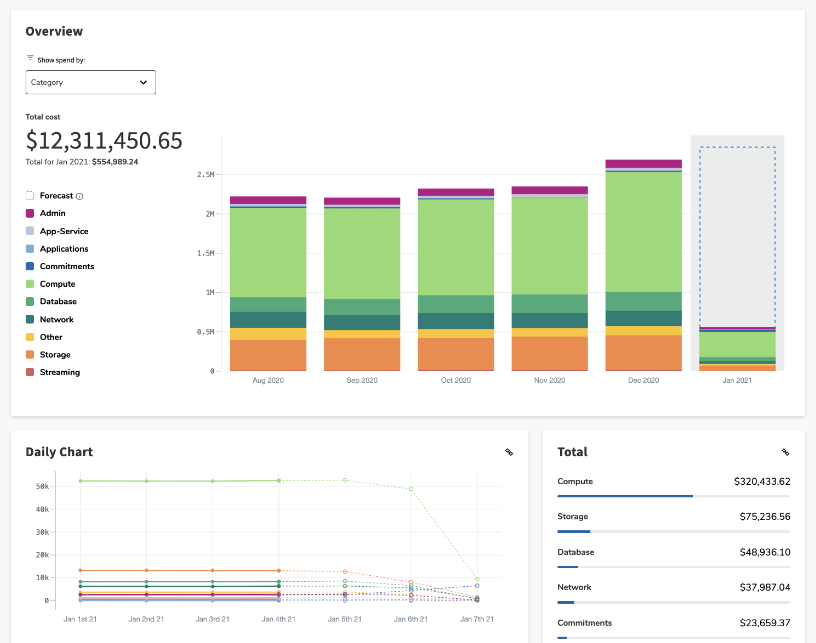
Flexera Cloud Management offers a powerful suite of tools to optimize resources and automate workflows across various cloud platforms. By enabling organizations to manage and control their cloud resources efficiently, it proves to be an excellent choice for optimizing resources and automating tasks.
Why I Picked Flexera Cloud Management:
I picked Flexera Cloud Management for its robust optimization and automation capabilities. It stands out due to its ability to provide comprehensive visibility into cloud usage and costs, helping organizations streamline their cloud infrastructure.
Therefore, I found it to be the best for resource optimization and automation among cloud management tools.
Standout Features & Integrations:
Flexera Cloud Management offers features like cloud cost management, cloud governance, and cloud automation. It also provides resource optimization insights that can lead to significant cost savings. The tool integrates well with many popular cloud platforms, including AWS, Azure, and Google Cloud, ensuring broad applicability.
Pros and Cons
Pros:
- Extensive integrations with popular cloud platforms
- Effective automation features
- Robust resource optimization capabilities
Cons:
- Some users may find the interface not as intuitive as competitors
- May be complex to set up initially
- Lack of transparent pricing information


InsightCloudSec operates as a robust cloud security posture management tool, aimed at unifying security and compliance across multiple cloud platforms. It streamlines the task of ensuring your cloud environments align with your security and compliance needs.
Why I Picked InsightCloudSec:
The reason I picked InsightCloudSec lies in its commitment to providing comprehensive cloud security and compliance management. Among the various tools I reviewed, InsightCloudSec stands out due to its unique ability to unify these aspects across disparate cloud environments. This functionality validates it as the best for maintaining consistent security and compliance standards.
Standout Features & Integrations:
InsightCloudSec boasts a diverse range of features, including asset discovery, multi-factor risk identification, and automated remediation capabilities. Additionally, it offers extensive integrations with numerous cloud service providers such as AWS, Google Cloud, and Azure, enabling users to easily maintain their security and compliance standards across various platforms.
Pros and Cons
Pros:
- Automated remediation features
- Extensive integrations with various cloud service providers
- Comprehensive cloud security and compliance capabilities
Cons:
- Limited accessibility for small businesses with a limited budget
- Premium features require additional costs
- High starting price point


Tenable is a robust cybersecurity solution that excels in identifying and managing vulnerabilities in the cloud. Its suite of services is ideal for organizations that require proactive vulnerability detection and threat mitigation strategies, especially in cloud-based environments.
Why I Picked Tenable:
Tenable made it to my selection primarily due to its extensive and industry-leading vulnerability management capabilities. Its prowess in continuous network monitoring, vulnerability assessment, and proactive threat detection sets it apart. Moreover, its ability to manage vulnerabilities effectively in the cloud makes it a top choice for organizations prioritizing cloud security.
Standout Features & Integrations:
Tenable provides a multitude of essential features, including active network scanning, web application scanning, and container security. It integrates easily with a variety of platforms and tools such as ServiceNow, Splunk, and CyberArk, contributing to its robustness as a comprehensive cybersecurity solution.
Pros and Cons
Pros:
- Comprehensive network and application scanning features
- Extensive integrations with other platforms and tools
- Exceptional vulnerability management
Cons:
- Limited functionality at lower price points
- Can be complex to navigate for less tech-savvy users
- Pricing could be steep for smaller organizations


BMC Helix Cloud Cost is a comprehensive solution that provides efficient cost management across cloud platforms. With its rich capabilities, it's particularly useful for maintaining budget control and improving cost efficiency in the cloud.
Why I Picked BMC Helix Cloud Cost:
I chose BMC Helix Cloud Cost because of its robust features that enable budget control and improve cost efficiency. It stands out with its capacity to integrate with different cloud providers and generate precise analytics, correlating cloud cost with usage.
This characteristic makes it the best fit for organizations aiming to enhance cost efficiency and tighten budget control in their cloud environment.
Standout Features & Integrations:
BMC Helix Cloud Cost comes with features like cloud cost forecasting, budget management, and usage analytics. It offers crucial integrations with popular cloud platforms such as AWS, Azure, and Google Cloud, allowing users to centralize their cloud cost management.
Pros and Cons
Pros:
- Efficient cloud cost forecasting and budget management
- Excellent integration capabilities
- Robust cost management features
Cons:
- Higher price tiers for additional services
- Some complex features may require time to master
- Could be overkill for small organizations

CloudBolt is a leading cloud management platform that supports hybrid and multi-cloud deployments. It facilitates rapid provisioning and resource management, making it particularly suitable for organizations in need of swift deployment in hybrid environments.
Why I Picked CloudBolt:
I chose CloudBolt for this list primarily due to its effective deployment capabilities in hybrid environments. In comparing the different tools, CloudBolt's speed and efficiency in managing resources and automating provisioning processes stood out. This makes it a standout choice for organizations that require quick deployment in hybrid cloud settings.
Standout Features & Integrations:
CloudBolt excels with features such as self-service IT, automated provisioning, and resource management. Its service catalog offers predefined templates and blueprints that accelerate the deployment process. CloudBolt supports integrations with a multitude of platforms including AWS, Azure, Google Cloud, and VMware, offering versatility for diverse cloud environments.
Pros and Cons
Pros:
- Automated provisioning and resource management capabilities
- Strong integrations with numerous cloud service platforms
- Rapid deployment in hybrid and multi-cloud environments
Cons:
- Some advanced features are only available at higher pricing tiers
- Complex features might have a learning curve for new users
- Higher starting price points may deter small businesses


CloudCheckr is a multi-faceted cloud management platform designed to optimize costs and bolster security. It delivers in-depth visibility into your cloud infrastructure, making it the tool of choice for comprehensive cost and security management.
Why I Picked CloudCheckr:
I selected CloudCheckr based on its dual approach to cost optimization and security management. Its ability to provide a detailed view of cloud expenditure, coupled with robust security protocols, distinguishes it from the rest. The tool's expansive features support the claim of it is the best choice for comprehensive cost and security management.
Standout Features & Integrations:
CloudCheckr is loaded with features like cost allocation, spend optimization, invoicing, and robust security checks. Its capabilities extend to integrations with AWS, Azure, and Google Cloud, facilitating a cohesive cloud governance experience across various platforms.
Pros and Cons
Pros:
- Strong integrations with leading cloud platforms
- Comprehensive visibility into cloud expenditure
- Robust cost and security management features
Cons:
- Advanced features are at an additional cost
- Some features require a learning curve
- The pricing might be high for smaller organizations
Weitere Cloud-Governance-Tools
Nachfolgend finden Sie eine Liste weiterer Cloud-Governance-Tools, die ich in die engere Auswahl genommen habe, die es jedoch nicht in die Top 12 geschafft haben. Diese sind definitiv einen Blick wert.
- eG Innovations
For performance monitoring across cloud platforms
- Cloudability
For visibility into cloud spending and usage
- CloudKeeper
For simplifying cloud cost management
- Stream Security
For context-aware governance
- Morpheus Data
ForDevOps teams seeking integrated application lifecycle management
- Nutanix Cloud Manager
Formanaging hybrid clouds with a single platform
- Centilytics
Forgranular cloud cost allocation and optimization
- Cisco Workload Optimization Manager (CWOM)
Forreal-time workload optimization across hybrid IT
- Exponential-e
Forbusinesses seeking a comprehensive cloud services platform
- Terraform Enterprise
Forinfrastructure as code and multi-cloud provisioning


Verwandte Software- & Tool-Bewertungen
Falls Sie hier noch nicht fündig geworden sind, werfen Sie einen Blick auf diese weiteren von uns getesteten und bewerteten Tools:
- Netzwerk-Monitoring-Software
- Server-Monitoring-Software
- SD-Wan-Lösungen
- Infrastruktur-Monitoring-Tools
- Packet Sniffer
- Application-Monitoring-Tools
Auswahlkriterien für Cloud-Governance-Tools
Für die Auswahl der besten Cloud-Governance-Tools in dieser Liste habe ich typische Anforderungen und Schwierigkeiten der Nutzer wie Compliance-Management und Kostenkontrolle berücksichtigt. Zusätzlich habe ich das folgende Bewertungsraster genutzt, um objektiv und fair zu bewerten:
Kernfunktionalität (25 % der Gesamtbewertung)
Jede Lösung musste diese gängigen Anwendungsfälle erfüllen, um in die Auswahl aufgenommen zu werden:
- Cloud-Kosten verwalten
- Compliance sicherstellen
- Automatisierte Durchsetzung von Richtlinien
- Cloud-Nutzung überwachen
- Ressourcenzuteilung optimieren
Zusätzliche besondere Funktionen (25 % der Gesamtbewertung)
Zur weiteren Eingrenzung des Wettbewerbs habe ich auch auf Alleinstellungsmerkmale wie diese geachtet:
- Echtzeit-Analyse-Dashboard
- Anpassbare Berichte
- KI-gestützte Empfehlungen
- Multi-Cloud-Unterstützung
- Integration mit Drittanbieter-Tools
Benutzerfreundlichkeit (10 % der Gesamtbewertung)
Um den Bedienkomfort jedes Systems einschätzen zu können, habe ich Folgendes berücksichtigt:
- Intuitives Oberflächendesign
- Einfache Navigation
- Klare Beschriftungen und Anleitungen
- Geringe Lernkurve
- Konsistente Nutzererfahrung
Onboarding (10 % der Gesamtbewertung)
Um das Onboarding-Erlebnis jeder Plattform zu bewerten, habe ich Folgendes berücksichtigt:
- Verfügbarkeit von Trainingsvideos
- Interaktive Produkttouren
- Zugriff auf Vorlagen
- Webinare und Live-Demos
- Reaktionsschnelle Chatbots oder Support
Kundendienst (10 % der Gesamtbewertung)
Um die Kundensupport-Leistungen jedes Softwareanbieters zu bewerten, habe ich Folgendes berücksichtigt:
- 24/7-Erreichbarkeit
- Mehrere Supportkanäle
- Schnelle Reaktionszeiten
- Kompetente Supportmitarbeiter
- Zugriff auf ein umfassendes Hilfezentrum
Preis-Leistungs-Verhältnis (10 % der Gesamtbewertung)
Um das Preis-Leistungs-Verhältnis jeder Plattform zu beurteilen, habe ich Folgendes berücksichtigt:
- Konkurrenzfähige Preise
- Flexible Abonnementmodelle
- Transparente Preisstruktur
- Rabatte bei langfristigen Verträgen
- Kosten-Nutzen-Verhältnis
Kundenbewertungen (10 % der Gesamtbewertung)
Um einen Eindruck von der allgemeinen Kundenzufriedenheit zu gewinnen, habe ich bei der Lektüre von Bewertungen Folgendes berücksichtigt:
- Positives Feedback zu Funktionen
- Hohe Bewertungen für Unterstützung
- Zufriedenheit mit der Benutzererfahrung
- Erfahrungsberichte zum ROI
- Häufigkeit von Updates und Verbesserungen
Wie wählt man ein Cloud-Governance-Tool aus?
Es ist leicht, sich in langen Funktionslisten und komplexen Preisstrukturen zu verlieren. Um dir zu helfen, den Überblick in deinem individuellen Auswahlprozess zu behalten, findest du hier eine Checkliste mit wichtigen Faktoren:
| Faktor | Was zu beachten ist |
|---|---|
| Skalierbarkeit | Wächst das Tool mit den Anforderungen deines Teams? Prüfe, ob steigende Arbeitslasten ohne Leistungseinbußen bewältigt werden. Berücksichtige zukünftiges Wachstum und stelle sicher, dass das Tool entsprechend skalierbar ist. |
| Integrationen | Funktioniert es mit deinen bestehenden Systemen? Überprüfe die Kompatibilität mit deiner aktuellen Softwarelandschaft, einschließlich APIs und Drittanbieterdiensten, um Arbeitsabläufe nicht zu stören. |
| Anpassbarkeit | Lässt es sich auf deine Bedürfnisse zuschneiden? Achte darauf, dass Dashboards, Berichte und Workflows individuell für deine Governance-Anforderungen angepasst werden können. |
| Benutzerfreundlichkeit | Ist das Tool leicht zu bedienen? Bewerte Oberfläche und Nutzererfahrung. Ein komplexes Tool erfordert oft mehr Schulung, was die Einführung verzögern kann. |
| Implementierung und Onboarding | Wie lange dauert der Start? Berücksichtige benötigte Zeit und Ressourcen für die Einrichtung. Frage nach Unterstützungsangeboten beim Onboarding – etwa Schulungsmaterialien oder dedizierte Hilfestellung. |
| Kosten | Passt das Tool zu deinem Budget? Prüfe Preisstruktur und versteckte Kosten. Vergleiche mit Mitbewerbern, um ein gutes Preis-Leistungs-Verhältnis zu sichern. |
| Sicherheitsmaßnahmen | Werden deine Daten geschützt? Achte auf Verschlüsselungsstandards und die Einhaltung von Sicherheitsvorgaben. Das Tool sollte mit den Sicherheitsrichtlinien deiner Organisation konform sein. |
| Compliance-Anforderungen | Entspricht das Tool den Branchenstandards? Achte auf die Einhaltung geltender Vorschriften wie GDPR oder HIPAA, um Compliance-Probleme zu vermeiden. |
Trends bei Cloud-Governance-Tools
Da immer mehr Unternehmen in die Cloud wechseln, steigt auch der Bedarf an fortschrittlichen Governance-Tools, die Compliance sicherstellen, Kosten optimieren und die Sicherheit erhöhen. Die Analyse von Produktneuheiten, Pressemitteilungen und Versionsprotokollen führender Tools zeigt mehrere wichtige Trends auf und verdeutlicht die Richtung, in die sich die Cloud-Governance-Technologien bewegen.
Diese Trends weisen nicht nur auf sich rasch entwickelnde Funktionen und Technologien hin, sondern geben auch Aufschluss darüber, was der Markt als besonders innovativ, wichtig oder weniger relevant betrachtet. Hier mein Überblick über aufkommende Trends bei Cloud-Governance-Tools:
Sich entwickelnde Funktionen und Technologien
- Integration mit KI und maschinellem Lernen: Tools integrieren zunehmend KI und ML für prädiktive Analysen im Kostenmanagement und bei der Bedrohungserkennung. Dieser Trend deutet auf einen Wandel hin zu proaktiveren und intelligenteren Strategien für Cloud-Governance.
- Erweiterte Sicherheits- und Compliance-Automatisierung: Die rasante Entwicklung automatisierter Sicherheitsrichtlinien und Funktionen für Compliance-Management zeigt einen steigenden Bedarf an Tools, die sich nahtlos an verändernde Vorschriften und Bedrohungsszenarien anpassen können.
- Nachhaltigkeitsmetriken: Ein bedeutender Trend ist die Integration von Metriken zur ökologischen Nachhaltigkeit, was eine branchenweite Entwicklung hin zu umweltbewusstem Computing widerspiegelt. Tools bieten nun Funktionen zur Überwachung und Optimierung der Umweltauswirkungen von Cloud-Operationen.
Wichtigste und gefragteste Funktionen
- Kostenoptimierung und -management: Funktionen, die detaillierte Einblicke in Cloud-Ausgaben bieten und Empfehlungen zur Kostenreduktion bereitstellen, sind besonders gefragt. Das unterstreicht den anhaltenden Druck auf Unternehmen, Cloud-Kosten effektiv zu verwalten.
- Umfassendes Identitäts- und Zugriffsmanagement (IAM): Mit zunehmender Komplexität der Cloud-Umgebungen wächst die Bedeutung leistungsfähiger IAM-Funktionen, was den Bedarf an strikten Zugriffskontrollen und Benutzerverwaltungsmöglichkeiten hervorhebt.
Schwindende Bedeutung
- Manuelle Ressourcenbereitstellung und -verwaltung: Die Nachfrage nach manueller Ressourcenbereitstellung nimmt spürbar ab, da automatisierte und KI-gestützte Ressourcenoptimierung zum Standard wird.
Die Trends bei Cloud-Governance-Tools verdeutlichen einen Markt, der immer stärker auf Automatisierung, Intelligenz und Nachhaltigkeit setzt. Während sich diese Tools weiterentwickeln, bleibt der Fokus auf Kostenoptimierung und umfassenden IAM-Funktionen zentral. Das spiegelt die anhaltenden Herausforderungen wider, mit denen Unternehmen bei der Verwaltung von Cloud-Kosten und -Sicherheit konfrontiert sind.
Was sind Cloud-Governance-Tools?
Cloud-Governance-Tools sind Softwareanwendungen, die von Unternehmen eingesetzt werden, um ihre Cloud-Computing-Dienste zu verwalten, zu kontrollieren und zu überwachen. Diese Tools werden von IT-Administratoren, Geschäftsführern und Entscheidungsträgern genutzt, die darauf abzielen, ihre Cloud-Nutzung mit den Unternehmensrichtlinien und gesetzlichen Vorgaben in Einklang zu bringen.
Diese Tools verfolgen einen ganzheitlichen Ansatz beim Servicemanagement und enthalten Überwachungstools, die jeden Aspekt des Cloud-Betriebs im Blick behalten. Sie ermöglichen zentrale Funktionen wie Kostenkontrolle, Ressourcenoptimierung, Sicherheit, Compliance, Leistungsüberwachung und Automatisierung. Diese Tools sind unverzichtbar für Unternehmen, die ihre Cloud-Umgebungen effektiv steuern möchten, da sie eine effiziente Ressourcennutzung, Kosteneinsparungen und Sicherheit gewährleisten.
Funktionen
Hier stelle ich die wichtigsten Funktionen vor, auf die ich bei Cloud-Governance-Tools achte, um eine gut verwaltete Cloud-Infrastruktur zu erreichen:
- Kostenmanagement und -optimierung: Dieses Feature hilft Unternehmen, ihre Cloud-Ausgaben zu überwachen, zu steuern und zu optimieren. Es ist von entscheidender Bedeutung, da es Unternehmen ermöglicht, Überausgaben zu vermeiden und Ressourcen effizient auf verschiedene Cloud-Dienste zu verteilen.
- Compliance-Management: Dieses Feature sorgt für die Einhaltung gesetzlicher und unternehmensinterner Richtlinien. Es ist unerlässlich, um Vertrauen zu wahren und rechtliche oder finanzielle Strafen zu vermeiden, indem sichergestellt wird, dass die Cloud-Abläufe den Branchenvorschriften und Unternehmensrichtlinien entsprechen.
- Identity and Access Management (IAM): IAM steuert, wer in der Cloud-Umgebung auf welche Ressourcen zugreifen kann. Es ist entscheidend, um unbefugten Zugriff zu verhindern und sicherzustellen, dass nur autorisierte Personen Zugang zu sensiblen Informationen und Ressourcen erhalten.
- Ressourcenmanagement: Diese Funktion bietet Kontrolle und Übersicht über die Cloud-Ressourcen. Sie ist wichtig, um die Ressourcennutzung zu optimieren und sicherzustellen, dass die Bereitstellungen den Anforderungen des Unternehmens entsprechen, ohne Unterauslastung oder Überprovisionierung.
- Datenschutz und Privatsphäre: Dieses Feature schützt sensible Informationen, die in der Cloud gespeichert sind. Der Schutz von Daten vor unbefugtem Zugriff und die Gewährleistung der Privatsphäre sind essenziell, um das Vertrauen der Kunden zu erhalten und die Einhaltung von Datenschutzgesetzen sicherzustellen.
- Durchsetzung von Sicherheitsrichtlinien: Diese Funktion stellt sicher, dass Cloud-Dienste den Sicherheitsrichtlinien entsprechen. Sie ist entscheidend, um die Cloud-Umgebung vor Bedrohungen und Schwachstellen zu schützen und die Integrität sowie Vertraulichkeit von Daten zu bewahren.
- Leistungsüberwachung: Dieses Feature überwacht die Performance der Cloud-Dienste. Die Sicherstellung von hoher Leistungsfähigkeit und Verfügbarkeit ist für eine reibungslose Nutzererfahrung und operative Effizienz unerlässlich.
- Disaster Recovery und Backup: Diese Funktion gewährleistet die Geschäftskontinuität, indem sie Mechanismen für Datensicherung und -wiederherstellung im Falle von Vorfällen bereitstellt. Sie ist entscheidend, um Ausfallzeiten und Datenverlust bei Katastrophen zu minimieren.
- Service Level Agreement (SLA)-Management: Dieses Feature überwacht und erzwingt SLAs mit Cloud-Service-Anbietern. Es ist wichtig, um sicherzustellen, dass die Dienste die vereinbarten Leistungs- und Verfügbarkeitsstandards erfüllen und so die Interessen des Unternehmens gewahrt bleiben.
- Ökologische Nachhaltigkeit: Diese Funktion überwacht und optimiert die Umweltauswirkungen der Cloud-Dienste. Da Unternehmen Nachhaltigkeit zunehmend priorisieren, wird es essenziell, dass Cloud-Computing-Aktivitäten mit den Umweltzielen im Einklang stehen.
Cloud-Governance-Tools mit diesen Funktionen ermöglichen es Organisationen, die Komplexität des Cloud Computings zu bewältigen und sicherzustellen, dass ihre Cloud-Umgebungen sicher, effizient und auf die Geschäftsziele ausgerichtet sind. Durch die Priorisierung dieser Schlüsselfunktionen können Unternehmen das volle Potenzial des Cloud Computings ausschöpfen, während sie Risiken minimieren und Ressourcen optimal einsetzen.
Vorteile
Cloud-Governance-Tools ermöglichen es Unternehmen, ihre Cloud-Umgebungen effektiv zu verwalten, abzusichern und zu optimieren und so die Betriebseffizienz sowie die Einhaltung relevanter Vorschriften sicherzustellen. Werfen wir einen genaueren Blick auf einige der spezifischen, greifbaren Vorteile dieser Tools:
- Erhöhte Sicherheit und Compliance: Cloud-Governance-Tools bieten Frameworks und Kontrollen, um Datensicherheit und regulatorische Compliance zu steuern. Dieser Vorteil sorgt dafür, dass Unternehmen sensible Informationen schützen und Branchenvorschriften einhalten, wodurch das Risiko von Datenschutzverletzungen und Compliance-Strafen reduziert wird.
- Kostenmanagement und -optimierung: Durch Einblicke in Cloud-Ausgaben und -Nutzung ermöglichen diese Tools Unternehmen, unnötige Ausgaben zu identifizieren und zu beseitigen. Dies führt zu erheblichen Kosteneinsparungen und stellt sicher, dass Ressourcen effizient eingesetzt werden, um den Ertrag aus Cloud-Investitionen zu maximieren.
- Effizientere Abläufe und Ressourcenmanagement: Cloud-Governance-Tools automatisieren die Bereitstellung, Skalierung und Verwaltung von Cloud-Ressourcen. Diese Automatisierung reduziert manuellen Aufwand, minimiert Fehler und stellt sicher, dass Cloud-Umgebungen hinsichtlich Leistung und Kosten optimal betrieben werden.
- Verbesserte Übersicht und Kontrolle: Diese Tools bieten zentrale Dashboards zur Überwachung und Verwaltung von Cloud-Ressourcen über mehrere Plattformen hinweg. Die verbesserte Transparenz der Cloud-Abläufe ermöglicht es IT-Spezialisten, fundierte Entscheidungen zu treffen und so eine optimale Bereitstellung und Nutzung von Cloud-Diensten zu gewährleisten.
- Strategische Entscheidungsfindung und Planung: Mit detaillierten Analysen und Berichterstattungsfunktionen liefern Cloud-Governance-Tools wertvolle Einblicke für die strategische Planung. Sie ermöglichen es Unternehmen, zukünftige Anforderungen vorherzusehen, Skalierung zu planen und fundierte Entscheidungen über Cloud-Architektur und -Dienste zu treffen.
Cloud-Governance-Tools sind entscheidend für Organisationen, die eine robuste, sichere und effiziente Cloud-Umgebung aufrechterhalten möchten. Durch den Einsatz dieser Tools können IT-Spezialisten sicherstellen, dass ihre Organisationen agil, konform und wettbewerbsfähig im sich ständig wandelnden digitalen Umfeld bleiben.
Kosten & Preise
Cloud-Governance-Tools sind in verschiedenen Paketen erhältlich, die jeweils auf die Bedürfnisse unterschiedlicher Unternehmensgrößen und Anforderungen abgestimmt sind – von kleinen Unternehmen bis hin zu großen Konzernen.
Tarifvergleichstabelle für Cloud-Governance-Tools
Hier ist eine Übersicht der gängigen Tarifarten, ihrer durchschnittlichen Preise und der typischerweise enthaltenen Funktionen:
| Plantyp | Durchschnittlicher Preis | Häufige Funktionen |
|---|---|---|
| Kostenlos | $0 | Grundlegende Überwachung und Verwaltung, Eingeschränkter Benutzerzugang, Grundlegende Sicherheits- und Compliance-Funktionen |
| Basic | $500 - $1,000/Monat | Erweiterte Sicherheitsfunktionen, Tools zur Kostenoptimierung, Zugang für mehrere Benutzer, Grundlegender Support |
| Professional | $1,000 - $3,000/Monat | Erweiterte Sicherheits- und Compliance-Verwaltung, Vollständige Sammlung an Kostenmanagement-Tools, Priorisierter Support, Integrationsmöglichkeiten |
| Enterprise | $3,000+/Monat | Anpassbare Funktionen und Integrationen, Dedizierter Support, Erweiterte Analysen und Berichte, Unbegrenzter Benutzerzugang |
Berücksichtigen Sie bei der Auswahl eines Plans sowohl Ihre aktuellen Bedürfnisse als auch Ihr zukünftiges Wachstum. Eine kostenlose Option kann für sehr kleine Teams oder zu Evaluierungszwecken geeignet sein, während Basic- und Professional-Pläne umfassendere Funktionen für wachsende Unternehmen bieten. Enterprise-Pläne sind am besten für große Organisationen geeignet, die ein hohes Maß an Anpassung und dedizierten Support erfordern.
Behalten Sie das Gleichgewicht zwischen Kosten und Funktionalität im Auge, um sicherzustellen, dass Sie einen Plan wählen, der nicht nur in Ihr Budget passt, sondern auch umfassend Ihre Anforderungen an das Cloud-Governance-Management erfüllt.
Häufige Fragen zu Cloud-Governance-Tools
Haben Sie noch Fragen zu Cloud-Governance-Tools? Wir haben die Antworten!
Können Cloud-Governance-Tools beim Thema Compliance helfen?
Was ist Multi-Cloud-Management bei Cloud-Governance-Tools?
Welche sind einige der günstigsten und teuersten Cloud-Governance-Tools?
Gibt es kostenlose Cloud-Governance-Tools?
Wie geht es weiter?
Wenn Sie gerade Cloud-Governance-Tools recherchieren, nehmen Sie Kontakt mit einem SoftwareSelect-Berater auf und erhalten Sie kostenlose Empfehlungen.
Sie füllen ein Formular aus und führen ein kurzes Gespräch, in dem Ihre spezifischen Anforderungen besprochen werden. Anschließend erhalten Sie eine Auswahlliste an Software-Lösungen, die Sie prüfen können. Die Berater unterstützen Sie sogar während des gesamten Kaufprozesses – einschließlich Preisverhandlungen.