
Die besten Tools für Backlog-Management im Test für 2026

Die besten Tools für Backlog-Management – Kurzliste
Nach einer gründlichen Auswertung habe ich 12 herausragende Backlog-Management-Tools ausgewählt, um Ihre Backlog-Herausforderungen zu lösen.


Angesichts der Vielzahl an unterschiedlichen Backlog-Management-Tools ist es schwierig herauszufinden, welches das richtige für Sie ist. Sie wissen, dass Ihre Produktentwicklungsprojekte komplex zu steuern sind, brauchen aber ein passendes Tool, das Sie wirklich unterstützt. Kein Problem – ich helfe Ihnen! In diesem Beitrag erleichtere ich Ihre Entscheidung, denn ich teile meine persönlichen Erfahrungen mit Dutzenden verschiedener Backlog-Tools in großen Teams und Projekten – und stelle Ihnen meine Favoriten fürs Backlog-Management vor.
Mit Funktionen wie benutzerfreundlicher Kommunikation, zeitnahen Benachrichtigungen und sogar einem kostenlosen Tarif für unbegrenzt viele Nutzer wird das Navigieren durch Produkt- und Sprint-Backlogs ganz intuitiv. Wenn Sie als agiles Team Iterationen, Rechteverwaltung und Zusammenarbeit vereinfachen wollen, bieten diese Tools die passende Lösung.
Why Trust Our Software Reviews
Zusammenfassung der besten Backlog-Management-Tools
| Tool | Best For | Trial Info | Price | ||
|---|---|---|---|---|---|
| 1 | Best for infinite nested task lists | 30-day free trial + free plan available | From $7.65/member/month (billed annually) | Website | |
| 2 | Best for all-in-one project management solutions | Free plan + free demo available | From $7/user/month (billed annually) | Website | |
| 3 | Best for product management and roadmap visualization | 15-day free trial available | From $20/user/month (billed annually) | Website | |
| 4 | Best for integrated documentation collaboration | Free plan available | From $5.42/user/month | Website | |
| 5 | Best for agile project management with visual boards | 30-day free trial | From $5/user/month | Website | |
| 6 | Best for simple, card-based task organization | 14-day free trial + free plan available | From $5/user/month (billed annually) | Website | |
| 7 | Best for open-source project management | Free-forever plan available | Free to use | Website | |
| 8 | Best for large-scale agile projects | Not available | Pricing upon request | Website | |
| 9 | Best for detailed software project management | 14-day free trial + free plan available | From $7.91/user/month | Website | |
| 10 | Best for software development teams and release planning | 14-day free trial | From $5/user/month | Website |
-

Site24x7
Visit WebsiteThis is an aggregated rating for this tool including ratings from Crozdesk users and ratings from other sites.4.6 -
Docker
Visit WebsiteThis is an aggregated rating for this tool including ratings from Crozdesk users and ratings from other sites.4.6 -
Pulumi
Visit WebsiteThis is an aggregated rating for this tool including ratings from Crozdesk users and ratings from other sites.4.8





Bewertungen der besten Backlog-Management-Tools


Quire is a collaborative task and project management tool designed to help teams organize ideas, plan projects, and track work from start to finish.
Why I Picked Quire:
Quire's infinite nested list view is a particularly notable feature to use for backlog management. It allows you to create a hierarchy of tasks and subtasks, making it easier to organize and prioritize your backlog items. This structure helps you break down large projects into smaller, actionable steps, ensuring that nothing falls through the cracks. Additionally, Quire's Kanban board integrates with the nested list view. This combination enables you to visualize your backlog items as they move through different stages of development.
Standout features & integrations:
Other features include the ability to create personalized sublists from your main task list, helping you focus on specific tasks or priorities. Quire also offers a timeline feature that lets you visualize your project's journey, meet deadlines, and achieve milestones. Some integrations include Google Calendar, Gmail, Slack, Outlook, Zoho Flow, GitHub, Apple Calendar Sync, Box, Dropbox, Google Drive, and Microsoft Teams.
Pros and Cons
Pros:
- Ability to create nested tasks and subtasks, allowing for detailed project breakdowns
- Multiple project views, including lists, boards, and timelines
- Easy to collaborate with team members
Cons:
- Potential for notification overload, especially when working with large teams
- The mobile version lacks some features available on the desktop
New Product Updates from Quire
Quire Enhances Chat Editing and Text Formatting
Quire introduces updates to its chat functionality to improve collaboration and message formatting. These enhancements make it easier for teams to edit messages and structure text within conversations. For more information, visit Quire’s official site.
 .
.

In the vast sphere of project management, ClickUp stands as a comprehensive tool, offering a suite of features for a diverse range of needs. It’s designed to encompass all aspects of project management, which supports its position as a preferred choice for teams seeking an all-in-one solution.
Why I Picked ClickUp:
Navigating through a myriad of project management tools, I settled on ClickUp primarily for its holistic approach. When comparing its breadth of features and adaptability to other platforms, ClickUp clearly differentiated itself. I am of the opinion that ClickUp is the best fit for teams who want an encompassing project management tool without juggling multiple platforms.
Standout features & integrations:
ClickUp excels with its custom views ranging from lists, and boards, to calendar displays. Its goal-tracking and mind-mapping capabilities further enhance the project planning process. Integrations are vast, with ClickUp connecting effortlessly to tools such as Slack, GitHub, and Google Drive.
Pros and Cons
Pros:
- Extensive integration options
- Customizable views for personalized management
- A comprehensive set of features for varied needs
Cons:
- Some advanced features behind paywalls
- The mobile app experience can be improved
- Might feel overwhelming for new users


Every effective product team requires a streamlined process to visualize and manage their roadmap. ProductBoard delivers on this, providing a platform where product management intertwines perfectly with visualization tools. Its prowess in displaying product management phases, along with roadmap visualization, sets it apart for those who like seeing the big picture.
Why I Picked ProductBoard:
While examining numerous platforms, I chose ProductBoard because it struck a balance between product management and roadmap clarity. Comparing its interface and capabilities to others, it stood out with its unique product-centered view. My judgment on ProductBoard is founded on its ability to make product management and roadmap visualization cohesive, thereby ensuring it's the best for product teams requiring this synergy.
Standout features & integrations:
ProductBoard excels with its feature prioritization tools, allowing teams to weigh and decide on the most impactful changes. Its portal for user feedback ensures products are continually aligned with customer needs. Integration-wise, it connects with tools like Jira, Trello, and Slack, making data flow easy and actionable.
Pros and Cons
Pros:
- Direct portal for gathering user feedback
- Effective feature prioritization tools
- Clear product roadmap visualization
Cons:
- Annual billing might deter some users
- Requires a learning curve for full utilization
- Might be overkill for very small teams


At the heart of every efficient team lies a robust documentation system. Confluence stands out as a dedicated platform for this, helping teams document, collaborate, and share work. Its primary strength lies in integrated documentation collaboration, making it an ideal choice for teams that prioritize structured and collaborative document management.
Why I Picked Confluence:
In the vast sea of collaborative tools, I selected Confluence because of its distinguished approach to documentation. After comparing and judging multiple platforms, Confluence emerged distinctively due to its emphasis on creating an integrated documentation environment. This central focus on documentation, backed by user reviews and its extensive features, firmly planted my opinion that it's genuinely the best for teams seeking a collaborative documentation hub.
Standout features & integrations:
Confluence champions in offering customizable templates, ensuring teams can maintain consistent documentation standards. The real-time editing feature is another highlight, allowing multiple team members to cohesively work on a document. Integration-wise, it synergizes well with Atlassian’s ecosystem, including Jira, Trello, and Bitbucket. Moreover, its extensive marketplace ensures teams have a plethora of plugins to customize their workspace.
Pros and Cons
Pros:
- A wide array of plugins in the marketplace
- Real-time editing facilitates simultaneous collaboration
- Customizable templates for standardized documentation
Cons:
- Cost becomes a consideration for very large teams
- Initial setup might require some learning
- Could be daunting for smaller teams or solo users

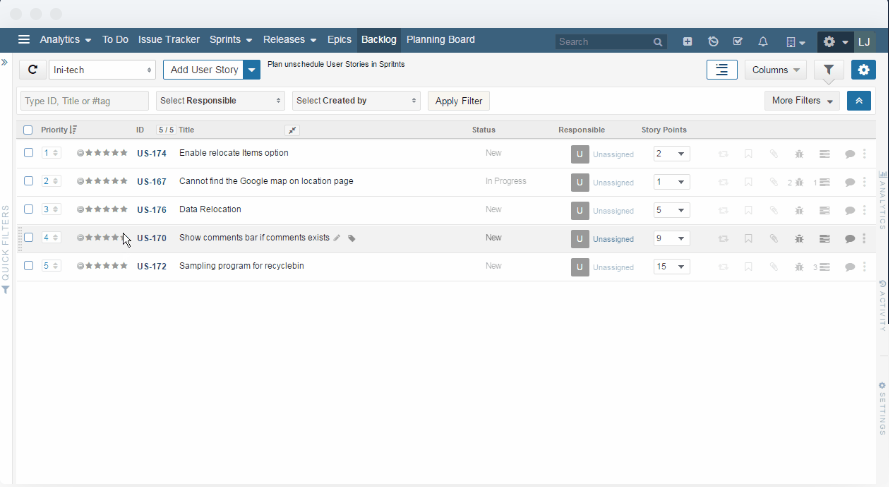
For teams steeped in agile methodologies, visual boards become an indispensable asset. Yodiz presents itself as a potent solution for agile project management using vivid, intuitive boards. With its emphasis on visual representations of agile processes, Yodiz resonates with teams that prefer a graphic touch to their workflows.
Why I Picked Yodiz:
Navigating the landscape of agile management tools, Yodiz caught my attention due to its pronounced visual capabilities. I determined that its visual boards are not only appealing but functionally superior, simplifying complex agile processes. This combination solidified my opinion that Yodiz is best for teams in pursuit of a visually charged agile management experience.
Standout features & integrations:
Yodiz offers a scalable scrum board, catering to teams of varying sizes and complexity. Its epic and release management features are commendable, offering a broad perspective on projects. As for integrations, Yodiz supports connections with popular platforms like Slack, GitHub, and Jenkins, enhancing its operational versatility.
Pros and Cons
Pros:
- A broad range of third-party integrations
- Comprehensive epic and release management
- Scalable and intuitive visual boards
Cons:
- Initial setup requires time and patience
- Customization has its limits
- The interface can feel dense at times


In the realm of task organization, simplicity often trumps complexity. Trello epitomizes this with its card-based system, allowing teams to manage tasks in a straightforward, drag-and-drop environment. Its commitment to simplicity, coupled with card-based organization, is why it's a favorite for those seeking a clutter-free task management experience.
Why I Picked Trello:
Through a process of selection and judgment, Trello emerged as a tool that masters the art of simplicity. In my comparisons, Trello’s card-based organization was unmatched in its ability to simplify complex workflows. I believe Trello is unequivocally the best for those who seek a straightforward, no-fuss task organization method.
Standout features & integrations:
Trello’s strength lies in its boards, lists, and cards, which offer a clear structure for task management. The Power-Ups feature, which lets teams integrate and automate their workflows, is a game-changer. On the integration front, Trello connects smoothly with tools like Dropbox, Google Drive, and Slack, enriching its ecosystem.
Pros and Cons
Pros:
- Numerous integration options
- Power-Ups add versatility to boards
- Intuitive card-based system
Cons:
- Collaboration tools can be basic for larger teams
- Might lack depth for complex projects
- Advanced features behind paywalls


Open-source solutions bring flexibility and customization, and Redmine captures these benefits in the realm of project management. As an open-source tool, Redmine offers adaptability and freedom, making it ideal for teams that prioritize customization and direct control.
Why I Picked Redmine:
I selected Redmine for this list after considering its strong community support and open-source nature. It became evident that its potential for customization and extensibility outshines many proprietary tools. Given these strengths, I judge Redmine as the best for organizations or teams that appreciate open-source freedoms.
Standout features & integrations:
Redmine boasts a modular architecture, allowing teams to plug in various features as needed. It supports multiple projects, offers a range of tracking tools, and possesses a robust issue management system. As for integrations, its open-source nature means it can be integrated with a plethora of tools, though popular ones include Git, Subversion, and LDAP.
Pros and Cons
Pros:
- Modular architecture for specific feature sets
- Strong community support
- Highly customizable due to its open-source nature
Cons:
- Limited official support
- The user interface feels dated
- Might require technical expertise to setup


Hansoft, by Perforce, carves out a niche for itself in managing large-scale agile projects. It's tailored to assist sprawling teams with detailed agile frameworks, making it a strong contender for organizations with vast projects that necessitate agile methodologies.
Why I Picked Hansoft:
In evaluating tools for comprehensive project management, Hansoft distinguished itself. My selection of Hansoft stems from its ability to handle the complexities of large projects while maintaining agile principles. Thus, I stand by the view that Hansoft is the ideal tool for entities needing a comprehensive solution for sizeable agile initiatives.
Standout features & integrations:
Hansoft excels with its combined backlog and timeline management, enabling simultaneous high-level and granular views. It also offers resource allocation and real-time collaboration tools, enhancing team synergy. On the integration front, Hansoft merges well with Jira, Perforce Helix Core, and Jenkins.
Pros and Cons
Pros:
- Real-time collaboration fosters team communication
- In-depth resource allocation tools
- Combines backlog and timeline views for improved oversight
Cons:
- The interface may seem dense for simple projects
- The pricing model may not be transparent
- The steeper learning curve for newcomers

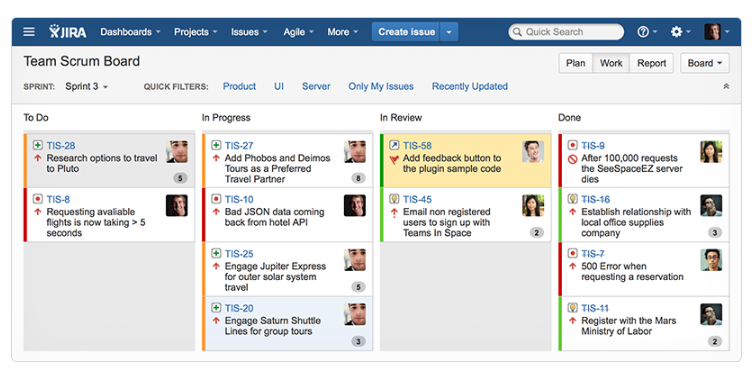
Jira, an Atlassian product, has long been a forerunner in the software project management landscape. It provides detailed tools catered to the software development lifecycle, making it the go-to for development teams needing robust oversight of their projects.
Why I Picked Jira:
Upon weighing the strengths of various tools, Jira stood out in the domain of software project management. I chose it because of its tried-and-true reputation in the software industry. Reflecting on its features, I believe Jira is the best tool for teams seeking an in-depth approach to software project management.
Standout features & integrations:
Jira is renowned for its customizable workflows that adapt to varying development methodologies. Its issue and project tracking, combined with agile reporting tools, offers detailed project oversight. Notable integrations include Confluence, Bitbucket, and Slack, fortifying its position in the software ecosystem.
Pros and Cons
Pros:
- Integration with other Atlassian products
- Robust issue tracking and agile reporting tools
- Customizable workflows cater to different methodologies
Cons:
- Pricing can get steep for larger teams.
- Configuration can be time-consuming
- Might be overkill for smaller projects

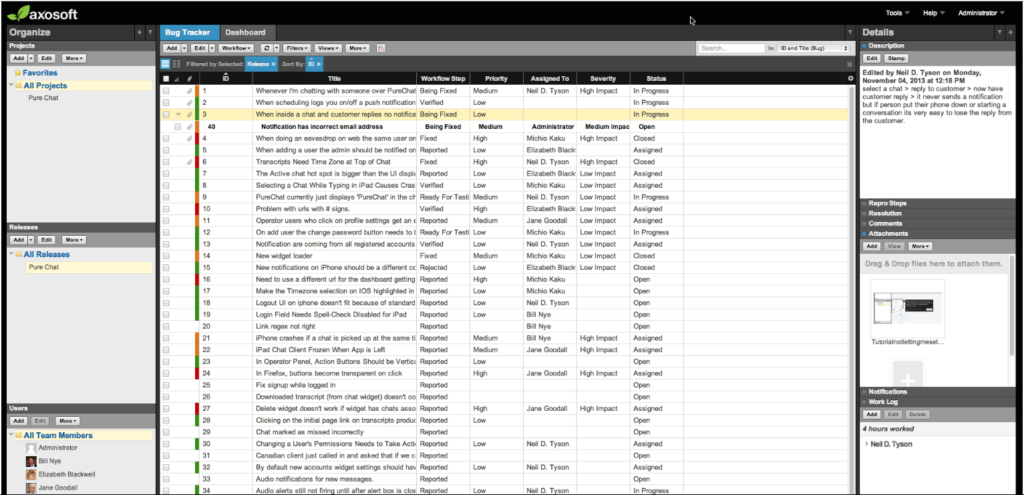
In the realm of software development, precise release planning is paramount. Axosoft emerges as a dedicated tool in this space, offering features tailored for developers and aiding in precise release cycles.
Why I Picked Axosoft:
When determining a tool tailored for software development teams, Axosoft consistently stood out. I chose it because of its profound focus on aiding developers in managing release cycles effectively. In drawing comparisons, it became apparent that Axosoft is best for development teams that require precision in their release planning.
Standout features & integrations:
Axosoft is lauded for its scrum software planning, which streamlines agile methodologies. Its burndown charts and capacity planning tools ensure teams stay on track. Integration-wise, Axosoft connects well with repositories like Git and Subversion, as well as with customer support tools like Help Scout.
Pros and Cons
Pros:
- Effective release management capabilities
- Robust scrum and agile planning tools
- Tailored features for software developers
Cons:
- Some features might seem complex for smaller teams
- The interface can take time to familiarize with
- Might not cater to non-development teams

monday dev is a product development management tool that offers customizable agile workflows to help teams plan, execute, and collaborate effectively. It allows teams to tailor their product development process to their unique strategy, manage sprints, create custom roadmaps and Gantt charts, and more.
Why I Picked monday dev:
I like that it provides a robust solution for backlog management by providing a variety of features tailored to Agile methodologies. The platform includes customizable templates specifically designed for product backlogs, allowing teams to quickly organize and prioritize workflows and tasks. Additionally, multiple work views, such as Kanban boards, Gantt charts, and timelines, enable teams to visualize their backlog in different formats.
Standout features & integrations:
monday dev also supports automation to streamline the prioritization process and set reminders for regular backlog reviews. Other key features include burndown charts, sprint management, bug tracking, and roadmap planning. Integrations include Slack, GitHub, Jira, Zoom, Trello, Microsoft Teams, Google Drive, Dropbox, and Asana.
Pros and Cons
Pros:
- Multiple views for visualizing backlogs
- Automation features for repetitive tasks
- Ready-made, customizable backlog templates
Cons:
- Administration control features limited to enterprise plan
- Mobile version lacks some functionalities compared to the desktop version

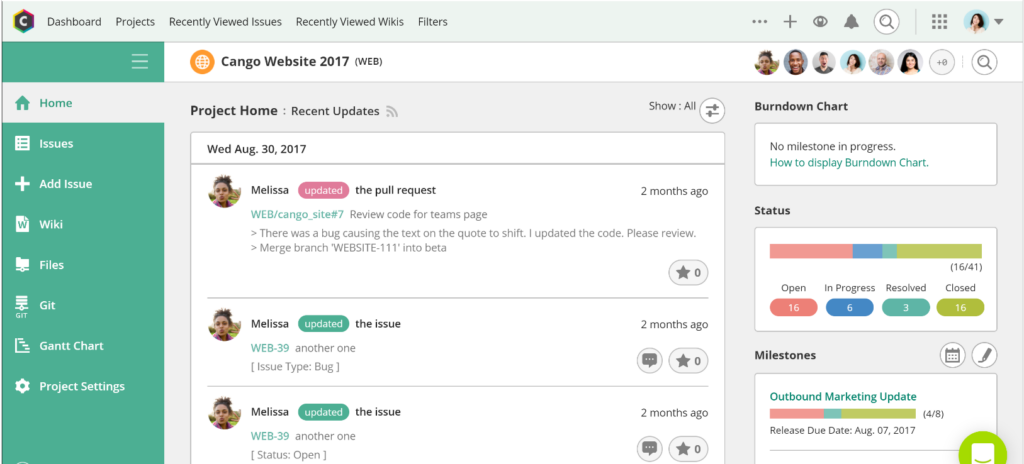
Backlog presents itself as a centralized platform that intertwines project management, task tracking, and bug resolution. It aptly consolidates these functionalities, making it invaluable for teams who want an integrated solution for their varying operational challenges.
Why I Picked Backlog:
In my search for tools that offer a cohesive experience, Backlog prominently emerged. I chose it after judging its capability to merge different operational needs into a single platform. Given its integrative features, it’s my determination that Backlog is best suited for teams keen on tracking projects, tasks, and bugs from one hub.
Standout features & integrations:
Backlog shines with its built-in bug-tracking system, ensuring issues are identified and resolved quickly. Additionally, it facilitates visual project timelines and offers extensive collaborative features such as shared wikis. Key integrations encompass Slack, Typetalk, and Jenkins for enhanced operational fluidity.
Pros and Cons
Pros:
- Visual Gantt chart and burndown chart features
- Built-in wiki system for team knowledge sharing
- Comprehensive dashboard with project, task, and bug views
Cons:
- Mobile experience could be enhanced
- Limited customization options in comparison to competitors
- The interface may be less intuitive for first-time users
Weitere Tools für Backlog-Management
Nachfolgend finden Sie weitere Backlog-Tools, die auf meiner Shortlist standen, es aber nicht in die Top 12 geschafft haben. Sie sind definitiv einen Blick wert.
- Canny
For prioritizing product feature requests
- Wrike
For real-time collaboration and workload management
- Teamhood
For Kanban-powered backlog management
- Craft.io
For hierarchical backlog organization
- monday.com
For customizable workflow automation
- Scoro
Forcombining CRM and project management
- ProWorkflow
Fortime tracking and resource management
- Pivotal Tracker
Foragile software development teams
- OpenProject
Forcomprehensive open-source collaboration


Weitere Bewertungen zu Tools und Software
Wenn Sie hier noch nicht das Richtige gefunden haben, werfen Sie auch einen Blick auf diese anderen Tool-Arten, die wir getestet und bewertet haben.
- Netzwerk-Monitoring-Software
- Server-Monitoring-Software
- SD-WAN-Lösungen
- Infrastruktur-Monitoring-Tools
- Packet Sniffer
- Anwendungsüberwachungs-Tools
Auswahlkriterien für Backlog-Management-Tools
Bei der Auswahl der besten Backlog-Tools für diese Liste habe ich übliche Anforderungen und Herausforderungen von Käufer:innen berücksichtigt – etwa die Priorisierung von Aufgaben und die Teamzusammenarbeit. Für eine faire Bewertung bin ich außerdem nach folgendem Rahmen vorgegangen:
Kernfunktionen (25% der Gesamtbewertung)
Um in diese Liste aufgenommen zu werden, musste jedes Tool folgende typische Anwendungsfälle abdecken:
- Aufgabenpriorisierung verwalten
- Projektfortschritt verfolgen
- Teamzusammenarbeit ermöglichen
- Integration mit anderen Tools
- Unterstützung von agilen Methoden
Weitere herausragende Features (25% der Gesamtbewertung)
Um die Auswahl weiter einzugrenzen, habe ich zudem auf besondere Alleinstellungsmerkmale geachtet – zum Beispiel:
- Anpassbare Workflows
- Erweiterte Berichtsfunktionen
- KI-gestützte Einblicke
- Echtzeit-Kollaborations-Tools
- Mehrsprachige Unterstützung
Benutzerfreundlichkeit (10% der Gesamtbewertung)
Um die Nutzbarkeit der einzelnen Systeme einzuschätzen, habe ich Folgendes bewertet:
- Intuitive Benutzeroberfläche
- Minimale Lernkurve
- Responsives Design
- Anpassungsoptionen
- Barrierefreiheitsfunktionen
Onboarding (10 % der Gesamtbewertung)
Um die Onboarding-Erfahrung jeder Plattform zu bewerten, habe ich Folgendes berücksichtigt:
- Verfügbarkeit von Trainingsvideos
- Interaktive Produkttouren
- Einsatz von Chatbots zur Unterstützung
- Zugang zu Webinaren
- Vorgefertigte Vorlagen
Kundensupport (10 % der Gesamtbewertung)
Um die Kundensupport-Dienste jedes Softwareanbieters zu bewerten, habe ich Folgendes berücksichtigt:
- 24/7 Support-Verfügbarkeit
- Mehrere Support-Kanäle
- Effizienz der Reaktionszeiten
- Zugang zu einer Wissensdatenbank
- Personalisierte Support-Optionen
Preis-Leistungs-Verhältnis (10 % der Gesamtbewertung)
Um das Preis-Leistungs-Verhältnis jeder Plattform zu bewerten, habe ich Folgendes berücksichtigt:
- Wettbewerbsfähige Preisgestaltung
- Gestaffelte Preisoptionen
- In jedem Tarif enthaltene Funktionen
- Verfügbarkeit einer kostenlosen Testphase
- Rabatte für Jahresabonnements
Kundenbewertungen (10 % der Gesamtbewertung)
Um einen Gesamteindruck der Kundenzufriedenheit zu gewinnen, habe ich beim Lesen von Kundenbewertungen Folgendes beachtet:
- Zufriedenheitsbewertungen der Nutzer
- Häufig berichtete Probleme
- Lob für bestimmte Funktionen
- Feedback zum Kundensupport
- Gesamtempfehlungsrate
Wie wählt man ein Backlog-Management-Tool aus?
Es ist leicht, sich in langen Funktionslisten und komplexen Preisstrukturen zu verlieren. Damit Sie während Ihres individuellen Software-Auswahlprozesses den Überblick behalten, finden Sie hier eine Checkliste mit Faktoren, die Sie im Hinterkopf behalten sollten:
| Faktor | Worauf achten? |
|---|---|
| Skalierbarkeit | Kann das Tool mit Ihrem Team wachsen? Berücksichtigen Sie zukünftiges Projektaufkommen und Teamgröße. Suchen Sie nach Tools, die skalierbare Pläne oder zusätzliche Ressourcen bieten. |
| Integrationen | Funktioniert es mit Ihrer bestehenden Software? Prüfen Sie, ob es mit den wichtigsten Tools Ihres Teams wie Slack, Jira oder Trello integriert werden kann. |
| Anpassbarkeit | Können Sie das Tool an Ihre Arbeitsweise anpassen? Überprüfen Sie, ob Sie Dashboards, Felder und Prozesse auf die Bedürfnisse Ihres Teams abstimmen können. |
| Benutzerfreundlichkeit | Ist das Tool einfach zu bedienen? Prüfen Sie die Lernkurve und ob Ihr Team sich schnell ohne umfassende Schulung zurechtfinden kann. |
| Implementierung und Onboarding | Wie reibungslos verläuft die Einrichtung? Suchen Sie nach Tools mit klaren Ressourcen für das Onboarding, wie z. B. Tutorials und Support, damit Ihr Team schnell starten kann. |
| Kosten | Passen die Preise zu Ihrem Budget? Vergleichen Sie die Kosten ähnlicher Tools und berücksichtigen Sie den Gegenwert in jeder Preisstufe. |
| Sicherheitsmaßnahmen | Sind Ihre Daten und Projekte sicher? Stellen Sie sicher, dass das Tool Sicherheitsstandards erfüllt und Funktionen wie Verschlüsselung und Zugriffskontrollen bietet. |
Was sind Backlog-Management-Tools?
Backlog-Management-Tools sind Softwarelösungen, die Teams dabei unterstützen, Aufgaben und Projekte zu organisieren, zu priorisieren und nachzuverfolgen. Diese Tools werden in der Regel von Projektmanager:innen, Entwickler:innen und Produktteams eingesetzt und bieten diesen bessere Kontrolle über Arbeitsabläufe und Zeitpläne. Aufgabenpriorisierung, Integrationsmöglichkeiten und anpassbare Workflows tragen dazu bei, Projekte organisiert zu halten und Teams effizient zu machen. Insgesamt ermöglichen diese Tools den Teams, ihre Arbeitslast effektiver zu verwalten und Fristen einzuhalten.
Funktionen
Achten Sie bei der Auswahl von Backlog-Management-Tools auf folgende Schlüsselfunktionen:
- Aufgabenpriorisierung: Hilft Teams dabei, Aufgaben nach Wichtigkeit zu ordnen, sodass kritische Arbeiten zuerst erledigt werden.
- Integrationsmöglichkeiten: Ermöglicht eine nahtlose Anbindung an andere Tools wie Slack, Jira und Trello, um Arbeitsabläufe zu optimieren.
- Anpassbare Workflows: Ermöglicht Teams, Prozesse und Dashboards an die individuellen Projektanforderungen anzupassen.
- Echtzeit-Zusammenarbeit: Erleichtert die Teamkommunikation und Aktualisierungen, sodass alle auf dem gleichen Stand sind.
- Erweiterte Berichte: Bietet Einblicke und Analysen, um den Projektfortschritt und die Teamleistung zu überwachen.
- Skalierbarkeit: Unterstützt Wachstum, indem mit steigendem Projektvolumen und Teamgröße mitgewachsen werden kann.
- Benutzerfreundliche Oberfläche: Stellt sicher, dass Teammitglieder das Tool einfach bedienen und navigieren können, ohne umfangreiche Schulungen zu benötigen.
- Sicherheitsvorkehrungen: Schützt Daten mit Funktionen wie Verschlüsselung und Zugriffskontrollen, um die Sicherheit der Informationen zu gewährleisten.
- Ressourcen zur Einarbeitung: Bietet Tutorials, Produkttouren und Vorlagen, damit neue Nutzer schnell starten können.
- Kostengünstige Preisgestaltung: Bietet verschiedene Preismodelle, die für unterschiedliche Budgets Mehrwert schaffen und Teams jeder Größe zugänglich sind.
Vorteile
Die Einführung von Backlog-Management-Tools bietet zahlreiche Vorteile für Ihr Team und Ihr Unternehmen. Hier sind einige, auf die Sie sich freuen können:
- Bessere Organisation: Aufgabenpriorisierung und anpassbare Workflows sorgen für Ordnung in Projekten und Aufgaben und reduzieren das Chaos.
- Verbesserte Zusammenarbeit: Echtzeit-Kollaborationsfunktionen halten Teammitglieder miteinander verbunden und informiert, was die Teamarbeit stärkt.
- Erhöhte Effizienz: Integrationen mit anderen Tools optimieren Prozesse und verringern die Zeit, die beim Wechseln zwischen Plattformen verloren geht.
- Bessere Entscheidungsfindung: Erweiterte Berichte liefern Einblicke in den Projektfortschritt und helfen Teams, fundierte Entscheidungen zu treffen.
- Unterstützung der Skalierbarkeit: Wenn Ihr Team wächst, können skalierbare Tools steigende Projektvolumen und Teamgrößen problemlos abbilden.
- Zeitersparnis: Benutzerfreundliche Oberflächen und Einarbeitungsressourcen minimieren den Zeitaufwand für das Erlernen und Implementieren des Tools.
- Datensicherheit: Sicherheitsvorkehrungen gewährleisten, dass die Daten Ihres Teams geschützt sind, und stärken Vertrauen sowie Compliance.
Kosten & Preise
Die Auswahl von Backlog-Management-Tools erfordert das Verständnis der verschiedenen verfügbaren Preismodelle und -pläne. Die Kosten variieren je nach Funktionen, Teamgröße, Zusatzoptionen und mehr. Die folgende Tabelle fasst gängige Pläne, deren Durchschnittspreise und typische Merkmale von Lösungen zur Verwaltung des Backlogs zusammen:
Vergleichstabelle für Backlog-Management-Tools
| Plan-Typ | Durchschnittlicher Preis | Übliche Funktionen |
|---|---|---|
| Free Plan | $0 | Grundlegendes Aufgabenmanagement, eingeschränkte Integrationen und Community-Support. |
| Personal Plan | $5-$25/user/month | Aufgabenpriorisierung, Basis-Berichte und E-Mail-Support. |
| Business Plan | $30-$60/user/month | Erweiterte Berichte, individuelle Workflows und Premium-Integrationen. |
| Enterprise Plan | $70-$100/user/month | Volle Anpassbarkeit, dedizierter Support und erweiterte Sicherheitsfunktionen. |
Häufig gestellte Fragen zu Backlog-Management-Tools
Antworten auf einige der wichtigsten Fragen rund um Lösungen zum Backlog-Management.
Welche Arten von Backlog-Management-Tools gibt es?
Gibt es kostenlose Backlog-Management-Tools?
Ist der Preis ein Indikator für Qualität?
Wie geht es weiter:
Wenn Sie gerade verschiedene Backlog-Management-Tools recherchieren, verbinden Sie sich kostenlos mit einem SoftwareSelect-Berater für individuelle Empfehlungen.
Sie füllen ein Formular aus und führen ein kurzes Gespräch, in dem Ihre konkreten Anforderungen ermittelt werden. Anschließend erhalten Sie eine Shortlist geeigneter Softwarelösungen zur Auswahl. Die Berater begleiten Sie zudem im gesamten Kaufprozess – einschließlich Preisverhandlungen.