
26 Beste Anforderungen-Management-Software im Test für 2026

Beste Requirements-Management-Software Übersicht
Nach einer gründlichen Auswertung habe ich 12 führende Requirements-Management-Softwares ausgewählt, um verschiedene Anforderungen abzudecken.


In diesem Artikel stelle ich meine Top-Empfehlungen für Requirements-Management-Software vor. Ich habe jede Lösung unabhängig getestet und bewertet, sodass Sie meinen Einschätzungen vertrauen können. Mein Ziel ist es, Ihnen ein Tool zu empfehlen, das Ihre Abläufe vereinfacht und die Produktivität Ihres Teams steigert.
Sie erhalten einen objektiven Überblick zu jeder Software, mit Fokus auf Funktionen, Vorteile und Nachteile. Egal ob Sie zu einem kleinen Team oder einem großen Unternehmen gehören – hier finden Sie bestimmt das Passende. Tauchen wir ein und entdecken Sie das richtige Tool für Ihre Anforderungen.
Table of Contents
Why Trust Our Software Reviews
Zusammenfassung: Die beste Requirements-Management-Software
| Tool | Best For | Trial Info | Price | ||
|---|---|---|---|---|---|
| 1 | Best for large-scale project management | 30-day free trial available | Pricing upon request | Website | |
| 2 | Best for requirements management customizability | Free demo available | Pricing upon request | Website | |
| 3 | Best for end-to-end traceability | Free trial available | From $470/year | Website | |
| 4 | Best for enterprise-level customizability | 30 days free trial | Pricing available upon request | Website | |
| 5 | Best for out-of-box API integrations | 30-day free trial + free demo available | Pricing upon request | Website | |
| 6 | Best with an ITSM help desk | 7-day free trial | From $20/user/month (billed annually) | Website | |
| 7 | Best for traceability features | Not available | Pricing upon request | Website | |
| 8 | Best for scalable deployments | Free demo available | Pricing upon request | Website | |
| 9 | Best for test integration | Not available | Pricing upon request | Website | |
| 10 | Best for Agile and DevOps teams | Not available | Pricing upon request | Website | |
| 11 | Best for robust integrations | Free trial + free demo available | Pricing upon request | Website | |
| 12 | Best for engineering teams | Not available | From $20/user/month (billed annually) | Website |
-

Site24x7
Visit WebsiteThis is an aggregated rating for this tool including ratings from Crozdesk users and ratings from other sites.4.6 -
Docker
Visit WebsiteThis is an aggregated rating for this tool including ratings from Crozdesk users and ratings from other sites.4.6 -
Pulumi
Visit WebsiteThis is an aggregated rating for this tool including ratings from Crozdesk users and ratings from other sites.4.8





Bewertungen der besten Requirements-Management-Software


Jama Software is a premier requirements and project management tool, primarily tailored for organizations managing expansive projects. Given the complex nature of large-scale endeavors, Jama's robust features ensure that project goals are consistently met with precision.
Why I Picked Jama Software: Jama Software made its way to this list after careful comparison and judgment. I chose it not only based on the favorable opinions of industry professionals but also due to its ability to cater specifically to large-scale projects. In the vast sea of project management tools, Jama stands out, especially when it comes to handling projects of significant magnitude.
This unique capability is the reason why I firmly believe it's "best for large-scale project management."
Standout Features & Integrations:
Jama is renowned for its detailed traceability, real-time collaboration, and review center. Additionally, its intuitive interface ensures that project managers can oversee multiple aspects simultaneously.
For integrations, Jama melds with popular tools like JIRA, Slack, and TFS, ensuring that teams remain in sync and project workflows are streamlined.
Pros and Cons
Pros:
- Interface is designed for overseeing large-scale projects
- Real-time collaboration ensures timely decision-making
- Comprehensive traceability aids in keeping track of project details
Cons:
- Some users might find the pricing on the higher side
- Initial setup can be somewhat intricate
- Might be too extensive for smaller projects


reqSuite® rm is a requirements management tool developed by OSSENO Software. It is designed to help companies manage and document requirements efficiently throughout the project lifecycle. This tool is highly customizable, allowing users to adapt it to their specific business processes without the need for extensive coding.
Why I Picked reqSuite® rm: The software allows users to customize workflows, templates, and data models to fit their specific needs without requiring extensive coding knowledge. This flexibility ensures that organizations can adapt the tool to their unique processes, making it a versatile option for various industries and project types.
Additionally, it includes automatic quality checks that detect inconsistencies and missing links, helping to maintain high standards of requirement documentation. It also provides a clear structure for managing requirements and artifacts, systematic grouping, and version history tracking.
Standout Features & Integrations:
Key features include its smart links for visualizing dependencies between requirements, collaborative tools for enhanced team communication, contextual support with work suggestions, and a centralized management system.
Integrations include Azure DevOps, ClickUp, Enterprise Architect, GitLab, Jira, Microsoft Azure, Microsoft Excel, Microsoft Word, Redmine, and TestRail.
Pros and Cons
Pros:
- Automatic checks for links and dependencies
- Version control features
- Highly configurable platform
Cons:
- Reporting graphical configuration could be modernized
- Data export feature could be improved


ReqView is a requirements management tool designed for hardware and software engineers in safety-critical industries, including medical devices, aerospace, automotive, and robotics.
Why I Picked ReqView: In complex projects, keeping track of every requirement and its relationships is crucial. With ReqView, you can link related requirements, helping maintain a clear and organized project structure. This end-to-end traceability ensures nothing falls through the cracks and every requirement is accounted for throughout the development process.
Plus, the tool's ability to handle formal verifications and full audit trails means you can meet compliance needs for safety-critical and information security standards.
Standout Features & Integrations:
Key features include customizable attributes, document templates, import/export options, risk management, verification and validation linking, traceability analysis, change impact analysis, baselining requirements, offline collaboration, human-readable project data (JSON), version control, and customizable reports.
Integrations include Jira, Git, Subversion, Enterprise Architect (beta), and other RM and MBSE tools via ReqIF data exchange.
Pros and Cons
Pros:
- Easy to setup and use
- Flexible project structure, customizable attributes and views
- Good customer support
Cons:
- Real-time collaboration is not yet implemented
- Coding skills needed for customization of export templates


Visure is a requirements management platform designed for teams working on complex systems, products, and software. It helps you manage requirements, risks, and testing while ensuring compliance with industry standards. The platform is built for scalability and adapts to different project types and methodologies, including agile, waterfall, and V model.
Why I picked Visure Requirements:
Visure gives your team end-to-end traceability, from conception to testing and deployment, which makes it easier to stay compliant and deliver projects on time. You can use its AI-driven quality analysis to automatically check the clarity of your requirements. It also lets you create reusable components, requirements, and test cases across projects, saving you time. With strong MS Word and Excel integration, you can work with stakeholders outside the platform and still keep everything aligned.
Standout features & integrations:
Features include full traceability that extends down to source code like Java, C, and C++, one-click impact analysis to see how changes affect your project, and graphical workflow modeling to enforce traceability rules. The platform also offers templates aligned with standards like ISO, IEC, and CENELEC for regulated industries.
Integrations include IBM DOORS, JIRA, Sparx EA, TFS, ReqIF, MATLAB, VectorCAST, Microsoft Word, and Microsoft Excel.
Pros and Cons
Pros:
- Strong Word and Excel integration
- AI-driven quality checks for requirements
- Flexible for agile and waterfall projects
Cons:
- Customization requires training for admins
- Interface may feel overwhelming at first


codebeamer is an end-to-end Application Lifecycle Management (ALM) platform with advanced requirements management capabilities. It’s built to help teams manage complex product development from requirements to release. The system supports both safety-critical and traditional software delivery while ensuring transparency and traceability across the lifecycle.
Why I picked codebeamer:
This platform gives your team full visibility into requirements, interdependencies, and the impact of changes as projects move forward. You’ll benefit from built-in requirements-based testing and automated change control, which makes it easier to keep projects compliant and on track. It also comes with preconfigured industry templates to support regulated industries. By combining reporting options, approval workflows, and traceability, codebeamer provides a flexible way to handle complex processes at scale.
Standout features & integrations:
Features include configurable workflows that adapt to your processes, requirements-based testing built into the system, and automated approval management to simplify collaboration. You can also use custom reporting options to analyze progress and stay compliant with industry regulations.
Integrations include Jira, Microsoft Word, Microsoft Excel, IBM Rational DOORS, and other tools through APIs.
Pros and Cons
Pros:
- Highly configurable workflows and templates
- Gapless traceability across development lifecycle
- Strong support for regulated industries
Cons:
- Interface may seem dated to new users
- Setup can feel complex at first

Jira Service Management is a platform built to help teams handle customer service requests and internal IT needs. It supports managing incidents, problems, changes, and service requests with workflows you can customize to your organization. The tool gives teams a central place to track, resolve, and report on service tasks.
Why I picked Jira Service Management:
This tool combines IT service management with the ability to handle requirements tracking, so you can manage both support tickets and evolving project needs. You can set up custom fields, workflows, and issue types to match how your team works. Linking requirements with related issues like bugs or feature requests helps keep everything connected. SLA tracking, automation rules, and real-time reporting make it easier for your team to stay on top of priorities.
Standout features & integrations:
Features include a self-service portal where end-users can submit and monitor requests, automation rules that reduce manual ticket routing, and SLA tracking to ensure deadlines are met. You’ll also get analytics and reporting tools that give insights into team performance and bottlenecks.
Integrations include Confluence, Slack, Google Workspace, Microsoft, Zoom, AdobeXD, Invision, Figma, Lucidchart, Trello, and GitHub.
Pros and Cons
Pros:
- Links requirements with bugs or requests
- SLA tracking keeps requests on schedule
- Flexible workflows for IT and dev teams
Cons:
- Customization requires admin knowledge
- Setup can be complex for new users


Micro Focus Dimensions RM serves as a dynamic tool designed to aid in requirement management throughout the software development lifecycle. Its distinct emphasis on traceability ensures that teams can track changes, origins, and relationships between requirements and artifacts.
Why I Picked Micro Focus Dimensions RM: In my process of selecting tools, Dimensions RM stood out prominently. The tool's commitment to offering unparalleled traceability features makes it unique. After weighing its attributes and comparing them with alternatives, I determined it to be "best for traceability features". This tool ensures teams have a clear vision of every requirement's journey, from its inception to final delivery.
Standout Features & Integrations:
Dimensions RM is equipped with features such as baseline comparison, impact analysis, and a version-controlled repository. These functionalities ensure that teams can track, compare, and manage requirements with precision.
For integrations, it harmoniously connects with tools like Jenkins, JIRA, and Micro Focus Quality Center, making it versatile in diverse development environments.
Pros and Cons
Pros:
- Robust version control ensures clear documentation of every change
- Integrates with a variety of popular development and testing tools
- Deep dive traceability features for comprehensive tracking
Cons:
- Potential for integration challenges with non-standard tools or platforms
- Some features may be too complex for smaller teams or projects
- May require a learning period for teams unfamiliar with its interface


IBM Engineering Requirements Management DOORS Next is a sophisticated requirements management tool, known for efficiently handling both small-scale projects and enterprise-level deployments. With its capability to scale without compromising on performance, it offers an ideal solution for organizations looking for growth and scalability in their operations.
Why I Picked IBM Engineering Requirements Management DOORS Next: In the process of selecting tools, DOORS Next stood out significantly. The decision was based on its reputation for handling massive requirements without hiccups. What truly differentiates it from others is its unmatched scalability.
I judged and compared it with peers, and based on the gathered opinions and my assessment, I concluded that it is "best for scalable deployments."
Standout Features & Integrations:
DOORS Next excels with features like real-time collaboration, advanced configuration management, and end-to-end traceability. The tool also supports a comprehensive dashboard for intuitive project management.
Integration-wise, DOORS Next syncs well with other IBM solutions and has the capability to integrate with third-party tools, creating a harmonious workflow.
Pros and Cons
Pros:
- Supports real-time collaboration which facilitates teamwork
- Comprehensive dashboards provide a detailed overview of projects
- Robust scalability ensures the tool is fit for all project sizes
Cons:
- Licensing and setup can be more complex than simpler alternatives
- Might be overkill for very small-scale projects
- A steeper learning curve compared to some other tools

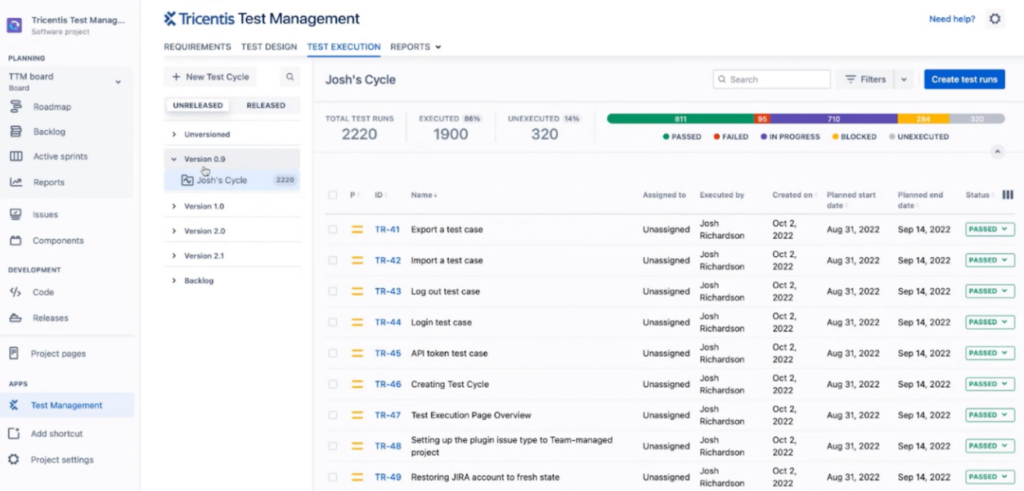
Tricentris stands at the forefront of providing efficient test integration solutions. Streamlining the testing phase empowers teams to maintain high-quality outputs, aligning with its premise of being best for test integration.
Why I Picked Tricentris: In my search and comparison of various tools, I selected Tricentris due to its robust capabilities in test integration. Its dedication to reducing complexities in the testing phase, coupled with advanced features, differentiates it from others in the market.
I believe it is "best for test integration" as it comprehensively addresses the challenges faced during software testing and integrates these solutions into one platform.
Standout Features & Integrations:
Tricentris boasts features like automated test case design, risk-based testing, and AI-driven impact analysis. These functionalities not only reduce manual effort but also ensure thorough testing.
For integrations, Tricentris effectively connects with platforms such as JIRA, Jenkins, and Selenium, bolstering its position as a hub for all testing-related tasks.
Pros and Cons
Pros:
- Efficient integrations with popular development tools streamline the workflow
- Advanced features like AI-driven analysis enhance testing precision
- Comprehensive test integration solution in a unified platform
Cons:
- Integration capabilities may require customization based on specific project needs
- Certain advanced features might be excessive for smaller projects
- Might come with a steeper learning curve for beginners

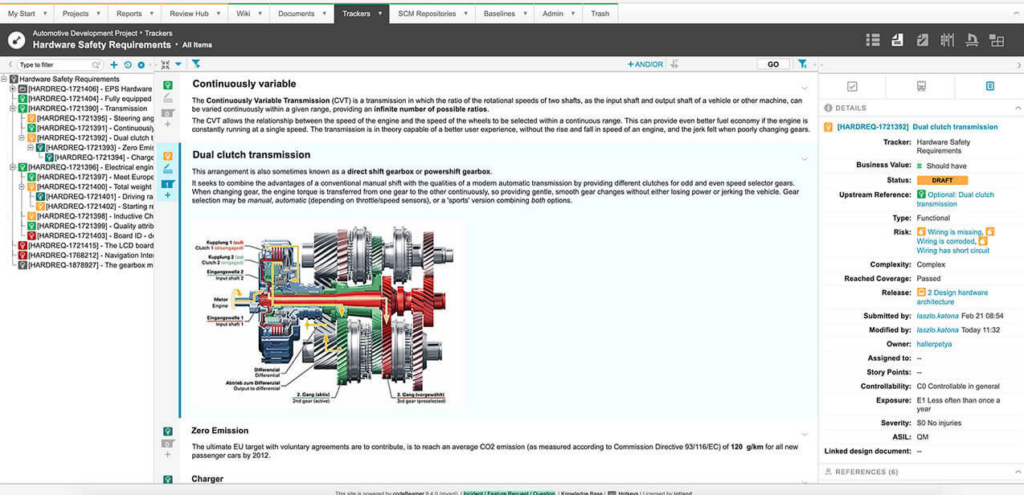
Intland Software is designed to support the specialized requirements of Agile and DevOps methodologies. With the rise of Agile and DevOps approaches in software development, Intland Software facilitates teams in ensuring smooth, efficient, and streamlined processes.
Why I Picked Intland Software: From the array of tools available, I determined Intland Software to be particularly effective due to its focus on Agile and DevOps practices. Its capability to bridge both these methodologies sets it apart from other offerings.
The reason it stands out as best for Agile and DevOps teams lies in its integrated suite of tools tailored to the unique needs of these practices.
Standout Features & Integrations:
Key features of Intland Software include backlog management, sprint planning, and continuous integration/deployment support. It also provides comprehensive release and defect management, aligning with the core principles of Agile and DevOps.
Integrations that augment its functionality include GitHub, Jenkins, and JIRA, ensuring compatibility with widely used tools in the development ecosystem.
Pros and Cons
Pros:
- Supports popular integrations, enhancing its adaptability in diverse environments
- Comprehensive management features that align with rapid development cycles
- Tailored toolset for both Agile and DevOps methodologies
Cons:
- Customization might be necessary to fit specific project needs
- The depth of features might require dedicated time for orientation
- Might be complex for teams not adhering strictly to Agile or DevOps


Visure Solutions is a comprehensive tool that serves as a hub for all project requirements, providing clarity and structure to complex processes. Its prowess lies in facilitating integrations, which I've determined to be vital for ensuring project fluidity and efficient management.
Why I Picked Visure Solutions: In evaluating various tools, I selected Visure Solutions based on its distinct edge in providing robust integrations. Its ability to connect with a myriad of tools differentiates it from many competitors. I've come to the opinion that for projects demanding multiple tool interactions, Visure Solutions is undeniably the best for integrations, bridging gaps, and fostering collaboration.
Standout Features & Integrations:
Visure Solutions shines with features like a traceability matrix, version control, and impact analysis, which collectively ensure every project requirement is meticulously managed.
On the integration front, Visure is remarkable. It syncs effortlessly with top ALM tools, popular test management platforms, and other critical software, paving the way for a connected project environment.
Pros and Cons
Pros:
- Broad range of integration options
- Comprehensive requirements traceability
- In-depth visualization tools
Cons:
- Initial interface navigation can be intricate
- Might be a cost concern for smaller teams
- Requires a learning curve for beginners


Valispace has emerged as a critical tool that specifically caters to the nuanced requirements of engineering teams. Its design, features, and integrations are all tailored to enhance the collaborative efforts of engineers, aligning with the specialized nature of their projects.
Why I Picked Valispace: In the midst of selecting a range of tools, Valispace stood out due to its specialized focus on engineering. I picked it not only for its dedicated features but also because it bridges the gap between traditional project management software and the unique demands of engineering teams.
The tool’s specialization and its proven track record with engineering groups were pivotal in determining its suitability.
Standout Features & Integrations:
Valispace shines with features such as data-driven component libraries, engineering change proposals, and requirements traceability. This tool understands that engineers often need a holistic view of projects, thus it provides real-time data visualization and detailed analysis.
It integrates with tools like JIRA, MATLAB, and Solidworks, ensuring that engineering data remains connected across different platforms.
Pros and Cons
Pros:
- Offers real-time data visualization and analysis
- Robust integration with popular engineering software
- Tailored specifically for the engineering domain
Cons:
- Some integrations might not be as deep or comprehensive as specialized tools
- Requires consistent updates to keep component libraries relevant
- Might have a steeper learning curve for non-engineers
Weitere Requirements-Management-Software
Nachfolgend finden Sie zusätzliche Requirements-Management-Software, die ich in die engere Auswahl genommen habe, die es aber nicht unter die Top 12 geschafft haben. Ein Blick lohnt sich auf jeden Fall.
- Doc Sheets
For scalability
- Olive
For real-time collaboration
- Orcanos
For compliance-focused projects
- Polarion
For product lifecycle management
- Innoslate
For lifecycle management
- Accompa
For user-friendly dashboards
- Modern Requirements
For collaboration in Azure DevOps
- PractiTest
Fortest and requirements alignment
- Sparx Systems Enterprise Architect
Forvisual modeling and design
- SpiraTeam
Forintegrated project management
- Micro Focus ALM Quality Center
Forend-to-end quality management
- Modern Requirements4DevOps
ForDevOps and Azure DevOps integration
- Kovair
Formulti-tool integration
- Helix ALM
Fortraceability across the project lifecycle


Weitere Software- & Tool-Bewertungen
Wenn Sie hier noch nicht fündig geworden sind, werfen Sie einen Blick auf diese weiteren Tools, die wir getestet und bewertet haben.
- Netzwerküberwachungs-Software
- Serverüberwachungs-Software
- SD-Wan-Lösungen
- Infrastrukturüberwachungs-Tools
- Packet Sniffer
- Application-Monitoring-Tools
Kriterien für die Auswahl von Requirements-Management-Software
Bei der Auswahl der besten Requirements-Management-Software für diese Liste habe ich typische Bedürfnisse der Käufer und deren Herausforderungen wie die Sicherstellung der Rückverfolgbarkeit und ein effektives Änderungsmanagement berücksichtigt. Außerdem habe ich dieses Bewertungsraster genutzt, um fair und strukturiert zu vergleichen:
Kernfunktionen (25% der Gesamtbewertung)
Um in diese Übersicht aufgenommen zu werden, musste jede Lösung diese gängigen Anwendungsfälle abdecken:
- Anforderungen erfassen und dokumentieren
- Änderungen nachverfolgen und Versionen verwalten
- Rückverfolgbarkeit über Projektphasen hinweg sicherstellen
- Zusammenarbeit zwischen Stakeholdern ermöglichen
- Berichte und Analysen generieren
Weitere besondere Merkmale (25% der Gesamtbewertung)
Um die Auswahl weiter einzugrenzen, habe ich zudem auf folgende besondere Funktionen geachtet:
- KI-gestützte Anforderungsanalyse
- Echtzeit-Datenintegration
- Individuell anpassbare Workflow-Automatisierung
- Erweitertes Compliance-Management
- Interaktive Dashboards
Benutzerfreundlichkeit (10% der Gesamtbewertung)
Um das Nutzungserlebnis jeder Lösung einzuschätzen, habe ich folgende Aspekte betrachtet:
- Intuitive Benutzeroberfläche
- Geringe Einarbeitungszeit
- Effiziente Navigation und Struktur
- Responsives Design für verschiedene Geräte
- Verfügbarkeit von Benutzeranleitungen und Dokumentation
Onboarding (10 % der Gesamtbewertung)
Um das Onboarding-Erlebnis für jede Plattform zu bewerten, habe ich Folgendes berücksichtigt:
- Verfügbarkeit von Trainingsvideos
- Interaktive Produkttouren
- Zugang zu Vorlagen und Leitfäden
- Unterstützende Chatbots und Hilfezentren
- Webinare und Live-Trainingssitzungen
Kundensupport (10 % der Gesamtbewertung)
Um die Kundenserviceleistungen jedes Softwareanbieters zu bewerten, habe ich Folgendes berücksichtigt:
- Verfügbarkeit von 24/7-Support
- Mehrere Supportkanäle
- Reaktionsgeschwindigkeit auf Anfragen
- Kompetentes Support-Personal
- Zugang zu einem Community-Forum
Preis-Leistungs-Verhältnis (10 % der Gesamtbewertung)
Um das Preis-Leistungs-Verhältnis jeder Plattform zu beurteilen, habe ich Folgendes berücksichtigt:
- Konkurrenzfähige Preisgestaltung
- Transparente Preisstruktur
- Umfang der angebotenen Funktionen
- Skalierbarkeit mit Unternehmenswachstum
- Kundenfeedback zur Preiszufriedenheit
Kundenbewertungen (10 % der Gesamtbewertung)
Um ein Bild der allgemeinen Kundenzufriedenheit zu erhalten, habe ich beim Lesen von Kundenrezensionen Folgendes beachtet:
- Positives Feedback zur Kernfunktionalität
- Zufriedenheit mit dem Kundenservice
- Einfachheit der Integration mit anderen Tools
- Nutzererfahrungen mit Zuverlässigkeit und Verfügbarkeit
- Wahrnehmung des Gesamtwertes durch die Kunden
So wählen Sie eine Requirements Management Software aus
Es ist leicht, sich in langen Funktionslisten und komplexen Preisstrukturen zu verlieren. Um Ihnen zu helfen, sich bei Ihrem individuellen Software-Auswahlprozess zu fokussieren, finden Sie hier eine Checkliste von Faktoren, die Sie im Auge behalten sollten:
| Faktor | Worauf Sie achten sollten |
|---|---|
| Skalierbarkeit | Wächst das Tool mit Ihrem Team mit? Prüfen Sie, ob es mehr Projekte oder Benutzer bewältigen kann, wenn Ihr Bedarf steigt. Suchen Sie nach klaren Upgrade-Möglichkeiten in der Preisstruktur. |
| Integrationen | Lässt es sich mit Ihren bestehenden Tools verbinden? Stellen Sie sicher, dass es die von Ihrem Team bereits verwendete Software wie Jira oder Slack unterstützt, um Unterbrechungen im Arbeitsablauf zu vermeiden. |
| Anpassbarkeit | Können Sie es auf Ihre Prozesse zuschneiden? Überprüfen Sie, ob Sie Workflows, Vorlagen und Felder an die Anforderungen Ihres Teams anpassen können, ohne umfangreiche technische Unterstützung zu benötigen. |
| Benutzerfreundlichkeit | Ist die Benutzeroberfläche für alle verständlich? Ein einfaches Design kann die Einarbeitungszeit verkürzen und die Akzeptanz erhöhen. Suchen Sie nach Demos oder Testversionen, um die Benutzerfreundlichkeit aus erster Hand zu prüfen. |
| Implementierung und Onboarding | Wie schnell kann Ihr Team starten? Berücksichtigen Sie die Ressourcen für Konfiguration und Schulung. Der Zugang zu Tutorials und Support kann den Übergang erleichtern. |
| Kosten | Passt es in Ihr Budget, ohne versteckte Gebühren? Vergleichen Sie die Gesamtkosten – einschließlich Lizenzen, Schulungen und Support – mit Ihren Budgetvorgaben und dem erwarteten ROI. |
| Sicherheitsvorkehrungen | Schützt es Ihre Daten? Prüfen Sie die vorhandenen Sicherheitsmaßnahmen wie Verschlüsselung und Benutzerrechte, um Datensicherheit zu gewährleisten. |
Was ist Requirements Management Software?
Requirements Management Software wird verwendet, um Projektanforderungen während ihres gesamten Lebenszyklus zu erfassen, zu dokumentieren und zu verfolgen. Ingenieure, Projektmanager und Business Analysten nutzen diese Tools in der Regel, um sicherzustellen, dass Projekte ihre vorgesehenen Ziele erreichen und im Zeitplan bleiben. Nachverfolgbarkeit, Änderungsmanagement und Kollaborationsfunktionen unterstützen eine effektive Kommunikation und Anpassungsfähigkeit im Team. Diese Tools sorgen für Klarheit und Organisation und erhöhen letztlich den Projekterfolg sowie die Ausrichtung an den Unternehmenszielen.
Funktionen
Wenn Sie Requirements Management Software auswählen, achten Sie auf die folgenden Schlüsselfunktionen:
- Sicherheitsmaßnahmen: Schützt sensible Projektdaten mit Funktionen wie Verschlüsselung und Benutzerrechten, um Compliance und Datenintegrität sicherzustellen. Orientieren Sie sich an den Funktionen, die am besten mit Ihrem Anwendungsfall übereinstimmen – damit können Sie die Komplexität von Projektanforderungen besser managen und erfolgreiche Ergebnisse erzielen.
- Nachverfolgbarkeit: Stellt sicher, dass alle Anforderungen über den gesamten Projektlebenszyklus verfolgt werden, wodurch Verantwortlichkeit und die Ausrichtung auf Projektziele gewährleistet sind.
- Änderungsmanagement: Hilft, Änderungen an Anforderungen zu verwalten und zu dokumentieren, um Missverständnisse und Projektverzögerungen zu minimieren.
- Kollaborationstools: Ermöglichen die Kommunikation zwischen den Beteiligten, sodass Teams effizient zusammenarbeiten und fundierte Entscheidungen treffen können.
- Anpassungsoptionen: Erlauben es, Arbeitsabläufe, Vorlagen und Felder individuell an die spezifischen Prozesse und Anforderungen Ihres Teams anzupassen.
- Auswirkungsanalyse: Bewertet die Auswirkungen von Anforderungsänderungen auf das Projekt, unterstützt bei der Risikominderung und erleichtert datenbasierte Entscheidungen.
- Echtzeit-Updates: Stellt aktuelle Informationen zum Projektstatus bereit, sodass alle Teammitglieder die neuesten Daten für ihre Entscheidungen erhalten.
- Versionskontrolle: Verwaltet verschiedene Versionen von Anforderungen, um Konsistenz zu gewährleisten und Änderungen im Zeitverlauf nachzuverfolgen.
- Berichte und Analysen: Bietet Einblicke in die Projektleistung und den Status der Anforderungen, um die strategische Planung und Umsetzung zu unterstützen.
Vorteile
Die Implementierung von Requirements-Management-Software bietet Ihrem Team und Unternehmen zahlreiche Vorteile. Hier sind einige, auf die Sie sich freuen können:
- Sicherheitsgarantie: Schützt Ihre Projektdaten durch Sicherheitsmaßnahmen wie Verschlüsselung und Benutzerberechtigungen und gewährleistet so Compliance und Datenintegrität. Requirements-Management-Software sorgt nicht nur für einen reibungslosen Projektablauf, sondern bietet auch ein robustes Rahmenwerk für das Änderungsmanagement, sichert Qualität und schafft Mehrwert.
- Verbesserte Projektabstimmung: Hält alle Beteiligten durch Rückverfolgbarkeit und Kollaborationswerkzeuge informiert und auf Kurs mit den Projektzielen.
- Risikominimierung: Minimiert Projektrisiken mit Funktionen für Änderungsmanagement und Auswirkungsanalyse, die Aktualisierungen von Anforderungen effektiv steuern.
- Verbesserte Kommunikation: Erleichtert die Kommunikation zwischen Teammitgliedern und Stakeholdern durch Echtzeit-Updates und Kollaborationsfunktionen.
- Höhere Effizienz: Steigert die Produktivität durch Automatisierung routinemäßiger Prozesse und bietet individuell anpassbare Arbeitsabläufe für Ihre Bedürfnisse.
- Datenbasierte Entscheidungen: Ermöglicht es Ihrem Team, fundierte Entscheidungen auf Grundlage von Berichten und Analysen zu treffen, die Einblicke in die Projektperformance geben.
Kosten & Preise
Die Wahl einer Requirements-Management-Software erfordert ein Verständnis der unterschiedlichen Preisstrukturen und verfügbaren Pläne. Die Kosten variieren je nach Funktionsumfang, Teamgröße, Zusatzoptionen und mehr. Die folgende Tabelle fasst gängige Pläne, deren durchschnittliche Preise und typische Leistungsmerkmale von Requirements-Management-Softwarelösungen zusammen:
Vergleichstabelle für Requirements-Management-Software
| Plantage | Durchschnittlicher Preis | Typische Funktionen |
|---|---|---|
| Kostenlos | $0 | Basis-Anforderungsmanagement, begrenzte Benutzer, grundlegende Kollaborationswerkzeuge, Zugang zum Community-Support |
| Starter | $10 - $25/user/month | Erweiterte Kollaborationsfunktionen, mehr Benutzer, grundlegende Berichte und Analysen, E-Mail-Support |
| Professional | $25 - $50/user/month | Erweiterte Anforderungsnachverfolgung, Integrationsmöglichkeiten, umfassende Berichte und Analysen, priorisierter E-Mail-Support |
| Enterprise | Individuelle Preisgestaltung | Individuell anpassbare Arbeitsabläufe, unbegrenzte Benutzer, erweiterte Sicherheitsfunktionen, dedizierter Support, On-Premise-Optionen, vollständige Integrationsmöglichkeiten, KI-basierte Einblicke |
FAQs zur Requirements-Management-Software
Hier finden Sie Antworten auf häufig gestellte Fragen zur Requirements-Management-Software:
Wie geht Requirements-Management-Software mit Änderungen um?
Requirements-Management-Software verfügt in der Regel über Funktionen zum Änderungsmanagement, um Anpassungen nachzuverfolgen und zu dokumentieren. Sie hilft Ihnen dabei, die Auswirkungen von Änderungen auf das Projekt zu beurteilen und stellt sicher, dass alle Aktualisierungen mit den Stakeholdern kommuniziert werden, sodass die Projektausrichtung gewahrt bleibt und Risiken reduziert werden.
Wie wird die Rückverfolgbarkeit in Requirements-Management-Software sichergestellt?
Rückverfolgbarkeit wird ermöglicht, indem Anforderungen mit ihren Ursprüngen verknüpft und während des gesamten Projektlebenszyklus verfolgt werden. Dies unterstützt Ihr Team dabei, alle Anforderungen zu erfüllen, und bietet einen klaren Audit-Trail – unerlässlich für Compliance und Nachvollziehbarkeit.
Was sollte man bei der Integration von Requirements-Management-Software beachten?
Bei der Integration von Requirements-Management-Software sollten Sie die Kompatibilität mit bestehenden Tools wie Jira oder Slack prüfen. Stellen Sie sicher, dass Datenmigration unterstützt wird und APIs für eine nahtlose Anbindung vorhanden sind. Diese Integration trägt dazu bei, Kontinuität in den Arbeitsabläufen zu gewährleisten und die teamübergreifende Zusammenarbeit zu verbessern.
Wie unterstützt Requirements-Management-Software die Einhaltung von Vorschriften?
Requirements-Management-Software unterstützt die Einhaltung von Vorschriften durch Funktionen wie Audit-Trails, Versionskontrolle und Rückverfolgbarkeit. Diese Werkzeuge helfen Ihrem Team, Prozesse zu dokumentieren, Änderungen nachzuverfolgen und sicherzustellen, dass alle regulatorischen Anforderungen erfüllt werden. So wird das Risiko von Nichteinhaltung reduziert.
Wie geht es weiter:
Wenn Sie gerade Requirements-Management-Software recherchieren, nehmen Sie Kontakt zu einem SoftwareSelect-Berater auf und erhalten Sie kostenlose Empfehlungen.
Sie füllen ein Formular aus und haben ein kurzes Gespräch, in dem die Berater auf Ihre spezifischen Anforderungen eingehen. Anschließend erhalten Sie eine Auswahlliste mit Softwarelösungen zur Überprüfung. Sie begleiten Sie sogar während des gesamten Kaufprozesses, einschließlich Preisverhandlungen.