

Elastic APM Review: Pros, Cons, Features, and Pricing
Elastic APM stands out as a cost-effective, flexible monitoring tool for Elastic Stack users, though it requires some management expertise.

We review tools independently, and commissions help fund our testing. See our transparency policy, our methodology, or suggest a tool.
Elastic APM is an application monitoring software built into the Elastic Stack, giving teams distributed tracing, error tracking, and service performance metrics in one place. It's worth considering when you're already running Elasticsearch or Kibana, since the native integration means your traces, logs, and metrics all live in the same environment. If you're weighing it against Datadog, Elastic APM is the stronger fit for teams that want that unified observability layer without paying per-host pricing that scales against you.
Elastic APM Evaluation Summary
0/5
- Pricing upon request
Why Trust Our Software Recommendations
6,700+
Reviews
20
Industry experts
16+
Evaluation factors
14
Years
Our team has been testing and reviewing software since 2012. As tech leaders ourselves, we know how difficult—and important—it is to choose the right software.
For this guide, we evaluated tools using hands-on testing and independent research, scoring tools using our selection criteria.
Our reviews reflect our human editorial judgment, not a sales pitch.
Expert reviewers:
- Paulo Gardini MiguelTech Director
 Tim FisherVP of AI
 Gabriel RosasTech Lead & Software Architect
 Christhian GruhnTech Lead & Platform Architect

Elastic APM Overview
In my opinion, Elastic APM is a solid choice for teams already invested in the Elastic Stack. Its open source APM agents offer flexibility, but they require a level of expertise to manage effectively. Compared to other APM software, it provides deep Elastic integration but might lag in user-friendliness for non-tech teams. Self-hosted users and those on lower-tier pricing plans might experience occasional slower support response times. This APM solution is best suited for businesses with technical teams ready to leverage its full potential, especially in environments with existing Elastic tools. If you're looking for a cost-effective solution with robust integration capabilities, Elastic APM could be the right fit for your team.
Pros
- You can customize it extensively to fit your team's specific needs.
- It offers real-time monitoring, visualization and insights, helping your team react quickly.
- It's part of the Elastic Stack, providing a unified ecosystem for data analysis.
Cons
- Your team might find the user interface less intuitive than other tools.
- It requires significant management expertise, which can be a hurdle for some teams.
- You might experience slower response times from customer support compared to competitors.
Is Elastic APM Right For Your Needs?
Who Would be a Good Fit for Elastic APM?
Elastic APM is a great choice for tech-savvy teams in industries like finance and e-commerce, where performance insights are vital. If your team is already using the Elastic Stack, you'll find the integration seamless, giving you a unified platform for monitoring and analysis. Its native OpenTelemetry instrumentation capabilities make it ideal for environments where quick detection and responses are crucial. Your team can customize it to fit specific needs, which is perfect for businesses with unique workflows or requirements.
- Tech StartupsYour team can benefit from Elastic APM's self-hosted open-source flexibility, adapting it to evolving needs without high initial costs.
- E-commerce PlatformsReal-time monitoring helps you keep track of customer experiences and optimize your online store's performance.
- Financial ServicesYou can rely on its detailed insights to maintain system integrity and quickly address any performance issues.
- DevOps TeamsElastic APM's customization options let your team tailor its full-stack observability and automation features to fit specific development and operational workflows.
- IT DepartmentsYour IT team can integrate it with existing Elastic tools to monitor backend applications, microservices, and other workloads.
- Digital AgenciesWith its flexible setup, you can use Elastic APM to monitor multiple client projects, ensuring high performance across the board.
Who Would be a Bad Fit for Elastic APM?
Elastic APM might not suit small businesses or non-technical teams lacking the expertise to manage its complexities. If your team needs a simple, out-of-the-box solution, you'll find its customization and management requirements overwhelming. Businesses that don't already use the Elastic Stack need more onboarding efforts compared to standalone application performance monitoring solutions.
- Small BusinessesYour team might find the setup and management too complex without dedicated IT resources.
- Non-Technical TeamsIf your team lacks technical expertise, you might struggle with its customization and configuration needs.
- Healthcare ProvidersYour team faces higher operational and governance overhead when working with Elastic APM’s open source agent.
- Educational InstitutionsYou might find its complexity and management requirements too demanding for limited IT departments.
- Retail ChainsIf you need a quick, simple monitoring solution, Elastic APM's setup might be too time-consuming.
- FreelancersYou likely need a straightforward tool, and Elastic APM's extensive features may be more than you need.
Our Review Methodology
How We Test & Score Tools
We’ve spent years building, refining, and improving our software testing and scoring system. The rubric is designed to capture the nuances of software selection and what makes a tool effective, focusing on critical aspects of the decision-making process.
Below, you can see exactly how our testing and scoring works across seven criteria. It allows us to provide an unbiased evaluation of the software based on core functionality, standout features, ease of use, onboarding, customer support, integrations, customer reviews, and value for money.
Core Functionality (25% of final scoring)
The starting point of our evaluation is always the core functionality of the tool. Does it have the basic features and functions that a user would expect to see? Are any of those core features locked to higher-tiered pricing plans? At its core, we expect a tool to stand up against the baseline capabilities of its competitors.
Standout Features (25% of final scoring)
Next, we evaluate uncommon standout features that go above and beyond the core functionality typically found in tools of its kind. A high score reflects specialized or unique features that make the product faster, more efficient, or offer additional value to the user.
We also evaluate how easy it is to integrate with other tools typically found in the tech stack to expand the functionality and utility of the software. Tools offering plentiful native integrations, 3rd party connections, and API access to build custom integrations score best.
Ease of Use (10% of final scoring)
We consider how quick and easy it is to execute the tasks defined in the core functionality using the tool. High scoring software is well designed, intuitive to use, offers mobile apps, provides templates, and makes relatively complex tasks seem simple.
Onboarding (10% of final scoring)
We know how important rapid team adoption is for a new platform, so we evaluate how easy it is to learn and use a tool with minimal training. We evaluate how quickly a team member can get set up and start using the tool with no experience. High scoring solutions indicate little or no support is required.
Customer Support (10% of final scoring)
We review how quick and easy it is to get unstuck and find help by phone, live chat, or knowledge base. Tools and companies that provide real-time support score best, while chatbots score worst.
Customer Reviews (10% of final scoring)
Beyond our own testing and evaluation, we consider the net promoter score from current and past customers. We review their likelihood, given the option, to choose the tool again for the core functionality. A high scoring software reflects a high net promoter score from current or past customers.
Value for Money (10% of final scoring)
Lastly, in consideration of all the other criteria, we review the average price of entry level plans against the core features and consider the value of the other evaluation criteria. Software that delivers more, for less, will score higher.
Core Features
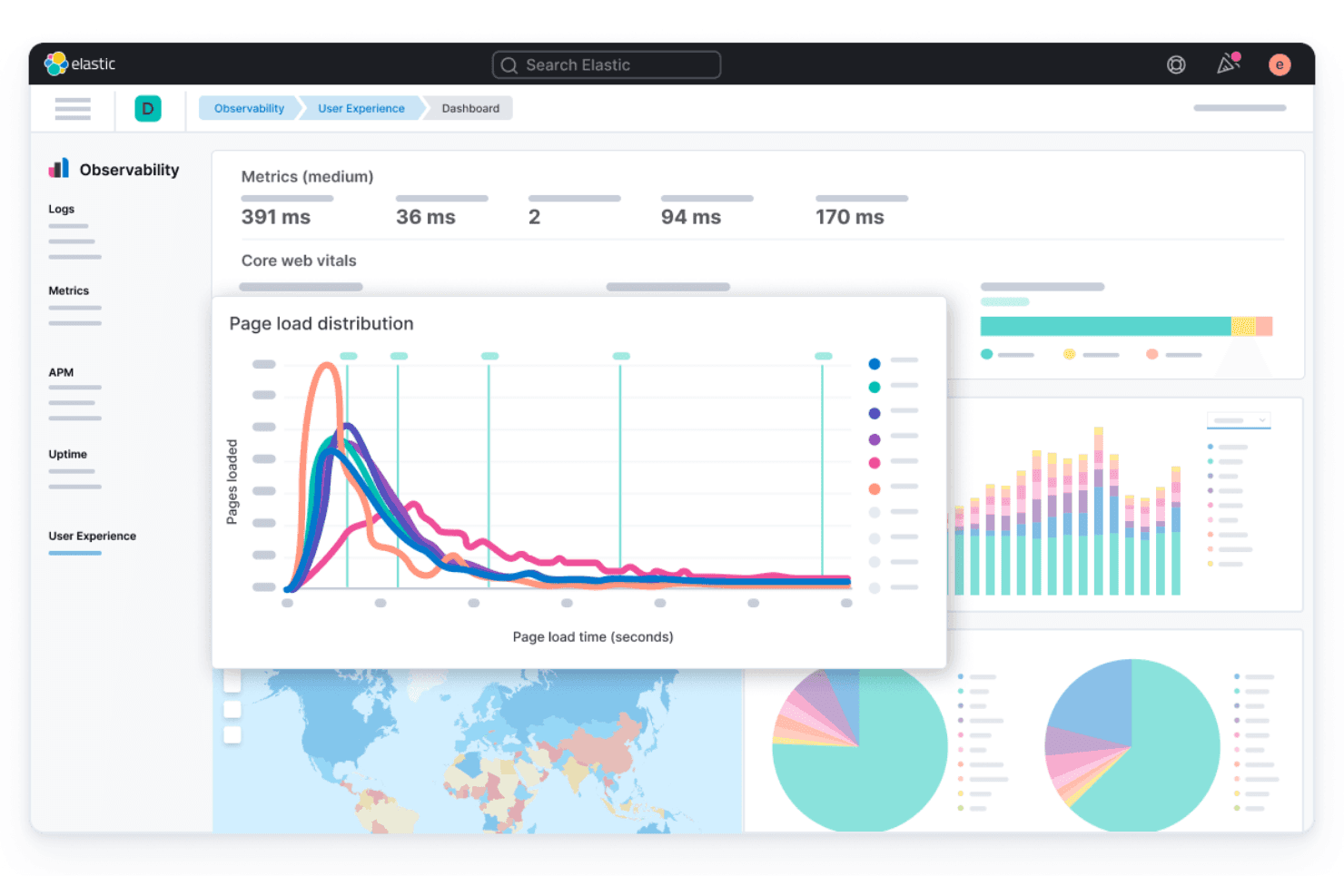
Real-Time Monitoring: Elastic APM lets you track your application performance as it happens, so you can address issues quickly. Resolving bottlenecks early allows you to improve user experience.
Transaction Tracing: You can trace each transaction across your application to pinpoint where delays occur. This visibility helps you optimize your code and improve response times.
Error Logging: With error logging, you can capture and analyze errors in your application across endpoints. Early prevention stops issues from negatively impacting end users.
Service Maps: Elastic APM's service maps visually represent how different services interact within your application. This helps you understand dependencies and impacts on performance.
Machine Learning Powered Anomaly Detection: This feature uses machine learning to identify unusual patterns in your application data. You can be more proactive when troubleshooting bugs, errors, or irregular system behaviors.
Custom Dashboards: You can create dashboards tailored to your team's needs, displaying the metrics that matter most. This customization helps you focus on latency, error rate, and other data crucial for your operations.

Standout Features
Elastic Stack Integration: As part of the Elastic Stack, Elastic APM seamlessly integrates with Elasticsearch, Kibana, and Logstash. This integration gives you a powerful, unified platform for monitoring and analyzing data.
Open-Source Flexibility: Elastic APM’s open source agents allow your team to customize and extend its functionalities. This flexibility is perfect for tech-savvy teams with unique monitoring requirements.
Ease of Use
Elastic APM can be challenging to use for teams without technical expertise. Its interface might feel less intuitive compared to other tools, requiring a learning curve for effective use. If your team is already familiar with the Elastic Stack, you'll find it integrates well, but newcomers might struggle setting it up. The flexibility and depth of features are strengths, yet they demand time and knowledge to fully leverage.
Onboarding
Elastic APM's onboarding process can feel daunting for new users, especially those unfamiliar with the Elastic Stack. While documentation and community support are available, they may not suffice for all teams. Your team might need to invest additional time to properly set it up.. The learning curve is steep, you’ll get significant value once you overcome it.
Customer Support
Elastic APM's customer support for free tiers might leave you wanting more, as response times can be slower than expected. While community forums and documentation offer some help, they may not address all your team's needs promptly. If your team requires immediate assistance, this could pose a challenge. The support channels available are useful but might not always be sufficient for teams needing quick and comprehensive solutions.
Integrations
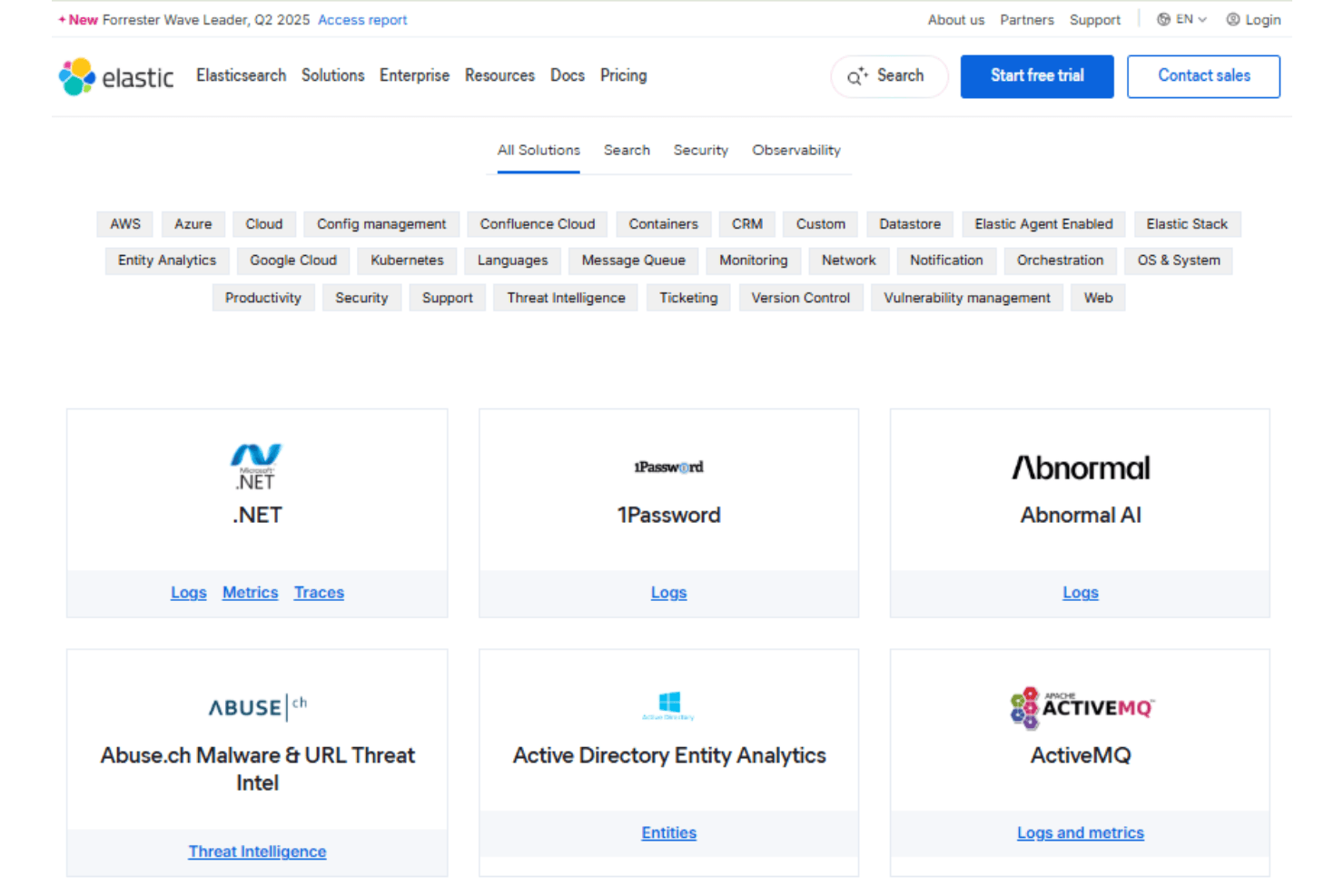
Elastic APM integrates with .NET, Go, Java, Node.js, PHP, Python, Ruby, iOS SDK, RUM (Real User Monitoring) for JavaScript, Microsoft Azure, Amazon Web Services (AWS), Kubernetes, Docker, Elastic Cloud, and more.
Elastic APM also offers an API and supports connections with third-party integration tools.
Value for Money
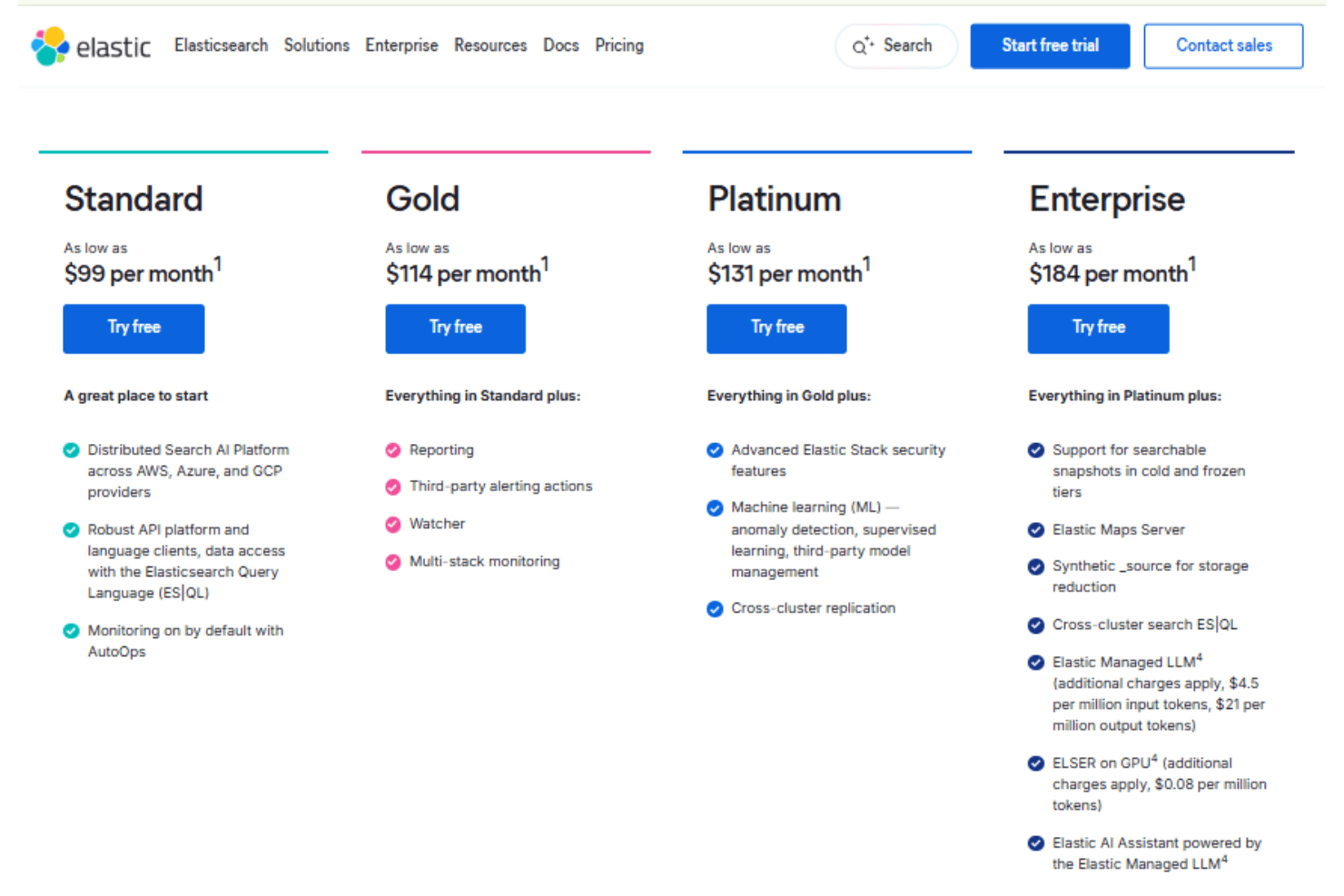
Elastic APM, offered as part of Elastic Cloud Observability solutions, provides good value for teams familiar with the Elastic Stack, offering extensive features at competitive prices. Its pricing structure supports scalability, making it accessible for growing organizations. A free trial is available, allowing your team to explore its capabilities before committing. You can use Elastic Stack as a self-managed service, or subscribe to a hosted or serverless Elastic Cloud. Below is what you’ll get with cloud-based Elastic APM.
- Standard: Offers core monitoring features for small to medium teams.
- Gold: Includes advanced features like reporting and third-party alerts.
- Platinum: Provides premium features such as machine learning and advanced security.
- Enterprise: Tailored for large organizations. Includes advanced features like searchable snapshots and artificial intelligence (AI) assistants.
Elastic APM Specs
- AI Integration: Yes
- API: Yes
- Automated Testing: Yes
- Browser Compatibility Testing: Yes
- Bug Tracking: Yes
- Code Review: Yes
- Custom Reports: Yes
- Data Export: Yes
- Data Import: Yes
- Developer Tools: Yes
- External Integrations: Yes
- Malware Protection: Yes
- Multi-User: Yes
- Notifications: Yes
- Performance Testing: Yes
- Process Reporting: Yes
- Static Analysis: Yes
- Status Notifications: Yes
- Workflow Management: Yes
Elastic APM FAQs
Elastic APM Company Overview & History
Elastic, founded in 2012 and headquartered in Amsterdam, is a leader in AI-powered search. It provides solutions for search, observability, security, and generative AI. The company is known for its open-source culture and innovation, serving a diverse clientele, including Fortune 500 companies. Elastic emphasizes data security and ethical practices, maintaining a strong online presence and actively seeking skilled talent for its global workforce.
Elastic APM Major Milestones
- 2012: Elastic was founded in Amsterdam.
- 2018: Elastic APM was introduced as part of the Elastic Stack.
- 2018: Elastic went public on the New York Stock Exchange.
- 2023: Introduced Elastic AI Assistant.
- 2025: Elastic acquired Jina AI, a company providing the search foundation for multimodal data.