

19 Elasticsearch Alternatives Picked for 2026

Elasticsearch Alternative Shortlist
Here’s my shortlist of the top Elasticsearch alternatives:


A strong Elasticsearch alternative delivers fast, scalable search, flexible data indexing, and reliable analytics without locking you into a single ecosystem. If you’re searching for options beyond Elasticsearch, you’re likely weighing factors like open-source flexibility, cost, ease of deployment, or advanced AI features.
With so many search and analytics platforms available, it’s tough to know which one will fit your technical requirements and business goals. This list will help you compare the top Elasticsearch alternatives for 2026, so you can confidently choose the right solution for your team’s needs.
What Is Elasticsearch?
Elasticsearch is an open-source, high-performance search and analytics engine built on Apache Lucene, designed for scalable, real-time search across structured and unstructured data. It stores data as JSON documents and supports full-text search, logging, and analytics use cases. Often used within the ELK Stack, it serves as a powerful alternative for teams needing fast, distributed search and data processing.
Best Elasticsearch Alternatives Summary
This comparison chart summarizes pricing details for my top Elasticsearch alternative selections to help you find the best one for your budget and business needs.
| Tool | Best For | Trial Info | Price | ||
|---|---|---|---|---|---|
| 1 | Best for advanced relevance tuning | Free plan + free demo available | Pay-as-you-go pricing based on usage | Website | |
| 2 | Best for retail site search optimization | Free demo available | Pricing upon request | Website | |
| 3 | Best for real-time big data processing | Not available | Free and open-source with paid managed hosting options | Website | |
| 4 | Best with seamless cloud integration | Free plan available | From $73.73/month | Website | |
| 5 | Best for developer-friendly APIs | Open-source version + free demo available | Pay-as-you-go pricing model (resource-based) | Website | |
| 6 | Best for AI-powered document insights | 30-day free trial available | From $500/month | Website | |
| 7 | Best for ecommerce product discovery | Free demo available | Pricing upon request | Website | |
| 8 | Best for lightning-fast search deployments | Open-source version available | From $30/month | Website | |
| 9 | Best for enterprise-grade scalability | Not available | Free and open-source | Website | |
| 10 | Best for AI-powered document insights | 30-day free tria available | From $500/month | Website |
Why Trust Our Software Reviews
We’ve been testing and reviewing software since 2023. As tech leaders ourselves, we know how critical and difficult it is to make the right decision when selecting software.
We invest in deep research to help our audience make better software purchasing decisions. We’ve tested more than 2,000 tools for different tech use cases and written over 1,000 comprehensive software reviews. Learn how we stay transparent & our software review methodology.
-

Site24x7
Visit WebsiteThis is an aggregated rating for this tool including ratings from Crozdesk users and ratings from other sites.4.6 -
GitHub Actions
Visit WebsiteThis is an aggregated rating for this tool including ratings from Crozdesk users and ratings from other sites.4.8 -
Docker
Visit WebsiteThis is an aggregated rating for this tool including ratings from Crozdesk users and ratings from other sites.4.6





Best Elasticsearch Alternatives Reviews
Below are my detailed summaries of the best Elasticsearch alternatives that made it onto my shortlist. My reviews offer a detailed look at the features, best use cases, and integrations of each platform to help you find the best one for you.

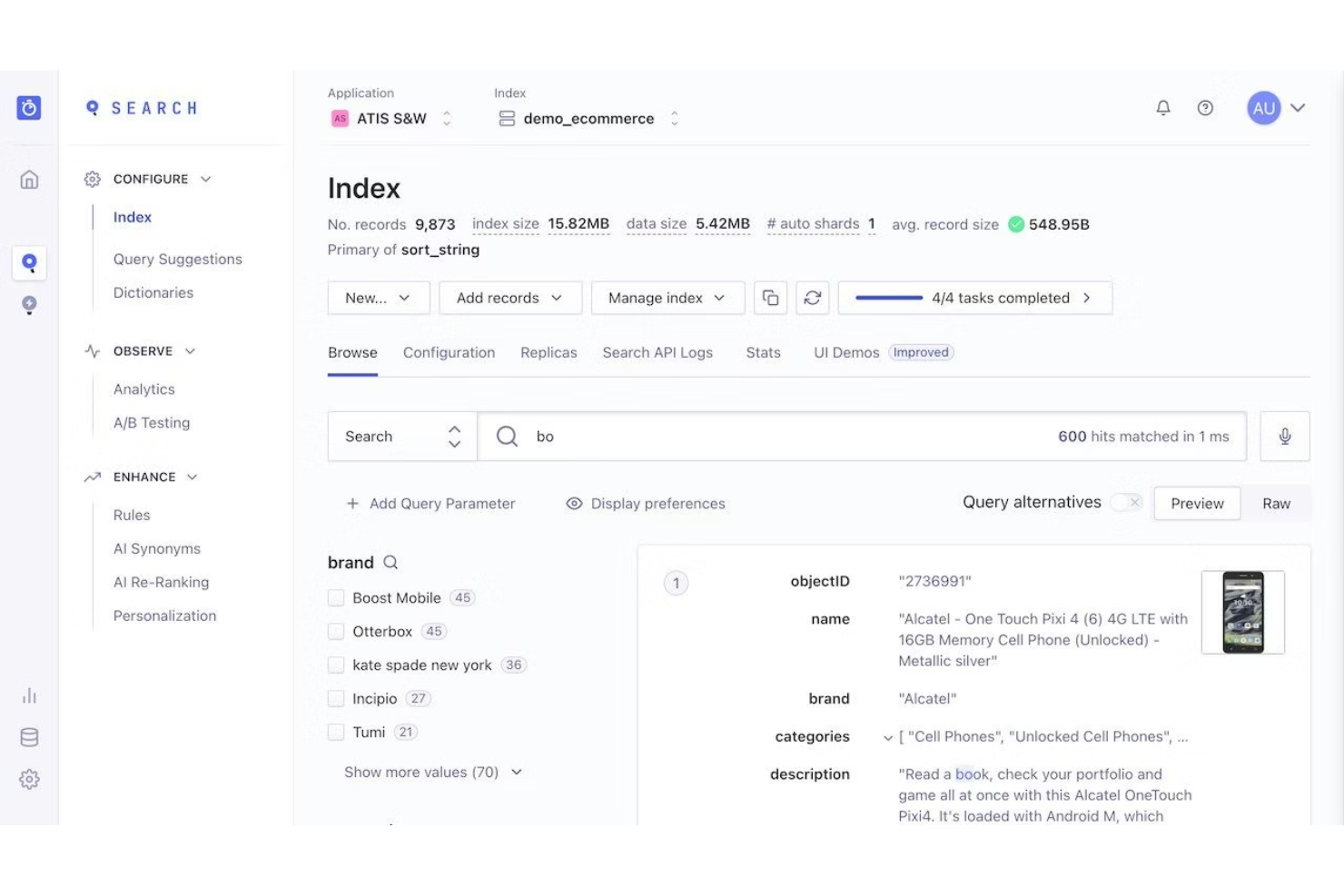
If you need granular control over search relevance, Algolia is built for you. This cloud-based search platform appeals to product teams, ecommerce businesses, and SaaS providers who want to fine-tune ranking and deliver highly personalized results. Unlike Elasticsearch, Algolia stands out for its advanced relevance tuning and real-time indexing capabilities.
Why Algolia Is a Good Elasticsearch Alternative
For teams that need advanced relevance tuning, Algolia offers a level of control that goes beyond what Elasticsearch provides out of the box. I picked Algolia because it lets you fine-tune ranking with custom rules, business logic, and user behavior signals.
Its dynamic ranking formula and AI-powered relevance features help you deliver search results that match user intent more closely. These capabilities make Algolia a strong choice for businesses where search precision and personalization are top priorities.
Algolia Key Features
Some other features in Algolia make it a flexible option for a range of search-driven applications:
- Geo-Search: Algolia supports location-based search, allowing you to filter and rank results by geographic proximity.
- Multi-Index Search: You can query multiple indexes in a single search request for more complex data needs.
- Faceting and Filtering: The platform provides built-in faceting and filtering to help users narrow down search results by attributes.
- Analytics Dashboard: Algolia includes a real-time analytics dashboard to monitor search performance and user behavior.
Algolia Integrations
Native integrations include Android, API access, Supabase, Meteor, Adobe Commerce, Bubble, WordPress, Adobe, Gatsby, Zendesk, BigCommerce, Netlify, Salesforce Commerce Cloud, and more.
Pros and Cons
Pros:
- Built-in typo tolerance and language support for global audiences
- Real-time indexing supports instant updates to search results
- Advanced relevance tuning allows granular control over search ranking
Cons:
- Limited support for complex aggregations compared to Elasticsearch
- Pricing can increase quickly with higher usage volumes

Retailers looking to boost product discovery and conversion rates may want to consider Netcore Unbxd for their site search needs. This platform is designed specifically for ecommerce, offering AI-driven merchandising and personalized search experiences that go beyond what Elasticsearch typically provides out of the box. Netcore Unbxd helps retail teams address challenges like relevance tuning, dynamic recommendations, and real-time inventory updates.
Why Netcore Unbxd Is a Good Elasticsearch Alternative
For retail businesses focused on optimizing site search for ecommerce, Netcore Unbxd offers specialized capabilities that set it apart from Elasticsearch. I picked Netcore Unbxd because it provides AI-powered product recommendations and merchandising tools tailored for online stores.
Features like dynamic faceted navigation and real-time inventory-aware search help retailers deliver more relevant results and boost conversions. If you need a search solution built specifically for retail, this platform addresses challenges that generic search engines often overlook.
Netcore Unbxd Key Features
Some other features that make Netcore Unbxd appealing for ecommerce teams include:
- Visual Search: Allow shoppers to search for products using images instead of keywords.
- A/B Testing for Search: Run experiments on search algorithms and configurations to measure impact on user behavior.
- Auto-Suggest and Spell Correction: Provide real-time suggestions and correct typos as users type in the search bar.
- Analytics Dashboard: Access detailed reports on search performance, user queries, and conversion metrics.
Netcore Unbxd Integrations
Native integrations are not currently listed by Netcore Unbxd.
Pros and Cons
Pros:
- Built-in analytics dashboard tracks search performance and conversion rates
- Visual search supports image-based product discovery for ecommerce sites
- AI-driven product recommendations adapt to shopper behavior in real time
Cons:
- Documentation and support resources can be difficult to navigate
- Some advanced features require manual configuration or vendor support

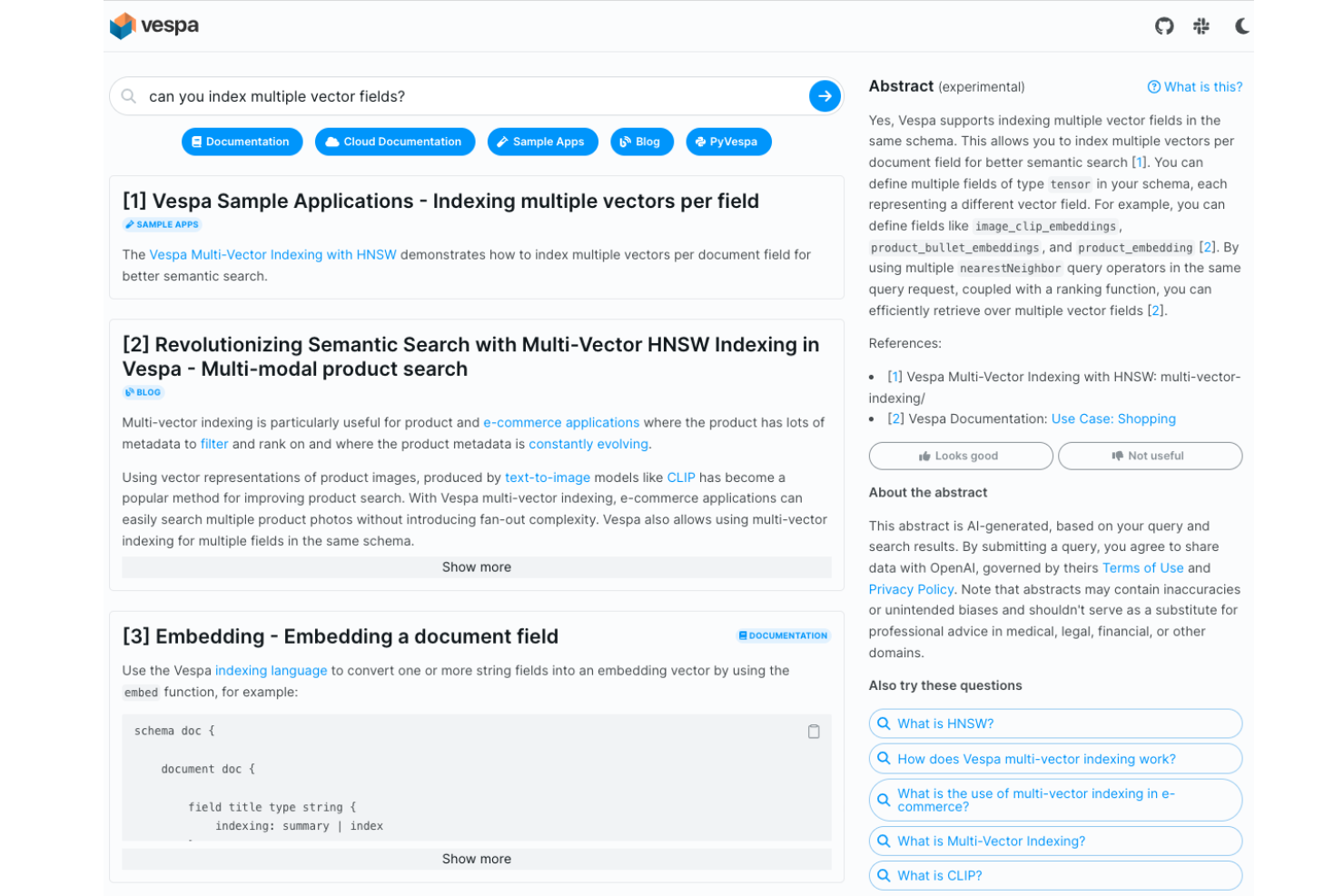
For teams handling massive, fast-moving datasets, Vespa offers a real-time big data processing engine that goes beyond traditional search. It’s built for IT specialists and data engineers who need to combine search, recommendation, and analytics on live data at scale. Vespa stands out from Elasticsearch alternatives by supporting low-latency, high-throughput processing for complex queries and machine learning models directly on streaming data.
Why Vespa Is a Good Elasticsearch Alternative
Vespa stands out for real-time big data processing, which is a key need for organizations working with high-velocity, large-scale datasets. I picked Vespa because it can execute complex queries, recommendations, and machine learning inference directly on live data as it streams in.
The platform’s architecture is designed for low-latency, high-throughput operations, making it well-suited for use cases like personalization, fraud detection, and large-scale search. These capabilities make Vespa a strong alternative to Elasticsearch when you need more than just search—you need real-time analytics and decisioning on fresh data.
Vespa Key Features
Some other features in Vespa make it a versatile choice for demanding data environments:
- Native Tensor Support: Vespa processes and stores tensor data structures for advanced ranking and machine learning use cases.
- Document Processing Pipelines: The platform includes built-in pipelines for ingesting, transforming, and indexing documents.
- Flexible Schema Management: You can define and update data schemas dynamically without downtime.
- Built-In Access Control: Vespa provides role-based access control to manage user permissions and data security.
Vespa Integrations
Integrations are API-first with support for custom applications, data pipelines, and machine learning integrations.
Pros and Cons
Pros:
- Open-source licensing provides full access to source code
- Native tensor support enables advanced machine learning inference
- Real-time processing supports low-latency analytics on streaming data
Cons:
- Initial setup and configuration can be complex for new users
- Requires significant infrastructure for optimal large-scale performance

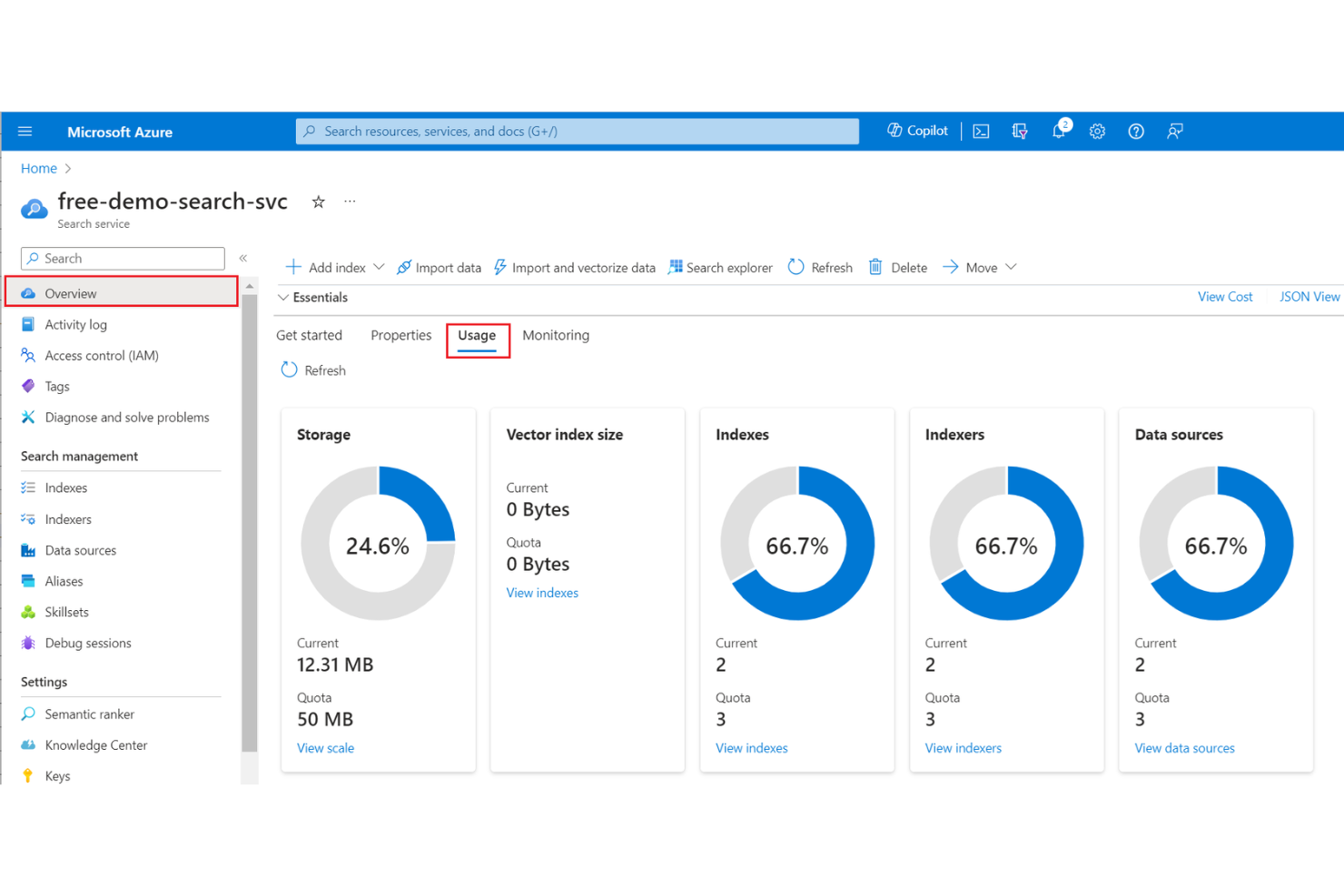
For IT teams already invested in the Microsoft ecosystem, Azure AI Search offers a cloud-native search solution that integrates tightly with other Azure services. It’s a strong fit for organizations managing large-scale, distributed data who want to leverage built-in AI capabilities for indexing and querying.
Unlike Elasticsearch, Azure AI Search provides seamless scaling, security, and compliance features that align with enterprise cloud requirements.
Why Microsoft Azure AI Search Is a Good Elasticsearch Alternative
When a smooth integration with cloud infrastructure is a top priority, Azure AI Search stands out as a strong alternative to Elasticsearch. I picked Azure AI Search because it’s built to work natively with other Azure services, making it easy to deploy, manage, and scale search across cloud-based data sources.
Features like built-in AI enrichment for document processing and enterprise-grade security controls help organizations meet compliance and data governance needs. For teams already using Azure, this tool offers a unified approach to search that’s hard to match with standalone solutions.
Microsoft Azure AI Search Key Features
Some other features worth highlighting for Azure AI Search include:
- Cognitive Search Skills: Apply AI-powered skills like language detection, entity recognition, and image analysis to enrich indexed content.
- Geo-Spatial Search: Support location-based queries and filtering for applications that require mapping or proximity search.
- Synonym Maps: Manage custom synonym lists to improve search relevance and handle domain-specific terminology.
- REST API Access: Integrate search capabilities into custom applications using a fully documented RESTful API.
Microsoft Azure AI Search Integrations
Integrations include Azure Blob Storage, Azure SQL Database, Cosmos DB, and Microsoft Power BI, with additional custom integrations available through REST APIs and SDKs.
Pros and Cons
Pros:
- Scalable infrastructure handles large, distributed data sets efficiently
- Built-in AI enrichment automates document processing and metadata extraction
- Native integration with Azure services simplifies cloud-based deployments
Cons:
- Documentation can be fragmented across different Azure resources
- Some advanced search features require additional Azure services


Developers looking for a straightforward, API-first search engine often turn to Typesense. This open source solution is designed for teams who want fast setup, simple scaling, and minimal operational overhead compared to Elasticsearch. Typesense stands out for its intuitive APIs and real-time indexing, making it a strong fit for projects where developer experience and rapid deployment matter most.
Why Typesense Is a Good Elasticsearch Alternative
If you want a search engine with developer-friendly APIs, Typesense is worth a close look. I picked Typesense because its RESTful and JSON-based APIs make it easy to integrate and manage search functionality without complex configuration.
The platform also offers instant search indexing and automatic typo tolerance, which help teams deliver fast, relevant results with minimal setup. These features make Typesense a strong choice for projects where developer productivity and straightforward implementation are priorities.
Typesense Key Features
Some other features in Typesense make it a flexible option for teams building search-driven applications:
- Faceted Search: Typesense supports faceted search, letting users filter results by multiple attributes.
- Synonym Management: You can define custom synonyms to improve search accuracy and user experience.
- Built-In High Availability: The platform offers built-in replication and failover for reliability.
- Open Source Licensing: Typesense is available under an open source license, allowing for self-hosting and customization.
Typesense Integrations
Integrations include Laravel, Symfony, Gatsby, Firebase, Twilio, Adobe Commerce, WooCommerce, Prepr, and more.
Pros and Cons
Pros:
- Built-in typo tolerance improves search accuracy for users
- Real-time indexing supports instant updates to search data
- API design is simple and consistent for rapid integration
Cons:
- No built-in support for complex aggregations or nested queries
- Lacks advanced analytics and dashboarding features natively

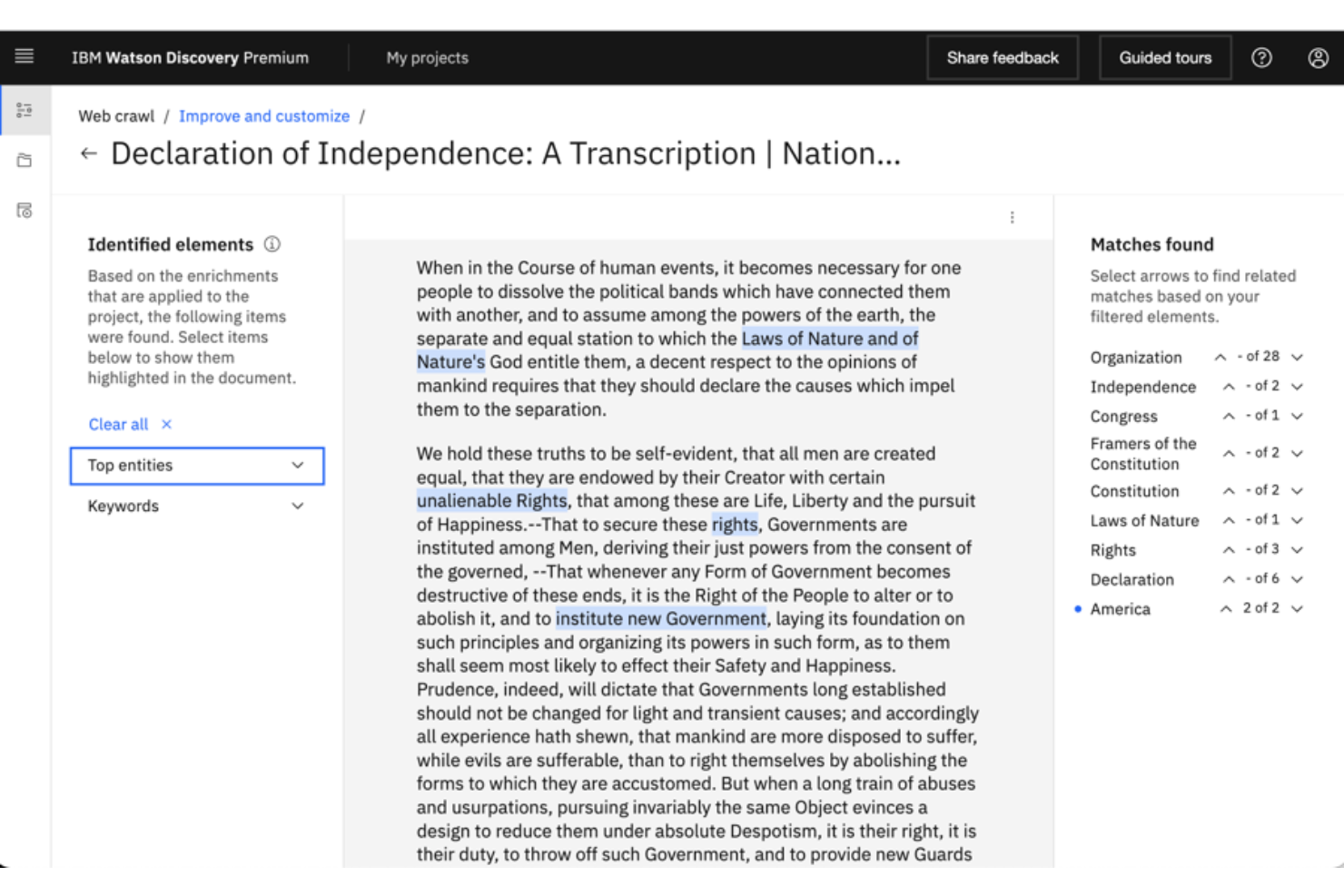
For teams that need to extract insights from large volumes of unstructured documents, IBM Watson Discovery offers advanced AI-powered search and analysis. It’s a strong fit for enterprises, research organizations, and regulated industries that need to surface relevant information from complex data sources.
Unlike Elasticsearch, Watson Discovery uses natural language processing and machine learning to understand context and deliver more precise answers from your documents.
Why IBM Watson Discovery Is a Good Elasticsearch Alternative
What sets IBM Watson Discovery apart is its focus on AI-powered document insights, which goes beyond traditional keyword search. I picked this tool because it uses natural language processing to extract meaning and context from unstructured data, making it easier to find relevant answers in complex documents.
Features like passage retrieval and advanced entity extraction help users surface precise information that might be missed by standard search engines. If your team needs to analyze and understand large sets of documents, Watson Discovery offers capabilities that are difficult to match with Elasticsearch alone.
IBM Watson Discovery Key Features
Some other features in IBM Watson Discovery make it a versatile choice for document search and analysis:
- Custom Data Connectors: Connect to a range of data sources, including cloud storage and enterprise content repositories.
- Smart Document Enrichment: Automatically tag and enrich documents with metadata for improved searchability.
- Relevancy Training: Fine-tune search results by training the system on what matters most to your organization.
- Integrated Analytics Dashboard: Visualize trends and patterns in your data with built-in analytics tools.
IBM Watson Discovery Integrations
Native integrations are not currently listed by IBM Watson Discovery.
Pros and Cons
Pros:
- Supports ingestion from multiple data sources including cloud repositories
- Pre-trained AI models extract entities and relationships from documents
- Advanced natural language processing delivers context-aware search results
Cons:
- Customization of AI models may require specialized expertise
- Initial setup and data preparation can be time-consuming for large datasets


For ecommerce teams focused on product discovery, FactFinder offers a search and navigation platform built specifically for online retail. It’s designed for merchandisers and ecommerce managers who need to connect shoppers with relevant products quickly, even as catalogs grow and change. Unlike Elasticsearch, FactFinder specializes in features like AI-powered product recommendations and real-time search optimization tailored to the needs of digital commerce.
Why FactFinder Is a Good Elasticsearch Alternative
If your main goal is to help shoppers discover products in large or complex catalogs, FactFinder is purpose-built for that challenge. I picked FactFinder because it combines AI-driven search with advanced merchandising tools, letting you fine-tune product visibility and relevance in real time. Features like dynamic product recommendations and error-tolerant search ensure customers find what they’re looking for, even with misspellings or vague queries. For ecommerce teams, FactFinder offers a focused approach to product discovery that goes beyond what Elasticsearch provides out of the box.
FactFinder Key Features
In addition to its strengths in product discovery, FactFinder offers several other features worth noting:
- Faceted Navigation: Allow users to filter and refine search results using multiple product attributes.
- Personalization Engine: Adjusts search and product listings based on individual shopper behavior and preferences.
- Campaign Management: Schedule and manage promotional campaigns directly within the search interface.
- Multilingual Search Support: Handles queries and product data in multiple languages for international ecommerce sites.
FactFinder Integrations
Integrations include Shopify, Salesforce Commerce Cloud, SAP Commerce Cloud, and OXID eSales.
Pros and Cons
Pros:
- Multilingual search capabilities handle international ecommerce requirements
- Built-in merchandising tools support campaign and promotion management
- AI-powered search delivers relevant results for ecommerce product catalogs
Cons:
- Customization options for unique business needs may be limited
- Advanced features may be unnecessary for small or simple stores


Meilisearch offers a lightweight, open-source search engine designed for teams that need fast, easy-to-deploy search functionality. Its simple setup and instant search results make it a strong fit for developers building user-facing applications or internal tools. If you want a solution that prioritizes speed and ease of use over complex configuration, Meilisearch stands out from Elasticsearch and other alternatives.
Why Meilisearch Is a Good Elasticsearch Alternative
What sets Meilisearch apart as an Elasticsearch alternative is its focus on delivering lightning-fast search deployments. I picked it for teams that need instant search results, thanks to its in-memory index and real-time updates. Meilisearch supports typo tolerance and customizable ranking rules out of the box, which helps users get relevant results quickly. These features make it especially appealing for projects where speed and responsiveness are top priorities.
Meilisearch Key Features
Some other features in Meilisearch make it a flexible choice for different search needs:
- RESTful API: Meilisearch provides a simple RESTful API for easy integration with web and mobile applications.
- Faceted Search: The platform supports faceted filtering, allowing users to refine search results by categories or attributes.
- Multi-Language Support: Meilisearch handles multiple languages, making it suitable for global applications.
- Synonym Management: You can define custom synonyms to improve search relevance and user experience.
Meilisearch Integrations
Native integrations include SDKs for .NET, Dart, Go, Java, JavaScript, PHP, Python, Ruby, Rust, and Swift.
Pros and Cons
Pros:
- Simple deployment process with minimal configuration required
- Offers typo tolerance and synonym support out of the box
- Delivers extremely fast search results for small to medium datasets
Cons:
- Does not support distributed clustering for large-scale deployments
- Lacks advanced analytics and aggregation features found in Elasticsearch

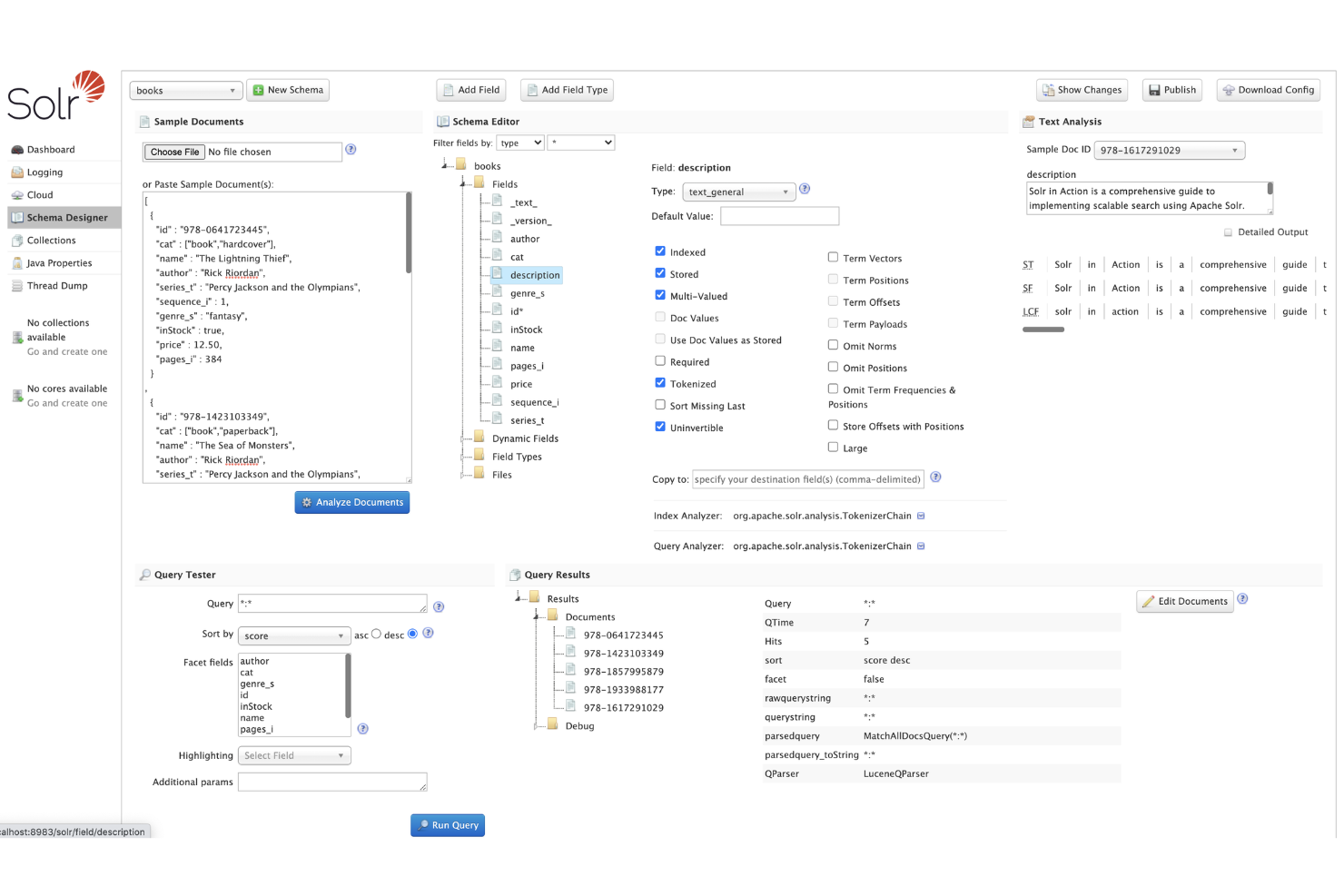
Organizations with demanding scalability and reliability needs often consider Apache Solr for their enterprise search infrastructure. Solr is built for large-scale deployments, offering distributed indexing, sharding, and replication that support high availability and massive data volumes.
Its flexible architecture and mature ecosystem make it a strong choice for IT teams managing complex, mission-critical search environments beyond what Elasticsearch typically handles out of the box.
Why Apache Solr Is a Good Elasticsearch Alternative
For teams prioritizing enterprise-grade scalability, Apache Solr offers a proven architecture for handling massive search workloads. I picked Solr because its distributed indexing, sharding, and replication features are designed to support high availability and horizontal scaling across large clusters.
Solr’s flexible schema management and advanced caching options also help IT teams fine-tune performance for complex, data-heavy environments. These capabilities make Solr a strong fit for organizations that need reliable, large-scale search beyond what Elasticsearch may provide out of the box.
Apache Solr Key Features
Some other features in Solr make it a versatile option for enterprise search projects:
- Full-Text Search Capabilities: Solr supports advanced text analysis, tokenization, and stemming for precise search results.
- Extensible Plugin Architecture: You can add custom plugins to extend Solr’s core functionality for specialized use cases.
- Geospatial Search: Solr includes built-in support for location-based queries and spatial data indexing.
- Rich Document Handling: The platform can index and search a wide range of document formats, including XML, JSON, and rich text files.
Apache Integrations
API-based integration via REST-like APIs, with plugins and connectors built through its ecosystem and custom development.
Pros and Cons
Pros:
- Advanced text analysis and tokenization improve search precision
- Flexible schema design allows for complex and evolving data models
- Distributed architecture supports high availability and large-scale deployments
Cons:
- Upgrading between major versions may require significant migration effort
- Documentation can be fragmented across versions and community sources

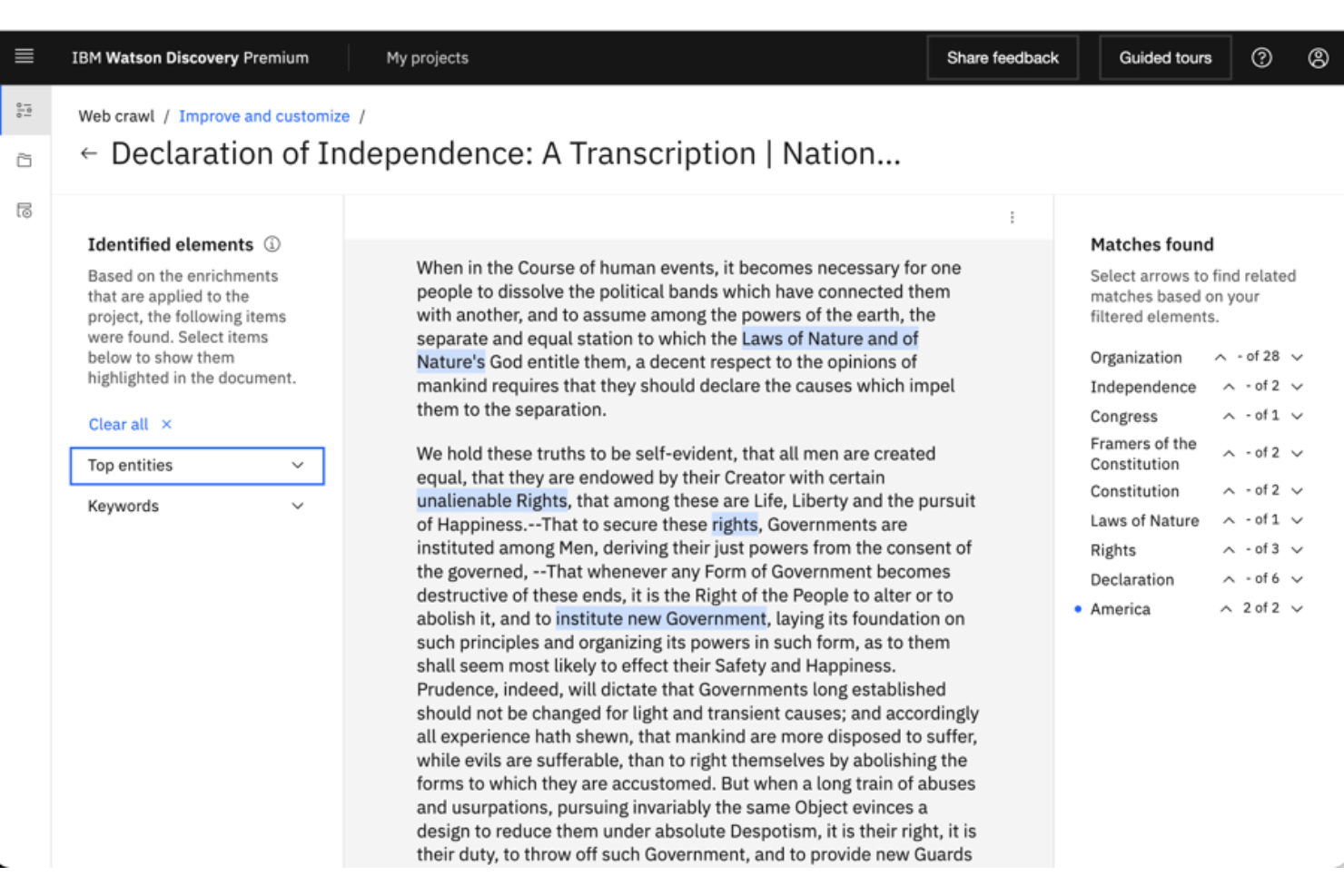
For teams that need to extract insights from large volumes of unstructured documents, IBM Watson Discovery offers advanced AI-powered search and analysis. It’s a strong fit for enterprises, research organizations, and regulated industries that need to surface relevant information from complex data sources.
Unlike Elasticsearch, Watson Discovery uses natural language processing and machine learning to understand context and deliver more precise answers from your documents.
Why IBM Watson Discovery Is a Good Elasticsearch Alternative
What sets IBM Watson Discovery apart is its focus on AI-powered document insights, which goes beyond traditional keyword search. I picked this tool because it uses natural language processing to extract meaning and context from unstructured data, making it easier to find relevant answers in complex documents.
Features like passage retrieval and advanced entity extraction help users surface precise information that might be missed by standard search engines. If your team needs to analyze and understand large sets of documents, Watson Discovery offers capabilities that are difficult to match with Elasticsearch alone.
IBM Watson Discovery Key Features
Some other features in IBM Watson Discovery make it a versatile choice for document search and analysis:
- Custom Data Connectors: Connect to a range of data sources, including cloud storage and enterprise content repositories.
- Smart Document Enrichment: Automatically tag and enrich documents with metadata for improved searchability.
- Relevancy Training: Fine-tune search results by training the system on what matters most to your organization.
- Integrated Analytics Dashboard: Visualize trends and patterns in your data with built-in analytics tools.
IBM Watson Discovery Integrations
Native integrations are not currently listed by IBM Watson Discovery.
Pros and Cons
Pros:
- Supports ingestion from multiple data sources including cloud repositories
- Pre-trained AI models extract entities and relationships from documents
- Advanced natural language processing delivers context-aware search results
Cons:
- Customization of AI models may require specialized expertise
- Initial setup and data preparation can be time-consuming for large datasets
Other Elasticsearch alternative
Here are some additional Elasticsearch alternative options that didn’t make it onto my shortlist, but are still worth checking out:
- OpenSearch
With open-source extensibility
- OpenObserve
For unified log and metric analytics
- Bloomreach
For AI-driven commerce search
- Logz.io
For cloud-native log analytics
- Graylog
For centralized security monitoring
- SigNoz
With built-in observability tools
- Shaped
For personalized ranking models
- VeloDB
For vector search at scale
- Google Cloud Search
With native Google Workspace integration


Elasticsearch Alternatives Selection Criteria
When selecting the best Elasticsearch alternatives to include in this list, I considered common buyer needs and pain points related to Elasticsearch alternative products, like scaling search infrastructure and improving relevance for ecommerce or log analytics. I also used the following framework to keep my evaluation structured and fair:
Core Functionality (25% of total score)
To be considered for inclusion in this list, each solution had to fulfill these common use cases:
- Indexing and searching large volumes of data
- Supporting structured and unstructured data types
- Providing full-text search capabilities
- Enabling real-time data ingestion and querying
- Offering API access for integration with other systems
Additional Standout Features (25% of total score)
To help further narrow down the competition, I also looked for unique features, such as:
- AI-powered search ranking and recommendations
- Visual or image-based search capabilities
- Built-in analytics and reporting dashboards
- Native support for vector search and similarity matching
- Advanced security and compliance controls
Usability (10% of total score)
To get a sense of the usability of each system, I considered the following:
- Intuitive user interface for configuration and management
- Clear and accessible documentation
- Logical navigation and search setup workflows
- Customizable dashboards and views
- Minimal need for command-line or manual configuration
Onboarding (10% of total score)
To evaluate the onboarding experience for each platform, I considered the following:
- Availability of step-by-step setup guides or wizards
- Access to training videos and product documentation
- Interactive product tours or onboarding checklists
- Pre-built templates or sample data for quick testing
- Responsive onboarding support or live chat
Customer Support (10% of total score)
To assess each software provider’s customer support services, I considered the following:
- Availability of live chat or phone support
- Responsiveness to technical issues and questions
- Access to a searchable knowledge base or help center
- Community forums or user groups for peer support
- Availability of dedicated account managers or technical specialists
Value For Money (10% of total score)
To evaluate the value for money of each platform, I considered the following:
- Transparent and predictable pricing models
- Flexible plans for different business sizes
- Inclusion of core features in lower-tier plans
- Cost compared to similar solutions in the market
- Availability of free trials or demos
Customer Reviews (10% of total score)
To get a sense of overall customer satisfaction, I considered the following when reading customer reviews:
- Consistency of positive feedback across review platforms
- Reports of reliability and uptime in production environments
- Feedback on support quality and responsiveness
- User comments on feature completeness and performance
- Trends in recent reviews regarding product updates or issues
Why Look For an Elasticsearch Alternative?
While Elasticsearch is a good choice of Elasticsearch alternatives, there are a number of reasons why some users seek out alternative solutions. You might be looking for an Elasticsearch alternative because…
- Managing and scaling clusters requires significant in-house expertise
- Built-in relevance tuning is limited for ecommerce or retail use cases
- Advanced analytics and reporting features are not included by default
- Native support for vector or image search is lacking
- Licensing and support costs can be unpredictable at scale
- Integrations with specific ecommerce or analytics platforms are limited
If any of these sound like you, you’ve come to the right place. My list contains several Elasticsearch alternative options that are better suited for teams facing these challenges with Elasticsearch and looking for alternative solutions.
Elasticsearch Key Features
Here are some of the key features of Elasticsearch, to help you contrast and compare what alternative solutions offer:
- Full-text search with support for complex queries
- Real-time data indexing and retrieval
- Distributed architecture for horizontal scaling
- RESTful API for integration with other systems
- Support for structured and unstructured data
- Built-in aggregation and analytics capabilities
- Role-based access control and security features
- Integration with Kibana for data visualization
- Multi-language support for global deployments
- Snapshot and restore for backup and disaster recovery