

Firecracker Review: Pros, Cons, Features, and Pricing
Firecracker excels in lightweight virtualization for microVMs, offering your team a swift, efficient solution that stands apart from traditional VM software.

We review tools independently, and commissions help fund our testing. See our transparency policy, our methodology, or suggest a tool.
Firecracker is an open-source virtualization software built for running serverless and container workloads in isolated, lightweight microVMs. It's worth considering if you manage multi-tenant infrastructure where fast startup times and strong workload isolation are non-negotiable. I'd reach for Firecracker over QEMU when resource overhead is a real concern—its minimalist virtual machine monitor design spins up microVMs in milliseconds and consumes far less memory than a full QEMU instance, which makes a meaningful difference at scale.
Firecracker Evaluation Summary

4.8/5
- Free plan available
Why Trust Our Software Recommendations
6,700+
Reviews
20
Industry experts
16+
Evaluation factors
14
Years
Our team has been testing and reviewing software since 2012. As tech leaders ourselves, we know how difficult—and important—it is to choose the right software.
For this guide, we evaluated tools using hands-on testing and independent research, scoring tools using our selection criteria.
Our reviews reflect our human editorial judgment, not a sales pitch.
Expert reviewers:
- Paulo Gardini MiguelTech Director
 Tim FisherVP of AI
 Gabriel RosasTech Lead & Software Architect
 Christhian GruhnTech Lead & Platform Architect

Firecracker Overview
In my opinion, Firecracker excels in delivering lightweight microVMs quickly, making it a strong contender for tech startups and those needing to manage multi-tenant container and function-based services. While its onboarding process might require some patience, the payoff is a secure and efficient virtualization environment. Compared to others, it stands out for its speed and resource efficiency but might lag in ease of use for less tech-savvy users. If you're focused on rapid deployment and cost-effective solutions, Firecracker could be the right choice.
Pros
- Firecracker microVMs launch quickly, saving your team valuable time.
- It uses minimal resources, making it efficient for your workloads.
- Security features are strong, keeping your data protected.
Cons
- The interface might be less intuitive for new users.
- Onboarding can take some time for your team to get accustomed to.
- It may lack some advanced features found in other virtualization tools.
Is Firecracker Right For Your Needs?
Who Would be a Good Fit for Firecracker?
Firecracker is a great fit for tech startups and agile development teams that need to run quick, secure microVMs on any bare-metal server. If your team values speed and efficiency, Firecracker's fast boot times and low resource usage can enhance your workflow. It's particularly useful for cloud service providers needing isolated workloads without heavy infrastructure. This makes it ideal for environments where rapid deployment and security are top priorities.
- Tech StartupsYour startup can benefit from Firecracker's quick microVM launches, helping you iterate and deploy faster.
- Cloud ProvidersFirecracker's efficient resource use offers your cloud services secure, isolated workloads with minimal overhead.
- Agile TeamsYour agile team can quickly deploy small, isolated environments, supporting rapid development cycles.
- DevOps DepartmentsFirecracker aids your DevOps work by providing secure, lightweight VMs, improving deployment efficiency.
- Security-Focused RolesFirecracker's strong security features, such as restricting user access to minimal elements of the KVM and sandboxing restrictions (including seccomp), keep your data safe.
- Resource-Constrained ProjectsIf your project has limited resources, Firecracker’s low memory overhead and efficient performance are advantageous.
Who Would be a Bad Fit for Firecracker?
- Large EnterprisesYour enterprise may find Firecracker lacking in comprehensive features and integrations necessary for large-scale operations.
- Non-Technical UsersIf your team isn't tech-savvy, Firecracker's interface and setup could pose challenges.
- Feature-Rich RequirementsWhen you need extensive virtualization features, Firecracker's minimalistic approach might not meet all your needs.
- Extensive IntegrationsIf your work relies on numerous integrations, Firecracker's limited options might not suffice.
- User-Friendly DemandsFor those seeking an intuitive interface, Firecracker's design may not deliver the ease you expect.
- Training-Heavy TeamsIf your team requires detailed onboarding and support, Firecracker's resources might be insufficient.
Our Review Methodology
How We Test & Score Tools
We’ve spent years building, refining, and improving our software testing and scoring system. The rubric is designed to capture the nuances of software selection and what makes a tool effective, focusing on critical aspects of the decision-making process.
Below, you can see exactly how our testing and scoring works across seven criteria. It allows us to provide an unbiased evaluation of the software based on core functionality, standout features, ease of use, onboarding, customer support, integrations, customer reviews, and value for money.
Core Functionality (25% of final scoring)
The starting point of our evaluation is always the core functionality of the tool. Does it have the basic features and functions that a user would expect to see? Are any of those core features locked to higher-tiered pricing plans? At its core, we expect a tool to stand up against the baseline capabilities of its competitors.
Standout Features (25% of final scoring)
Next, we evaluate uncommon standout features that go above and beyond the core functionality typically found in tools of its kind. A high score reflects specialized or unique features that make the product faster, more efficient, or offer additional value to the user.
We also evaluate how easy it is to integrate with other tools typically found in the tech stack to expand the functionality and utility of the software. Tools offering plentiful native integrations, 3rd party connections, and API access to build custom integrations score best.
Ease of Use (10% of final scoring)
We consider how quick and easy it is to execute the tasks defined in the core functionality using the tool. High scoring software is well designed, intuitive to use, offers mobile apps, provides templates, and makes relatively complex tasks seem simple.
Onboarding (10% of final scoring)
We know how important rapid team adoption is for a new platform, so we evaluate how easy it is to learn and use a tool with minimal training. We evaluate how quickly a team member can get set up and start using the tool with no experience. High scoring solutions indicate little or no support is required.
Customer Support (10% of final scoring)
We review how quick and easy it is to get unstuck and find help by phone, live chat, or knowledge base. Tools and companies that provide real-time support score best, while chatbots score worst.
Customer Reviews (10% of final scoring)
Beyond our own testing and evaluation, we consider the net promoter score from current and past customers. We review their likelihood, given the option, to choose the tool again for the core functionality. A high scoring software reflects a high net promoter score from current or past customers.
Value for Money (10% of final scoring)
Lastly, in consideration of all the other criteria, we review the average price of entry level plans against the core features and consider the value of the other evaluation criteria. Software that delivers more, for less, will score higher.
Core Features
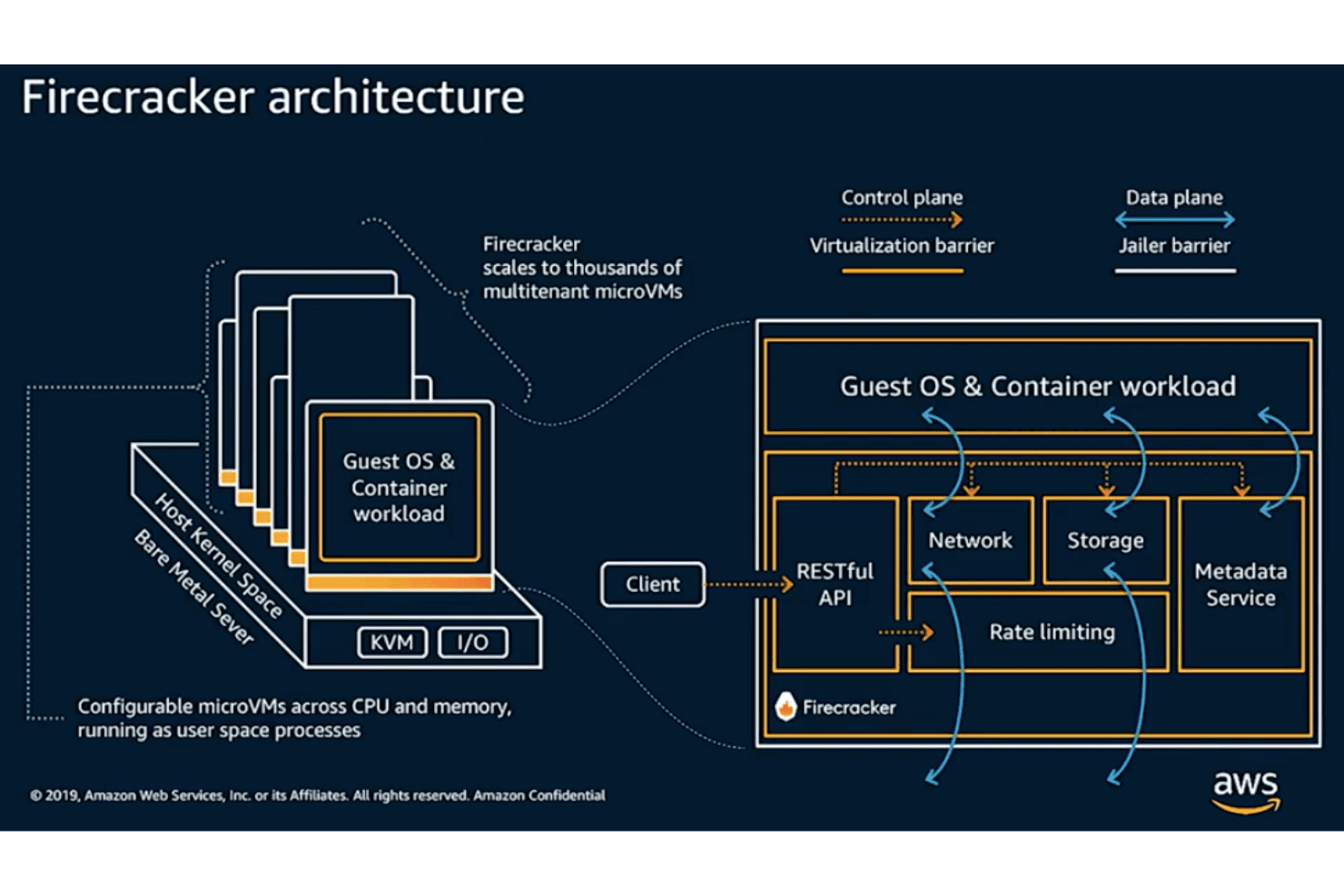
MicroVMs: Firecracker runs lightweight microVMs that start quickly, saving your team time on deployments. This feature is perfect for handling multiple, isolated workloads efficiently.
Fast Boot Times: Firecracker VMs boot in milliseconds, allowing your work to begin almost instantly. This speed is crucial for applications needing rapid scaling.
Low Infrastructure Requirements: Firecracker uses minimal resources, ensuring efficient performance even with limited infrastructure. Your team can run thousands of Firecracker microVMs on a single virtual CPU.
Security Isolation: Each microVM is isolated and has a minimal attack surface, enhancing security for your workloads. This feature helps protect your data from cross-VM vulnerabilities.
API Driven: Firecracker offers an API-driven interface, giving your team control over VM management. It's designed for automation and seamless integration into your workflows.
Minimal Overhead: With Firecracker, you can enjoy virtualization with reduced memory overhead, freeing up system resources for other tasks. This efficiency is key for cost-effective operations.

Standout Features
Jailer: Firecracker's Jailer limits the resources and permissions of microVMs, enhancing security. It ensures your VMs run with only the necessary privileges, reducing risk.
Snapshotting: Firecracker allows you to take snapshots of running VMs, preserving their state. This feature is ideal for testing and recovery, giving your team flexibility in operations.
Ease of Use
Firecracker's user interface might not be the most intuitive, especially for those new to virtualization. It requires you to build kernels and root filesystems, which could slow your team down if they are new to Linux internals and writing in Rust. However, once you're familiar with its API-driven setup, managing microVMs becomes straightforward. The minimalistic design focuses on performance and speed, which benefits those who prioritize efficiency over ease of use. If you're tech-savvy, you'll appreciate the control it offers.

Onboarding
Firecracker's onboarding process can be a bit challenging for new users, as it demands technical expertise to get up to speed. The Firecracker GitHub has comprehensive information and community support is helpful but your team may need to invest time in learning. Once you grasp the basics, the API-driven setup aids smooth operation. While it may take a while to reach full productivity, the payoff is a powerful tool for managing lightweight, efficient virtual environments.
Customer Support
Firecracker provides decent customer support, though it may not be the most comprehensive. Your team can rely on documentation and community forums for assistance, which are generally informative. However, direct support channels are limited, requiring some patience and self-research. If your team is comfortable seeking solutions independently, the available resources will be sufficient. The community-driven support can be a valuable asset, especially if you're familiar with similar environments.
Integrations
Firecracker integrates with Docker Hub, OpenNebula, AWS Lambda, and AWS Fargate.
Firecracker also has an API that allows you to connect with third-party integration tools.

Value for Money
Public pricing is not available. Reach out to AWS Firecracker for more details.
Firecracker Specs
- API: Yes
- Bug Tracking: No
- CI/CD Integration: No
- Cloud Deployment: No
- Code Review: No
- Code Transformation: No
- Collaboration Support: No
- Data Export: No
- Data Import: No
- Developer Tools: No
- External Integrations: Yes
- Git Integration: No
- History/Version Control: No
- IDE Plugins: No
- Local Deployment: Yes
- Multi-User: No
- Notifications: No
- Project Management: No
- Release Management: No
- Static Analysis: No
- Task Scheduling/Tracking: No
- Testing: No
Firecracker FAQs
Firecracker Company Overview & History
Firecracker was developed by Amazon Web Services, headquartered in Seattle, Washington, to power serverless services including AWS Lambda and AWS Fargate. It was released in 2018 as an open-source project and has since been integrated into several other platforms and used by various companies. AWS Firecracker reviews and accepts pull requests to collaborate with contributors from all over the world.
Firecracker Major Milestones
- 2018: Developed by AWS.
- 2019: Added AMD and ARM CPU Support.
- 2020: Recognized at USENIX Symposium on Networked Systems Design and Implementation.