




Argos is a visual regression software testing tool that catches UI changes by comparing screenshots across builds. It fits development teams running CI/CD pipelines who need automated visual diff detection built directly into their review process. I'd pick it over Percy if open-source flexibility and lower pricing are priorities. Percy works well at the enterprise level, but Argos delivers the same screenshot comparison workflow at a more accessible price point.
Argos Evaluation Summary

- From $30/month
- Free plan available
Why Trust Our Software Recommendations
Our team has been testing and reviewing software since 2012. As tech leaders ourselves, we know how difficult—and important—it is to choose the right software.
For this guide, we evaluated tools using hands-on testing and independent research, scoring tools using our selection criteria.
Our reviews reflect our human editorial judgment, not a sales pitch.
Expert reviewers:
Argos Overview
In my opinion, Argos CI excels as a software testing tool with its intuitive interface and efficient visual testing functionality. It’s particularly valuable for tech-driven teams needing reliable visual regression testing. Argos is best suited for development teams in industries like e-commerce and SaaS, where UI consistency is vital. It offers extensive integration, CI/CD workflow, and responsive customer support. Additionally, Argos allows ad hoc testing outside of your main development branch. However, some might find its price slightly higher than that of competitors.
pros
-
The visual testing features are straightforward and effective.
-
Your team can quickly adopt it due to its user-friendly interface.
-
It offers reliable bug detection and reporting.
cons
-
Limited customization options may not meet specific testing needs.
-
Some users found the documentation lacking depth.
-
It may not handle large-scale projects as efficiently as some competitors.
Is Argos Right For Your Needs?
Who Would be a Good Fit for Argos?
Argos CI is ideal for tech-driven teams that prioritize visual consistency, like those in e-commerce and SaaS. If your team needs reliable visual regression testing, Argos’s straightforward dashboard and effective bug detection make it a strong choice. Development teams will benefit from its user-friendly features, ensuring smooth testing processes. If your work involves frequent UI updates and requires consistent visual validation, Argos is particularly beneficial.
-
E-commerce Platforms
Argos helps ensure your product displays and user interface remain consistent across frequent updates.
-
SaaS Companies
Your development team can rely on Argos for efficient visual regression testing in your fast-paced environment.
-
Web Development Teams
Argos helps maintain UI consistency, which is crucial for your client-facing projects.
-
QA Departments
You can use Argos’ reporting tools to accurately detect bugs, enhancing your team's testing efficiency.
-
UI/UX Design Teams
Argos supports your need for visual accuracy, ensuring design elements appear as intended.
-
Small to Medium Businesses
Argos offers your team a cost-effective solution to maintain visual integrity across your applications.
Who Would be a Bad Fit for Argos?
Argos might not suit large enterprises needing extensive customization and scalability. If your team handles massive projects that require highly tailored testing processes, Argos’s limited customization options restrict you. Industries that demand complex testing beyond visual regression might find Argos struggling to provide the features they need. If in-depth documentation is crucial for your team’s onboarding and training, Argos’s current resources might not meet your expectations.
-
Large Enterprises
If your company requires extensive scalability, Argos’s features might not be sufficient.
-
Highly Regulated Industries
Your compliance requirements may demand more advanced testing features than Argos offers.
-
Telecommunications Companies
Argos might not handle the complex testing scenarios your industry demands.
-
Financial Institutions
Your need for detailed testing documentation may exceed Argos’s current resources.
-
Manufacturing Sectors
Argos’s focus on visual testing may not align with your functional testing requirements.
-
Consulting Firms
If you require highly customized testing solutions for diverse clients, Argos may not provide the flexibility you need.
Our Review Methodology
How We Test & Score Tools
We’ve spent years building, refining, and improving our software testing and scoring system. The rubric is designed to capture the nuances of software selection and what makes a tool effective, focusing on critical aspects of the decision-making process.
Below, you can see exactly how our testing and scoring works across seven criteria. It allows us to provide an unbiased evaluation of the software based on core functionality, standout features, ease of use, onboarding, customer support, integrations, customer reviews, and value for money.
Core Functionality (25% of final scoring)
The starting point of our evaluation is always the core functionality of the tool. Does it have the basic features and functions that a user would expect to see? Are any of those core features locked to higher-tiered pricing plans? At its core, we expect a tool to stand up against the baseline capabilities of its competitors.
Standout Features (25% of final scoring)
Next, we evaluate uncommon standout features that go above and beyond the core functionality typically found in tools of its kind. A high score reflects specialized or unique features that make the product faster, more efficient, or offer additional value to the user.
We also evaluate how easy it is to integrate with other tools typically found in the tech stack to expand the functionality and utility of the software. Tools offering plentiful native integrations, 3rd party connections, and API access to build custom integrations score best.
Ease of Use (10% of final scoring)
We consider how quick and easy it is to execute the tasks defined in the core functionality using the tool. High scoring software is well designed, intuitive to use, offers mobile apps, provides templates, and makes relatively complex tasks seem simple.
Onboarding (10% of final scoring)
We know how important rapid team adoption is for a new platform, so we evaluate how easy it is to learn and use a tool with minimal training. We evaluate how quickly a team member can get set up and start using the tool with no experience. High scoring solutions indicate little or no support is required.
Customer Support (10% of final scoring)
We review how quick and easy it is to get unstuck and find help by phone, live chat, or knowledge base. Tools and companies that provide real-time support score best, while chatbots score worst.
Customer Reviews (10% of final scoring)
Beyond our own testing and evaluation, we consider the net promoter score from current and past customers. We review their likelihood, given the option, to choose the tool again for the core functionality. A high scoring software reflects a high net promoter score from current or past customers.
Value for Money (10% of final scoring)
Lastly, in consideration of all the other criteria, we review the average price of entry level plans against the core features and consider the value of the other evaluation criteria. Software that delivers more, for less, will score higher.
Core Features
Visual Regression Testing: Argos CI detects visual changes in your web applications by comparing screenshots uploaded in PNG format. This saves your team time and ensures a consistent user experience.
Automated Bug Detection: Argos automates bug detection in visual elements, so you can focus on fixing them rather than finding them.
User-Friendly Interface: The intuitive design makes navigating Argos easy for your team, reducing the learning curve and speeding up adoption.
Detailed Reporting: Argos provides clear reports on visual discrepancies, meeting your team’s reporting needs by providing actionable insights.
CI Workflow Integration: Argos seamlessly integrates into your CI pipeline, improving the efficiency of your testing process.
Cross-Browser Testing: Test your applications across different browsers to ensure a consistent aesthetic and enhance user satisfaction.

Standout Features
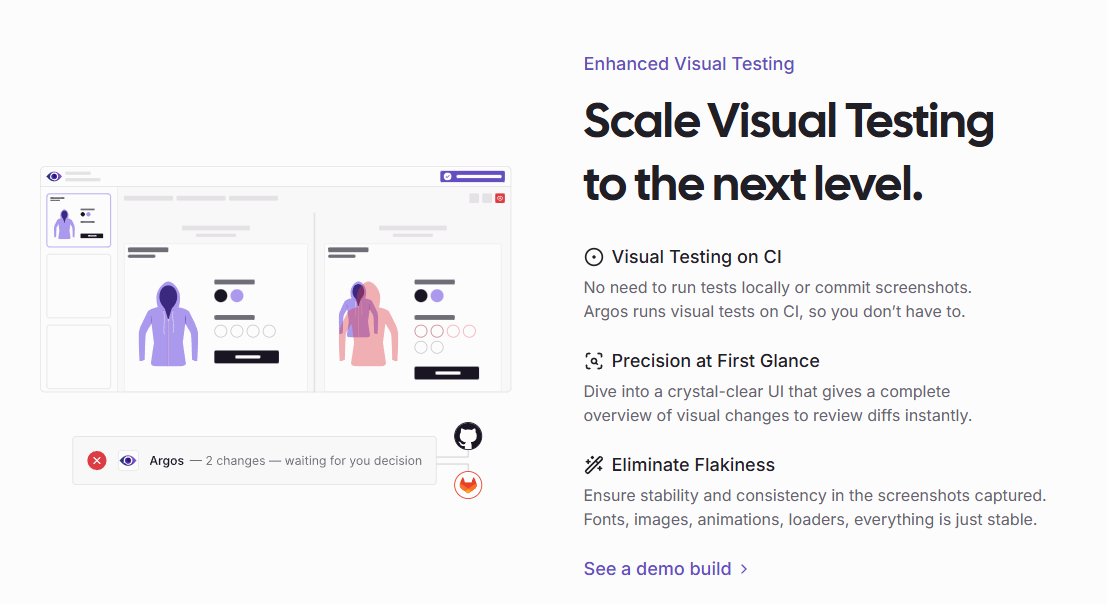
Snapshot Comparisons: Argos offers side-by-side snapshot comparisons, making it easy for you to spot visual differences and address them quickly.
Custom Thresholds: You can set custom thresholds for visual changes, allowing your team to determine the acceptable level of change for your applications.
Ease of Use
Argos is remarkably user-friendly, making it easy for your team to integrate into their workflow. Its intuitive interface requires minimal training, allowing you to focus on testing rather than setup. Users appreciate the clear navigation and straightforward design, which streamlines the testing process. The automated bug detection and detailed reporting further simplify your work by providing actionable insights without unnecessary complexity. This usability advantage positions Argos well among software testing tools, especially for teams seeking efficient visual testing solutions.

Onboarding
Argos offers a smooth onboarding experience, allowing your team to get up and running quickly. The straightforward setup process and user-friendly interface mean you won’t spend much time learning the tool. Although some user reviews mention room for improvement in the documentation, the available support helps bridge any gaps. Argos’s quick integration into existing workflows ensures your team can start realizing value with minimal delay.
Customer Support
Argos provides accessible customer support, ensuring your team gets the help it needs when facing issues. Users appreciate the support team's responsiveness and helpfulness, which makes troubleshooting smoother. While the documentation could be more detailed, the support makes up for it by offering timely assistance. This level of support makes Argos a reliable choice for teams needing dependable user assistance in their software testing processes.
Integrations
Argos integrates with Playwright, Cypress, Storybook, Next.js, React Router (previously Remix), GitHub, GitLab, and WebdriverIO.
Argos also provides an API client for custom integrations, allowing your team to upload screenshots from their CI workflow.

Value for Money
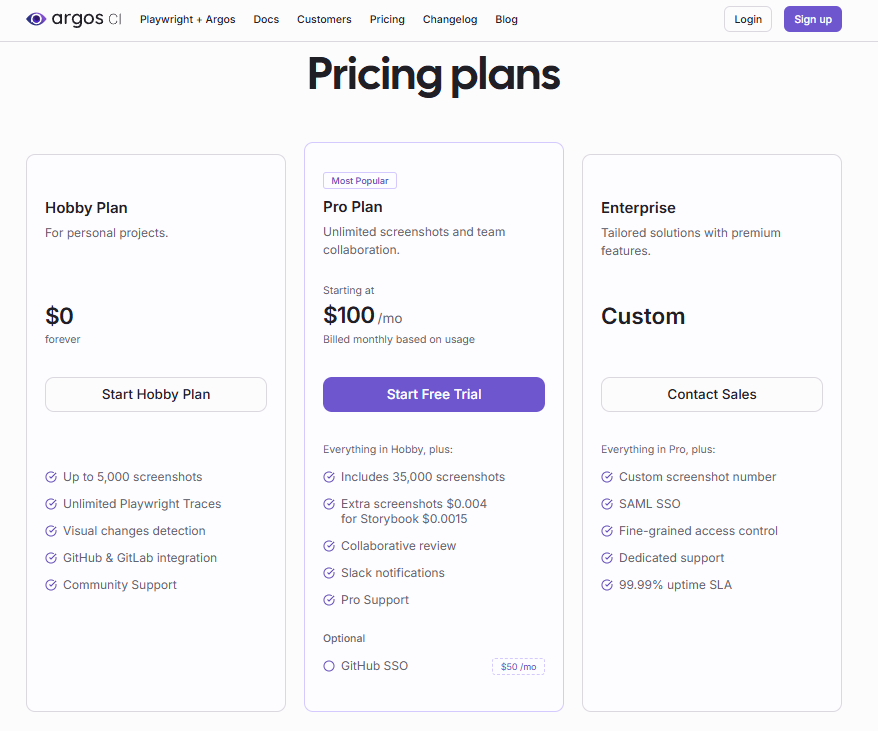
Argos CI offers competitive pricing that aligns well with the value it delivers to your team. Argos provides different pricing tiers to suit varying needs and budgets. Pricing starts from $100 per month, allowing users to upload up to 35,000 screenshots. A free trial is available for your team to evaluate the software before making a purchase decision.
- Hobby Plan: Free plan that includes core visual testing features.
- Pro Plan: $100/mo, offers advanced testing and collaborative capabilities.
- Enterprise Plan: Provides tailored solutions and premium support.
Argos Specs
- A/B Testing
- API
- Automated Testing
- Browser Compatibility Testing
- Bug Tracking
- Calendar Management
- CI/CD Integration
- Dashboard
- Data Export
- Data Import
- Data Visualization
- Developer Tools
- External Integrations
- History/Version Control
- Manual Testing
- Multi-User
- Notifications
- Performance Testing
- Regression Testing
- Scheduling
- Status Notifications
- Third-Party Plugins/Add-Ons
Argos FAQs
How does Argos ensure data security and compliance?
Can Argos handle large-scale projects?
How does Argos support continuous integration workflows?
What kind of customer support does Argos offer?
Does Argos support cross-browser testing?
How customizable are Argos’s testing solutions?
How quickly can my team get up to speed with Argos?
What kind of reporting capabilities does Argos offer?
Argos Company Overview & History
Argos CI, founded by Greg Bergé and Jeremy Sfez, is a visual testing solution for modern frontend teams. The company started as an internal tool at Doctolib in 2016 and later became a full-fledged SaaS product in 2022. It is developed by Smooth Code, a French web agency, and is headquartered in France. Argos CI is used by over 80 product teams, including notable companies like Doctolib and MUI, and is available on the GitHub Marketplace. Today, Argos CI’s company size is between 11 and 50, according to LinkedIn.
Argos CI Major Milestones
- 2016: Argos began as an internal tool at Doctolib.
- 2022: Transformed into a SaaS product for wider community use.
- 2023: Launched on GitHub Marketplace, adopted by over 80 teams.