

Menținerea tuturor dispozitivelor actualizate nu ține doar de comoditate, ci și de protejarea companiei împotriva amenințărilor cibernetice în continuă evoluție. Software-ul de gestionare a patch-urilor elimină munca manuală necesară pentru menținerea securității prin actualizarea automată a sistemelor, monitorizarea conformității și reducerea vulnerabilităților. Indiferent dacă gestionați o echipă IT mică sau coordonați operațiuni la nivel de întreprindere, instrumentul potrivit vă poate economisi ore de muncă repetitivă și poate preveni perioadele de nefuncționare costisitoare.
Why Trust Our Software Recommendations
6,700+
Reviews
20
Industry experts
16+
Evaluation factors
14
Years
Our team has been testing and reviewing software since 2012. As tech leaders ourselves, we know how difficult—and important—it is to choose the right software.
For this guide, we evaluated tools using hands-on testing and independent research, scoring tools using our selection criteria.
Our reviews reflect our human editorial judgment, not a sales pitch.
Expert reviewers:
- Paulo Gardini MiguelTech Director
 Tim FisherVP of AI
 Gabriel RosasTech Lead & Software Architect
 Christhian GruhnTech Lead & Platform Architect

Tabel comparativ pentru software-ul de gestionare a patch-urilor
Acest tabel comparativ rezumă detaliile privind prețurile pentru selecțiile mele de top de software pentru gestionarea patch-urilor:
Sorted by: Default
| Tool | Starting Price | Website | |
|---|---|---|---|
Best for AI-powered ITSM with smart patching | 4.6 out of 5 | $19/user/month 14-day free trial | Book Demo |
Best for multi-OS patch management | 4.6 out of 5 | $149/user/month Free trial available | Book Demo |
Best with real-time asset visibility | Not rated | Pricing upon request Free trial + free demo available | Website |
Best with unified risk detection and patching | 4.5 out of 5 | Pricing upon request 30-day free trial + free demo available | Website |
Best for IT consultants and service providers | 5.0 out of 5 | Pricing upon request 30-day free trial available | Website |
Best for remote workforce patch management | 4.9 out of 5 | Pricing upon request Free plan + free demo available | Website |
Best for cloud-native environments | 4.7 out of 5 | $1/endpoint/month 15-day free trial + free demo available | Website |
Best with automated CVE remediation | 4.6 out of 5 | $12/device/year Free trial + demo available | Website |
Best for MSPs looking for extensive customization | 4.0 out of 5 | Pricing upon request Free demo available | Website |
Best for small businesses on a budget | 3.9 out of 5 | $2.39/month Free trial + free demo available | Website |


Recenzii despre cele mai bune software-uri de gestionare a patch-urilor
Mai jos sunt rezumatele mele detaliate ale celor mai bune software-uri de gestionare a patch-urilor incluse în lista mea scurtă. Recenziile mele oferă o analiză detaliată a funcțiilor esențiale, avantajelor și dezavantajelor, integrărilor și cazurilor ideale de utilizare pentru fiecare instrument, pentru a vă ajuta să îl găsiți pe cel mai potrivit pentru dumneavoastră.
 Best for AI-powered ITSM with smart patching
- 14-day free trial
- From $19/user/month (billed annually)
Visit WebsiteCustomer Rating:4.6/5
Testing and deploying patches in Freshservice patch management software Freshservice is an ITSM platform that combines service management with automated patch management capabilities. It helps you manage incidents, assets, and changes while using AI-driven workflows to streamline patch deployment and device oversight.
Why I Picked Freshservice: I picked Freshservice because it combines AI-powered IT service management with automated patch testing and deployment in a single system. Its intelligent automation supports ticket routing and service workflows, while built-in patch management tools help you identify, test, and deploy updates across devices without relying on separate software.
Standout Features & Integrations:
Freshservice offers features like auto-discovery of devices, automated patch testing, and deployment. Furthermore, it has a built-in CMDB for better asset management.
It integrates with popular ITSM tools, IT operations tools, and software like Jira and Slack.
Pros and Cons
Pros:
- Flexible integrations
- Built-in CMDB for asset management
- ITIL compliance
Cons:
- Limited patch-specific features.
- Overkill for non-ITIL organizations
- Pricier starting point
Learn more about Freshservice: Best for multi-OS patch management
- Free trial available
- From $149/user/month (billed annually)
Visit WebsiteCustomer Rating:4.6/5
Atera automation profile showing scheduled OS patch management, software updates, and maintenance tasks managed from a single dashboard. Atera is a complete solution for IT professionals and managed service providers, offering tools for remote monitoring and management. It's designed to simplify your workload by automating various processes, including multi-OS patch management.
Why I Picked Atera: I picked Atera because it automates patch installations across multiple operating systems, which can save you a lot of time. Whether you're dealing with Windows, macOS, or Linux, Atera has you covered with its automated scheduling and installation features. This ensures that your systems are always up to date without you having to manually intervene.
Another reason Atera stands out is its ability to handle reboots and manage patch-related tasks without disrupting your work. This means you can focus on more critical tasks while knowing that your patch management is being handled efficiently. These features make it a reliable choice for keeping your systems secure.
Standout Features & Integrations:
Features include automated patch management that covers Windows, macOS, and Linux, There's an option for offline agent execution, so patches can be applied even when machines aren't connected to the internet. Additionally, Atera offers detailed reporting on patch statuses.
The tool integrates with Microsoft Teams, Slack, ServiceNow, Okta, Jira Software Cloud, Azure Active Directory, Microsoft Outlook, WhatsApp Notifications, Acronis Cyber Protect Cloud, Google Sheets, ChatGPT (OpenAI), and monday.com.
Pros and Cons
Pros:
- Custom scripts and real-time dashboards offer visibility into patch workflows
- Combines patch management, remote access, and help desk features
- Unlimited endpoint coverage under a single technician license makes it cost-effective for MSPs
Cons:
- Interface can feel clunky when managing large device fleets or running bulk actions
- Compliance and audit reporting may fall short for heavily regulated industries
- Patch rollback options are minimal compared to enterprise-grade tools
 Best with real-time asset visibility
- Free trial + free demo available
- Pricing upon request

Heimdal’s unified management dashboard gives you clear visibility into endpoint compliance, patching status, and security controls across all managed devices. Heimdal's patch management software stands out as a versatile solution for businesses aiming to enhance their cybersecurity posture. It is particularly appealing to IT professionals and managed service providers (MSPs) who need to manage software updates seamlessly across various platforms. By automating the patch deployment process, Heimdal addresses the challenge of keeping systems secure and compliant with industry regulations, making it an ideal choice for sectors like healthcare, education, and government.
Why I Picked Heimdal
I picked Heimdal for its ability to automate the patch deployment process, which significantly reduces manual workload and ensures timely updates. With support for over 350 third-party applications, Heimdal provides comprehensive coverage to keep your systems secure and compliant. Its integration with Heimdal's Unified Security Platform further enhances your organization's cybersecurity strategy, making it a practical choice for those in need of effective patch management.
Heimdal Key Features
In addition to automated patch deployment, I also found that Heimdal offers several other valuable features:
- Vulnerability Management: Continuously scans your systems to identify and address potential security threats.
- Asset Management: Provides real-time visibility into your organization's IT assets, helping you track and manage them effectively.
- Customizable Patching Schedules: Allows you to set patch deployment times that minimize disruptions to your operations.
- Priority Server Updates: Optimizes patch distribution for bandwidth-limited environments, ensuring critical updates reach priority endpoints first.
Heimdal Integrations
Native integrations are not currently listed by Heimdal; however, the platform supports API-based custom integrations.
Pros and Cons
Pros:
- Detailed asset and license visibility
- Strong vulnerability and threat detection
- Automates patching across endpoints
Cons:
- Interface requires onboarding time
- No native integrations available
Learn more about Heimdal: Best with unified risk detection and patching
- 30-day free trial + free demo available
- Pricing upon request
Visit WebsiteCustomer Rating:4.5/5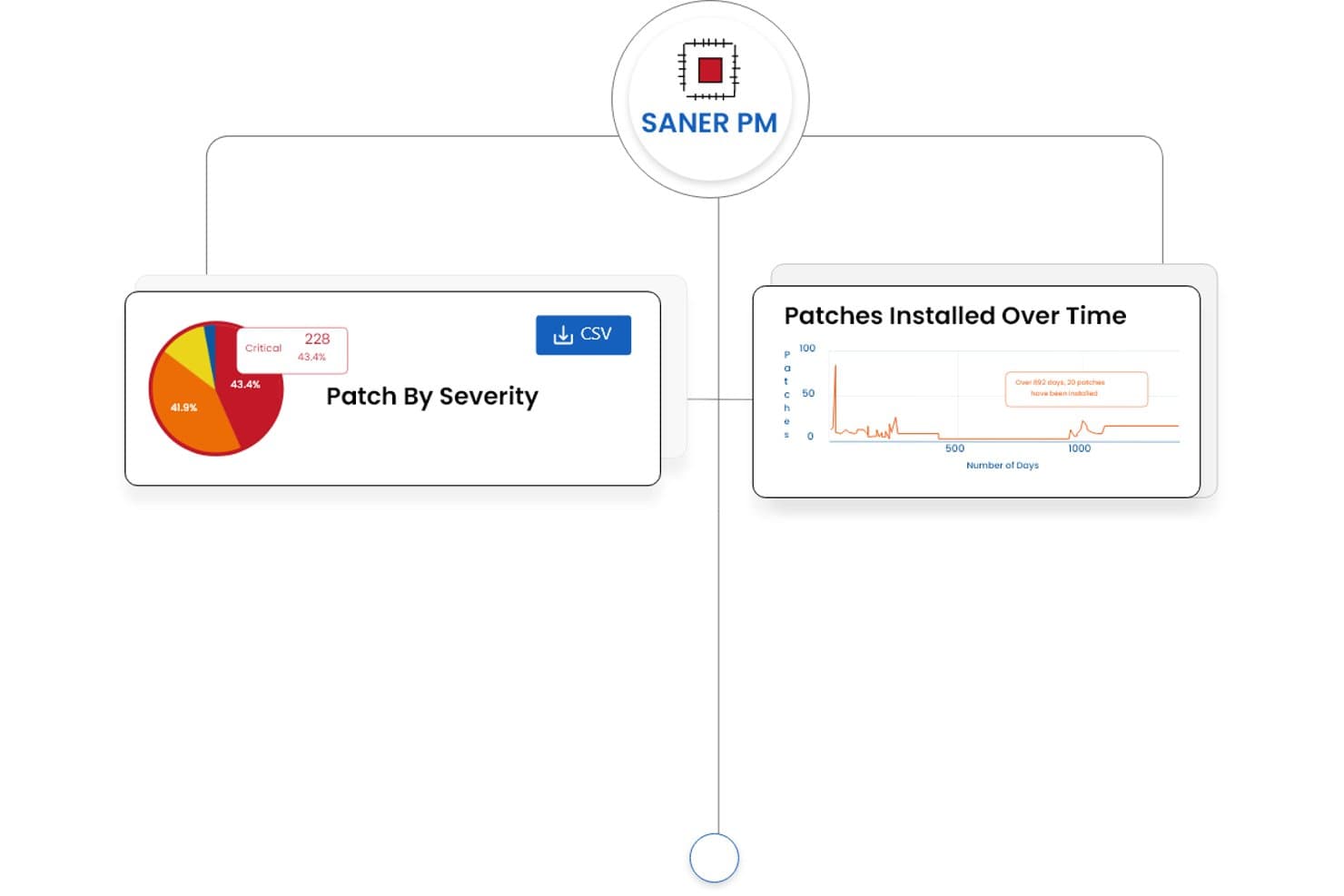
SecPod (Saner Platform) offers patch management dashboards displaying patch severity breakdowns and patches installed over time trends. SecPod's Saner Platform is a cloud-native patch management and vulnerability exposure solution that combines continuous risk detection, automated patch deployment, and compliance reporting across Windows, macOS, Linux, and 550+ third-party applications.
Who Is SecPod (Saner Platform) Best For?
Security and IT operations teams at mid-to-large enterprises that need vulnerability detection and patch remediation managed from a single platform.
Why I Picked SecPod (Saner Platform)
SecPod (Saner Platform) earns its spot as one of the best on my shortlist because it collapses two typically separate workflows, vulnerability detection and patch deployment, into one agent-driven platform. I particularly like how it layers SSVC business-context scoring, EPSS exploit probability, and CISA KEV data together to surface which patches actually need urgent action. The single-click rollback is genuinely useful when a patch causes issues in a production environment and you need to restore a stable state fast.
SecPod (Saner Platform) Key Features
- Automated multi-OS patching: Continuously applies patches across Windows, macOS, Linux, and 550+ third-party apps from a single console.
- Custom patch packaging: Lets admins deploy organization-specific or in-house developed patches alongside vendor updates.
- Compliance reporting: Generates exportable, audit-ready reports mapped to regulatory frameworks like HIPAA, PCI, and SOC 2.
- Cloud-native agent architecture: Enables patching and vulnerability management for distributed and remote endpoints without relying on VPNs.
SecPod (Saner Platform) Integrations
Native integrations are not clearly documented. An API is available for custom integrations.
Pros and Cons
Pros:
- Supports 550+ third-party application patches
- Risk-based patch prioritization using real threat data
- Unified vulnerability detection and patch remediation
Cons:
- Limited third-party integration options available
- Reporting interface can feel overwhelming initially
Learn more about SecPod (Saner Platform): Best for IT consultants and service providers
- 30-day free trial available
- Pricing upon request
Visit WebsiteCustomer Rating:5/5
Admin panel of Atera patch management software Atera is designed as an all-in-one IT management solution aimed at IT consultants and service providers. Its flexible pricing and customization make it especially useful for this target group.
Why I Picked Atera: I chose Atera because of its tailored approach for IT consultants and service providers. In terms of unique offerings, its customizability and flexible pricing models make it distinct. It's best for IT consultants and service providers who require a flexible, customizable tool.
Standout Features & Integrations:
Atera offers remote monitoring, patch management, and an integrated help desk. Its automated scripts are particularly useful for IT service providers.
The tool has native integrations with popular PSAs and RMM solutions, as well as Windows operating systems.
Pros and Cons
Pros:
- A high degree of customizability
- Offers integrated help desk and RMM
- Tailored for IT consultants and service providers
Cons:
- Higher starting price point.
- Might be too specialized for general business use
- Billed annually, not monthly
Learn more about Atera: Best for remote workforce patch management
- Free plan + free demo available
- Pricing upon request
Visit WebsiteCustomer Rating:4.9/5
Overview of the 'Endpoints' dashboard in Action1 patch management software Action1 is a cloud-based patch management solution designed to assist businesses in automating the deployment of software patches to remote workforces. This is particularly beneficial for companies with many remote employees who require consistent patching, making it best for remote workforce patch management.
Why I Picked Action1: I selected Action1 for this compilation because of its cloud-based architecture that effectively allows businesses to manage patches across remote workforces. It stands out for its ability to maintain the security and performance of distributed endpoints.
Thus, it cuts the best tool for companies needing remote workforce patch management.
Standout Features & Integrations:
The most vital features of Action1 include automated patch assessments, real-time reporting, and multi-platform support, offering businesses greater flexibility in managing patches across various operating systems. It also integrates with commonly used systems like Active Directory and SCCM, making it more adaptable for businesses with existing infrastructure.
Pros and Cons
Pros:
- Multi-platform support covers a broad range of operating systems.
- Real-time reporting gives immediate insights into patch compliance.
- Cloud-based architecture is ideal for managing remote workforces.
Cons:
- Limited features compared to some other enterprise-level solutions.
- Could be a learning curve for teams new to patch management.
- Minimum seat requirements may not suit smaller organizations.
Learn more about Action1: Best for cloud-native environments
- 15-day free trial + free demo available
- From $1/endpoint/month (billed annually)
Visit WebsiteCustomer Rating:4.7/5
System management feature on Automox patch management software Automox automates patch management in the cloud, from discovery to deployment. It's flexible and scalable, perfect for securing remote endpoints.
Why I Picked Automox: I chose Automox for this list because of its comprehensive, cloud-native approach to patch management. In a world where remote work is becoming increasingly common, having a tool that is designed from the ground up to handle cloud-based operations is incredibly valuable.
Automox stands out because it manages and secures remote endpoints, making it best for organizations operating in cloud-native environments.
Standout Features & Integrations:
Automox provides features like automatic system discovery, continuous vulnerability assessment, and policy-based automation. These features make it easier to manage patches and reduce the security risks associated with outdated software.
Additionally, Automox integrates with popular third-party tools such as Slack, Jira, and Webhooks, allowing for better communication and coordination across your organization.
Pros and Cons
Pros:
- Integrates with popular third-party tools for better communication and coordination.
- Policy-based automation to streamline patch management tasks.
- Cloud-native platform, designed for modern, distributed organizations.
Cons:
- Requires some technical knowledge for setup and configuration.
- Pricing is on an annual basis, which might not be ideal for some businesses.
- Might be less suitable for organizations not fully operating in the cloud.
 Best with automated CVE remediation
- Free trial + demo available
- From $12/device/year
Visit WebsiteCustomer Rating:4.6/5
PDQ Deploy displays a real-time deployments dashboard showing software package installations with online status, completion state, and elapsed time across multiple endpoints. PDQ Connect is a cloud-based patch management platform for Windows devices that offers automated patch deployment, remote device inventory, custom package creation, and role-based access controls.
Who Is PDQ Connect Best For?
IT teams in small to midsize organizations managing Windows devices across distributed or remote environments.
Why I Picked PDQ Connect
I picked PDQ Connect as one of the best because it automates CVE remediation, letting my team quickly address vulnerabilities as soon as they’re identified. I like that it pulls in CVE data, matches it to our Windows devices, and pushes patches without manual intervention. This approach means we can stay ahead of threats and reduce the window of exposure across our environment.
PDQ Connect Key Features
- Remote device inventory: View and manage all Windows devices in your environment from a single dashboard.
- Custom package deployment: Build and deploy custom software packages to targeted devices.
- Role-based access control: Assign permissions and roles to team members for secure management.
- Real-time reporting: Generate up-to-date reports on patch status and device compliance.
PDQ Connect Integrations
Native integrations are not clearly documented. PDQ Connect provides an API for custom integrations.
Pros and Cons
Pros:
- Detailed compliance and audit reporting
- Automated patch scheduling for Windows devices
- Real-time device inventory and status updates
Cons:
- Reporting customization options are limited
- Lacks built-in vulnerability scanning features
Learn more about PDQ Connect: Best for MSPs looking for extensive customization
- Free demo available
- Pricing upon request
Visit WebsiteCustomer Rating:4/5
ConnectWise Automate monitoring feature for patch management ConnectWise Automate is designed to help Managed Service Providers (MSPs) manage and automate all aspects of patch management. Its customizable nature means you can tailor the tool's features to better align with your unique operational requirements, making it ideal for MSPs that require extensive customization.
Why I Picked ConnectWise Automate: In selecting tools for this list, customization was a key criterion. ConnectWise Automate offers extensive customizability, allowing MSPs to adapt the software to fit specific client needs or niche markets.
This unique capability justifies its position as best for MSPs who demand extensive customization options in their patch management solutions.
Standout Features & Integrations:
Key features include role-based security, automated patch testing, and customizable reporting tools, providing MSPs with the capability to fine-tune their patch management processes.
ConnectWise Automate also integrates with other solutions from the ConnectWise suite, as well as third-party tools like LabTech, ScreenConnect, and SQL Server, thereby offering a comprehensive ecosystem for MSPs.
Pros and Cons
Pros:
- A comprehensive ecosystem with various integrations for better operational flow.
- Role-based security ensures granular control over the system.
- Extensive customization capabilities allow for niche deployments.
Cons:
- May require additional training to fully utilize all customization options.
- Base fees and annual billing may pose a financial burden for some businesses.
- Complexity could make the system daunting for small teams.
Learn more about ConnectWise Automate: 10Best for small businesses on a budget
ITarian
- Free trial + free demo available
- From $2.39/month
Visit WebsiteCustomer Rating:3.9/5
Itarian's patch procedures for patch management Itarian is a cloud-based IT management platform that offers a range of services including patch management. Its affordability and streamlined feature set make it ideal for small businesses on a budget.
Why I Picked Itarian: I selected Itarian because its platform provides a budget-friendly option for small businesses without sacrificing essential features. What sets it apart is its cost-effectiveness combined with utility. It is best for small businesses on a budget, providing a solution that balances cost and functionality effectively.
Standout Features & Integrations:
Itarian offers automated patch management, vulnerability assessment, and remote monitoring. The platform also provides real-time alerts to keep administrators informed.
The tool integrates with popular operating systems like Windows, Linux, and macOS, and offers API support for extended functionality.
Pros and Cons
Pros:
- Supports multiple operating systems
- Includes basic features like vulnerability assessment
- Budget-friendly for small businesses
Cons:
- No native integration with popular business apps.
- Interface can be complex for beginners
- Limited advanced features
Learn more about ITarian:
Alte software-uri de gestionare a patch-urilor
Iată câteva opțiuni suplimentare de software pentru gestionarea patch-urilor care nu au fost incluse în lista mea scurtă, dar care merită totuși analizate:
- 11AcronisBest for those needing backup and patch management in one
- 12SolarWinds Patch ManagerBest for large enterprise scalability
- 13IvantiBest for integrating with other Ivanti products
- 14ManageEngine Patch Management PlusBest for centralized control of heterogeneous networks
- 15N-central Patch ManagementBest for automating routine patch tasks
- 16ScalefusionBest for automated patch deployment
- 17NinjaOneBest for simplified patch compliance reporting
- 18Rippling ITBest for HR-driven patch policy enforcement
- 19GFI LanguardGood for businesses needing network security scans
- 20GoTo ResolveGood for remote patching via a simple interface
- 21Kaseya VSAGood for centralized management with compliance reporting
- 22PDQGood for automated deployments of third-party updates
- 23Microsoft Defender for IoTGood for IoT devices requiring high-security standards
- 24SyxsenseGood for cloud-based patch management
- 25Qualys Patch ManagementGood for organizations requiring real-time threat intelligence
How I Evaluate Patch Management Software
Whether you're patching remote endpoints or managing third-party app updates across mixed OSes, I evaluate every tool in two layers: the baseline it must meet and what actually sets it apart.
Core Functionality (Table Stakes For This List)
When I'm selecting tools for my list, I rank each one on a scale from 0 (does not offer the functionality) to 5 (excels in this area) for each core functionality listed below. Then, I calculate the tool's total score into a percentage. Each tool needs to achieve a minimum total score of 75% to be considered for inclusion.
- Patch Discovery & Inventory: I check whether the tool can continuously scan endpoints and build a real-time picture of missing patches, not just run on-demand scans that go stale within hours.
- Automated Patch Deployment: Policy-driven deployment matters here—I look for configurable approval workflows and grouping logic so you can push updates to finance servers differently than developer workstations.
- OS & Third-Party App Support: A tool that only covers Windows updates falls short. I evaluate the breadth of OS coverage (macOS, Linux) and the third-party catalog for apps like Chrome, Zoom, and Java.
- Patch Scheduling & Rollback: I look for maintenance windows, staged rollouts, and reliable rollback options—because a bad patch pushed to production at midday with no undo path is a real risk.
- Compliance Reporting & Auditing: Reports need to map patch status to frameworks like PCI-DSS or CIS benchmarks. I evaluate whether you can generate audit-ready output without manually stitching data together.
- Remote & Distributed Patching: With hybrid workforces, I evaluate how each tool handles endpoints outside the corporate network—whether through cloud-native agents, relay servers, or peer-to-peer distribution.
Once I have a list of tools that meet this criteria, I consider what sets each platform apart.
Differentiating Factors (What Sets Vendors Apart)
Here's how I compare and contrast different vendors:
Standout Features
Vulnerability prioritization is a big one—I look for tools that tie CVE/CVSS data into patch queues so your team fixes actively exploited threats first, not just the latest update. Pre-deployment testing matters just as much, since a sandbox or test ring can catch a broken driver update before it hits your production fleet. I also evaluate custom patch support, which lets you package and deploy in-house application updates alongside vendor-supplied patches through the same workflow.
Beyond Features
Integrations matter a lot here—I check whether each tool connects natively with your ITSM, SIEM, and endpoint security stack so patch data flows into existing incident and vulnerability workflows. Compliance alignment is equally important, especially if your organization maps patch status to frameworks like HIPAA or SOC 2. I also evaluate pricing and licensing transparency, since per-endpoint models can scale very differently than flat-tier subscriptions when your device count grows from 500 to 5,000.
Cum să alegeți software-ul de gestionare a patch-urilor
Este ușor să vă pierdeți în liste lungi de funcții și structuri complexe de prețuri. Pentru a vă ajuta să rămâneți concentrat în timp ce parcurgeți procesul unic de selectare a software-ului, iată o listă de verificare a factorilor de care trebuie să țineți cont:
| Factor | Ce trebuie luat în considerare |
|---|---|
| FactorScalabilitate | Ce trebuie luat în considerarePoate instrumentul să crească odată cu compania dumneavoastră? Luați în considerare numărul de dispozitive pe care le veți gestiona pe măsură ce vă extindeți. Căutați soluții care se pot extinde fără probleme. |
| FactorIntegrări | Ce trebuie luat în considerareFuncționează cu sistemele existente? Asigurați compatibilitatea cu instrumentele actuale, cum ar fi software-ul de securitate sau platformele de gestionare IT. |
| FactorPosibilități de personalizare | Ce trebuie luat în considerarePuteți adapta software-ul la nevoile dumneavoastră? Căutați instrumente care vă permit să personalizați tablourile de bord și rapoartele pentru a se potrivi fluxurilor de lucru. |
| FactorUșurință în utilizare | Ce trebuie luat în considerareEste interfața intuitivă? Un design ușor de utilizat reduce timpul de instruire și ajută echipa să lucreze mai eficient. |
| FactorImplementare și integrare inițială | Ce trebuie luat în considerareCât timp va dura până când veți putea începe să utilizați soluția? Luați în considerare resursele necesare și dacă furnizorul oferă asistență, precum videoclipuri de instruire sau tutoriale. |
| FactorCost | Ce trebuie luat în considerareCare este costul total de proprietate? Nu vă limitați la prețul afișat. Luați în considerare taxele ascunse, contractele pe termen lung și dacă prețul se încadrează în bugetul dumneavoastră. |
| FactorMăsuri de protecție a securității | Ce trebuie luat în considerareRăspunde soluția nevoilor dumneavoastră de securitate? Evaluați criptarea, măsurile de protecție a datelor și conformitatea cu standardele din domeniu. |
| FactorDisponibilitatea asistenței | Ce trebuie luat în considerareVeți primi ajutorul de care aveți nevoie? Verificați opțiunile de asistență 24/7, timpii de răspuns și dacă asistența este inclusă în preț. |
Ce este software-ul de gestionare a patch-urilor?
Software-ul de gestionare a patch-urilor este un instrument care ajută la automatizarea procesului de actualizare a aplicațiilor software și a sistemelor, pentru a se asigura că acestea sunt sigure și actualizate. Profesioniștii IT și administratorii de sistem folosesc în general aceste instrumente pentru a menține securitatea și eficiența sistemelor. Implementarea automată a patch-urilor, programarea actualizărilor și rapoartele de conformitate contribuie la gestionarea rețelelor mari și la reducerea muncii manuale. În general, aceste instrumente mențin sistemele în siguranță, reduc la minimum vulnerabilitățile și asigură desfășurarea fără probleme a operațiunilor.
Funcții
Atunci când selectați un software de gestionare a patch-urilor, urmăriți următoarele funcții esențiale:
- Implementarea automată a corecțiilor: Aplică automat actualizări sistemelor, reducând nevoia de intervenție manuală și asigurând remedierea promptă a problemelor.
- Raportarea conformității: Generează rapoarte pentru a demonstra respectarea standardelor și reglementărilor din industrie, contribuind la menținerea conformității de securitate.
- Monitorizarea în timp real: Urmărește starea corecțiilor în întreaga rețea pentru a identifica și remedia rapid orice problemă.
- Tablouri de bord personalizabile: Adaptează interfața pentru a afișa cele mai relevante informații pentru echipa ta, îmbunătățind eficiența fluxului de lucru.
- Programarea actualizărilor: Stabilește momente specifice pentru actualizări, pentru a minimiza întreruperile în timpul programului de lucru și a menține productivitatea.
- Scanarea vulnerabilităților: Identifică potențialele riscuri de securitate din sistemele tale, permițând luarea unor măsuri proactive.
- Posibilități de acces de la distanță: Gestionează și actualizează sistemele din orice locație, ceea ce este deosebit de util pentru echipele distribuite.
- Integrarea protecției datelor: Asigură aplicarea corecțiilor fără a compromite integritatea datelor, menținând securitatea generală.
- Compatibilitate multiplatformă: Gestionează corecțiile pe diferite sisteme de operare, asigurând implementarea unor măsuri de securitate consecvente.
- Interfață ușor de utilizat: Simplifică navigarea și reduce timpul necesar instruirii, permițând echipei să se concentreze asupra sarcinilor critice.
Beneficii
Implementarea unui software de gestionare a corecțiilor oferă mai multe beneficii pentru echipa și afacerea ta. Iată câteva dintre acestea:
- Securitate îmbunătățită: Actualizările regulate și scanarea vulnerabilităților contribuie la protejarea sistemelor împotriva amenințărilor și la reducerea riscurilor de securitate.
- Eficiență sporită: Implementarea automată a corecțiilor și programarea actualizărilor economisesc timp și resurse, permițând echipei să se concentreze asupra sarcinilor mai importante.
- Conformitate îmbunătățită: Raportarea conformității asigură respectarea standardelor din industrie, ceea ce poate preveni penalizările costisitoare.
- Reducerea perioadelor de nefuncționare: Programarea actualizărilor în afara orelor de vârf minimizează întreruperile operațiunilor afacerii.
- Performanță mai bună a sistemului: Menținerea software-ului la zi cu cele mai recente corecții asigură performanță și stabilitate optime.
- Gestionare de la distanță: Posibilitățile de acces de la distanță îți permit să gestionezi și să actualizezi sistemele de oriunde, ceea ce este benefic pentru echipele distribuite.
- Experiență de utilizare personalizabilă: Tablourile de bord personalizabile și interfața ușor de utilizat facilitează lucrul eficient și eficace al echipei.
Costuri & prețuri
Selectarea unui software de gestionare a corecțiilor necesită înțelegerea diferitelor modele și planuri de tarifare disponibile. Costurile variază în funcție de caracteristici, dimensiunea echipei, modulele suplimentare și alți factori. Tabelul de mai jos prezintă planurile obișnuite, prețurile lor medii și caracteristicile incluse de obicei în soluțiile software de gestionare a corecțiilor:
Tabel comparativ al planurilor pentru software-ul de gestionare a corecțiilor
| Tipul planului | Preț mediu | Caracteristici comune |
|---|---|---|
| Tipul planuluiPlan gratuit | Preț mediu$0 | Caracteristici comuneImplementare de bază a corecțiilor, raportare limitată și asistență din partea comunității. |
| Tipul planuluiPlan personal | Preț mediu$5-$25/user/month | Caracteristici comuneAplicarea automată a corecțiilor, programarea actualizărilor și raportarea de bază a conformității. |
| Tipul planuluiPlan pentru afaceri | Preț mediu$30-$60/user/month | Caracteristici comuneRaportare avansată, compatibilitate multiplatformă și posibilități de gestionare de la distanță. |
| Tipul planuluiPlan pentru întreprinderi | Preț mediu$65-$100/user/month | Caracteristici comuneTablouri de bord personalizabile, monitorizare în timp real și asistență premium pentru clienți. |
Întrebări frecvente despre software-ul de gestionare a patchurilor
Iată câteva răspunsuri la întrebările frecvente despre software-ul de gestionare a patchurilor:
Cum ajută gestionarea patchurilor la prevenirea atacurilor cibernetice?
Gestionarea patchurilor reduce riscurile de securitate prin remedierea vulnerabilităților cunoscute ale software-ului înainte ca hackerii să le poată exploata. După lansarea unui patch, atacatorii vizează adesea sistemele care nu au fost actualizate. Instrumentele automate pentru gestionarea patchurilor asigură aplicarea rapidă a actualizărilor, menținând rețeaua protejată cu un efort manual minim.
Care sunt riscurile neutilizării software-ului de gestionare a patchurilor?
Fără aplicarea automată a patchurilor, sistemele devin mai vulnerabile la programe malware, ransomware și breșe de securitate a datelor. Actualizările manuale sunt adesea întârziate sau omise, lăsând lacune critice în protecție. În timp, acest lucru poate duce la instabilitatea sistemului, perioade de nefuncționare sau chiar încălcări ale cerințelor de conformitate.
Poate software-ul de gestionare a patchurilor să funcționeze în configurații de lucru hibride sau la distanță?
Da. Majoritatea instrumentelor moderne de gestionare a patchurilor sunt bazate pe cloud, ceea ce înseamnă că pot actualiza și monitoriza dispozitivele indiferent de locația lor — acasă, la birou sau în deplasare. Această flexibilitate menține echipele distribuite în siguranță fără a necesita configurații de rețea complexe.
Cum sprijină gestionarea patchurilor conformitatea și auditarea?
Multe industrii solicită dovezi că sistemele sunt actualizate periodic. Instrumentele de gestionare a patchurilor generează automat rapoarte detaliate care indică istoricul actualizărilor, starea dispozitivelor și conformitatea cu politicile de securitate. Aceste rapoarte contribuie la respectarea standardelor de reglementare și simplifică pregătirea pentru audit.
Ce funcții esențiale ar trebui să prioritizez atunci când aleg un software de gestionare a patchurilor?
Concentrează-te pe automatizare, suport pentru mai multe platforme și monitorizare în timp real. Automatizarea economisește timp, compatibilitatea multiplatformă asigură acoperirea fiecărui dispozitiv, iar tablourile de bord actualizate în timp real oferă vizibilitate asupra stării patchurilor. Raportarea solidă și integrările facile sunt, de asemenea, esențiale pentru extinderea eficientă a operațiunilor IT.