

Utilizarea numeroaselor instrumente de asistență disponibile astăzi poate părea copleșitoare, mai ales dacă echipa dvs. are nevoie atât de urmărirea tichetelor, cât și de vizibilitate asupra activelor. Platforma potrivită poate economisi timp, reduce stresul și centraliza operațiunile de asistență.
Acest ghid analizează soluții de încredere concepute pentru echipe care apreciază fluxurile de lucru organizate, automatizarea și asumarea responsabilității. Fiecare recenzie evidențiază ce diferențiază software-ul, pentru ce situație este cel mai potrivit și principalele avantaje și dezavantaje, pentru a vă ajuta să găsiți soluția potrivită.
Why Trust Our Software Recommendations
6,700+
Reviews
20
Industry experts
16+
Evaluation factors
14
Years
Our team has been testing and reviewing software since 2012. As tech leaders ourselves, we know how difficult—and important—it is to choose the right software.
For this guide, we evaluated tools using hands-on testing and independent research, scoring tools using our selection criteria.
Our reviews reflect our human editorial judgment, not a sales pitch.
Expert reviewers:
- Paulo Gardini MiguelTech Director
 Tim FisherVP of AI
 Gabriel RosasTech Lead & Software Architect
 Christhian GruhnTech Lead & Platform Architect

Tabel comparativ pentru software-ul de asistență cu gestionarea activelor
Tabelul de mai jos compară detaliile de preț pentru selecțiile mele de top de software de asistență cu gestionarea activelor.
Sorted by: Default
| Tool | Starting Price | Website | |
|---|---|---|---|
Best for incorporating ITIL best practices | 4.6 out of 5 | $19/user/month 14-day free trial | Book Demo |
Best for combining help desk & IT asset management | 4.6 out of 5 | $149/user/month Free trial available | Book Demo |
Best for built-in CMDB maps | 4.5 out of 5 | $59/user/month Free trial + free demo available | Book Demo |
Best for context-aware IT support | 4.6 out of 5 | Pricing upon request 14-day free trial | Website |
Best with AI-driven service automation | 4.5 out of 5 | Pricing upon request Free demo available | Website |
Best for intuitive ticketing and problem resolution | 4.3 out of 5 | $19/agent/month 14-day free trial + demo available | Book Demo |
Best for IT inventory management | 4.6 out of 5 | $8/user/month 14-day free trial | Website |
Best for scheduled maintenance tasks | 4.5 out of 5 | $75/user/month Free demo available | Website |
Best for large enterprises needing comprehensive IT solutions | 4.4 out of 5 | Pricing upon request Not available | Website |
Best for drag-and-drop IT workflows | 4.6 out of 5 | $1,499/year 30-day free trial + free demo available | Website |


Recenzii pentru cel mai bun software de asistență cu gestionarea activelor
 Best for incorporating ITIL best practices
- 14-day free trial
- From $19/user/month (billed annually)
Visit WebsiteCustomer Rating:4.6/5
Freshservice lets you create a unified view of all assets across multiple systems, offices, and clouds. Freshservice is a cloud-based IT service management tool that flawlessly integrates ITIL best practices into its operations. This software is designed to help businesses manage and track IT assets while providing a top-notch help desk solution, making it excellent for those seeking to adhere to ITIL standards.
Why I Picked Freshservice: One standout feature is its robust incident management system, which allows for intelligent routing of incidents and equips technicians with all necessary tools to resolve issues efficiently. The platform's AI-driven service management capabilities further enhance productivity by providing intelligent suggestions and automating routine tasks. Additionally, Freshservice offers a unified service catalog that simplifies service delivery, from simple password resets to complex onboarding processes.
Standout features & integrations:
Key features of Freshservice include its incident, problem, change, and release management modules, all of which align with ITIL guidelines. In addition, it offers a modern and intuitive self-service portal for end-users. On the integration front, Freshservice works well with popular business apps like Google Workspace, Slack, and Okta, extending its functionality beyond the IT department.
Pros and Cons
Pros:
- Robust workflow automation capabilities
- Supports ITIL processes
- Provides a user-friendly self-service portal
Cons:
- Could be expensive for small businesses
- Customization options could be better
Learn more about Freshservice: Best for combining help desk & IT asset management
- Free trial available
- From $149/user/month (billed annually)
Visit WebsiteCustomer Rating:4.6/5
Atera provides a streamlined ticket automation feature to manage help desk operations. Atera is an IT management platform that combines Remote Monitoring and Management (RMM), Professional Services Automation (PSA), and help desk software into one cloud-based solution for managed service providers (MSPs) and internal IT teams. In addition to its monitoring and automation capabilities, Atera includes IT Asset Management (ITAM) tools that help you track, organize, and manage IT assets throughout their lifecycle.
Why I Picked Atera:
I picked Atera because of how fully it integrates help desk ticketing with asset management tools. When a ticket is created, you can link it directly to hardware or software assets, giving you immediate context without needing to switch systems. You’re able to access device status, performance data, and service history alongside each support request. That means you can make more informed troubleshooting decisions and reduce time spent gathering background details. Atera’s unified interface also helps MSPs and IT departments keep both client support and asset inventory under one roof.
Standout features & integrations:
Features include automated patch management, network discovery, AI-powered ticket summaries and recommendations, remote access, contract management, and proactive issue alerts. Atera integrates with Microsoft Teams, Slack, ServiceNow, Okta, Azure Active Directory, Microsoft Outlook, WhatsApp Notifications, monday.com, Jira Software Cloud, ClickUp, Acronis Cyber Protect Cloud, and Google Sheets.
Pros and Cons
Pros:
- Detailed reporting and client-facing dashboards
- Proactive issue detection and automation options
- Centralizes ticketing, RMM, PSA, and asset management
Cons:
- Some limitations in PSA and billing features
- Learning curve for new users due to breadth of features
 Best for built-in CMDB maps
- Free trial + free demo available
- From $59/user/month (billed annually)
Visit WebsiteCustomer Rating:4.5/5
SysAid displays active service records with AI-assisted ticket summaries, priority levels, and response timelines. SysAid is an IT Service Management (ITSM) platform that combines help desk software and asset management in a single system. It helps IT teams manage incidents, service requests, and assets while maintaining visibility across the IT environment. With AI-driven automation and a centralized CMDB, SysAid supports more efficient workflows and faster issue resolution.
Why I picked SysAid: I picked SysAid because it lets you manage IT services and assets in one connected platform instead of relying on separate tools. It's built-in CMDB maps relationships between hardware, software, and services, while SysAid’s AI capabilities help categorize and route tickets automatically to reduce manual triage. This setup gives you clearer oversight of your IT operations and helps reduce service disruptions caused by missed dependencies or slow response times.
Standout features & integrations:
Features include a Self-Service Portal that allows users to submit requests, resolve common issues, and access knowledge articles, AI-driven ticket categorization and automation to reduce repetitive service desk work, and Asset Management with CMDB for tracking hardware, software, and license usage. SysAid also provides Reporting and Analytics to surface metrics like response times, workload trends, and potential bottlenecks.
Integrations include Microsoft 365, Microsoft Teams, Slack, Jira, Salesforce, Google Workspace, ServiceNow, Zendesk, Zoom, Box, Dropbox, and Trello.
Pros and Cons
Pros:
- Workflow automation reduces operational errors
- CMDB maps IT asset relationships
- AI agent automates ticket handling
Cons:
- Implementation process reported as slow
- Interface considered outdated by users
 Best for context-aware IT support
- 14-day free trial
- Pricing upon request
Visit WebsiteCustomer Rating:4.6/5
SuperOps displays ticket details, updates, and SLA status in one unified help desk view. SuperOps is an AI-powered platform that combines Professional Services Automation (PSA) and Remote Monitoring and Management (RMM) to support managed service providers (MSPs) and IT teams.
Why I Picked SuperOps: I picked SuperOps because of how tightly its help desk and asset management features are connected. When a ticket is raised, technicians can instantly view all asset data related to that ticket—like software versions, hardware details, and recent changes—without switching tabs or tools. The asset timeline shows every event tied to a device, making it easier to trace issues and spot patterns. You can also act on those assets directly from the help desk, like running scripts or pushing patches, which saves time and cuts down on back-and-forth. Overall, these features help you provide more context-aware IT support.
Standout features & integrations:
Features include technician collision detection, which helps prevent multiple technicians from working on the same ticket at the same time. On the asset management side, SuperOps also supports asset relationship mapping, letting you define and visualize how assets are connected—like which printer belongs to which department or which software is installed on which device. Some integrations include Acronis, ESET, Sophos, SentinelOne, Emsisoft, Bitdefender, Splashtop, TeamViewer, Connectwise Control, Xero, Quickbooks, and Azure.
Pros and Cons
Pros:
- Tickets link directly to assets
- The platform offers robust reporting tools that provide valuable insights into IT operations
- Intelligent AI-based alerting system
Cons:
- Limited language support
- Setup can be time-consuming for smaller teams
Learn more about SuperOps: Best with AI-driven service automation
- Free demo available
- Pricing upon request
Visit WebsiteCustomer Rating:4.5/5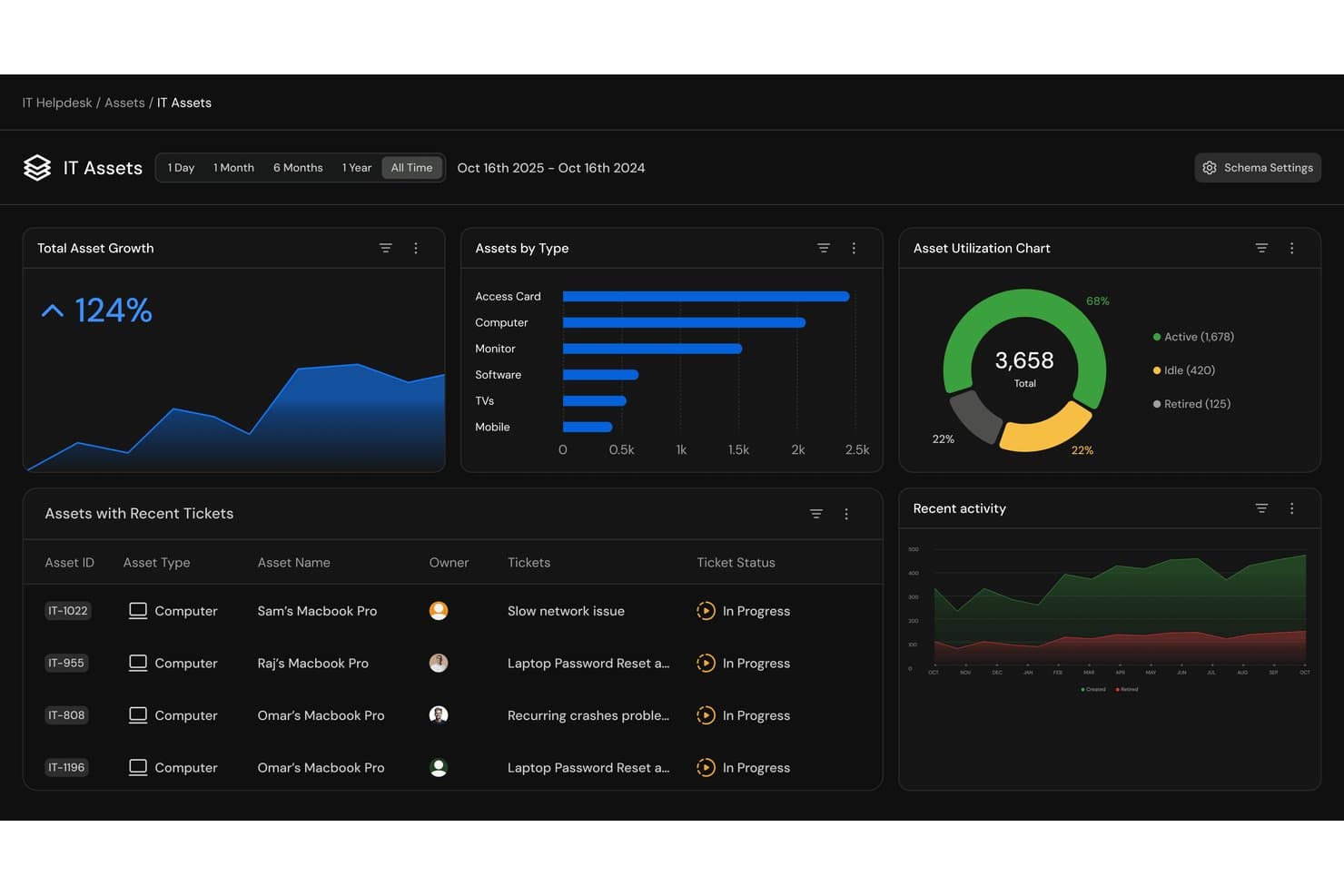
Serval offers an IT Assets dashboard with asset growth metrics, asset type breakdowns, utilization charts, and recent ticket tracking for help desk asset management. Serval is an AI-native ITSM platform that combines help desk ticketing, asset management, workflow automation, and access management through autonomous AI agents that handle and resolve IT requests.
Who Is Serval Best For?
Serval suits mid-to-large IT teams at technically mature organizations that want AI to autonomously handle high volumes of routine support requests.
Why I Picked Serval
Serval earns its spot on my shortlist because of how it handles automation differently from every other tool I've reviewed. Instead of a drag-and-drop workflow builder, I can describe a process in plain English and Serval generates production-ready automation. What I find genuinely useful is Serval Suggestions: as my team closes tickets manually, the system spots resolution patterns and proposes fully built workflows I can publish in one click.
Serval Key Features
- Asset ingestion and reconciliation: Automatically collects and merges asset records from MDM, HRIS, IdP, and procurement systems.
- Custom workflow code management: Stores workflow automations as auditable code with Git version control for transparency and rollbacks.
- Team segmentation: Organizes tickets, workflows, and integrations by department, with fine-grained access controls.
- Multi-channel support: Allows IT teams to receive and manage requests through Slack, Teams, email, and a web portal.
Serval Integrations
Serval offers native integrations with Okta, Google Workspace, Microsoft Teams, Slack, Notion, Confluence, Jira, GitHub, ServiceNow, and Salesforce. An API is available for custom integrations.
Pros and Cons
Pros:
- Multi-department team segmentation with fine-grained access
- Plain-language workflow building without writing code
- AI autonomously resolves tickets without technician input
Cons:
- New product with limited third-party review data
- Asset management depth lags behind dedicated ITAM tools
Learn more about Serval: Best for intuitive ticketing and problem resolution
- 14-day free trial + demo available
- From $19/agent/month (billed annually)
Visit WebsiteCustomer Rating:4.3/5
A screenshot of the agent dashboard view of Zendesk. Zendesk is a customer service platform designed to streamline your support team's workflow with its robust and intuitive ticketing system. The software shines brightly in its ability to simplify problem resolution, ensuring that businesses can swiftly and effectively attend to customer inquiries or issues, thereby solidifying its position as a top pick for those seeking intuitive ticketing solutions.
Why I Picked Zendesk: Zendesk was a clear choice for my list given its renowned reputation in the helpdesk software landscape. Its easy-to-use interface and robust capabilities make it an ideal solution for businesses looking for a streamlined ticketing and problem resolution process. I believe Zendesk is best for intuitive ticketing due to its efficient design, helping users navigate requests effortlessly, hence facilitating rapid problem resolution.
Standout features & integrations:
Zendesk impresses with its smart ticketing system that automatically routes and categorizes requests for efficient handling. Its AI-powered Answer Bot offers immediate responses to customer queries, enhancing user experience. In terms of integrations, Zendesk pairs well with a vast number of applications, including Slack, Salesforce, and Microsoft Teams, allowing for smoother communication and data flow between different platforms.
Pros and Cons
Pros:
- Wide range of integrations for enhanced functionality
- Smart ticketing system with auto-routing
- Easy-to-use interface for efficient problem resolution
Cons:
- Lacks asset management in the lower-tier plans
- Advanced features only available at higher pricing tiers
- Can be pricey for small businesses
 Best for IT inventory management
- 14-day free trial
- From $8/user/month (billed annually)
Visit WebsiteCustomer Rating:4.6/5
monday service helps IT teams track assets and manage support with no-code customization. monday service is a customizable service platform that helps teams efficiently manage and automate their service operations and processes. Its visual approach simplifies the management of both service requests and IT inventory.
Why I picked monday service: Teams can easily monitor hardware, assign tasks, and keep track of important maintenance dates. You can organize equipment by type, track serial numbers, and monitor the lifecycle of each asset.
The platform’s customizable workflows make it simple to create an asset management process that fits your team’s specific needs. With automations, you’ll receive reminders when maintenance is due, and visual dashboards keep everyone aligned and make it easy to see the status of all equipment in real-time.
Standout features & integrations:
Features include customizable no-code workflows, centralized IT asset tracking, visual dashboards for hardware management, automations for sending maintenance reminders, tools for tracking serial numbers and handover dates, and reporting tools for asset usage insights.
Integrations include Slack, Zoom, Microsoft Teams, Google Drive, Dropbox, Jira, HubSpot, Salesforce, GitHub, and Gmail.
Pros and Cons
Pros:
- Visual dashboards for asset status
- Automations for asset maintenance
- Customizable asset workflows
Cons:
- Automations may require fine-tuning
- Setup can be time-consuming
Learn more about monday service: Best for scheduled maintenance tasks
- Free demo available
- From $75/user/month (billed annually)
Visit WebsiteCustomer Rating:4.5/5
Issuetrak consolidates support requests and offers a separate module for asset management. Issuetrak is a versatile help desk software designed to simplify issue tracking and resolution for businesses across various industries. It offers a comprehensive suite of tools to manage customer support requests, complaints, and internal incidents efficiently.
Why I picked Issuetrak: Issuetrak's asset management feature allows you to keep track of hardware and software information, ensuring that all assets are accounted for and up to date. Additionally, the system enables the scheduling of maintenance tasks, ensuring that equipment remains in optimal condition.
Another reason to consider Issuetrak is its ability to automate ticket assignments through round-robin distribution. This feature ensures that incoming issues are evenly distributed among your support team, preventing overload on individual members and promoting efficient resolution times. By automating this process, your team can focus more on resolving issues rather than managing task assignments.
Standout features & integrations:
Features include a centralized Issue Hub that provides a one-stop location to view, manage, and update tickets with ease. The platform also offers task flows, allowing your team to collaborate on issues and maintain consistency in processes. Furthermore, Issuetrak's knowledge base helps keep important information accessible for both users and administrators.
Integrations include Microsoft 365, Google Analytics, Gmail, Salesforce, Power BI, and thousands more through Zapier. You can also access the Issuetrak API for even more connections.
Pros and Cons
Pros:
- Highly customizable system
- Cloud and on-premises deployment options
- Effective in organizing and managing tickets
Cons:
- Certain features may be complex to set up
- Asset management is a paid add-on
Learn more about Issuetrak: Best for large enterprises needing comprehensive IT solutions
- Not available
- Pricing upon request
Visit WebsiteCustomer Rating:4.4/5
A photo of the details portion for a ticket created in ServiceNow. ServiceNow offers an extensive range of IT services making it an all-encompassing tool for large enterprises. Its breadth of functionality caters to a myriad of needs, securing its position as a leading solution for businesses requiring comprehensive IT services.
Why I Picked ServiceNow: ServiceNow emerged as a prime contender during my evaluation due to its comprehensive suite of IT solutions. I chose this platform because it offers a wide range of services under one roof, making it particularly useful for larger organizations. Its extensive functionality is what sets it apart and makes it the "Best for..." large enterprises that need a comprehensive set of IT solutions.
Standout features & integrations:
ServiceNow shines with its incident management, problem management, change and release management, and asset and cost management features. It also offers impressive AI capabilities that help automate routine tasks. ServiceNow integrates seamlessly with many enterprise solutions like Slack, Jira, and Trello, which further boosts its effectiveness.
Pros and Cons
Pros:
- Robust integrations with other enterprise solutions
- Advanced AI capabilities for automation
- Comprehensive suite of IT solutions
Cons:
- Requires technical knowledge for customization
- Interface can be complicated for new users
- Premium pricing may not suit all budgets
 Best for drag-and-drop IT workflows
- 30-day free trial + free demo available
- From $1,499/year (billed annually)
Visit WebsiteCustomer Rating:4.6/5
Drag-and-drop workflow builder in InvGate Service Management showing IT hardware request approvals, conditional logic, stock checks, and automated subflows in a visual no-code interface. InvGate Service Management is an IT service management (ITSM) solution designed to improve how you manage service requests, incidents, and IT operations. When combined with InvGate Asset Management, it connects service and asset data to give you full visibility into your IT environment.
Why I Picked InvGate Service Management
I picked InvGate Service Management because of its deep integration with InvGate Asset Management, making it a strong option for organizations that want unified service and asset visibility. By linking tickets to real-time asset data, you can diagnose issues faster, track software licenses for compliance, and automate service actions based on asset conditions. I also noted its drag-and-drop workflow builder, which allows your team to design and adjust automated workflows without writing code. This makes it easier to standardize processes and scale service operations without relying on external implementation support.
InvGate Service Management Key Features
- Unified service catalog: Allows you to extend service management beyond IT to HR, finance, and facilities through a single request portal.
- Automated workflow triggers: Initiates actions based on asset conditions, such as warranty expirations, patch requirements, or device replacements.
- Drag-and-drop workflow builder: Enables your team to design and modify automated workflows without writing code.
- ITSM analytics and reporting: Supports cross-reporting between service and asset data for operational and procurement insights.
InvGate Service Management Integrations
InvGate Service Management offers native integrations with FileWave, Lansweeper, Microsoft Teams, Microsoft Active Directory, Azure DevOps, Okta, Microsoft 365, Outlook, OpenAI, and Jira.
Pros and Cons
Pros:
- Easily integrates service management with asset management
- Incorporates AI and low-code automation
- Provides a robust platform for incident management
Cons:
- Could offer more native integrations
- No social media ticket creation support
Learn more about InvGate Service Management:
Alte soluții software de asistență cu gestionarea activelor
Mai jos este o listă cu alte soluții software de asistență cu instrumente de gestionare a activelor pe care le-am selectat, dar care nu au ajuns în top 10. Merită cu siguranță să le verificați.
- 11Jira Service ManagementBest for Agile development teams seeking ITSM tools
- 12ConnectWise ManageBest for IT services requiring robust business management
- 13SysAidBest for integrating multiple ITSM services into one platform
- 14Cherwell Service ManagementBest for flexible and customizable workflows
- 15Ivanti Service ManagementBest for comprehensive IT asset management
- 16Spiceworks IT DesktopBest for budget-conscious businesses needing IT support
- 17SolarWinds IT Service Desk SoftwareBest for incident management automation
- 18HiverBest for omnichannel communication
- 19NinjaOneBest for real-time asset monitoring
- 20ManageEngine ServiceDesk PlusBest for implementing advanced IT analytics
- 21HappyFoxGood for teams needing a user-friendly helpdesk platform
- 22LansweeperGood for IT departments needing network inventory and asset discovery
- 23Device42Good for businesses requiring comprehensive IT infrastructure management
- 24Alloy NavigatorGood for IT operations requiring robust IT asset management
- 25HaloGood for businesses seeking a customizable ITSM solution with ITIL-aligned processes
Recenzii asociate pentru software de asistență cu gestionarea activelor
How I Evaluate Help Desk Software With Asset Management
I evaluate these tools across two layers: the baseline—things like a working CMDB, automated asset discovery, and ticket-to-asset linking—and the differentiators that set stronger platforms apart.
Core Functionality (Table Stakes For This List)
When I'm selecting tools for my list, I rank each one on a scale from 0 (does not offer the functionality) to 5 (excels in this area) for each core functionality listed below. Then, I calculate the tool's total score into a percentage. Each tool needs to achieve a minimum total score of 65% to be considered for inclusion.
- Ticketing System: I look for multi-channel intake (email, portal, chat), automated routing, SLA timers, and queue management so technicians aren't manually triaging every request.
- Asset Repository (CMDB): A solid CMDB should track hardware, software, and CIs with lifecycle status, ownership, and dependency mapping between related assets.
- Ticket-to-Asset Linking: I check whether a technician can pull up a device's full incident history directly from a ticket instead of hunting through a separate inventory screen.
- Automated Asset Discovery: Network and agent-based scanning that keeps your inventory current matters here—manual CSV imports alone won't cut it for growing environments.
- License & Contract Tracking: I evaluate whether the tool tracks software license counts, vendor contracts, warranty expirations, and flags compliance gaps before renewal deadlines hit.
- ITIL Workflow Support: Beyond basic incident logging, I look for structured change, problem, and request management workflows with approval chains and escalation paths.
Once I have a list of tools that meet this criteria, I consider what sets each platform apart.
Differentiating Factors (What Sets Vendors Apart)
Here's how I compare and contrast different vendors:
Standout Features
Built-in remote control is a big one—technicians who can jump into an end-user's desktop straight from a ticket resolve issues faster than those toggling between separate tools. I also look at patch management capabilities, since platforms that automate OS and third-party patching directly reduce the ticket volume hitting your queue. AI-powered ticket deflection is worth evaluating too, especially for teams fielding repetitive password resets or access requests that a chatbot can handle before a technician ever gets involved.
Beyond Features
Integration ecosystem matters a lot here. Your help desk and asset management tool needs to sync with directory services like Active Directory or Okta for user provisioning, plus endpoint management platforms like Intune or Jamf for real-time asset data. I also evaluate compliance posture—SOC 2 Type II and ISO 27001 certifications signal that a vendor takes data protection seriously, which matters when your CMDB holds sensitive device and user records. Total cost of ownership deserves attention too, since some vendors charge extra for discovery agents or additional asset records.
Cum să alegeți software-ul de asistență cu gestionarea activelor
Este ușor să vă pierdeți în liste lungi de funcții și structuri complexe de prețuri. Pentru a rămâne concentrat pe parcursul procesului dvs. unic de selecție a software-ului, iată o listă de factori pe care trebuie să îi aveți în vedere:
| Factor | Aspecte de luat în considerare |
|---|---|
| FactorScalabilitate | Aspecte de luat în considerarePoate instrumentul să se dezvolte odată cu afacerea dvs.? Verificați dacă acceptă creșterea numărului de utilizatori și a volumului de date fără o scădere a performanței. Luați în considerare extinderea viitoare și modul în care instrumentul va gestiona încărcarea crescută. |
| FactorIntegrări | Aspecte de luat în considerareSe potrivește cu sistemele dvs. existente? Căutați integrări native cu software-ul pe care îl utilizați deja. Evitați instrumentele care necesită soluții alternative complexe pentru a se conecta la stiva dvs. tehnologică. |
| FactorPosibilități de personalizare | Aspecte de luat în considerarePuteți adapta instrumentul la fluxurile dvs. de lucru? Asigurați-vă că permite ajustări pentru a se potrivi proceselor dvs. fără a necesita programare extinsă. Flexibilitatea este esențială pentru nevoile unice ale unei afaceri. |
| FactorUșurința utilizării | Aspecte de luat în considerareEste interfața intuitivă? Testați dacă are un aspect simplu, pe care utilizatorii noi îl pot înțelege rapid. Evitați instrumentele cu navigare excesiv de complexă, care încetinește sarcinile zilnice. |
| FactorImplementare și integrare inițială | Aspecte de luat în considerareCât de repede poate începe echipa dvs.? Căutați instrumente care oferă ghiduri clare pentru integrarea inițială, resurse de instruire sau asistență dedicată, pentru a vă ajuta să începeți rapid. Atunci când comparați instrumente precum NinjaOne vs. Atera, luați în considerare expertiza și fluxurile de lucru preferate ale echipei dvs. |
| FactorCost | Aspecte de luat în considerareSe încadrează în bugetul dvs.? Comparați planurile tarifare și fiți atenți la taxele ascunse. Luați în considerare costul total de deținere, inclusiv eventualele costuri viitoare pe măsură ce nevoile dvs. evoluează. |
| FactorMăsuri de securitate | Aspecte de luat în considerareSunt datele și activele dvs. protejate? Verificați standardele de criptare, actualizările regulate de securitate și conformitatea cu reglementările relevante. Asigurați-vă că respectă politicile de securitate ale organizației dvs. |
Ce este software-ul de asistență cu gestionarea activelor?
Software-ul de asistență cu gestionarea activelor este un instrument care combină gestionarea tichetelor și urmărirea activelor pentru a îmbunătăți furnizarea serviciilor IT. Profesioniștii IT, echipele de asistență și managerii operaționali folosesc în general aceste instrumente pentru a gestiona eficient solicitările clienților și activele companiei. Funcțiile de gestionare a tichetelor, urmărire a activelor și raportare a incidentelor ajută la organizarea fluxurilor de lucru și la menținerea calității serviciilor. În general, aceste instrumente și alte soluții software de gestionare a activelor fixe îmbunătățesc eficiența și gestionarea resurselor în organizații.
Funcții
Atunci când selectați software de asistență cu gestionarea activelor, urmăriți următoarele funcții esențiale:
- Gestionarea tichetelor: Organizează și prioritizează solicitările clienților pentru a asigura răspunsuri prompte și eficiente.
- Urmărirea activelor: Monitorizează și gestionează activele companiei pe tot parcursul ciclului lor de viață pentru a menține responsabilitatea și eficiența.
- Raportarea incidentelor: Înregistrează și urmărește incidentele pentru a ajuta echipele să analizeze tiparele și să prevină problemele viitoare.
- Fluxuri de lucru personalizabile: Permite echipelor să adapteze procesele pentru a răspunde nevoilor specifice ale companiei, fără programare extinsă.
- Asistență multicanal: Permite comunicarea cu utilizatorii pe diverse platforme, îmbunătățind accesibilitatea și experiența utilizatorilor.
- Portal de autoservire: Le permite utilizatorilor să găsească soluții în mod independent, reducând volumul de muncă al echipelor de asistență.
- Instrumente de analiză: Oferă informații despre performanța și tendințele serviciilor, sprijinind luarea deciziilor pe baza datelor.
- Posibilități de integrare: Se conectează la sistemele existente pentru a asigura un flux fluent de informații între platforme.
- Măsuri de securitate: Protejează datele sensibile prin criptare și respectarea reglementărilor relevante.
- Facturare automatizată: Optimizează operațiunile financiare prin asigurarea facturării corecte și a urmăririi veniturilor.
Beneficii
Implementarea unui software de asistență tehnică cu gestionarea activelor oferă mai multe beneficii pentru echipa și compania dvs. Iată câteva dintre acestea:
- Eficiență îmbunătățită: Automatizează sarcini de rutină, precum gestionarea tichetelor și urmărirea activelor, permițând echipei să se concentreze asupra priorităților strategice.
- Luarea deciziilor îmbunătățită: Oferă instrumente de analiză care furnizează informații despre tendințele de performanță, ajutându-vă să luați decizii pe baza datelor.
- Gestionarea mai bună a resurselor: Urmărește activele pe tot parcursul ciclului lor de viață, asigurând utilizarea optimă și reducând risipa.
- Satisfacție sporită a utilizatorilor: Oferă un portal de autoservire prin care utilizatorii pot rezolva problemele în mod independent, ceea ce duce la soluționarea mai rapidă a problemelor.
- Economii de costuri: Reduce costurile operaționale prin automatizarea proceselor de facturare și emitere a facturilor, asigurând acuratețea și eficiența.
- Scalabilitate: Sprijină companiile în creștere prin gestionarea unui număr tot mai mare de utilizatori și date, fără a compromite performanța.
- Securitate mai puternică: Protejează informațiile sensibile prin măsuri de securitate și respectarea reglementărilor, asigurând integritatea datelor.
Costuri & prețuri
Selectarea unui software de asistență tehnică cu gestionarea activelor necesită înțelegerea diferitelor modele și planuri de tarifare disponibile. Costurile variază în funcție de caracteristici, dimensiunea echipei, extensii și alți factori. Tabelul de mai jos rezumă planurile comune, prețurile medii ale acestora și caracteristicile incluse de obicei în soluțiile software de asistență tehnică cu gestionarea activelor:
Tabel comparativ al planurilor pentru software-ul de asistență tehnică cu gestionarea activelor
| Tipul planului | Preț mediu | Caracteristici comune |
|---|---|---|
| Tipul planuluiPlan gratuit | Preț mediu$0 | Caracteristici comuneGestionarea de bază a tichetelor, urmărirea limitată a activelor și asistență din partea comunității. |
| Tipul planuluiPlan personal | Preț mediu$5-$25/utilizator/lună | Caracteristici comuneGestionarea tichetelor, urmărirea de bază a activelor, asistență prin e-mail și portal de autoservire. |
| Tipul planuluiPlan pentru companii | Preț mediu$30-$60/utilizator/lună | Caracteristici comuneGestionarea avansată a activelor, asistență multicanal, instrumente de raportare și posibilități de integrare. |
| Tipul planuluiPlan pentru întreprinderi | Preț mediu$70-$120/utilizator/lună | Caracteristici comuneOpțiuni complete de personalizare, analiză avansată, gestionarea dedicată a contului și funcții de securitate îmbunătățite. |
Întrebări frecvente despre software-ul de asistență tehnică cu gestionarea activelor
Ce diferențiază software-ul de asistență tehnică cu gestionarea activelor de un instrument obișnuit de asistență tehnică?
Un serviciu obișnuit de asistență tehnică se concentrează în principal pe gestionarea tichetelor de service. Atunci când este combinat cu gestionarea activelor, sistemul urmărește și activele fizice și digitale, asociind fiecare tichet cu echipamentul sau software-ul implicat, pentru un context mai bun și soluționări mai rapide.
Poate software-ul de asistență tehnică să urmărească active care nu țin de IT?
Da. Deși a fost creat inițial pentru active IT, precum laptopuri sau servere, multe platforme permit acum urmărirea echipamentelor de birou, a mobilierului și chiar a licențelor software, oferind echipelor vizibilitate completă în toate departamentele.
Cum îmbunătățește urmărirea activelor depanarea?
Prin asocierea tichetelor cu active specifice, tehnicienii pot consulta istoricul complet al unui activ, inclusiv problemele anterioare sau jurnalele de mentenanță. Astfel, identificarea problemelor recurente devine mai rapidă și mai precisă.
Ce tipuri de organizații folosesc software de asistență tehnică cu gestionarea activelor?
Este utilizat în toate domeniile, de la IT și educație până la sănătate și finanțe. Orice organizație care gestionează echipamente sau instrumente digitale împreună cu asistența pentru utilizatori poate beneficia de acesta.
Cum se integrează automatizarea în instrumentele de asistență tehnică și gestionare a activelor?
Automatizarea ajută la direcționarea tichetelor, actualizarea înregistrărilor activelor și declanșarea mementourilor pentru mentenanță. Reduce munca manuală repetitivă și asigură menținerea unor date exacte în toate sistemele.
Sunt sistemele de asistență tehnică bazate pe cloud mai bune decât cele instalate local?
Sistemele bazate pe cloud sunt mai ușor de accesat și actualizat, ceea ce le face ideale pentru echipele la distanță sau hibride. Totuși, soluțiile instalate local rămân utile pentru companiile care au nevoie de un control strict asupra stocării datelor și a conformității.