

Cele mai bune software-uri de virtualizare a stocării ajută echipele să combine spațiul de stocare din sisteme diferite, să îmbunătățească performanța și să gestioneze capacitatea fără a depinde de hardware izolat. Aceste instrumente facilitează extinderea spațiului de stocare, reduc perioadele de nefuncționare cauzate de problemele hardware și mențin accesul la date în diferite medii.
Atunci când configurările greșite întrerup accesul, furnizarea manuală încetinește implementările sau spațiul de stocare izolat face dificilă urmărirea utilizării, eficiența și fiabilitatea pot scădea. Aceste provocări măresc volumul de mentenanță și îngreunează activitatea echipelor de IT și inginerie care trebuie să ofere suport aplicațiilor ce depind de o performanță constantă a stocării.
Având peste 20 de ani de experiență în industrie ca director de tehnologie, am testat și evaluat zeci de soluții de virtualizare a stocării pentru a le analiza performanța, calitatea integrării și ușurința în utilizare. Acest ghid prezintă funcțiile, avantajele și dezavantajele, precum și cazurile de utilizare potrivite, pentru a vă ajuta să alegeți instrumentul potrivit.
Why Trust Our Software Recommendations
6,700+
Reviews
20
Industry experts
16+
Evaluation factors
14
Years
Our team has been testing and reviewing software since 2012. As tech leaders ourselves, we know how difficult—and important—it is to choose the right software.
For this guide, we evaluated tools using hands-on testing and independent research, scoring tools using our selection criteria.
Our reviews reflect our human editorial judgment, not a sales pitch.
Expert reviewers:
- Paulo Gardini MiguelTech Director
 Tim FisherVP of AI
 Gabriel RosasTech Lead & Software Architect
 Christhian GruhnTech Lead & Platform Architect

Tabel comparativ: software-uri de virtualizare a stocării
Acest tabel comparativ sintetizează detaliile de preț pentru selecțiile mele de top de software-uri de virtualizare a stocării.
Score legend (out of 5)
- Excellent4.5–5
- Good4–4.4
- Average3–3.9
- Below average2–2.9
- Poor1–1.9
Sorted by: Default
| Tool | Starting Price | Website | |||||||
|---|---|---|---|---|---|---|---|---|---|
Best for unified block, object, and file at scale | 4.7 out of 5 | 4 | 5 | 5 | 5 | 5 | 4 | Pricing upon request Not available | Website |
Best for ONTAP data management on commodity hardware | 4.7 out of 5 | 4 | 5 | 5 | 5 | 4 | 5 | Pricing upon request 90-day free trial | Website |
Best for data reduction across virtualized arrays | 4.8 out of 5 | 5 | 5 | 5 | 5 | 4 | 5 | Pricing upon request Free demo available | Website |
Best for Kubernetes-native container storage QoS | 4.7 out of 5 | 5 | 5 | 5 | 5 | 4 | 4 | Pricing upon request 30-day free trial | Website |
Best for open-source Ceph and ZFS at scale | 4.3 out of 5 | 4 | 5 | 4 | 5 | 4 | 4 | Pricing upon request Free demo available | Website |
Best for non-disruptive migration across mixed arrays | 5.0 out of 5 | 5 | 5 | 5 | 5 | 5 | 5 | Pricing upon request 30-day free trial | Website |
Best for policy-driven HCI storage at scale | 4.8 out of 5 | 5 | 5 | 5 | 5 | 4 | 5 | Pricing upon request 90-day free trial available | Website |
Best for HCI-native S3 object storage at scale | 4.8 out of 5 | 5 | 5 | 5 | 5 | 4 | 5 | Pricing upon request 60-day free trial | Website |
Best for VMware-native hyperconverged storage | 4.7 out of 5 | 5 | 5 | 5 | 5 | 3 | 5 | Pricing upon request Free demo available | Website |
Best for exabyte-scale object storage autonomy | 4.7 out of 5 | 4 | 5 | 5 | 5 | 5 | 4 | Pricing upon request 30-day free trial | Website |





Recenzii ale celor mai bune software-uri de virtualizare a stocării
Mai jos sunt prezentate rezumatele mele detaliate ale celor mai bune software-uri de virtualizare a stocării incluse în lista mea scurtă. Recenziile mele oferă o analiză detaliată a funcțiilor principale, avantajelor și dezavantajelor, integrărilor și cazurilor ideale de utilizare pentru fiecare instrument, pentru a vă ajuta să îl găsiți pe cel mai potrivit pentru dumneavoastră.
 Best for unified block, object, and file at scale
- Not available
- Pricing upon request
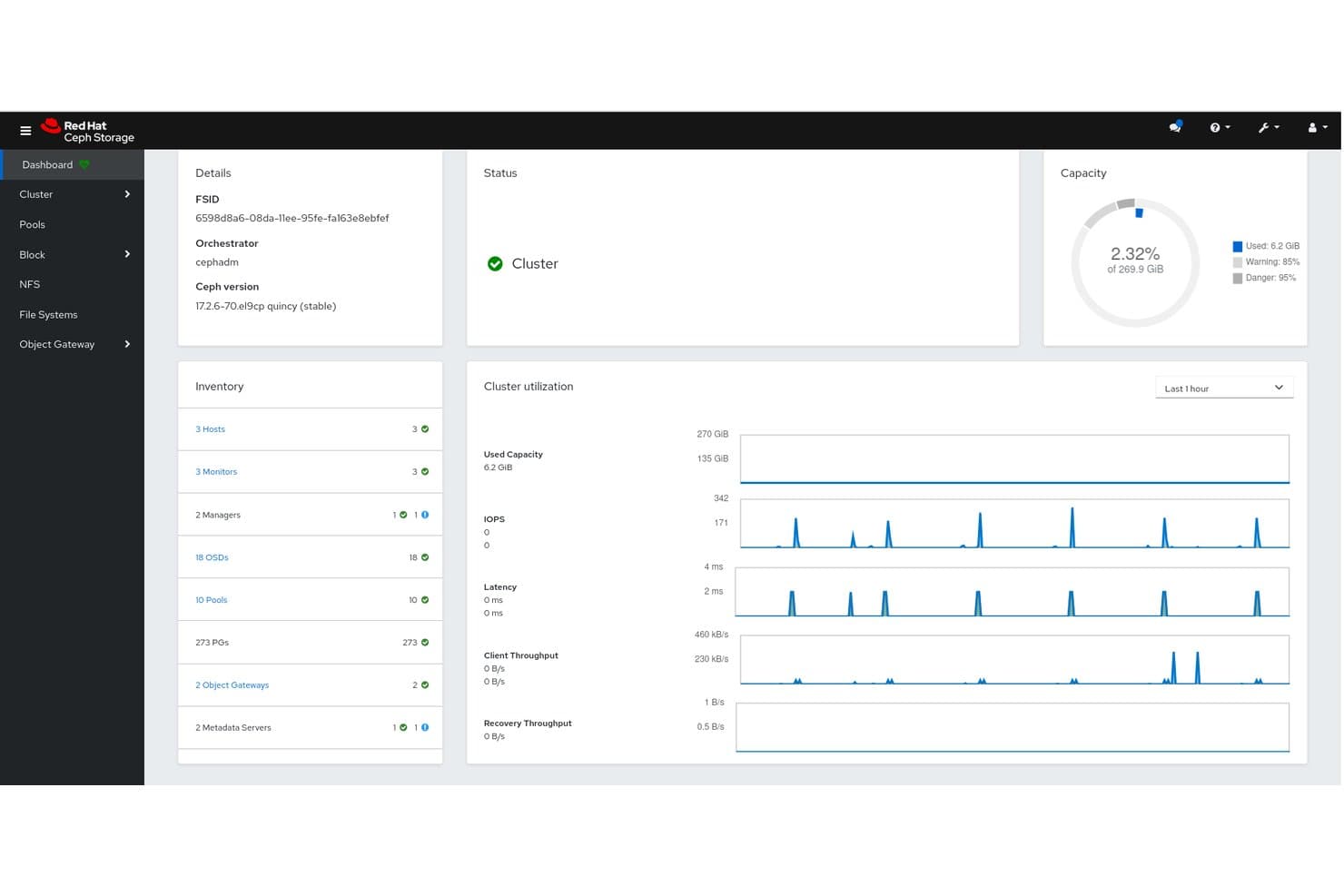
Red Hat Ceph Storage centralizes cluster health, capacity, and I/O metrics. Red Hat Ceph Storage is an open-source, software-defined storage platform that virtualizes commodity hardware into unified block (RBD), object (S3/Swift-compatible), and file (CephFS) storage pools managed from a single cluster.
Who Is Red Hat Ceph Storage Best For?
It's a strong fit for infrastructure teams running private cloud environments on OpenStack or OpenShift who need petabyte-scale, unified block, object, and file storage from a single cluster.
Why I Picked Red Hat Ceph Storage
Red Hat Ceph Storage earns its spot on my shortlist because its CRUSH algorithm does something genuinely hard: it pools commodity hardware into a single cluster that simultaneously serves block (RBD), object (S3/Swift), and file (CephFS) storage without siloing each protocol behind separate infrastructure. I'm particularly impressed by erasure coding support, which cuts raw storage overhead to roughly 1.5x compared to 3x for standard replication, and per-image QoS on RBD volumes, which keeps noisy workloads from starving others in multi-tenant environments.
Red Hat Ceph Storage Key Features
- CRUSH-based data placement: The CRUSH algorithm distributes data across OSDs automatically, ensuring balanced placement without a central lookup table.
- BlueStore inline compression: Ceph's native storage backend compresses data at write time, reducing on-disk footprint without a separate compression layer.
- Ceph Dashboard with embedded Grafana: A web-based GUI surfaces real-time cluster health, capacity, and performance metrics alongside customizable Grafana dashboards.
- FIPS 140-2 validated encryption: Encryption at rest and in transit is available using FIPS-validated cryptographic modules on certified Red Hat Enterprise Linux deployments.
Red Hat Ceph Storage Integrations
Red Hat Ceph Storage integrates with Red Hat OpenStack Services on OpenShift, Red Hat OpenShift, Kubernetes through Rook CSI, Prometheus, Grafana, Ansible Automation Platform, Veeam, Veritas, and TrilioVault. Its RESTful API supports custom integrations and CI/CD workflows.
Pros and Cons
Pros:
- Scales to petabytes with self-healing rebalancing
- Runs on commodity hardware without vendor lock-in
- Delivers unified block, object, and file storage
Cons:
- Documented slow data rebalancing after failures
- Requires OpenStack for current Red Hat deployments
Learn more about Red Hat Ceph Storage: Best for ONTAP data management on commodity hardware
- 90-day free trial
- Pricing upon request
NetApp organizes storage into layered virtual machines, aggregates, and RAID groups. NetApp ONTAP Select is a software-defined storage virtualization solution that deploys the full ONTAP 9 data management stack as a virtual machine on commodity hardware, supporting NFS, SMB, iSCSI, and NVMe protocols across single-node to 12-node cluster configurations.
Who Is NetApp Best For?
NetApp ONTAP Select is a strong fit for enterprise infrastructure teams that want full ONTAP 9 capabilities without investing in dedicated NetApp hardware.
Why I Picked NetApp
NetApp ONTAP Select earns its spot on my shortlist because it runs the full ONTAP 9 data management stack as a VM on commodity Intel or AMD hardware, which means I get enterprise-grade storage without locking into proprietary appliances. I particularly like the AFF-like inline deduplication, compression, and compaction that auto-enable on DAS SSD Premium deployments, plus SnapMirror-based replication that spans on-premises nodes and cloud targets like AWS S3 and Azure Blob.
NetApp Key Features
- MetroCluster SDS: Stretches a 2-node HA cluster across geographically separated sites with synchronous mirroring and up to 10ms round-trip latency tolerance.
- FabricPool cold-data tiering: Automatically moves inactive data to object storage targets including AWS S3, Azure Blob, and NetApp StorageGRID.
- SnapLock Enterprise: Enforces WORM-compliant immutable storage on select volumes to protect data against deletion or modification.
- Autonomous Ransomware Protection: Uses AI-driven analysis to detect abnormal storage activity patterns and flag potential ransomware events at the storage layer.
NetApp ONTAP Select Integrations
NetApp ONTAP Select integrates with VMware vSphere ESXi and vCenter, KVM, Veeam Backup & Replication, SnapCenter, and Active IQ Unified Manager. It also offers a REST API and Ansible roles for custom automation.
Pros and Cons
Pros:
- AFF-like deduplication and compression auto-enabled
- MetroCluster SDS for synchronous stretched clusters
- Full ONTAP stack runs on commodity hardware
Cons:
- Autonomous Ransomware Protection updates are manual
- No support for Fibre Channel front-end
Learn more about NetApp: Best for data reduction across virtualized arrays
- Free demo available
- Pricing upon request

Hitachi VSP 360 SDS manages multi-cloud inventory across on-premises, AWS, Google, and Azure. Hitachi Virtual Storage Platform E Series is an enterprise block storage virtualization platform that runs on SVOS to pool internal NVMe/SAS/HDD drives and third-party arrays into unified logical volumes, with scale-out clustering, automated tiering, and inline deduplication across virtualized environments.
Who Is Hitachi Virtual Storage Platform E Series Best For?
It's a strong fit for large enterprises running heterogeneous storage environments who need to consolidate third-party arrays under a single virtualization layer without replacing existing hardware.
Why I Picked Hitachi Virtual Storage Platform E Series
Hitachi VSP E Series earns its spot on my shortlist because of how it handles data reduction across virtualized arrays, which is genuinely rare at this scale. I'm impressed by Adaptive Data Reduction (ADR), which delivers AI-powered inline deduplication and compression with a contractual 4:1 guarantee. Paired with SVOS's ability to virtualize third-party arrays as locally managed volumes, you get meaningful efficiency gains without ripping out existing hardware.
Hitachi Virtual Storage Platform E Series Key Features
- Global-Active Device (GAD): Creates a virtual storage machine spanning two VSP arrays across two data centers for active-active synchronous mirroring with zero RPO.
- Virtual Storage Scale Out (VSSO): Scales clusters nondisruptively to 65 nodes and 130 controllers with automated workload mobility across nodes.
- Ops Center Automator: Automates end-to-end storage provisioning workflows with native ServiceNow integration for ticketing and orchestration.
- CyberSense ransomware detection: Scans storage data with 99.99% accuracy to identify ransomware-related corruption before it propagates.
Hitachi Virtual Storage Platform E Series Integrations
Integrations include Veeam Backup & Replication, Commvault IntelliSnap, VMware vSphere, Kubernetes, Proxmox VE, Ansible, and ServiceNow. Ops Center provides REST APIs for custom provisioning, monitoring, and automation workflows.
Pros and Cons
Pros:
- 4:1 AI-powered deduplication guarantee
- Virtualizes third-party arrays without forklift upgrades
- Zero RPO active-active mirroring between sites
Cons:
- Outdated graphical interface compared to peers
- No unified block and file storage
Learn more about Hitachi Virtual Storage Platform E Series: Best for Kubernetes-native container storage QoS
- 30-day free trial
- Pricing upon request
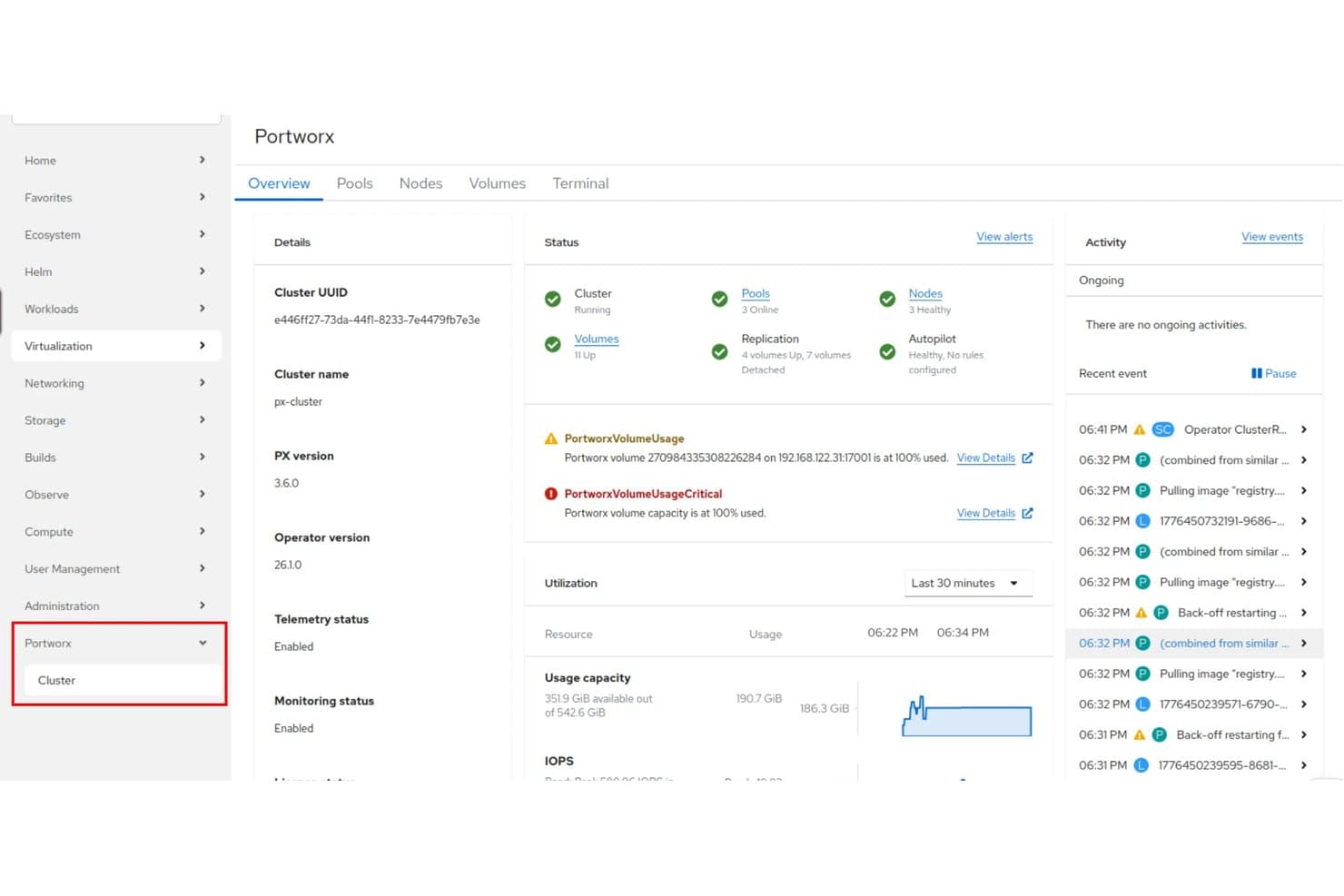
Portworx gives users a unified cluster dashboard with live storage metrics. Portworx is a Kubernetes-native storage virtualization platform that pools local NVMe, cloud block storage, and Pure Storage arrays into unified storage fabrics, with built-in capacity automation, per-volume QoS controls, data migration, and application-aware backup and disaster recovery.
Who Is Portworx Best For?
Portworx is a strong fit for platform and infrastructure teams running stateful workloads on Kubernetes who need granular, per-volume storage QoS controls across multi-cluster or multi-cloud environments.
Why I Picked Portworx
Portworx earns its spot on my shortlist because it's the only storage virtualization platform I've found that delivers per-volume QoS controls at the Kubernetes layer. I can set independent IOPS and bandwidth limits for individual volumes across read and write paths, which eliminates noisy-neighbor problems in multi-tenant clusters. Autopilot then handles dynamic PVC resizing automatically when thresholds are hit, so my team isn't scrambling to prevent capacity exhaustion during peak workloads.
Portworx Key Features
- Synchronous replication: Portworx replicates volumes across up to three nodes simultaneously, keeping stateful workloads available through node failures.
- CloudSnap: Sends volume snapshots directly to object storage (e.g., Amazon S3) for off-cluster backup and long-term retention.
- Stork scheduler: A Kubernetes scheduler extender that places pods on nodes where their volume replicas live, improving data locality and I/O performance.
- PX-StoreV2 NVMe backend: A purpose-built, high-performance datastore optimized for NVMe devices, designed for latency-sensitive AI/ML and database workloads.
Portworx Integrations
Portworx integrates with Kubernetes platforms including Red Hat OpenShift, Amazon EKS, Azure AKS, Google GKE, VMware VKS, and SUSE Rancher, plus Pure Storage FlashArray and FlashBlade. It supports KubeVirt, Ansible automation, and REST API connectivity for custom integrations.
Pros and Cons
Pros:
- Immutable backups with ransomware protection
- Automated PVC resizing prevents storage exhaustion
- Granular per-volume storage QoS on Kubernetes
Cons:
- Disaster recovery features require extra licensing
- Only works in Kubernetes environments
Learn more about Portworx: Best for open-source Ceph and ZFS at scale
- Free demo available
- Pricing upon request

45Drives lets users manage ZFS storage pools and filesystems visually. 45Drives is a storage virtualization platform that pairs open-source software—Ceph clustering, ZFS, Proxmox VE, and the Houston UI management dashboard—with its own high-density hardware to deliver unified block, file, and object storage across bare-metal, hyperconverged, and clustered environments.
Who Is 45Drives Best For?
45Drives is a strong fit for infrastructure teams running large-scale, on-premises storage who want the flexibility of open-source ZFS and Ceph without proprietary licensing costs.
Why I Picked 45Drives
I picked 45Drives as one of the best because no other vendor on this list delivers a fully integrated open-source storage stack, combining Ceph clustering, ZFS, and Proxmox VE, without a single proprietary licensing fee. I'm particularly impressed by Ceph's CRUSH-based pooling, which auto-rebalances data across nodes as you add capacity, and SnapShield, which isolates infected clients within seconds of detecting ransomware without disrupting the rest of the cluster.
45Drives Key Features
- Houston UI dashboard: A web-based management interface for provisioning ZFS pools, managing Ceph clusters, scheduling snapshots, browsing S3 objects, and monitoring hardware from a single pane of glass.
- Multi-protocol access: Serves block, file, and object storage simultaneously from a single Ceph pool via iSCSI, SMB, NFS, and S3-compatible endpoints.
- ZFS tiered caching: Supports L2ARC (NVMe read cache) and SLOG (NVMe write log) devices to accelerate performance on spinning-disk or hybrid storage arrays.
- Proxmox VE hyperconverged integration: Combines compute and storage on Proxinator nodes running Proxmox VE, with built-in HA, live VM migration, and Proxmox Backup Server for unified VM and storage management.
45Drives Integrations
45Drives offers native Proxmox VE integration, plus migration support for VMware ESXi and Microsoft Hyper-V. Houston UI supports rclone connections to 70+ cloud providers, including Backblaze B2, and S3-compatible backends such as MinIO, GarageHQ, Ceph RGW, and RustFS.
Pros and Cons
Pros:
- Ceph-based clustering enables near-limitless scalability
- SnapShield provides ransomware-activated data protection
- Fully open-source stack, no vendor lock-in
Cons:
- No native automated cloud tiering available
- Optimized for 45Drives hardware only
Learn more about 45Drives: Best for non-disruptive migration across mixed arrays
- 30-day free trial
- Pricing upon request
Visit WebsiteCustomer Rating:4.4/5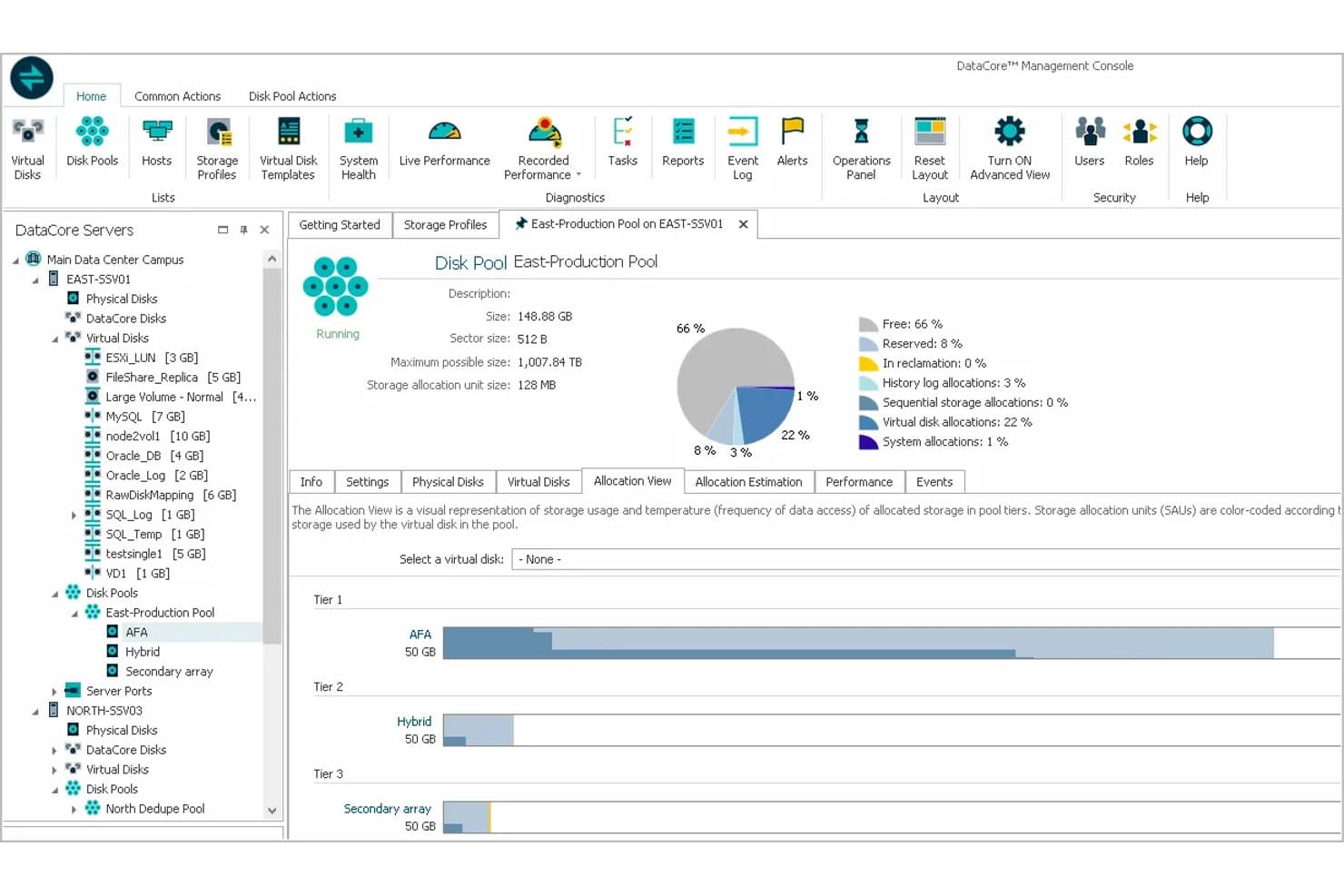
DataCore visualizes tiered storage allocation across AFA, Hybrid, and Secondary array pools. DataCore SANsymphony is a hardware-agnostic storage virtualization platform that pools block storage from mixed-vendor arrays—including SAN, DAS, SSD, and HDD—into unified virtual storage pools with auto-tiering, synchronous mirroring, inline deduplication, and non-disruptive live migration.
Who Is DataCore Best For?
DataCore SANsymphony is a strong fit for storage architects and data center administrators managing mixed-vendor arrays who need to migrate or refresh hardware without taking applications offline.
Why I Picked DataCore
DataCore SANsymphony earns its spot on my shortlist because it's built specifically for environments running mixed-vendor arrays where replacing hardware without downtime isn't optional—it's essential. I like that live migration runs transparently through the virtualization layer, so applications keep running while data moves between, say, an aging Dell array and a new Pure Storage AFA in the background. Adaptive Data Placement then continuously rebalances that data across up to 15 storage tiers using AI-driven access pattern analysis, with no manual policy tuning required.
DataCore Key Features
- Synchronous mirroring: Writes data simultaneously to two independent storage locations, delivering zero RPO and zero RTO failover without application interruption.
- DataCore Insight Services: An AI/ML analytics layer that delivers heat maps, bottleneck identification, and capacity forecasting across your entire storage estate.
- QoS controls: Regulates I/O allocation per workload so high-priority applications maintain performance when competing for shared storage resources.
- Inline deduplication and compression: Reduces data footprint before tiering infrequently accessed data to lower-cost storage classes.
DataCore Integrations
DataCore SANsymphony integrates with VMware vSphere, Microsoft Hyper-V, Veeam Backup & Replication, and OpenStack, with Kubernetes CSI support via DataCore Puls8. REST API and PowerShell support custom automation, while AWS and Azure connectivity uses gateway appliances.
Pros and Cons
Pros:
- Zero RPO/RTO with synchronous mirroring
- Pools storage from any hardware vendor
- Enables live migration without application downtime
Cons:
- AI analytics unavailable for perpetual licenses
- Requires Windows Server as host system
Learn more about DataCore: Best for policy-driven HCI storage at scale
- 90-day free trial available
- Pricing upon request
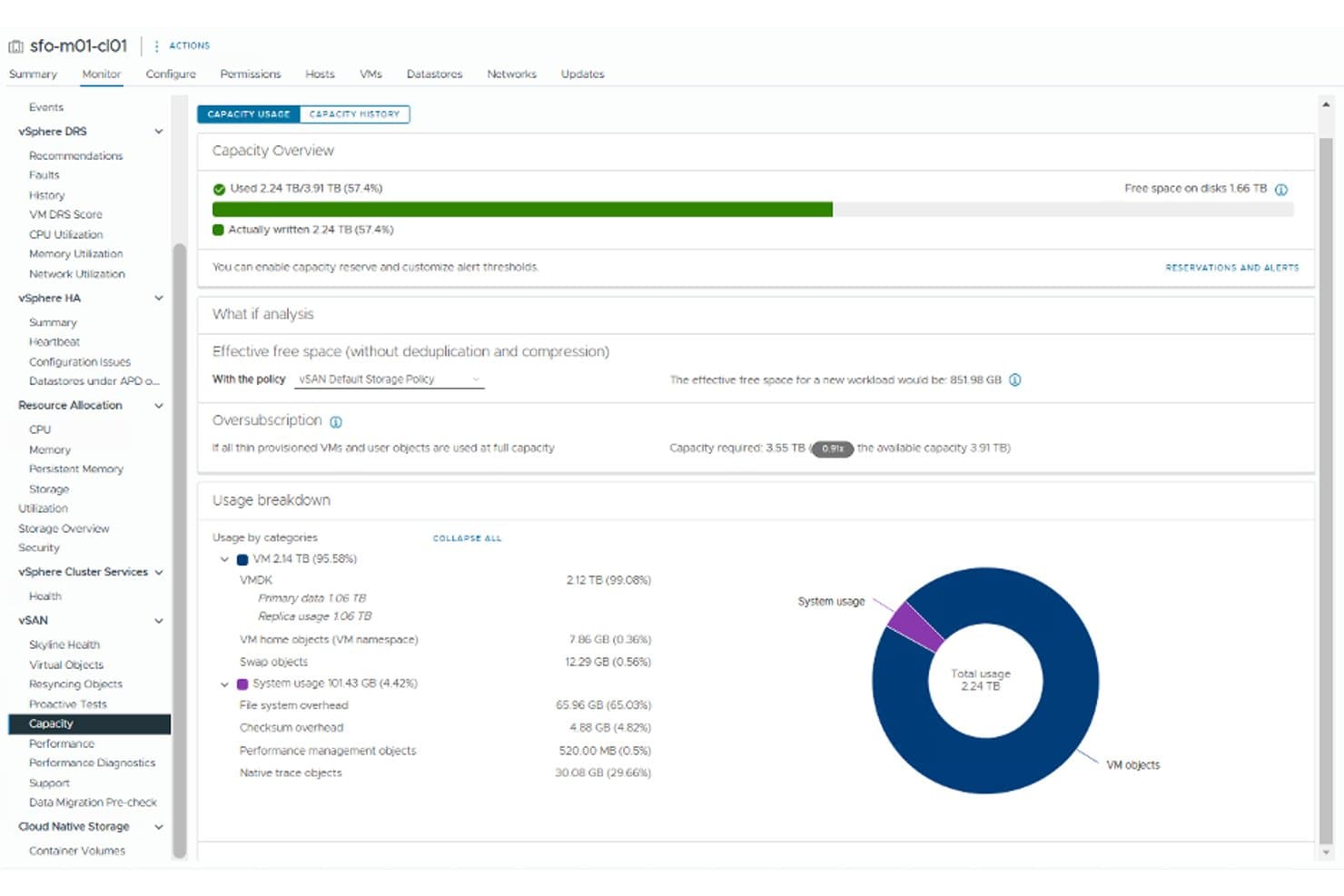
vSphere tracks vSAN storage capacity usage and oversubscription at a glance. VMware vSphere is an enterprise virtualization platform that virtualizes and pools direct-attached storage across ESXi hosts into shared datastores via vSAN, while supporting external SAN/NAS abstraction and policy-based storage management through SPBM.
Who Is vSphere Best For?
vSphere is a strong fit for enterprise IT teams running large-scale virtualized environments who need policy-driven storage management across hundreds or thousands of VMs.
Why I Picked vSphere
vSphere earns its spot on my shortlist because no other platform matches its depth of policy-driven storage management at enterprise scale. I'm particularly impressed by SPBM, which lets you define fault tolerance, performance tier, and data services as per-VM policies rather than manually configuring each datastore. Pair that with vSAN ESA's support for up to 200 snapshots per VM and immutable snapshot protection, and you get a storage virtualization platform built for environments where consistency and resilience across hundreds of VMs isn't optional.
vSphere Key Features
- Storage vMotion: Migrates VM disk files between datastores live, with no application downtime, so you can rebalance storage or evacuate hosts without a maintenance window.
- vSAN automated rebalancing: Redistributes data across cluster nodes automatically as hosts are added or removed to maintain consistent performance.
- vSphere REST API and PowerCLI support: Lets you script and automate storage provisioning, lifecycle management, and configuration changes across your entire vSphere environment.
- RAID 5/6 erasure coding: Reduces raw storage overhead compared to mirroring while maintaining configurable fault tolerance across vSAN cluster nodes.
vSphere Integrations
vSphere integrates with Veeam Backup & Replication, Commvault, Rubrik, and Zerto through VADP, plus VMware Cloud on AWS and VMware HCX for hybrid mobility. REST API, PowerCLI, Ansible, and Terraform support custom automation.
Pros and Cons
Pros:
- Immutable snapshots enhance ransomware resilience
- Live, non-disruptive storage migration supported
- Policy-driven storage management at VM level
Cons:
- Mandatory subscription and minimum core licensing
- Requires certified hardware for vSAN ESA
Learn more about vSphere: Best for HCI-native S3 object storage at scale
- 60-day free trial
- Pricing upon request
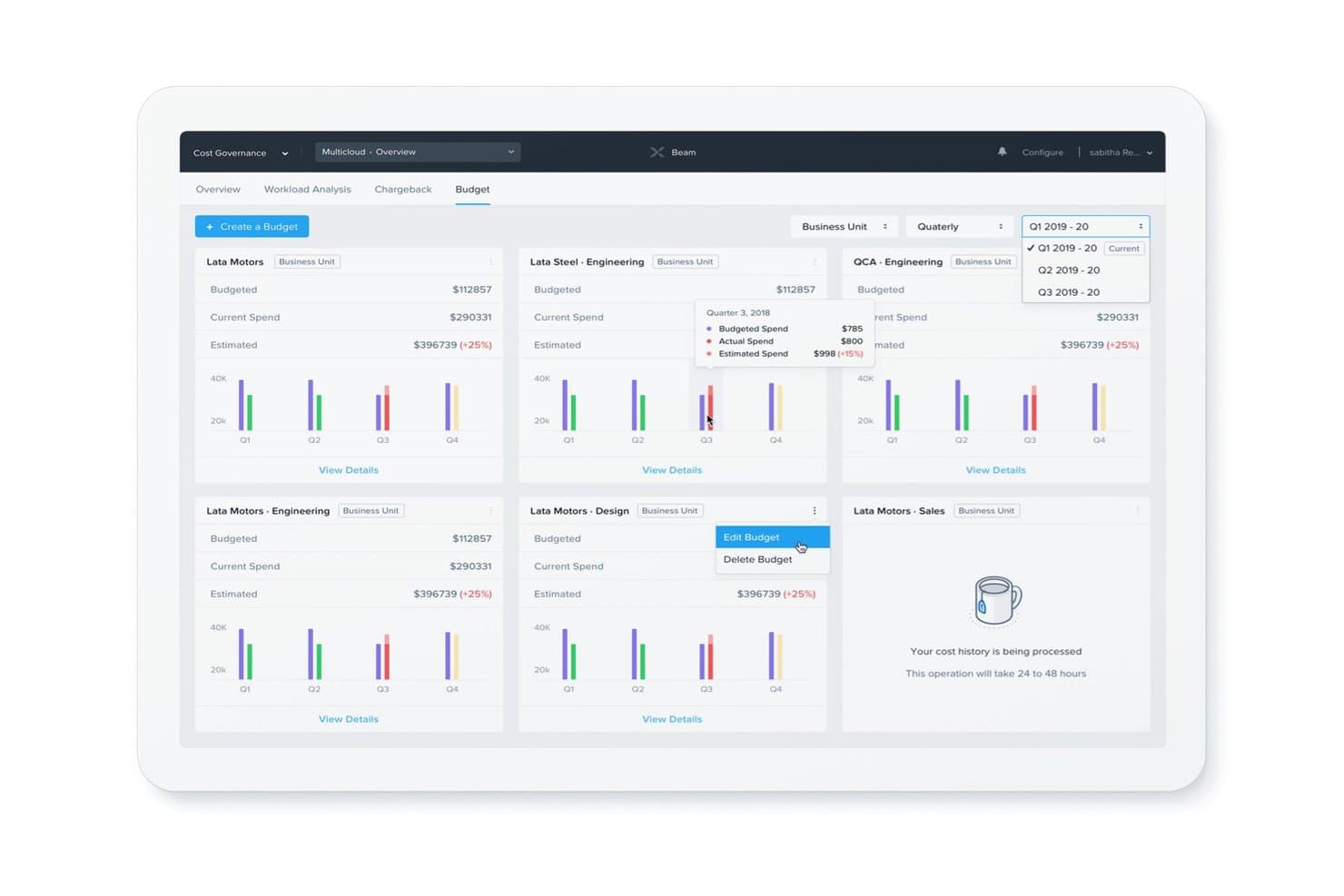
Nutanix Objects Storage lets users track and manage budgets across business units quarterly. Nutanix Objects Storage is an S3-compatible, software-defined object storage solution that pools and virtualizes underlying HCI resources into a scalable global namespace, with built-in deduplication, erasure coding, cloud tiering, and WORM immutability managed through a single Prism Central console.
Who Is Nutanix Objects Storage Best For?
Nutanix Objects Storage is a strong fit for IT teams already running Nutanix HCI who need petabyte-scale, S3-compatible object storage without adding a separate storage platform.
Why I Picked Nutanix Objects Storage
Nutanix Objects Storage earns its spot on my shortlist because it's the only solution here that pools HCI resources directly into a petabyte-scale S3-compatible namespace without adding a separate storage platform. I love how WORM bucket policies, object versioning, and Data Lens anomaly detection layer together to block ransomware before it spreads. Cloud tiering to AWS S3 and Azure Blob runs as a native policy, so on-premises capacity shrinks automatically without manual data movement.
Nutanix Objects Storage Key Features
- S3 Select query pushdown: Runs SQL-like filter queries directly at the object storage layer, cutting network and compute overhead for analytics workloads.
- Erasure coding (EC-X): Distributes data and parity across nodes to maximize usable capacity while maintaining fault tolerance.
- Multi-cluster federated namespace: Links multiple Objects clusters across sites into a single logical namespace, scaling to multi-petabyte capacity.
- Lifecycle Management (LCM) one-click upgrades: Handles version upgrades for Objects Storage through Prism Central without manual intervention or downtime.
Nutanix Objects Storage Integrations
Nutanix Objects Storage integrates with Veeam, Commvault, HYCU, Veritas, Snowflake, Splunk, AWS S3, and Azure Blob Storage. It supports Amazon S3 API v4, REST APIs, Terraform, and Ansible for custom automation.
Pros and Cons
Pros:
- Hybrid cloud tiering to AWS and Azure
- Built-in ransomware protection with WORM buckets
- Delivers true global namespace federation
Cons:
- Opaque and custom-quoted pricing model
- Requires existing Nutanix infrastructure investment
Learn more about Nutanix Objects Storage: Best for VMware-native hyperconverged storage
- Free demo available
- Pricing upon request

VMware vSAN tracks cluster-level VM performance metrics in real time. VMware vSAN is a software-defined storage virtualization platform that pools local NVMe and SSD drives from ESXi hosts into a shared, distributed datastore with built-in deduplication, erasure coding, encryption, and native snapshot-based data protection.
Who Is VMware vSAN Best For?
VMware vSAN is the right fit for enterprise IT teams already running VMware vSphere or VMware Cloud Foundation who want native, hyperconverged storage without adding a separate SAN or NAS.
Why I Picked VMware vSAN
VMware vSAN earns its spot as one of the best on my shortlist because it's the only storage virtualization platform that's truly native to vSphere, not just compatible with it. I picked it specifically for shops running VMware Cloud Foundation, where vSAN pools local NVMe and SSD drives across ESXi hosts into a single distributed datastore managed entirely through vCenter. What I find compelling is the Express Storage Architecture, which delivers inline deduplication and compression without a performance hit, plus immutable snapshots through vSAN Data Protection for ransomware resilience.
VMware vSAN Key Features
- Storage policy-based management (SPBM): Assigns protection, performance, and capacity settings to individual VMs through policy definitions rather than manual LUN configuration.
- Stretched cluster support: Extends a single vSAN cluster across two geographically separate sites for active-active VM availability at the metro level.
- vSAN File Services: Provides NFS-based shared file storage alongside block storage, served directly from the vSAN cluster without a separate NAS appliance.
- VM I/O Trip Analyzer: Diagnoses storage performance issues by tracing I/O paths for up to eight VMs simultaneously within the vSphere Client.
VMware vSAN Integrations
VMware vSAN has native integrations across the VMware ecosystem, including vSphere, vCenter Server, SDDC Manager, NSX, HCX, Site Recovery Manager, and Aria Operations. It supports Kubernetes through CSI, works with Veeam, Commvault, and Rubrik, and offers REST APIs, PowerCLI, and Terraform.
Pros and Cons
Pros:
- Immutable snapshots for ransomware resilience
- Per-VM QoS and policy controls
- Deep VMware vSphere and VCF integration
Cons:
- Licensing and hardware requirements are complex
- Locked to VMware ESXi environments only
Learn more about VMware vSAN:

Scality centralizes storage health, capacity, and S3 endpoints in one dashboard. Scality is a software-defined object storage platform that pools commodity hardware into a unified S3 namespace, spanning edge nodes, on-premises data centers, and multi-cloud environments across all three of its product lines: RING, ARTESCA, and ADI.
Who Is Scality Best For?
Scality is a strong fit for storage architects and IT ops teams managing petabyte-to-exabyte workloads across distributed, multi-site environments who need hardware-agnostic autonomy without proprietary lock-in.
Why I Picked Scality
Scality earns its spot on my shortlist because its MultiScale Architecture pools commodity hardware from any OEM into a single S3 namespace that scales independently across capacity, performance, and geography, from a 20 TB edge node all the way to exabyte-class deployments. I'm particularly impressed by ADI's Guardian AI agent, which autonomously handles rebalancing, healing, and lifecycle tiering across NVMe, HDD, tape, and cloud without manual intervention. That level of autonomous operation is what makes exabyte-scale storage genuinely manageable.
Scality Key Features
- Maestro fleet management console: Centralized dashboard for monitoring health, pushing software updates, and tracking capacity across multi-site ARTESCA deployments without VPN access to individual sites.
- S3 Object Lock (WORM): Enforces immutable retention locks at the API and storage layers, keeping data protected even if admin credentials are compromised.
- Multi-tenant namespace isolation: Per-tenant quotas, IAM policies, and performance controls segment workloads across shared infrastructure for cloud service providers and sovereign cloud deployments.
- Open-source COSI and CSI drivers: Native Kubernetes drivers for S3 bucket provisioning and file storage volumes, included at no additional license cost with RING and ARTESCA.
Scality Integrations
Scality integrates with Veeam, Commvault, Cohesity, Rubrik, VMware vSphere/ESXi, VMware Cloud Director, Kubernetes through COSI and CSI drivers, and AWS DataSync. Its S3 API and management APIs support custom integrations.
Pros and Cons
Pros:
- S3 object lock enforces API-layer immutability
- Pools commodity hardware from any OEM
- Autonomous AI handles rebalancing and healing
Cons:
- Initial setup complexity requires storage expertise
- Native block virtualization is not supported
Learn more about Scality:
Alte software-uri de virtualizare a stocării
Mai jos este o listă cu software-uri suplimentare de virtualizare a stocării pe care le-am inclus în lista scurtă, dar care nu au ajuns în top. Merită cu siguranță să le analizați.
- 11HPEBest for disaggregated NVMe scale-out storage
- 12IBM Storage FusionBest for OpenShift-native hybrid cloud storage
- 13StarWind Virtual SANBest for 2-node HA on commodity hardware
- 14Quantum ActiveScaleBest for air-gapped tape and WORM object storage
- 15MinIOBest for S3-native AI storage on commodity hardware
- 16Oracle VirtualizationBest for OCI-native on-premises VM storage
- 17Microsoft Storage Spaces Direct (S2D)Best for Windows-native HCI storage at no added cost
Recenzii asociate ale software-urilor IT
Dacă încă nu ați găsit aici ceea ce căutați, consultați aceste instrumente alternative pe care le-am testat și evaluat.
- Software de monitorizare a rețelei
- Software de monitorizare a serverelor
- Soluții SD-WAN
- Instrumente de monitorizare a infrastructurii
- Analizor de pachete
- Instrumente de monitorizare a aplicațiilor
How I Evaluate Storage Virtualization Software
I split my evaluation into baseline capabilities a tool must cover—like pooling and provisioning—and the differentiators that separate solid options from the best ones.
Core Functionality (Table Stakes For This List)
When I'm selecting tools for my list, I rank each one on a scale from 0 (does not offer the functionality) to 5 (excels in this area) for each core functionality listed below. I then calculate the tool's total score into a percentage, using 65% as a benchmark to help assess its overall fit for the list.
- Storage Abstraction & Pooling: I look at how well a tool combines physical disks, arrays, or nodes into logical pools that you can carve up and allocate on demand.
- Hardware & Environment Support: Heterogeneous storage is the norm, so I check whether a platform works across different vendors, array types, and hybrid environments.
- Centralized Storage Management: I evaluate the management console for provisioning, monitoring, and policy controls—things like RBAC, alerting, and API access matter here.
- Data Migration & Mobility: Moving data between tiers or arrays without taking applications offline is a real-world need I look for, including automated rebalancing options.
- Capacity & Performance Optimization: Features like thin provisioning, deduplication, compression, and automated tiering tell me how well a tool helps you stretch existing capacity.
- Data Protection & Availability: I check for snapshots, replication, and failover capabilities—especially whether recovery can be orchestrated across sites during an outage.
Once I have a list of tools that meet the criteria, I consider what sets each platform apart.
Differentiating Factors (What Sets Vendors Apart)
Here's how I compare and contrast different vendors:
Standout Features
Ransomware resilience is a big one for me. I check whether a platform offers immutable snapshots and air-gapped copies, since those are the features that actually protect you when an attack hits. API-first automation also matters a lot—I look for Terraform providers and Ansible modules that let you manage storage as code inside existing CI/CD pipelines. Cloud tiering rounds things out by letting you offload cold data to object storage like AWS S3 or Azure Blob, which keeps primary pool costs down without sacrificing accessibility.
Beyond Features
I look at licensing models closely because some vendors bundle replication and encryption in the base license while others charge per add-on, which can double your total cost. Deployment flexibility matters too—I check whether a platform ships as a software-only install, a virtual appliance, or a Kubernetes CSI driver, since that determines how well it fits into your existing stack. I also evaluate compliance certifications like FIPS 140-2 and SOC 2, especially for teams in regulated industries where missing a certification means a tool is off the table entirely.
Cum să alegeți software-ul de virtualizare a stocării
Este ușor să vă pierdeți în liste lungi de funcții și structuri complexe de prețuri. Pentru a vă ajuta să rămâneți concentrat în timp ce parcurgeți procesul unic de selecție a software-ului, iată o listă de factori de care trebuie să țineți cont:
| Factor | Ce trebuie luat în considerare |
|---|---|
| FactorScalabilitate | Ce trebuie luat în considerarePoate soluția să facă față cerințelor de stocare în creștere? Căutați opțiuni care acceptă medii de mari dimensiuni și dezvoltarea viitoare fără degradarea performanței. |
| FactorIntegrări | Ce trebuie luat în considerareSe integrează cu sistemele de stocare existente, furnizorii de cloud și software-ul pentru mașini virtuale? Asigurați compatibilitatea cu furnizori importanți precum VMware, AWS și Microsoft Azure. |
| FactorPosibilitate de personalizare | Ce trebuie luat în considerarePuteți modifica politicile, automatiza alocarea spațiului de stocare și personaliza controalele de acces? O soluție flexibilă vă permite să adaptați gestionarea stocării la nevoile dumneavoastră. |
| FactorUșurință în utilizare | Ce trebuie luat în considerareEste interfața de administrare intuitivă? Căutați un tablou de bord cu instrumente clare de monitorizare, configurare simplă și o curbă de învățare redusă pentru echipa dumneavoastră. |
| FactorBuget | Ce trebuie luat în considerarePrețul corespunde capacității de stocare și funcțiilor de care aveți nevoie? Verificați dacă prețurile cresc în mod previzibil și dacă există taxe suplimentare pentru funcțiile premium. |
| FactorMăsuri de securitate | Ce trebuie luat în considerareCât de bine protejează datele sensibile? Asigurați-vă că include criptare, controale de acces și conformitate cu standarde de securitate precum ISO 27001 și SOC 2. |
| FactorOptimizarea performanței | Ce trebuie luat în considerareInclude echilibrarea volumului de lucru sau stocarea în cache bazată pe inteligență artificială pentru îmbunătățirea performanței? Optimizarea inteligentă poate reduce latența și îmbunătăți eficiența stocării. |
| FactorRecuperarea datelor și redundanța | Ce trebuie luat în considerareOferă opțiuni de backup, comutare automată și recuperare în caz de dezastru? Redundanța încorporată contribuie la minimizarea timpului de nefuncționare și a pierderilor de date în cazul defecțiunilor. |
Tendințe în software-ul de virtualizare a stocării
În cercetarea mea, am analizat nenumărate actualizări de produse, comunicate de presă și jurnale de lansare de la diferiți furnizori de software pentru virtualizarea stocării. Organizațiile integrează adesea aceste soluții cu software DCIM de top pentru capacități îmbunătățite de gestionare a centrelor de date. Iată câteva dintre tendințele emergente pe care le urmăresc:
- Optimizarea stocării bazată pe inteligență artificială: Tot mai mulți furnizori folosesc inteligența artificială pentru a analiza tiparele de utilizare a stocării și a optimiza alocarea resurselor în timp real. Acest lucru reduce risipa, îmbunătățește performanța și minimizează necesitatea ajustărilor manuale.
- Analiză predictivă pentru planificarea capacității: Soluțiile de stocare integrează învățarea automată pentru a anticipa necesarul viitor de stocare pe baza utilizării istorice. Acest lucru ajută echipele IT să prevină lipsa capacității și să evite supradimensionarea inutilă.
- Adoptarea stocării definite prin software (SDS): Companiile se îndepărtează de dependența tradițională de hardware în favoarea soluțiilor SDS, care permit gestionarea stocării la nivel de software. Această tendință sporește flexibilitatea și simplifică extinderea în medii hibride și multi-cloud.
- Protecția și recuperarea în urma atacurilor ransomware: Platformele de virtualizare a stocării integrează funcții de securitate încorporate, precum instantanee imuabile și opțiuni de recuperare automatizată, pentru a ajuta organizațiile să reducă amenințările ransomware.
- Stocarea ca serviciu (STaaS): Tot mai mulți furnizori oferă soluții de stocare pe bază de abonament, care permit companiilor să plătească doar pentru ceea ce utilizează. Acest lucru elimină costurile inițiale ridicate și oferă stocare scalabilă, adaptată nevoilor în schimbare.
Ce este software-ul de virtualizare a stocării?
Software-ul de virtualizare a stocării combină spațiul de stocare din sisteme diferite într-un singur loc, astfel încât echipele să poată gestiona mai ușor capacitatea. Este utilizat de echipele IT, administratorii de sistem și inginerii de infrastructură care au nevoie de stocare flexibilă, extindere simplificată și mai puține limitări hardware.
Funcțiile de reunire în grup, automatizare și gestionare centralizată ajută la organizarea stocării, reduc configurarea manuală și mențin disponibilitatea datelor în diferite medii. În general, acest software ajută organizațiile să gestioneze necesarul tot mai mare de stocare într-un mod mai eficient și mai previzibil.
Funcțiile software-ului de virtualizare a stocării
Atunci când selectați software pentru virtualizarea stocării, urmăriți următoarele funcții esențiale:
- Alocare elastică: Alocă spațiul de stocare la cerere, în loc să aloce în prealabil cantități fixe, reducând spațiul irosit și îmbunătățind eficiența.
- Deduplicarea datelor: Elimină copiile duplicate ale datelor pentru a optimiza capacitatea de stocare și a reduce redundanța.
- Clasificarea automată pe niveluri: Mută datele accesate frecvent pe stocare de înaltă performanță, iar datele utilizate mai rar pe niveluri de stocare eficiente din punct de vedere al costurilor.
- Instantanee și clonare: Creează copii instantanee ale datelor pentru backup, recuperare în caz de dezastru sau medii de testare, fără a consuma spațiu de stocare suplimentar.
- Comutare automată și redundanță: Asigură disponibilitatea ridicată prin redirecționarea automată a sarcinilor de stocare în cazul defecțiunilor hardware.
- Reunirea stocării într-un grup: Combină mai multe resurse fizice de stocare într-un singur grup virtualizat pentru o gestionare și o alocare mai simple.
- Analiză predictivă: Utilizează inteligența artificială pentru a monitoriza utilizarea stocării și a anticipa necesarul viitor de capacitate, prevenind blocajele de performanță.
- Controale de acces bazate pe roluri: Limitează accesul la stocare la utilizatorii autorizați, îmbunătățind securitatea și conformitatea.
- Compatibilitate multi-cloud: Permite gestionarea stocării în medii locale, clouduri private și publice.
- Criptare și protecția datelor: Protejează datele în repaus și în tranzit, prevenind accesul neautorizat și asigurând conformitatea cu standardele de securitate.
Beneficiile software-ului de virtualizare a stocării
Implementarea software-ului de virtualizare a stocării oferă mai multe beneficii pentru echipa și compania dumneavoastră. Iată câteva dintre acestea:
- Utilizarea mai eficientă a resurselor: Agregă stocarea de pe mai multe dispozitive, asigurând utilizarea eficientă a capacității și eliminând spațiul irosit. Organizațiile își pot valida implementările de virtualizare a stocării prin intermediul software-ului pentru laboratoare IT virtuale pentru a asigura performanța optimă înainte de implementarea completă.
- Costuri mai mici de stocare: Reduce necesitatea actualizărilor costisitoare ale hardware-ului prin optimizarea stocării existente cu ajutorul deduplicării și al alocării dinamice.
- Disponibilitate îmbunătățită a datelor: Asigură funcționarea neîntreruptă prin mecanisme de comutare automată și echilibrare automată a sarcinilor de lucru, minimizând întreruperile serviciilor.
- Gestionare simplificată a stocării: Oferă un tablou de bord centralizat pentru monitorizarea, alocarea și gestionarea stocării în diferite medii.
- Copii de siguranță și recuperare mai rapide: Utilizează funcții de instantanee și clonare pentru a restaura rapid datele în cazul unor defecțiuni sau amenințări cibernetice.
- Scalabilitate fără întreruperi: Extinde dinamic capacitatea de stocare fără a perturba operațiunile, susținând dezvoltarea afacerii.
- Securitate și conformitate îmbunătățite: Criptează datele, aplică mecanisme de control al accesului și păstrează jurnale de audit pentru a contribui la îndeplinirea cerințelor de reglementare.
Costurile și prețurile software-ului de virtualizare a stocării
Selectarea software-ului de virtualizare a stocării sau a altor soluții VDI necesită înțelegerea diferitelor modele și planuri de preț disponibile. Costurile variază în funcție de funcții, dimensiunea echipei, suplimente și multe altele. Tabelul de mai jos prezintă planurile uzuale, prețurile medii ale acestora și funcțiile incluse de obicei în soluțiile software de virtualizare a stocării:
Tabel comparativ al planurilor pentru software-ul de virtualizare a stocării
| Tipul planului | Preț mediu | Funcții comune |
|---|---|---|
| Tipul planuluiPlan gratuit | Preț mediu$0 | Funcții comuneAgregarea de bază a stocării, deduplicarea limitată a datelor, acces pentru un singur utilizator și asistență din partea comunității. |
| Tipul planuluiPlan personal | Preț mediu$10-$50/utilizator/lună | Funcții comuneGestionarea stocării pe mai multe dispozitive, alocare dinamică, suport pentru instantanee și analize de bază. |
| Tipul planuluiPlan pentru companii | Preț mediu$100-$500/utilizator/lună | Funcții comuneAutomatizare avansată, software de stocare a obiectelor bazat pe inteligență artificială, funcții de disponibilitate ridicată și controale de acces bazate pe roluri. |
| Tipul planuluiPlan pentru întreprinderi | Preț mediuPreț personalizat | Funcții comuneIntegrări personalizate, asistență dedicată, gestionarea conformității, analize predictive și compatibilitate cu mai multe clouduri. |
Întrebări frecvente despre software-ul de virtualizare a stocării
Iată câteva răspunsuri la întrebările frecvente despre software-ul de virtualizare a stocării:
Cum îmbunătățește virtualizarea stocării gestionarea datelor?
Virtualizarea stocării consolidează mai multe dispozitive de stocare într-o singură entitate ușor de gestionat, simplificând gestionarea datelor. Această abordare unificată permite echipei dumneavoastră să aloce, să monitorizeze și să optimizeze mai eficient resursele de stocare, reducând volumul de lucru administrativ și minimizând erorile.
Poate funcționa virtualizarea stocării cu hardware-ul existent?
Da, virtualizarea stocării este concepută pentru a se integra cu configurații hardware diverse și cu alte soluții software de virtualizare a serverelor. Aceasta abstractizează dispozitivele fizice de stocare, permițând echipei dumneavoastră să gestioneze coerent diferite sisteme de stocare. Această flexibilitate înseamnă că puteți valorifica la maximum investițiile actuale fără a fi necesare upgrade-uri imediate ale hardware-ului.
Care sunt posibilele provocări ale implementării virtualizării stocării?
Deși virtualizarea stocării oferă numeroase beneficii, provocările pot include complexitatea configurării inițiale și asigurarea compatibilității cu sistemele vechi. Este esențial să planificați temeinic și să implicați profesioniști cu experiență pentru a aborda eficient aceste probleme, asigurând o tranziție fără probleme și performanțe optime.
Cum afectează virtualizarea stocării securitatea datelor?
Virtualizarea stocării poate îmbunătăți securitatea datelor prin centralizarea controlului și implementarea unor protocoale de securitate uniforme în toate resursele de stocare. Cu toate acestea, este esențial să configurați corect setările de securitate și să mențineți actualizări regulate pentru a vă proteja împotriva potențialelor vulnerabilități.
Este virtualizarea stocării potrivită pentru întreprinderile mici?
Desigur, virtualizarea stocării poate aduce beneficii întreprinderilor de toate dimensiunile. Pentru întreprinderile mici, aceasta oferă gestionarea rentabilă a stocării, scalabilitate și o utilizare îmbunătățită a resurselor, permițând echipei dumneavoastră să se adapteze creșterii fără modificări semnificative ale infrastructurii.
Cum influențează virtualizarea stocării performanța sistemului?
Atunci când este implementată corect, virtualizarea stocării poate îmbunătăți performanța sistemului prin optimizarea alocării resurselor și permiterea unui acces mai rapid la date. Cu toate acestea, o planificare necorespunzătoare sau o configurare incorectă pot duce la blocaje de performanță, așadar este esențial să urmați cele mai bune practici în timpul implementării.Software-ul de virtualizare a stocării este un instrument care combină spațiul de stocare din sisteme diferite într-un singur loc, astfel încât echipele să poată gestiona mai ușor capacitatea. Este utilizat de echipele IT, administratorii de sisteme și inginerii de infrastructură care au nevoie de stocare flexibilă, scalare mai simplă și mai puține limitări hardware. Funcțiile de grupare, automatizare și gestionare centralizată ajută la organizarea stocării, reduc configurarea manuală și mențin disponibilitatea datelor în toate mediile. În general, acest software ajută organizațiile să gestioneze nevoile tot mai mari de stocare într-un mod mai eficient și mai previzibil.