

Den beste programvaren for lagringsvirtualisering hjelper team med å kombinere lagring fra ulike systemer, forbedre ytelsen og administrere kapasiteten uten å være avhengige av isolert maskinvare. Disse verktøyene gjør det enklere å skalere lagringen, redusere nedetid som følge av maskinvareproblemer og holde data tilgjengelig på tvers av miljøer.
Når feilkonfigureringer avbryter tilgangen, manuell klargjøring bremser distribusjoner eller lagring i siloer gjør det vanskelig å følge med på bruken, kan effektiviteten og påliteligheten reduseres. Disse utfordringene øker vedlikeholdsarbeidet og gjør det vanskeligere for IT- og ingeniørteam å støtte applikasjoner som er avhengige av jevn lagringsytelse.
Med over 20 år i bransjen som teknologidirektør har jeg testet og vurdert dusinvis av løsninger for lagringsvirtualisering for å evaluere ytelsen, integrasjonskvaliteten og brukervennligheten. Denne veiledningen dekker funksjoner, fordeler og ulemper samt bruksområder som passer best, slik at du kan velge riktig verktøy.
Why Trust Our Software Recommendations
6,700+
Reviews
20
Industry experts
16+
Evaluation factors
14
Years
Our team has been testing and reviewing software since 2012. As tech leaders ourselves, we know how difficult—and important—it is to choose the right software.
For this guide, we evaluated tools using hands-on testing and independent research, scoring tools using our selection criteria.
Our reviews reflect our human editorial judgment, not a sales pitch.
Expert reviewers:
- Paulo Gardini MiguelTech Director
 Tim FisherVP of AI
 Gabriel RosasTech Lead & Software Architect
 Christhian GruhnTech Lead & Platform Architect

Sammenligningstabell: Programvare for lagringsvirtualisering
Denne sammenligningstabellen oppsummerer prisopplysningene for mine beste utvalgte programmer for lagringsvirtualisering.
| Tool | Best For | Trial Info | Price | ||
|---|---|---|---|---|---|
| 1 | Best for unified block, object, and file at scale | Not available | Pricing upon request | Website | |
| 2 | Best for ONTAP data management on commodity hardware | 90-day free trial | Pricing upon request | Website | |
| 3 | Best for data reduction across virtualized arrays | Free demo available | Pricing upon request | Website | |
| 4 | Best for Kubernetes-native container storage QoS | 30-day free trial | Pricing upon request | Website | |
| 5 | Best for open-source Ceph and ZFS at scale | Free demo available | Pricing upon request | Website | |
| 6 | Best for non-disruptive migration across mixed arrays | 30-day free trial | Pricing upon request | Website | |
| 7 | Best for policy-driven HCI storage at scale | 90-day free trial available | Pricing upon request | Website | |
| 8 | Best for HCI-native S3 object storage at scale | 60-day free trial | Pricing upon request | Website | |
| 9 | Best for VMware-native hyperconverged storage | Free demo available | Pricing upon request | Website | |
| 10 | Best for exabyte-scale object storage autonomy | 30-day free trial | Pricing upon request | Website |





Anmeldelser av den beste programvaren for lagringsvirtualisering
Nedenfor finner du mine detaljerte oppsummeringer av den beste programvaren for lagringsvirtualisering som kom med på kortlisten. Anmeldelsene mine gir en detaljert gjennomgang av de viktigste funksjonene, fordeler & ulemper, integrasjoner og ideelle bruksområder for hvert verktøy, slik at du kan finne det beste alternativet for deg.
 Best for unified block, object, and file at scale
- Not available
- Pricing upon request
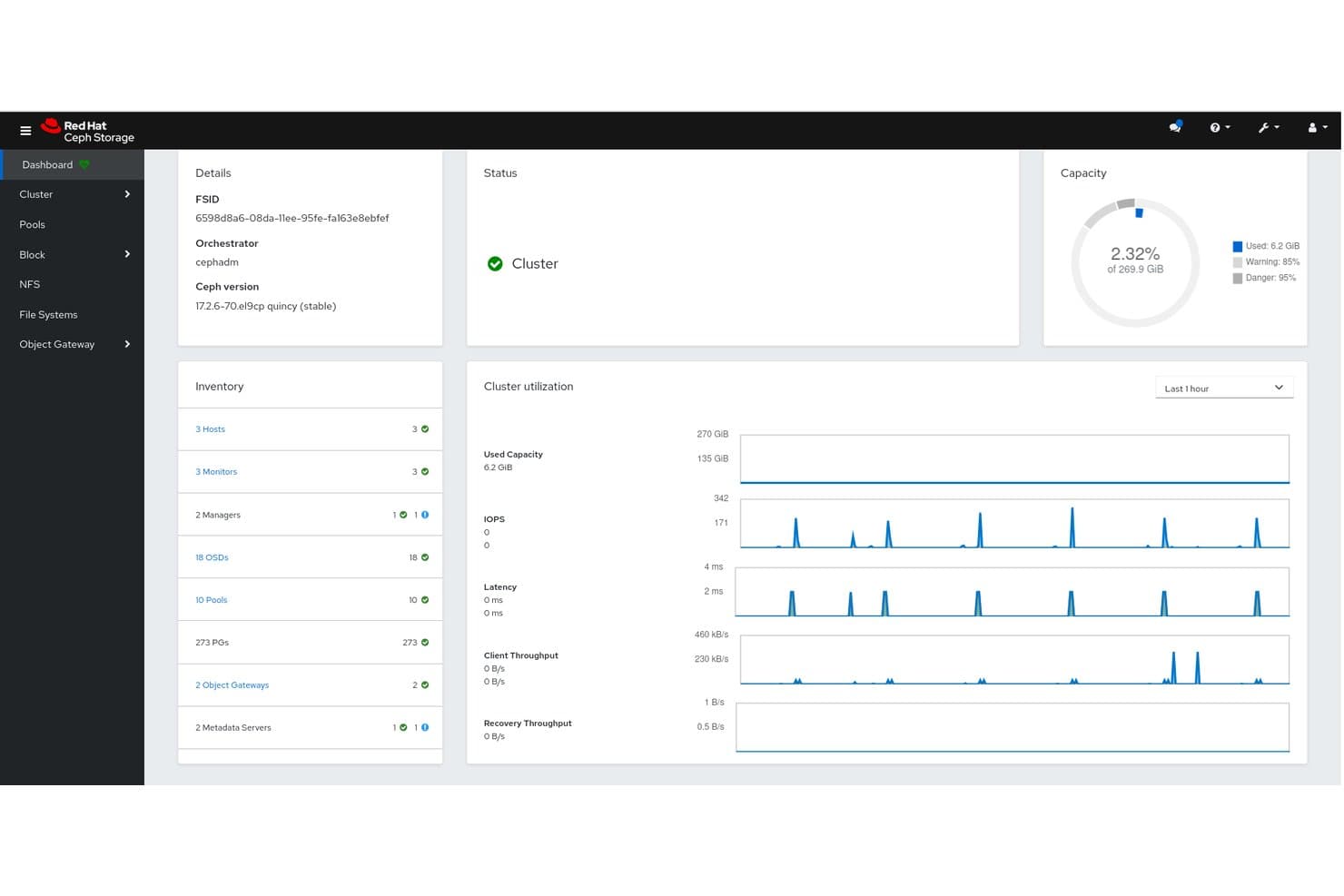
Red Hat Ceph Storage centralizes cluster health, capacity, and I/O metrics. Red Hat Ceph Storage is an open-source, software-defined storage platform that virtualizes commodity hardware into unified block (RBD), object (S3/Swift-compatible), and file (CephFS) storage pools managed from a single cluster.
Who Is Red Hat Ceph Storage Best For?
It's a strong fit for infrastructure teams running private cloud environments on OpenStack or OpenShift who need petabyte-scale, unified block, object, and file storage from a single cluster.
Why I Picked Red Hat Ceph Storage
Red Hat Ceph Storage earns its spot on my shortlist because its CRUSH algorithm does something genuinely hard: it pools commodity hardware into a single cluster that simultaneously serves block (RBD), object (S3/Swift), and file (CephFS) storage without siloing each protocol behind separate infrastructure. I'm particularly impressed by erasure coding support, which cuts raw storage overhead to roughly 1.5x compared to 3x for standard replication, and per-image QoS on RBD volumes, which keeps noisy workloads from starving others in multi-tenant environments.
Red Hat Ceph Storage Key Features
- CRUSH-based data placement: The CRUSH algorithm distributes data across OSDs automatically, ensuring balanced placement without a central lookup table.
- BlueStore inline compression: Ceph's native storage backend compresses data at write time, reducing on-disk footprint without a separate compression layer.
- Ceph Dashboard with embedded Grafana: A web-based GUI surfaces real-time cluster health, capacity, and performance metrics alongside customizable Grafana dashboards.
- FIPS 140-2 validated encryption: Encryption at rest and in transit is available using FIPS-validated cryptographic modules on certified Red Hat Enterprise Linux deployments.
Red Hat Ceph Storage Integrations
Red Hat Ceph Storage integrates with Red Hat OpenStack Services on OpenShift, Red Hat OpenShift, Kubernetes through Rook CSI, Prometheus, Grafana, Ansible Automation Platform, Veeam, Veritas, and TrilioVault. Its RESTful API supports custom integrations and CI/CD workflows.
Pros and Cons
Pros:
- Scales to petabytes with self-healing rebalancing
- Runs on commodity hardware without vendor lock-in
- Delivers unified block, object, and file storage
Cons:
- Documented slow data rebalancing after failures
- Requires OpenStack for current Red Hat deployments
Learn more about Red Hat Ceph Storage: Best for ONTAP data management on commodity hardware
- 90-day free trial
- Pricing upon request
NetApp organizes storage into layered virtual machines, aggregates, and RAID groups. NetApp ONTAP Select is a software-defined storage virtualization solution that deploys the full ONTAP 9 data management stack as a virtual machine on commodity hardware, supporting NFS, SMB, iSCSI, and NVMe protocols across single-node to 12-node cluster configurations.
Who Is NetApp Best For?
NetApp ONTAP Select is a strong fit for enterprise infrastructure teams that want full ONTAP 9 capabilities without investing in dedicated NetApp hardware.
Why I Picked NetApp
NetApp ONTAP Select earns its spot on my shortlist because it runs the full ONTAP 9 data management stack as a VM on commodity Intel or AMD hardware, which means I get enterprise-grade storage without locking into proprietary appliances. I particularly like the AFF-like inline deduplication, compression, and compaction that auto-enable on DAS SSD Premium deployments, plus SnapMirror-based replication that spans on-premises nodes and cloud targets like AWS S3 and Azure Blob.
NetApp Key Features
- MetroCluster SDS: Stretches a 2-node HA cluster across geographically separated sites with synchronous mirroring and up to 10ms round-trip latency tolerance.
- FabricPool cold-data tiering: Automatically moves inactive data to object storage targets including AWS S3, Azure Blob, and NetApp StorageGRID.
- SnapLock Enterprise: Enforces WORM-compliant immutable storage on select volumes to protect data against deletion or modification.
- Autonomous Ransomware Protection: Uses AI-driven analysis to detect abnormal storage activity patterns and flag potential ransomware events at the storage layer.
NetApp ONTAP Select Integrations
NetApp ONTAP Select integrates with VMware vSphere ESXi and vCenter, KVM, Veeam Backup & Replication, SnapCenter, and Active IQ Unified Manager. It also offers a REST API and Ansible roles for custom automation.
Pros and Cons
Pros:
- AFF-like deduplication and compression auto-enabled
- MetroCluster SDS for synchronous stretched clusters
- Full ONTAP stack runs on commodity hardware
Cons:
- Autonomous Ransomware Protection updates are manual
- No support for Fibre Channel front-end
Learn more about NetApp: Best for data reduction across virtualized arrays
- Free demo available
- Pricing upon request

Hitachi VSP 360 SDS manages multi-cloud inventory across on-premises, AWS, Google, and Azure. Hitachi Virtual Storage Platform E Series is an enterprise block storage virtualization platform that runs on SVOS to pool internal NVMe/SAS/HDD drives and third-party arrays into unified logical volumes, with scale-out clustering, automated tiering, and inline deduplication across virtualized environments.
Who Is Hitachi Virtual Storage Platform E Series Best For?
It's a strong fit for large enterprises running heterogeneous storage environments who need to consolidate third-party arrays under a single virtualization layer without replacing existing hardware.
Why I Picked Hitachi Virtual Storage Platform E Series
Hitachi VSP E Series earns its spot on my shortlist because of how it handles data reduction across virtualized arrays, which is genuinely rare at this scale. I'm impressed by Adaptive Data Reduction (ADR), which delivers AI-powered inline deduplication and compression with a contractual 4:1 guarantee. Paired with SVOS's ability to virtualize third-party arrays as locally managed volumes, you get meaningful efficiency gains without ripping out existing hardware.
Hitachi Virtual Storage Platform E Series Key Features
- Global-Active Device (GAD): Creates a virtual storage machine spanning two VSP arrays across two data centers for active-active synchronous mirroring with zero RPO.
- Virtual Storage Scale Out (VSSO): Scales clusters nondisruptively to 65 nodes and 130 controllers with automated workload mobility across nodes.
- Ops Center Automator: Automates end-to-end storage provisioning workflows with native ServiceNow integration for ticketing and orchestration.
- CyberSense ransomware detection: Scans storage data with 99.99% accuracy to identify ransomware-related corruption before it propagates.
Hitachi Virtual Storage Platform E Series Integrations
Integrations include Veeam Backup & Replication, Commvault IntelliSnap, VMware vSphere, Kubernetes, Proxmox VE, Ansible, and ServiceNow. Ops Center provides REST APIs for custom provisioning, monitoring, and automation workflows.
Pros and Cons
Pros:
- 4:1 AI-powered deduplication guarantee
- Virtualizes third-party arrays without forklift upgrades
- Zero RPO active-active mirroring between sites
Cons:
- Outdated graphical interface compared to peers
- No unified block and file storage
Learn more about Hitachi Virtual Storage Platform E Series: Best for Kubernetes-native container storage QoS
- 30-day free trial
- Pricing upon request
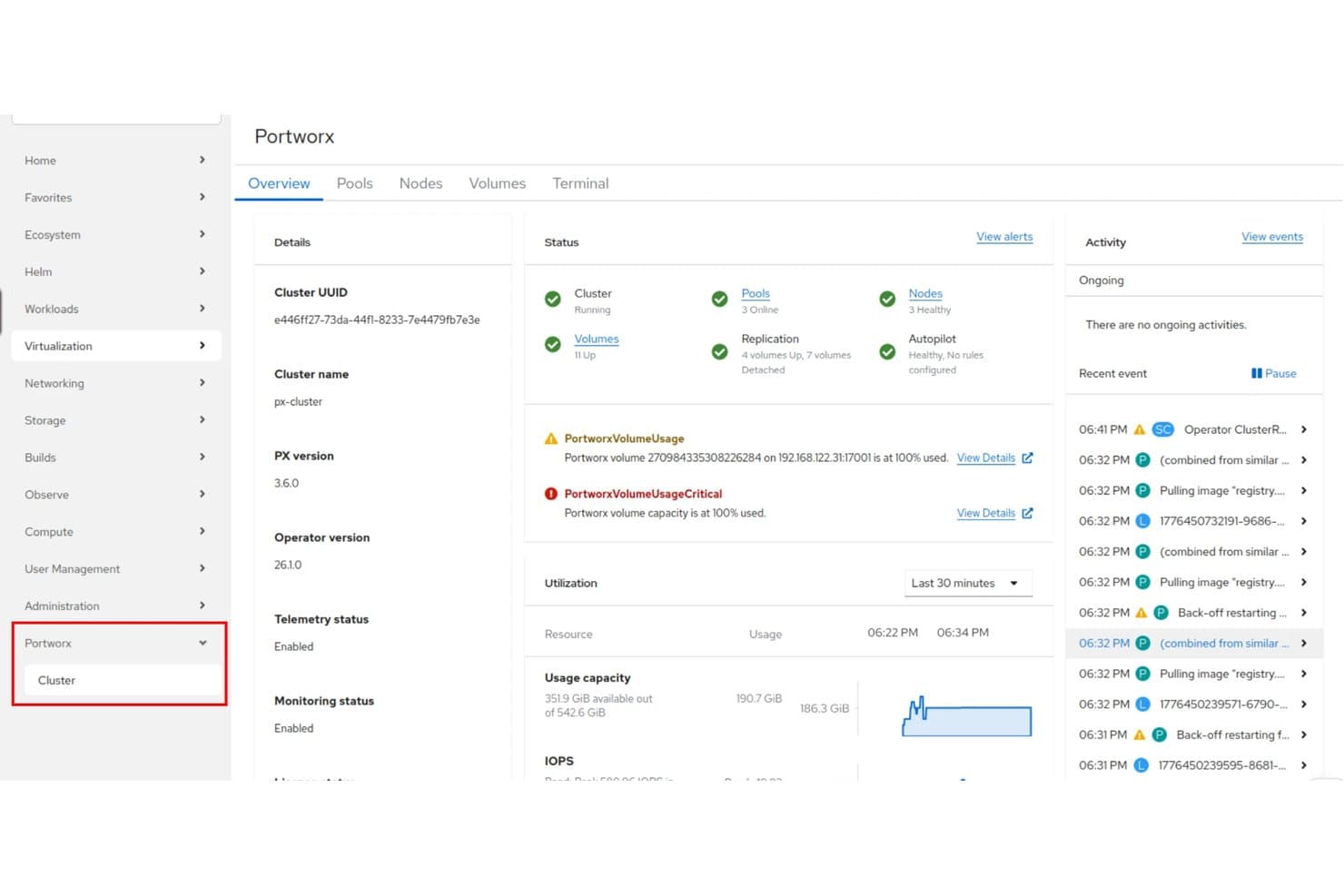
Portworx gives users a unified cluster dashboard with live storage metrics. Portworx is a Kubernetes-native storage virtualization platform that pools local NVMe, cloud block storage, and Pure Storage arrays into unified storage fabrics, with built-in capacity automation, per-volume QoS controls, data migration, and application-aware backup and disaster recovery.
Who Is Portworx Best For?
Portworx is a strong fit for platform and infrastructure teams running stateful workloads on Kubernetes who need granular, per-volume storage QoS controls across multi-cluster or multi-cloud environments.
Why I Picked Portworx
Portworx earns its spot on my shortlist because it's the only storage virtualization platform I've found that delivers per-volume QoS controls at the Kubernetes layer. I can set independent IOPS and bandwidth limits for individual volumes across read and write paths, which eliminates noisy-neighbor problems in multi-tenant clusters. Autopilot then handles dynamic PVC resizing automatically when thresholds are hit, so my team isn't scrambling to prevent capacity exhaustion during peak workloads.
Portworx Key Features
- Synchronous replication: Portworx replicates volumes across up to three nodes simultaneously, keeping stateful workloads available through node failures.
- CloudSnap: Sends volume snapshots directly to object storage (e.g., Amazon S3) for off-cluster backup and long-term retention.
- Stork scheduler: A Kubernetes scheduler extender that places pods on nodes where their volume replicas live, improving data locality and I/O performance.
- PX-StoreV2 NVMe backend: A purpose-built, high-performance datastore optimized for NVMe devices, designed for latency-sensitive AI/ML and database workloads.
Portworx Integrations
Portworx integrates with Kubernetes platforms including Red Hat OpenShift, Amazon EKS, Azure AKS, Google GKE, VMware VKS, and SUSE Rancher, plus Pure Storage FlashArray and FlashBlade. It supports KubeVirt, Ansible automation, and REST API connectivity for custom integrations.
Pros and Cons
Pros:
- Immutable backups with ransomware protection
- Automated PVC resizing prevents storage exhaustion
- Granular per-volume storage QoS on Kubernetes
Cons:
- Disaster recovery features require extra licensing
- Only works in Kubernetes environments
Learn more about Portworx: Best for open-source Ceph and ZFS at scale
- Free demo available
- Pricing upon request

45Drives lets users manage ZFS storage pools and filesystems visually. 45Drives is a storage virtualization platform that pairs open-source software—Ceph clustering, ZFS, Proxmox VE, and the Houston UI management dashboard—with its own high-density hardware to deliver unified block, file, and object storage across bare-metal, hyperconverged, and clustered environments.
Who Is 45Drives Best For?
45Drives is a strong fit for infrastructure teams running large-scale, on-premises storage who want the flexibility of open-source ZFS and Ceph without proprietary licensing costs.
Why I Picked 45Drives
I picked 45Drives as one of the best because no other vendor on this list delivers a fully integrated open-source storage stack, combining Ceph clustering, ZFS, and Proxmox VE, without a single proprietary licensing fee. I'm particularly impressed by Ceph's CRUSH-based pooling, which auto-rebalances data across nodes as you add capacity, and SnapShield, which isolates infected clients within seconds of detecting ransomware without disrupting the rest of the cluster.
45Drives Key Features
- Houston UI dashboard: A web-based management interface for provisioning ZFS pools, managing Ceph clusters, scheduling snapshots, browsing S3 objects, and monitoring hardware from a single pane of glass.
- Multi-protocol access: Serves block, file, and object storage simultaneously from a single Ceph pool via iSCSI, SMB, NFS, and S3-compatible endpoints.
- ZFS tiered caching: Supports L2ARC (NVMe read cache) and SLOG (NVMe write log) devices to accelerate performance on spinning-disk or hybrid storage arrays.
- Proxmox VE hyperconverged integration: Combines compute and storage on Proxinator nodes running Proxmox VE, with built-in HA, live VM migration, and Proxmox Backup Server for unified VM and storage management.
45Drives Integrations
45Drives offers native Proxmox VE integration, plus migration support for VMware ESXi and Microsoft Hyper-V. Houston UI supports rclone connections to 70+ cloud providers, including Backblaze B2, and S3-compatible backends such as MinIO, GarageHQ, Ceph RGW, and RustFS.
Pros and Cons
Pros:
- Ceph-based clustering enables near-limitless scalability
- SnapShield provides ransomware-activated data protection
- Fully open-source stack, no vendor lock-in
Cons:
- No native automated cloud tiering available
- Optimized for 45Drives hardware only
Learn more about 45Drives: Best for non-disruptive migration across mixed arrays
- 30-day free trial
- Pricing upon request
Visit WebsiteCustomer Rating:4.4/5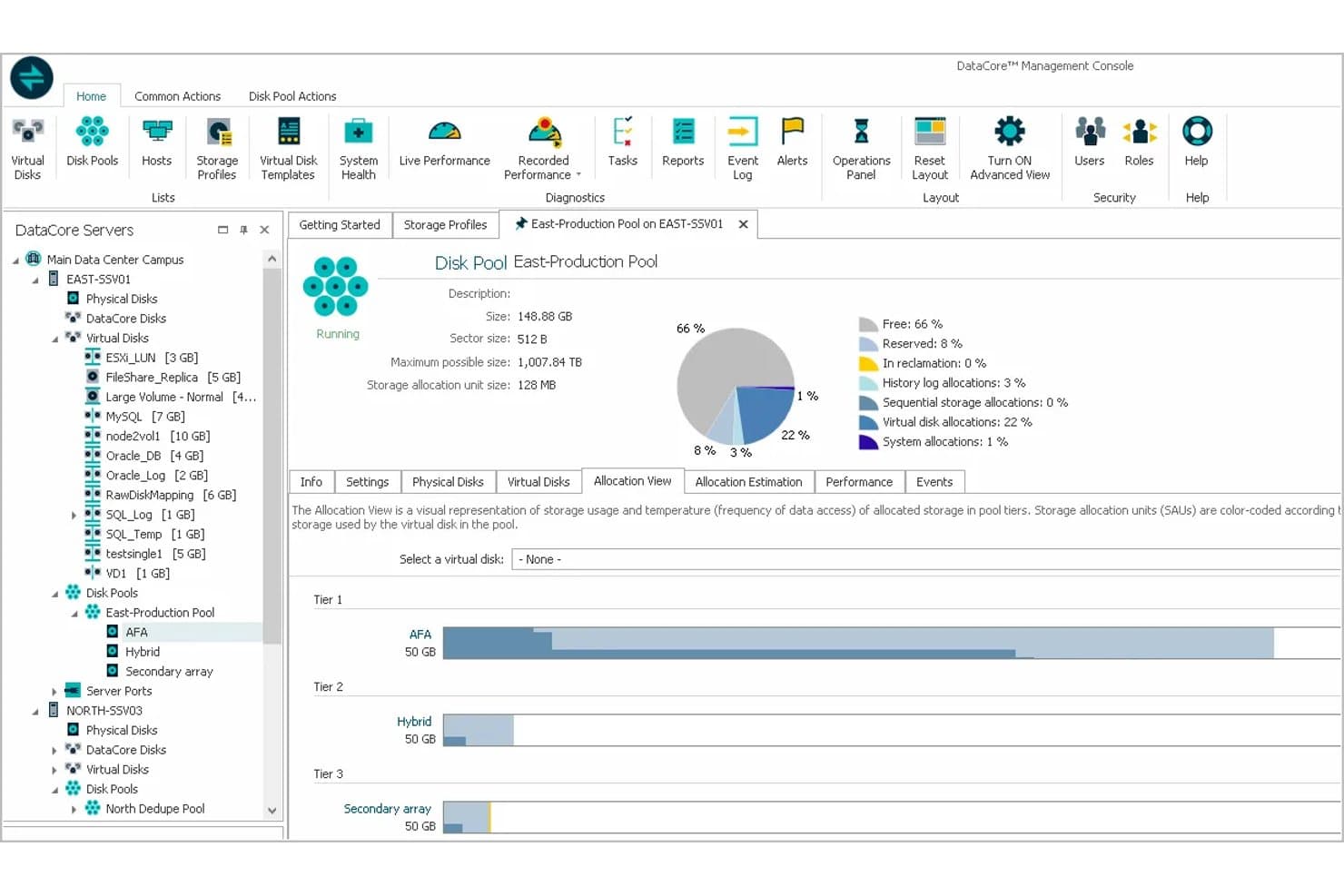
DataCore visualizes tiered storage allocation across AFA, Hybrid, and Secondary array pools. DataCore SANsymphony is a hardware-agnostic storage virtualization platform that pools block storage from mixed-vendor arrays—including SAN, DAS, SSD, and HDD—into unified virtual storage pools with auto-tiering, synchronous mirroring, inline deduplication, and non-disruptive live migration.
Who Is DataCore Best For?
DataCore SANsymphony is a strong fit for storage architects and data center administrators managing mixed-vendor arrays who need to migrate or refresh hardware without taking applications offline.
Why I Picked DataCore
DataCore SANsymphony earns its spot on my shortlist because it's built specifically for environments running mixed-vendor arrays where replacing hardware without downtime isn't optional—it's essential. I like that live migration runs transparently through the virtualization layer, so applications keep running while data moves between, say, an aging Dell array and a new Pure Storage AFA in the background. Adaptive Data Placement then continuously rebalances that data across up to 15 storage tiers using AI-driven access pattern analysis, with no manual policy tuning required.
DataCore Key Features
- Synchronous mirroring: Writes data simultaneously to two independent storage locations, delivering zero RPO and zero RTO failover without application interruption.
- DataCore Insight Services: An AI/ML analytics layer that delivers heat maps, bottleneck identification, and capacity forecasting across your entire storage estate.
- QoS controls: Regulates I/O allocation per workload so high-priority applications maintain performance when competing for shared storage resources.
- Inline deduplication and compression: Reduces data footprint before tiering infrequently accessed data to lower-cost storage classes.
DataCore Integrations
DataCore SANsymphony integrates with VMware vSphere, Microsoft Hyper-V, Veeam Backup & Replication, and OpenStack, with Kubernetes CSI support via DataCore Puls8. REST API and PowerShell support custom automation, while AWS and Azure connectivity uses gateway appliances.
Pros and Cons
Pros:
- Zero RPO/RTO with synchronous mirroring
- Pools storage from any hardware vendor
- Enables live migration without application downtime
Cons:
- AI analytics unavailable for perpetual licenses
- Requires Windows Server as host system
Learn more about DataCore: Best for policy-driven HCI storage at scale
- 90-day free trial available
- Pricing upon request
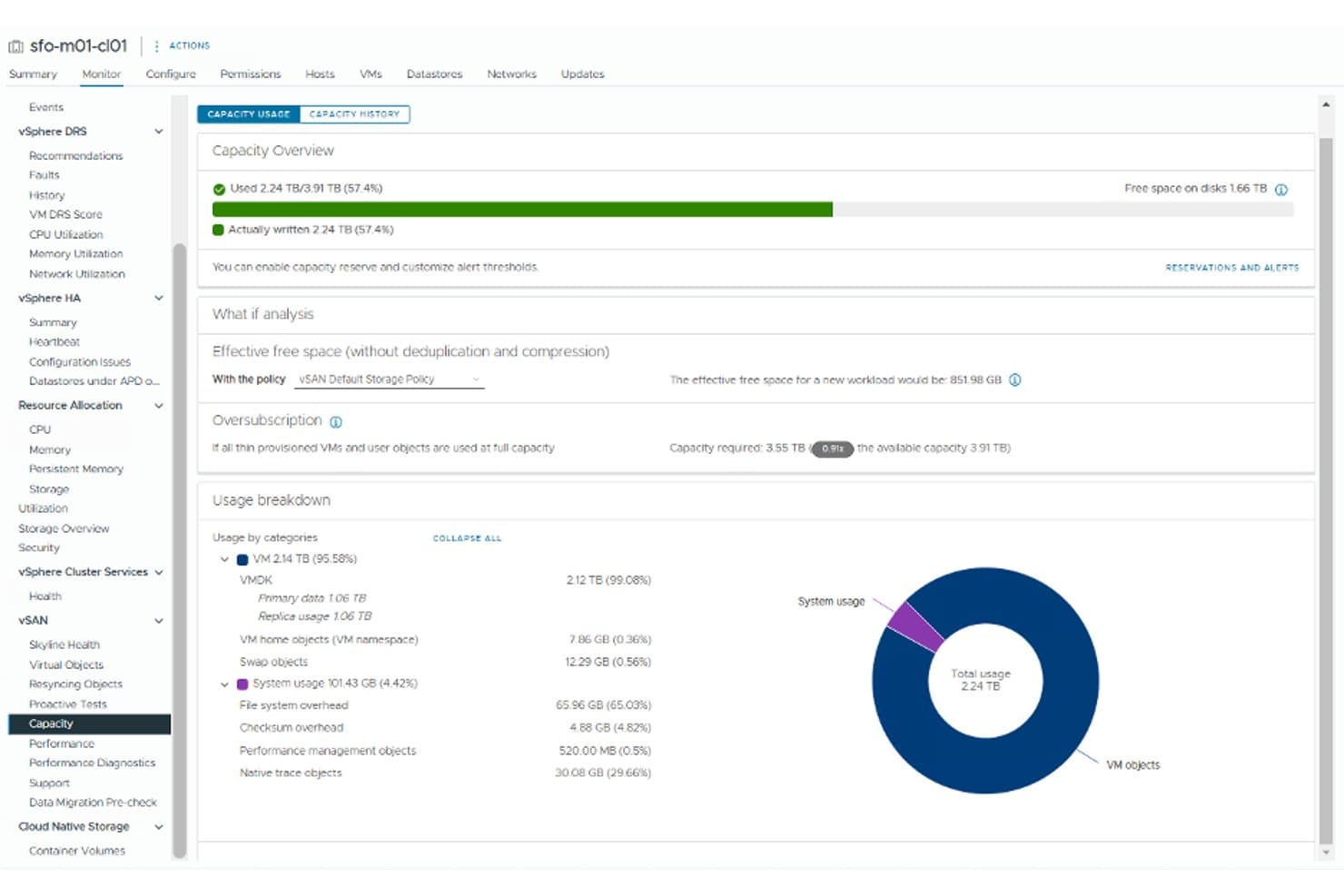
vSphere tracks vSAN storage capacity usage and oversubscription at a glance. VMware vSphere is an enterprise virtualization platform that virtualizes and pools direct-attached storage across ESXi hosts into shared datastores via vSAN, while supporting external SAN/NAS abstraction and policy-based storage management through SPBM.
Who Is vSphere Best For?
vSphere is a strong fit for enterprise IT teams running large-scale virtualized environments who need policy-driven storage management across hundreds or thousands of VMs.
Why I Picked vSphere
vSphere earns its spot on my shortlist because no other platform matches its depth of policy-driven storage management at enterprise scale. I'm particularly impressed by SPBM, which lets you define fault tolerance, performance tier, and data services as per-VM policies rather than manually configuring each datastore. Pair that with vSAN ESA's support for up to 200 snapshots per VM and immutable snapshot protection, and you get a storage virtualization platform built for environments where consistency and resilience across hundreds of VMs isn't optional.
vSphere Key Features
- Storage vMotion: Migrates VM disk files between datastores live, with no application downtime, so you can rebalance storage or evacuate hosts without a maintenance window.
- vSAN automated rebalancing: Redistributes data across cluster nodes automatically as hosts are added or removed to maintain consistent performance.
- vSphere REST API and PowerCLI support: Lets you script and automate storage provisioning, lifecycle management, and configuration changes across your entire vSphere environment.
- RAID 5/6 erasure coding: Reduces raw storage overhead compared to mirroring while maintaining configurable fault tolerance across vSAN cluster nodes.
vSphere Integrations
vSphere integrates with Veeam Backup & Replication, Commvault, Rubrik, and Zerto through VADP, plus VMware Cloud on AWS and VMware HCX for hybrid mobility. REST API, PowerCLI, Ansible, and Terraform support custom automation.
Pros and Cons
Pros:
- Immutable snapshots enhance ransomware resilience
- Live, non-disruptive storage migration supported
- Policy-driven storage management at VM level
Cons:
- Mandatory subscription and minimum core licensing
- Requires certified hardware for vSAN ESA
Learn more about vSphere: Best for HCI-native S3 object storage at scale
- 60-day free trial
- Pricing upon request
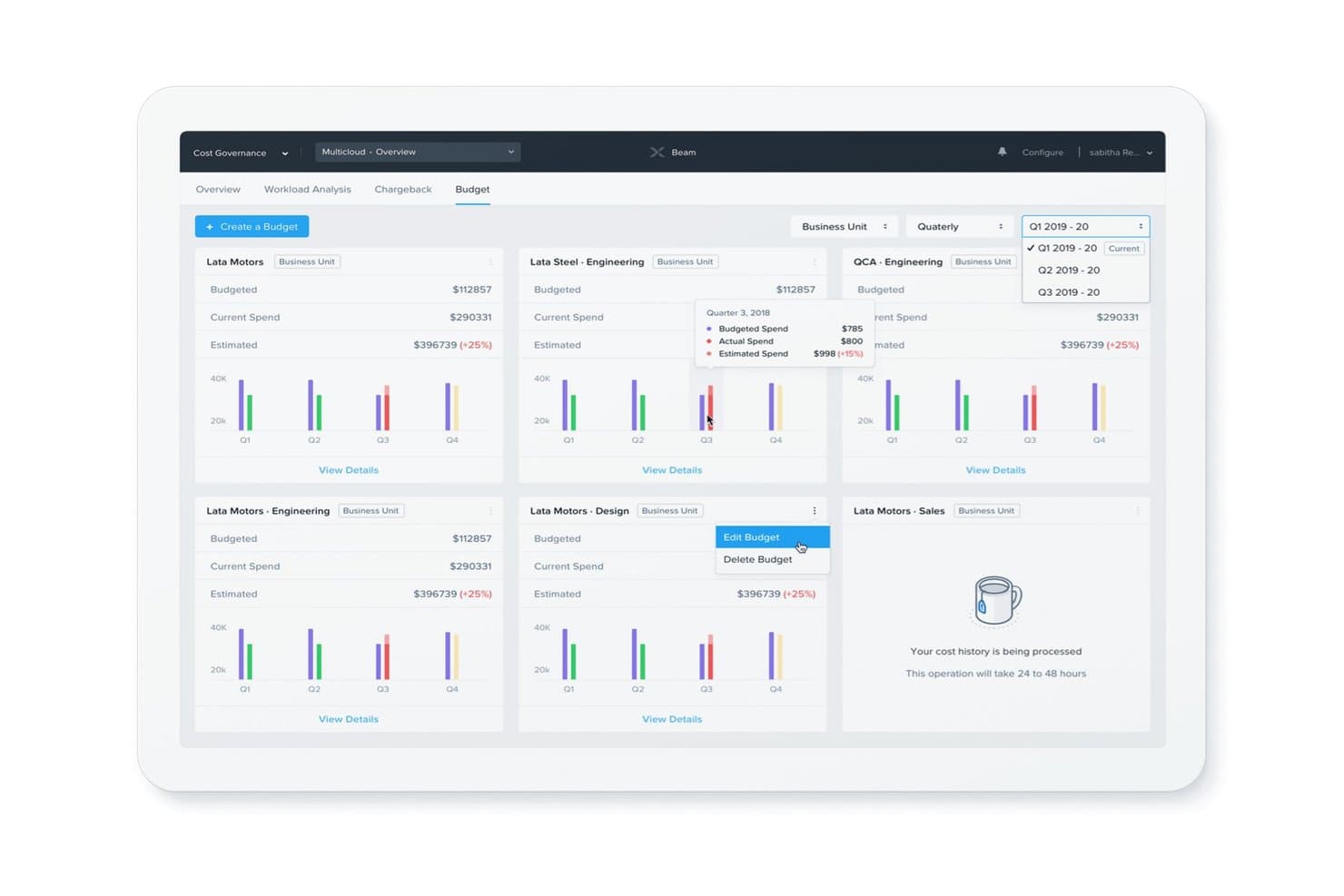
Nutanix Objects Storage lets users track and manage budgets across business units quarterly. Nutanix Objects Storage is an S3-compatible, software-defined object storage solution that pools and virtualizes underlying HCI resources into a scalable global namespace, with built-in deduplication, erasure coding, cloud tiering, and WORM immutability managed through a single Prism Central console.
Who Is Nutanix Objects Storage Best For?
Nutanix Objects Storage is a strong fit for IT teams already running Nutanix HCI who need petabyte-scale, S3-compatible object storage without adding a separate storage platform.
Why I Picked Nutanix Objects Storage
Nutanix Objects Storage earns its spot on my shortlist because it's the only solution here that pools HCI resources directly into a petabyte-scale S3-compatible namespace without adding a separate storage platform. I love how WORM bucket policies, object versioning, and Data Lens anomaly detection layer together to block ransomware before it spreads. Cloud tiering to AWS S3 and Azure Blob runs as a native policy, so on-premises capacity shrinks automatically without manual data movement.
Nutanix Objects Storage Key Features
- S3 Select query pushdown: Runs SQL-like filter queries directly at the object storage layer, cutting network and compute overhead for analytics workloads.
- Erasure coding (EC-X): Distributes data and parity across nodes to maximize usable capacity while maintaining fault tolerance.
- Multi-cluster federated namespace: Links multiple Objects clusters across sites into a single logical namespace, scaling to multi-petabyte capacity.
- Lifecycle Management (LCM) one-click upgrades: Handles version upgrades for Objects Storage through Prism Central without manual intervention or downtime.
Nutanix Objects Storage Integrations
Nutanix Objects Storage integrates with Veeam, Commvault, HYCU, Veritas, Snowflake, Splunk, AWS S3, and Azure Blob Storage. It supports Amazon S3 API v4, REST APIs, Terraform, and Ansible for custom automation.
Pros and Cons
Pros:
- Hybrid cloud tiering to AWS and Azure
- Built-in ransomware protection with WORM buckets
- Delivers true global namespace federation
Cons:
- Opaque and custom-quoted pricing model
- Requires existing Nutanix infrastructure investment
Learn more about Nutanix Objects Storage: Best for VMware-native hyperconverged storage
- Free demo available
- Pricing upon request

VMware vSAN tracks cluster-level VM performance metrics in real time. VMware vSAN is a software-defined storage virtualization platform that pools local NVMe and SSD drives from ESXi hosts into a shared, distributed datastore with built-in deduplication, erasure coding, encryption, and native snapshot-based data protection.
Who Is VMware vSAN Best For?
VMware vSAN is the right fit for enterprise IT teams already running VMware vSphere or VMware Cloud Foundation who want native, hyperconverged storage without adding a separate SAN or NAS.
Why I Picked VMware vSAN
VMware vSAN earns its spot as one of the best on my shortlist because it's the only storage virtualization platform that's truly native to vSphere, not just compatible with it. I picked it specifically for shops running VMware Cloud Foundation, where vSAN pools local NVMe and SSD drives across ESXi hosts into a single distributed datastore managed entirely through vCenter. What I find compelling is the Express Storage Architecture, which delivers inline deduplication and compression without a performance hit, plus immutable snapshots through vSAN Data Protection for ransomware resilience.
VMware vSAN Key Features
- Storage policy-based management (SPBM): Assigns protection, performance, and capacity settings to individual VMs through policy definitions rather than manual LUN configuration.
- Stretched cluster support: Extends a single vSAN cluster across two geographically separate sites for active-active VM availability at the metro level.
- vSAN File Services: Provides NFS-based shared file storage alongside block storage, served directly from the vSAN cluster without a separate NAS appliance.
- VM I/O Trip Analyzer: Diagnoses storage performance issues by tracing I/O paths for up to eight VMs simultaneously within the vSphere Client.
VMware vSAN Integrations
VMware vSAN has native integrations across the VMware ecosystem, including vSphere, vCenter Server, SDDC Manager, NSX, HCX, Site Recovery Manager, and Aria Operations. It supports Kubernetes through CSI, works with Veeam, Commvault, and Rubrik, and offers REST APIs, PowerCLI, and Terraform.
Pros and Cons
Pros:
- Immutable snapshots for ransomware resilience
- Per-VM QoS and policy controls
- Deep VMware vSphere and VCF integration
Cons:
- Licensing and hardware requirements are complex
- Locked to VMware ESXi environments only
Learn more about VMware vSAN:

Scality centralizes storage health, capacity, and S3 endpoints in one dashboard. Scality is a software-defined object storage platform that pools commodity hardware into a unified S3 namespace, spanning edge nodes, on-premises data centers, and multi-cloud environments across all three of its product lines: RING, ARTESCA, and ADI.
Who Is Scality Best For?
Scality is a strong fit for storage architects and IT ops teams managing petabyte-to-exabyte workloads across distributed, multi-site environments who need hardware-agnostic autonomy without proprietary lock-in.
Why I Picked Scality
Scality earns its spot on my shortlist because its MultiScale Architecture pools commodity hardware from any OEM into a single S3 namespace that scales independently across capacity, performance, and geography, from a 20 TB edge node all the way to exabyte-class deployments. I'm particularly impressed by ADI's Guardian AI agent, which autonomously handles rebalancing, healing, and lifecycle tiering across NVMe, HDD, tape, and cloud without manual intervention. That level of autonomous operation is what makes exabyte-scale storage genuinely manageable.
Scality Key Features
- Maestro fleet management console: Centralized dashboard for monitoring health, pushing software updates, and tracking capacity across multi-site ARTESCA deployments without VPN access to individual sites.
- S3 Object Lock (WORM): Enforces immutable retention locks at the API and storage layers, keeping data protected even if admin credentials are compromised.
- Multi-tenant namespace isolation: Per-tenant quotas, IAM policies, and performance controls segment workloads across shared infrastructure for cloud service providers and sovereign cloud deployments.
- Open-source COSI and CSI drivers: Native Kubernetes drivers for S3 bucket provisioning and file storage volumes, included at no additional license cost with RING and ARTESCA.
Scality Integrations
Scality integrates with Veeam, Commvault, Cohesity, Rubrik, VMware vSphere/ESXi, VMware Cloud Director, Kubernetes through COSI and CSI drivers, and AWS DataSync. Its S3 API and management APIs support custom integrations.
Pros and Cons
Pros:
- S3 object lock enforces API-layer immutability
- Pools commodity hardware from any OEM
- Autonomous AI handles rebalancing and healing
Cons:
- Initial setup complexity requires storage expertise
- Native block virtualization is not supported
Learn more about Scality:
Annen programvare for lagringsvirtualisering
Nedenfor finner du en liste over ytterligere programmer for lagringsvirtualisering som jeg tok med på kortlisten, men som ikke nådde helt opp. Det er absolutt verdt å se nærmere på dem.
- 11HPEBest for disaggregated NVMe scale-out storage
- 12IBM Storage FusionBest for OpenShift-native hybrid cloud storage
- 13StarWind Virtual SANBest for 2-node HA on commodity hardware
- 14Quantum ActiveScaleBest for air-gapped tape and WORM object storage
- 15MinIOBest for S3-native AI storage on commodity hardware
- 16Oracle VirtualizationBest for OCI-native on-premises VM storage
- 17Microsoft Storage Spaces Direct (S2D)Best for Windows-native HCI storage at no added cost
Relaterte anmeldelser av IT-programvare
Hvis du fortsatt ikke har funnet det du leter etter her, kan du se nærmere på disse alternative verktøyene som vi har testet og evaluert.
- Programvare for nettverksovervåking
- Programvare for serverovervåking
- SD-WAN-løsninger
- Verktøy for infrastrukturovervåking
- Pakkesniffer
- Verktøy for applikasjonsovervåking
How I Evaluate Storage Virtualization Software
I split my evaluation into baseline capabilities a tool must cover—like pooling and provisioning—and the differentiators that separate solid options from the best ones.
Core Functionality (Table Stakes For This List)
When I'm selecting tools for my list, I rank each one on a scale from 0 (does not offer the functionality) to 5 (excels in this area) for each core functionality listed below. I then calculate the tool's total score into a percentage, using 65% as a benchmark to help assess its overall fit for the list.
- Storage Abstraction & Pooling: I look at how well a tool combines physical disks, arrays, or nodes into logical pools that you can carve up and allocate on demand.
- Hardware & Environment Support: Heterogeneous storage is the norm, so I check whether a platform works across different vendors, array types, and hybrid environments.
- Centralized Storage Management: I evaluate the management console for provisioning, monitoring, and policy controls—things like RBAC, alerting, and API access matter here.
- Data Migration & Mobility: Moving data between tiers or arrays without taking applications offline is a real-world need I look for, including automated rebalancing options.
- Capacity & Performance Optimization: Features like thin provisioning, deduplication, compression, and automated tiering tell me how well a tool helps you stretch existing capacity.
- Data Protection & Availability: I check for snapshots, replication, and failover capabilities—especially whether recovery can be orchestrated across sites during an outage.
Once I have a list of tools that meet the criteria, I consider what sets each platform apart.
Differentiating Factors (What Sets Vendors Apart)
Here's how I compare and contrast different vendors:
Standout Features
Ransomware resilience is a big one for me. I check whether a platform offers immutable snapshots and air-gapped copies, since those are the features that actually protect you when an attack hits. API-first automation also matters a lot—I look for Terraform providers and Ansible modules that let you manage storage as code inside existing CI/CD pipelines. Cloud tiering rounds things out by letting you offload cold data to object storage like AWS S3 or Azure Blob, which keeps primary pool costs down without sacrificing accessibility.
Beyond Features
I look at licensing models closely because some vendors bundle replication and encryption in the base license while others charge per add-on, which can double your total cost. Deployment flexibility matters too—I check whether a platform ships as a software-only install, a virtual appliance, or a Kubernetes CSI driver, since that determines how well it fits into your existing stack. I also evaluate compliance certifications like FIPS 140-2 and SOC 2, especially for teams in regulated industries where missing a certification means a tool is off the table entirely.
Slik velger du programvare for lagringsvirtualisering
Det er lett å gå seg vill i lange funksjonslister og kompliserte prisstrukturer. For å hjelpe deg med å holde fokus mens du arbeider deg gjennom din unike prosess for programvarevalg, har vi laget en sjekkliste over faktorer du bør ha i bakhodet:
| Faktor | Hva bør vurderes |
|---|---|
| FaktorSkalerbarhet | Hva bør vurderesKan løsningen håndtere økende lagringsbehov? Se etter alternativer som støtter storskalamiljøer og fremtidig vekst uten ytelsesforringelse. |
| FaktorIntegrasjoner | Hva bør vurderesIntegreres den med dine eksisterende lagringssystemer, skyleverandører og programvare for virtuelle maskiner? Sørg for kompatibilitet med store leverandører som VMware, AWS og Microsoft Azure. |
| FaktorTilpasningsmuligheter | Hva bør vurderesKan du endre policyer, automatisere lagringstildeling og tilpasse tilgangskontroller? En fleksibel løsning lar deg skreddersy lagringsadministrasjonen etter behovene dine. |
| FaktorBrukervennlighet | Hva bør vurderesEr administrasjonsgrensesnittet intuitivt? Se etter et dashbord med tydelige overvåkingsverktøy, enkel konfigurering og en minimal læringskurve for teamet ditt. |
| FaktorBudsjett | Hva bør vurderesSamsvarer prisene med lagringskapasiteten og funksjonsbehovene dine? Sjekk om kostnadene øker forutsigbart, og om det finnes ekstra gebyrer for premiumfunksjoner. |
| FaktorSikkerhetstiltak | Hva bør vurderesHvor godt beskytter den sensitive data? Sørg for at den inkluderer kryptering, tilgangskontroller og samsvar med sikkerhetsstandarder som ISO 27001 og SOC 2. |
| FaktorYtelsesoptimalisering | Hva bør vurderesInkluderer den AI-drevet arbeidsbelastningsbalansering eller hurtigbufring for å forbedre ytelsen? Intelligent optimalisering kan redusere forsinkelser og forbedre lagringseffektiviteten. |
| FaktorDatagjenoppretting og redundans | Hva bør vurderesTilbyr den alternativer for sikkerhetskopiering, redundans og katastrofegjenoppretting? Innebygd redundans bidrar til å minimere nedetid og datatap ved feil. |
Trender innen programvare for lagringsvirtualisering
I arbeidet med undersøkelsen samlet jeg inn utallige produktoppdateringer, pressemeldinger og lanseringslogger fra ulike leverandører av programvare for lagringsvirtualisering. Organisasjoner integrerer ofte disse løsningene med ledende DCIM-programvare for bedre funksjonalitet innen datasenteradministrasjon. Her er noen av trendene som er i ferd med å vokse frem, og som jeg følger med på:
- AI-drevet lagringsoptimalisering: Flere leverandører bruker AI til å analysere bruksmønstre for lagring og optimalisere ressursallokeringen i sanntid. Dette reduserer sløsing, forbedrer ytelsen og minimerer behovet for manuell finjustering.
- Prediktiv analyse for kapasitetsplanlegging: Lagringsløsninger tar i bruk maskinlæring for å forutsi fremtidige lagringsbehov basert på historisk bruk. Dette hjelper IT-team med å forhindre kapasitetsmangel og unngå unødvendig overprovisionering.
- Økt bruk av programvaredefinert lagring (SDS): Virksomheter beveger seg bort fra tradisjonell avhengighet av maskinvare til fordel for SDS-løsninger som gjør det mulig å administrere lagring på programvarenivå. Denne trenden øker fleksibiliteten og forenkler skalering i hybride miljøer og miljøer med flere skyer.
- Beskyttelse mot løsepengevirus og gjenoppretting: Plattformene for lagringsvirtualisering integrerer innebygde sikkerhetsfunksjoner, som uforanderlige øyeblikksbilder og automatiserte gjenopprettingsalternativer, for å hjelpe organisasjoner med å redusere trusler fra løsepengevirus.
- Lagring som tjeneste (STaaS): Flere leverandører tilbyr abonnementsbaserte lagringsløsninger som lar virksomheter betale for bare det de bruker. Dette eliminerer store kostnader på forhånd og gir skalerbar lagring som tilpasser seg endrede behov.
Hva er programvare for lagringsvirtualisering?
Programvare for lagringsvirtualisering kombinerer lagring fra ulike systemer på ett sted, slik at team enklere kan administrere kapasiteten. Den brukes av IT-team, systemadministratorer og infrastrukturingeniører som trenger fleksibel lagring, enklere skalering og færre begrensninger knyttet til maskinvare.
Funksjoner for sammenslåing av lagring, automatisering og sentralisert administrasjon bidrar til å organisere lagring, redusere manuelt oppsett og holde data tilgjengelig på tvers av miljøer. Alt i alt hjelper denne programvaren organisasjoner med å håndtere økende lagringsbehov på en mer effektiv og forutsigbar måte.
Funksjoner i programvare for lagringsvirtualisering
Når du velger programvare for lagringsvirtualisering, bør du se etter følgende nøkkelfunksjoner:
- Tynn klargjøring: Tildeler lagringsplass etter behov i stedet for å forhåndstildele faste mengder, noe som reduserer bortkastet plass og forbedrer effektiviteten.
- Datadeduplisering: Fjerner duplikatkopier av data for å optimalisere lagringskapasiteten og redusere redundans.
- Automatisert nivådeling: Flytter data som brukes ofte, til høyytelseslagring og mindre brukte data til kostnadseffektive lagringsnivåer.
- Øyeblikksbilder og kloning: Oppretter øyeblikkelige kopier av data for sikkerhetskopiering, katastrofegjenoppretting eller testmiljøer uten å bruke ekstra lagringsplass.
- Automatisk overtakelse ved feil og redundans: Sikrer høy tilgjengelighet ved automatisk å omdirigere lagringsarbeidsbelastninger ved maskinvarefeil.
- Lagringspooling: Kombinerer flere fysiske lagringsressurser i én virtualisert pool for enklere administrasjon og allokering.
- Prediktiv analyse: Bruker KI til å overvåke lagringsbruken og forutsi fremtidige kapasitetsbehov, slik at ytelsesflaskehalser kan unngås.
- Rollebaserte tilgangskontroller: Begrenser lagringstilgangen til autoriserte brukere, noe som forbedrer sikkerheten og samsvaret med regelverk.
- Kompatibilitet med flere skyer: Støtter lagringsadministrasjon på tvers av lokale miljøer, private skyer og offentlige skyer.
- Kryptering og databeskyttelse: Sikrer data i hvile og under overføring, hindrer uautorisert tilgang og sørger for samsvar med sikkerhetsstandarder.
Fordeler med programvare for lagringsvirtualisering
Implementering av programvare for lagringsvirtualisering gir flere fordeler for teamet og virksomheten din. Her er noen av fordelene du kan se frem til:
- Bedre ressursutnyttelse: Samler lagring fra flere enheter, sikrer at kapasiteten brukes effektivt og eliminerer bortkastet plass. Organisasjoner kan validere implementeringene av lagringsvirtualisering gjennom programvare for virtuelle IT-laboratorier for å sikre optimal ytelse før full utrulling.
- Lavere lagringskostnader: Reduserer behovet for kostbare maskinvareoppgraderinger ved å optimalisere eksisterende lagring gjennom datadeduplisering og tynn klargjøring.
- Bedre datatilgjengelighet: Sikrer oppetid med mekanismer for automatisk overtakelse ved feil og automatisk balansering av arbeidsbelastninger, noe som minimerer tjenesteavbrudd.
- Forenklet lagringsadministrasjon: Tilbyr et sentralisert kontrollpanel for overvåking, klargjøring og administrasjon av lagring på tvers av ulike miljøer.
- Raskere sikkerhetskopiering og gjenoppretting: Bruker funksjoner for øyeblikksbilder og kloning til raskt å gjenopprette data ved feil eller cybertrusler.
- Skalerbarhet uten nedetid: Utvider lagringskapasiteten dynamisk uten å forstyrre driften, noe som støtter virksomhetens vekst.
- Forbedret sikkerhet og samsvar: Krypterer data, håndhever tilgangskontroller og opprettholder revisjonslogger for å bidra til å oppfylle regulatoriske krav.
Kostnader og priser for programvare for lagringsvirtualisering
Ved valg av programvare for lagringsvirtualisering eller andre VDI-løsninger er det nødvendig å forstå de ulike prismodellene og tilgjengelige abonnementene. Kostnadene varierer basert på funksjoner, teamstørrelse, tillegg og mer. Tabellen nedenfor oppsummerer vanlige abonnementer, gjennomsnittsprisene deres og typiske funksjoner som er inkludert i løsninger for programvare for lagringsvirtualisering:
Sammenligningstabell for abonnementer for programvare for lagringsvirtualisering
| Abonnementstype | Gjennomsnittspris | Vanlige funksjoner |
|---|---|---|
| AbonnementstypeGratisabonnement | Gjennomsnittspris$0 | Vanlige funksjonerGrunnleggende lagringspooling, begrenset datadeduplisering, tilgang for én bruker og brukerstøtte fra fellesskapet. |
| AbonnementstypePersonlig abonnement | Gjennomsnittspris$10-$50/bruker/måned | Vanlige funksjonerLagringsadministrasjon for flere enheter, tynn klargjøring, støtte for øyeblikksbilder og grunnleggende analyse. |
| AbonnementstypeBedriftsabonnement | Gjennomsnittspris$100-$500/bruker/måned | Vanlige funksjonerAvansert automatisering, KI-drevet programvare for objektlagring, funksjoner for høy tilgjengelighet og rollebaserte tilgangskontroller. |
| AbonnementstypeAbonnement for større virksomheter | GjennomsnittsprisTilpasset pris | Vanlige funksjonerTilpassede integrasjoner, dedikert brukerstøtte, samsvarsadministrasjon, prediktiv analyse og kompatibilitet med flere skyer. |
Vanlige spørsmål om programvare for lagringsvirtualisering
Her er noen svar på vanlige spørsmål om programvare for lagringsvirtualisering:
Hvordan forbedrer lagringsvirtualisering datahåndteringen?
Lagringsvirtualisering samler flere lagringsenheter i én enkelt, håndterbar enhet, noe som forenkler datahåndteringen. Denne enhetlige tilnærmingen gjør det mulig for teamet ditt å tildele, overvåke og optimalisere lagringsressurser mer effektivt, samtidig som den administrative belastningen og antallet feil reduseres.
Kan lagringsvirtualisering fungere med den eksisterende maskinvaren vår?
Ja, lagringsvirtualisering er utviklet for å integreres med ulike maskinvareoppsett og annen programvare for servervirtualisering. Den abstraherer fysiske lagringsenheter, slik at teamet ditt kan administrere ulike lagringssystemer på en helhetlig måte. Denne fleksibiliteten betyr at dere kan maksimere eksisterende investeringer uten behov for umiddelbare maskinvareoppgraderinger.
Hvilke potensielle utfordringer finnes ved implementering av lagringsvirtualisering?
Selv om lagringsvirtualisering har mange fordeler, kan utfordringene blant annet omfatte kompleksitet ved førstegangsoppsettet og sikring av kompatibilitet med eldre systemer. Det er avgjørende å planlegge grundig og involvere erfarne fagfolk for å håndtere disse problemene effektivt, slik at overgangen blir smidig og ytelsen optimal.
Hvordan påvirker lagringsvirtualisering datasikkerheten?
Lagringsvirtualisering kan styrke datasikkerheten ved å sentralisere kontrollen og implementere ensartede sikkerhetsprotokoller på tvers av alle lagringsressurser. Det er imidlertid viktig å konfigurere sikkerhetsinnstillingene riktig og sørge for jevnlige oppdateringer for å beskytte mot potensielle sårbarheter.
Passer lagringsvirtualisering for små bedrifter?
Absolutt, lagringsvirtualisering kan være nyttig for bedrifter av alle størrelser. For små bedrifter gir det kostnadseffektiv lagringsadministrasjon, skalerbarhet og bedre ressursutnyttelse, slik at teamet kan tilpasse seg vekst uten betydelige endringer i infrastrukturen.
Hvordan påvirker lagringsvirtualisering systemytelsen?
Når lagringsvirtualisering implementeres riktig, kan den forbedre systemytelsen ved å optimalisere ressursallokeringen og muliggjøre raskere datatilgang. Mangelfull planlegging eller feilkonfigurering kan imidlertid føre til ytelsesflaskehalser, så det er viktig å følge beste praksis under utrullingen.Programvare for lagringsvirtualisering er et verktøy som kombinerer lagring fra ulike systemer på ett sted, slik at team kan administrere kapasiteten enklere. Den brukes av IT-team, systemadministratorer og infrastrukturingeniører som trenger fleksibel lagring, enklere skalering og færre maskinvarebegrensninger. Funksjoner for sammenslåing av lagringsressurser, automatisering og sentralisert administrasjon bidrar til å organisere lagringen, redusere manuelt oppsett og holde data tilgjengelig på tvers av miljøer. Alt i alt hjelper denne programvaren organisasjoner med å håndtere økende lagringsbehov på en mer effektiv og forutsigbar måte.