

I migliori strumenti di test BDD aiutano i team a colmare il divario tra sviluppo tecnico e obiettivi aziendali, trasformando i requisiti degli utenti in scenari chiari e verificabili. Garantiscono che tutti, dagli sviluppatori alle parti interessate non tecniche, comprendano cosa viene realizzato e perché, riducendo il lavoro da rifare e la confusione durante lo sviluppo.
Molti team cercano questi strumenti dopo essersi trovati a gestire criteri di accettazione poco chiari, continui scambi durante le revisioni degli sprint o test che non riflettono le reali esigenze degli utenti. Senza una struttura condivisa per la collaborazione, è facile che i progetti perdano la direzione e producano risultati che non soddisfano le aspettative.
Ho lavorato con team di ingegneria e di prodotto che implementavano metodologie BDD in ambienti agili, verificando come diversi strumenti gestiscono l'automazione, l'integrazione e la reportistica in condizioni reali di progetto. Questa esperienza ha evidenziato quali piattaforme rendono il test basato sul comportamento pratico ed efficace, non solo teorico.
In questa guida vedrai quali strumenti di test BDD facilitano la definizione di scenari affidabili, migliorano la comunicazione tra i team e mantengono coerente il processo di test dallo sviluppo alla distribuzione.
Perché fidarsi dei nostri consigli sui software
6,700+
Reviews
20
Industry experts
16+
Evaluation factors
14
Years
Il nostro team testa e recensisce software dal 2012. In quanto leader tecnologici noi stessi, sappiamo quanto sia difficile — e importante — scegliere il software giusto.
Per questa guida, abbiamo valutato gli strumenti attraverso test praticie ricerche indipendenti, assegnando un punteggio agli strumenti in base ai nostri criteri di selezione.
Le nostre recensioni riflettono il nostro giudizio editoriale umano, non un discorso di vendita.
Revisori esperti:
- Paulo Gardini MiguelDirettore tecnico
 Tim FisherVP dell'IA
 Gabriel RosasTech Lead e architetto software
 Christhian GruhnTech Lead e architetto della piattaforma

Tabella comparativa degli strumenti di test BDD
Questa tabella comparativa riassume i dettagli dei prezzi per la mia selezione dei migliori strumenti di test BDD.
| Tool | Best For | Trial Info | Price | ||
|---|---|---|---|---|---|
| 1 | Ideale per automazione modulare avanzata senza codice | Prova gratuita di 14 giorni + demo gratuita disponibile | Prezzo su richiesta | Website | |
| 2 | Ideale per l'automazione di passi Gherkin | Prova gratuita disponibile | Prezzo su richiesta | Website | |
| 3 | Ideale per la gestione dei test aziendali | Prova gratuita di 14 giorni + Demo gratuita | Prezzo su richiesta | Website | |
| 4 | Ideale per integrazione con Jira | Prova gratuita di 30 giorni | Prezzo su richiesta | Website | |
| 5 | Ideale per il supporto multi-lingua | Demo gratuita disponibile | Prezzi su richiesta | Website | |
| 6 | Ideale per sviluppo guidato dal comportamento | Piano gratuito disponibile | Da $4/utente/mese | Website | |
| 7 | Ideale per l'automazione dei test nelle prime fasi | Demo gratuita disponibile | Prezzo su richiesta | Website | |
| 8 | Ideale per l’iniezione delle dipendenze | Gratuito | Website | ||
| 9 | Ideale per ambienti .NET | Gratis da usare | Website | ||
| 10 | Ideale per il testing in stile wiki | Gratuito | Website |


Recensioni dei migliori strumenti di test BDD
Di seguito sono riportati i miei riepiloghi dettagliati dei migliori strumenti di test BDD inclusi nel mio elenco. Le mie recensioni offrono un’analisi dettagliata delle funzionalità principali, dei pro e dei contro, delle integrazioni e dei casi d’uso ideali di ogni strumento, per aiutarti a trovare quello più adatto a te.
 Ideale per automazione modulare avanzata senza codice
- Prova gratuita di 14 giorni + demo gratuita disponibile
- Prezzo su richiesta
Visit WebsiteCustomer Rating:4.8/5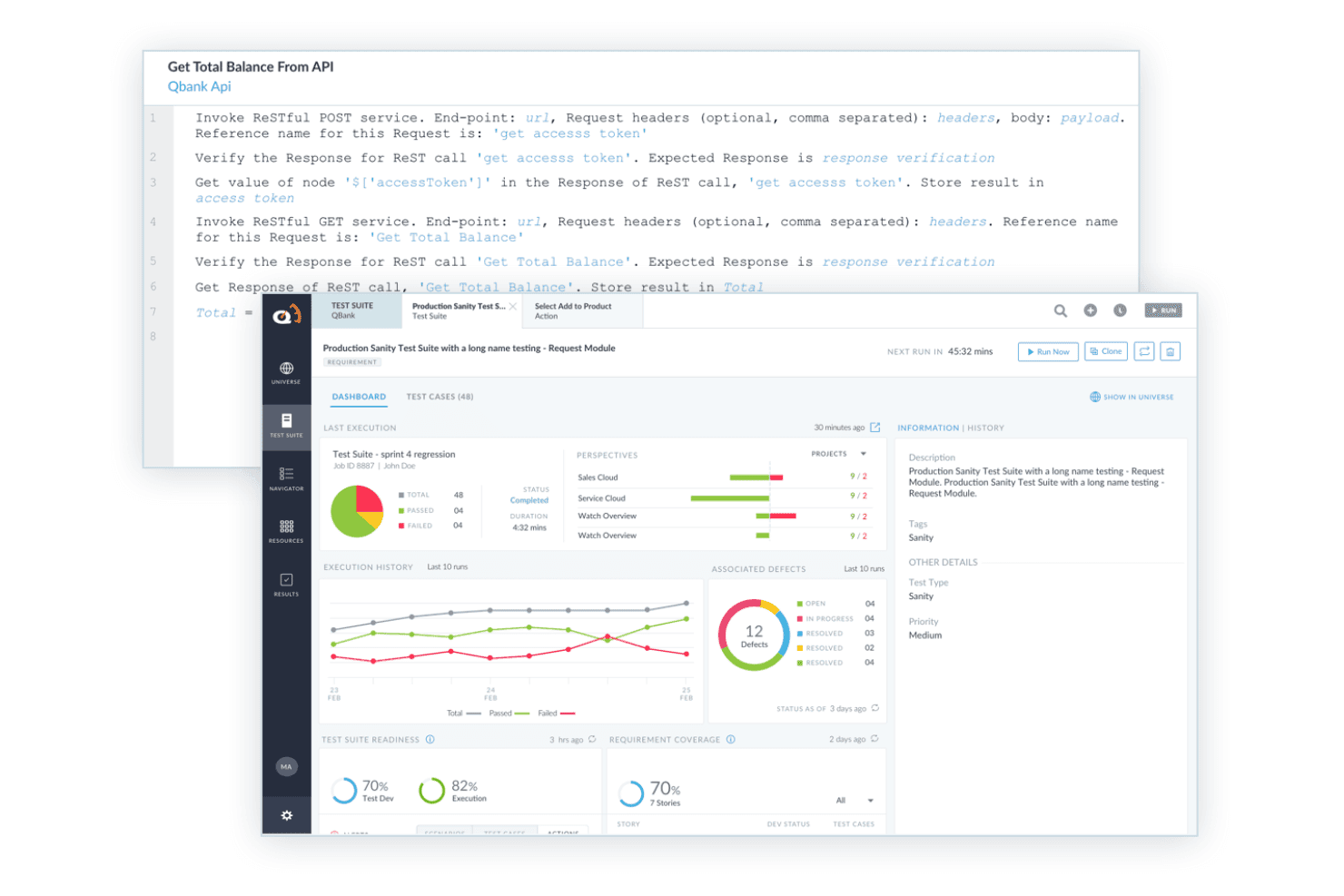
ACCELQ supporta il testing BDD con passaggi di test API leggibili, esecuzione automatizzata e reportistica della suite di test. ACCELQ è una piattaforma di automazione dei test senza codice che supporta la progettazione di scenari basati sul comportamento per applicazioni web, API, mobile, desktop e pacchettizzate senza richiedere scripting a nessun livello.
Per Chi è ACCELQ?
ACCELQ è adatto ai team QA aziendali che devono scalare l'automazione dei test su diversi tipi di applicazioni senza dipendere dagli sviluppatori per la scrittura e manutenzione degli script di test.
Perché Ho Scelto ACCELQ
ACCELQ si guadagna il suo posto nella mia shortlist perché il suo Behavior Driven Scenario Designer consente ai team QA di creare scenari Given-When-Then in semplice inglese senza toccare una riga di codice. Ciò che apprezzo particolarmente è la modularità: le librerie di azioni riutilizzabili permettono che, quando l'applicazione cambia, sia necessario aggiornare un solo componente per propagare la correzione in tutti i test che lo utilizzano. Ho visto questo approccio ridurre significativamente il tempo di manutenzione dei test su grandi suite di regressione che includono web, API e mobile in un unico ambiente di esecuzione.
Caratteristiche Principali di ACCELQ
- Automazione multipiattaforma: Automatizza i test su web, API, mobile, desktop e applicazioni pacchettizzate da un'unica piattaforma.
- Test di API e backend: Supporta test su REST, SOAP, GraphQL, database, middleware e integrazioni ETL.
- Integrazioni con Jira e CI/CD: Si connette con Jira, Jenkins, Azure DevOps e altri comuni strumenti CI per un flusso di lavoro end-to-end.
- Collaborazione basata su ruoli: Permette a utenti aziendali, tester e sviluppatori di contribuire alla creazione e revisione degli scenari con permessi specifici per ruolo.
Integrazioni di ACCELQ
ACCELQ offre integrazioni native con Jenkins, Jira, ClickUp, Bamboo, TeamCity, Slack e Microsoft Teams e mette a disposizione un'API per integrazioni personalizzate.
Pros and Cons
Pros:
- Permette automazione BDD senza codice per app complesse
- Librerie di azioni riutilizzabili supportano un design modulare dei test
- Elementi di test auto-riparanti riducono lo sforzo di manutenzione
Cons:
- Manca la creazione nativa di file feature Gherkin
- Le dashboard degli scenari possono diventare disordinate su larga scala
Learn more about ACCELQ: Ideale per l'automazione di passi Gherkin
- Prova gratuita disponibile
- Prezzo su richiesta
Visit WebsiteCustomer Rating:4.3/5
Squish supporta lo Sviluppo Guidato dal Comportamento (BDD), permettendo di scrivere test in linguaggio naturale comprensibile. Squish è nella mia lista per il supporto diretto all'automazione BDD a livello di step con Gherkin, una funzionalità che la maggior parte degli strumenti di test automation ancora non gestisce correttamente. Quando i team devono collegare scenari business-driven leggibili con una reale automazione UI—specialmente per sistemi desktop, mobile o embedded multipiattaforma—ho riscontrato che Squish sia una buona soluzione.
Ciò che mi piace è come si possano abbinare i passi Gherkin in linguaggio naturale alle interazioni GUI, facilitando molto il riutilizzo e il versionamento dei casi di test man mano che l'interfaccia utente evolve.
Ideale per
- Team che necessitano di test automatici UI e funzionali basati su Gherkin
- Progetti che coprono interfacce di applicazioni desktop, mobile ed embedded
Non adatto per
- Utenti che cercano un'automazione BDD orientata principalmente al web o limitata solo alle API
- Team che non dispongono di tempo per la manutenzione dei test o per la configurazione iniziale
Cosa distingue Squish
Squish adotta un approccio diretto per i team che vogliono automatizzare test BDD in Gherkin senza doverlo integrare su altri strumenti. A differenza dei classici strumenti di scripting o dei framework orientati al web come Cypress, si possono associare direttamente i passi in linguaggio naturale a test UI interattivi e full-stack su dispositivi desktop, mobile ed embedded. Funziona molto bene quando servono casi di test comprensibili a livello aziendale che vengano realmente eseguiti sulle applicazioni effettive.
Compromessi con Squish
Squish è ottimizzato per l'automazione della UI e dei singoli passi, quindi si perdono la velocità e la semplicità degli strumenti progettati solo per il test web senza interfaccia o per le API. Questa capacità in più comporta anche una configurazione e una manutenzione aggiuntive, soprattutto quando le applicazioni o le interfacce cambiano frequentemente.
Pros and Cons
Pros:
- Supporta molti linguaggi di scripting come Python e JavaScript
- Efficace integrazione BDD con mappatura automatica dei passi
- Funziona su una vasta gamma di piattaforme
Cons:
- I test automatici non sono sempre semplici da creare
- Può richiedere tempo per apprendere le funzionalità avanzate di Squish
Learn more about Squish: Ideale per la gestione dei test aziendali
- Prova gratuita di 14 giorni + Demo gratuita
- Prezzo su richiesta
Visit WebsiteCustomer Rating:4.3/5
Tricentis qTest offre oltre 60 metriche pronte all’uso e facilmente utilizzabili, con funzionalità drag-and-drop per creare dashboard personalizzati. Tricentis qTest è la scelta ideale per i team aziendali che necessitano del supporto BDD integrato direttamente nel processo di gestione dei test. Vi faccio affidamento quando i team devono coordinare la progettazione dei casi di test, l’esecuzione e la tracciabilità su larga scala, soprattutto con scenari complessi mappati in Gherkin. Quello che apprezzo di più è quanto bene qTest centralizzi requisiti, scenari BDD e automazione all’interno di grandi organizzazioni QA—offrendo a tutti un’unica fonte di verità.
Tricentis qTest: Ideale per
- Grandi team QA che gestiscono BDD aziendale e tracciabilità dei test
- Organizzazioni che necessitano di gestione e automazione dei test centralizzate su larga scala
Tricentis qTest: Non ideale per
- Piccoli team che cercano strumenti BDD semplici o leggeri
- Gruppi che non hanno bisogno di funzionalità aziendali avanzate
Cosa distingue Tricentis qTest
Tricentis qTest è progettato per organizzazioni in cui la gestione dei test, il BDD e l’automazione devono convivere in uno spazio centralizzato. A differenza di Jira, che aggiunge il testing tramite plugin, qTest si aspetta che i team QA a piena scala gestiscano insieme requisiti, scenari BDD ed esecuzione dei test. Lo vedo funzionare al meglio quando serve tracciabilità tra requisiti, test e risultati, specialmente in ambienti regolamentati o altamente complessi.
Compromessi con Tricentis qTest
qTest è ottimizzato per la scala e la governance centralizzata, quindi si finisce per sacrificare velocità e semplicità. I team più piccoli senza grandi esigenze di conformità trovano solitamente inutile questo livello di complessità.
Pros and Cons
Pros:
- Supporta varie metodologie
- Potenti funzionalità di analisi
- Favorisce la collaborazione tra i team
Cons:
- È necessario un addestramento per un uso ottimale
- Alcune integrazioni richiedono configurazione manuale
Learn more about Tricentis qTest: Ideale per integrazione con Jira
- Prova gratuita di 30 giorni
- Prezzo su richiesta
Visit WebsiteCustomer Rating:4.2/5
AssertThat offre una panoramica completa dei tuoi scenari di test BDD automatizzati, così puoi monitorare facilmente le metriche di performance a colpo d'occhio. AssertThat si guadagna un posto nella mia lista per il modo diretto in cui integra i test BDD nell'ambiente Jira. Se lavori a stretto contatto con stakeholder che utilizzano principalmente Jira, AssertThat è il primo strumento che suggerisco per sincronizzare gli script Gherkin e i risultati direttamente dentro Epiche e Story.
Ciò che lo distingue, secondo me, è la possibilità di gestire i test cucumber, mappare gli scenari e tracciare gli esiti senza uscire dal flusso di lavoro principale di Jira. Questo rende molto più semplice per i team mantenere la gestione dei test allineata con le attività di delivery.
AssertThat è ideale per
- Team che utilizzano Jira per gestire BDD con Gherkin e cucumber
- Organizzazioni che desiderano mantenere gestione test e tracciamento progetto insieme
AssertThat non è consigliato per
- Team che non usano Jira come piattaforma principale
- Progetti che necessitano di reportistica visuale avanzata o analisi approfondite dei test
Cosa distingue AssertThat
AssertThat tratta la gestione dei test BDD come una parte nativa di Jira, non come un componente aggiuntivo. Puoi scrivere e gestire i file feature Gherkin direttamente insieme alle issue Jira, così tester, sviluppatori e stakeholder non tecnici lavorano fianco a fianco usando la piattaforma su cui già fanno affidamento. A differenza di strumenti indipendenti come SpecFlow, AssertThat rende la documentazione e la tracciabilità dei test parte integrante del flusso di lavoro Jira. È la soluzione ideale se hai bisogno che i tuoi asset BDD siano strettamente legati alla pianificazione sprint e al tracciamento delle issue.
Compromessi con AssertThat
AssertThat è pensato per team che lavorano principalmente in Jira, ma perdi funzionalità come reportistica dettagliata o analisi flessibili che solo piattaforme BDD dedicate possono offrire. Se desideri dati approfonditi o visibilità sui test tra progetti diversi, probabilmente ti sentirai limitato.
Pros and Cons
Pros:
- Si integra perfettamente con Jira
- Supporta sintassi BDD
- Funzionalità di reportistica in tempo reale
Cons:
- Funzionalità autonome limitate
- Supporto limitato fuori da Jira
Learn more about AssertThat: Ideale per il supporto multi-lingua
- Demo gratuita disponibile
- Prezzi su richiesta
Visit WebsiteCustomer Rating:4.2/5
Plugin Cucumber per Java IDE Cucumber è nella mia lista dei preferiti perché supporta i team nella scrittura di scenari BDD in oltre 30 linguaggi di programmazione, rendendolo una scelta solida per progetti che non sono vincolati a un solo stack. Quando è necessaria una pratica BDD coerente tra diversi linguaggi o ambienti misti, questo strumento si adatta facilmente. Apprezzo la sintassi Gherkin, aperta e leggibile, e il modo in cui tiene allineate le persone tecniche e non tecniche.
Cucumber è ideale per
- Team che utilizzano più linguaggi di programmazione nei flussi di lavoro BDD
- Gruppi cross-funzionali che necessitano di definizioni di scenario in linguaggio naturale
Cucumber non è adatto per
- Progetti limitati a un unico stack linguistico fortemente integrato
- Team che non amano mantenere file di caratteristiche basati su testo
Cosa distingue Cucumber
Cucumber si aspetta che lo sviluppo sia guidato da conversazioni e comprensione condivisa, non solo da specifiche scritte. Lo vedo puntare fortemente sulla collaborazione tra persone tecniche e non tecniche, molto più che strumenti classici come Jira o anche SpecFlow. Al posto di inserire i requisiti nei campi dei ticket o nei commenti del codice, si scrivono scenari eseguibili in Gherkin che vivono con la base di codice. Questo funziona al meglio quando si desidera che comprensione e test rimangano allineati mentre il prodotto evolve.
Compromessi con Cucumber
Cucumber è ottimizzato per scenari condivisi e leggibili, ma si rinuncia a un po' di velocità e semplicità rispetto agli strumenti che generano solo test dal codice. In pratica, si passa più tempo a scrivere e mantenere documentazione in linguaggio naturale.
Pros and Cons
Pros:
- Supporta molteplici linguaggi di programmazione
- Colma il divario tra team tecnici e non tecnici
- Si adatta a diversi ambienti
Cons:
- Potrebbe richiedere configurazioni aggiuntive
- Funzionalità avanzate limitate
Learn more about Cucumber: Ideale per sviluppo guidato dal comportamento
- Piano gratuito disponibile
- Da $4/utente/mese

JDave si è guadagnato un posto nella mia shortlist di testing BDD perché applica un approccio alla specifica tramite esempi in Java che rimane leggibile anche per i non sviluppatori. Trovo che la sua strutturazione basata sul contesto permetta ai team di esprimere comportamenti, risultati e specifiche in un linguaggio semplice, facilitando così la collaborazione con gli stakeholder.
Quello che apprezzo di più è la chiara separazione tra contesto, evento e risultato quando si scrivono le specifiche in JDave. Questo funziona particolarmente bene nei team che puntano a un consenso sui requisiti prima che venga scritto qualsiasi codice.
JDave è ideale per
- Team Java che praticano lo sviluppo guidato dal comportamento e la specifica tramite esempi
- Sviluppatori che collaborano strettamente con esperti di dominio e non sviluppatori
JDave non è consigliato per
- Team che desiderano interfacce utente moderne o web application ricche
- Organizzazioni che utilizzano stack tecnologici diversi da Java (Python, .NET, JS)
Cosa distingue JDave
JDave si distingue indirizzandoti verso la descrizione del comportamento del software in un linguaggio semplice con una struttura che riflette esempi reali. Rispetto a strumenti come Cucumber o SpecFlow, JDave incorpora i principi behavior-driven direttamente nel linguaggio Java invece di affidarsi alla sintassi Gherkin o a configurazioni esterne. Generalmente lavori a stretto contatto con gli esperti di dominio, lasciando da parte i dettagli tecnici fino alla fase di implementazione.
Compromessi con JDave
JDave è ottimizzato per specifiche centrate su Java e sul comportamento, ma si rinuncia al supporto del fornitore, a un'interfaccia moderna e alla cura dei dettagli. Nella pratica, i team che desiderano strumenti grafici o supporto per stack tecnologici diversi da Java non troveranno qui ciò di cui hanno bisogno.
Pros and Cons
Pros:
- Si concentra sulle specifiche guidate dal comportamento
- Favorisce la collaborazione con gli stakeholder
- Supporta test in stile narrativo
Cons:
- Limitato ad ambienti Java
- Richiede comprensione dei principi BDD
Learn more about JDave: Ideale per l'automazione dei test nelle prime fasi
- Demo gratuita disponibile
- Prezzo su richiesta

Interfaccia TestLeft che evidenzia un oggetto nel pannello ad albero degli oggetti TestLeft rientra nella mia selezione perché integra la BDD nei flussi di lavoro degli sviluppatori fin dall'inizio, consentendo l'automazione dei test mentre il codice viene scritto. Lo consiglio quando si desidera che i test siano scriptabili direttamente all'interno di Visual Studio o degli IDE di JetBrains, permettendo ai team di utilizzare C# o Java sia per i passaggi che per l'automazione.
Ciò che mi colpisce è come TestLeft consenta di attivare e gestire scenari BDD direttamente nella pipeline CI. Mi piace che sia possibile mantenere gli sforzi di automazione allineati con una rapida iterazione, il che lo rende particolarmente utile per l'adozione nelle fasi iniziali del ciclo di sviluppo.
Ideale per
- Sviluppatori che vogliono l'automazione dei test BDD incentrata sul codice
- Team che integrano la BDD automatizzata nelle loro pipeline CI
Non ideale per
- Non sviluppatori che necessitano di strumenti BDD senza codice
- Organizzazioni che cercano reportistica test avanzata e pronta all’uso
Cosa distingue TestLeft
TestLeft si aspetta che gli sviluppatori mantengano i test BDD automatizzati vicino al codice, integrandosi direttamente in IDE come Visual Studio e JetBrains. Questo design mantiene il processo di automazione allineato con il lavoro di sviluppo quotidiano. Invece di gestire la BDD in strumenti separati come Cucumber o SpecFlow, noto che TestLeft è ideale quando si vuole eseguire e mantenere i test direttamente dove si scrive il codice.
Compromessi con TestLeft
TestLeft è ottimizzato per l'automazione guidata dal codice, ma ciò significa che i tester che preferiscono strumenti visuali o necessitano di report integrati spesso possono sentirsi limitati.
Pros and Cons
Pros:
- Supporta esecuzione parallela dei test
- Genera script in diversi linguaggi
- Integrazione precoce dell'automazione
Cons:
- Richiede conoscenza degli IDE
- Supporto limitato per ambienti non-IDE
Learn more about TestLeft:

BeanSpec è una soluzione di testing basata su Java utilizzata per specificare, verificare e riassumere il comportamento di un componente in stile dichiarativo e narrativo. BeanSpec è nella mia lista per il suo approccio all’iniezione delle dipendenze e per come aiuta a costruire scenari di test affidabili per la BDD. Invece di codificare rigidamente le dipendenze, puoi iniettare facilmente mock e stub a runtime, cosa che ho trovato particolarmente utile per isolare i casi di test. Testandolo, ho apprezzato la risoluzione dei parametri type-safe e quanto velocizzi la configurazione di grafi oggetto complessi nei test automatizzati guidati dal comportamento.
BeanSpec è ideale per
- Sviluppatori che automatizzano l’iniezione delle dipendenze nelle suite di test BDD
- Team che necessitano di un controllo dettagliato sull’impostazione degli oggetti di test
Quando BeanSpec non è la scelta migliore
- Utenti che necessitano di framework BDD end-to-end pronti all’uso
- Team di QA che evitano l’iniezione di dipendenze personalizzate o strumenti basati su JVM
Cosa distingue BeanSpec
BeanSpec è progettato per sviluppatori che vogliono un controllo diretto su come vengono iniettate le dipendenze durante i test. Tralascia i grandi framework che vedi con strumenti come Spring o Guice e invece ti offre una visibilità granulare sulla risoluzione degli argomenti e sul collegamento degli oggetti. Nella pratica, trovo che dia il suo meglio quando vuoi predisporre casi di test molto precisi per la BDD e hai bisogno di sostituire al volo implementazioni reali con dei mock. A differenza degli strumenti di iniezione delle dipendenze 'pesanti', BeanSpec si aspetta che tu rimanga vicino al codice e adatti le dipendenze in base allo scenario senza troppa configurazione aggiuntiva.
Compromessi nell’uso di BeanSpec
BeanSpec è ottimizzato per un’iniezione manuale e flessibile, ma si rinuncia a definizioni di step integrate e alla gestione dei test. Sarà necessario adottare un altro runner BDD e coordinare gli strumenti autonomamente.
Pros and Cons
Pros:
- Iniezione delle dipendenze semplice
- Riduce il codice boilerplate
- Supporta ambiti bean personalizzati
Cons:
- Limitato ad ambienti Java
- Documentazione non molto estesa
Learn more about BeanSpec:

Risultato del test SpecFlow con dettaglio dell'esecuzione dei singoli scenari SpecFlow è in questa lista perché è pensato per i team che lavorano in ambienti .NET e desiderano un solido supporto BDD direttamente nel loro flusso di lavoro. Mi affido a questo strumento quando ho bisogno di automatizzare i test di accettazione usando Gherkin con integrazioni native C#—la configurazione risulta naturale se già si opera nell'ecosistema Microsoft.
Ciò che mi colpisce di più è l’integrazione ricca di funzionalità con Visual Studio e il supporto alla documentazione vivente che aiuta i team a mantenere gli scenari comprensibili e sincronizzati con il codice.
SpecFlow: Migliore Per
- Team di sviluppo .NET che desiderano BDD con sintassi Gherkin
- Organizzazioni che usano Visual Studio per l'automazione dei test
SpecFlow: Non Indicata Per
- Progetti di automazione basati su JavaScript o Python
- Team che necessitano di supporto integrato cross-platform o browser
Cosa distingue SpecFlow
SpecFlow si distingue perché è progettato per i team .NET che vogliono rendere gli scenari BDD una parte integrata del loro flusso di lavoro. A differenza di Cucumber, che risulta più naturale negli stack Ruby o JavaScript, SpecFlow prevede l’utilizzo di Visual Studio e degli strumenti C# già familiari. Nella pratica, funziona meglio se desiderate che il vostro processo BDD si integri con le consuete abitudini di sviluppo .NET, senza traduzioni aggiuntive tra framework o linguaggi diversi.
Compromessi di SpecFlow
SpecFlow è ottimizzato per una profonda integrazione con .NET e Visual Studio, ma si perde flessibilità nella scelta del linguaggio e nell'automazione browser cross-platform. Se vi allontanate da C# o operate su più stack, potreste incontrare delle difficoltà.
Pros and Cons
Pros:
- Ideale per ambienti .NET
- Allinea team tecnici e non tecnici
- Esperienza senza interruzioni su Visual Studio
Cons:
- Limitato al framework .NET
- Non adatto a progetti non-.NET
Learn more about SpecFLow:

Plugin FitNesse in azione con IntelliJ FitNesse entra nella mia lista perché è raro vedere uno strumento che unisca così naturalmente la documentazione allo sviluppo dei casi di test. È ottimo per scrivere criteri di accettazione nei wiki e trasformarli in test eseguibili senza mai uscire da quel flusso di lavoro.
Apprezzo il fatto che si possa collaborare alle specifiche dei test direttamente nel browser, ed eseguire poi quelle pagine wiki come BDD 'viventi'. Per i team cross-funzionali che desiderano mantenere assieme specifiche leggibili dal business e test automatizzati, questa è un'opzione solida.
FitNesse è ideale per
- Team che scrivono specifiche eseguibili insieme alla documentazione nei wiki
- QA e analisti di business che vogliono test BDD leggibili e condivisi
FitNesse non è ideale per
- Utenti che necessitano di integrazioni moderne con IDE o feedback rapido dall'interfaccia
- Team che cercano una gestione dei test o dei flussi di lavoro altamente visuale
Cosa distingue FitNesse
FitNesse si avvicina al BDD facendo convivere documentazione e specifiche di test in un wiki accessibile dal browser, invece di lasciare i requisiti in ticket come Jira o storie utente esterne alla suite di test. Funziona bene per i team che già utilizzano i wiki per scrivere specifiche e vogliono collegarle direttamente a test automatizzati ed eseguibili per un migliore allineamento.
L'interazione avviene tramite un wiki condiviso invece che tramite un IDE, favorendo la collaborazione tra tester e utenti business.
Compromessi con FitNesse
FitNesse ottimizza per collaborazione e trasparenza, ma si perdono funzionalità di workflow moderne e feedback rapido che ci si aspetterebbe dagli strumenti di test integrati negli IDE più recenti. Questo può rallentare alcuni team quando la base di test o il codice diventano voluminosi.
Pros and Cons
Pros:
- Integra documentazione e test
- Supporta il testing di accettazione
- Riflette direttamente i requisiti di business
Cons:
- Non ideale per progetti complessi
- Manca di funzionalità di testing avanzate
Learn more about FitNesse:
Altri strumenti di test BDD
Ecco alcune opzioni aggiuntive di strumenti di test BDD che non sono state incluse nel mio elenco, ma che vale comunque la pena considerare:
- 11JBehaveIdeale per sviluppatori Java
- 12ConcordionIdeale per specifiche tramite esempi
- 13testRigorIdeale per l'automazione dei test senza codice
- 14Zephyr ScaleIdeale per la gestione dei test in Jira
Come Valuto gli Strumenti di Test BDD
Valuto ogni strumento su due livelli: le capacità BDD di base (supporto Gherkin, binding degli step, integrazione CI) necessarie a un team per il rilascio, e i fattori differenzianti che determinano la compatibilità.
Funzionalità Principali (Requisiti Fondamentali per Questa Lista)
Quando seleziono gli strumenti per la mia lista, valuto ciascuno su una scala da 0 (non offre la funzionalità) a 5 (eccelle in quest'area) per ogni funzionalità principale elencata di seguito. Poi, calcolo il punteggio totale dello strumento come percentuale. Ogni strumento deve raggiungere un punteggio totale minimo del 65% per essere considerato per l'inclusione.
- Sintassi Gherkin/Linguaggio Naturale: Verifico se lo strumento supporta i costrutti Gherkin completi come Scenario Outline, tabelle dati e tag—non solo la struttura base Given-When-Then.
- Binding delle Definizioni di Step: L'approccio di ciascuno strumento nella mappatura degli step in linguaggio naturale verso codice eseguibile è importante, perciò valuto la parametrizzazione, il supporto delle espressioni regolari e il riutilizzo tra i file delle funzionalità.
- Esecuzione dell'Automazione dei Test: Cerco un'esecuzione affidabile su vari tipi di applicazioni—web, API e mobile—e se lo strumento supporta esecuzioni parallele per mantenere grandi suite BDD pratiche.
- Integrazione in Pipeline CI/CD: Lo strumento deve integrarsi con pipeline come Jenkins, GitHub Actions o GitLab CI tramite plugin nativi o comandi CLI ben documentati.
- Documentazione Vivente & Reporting: I buoni strumenti BDD trasformano i risultati dei test in documentazione pronta per gli stakeholder, quindi valuto la qualità dei report, la tracciabilità delle funzionalità e la visibilità sulle tendenze storiche.
- Collaborazione sui File delle Funzionalità: Osservo come lo strumento supporta la stesura condivisa—che sia tramite un editor web per i product owner o workflow sincronizzati su Git per il passaggio tra sviluppatori e QA.
Una volta che ho una lista di strumenti che soddisfano questi criteri, considero cosa distingue ogni piattaforma.
Fattori Differenzianti (Cosa Distingue i Fornitori)
Ecco come confronto e metto a contrasto i diversi fornitori:
Caratteristiche Distintive
La tracciabilità dei requisiti è un aspetto fondamentale—cerco strumenti che colleghino gli scenari Gherkin direttamente a storie Jira o Azure DevOps così che gli esiti dei test siano mappati sui criteri di accettazione. Anche i localizzatori auto-adattivi fanno davvero risparmiare tempo ai team; quando un elemento front-end cambia, lo strumento si adatta invece di far fallire l'intera suite. Valuto anche la creazione di scenari assistita dall'IA, con strumenti che suggeriscono o generano step Gherkin dalle user story, velocizzando la creazione dei file delle funzionalità su backlog di grandi dimensioni.
Oltre le Caratteristiche
La compatibilità con linguaggi e framework è la prima cosa che controllo—uno strumento costruito attorno a Java e Cucumber JVM non sarà adatto a un team che scrive in TypeScript con Playwright. Anche il modello di prezzo è importante, specialmente la differenza tra framework open-source e piattaforme commerciali che addebitano il costo per utente o per esecuzione parallela. Valuto inoltre quanto bene ogni strumento si colleghi allo stack DevOps più ampio, da Jira e TestRail per la gestione dei test a Slack e ReportPortal per la visibilità dei risultati su tutto il team.
Come scegliere gli strumenti di test BDD
È facile perdersi in lunghi elenchi di funzionalità e strutture di prezzo complesse. Per aiutarti a rimanere concentrato mentre affronti il tuo processo personalizzato di selezione del software, ecco un elenco di controllo dei fattori da tenere a mente:
| Fattore | Cosa considerare |
| Scalabilità | Assicurati che lo strumento possa crescere insieme al tuo team e gestire efficacemente volumi di test in aumento. |
| Integrazioni | Verifica che si integri senza problemi con gli strumenti che già utilizzi, come le pipeline CI/CD e i sistemi di controllo versione. |
| Personalizzazione | Cerca funzionalità che ti consentano di adattare lo strumento ai tuoi flussi di lavoro e alle tue esigenze di test specifiche. |
| Facilità d'uso | Scegli uno strumento dotato di un'interfaccia intuitiva che riduca al minimo la curva di apprendimento per il tuo team. |
| Budget | Valuta il costo totale di proprietà, comprese eventuali commissioni nascoste, per assicurarti che rientri nel tuo budget. |
| Misure di sicurezza | Assicurati che lo strumento sia conforme agli standard del tuo settore e protegga i tuoi dati. |
| Supporto | Considera la disponibilità e la qualità dell'assistenza clienti e delle risorse della comunità. |
| Documentazione | Cerca una documentazione completa e chiara che ti aiuti nella configurazione e nella risoluzione dei problemi. |
Tendenze negli strumenti di test BDD
Nella mia ricerca, ho raccolto innumerevoli aggiornamenti sui prodotti, comunicati stampa e registri delle versioni dai fornitori di diversi strumenti di test BDD. Ecco alcune delle tendenze emergenti che sto tenendo d'occhio:
- Creazione dei test basata sull'IA: Un numero sempre maggiore di strumenti utilizza l'IA per generare automaticamente casi di test basati sulle storie utente. Questo fa risparmiare tempo agli sviluppatori e garantisce una copertura completa dei test. Fornitori come testRigor stanno guidando questa tendenza integrando la creazione dei test basata sull'IA nelle loro piattaforme.
- Collaborazione in tempo reale: Gli strumenti stanno potenziando le funzionalità che consentono ai team di collaborare in tempo reale, garantendo che tutte le parti interessate siano allineate. Questo è particolarmente utile per i team distribuiti che lavorano su progetti complessi.
- Funzionalità di reportistica avanzate: La domanda di funzionalità dettagliate di analisi e reportistica è in crescita, per fornire informazioni sui risultati dei test e sullo stato del progetto. I fornitori stanno aggiungendo dashboard personalizzabili per aiutare i team a visualizzare i dati in modo efficace.
- Sviluppo guidato dal comportamento per i non sviluppatori: Un numero sempre maggiore di strumenti si concentra sul rendere il BDD accessibile ai non sviluppatori, semplificando la sintassi e fornendo interfacce intuitive. Questa tendenza contribuisce a colmare il divario tra i membri dei team tecnici e non tecnici.
- Concentrarsi sui test di sicurezza: Poiché la sicurezza diventa una priorità assoluta, gli strumenti BDD iniziano a integrare funzionalità di test di sicurezza per identificare le vulnerabilità nelle prime fasi del ciclo di vita dello sviluppo software. Questa tendenza sta prendendo piede, soprattutto nei settori con requisiti rigorosi di conformità.
Cosa sono gli strumenti di test BDD?
Gli strumenti di test BDD sono applicazioni che aiutano i team a scrivere e automatizzare i test utilizzando descrizioni in linguaggio naturale del comportamento previsto del software. Sviluppatori, tester e analisti aziendali utilizzano questi strumenti per creare una comprensione condivisa dei requisiti e verificare che le funzionalità funzionino come previsto.
La scrittura degli scenari, l'integrazione dell'automazione e le funzionalità di reportistica favoriscono la collaborazione, la precisione e un feedback più rapido durante lo sviluppo. Nel complesso, gli strumenti di test BDD facilitano il collegamento tra gli obiettivi aziendali e l'implementazione tecnica e aiutano a mantenere una qualità del software costante.
Funzionalità degli strumenti di test BDD
Quando selezioni gli strumenti di test BDD, presta attenzione alle seguenti funzionalità chiave:
- Supporto della sintassi Gherkin: Consente ai team di scrivere test in linguaggio naturale, rendendoli comprensibili a tutte le parti interessate.
- Creazione dei test basata sull'IA: Genera automaticamente casi di test basati sulle storie utente, facendo risparmiare tempo e garantendo una copertura completa.
- Collaborazione in tempo reale: Consente ai team di lavorare insieme simultaneamente, garantendo allineamento e comunicazione efficiente.
- Funzionalità di reportistica avanzate: Fornisce analisi dettagliate e dashboard per visualizzare i risultati dei test e lo stato del progetto.
- Supporto multipiattaforma linguistico: Offre flessibilità supportando diversi linguaggi di programmazione e adattandosi a team di sviluppo eterogenei.
- Documentazione vivente: Mantiene la documentazione aggiornata con i test più recenti, garantendo a tutti i membri del team l'accesso alle informazioni attuali.
- Funzionalità di test di sicurezza: Identifica le vulnerabilità nelle prime fasi del processo di sviluppo, un aspetto importante per i settori con requisiti di conformità.
- Dashboard personalizzabili: Consentono ai team di adattare report e analisi alle proprie esigenze specifiche, favorendo decisioni migliori.
- Integrazione con gli strumenti CI/CD: Garantisce che i test vengano eseguiti automaticamente nella pipeline di sviluppo, migliorando l'efficienza.
- Specifiche basate sul comportamento: Aiuta ad allineare lo sviluppo alle esigenze degli utenti concentrandosi sui principi dello Sviluppo guidato dal comportamento.
Vantaggi degli strumenti di test BDD
L'implementazione degli strumenti di test BDD offre diversi vantaggi al tuo team e alla tua azienda. Eccone alcuni che puoi aspettarti:
- Collaborazione migliorata: utilizzando la sintassi Gherkin, questi strumenti facilitano la comprensione e la partecipazione ai test sia per i membri tecnici sia per quelli non tecnici del team.
- Creazione più rapida dei test: le funzionalità di creazione dei test basate sull'intelligenza artificiale fanno risparmiare tempo generando automaticamente i casi di test e consentendo al team di concentrarsi sullo sviluppo.
- Maggiore allineamento: le funzionalità di collaborazione in tempo reale garantiscono che tutte le parti interessate siano sulla stessa linea, riducendo incomprensioni ed errori.
- Maggiore visibilità: le funzionalità di reportistica avanzata forniscono analisi e dashboard preziose, aiutando il team a prendere decisioni informate.
- Sicurezza migliorata: le funzionalità di test della sicurezza identificano tempestivamente le vulnerabilità, un aspetto fondamentale per mantenere la conformità e proteggere l'azienda.
- Documentazione aggiornata: la documentazione vivente mantiene tutti i membri del team informati sugli ultimi aggiornamenti dei test, garantendo che tutti abbiano accesso alle informazioni più recenti.
- Sviluppo flessibile: il supporto per più linguaggi consente al team di lavorare con i linguaggi di programmazione preferiti, adattandosi a competenze diverse.
Costi e prezzi degli strumenti di test BDD
La scelta degli strumenti di test BDD richiede la comprensione dei diversi modelli di prezzo e dei piani disponibili. I costi variano in base alle funzionalità, alle dimensioni del team, ai componenti aggiuntivi e ad altri fattori. La tabella seguente riassume i piani più comuni, i relativi prezzi medi e le funzionalità tipicamente incluse nelle soluzioni di strumenti di test BDD:
Tabella di confronto dei piani per gli strumenti di test BDD
| Tipo di piano | Prezzo medio | Funzionalità comuni |
| Piano gratuito | $0 | Creazione di test di base, integrazioni limitate e supporto della comunità. |
| Piano personale | $10-$30/utente/mese | Creazione avanzata dei test, integrazioni essenziali e supporto via e-mail. |
| Piano aziendale | $30-$60/utente/mese | Insieme completo di test, reportistica avanzata, strumenti di collaborazione e supporto standard. |
| Piano per grandi aziende | $60-$120/utente/mese | Funzionalità personalizzabili, supporto prioritario, sicurezza avanzata e gestione dedicata dell'account. |
Strumenti di test BDD (domande frequenti)
Ecco alcune risposte alle domande comuni sugli strumenti di test BDD:
Quali strumenti possono essere utilizzati nel BDD?
Gli strumenti BDD includono opzioni diffuse come Cucumber, JBehave e pytest-bdd. Questi strumenti aiutano a scrivere test in un linguaggio comprensibile a tutti i membri del team, garantendo chiarezza e collaborazione. Supportano diversi linguaggi di programmazione, consentendo di scegliere quello più adatto alle esigenze del progetto.
Quali sono le tre pratiche del BDD?
Le tre pratiche fondamentali del BDD sono gli scenari collaborativi, i criteri di accettazione automatizzati e la documentazione vivente. Queste pratiche garantiscono una comunicazione efficace all’interno del team e l’allineamento dei test agli obiettivi aziendali. Utilizzando un linguaggio comune, il BDD favorisce una migliore comprensione tra sviluppatori, tester e parti interessate aziendali.
Quale tipo di test è comunemente associato al BDD?
I test di accettazione sono comunemente associati al BDD. Garantiscono che il software soddisfi i requisiti aziendali e le esigenze degli utenti. Gli strumenti BDD come Cucumber aiutano ad automatizzare questi test, facilitando la verifica del comportamento previsto dell’applicazione.
Come si implementa una struttura BDD?
Per implementare una struttura BDD, inizia pianificando i test e scrivendoli in Gherkin. Definisci le funzionalità con scenari chiari che descrivano il comportamento previsto. Automatizza questi scenari utilizzando uno strumento BDD come Cucumber, per garantire che vengano eseguiti in modo coerente nell’ambito del processo di sviluppo.
In che modo il BDD migliora la collaborazione?
Il BDD migliora la collaborazione utilizzando un linguaggio condiviso comprensibile sia ai membri tecnici sia a quelli non tecnici del team. Questo approccio aiuta a colmare il divario tra sviluppatori e parti interessate aziendali, garantendo che tutti siano allineati sugli obiettivi e sui requisiti del progetto.
Il BDD può essere utilizzato per progetti non Agile?
Sì, il BDD può essere utilizzato per progetti non Agile. Sebbene completi le metodologie Agile, la sua attenzione alla comunicazione e alla chiarezza lo rende prezioso in qualsiasi processo di sviluppo. Il BDD garantisce che il team comprenda i requisiti, indipendentemente dalla metodologia adottata.