

Trovare gli strumenti di sicurezza cloud giusti può semplificare significativamente il rilevamento delle minacce e migliorare la conformità, sia che si tratti di proteggere dati sensibili, mettere in sicurezza ambienti multi-cloud o automatizzare la risposta agli incidenti.
Ho testato e recensito in modo indipendente diverse soluzioni, concentrandomi su ciò che conta davvero per te e il tuo team. Credo nell'offrire una prospettiva imparziale e basata su ricerche approfondite per aiutarti a prendere decisioni informate.
In questo articolo scoprirai le mie migliori scelte per gli strumenti di sicurezza cloud, ciascuna selezionata per i suoi vantaggi specifici. Che tu sia preoccupato per la protezione dei dati o per la conformità, troverai informazioni utili per le tue esigenze specifiche. Esaminiamo le opzioni e troviamo quella più adatta alla tua organizzazione.
Perché fidarsi dei nostri consigli sui software
6,700+
Reviews
20
Industry experts
16+
Evaluation factors
14
Years
Il nostro team testa e recensisce software dal 2012. In quanto leader tecnologici noi stessi, sappiamo quanto sia difficile — e importante — scegliere il software giusto.
Per questa guida, abbiamo valutato gli strumenti attraverso test praticie ricerche indipendenti, assegnando un punteggio agli strumenti in base ai nostri criteri di selezione.
Le nostre recensioni riflettono il nostro giudizio editoriale umano, non un discorso di vendita.
Revisori esperti:
- Paulo Gardini MiguelDirettore tecnico
 Tim FisherVP dell'IA
 Gabriel RosasTech Lead e architetto software
 Christhian GruhnTech Lead e architetto della piattaforma

Tabella comparativa degli strumenti di sicurezza cloud
Questa tabella comparativa riassume i dettagli dei prezzi delle mie migliori selezioni di strumenti di sicurezza cloud.
| Tool | Best For | Trial Info | Price | ||
|---|---|---|---|---|---|
| 1 | Ideale per la protezione degli endpoint | Prova gratuita di 15 giorni | A partire da $25/mese con un piano annuale | Website | |
| 2 | Ideale per CSPM e rischio delle identità in ambienti multicloud | Prova gratuita di 30 giorni + demo gratuita disponibile | Prezzi su richiesta | Website | |
| 3 | Ideale per la sicurezza delle flotte di dispositivi globali | Demo gratuita disponibile | da $5/persona/mese | Website | |
| 4 | La soluzione migliore per il controllo degli accessi zero trust | Piano gratuito disponibile | A partire da $5/utente/mese (fatturazione annuale) | Website | |
| 5 | Ideale per SIEM unificato con DLP e CASB | Demo gratuita disponibile | Prezzo su richiesta | Website | |
| 6 | Ideale per una gestione completa della postura di sicurezza cloud | Piano gratuito disponibile + demo gratuita | Da $350/mese | Website | |
| 7 | Ideale per la gestione degli account privilegiati | Prova gratuita + demo gratuita disponibile | Prezzo su richiesta | Website | |
| 8 | Ideale per una difesa basata sull'analisi dei dati | Prova gratuita di 30 giorni disponibile | Da $795/50 endpoint/anno | Website | |
| 9 | Miglior gamma di servizi di scansione | Prova gratuita di 14 giorni + demo gratuita disponibile | Da $149/mese | Website | |
| 10 | Ideale per il rilevamento proattivo delle minacce | Prova gratuita di 30 giorni + demo gratuita disponibile | A partire da $338.50/anno | Website |


Recensioni dei migliori strumenti di sicurezza cloud
Di seguito trovi le mie analisi dettagliate dei migliori strumenti di sicurezza cloud inclusi nella mia selezione. Le mie recensioni offrono una panoramica approfondita delle funzionalità principali, dei pro e dei contro, delle integrazioni e dei casi d’uso ideali di ogni strumento, per aiutarti a trovare quello più adatto a te.
 Ideale per la protezione degli endpoint
- Prova gratuita di 15 giorni
- A partire da $25/mese con un piano annuale
Visit WebsiteCustomer Rating:4.6/5
La dashboard di CrowdStrike Falcon offre visibilità sui carichi di lavoro cloud e container. CrowdStrike è un agente intelligente e leggero che previene gli attacchi malware registrando e catturando l'attività degli endpoint. La sua soluzione di sicurezza per gli endpoint utilizza l'intelligenza artificiale e l'analisi avanzata dei collegamenti per fornire rilevamento e risposta estesa alla tua architettura cloud.
Perché ho scelto CrowdStrike Falcon: Ho scelto CrowdStrike perché offre una protezione endpoint di nuova generazione unita a un servizio di rilevamento delle minacce gestito in modo continuo. Ho apprezzato in particolare la capacità degli strumenti di rilevamento e rimedio di proteggere i carichi di lavoro su cloud in tutte le fasi, dallo sviluppo alla produzione.
Funzionalità e integrazioni principali di CrowdStrike Falcon:
Le funzionalità includono il rilevamento delle minacce basato su IA, che offre approfondimenti in tempo reale sull'attività degli endpoint per identificare e mitigare le potenziali violazioni prima che si verifichino. La sua architettura nativa per il cloud garantisce una distribuzione rapida e scalabilità, rendendolo ideale per organizzazioni di qualsiasi dimensione. Inoltre, CrowdStrike Falcon si integra perfettamente con altri strumenti di sicurezza e offre una piattaforma unificata per rilevamento e risposta degli endpoint (EDR), threat hunting e servizi di sicurezza gestiti, fornendo protezione con un impatto minimo sulle risorse.
Le integrazioni sono disponibili in modo nativo per Splunk, IBM QRadar, ArcSight, AWS, Microsoft Azure, Okta e ServiceNow.
Pros and Cons
Pros:
- Rilevamento e risposta in tempo reale
- Integrazione con altri strumenti di sicurezza
- Reportistica completa
Cons:
- Possibili falsi positivi
- Personalizzazione limitata
Learn more about CrowdStrike Falcon: Ideale per CSPM e rischio delle identità in ambienti multicloud
- Prova gratuita di 30 giorni + demo gratuita disponibile
- Prezzi su richiesta
Visit WebsiteCustomer Rating:4.5/5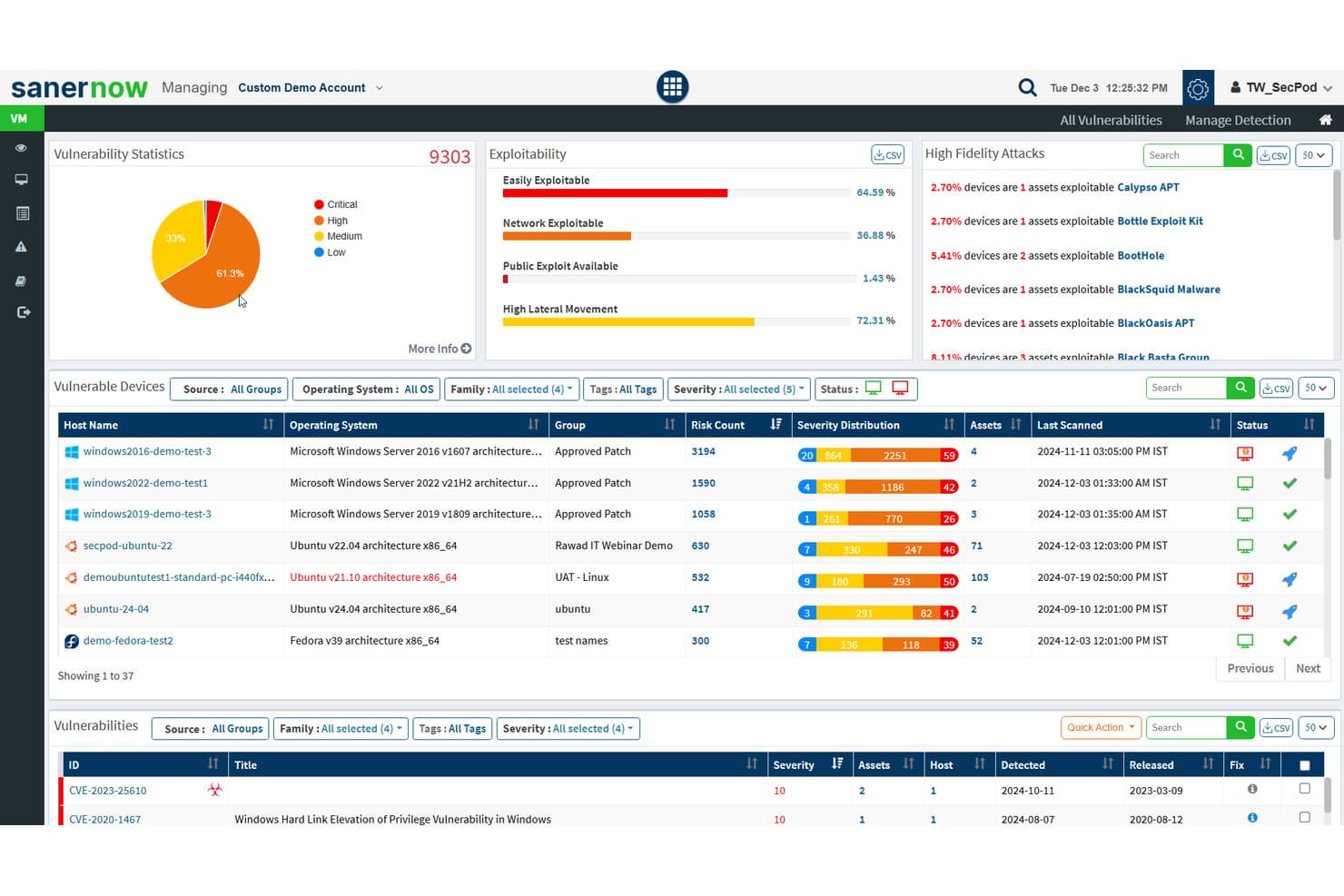
SecPod (Saner Platform) monitora le statistiche sulle vulnerabilità e la sfruttabilità negli asset cloud. Saner Cloud è una piattaforma nativa cloud per la protezione delle applicazioni di SecPod che unifica la gestione della postura cloud, la gestione dei diritti di accesso all'infrastruttura, il rilevamento delle anomalie e l'esposizione degli asset in AWS, Azure e GCP.
Per chi è più adatto SecPod (Saner Platform)?
Saner Cloud è adatto ai team di sicurezza e conformità che gestiscono identità, autorizzazioni e postura in AWS, Azure e GCP all'interno di ambienti multicloud.
Perché ho scelto SecPod (Saner Platform)
Ho scelto Saner Cloud come una delle soluzioni migliori perché la sua funzionalità CIEM va oltre la semplice segnalazione delle autorizzazioni ampie: mappa esattamente il modo in cui identità, ruoli e policy si combinano per concedere l'accesso in AWS, Azure e GCP, quindi mette in evidenza account inattivi, associazioni orfane e i 10 utenti con maggiori privilegi, fornendo prove che spiegano perché ogni assegnazione è rischiosa. In combinazione con i controlli CSPM basati su oltre 1.000 regole, la definizione delle priorità dei rischi allineata al modello SSVC di CISA mantiene il team concentrato su ciò che è sfruttabile, non solo su ciò che è configurato in modo errato.
Funzionalità principali di SecPod (Saner Platform)
- Rilevamento delle anomalie con punteggio di affidabilità: la funzionalità di rilevamento delle anomalie della postura di sicurezza cloud di Saner Cloud raggruppa le deviazioni della postura rilevate nelle categorie di affidabilità alta, media e bassa in AWS, Azure e GCP.
- Pianificazione automatizzata della correzione: i team possono configurare regole di correzione da eseguire automaticamente dopo le scansioni oppure secondo pianificazioni giornaliere, settimanali o mensili, con monitoraggio dello stato.
- Inventario dell'esposizione degli asset cloud: Saner Cloud mantiene un inventario centralizzato degli asset che segnala le risorse accessibili pubblicamente e tiene traccia degli asset cloud obsoleti o non più supportati.
- Definizione delle priorità dei rischi allineata a CISA SSVC: i risultati vengono classificati in base ai fattori decisionali SSVC di CISA — sfruttabilità, automazione, impatto tecnico e criticità delle risorse — per mettere in evidenza ciò che richiede un'attenzione immediata.
Integrazioni di SecPod (Saner Platform)
SecPod (Saner Platform) si integra con Amazon Web Services (AWS), Microsoft Azure e Google Cloud Platform (GCP) per i dati relativi alla postura cloud, alle identità e agli asset. Il numero di integrazioni native e la disponibilità delle API non sono documentati.
Pros and Cons
Pros:
- Classifica i rischi cloud in base all'impatto e alla sfruttabilità
- Mappa le autorizzazioni delle identità su tre cloud
- I recensori riferiscono che la configurazione iniziale è rapida
Cons:
- Gli avvisi basati sulle scansioni possono non rilevare i cambiamenti transitori
- La copertura degli ambienti ibridi e on-premise non è ancora documentata
Learn more about SecPod (Saner Platform): Ideale per la sicurezza delle flotte di dispositivi globali
- Demo gratuita disponibile
- da $5/persona/mese
Visit WebsiteCustomer Rating:4.9/5
La dashboard IT di Deel offre una panoramica globale sulla sicurezza dei dispositivi, il tracciamento delle attrezzature e la distribuzione degli asset in tutta la forza lavoro. Deel offre una suite di strumenti di sicurezza basati su cloud progettati per proteggere ogni dispositivo nella tua organizzazione dalle minacce informatiche. La sua piattaforma di protezione degli endpoint salvaguarda laptop, tablet e dispositivi mobili in tutta la forza lavoro globale.
Perché ho scelto Deel: Ho scelto Deel perché integra la sicurezza cloud direttamente nell'ecosistema di gestione della forza lavoro, combinando la protezione degli endpoint con la gestione dei dispositivi e il controllo degli accessi. Il sistema cloud-native di Deel rileva e previene continuamente malware, ransomware e accessi non autorizzati in tempo reale—senza bisogno di un pesante intervento manuale. La sua risposta automatica alle minacce isola istantaneamente i dispositivi compromessi, riducendo al minimo interruzioni ed esposizione dei dati.
Funzionalità e integrazioni di spicco di Deel:
Le funzionalità includono il rilevamento automatico delle minacce che si adatta all'evolversi dei rischi informatici in tempo reale, garantendo che ogni endpoint rimanga protetto. L'architettura leggera della piattaforma consente il contenimento istantaneo delle minacce senza rallentare dispositivi o flussi di lavoro. Deel offre anche copertura cross-platform, fornendo al tuo team IT protezione e visibilità coerenti su tutti i sistemi operativi e tipi di dispositivi.
Le integrazioni includono BambooHR, Personio, NetSuite, Slack, Google Workspace, Zoom, SAP SuccessFactors, Xero, QuickBooks, Workday, Greenhouse e Lever.
Pros and Cons
Pros:
- Rilevamento e risposta alle minacce in tempo reale
- Protegge tutti i dispositivi su più sedi
- Il contenimento automatico riduce il lavoro manuale
Cons:
- Non è una suite di sicurezza aziendale completa
- Manca di strumenti di sicurezza cloud più ampi al di là della gestione endpoint dei dispositivi
Learn more about Deel IT: La soluzione migliore per il controllo degli accessi zero trust
- Piano gratuito disponibile
- A partire da $5/utente/mese (fatturazione annuale)
Visit WebsiteCustomer Rating:4.8/5
Twingate offre visibilità sui dispositivi per una migliore gestione della rete. Twingate è una soluzione di sicurezza cloud che sostituisce le VPN tradizionali con un modello di Zero Trust Network Access (ZTNA). Aiuta a garantire l'accesso remoto sicuro alle risorse private applicando il principio del privilegio minimo, la verifica del dispositivo e controlli intelligenti del traffico.
Perché ho scelto Twingate: Ho scelto Twingate per la sua solida implementazione del modello zero trust, che garantisce agli utenti l'accesso solo alle risorse di cui hanno bisogno. Autenticando sia l'identità dell'utente sia lo stato del dispositivo, Twingate contribuisce a prevenire movimenti laterali non autorizzati all'interno delle reti. Ho trovato anche utili i suoi controlli di accesso automatizzati, che possono semplificare il processo di concessione o revoca dei permessi in ambienti di lavoro dinamici. Per i team distribuiti, queste funzionalità facilitano il mantenimento della sicurezza senza creare attriti per gli utenti finali.
Funzionalità e integrazioni principali di Twingate:
Le funzionalità includono la verifica intelligente dei dispositivi tramite integrazioni con servizi come CrowdStrike e Jamf, oltre al filtraggio DNS e al filtro dei contenuti per ridurre l'esposizione a siti dannosi. Il suo livello di orchestrazione può centralizzare la sicurezza senza richiedere una riconfigurazione della rete, mentre le integrazioni con provider di identità come Azure AD e Okta rendono la gestione degli accessi più efficiente.
Le integrazioni includono CrowdStrike, Intune, Kandji, Jamf, Azure AD, Okta, Google Workspace, OneLogin, KeyCloak, JumpCloud, Virtual Machines e Kubernetes.
Pros and Cons
Pros:
- Integrazioni flessibili con provider di identità
- Controlli avanzati di verifica dei dispositivi
- Orchestrazione zero trust centralizzata
Cons:
- Curva di apprendimento durante la configurazione
- Analisi avanzate limitate
Learn more about Twingate: Ideale per SIEM unificato con DLP e CASB
- Demo gratuita disponibile
- Prezzo su richiesta
Visit WebsiteCustomer Rating:4.2/5
ManageEngine Log360 offre funzionalità di reportistica personalizzabili per eventi di sicurezza, conformità e approfondimenti operativi. ManageEngine Log360 è una soluzione completa di gestione delle informazioni e degli eventi di sicurezza (SIEM) che offre gestione dei log, rilevamento delle minacce, reportistica per la conformità e avvisi di sicurezza in tempo reale. Mira a migliorare la visibilità sulla rete di un'organizzazione, potenziare le misure di sicurezza e offrire un'esperienza utente intuitiva.
Perché ho scelto ManageEngine Log360: Ho scelto ManageEngine Log360 per la sua capacità di offrire una copertura di sicurezza completa per gli ambienti cloud. L'integrazione delle funzionalità SIEM con cloud access security broker (CASB) e data loss prevention (DLP) garantisce un rilevamento e una risposta alle minacce solide. Inoltre, il rilevamento delle anomalie basato su machine learning, abbinato ad analisi in tempo reale, offre una sicurezza cloud dinamica e proattiva, rendendolo la scelta ideale per proteggere risorse e dati nel cloud.
ManageEngine Log360 Funzionalità principali e integrazioni:
Le funzionalità includono la gestione unificata dei log e le capacità SIEM, che consentono il rilevamento delle minacce in tempo reale e la reportistica di conformità da un'unica console. L'integrazione con i principali strumenti IT e di sicurezza migliora la visibilità su ambienti IT ibridi, semplificando la conformità a normative come GDPR e HIPAA. Inoltre, la correlazione automatica dei log e il rilevamento delle anomalie di Log360 forniscono insight operativi per identificare e mitigare rapidamente potenziali rischi di sicurezza.
Le integrazioni includono Microsoft Active Directory, Office 365, Google Workspace, AWS, Azure, Salesforce, Box, ServiceNow, Jira, Slack, IBM QRadar, Splunk, SolarWinds, Palo Alto Networks, Fortinet, Cisco e Sophos.
Pros and Cons
Pros:
- Visibilità della sicurezza a 360° tra reti on-premises, cloud e ibride
- Console per la gestione degli incidenti
- Conformità alle normative di legge
Cons:
- Configurazione e installazione complesse
- I log possono essere difficili da leggere e comprendere
Learn more about ManageEngine Log360: Ideale per una gestione completa della postura di sicurezza cloud
- Piano gratuito disponibile + demo gratuita
- Da $350/mese
Visit WebsiteCustomer Rating:4.7/5
Aikido Security offre una dashboard unificata per selezionare e filtrare le problematiche per tipologia, gravità e fonte della scansione. Aikido Security è una piattaforma DevSecOps completa progettata per offrire una copertura di sicurezza totale, dal codice al cloud. Integra molteplici funzionalità di scansione della sicurezza, tra cui SAST, DAST, SCA, CSPM, IaC e scansione dei container, per identificare e gestire vulnerabilità ad alto rischio nel codice sorgente, nei container e negli ambienti cloud.
Perché ho scelto Aikido Security: Apprezzo la sua gestione della postura di sicurezza cloud (CSPM), che rileva i rischi dell'infrastruttura cloud presso i principali fornitori di servizi cloud. Questa funzionalità garantisce che il tuo ambiente cloud sia costantemente monitorato per vulnerabilità, configurazioni errate e problematiche di conformità, offrendo una solida difesa contro potenziali violazioni di sicurezza. Inoltre, Aikido Security offre la scansione Infrastructure as Code (IaC), che esamina le configurazioni Terraform, CloudFormation e Kubernetes alla ricerca di rischi per la sicurezza.
Funzionalità e integrazioni distintive di Aikido Security:
Le funzionalità includono un approccio innovativo nel rilevamento dei percorsi di attacco visualizzando le potenziali vulnerabilità di sicurezza nell'infrastruttura cloud, consentendo una correzione preventiva. La sua priorizzazione dei rischi offre spunti operativi basati sul contesto in tempo reale e sull'impatto potenziale, aiutando i team a concentrarsi sulle minacce più critiche. Aikido Security si integra con i pipeline CI/CD e con i più diffusi strumenti DevOps, facilitando l'inserimento dei controlli di sicurezza nei flussi di lavoro di sviluppo senza compromettere la produttività.
Le integrazioni includono Amazon Web Services (AWS), Google Cloud, Microsoft Azure Cloud, Drata, Vanta, AWS Elastic Container Registry, Docker Hub, Jira, Asana e GitHub.
Pros and Cons
Pros:
- Interfaccia intuitiva
- Supporta il monitoraggio della conformità e la reportistica
- Fornisce spunti e raccomandazioni operative
Cons:
- Ignora le vulnerabilità se non è disponibile una soluzione
- Non dispone di funzionalità di sicurezza endpoint o rilevamento delle intrusioni
Learn more about Aikido Security: Ideale per la gestione degli account privilegiati
- Prova gratuita + demo gratuita disponibile
- Prezzo su richiesta

Heimdal offre una dashboard completa per la gestione degli asset IT. Nel campo della sicurezza cloud, Heimdal offre una soluzione dinamica per le aziende che desiderano proteggere i propri ambienti digitali. Progettato per settori come sanità, istruzione e pubblica amministrazione, affronta sfide come la conformità a standard quali ISO 27001 e GDPR. Lo strumento non solo difende da minacce come ransomware e phishing, ma semplifica anche la gestione della sicurezza, diventando così una risorsa preziosa per i team IT.
Perché ho scelto Heimdal
Ho scelto Heimdal per la sua eccezionale integrazione di avanzate misure di sicurezza pensate per l’ambiente cloud. Le sue capacità di Extended Detection & Response (XDR) offrono una copertura completa delle minacce su endpoint e reti, rispondendo all’esigenza di monitoraggio costante. Inoltre, la DNS Security di Heimdal protegge da minacce web, assicurando che la rete rimanga sicura. Queste caratteristiche risultano particolarmente interessanti per le aziende che danno priorità alla conformità e alla protezione dei dati.
Caratteristiche chiave di Heimdal
Oltre alle sue funzionalità di spicco, Heimdal offre numerose altre caratteristiche che potenziano la sua offerta di sicurezza cloud:
- Gestione account privilegiati & sessioni: Questa funzione mette in sicurezza l’accesso gestendo e monitorando gli account privilegiati, riducendo il rischio di accessi non autorizzati.
- Gestione patch & asset: Automatizza il processo di aggiornamento, garantendo che i sistemi siano sempre aggiornati e conformi agli standard di sicurezza.
- Protezione da crittografia ransomware: Fornisce un livello aggiuntivo di difesa contro gli attacchi ransomware, proteggendo dati e sistemi critici.
- Sicurezza email: Difende da minacce provenienti dalle email, come phishing e malware, filtrando e monitorando le comunicazioni.
Integrazioni di Heimdal
Al momento Heimdal non elenca integrazioni native; tuttavia, la piattaforma supporta integrazioni personalizzate tramite API.
Pros and Cons
Pros:
- Automatizza la distribuzione delle patch su tutti gli endpoint
- Solida rilevazione di vulnerabilità e minacce
- Visibilità dettagliata su asset e licenze
Cons:
- Nessuna integrazione nativa disponibile
- L’interfaccia richiede tempo di onboarding
Learn more about Heimdal: Ideale per una difesa basata sull'analisi dei dati
- Prova gratuita di 30 giorni disponibile
- Da $795/50 endpoint/anno
Visit WebsiteCustomer Rating:4.3/5
Ottieni panoramiche dettagliate dello stato del sistema con ManageEngine Desktop Central. ManageEngine Desktop Central è uno strumento completo che offre una gestione unificata degli endpoint e sicurezza cloud per tutti i dispositivi all'interno di un'organizzazione, ideale per professionisti IT, fornitori di servizi gestiti (MSP) e aziende di varie dimensioni. Il suo obiettivo è aiutare nella gestione di server, laptop, desktop, smartphone e tablet da un'unica posizione centralizzata.
Perché ho scelto ManageEngine Desktop Central: Il software fornisce una difesa basata sull'analisi dei dati grazie alle sue funzionalità di raccolta dati e analisi approfondite, che supportano gli amministratori IT con informazioni utili per affrontare proattivamente le minacce alla sicurezza. Una funzione chiave che supporta questo approccio è il monitoraggio in tempo reale dei sistemi e gli avvisi immediati. ManageEngine Desktop Central offre anche visibilità, controllo totale e consolidamento dei dati.
Caratteristiche e integrazioni distintive di ManageEngine Desktop Central:
Le funzionalità includono la gestione degli endpoint su dispositivi e sistemi operativi diversi, garantendo un'amministrazione fluida di desktop, server e dispositivi mobili. L'integrazione con strumenti come ServiceDesk Plus consente operazioni IT efficienti collegando i flussi di lavoro di ticketing e gestione dispositivi. Inoltre, il software offre automazione avanzata per la gestione delle patch e l'applicazione delle configurazioni, migliorando la sicurezza e riducendo l'intervento manuale.
Le integrazioni includono ServiceNow, Jira, Zoho Desk, Zendesk, Jira Service Desk, Microsoft SCCM, IBM BigFix, Slack, Microsoft Teams, Trello, Zapier, ManageEngine ServiceDesk Plus, Microsoft Intune, e altri.
Pros and Cons
Pros:
- Funzionalità di gestione desktop remota
- Gestione delle patch per aggiornamenti software
- Gestione active directory
Cons:
- Alcune funzionalità avanzate richiedono ulteriore approfondimento
- Gli utenti possono sentirsi sopraffatti dall'elevato numero di funzionalità configurabili
Learn more about ManageEngine Endpoint Central: Miglior gamma di servizi di scansione
- Prova gratuita di 14 giorni + demo gratuita disponibile
- Da $149/mese
Visit WebsiteCustomer Rating:4.8/5
Intruder offre una dashboard per la gestione centralizzata delle vulnerabilità. Intruder è uno strumento di sicurezza cloud progettato per aiutare le organizzazioni a gestire le vulnerabilità e proteggere i propri asset digitali. Si concentra sulla gestione continua delle vulnerabilità e sulla gestione della superficie di attacco, offrendo un approccio completo per identificare e affrontare le debolezze di sicurezza.
Perché ho scelto Intruder: Ho scelto Intruder per la sua capacità di eseguire vari servizi di scansione, inclusi scansioni di vulnerabilità esterne, interne, cloud, di applicazioni web e API. Queste funzionalità ti permettono di monitorare in tempo reale la postura di sicurezza della tua organizzazione, assicurando che le vulnerabilità critiche siano prioritarie e gestite tempestivamente. Inoltre, la piattaforma Intruder offre la gestione dell'esposizione utilizzando molteplici motori di scansione, il che aiuta a identificare problemi che potrebbero essere trascurati da altri strumenti.
Caratteristiche e integrazioni di spicco di Intruder:
Caratteristiche includono la capacità di dare priorità alle vulnerabilità in base al loro impatto potenziale, aiutandoti a concentrarti sui problemi più urgenti. Intruder fornisce anche indicazioni chiare per la risoluzione dei problemi, facilitando il compito del tuo team nell'affrontare le problematiche individuate. Inoltre, la piattaforma offre ampie capacità di reportistica, permettendoti di monitorare nel tempo la postura di sicurezza e dimostrare la conformità agli standard di settore.
Integrazioni includono AWS, GitLab, GitHub, Jira, Azure, Teams, Slack, Azure DevOps, Cloudflare, Google Cloud, Microsoft Sentinel e Okta.
Pros and Cons
Pros:
- La piattaforma esegue scansioni proattive per le nuove vulnerabilità divulgate
- Offre report dettagliati
- La prioritizzazione delle problematiche aiuta a concentrarsi sulle minacce critiche
Cons:
- Alcuni potrebbero trovare limitate le opzioni di personalizzazione delle scansioni
- Il monitoraggio della superficie di attacco è limitato al piano Premium
Learn more about Intruder: Ideale per il rilevamento proattivo delle minacce
- Prova gratuita di 30 giorni + demo gratuita disponibile
- A partire da $338.50/anno
Visit WebsiteCustomer Rating:4.6/5
Il rilevamento proattivo delle minacce di ESET PROTECT è visibile in un'unica dashboard. ESET PROTECT Complete è una soluzione di sicurezza completa basata su cloud progettata per offrire una protezione multilivello agli endpoint aziendali, inclusi computer, laptop e dispositivi mobili. La soluzione dispone di una tecnologia di sandboxing in cloud per contrastare le minacce zero-day e include la crittografia completa del disco per migliorare la protezione dei dati.
Perché ho scelto ESET PROTECT Complete: Come strumento di sicurezza cloud, ESET PROTECT offre una protezione robusta specificamente ideata per affrontare le sfide uniche della sicurezza in cloud computing. Inoltre, la console basata su cloud della piattaforma consente agli amministratori di gestire la sicurezza su ambienti cloud distribuiti in modo semplice, aumentando la visibilità e il controllo su tutte le risorse.
Caratteristiche e integrazioni salienti di ESET PROTECT Complete:
Le funzionalità includono una piattaforma di gestione unificata della sicurezza con capacità avanzate di rilevamento e risposta alle minacce, consentendo ai team IT di monitorare endpoint, server e reti in tempo reale. L’approccio multilivello di ESET alla sicurezza comprende protezione degli endpoint, crittografia dei dati e sandboxing in cloud, garantendo una difesa completa contro minacce note e zero-day. L’integrazione con strumenti cloud-native e la distribuzione semplificata la rendono particolarmente facile da usare per le organizzazioni che cercano soluzioni di cybersecurity efficienti e scalabili.
Le integrazioni includono ConnectWise Automate, Microsoft Windows Defender Antivirus, Microsoft Azure, Datto RMM, NinjaOne, Kaseya VSA e ATERA.
Pros and Cons
Pros:
- Impatto minimo sulle prestazioni grazie a una presenza leggera nel sistema
- Capacità avanzate di rilevamento e risposta alle minacce
- Strumenti di reportistica completi per approfondite analisi della sicurezza
Cons:
- Il prezzo può risultare elevato per le organizzazioni più piccole
- Necessarie competenze tecniche per sfruttare le funzionalità avanzate
Learn more about ESET PROTECT Complete:
Altri strumenti di sicurezza cloud
Ecco alcune ulteriori opzioni di strumenti di sicurezza cloud che non sono state incluse nella mia selezione, ma che vale comunque la pena considerare:
- 11CyberarkIdeale per la sicurezza dell'identità end-to-end
- 12Astra PentestIdeale per una scansione continua con supporto esperto
- 13QualysIdeale per la gestione delle vulnerabilità in ambienti ibridi
- 14ZygonIdeale per la sicurezza degli accessi SaaS
- 15SplunkLa migliore piattaforma unificata per sicurezza e osservabilità
- 16ZscalerMigliore soluzione zero trust
- 17Trend MicroIdeale per extended detection and response (XDR)
- 18Barracuda CloudGen FirewallMiglior firewall per reti cloud e ibride
- 19WizIdeale per imprese di medie e grandi dimensioni
- 20Forcepoint ONEIdeale per aziende con una forza lavoro ibrida
- 21RubrikIdeale per il backup e il ripristino dei dati aziendali
- 22Orca SecurityMigliore soluzione di sicurezza cloud senza agenti
- 23PenteraIdeale per la validazione automatizzata della sicurezza
- 24CakewalkIdeale per la gestione degli accessi
- 25OPSWAT Security ScoreIdeale per controlli rapidi della sicurezza
- 26Rippling ITIdeale per la gestione di dispositivi e applicazioni basati sul cloud
- 27Stream SecurityIdeale per il rilevamento in tempo reale delle esposizioni sul cloud
- 28UnderDefenseIdeale per il rilevamento e la risposta alle minacce 24/7
Come Valuto gli Strumenti di Sicurezza Cloud
Divido la mia valutazione in criteri di base—come copertura CSPM multi-cloud e analisi IAM—e fattori differenzianti che separano gli strumenti pensati per le SecOps aziendali da quelli più adatti a team snelli.
Funzionalità Core (Requisiti Minimi per Questa Lista)
Quando seleziono gli strumenti per la mia lista, li valuto su una scala da 0 (non offre la funzionalità) a 5 (eccelle in quest'area) per ciascuna delle seguenti funzionalità core. Poi calcolo il punteggio totale dello strumento in percentuale. Ogni strumento deve raggiungere un punteggio minimo totale del 75% per essere considerato per l'inclusione.
- Gestione della Postura Cloud: Valuto quanto bene uno strumento rileva configurazioni errate come bucket S3 aperti, gruppi di sicurezza troppo permissivi e archiviazione non crittografata tra gli account cloud.
- Copertura Multi-Cloud: L'assistenza di ciascuno strumento su AWS, Azure e GCP è importante, soprattutto per la parità delle funzionalità così che i team non debbano gestire mancanze tra i provider.
- Conformità e Applicazione delle Policy: Cerco framework integrati come i CIS Benchmark, SOC 2 e HIPAA, oltre alla possibilità di creare policy personalizzate secondo gli standard interni.
- Scansione di Carichi di Lavoro e Vulnerabilità: La copertura su VM, container e cluster Kubernetes è fondamentale, inclusa la capacità di uno strumento di scansionare carichi di lavoro attivi o soltanto immagini a riposo.
- Gestione delle Identità e delle Autorizzazioni: Verifico se lo strumento mappa i permessi IAM, segnala account di servizio troppo privilegiati e raccomanda policy di minimo privilegio negli ambienti cloud.
- Rilevamento e Risposta alle Minacce: La priorità va agli avvisi in tempo reale su attività sospette come chiamate API insolite o movimenti laterali, insieme a workflow di rimedio o integrazione con SIEM/SOAR.
Una volta composta la lista degli strumenti che soddisfano questi criteri, considero cosa distingue ogni piattaforma.
Fattori Differenzianti (Cosa Distingue i Fornitori)
Ecco come confronto e metto a confronto i diversi fornitori:
Funzionalità Distintive
L'analisi dei percorsi di attacco è un importante elemento distintivo. Cerco strumenti che mappano come un bucket di archiviazione mal configurato, combinato con un ruolo troppo privilegiato, possa dare a un attaccante una via verso i database di produzione. Anche la scansione della sicurezza IaC è fondamentale, perché rilevare una configurazione errata su Terraform o CloudFormation prima del deployment fa risparmiare ore di rimedio successivo. Valuto se uno strumento consolida CSPM, CWPP e CIEM in una console unificata CNAPP, che riduce il cambio di contesto e offre ai team sicurezza viste di rischio correlate invece di avvisi frammentati.
Oltre le Funzionalità
Le integrazioni qui sono molto importanti. Verifico se uno strumento si connette nativamente a piattaforme SIEM/SOAR come Splunk o Sentinel e a sistemi di ticketing come Jira, dato che le rilevazioni di sicurezza devono fluire nei workflow di risposta agli incidenti già esistenti. Anche la trasparenza dei prezzi è un fattore che considero: alcuni fornitori fanno pagare per carico di lavoro, altri per account cloud, e i costi imprevedibili con la crescita dell'infrastruttura possono ridurre il valore rapidamente. Valuto anche la scalabilità, in particolare se la piattaforma gestisce centinaia di account cloud con un adeguato RBAC e supporto multi-tenant per team di sicurezza distribuiti.
Come scegliere gli strumenti di sicurezza cloud
È facile perdersi in lunghi elenchi di funzionalità e strutture tariffarie complesse. Per aiutarti a rimanere concentrato mentre affronti il tuo processo di selezione del software, ecco una lista di controllo dei fattori da tenere a mente:
| Fattore | Cosa considerare |
|---|---|
| FattoreScalabilità | Cosa considerareLo strumento può crescere insieme al tuo team e alle tue esigenze di dati? Cerca opzioni che supportino l'espansione dei carichi di lavoro e degli utenti senza un aumento significativo dei costi. |
| FattoreIntegrazioni | Cosa considerareFunziona con i tuoi strumenti DevSecOps esistenti e con le piattaforme di protezione dei carichi di lavoro cloud? Verifica la compatibilità con il tuo attuale insieme di software per evitare interruzioni e garantire operazioni fluide. |
| FattorePersonalizzazione | Cosa considerarePuoi adattare lo strumento ai tuoi flussi di lavoro? Considera strumenti che offrano la flessibilità necessaria per modificare impostazioni e funzionalità in base alle tue esigenze specifiche. |
| FattoreSemplicità d'uso | Cosa considerareLo strumento è facile da usare per il tuo team? Testa l'interfaccia per verificare che la navigazione sia intuitiva e garantire una rapida adozione da parte di tutti i membri del team. |
| FattoreImplementazione e avvio | Cosa considerareCosa serve per iniziare? Cerca risorse come tutorial e supporto per facilitare la transizione e ridurre i tempi di inattività durante la configurazione. |
| FattoreCosto | Cosa considerareIl prezzo rientra nel tuo budget? Confronta i piani di abbonamento, i costi nascosti e il valore a lungo termine per garantire la convenienza senza rinunciare alle funzionalità essenziali. |
| FattoreMisure di sicurezza | Cosa considerareSono presenti misure di sicurezza solide? Dai priorità agli strumenti con crittografia, controlli degli accessi e aggiornamenti regolari per proteggere i tuoi dati. |
Cosa sono gli strumenti di sicurezza del cloud?
Gli strumenti di sicurezza del cloud sono soluzioni progettate per proteggere dati e applicazioni basati sul cloud da minacce e accessi non autorizzati. I professionisti IT, gli esperti di cybersicurezza e i responsabili della conformità utilizzano generalmente questi strumenti per proteggere le informazioni sensibili e mantenere la conformità normativa. Le funzionalità di protezione dei dati, rilevamento delle minacce e controllo degli accessi contribuiscono a proteggere gli ambienti, garantire la conformità e gestire i rischi. Nel complesso, questi strumenti forniscono sicurezza essenziale e tranquillità negli ambienti cloud.
Funzionalità
Quando selezioni gli strumenti di sicurezza del cloud, presta attenzione alle seguenti funzionalità principali:
- Protezione dei dati: protegge le informazioni sensibili da accessi non autorizzati e violazioni, garantendo l'integrità dei dati.
- Rilevamento delle minacce: identifica e segnala agli utenti le potenziali minacce alla sicurezza in tempo reale, comprese quelle segnalate dagli strumenti di monitoraggio del dark web integrati.
- Controllo degli accessi: gestisce chi può accedere a dati e applicazioni specifici, riducendo il rischio di minacce interne.
- Gestione della conformità: aiuta le organizzazioni a rispettare le normative e gli standard di settore, evitando sanzioni legali.
- Monitoraggio della sicurezza: monitora continuamente gli ambienti cloud alla ricerca di attività sospette, mantenendo il livello di sicurezza.
- Analisi delle minacce basata sull'intelligenza artificiale: utilizza l'intelligenza artificiale per prevedere e analizzare le potenziali minacce, migliorando la protezione.
- Supporto multi-cloud: fornisce sicurezza su più piattaforme cloud, offrendo flessibilità e scalabilità.
- Crittografia avanzata: protegge i dati con solidi metodi di crittografia, garantendo riservatezza e sicurezza.
- Avvisi in tempo reale: notifica immediatamente agli utenti gli incidenti di sicurezza, consentendo di agire rapidamente per mitigare i rischi.
- Dashboard personalizzabili: consentono agli utenti di personalizzare la visualizzazione delle metriche di sicurezza, migliorando il monitoraggio e il processo decisionale.
Vantaggi
L'implementazione di strumenti di sicurezza del cloud offre diversi vantaggi al tuo team e alla tua azienda. Eccone alcuni:
- Maggiore sicurezza dei dati: protegge le informazioni sensibili dalle violazioni grazie a funzionalità come la protezione dei dati e la crittografia avanzata.
- Conformità normativa: aiuta la tua azienda a rispettare le normative di settore attraverso la gestione della conformità e le integrazioni con gli strumenti di governance del cloud.
- Riduzione del rischio di minacce: identifica e mitiga rapidamente le potenziali minacce alla sicurezza grazie al rilevamento delle minacce e agli avvisi in tempo reale.
- Controllo degli accessi migliorato: limita gli accessi non autorizzati con funzionalità di controllo degli accessi, proteggendo i dati dalle minacce interne.
- Scalabilità e flessibilità: supporta la crescita e i cambiamenti aziendali grazie al supporto multi-cloud, adattandosi alle tue esigenze in evoluzione.
- Risposta rapida agli incidenti: consente di agire rapidamente durante gli incidenti di sicurezza attraverso avvisi e monitoraggio in tempo reale.
- Processo decisionale informato: le dashboard personalizzabili forniscono informazioni chiare sulle metriche di sicurezza, favorendo la pianificazione strategica.
Costi & Prezzi
La selezione degli strumenti di sicurezza del cloud richiede una comprensione dei diversi modelli e piani tariffari disponibili. I costi variano in base alle funzionalità, alle dimensioni del team, agli elementi aggiuntivi e ad altro ancora. La tabella seguente riassume i piani più comuni, i relativi prezzi medi e le funzionalità generalmente incluse nelle soluzioni di strumenti di sicurezza del cloud:
Tabella comparativa dei piani per gli strumenti di sicurezza del cloud
| Tipo di piano | Prezzo medio | Funzionalità comuni |
|---|---|---|
| Tipo di pianoPiano gratuito | Prezzo medio$0 | Funzionalità comuniRilevamento delle minacce di base, controllo degli accessi limitato e protezione dei dati di livello base. |
| Tipo di pianoPiano personale | Prezzo medio$5-$25/utente/mese | Funzionalità comuniProtezione dei dati avanzata, avvisi in tempo reale e gestione della conformità di base. |
| Tipo di pianoPiano aziendale | Prezzo medio$30-$60/utente/mese | Funzionalità comuniRilevamento avanzato delle minacce, supporto multi-cloud e dashboard personalizzabili. |
| Tipo di pianoPiano aziendale avanzato | Prezzo medio$70-$150/utente/mese | Funzionalità comuniStrumenti completi per la conformità, analisi delle minacce basata sull'intelligenza artificiale e controllo completo degli accessi. |
Domande frequenti sugli strumenti di sicurezza cloud
Ecco alcune risposte alle domande comuni sugli strumenti di sicurezza cloud:
Gli strumenti di sicurezza cloud richiedono una manutenzione continua?
Sì, spesso richiedono aggiornamenti, ottimizzazione delle policy e manutenzione delle integrazioni. Alcune piattaforme offrono aggiornamenti automatici o servizi gestiti per ridurre il lavoro manuale. Il carico di manutenzione dipende dal modello di implementazione e dalla complessità della configurazione.
Gli strumenti di sicurezza cloud possono integrarsi con i sistemi esistenti?
Sì, molti strumenti di sicurezza cloud offrono integrazioni con i sistemi e i software IT esistenti. Ciò garantisce un flusso di lavoro fluido e la sincronizzazione dei dati. Verifica la compatibilità con i sistemi attuali per massimizzare l’efficienza ed evitare interruzioni.
Quali tipi di ambienti cloud supportano questi strumenti?
La maggior parte degli strumenti è progettata per funzionare in ambienti cloud pubblici, privati e ibridi. Alcuni sono ottimizzati per provider specifici come AWS, Azure o Google Cloud. La compatibilità può dipendere dal modo in cui lo strumento viene implementato e configurato.
Come rilevano le minacce gli strumenti di sicurezza cloud?
In genere si basano su sistemi automatizzati che analizzano i log, l’attività di rete e i modelli di accesso. I metodi di rilevamento possono includere motori basati su regole, modelli di apprendimento automatico o analisi comportamentali. La logica di rilevamento varia tra le piattaforme in base alla loro architettura.
Gli strumenti di sicurezza cloud sono specifici per una piattaforma o multipiattaforma?
Alcuni sono sviluppati specificamente per un singolo provider cloud, mentre altri supportano più piattaforme. Gli strumenti multipiattaforma spesso includono dashboard centralizzate per una visibilità unificata. I requisiti di implementazione e il livello di integrazione variano in base allo strumento.
Quali sono le 4 C della sicurezza cloud?
Le quattro C della sicurezza cloud-native sono Cloud, Cluster, Codice e Container. Rappresentano diversi livelli di sicurezza necessari per proteggere le applicazioni cloud-native. Considera come ogni livello interagisce con gli altri e supporta la strategia complessiva di sicurezza del tuo ambiente cloud.
In che modo gli strumenti di sicurezza cloud aiutano a garantire la conformità?
Gli strumenti di sicurezza cloud contribuiscono alla conformità offrendo funzionalità come log di audit, crittografia dei dati e controlli degli accessi. Aiutano a garantire che la tua organizzazione rispetti le normative di settore. Cerca strumenti in linea con le tue esigenze specifiche di conformità per evitare potenziali sanzioni.