

I 10 migliori software gratuiti di assistenza IT recensiti nel 2026

Elenco dei migliori software gratuiti per la gestione dell'assistenza clienti


Gestire un'attività può essere impegnativo, soprattutto quando le risorse sono limitate e devi gestire dati complessi provenienti da diverse fonti. Devi mantenere soddisfatti i tuoi clienti senza spendere una fortuna. È qui che entra in gioco il software gratuito per la gestione dell'assistenza clienti. Offre un modo pratico per gestire le richieste dei clienti, il flusso dei dati e i ticket di assistenza senza i costi elevati delle soluzioni a pagamento.
In base alla mia esperienza, trovare lo strumento giusto può farti risparmiare tempo, ridurre lo stress e migliorare la qualità dei dati nei vari insiemi di dati dei clienti. Ho testato e recensito diverse opzioni per offrirti una panoramica imparziale delle migliori soluzioni gratuite per la gestione dell'assistenza clienti disponibili, incluse le opzioni basate nativamente sul cloud e quelle open source.
In questo articolo troverai le mie scelte migliori, che offrono piani o periodi di prova gratuiti. Evidenzierò le loro caratteristiche distintive, le capacità di gestione dei dati e il modo in cui supportano i flussi di lavoro end-to-end, per aiutare il tuo team ad affrontare le sfide quotidiane.
Perché fidarsi dei nostri consigli sui software
Il nostro team testa e recensisce software dal 2012. In quanto leader tecnologici noi stessi, sappiamo quanto sia difficile — e importante — scegliere il software giusto.
Per questa guida, abbiamo valutato gli strumenti attraverso test praticie ricerche indipendenti, assegnando un punteggio agli strumenti in base ai nostri criteri di selezione.
Le nostre recensioni riflettono il nostro giudizio editoriale umano, non un discorso di vendita.
Revisori esperti:
Tabella comparativa dei software gratuiti per la gestione dell'assistenza clienti
Questa tabella comparativa evidenzia i prezzi di base dei piani a pagamento delle mie migliori selezioni di software gratuiti per la gestione dell’assistenza clienti.
| Tool | Best For | Trial Info | Price | ||
|---|---|---|---|---|---|
| 1 | Ideale per il ticketing basato sull’IA | Prova gratuita di 14 giorni + demo gratuita disponibile | Da $19/agente/mese (fatturazione annuale) | Website | |
| 2 | Ideale per collegare ticket e contesto operativo | Prova gratuita di 14 giorni + demo gratuita disponibile | A partire da $19/agente/mese (fatturato annualmente) | Website | |
| 3 | Ideale per workflow automatici dei chatbot | Prova gratuita di 7 giorni + piano free disponibile | Da $24.17/mese (fatturazione annuale) | Website | |
| 4 | Il migliore con conformità HIPAA-ready | Prova gratuita disponibile | Da $25/utente/mese (fatturazione annuale) | Website | |
| 5 | Ideale per la gestione dei ticket guidata dall'IA | Prova gratuita di 21 giorni + demo gratuita disponibile | A partire da $149/tecnico/mese (fatturazione annuale) | Website | |
| 6 | Ideale per l'hosting su cloud | Piano gratuito disponibile | Gratis da usare | Website | |
| 7 | Ideale per una gestione facile dei ticket | Piano gratuito + demo gratuita disponibile | Da $39.99/mese (fatturazione annuale) | Website | |
| 8 | Ideale per la gestione degli asset | Piano gratuito + prova gratuita di 45 giorni disponibile | Da €19/agente/mese | Website | |
| 9 | Ideale per professionisti IT | Piano gratuito disponibile | A partire da $5/postazione/mese (fatturato annualmente) | Website | |
| 10 | Ideale per l'integrazione email | Prova gratuita di 30 giorni + piano gratuito disponibile | Da $12/utente/mese | Website |


Recensione dei migliori software gratuiti per la gestione dell'assistenza clienti
Di seguito trovi i miei riepiloghi dettagliati dei migliori software gratuiti per la gestione dell’assistenza clienti inclusi nel mio elenco. Le mie recensioni offrono una panoramica dettagliata delle caratteristiche principali, dei pro e dei contro, delle integrazioni e dei casi d’uso ideali di ogni strumento, per aiutarti a trovare quello più adatto a te. Sebbene alcuni di questi strumenti offrano una versione completamente gratuita, altri propongono un periodo di prova gratuito. In ogni recensione ho aggiunto una nota relativa a ciò che è gratuito.

Ideale per il ticketing basato sull’IA
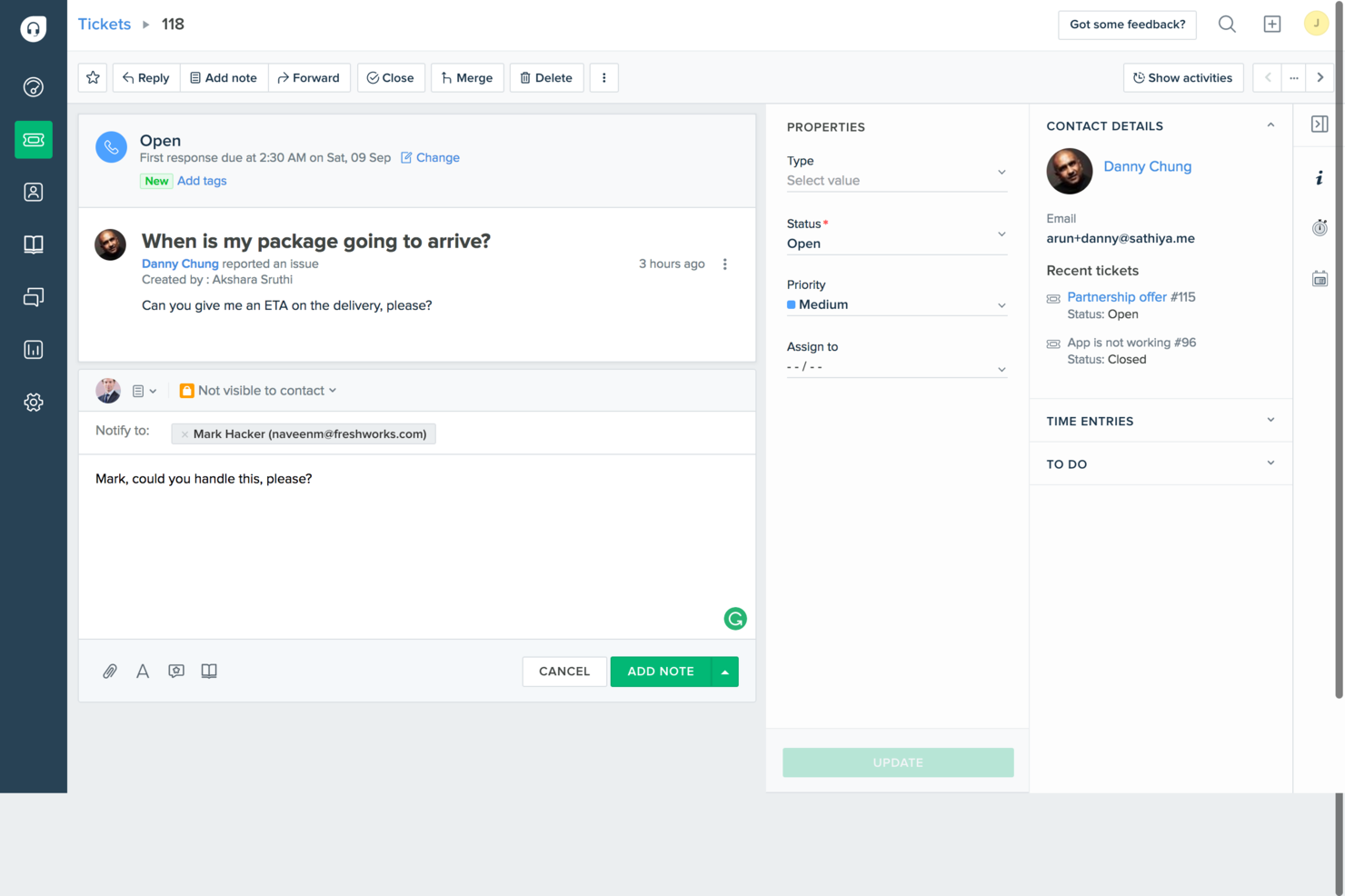
Per le aziende che desiderano una soluzione di assistenza clienti semplice ed efficace, Freshdesk è una scelta pratica. Progettato pensando alle piccole imprese e alle startup, include gli strumenti essenziali per gestire il servizio clienti senza complessità inutili. Centralizzando la gestione dei ticket tra email e social media, Freshdesk aiuta il tuo team a gestire le richieste dei clienti in un unico posto, così puoi dedicare più tempo a costruire relazioni solide invece di destreggiarti tra diversi canali.
Perché ho scelto Freshdesk
Ho scelto Freshdesk per la sua integrazione di funzionalità di ticketing e automazione basate sull'intelligenza artificiale, che soddisfano le necessità delle imprese che vogliono ottimizzare il supporto clienti. Il sistema di ticketing potenziato dall’IA riduce notevolmente i tempi di risoluzione dei ticket, consentendo al tuo team di concentrarsi su attività più strategiche. Inoltre, Freddy AI di Freshdesk offre informazioni preziose e automatizza i compiti ripetitivi, aiutandoti a migliorare l’efficienza e la produttività senza bisogno di un intervento manuale esteso.
Funzionalità Principali di Freshdesk
Oltre alle sue capacità basate sull'IA, ho rilevato che Freshdesk offre una serie di altre funzionalità utili come software helpdesk gratuito:
- Sistema di Ticketing Integrato: Gestisci i quesiti dei clienti provenienti da email e social media in un unico luogo, assicurandoti che nessuna richiesta resti senza risposta.
- Base di Conoscenza: Crea un portale self-service dove i clienti possono trovare risposte alle proprie domande, riducendo il carico sul tuo team di supporto.
- Strumenti di Collaborazione: Permetti al tuo team di lavorare insieme sui ticket, garantendo che i problemi complessi vengano risolti in modo efficiente.
- Reportistica e Analisi: Ottieni dati sulle tendenze dei ticket e sulle prestazioni del team per prendere decisioni aziendali informate.
Integrazioni di Freshdesk
Tra le integrazioni figurano Slack, MS Teams, Shopify, Playvox, Facebook, WhatsApp, QuickBooks, Google Workspace, Trello e Salesforce.
Pros and Cons
Pros:
- Ticketing multicanale per email e social
- Smistamento automatico dei ticket incluso
- Portale della knowledge base integrato
Cons:
- Personalizzazione limitata nei piani base
- Funzionalità IA non completamente gratuite
New Product Updates from Freshdesk

Freshdesk Adds Voice AI Agents in Freshcaller
Freshdesk introduces Voice AI Agents available through Freshcaller Marketplace apps to handle routine calls and reduce queues. This feature enables automated call handling with real-time, conversational support. For more information, visit Freshdesk's official site.

Ideale per collegare ticket e contesto operativo
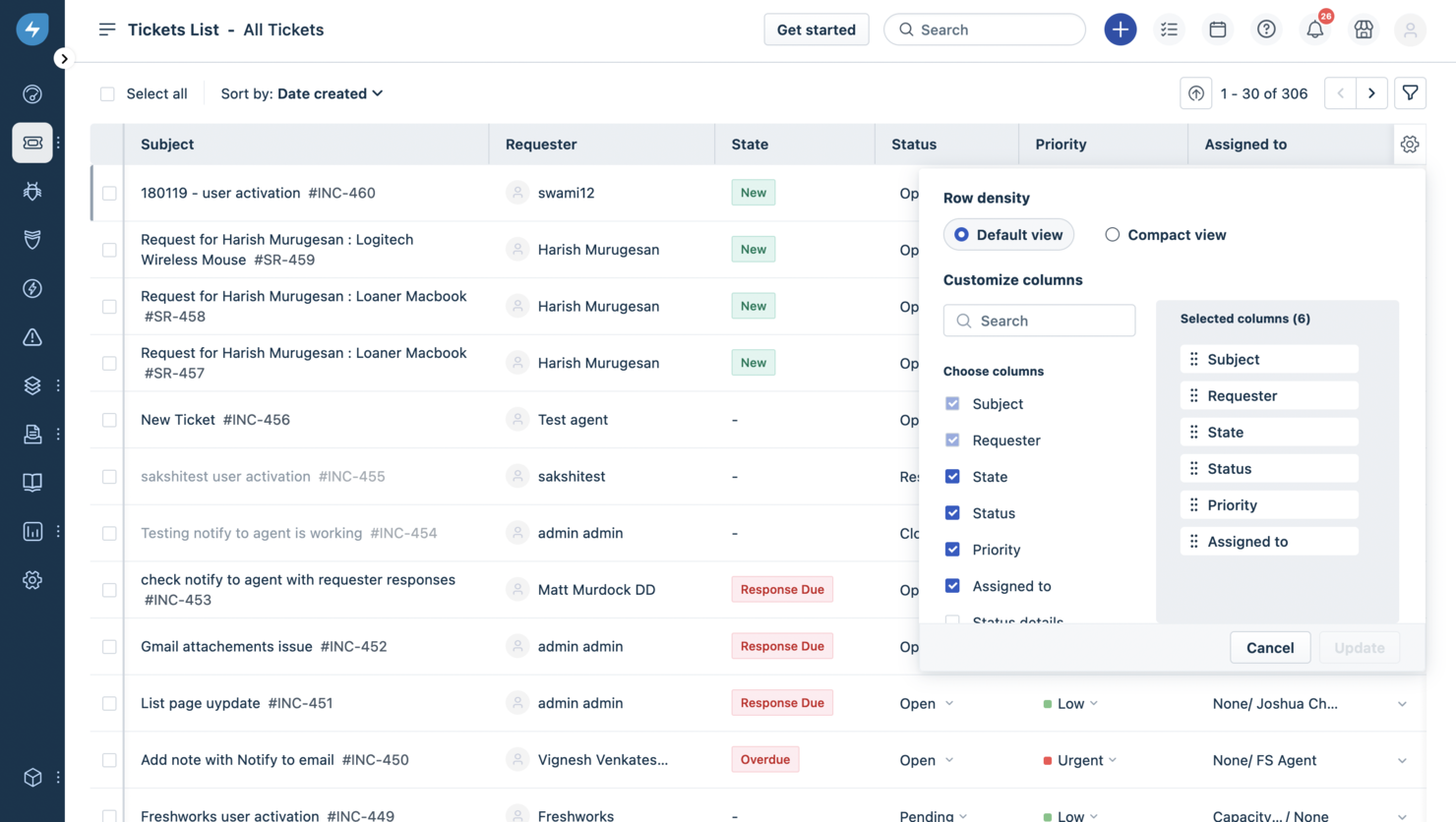
Freshservice si presenta come un software di helpdesk che fa molto più che registrare ticket, combinando le tradizionali funzioni del support desk con pratiche strutturate di gestione dei servizi IT, così il tuo team può gestire richieste in entrata, indirizzare i problemi e supervisionare il lavoro di servizio da un'unica piattaforma. È pensato per team IT, gruppi di supporto interni (come HR o servizi generali), e aziende che desiderano un helpdesk con capacità di ticketing, self-service e automazione per ridurre il lavoro manuale nelle operazioni di servizio.
Perché ho scelto Freshservice
Ho scelto Freshservice per il suo service desk potenziato dall’IA, che semplifica l’esperienza utente grazie a flussi di lavoro drag-and-drop. La funzione di gestione degli incidenti della piattaforma automatizza l’inoltro dei ticket, garantendo tempi di risoluzione rapidi, esigenza fondamentale per ogni software di helpdesk.
Inoltre, le capacità di gestione dei cambiamenti di Freshservice permettono di semplificare il monitoraggio della conformità, essenziale per mantenere l’integrità operativa. L’automazione integrata e la gestione degli SLA aiutano ad assegnare il lavoro e monitorare le prestazioni di servizio senza supervisione manuale. Se cerchi un helpdesk che colleghi i ticket al contesto operativo più ampio e all’applicazione delle aspettative di servizio, Freshservice offre questo equilibrio.
Funzionalità chiave di Freshservice
Oltre alle sue funzionalità di base, Freshservice offre diverse altre opzioni che ne potenziano l’utilità come soluzione di helpdesk:
- Supporto omnicanale: Gestisce l’assistenza su piattaforme come email e Slack, assicurando una comunicazione senza soluzione di continuità.
- Catalogo dei servizi: Offre un portale unificato per tutte le richieste di servizio, facilitando agli utenti la ricerca di ciò di cui hanno bisogno.
- Gestione della conoscenza: Centralizza le informazioni, riducendo il carico di lavoro degli operatori tramite il self-service.
- Gestione degli asset: Tiene traccia di hardware e software insieme ai ticket, fornendo al tuo helpdesk il contesto di ciò che viene supportato e la sua cronologia.
Integrazioni di Freshservice
Le integrazioni includono Microsoft Teams, Slack, Google Workspace, Jira, Dropbox, AWS, Azure, Zapier, Trello e Salesforce.
Pros and Cons
Pros:
- Gestione centralizzata di ticket e workflow di helpdesk.
- Il portale self-service riduce le richieste di base.
- Solidi flussi di lavoro allineati a ITIL per un’erogazione strutturata dei servizi.
Cons:
- La gestione degli asset può diventare costosa con la crescita.
- L’app mobile offre funzionalità limitate per alcuni utenti.
New Product Updates from Freshservice
 Experience)
Freshservice Introduces a Reimagined IT Asset Management (ITAM) Experience
Freshservice introduces a reimagined IT Asset Management (ITAM) experience with continuous infrastructure discovery, dependency mapping, IPAM, and Software License Management. This update helps teams improve asset visibility and manage connected IT environments more effectively. For more information, visit Freshservice’s official site.

Tidio
Ideale per workflow automatici dei chatbot

Tidio è una piattaforma di live chat e helpdesk che combina una casella di posta multicanale, gestione dei ticket, automazione delle chat alimentata da AI e un elenco dei visitatori in tempo reale in un'unica interfaccia per i team di assistenza clienti.
Per chi è più indicato Tidio?
Tidio è particolarmente adatto a piccole imprese ecommerce e startup che necessitano di uno strumento per il supporto clienti gratuito e facile da implementare, con chat e automazioni integrate.
Perché ho scelto Tidio
Tidio è una delle mie scelte preferite perché adoro il suo builder Flows, che rende l'automazione dei chatbot davvero accessibile senza dover scrivere una sola riga di codice. Offre un editor visivo drag-and-drop, oltre 40 template predefiniti per scenari come il recupero dei carrelli abbandonati e la gestione delle FAQ, e una logica basata su trigger che si attiva in momenti specifici del percorso del visitatore. Trovo anche utili il trigger sulla profondità di scroll e i percorsi di azione specifici per mobile, pensati per i team che cercano precisione su come e quando far partire le automazioni.
Caratteristiche principali di Tidio
- Casella di posta multicanale: Gestisci live chat, email, Instagram, Messenger e WhatsApp da un'unica casella condivisa.
- Lyro AI agent: Un agente alimentato da AI che gestisce le richieste di supporto utilizzando i contenuti della tua knowledge base per generare risposte.
- Gestione dei ticket: Trasforma le conversazioni in ticket di supporto, assegna livelli di priorità e indirizza automaticamente i ticket all'agente giusto.
- Risposte predefinite: Crea e archivia template di risposta già pronti che gli agenti possono inserire all'istante durante le chat.
Integrazioni di Tidio
Tidio offre integrazioni native con Shopify, WordPress, Zendesk, WhatsApp, Instagram, Messenger, ActiveCampaign, Agile CRM e BigCommerce, tra gli altri. Si collega con Zapier e dispone di una OpenAPI per integrazioni personalizzate.
Cosa è gratuito?
Tidio propone un piano gratuito per sempre che include 50 conversazioni fatturabili al mese, fino a 10 posti agente, live chat, gestione ticket, lista visitatori in tempo reale, analisi base e 50 conversazioni una tantum con Lyro AI. Tutti i piani a pagamento includono anche una prova gratuita di 7 giorni che non richiede carta di credito.
Pros and Cons
Pros:
- Builder visuale dei chatbot drag-and-drop
- Casella di posta multicanale per chat e social
- Live chat si installa in meno di 30 minuti
Cons:
- Lyro AI si blocca al limite giornaliero di utilizzo
- Le analisi non sono sufficientemente dettagliate per report approfonditi

Il migliore con conformità HIPAA-ready

Help Scout offre una piattaforma di helpdesk progettata per i team che vogliono gestire le conversazioni con i clienti con chiarezza e struttura. È una buona scelta per piccole imprese, aziende SaaS e team di supporto che cercano una casella di posta condivisa, automazione e una knowledge base integrata. Se hai bisogno di una soluzione gratuita che bilanci la collaborazione con il self-service per i clienti, Help Scout merita considerazione.
Per chi è più adatto Help Scout?
Help Scout è indicato per piccole e medie imprese e team di supporto che hanno bisogno di un helpdesk collaborativo con potenti strumenti di comunicazione con i clienti.
Perché ho scelto Help Scout
Per i team che devono rispettare rigorosi standard di privacy dei dati, ho scelto Help Scout perché offre un'opzione conforme agli standard HIPAA-ready. Questo è particolarmente importante per le organizzazioni sanitarie o qualsiasi azienda che gestisce informazioni sensibili sulla salute. Il piano HIPAA-ready di Help Scout include funzionalità come la gestione sicura dei dati e la sottoscrizione di Business Associate Agreements (BAA), essenziali per la conformità normativa. Queste capacità lo rendono una scelta pratica se cerchi una soluzione di helpdesk gratuita che possa adattarsi ai requisiti HIPAA man mano che crescono le tue esigenze.
Funzionalità principali di Help Scout
Altre funzionalità che spiccano per i team di helpdesk includono:
- Casella di posta condivisa: Gestisci e assegna le conversazioni con i clienti all'interno del tuo team da un'unica casella di posta organizzata.
- Knowledge base (Docs): Crea e mantieni un portale self-service ricercabile affinché i clienti possano trovare autonomamente le risposte.
- Workflow automatizzati: Imposta regole per automatizzare attività ripetitive come l'instradamento dei ticket, l'aggiunta di tag e la definizione delle priorità.
- Messaggistica in-app: Comunica direttamente con i clienti all'interno del tuo prodotto o sito tramite messaggi mirati.
Integrazioni Help Scout
Le integrazioni includono Salesforce, Shopify, WhatsApp, HubSpot, Jira, Linear, Stripe, Slack, FullStory e WooCommerce.
Cosa è gratuito?
Help Scout offre un piano gratuito per sempre per individui o piccoli team. Il piano gratuito comprende 1 casella di posta condivisa, 1 knowledge base pubblica, fino a 100 contatti al mese e risposte salvate limitate, ma non include strumenti AI o la maggior parte delle funzionalità avanzate.
Pros and Cons
Pros:
- Le viste delle conversazioni a livello aziendale sono utili per il supporto B2B
- La casella di posta condivisa supporta la collaborazione del team
- Il rilevamento delle collisioni evita risposte duplicate
Cons:
- La conformità HIPAA richiede un upgrade a un piano a pagamento
- Le funzionalità di reportistica e analytics sono limitate
New Product Updates from Help Scout

Help Scout Adds Automatic Conversation Reassignment
Help Scout can now automatically unassign conversations when the assigned teammate has been away long enough, keeping replies moving so others can pick them up. For more information, visit Help Scout's official site.
 .
.
SuperOps
Ideale per la gestione dei ticket guidata dall'IA
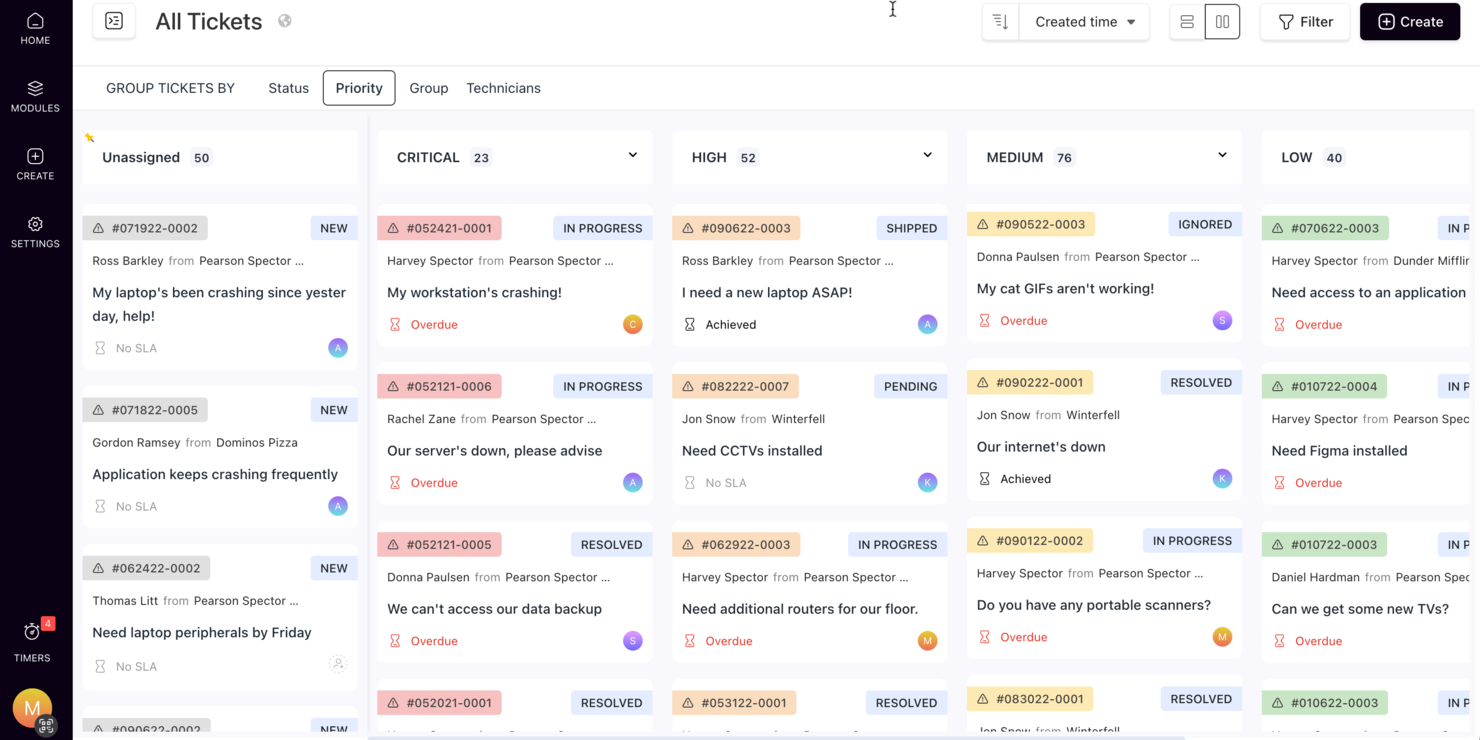
SuperOps offre una soluzione intelligente per le aziende che cercano un software helpdesk gratuito, particolarmente adatto a fornitori di servizi gestiti e team IT. Integrando strumenti basati sull'intelligenza artificiale e una comunicazione centralizzata, consente una gestione efficiente dei ticket e l'automazione delle attività ripetitive, migliorando l'efficienza operativa e la soddisfazione dei clienti. Questa piattaforma affronta problematiche come la lenta risoluzione dei ticket e la comunicazione frammentata, rappresentando una scelta preziosa per le organizzazioni che desiderano migliorare le operazioni di supporto senza costi significativi.
Perché ho scelto SuperOps
Ho scelto SuperOps perché combina la gestione dei ticket guidata dall'IA con funzionalità di automazione, offrendo un'opzione convincente nel panorama dei software helpdesk gratuiti. I suoi strumenti di comunicazione potenziati dall'IA offrono chiarezza e riepiloghi rapidi dei ticket, riducendo notevolmente i tempi di risposta. Inoltre, la piattaforma automatizza la gestione degli SLA e integra funzionalità di help desk e service desk, offrendo agli utenti uno strumento completo per soddisfare efficacemente le loro esigenze di supporto.
Caratteristiche Principali di SuperOps
Oltre alla gestione dei ticket tramite IA, SuperOps offre diverse altre funzionalità preziose per le operazioni helpdesk:
- Runbook Unificati: Snellisci le approvazioni e automatizza le attività di routine grazie a flussi di lavoro personalizzabili che migliorano l'efficienza operativa.
- Gestione delle Risorse: Tieni traccia di tutto l'hardware e il software in un unico posto, garantendo maggiore controllo e migliori decisioni.
- Gestione delle Patch: Automatizza la distribuzione degli aggiornamenti software e delle patch, riducendo le vulnerabilità e migliorando la sicurezza.
- Gestione dei Dispositivi Mobili: Gestisci e proteggi i dispositivi mobili in tutta l'organizzazione, assicurando conformità e protezione dei dati.
Integrazioni di SuperOps
Le integrazioni includono Azure AD, Bitdefender, SentinelOne, Webroot, QuickBooks, ConnectWise Control, Stripe, Splashtop, ESET e TeamViewer.
Pros and Cons
Pros:
- Gestione integrata dei dispositivi mobili
- Potenti strumenti di automazione e IA
- Gestione delle patch e degli endpoint inclusa
Cons:
- Può richiedere tempo di onboarding
- Basato sul cloud, richiede accesso a Internet
New Product Updates from SuperOps

SuperOps Improves Ticket Visibility, Dynamic Forms, and Dashboard Views
SuperOps introduces improvements to ticket visibility, dynamic forms, and dashboard visualizations. These updates help technicians manage customer conversations, simplify ticket creation, and keep dashboard views consistent across teams. For more information, visit SuperOps' official site.
 .
.
Ideale per l'hosting su cloud
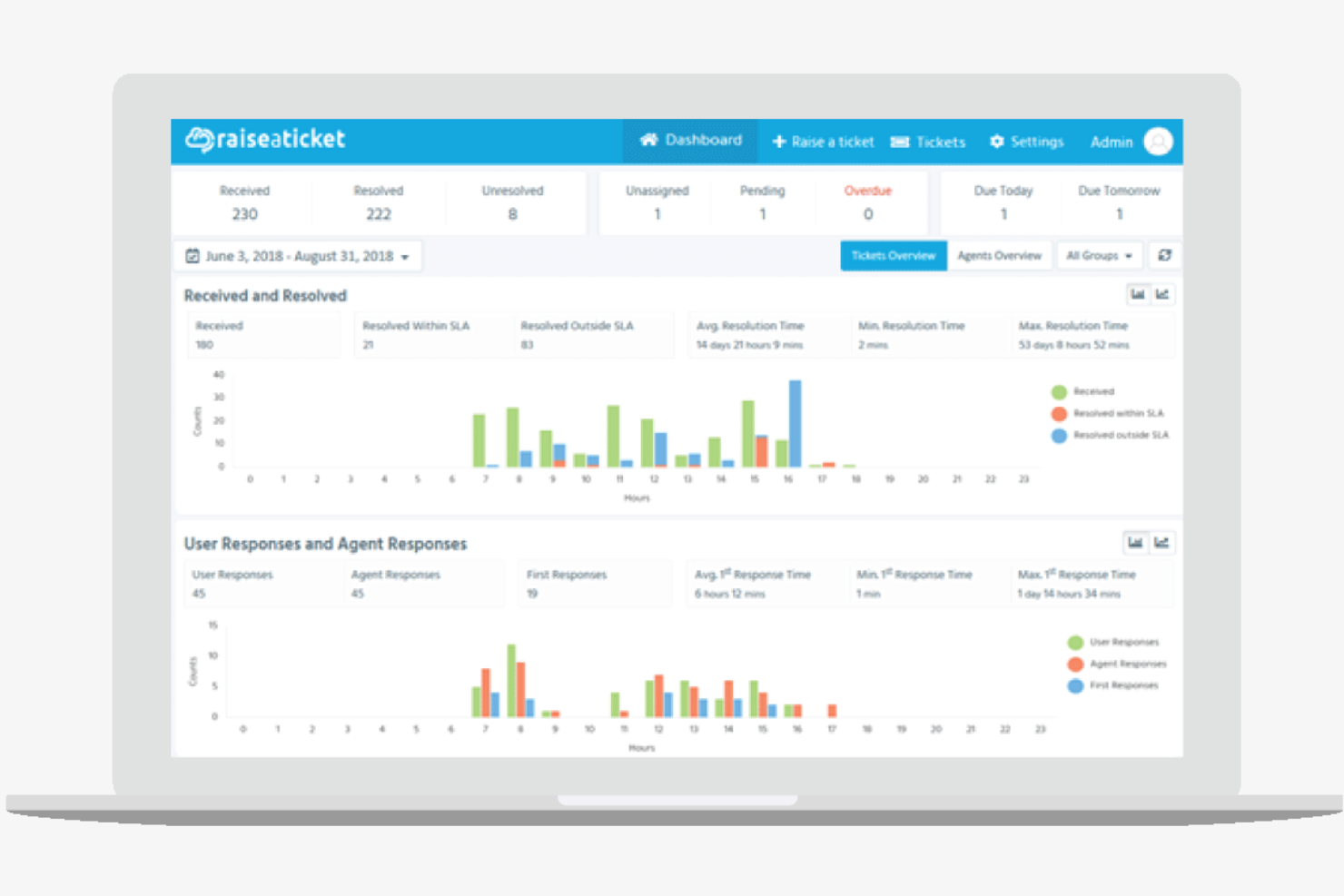
Raiseaticket è una piattaforma helpdesk basata su cloud progettata per le aziende che cercano soluzioni efficienti per la gestione dei ticket e il supporto clienti. Serve una varietà di settori offrendo strumenti per l'organizzazione dei ticket e la comunicazione con i clienti.
Perché ho scelto Raiseaticket: La versione gratuita è perfetta se preferisci l'hosting su cloud senza costi aggiuntivi. Puoi gestire i ticket in modo efficiente tramite il sistema di ticketing via email e una dashboard intuitiva. Raiseaticket consente un numero illimitato di agenti, rendendolo una soluzione conveniente per i team in crescita, mentre la sua capacità di hosting cloud offre flessibilità e facilità di accesso per i team di supporto remoto.
Funzionalità e integrazioni straordinarie:
Le funzionalità includono un sistema di ticketing personalizzabile che permette di adattare i flussi di lavoro alle esigenze aziendali. Puoi configurare risposte automatiche per migliorare i tempi di risposta e la soddisfazione del cliente. Raiseaticket offre anche uno strumento di reportistica per monitorare le prestazioni del supporto.
Le integrazioni includono Slack, Microsoft Teams, Google Workspace, Office 365 e altre ancora.
Cosa è gratuito?
Raiseaticket offre un piano gratuito per sempre senza limiti sul numero di agenti, ma potrebbe limitare l'accesso a funzionalità avanzate e personalizzazioni.
Pros and Cons
Pros:
- Agenti illimitati nel piano gratuito
- Accesso basato su cloud
- Sistema di ticketing personalizzabile
Cons:
- È necessario pagare per le integrazioni premium
- Opzioni di personalizzazione di base

Ideale per una gestione facile dei ticket

ProProfs Help Desk è un software di ticketing e supporto basato su intelligenza artificiale progettato per le aziende che desiderano migliorare l'efficienza del servizio clienti. È ideale per imprese nei settori IT, e-commerce e ospitalità, offrendo una gestione centralizzata dei ticket e supporto omnicanale.
Perché ho scelto ProProfs Help Desk: Il piano gratuito è perfetto per utenti singoli che necessitano di una gestione efficiente dei ticket. Offre supporto AI per risolvere rapidamente le richieste e centralizza le domande provenienti da diversi canali, come email e chat, semplificando le funzionalità di collaborazione del team grazie alle caselle di posta condivise. ProProfs si distingue per rendere la gestione dei ticket semplice ed efficace, consentendo anche di esportare i dati dei ticket per reportistica su strumenti come BigQuery o Snowflake.
Funzionalità e integrazioni principali:
Le funzionalità includono automazione nell’assegnazione dei ticket e risposte predefinite per risparmiare tempo. La funzione di reportistica sulle performance offre una panoramica su metriche come i tempi di risposta, aiutandoti a migliorare la qualità del servizio. I sondaggi sulla soddisfazione del cliente permettono di raccogliere feedback per perfezionare il supporto.
Le integrazioni includono Salesforce, Slack, Shopify, BigCommerce, Jira, ClickUp, Microsoft Dynamics CRM e altro ancora.
Cosa è gratuito?
Il piano gratuito è disponibile per utenti singoli, con limitazioni sul numero di agenti e sulle funzionalità avanzate.
Pros and Cons
Pros:
- Facile da usare per i principianti
- Risoluzione dei ticket supportata da AI
- Centralizza più canali di comunicazione
Cons:
- Limitato a un singolo utente nel piano gratuito
- L'interfaccia utente a volte appare datata

GLPI
Ideale per la gestione degli asset

GLPI è un software open-source per la gestione delle risorse IT e dell'helpdesk, pensato per le organizzazioni che devono gestire le proprie risorse IT e le richieste di supporto. Offre strumenti per il monitoraggio degli asset, la gestione dell'inventario e l'organizzazione delle richieste helpdesk.
Perché ho scelto GLPI: La versione gratuita offre ampie capacità di gestione delle risorse e degli asset IT senza costi aggiuntivi. GLPI permette di gestire i ticket di supporto e monitorare l'inventario. È possibile trasformare e caricare i dati di GLPI in Redshift e Snowflake usando uno strumento ETL come Airbyte.
Funzionalità principali e integrazioni:
Le funzionalità includono una gestione avanzata dell'inventario e capacità di trasformazione per aiutarti a tracciare hardware e software e gestire dati grezzi. Il software offre anche un sistema di ticketing che organizza e dà priorità alle richieste di supporto. Inoltre, GLPI dispone di strumenti di reportistica per fornire una panoramica sull'utilizzo delle risorse e sulle prestazioni dell'helpdesk.
Le integrazioni includono Microsoft Active Directory, LDAP, Apache Directory e altro.
Cosa è gratuito?
GLPI offre un piano gratuito illimitato con accesso completo alle funzionalità di gestione degli asset e helpdesk, anche se può richiedere competenze tecniche per la configurazione.
Pros and Cons
Pros:
- Funzionalità avanzate per la gestione degli asset
- Nessun costo per le funzionalità di base
- Strumenti di reportistica personalizzabili
Cons:
- Richiede competenze tecniche per la configurazione
- Esperienza mobile limitata

Ideale per professionisti IT

Spiceworks è un software gratuito per la gestione IT, helpdesk e integrazione dei dati progettato per professionisti IT e team che gestiscono ambienti di big data ed effettuano regolarmente l'estrazione dei dati. Fornisce strumenti per la gestione dei ticket dell'helpdesk, pipeline di dati, inventario di rete, reportistica IT, elaborazione dei dati, elaborazione batch e replicazione dei dati.
Perché ho scelto Spiceworks: La versione gratuita è ideale per i professionisti IT alla ricerca di una soluzione per la gestione IT. Le sue funzionalità permettono di gestire i ticket dell'helpdesk in modo efficiente. Spiceworks offre capacità dettagliate di reportistica e tracciamento degli asset. Il suo focus sulla gestione IT lo rende una scelta eccellente per ambienti tecnologicamente avanzati.
Caratteristiche principali e integrazioni:
Le funzionalità includono il monitoraggio della rete che consente di tenere sotto controllo la tua infrastruttura. Il software offre anche la gestione degli asset hardware e software IT, oltre a un portale utente dove i membri del team possono inviare e monitorare i ticket.
Le integrazioni includono Microsoft Active Directory, LDAP, AlienVault, Webroot SecureAnywhere, NetClarity e altro ancora.
Cosa è gratuito?
Spiceworks offre un piano gratuito per sempre senza limiti di utenti, ma può limitare il supporto premium e le funzionalità avanzate.
Pros and Cons
Pros:
- Nessun limite di utenti nel piano gratuito
- Strumenti avanzati di gestione IT
- Tracciamento dettagliato degli asset
Cons:
- Supporto premium limitato nella versione gratuita
- Interfaccia con pubblicità

osTicket
Ideale per l'integrazione email
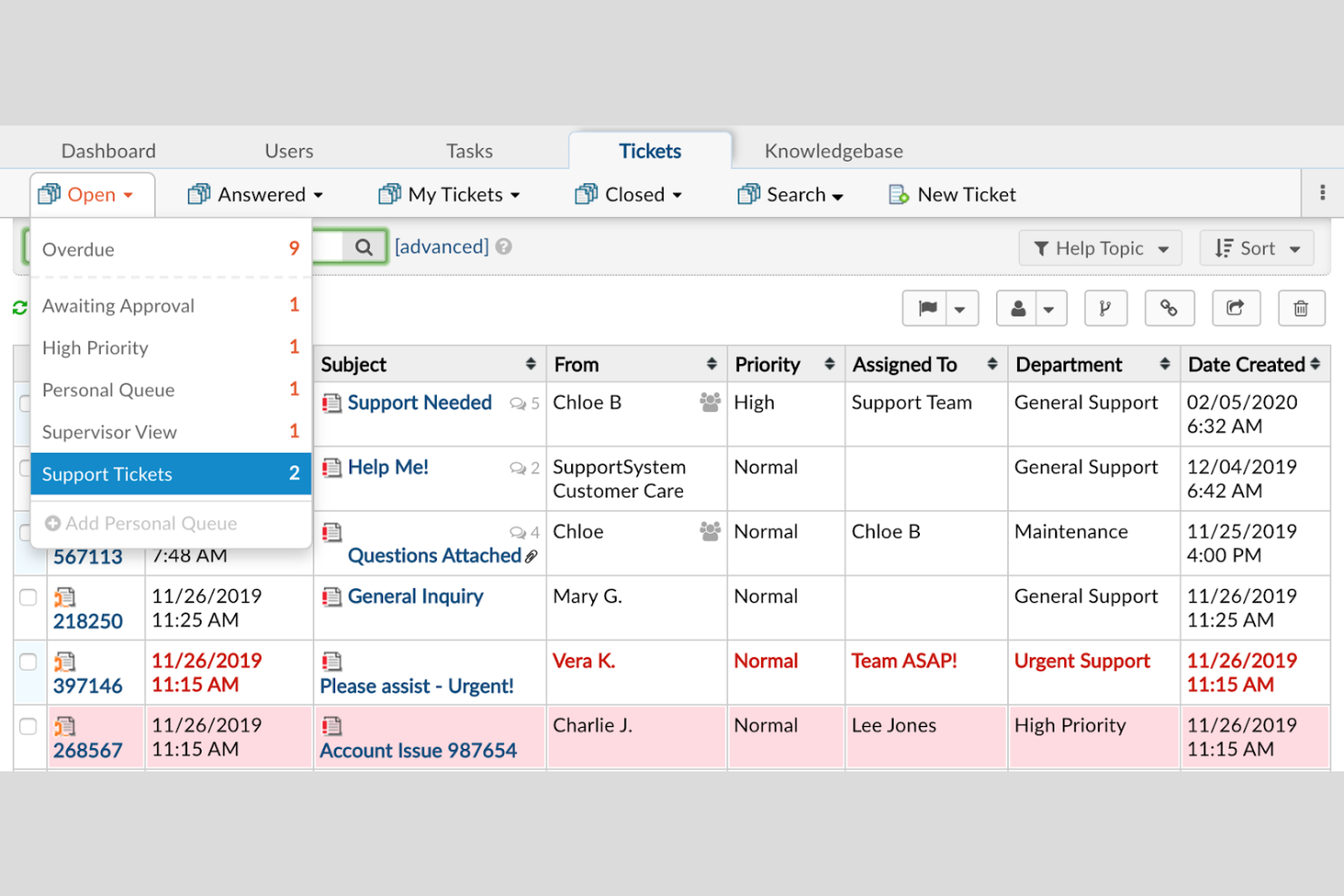
osTicket è un software helpdesk open-source molto diffuso, pensato per aziende di tutte le dimensioni che necessitano di una gestione efficiente dei ticket e opzioni per ottimizzare i flussi di lavoro. Offre strumenti per semplificare il supporto ai clienti tramite integrazione email e tracciamento dei ticket. Le informazioni dei ticket possono essere estratte e trasformate utilizzando strumenti ETL come Talend Open Studio e Informatica.
Perché ho scelto osTicket: La versione gratuita è perfetta per le aziende che fanno molto affidamento sulla comunicazione via email. Puoi gestire i ticket in modo efficiente grazie alla funzione di integrazione email. osTicket supporta utenti illimitati, diventando così una soluzione conveniente per team in crescita.
Funzionalità principali e integrazioni:
Le funzionalità includono un sistema di ticketing personalizzabile che ti consente di impostare flussi di lavoro e caricare dati secondo necessità. Il sistema offre anche risposte automatiche per migliorare i tempi di risposta, automatizzare la trasformazione dei dati, gestire le dipendenze, supportare l'orchestrazione e garantire un'elevata qualità dei dati nelle soluzioni ETL e nelle pipeline di acquisizione dati. Inoltre, osTicket offre un portale clienti dove i clienti possono monitorare lo stato dei propri ticket.
Le integrazioni includono Microsoft Exchange, Gmail, Office 365, LDAP, Microsoft Active Directory e altro ancora.
Cosa è gratuito?
osTicket offre un piano gratuito per sempre senza limiti di utenti, anche se potrebbe richiedere competenze tecniche per l'installazione e la personalizzazione.
Pros and Cons
Pros:
- Utenti illimitati nel piano gratuito
- Forte integrazione email e streaming dati
- Sistema di ticketing personalizzabile
Cons:
- Nessuna regola di automazione integrata
- Reportistica nativa limitata
Altri software gratuiti per la gestione dell'assistenza clienti
Ecco alcune opzioni aggiuntive di software per la gestione dell’assistenza clienti che offrono piani o periodi di prova gratuiti. Sebbene questi strumenti non siano stati inclusi nel mio elenco, vale comunque la pena dare loro un’occhiata:
- Bitrix24
Ideale per la collaborazione in team
- Frappe
Ideale per la personalizzazione open-source
- Hesk
Ideale per il supporto alle piccole imprese
- Uvdesk
Ideale per il supporto e-commerce
- Zammad
Ideale per agenti illimitati
- FreeScout
Ideale per soluzioni self-hosted
- HelpDeskZ
Ideale per supporto multilingue


Come Valuto il Software Helpdesk Gratuito
Valuto gli strumenti helpdesk gratuiti su due livelli: criteri di base che ogni opzione deve soddisfare, come la gestione utilizzabile dei ticket su un piano gratuito, e fattori differenzianti che svelano l'adattamento ideale al tuo ambiente IT.
Funzionalità di Base (Requisiti Fondamentali per Questa Lista)
Quando seleziono gli strumenti per la mia lista, valuto ciascuno di essi su una scala da 0 (non offre la funzionalità) a 5 (eccelle in quest'area) per ogni funzionalità fondamentale elencata di seguito. Successivamente, trasformo il punteggio totale dello strumento in una percentuale. Ogni strumento deve raggiungere un punteggio totale minimo del 65% per essere preso in considerazione.
- Gestione dei Ticket: Cerco un ciclo di vita completo del ticket: stati, priorità, assegnazioni e campi personalizzati, affinché i tecnici possano gestire un guasto del server o un reset password senza perdere contesto.
- Piano Davvero Gratuito: Il livello gratuito deve supportare operazioni helpdesk reali e continuative, non solo una prova di 14 giorni. Verifico che siano inclusi abbastanza posti agente e funzionalità per gestire la coda di un piccolo team IT.
- Raccolta Ticket Multi-Canale: Valuto se i ticket possono arrivare almeno da email e portale web, poiché i team IT tipicamente ricevono richieste da diverse fonti come chat, moduli e integrazioni API.
- Knowledge Base & Self-Service: È importante una base conoscenze ricercabile rivolta agli utenti finali. Cerco strumenti che permettano di pubblicare articoli tutorial—come guide per la configurazione VPN o istruzioni per risolvere problemi alle stampanti—così gli utenti possono risolvere autonomamente le problematiche comuni.
- Automazione & Regole di Smistamento: Verifico la presenza di flussi di lavoro basati su regole che gestiscono automaticamente l'assegnazione e l'escalation dei ticket, come lo smistamento automatico di tutti i ticket relativi alla rete in una coda specifica in base a categoria o priorità.
- Reportistica & Monitoraggio SLA: Dashboard che tracciano i tempi di prima risposta, tassi di risoluzione e rispetto degli SLA danno ai responsabili IT la visibilità necessaria. Valuto se questi report sono disponibili sul piano gratuito.
Una volta ottenuta una lista di strumenti che soddisfano questi criteri, considero ciò che distingue ciascuna piattaforma.
Fattori Differenzianti (Cosa Distingue i Fornitori)
Ecco come confronto e metto a confronto i vari fornitori:
Funzionalità Distintive
L'allineamento con ITIL/ITSM è un importante elemento distintivo. Cerco workflow nativi per la gestione degli incidenti, dei problemi e dei cambiamenti che vadano oltre la semplice gestione dei ticket. Un asset tracking integrato o un CMDB aggiungono inoltre valore reale: associare un laptop o server specifico a un ticket aperto offre immediatamente ai tecnici il contesto necessario durante la risoluzione di problemi. Per i team DevOps e SRE, valuto la profondità dell'API e il supporto ai webhook, poiché questi team spesso necessitano di collegare direttamente gli avvisi di monitoraggio alla coda helpdesk senza passaggi manuali.
Oltre le Funzionalità
Verifico come ogni piano gratuito si adatti alla crescita: limiti sugli agenti, sul numero di ticket e cosa accade ai dati quando si supera la soglia del piano. Le integrazioni sono altrettanto importanti. Un helpdesk che si connette nativamente con Jira, Slack o Azure AD si inserisce nei flussi di lavoro IT esistenti senza soluzioni personalizzate. La sicurezza è un altro fattore chiave; valuto se SSO, MFA e controllo degli accessi basato sui ruoli sono disponibili anche nel piano gratuito, poiché anche i piccoli team IT gestiscono quotidianamente dati utente e credenziali di sistema sensibili. Gli strumenti che riservano le funzionalità di base sulla sicurezza ai soli piani a pagamento destano preoccupazioni.
Come scegliere un software gratuito per la gestione dell'assistenza clienti
Gli elenchi di funzionalità complessi e le strutture dei prezzi possono rendere difficile capire cosa si ottiene realmente da un software gratuito per la gestione dell'assistenza clienti. Per aiutarti a rimanere concentrato mentre procedi nella scelta del software, ecco alcuni fattori da tenere presenti:
| Fattore | Cosa considerare |
|---|---|
| Ambito dell'offerta gratuita | Verifica quali funzionalità sono incluse nel piano gratuito. Assicurati che soddisfi le tue esigenze di base senza costi nascosti o limitazioni che potrebbero ostacolare le tue operazioni. |
| Scalabilità | Considera se il software può crescere insieme alla tua attività. Cerca opzioni che consentano aggiornamenti semplici man mano che il tuo team o la tua base clienti si espande. |
| Integrazioni | Assicurati che il software si integri con gli strumenti che già utilizzi, come CRM, sistemi di posta elettronica o chat. Questo farà risparmiare tempo e migliorerà l'efficienza del tuo team. |
| Facilità d'uso | Valuta l'interfaccia utente e l'esperienza complessiva. Un design semplice e intuitivo ridurrà la curva di apprendimento e aiuterà il tuo team a iniziare rapidamente. |
| Personalizzazione | Determina se puoi adattare il software ai tuoi flussi di lavoro specifici. Campi dei ticket o dashboard personalizzabili possono migliorare la produttività. |
| Opzioni di supporto | Esamina l'assistenza clienti disponibile con il piano gratuito. L'accesso alla chat dal vivo, all'assistenza via e-mail o a una base di conoscenza può essere fondamentale quando si verificano problemi. |
| Strumenti di reportistica | Verifica se il software offre funzionalità di reportistica o analisi. Le informazioni sul volume dei ticket o sui tempi di risposta possono contribuire a migliorare il servizio clienti. |
| Sicurezza | Valuta le misure di sicurezza adottate per proteggere i tuoi dati. Assicurati che siano conformi agli standard del settore e considera la crittografia o l'autenticazione a più fattori. |
Che cos'è il software gratuito per helpdesk?
Il software per helpdesk è uno strumento che aiuta le aziende a gestire in modo efficiente le richieste dei clienti e le richieste di assistenza. Questi strumenti offrono spesso piani o versioni di prova gratuite, consentendo agli utenti di accedere alle funzionalità di base senza costi. In genere, i team del servizio clienti, i professionisti IT e i titolari di piccole imprese utilizzano questi strumenti per migliorare la comunicazione con i clienti e la risoluzione dei problemi. La gestione dei ticket, i canali di comunicazione e le funzionalità di reportistica aiutano a organizzare le attività di assistenza, migliorare la soddisfazione dei clienti e fornire informazioni preziose.
Funzionalità
Quando selezioni un software per helpdesk, presta attenzione alle seguenti funzionalità chiave:
Funzionalità tipiche del software gratuito per helpdesk
- Gestione dei ticket: consente di organizzare e monitorare le richieste dei clienti, rendendo più semplice risolvere i problemi in modo efficiente.
- Integrazione della posta elettronica: collega il tuo sistema di posta elettronica all'helpdesk, consentendo una comunicazione efficace con i clienti.
- Base di conoscenza: offre un portale self-service in cui i clienti possono trovare risposte alle domande frequenti, riducendo il numero di ticket di assistenza.
- Reportistica di base: fornisce informazioni sulle attività di assistenza, aiutandoti a comprendere le metriche delle prestazioni e le aree di miglioramento.
- Gestione degli utenti: consente di aggiungere e gestire i membri del team, assicurando che tutti possano accedere agli strumenti di assistenza necessari.
Funzionalità tipiche del software a pagamento per helpdesk
- Analisi avanzate: offrono informazioni approfondite sulle interazioni con i clienti e sulle prestazioni dell'assistenza, aiutandoti a prendere decisioni basate sui dati.
- Flussi di lavoro automatizzati: semplificano le attività e i processi ripetitivi, facendo risparmiare tempo e aumentando l'efficienza del team di assistenza.
- Assistenza multilingue: consente di fornire assistenza in più lingue, rivolgendosi a una base clienti globale.
- Dashboard personalizzabili: consentono di adattare l'interfaccia utente alle esigenze e alle preferenze specifiche del tuo team.
- Risposte generate dall'intelligenza artificiale: utilizzano l'intelligenza artificiale per generare risposte automatiche, migliorando i tempi di risposta e la soddisfazione dei clienti.
Vantaggi
L'implementazione di un software gratuito per helpdesk offre diversi vantaggi al tuo team e alla tua azienda. Eccone alcuni:
- Risparmio sui costi: I piani gratuiti consentono di gestire l'assistenza clienti senza costi aggiuntivi, risultando ideali per piccole imprese e startup.
- Organizzazione migliorata: Le funzionalità di gestione dei ticket aiutano a tenere traccia delle richieste dei clienti, assicurando che nulla venga trascurato.
- Comunicazione migliorata: L'integrazione delle email e i canali di comunicazione aiutano a connettersi efficacemente con i clienti e a fornire un'assistenza tempestiva.
- Opzioni self-service: Una base di conoscenza consente ai clienti di trovare autonomamente le risposte, riducendo il carico di lavoro del team di assistenza.
- Scalabilità: Molti piani gratuiti offrono utenti illimitati, consentendo al team di crescere senza sostenere spese aggiuntive.
- Informazioni di base: Gli strumenti di reportistica offrono una panoramica delle prestazioni dell'assistenza, aiutando a identificare le aree di miglioramento.
- Flessibilità: I flussi di lavoro personalizzabili e le funzionalità di gestione degli utenti consentono di adattare il sistema alle esigenze del team.
Costi e prezzi
Sebbene questo articolo elenchi le migliori opzioni di software gratuiti per l'assistenza tecnica, questi piani offrono solo funzionalità limitate. È molto probabile che in futuro sarà necessario passare a un piano superiore.
La tabella seguente riassume i piani comuni, i relativi prezzi medi e le funzionalità generalmente incluse nelle soluzioni software per l'assistenza tecnica:
Tabella comparativa dei piani per software per l'assistenza tecnica
| Tipo di piano | Prezzo medio | Funzionalità comuni |
|---|---|---|
| Piano gratuito | $0 | Gestione di base dei ticket, integrazione delle email e portale per il supporto autonomo. |
| Piano personale | $5-$49/utente/mese | Reportistica migliorata, flussi di lavoro personalizzabili e spazio di archiviazione aggiuntivo. |
| Piano aziendale | $30-$60/utente/mese | Supporto multilingue, analisi avanzate e integrazione con il CRM. |
| Piano per grandi aziende | $70-$399/utente/mese | Automazione basata sull'intelligenza artificiale, assistenza dedicata e ampie opzioni di personalizzazione. |
Domande frequenti sul software gratuito per l'assistenza tecnica
Ecco alcune risposte alle domande comuni sul software gratuito per l’assistenza tecnica:
Come scelgo il miglior software gratuito per l'assistenza tecnica per la mia azienda?
La scelta del miglior software gratuito per l’assistenza tecnica dipende dalle tue esigenze specifiche. Considera le funzionalità di cui hai bisogno, come l’accesso ai dati in tempo reale, la gestione delle richieste o l’integrazione con la posta elettronica, e assicurati che il software supporti il numero di utenti di cui disponi. Cerca strumenti che offrano configurazione basata su interfaccia grafica, interfacce di trascinamento, automazione senza codice e una connettività efficace con gli strumenti di analisi. Valuta la facilità d’uso, le opzioni di assistenza disponibili e i servizi nel cloud per garantire un’esperienza fluida.
È semplice passare da un piano gratuito a uno a pagamento?
Sì, la maggior parte dei fornitori di software per l’assistenza tecnica offre passaggi semplici dai piani gratuiti a quelli a pagamento. Questo ti consente di accedere a funzionalità e assistenza aggiuntive man mano che la tua azienda cresce. Verifica se il fornitore offre opzioni di prezzo flessibili adatte al tuo budget e alle tue esigenze.
Esistono limitazioni nell'utilizzo di un software gratuito per l'assistenza tecnica?
Il software gratuito per l’assistenza tecnica presenta spesso alcune limitazioni, come un numero inferiore di funzionalità, un numero limitato di utenti o un’assistenza ridotta. È importante comprendere queste limitazioni e valutare se siano in linea con le esigenze attuali della tua azienda. Considera la crescita futura e la possibilità di effettuare un aggiornamento, se necessario.
Quanto è sicuro il software gratuito per l'assistenza tecnica?
Il livello di sicurezza varia da un fornitore all’altro, ma il software gratuito per l’assistenza tecnica offerto da fornitori affidabili include generalmente funzionalità di sicurezza di base, come controlli degli accessi, governo dei dati e modelli di implementazione sicuri e nativi del cloud. Cerca opzioni che offrano crittografia dei dati, autenticazione degli utenti e conformità agli standard del settore. Questo garantisce un trasferimento affidabile dei dati, una latenza ridotta e un’integrazione sicura dei dati tra le piattaforme di dati nel cloud.
Che tipo di assistenza posso aspettarmi con un software gratuito per l'assistenza tecnica?
L’assistenza per il software gratuito per l’assistenza tecnica e l’integrazione dei dati a codice aperto è generalmente limitata rispetto ai piani a pagamento. Potresti avere accesso a forum della comunità, risorse di autoassistenza o assistenza tramite posta elettronica. Valuta le opzioni di assistenza disponibili e determina se soddisfano le tue esigenze, soprattutto se richiedi un supporto rapido.
Il software gratuito per l'assistenza tecnica può integrarsi con gli altri strumenti che utilizzo?
Molte soluzioni software gratuite per l’assistenza tecnica offrono integrazioni di base con strumenti diffusi come la posta elettronica, CRM e software per la gestione dei progetti. Verifica se il software che stai considerando offre uno strumento di integrazione dei dati adatto ai tuoi sistemi esistenti, per garantire un flusso di lavoro efficace e l’efficienza del team.