

Les 10 meilleures plateformes d’intelligence artificielle que j’ai testées en 2026

Meilleure sélection de plateformes d'intelligence artificielle


Il peut être difficile de naviguer dans le monde des plateformes d'intelligence artificielle. Vous faites face à des défis tels que la gestion des données, l'automatisation et la prise de décision. C'est là que les plateformes d'IA interviennent, offrant des solutions à ces problématiques.
D'après mon expérience, choisir la bonne plateforme peut transformer le fonctionnement de votre équipe. J'ai testé et évalué plusieurs options, en me concentrant sur ce qui compte vraiment pour les experts techniques comme vous.
Dans cet article, vous trouverez un examen impartial des meilleures plateformes d'IA. Je couvrirais les fonctionnalités, les avantages et ce qui distingue chacune d'elles. Que vous cherchiez à améliorer l'efficacité ou à optimiser la précision, il y a forcément une solution qui vous correspond. Découvrons ensemble les options capables de faire évoluer les capacités de votre équipe.
Pourquoi faire confiance à nos recommandations de logiciels
Notre équipe teste et évalue des logiciels depuis 2012. En tant que leaders technologiques nous-mêmes, nous savons à quel point il est difficile — et important — de choisir le bon logiciel.
Pour ce guide, nous avons évalué les outils grâce à des tests pratiques et une recherche indépendante, en notant les outils selon nos critères de sélection.
Nos avis reflètent notre jugement éditorial humain, et non un argumentaire de vente.
Réviseurs experts:
Résumé des meilleures plateformes d'intelligence artificielle
Ce tableau comparatif résume les informations tarifaires de mes principales sélections de plateformes d’intelligence artificielle afin de vous aider à trouver celle qui correspond le mieux à votre budget et à vos besoins professionnels.
| Tool | Best For | Trial Info | Price | ||
|---|---|---|---|---|---|
| 1 | Idéal pour le partage et la collaboration sécurisés des données | Essai gratuit disponible | À partir de $2,00/crédit | Website | |
| 2 | Idéal pour la collaboration IA régulée en entreprise | Essai gratuit de 14 jours | À partir de 417 $/utilisateur/mois (facturé annuellement) | Website | |
| 3 | Idéal pour automatiser des workflows financiers complexes | Démo gratuite disponible | Tarification sur demande | Website | |
| 4 | Idéal pour l'évaluation automatisée des risques liés à l'IA | Démo gratuite disponible | Tarification sur demande | Website | |
| 5 | Idéal pour simplifier les processus complexes de ML | Essai gratuit disponible + démo gratuite | Tarification sur demande | Website | |
| 6 | Idéal pour le déploiement IA de bout en bout | À partir de $0.19/utilisateur/heure pour l’entraînement de modèles sur machines standard | Website | ||
| 7 | Idéal pour l'intelligence décisionnelle pilotée par l'IA | Démo gratuite disponible | Tarifs sur demande | Website | |
| 8 | Idéal pour l'accélération du MLOps | Essai gratuit de 14 jours | Tarifs sur demande | Website | |
| 9 | Idéal pour les applications d’IA conversationnelle | Not available | Tarification sur demande | Website | |
| 10 | Idéal pour les modèles d'IA axés sur la recherche | Tarif personnalisé sur demande | Website |

Aperçu des meilleures plateformes d'intelligence artificielle
Vous trouverez ci-dessous mes résumés détaillés des meilleures plateformes d’intelligence artificielle qui sont apparues dans ma sélection. Mes avis proposent un aperçu complet des principales fonctionnalités, avantages et inconvénients, intégrations et cas d’usages idéaux de chaque outil pour vous guider vers la solution la plus appropriée.

Idéal pour le partage et la collaboration sécurisés des données
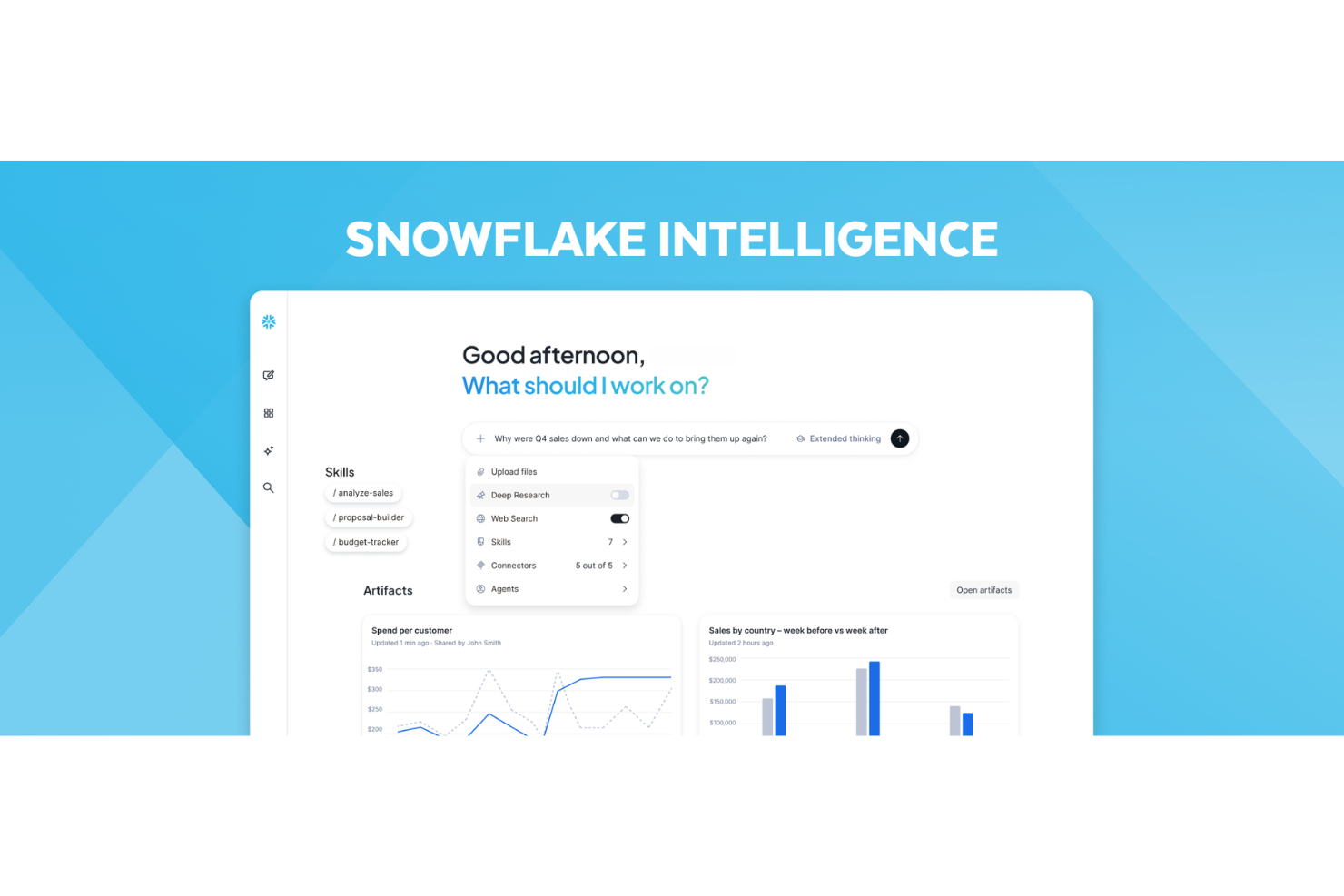
Snowflake Data Cloud est une plateforme cloud d'IA et de données qui combine l'entreposage de données, l'apprentissage automatique et le développement d'IA générative, tout en offrant un accès contrôlé à des données structurées et non structurées à travers plusieurs environnements cloud.
Pour qui Snowflake Data Cloud est-il le mieux adapté ?
Snowflake s'adresse aux équipes d'ingénierie des données, de data science et d'informatique au sein des moyennes et grandes entreprises qui gèrent d'importants volumes de données sur plusieurs clouds.
Pourquoi j'ai choisi Snowflake Data Cloud
J'ai choisi Snowflake Data Cloud parmi les meilleurs pour le partage et la collaboration sécurisés des données en raison de sa capacité à permettre un accès aux données en temps réel sans jamais déplacer ou copier les données sous-jacentes. Le modèle de partage sans duplication permet aux partenaires et équipes internes d'interroger directement la même donnée depuis le compte du fournisseur, éliminant ainsi le risque de divergence de version et de duplication. J'apprécie également la fonctionnalité Data Clean Room, qui permet de collaborer avec des parties externes sur des ensembles de données sensibles tout en définissant précisément les analyses possibles, sans jamais exposer les données brutes.
Principales fonctionnalités de Snowflake Data Cloud
- Snowflake Cortex AI : Des fonctions LLM intégrées vous permettent d'exécuter le résumé de texte, l'analyse de sentiment et la traduction directement sur vos données à l'aide de SQL.
- Snowpark : Créez des pipelines d'apprentissage automatique en Python, Java ou Scala et exécutez-les au sein de Snowflake sans déplacer les données vers un environnement externe.
- Registre de modèles : Stockez, versionnez et gérez les modèles d'apprentissage automatique en un seul endroit afin que votre équipe puisse suivre les déploiements et revenir en arrière si nécessaire.
- Document AI : Extrayez des données structurées à partir de documents non structurés comme les PDF en utilisant des modèles d'apprentissage automatique intégrés.
Intégrations avec Snowflake Data Cloud
Snowflake dispose d'un écosystème de plus de 14 000 partenaires, avec des intégrations certifiées couvrant l'intégration de données, la BI, le ML et la sécurité. Les intégrations technologiques incluent Matillion, dbt, Fivetran et Talend, ainsi que des outils tels que SAP via le partage de données sans duplication, Tableau, Informatica, Salesforce, Power BI et Apache Kafka. Snowflake se connecte également à Zapier, et fournit des pilotes natifs pour JDBC, ODBC, Python, Node.js, Go et .NET pour des intégrations personnalisées.
Pros and Cons
Pros:
- Exécute des charges Python et ML directement sur les données
- Se connecte à plusieurs LLMs via Cortex
- Partage les données de façon sécurisée sans les déplacer
Cons:
- La recherche d’erreurs et le débogage de l’IA restent peu développés
- Les coûts peuvent augmenter de façon imprévisible à grande échelle
Dataiku
Idéal pour la collaboration IA régulée en entreprise
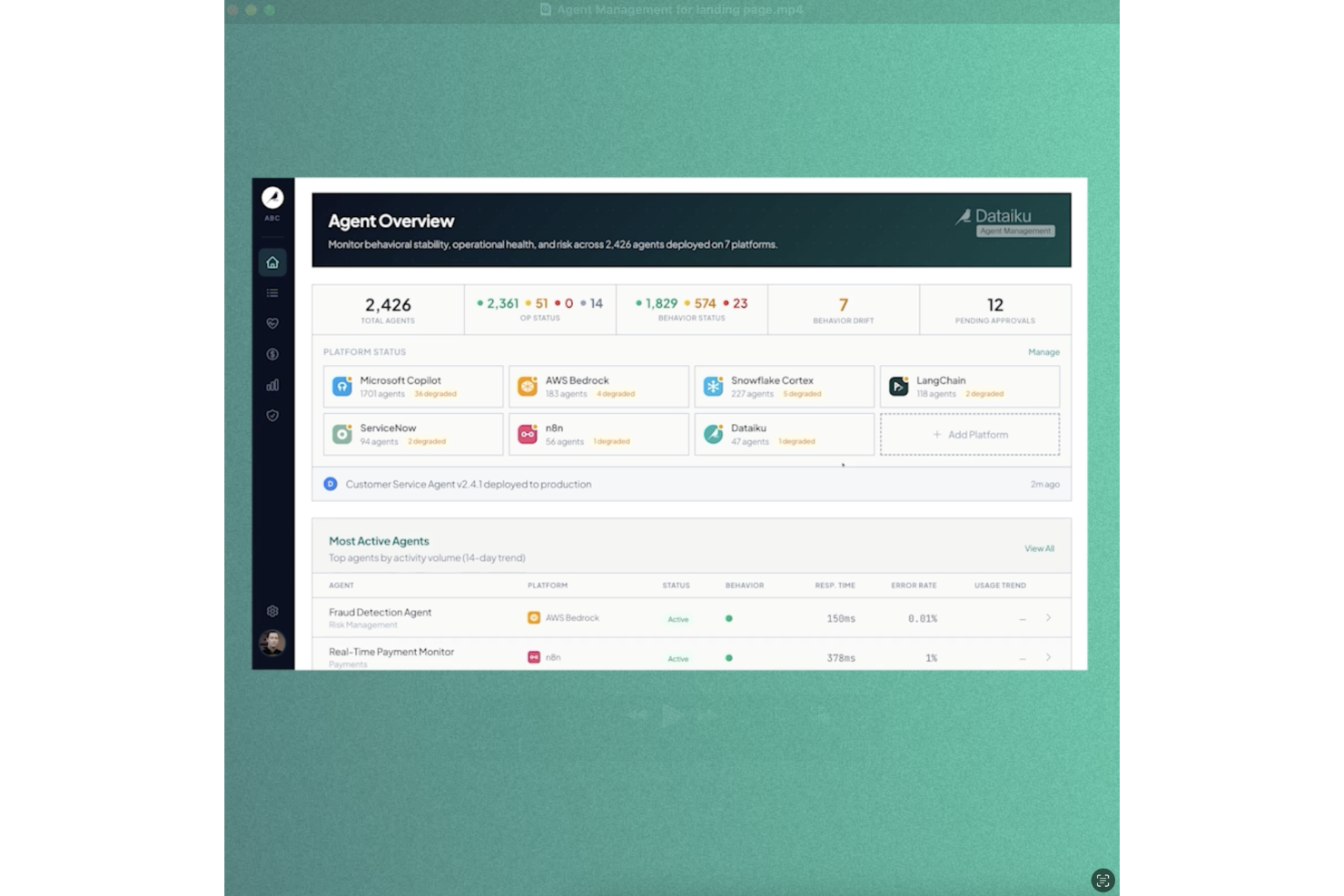
Dataiku est une plateforme d'IA de bout en bout où les équipes de données conçoivent, déploient et gèrent des modèles de machine learning, des applications propulsées par des LLM et des agents IA à l'aide d'outils de développement visuels et basés sur le code.
Pour qui Dataiku est-il le mieux adapté ?
Dataiku convient particulièrement aux grandes entreprises où les data scientists, ingénieurs ML et analystes métier doivent collaborer sur des projets d'IA dans un environnement centralisé et régulé.
Pourquoi j'ai choisi Dataiku
Dataiku est l'un de mes choix préférés car j'apprécie que la gouvernance ne soit pas une couche séparée ajoutée après coup : elle est intégrée dès le début de chaque projet d'IA. Concrètement, mon équipe peut assigner des parties prenantes, appliquer des règles de validation, et bloquer les déploiements tant que les politiques ne sont pas respectées, le tout au sein du même espace de travail où se réalise l'activité. Les registres de bundles, de modèles et de LLM nous offrent un espace unifié pour suivre chaque actif IA dans l'organisation, ce qui rend la collaboration inter-équipes bien moins chaotique.
Principales fonctionnalités de Dataiku
- LLM Mesh : Route les requêtes entre plusieurs fournisseurs de LLM à partir d'un point de contrôle unique, avec suivi d'utilisation et surveillance des coûts intégrés.
- Générateur de flux visuel : Un canevas glisser-déposer pour concevoir des pipelines de données et de ML de bout en bout sans écrire de code.
- AutoML : Automatise l'entraînement des modèles, la sélection des algorithmes et l'ajustement des hyperparamètres sur des ensembles de données structurés.
- Surveillance des modèles : Suit les modèles déployés pour détecter la dérive de données, la dégradation des performances et la qualité des prédictions en production.
Intégrations Dataiku
Dataiku propose plus de 40 connecteurs natifs de données, notamment Snowflake, Databricks, Google BigQuery, Amazon Redshift et Amazon S3, ainsi que des connecteurs applicatifs pour Salesforce, Jira, Google Sheets, ServiceNow et SharePoint Online. La plateforme s'intègre également avec Anthropic, OpenAI, Mistral, NVIDIA, AWS, Google Cloud et Microsoft Azure comme partenaires technologiques et propose des API Python, R et REST pour des intégrations personnalisées. La compatibilité avec Zapier n'est pas clairement documentée.
Pros and Cons
Pros:
- Workflows visuels accessibles aux non-codeurs
- Prise en charge du ML et de l'IA générative
- Fonctionne sur tous les fournisseurs cloud
Cons:
- Visualisation faible comparée aux outils BI dédiés
- Demande d'importantes ressources informatiques et d'infrastructure

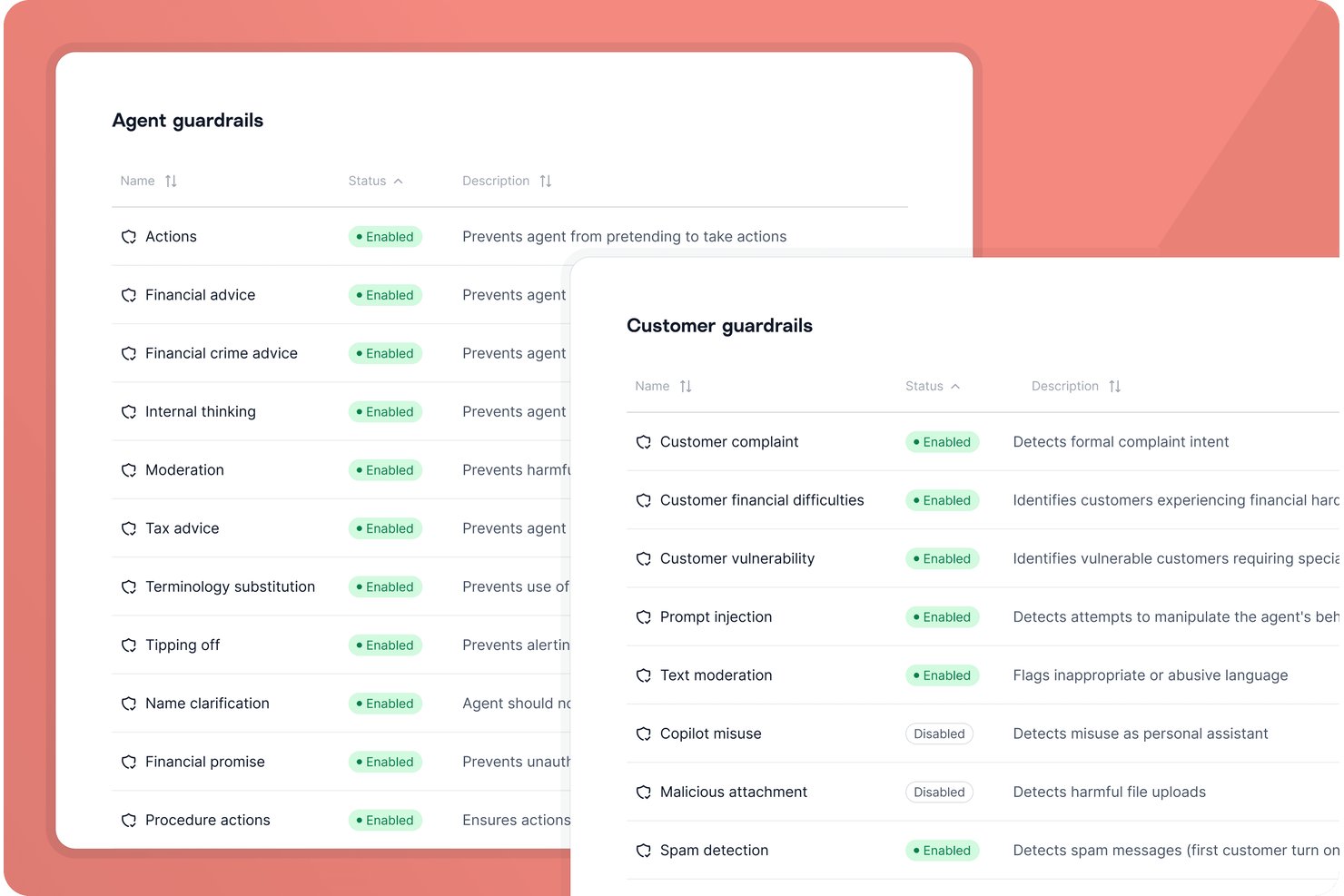
Gradient Labs est une plateforme d'automatisation IA conçue pour les équipes de services financiers, proposant des agents spécialisés capables de gérer tout, de l'intégration client à la gestion des litiges et à l'intégration des workflows de conformité.
À qui s'adresse Gradient Labs ?
Aux équipes d'opérations financières et de service client des banques réglementées, fintechs et prêteurs ayant besoin d'automatisation de workflows par l'IA et d'un accompagnement en matière de conformité.
Pourquoi j'ai choisi Gradient Labs
J'ai choisi Gradient Labs parmi les meilleurs car la solution fournit des agents IA spécialisés dans la finance qui automatisent entièrement les opérations de crédit, la vérification d'identité (KYC) et la gestion des litiges de paiement. En pratique, mon équipe peut déployer des agents formés sur nos workflows et exigences réglementaires.
Fonctionnalités clés de Gradient Labs
- Communication multicanale : Les agents peuvent travailler de manière fluide via e-mail, SMS, chat et voix.
- Garde-fous de conformité : Les modèles IA sont préconfigurés avec plus de 20 contrôles pour SOC 2, RGPD et d'autres réglementations.
- Assurance qualité automatisée : La plateforme surveille et examine chaque interaction des agents pour garantir cohérence et conformité.
- Prise en charge API et CSV : Intégrez-vous à vos systèmes existants ou importez des données en masse pour automatiser les workflows.
Intégrations Gradient Labs
Gradient Labs propose des intégrations natives avec Intercom, Zendesk, Freshdesk, Salesforce, Twilio, RingCentral, Genesys, Visa, Mastercard, etc., et fournit une API pour des intégrations personnalisées.
Pros and Cons
Pros:
- Automatise des workflows financiers et de conformité complexes
- Taux de résolution élevé en production
- Garde-fous réglementaires intégrés pour les services financiers
Cons:
- Ne propose pas de fonctionnalité copilote ou agent d'assistance
- Peu d'avis utilisateurs publics indépendants disponibles

Idéal pour l'évaluation automatisée des risques liés à l'IA

Trustible est une plateforme de gouvernance de l'IA qui centralise la déclaration des cas d'utilisation de l'IA, l'évaluation automatisée des risques, le suivi de la conformité réglementaire, l'évaluation des fournisseurs et la gestion des politiques au sein d'un portefeuille d'IA d'entreprise.
À qui s'adresse Trustible ?
Trustible convient particulièrement aux responsables de la gouvernance de l'IA, aux responsables des risques et aux équipes de conformité dans les moyennes et grandes entreprises déployant plusieurs systèmes d'IA à travers diverses fonctions métiers.
Pourquoi j'ai choisi Trustible
J'ai choisi Trustible comme l'une des meilleures solutions pour l'évaluation automatisée des risques liés à l'IA car son moteur de notation basé sur des règles prend en charge l'essentiel du travail dès qu'un cas d'utilisation est soumis. Il cartographie chaque réponse de déclaration selon cinq catégories de risque (Performance, Protection des données, Cybersécurité, Éthique et Juridique), attribue un niveau de risque inhérent et recommande automatiquement la réponse de gouvernance appropriée. Ce que je trouve particulièrement précieux, c'est que les cas d'utilisation à haut risque déclenchent automatiquement des évaluations d'impact structurées, de sorte que rien ne passe en production sans un examen approfondi.
Fonctionnalités clés de Trustible
- Inventaire IA : Registre centralisé permettant de suivre chaque cas d'utilisation de l'IA, modèle et fournisseur au sein de l'organisation.
- Analyse de la documentation des fournisseurs : Revue assistée par IA de la documentation des fournisseurs tiers selon vos exigences de gouvernance.
- Cartographie des cadres réglementaires : Cartographies préétablies vers des cadres tels que l'EU AI Act, le NIST AI RMF et l'ISO 42001.
- Programmation des revues périodiques : Rappels programmés invitant les responsables des cas d'utilisation à confirmer ou mettre à jour le statut du système d'IA.
Intégrations Trustible
Les intégrations natives ne sont pas clairement documentées. Trustible est conçu comme une plateforme de gouvernance de l'IA autonome, et sa FAQ confirme qu'il n'exige pas d'intégration technique avec les pipelines MLOps. Trustible propose néanmoins un module de formation à l'acculturation et à la conformité IA qui s'intègre aux systèmes de gestion de l'apprentissage (LMS) des entreprises. La plateforme vise une mise en service rapide sans intégration informatique lourde. Le support API et Zapier n'est pas clairement disponible.
Pros and Cons
Pros:
- Cartographie des contrôles sur plus de 10 cadres réglementaires
- Taxonomies experts des risques et mesures de mitigation pour l'IA
- Conçu spécifiquement pour la gouvernance, non pour le MLOps
Cons:
- Intégrations natives limitées avec des outils externes
- Aucun essai gratuit pour évaluer avant achat

Nanonets
Idéal pour simplifier les processus complexes de ML
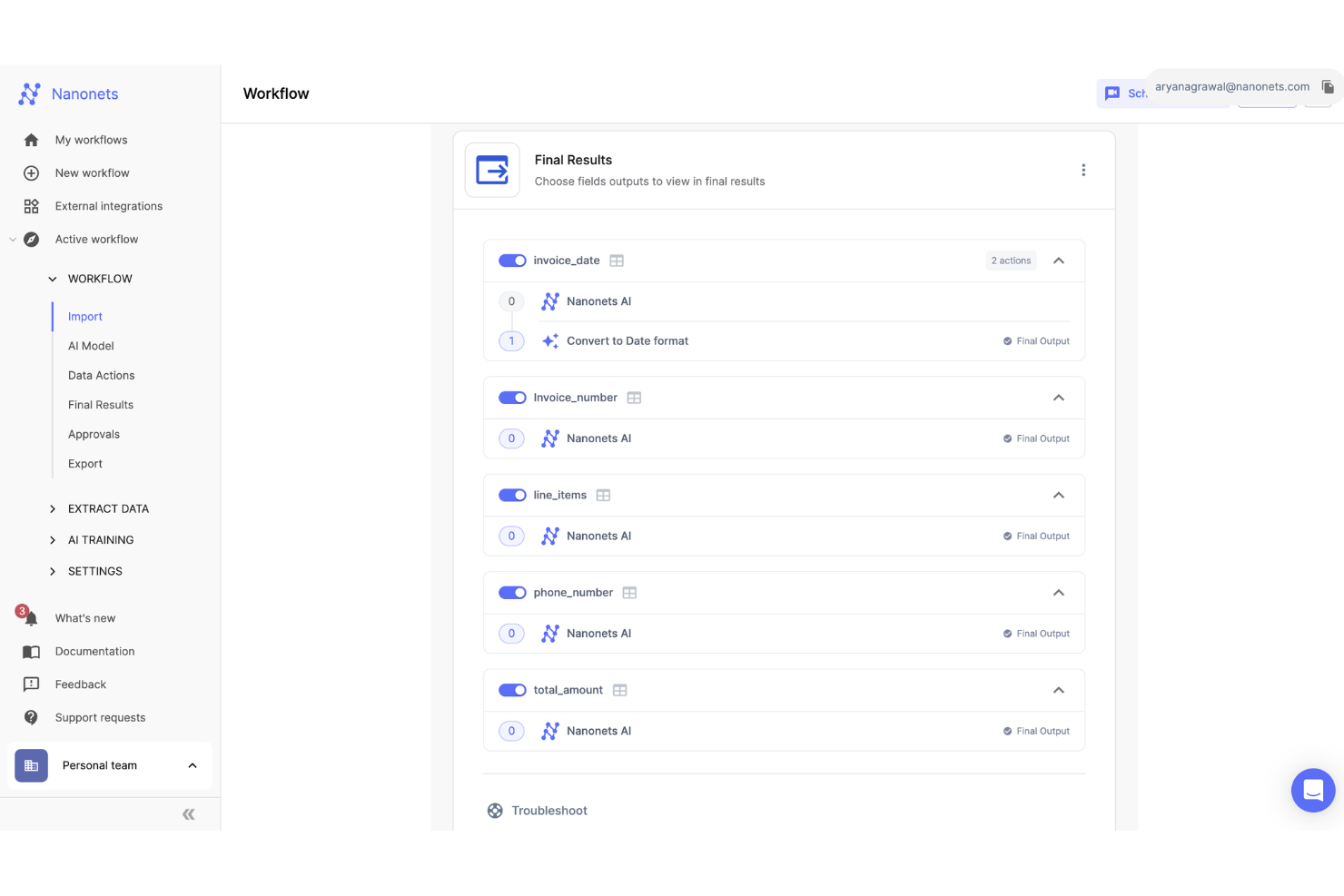
Nanonets est une plateforme d'IA qui automatise le traitement des documents et l'extraction des données grâce à la reconnaissance optique de caractères (OCR) et à des modèles d'apprentissage profond.
Pourquoi j'ai choisi Nanonets : Nanonets se distingue par sa capacité à simplifier les processus complexes d'apprentissage automatique, les rendant accessibles sans exiger une expertise technique approfondie. Cela est particulièrement bénéfique pour les entreprises souhaitant intégrer des technologies d'IA dans leurs opérations sans nécessiter de connaissances ou de ressources poussées. Les fonctionnalités de Nanonets, telles que la détection d'objets, la classification d'images, l'extraction de texte et la reconnaissance optique de caractères (OCR), sont conçues pour améliorer la qualité des données et rationaliser les flux de travail.
Fonctionnalités et intégrations remarquables :
Les fonctionnalités incluent l'extraction de données par IA à partir de différents types de documents, tels que les factures, connaissements, bons de commande et reçus, ainsi que des flux de travail automatisés pour diverses tâches comme le traitement des factures, l'extraction de données, la validation de documents et les comptes fournisseurs. La solution utilise également l'IA pour transformer les données non structurées en informations exploitables.
Pros and Cons
Pros:
- Fonctionnalités d'extraction automatique des données
- Flux de travail personnalisables pour le traitement des documents
- API simple pour une intégration facile
Cons:
- Potentiels problèmes de performance lors d'opérations en forte charge
- Bien que généralement personnalisable, il existe des limites pour certains cas d'usage spécifiques

Idéal pour le déploiement IA de bout en bout
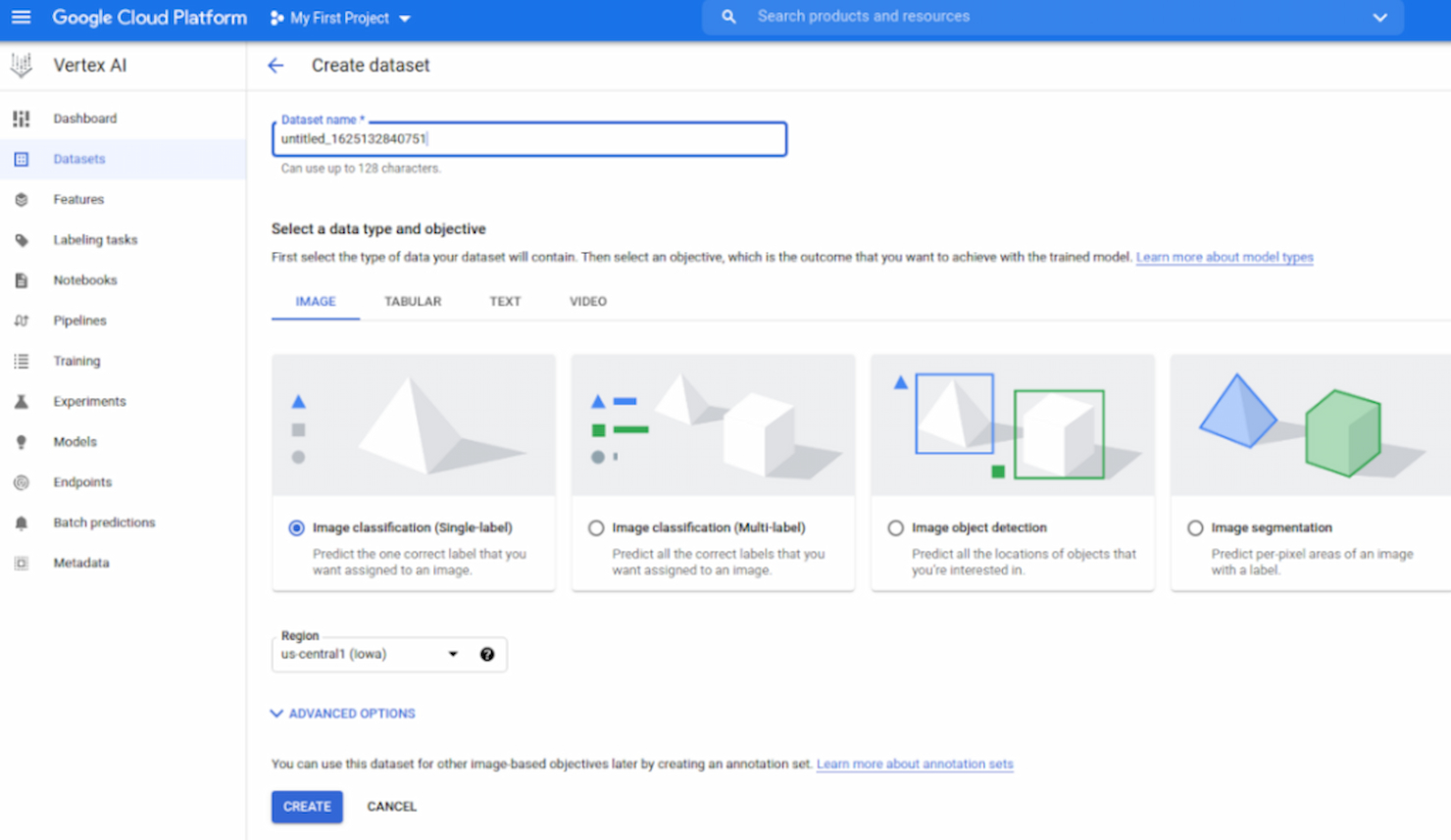
Vertex AI est une plateforme de machine learning (ML) gérée proposée par Google Cloud, facilitant l'ensemble du processus de création, de déploiement et de maintenance des modèles d'IA. Grâce à sa panoplie d'outils complète qui accompagne chaque étape du développement ML, elle s'avère particulièrement efficace pour les entreprises cherchant à rationaliser leur parcours de déploiement IA de bout en bout.
Pourquoi j'ai choisi Vertex AI : Dans ma recherche des outils les plus performants pour le déploiement de l'IA, Vertex AI s'est démarquée par son environnement cohérent. J'ai constaté que son interface unifiée pour l'entraînement, la validation et la prédiction rend le processus ML plus intuitif. De plus, j'ai estimé que Vertex AI répondait parfaitement au besoin d'une solution de déploiement IA complète, au vu de ses fonctionnalités et des retours utilisateur.
Fonctionnalités clés & intégrations :
Vertex AI propose des capacités AutoML, permettant aux utilisateurs d'entraîner des modèles ML sur mesure et de haute qualité avec un minimum de code. Elle intègre également Vertex Pipelines, qui simplifie le travail ML en orchestrant l'ensemble du processus. Côté intégration, Vertex AI se connecte à d'autres services Google Cloud, notamment BigQuery et Dataflow, enrichissant ainsi ses capacités de traitement et d'entraînement des données.
Pros and Cons
Pros:
- Suite complète prenant en charge toutes les phases du processus ML
- Outils intégrés comme AutoML pour simplifier la création de modèles
- Intégration poussée avec les autres services Google Cloud
Cons:
- Peut être déroutant pour les nouveaux venus dans le domaine du ML
- La tarification peut s’avérer complexe selon l’étendue des services utilisés
- La dépendance à l'écosystème Google Cloud peut être limitante pour certains

Athenic
Idéal pour l'intelligence décisionnelle pilotée par l'IA
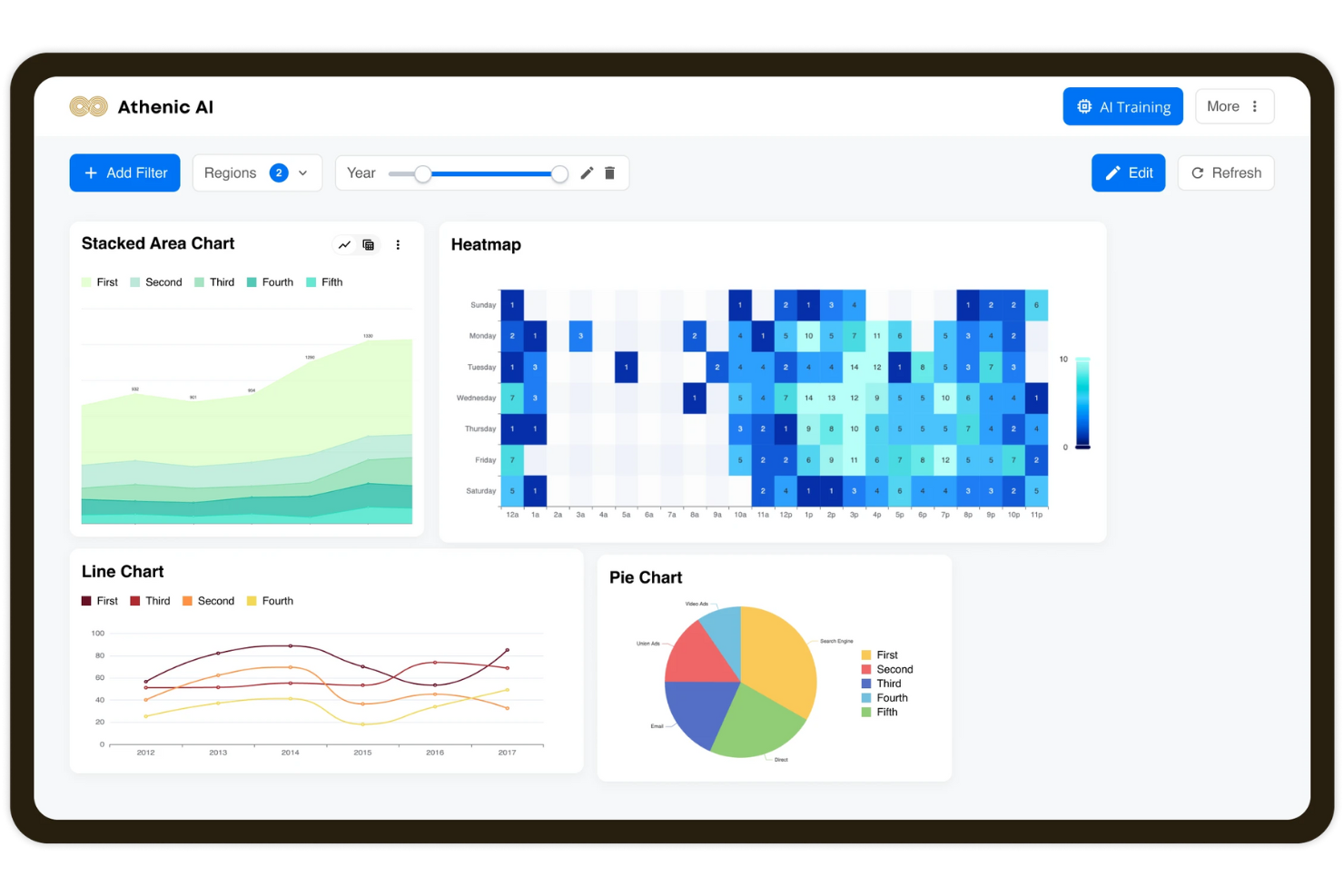
Athenic est une plateforme d'intelligence artificielle conçue pour transformer votre interaction avec les données. En s'appuyant sur des modèles d'IA avancés, elle permet d'obtenir rapidement des informations et de prendre des décisions fondées sur les données dans divers secteurs, notamment les SaaS, les produits de grande consommation et l'industrie manufacturière.
Pourquoi j'ai choisi Athenic : J'ai choisi Athenic pour son intelligence décisionnelle pilotée par l'IA, qui fournit des réponses instantanées et précises aux questions complexes grâce à son utilisation d'un graphe de connaissances. Cette fonctionnalité est particulièrement bénéfique car elle permet à votre équipe de prendre des décisions éclairées sans attendre de longs temps de traitement des données. De plus, la plateforme est conçue pour répondre aux besoins spécifiques de l'entreprise, permettant ainsi une analyse personnalisée des données adaptée à vos objectifs uniques.
Une autre raison de choisir Athenic est l'accent mis sur l'accessibilité aux utilisateurs non techniques. La conception de la plateforme favorise un accès élargi aux données au sein des équipes, donnant à chacun le pouvoir de créer des visualisations et de mener des analyses approfondies. Cette démocratisation des données favorise non seulement l'adoption de l'intelligence décisionnelle mais encourage aussi une culture de la prise de décision éclairée au sein de votre organisation.
Fonctionnalités et intégrations remarquables :
Les fonctionnalités incluent la capacité de la plateforme à mener de manière autonome des recherches approfondies, ce qui signifie que vous pouvez compter sur elle pour gérer des analyses complexes sans intervention manuelle. Elle fournit les résultats dans un format accessible, à l'aide de tableaux et graphiques qui rendent l'interprétation des données facile à comprendre. Athenic se distingue également par sa rapidité, offrant des temps d'analyse nettement plus courts que les méthodes traditionnelles, ce qui est crucial pour des décisions prises en temps voulu.
Les intégrations incluent Google Sheets, Facebook, Slack, Salesforce CRM, Notion, Stripe, AWeber, Asana, Zoho CRM, Google Calendar, Smartlead et Getsitecontrol.
Pros and Cons
Pros:
- Fonctionne comme un traducteur SQL piloté par l'IA en anglais, facilitant l'interrogation de données
- Soutient la planification de la croissance produit et client
- L'interface conviviale simplifie l'analyse de données pour les utilisateurs non techniques.
Cons:
- Fonctionnalités limitées par rapport à des outils analytiques plus avancés
- Nécessite une connexion internet pour une fonctionnalité optimale

iguazio
Idéal pour l'accélération du MLOps
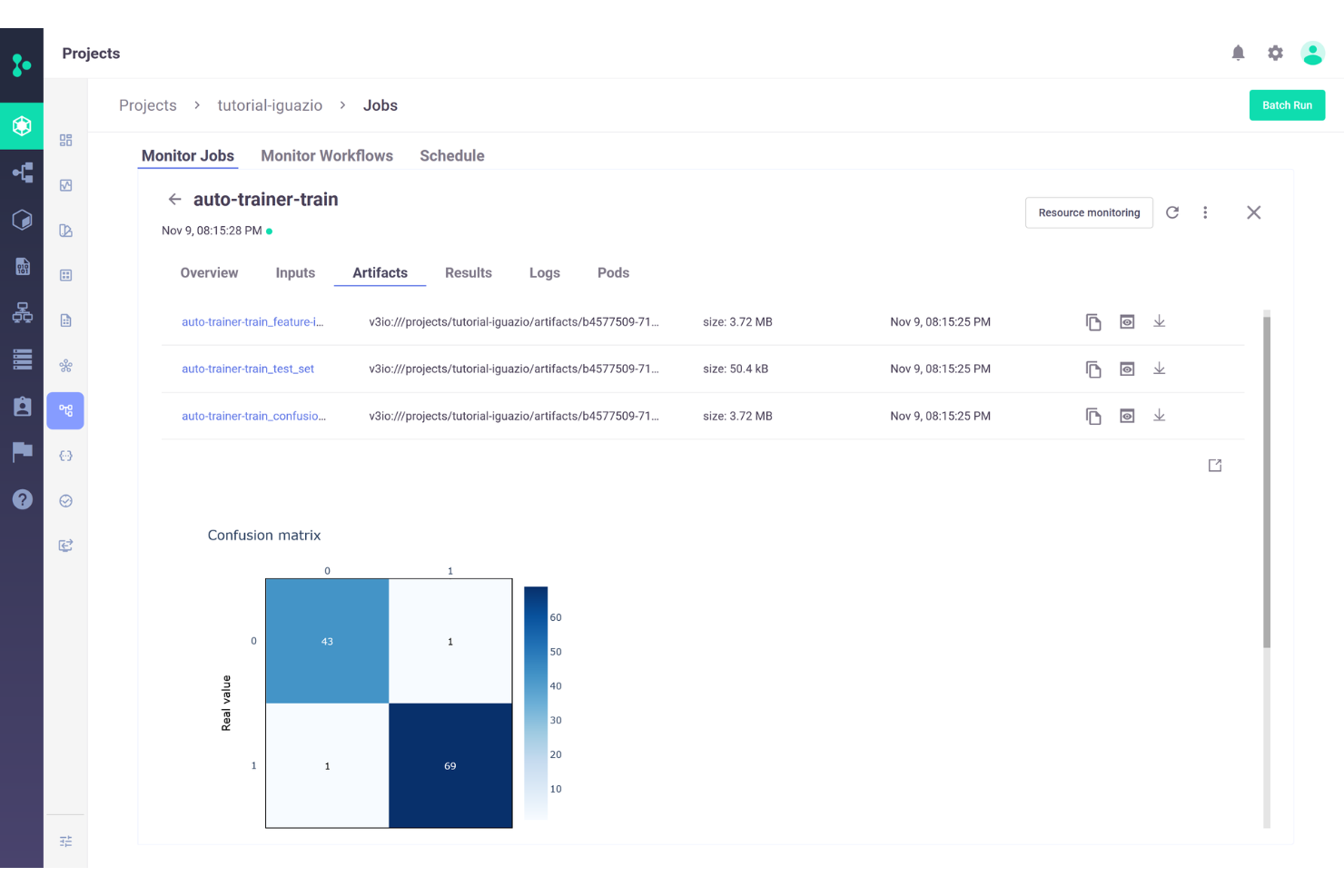
La plateforme MLOps d'Iguazio est un outil complet conçu pour accélérer et étendre le développement, le déploiement et la gestion des applications d'apprentissage automatique et d'IA générative. Elle propose une automatisation de bout en bout des pipelines de machine learning et de deep learning, permettant aux utilisateurs de transformer des projets d'IA en résultats commerciaux concrets.
Pourquoi j'ai choisi Iguazio : J'apprécie la méthodologie de la plateforme pour accélérer le MLOps grâce à divers mécanismes. Par exemple, sa feature store intégrée automatise l'ingénierie des caractéristiques offline et online pour les données en temps réel et par lot, tandis que sa technologie serverless facilite le développement rapide de pipelines de données et de ML évolutifs en temps réel.
Iguazio intègre également le CI/CD sur le code, les données et les modèles, et prend en charge les principaux frameworks de ML, permettant aux utilisateurs d'automatiser les tests et le déploiement des modèles de ML ainsi que de leurs pipelines de données associés.
Fonctionnalités clés & intégrations :
Iguazio offre de puissantes capacités de monitoring et de réentraînement, incluant la surveillance des modèles sans code, la détection de dérive et le réentraînement automatisé afin de garantir la précision des modèles dans le temps.
Les intégrations couvrent les principales plateformes cloud telles qu'AWS, Microsoft Azure et Google, ainsi que NVIDIA, NetApp, Dell et MongoDB.
Pros and Cons
Pros:
- Pipeline de données et de modèles en temps réel
- Capacité de mise à l'échelle dynamique
- Gestion centralisée des métadonnées
Cons:
- Les solutions de sauvegarde propriétaires peuvent être limitantes
- L'interface utilisateur pourrait être plus facile à naviguer

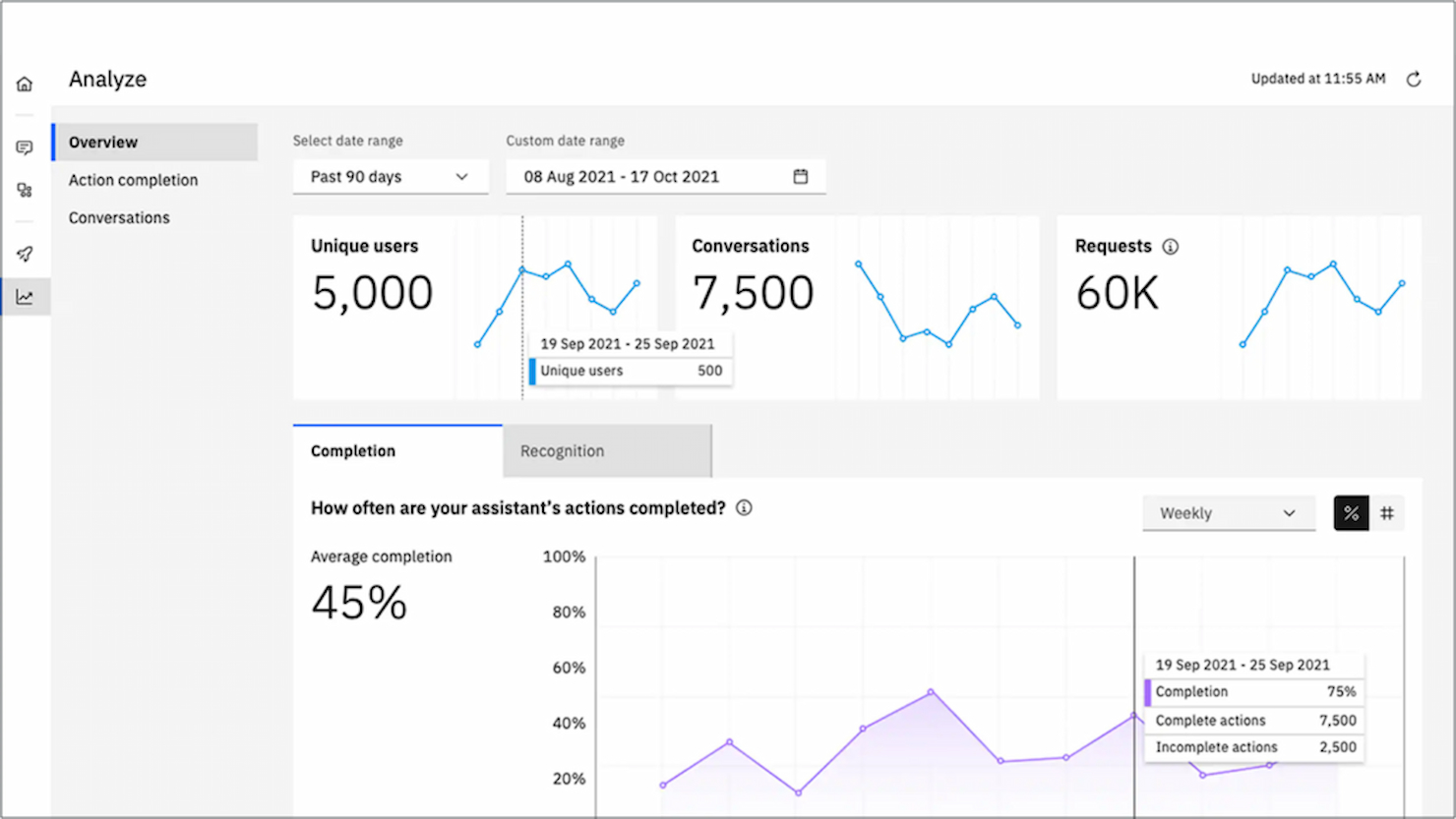
IBM Watson Assistant est une solution robuste qui facilite la conception, le développement et le déploiement de chatbots et d’assistants virtuels alimentés par l’IA. Grâce à son orientation spécifique sur la création d’interfaces conversationnelles, il se positionne comme un choix de premier plan pour les entreprises à la recherche d’un avantage concurrentiel dans les applications d’IA conversationnelle.
Pourquoi j’ai choisi IBM Watson Assistant : Lors de mon processus de sélection d’outils, IBM Watson Assistant s’est imposé comme un concurrent de choix en raison de sa profondeur dans le traitement des tâches de traitement du langage naturel. J’ai jugé que ses capacités surpassaient celles de nombreux concurrents, notamment dans le domaine de l’IA conversationnelle.
Cet outil est en adéquation avec le besoin d'applications d’IA conversationnelle, car il comprend non seulement les saisies des utilisateurs, mais apprend aussi de celles-ci pour proposer de meilleures réponses au fil du temps.
Fonctionnalités et intégrations remarquables :
IBM Watson Assistant prend en charge les conversations à plusieurs tours, garantissant des réponses adaptées au contexte. Grâce à son tableau de bord analytique intégré, les entreprises peuvent surveiller et améliorer la performance de leur bot en analysant les interactions avec les utilisateurs.
Côté intégrations, Watson Assistant peut être connecté à la plupart des canaux de messagerie, solutions CRM et canaux vocaux, ce qui le rend polyvalent pour répondre à différents besoins professionnels.
Pros and Cons
Pros:
- Compréhension approfondie du langage naturel
- Prend en charge les conversations à plusieurs tours pour des interactions riches en contexte
- Tableau de bord analytique complet fournissant des informations sur la performance
Cons:
- Courbe d’apprentissage plus raide pour les débutants
- Certains utilisateurs peuvent trouver les options de configuration complexes
- La plateforme peut être gourmande en ressources pour les déploiements à grande échelle


OpenAI est une organisation de renom qui repousse les limites de l'intelligence artificielle grâce à la recherche et au développement. Étant donné son engagement à faire évoluer l'IA de manière ouverte et éthique, OpenAI s'impose comme un leader pour ceux qui recherchent les modèles d'IA de pointe axés sur la recherche.
Pourquoi j'ai choisi OpenAI : Lorsqu'il s'agissait de déterminer quelle plateforme offrait le summum des modèles d'IA axés sur la recherche, OpenAI a été mon choix. Cette organisation a constamment fait preuve d'un engagement à repousser les frontières de la recherche en IA, ce qui la distingue de ses pairs. Pour ceux qui souhaitent être à l'avant-garde du développement de l'IA fondé sur des recherches approfondies, OpenAI est sans aucun doute la meilleure option.
Caractéristiques et intégrations remarquables :
OpenAI propose une multitude de modèles à la pointe de la technologie, notamment la série GPT, qui a établi des normes dans le traitement du langage naturel. L'organisation a également réalisé des avancées significatives en apprentissage par renforcement et en robotique. En termes d'intégration, OpenAI a rendu ses modèles accessibles via des API, permettant ainsi aux développeurs d'intégrer ces puissants outils dans diverses applications et plateformes.
Pros and Cons
Pros:
- Des modèles de pointe comme la série GPT redéfinissent les capacités de l'IA
- L'engagement pour la recherche ouverte garantit une innovation continue
- L'accessibilité des API facilite l'intégration fluide dans de nombreuses applications
Cons:
- La structure tarifaire peut être ambiguë sans demande directe
- La nature de pointe du service peut exiger des utilisateurs qu'ils restent constamment à jour
- Les limites de débit des API peuvent parfois entraver les tâches lourdes
Autres plateformes d'intelligence artificielle à considérer
Voici d’autres options de plateformes d’intelligence artificielle qui ne figurent pas dans ma sélection principale, mais qui méritent tout de même d’être explorées :
- Microsoft Azure AI
Idéal pour les solutions d'IA évolutives dans le cloud
- SAP HANA Cloud
Idéal pour la gestion des bases de données en temps réel
- Google Cloud AI Platform
Idéal pour intégrer l'IA aux services cloud
- Databricks Lakehouse Platform
Idéal pour combiner data lakes et entrepôts de données
- PyTorch
Idéal pour les graphes dynamiques de réseaux neuronaux
- Keras
Idéal pour une flexibilité maximale des modèles d'apprentissage profond
- Alteryx Intelligence Suite
Idéal pour le mélange de données et l'analytique avancée
- DataRobot
Idéal pour l'apprentissage automatique automatisé
- Aporia
Idéale pour surveiller le machine learning en production
- elvex
Idéal pour l’adoption de l’IA en entreprise
- TestGrid
Idéal pour le test logiciel
- NVIDIA Deep Learning AI
Idéal pour des performances d'apprentissage profond accélérées par GPU


Comment j'évalue les plateformes d'intelligence artificielle
Je divise mon évaluation en deux niveaux : des exigences de base—formation de modèles, déploiement et MLOps—que chaque plateforme doit remplir, et des facteurs différenciateurs comme les outils LLM et la gouvernance qui distinguent les meilleures des autres.
Fonctionnalités principales (Critères minimums pour cette liste)
Ces capacités essentielles servent de critères d'admissibilité pour figurer sur ma liste de plateformes d'intelligence artificielle :
- Environnement de développement de modèles : J'évalue si les plateformes proposent des notebooks intégrés, la prise en charge de plusieurs frameworks (PyTorch, TensorFlow, scikit-learn), et l'AutoML, afin que les équipes puissent prototyper et entraîner des modèles sans avoir à combiner des outils séparés.
- Déploiement et service du modèle : Chaque plateforme doit permettre de publier un modèle entraîné vers un point d'accès API évolutif avec une prise en charge de l'inférence en temps réel et par lot sur le cloud, à la périphérie ou sur site.
- MLOps et gestion du cycle de vie : Je recherche le suivi des expériences, la gestion des versions de modèles et la prise en charge des pipelines CI/CD—le type d'outillage qui garantit la reproductibilité d'un modèle du notebook à la remise en production.
- Intégration et gestion des données : Les plateformes doivent proposer des connecteurs vers des sources de données courantes comme Snowflake, BigQuery et S3, ainsi que des fonctionnalités natives de préparation de données et de magasin de caractéristiques pour des pipelines de variables réutilisables.
- Services et modèles IA pré-construits : Un catalogue de modèles pré-entraînés ou fondamentaux est essentiel—surtout pour les équipes qui ont besoin de capacités de traitement du langage naturel, de vision ou d'IA générative qu'elles peuvent affiner au lieu de les créer de zéro.
- Surveillance et gouvernance des modèles : Je vérifie la détection de dérive, le suivi des biais, le contrôle d'accès basé sur les rôles (RBAC) et l'audit logging—tout ce qu'il faut pour garantir la conformité et la performance des modèles en production au fil du temps.
J'attribue à chaque fournisseur une note de 0 (fonctionnalité non proposée) à 5 (excelle dans ce domaine) pour chaque critère.
Les fournisseurs doivent obtenir une note moyenne minimale pour être inclus dans ma liste. Ensuite, j'examine ce qui distingue chaque plateforme.
Facteurs différenciateurs (Ce qui distingue les fournisseurs)
Une fois ma liste établie, voici comment je compare les différents fournisseurs dans le domaine des plateformes d'intelligence artificielle :
Fonctionnalités remarquables
J'accorde une attention particulière à l'IA générative et aux outils LLM, car la capacité à bâtir ou orchestrer rapidement avec de grands modèles de langage ouvre la voie à des cas d'usage avancés comme RAG, les chatbots personnalisés ou la recherche optimisée par l'IA. Les fonctionnalités d'entraînement distribué—comme le support multi-GPU et l'optimisation matérielle—sont également importantes pour les équipes travaillant sur des expérimentations de grands modèles. Je vérifie aussi la présence de kits d'outils pour une IA responsable, soutenant l'explicabilité et l'atténuation des biais, ce qui est essentiel pour les déploiements très réglementés ou à forte visibilité publique.
Au-delà des fonctionnalités
La flexibilité de déploiement est essentielle—j'évalue si une plateforme prend en charge les modèles cloud, hybrides et sur site, car de nombreuses équipes en entreprise doivent garder des données sensibles derrière leur propre pare-feu. Les certifications de sécurité et de conformité telles que SOC 2, HIPAA et FedRAMP sont également importantes, en particulier pour les équipes dans des secteurs réglementés. La transparence des prix compte aussi. J'examine si les modèles basés sur la consommation ou par utilisateur sont suffisamment clairs pour prévoir les coûts GPU avant que le projet ne prenne de l'ampleur.
Comment choisir une plateforme d'intelligence artificielle
Il est facile de se perdre dans des listes de fonctionnalités interminables et des structures tarifaires complexes. Pour vous aider à rester concentré pendant votre processus de sélection de logiciel, voici une checklist des critères à retenir :
| Critère | À considérer |
|---|---|
| Scalabilité | La plateforme peut-elle évoluer avec votre entreprise ? Examinez sa capacité à gérer une hausse de données et d’utilisateurs. Soyez attentifs aux signes de baisse de performances à mesure que l’échelle augmente. |
| Intégrations | Est-ce compatible avec vos outils existants ? Vérifiez si la plateforme prend en charge votre pile logicielle ou si elle nécessite des solutions de contournement qui pourraient compliquer vos processus. |
| Personnalisation | Pouvez-vous adapter la solution à vos besoins ? Assurez-vous qu’elle offre de la flexibilité sans exiger de longues phases de développement ou l'intervention de prestataires externes. |
| Facilité d’utilisation | L’interface est-elle intuitive pour votre équipe ? Évitez les longues courbes d’apprentissage qui ralentissent l’adoption et impactent la productivité. |
| Mise en œuvre et intégration | Combien de temps faut-il pour être opérationnel ? Évaluez la disponibilité des ressources comme les supports de formation et l’assistance durant la transition. |
| Coût | La tarification entre-t-elle dans votre budget ? Comparez le coût avec les fonctionnalités proposées tout en restant vigilant sur les frais cachés qui peuvent alourdir la facture finale. |
| Garantie de sécurité | Comment la plateforme protège-t-elle vos données ? Vérifiez qu’elle se conforme aux normes de sécurité de votre secteur avec des dispositifs robustes de protection des données. |
| Disponibilité du support | L’assistance est-elle accessible quand vous en avez besoin ? Assurez-vous que le support technique correspond à vos horaires et canaux de communication préférés. |
Qu'est-ce qu'une plateforme d’intelligence artificielle ?
Une plateforme d’intelligence artificielle est un logiciel qui permet de développer, de déployer et de gérer des modèles et applications d’IA. Ces outils sont couramment utilisés par les data scientists, les développeurs et les professionnels de l’informatique afin d’améliorer la prise de décision et d’automatiser des tâches. L’analyse de données, l’analytique prédictive et l’intégration du machine learning facilitent le traitement de grandes quantités de données, améliorent la précision et automatisent des processus complexes. Globalement, ces outils offrent une valeur significative en augmentant l’efficacité et en permettant des analyses guidées par les données.
Fonctionnalités
Lorsque vous choisissez une plateforme d’intelligence artificielle, soyez attentif aux fonctionnalités clés suivantes :
- Analyse de données : Fournit des outils pour traiter et interpréter de grands ensembles de données, aidant les utilisateurs à extraire des informations pertinentes.
- Modélisation prédictive : Utilise des algorithmes pour prévoir les tendances futures et faciliter la prise de décisions proactives.
- Intégration du machine learning : Permet de construire et de déployer des modèles d’apprentissage automatique, automatisant ainsi des tâches complexes.
- Logiciel d’intelligence conversationnelle : Permet aux systèmes de comprendre et de répondre au langage humain, améliorant ainsi l’interaction utilisateur.
- Algorithmes personnalisables : Offre la possibilité d’adapter les fonctions d’IA aux besoins spécifiques de l’entreprise sans codage approfondi.
- Traitement des données en temps réel : Garantit une analyse immédiate des données pour fournir des informations à jour pour des décisions rapides.
- Outils de visualisation avancés : Aident à représenter les données sous forme visuelle, facilitant la compréhension d’informations complexes.
- Prise en charge de plusieurs langues : Facilite la gestion de jeux de données variés en intégrant plusieurs langues.
- Scalabilité basée sur le cloud : Permet de faire évoluer facilement les capacités en fonction des besoins de l’entreprise, sans contraintes matérielles.
- Garanties de sécurité : Protège les données sensibles grâce au chiffrement et au respect des normes du secteur.
Avantages
La mise en place d’un logiciel d’IA procure plusieurs avantages à votre équipe et à votre entreprise. Voici quelques bénéfices auxquels vous pouvez vous attendre :
- Amélioration de la prise de décision : La modélisation prédictive et l’analyse de données permettent de prendre des décisions éclairées plus rapidement et plus précisément.
- Efficacité accrue : L’automatisation des tâches grâce à l’intégration de l’apprentissage automatique réduit le travail manuel et fait gagner du temps.
- Meilleure interaction avec les utilisateurs : Le traitement du langage naturel favorise une communication et un engagement améliorés auprès des utilisateurs.
- Scalabilité : La scalabilité basée sur le cloud permet de faire grandir votre entreprise sans limitations matérielles et de s’adapter aux besoins changeants.
- Sécurité des données : Les garanties de sécurité intégrées protègent les informations sensibles et assurent le respect des normes du secteur.
- Réduction des coûts : Le traitement efficace des données et l’automatisation des tâches peuvent réduire les coûts opérationnels sur le long terme.
Coûts et Tarification
Choisir une plateforme d’intelligence artificielle nécessite de comprendre les différents modèles de tarification et les formules disponibles. Les coûts varient selon les fonctionnalités, la taille de l’équipe, les modules complémentaires et plus encore. Le tableau ci-dessous résume les formules courantes, leurs prix moyens et les caractéristiques typiques incluses dans les solutions de plateforme d’intelligence artificielle :
Tableau comparatif des formules pour une plateforme d’intelligence artificielle
| Type de formule | Prix moyen | Fonctionnalités courantes |
|---|---|---|
| Formule gratuite | $0 | Analyse de données basique, modèles de machine learning limités et support communautaire. |
| Formule personnelle | $10-$30/user/month | Traitement avancé des données, algorithmes personnalisables et support par e-mail. |
| Formule entreprise | $50-$100/user/month | Traitement des données en temps réel, support multilingue et service client prioritaire. |
| Formule grande entreprise | $150-$300/user/month | Capacités d’intégration complètes, gestionnaire de compte dédié et sécurité renforcée. |
FAQ sur les plateformes d’intelligence artificielle
Voici des réponses aux questions courantes sur les plateformes d’intelligence artificielle :
Comment garantir la confidentialité des données avec les plateformes d’IA ?
Pour protéger vos données, évitez de saisir des informations confidentielles ou personnelles dans les systèmes d’IA. Désactivez les fonctionnalités de collecte de données lorsque c’est possible et utilisez des identifiants uniques au lieu de comptes de réseaux sociaux. Examinez régulièrement les autorisations des applications et révoquez-les afin de prévenir tout accès non autorisé.
Y a-t-il des enjeux juridiques liés à l’utilisation de contenus générés par l’IA ?
Oui, l’utilisation d’images ou de contenus générés par l’IA peut soulever des questions juridiques, notamment en matière de droits d’auteur. Consultez toujours les conditions d’utilisation de chaque plateforme et évitez d’exploiter des images générées par l’IA à des fins commerciales tant que les règles juridiques ne sont pas claires.
Que dois-je prendre en compte lors de l’intégration de l’IA avec mes systèmes existants ?
Assurez-vous que la plateforme d’IA s’intègre facilement à vos outils et processus actuels. La compatibilité est essentielle pour éviter les silos de données et garantir l’efficacité des opérations. Testez les intégrations pendant une phase d’essai pour évaluer la fonctionnalité et résoudre rapidement les problèmes.
Quel impact financier une plateforme d’IA peut-elle avoir sur mon entreprise ?
Les plateformes d’IA peuvent améliorer l’efficacité et réduire les coûts, mais une fuite de données peut avoir des conséquences financières importantes. Optez pour des plateformes dotées de solides dispositifs de sécurité et mettez régulièrement vos systèmes à jour pour se prémunir contre d’éventuelles menaces.
Quels sont les pièges courants lors du déploiement d’une plateforme d’IA ?
Les problèmes fréquents incluent un manque de formation des équipes et une sous-estimation du temps d’implémentation. Prévoyez un processus d’intégration approfondi et allouez des ressources pour la formation continue et l’assistance afin d’assurer un déploiement réussi.
Comment obtenir les meilleurs résultats avec les outils d’IA ?
Un encadrement précis et la vérification des faits sont essentiels pour des résultats optimaux. Utilisez plusieurs plateformes d’IA pour obtenir des retours variés et consultez des experts pour les questions juridiques ou RH afin de garantir la conformité et la fiabilité.
Prochaine étape :
Si vous recherchez actuellement des plateformes d’intelligence artificielle, contactez gratuitement un conseiller SoftwareSelect pour des recommandations personnalisées.
Vous remplissez un formulaire et échangez brièvement afin qu’ils comprennent vos besoins spécifiques. Vous recevrez ensuite une sélection de logiciels à examiner. Ils vous accompagneront même tout au long du processus d’achat, y compris lors des négociations tarifaires.