

Los 10 mejores programas de prevención de pérdida de datos de 2026

10 Lista de selección del mejor software de prevención de pérdida de datos


En el mundo digital actual, mantener tus datos seguros es una prioridad absoluta. La pérdida de datos puede convertirse en una pesadilla para ti y tu equipo, ya que provoca la pérdida de tiempo, dinero y confianza. Ahí es donde entra en juego el software de prevención de pérdida de datos: te ayuda a proteger la información confidencial y a garantizar el cumplimiento de las normativas.
Pruebo y reviso software de forma independiente, centrándome en lo que realmente importa a expertos en tecnología como tú. Según mi experiencia, encontrar las herramientas adecuadas de prevención de pérdida de datos puede marcar la diferencia a la hora de proteger tu empresa.
En este artículo, compartiré mis principales opciones de software de prevención de pérdida de datos. Obtendrás una visión imparcial de sus funciones, ventajas y desventajas, así como de la forma en que estas herramientas pueden aliviar tus dificultades. Adentrémonos en el tema para encontrar la opción que mejor se adapte a tus necesidades.
Por qué confiar en nuestras recomendaciones de software
Nuestro equipo lleva probando y evaluando software desde 2012. Como líderes tecnológicos, sabemos lo difícil —y lo importante— que es elegir el software adecuado.
Para esta guía, evaluamos las herramientas mediante pruebas prácticas e investigación independiente, puntuando las herramientas según nuestros criterios de selección.
Nuestras reseñas reflejan nuestro criterio editorial humano, no un discurso de ventas.
Revisores expertos:
Resumen del mejor software de prevención de pérdida de datos
| Tool | Best For | Trial Info | Price | ||
|---|---|---|---|---|---|
| 1 | Ideal para controlar la exfiltración de datos en SaaS e IA generativa | Demostración gratuita disponible | Precio bajo solicitud | Website | |
| 2 | Ideal para la detección de amenazas internas | Prueba gratuita + demo gratuita disponible | Desde $14/usuario/mes (facturado anualmente) | Website | |
| 3 | La mejor para detección y respuesta ante amenazas | Not available | $15/user/month (facturado anualmente) | Website | |
| 4 | Ideal para la protección de datos empresariales a gran escala | Not available | Precio personalizado bajo solicitud | Website | |
| 5 | Ideal para protección holística de datos en entornos de nube híbrida | Not available | Precio bajo solicitud | Website | |
| 6 | El mejor para seguridad y cumplimiento en bases de datos | Prueba gratuita de 30 días disponible | $30/user/month | Website | |
| 7 | Ideal para una protección avanzada basada en aprendizaje automático | Not available | Precio bajo solicitud | Website | |
| 8 | Ideal para seguridad de datos consciente del contexto | Not available | $10/usuario/mes (facturación anual) | Website | |
| 9 | Ideal para seguridad integrada en endpoints y red | Not available | $15/user/month | Website | |
| 10 | Ideal para entornos nativos en la nube | Not available | $10/user/month (facturado anualmente) | Website |
Análisis del mejor software de prevención de pérdida de datos

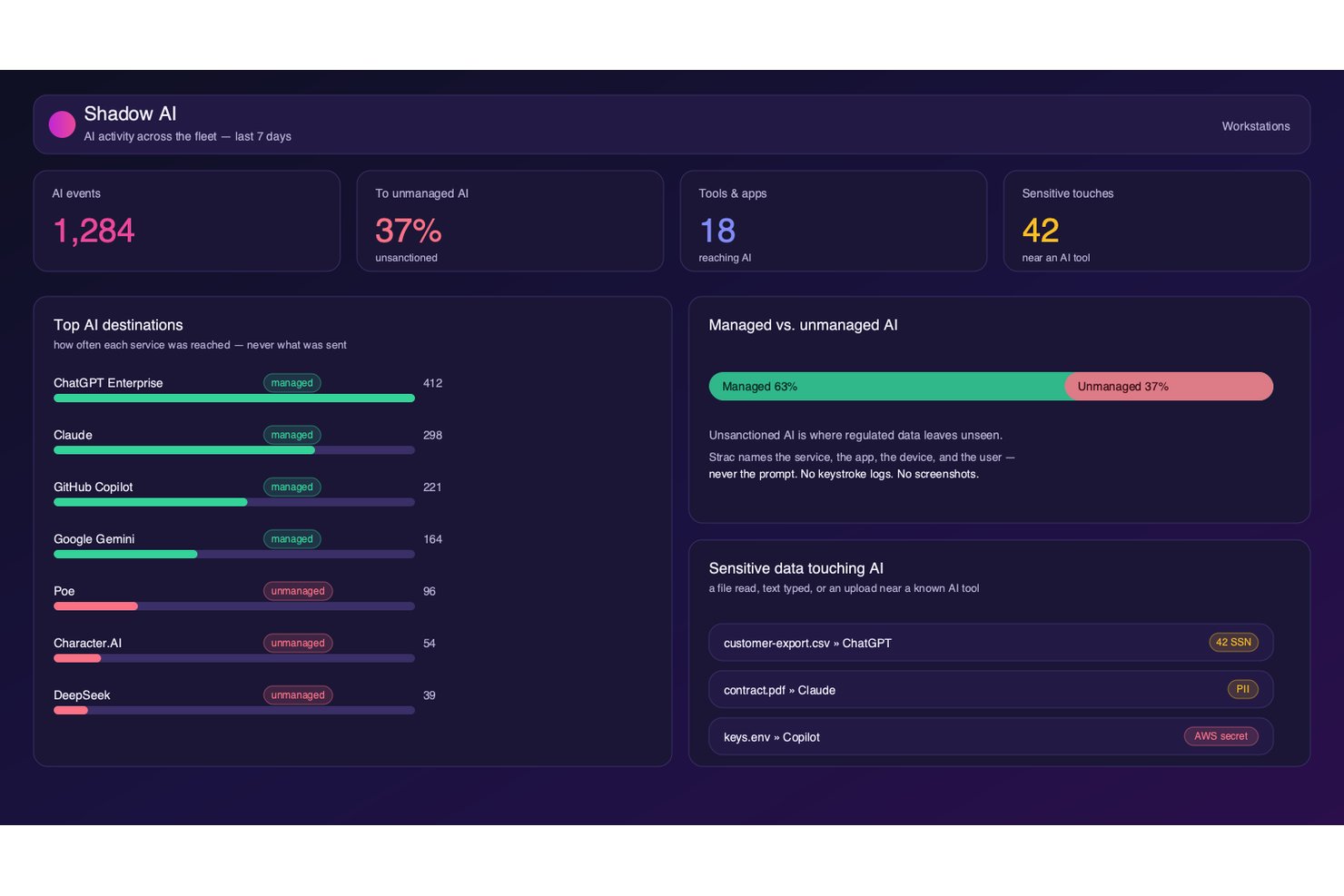
Strac es una plataforma de DLP que supervisa y aplica políticas de protección de datos en aplicaciones SaaS, almacenamiento en la nube, endpoints, navegadores y herramientas de IA generativa mediante clasificación basada en ML y OCR.
¿Para quién es mejor Strac?
Strac es una opción excelente para los equipos de seguridad que gestionan datos confidenciales en entornos SaaS extensos y para las organizaciones que están adoptando activamente herramientas de IA generativa y necesitan controlar qué datos envían los empleados a los modelos de IA.
Por qué elegí Strac
Elegí Strac como una de las mejores opciones porque es una de las pocas plataformas de DLP que considera la IA generativa un canal de exfiltración de primer nivel. Supervisa y bloquea los datos confidenciales enviados a ChatGPT, Claude, Gemini y Copilot desde el nivel de las indicaciones, y amplía esa cobertura a los flujos de trabajo de agentes MCP. También me gusta que su motor de ML y OCR detecte datos confidenciales incrustados en imágenes y archivos PDF escaneados antes de que salgan del entorno.
Características clave de Strac
- Plantillas de políticas de cumplimiento: Plantillas prediseñadas asignadas a HIPAA, PCI DSS, SOC 2, GDPR, CCPA, CPRA, ISO 27001 e ISO 27701 para ofrecer cobertura normativa inmediata.
- Control de medios extraíbles e impresión: Los agentes para endpoints de Windows, macOS y Linux aplican restricciones de USB, portapapeles e impresión en tiempo real.
- Implementación local autohospedada: Strac puede ejecutarse completamente dentro de su propia VPC de AWS sin salida de datos, lo que permite cumplir estrictos requisitos de residencia de datos y FedRAMP.
- Indicaciones de orientación para usuarios: En el momento de una posible infracción de políticas, Strac muestra indicaciones integradas que educan a los empleados en lugar de bloquearlos silenciosamente.
Integraciones de Strac
Strac ofrece más de 50 integraciones nativas, incluidas Slack, Google Workspace, Microsoft 365, Salesforce, Jira, AWS, Snowflake, PostgreSQL, ChatGPT, Claude y Gemini. También proporciona documentación de API para integraciones personalizadas y admite conexiones SIEM con Splunk, Sumo Logic y Microsoft Sentinel.
Pros and Cons
Pros:
- Aplica DLP en herramientas de IA generativa
- Proporciona corrección en tiempo real en el origen de los datos
- Realiza detección basada en OCR para imágenes y archivos PDF
Cons:
- Carece de UEBA independiente para amenazas internas
- No ofrece DLP de proxy en línea a nivel de red

Teramind
Ideal para la detección de amenazas internas
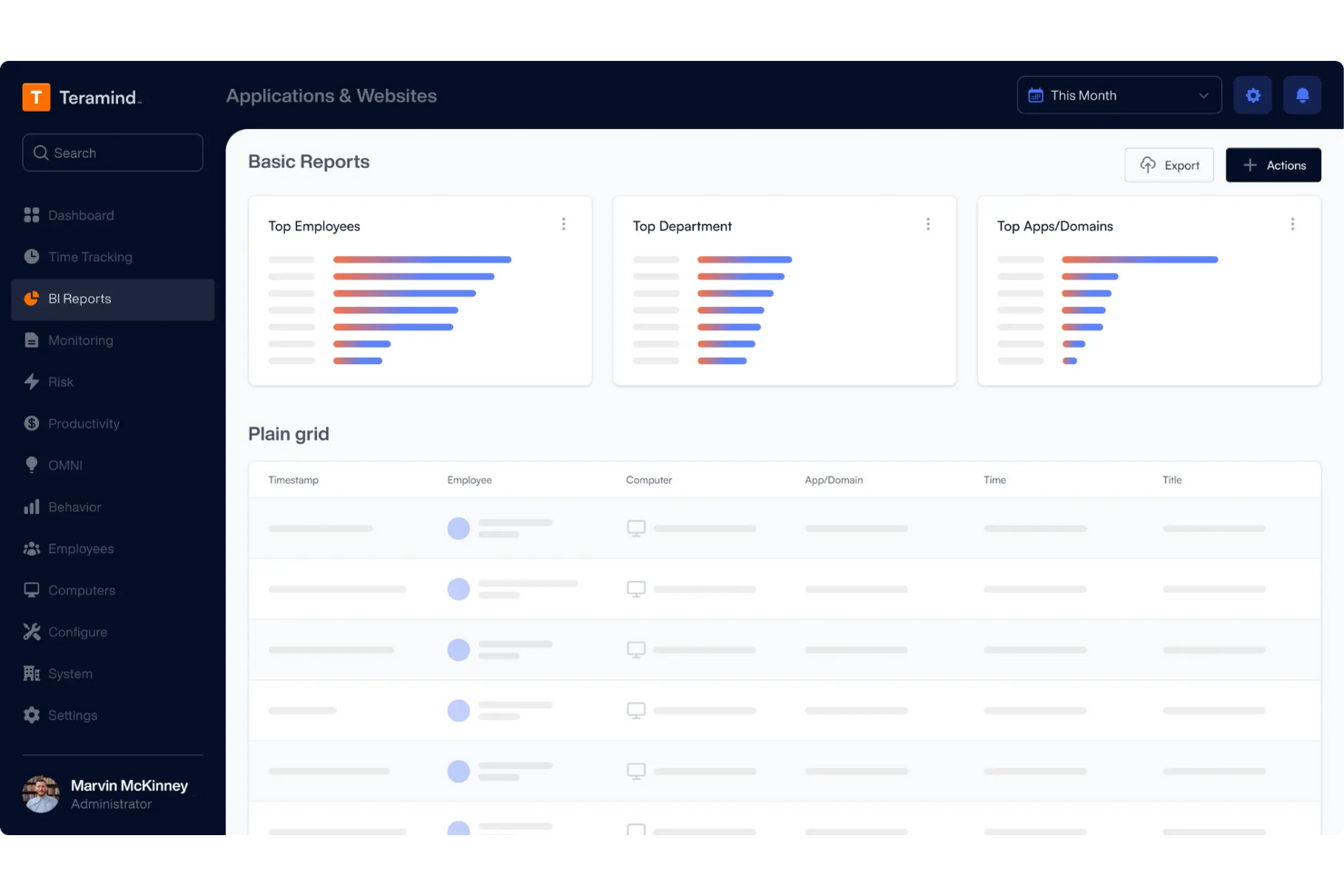
Teramind está en mi lista de favoritos por lo bien que cubre la detección de amenazas internas en tiempo real. Lo recomiendo cuando necesitas monitorizar comportamientos de usuario arriesgados que pasan desapercibidos por los controles tradicionales de DLP.
Lo que me gusta es su sólido monitoreo de la actividad de usuarios y su puntuación de riesgo automatizada. En la práctica, los equipos pueden identificar acciones inusuales—como movimiento masivo de archivos o accesos no autorizados—antes de que los datos realmente salgan del entorno.
Lo mejor de Teramind
- Equipos de seguridad que monitorean amenazas internas y usuarios de riesgo
- Organizaciones que necesitan un seguimiento granular de la actividad de los usuarios
Lo no tan bueno de Teramind
- Empresas que buscan soluciones DLP ligeras y sin intervención
- Equipos enfocados únicamente en la clasificación automatizada de datos
Qué distingue a Teramind
Teramind se centra en el monitoreo cercano del comportamiento del usuario, tratando cada acción—como transferencias de archivos y uso de aplicaciones—como un posible indicador de riesgo que necesitas seguir. A diferencia de la mayoría de las herramientas DLP que se centran en el escaneo de contenido o el etiquetado de datos, Teramind parte de la premisa de que tus mayores amenazas se mueven a través de las personas dentro de tu red. En la práctica, esto funciona bien cuando te preocupa más el patrón de actividad que solo bloquear tipos de datos conocidos.
Compensaciones de Teramind
Teramind optimiza para un monitoreo activo y datos de comportamiento, pero esto implica mayor configuración, análisis continuo y ruido. Si quieres una DLP automatizada y con mínima personalización, este enfoque requiere más esfuerzo.
Pros and Cons
Pros:
- Detecta amenazas internas que pasan desapercibidas en sistemas solo basados en reglas
- La puntuación granular de riesgo ayuda a reducir falsos positivos
- Bloquea filtraciones de datos proactivamente, no solo las detecta después
Cons:
- No hay huella digital de bases de datos con datos estructurados
- Requiere instalar un agente en cada dispositivo

La mejor para detección y respuesta ante amenazas
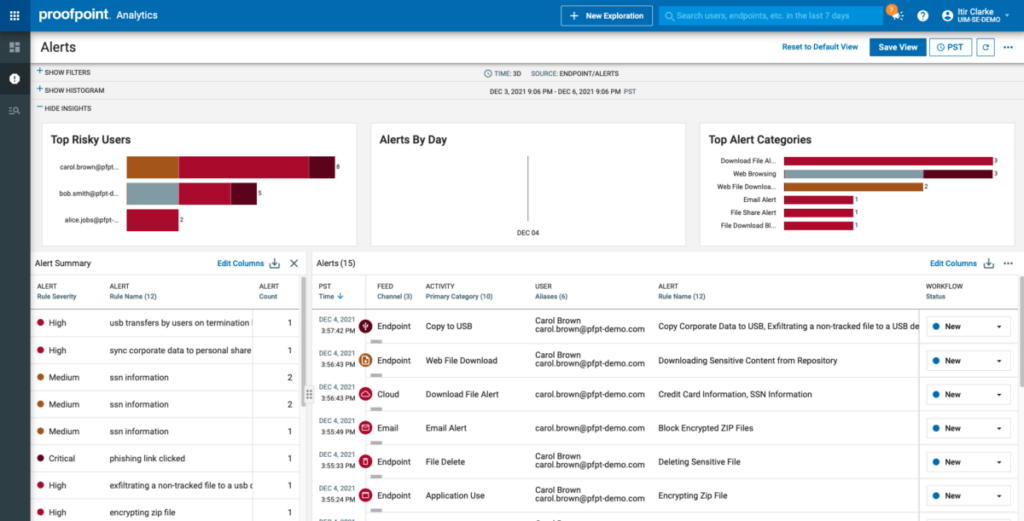
Proofpoint Enterprise Data Loss Prevention merece un lugar porque detecta constantemente amenazas que otras herramientas no encuentran, especialmente en canales de correo electrónico, nube y endpoints. He visto cómo identifica intentos de exfiltración y riesgos internos al combinar análisis de comportamiento e inspección de contenido en un solo flujo de trabajo.
Lo que lo distingue para mí es el motor de correlación de amenazas. Recibes alertas procesables y un flujo de respuesta que cubre desde bloqueos en tiempo real hasta la revisión de incidentes, todo desde un panel unificado.
Lo mejor de Proofpoint DLP
- Grandes empresas que necesitan protección contra amenazas en correo electrónico, nube y endpoints
- Equipos de seguridad enfocados en riesgos internos y de exfiltración
Cuándo no es ideal Proofpoint DLP
- Pequeñas empresas con recursos mínimos en seguridad informática
- Organizaciones que buscan soluciones DLP ligeras o básicas
Qué distingue a Proofpoint DLP
Proofpoint DLP coloca la detección de amenazas en el centro, enfocándose en señales de comportamiento antes de analizar el contenido y las políticas. A diferencia de las herramientas DLP tradicionales que alertan principalmente por palabras clave o patrones, Proofpoint apuesta por el contexto y la actividad en tiempo real, señalando conductas riesgosas primero en correo y la nube. Esto funciona especialmente bien en organizaciones con preocupación tanto por amenazas internas como externas, donde quieres conectar señales de advertencia tempranas con movimientos de datos.
Compromisos de Proofpoint DLP
Al optimizar para una detección avanzada, Proofpoint suma complejidad y una curva de aprendizaje más pronunciada. Para equipos que buscan algo más simple o de administración ligera, esa profundidad adicional puede traducirse en más trabajo al inicio y una incorporación más lenta.
Pros and Cons
Pros:
- Capacidades excepcionales de detección y respuesta ante amenazas.
- Se integra con otras soluciones de Proofpoint.
- Proporciona visibilidad integral sobre la seguridad de los datos.
Cons:
- Precio inicial más alto comparado con otras soluciones DLP.
- Puede haber costos adicionales por funciones avanzadas.
- Puede ser complejo de implementar y gestionar para pequeñas empresas.

Ideal para la protección de datos empresariales a gran escala
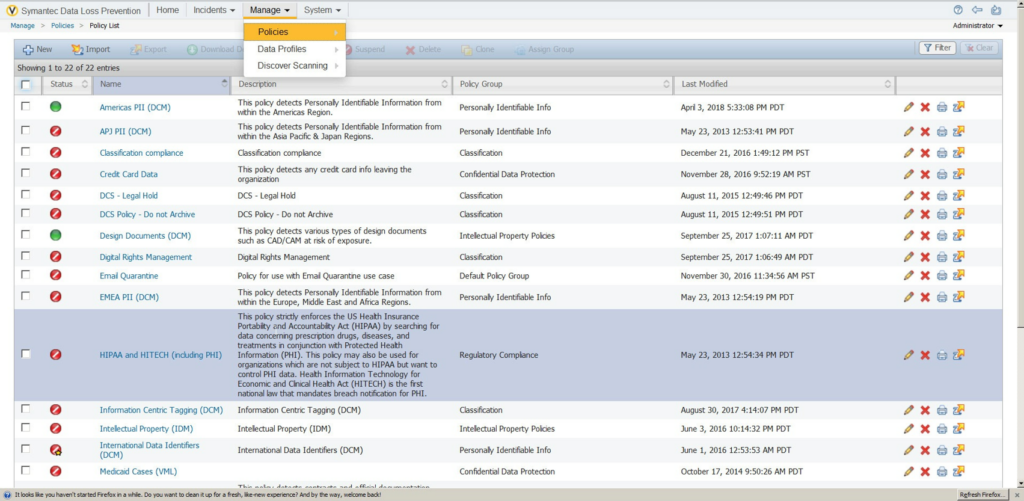
Symantec Data Loss Prevention está en mi lista porque aborda algunas de las necesidades de protección de datos más grandes y complejas que he encontrado. Cuando trabajo con empresas donde los datos confidenciales se trasladan entre sistemas en la nube, dispositivos finales y entornos locales, la gestión unificada de políticas y el descubrimiento automático de datos de Symantec realmente destacan.
Lo que más me gusta es la posibilidad de personalizar las políticas para abordar el cumplimiento regional, amenazas internas y riesgos de terceros a gran escala.
Lo mejor de Symantec DLP para
- Grandes empresas con entornos de datos diversos y complejos
- Organizaciones que necesitan control granular sobre el movimiento de datos sensibles
Donde Symantec DLP no es ideal
- Pequeñas empresas con necesidades de protección de datos simples
- Equipos que buscan implementaciones rápidas y ligeras
Qué diferencia a Symantec DLP
Symantec DLP está diseñado para organizaciones que necesitan gobernar datos sensibles en movimiento entre puntos finales, la nube y sistemas locales, todo bajo un mismo techo. A diferencia de herramientas más sencillas como Microsoft Purview, que se adaptan a entornos más pequeños o basados principalmente en Microsoft, Symantec espera que centralices políticas e informes para infraestructuras altamente diversas.
En la práctica, esto funciona bien para los equipos de seguridad que necesitan coordinar controles de riesgo en operaciones globales, obligaciones regulatorias y plataformas mixtas.
Compromisos con Symantec DLP
Symantec DLP optimiza el control sobre la escala y la complejidad, pero la incorporación y ajuste requieren tiempo y habilidades especializadas. Los equipos más pequeños terminan con más mantenimiento del que desean.
Pros and Cons
Pros:
- Puede abordar las necesidades empresariales a gran escala.
- Ofrece gestión unificada de políticas.
- Se integra profundamente con otros productos de Symantec.
Cons:
- La información de precios no está disponible fácilmente.
- Puede ser demasiado complejo para organizaciones pequeñas.
- La configuración y gestión pueden consumir mucho tiempo.

Ideal para protección holística de datos en entornos de nube híbrida
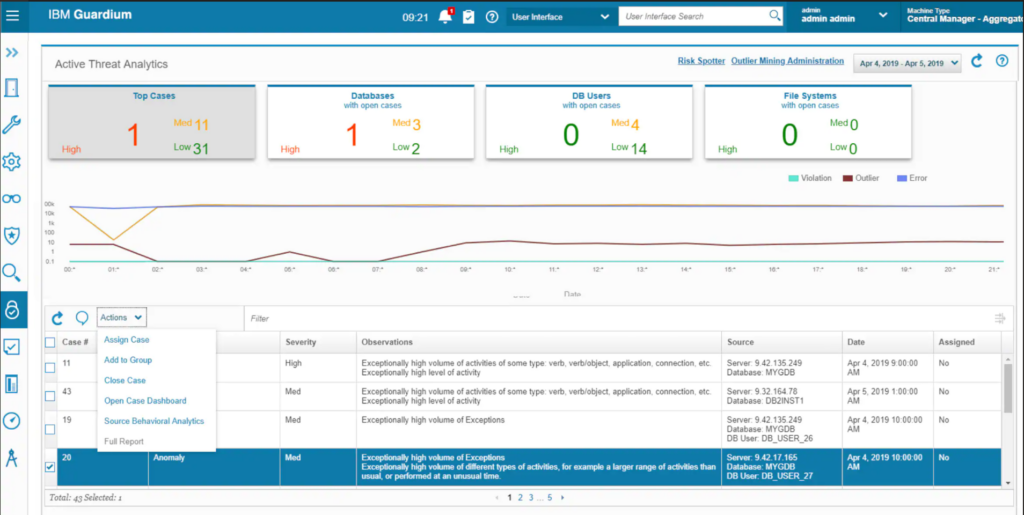
IBM Data Security: Mejor Para
- Empresas con entornos de datos híbridos o multinube complejos
- Equipos de seguridad que requieren automatización centralizada de políticas y cumplimiento
IBM Data Security: No es ideal para
- Organizaciones pequeñas con almacenamiento de datos local y simple
- Equipos que necesiten herramientas DLP ligeras y listas para usar
Qué distingue a IBM Data Security
IBM Data Security destaca por priorizar la aplicación unificada de políticas y la monitorización en fuentes de datos tanto en la nube como en local. En vez de superponer herramientas DLP para cada entorno, estableces las políticas una vez y las aplicas en todas partes.
Esto es especialmente útil para organizaciones que gestionan datos sensibles en la nube pública y en centros de datos locales. En comparación con soluciones como Symantec DLP, que suelen asumir infraestructuras más estandarizadas, IBM se enfoca en la coherencia entre entornos.
Compromisos con IBM Data Security
Optimiza el control centralizado y amplio, pero esto puede suponer implementaciones más lentas y configuración adicional cuando solo se necesita protección DLP básica y dirigida para un único sistema.
Pros and Cons
Pros:
- Solución integral para la protección de datos en entornos de nube híbrida.
- Ofrece una plataforma unificada para todas las necesidades de seguridad de datos.
- Amplia gama de integraciones compatibles.
Cons:
- La información sobre precios no está disponible fácilmente.
- Puede ser demasiado complejo para pequeñas empresas.
- Puede haber una curva de aprendizaje debido a su gran variedad de funciones.

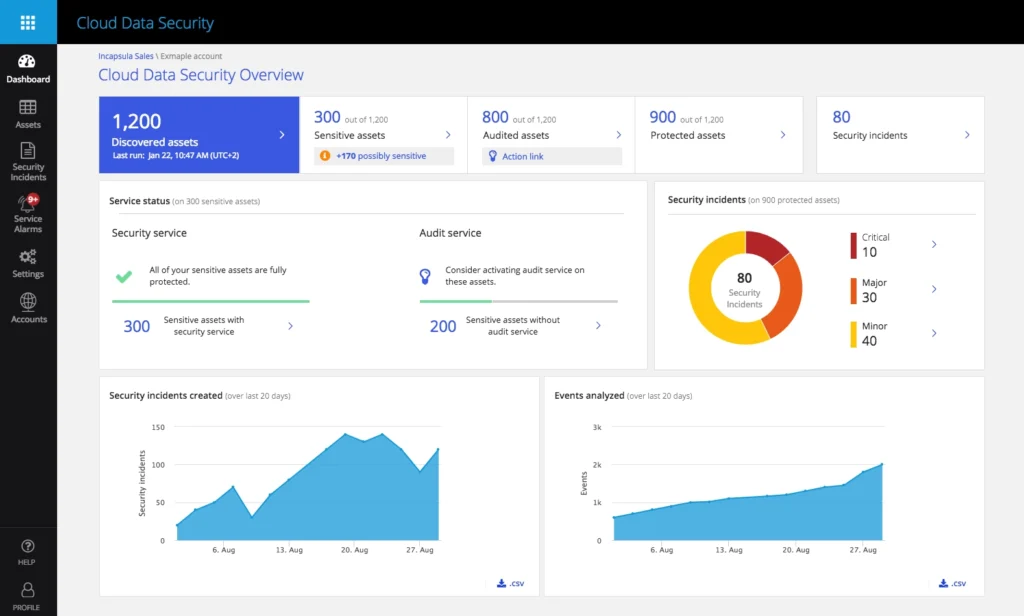
Imperva es ideal para
- Industrias reguladas con necesidades complejas de cumplimiento en bases de datos
- Equipos de seguridad que requieren monitoreo en tiempo real de datos sensibles
Imperva no es ideal para
- Organizaciones enfocadas en la prevención de pérdida de datos basada en endpoints
- Equipos con entornos de pequeña escala o solo almacenamiento de archivos
Lo que diferencia a Imperva
Imperva está diseñado bajo la idea de que la seguridad de bases de datos debe ser granular, continua e independiente de dónde residen tus datos. A diferencia de las soluciones de DLP tradicionales que se centran en endpoints o el tráfico de la red, Imperva asume que tus datos más valiosos viven en bases de datos y almacenamientos en la nube, y allí es donde monitorea y aplica controles.
Pude ver cómo esto funciona bien cuando necesitas políticas estrictas para cargas de trabajo reguladas o entornos de bases de datos. Considera que los controles centrados en los datos deben guiar tu enfoque de seguridad, no solo los perímetros de red o los endpoints.
Compromisos con Imperva
Imperva está optimizado para la protección de datos en bases de datos y la nube, pero ese enfoque significa que se pierde visibilidad total sobre los riesgos en archivos y endpoints. Los equipos con datos distribuidos en muchos sistemas pueden necesitar otra herramienta DLP para una cobertura más amplia.
Pros and Cons
Pros:
- Enfoque sólido en la seguridad de bases de datos.
- Ayuda a cumplir con los estándares regulatorios.
- Se integra con otras herramientas de seguridad para brindar protección integral.
Cons:
- El precio puede ser alto para pequeñas empresas.
- Las opciones de personalización pueden ser complejas para principiantes.
- Dependiendo del tamaño de la base de datos, el rendimiento del sistema puede verse afectado.

Ideal para una protección avanzada basada en aprendizaje automático
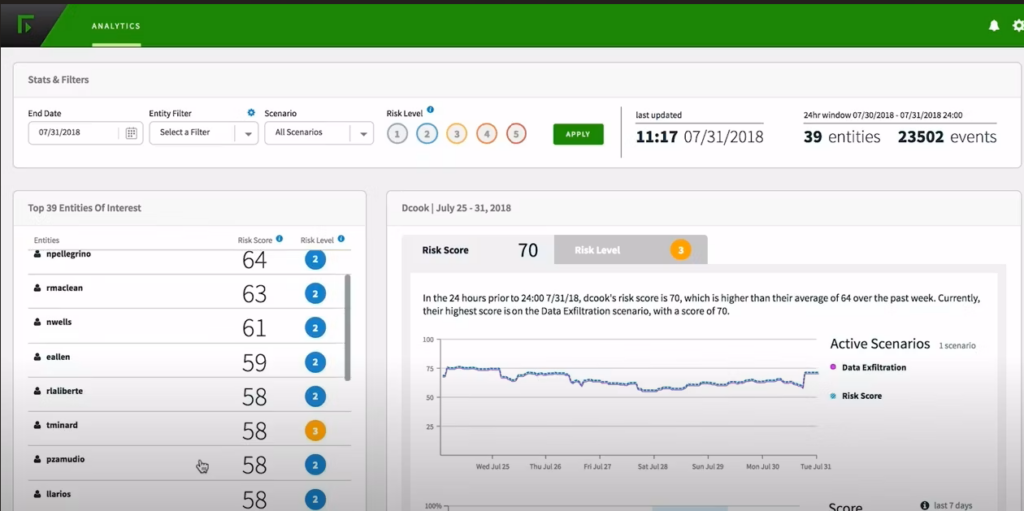
Forcepoint Data Loss Prevention se gana un lugar en mi lista por su enfoque avanzado de aprendizaje automático para los riesgos de pérdida de datos. He comprobado cómo la herramienta identifica patrones sutiles en el comportamiento de los usuarios que muchos sistemas tradicionales basados en reglas pasan por alto. Me gusta la precisión de su aplicación automatizada de políticas, especialmente en entornos complejos y muy regulados.
Esta es una opción de referencia cuando tu equipo gestiona grandes volúmenes de datos confidenciales y necesitas una visión más profunda y contextual para detener las filtraciones antes de que ocurran.
Para qué es mejor Forcepoint DLP
- Empresas con flujos de datos complejos y estrictas necesidades de cumplimiento
- Equipos de seguridad que exigen una protección de datos contextual basada en aprendizaje automático
Para qué no es ideal Forcepoint DLP
- Organizaciones pequeñas que necesitan una solución DLP sencilla y lista para usar
- Equipos sin recursos para realizar ajustes y gestionar la solución de forma continua
Qué diferencia a Forcepoint DLP
Forcepoint DLP está diseñado para organizaciones que necesitan algo más que simples reglas de contenido. En la práctica, espera que configures políticas que tengan en cuenta el contexto y el comportamiento de los usuarios, no solo los tipos de archivo o las palabras clave. A diferencia de herramientas como Symantec DLP, que dependen en gran medida de patrones estáticos, Forcepoint te orienta hacia flujos de trabajo adaptables al riesgo que cambian según lo que los usuarios realmente hacen con el tiempo.
Terminas trabajando con alertas y controles que se adaptan a tu entorno, en lugar de bloquear las mismas infracciones una y otra vez.
Compensaciones de Forcepoint DLP
Al centrarse en una protección adaptable al riesgo, Forcepoint añade más trabajo de configuración y calibración inicial, por lo que renuncias a la incorporación sencilla que obtendrías con una herramienta DLP básica.
Pros and Cons
Pros:
- Utiliza aprendizaje automático avanzado para la protección.
- Ofrece un conjunto completo de funciones.
- Proporciona integraciones con otras soluciones de Forcepoint.
Cons:
- El precio no es transparente y requiere contacto directo.
- Podría resultar demasiado compleja para empresas pequeñas.
- Los modelos de aprendizaje automático pueden requerir tiempo para una calibración óptima.

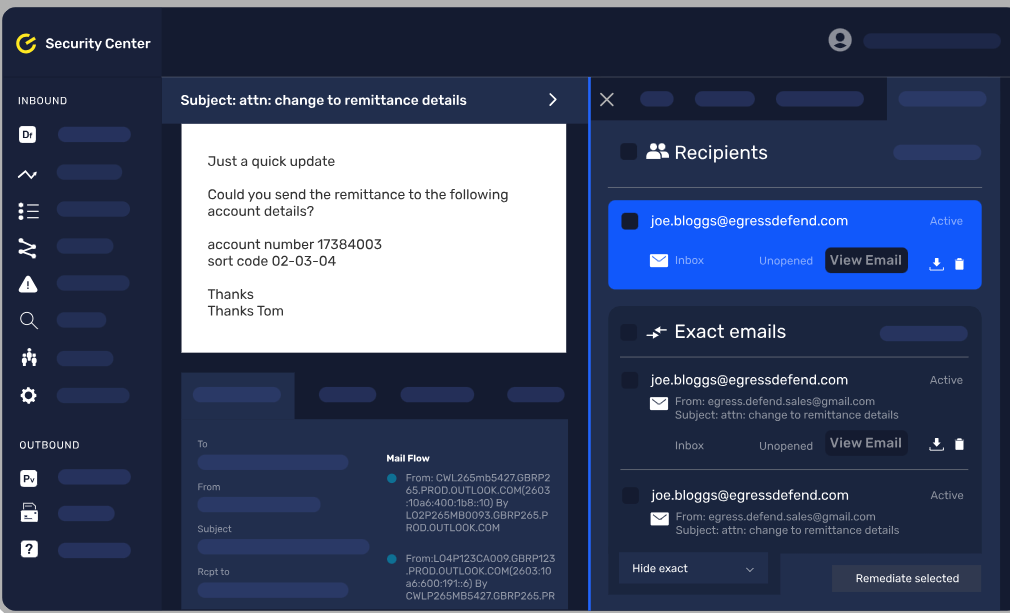
Egress Data Loss Prevention entra en mi lista principal por la manera en que aplica la conciencia contextual a la seguridad de los datos en el correo electrónico. Lo que destaca es cómo analiza el contenido del mensaje y el contexto del destinatario en tiempo real, marcando o bloqueando eventos de riesgo antes de que sucedan.
Me gusta cómo los equipos pueden establecer políticas para que la información confidencial se gestione de forma diferente según el contenido, el destinatario o la acción del usuario—especialmente en entornos financieros o legales donde el contexto es fundamental.
Lo mejor de Egress
- Organizaciones que envían datos confidenciales por correo electrónico
- Equipos que necesitan controles de datos contextuales y basados en políticas
No tan recomendado para
- Empresas que buscan prevención de pérdida de datos fuera del correo electrónico
- Pequeñas empresas con necesidades de correo simples y de bajo volumen
Qué hace único a Egress
Egress se distingue por construir la seguridad del correo electrónico alrededor del contexto, no solo de la detección básica de contenido. En lugar de etiquetar palabras clave o bloquear archivos adjuntos como algunas herramientas DLP, analiza tanto el mensaje como sus destinatarios antes de actuar. Para organizaciones donde los detalles sensibles pueden cambiar de significado dependiendo de quién los envía, o donde los errores con datos salientes son comunes, esta herramienta es una opción sólida.
Compromisos de Egress
Egress prioriza controles matizados y basados en políticas para el correo electrónico, pero eso tiene el coste de una cobertura limitada para canales que no sean correo. Si necesitas monitorear datos en nubes o chats, precisarás una herramienta adicional.
Pros and Cons
Pros:
- Ofrece seguridad de datos consciente del contexto.
- Se integra bien con Microsoft 365 y Google Workspace.
- Utiliza aprendizaje automático avanzado para la detección de amenazas.
Cons:
- Las funciones avanzadas pueden suponer costes adicionales.
- Puede ser abrumador para pequeñas empresas.
- La configuración puede requerir una curva de aprendizaje.

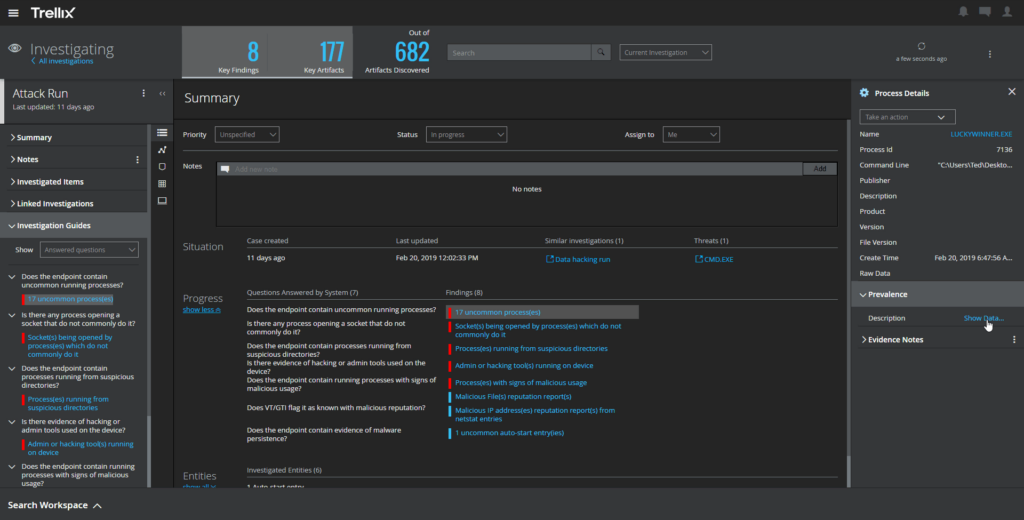
Trellix Data Loss Prevention se encuentra en mi lista por la forma en que unifica la seguridad en endpoints y red en un sistema coordinado. He trabajado con equipos que buscan detectar tanto filtraciones accidentales de datos como amenazas internas graves sin tener que alternar entre herramientas separadas, y este producto se adapta bien a ese caso de uso.
Lo que me gusta es la manera en la que Trellix combina la inspección de contenido en tiempo real con la aplicación automática de políticas en dispositivos y capas de red. Puedes definir y aplicar controles consistentes en un solo lugar, lo que reduce las brechas entre endpoints y red.
Lo mejor de Trellix para
- Organizaciones que necesitan protección de datos unificada en endpoints y red
- Equipos con necesidades estrictas de cumplimiento regulatorio o monitoreo de amenazas internas
Trellix no es ideal para
- Pequeñas empresas sin personal dedicado a seguridad
- Equipos que buscan soluciones DLP ligeras o listas para usar
Qué distingue a Trellix
Trellix adopta un enfoque coordinado gestionando la prevención de pérdida de datos tanto en los endpoints como en la red. Esto es diferente de herramientas como Symantec DLP, que suelen mantener esas capas separadas. En la práctica, veo que Trellix espera que diseñes políticas que rastreen datos sensibles que se mueven en todo tu entorno, incluyendo endpoints, tráfico de red y canales en la nube.
Esto funciona bien si deseas controles consistentes y una respuesta de incidentes unificada, pero necesitas planificar para alinear tus políticas en múltiples superficies.
Compromisos con Trellix
Trellix está optimizado para un control profundo de políticas tanto en endpoints como en redes, pero esa complejidad hace que el despliegue sea más lento y requiere un esfuerzo administrativo continuo. Si buscas algo rápido de implementar y con mínimo ajuste, este producto no es adecuado.
Pros and Cons
Pros:
- Proporciona seguridad tanto en endpoints como en red.
- Visibilidad en tiempo real del movimiento de datos.
- Fácil integración con otras plataformas de seguridad y TI.
Cons:
- Puede resultar caro para empresas más pequeñas.
- Requiere tiempo para la configuración inicial y de políticas.
- La interfaz puede requerir ayuda para navegar para principiantes.

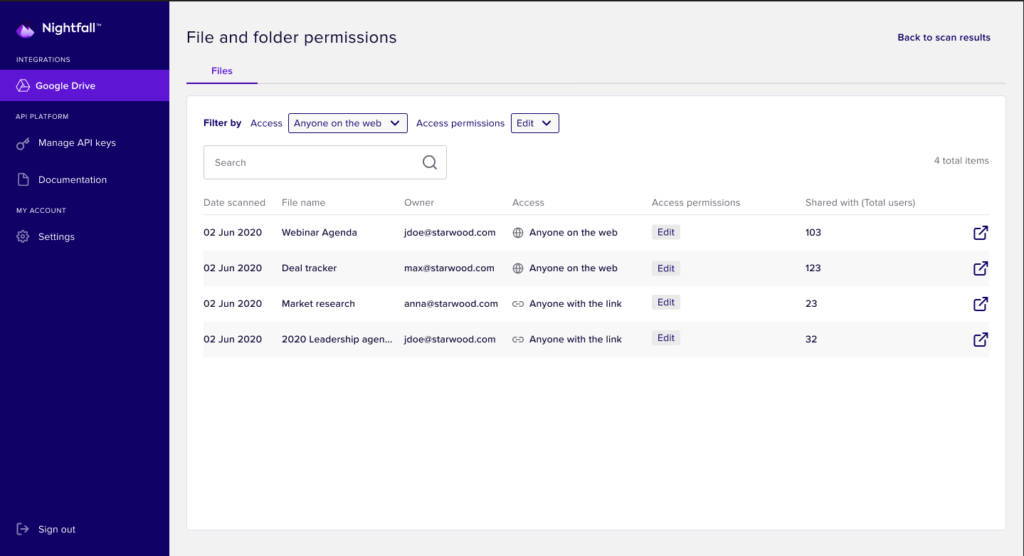
Nightfall DLP destaca por lo completo que es a la hora de abordar la protección de datos en la nube. Cuando probé su detección automatizada, la inspección de contenido funciona directamente en herramientas como Google Drive, Slack y Jira, identificando datos sensibles con una configuración mínima.
Lo que valoro aquí es el paquete de detección predefinido para tipos de datos comunes. Es una forma inteligente de gestionar el riesgo de pérdida de datos sin ajustes manuales, especialmente a medida que tu equipo adopta cada vez más la nube.
Mejor uso de Nightfall DLP
- Equipos de seguridad que protegen información sensible en aplicaciones en la nube
- Organizaciones que necesitan cumplimiento normativo automatizado y clasificación de datos
No es ideal para
- Empresas con infraestructuras mayoritariamente locales o heredadas
- Pequeños equipos que solo requieren DLP básico en endpoints
Qué diferencia a Nightfall DLP
Nightfall DLP sobresale porque está diseñado pensando en plataformas en la nube como Google Workspace, Slack y Jira, no como una adaptación posterior. Mientras que las herramientas DLP tradicionales se apoyan en controles en los endpoints o la red, Nightfall está pensado para que trabajes directamente en aplicaciones SaaS y APIs. En la práctica, esto es ideal para cuando necesitas un escaneo continuo dentro de las herramientas que ya usa tu equipo.
Compromisos de Nightfall DLP
Nightfall está optimizado para entornos cloud-first, pero se pierde el soporte directo para controlar los canales de datos locales, lo que lo hace menos útil si tus datos aún residen principalmente en endpoints locales o servidores de archivos.
Pros and Cons
Pros:
- Excelente protección para entornos nativos en la nube.
- Detección mejorada con aprendizaje automático.
- Amplias integraciones con plataformas en la nube.
Cons:
- Puede ser demasiado especializado para empresas no orientadas a la nube.
- Algunas funciones avanzadas pueden tener costes adicionales.
- La interfaz de usuario puede requerir tiempo para dominarla.
Otros programas de prevención de pérdida de datos
A continuación se muestra una lista de programas adicionales de prevención de pérdida de datos que seleccioné, pero que no llegaron a estar entre los 10 mejores. Sin duda, merece la pena echarles un vistazo.
- Endpoint Protector Data Loss Prevention (DLP) Software
El mejor para el control de dispositivos USB y periféricos
- Safetica ONE
Ideal para la prevención de fugas de datos mediante análisis comportamental
- 2B Advice PrIME
Ideal para la gestión de privacidad y cumplimiento
- GTT DLP
Ideal para visibilidad de datos integral


Análisis relacionados
- Software de seguridad de redes
- Herramientas de seguridad en la nube
- Software de replicación de datos
Cómo evalúo el software de prevención de pérdida de datos
Divido mi evaluación en dos capas: capacidades básicas que toda herramienta DLP debe tener—como clasificación de datos y aplicación de políticas en múltiples canales—y diferenciadores que distinguen a las opciones más sólidas.
Funcionalidad principal (Requisitos indispensables para esta lista)
Al seleccionar herramientas para mi lista, califico cada una en una escala de 0 (no ofrece la funcionalidad) a 5 (destaca en esta área) para cada funcionalidad principal que se detalla a continuación. Luego, calculo la puntuación total de la herramienta como un porcentaje. Cada herramienta necesita lograr una puntuación mínima total del 75% para ser considerada para su inclusión.
- Descubrimiento y clasificación de datos: Verifico si una herramienta puede analizar y categorizar automáticamente datos sensibles—como PII en almacenamiento en la nube o registros financieros en diversas bases de datos—sin depender del etiquetado manual.
- Aplicación de políticas en múltiples canales: Cada herramienta debe aplicar políticas en endpoints, correo electrónico, web, aplicaciones en la nube y medios extraíbles, de modo que un único conjunto de reglas cubra todas las formas en que los datos pueden salir de tu entorno.
- Inspección de contenido y análisis de contexto: Más allá de la coincidencia básica de palabras clave, evalúo si la herramienta admite fingerprinting, coincidencia exacta de datos y análisis contextual para reducir falsos positivos en documentos reales.
- Detección de incidentes y respuesta: Las alertas en tiempo real son importantes, pero también busco acciones de respuesta automatizadas, como bloquear una transferencia de archivos o cifrar un archivo adjunto antes de que llegue a un destinatario externo.
- Informes de cumplimiento y registros de auditoría: Las plantillas de informes preconfiguradas alineadas con normativas como GDPR, HIPAA y PCI-DSS ahorran mucho tiempo al prepararse para auditorías o demostrar cumplimiento ante las partes interesadas.
- Monitoreo de actividad de usuario y amenazas internas: Las analíticas de comportamiento y la puntuación de riesgos ayudan a detectar patrones anómalos—como un usuario que descarga volúmenes inusuales de archivos—antes de que ocurra una filtración.
Una vez que tengo una lista de herramientas que cumplen con estos criterios, considero lo que distingue a cada plataforma.
Factores diferenciadores (Lo que distingue a los proveedores)
Así es como comparo y contrasto a los diferentes proveedores:
Características destacadas
La puntuación de riesgos impulsada por IA/ML es un gran diferenciador—ayuda a los analistas a enfocarse en incidentes de alta gravedad en lugar de perder tiempo entre cientos de alertas de baja prioridad. La capacidad OCR también es importante, ya que los datos sensibles a menudo se encuentran ocultos en documentos escaneados, capturas de pantalla o archivos PDF basados en imágenes que una inspección básica de contenido no detecta en absoluto. También evalúo si una herramienta ofrece integración nativa con CASB para ampliar las políticas de DLP a aplicaciones SaaS como Microsoft 365 y Google Workspace, donde actualmente ocurre la mayor parte del movimiento de datos.
Más allá de las características
El ecosistema de integración es algo que evalúo detenidamente—las herramientas DLP deben alimentar alertas a tu SIEM o SOAR existente, y conectarse con tu proveedor de identidad para políticas conscientes del contexto. La flexibilidad de implementación también es importante. Algunos equipos necesitan una opción nativa en la nube, mientras que otros en industrias reguladas requieren modelos on-premise o híbridos. También analizo la estructura de precios, en particular si la licencia es lo suficientemente modular como para empezar con DLP en endpoints y añadir módulos de red o nube a medida que tu programa madura, en lugar de pagar por capacidades que aún no necesitas.
Cómo elegir un software de prevención de pérdida de datos
Es fácil perderse entre largas listas de funciones y complejas estructuras de precios. Para ayudarte a mantener la atención mientras avanzas en tu proceso único de selección de software, aquí tienes una lista de factores que debes tener en cuenta:
| Factor | Qué debes considerar |
|---|---|
| Escalabilidad | ¿El software crecerá junto con tu empresa? Considera los límites de usuarios, la capacidad de datos y la facilidad para actualizar o ampliar las funciones a medida que evolucionen tus necesidades. |
| Integraciones | ¿Funciona con tus herramientas actuales? Comprueba la compatibilidad con tus sistemas actuales y con cualquier tecnología futura que tengas previsto implementar. |
| Personalización | ¿Puedes adaptarlo a tus procesos? Busca opciones para ajustar la configuración, los flujos de trabajo y los informes a las necesidades específicas de tu equipo. |
| Facilidad de uso | ¿La interfaz es fácil de usar? Asegúrate de que tu equipo pueda navegar por el software sin necesidad de una formación extensa. Comprueba que el diseño y las funciones sean intuitivos. |
| Implementación e incorporación | ¿Qué rapidez tiene la configuración? Evalúa el tiempo y los recursos necesarios para comenzar, incluidos los materiales de formación y la asistencia durante la fase inicial. |
| Coste | ¿Se ajusta a tu presupuesto? Compara los modelos de precios, como las suscripciones frente a las tarifas únicas, y considera cualquier coste oculto, como complementos o actualizaciones. |
| Medidas de seguridad | ¿Cómo protege tus datos? Evalúa los estándares de cifrado, las opciones de copia de seguridad de datos y los controles de acceso para garantizar medidas de seguridad sólidas. |
| Requisitos de cumplimiento | ¿Cumple los estándares del sector? Verifica si el software cumple las normativas pertinentes para tu sector, como el RGPD o la HIPAA. |
¿Qué es el software de prevención de pérdida de datos?
El software de prevención de pérdida de datos es una herramienta diseñada para proteger los datos confidenciales frente a pérdidas, robos o accesos de usuarios no autorizados. Los profesionales de TI, los responsables de cumplimiento normativo y los equipos de seguridad de datos suelen utilizar estas herramientas para proteger la información y garantizar el cumplimiento normativo.
Las funciones de supervisión, cifrado de datos y control de acceso ayudan a prevenir filtraciones de datos y mantener la integridad de la información. Cuando se producen incidentes, el software de análisis forense digital puede ayudar a investigar y analizar la filtración. En general, estas herramientas ofrecen tranquilidad al proteger información valiosa y respaldar los esfuerzos de cumplimiento.
Funciones
Al seleccionar un software de prevención de pérdida de datos, presta atención a las siguientes funciones clave:
- Supervisión de datos: Rastrea el movimiento y el acceso a los datos para identificar actividades inusuales y prevenir accesos no autorizados.
- Cifrado: Protege la información confidencial convirtiéndola en un código ilegible, lo que garantiza la seguridad de los datos incluso si se accede a ellos.
- Control de acceso: Limita quién puede ver o editar los datos, reduciendo el riesgo de filtraciones internas y externas.
- Gestión del cumplimiento: Ayuda a garantizar el cumplimiento de normativas del sector como el RGPD o la HIPAA, evitando multas y sanciones costosas.
- Alertas en tiempo real: Notifica inmediatamente a los usuarios sobre posibles filtraciones de datos o infracciones de políticas, lo que permite responder rápidamente.
- Capacidades de integración: Funciona perfectamente con los sistemas y el software existentes, mejorando la infraestructura de seguridad general.
- Clasificación de datos: Clasifica los datos en función de su sensibilidad, lo que ayuda a priorizar eficazmente los esfuerzos de protección.
- Políticas personalizables: Permite adaptar las medidas de seguridad para satisfacer las necesidades y los flujos de trabajo específicos de la organización.
- Registros de auditoría: Proporciona registros detallados del acceso y los cambios en los datos, lo que facilita el análisis forense y la rendición de cuentas.
- Compatibilidad con la formación de usuarios: Ofrece recursos y herramientas para formar a los empleados en prácticas de protección de datos, reduciendo los errores humanos.
Beneficios
Implementar un software de prevención de pérdida de datos ofrece varios beneficios para tu equipo y tu empresa. Estos son algunos de los que puedes esperar:
- Mayor seguridad: Protege la información confidencial mediante cifrado y controles de acceso, reduciendo el riesgo de filtraciones de datos.
- Cumplimiento normativo: Ayuda a tu organización a cumplir estándares del sector como el RGPD o la HIPAA, evitando multas y sanciones costosas.
- Respuesta en tiempo real: Envía alertas instantáneas sobre actividades sospechosas, lo que permite a tu equipo actuar rápidamente y mitigar posibles amenazas.
- Visibilidad de los datos: Proporciona información sobre el movimiento y el acceso a los datos, ayudándote a supervisar y gestionar la información eficazmente.
- Ahorro de costes: Previene las filtraciones de datos y los costes asociados al mantener la integridad de los datos y protegerlos frente a accesos no autorizados.
- Protección adaptada: Ofrece políticas personalizables que se ajustan a las necesidades específicas de tu empresa, garantizando medidas de seguridad de datos específicas y eficientes.
- Responsabilidad de los usuarios: Rastrea el acceso y los cambios en los datos mediante registros de auditoría, fomentando una cultura de responsabilidad y transparencia dentro de tu equipo.
Costes y precios
Seleccionar un software de prevención de pérdida de datos requiere comprender los distintos modelos de precios y planes disponibles. Los costes varían según las funciones, el tamaño del equipo, los complementos y otros factores. La siguiente tabla resume los planes habituales, sus precios medios y las funciones que suelen incluir las soluciones de software de prevención de pérdida de datos:
Tabla comparativa de planes de software de prevención de pérdida de datos
| Tipo de plan | Precio medio | Funciones habituales |
|---|---|---|
| Plan gratuito | $0 | Supervisión básica, protección de datos limitada e informes básicos. |
| Plan personal | $5-$25/usuario/mes | Cifrado mejorado, controles de acceso y herramientas de cumplimiento estándar. |
| Plan empresarial | $30-$75/usuario/mes | Análisis avanzado, políticas personalizables y capacidades de integración. |
| Plan corporativo | $100-$200/usuario/mes | Alertas en tiempo real, registros de auditoría completos y asistencia especializada. |
Preguntas más frecuentes sobre el software de prevención de pérdida de datos (preguntas frecuentes)
¿Cómo funcionan las políticas de DLP?
Las políticas de DLP definen reglas y acciones para proteger los datos contra el acceso no autorizado o las filtraciones. Supervisan la actividad de los datos, detectan infracciones y aplican medidas correctivas, como bloquear o enviar alertas. Estas políticas son esenciales para mantener la seguridad de los datos y evitar brechas de seguridad.
¿Cuáles son los cuatro tipos de DLP?
Los cuatro tipos principales de DLP son el de red, el de punto final, el de nube y el de aplicaciones. El DLP de red supervisa los datos en tránsito, el DLP de punto final protege los datos en los dispositivos, el DLP de nube protege los datos almacenados en la nube y el DLP de aplicaciones se centra en proteger los datos dentro de aplicaciones específicas.
¿Cómo se implementa el software de DLP?
La implementación de un software de DLP implica evaluar sus necesidades de protección de datos, seleccionar una solución adecuada y configurar políticas para abordar las vulnerabilidades. Capacite a su equipo sobre su uso y supervise el sistema con regularidad para garantizar que proteja eficazmente la información confidencial.
¿Cuáles son las directrices de DLP?
Las directrices de DLP le ayudan a identificar, supervisar y proteger los datos confidenciales en reposo, en movimiento y en uso. Determinan cómo se gestionan los datos en distintas ubicaciones y mediante diversos métodos de transmisión. La implementación de estas directrices garantiza que la información confidencial permanezca segura y cumpla con las normativas.
Qué sigue:
Si está investigando un software de prevención de pérdida de datos, póngase en contacto con un asesor de SoftwareSelect para obtener recomendaciones gratuitas.
Solo tiene que completar un formulario y mantener una breve conversación en la que se analizarán en detalle sus necesidades. Después, recibirá una lista reducida de opciones de software para revisar. Además, le ayudarán durante todo el proceso de compra, incluidas las negociaciones de precios.